Data Loss Prevention
Exchange and Office 365
Will Martin
Premier Field Engineer
Microsoft
Agenda
• DLP Overview
• Built-In DLP Policies
• Custom DLP Policies
• Custom DLP Policy Templates
• Additional Functionalities
DLP Overview
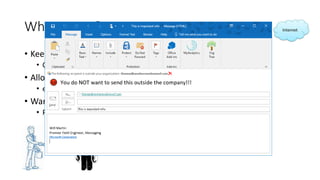
What is DLP?
• Keep internal information internal
• Corporate patents, contract information, etc
• Allow only specific people to send externally
• ex, personnel and SSNs, bankers and credit card or bank acct info
• Warn people what they’re doing
• Policy Tips
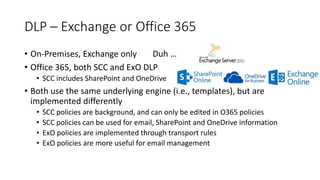
DLP – Exchange or Office 365
• On-Premises, Exchange only
• Office 365, both SCC and ExO DLP
• SCC includes SharePoint and OneDrive
• Both use the same underlying engine (i.e., templates), but are
implemented differently
• SCC policies are background, and can only be edited in O365 policies
• SCC policies can be used for email, SharePoint and OneDrive information
• ExO policies are implemented through transport rules
• ExO policies are more useful for email management
Duh …
DLP Overview
Demonstration
Built-In DLP Policies
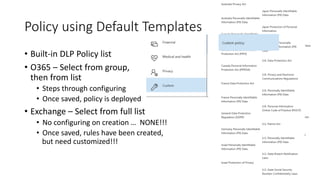
Policy using Default Templates
• Built-in DLP Policy list
• O365 – Select from group,
then from list
• Steps through configuring
• Once saved, policy is deployed
• Exchange – Select from full list
• No configuring on creation
• Once saved, rules have been created
… NONE!!!
but need customized!!!
,
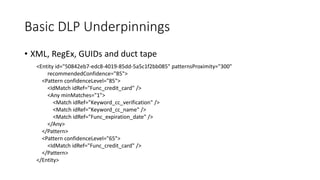
Basic DLP Underpinnings
• XML, RegEx, GUIDs
<Entity id="50842eb7-edc8-4019-85dd-5a5c1f2bb085" patternsProximity="300"
recommendedConfidence="85">
<Pattern confidenceLevel="85">
<IdMatch idRef="Func_credit_card" />
<Any minMatches="1">
<Match idRef="Keyword_cc_verification" />
<Match idRef="Keyword_cc_name" />
<Match idRef="Func_expiration_date" />
</Any>
</Pattern>
<Pattern confidenceLevel="65">
<IdMatch idRef="Func_credit_card" />
</Pattern>
</Entity>
and duct tape
Built-In DLP Policy
Demonstration
Custom DLP Policies
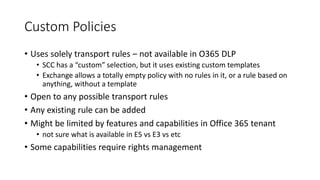
Custom Policies
• Uses solely transport rules – not available in O365 DLP
• SCC has a “custom” selection, but it uses existing custom templates
• Exchange allows a totally empty policy with no rules in it, or a rule based on
anything, without a template
• Open to any possible transport rules
• Any existing rule can be added
• Might be limited by features and capabilities in Office 365 tenant
• not sure what is available in E5 vs E3 vs etc
• Some capabilities require rights management
Custom DLP Policy
Demonstration
Custom DLP Policy Templates
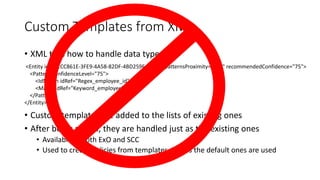
Custom Templates from XML
• XML tells how to handle data types
• Custom templates are added to the lists of existing ones
• After being added, they are handled just as the existing ones
• Available in both ExO and SCC
• Used to create policies from templates, just as the default ones are used
<Entity id="E1CC861E-3FE9-4A58-82DF-4BD259EAB378" patternsProximity="300" recommendedConfidence="75">
<Pattern confidenceLevel="75">
<IdMatch idRef="Regex_employee_id" />
<Match idRef="Keyword_employee" />
</Pattern>
</Entity>
Custom DLP Policy Templates
Demonstration
Additional Notes
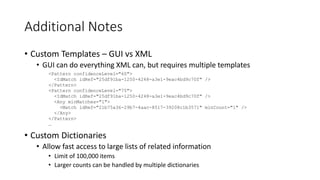
• Custom Templates – GUI vs XML
• GUI can do everything XML can, but requires multiple templates
• Custom Dictionaries
• Allow fast access to large lists of related information
• Limit of 100,000 items
• Larger counts can be handled by multiple dictionaries
<Pattern confidenceLevel="60">
<IdMatch idRef="25df91ba-1250-4248-a3e1-9eac4bd9c70f" />
</Pattern>
<Pattern confidenceLevel="75">
<IdMatch idRef="25df91ba-1250-4248-a3e1-9eac4bd9c70f" />
<Any minMatches="1">
<Match idRef="21b75a36-29b7-4aac-8517-39208c1b3571" minCount="1" />
</Any>
</Pattern>
…
Additional Functionalities
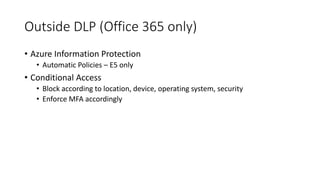
Outside DLP (Office 365 only)
• Azure Information Protection
• Automatic Policies – E5 only
• Conditional Access
• Block according to location, device, operating system, security
• Enforce MFA accordingly
Additional Functionalities
Demonstration
Appendix
Appendix
• Overview of data loss prevention policies
• https://support.office.com/en-us/article/Overview-of-data-loss-prevention-
policies-1966b2a7-d1e2-4d92-ab61-42efbb137f5e
• DLP procedures
• https://technet.microsoft.com/en-us/library/jj938003(v=exchg.150).aspx
• Customize DLP – Built-In, Export, Import and create a new rule
• https://blogs.technet.microsoft.com/tiagosouza/2016/11/23/customize-dlp-
built-in-export-import-and-create-a-new-rule/
• Create a keyword dictionary
• https://support.office.com/en-us/article/Create-a-keyword-dictionary-
c8a95d1b-c3b6-4613-98ab-0331d1872cf3

Microsoft data loss prevention

  • 1.
    Data Loss Prevention Exchangeand Office 365 Will Martin Premier Field Engineer Microsoft
  • 2.
    Agenda • DLP Overview •Built-In DLP Policies • Custom DLP Policies • Custom DLP Policy Templates • Additional Functionalities
  • 3.
  • 4.
    What is DLP? •Keep internal information internal • Corporate patents, contract information, etc • Allow only specific people to send externally • ex, personnel and SSNs, bankers and credit card or bank acct info • Warn people what they’re doing • Policy Tips
  • 5.
    DLP – Exchangeor Office 365 • On-Premises, Exchange only • Office 365, both SCC and ExO DLP • SCC includes SharePoint and OneDrive • Both use the same underlying engine (i.e., templates), but are implemented differently • SCC policies are background, and can only be edited in O365 policies • SCC policies can be used for email, SharePoint and OneDrive information • ExO policies are implemented through transport rules • ExO policies are more useful for email management Duh …
  • 6.
  • 7.
  • 8.
    Policy using DefaultTemplates • Built-in DLP Policy list • O365 – Select from group, then from list • Steps through configuring • Once saved, policy is deployed • Exchange – Select from full list • No configuring on creation • Once saved, rules have been created … NONE!!! but need customized!!! ,
  • 9.
    Basic DLP Underpinnings •XML, RegEx, GUIDs <Entity id="50842eb7-edc8-4019-85dd-5a5c1f2bb085" patternsProximity="300" recommendedConfidence="85"> <Pattern confidenceLevel="85"> <IdMatch idRef="Func_credit_card" /> <Any minMatches="1"> <Match idRef="Keyword_cc_verification" /> <Match idRef="Keyword_cc_name" /> <Match idRef="Func_expiration_date" /> </Any> </Pattern> <Pattern confidenceLevel="65"> <IdMatch idRef="Func_credit_card" /> </Pattern> </Entity> and duct tape
  • 10.
  • 11.
  • 12.
    Custom Policies • Usessolely transport rules – not available in O365 DLP • SCC has a “custom” selection, but it uses existing custom templates • Exchange allows a totally empty policy with no rules in it, or a rule based on anything, without a template • Open to any possible transport rules • Any existing rule can be added • Might be limited by features and capabilities in Office 365 tenant • not sure what is available in E5 vs E3 vs etc • Some capabilities require rights management
  • 13.
  • 14.
  • 15.
    Custom Templates fromXML • XML tells how to handle data types • Custom templates are added to the lists of existing ones • After being added, they are handled just as the existing ones • Available in both ExO and SCC • Used to create policies from templates, just as the default ones are used <Entity id="E1CC861E-3FE9-4A58-82DF-4BD259EAB378" patternsProximity="300" recommendedConfidence="75"> <Pattern confidenceLevel="75"> <IdMatch idRef="Regex_employee_id" /> <Match idRef="Keyword_employee" /> </Pattern> </Entity>
  • 16.
    Custom DLP PolicyTemplates Demonstration
  • 17.
    Additional Notes • CustomTemplates – GUI vs XML • GUI can do everything XML can, but requires multiple templates • Custom Dictionaries • Allow fast access to large lists of related information • Limit of 100,000 items • Larger counts can be handled by multiple dictionaries <Pattern confidenceLevel="60"> <IdMatch idRef="25df91ba-1250-4248-a3e1-9eac4bd9c70f" /> </Pattern> <Pattern confidenceLevel="75"> <IdMatch idRef="25df91ba-1250-4248-a3e1-9eac4bd9c70f" /> <Any minMatches="1"> <Match idRef="21b75a36-29b7-4aac-8517-39208c1b3571" minCount="1" /> </Any> </Pattern> …
  • 18.
  • 19.
    Outside DLP (Office365 only) • Azure Information Protection • Automatic Policies – E5 only • Conditional Access • Block according to location, device, operating system, security • Enforce MFA accordingly
  • 20.
  • 21.
  • 22.
    Appendix • Overview ofdata loss prevention policies • https://support.office.com/en-us/article/Overview-of-data-loss-prevention- policies-1966b2a7-d1e2-4d92-ab61-42efbb137f5e • DLP procedures • https://technet.microsoft.com/en-us/library/jj938003(v=exchg.150).aspx • Customize DLP – Built-In, Export, Import and create a new rule • https://blogs.technet.microsoft.com/tiagosouza/2016/11/23/customize-dlp- built-in-export-import-and-create-a-new-rule/ • Create a keyword dictionary • https://support.office.com/en-us/article/Create-a-keyword-dictionary- c8a95d1b-c3b6-4613-98ab-0331d1872cf3

Editor's Notes

  • #6 Add Demo after this slide Shortcoming in DLP for OneDrive - http://onelistdashboard/list?id=115822&refid=IP&v=1520869447 – this is caused by LAG and the product group has been working on fixing it since 2016
  • #7 Show differences between O365 DLP and Exchange DLP
  • #10 get-dlppolicytemplate -Identity 'U.S. Health Insurance Act (HIPAA)'
  • #11 get-dlppolicytemplate -Identity 'U.S. Health Insurance Act (HIPAA)’ Get-DlpSensitiveInformationTypeRulePackage | Select -First 1 | % { $_.ClassificationRuleCollectionXml } $DLPRulePack = Get-DlpSensitiveInformationTypeRulePackage | Select -First 1 $DLPRulePack | Fl ClassificationRuleCollectionXml | More .\Open-Office365.ps1 Get-DlpPolicyTemplate -Identity 'U.S. Health Insurance Act (HIPAA)’ | Fl Get-DlpPolicyTemplate -Identity 'U.S. Health Insurance Act (HIPAA)’ | Fl * .\Open-O365SCC.ps1 Get-DlpSensitiveInformationTypeRulePackage | Select -First 1 | % { $_.ClassificationRuleCollectionXml }
  • #14 Show creation of a DLP policy with no rules, then add rules
  • #16 300 Unicode characters means 150 ASCII characters, or 15-25 words (6 to 8 letters)
  • #21 https://regexr.com/ (among many others)
  • #23 https://regexr.com/ (among many others)
  • #25 My Bike Shop My Bike Shop Stuff Bike Parts
  • #29 Show the dictionary and how to use it
  • #32 Show the dictionary and how to use it