Microprocessor
Lecturer: PhD. Nguyễn Trọng Kiên
Department Head of Signal Processing and Communications,
Posts & Telecommunications Institute of Technology, HCM City.
CHAPTER 4: < PIC16F887
MICROCONTROLLER: THE
BASICS OF C PROGRAMMING
LANGUAGE>
Chapter 4: C Programming
3
In this chapter, I aim to use LEDs as a
practical example to demonstrate C
programming concepts, rather than just
explaining C programming in theory.
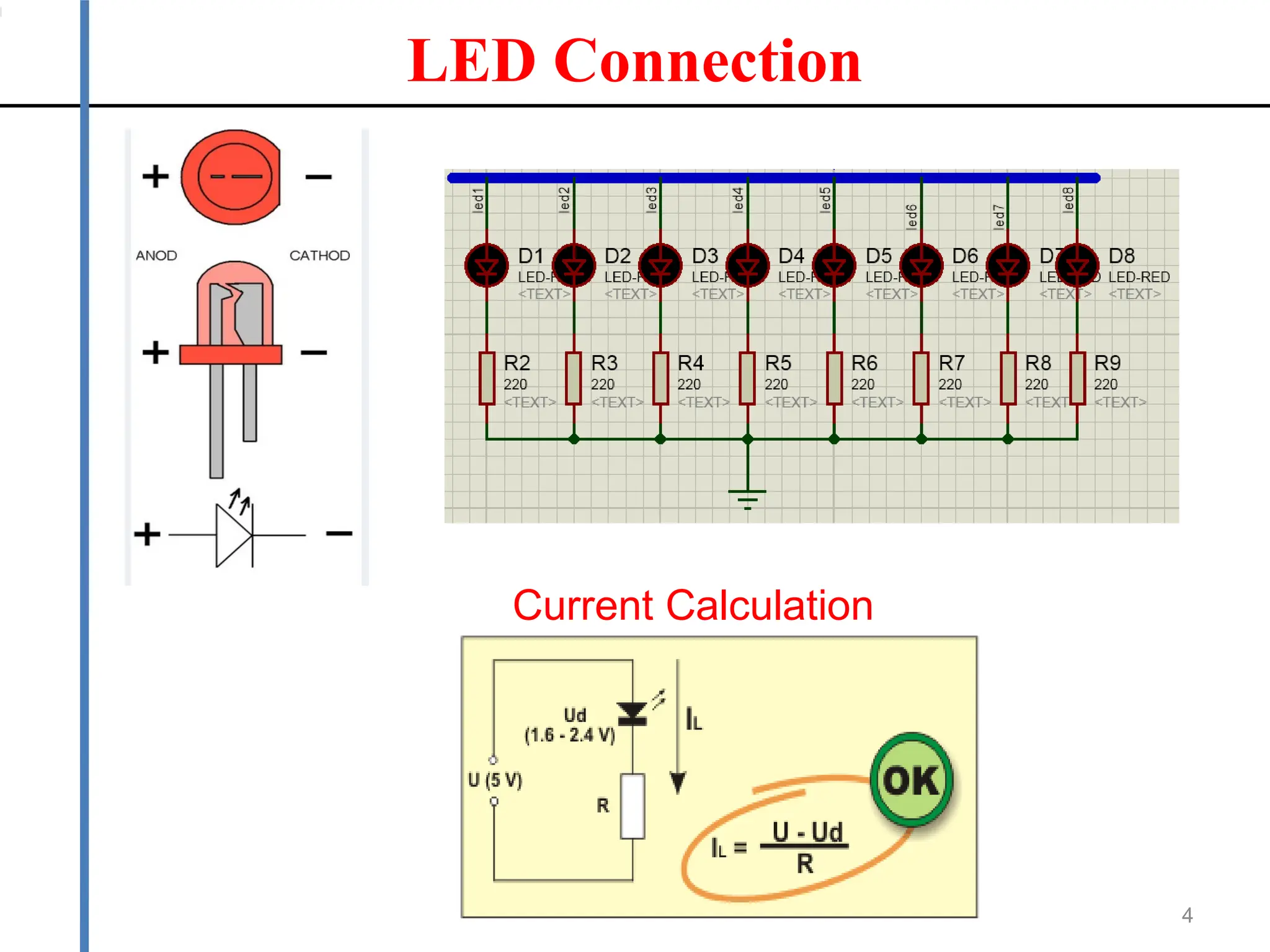
LED Connection
4
Current Calculation
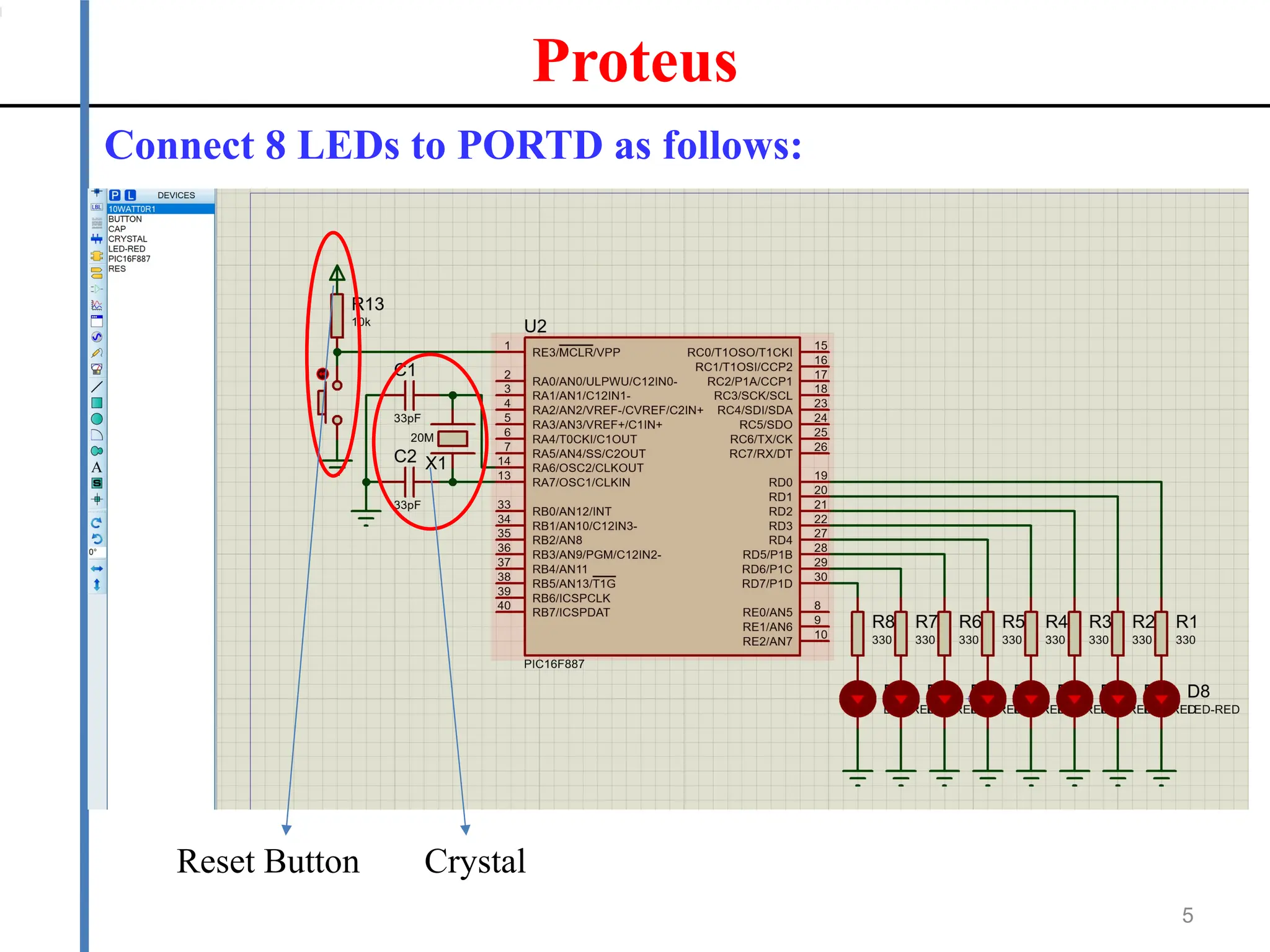
Proteus
5
Connect 8 LEDs to PORTD as follows:
Reset Button Crystal
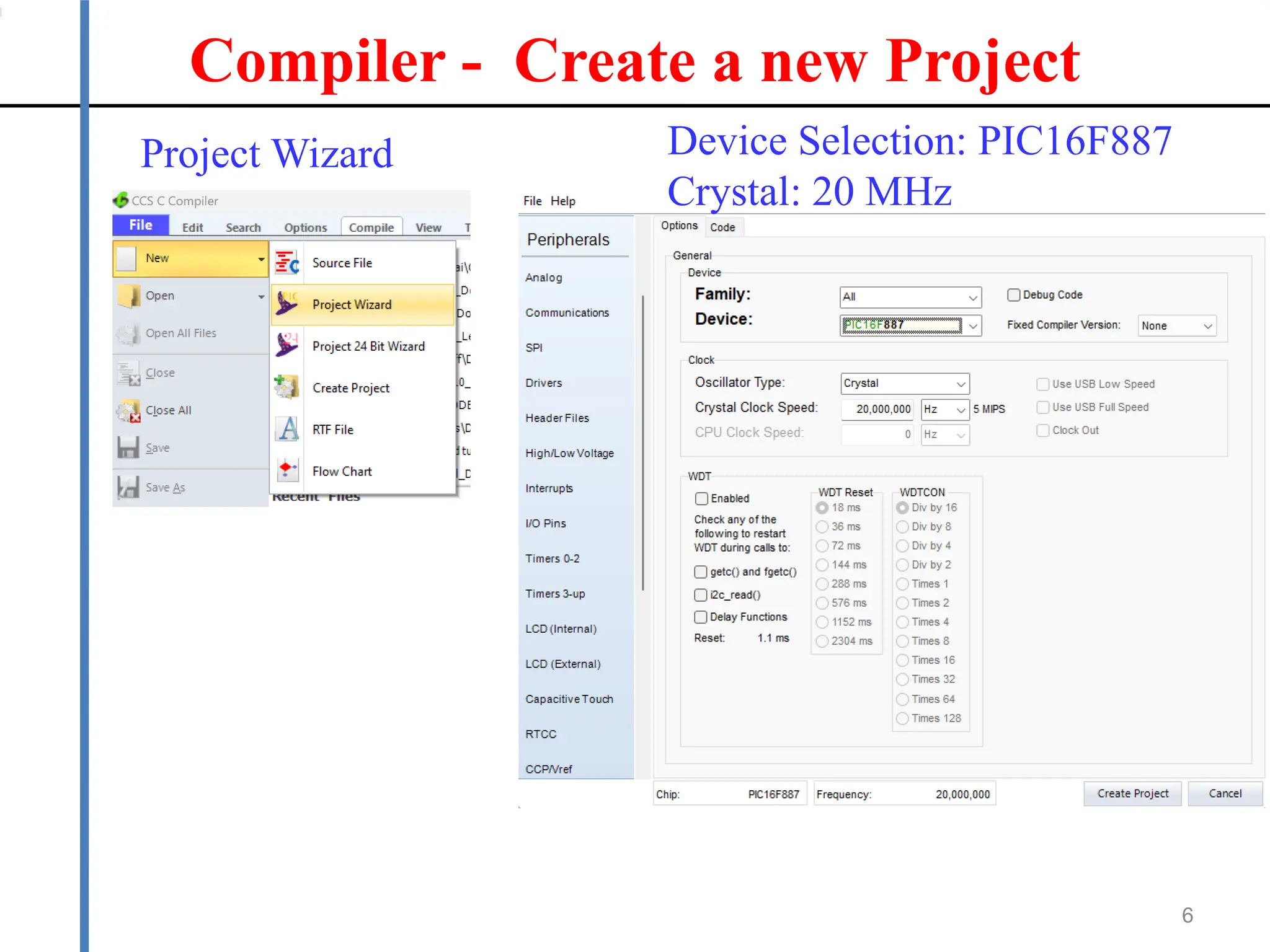
Compiler - Create a new Project
6
Project Wizard Device Selection: PIC16F887
Crystal: 20 MHz
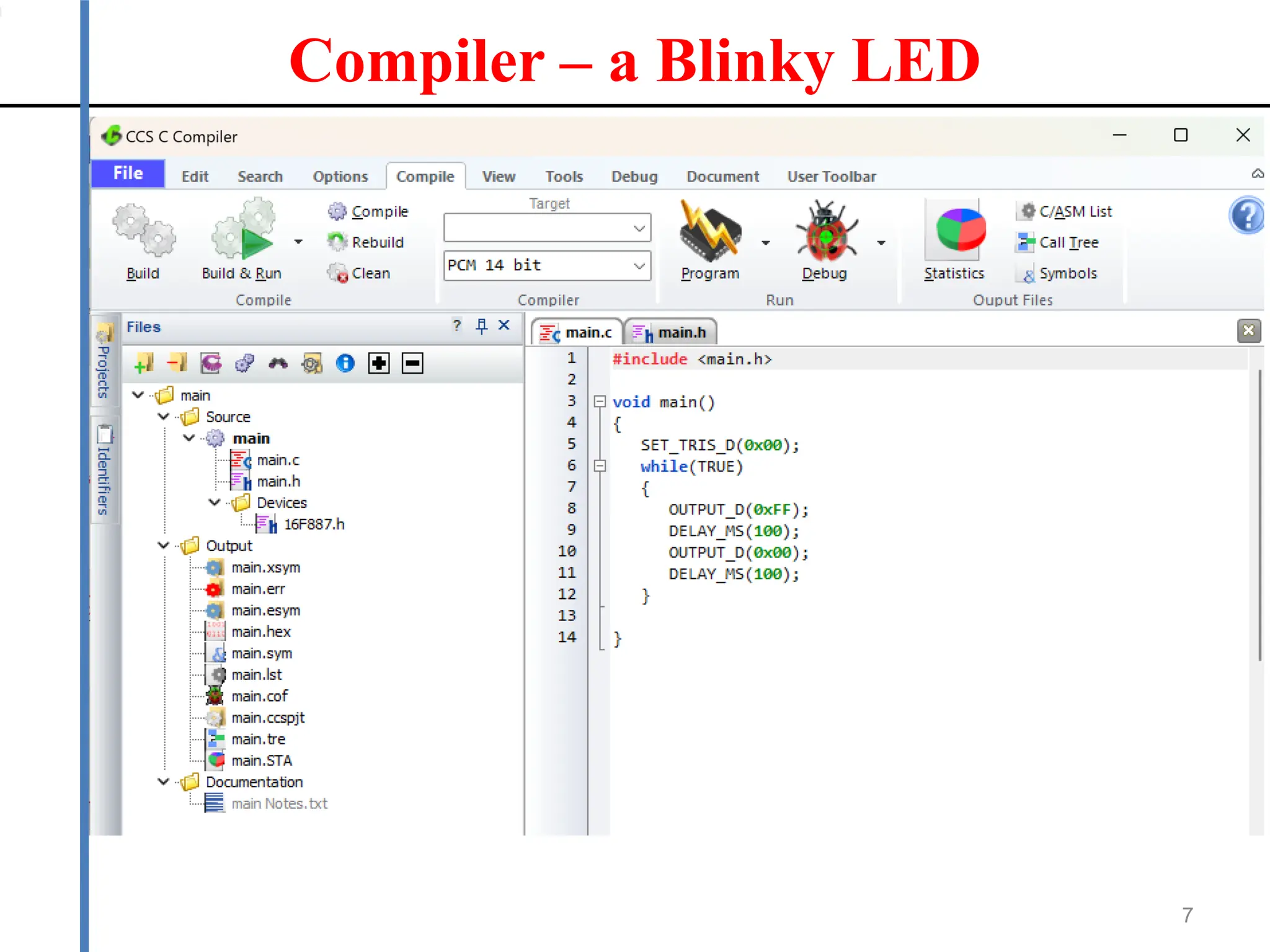
Compiler – a Blinky LED
7
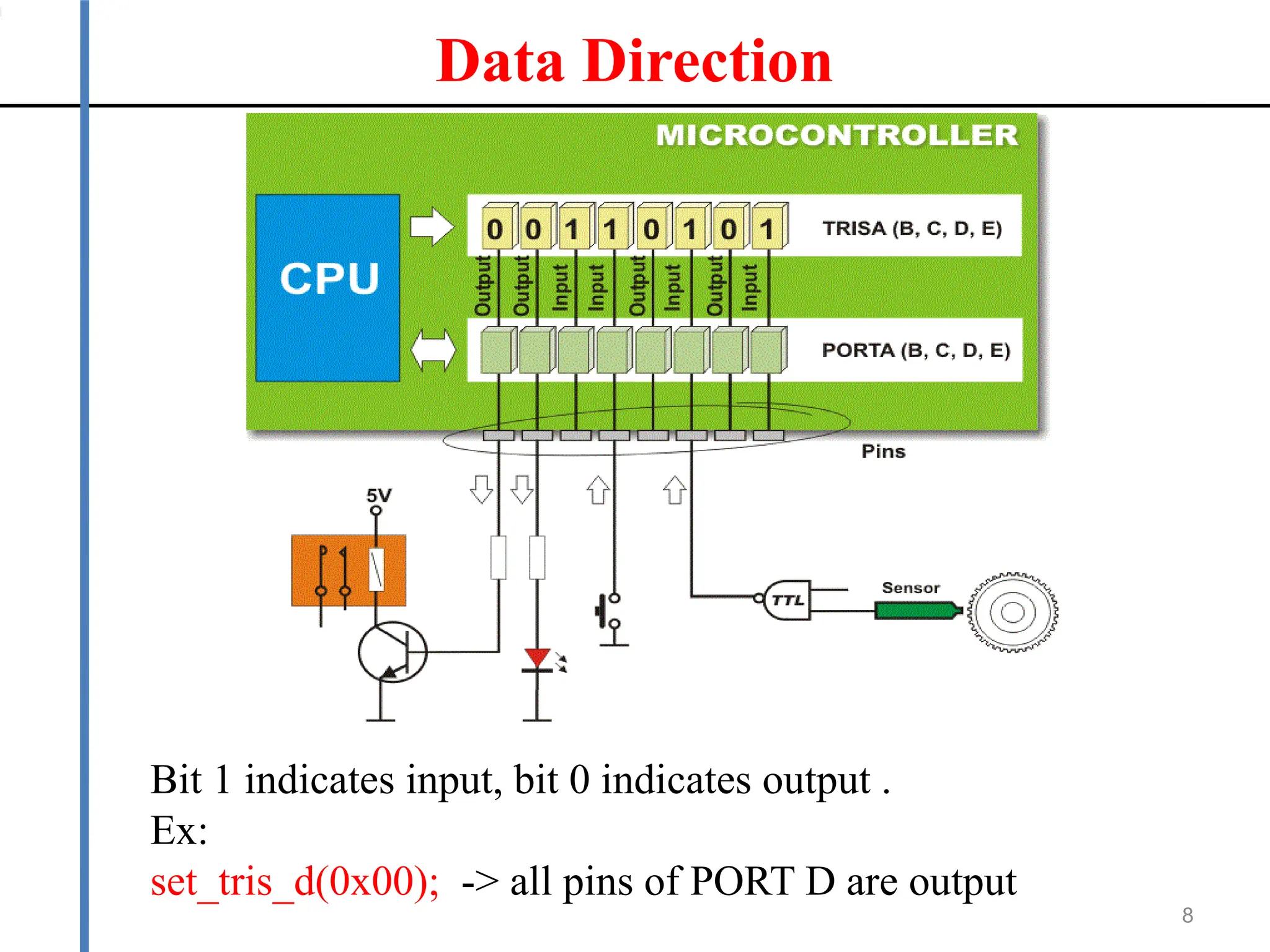
Data Direction
8
Bit 1 indicates input, bit 0 indicates output .
Ex:
set_tris_d(0x00); -> all pins of PORT D are output
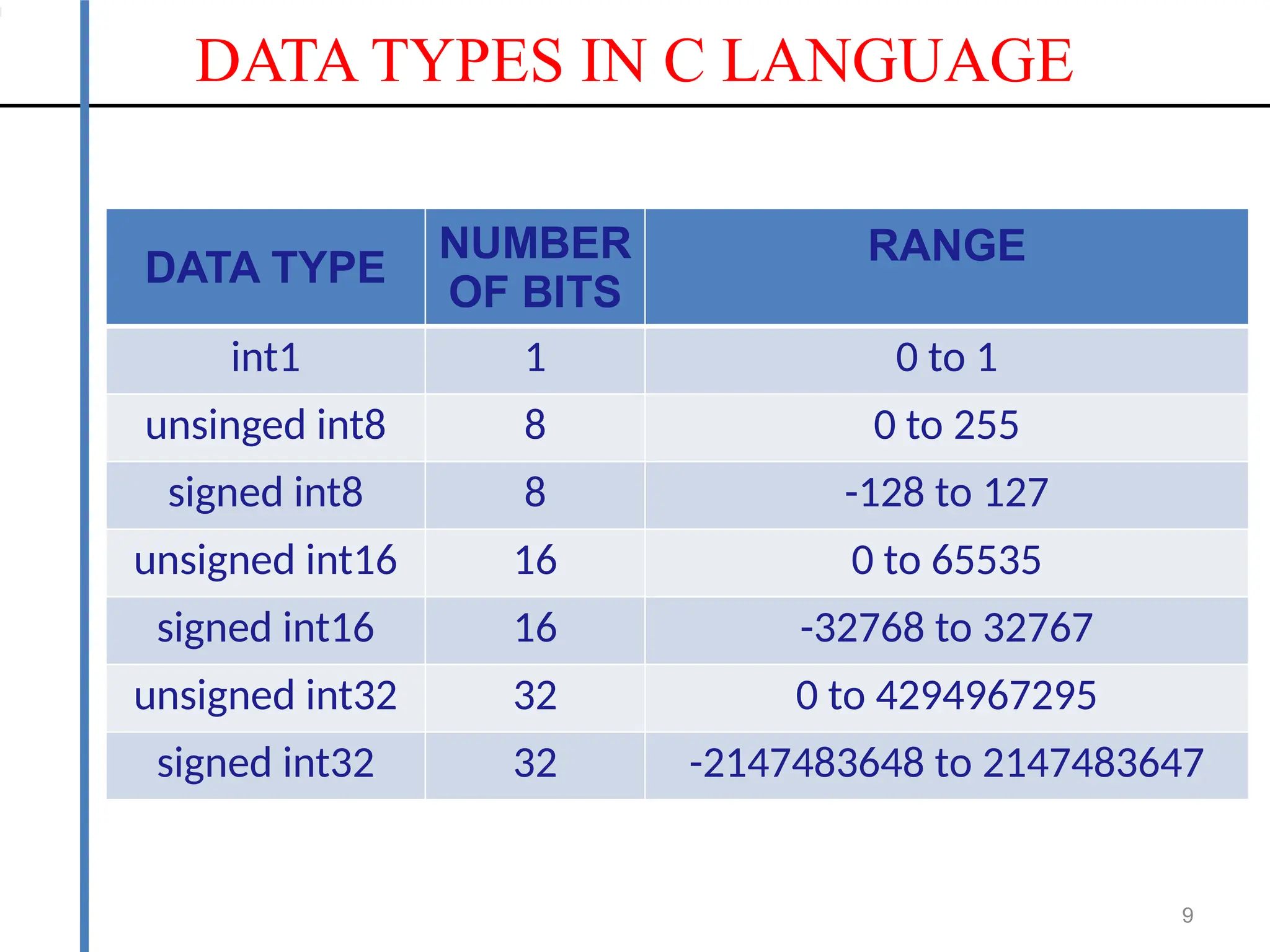
DATA TYPES IN C LANGUAGE
9
DATA TYPE
NUMBER
OF BITS
RANGE
int1 1 0 to 1
unsinged int8 8 0 to 255
signed int8 8 -128 to 127
unsigned int16 16 0 to 65535
signed int16 16 -32768 to 32767
unsigned int32 32 0 to 4294967295
signed int32 32 -2147483648 to 2147483647
10
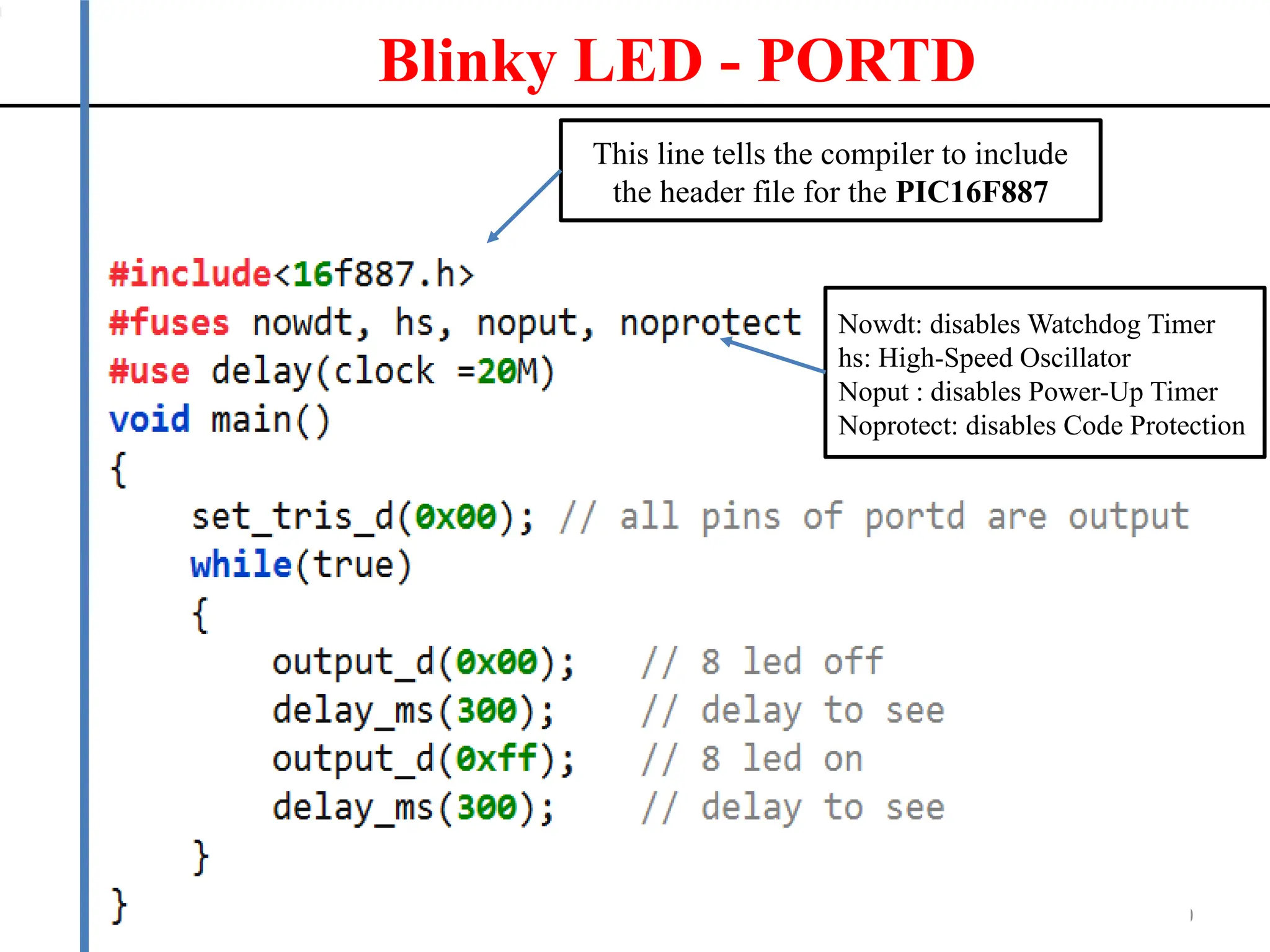
This line tells the compiler to include
the header file for the PIC16F887
Blinky LED - PORTD
Nowdt: disables Watchdog Timer
hs: High-Speed Oscillator
Noput : disables Power-Up Timer
Noprotect: disables Code Protection
11
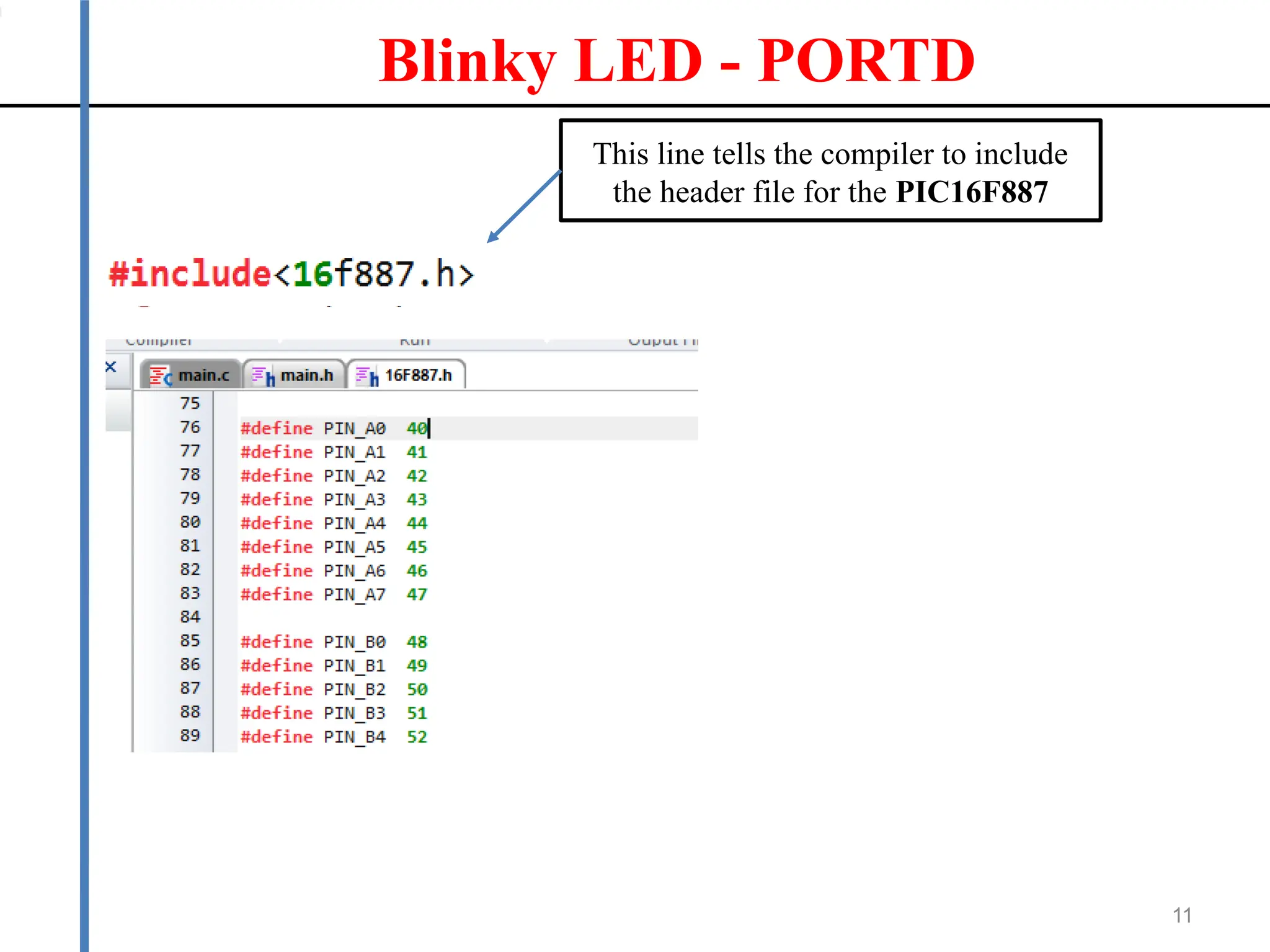
This line tells the compiler to include
the header file for the PIC16F887
Blinky LED - PORTD
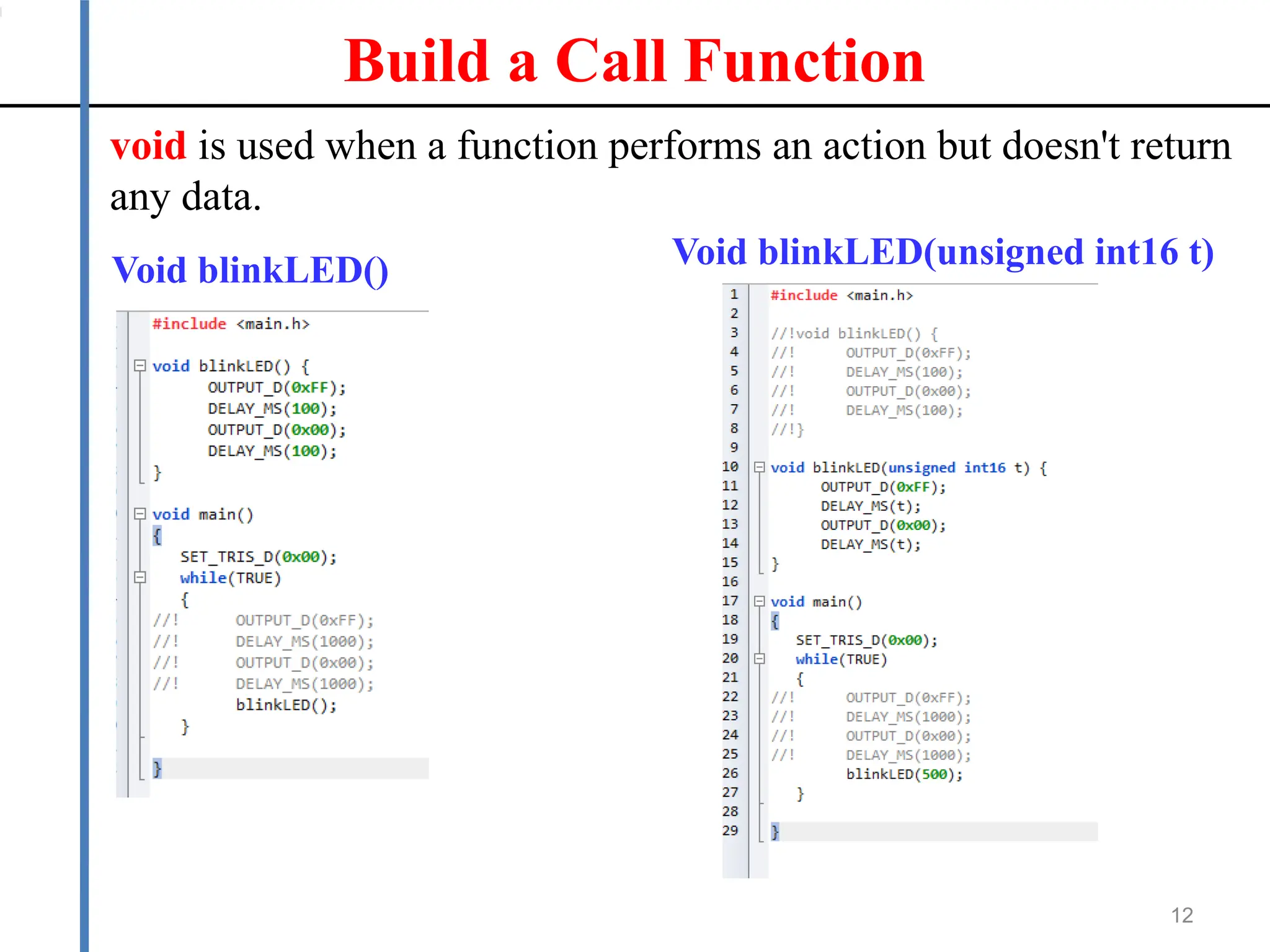
Build a Call Function
12
void is used when a function performs an action but doesn't return
any data.
Void blinkLED() Void blinkLED(unsigned int16 t)
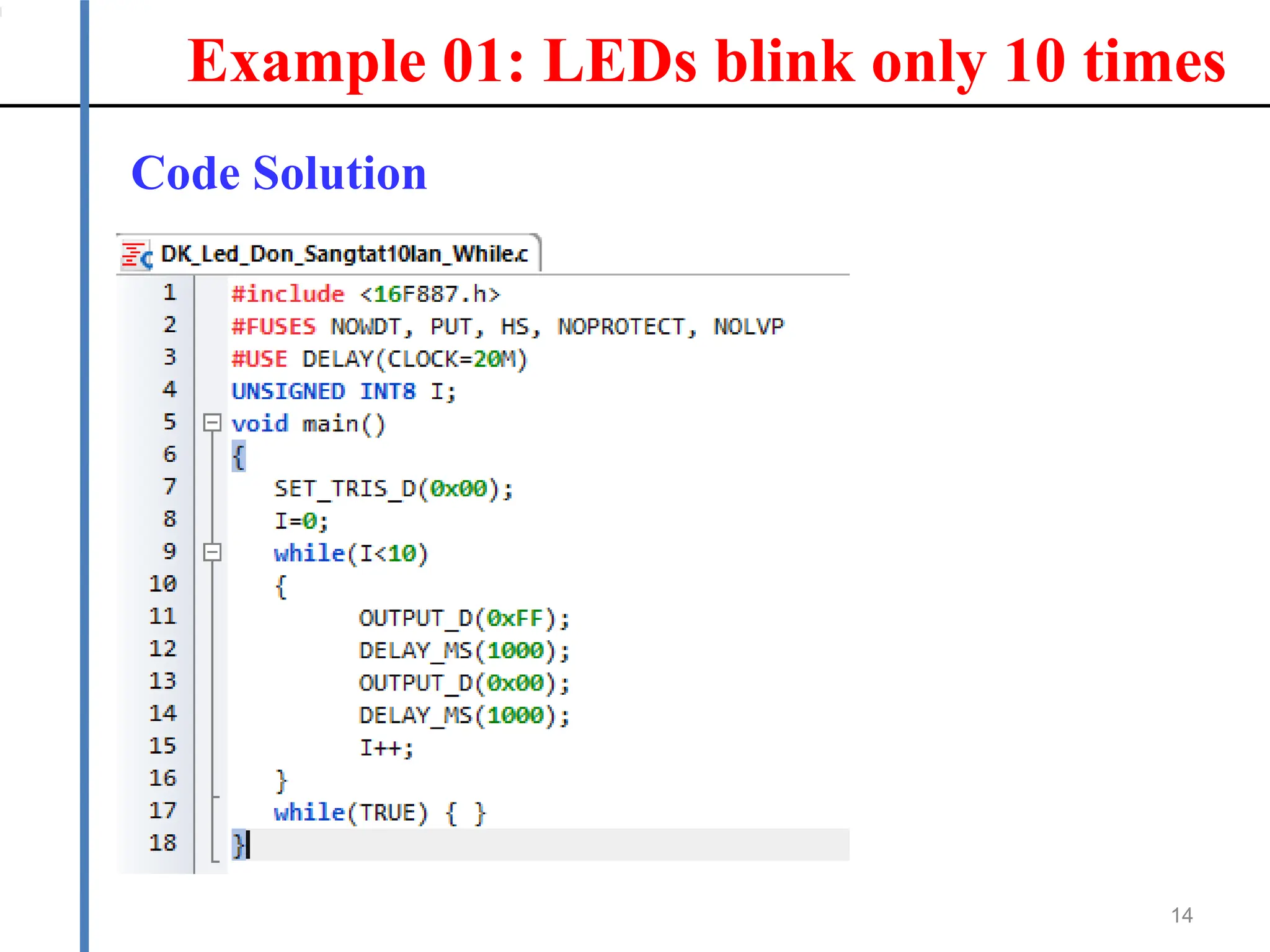
Example 01: LEDs blink only 10 times
13
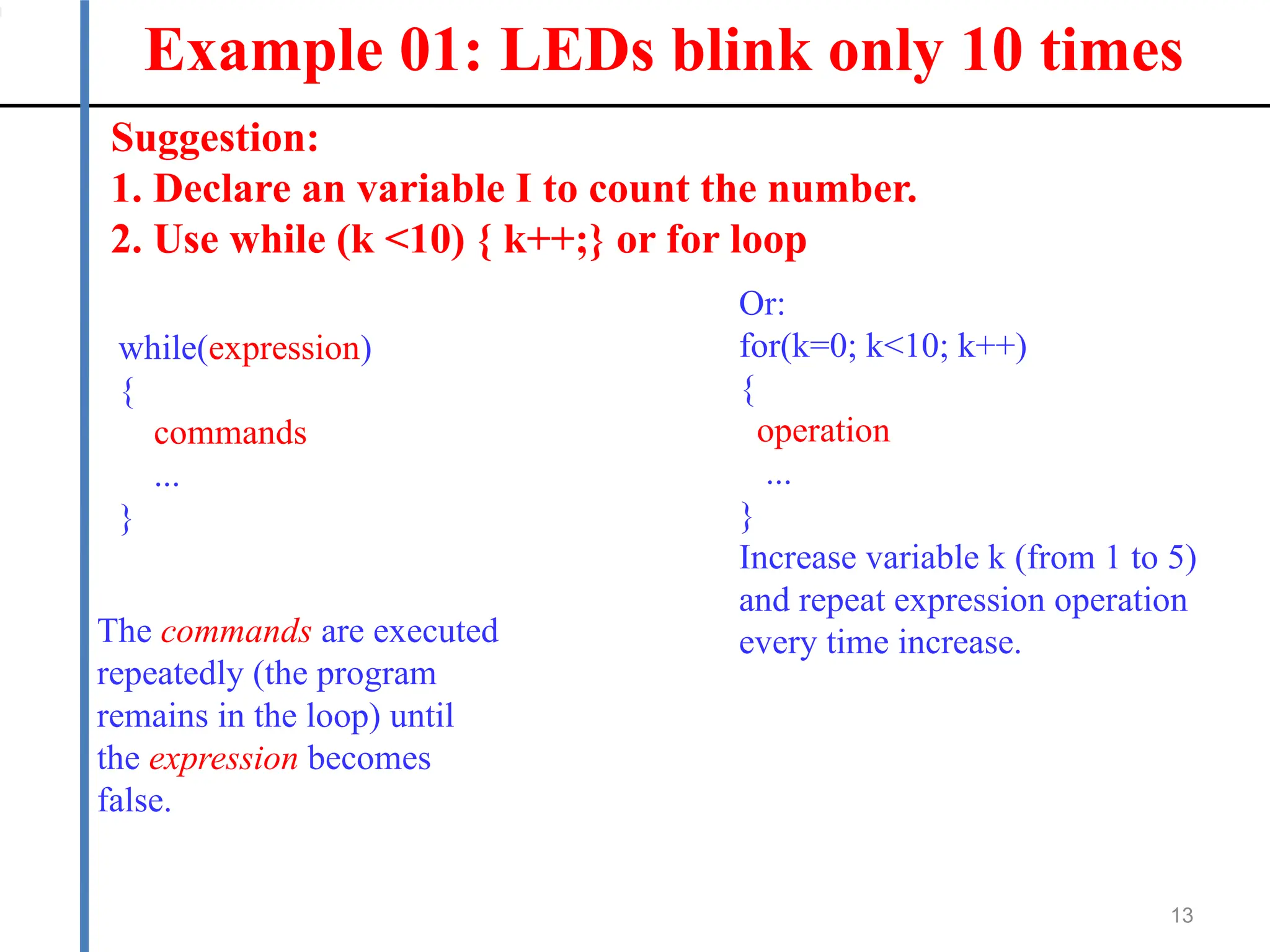
Suggestion:
1. Declare an variable I to count the number.
2. Use while (k <10) { k++;} or for loop
while(expression)
{
commands
...
}
The commands are executed
repeatedly (the program
remains in the loop) until
the expression becomes
false.
Or:
for(k=0; k<10; k++)
{
operation
...
}
Increase variable k (from 1 to 5)
and repeat expression operation
every time increase.
Example 01: LEDs blink only 10 times
14
Code Solution
C Programming: Declare ARRAYS
15
ONE-DIMENSIONAL ARRAY:
component_type array_name [number_of_components
Example:
unsigned int8 calendar [12] =
{31,28,31,30,31,30,31,31,30,31,30,31};
date = calendar [5];
// now date value is 30
TWO-DIMENSIONALARRAY
int8 Table[2][3] = {3,42,1, 7,7,19};
temp = Table[0][2];
// now temp value is 1
Example 02: Controlling a single LED to gradually light
up from right to left
16
Suggestion:
1. Declare an variable:
UNSIGNED INT8 led_pattern_sang[8] = {0x01, 0x03, 0x07,
0x0F, 0x1F, 0x3F, 0x7F, 0xFF};
2. Use FOR(I=0;I<8;I++)
Example 02: Controlling a single LED to gradually light
up from right to left
17
Suggestion:
1. Declare an variable:
UNSIGNED INT8 led_pattern_sang[8] = {0x01, 0x03, 0x07,
0x0F, 0x1F, 0x3F, 0x7F, 0xFF};
2. Use FOR(I=0;I<8;I++)
Solution Code:
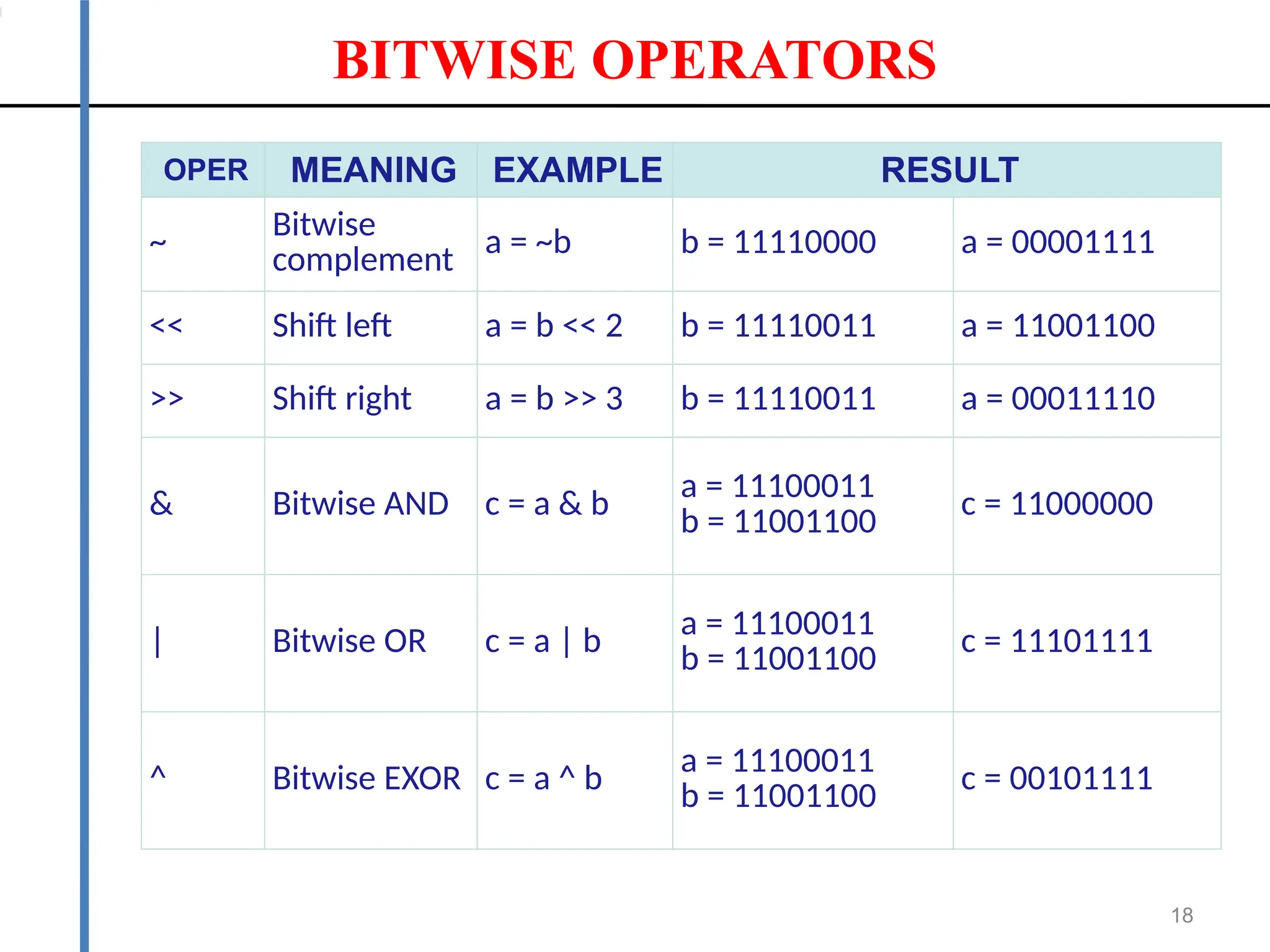
BITWISE OPERATORS
18
OPER MEANING EXAMPLE RESULT
~ Bitwise
complement a = ~b b = 11110000 a = 00001111
<< Shift left a = b << 2 b = 11110011 a = 11001100
>> Shift right a = b >> 3 b = 11110011 a = 00011110
& Bitwise AND c = a & b a = 11100011
b = 11001100
c = 11000000
| Bitwise OR c = a | b a = 11100011
b = 11001100 c = 11101111
^ Bitwise EXOR c = a ^ b a = 11100011
b = 11001100 c = 00101111
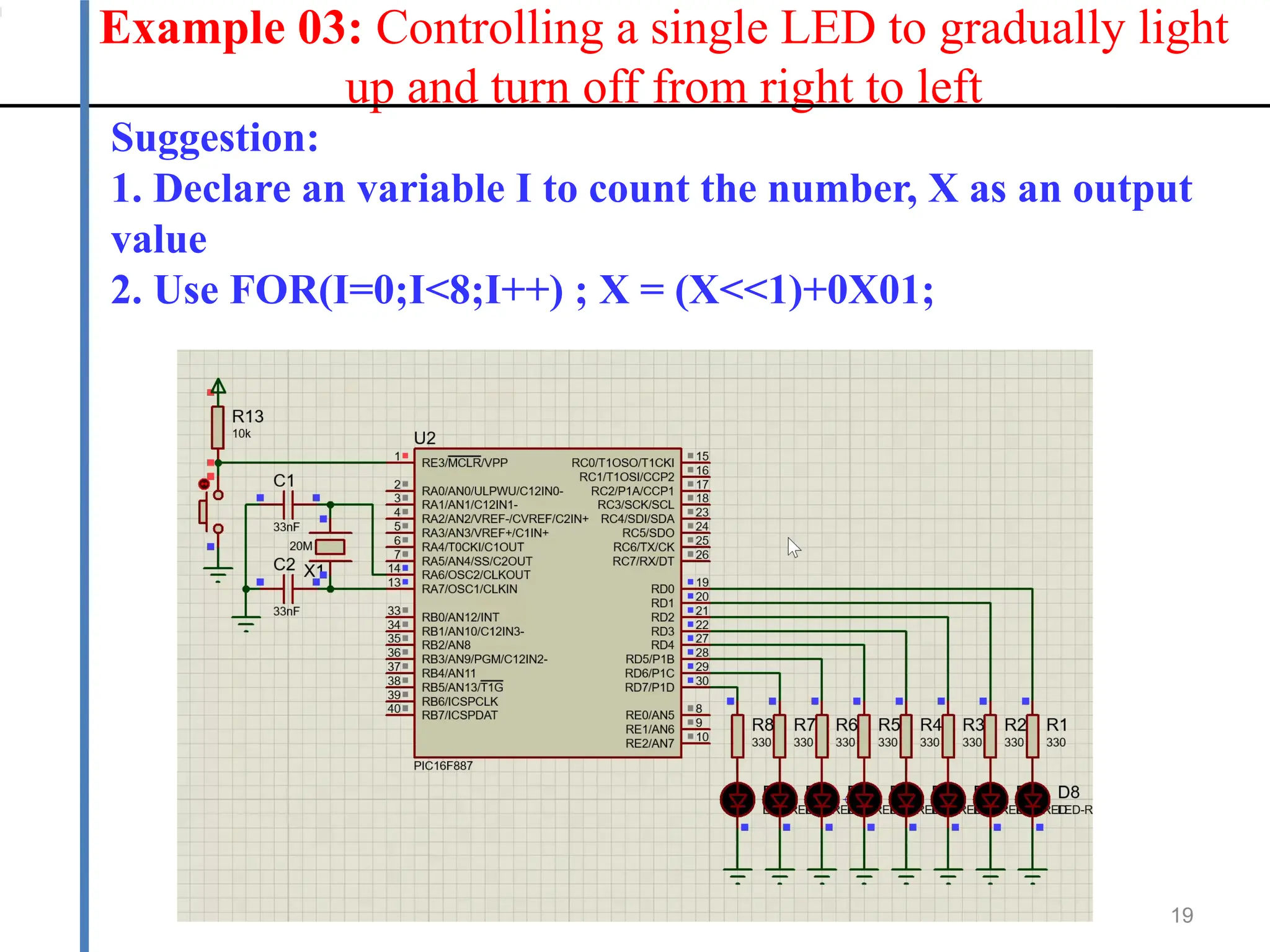
Example 03: Controlling a single LED to gradually light
up and turn off from right to left
19
Suggestion:
1. Declare an variable I to count the number, X as an output
value
2. Use FOR(I=0;I<8;I++) ; X = (X<<1)+0X01;
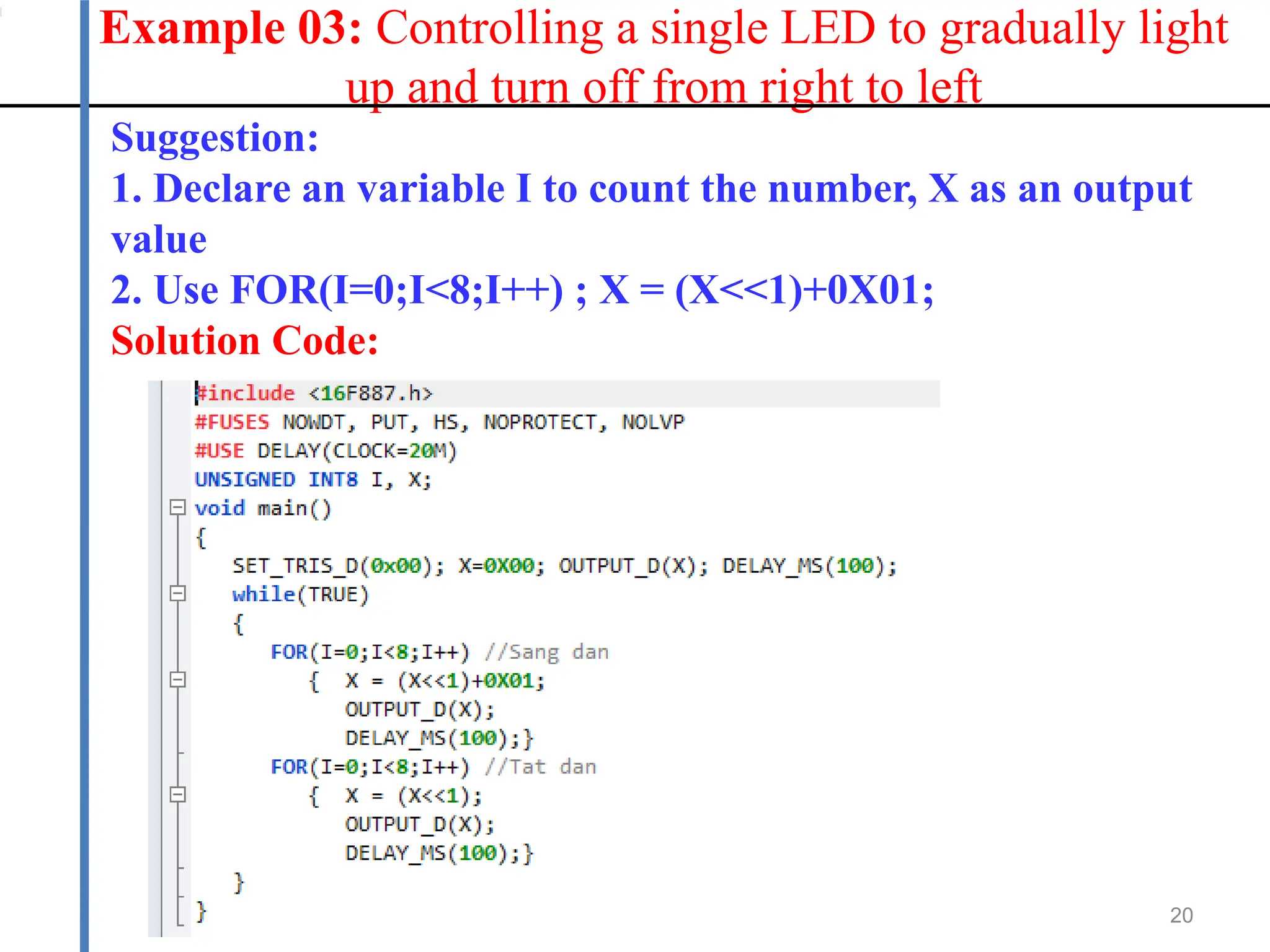
Example 03: Controlling a single LED to gradually light
up and turn off from right to left
20
Suggestion:
1. Declare an variable I to count the number, X as an output
value
2. Use FOR(I=0;I<8;I++) ; X = (X<<1)+0X01;
Solution Code:
Thank you!

microprocessor for engineering beginer.pptx

  • 1.
    Microprocessor Lecturer: PhD. NguyễnTrọng Kiên Department Head of Signal Processing and Communications, Posts & Telecommunications Institute of Technology, HCM City.
  • 2.
    CHAPTER 4: <PIC16F887 MICROCONTROLLER: THE BASICS OF C PROGRAMMING LANGUAGE>
  • 3.
    Chapter 4: CProgramming 3 In this chapter, I aim to use LEDs as a practical example to demonstrate C programming concepts, rather than just explaining C programming in theory.
  • 4.
  • 5.
    Proteus 5 Connect 8 LEDsto PORTD as follows: Reset Button Crystal
  • 6.
    Compiler - Createa new Project 6 Project Wizard Device Selection: PIC16F887 Crystal: 20 MHz
  • 7.
    Compiler – aBlinky LED 7
  • 8.
    Data Direction 8 Bit 1indicates input, bit 0 indicates output . Ex: set_tris_d(0x00); -> all pins of PORT D are output
  • 9.
    DATA TYPES INC LANGUAGE 9 DATA TYPE NUMBER OF BITS RANGE int1 1 0 to 1 unsinged int8 8 0 to 255 signed int8 8 -128 to 127 unsigned int16 16 0 to 65535 signed int16 16 -32768 to 32767 unsigned int32 32 0 to 4294967295 signed int32 32 -2147483648 to 2147483647
  • 10.
    10 This line tellsthe compiler to include the header file for the PIC16F887 Blinky LED - PORTD Nowdt: disables Watchdog Timer hs: High-Speed Oscillator Noput : disables Power-Up Timer Noprotect: disables Code Protection
  • 11.
    11 This line tellsthe compiler to include the header file for the PIC16F887 Blinky LED - PORTD
  • 12.
    Build a CallFunction 12 void is used when a function performs an action but doesn't return any data. Void blinkLED() Void blinkLED(unsigned int16 t)
  • 13.
    Example 01: LEDsblink only 10 times 13 Suggestion: 1. Declare an variable I to count the number. 2. Use while (k <10) { k++;} or for loop while(expression) { commands ... } The commands are executed repeatedly (the program remains in the loop) until the expression becomes false. Or: for(k=0; k<10; k++) { operation ... } Increase variable k (from 1 to 5) and repeat expression operation every time increase.
  • 14.
    Example 01: LEDsblink only 10 times 14 Code Solution
  • 15.
    C Programming: DeclareARRAYS 15 ONE-DIMENSIONAL ARRAY: component_type array_name [number_of_components Example: unsigned int8 calendar [12] = {31,28,31,30,31,30,31,31,30,31,30,31}; date = calendar [5]; // now date value is 30 TWO-DIMENSIONALARRAY int8 Table[2][3] = {3,42,1, 7,7,19}; temp = Table[0][2]; // now temp value is 1
  • 16.
    Example 02: Controllinga single LED to gradually light up from right to left 16 Suggestion: 1. Declare an variable: UNSIGNED INT8 led_pattern_sang[8] = {0x01, 0x03, 0x07, 0x0F, 0x1F, 0x3F, 0x7F, 0xFF}; 2. Use FOR(I=0;I<8;I++)
  • 17.
    Example 02: Controllinga single LED to gradually light up from right to left 17 Suggestion: 1. Declare an variable: UNSIGNED INT8 led_pattern_sang[8] = {0x01, 0x03, 0x07, 0x0F, 0x1F, 0x3F, 0x7F, 0xFF}; 2. Use FOR(I=0;I<8;I++) Solution Code:
  • 18.
    BITWISE OPERATORS 18 OPER MEANINGEXAMPLE RESULT ~ Bitwise complement a = ~b b = 11110000 a = 00001111 << Shift left a = b << 2 b = 11110011 a = 11001100 >> Shift right a = b >> 3 b = 11110011 a = 00011110 & Bitwise AND c = a & b a = 11100011 b = 11001100 c = 11000000 | Bitwise OR c = a | b a = 11100011 b = 11001100 c = 11101111 ^ Bitwise EXOR c = a ^ b a = 11100011 b = 11001100 c = 00101111
  • 19.
    Example 03: Controllinga single LED to gradually light up and turn off from right to left 19 Suggestion: 1. Declare an variable I to count the number, X as an output value 2. Use FOR(I=0;I<8;I++) ; X = (X<<1)+0X01;
  • 20.
    Example 03: Controllinga single LED to gradually light up and turn off from right to left 20 Suggestion: 1. Declare an variable I to count the number, X as an output value 2. Use FOR(I=0;I<8;I++) ; X = (X<<1)+0X01; Solution Code:
  • 21.