‫والبحث‬ ‫العالــي‬ ‫التعليم‬ ‫وزارة‬
‫العلـــمي‬
‫تقنيــــــات‬ ‫هندســـــــــــة‬ ‫قســم‬
‫الحاســـــوب‬
‫فـــــــــــــرع‬
‫الكـــــــــــــترونيات‬
‫الحاســــــــــــــبات‬
‫المرحلـــــــــــــــــــــــــــــــــــــ‬
‫الــــــــــثالثــــــــــــــــــــــــة‬ ‫ة‬
‫الرقمـــية‬ ‫المســــيطرات‬
‫المتقدمـــــــة‬
"
‫الدقيقـــــــة‬ ‫المسيطرات‬
"
Advanced Digital Controllers
"
Microcontroller Course
"
Eng. Jabbar Sh. Jahlool
Introduction to Microcontrollers
1) Important Notes over Electronics.
2) What is a Microcontroller?
3) Inside Components of the Microcontroller.
4) How does the Microcontroller Work?
5) Microcontroller Vs Microprocessor.
6) Short list of MCU Brands.
7) How to choose your chip?
8) Description Of PIC16F887.
9) Necessary connections of PIC Microcontroller.
10) Outputting Data / Signals
11) Applications examples.
12) Important Displays Interfacing For PIC MCU
1) Important Notes over Electronics
a) Pull Down Resistor Connection.
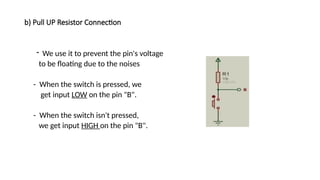
b) Pull UP Resistor Connection.
c) Relay Driver Circuit.
d) Logic Gates.
e) Test Board.
a) Pull Down Resistor Connection
- We use it to prevent the pin's voltage
to be floating due to the noises.
- When the switch is pressed, we get
input HIGH on the pin "B".
- When the switch isn't pressed, we
get input LOW on the pin "B".
b) Pull UP Resistor Connection
- We use it to prevent the pin's voltage
to be floating due to the noises
- When the switch is pressed, we
get input LOW on the pin "B".
- When the switch isn't pressed,
we get input HIGH on the pin "B".
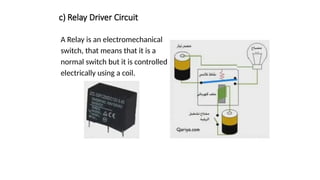
c) Relay Driver Circuit
A Relay is an electromechanical
switch, that means that it is a
normal switch but it is controlled
electrically using a coil.
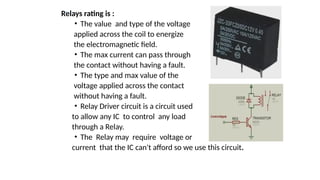
Relays rating is :
• The value and type of the voltage
applied across the coil to energize
the electromagnetic field.
• The max current can pass through
the contact without having a fault.
• The type and max value of the
voltage applied across the contact
without having a fault.
• Relay Driver circuit is a circuit used
to allow any IC to control any load
through a Relay.
• The Relay may require voltage or
current that the IC can't afford so we use this circuit.
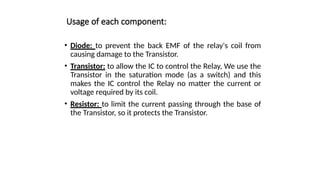
Usage of each component:
• Diode: to prevent the back EMF of the relay's coil from
causing damage to the Transistor.
• Transistor: to allow the IC to control the Relay, We use the
Transistor in the saturation mode (as a switch) and this
makes the IC control the Relay no matter the current or
voltage required by its coil.
• Resistor: to limit the current passing through the base of
the Transistor, so it protects the Transistor.
d) Logic Gates
• It is important to be known that 1 in logic or High
means 5 volt and 0 or Low means 0 volts.
• Also you must know that there is different forms for
numbering:
1) Binary: consists of 0 and 1 only.
2) Decimal: it is the normal numbering system we are using:
(0, 1, 2, 3, 4, 5, 6, 7, 8, 9)
3) Hex Decimal: consist of (0, 1, 2, 3, 4, 5, 6, 7, 8, 9, A, B, C,
D, E, F)
4) Octal: consist of (0, 1, 2, 3, 4, 5, 6, 7)
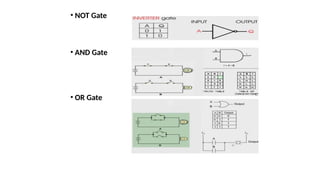
• NOT Gate
• AND Gate
• OR Gate
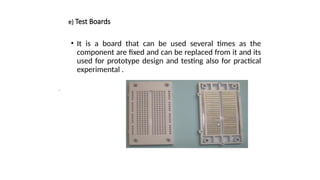
e) Test Boards
• It is a board that can be used several times as the
component are fixed and can be replaced from it and its
used for prototype design and testing also for practical
experimental .
•
2) What is a Microcontroller?
• Embedded Systems
• An embedded system is a product which uses a computer
to run it but the product itself is not a computer.
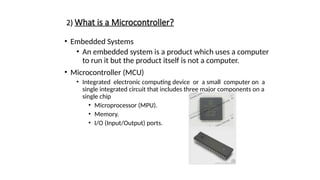
• Microcontroller (MCU)
• Integrated electronic computing device or a small computer on a
single integrated circuit that includes three major components on a
single chip
• Microprocessor (MPU).
• Memory.
• I/O (Input/Output) ports.
Types of Microcontrollers:
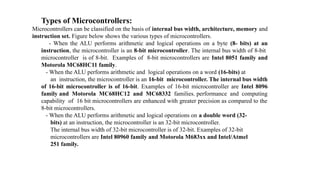
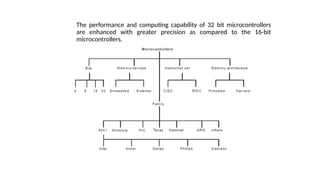
Microcontrollers can be classified on the basis of internal bus width, architecture, memory and
instruction set. Figure below shows the various types of microcontrollers.
- When the ALU performs arithmetic and logical operations on a byte (8- bits) at an
instruction, the microcontroller is an 8-bit microcontroller. The internal bus width of 8-bit
microcontroller is of 8-bit. Examples of 8-bit microcontrollers are Intel 8051 family and
Motorola MC68HC11 family.
- When the ALU performs arithmetic and logical operations on a word (16-bits) at
an instruction, the microcontroller is an 16-bit microcontroller. The internal bus width
of 16-bit microcontroller is of 16-bit. Examples of 16-bit microcontroller are Intel 8096
family and Motorola MC68HC12 and MC68332 families. performance and computing
capability of 16 bit microcontrollers are enhanced with greater precision as compared to the
8-bit microcontrollers.
- When the ALU performs arithmetic and logical operations on a double word (32-
bits) at an instruction, the microcontroller is an 32-bit microcontroller.
The internal bus width of 32-bit microcontroller is of 32-bit. Examples of 32-bit
microcontrollers are Intel 80960 family and Motorola M683xx and Intel/Atmel
251 family.
The performance and computing capability of 32 bit microcontrollers
are enhanced with greater precision as compared to the 16-bit
microcontrollers.
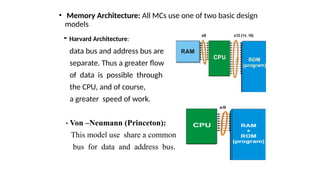
• Memory Architecture: All MCs use one of two basic design
models
- Harvard Architecture:
data bus and address bus are
separate. Thus a greater flow
of data is possible through
the CPU, and of course,
a greater speed of work.
- Von –Neumann (Princeton):
This model use share a common
bus for data and address bus.
• Microcontroller Applications:
These small devices have revolutionized the world of electronics. Today
microcontrollers are everywhere, think of a device and you will find a
microcontroller somewhere in it. May it be your remote control, cell
phone air conditioner, microwave oven, DVD player, home monitoring
system, environmental control (greenhouse, factory, home) television or
all have a microcontroller sitting inside . These small devices can do so
much, that only imagination is the limit. Moreover they are very simple
to use, you don't need to be an expert in electronics to use them in your
next project. A basic understanding of electronics, and digital circuits is
all that is required to get started. Once you are in the business, sky is the
limit. Think of any logical application and you will find microcontroller
handling the job nicely.
Industrial automation including automatic assembly lines, robots and
quality control systems all are backed by some kind of microcontroller.
Lec.2
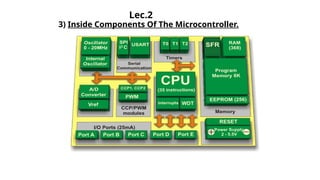
3) Inside Components Of The Microcontroller.
PIC MUC Components
a) Central processing unit (CPU)
b) Read Only Memory (ROM)
c) Random Access Memory (RAM)
d) Special Function Registers (SFR)
e) Input /Output Ports
f) Serial Communication
g) Timers/Counters
h) A/D Converter
i) Power Supply Circuit
j) Oscillator
a) Central processing unit (CPU)
 This is a unit which monitors and controls all processes within the
microcontroller and the user cannot affect its work.
 It consists of several smaller subunits, of which the most important
are:
a) Instruction decoder
b) Arithmetical Logical Unit (ALU)
c) Accumulator
b) Read Only Memory (ROM)
• Read Only Memory (ROM) is a type of memory used to permanently
save the program being executed.
• The size of the program that can be written depends on the size of
this memory.
• ROM can be built in the microcontroller or added as external chip,
which depends on the type of the microcontroller.
• Today’s microcontrollers commonly use 16-bit addressing, which
means that they are able to address up to 64 Kb of memory, i.e. 65535
locations. As a novice, your program will rarely exceed the limit of
several hundred instructions. There are several types of ROM:-
 Flash Memory: Flash memory is a non-volatile memory used
mainly to store user programs. This type of memory can be
programmed electrically while embedded on the board. Some
microcontrollers have only 1 KB flash memory, while some others
can have 32KB or more. In addition to computers, flash memory is
also used in mobile phones and digital cameras.
• This type of memory was invented in the 80s in the laboratories of
INTEL and was represented as the successor to the UV EPROM.
Since the content of this memory can be written and cleared
practically an unlimited number of times, microcontrollers with Flash
ROM are ideal for learning, experimentation and small-scale
production. Because of its great popularity, most microcontrollers are
manufactured in flash technology today. So, if you are going to buy a
microcontroller, the type to look for is definitely Flash!
- MROM (Masked ROM).
- UV Erasable Programmable ROM (UV EPROM).
- EEPROM (Electric erasable programmable ROM).
 Random Access Memory (RAM) is a type of memory used for temporary
storing data and intermediate results created and used during the operation of
the microcontrollers.
 The content of this memory is cleared once the power supply is off.
 EEPROM Data Memory: EEPROM-type data memory is also very
common in many microcontrollers. The advantage of an EEPROM memory
is that the programmer can store nonvolatile data there and change this data
whenever required. For example, in a temperature monitoring application, the
maximum and minimum temperature readings can be stored in an EEPROM
memory. If the power supply is removed for any reason, the values of the
latest readings are available in the EEPROM memory. The PIC18F452
microcontroller has 256 bytes of EEPROM memory. Other members of the
PIC18F family have more EEPROM memory (e.g., the PIC18F6680 has
1024 bytes). The mikroC language provides special instructions for reading
and writing to the EEPROM memory of a PIC microcontroller.
c) Random Access Memory (RAM)
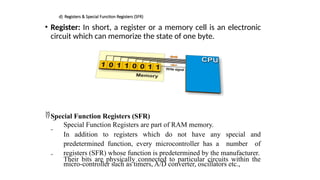
d) Registers & Special Function Registers (SFR)
• Register: In short, a register or a memory cell is an electronic
circuit which can memorize the state of one byte.
Special Function Registers (SFR)
 Special Function Registers are part of RAM memory.
 In addition to registers which do not have any special and
predetermined function, every microcontroller has a number of
registers (SFR) whose function is predetermined by the manufacturer.
 Their bits are physically connected to particular circuits within the
micro-controller such as timers, A/D converter, oscillators etc.,
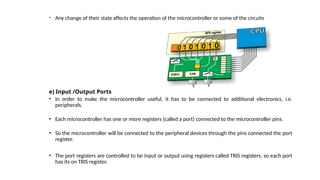
- Any change of their state affects the operation of the microcontroller or some of the circuits
e) Input /Output Ports
• In order to make the microcontroller useful, it has to be connected to additional electronics, i.e.
peripherals.
• Each microcontroller has one or more registers (called a port) connected to the microcontroller pins.
• So the microcontroller will be connected to the peripheral devices through the pins connected the port
register.
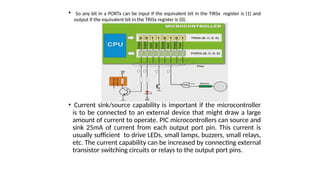
• The port registers are controlled to be input or output using registers called TRIS registers, so each port
has its on TRIS register.
• So any bit in a PORTx can be input if the equivalent bit in the TIRSx register is (1) and
output if the equivalent bit in the TRISx register is (0).
• Current sink/source capability is important if the microcontroller
is to be connected to an external device that might draw a large
amount of current to operate. PIC microcontrollers can source and
sink 25mA of current from each output port pin. This current is
usually sufficient to drive LEDs, small lamps, buzzers, small relays,
etc. The current capability can be increased by connecting external
transistor switching circuits or relays to the output port pins.
f) Serial Communication
• Parallel connection between the microcontroller and
peripherals via input/output ports is the ideal solution on
shorter distances up to several meters. However, in other
cases when it is necessary to establish communication
between two devices on longer distances it is not possible
to use parallel connection. Instead, serial communication is
used.
• Serial Input-Output or Serial communication (also called
RS232 communication) enables a microcontroller to be
connected to another microcontroller or to a PC using a
serial cable. Some microcontrollers have built-in hardware
called USART (universal synchronous asynchronous receiver-
transmitter) to implement a serial communication interface.
Today, most microcontrollers have built in several different
systems for serial communication as a standard equipment.
Which of these systems will be used depends on many
factors of which the most important are:
- How many devices the microcontroller has to exchange
data with?
- How fast the data exchange has to be?
- What is the distance between devices?
-Is it necessary to send and receive data simultaneously?
• One of the most important things concerning serial communication
is the Protocol which should be strictly observed. It is a set of rules
which must be applied in order that devices can correctly interpret
data they mutually exchange. Fortunately, the microcontroller
automatically takes care of this, so that the work of the
programmer/user is reduced to simple write (data to be sent) and
read (received data).
• Baud Rate: The term baud rate is used to denote the number of bits
transferred per second [bps]. Note that it refers to bits, not bytes. It is
usually required by the protocol that each byte is transferred along
with several control bits. It means that one byte in serial data stream
may consist of 11 bits. For example, if the baud rate is 300 bps then
maximum 37 and minimum 27 bytes may be transferred per second.
• The most commonly used serial communication systems are:
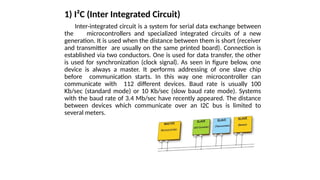
1) I²C (Inter Integrated Circuit)
Inter-integrated circuit is a system for serial data exchange between
the microcontrollers and specialized integrated circuits of a new
generation. It is used when the distance between them is short (receiver
and transmitter are usually on the same printed board). Connection is
established via two conductors. One is used for data transfer, the other
is used for synchronization (clock signal). As seen in figure below, one
device is always a master. It performs addressing of one slave chip
before communication starts. In this way one microcontroller can
communicate with 112 different devices. Baud rate is usually 100
Kb/sec (standard mode) or 10 Kb/sec (slow baud rate mode). Systems
with the baud rate of 3.4 Mb/sec have recently appeared. The distance
between devices which communicate over an I2C bus is limited to
several meters.
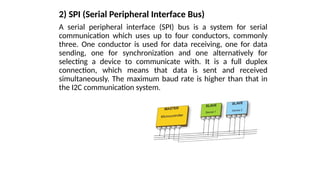
2) SPI (Serial Peripheral Interface Bus)
A serial peripheral interface (SPI) bus is a system for serial
communication which uses up to four conductors, commonly
three. One conductor is used for data receiving, one for data
sending, one for synchronization and one alternatively for
selecting a device to communicate with. It is a full duplex
connection, which means that data is sent and received
simultaneously. The maximum baud rate is higher than that in
the I2C communication system.
Lec-3
3) UART (Universal Asynchronous Receiver/
Transmitter)
This sort of communication is asynchronous, which means
that a special line for transferring clock signal is not used. In
some applications, such as radio connection or infrared
waves remote control, this feature is crucial. Since only one
communication line is used, both receiver and transmitter
operate at the same predefined rate in order to maintain
necessary synchronization. This is a very simple way of
transferring data since it basically represents the conversion
of 8-bit data from parallel to serial format. Baud rate is not
high, up to 1 Mbit/sec.
g) Timers/Counters
The microcontroller oscillator uses quartz crystal for its
operation. Even though it is not the simplest solution, there
are many reasons to use it.
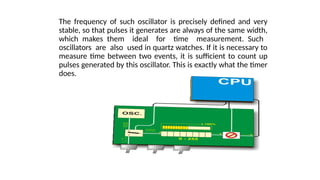
The frequency of such oscillator is precisely defined and very
stable, so that pulses it generates are always of the same width,
which makes them ideal for time measurement. Such
oscillators are also used in quartz watches. If it is necessary to
measure time between two events, it is sufficient to count up
pulses generated by this oscillator. This is exactly what the timer
does.
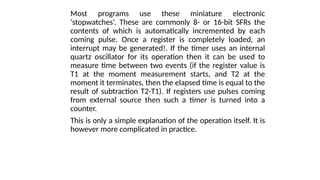
Most programs use these miniature electronic
‘stopwatches’. These are commonly 8- or 16-bit SFRs the
contents of which is automatically incremented by each
coming pulse. Once a register is completely loaded, an
interrupt may be generated!. If the timer uses an internal
quartz oscillator for its operation then it can be used to
measure time between two events (if the register value is
T1 at the moment measurement starts, and T2 at the
moment it terminates, then the elapsed time is equal to the
result of subtraction T2-T1). If registers use pulses coming
from external source then such a timer is turned into a
counter.
This is only a simple explanation of the operation itself. It is
however more complicated in practice.
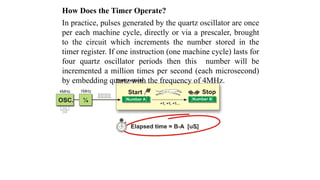
How Does the Timer Operate?
In practice, pulses generated by the quartz oscillator are once
per each machine cycle, directly or via a prescaler, brought
to the circuit which increments the number stored in the
timer register. If one instruction (one machine cycle) lasts for
four quartz oscillator periods then this number will be
incremented a million times per second (each microsecond)
by embedding quartz with the frequency of 4MHz.
It is easy to measure short time intervals, up to 256 microseconds, in the
way described above because it is the largest number that one register
can store. This restriction may be easily overcome in several ways such
as by using a slower oscillator, registers with more bits, prescaler or
interrupts. The first two solutions have some weaknesses so it is more
recommended to use prescalers or interrupts.
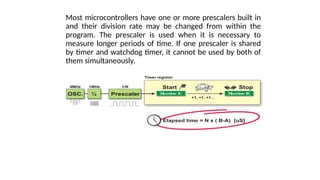
Using a Prescaler in Timer Operation:
A prescaler is an electronic device used to reduce frequency by a
predetermined factor. In order to generate one pulse on its output, it is
necessary to bring 1, 2 , 4 or more pulses on its input.
Most microcontrollers have one or more prescalers built in and their
division rate may be changed from within the program. The prescaler is
used when it is necessary to measure longer periods of time. If one
prescaler is shared by timer and watchdog timer, it cannot be used by
both of them simultaneously.
Most microcontrollers have one or more prescalers built in
and their division rate may be changed from within the
program. The prescaler is used when it is necessary to
measure longer periods of time. If one prescaler is shared
by timer and watchdog timer, it cannot be used by both of
them simultaneously.
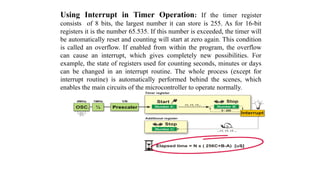
Using Interrupt in Timer Operation: If the timer register
consists of 8 bits, the largest number it can store is 255. As for 16-bit
registers it is the number 65.535. If this number is exceeded, the timer will
be automatically reset and counting will start at zero again. This condition
is called an overflow. If enabled from within the program, the overflow
can cause an interrupt, which gives completely new possibilities. For
example, the state of registers used for counting seconds, minutes or days
can be changed in an interrupt routine. The whole process (except for
interrupt routine) is automatically performed behind the scenes, which
enables the main circuits of the microcontroller to operate normally.
This figure illustrates the use of an interrupt in timer operation.
Delays of arbitrary duration, having almost no influence on the
main program execution, can be easily obtained by assigning
the prescaler to the timer.
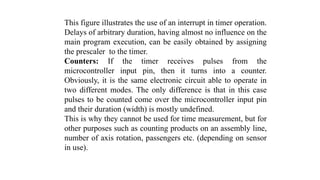
Counters: If the timer receives pulses from the
microcontroller input pin, then it turns into a counter.
Obviously, it is the same electronic circuit able to operate in
two different modes. The only difference is that in this case
pulses to be counted come over the microcontroller input pin
and their duration (width) is mostly undefined.
This is why they cannot be used for time measurement, but for
other purposes such as counting products on an assembly line,
number of axis rotation, passengers etc. (depending on sensor
in use).
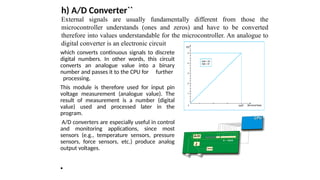
h) A/D Converter``
which converts continuous signals to discrete
digital numbers. In other words, this circuit
converts an analogue value into a binary
number and passes it to the CPU for further
processing.
This module is therefore used for input pin
voltage measurement (analogue value). The
result of measurement is a number (digital
value) used and processed later in the
program.
A/D converters are especially useful in control
and monitoring applications, since most
sensors (e.g., temperature sensors, pressure
sensors, force sensors, etc.) produce analog
output voltages.
•
External signals are usually fundamentally different from those the
microcontroller understands (ones and zeros) and have to be converted
therefore into values understandable for the microcontroller. An analogue to
digital converter is an electronic circuit
i) Power Supply Circuit
There are two things worth attention concerning the microcontroller
power supply circuit:
- Brown Out
- Reset Pin
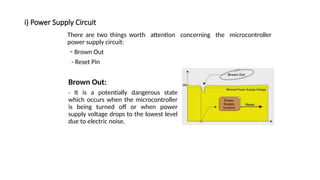
Brown Out:
- It is a potentially dangerous state
which occurs when the microcontroller
is being turned off or when power
supply voltage drops to the lowest level
due to electric noise.
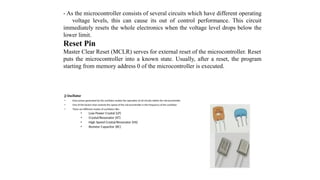
j) Oscillator
• Even pulses generated by the oscillator enable the operation of all circuits within the microcontroller.
• One of the factors that controls the speed of the microcontroller is the frequency of the oscillator.
• There are different modes of oscillators like:
• Low Power Crystal (LP)
• Crystal/Resonator (XT)
• High Speed Crystal/Resonator (HS)
• Resistor Capacitor (RC)
- As the microcontroller consists of several circuits which have different operating
voltage levels, this can cause its out of control performance. This circuit
immediately resets the whole electronics when the voltage level drops below the
lower limit.
Reset Pin
Master Clear Reset (MCLR) serves for external reset of the microcontroller. Reset
puts the microcontroller into a known state. Usually, after a reset, the program
starting from memory address 0 of the microcontroller is executed.
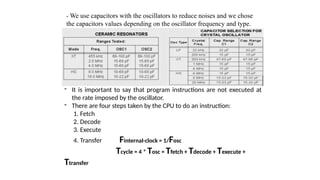
- We use capacitors with the oscillators to reduce noises and we chose
the capacitors values depending on the oscillator frequency and type.
- It is important to say that program instructions are not executed at
the rate imposed by the oscillator.
- There are four steps taken by the CPU to do an instruction:
1. Fetch
2. Decode
3. Execute
4. Transfer Finternal-clock = 1/Fosc
Tcycle = 4 * Tosc = Tfetch + Tdecode + Texecute +
Ttransfer
4) How does the microcontroller work?
• The program is load into the microcontroller.
• Power supply is turned on, the control logic units disables all
other circuits except quartz crystal to operate.
• Power supply voltage reaches its maximum and oscillator
frequency becomes stable. SFRs are being filled with bits
reflecting the state of all circuits within the microcontroller.
• Program counter is set to zero. Instruction from that address
is sent to instruction decoder which recognizes it, after
which it is executed with immediate effect.
• The value of the program counter is incremented by (1) and
the whole process is repeated several million times per
second.
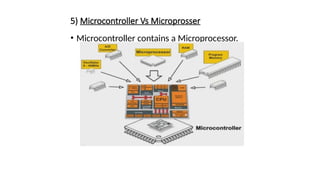
5) Microcontroller Vs Microprosser
• Microcontroller contains a Microprocessor.
• Microprocessor is a single chip CPU, microcontroller contains, a CPU and much of the
remaining circuitry of a complete microcomputer system in a single chip.
• Microcontroller includes RAM, ROM, serial and parallel interface, timer, interrupt
schedule circuitry (in addition to CPU) in a single chip.
• RAM is smaller than that of even an ordinary microcomputer, but enough for its
applications.
• Interrupt system is an important feature, as microcontrollers have to respond to
control oriented devices in real time. E.g., opening of microwave oven’s door cause an
interrupt to stop the operation. (Most microprocessors can also implement powerful
interrupt schemes, but external components are usually needed).
• Microprocessors are most commonly used as the CPU in microcomputer systems.
Microcontrollers are used in small, minimum component designs performing control-
oriented activities.
• Microprocessor instruction sets are processing intensive, implying powerful
addressing modes with instructions catering to large volumes of data. Their
instructions operate on nibbles, bytes, etc. Microcontrollers have instruction sets
catering to the control of inputs and outputs. Their instructions operate also on a
single bit. E.g., a motor may be turned ON and OFF by a 1-bit output port.
6) How to choose your chip?
Logically:
Decide the type and number of the modules in the microcontroller you will
need in your project.
Check up the microcontrollers available in the market.
Look for the data sheet for each of them to get the one that you need (look it
up in the library of the software proteus easier than the internet).
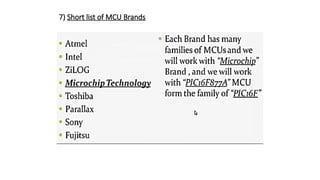
7) Short list of MCU Brands
Lec-4
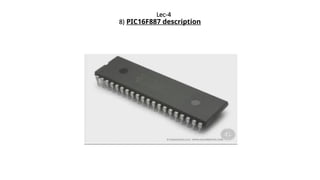
8) PIC16F887 description
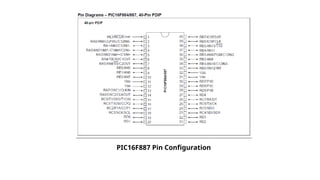
PIC16F887 Pin Configuration
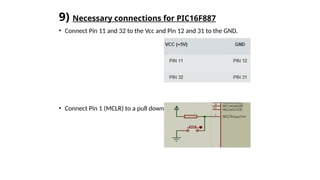
9) Necessary connections for PIC16F887
• Connect Pin 11 and 32 to the Vcc and Pin 12 and 31 to the GND.
• Connect Pin 1 (MCLR) to a pull down resistor connection.
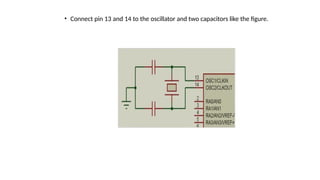
• Connect pin 13 and 14 to the oscillator and two capacitors like the figure.
C Programming Language
1) Introduction to Programming
2) mikroC Compiler
3) Structure of a Simple Program
4) Variables & Constants
5) Arrays
6) Operators
7) Flow Control
8) Functions
9) Notes
1) Introduction to Programming
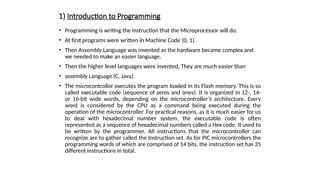
• Programming is writing the instruction that the Microprocessor will do.
• At first programs were written in Machine Code (0, 1).
• Then Assembly Language was invented as the hardware became complex and
we needed to make an easier language.
• Then the higher level languages were invented, They are much easier than
• assembly Language (C, Java).
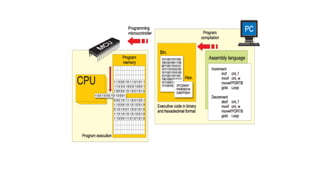
• The microcontroller executes the program loaded in its Flash memory. This is so
called executable code (sequence of zeros and ones). It is organized in 12-, 14-
or 16-bit wide words, depending on the microcontroller’s architecture. Every
word is considered by the CPU as a command being executed during the
operation of the microcontroller. For practical reasons, as it is much easier for us
to deal with hexadecimal number system, the executable code is often
represented as a sequence of hexadecimal numbers called a Hex code. It used to
be written by the programmer. All instructions that the microcontroller can
recognize are to gather called the Instruction set. As for PIC microcontrollers the
programming words of which are comprised of 14 bits, the instruction set has 35
different instructions in total.
2) MikroC Complier
The first thing you need to write a program for the microcontroller is a PC
program which understands the programming language you use, C in this case,
and provides a window for writing program. Besides, the software must 'know' the
architecture of the microcontroller in use. In this case, you need a compiler for C
language.
There is no compiler to be used for only one concrete microcontroller as there is
no compiler to be used for all microcontrollers. It’s all about software used to
program a group of similar microcontrollers of one manufacturer compiler. As the
name suggests, the compiler is intended for writing programs for PIC
microcontrollers in C language. It is provided with all data on internal architecture
of these microcontrollers, operation of particular circuits, instruction set, names of
registers, their accurate addresses, pin outs etc. When you start up the compiler,
the next thing to do is to select a chip from the list and operating frequency and of
course - to write a program in C language.
3) Variables and Constants
a) Why using Variables and
Constants?!
b) How to declare a Variable?
c) Variable Types.
d) Variable Name.
e) Examples of Variable declaration.
f) Constants declaration.
a) Why using Variables and Constants?!
- We use Variables and constants to store the data of the program and
deal with them like doing mathematical operations or displaying
their values.
- Variables are stored in RAM so we can change their values during the
program.
- Constants are stored in ROM so we can't change their values during
the program.
b) How to declare a Variable?
• To declare a variable we need to describe the following:
1. Variable Type.
2. Variable name.
3. Value of the Variable (not a must).
And we write the declaration statement like this:
Variable Type Variable name = Variable Value;
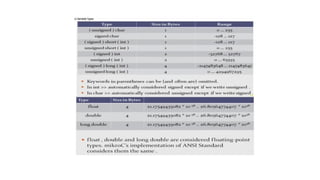
c) Variable Types
d) Variable Name
• Variable Names must be Unique.
• Variable Names must begin with alphabetical characters (uppercase or
lowercase) or Underscore characters.
• It may contain numbers and can contain uppercase or lowercase
characters.
• Variable Names must not be like the reserved names of the compiler.
• It must not contain any special characters like ( ) : ; _ " ' & % $ # } [ { ].
• Examples:
• Correct Variable Names: (sum, Result, student_1, Student4, _sum).
• Wrong Variable Names: (5student, 5_student, #sum, if, switch, while, enum, case, else, asm, goto .....
e) Examples of Variable Declaration
• int x ;
• char n = 'A' ;
• float sum = 0 ;
• long z =12 ;
• Int L = 0b110011 ;
f) Constant Declaration
 Declaring a constant is just like declaring a variable, we just put the
word const before the variable type.
 As we can't change the value of the constants during the program so
we must put their value when declaring them.
 Examples:
const int x = 5 ;
const char ch_1 = 'L' ;
4) Arrays
a) What are Arrays and why using them?
b) How to declare an array?
a) What are Arrays and why using them?
•Array used to store elements with the same type in memory.
•We may use arrays to one operation to more than a couple of variables like adding
three number to an other three numbers in the same time.
•Arrays will help you to store and handle data easily during the program such as in
loops and many other uses.
b) How to declare an array?
 Like a variable with declaring name and type but we need to
add the number of elements (optional).
 Index of the elements of an array begins from zero.
 char name [ ] = "Ahmed" ;
 int numbers [4] = {1, 2, 3, 4} ;
 char name [ ] = {'A', 'h', 'm', 'e', 'd'} ;
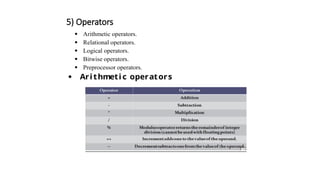
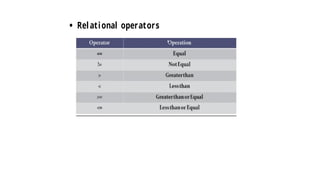
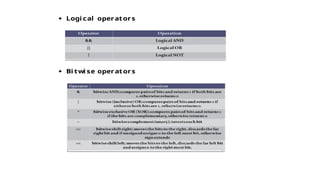
5) Operators
 Arithmetic operators.
 Relational operators.
 Logical operators.
 Bitwise operators.
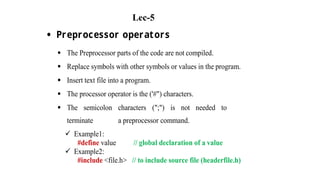
 Preprocessor operators.
 Arithmeti c operators
 Relational operators
 Logi cal operators
 Bi twi se operators
 Preprocessor operators
 The Preprocessor parts of the code are not compiled.
 Replace symbols with other symbols or values in the program.
 Insert text file into a program.
 The processor operator is the ('#") characters.
 The semicolon characters (";") is not needed to
terminate a preprocessor command.
 Example1:
#define value // global declaration of a value
 Example2:
#include <file.h> // to include source file (headerfile.h)
Lec-5
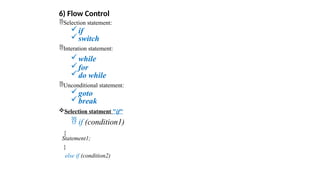
6) Flow Control
Selection statement:
if
switch
Interation statement:
while
for
do while
Unconditional statement:
goto
break
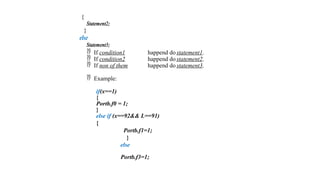
Selection statment "if"
 if (condition1)
{
Statement1;
}
else if (condition2)
{
Statement2;
}
else
Statement3;
 If condition1 happend do statement1.
 If condition2 happend do statement2.
 If non of them happend do statement3.
 Example:
if(x==1)
{
Portb.f0 = 1;
}
else if (x==92&& L==91)
{
Portb.f1=1;
}
else
Portb.f3=1;
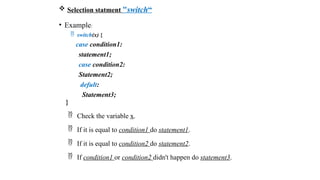
 Selection statment "switch“
• Example:
 switch(x) {
case condition1:
statement1;
case condition2:
Statement2;
defult:
Statement3;
}
 Check the variable x.
 If it is equal to condition1 do statement1.
 If it is equal to condition2 do statement2.
 If condition1 or condition2 didn't happen do statement3.
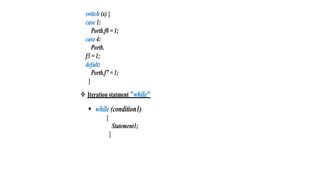
switch (x) {
case 1:
Portb.f0 = 1;
case 4:
Portb.
f3 = 1;
defult:
Portb.f7 = 1;
}
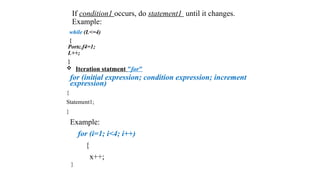
 Iteration statment "while"
 while (condition1)
{
Statement1;
}
If condition1 occurs, do statement1 until it changes.
Example:
while (L<=4)
{
Portc.f4=1;
L++;
}
 Iteration statment "for"
for (initial expression; condition expression; increment
expression)
{
Statement1;
}
Example:
for (i=1; i<4; i++)
{
x++;
}
 It will begin with i = 1 then it will check if it is less than 4 and if
this true it will do x++ then increments i with 1 and then checks if
the new value of i is less than 4 or not if it was true it will do x++
then increments i with 1 and so on until i is equal or greater than 4
it will not do the loop and continue the program.
 Iteration statment "do while"
 do{
Statement1;
}
while(condition1)
 It will do statement 1 then checks if condition 1 is happening it will
continue in the loop until condition 1 don't occur.
 Example:
do{
x++;
}
while(x<10);
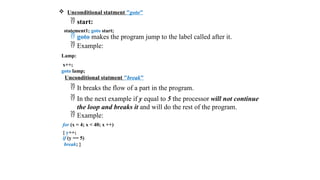
 Unconditional statment "goto"
 start:
statement1; goto start;
 goto makes the program jump to the label called after it.
 Example:
Lamp:
x++;
goto lamp;
Unconditional statment "break"
 It breaks the flow of a part in the program.
 In the next example if y equal to 5 the processor will not continue
the loop and breaks it and will do the rest of the program.
 Example:
for (x = 4; x < 40; x ++)
{ y++;
if (y == 5)
break; }
7) Functions
• What is a function?
• How to Declare a function?
• Example.
-- What is a function?
• A function is a process which is outside the main function of the program and you
can use it in the main function.
• It is similar to a function in Math - but not exactly the same -, it has input values
and it does some kind of operations on it then it gives you an output.
-- How to Declare a function?
•To declare a function we must put:
1.The Function's name.
2.What parameters will the function have as input (number of them and their type).
3. What parameters will the function return as an output (Type).
 Example
 int square (int x)
In this example we here declared:
 Name of the function as square.
 It have one input parameter.
 The input parameter is integer.
 Its output is also an integer.
 int anything (int x, char y)
In this example we here declared:
 Name of the function as anything.
 It have two input parameters.
 The input parameter is integer and the other one is char.
 Its output is also an integer.
 Note that:
 If you don't want the function to have any input parameters you should
leave the two brackets empty ( ) or write (void) between them.
 Example: int sum ( ), int sum (void).
 If you don't want the function to return any parameters you will write
void instead of the type that it returns.
 Example: void sum (int x), void sum ( ).
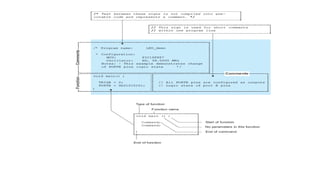
8) Structure Of Simple Program
Figure below illustrates the structure of a simple program, pointing out the parts.
9) Notes
 We will write the main program in a function called main.
void main ( ) {
Program!
}
 Each statement must end with semi colon " ; ".
 White spaces doesn't matter.
Example: x = 6; is the same as x =6;
 Names are case sensitive (upper case and lower case).
Example: x is different from X
 To write comments use // before them for one line comment
and for more than one line comment use /* in the beginning and
*/ at the end of the comment.
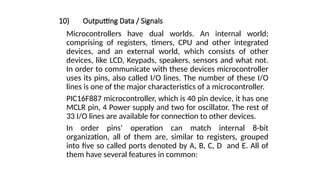
10) Outputting Data / Signals
Microcontrollers have dual worlds. An internal world;
comprising of registers, timers, CPU and other integrated
devices, and an external world, which consists of other
devices, like LCD, Keypads, speakers, sensors and what not.
In order to communicate with these devices microcontroller
uses its pins, also called I/O lines. The number of these I/O
lines is one of the major characteristics of a microcontroller.
PIC16F887 microcontroller, which is 40 pin device, it has one
MCLR pin, 4 Power supply and two for oscillator. The rest of
33 I/O lines are available for connection to other devices.
In order pins’ operation can match internal 8-bit
organization, all of them are, similar to registers, grouped
into five so called ports denoted by A, B, C, D and E. All of
them have several features in common:
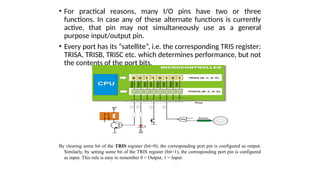
• For practical reasons, many I/O pins have two or three
functions. In case any of these alternate functions is currently
active, that pin may not simultaneously use as a general
purpose input/output pin.
• Every port has its “satellite”, i.e. the corresponding TRIS register:
TRISA, TRISB, TRISC etc. which determines performance, but not
the contents of the port bits.
By clearing some bit of the TRIS register (bit=0), the corresponding port pin is configured as output.
Similarly, by setting some bit of the TRIS register (bit=1), the corresponding port pin is configured
as input. This rule is easy to remember 0 = Output, 1 = Input.
Analog and Digital Pins
PIC16F887 has a number of pins, which can acquire analog data. The same pins however
can also be configured as digital, if not to be used as analog.
PORTA and TRISA register
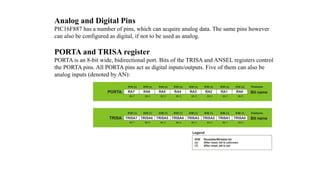
PORTA is an 8-bit wide, bidirectional port. Bits of the TRISA and ANSEL registers control
the PORTA pins. All PORTA pins act as digital inputs/outputs. Five of them can also be
analog inputs (denoted by AN):
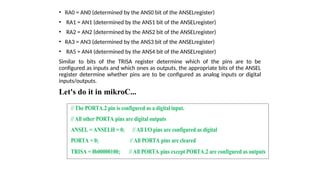
• RA0 = AN0 (determined by the ANS0 bit of the ANSELregister)
• RA1 = AN1 (determined by the ANS1 bit of the ANSELregister)
• RA2 = AN2 (determined by the ANS2 bit of the ANSELregister)
• RA3 = AN3 (determined by the ANS3 bit of the ANSELregister)
• RA5 = AN4 (determined by the ANS4 bit of the ANSELregister)
Similar to bits of the TRISA register determine which of the pins are to be
configured as inputs and which ones as outputs, the appropriate bits of the ANSEL
register determine whether pins are to be configured as analog inputs or digital
inputs/outputs.
Let's do it in mikroC...
// The PORTA.2 pin is configured as a digital input.
// All other PORTA pins are digital outputs
ANSEL = ANSELH = 0; // All I/O pins are configured as digital
PORTA = 0; // All PORTA pins are cleared
TRISA = 0b00000100; // All PORTA pins except PORTA.2 are configured as outputs
Lec-6
PORTB and TRISB register
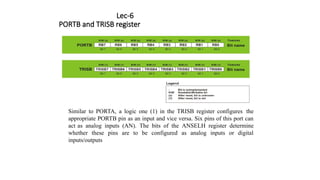
Similar to PORTA, a logic one (1) in the TRISB register configures the
appropriate PORTB pin as an input and vice versa. Six pins of this port can
act as analog inputs (AN). The bits of the ANSELH register determine
whether these pins are to be configured as analog inputs or digital
inputs/outputs
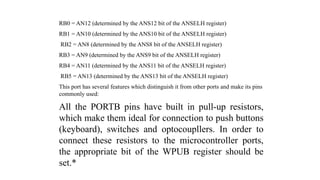
RB0 = AN12 (determined by the ANS12 bit of the ANSELH register)
RB1 = AN10 (determined by the ANS10 bit of the ANSELH register)
RB2 = AN8 (determined by the ANS8 bit of the ANSELH register)
RB3 = AN9 (determined by the ANS9 bit of the ANSELH register)
RB4 = AN11 (determined by the ANS11 bit of the ANSELH register)
RB5 = AN13 (determined by the ANS13 bit of the ANSELH register)
This port has several features which distinguish it from other ports and make its pins
commonly used:
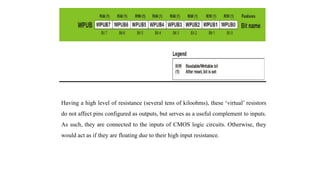
All the PORTB pins have built in pull-up resistors,
which make them ideal for connection to push buttons
(keyboard), switches and optocoupllers. In order to
connect these resistors to the microcontroller ports,
the appropriate bit of the WPUB register should be
set.*
Having a high level of resistance (several tens of kiloohms), these ‘virtual’ resistors
do not affect pins configured as outputs, but serves as a useful complement to inputs.
As such, they are connected to the inputs of CMOS logic circuits. Otherwise, they
would act as if they are floating due to their high input resistance.
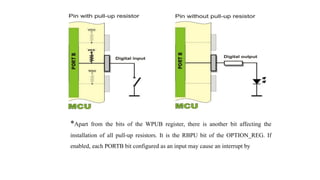
*Apart from the bits of the WPUB register, there is another bit affecting the
installation of all pull-up resistors. It is the RBPU bit of the OPTION_REG. If
enabled, each PORTB bit configured as an input may cause an interrupt by
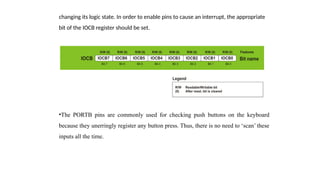
changing its logic state. In order to enable pins to cause an interrupt, the appropriate
bit of the IOCB register should be set.
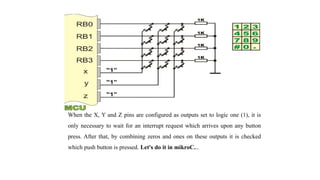
•The PORTB pins are commonly used for checking push buttons on the keyboard
because they unerringly register any button press. Thus, there is no need to ‘scan’ these
inputs all the time.
When the X, Y and Z pins are configured as outputs set to logic one (1), it is
only necessary to wait for an interrupt request which arrives upon any button
press. After that, by combining zeros and ones on these outputs it is checked
which push button is pressed. Let's do it in mikroC...
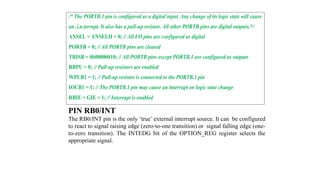
/* The PORTB.1 pin is configured as a digital input. Any change of its logic state will cause
an .i.n.terrupt. It also has a pull-up resistor. All other PORTB pins are digital outputs.*/
ANSEL = ANSELH = 0; // All I/O pins are configured as digital
PORTB = 0; // All PORTB pins are cleared
TRISB = 0b00000010; // All PORTB pins except PORTB.1 are configured as outputs
RBPU = 0; // Pull-up resistors are enabled
WPUB1 = 1; // Pull-up resistor is connected to the PORTB.1 pin
IOCB1 = 1; // The PORTB.1 pin may cause an interrupt on logic state change
RBIE = GIE = 1; // Interrupt is enabled
PIN RB0/INT
The RB0/INT pin is the only ‘true’ external interrupt source. It can be configured
to react to signal raising edge (zero-to-one transition) or signal falling edge (one-
to-zero transition). The INTEDG bit of the OPTION_REG register selects the
appropriate signal.
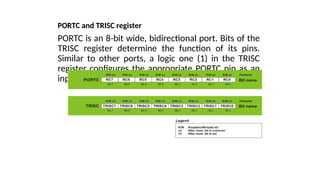
PORTC and TRISC register
PORTC is an 8-bit wide, bidirectional port. Bits of the
TRISC register determine the function of its pins.
Similar to other ports, a logic one (1) in the TRISC
register configures the appropriate PORTC pin as an
input.
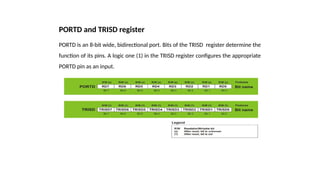
PORTD and TRISD register
PORTD is an 8-bit wide, bidirectional port. Bits of the TRISD register determine the
function of its pins. A logic one (1) in the TRISD register configures the appropriate
PORTD pin as an input.
PORTE and TRISE register
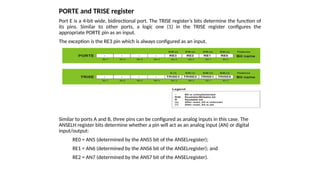
Port E is a 4-bit wide, bidirectional port. The TRISE register’s bits determine the function of
its pins. Similar to other ports, a logic one (1) in the TRISE register configures the
appropriate PORTE pin as an input.
The exception is the RE3 pin which is always configured as an input.
Similar to ports A and B, three pins can be configured as analog inputs in this case. The
ANSELH register bits determine whether a pin will act as an analog input (AN) or digital
input/output:
RE0 = AN5 (determined by the ANS5 bit of the ANSELregister);
RE1 = AN6 (determined by the ANS6 bit of the ANSELregister); and
RE2 = AN7 (determined by the ANS7 bit of the ANSELregister).
ANSEL and ANSELH register
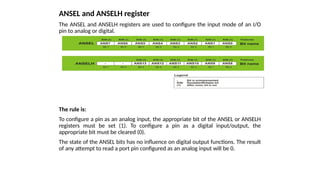
The ANSEL and ANSELH registers are used to configure the input mode of an I/O
pin to analog or digital.
The rule is:
To configure a pin as an analog input, the appropriate bit of the ANSEL or ANSELH
registers must be set (1). To configure a pin as a digital input/output, the
appropriate bit must be cleared (0).
The state of the ANSEL bits has no influence on digital output functions. The result
of any attempt to read a port pin configured as an analog input will be 0.
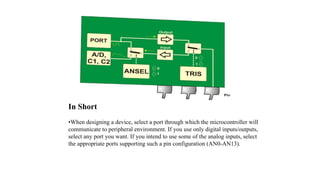
In Short
•When designing a device, select a port through which the microcontroller will
communicate to peripheral environment. If you use only digital inputs/outputs,
select any port you want. If you intend to use some of the analog inputs, select
the appropriate ports supporting such a pin configuration (AN0-AN13).
• Each port pin may be configured as either input or output. Bits of the
TRISA, TRISB, TRISC, TRISD and TRISE registers determine how the
appropriate port pins- PORTA, PORTB, PORTC, PORTD and PORTE will
act. Simply...
•If you use some of the analog inputs, it is first necessary to set the
appropriate bits of the ANSEL and ANSELH registers at the beginning of
the program.
•If you use switches and push buttons as input signal source, connect them
to PORTB pins because they have pull-up resistors. The use of these
resistors is enabled by the RBPU bit of the OPTION_REG register,
whereas the installation of individual resistors is enabled by bits of the
WPUB register.
•It is usually necessary to respond as soon as input pins change their logic
state.
•However, it is not necessary to write a program for checking pins’ logic
state. It is far simpler to connect such inputs to the PORTB pins and enable
an interrupt to occur on every voltage change. Bits of the IOCB and
INTCON registers are in charge of that.
11) Application Examples
EXAMPLE 1
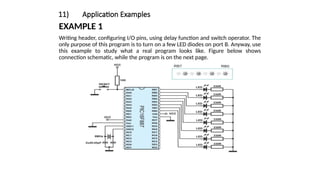
Writing header, configuring I/O pins, using delay function and switch operator. The
only purpose of this program is to turn on a few LED diodes on port B. Anyway, use
this example to study what a real program looks like. Figure below shows
connection schematic, while the program is on the next page.
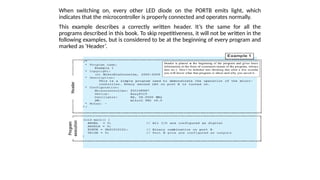
When switching on, every other LED diode on the PORTB emits light, which
indicates that the microcontroller is properly connected and operates normally.
This example describes a correctly written header. It’s the same for all the
programs described in this book. To skip repetitiveness, it will not be written in the
following examples, but is considered to be at the beginning of every program and
marked as ‘Header’.
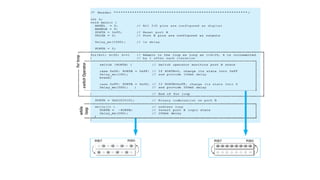
To make this example more interesting, we will enable LEDs connected to
the PORTB to blink. There are several ways to do it:
1. As soon as the microcontroller is turned on, all LEDs will emit light for a
second. The Delay function is in charge of it in the program. It’s only
needed to set delay expressed in milliseconds.
2. After one second, the program enters the for loop and remains there as
long as the variable k is less than 20. The variable is incremented by 1 after
each iteration. Within the for loop, the switch operation monitors PORTB
logic state. If PORTB=0xFF, its state is inverted into 0x00 and vice versa.
Any change of these logic states causes all LEDs to blink. Duty Cycle is 5:1
(500mS:100mS).
3. When the program exits the for loop, the PORTB logic state changes
(0xb 01010101) and the program enters the endless while loop and
remains there as long as 1=1. The PORTB logic state is inverted each
200mS.
Lec-7
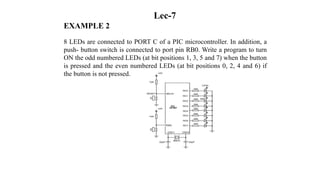
EXAMPLE 2
8 LEDs are connected to PORT C of a PIC microcontroller. In addition, a
push- button switch is connected to port pin RB0. Write a program to turn
ON the odd numbered LEDs (at bit positions 1, 3, 5 and 7) when the button
is pressed and the even numbered LEDs (at bit positions 0, 2, 4 and 6) if
the button is not pressed.
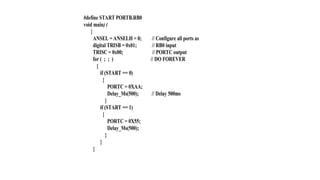
#define START PORTB.RB0
void main) (
{
ANSEL = ANSELH = 0; // Configure all ports as
digital TRISB = 0x01; // RB0 input
TRISC = 0x00; // PORTC output
for ( ; ; ) // DO FOREVER
{
if (START == 0)
{
PORTC = 0XAA;
Delay_Ms(500); // Delay 500ms
}
if (START == 1)
{
PORTC = 0X55;
Delay_Ms(500);
}
}
}
12) Important Displays Interfacing For PIC MCU
1) Interfacing 7-Segment Display With Pic MCU.
2) Interfacing Character LCD with PIC MCU.
3) Interfacing Graphics LCD (GLCD) With PIC MC
1) Interfacing 7-Segment Display With Pic MCU
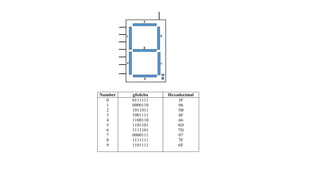
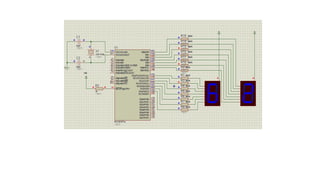
A seven segment display is the most basic electronic display device that can display
digits from 0-9. The most common configuration has an array of eight LEDs
arranged in a special pattern to display these digits. These device are commonly
used in digital clocks, electronics meters, counters and signaling.
A common pin is also associated with the 7-segment, which is used to identify the
type of 7-segment display; whether it is common anode or common cathode. In
common anode display, the positive pins of all the LEDs are tied together to form
the common pin which needs to be provided a ‘HIGH’ signal. In common cathode
display, all the cathode connections of the LEDs are tied together which forms the
common pin that needs to be grounded.
Number gfedcba Hexadecimal
0
1
2
3
4
5
6
7
8
9
0111111
0000110
1011011
1001111
1100110
1101101
1111101
0000111
1111111
1101111
3F
06
5B
4F
66
6D
7D
07
7F
6F
2) Interfacing Character LCD with PIC MCU
The Liquid Crystal Display (LCD) is one of the most commonly used displays
today. There are basically three types of LCDs as far as the type of data that can
be displayed is concerned: Segment LCD, Dot Matrix LCD and Graphic LCD.
Dot Matrix LCD is also known as the character LCD. The most commonly used
dot matrix LCD displays are 2 lines of 16 characters. Each character is
represented by 5x7 dots (or 5x8 characters including the cursor). Dot matrix
LCDs can display alphanumeric data, including a subset of symbols. It can
display all the letters of alphabet, Greek letters, punctuation marks,
mathematical symbols…etc. It is also possible to display symbols made up by
the user. Other useful features include automatic message shift (left and right),
cursor appearance, LED backlight etc..
Liquid crystals do not emit light by themselves, like LEDs. Therefore you need
light to see them; usually the surrounding light is enough to read the display,
yet in case of dark environments it is hard to read the display. Most LCDs
therefore contain an optional backlight, to produce sufficient contrast, which
makes reading easy in dark environment.
A) LCD Hardware
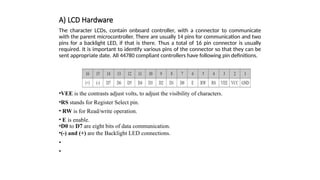
The character LCDs, contain onboard controller, with a connector to communicate
with the parent microcontroller. There are usually 14 pins for communication and two
pins for a backlight LED, if that is there. Thus a total of 16 pin connector is usually
required. It is important to identify various pins of the connector so that they can be
sent appropriate date. All 44780 compliant controllers have following pin definitions.
•VEE is the contrasts adjust volts, to adjust the visibility of characters.
•RS stands for Register Select pin.
• RW is for Read/write operation.
• E is enable.
•D0 to D7 are eight bits of data communication.
•(-) and (+) are the Backlight LED connections.
•
•
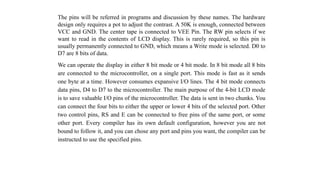
The pins will be referred in programs and discussion by these names. The hardware
design only requires a pot to adjust the contrast. A 50K is enough, connected between
VCC and GND. The center tape is connected to VEE Pin. The RW pin selects if we
want to read in the contents of LCD display. This is rarely required, so this pin is
usually permanently connected to GND, which means a Write mode is selected. D0 to
D7 are 8 bits of data.
We can operate the display in either 8 bit mode or 4 bit mode. In 8 bit mode all 8 bits
are connected to the microcontroller, on a single port. This mode is fast as it sends
one byte at a time. However consumes expansive I/O lines. The 4 bit mode connects
data pins, D4 to D7 to the microcontroller. The main purpose of the 4-bit LCD mode
is to save valuable I/O pins of the microcontroller. The data is sent in two chunks. You
can connect the four bits to either the upper or lower 4 bits of the selected port. Other
two control pins, RS and E can be connected to free pins of the same port, or some
other port. Every compiler has its own default configuration, however you are not
bound to follow it, and you can chose any port and pins you want, the compiler can be
instructed to use the specified pins.
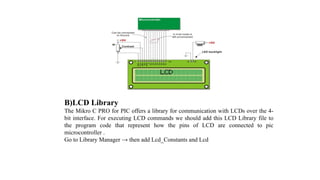
B)LCD Library
The Mikro C PRO for PIC offers a library for communication with LCDs over the 4-
bit interface. For executing LCD commands we should add this LCD Library file to
the program code that represent how the pins of LCD are connected to pic
microcontroller .
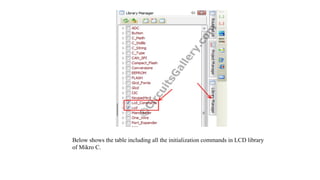
Go to Library Manager → then add Lcd_Constants and Lcd
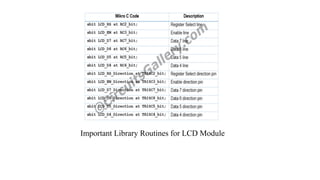
Below shows the table including all the initialization commands in LCD library
of Mikro C.
Important Library Routines for LCD Module
C) LCD Setup
Lcd_Init();
Initializes LCD module to work with PIC Microcontroller.
Lcd_Out(char row, char column, char“Text”);
Writes text on LCD beginning from definite position. Both string variables and
literals can be passed as a text. row: starting position row number. column: starting
position column number text: text to be written.
Lcd_Out_Cp(char *text);
This function prints the text (string) in the current cursor position. When we write
data to LCD Screen, it automatically increments the cursor position.
Lcd_Cmd(_LCD_CLEAR); LCD clear display.
Lcd_Cmd(_LCD_CURSOR_OFF); LCD Cursor off .
D) Algorithm for LCD to PIC program Steps
1. Configure LCD module pin connections.
2. Set PORTC as Output port.
3.Setup LCD display.
4. Send data to LCD display.
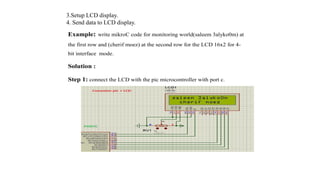
Example: write mikroC code for monitoring world(saleem 3alyko0m) at
the first row and (cherif moez) at the second row for the LCD 16x2 for 4-
bit interface mode.
Solution :
Step 1: connect the LCD with the pic microcontroller with port c.
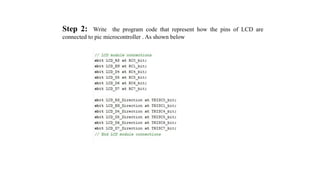
Step 2: Write the program code that represent how the pins of LCD are
connected to pic microcontroller . As shown below
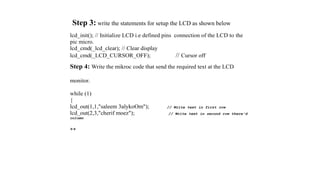
Step 3: write the statements for setup the LCD as shown below
lcd_init(); // Initialize LCD i.e defined pins connection of the LCD to the
pic micro.
lcd_cmd(_lcd_clear); // Clear display
lcd_cmd(_LCD_CURSOR_OFF); // Cursor off
Step 4: Write the mikroc code that send the required text at the LCD
monitor.
while (1)
{
lcd_out(1,1,"saleem 3alykoOm"); // Write text in first row
lcd_out(2,3,"cherif moez"); // Write text in second row there'd
column
**
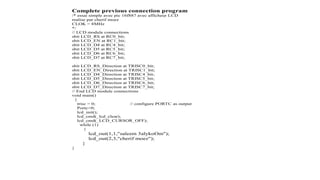
Complete previous connection program
/* essai simple avec pic 16f887 avec afficheur LCD
realise par cherif moez
CLOK = 8MHz
*/
// LCD module connections
sbit LCD_RS at RC0_bit;
sbit LCD_EN at RC1_bit;
sbit LCD_D4 at RC4_bit;
sbit LCD_D5 at RC5_bit;
sbit LCD_D6 at RC6_bit;
sbit LCD_D7 at RC7_bit;
sbit LCD_RS_Direction at TRISC0_bit;
sbit LCD_EN_Direction at TRISC1_bit;
sbit LCD_D4_Direction at TRISC4_bit;
sbit LCD_D5_Direction at TRISC5_bit;
sbit LCD_D6_Direction at TRISC6_bit;
sbit LCD_D7_Direction at TRISC7_bit;
// End LCD module connections
void main()
{
trisc = 0; // configure PORTC as output
Portc=0;
lcd_init();
lcd_cmd(_lcd_clear);
lcd_cmd(_LCD_CURSOR_OFF);
while (1)
{
lcd_out(1,1,"saleem 3alykoOm");
lcd_out(2,3,"cherif moez");
}
}
Lec-8
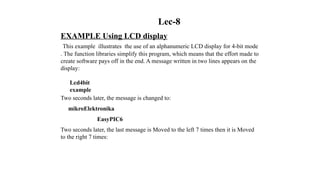
EXAMPLE Using LCD display
This example illustrates the use of an alphanumeric LCD display for 4-bit mode
. The function libraries simplify this program, which means that the effort made to
create software pays off in the end. A message written in two lines appears on the
display:
Lcd4bit
example
Two seconds later, the message is changed to:
mikroElektronika
EasyPIC6
Two seconds later, the last message is Moved to the left 7 times then it is Moved
to the right 7 times:
// LCD module
connections sbit
LCD_RS at RB4_bit;
sbit LCD_EN at
RB5_bit; sbit
LCD_D4 at RB0_bit;
sbit LCD_D5 at
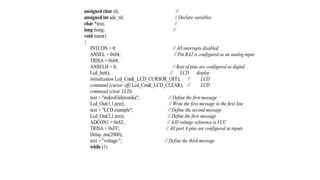
RB1_bit; sbit
LCD_D6 at RB2_bit;
sbit LCD_D7 at
RB3_bit;
sbit LCD_RS_Direction at
TRISB4_bit; sbit
LCD_EN_Direction at
TRISB5_bit; sbit
LCD_D4_Direction at
TRISB0_bit; sbit
LCD_D5_Direction at
TRISB1_bit; sbit
LCD_D6_Direction at
TRISB2_bit; sbit
LCD_D7_Direction at
TRISB3_bit;
// End LCD module connections
char txt1[] =
"mikroElektronika"; char
txt2[] = "EasyPIC6";
char txt3[] =
"Lcd4bit"; char
txt4[] =
"example";
char i; // Loop variable
void Move_Delay() { // Function used for text moving
Delay_ms(500); // You can change the moving speed here
}
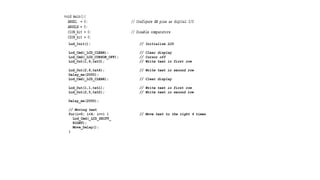
Lcd_Init(); // Initialize LCD
Lcd_Cmd(_LCD_CLEAR); // Clear display
Lcd_Cmd(_LCD_CURSOR_OFF); // Cursor off
Lcd_Out(1,6,txt3); // Write text in first row
Lcd_Out(2,6,txt4); // Write text in second row
Delay_ms(2000);
Lcd_Cmd(_LCD_CLEAR); // Clear display
Lcd_Out(1,1,txt1); // Write text in first row
Lcd_Out(2,5,txt2); // Write text in second row
Delay_ms(2000);
// Moving text
for(i=0; i<4; i++) { // Move text to the right 4 times
Lcd_Cmd(_LCD_SHIFT_
RIGHT);
Move_Delay();
}
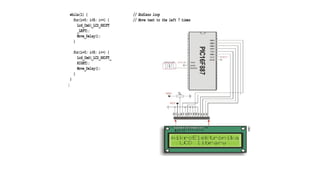
while(1) { // Endless loop
for(i=0; i<8; i++) { // Move text to the left 7 times
Lcd_Cmd(_LCD_SHIFT
_LEFT);
Move_Delay();
}
for(i=0; i<8; i++) { // Move text to the right 7 times
Lcd_Cmd(_LCD_SHIFT_
RIGHT);
Move_Delay();
}
}
}
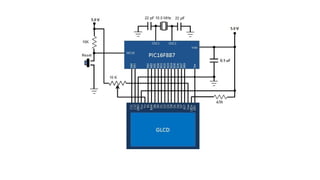
3) Interfacing Graphics LCD (GLCD) With PIC
The use of a graphical LCD (GLCD) drastically changes the look of your design. It
provides more freedom for presenting data than the based character LCDs. Because
the GLCDs required large number of I/O and memory there for its required a bigger
size PIC microcontroller like PIC16F887 which has 36 I/O pins and 14KB flash
memory. Also like characters LCD the mikroC Pro for PIC compiler has built-in
GLCD Library to display more complex texts and objects. There are different types
of GLCD this means the pin diagrams of GLCDs is not standardized and it is
therefore, important to read the manufacturer’s datasheet for correct wiring of a
GLCD module.
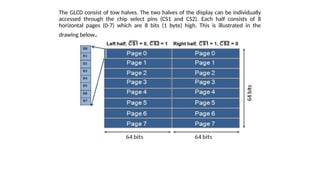
The GLCD consist of tow halves. The two halves of the display can be individually
accessed through the chip select pins (CS1 and CS2). Each half consists of 8
horizontal pages (0-7) which are 8 bits (1 byte) high. This is illustrated in the
drawing below.
Starting from page 0 on the left half (/CS1 = 0) if you transmit one data
byte, it will appear on the first column of page 0. If you repeat this 64
times, then switch to the second half, and repeat until 128th position is
reached, the first 8 display lines will be plotted. The next 8 lines can be
plotted similarly by switching to page address 1. The total amount of bytes
needed for a complete display frame (128×64 pixels) is, therefore, 2 * 64
pixels * 8 bits = 1024 bytes.
Here’s a brief description of various user-defined function subroutines used in the
code.
GLCD_ON() : This function turns the display on. This can be done by sending
the command 3Fh to both the controllers. So, while sending this command, both
CS1 and CS2 must be pulled low. Similarly the RS pin should be low too as the
byte sent is an instruction.
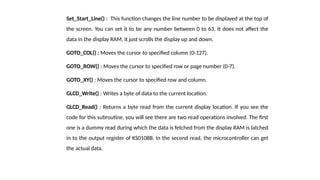
Set_Start_Line() : This function changes the line number to be displayed at the top of
the screen. You can set it to be any number between 0 to 63. It does not affect the
data in the display RAM, it just scrolls the display up and down.
GOTO_COL() : Moves the cursor to specified column (0-127).
GOTO_ROW() : Moves the cursor to specified row or page number (0-7).
GOTO_XY() : Moves the cursor to specified row and column.
GLCD_Write() : Writes a byte of data to the current location.
GLCD_Read() : Returns a byte read from the current display location. If you see the
code for this subroutine, you will see there are two read operations involved. The first
one is a dummy read during which the data is fetched from the display RAM is latched
in to the output register of KS0108B. In the second read, the microcontroller can get
the actual data.
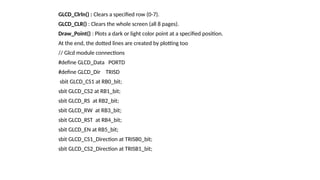
GLCD_Clrln() : Clears a specified row (0-7).
GLCD_CLR() : Clears the whole screen (all 8 pages).
Draw_Point() : Plots a dark or light color point at a specified position.
At the end, the dotted lines are created by plotting too
// Glcd module connections
#define GLCD_Data PORTD
#define GLCD_Dir TRISD
sbit GLCD_CS1 at RB0_bit;
sbit GLCD_CS2 at RB1_bit;
sbit GLCD_RS at RB2_bit;
sbit GLCD_RW at RB3_bit;
sbit GLCD_RST at RB4_bit;
sbit GLCD_EN at RB5_bit;
sbit GLCD_CS1_Direction at TRISB0_bit;
sbit GLCD_CS2_Direction at TRISB1_bit;
Lec-9
13) A/D Converter & Analog Modules
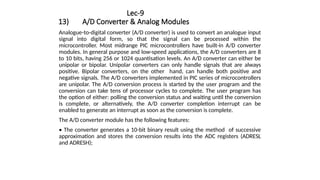
Analogue-to-digital converter (A/D converter) is used to convert an analogue input
signal into digital form, so that the signal can be processed within the
microcontroller. Most midrange PIC microcontrollers have built-in A/D converter
modules. In general purpose and low-speed applications, the A/D converters are 8
to 10 bits, having 256 or 1024 quantisation levels. An A/D converter can either be
unipolar or bipolar. Unipolar converters can only handle signals that are always
positive. Bipolar converters, on the other hand, can handle both positive and
negative signals. The A/D converters implemented in PIC series of microcontrollers
are unipolar. The A/D conversion process is started by the user program and the
conversion can take tens of processor cycles to complete. The user program has
the option of either: polling the conversion status and waiting until the conversion
is complete, or alternatively, the A/D converter completion interrupt can be
enabled to generate an interrupt as soon as the conversion is complete.
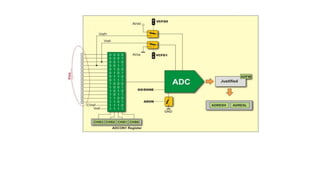
The A/D converter module has the following features:
• The converter generates a 10-bit binary result using the method of successive
approximation and stores the conversion results into the ADC registers (ADRESL
and ADRESH);
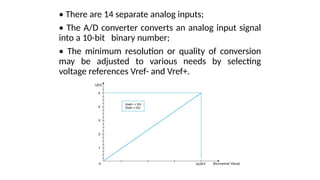
• There are 14 separate analog inputs;
• The A/D converter converts an analog input signal
into a 10-bit binary number;
• The minimum resolution or quality of conversion
may be adjusted to various needs by selecting
voltage references Vref- and Vref+.
The operation of A/D converter is in control of the bits of four registers:
- ADRESH Contains high byte of conversion result;
- ADRESL Contains low byte of conversion result;
- ADCON0 Control register 0; and
- ADCON1 Control register 1.
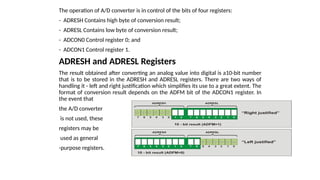
ADRESH and ADRESL Registers
The result obtained after converting an analog value into digital is a10-bit number
that is to be stored in the ADRESH and ADRESL registers. There are two ways of
handling it - left and right justification which simplifies its use to a great extent. The
format of conversion result depends on the ADFM bit of the ADCON1 register. In
the event that
the A/D converter
is not used, these
registers may be
used as general
-purpose registers.
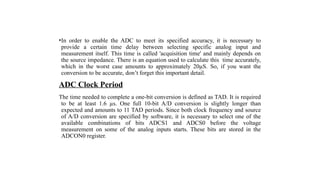
•In order to enable the ADC to meet its specified accuracy, it is necessary to
provide a certain time delay between selecting specific analog input and
measurement itself. This time is called 'acquisition time' and mainly depends on
the source impedance. There is an equation used to calculate this time accurately,
which in the worst case amounts to approximately 20µS. So, if you want the
conversion to be accurate, don’t forget this important detail.
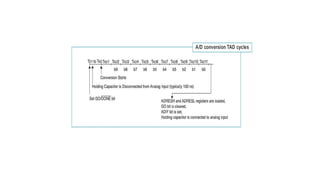
ADC Clock Period
The time needed to complete a one-bit conversion is defined as TAD. It is required
to be at least 1.6 µs. One full 10-bit A/D conversion is slightly longer than
expected and amounts to 11 TAD periods. Since both clock frequency and source
of A/D conversion are specified by software, it is necessary to select one of the
available combinations of bits ADCS1 and ADCS0 before the voltage
measurement on some of the analog inputs starts. These bits are stored in the
ADCON0 register.
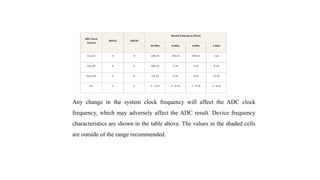
Any change in the system clock frequency will affect the ADC clock
frequency, which may adversely affect the ADC result. Device frequency
characteristics are shown in the table above. The values in the shaded cells
are outside of the range recommended.
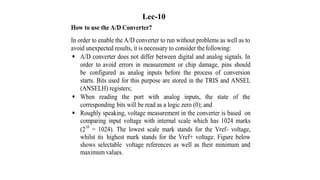
How to use the A/D Converter?
In order to enable the A/D converter to run without problems as well as to
avoid unexpected results, it is necessary to consider the following:
 A/D converter does not differ between digital and analog signals. In
order to avoid errors in measurement or chip damage, pins should
be configured as analog inputs before the process of conversion
starts. Bits used for this purpose are stored in the TRIS and ANSEL
(ANSELH) registers;
 When reading the port with analog inputs, the state of the
corresponding bits will be read as a logic zero (0); and
 Roughly speaking, voltage measurement in the converter is based on
comparing input voltage with internal scale which has 1024 marks
(210
= 1024). The lowest scale mark stands for the Vref- voltage,
whilst its highest mark stands for the Vref+ voltage. Figure below
shows selectable voltage references as well as their minimum and
maximum values.
Lec-10
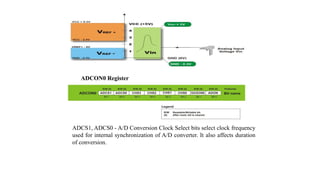
ADCON0 Register
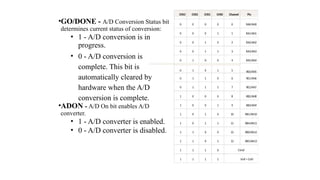
ADCS1, ADCS0 - A/D Conversion Clock Select bits select clock frequency
used for internal synchronization of A/D converter. It also affects duration
of conversion.
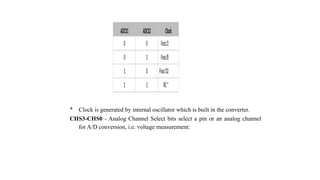
ADCS1 ADCS2 Clock
0 0 Fosc/2
0 1 Fosc/8
1 0 Fosc/32
1 1 RC*
* Clock is generated by internal oscillator which is built in the converter.
CHS3-CHS0 - Analog Channel Select bits select a pin or an analog channel
for A/D conversion, i.e. voltage measurement:
•GO/DONE - A/D Conversion Status bit
determines current status of conversion:
• 1 - A/D conversion is in
progress.
• 0 - A/D conversion is
complete. This bit is
automatically cleared by
hardware when the A/D
conversion is complete.
•ADON - A/D On bit enables A/D
converter.
• 1 - A/D converter is enabled.
• 0 - A/D converter is disabled.
CHS3 CHS2 CHS1 CHS0 Channel Pin
0 0 0 0 0 RA0/AN0
0 0 0 1 1 RA1/AN1
0 0 1 0 2 RA2/AN2
0 0 1 1 3 RA3/AN3
0 1 0 0 4 RA5/AN4
0 1 0 1 5 RE0/AN5
0 1 1 0 6 RE1/AN6
0 1 1 1 7 RE2/AN7
1 0 0 0 8 RB2/AN8
1 0 0 1 9 RB3/AN9
1 0 1 0 10 RB1/AN10
1 0 1 1 11 RB4/AN11
1 1 0 0 12 RB0/AN12
1 1 0 1 13 RB5/AN13
1 1 1 0 CVref
1 1 1 1 Vref = 0.6V
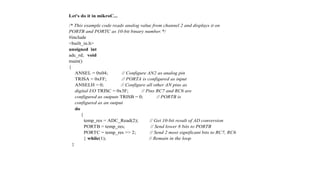
Let's do it in mikroC...
/* This example code reads analog value from channel 2 and displays it on
PORTB and PORTC as 10-bit binary number.*/
#include
<built_in.h>
unsigned int
adc_rd; void
main()
{
ANSEL = 0x04; // Configure AN2 as analog pin
TRISA = 0xFF; // PORTA is configured as input
ANSELH = 0; // Configure all other AN pins as
digital I/O TRISC = 0x3F; // Pins RC7 and RC6 are
configured as outputs TRISB = 0; // PORTB is
configured as an output
do
{
temp_res = ADC_Read(2); // Get 10-bit result of AD conversion
PORTB = temp_res; // Send lower 8 bits to PORTB
PORTC = temp_res >> 2; // Send 2 most significant bits to RC7, RC6
} while(1); // Remain in the loop
}
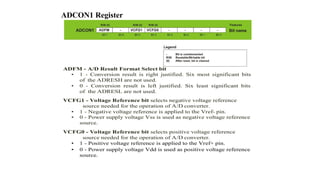
ADCON1 Register
ADFM - A/D Result Format Select bit
• 1 - Conversion result is right justified. Six most significant bits
of the ADRESH are not used.
• 0 - Conversion result is left justified. Six least significant bits
of the ADRESL are not used.
VCFG1 - Voltage Reference bit selects negative voltage reference
source needed for the operation of A/D converter.
• 1 - Negative voltage reference is applied to the Vref- pin.
• 0 - Power supply voltage Vss is used as negative voltage reference
source.
VCFG0 - Voltage Reference bit selects positive voltage reference
source needed for the operation of A/D converter.
• 1 - Positive voltage reference is applied to the Vref+ pin.
• 0 - Power supply voltage Vdd is used as positive voltage reference
source.
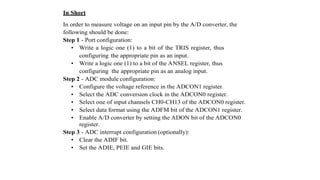
In Short
In order to measure voltage on an input pin by the A/D converter, the
following should be done:
Step 1 - Port configuration:
• Write a logic one (1) to a bit of the TRIS register, thus
configuring the appropriate pin as an input.
• Write a logic one (1) to a bit of the ANSEL register, thus
configuring the appropriate pin as an analog input.
Step 2 - ADC module configuration:
• Configure the voltage reference in the ADCON1 register.
• Select the ADC conversion clock in the ADCON0 register.
• Select one of input channels CH0-CH13 of the ADCON0 register.
• Select data format using the ADFM bit of the ADCON1 register.
• Enable A/D converter by setting the ADON bit of the ADCON0
register.
Step 3 - ADC interrupt configuration (optionally):
• Clear the ADIF bit.
• Set the ADIE, PEIE and GIE bits.
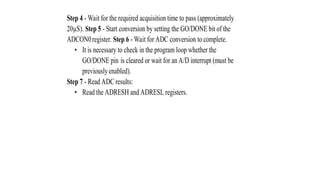
Step 4 - Wait for the required acquisition time to pass (approximately
20µS). Step 5 - Start conversion by setting the GO/DONE bit of the
ADCON0register. Step 6 - Wait for ADC conversion to complete.
• It is necessary to check in the program loop whether the
GO/DONE pin is cleared or wait for an A/D interrupt (must be
previouslyenabled).
Step 7 - Read ADC results:
• Read the ADRESH and ADRESL registers.
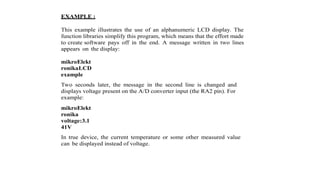
EXAMPLE :
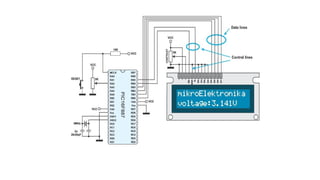
This example illustrates the use of an alphanumeric LCD display. The
function libraries simplify this program, which means that the effort made
to create software pays off in the end. A message written in two lines
appears on the display:
mikroElekt
ronikaLCD
example
Two seconds later, the message in the second line is changed and
displays voltage present on the A/D converter input (the RA2 pin). For
example:
mikroElekt
ronika
voltage:3.1
41V
In true device, the current temperature or some other measured value
can be displayed instead of voltage.
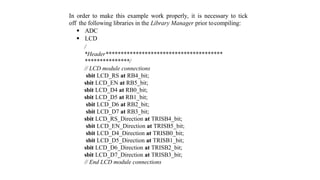
In order to make this example work properly, it is necessary to tick
off the following libraries in the Library Manager prior tocompiling:
 ADC
 LCD
/
*Header***************************************
***************/
// LCD module connections
sbit LCD_RS at RB4_bit;
sbit LCD_EN at RB5_bit;
sbit LCD_D4 at RB0_bit;
sbit LCD_D5 at RB1_bit;
sbit LCD_D6 at RB2_bit;
sbit LCD_D7 at RB3_bit;
sbit LCD_RS_Direction at TRISB4_bit;
sbit LCD_EN_Direction at TRISB5_bit;
sbit LCD_D4_Direction at TRISB0_bit;
sbit LCD_D5_Direction at TRISB1_bit;
sbit LCD_D6_Direction at TRISB2_bit;
sbit LCD_D7_Direction at TRISB3_bit;
// End LCD module connections
unsigned char ch; //
unsigned int adc_rd; // Declare variables
char *text; //
long tlong; //
void main()
{
INTCON = 0; // All interrupts disabled
ANSEL = 0x04; // Pin RA2 is configured as an analog input
TRISA = 0x04;
ANSELH = 0; // Rest of pins are configured as digital
Lcd_Init(); // LCD display
initialization Lcd_Cmd(_LCD_CURSOR_OFF); // LCD
command (cursor off) Lcd_Cmd(_LCD_CLEAR); // LCD
command (clear LCD)
text = "mikroElektronika"; // Define the first message
Lcd_Out(1,1,text); // Write the first message in the first line
text = "LCD example"; // Define the second message
Lcd_Out(2,1,text); // Define the first message
ADCON1 = 0x82; // A/D voltage reference is VCC
TRISA = 0xFF; // All port A pins are configured as inputs
Delay_ms(2000);
text = "voltage:"; // Define the third message
while (1)
{
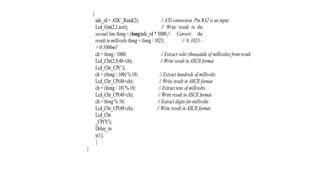
adc_rd = ADC_Read(2); // A/D conversion. Pin RA2 is an input.
Lcd_Out(2,1,text); // Write result in the
second line tlong = (long)adc_rd * 5000;// Convert the
result inmillivolts tlong = tlong / 1023; // 0..1023 -
> 0-5000mV
ch = tlong / 1000; // Extract volts (thousands of millivolts) fromresult
Lcd_Chr(2,9,48+ch); // Write result in ASCII format
Lcd_Chr_CP('.');
ch = (tlong / 100) % 10; // Extract hundreds of millivolts
Lcd_Chr_CP(48+ch); // Write result in ASCII format
ch = (tlong / 10) % 10; // Extract tens of millivolts
Lcd_Chr_CP(48+ch); // Write result in ASCII format
ch = tlong % 10; // Extract digits formillivolts
Lcd_Chr_CP(48+ch); // Write result in ASCII format
Lcd_Chr
_CP('V');
Delay_m
s(1);
}
}

Micro Controllers engineering - computer engineering

  • 1.
    ‫والبحث‬ ‫العالــي‬ ‫التعليم‬‫وزارة‬ ‫العلـــمي‬ ‫تقنيــــــات‬ ‫هندســـــــــــة‬ ‫قســم‬ ‫الحاســـــوب‬ ‫فـــــــــــــرع‬ ‫الكـــــــــــــترونيات‬ ‫الحاســــــــــــــبات‬ ‫المرحلـــــــــــــــــــــــــــــــــــــ‬ ‫الــــــــــثالثــــــــــــــــــــــــة‬ ‫ة‬ ‫الرقمـــية‬ ‫المســــيطرات‬ ‫المتقدمـــــــة‬ " ‫الدقيقـــــــة‬ ‫المسيطرات‬ " Advanced Digital Controllers " Microcontroller Course " Eng. Jabbar Sh. Jahlool
  • 2.
    Introduction to Microcontrollers 1)Important Notes over Electronics. 2) What is a Microcontroller? 3) Inside Components of the Microcontroller. 4) How does the Microcontroller Work? 5) Microcontroller Vs Microprocessor. 6) Short list of MCU Brands. 7) How to choose your chip? 8) Description Of PIC16F887. 9) Necessary connections of PIC Microcontroller. 10) Outputting Data / Signals 11) Applications examples. 12) Important Displays Interfacing For PIC MCU
  • 3.
    1) Important Notesover Electronics a) Pull Down Resistor Connection. b) Pull UP Resistor Connection. c) Relay Driver Circuit. d) Logic Gates. e) Test Board. a) Pull Down Resistor Connection - We use it to prevent the pin's voltage to be floating due to the noises. - When the switch is pressed, we get input HIGH on the pin "B". - When the switch isn't pressed, we get input LOW on the pin "B".
  • 4.
    b) Pull UPResistor Connection - We use it to prevent the pin's voltage to be floating due to the noises - When the switch is pressed, we get input LOW on the pin "B". - When the switch isn't pressed, we get input HIGH on the pin "B".
  • 5.
    c) Relay DriverCircuit A Relay is an electromechanical switch, that means that it is a normal switch but it is controlled electrically using a coil.
  • 6.
    Relays rating is: • The value and type of the voltage applied across the coil to energize the electromagnetic field. • The max current can pass through the contact without having a fault. • The type and max value of the voltage applied across the contact without having a fault. • Relay Driver circuit is a circuit used to allow any IC to control any load through a Relay. • The Relay may require voltage or current that the IC can't afford so we use this circuit.
  • 7.
    Usage of eachcomponent: • Diode: to prevent the back EMF of the relay's coil from causing damage to the Transistor. • Transistor: to allow the IC to control the Relay, We use the Transistor in the saturation mode (as a switch) and this makes the IC control the Relay no matter the current or voltage required by its coil. • Resistor: to limit the current passing through the base of the Transistor, so it protects the Transistor.
  • 8.
    d) Logic Gates •It is important to be known that 1 in logic or High means 5 volt and 0 or Low means 0 volts. • Also you must know that there is different forms for numbering: 1) Binary: consists of 0 and 1 only. 2) Decimal: it is the normal numbering system we are using: (0, 1, 2, 3, 4, 5, 6, 7, 8, 9) 3) Hex Decimal: consist of (0, 1, 2, 3, 4, 5, 6, 7, 8, 9, A, B, C, D, E, F) 4) Octal: consist of (0, 1, 2, 3, 4, 5, 6, 7)
  • 9.
    • NOT Gate •AND Gate • OR Gate
  • 10.
    e) Test Boards •It is a board that can be used several times as the component are fixed and can be replaced from it and its used for prototype design and testing also for practical experimental . •
  • 11.
    2) What isa Microcontroller? • Embedded Systems • An embedded system is a product which uses a computer to run it but the product itself is not a computer. • Microcontroller (MCU) • Integrated electronic computing device or a small computer on a single integrated circuit that includes three major components on a single chip • Microprocessor (MPU). • Memory. • I/O (Input/Output) ports.
  • 12.
    Types of Microcontrollers: Microcontrollerscan be classified on the basis of internal bus width, architecture, memory and instruction set. Figure below shows the various types of microcontrollers. - When the ALU performs arithmetic and logical operations on a byte (8- bits) at an instruction, the microcontroller is an 8-bit microcontroller. The internal bus width of 8-bit microcontroller is of 8-bit. Examples of 8-bit microcontrollers are Intel 8051 family and Motorola MC68HC11 family. - When the ALU performs arithmetic and logical operations on a word (16-bits) at an instruction, the microcontroller is an 16-bit microcontroller. The internal bus width of 16-bit microcontroller is of 16-bit. Examples of 16-bit microcontroller are Intel 8096 family and Motorola MC68HC12 and MC68332 families. performance and computing capability of 16 bit microcontrollers are enhanced with greater precision as compared to the 8-bit microcontrollers. - When the ALU performs arithmetic and logical operations on a double word (32- bits) at an instruction, the microcontroller is an 32-bit microcontroller. The internal bus width of 32-bit microcontroller is of 32-bit. Examples of 32-bit microcontrollers are Intel 80960 family and Motorola M683xx and Intel/Atmel 251 family.
  • 13.
    The performance andcomputing capability of 32 bit microcontrollers are enhanced with greater precision as compared to the 16-bit microcontrollers.
  • 14.
    • Memory Architecture:All MCs use one of two basic design models - Harvard Architecture: data bus and address bus are separate. Thus a greater flow of data is possible through the CPU, and of course, a greater speed of work. - Von –Neumann (Princeton): This model use share a common bus for data and address bus.
  • 15.
    • Microcontroller Applications: Thesesmall devices have revolutionized the world of electronics. Today microcontrollers are everywhere, think of a device and you will find a microcontroller somewhere in it. May it be your remote control, cell phone air conditioner, microwave oven, DVD player, home monitoring system, environmental control (greenhouse, factory, home) television or all have a microcontroller sitting inside . These small devices can do so much, that only imagination is the limit. Moreover they are very simple to use, you don't need to be an expert in electronics to use them in your next project. A basic understanding of electronics, and digital circuits is all that is required to get started. Once you are in the business, sky is the limit. Think of any logical application and you will find microcontroller handling the job nicely. Industrial automation including automatic assembly lines, robots and quality control systems all are backed by some kind of microcontroller.
  • 16.
    Lec.2 3) Inside ComponentsOf The Microcontroller.
  • 17.
    PIC MUC Components a)Central processing unit (CPU) b) Read Only Memory (ROM) c) Random Access Memory (RAM) d) Special Function Registers (SFR) e) Input /Output Ports f) Serial Communication g) Timers/Counters h) A/D Converter i) Power Supply Circuit j) Oscillator
  • 18.
    a) Central processingunit (CPU)  This is a unit which monitors and controls all processes within the microcontroller and the user cannot affect its work.  It consists of several smaller subunits, of which the most important are: a) Instruction decoder b) Arithmetical Logical Unit (ALU) c) Accumulator b) Read Only Memory (ROM) • Read Only Memory (ROM) is a type of memory used to permanently save the program being executed. • The size of the program that can be written depends on the size of this memory. • ROM can be built in the microcontroller or added as external chip, which depends on the type of the microcontroller. • Today’s microcontrollers commonly use 16-bit addressing, which means that they are able to address up to 64 Kb of memory, i.e. 65535 locations. As a novice, your program will rarely exceed the limit of several hundred instructions. There are several types of ROM:-
  • 19.
     Flash Memory:Flash memory is a non-volatile memory used mainly to store user programs. This type of memory can be programmed electrically while embedded on the board. Some microcontrollers have only 1 KB flash memory, while some others can have 32KB or more. In addition to computers, flash memory is also used in mobile phones and digital cameras. • This type of memory was invented in the 80s in the laboratories of INTEL and was represented as the successor to the UV EPROM. Since the content of this memory can be written and cleared practically an unlimited number of times, microcontrollers with Flash ROM are ideal for learning, experimentation and small-scale production. Because of its great popularity, most microcontrollers are manufactured in flash technology today. So, if you are going to buy a microcontroller, the type to look for is definitely Flash! - MROM (Masked ROM). - UV Erasable Programmable ROM (UV EPROM). - EEPROM (Electric erasable programmable ROM).
  • 20.
     Random AccessMemory (RAM) is a type of memory used for temporary storing data and intermediate results created and used during the operation of the microcontrollers.  The content of this memory is cleared once the power supply is off.  EEPROM Data Memory: EEPROM-type data memory is also very common in many microcontrollers. The advantage of an EEPROM memory is that the programmer can store nonvolatile data there and change this data whenever required. For example, in a temperature monitoring application, the maximum and minimum temperature readings can be stored in an EEPROM memory. If the power supply is removed for any reason, the values of the latest readings are available in the EEPROM memory. The PIC18F452 microcontroller has 256 bytes of EEPROM memory. Other members of the PIC18F family have more EEPROM memory (e.g., the PIC18F6680 has 1024 bytes). The mikroC language provides special instructions for reading and writing to the EEPROM memory of a PIC microcontroller. c) Random Access Memory (RAM)
  • 21.
    d) Registers &Special Function Registers (SFR) • Register: In short, a register or a memory cell is an electronic circuit which can memorize the state of one byte. Special Function Registers (SFR)  Special Function Registers are part of RAM memory.  In addition to registers which do not have any special and predetermined function, every microcontroller has a number of registers (SFR) whose function is predetermined by the manufacturer.  Their bits are physically connected to particular circuits within the micro-controller such as timers, A/D converter, oscillators etc.,
  • 22.
    - Any changeof their state affects the operation of the microcontroller or some of the circuits e) Input /Output Ports • In order to make the microcontroller useful, it has to be connected to additional electronics, i.e. peripherals. • Each microcontroller has one or more registers (called a port) connected to the microcontroller pins. • So the microcontroller will be connected to the peripheral devices through the pins connected the port register. • The port registers are controlled to be input or output using registers called TRIS registers, so each port has its on TRIS register.
  • 23.
    • So anybit in a PORTx can be input if the equivalent bit in the TIRSx register is (1) and output if the equivalent bit in the TRISx register is (0). • Current sink/source capability is important if the microcontroller is to be connected to an external device that might draw a large amount of current to operate. PIC microcontrollers can source and sink 25mA of current from each output port pin. This current is usually sufficient to drive LEDs, small lamps, buzzers, small relays, etc. The current capability can be increased by connecting external transistor switching circuits or relays to the output port pins.
  • 24.
    f) Serial Communication •Parallel connection between the microcontroller and peripherals via input/output ports is the ideal solution on shorter distances up to several meters. However, in other cases when it is necessary to establish communication between two devices on longer distances it is not possible to use parallel connection. Instead, serial communication is used. • Serial Input-Output or Serial communication (also called RS232 communication) enables a microcontroller to be connected to another microcontroller or to a PC using a serial cable. Some microcontrollers have built-in hardware called USART (universal synchronous asynchronous receiver- transmitter) to implement a serial communication interface.
  • 25.
    Today, most microcontrollershave built in several different systems for serial communication as a standard equipment. Which of these systems will be used depends on many factors of which the most important are: - How many devices the microcontroller has to exchange data with? - How fast the data exchange has to be? - What is the distance between devices? -Is it necessary to send and receive data simultaneously?
  • 26.
    • One ofthe most important things concerning serial communication is the Protocol which should be strictly observed. It is a set of rules which must be applied in order that devices can correctly interpret data they mutually exchange. Fortunately, the microcontroller automatically takes care of this, so that the work of the programmer/user is reduced to simple write (data to be sent) and read (received data). • Baud Rate: The term baud rate is used to denote the number of bits transferred per second [bps]. Note that it refers to bits, not bytes. It is usually required by the protocol that each byte is transferred along with several control bits. It means that one byte in serial data stream may consist of 11 bits. For example, if the baud rate is 300 bps then maximum 37 and minimum 27 bytes may be transferred per second. • The most commonly used serial communication systems are:
  • 27.
    1) I²C (InterIntegrated Circuit) Inter-integrated circuit is a system for serial data exchange between the microcontrollers and specialized integrated circuits of a new generation. It is used when the distance between them is short (receiver and transmitter are usually on the same printed board). Connection is established via two conductors. One is used for data transfer, the other is used for synchronization (clock signal). As seen in figure below, one device is always a master. It performs addressing of one slave chip before communication starts. In this way one microcontroller can communicate with 112 different devices. Baud rate is usually 100 Kb/sec (standard mode) or 10 Kb/sec (slow baud rate mode). Systems with the baud rate of 3.4 Mb/sec have recently appeared. The distance between devices which communicate over an I2C bus is limited to several meters.
  • 28.
    2) SPI (SerialPeripheral Interface Bus) A serial peripheral interface (SPI) bus is a system for serial communication which uses up to four conductors, commonly three. One conductor is used for data receiving, one for data sending, one for synchronization and one alternatively for selecting a device to communicate with. It is a full duplex connection, which means that data is sent and received simultaneously. The maximum baud rate is higher than that in the I2C communication system.
  • 29.
    Lec-3 3) UART (UniversalAsynchronous Receiver/ Transmitter) This sort of communication is asynchronous, which means that a special line for transferring clock signal is not used. In some applications, such as radio connection or infrared waves remote control, this feature is crucial. Since only one communication line is used, both receiver and transmitter operate at the same predefined rate in order to maintain necessary synchronization. This is a very simple way of transferring data since it basically represents the conversion of 8-bit data from parallel to serial format. Baud rate is not high, up to 1 Mbit/sec. g) Timers/Counters The microcontroller oscillator uses quartz crystal for its operation. Even though it is not the simplest solution, there are many reasons to use it.
  • 30.
    The frequency ofsuch oscillator is precisely defined and very stable, so that pulses it generates are always of the same width, which makes them ideal for time measurement. Such oscillators are also used in quartz watches. If it is necessary to measure time between two events, it is sufficient to count up pulses generated by this oscillator. This is exactly what the timer does.
  • 31.
    Most programs usethese miniature electronic ‘stopwatches’. These are commonly 8- or 16-bit SFRs the contents of which is automatically incremented by each coming pulse. Once a register is completely loaded, an interrupt may be generated!. If the timer uses an internal quartz oscillator for its operation then it can be used to measure time between two events (if the register value is T1 at the moment measurement starts, and T2 at the moment it terminates, then the elapsed time is equal to the result of subtraction T2-T1). If registers use pulses coming from external source then such a timer is turned into a counter. This is only a simple explanation of the operation itself. It is however more complicated in practice.
  • 32.
    How Does theTimer Operate? In practice, pulses generated by the quartz oscillator are once per each machine cycle, directly or via a prescaler, brought to the circuit which increments the number stored in the timer register. If one instruction (one machine cycle) lasts for four quartz oscillator periods then this number will be incremented a million times per second (each microsecond) by embedding quartz with the frequency of 4MHz.
  • 33.
    It is easyto measure short time intervals, up to 256 microseconds, in the way described above because it is the largest number that one register can store. This restriction may be easily overcome in several ways such as by using a slower oscillator, registers with more bits, prescaler or interrupts. The first two solutions have some weaknesses so it is more recommended to use prescalers or interrupts. Using a Prescaler in Timer Operation: A prescaler is an electronic device used to reduce frequency by a predetermined factor. In order to generate one pulse on its output, it is necessary to bring 1, 2 , 4 or more pulses on its input. Most microcontrollers have one or more prescalers built in and their division rate may be changed from within the program. The prescaler is used when it is necessary to measure longer periods of time. If one prescaler is shared by timer and watchdog timer, it cannot be used by both of them simultaneously.
  • 34.
    Most microcontrollers haveone or more prescalers built in and their division rate may be changed from within the program. The prescaler is used when it is necessary to measure longer periods of time. If one prescaler is shared by timer and watchdog timer, it cannot be used by both of them simultaneously.
  • 35.
    Using Interrupt inTimer Operation: If the timer register consists of 8 bits, the largest number it can store is 255. As for 16-bit registers it is the number 65.535. If this number is exceeded, the timer will be automatically reset and counting will start at zero again. This condition is called an overflow. If enabled from within the program, the overflow can cause an interrupt, which gives completely new possibilities. For example, the state of registers used for counting seconds, minutes or days can be changed in an interrupt routine. The whole process (except for interrupt routine) is automatically performed behind the scenes, which enables the main circuits of the microcontroller to operate normally.
  • 36.
    This figure illustratesthe use of an interrupt in timer operation. Delays of arbitrary duration, having almost no influence on the main program execution, can be easily obtained by assigning the prescaler to the timer. Counters: If the timer receives pulses from the microcontroller input pin, then it turns into a counter. Obviously, it is the same electronic circuit able to operate in two different modes. The only difference is that in this case pulses to be counted come over the microcontroller input pin and their duration (width) is mostly undefined. This is why they cannot be used for time measurement, but for other purposes such as counting products on an assembly line, number of axis rotation, passengers etc. (depending on sensor in use).
  • 37.
    h) A/D Converter`` whichconverts continuous signals to discrete digital numbers. In other words, this circuit converts an analogue value into a binary number and passes it to the CPU for further processing. This module is therefore used for input pin voltage measurement (analogue value). The result of measurement is a number (digital value) used and processed later in the program. A/D converters are especially useful in control and monitoring applications, since most sensors (e.g., temperature sensors, pressure sensors, force sensors, etc.) produce analog output voltages. • External signals are usually fundamentally different from those the microcontroller understands (ones and zeros) and have to be converted therefore into values understandable for the microcontroller. An analogue to digital converter is an electronic circuit
  • 38.
    i) Power SupplyCircuit There are two things worth attention concerning the microcontroller power supply circuit: - Brown Out - Reset Pin Brown Out: - It is a potentially dangerous state which occurs when the microcontroller is being turned off or when power supply voltage drops to the lowest level due to electric noise.
  • 39.
    j) Oscillator • Evenpulses generated by the oscillator enable the operation of all circuits within the microcontroller. • One of the factors that controls the speed of the microcontroller is the frequency of the oscillator. • There are different modes of oscillators like: • Low Power Crystal (LP) • Crystal/Resonator (XT) • High Speed Crystal/Resonator (HS) • Resistor Capacitor (RC) - As the microcontroller consists of several circuits which have different operating voltage levels, this can cause its out of control performance. This circuit immediately resets the whole electronics when the voltage level drops below the lower limit. Reset Pin Master Clear Reset (MCLR) serves for external reset of the microcontroller. Reset puts the microcontroller into a known state. Usually, after a reset, the program starting from memory address 0 of the microcontroller is executed.
  • 40.
    - We usecapacitors with the oscillators to reduce noises and we chose the capacitors values depending on the oscillator frequency and type. - It is important to say that program instructions are not executed at the rate imposed by the oscillator. - There are four steps taken by the CPU to do an instruction: 1. Fetch 2. Decode 3. Execute 4. Transfer Finternal-clock = 1/Fosc Tcycle = 4 * Tosc = Tfetch + Tdecode + Texecute + Ttransfer
  • 41.
    4) How doesthe microcontroller work? • The program is load into the microcontroller. • Power supply is turned on, the control logic units disables all other circuits except quartz crystal to operate. • Power supply voltage reaches its maximum and oscillator frequency becomes stable. SFRs are being filled with bits reflecting the state of all circuits within the microcontroller. • Program counter is set to zero. Instruction from that address is sent to instruction decoder which recognizes it, after which it is executed with immediate effect. • The value of the program counter is incremented by (1) and the whole process is repeated several million times per second.
  • 42.
    5) Microcontroller VsMicroprosser • Microcontroller contains a Microprocessor.
  • 43.
    • Microprocessor isa single chip CPU, microcontroller contains, a CPU and much of the remaining circuitry of a complete microcomputer system in a single chip. • Microcontroller includes RAM, ROM, serial and parallel interface, timer, interrupt schedule circuitry (in addition to CPU) in a single chip. • RAM is smaller than that of even an ordinary microcomputer, but enough for its applications. • Interrupt system is an important feature, as microcontrollers have to respond to control oriented devices in real time. E.g., opening of microwave oven’s door cause an interrupt to stop the operation. (Most microprocessors can also implement powerful interrupt schemes, but external components are usually needed). • Microprocessors are most commonly used as the CPU in microcomputer systems. Microcontrollers are used in small, minimum component designs performing control- oriented activities. • Microprocessor instruction sets are processing intensive, implying powerful addressing modes with instructions catering to large volumes of data. Their instructions operate on nibbles, bytes, etc. Microcontrollers have instruction sets catering to the control of inputs and outputs. Their instructions operate also on a single bit. E.g., a motor may be turned ON and OFF by a 1-bit output port.
  • 44.
    6) How tochoose your chip? Logically: Decide the type and number of the modules in the microcontroller you will need in your project. Check up the microcontrollers available in the market. Look for the data sheet for each of them to get the one that you need (look it up in the library of the software proteus easier than the internet).
  • 45.
    7) Short listof MCU Brands
  • 46.
  • 47.
  • 48.
    9) Necessary connectionsfor PIC16F887 • Connect Pin 11 and 32 to the Vcc and Pin 12 and 31 to the GND. • Connect Pin 1 (MCLR) to a pull down resistor connection.
  • 49.
    • Connect pin13 and 14 to the oscillator and two capacitors like the figure.
  • 50.
    C Programming Language 1)Introduction to Programming 2) mikroC Compiler 3) Structure of a Simple Program 4) Variables & Constants 5) Arrays 6) Operators 7) Flow Control 8) Functions 9) Notes
  • 51.
    1) Introduction toProgramming • Programming is writing the instruction that the Microprocessor will do. • At first programs were written in Machine Code (0, 1). • Then Assembly Language was invented as the hardware became complex and we needed to make an easier language. • Then the higher level languages were invented, They are much easier than • assembly Language (C, Java). • The microcontroller executes the program loaded in its Flash memory. This is so called executable code (sequence of zeros and ones). It is organized in 12-, 14- or 16-bit wide words, depending on the microcontroller’s architecture. Every word is considered by the CPU as a command being executed during the operation of the microcontroller. For practical reasons, as it is much easier for us to deal with hexadecimal number system, the executable code is often represented as a sequence of hexadecimal numbers called a Hex code. It used to be written by the programmer. All instructions that the microcontroller can recognize are to gather called the Instruction set. As for PIC microcontrollers the programming words of which are comprised of 14 bits, the instruction set has 35 different instructions in total.
  • 53.
    2) MikroC Complier Thefirst thing you need to write a program for the microcontroller is a PC program which understands the programming language you use, C in this case, and provides a window for writing program. Besides, the software must 'know' the architecture of the microcontroller in use. In this case, you need a compiler for C language. There is no compiler to be used for only one concrete microcontroller as there is no compiler to be used for all microcontrollers. It’s all about software used to program a group of similar microcontrollers of one manufacturer compiler. As the name suggests, the compiler is intended for writing programs for PIC microcontrollers in C language. It is provided with all data on internal architecture of these microcontrollers, operation of particular circuits, instruction set, names of registers, their accurate addresses, pin outs etc. When you start up the compiler, the next thing to do is to select a chip from the list and operating frequency and of course - to write a program in C language.
  • 54.
    3) Variables andConstants a) Why using Variables and Constants?! b) How to declare a Variable? c) Variable Types. d) Variable Name. e) Examples of Variable declaration. f) Constants declaration. a) Why using Variables and Constants?! - We use Variables and constants to store the data of the program and deal with them like doing mathematical operations or displaying their values. - Variables are stored in RAM so we can change their values during the program. - Constants are stored in ROM so we can't change their values during the program.
  • 55.
    b) How todeclare a Variable? • To declare a variable we need to describe the following: 1. Variable Type. 2. Variable name. 3. Value of the Variable (not a must). And we write the declaration statement like this: Variable Type Variable name = Variable Value;
  • 56.
  • 57.
    d) Variable Name •Variable Names must be Unique. • Variable Names must begin with alphabetical characters (uppercase or lowercase) or Underscore characters. • It may contain numbers and can contain uppercase or lowercase characters. • Variable Names must not be like the reserved names of the compiler. • It must not contain any special characters like ( ) : ; _ " ' & % $ # } [ { ]. • Examples: • Correct Variable Names: (sum, Result, student_1, Student4, _sum). • Wrong Variable Names: (5student, 5_student, #sum, if, switch, while, enum, case, else, asm, goto ..... e) Examples of Variable Declaration • int x ; • char n = 'A' ; • float sum = 0 ; • long z =12 ; • Int L = 0b110011 ;
  • 58.
    f) Constant Declaration Declaring a constant is just like declaring a variable, we just put the word const before the variable type.  As we can't change the value of the constants during the program so we must put their value when declaring them.  Examples: const int x = 5 ; const char ch_1 = 'L' ; 4) Arrays a) What are Arrays and why using them? b) How to declare an array?
  • 59.
    a) What areArrays and why using them? •Array used to store elements with the same type in memory. •We may use arrays to one operation to more than a couple of variables like adding three number to an other three numbers in the same time. •Arrays will help you to store and handle data easily during the program such as in loops and many other uses. b) How to declare an array?  Like a variable with declaring name and type but we need to add the number of elements (optional).  Index of the elements of an array begins from zero.  char name [ ] = "Ahmed" ;  int numbers [4] = {1, 2, 3, 4} ;  char name [ ] = {'A', 'h', 'm', 'e', 'd'} ;
  • 60.
    5) Operators  Arithmeticoperators.  Relational operators.  Logical operators.  Bitwise operators.  Preprocessor operators.  Arithmeti c operators
  • 61.
  • 62.
     Logi caloperators  Bi twi se operators
  • 63.
     Preprocessor operators The Preprocessor parts of the code are not compiled.  Replace symbols with other symbols or values in the program.  Insert text file into a program.  The processor operator is the ('#") characters.  The semicolon characters (";") is not needed to terminate a preprocessor command.  Example1: #define value // global declaration of a value  Example2: #include <file.h> // to include source file (headerfile.h) Lec-5
  • 64.
    6) Flow Control Selectionstatement: if switch Interation statement: while for do while Unconditional statement: goto break Selection statment "if"  if (condition1) { Statement1; } else if (condition2)
  • 65.
    { Statement2; } else Statement3;  If condition1happend do statement1.  If condition2 happend do statement2.  If non of them happend do statement3.  Example: if(x==1) { Portb.f0 = 1; } else if (x==92&& L==91) { Portb.f1=1; } else Portb.f3=1;
  • 66.
     Selection statment"switch“ • Example:  switch(x) { case condition1: statement1; case condition2: Statement2; defult: Statement3; }  Check the variable x.  If it is equal to condition1 do statement1.  If it is equal to condition2 do statement2.  If condition1 or condition2 didn't happen do statement3.
  • 67.
    switch (x) { case1: Portb.f0 = 1; case 4: Portb. f3 = 1; defult: Portb.f7 = 1; }  Iteration statment "while"  while (condition1) { Statement1; }
  • 68.
    If condition1 occurs,do statement1 until it changes. Example: while (L<=4) { Portc.f4=1; L++; }  Iteration statment "for" for (initial expression; condition expression; increment expression) { Statement1; } Example: for (i=1; i<4; i++) { x++; }
  • 69.
     It willbegin with i = 1 then it will check if it is less than 4 and if this true it will do x++ then increments i with 1 and then checks if the new value of i is less than 4 or not if it was true it will do x++ then increments i with 1 and so on until i is equal or greater than 4 it will not do the loop and continue the program.  Iteration statment "do while"  do{ Statement1; } while(condition1)  It will do statement 1 then checks if condition 1 is happening it will continue in the loop until condition 1 don't occur.  Example: do{ x++; } while(x<10);
  • 70.
     Unconditional statment"goto"  start: statement1; goto start;  goto makes the program jump to the label called after it.  Example: Lamp: x++; goto lamp; Unconditional statment "break"  It breaks the flow of a part in the program.  In the next example if y equal to 5 the processor will not continue the loop and breaks it and will do the rest of the program.  Example: for (x = 4; x < 40; x ++) { y++; if (y == 5) break; }
  • 71.
    7) Functions • Whatis a function? • How to Declare a function? • Example. -- What is a function? • A function is a process which is outside the main function of the program and you can use it in the main function. • It is similar to a function in Math - but not exactly the same -, it has input values and it does some kind of operations on it then it gives you an output. -- How to Declare a function? •To declare a function we must put: 1.The Function's name. 2.What parameters will the function have as input (number of them and their type). 3. What parameters will the function return as an output (Type).
  • 72.
     Example  intsquare (int x) In this example we here declared:  Name of the function as square.  It have one input parameter.  The input parameter is integer.  Its output is also an integer.  int anything (int x, char y) In this example we here declared:  Name of the function as anything.  It have two input parameters.  The input parameter is integer and the other one is char.  Its output is also an integer.
  • 73.
     Note that: If you don't want the function to have any input parameters you should leave the two brackets empty ( ) or write (void) between them.  Example: int sum ( ), int sum (void).  If you don't want the function to return any parameters you will write void instead of the type that it returns.  Example: void sum (int x), void sum ( ). 8) Structure Of Simple Program Figure below illustrates the structure of a simple program, pointing out the parts.
  • 75.
    9) Notes  Wewill write the main program in a function called main. void main ( ) { Program! }  Each statement must end with semi colon " ; ".  White spaces doesn't matter. Example: x = 6; is the same as x =6;  Names are case sensitive (upper case and lower case). Example: x is different from X  To write comments use // before them for one line comment and for more than one line comment use /* in the beginning and */ at the end of the comment.
  • 76.
    10) Outputting Data/ Signals Microcontrollers have dual worlds. An internal world; comprising of registers, timers, CPU and other integrated devices, and an external world, which consists of other devices, like LCD, Keypads, speakers, sensors and what not. In order to communicate with these devices microcontroller uses its pins, also called I/O lines. The number of these I/O lines is one of the major characteristics of a microcontroller. PIC16F887 microcontroller, which is 40 pin device, it has one MCLR pin, 4 Power supply and two for oscillator. The rest of 33 I/O lines are available for connection to other devices. In order pins’ operation can match internal 8-bit organization, all of them are, similar to registers, grouped into five so called ports denoted by A, B, C, D and E. All of them have several features in common:
  • 77.
    • For practicalreasons, many I/O pins have two or three functions. In case any of these alternate functions is currently active, that pin may not simultaneously use as a general purpose input/output pin. • Every port has its “satellite”, i.e. the corresponding TRIS register: TRISA, TRISB, TRISC etc. which determines performance, but not the contents of the port bits. By clearing some bit of the TRIS register (bit=0), the corresponding port pin is configured as output. Similarly, by setting some bit of the TRIS register (bit=1), the corresponding port pin is configured as input. This rule is easy to remember 0 = Output, 1 = Input.
  • 78.
    Analog and DigitalPins PIC16F887 has a number of pins, which can acquire analog data. The same pins however can also be configured as digital, if not to be used as analog. PORTA and TRISA register PORTA is an 8-bit wide, bidirectional port. Bits of the TRISA and ANSEL registers control the PORTA pins. All PORTA pins act as digital inputs/outputs. Five of them can also be analog inputs (denoted by AN):
  • 79.
    • RA0 =AN0 (determined by the ANS0 bit of the ANSELregister) • RA1 = AN1 (determined by the ANS1 bit of the ANSELregister) • RA2 = AN2 (determined by the ANS2 bit of the ANSELregister) • RA3 = AN3 (determined by the ANS3 bit of the ANSELregister) • RA5 = AN4 (determined by the ANS4 bit of the ANSELregister) Similar to bits of the TRISA register determine which of the pins are to be configured as inputs and which ones as outputs, the appropriate bits of the ANSEL register determine whether pins are to be configured as analog inputs or digital inputs/outputs. Let's do it in mikroC... // The PORTA.2 pin is configured as a digital input. // All other PORTA pins are digital outputs ANSEL = ANSELH = 0; // All I/O pins are configured as digital PORTA = 0; // All PORTA pins are cleared TRISA = 0b00000100; // All PORTA pins except PORTA.2 are configured as outputs
  • 80.
    Lec-6 PORTB and TRISBregister Similar to PORTA, a logic one (1) in the TRISB register configures the appropriate PORTB pin as an input and vice versa. Six pins of this port can act as analog inputs (AN). The bits of the ANSELH register determine whether these pins are to be configured as analog inputs or digital inputs/outputs
  • 81.
    RB0 = AN12(determined by the ANS12 bit of the ANSELH register) RB1 = AN10 (determined by the ANS10 bit of the ANSELH register) RB2 = AN8 (determined by the ANS8 bit of the ANSELH register) RB3 = AN9 (determined by the ANS9 bit of the ANSELH register) RB4 = AN11 (determined by the ANS11 bit of the ANSELH register) RB5 = AN13 (determined by the ANS13 bit of the ANSELH register) This port has several features which distinguish it from other ports and make its pins commonly used: All the PORTB pins have built in pull-up resistors, which make them ideal for connection to push buttons (keyboard), switches and optocoupllers. In order to connect these resistors to the microcontroller ports, the appropriate bit of the WPUB register should be set.*
  • 82.
    Having a highlevel of resistance (several tens of kiloohms), these ‘virtual’ resistors do not affect pins configured as outputs, but serves as a useful complement to inputs. As such, they are connected to the inputs of CMOS logic circuits. Otherwise, they would act as if they are floating due to their high input resistance.
  • 83.
    *Apart from thebits of the WPUB register, there is another bit affecting the installation of all pull-up resistors. It is the RBPU bit of the OPTION_REG. If enabled, each PORTB bit configured as an input may cause an interrupt by
  • 84.
    changing its logicstate. In order to enable pins to cause an interrupt, the appropriate bit of the IOCB register should be set. •The PORTB pins are commonly used for checking push buttons on the keyboard because they unerringly register any button press. Thus, there is no need to ‘scan’ these inputs all the time.
  • 85.
    When the X,Y and Z pins are configured as outputs set to logic one (1), it is only necessary to wait for an interrupt request which arrives upon any button press. After that, by combining zeros and ones on these outputs it is checked which push button is pressed. Let's do it in mikroC...
  • 86.
    /* The PORTB.1pin is configured as a digital input. Any change of its logic state will cause an .i.n.terrupt. It also has a pull-up resistor. All other PORTB pins are digital outputs.*/ ANSEL = ANSELH = 0; // All I/O pins are configured as digital PORTB = 0; // All PORTB pins are cleared TRISB = 0b00000010; // All PORTB pins except PORTB.1 are configured as outputs RBPU = 0; // Pull-up resistors are enabled WPUB1 = 1; // Pull-up resistor is connected to the PORTB.1 pin IOCB1 = 1; // The PORTB.1 pin may cause an interrupt on logic state change RBIE = GIE = 1; // Interrupt is enabled PIN RB0/INT The RB0/INT pin is the only ‘true’ external interrupt source. It can be configured to react to signal raising edge (zero-to-one transition) or signal falling edge (one- to-zero transition). The INTEDG bit of the OPTION_REG register selects the appropriate signal.
  • 87.
    PORTC and TRISCregister PORTC is an 8-bit wide, bidirectional port. Bits of the TRISC register determine the function of its pins. Similar to other ports, a logic one (1) in the TRISC register configures the appropriate PORTC pin as an input.
  • 88.
    PORTD and TRISDregister PORTD is an 8-bit wide, bidirectional port. Bits of the TRISD register determine the function of its pins. A logic one (1) in the TRISD register configures the appropriate PORTD pin as an input.
  • 89.
    PORTE and TRISEregister Port E is a 4-bit wide, bidirectional port. The TRISE register’s bits determine the function of its pins. Similar to other ports, a logic one (1) in the TRISE register configures the appropriate PORTE pin as an input. The exception is the RE3 pin which is always configured as an input. Similar to ports A and B, three pins can be configured as analog inputs in this case. The ANSELH register bits determine whether a pin will act as an analog input (AN) or digital input/output: RE0 = AN5 (determined by the ANS5 bit of the ANSELregister); RE1 = AN6 (determined by the ANS6 bit of the ANSELregister); and RE2 = AN7 (determined by the ANS7 bit of the ANSELregister).
  • 90.
    ANSEL and ANSELHregister The ANSEL and ANSELH registers are used to configure the input mode of an I/O pin to analog or digital. The rule is: To configure a pin as an analog input, the appropriate bit of the ANSEL or ANSELH registers must be set (1). To configure a pin as a digital input/output, the appropriate bit must be cleared (0). The state of the ANSEL bits has no influence on digital output functions. The result of any attempt to read a port pin configured as an analog input will be 0.
  • 91.
    In Short •When designinga device, select a port through which the microcontroller will communicate to peripheral environment. If you use only digital inputs/outputs, select any port you want. If you intend to use some of the analog inputs, select the appropriate ports supporting such a pin configuration (AN0-AN13).
  • 92.
    • Each portpin may be configured as either input or output. Bits of the TRISA, TRISB, TRISC, TRISD and TRISE registers determine how the appropriate port pins- PORTA, PORTB, PORTC, PORTD and PORTE will act. Simply... •If you use some of the analog inputs, it is first necessary to set the appropriate bits of the ANSEL and ANSELH registers at the beginning of the program. •If you use switches and push buttons as input signal source, connect them to PORTB pins because they have pull-up resistors. The use of these resistors is enabled by the RBPU bit of the OPTION_REG register, whereas the installation of individual resistors is enabled by bits of the WPUB register. •It is usually necessary to respond as soon as input pins change their logic state. •However, it is not necessary to write a program for checking pins’ logic state. It is far simpler to connect such inputs to the PORTB pins and enable an interrupt to occur on every voltage change. Bits of the IOCB and INTCON registers are in charge of that.
  • 93.
    11) Application Examples EXAMPLE1 Writing header, configuring I/O pins, using delay function and switch operator. The only purpose of this program is to turn on a few LED diodes on port B. Anyway, use this example to study what a real program looks like. Figure below shows connection schematic, while the program is on the next page.
  • 94.
    When switching on,every other LED diode on the PORTB emits light, which indicates that the microcontroller is properly connected and operates normally. This example describes a correctly written header. It’s the same for all the programs described in this book. To skip repetitiveness, it will not be written in the following examples, but is considered to be at the beginning of every program and marked as ‘Header’.
  • 95.
    To make thisexample more interesting, we will enable LEDs connected to the PORTB to blink. There are several ways to do it: 1. As soon as the microcontroller is turned on, all LEDs will emit light for a second. The Delay function is in charge of it in the program. It’s only needed to set delay expressed in milliseconds. 2. After one second, the program enters the for loop and remains there as long as the variable k is less than 20. The variable is incremented by 1 after each iteration. Within the for loop, the switch operation monitors PORTB logic state. If PORTB=0xFF, its state is inverted into 0x00 and vice versa. Any change of these logic states causes all LEDs to blink. Duty Cycle is 5:1 (500mS:100mS). 3. When the program exits the for loop, the PORTB logic state changes (0xb 01010101) and the program enters the endless while loop and remains there as long as 1=1. The PORTB logic state is inverted each 200mS.
  • 97.
    Lec-7 EXAMPLE 2 8 LEDsare connected to PORT C of a PIC microcontroller. In addition, a push- button switch is connected to port pin RB0. Write a program to turn ON the odd numbered LEDs (at bit positions 1, 3, 5 and 7) when the button is pressed and the even numbered LEDs (at bit positions 0, 2, 4 and 6) if the button is not pressed.
  • 98.
    #define START PORTB.RB0 voidmain) ( { ANSEL = ANSELH = 0; // Configure all ports as digital TRISB = 0x01; // RB0 input TRISC = 0x00; // PORTC output for ( ; ; ) // DO FOREVER { if (START == 0) { PORTC = 0XAA; Delay_Ms(500); // Delay 500ms } if (START == 1) { PORTC = 0X55; Delay_Ms(500); } } }
  • 99.
    12) Important DisplaysInterfacing For PIC MCU 1) Interfacing 7-Segment Display With Pic MCU. 2) Interfacing Character LCD with PIC MCU. 3) Interfacing Graphics LCD (GLCD) With PIC MC 1) Interfacing 7-Segment Display With Pic MCU A seven segment display is the most basic electronic display device that can display digits from 0-9. The most common configuration has an array of eight LEDs arranged in a special pattern to display these digits. These device are commonly used in digital clocks, electronics meters, counters and signaling. A common pin is also associated with the 7-segment, which is used to identify the type of 7-segment display; whether it is common anode or common cathode. In common anode display, the positive pins of all the LEDs are tied together to form the common pin which needs to be provided a ‘HIGH’ signal. In common cathode display, all the cathode connections of the LEDs are tied together which forms the common pin that needs to be grounded.
  • 100.
  • 102.
    2) Interfacing CharacterLCD with PIC MCU The Liquid Crystal Display (LCD) is one of the most commonly used displays today. There are basically three types of LCDs as far as the type of data that can be displayed is concerned: Segment LCD, Dot Matrix LCD and Graphic LCD. Dot Matrix LCD is also known as the character LCD. The most commonly used dot matrix LCD displays are 2 lines of 16 characters. Each character is represented by 5x7 dots (or 5x8 characters including the cursor). Dot matrix LCDs can display alphanumeric data, including a subset of symbols. It can display all the letters of alphabet, Greek letters, punctuation marks, mathematical symbols…etc. It is also possible to display symbols made up by the user. Other useful features include automatic message shift (left and right), cursor appearance, LED backlight etc.. Liquid crystals do not emit light by themselves, like LEDs. Therefore you need light to see them; usually the surrounding light is enough to read the display, yet in case of dark environments it is hard to read the display. Most LCDs therefore contain an optional backlight, to produce sufficient contrast, which makes reading easy in dark environment.
  • 103.
    A) LCD Hardware Thecharacter LCDs, contain onboard controller, with a connector to communicate with the parent microcontroller. There are usually 14 pins for communication and two pins for a backlight LED, if that is there. Thus a total of 16 pin connector is usually required. It is important to identify various pins of the connector so that they can be sent appropriate date. All 44780 compliant controllers have following pin definitions. •VEE is the contrasts adjust volts, to adjust the visibility of characters. •RS stands for Register Select pin. • RW is for Read/write operation. • E is enable. •D0 to D7 are eight bits of data communication. •(-) and (+) are the Backlight LED connections. • •
  • 104.
    The pins willbe referred in programs and discussion by these names. The hardware design only requires a pot to adjust the contrast. A 50K is enough, connected between VCC and GND. The center tape is connected to VEE Pin. The RW pin selects if we want to read in the contents of LCD display. This is rarely required, so this pin is usually permanently connected to GND, which means a Write mode is selected. D0 to D7 are 8 bits of data. We can operate the display in either 8 bit mode or 4 bit mode. In 8 bit mode all 8 bits are connected to the microcontroller, on a single port. This mode is fast as it sends one byte at a time. However consumes expansive I/O lines. The 4 bit mode connects data pins, D4 to D7 to the microcontroller. The main purpose of the 4-bit LCD mode is to save valuable I/O pins of the microcontroller. The data is sent in two chunks. You can connect the four bits to either the upper or lower 4 bits of the selected port. Other two control pins, RS and E can be connected to free pins of the same port, or some other port. Every compiler has its own default configuration, however you are not bound to follow it, and you can chose any port and pins you want, the compiler can be instructed to use the specified pins.
  • 105.
    B)LCD Library The MikroC PRO for PIC offers a library for communication with LCDs over the 4- bit interface. For executing LCD commands we should add this LCD Library file to the program code that represent how the pins of LCD are connected to pic microcontroller . Go to Library Manager → then add Lcd_Constants and Lcd
  • 106.
    Below shows thetable including all the initialization commands in LCD library of Mikro C.
  • 107.
  • 108.
    C) LCD Setup Lcd_Init(); InitializesLCD module to work with PIC Microcontroller. Lcd_Out(char row, char column, char“Text”); Writes text on LCD beginning from definite position. Both string variables and literals can be passed as a text. row: starting position row number. column: starting position column number text: text to be written. Lcd_Out_Cp(char *text); This function prints the text (string) in the current cursor position. When we write data to LCD Screen, it automatically increments the cursor position. Lcd_Cmd(_LCD_CLEAR); LCD clear display. Lcd_Cmd(_LCD_CURSOR_OFF); LCD Cursor off . D) Algorithm for LCD to PIC program Steps 1. Configure LCD module pin connections. 2. Set PORTC as Output port.
  • 109.
    3.Setup LCD display. 4.Send data to LCD display. Example: write mikroC code for monitoring world(saleem 3alyko0m) at the first row and (cherif moez) at the second row for the LCD 16x2 for 4- bit interface mode. Solution : Step 1: connect the LCD with the pic microcontroller with port c.
  • 110.
    Step 2: Writethe program code that represent how the pins of LCD are connected to pic microcontroller . As shown below
  • 111.
    Step 3: writethe statements for setup the LCD as shown below lcd_init(); // Initialize LCD i.e defined pins connection of the LCD to the pic micro. lcd_cmd(_lcd_clear); // Clear display lcd_cmd(_LCD_CURSOR_OFF); // Cursor off Step 4: Write the mikroc code that send the required text at the LCD monitor. while (1) { lcd_out(1,1,"saleem 3alykoOm"); // Write text in first row lcd_out(2,3,"cherif moez"); // Write text in second row there'd column **
  • 112.
    Complete previous connectionprogram /* essai simple avec pic 16f887 avec afficheur LCD realise par cherif moez CLOK = 8MHz */ // LCD module connections sbit LCD_RS at RC0_bit; sbit LCD_EN at RC1_bit; sbit LCD_D4 at RC4_bit; sbit LCD_D5 at RC5_bit; sbit LCD_D6 at RC6_bit; sbit LCD_D7 at RC7_bit; sbit LCD_RS_Direction at TRISC0_bit; sbit LCD_EN_Direction at TRISC1_bit; sbit LCD_D4_Direction at TRISC4_bit; sbit LCD_D5_Direction at TRISC5_bit; sbit LCD_D6_Direction at TRISC6_bit; sbit LCD_D7_Direction at TRISC7_bit; // End LCD module connections void main() { trisc = 0; // configure PORTC as output Portc=0; lcd_init(); lcd_cmd(_lcd_clear); lcd_cmd(_LCD_CURSOR_OFF); while (1) { lcd_out(1,1,"saleem 3alykoOm"); lcd_out(2,3,"cherif moez"); } }
  • 113.
    Lec-8 EXAMPLE Using LCDdisplay This example illustrates the use of an alphanumeric LCD display for 4-bit mode . The function libraries simplify this program, which means that the effort made to create software pays off in the end. A message written in two lines appears on the display: Lcd4bit example Two seconds later, the message is changed to: mikroElektronika EasyPIC6 Two seconds later, the last message is Moved to the left 7 times then it is Moved to the right 7 times:
  • 114.
    // LCD module connectionssbit LCD_RS at RB4_bit; sbit LCD_EN at RB5_bit; sbit LCD_D4 at RB0_bit; sbit LCD_D5 at RB1_bit; sbit LCD_D6 at RB2_bit; sbit LCD_D7 at RB3_bit; sbit LCD_RS_Direction at TRISB4_bit; sbit LCD_EN_Direction at TRISB5_bit; sbit LCD_D4_Direction at TRISB0_bit; sbit LCD_D5_Direction at TRISB1_bit; sbit LCD_D6_Direction at TRISB2_bit; sbit LCD_D7_Direction at TRISB3_bit; // End LCD module connections char txt1[] = "mikroElektronika"; char txt2[] = "EasyPIC6"; char txt3[] = "Lcd4bit"; char txt4[] = "example"; char i; // Loop variable void Move_Delay() { // Function used for text moving Delay_ms(500); // You can change the moving speed here }
  • 115.
    Lcd_Init(); // InitializeLCD Lcd_Cmd(_LCD_CLEAR); // Clear display Lcd_Cmd(_LCD_CURSOR_OFF); // Cursor off Lcd_Out(1,6,txt3); // Write text in first row Lcd_Out(2,6,txt4); // Write text in second row Delay_ms(2000); Lcd_Cmd(_LCD_CLEAR); // Clear display Lcd_Out(1,1,txt1); // Write text in first row Lcd_Out(2,5,txt2); // Write text in second row Delay_ms(2000); // Moving text for(i=0; i<4; i++) { // Move text to the right 4 times Lcd_Cmd(_LCD_SHIFT_ RIGHT); Move_Delay(); }
  • 116.
    while(1) { //Endless loop for(i=0; i<8; i++) { // Move text to the left 7 times Lcd_Cmd(_LCD_SHIFT _LEFT); Move_Delay(); } for(i=0; i<8; i++) { // Move text to the right 7 times Lcd_Cmd(_LCD_SHIFT_ RIGHT); Move_Delay(); } } }
  • 117.
    3) Interfacing GraphicsLCD (GLCD) With PIC The use of a graphical LCD (GLCD) drastically changes the look of your design. It provides more freedom for presenting data than the based character LCDs. Because the GLCDs required large number of I/O and memory there for its required a bigger size PIC microcontroller like PIC16F887 which has 36 I/O pins and 14KB flash memory. Also like characters LCD the mikroC Pro for PIC compiler has built-in GLCD Library to display more complex texts and objects. There are different types of GLCD this means the pin diagrams of GLCDs is not standardized and it is therefore, important to read the manufacturer’s datasheet for correct wiring of a GLCD module.
  • 119.
    The GLCD consistof tow halves. The two halves of the display can be individually accessed through the chip select pins (CS1 and CS2). Each half consists of 8 horizontal pages (0-7) which are 8 bits (1 byte) high. This is illustrated in the drawing below.
  • 120.
    Starting from page0 on the left half (/CS1 = 0) if you transmit one data byte, it will appear on the first column of page 0. If you repeat this 64 times, then switch to the second half, and repeat until 128th position is reached, the first 8 display lines will be plotted. The next 8 lines can be plotted similarly by switching to page address 1. The total amount of bytes needed for a complete display frame (128×64 pixels) is, therefore, 2 * 64 pixels * 8 bits = 1024 bytes. Here’s a brief description of various user-defined function subroutines used in the code. GLCD_ON() : This function turns the display on. This can be done by sending the command 3Fh to both the controllers. So, while sending this command, both CS1 and CS2 must be pulled low. Similarly the RS pin should be low too as the byte sent is an instruction.
  • 121.
    Set_Start_Line() : Thisfunction changes the line number to be displayed at the top of the screen. You can set it to be any number between 0 to 63. It does not affect the data in the display RAM, it just scrolls the display up and down. GOTO_COL() : Moves the cursor to specified column (0-127). GOTO_ROW() : Moves the cursor to specified row or page number (0-7). GOTO_XY() : Moves the cursor to specified row and column. GLCD_Write() : Writes a byte of data to the current location. GLCD_Read() : Returns a byte read from the current display location. If you see the code for this subroutine, you will see there are two read operations involved. The first one is a dummy read during which the data is fetched from the display RAM is latched in to the output register of KS0108B. In the second read, the microcontroller can get the actual data.
  • 122.
    GLCD_Clrln() : Clearsa specified row (0-7). GLCD_CLR() : Clears the whole screen (all 8 pages). Draw_Point() : Plots a dark or light color point at a specified position. At the end, the dotted lines are created by plotting too // Glcd module connections #define GLCD_Data PORTD #define GLCD_Dir TRISD sbit GLCD_CS1 at RB0_bit; sbit GLCD_CS2 at RB1_bit; sbit GLCD_RS at RB2_bit; sbit GLCD_RW at RB3_bit; sbit GLCD_RST at RB4_bit; sbit GLCD_EN at RB5_bit; sbit GLCD_CS1_Direction at TRISB0_bit; sbit GLCD_CS2_Direction at TRISB1_bit;
  • 123.
    Lec-9 13) A/D Converter& Analog Modules Analogue-to-digital converter (A/D converter) is used to convert an analogue input signal into digital form, so that the signal can be processed within the microcontroller. Most midrange PIC microcontrollers have built-in A/D converter modules. In general purpose and low-speed applications, the A/D converters are 8 to 10 bits, having 256 or 1024 quantisation levels. An A/D converter can either be unipolar or bipolar. Unipolar converters can only handle signals that are always positive. Bipolar converters, on the other hand, can handle both positive and negative signals. The A/D converters implemented in PIC series of microcontrollers are unipolar. The A/D conversion process is started by the user program and the conversion can take tens of processor cycles to complete. The user program has the option of either: polling the conversion status and waiting until the conversion is complete, or alternatively, the A/D converter completion interrupt can be enabled to generate an interrupt as soon as the conversion is complete. The A/D converter module has the following features: • The converter generates a 10-bit binary result using the method of successive approximation and stores the conversion results into the ADC registers (ADRESL and ADRESH);
  • 124.
    • There are14 separate analog inputs; • The A/D converter converts an analog input signal into a 10-bit binary number; • The minimum resolution or quality of conversion may be adjusted to various needs by selecting voltage references Vref- and Vref+.
  • 126.
    The operation ofA/D converter is in control of the bits of four registers: - ADRESH Contains high byte of conversion result; - ADRESL Contains low byte of conversion result; - ADCON0 Control register 0; and - ADCON1 Control register 1. ADRESH and ADRESL Registers The result obtained after converting an analog value into digital is a10-bit number that is to be stored in the ADRESH and ADRESL registers. There are two ways of handling it - left and right justification which simplifies its use to a great extent. The format of conversion result depends on the ADFM bit of the ADCON1 register. In the event that the A/D converter is not used, these registers may be used as general -purpose registers.
  • 127.
    •In order toenable the ADC to meet its specified accuracy, it is necessary to provide a certain time delay between selecting specific analog input and measurement itself. This time is called 'acquisition time' and mainly depends on the source impedance. There is an equation used to calculate this time accurately, which in the worst case amounts to approximately 20µS. So, if you want the conversion to be accurate, don’t forget this important detail. ADC Clock Period The time needed to complete a one-bit conversion is defined as TAD. It is required to be at least 1.6 µs. One full 10-bit A/D conversion is slightly longer than expected and amounts to 11 TAD periods. Since both clock frequency and source of A/D conversion are specified by software, it is necessary to select one of the available combinations of bits ADCS1 and ADCS0 before the voltage measurement on some of the analog inputs starts. These bits are stored in the ADCON0 register.
  • 128.
    Any change inthe system clock frequency will affect the ADC clock frequency, which may adversely affect the ADC result. Device frequency characteristics are shown in the table above. The values in the shaded cells are outside of the range recommended.
  • 130.
    How to usethe A/D Converter? In order to enable the A/D converter to run without problems as well as to avoid unexpected results, it is necessary to consider the following:  A/D converter does not differ between digital and analog signals. In order to avoid errors in measurement or chip damage, pins should be configured as analog inputs before the process of conversion starts. Bits used for this purpose are stored in the TRIS and ANSEL (ANSELH) registers;  When reading the port with analog inputs, the state of the corresponding bits will be read as a logic zero (0); and  Roughly speaking, voltage measurement in the converter is based on comparing input voltage with internal scale which has 1024 marks (210 = 1024). The lowest scale mark stands for the Vref- voltage, whilst its highest mark stands for the Vref+ voltage. Figure below shows selectable voltage references as well as their minimum and maximum values. Lec-10
  • 131.
    ADCON0 Register ADCS1, ADCS0- A/D Conversion Clock Select bits select clock frequency used for internal synchronization of A/D converter. It also affects duration of conversion.
  • 132.
    ADCS1 ADCS2 Clock 00 Fosc/2 0 1 Fosc/8 1 0 Fosc/32 1 1 RC* * Clock is generated by internal oscillator which is built in the converter. CHS3-CHS0 - Analog Channel Select bits select a pin or an analog channel for A/D conversion, i.e. voltage measurement:
  • 133.
    •GO/DONE - A/DConversion Status bit determines current status of conversion: • 1 - A/D conversion is in progress. • 0 - A/D conversion is complete. This bit is automatically cleared by hardware when the A/D conversion is complete. •ADON - A/D On bit enables A/D converter. • 1 - A/D converter is enabled. • 0 - A/D converter is disabled. CHS3 CHS2 CHS1 CHS0 Channel Pin 0 0 0 0 0 RA0/AN0 0 0 0 1 1 RA1/AN1 0 0 1 0 2 RA2/AN2 0 0 1 1 3 RA3/AN3 0 1 0 0 4 RA5/AN4 0 1 0 1 5 RE0/AN5 0 1 1 0 6 RE1/AN6 0 1 1 1 7 RE2/AN7 1 0 0 0 8 RB2/AN8 1 0 0 1 9 RB3/AN9 1 0 1 0 10 RB1/AN10 1 0 1 1 11 RB4/AN11 1 1 0 0 12 RB0/AN12 1 1 0 1 13 RB5/AN13 1 1 1 0 CVref 1 1 1 1 Vref = 0.6V
  • 134.
    Let's do itin mikroC... /* This example code reads analog value from channel 2 and displays it on PORTB and PORTC as 10-bit binary number.*/ #include <built_in.h> unsigned int adc_rd; void main() { ANSEL = 0x04; // Configure AN2 as analog pin TRISA = 0xFF; // PORTA is configured as input ANSELH = 0; // Configure all other AN pins as digital I/O TRISC = 0x3F; // Pins RC7 and RC6 are configured as outputs TRISB = 0; // PORTB is configured as an output do { temp_res = ADC_Read(2); // Get 10-bit result of AD conversion PORTB = temp_res; // Send lower 8 bits to PORTB PORTC = temp_res >> 2; // Send 2 most significant bits to RC7, RC6 } while(1); // Remain in the loop }
  • 135.
    ADCON1 Register ADFM -A/D Result Format Select bit • 1 - Conversion result is right justified. Six most significant bits of the ADRESH are not used. • 0 - Conversion result is left justified. Six least significant bits of the ADRESL are not used. VCFG1 - Voltage Reference bit selects negative voltage reference source needed for the operation of A/D converter. • 1 - Negative voltage reference is applied to the Vref- pin. • 0 - Power supply voltage Vss is used as negative voltage reference source. VCFG0 - Voltage Reference bit selects positive voltage reference source needed for the operation of A/D converter. • 1 - Positive voltage reference is applied to the Vref+ pin. • 0 - Power supply voltage Vdd is used as positive voltage reference source.
  • 136.
    In Short In orderto measure voltage on an input pin by the A/D converter, the following should be done: Step 1 - Port configuration: • Write a logic one (1) to a bit of the TRIS register, thus configuring the appropriate pin as an input. • Write a logic one (1) to a bit of the ANSEL register, thus configuring the appropriate pin as an analog input. Step 2 - ADC module configuration: • Configure the voltage reference in the ADCON1 register. • Select the ADC conversion clock in the ADCON0 register. • Select one of input channels CH0-CH13 of the ADCON0 register. • Select data format using the ADFM bit of the ADCON1 register. • Enable A/D converter by setting the ADON bit of the ADCON0 register. Step 3 - ADC interrupt configuration (optionally): • Clear the ADIF bit. • Set the ADIE, PEIE and GIE bits.
  • 137.
    Step 4 -Wait for the required acquisition time to pass (approximately 20µS). Step 5 - Start conversion by setting the GO/DONE bit of the ADCON0register. Step 6 - Wait for ADC conversion to complete. • It is necessary to check in the program loop whether the GO/DONE pin is cleared or wait for an A/D interrupt (must be previouslyenabled). Step 7 - Read ADC results: • Read the ADRESH and ADRESL registers.
  • 138.
    EXAMPLE : This exampleillustrates the use of an alphanumeric LCD display. The function libraries simplify this program, which means that the effort made to create software pays off in the end. A message written in two lines appears on the display: mikroElekt ronikaLCD example Two seconds later, the message in the second line is changed and displays voltage present on the A/D converter input (the RA2 pin). For example: mikroElekt ronika voltage:3.1 41V In true device, the current temperature or some other measured value can be displayed instead of voltage.
  • 140.
    In order tomake this example work properly, it is necessary to tick off the following libraries in the Library Manager prior tocompiling:  ADC  LCD / *Header*************************************** ***************/ // LCD module connections sbit LCD_RS at RB4_bit; sbit LCD_EN at RB5_bit; sbit LCD_D4 at RB0_bit; sbit LCD_D5 at RB1_bit; sbit LCD_D6 at RB2_bit; sbit LCD_D7 at RB3_bit; sbit LCD_RS_Direction at TRISB4_bit; sbit LCD_EN_Direction at TRISB5_bit; sbit LCD_D4_Direction at TRISB0_bit; sbit LCD_D5_Direction at TRISB1_bit; sbit LCD_D6_Direction at TRISB2_bit; sbit LCD_D7_Direction at TRISB3_bit; // End LCD module connections
  • 141.
    unsigned char ch;// unsigned int adc_rd; // Declare variables char *text; // long tlong; // void main() { INTCON = 0; // All interrupts disabled ANSEL = 0x04; // Pin RA2 is configured as an analog input TRISA = 0x04; ANSELH = 0; // Rest of pins are configured as digital Lcd_Init(); // LCD display initialization Lcd_Cmd(_LCD_CURSOR_OFF); // LCD command (cursor off) Lcd_Cmd(_LCD_CLEAR); // LCD command (clear LCD) text = "mikroElektronika"; // Define the first message Lcd_Out(1,1,text); // Write the first message in the first line text = "LCD example"; // Define the second message Lcd_Out(2,1,text); // Define the first message ADCON1 = 0x82; // A/D voltage reference is VCC TRISA = 0xFF; // All port A pins are configured as inputs Delay_ms(2000); text = "voltage:"; // Define the third message while (1)
  • 142.
    { adc_rd = ADC_Read(2);// A/D conversion. Pin RA2 is an input. Lcd_Out(2,1,text); // Write result in the second line tlong = (long)adc_rd * 5000;// Convert the result inmillivolts tlong = tlong / 1023; // 0..1023 - > 0-5000mV ch = tlong / 1000; // Extract volts (thousands of millivolts) fromresult Lcd_Chr(2,9,48+ch); // Write result in ASCII format Lcd_Chr_CP('.'); ch = (tlong / 100) % 10; // Extract hundreds of millivolts Lcd_Chr_CP(48+ch); // Write result in ASCII format ch = (tlong / 10) % 10; // Extract tens of millivolts Lcd_Chr_CP(48+ch); // Write result in ASCII format ch = tlong % 10; // Extract digits formillivolts Lcd_Chr_CP(48+ch); // Write result in ASCII format Lcd_Chr _CP('V'); Delay_m s(1); } }