Preliminary Research Task.

       By Imogen Potter.
Match on Action.
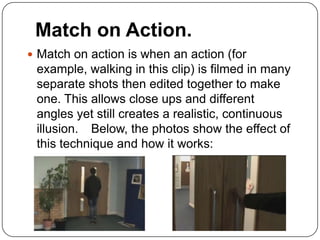
ď‚— Match on action is when an action (for
 example, walking in this clip) is filmed in many
 separate shots then edited together to make
 one. This allows close ups and different
 angles yet still creates a realistic, continuous
 illusion. Below, the photos show the effect of
 this technique and how it works:
Shot Reverse Shot.
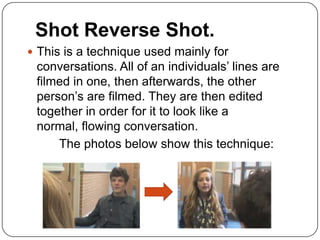
ď‚— This is a technique used mainly for
 conversations. All of an individuals’ lines are
 filmed in one, then afterwards, the other
 person’s are filmed. They are then edited
 together in order for it to look like a
 normal, flowing conversation.
     The photos below show this technique:
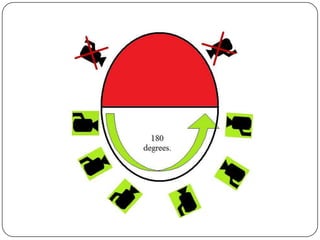
180 Degree Rule.
ď‚— This rule is always used to make sure that a
 film is consistent; it is enforced to make sure
 that the character on the left of the screen will
 stay on the left throughout that scene, and the
 same for the character on the right... To make
 this happen, the camera will never go over the
 180 degree line as shown in the illustration I
 made on the next slide:
Preliminary Research Task.

Preliminary Research Task.

  • 1.
    Preliminary Research Task. By Imogen Potter.
  • 2.
    Match on Action. ď‚—Match on action is when an action (for example, walking in this clip) is filmed in many separate shots then edited together to make one. This allows close ups and different angles yet still creates a realistic, continuous illusion. Below, the photos show the effect of this technique and how it works:
  • 3.
    Shot Reverse Shot. This is a technique used mainly for conversations. All of an individuals’ lines are filmed in one, then afterwards, the other person’s are filmed. They are then edited together in order for it to look like a normal, flowing conversation. The photos below show this technique:
  • 4.
    180 Degree Rule. ď‚—This rule is always used to make sure that a film is consistent; it is enforced to make sure that the character on the left of the screen will stay on the left throughout that scene, and the same for the character on the right... To make this happen, the camera will never go over the 180 degree line as shown in the illustration I made on the next slide: