SQL Recovery Tool
Solution like never before to repair SQL
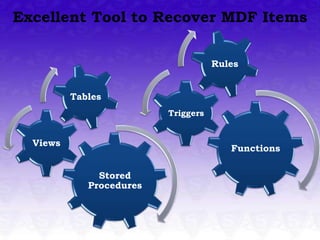
Excellent Tool to Recover MDF Items

                                     Rules


          Tables
                          Triggers


  Views
                                        Functions

               Stored
             Procedures
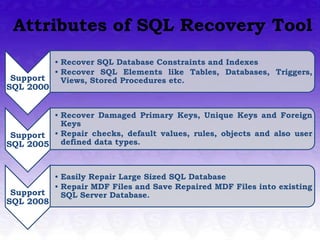
Attributes of SQL Recovery Tool
           • Recover SQL Database Constraints and Indexes
           • Recover SQL Elements like Tables, Databases, Triggers,
 Support     Views, Stored Procedures etc.
SQL 2000


         • Recover Damaged Primary Keys, Unique Keys and Foreign
           Keys
 Support • Repair checks, default values, rules, objects and also user
SQL 2005 defined data types.


           • Easily Repair Large Sized SQL Database
           • Repair MDF Files and Save Repaired MDF Files into existing
 Support     SQL Server Database.
SQL 2008
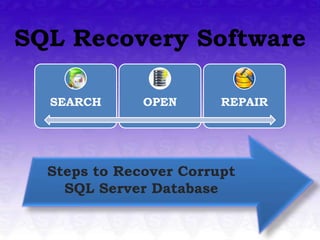
SQL Recovery Software

  SEARCH      OPEN      REPAIR


  Steps to Recover Corrupt
    SQL Server Database
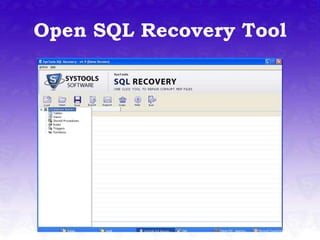
Open SQL Recovery Tool
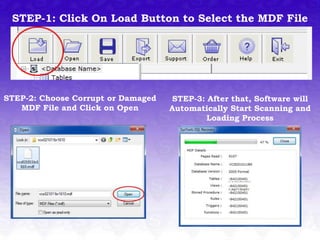
STEP-1: Click On Load Button to Select the MDF File


STEP-2: Choose Corrupt or Damaged   STEP-3: After that, Software will
   MDF File and Click on Open       Automatically Start Scanning and
                                            Loading Process
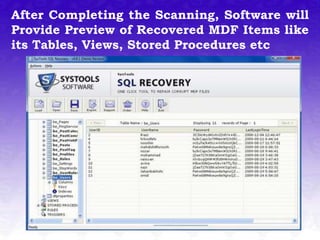
After Completing the Scanning, Software will
Provide Preview of Recovered MDF Items like
its Tables, Views, Stored Procedures etc
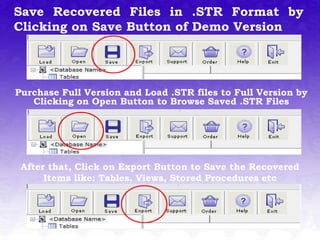
Save Recovered Files in .STR Format by
Clicking on Save Button of Demo Version


Purchase Full Version and Load .STR files to Full Version by
   Clicking on Open Button to Browse Saved .STR Files


 After that, Click on Export Button to Save the Recovered
      Items like: Tables, Views, Stored Procedures etc
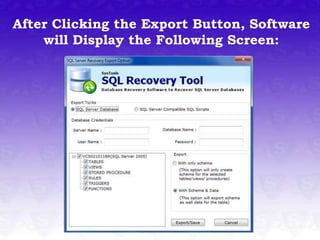
After Clicking the Export Button, Software
    will Display the Following Screen:
DEMO VERSION               VS   FULL VERSION

 DEMO VERSION: Demo Version of SysTools SQL
 Recovery Tool is functional but restricted version that
 only allows users to view the preview of recovered SQL
 Server database items but does not allow to save them.
 This is the best way to check the efficiency of SQL
 Recovery tool.


 FULL VERSION: Full Version of SysTools SQL Recovery
 Tool   enables users to perform the full recovery
 process. Using Full Version, you can easily repair
 corrupted /damaged MDF items, preview them before
 saving and save all the recovered items on your
 machine.

MDF Recovery

  • 1.
    SQL Recovery Tool Solutionlike never before to repair SQL
  • 2.
    Excellent Tool toRecover MDF Items Rules Tables Triggers Views Functions Stored Procedures
  • 3.
    Attributes of SQLRecovery Tool • Recover SQL Database Constraints and Indexes • Recover SQL Elements like Tables, Databases, Triggers, Support Views, Stored Procedures etc. SQL 2000 • Recover Damaged Primary Keys, Unique Keys and Foreign Keys Support • Repair checks, default values, rules, objects and also user SQL 2005 defined data types. • Easily Repair Large Sized SQL Database • Repair MDF Files and Save Repaired MDF Files into existing Support SQL Server Database. SQL 2008
  • 4.
    SQL Recovery Software SEARCH OPEN REPAIR Steps to Recover Corrupt SQL Server Database
  • 5.
  • 6.
    STEP-1: Click OnLoad Button to Select the MDF File STEP-2: Choose Corrupt or Damaged STEP-3: After that, Software will MDF File and Click on Open Automatically Start Scanning and Loading Process
  • 7.
    After Completing theScanning, Software will Provide Preview of Recovered MDF Items like its Tables, Views, Stored Procedures etc
  • 8.
    Save Recovered Filesin .STR Format by Clicking on Save Button of Demo Version Purchase Full Version and Load .STR files to Full Version by Clicking on Open Button to Browse Saved .STR Files After that, Click on Export Button to Save the Recovered Items like: Tables, Views, Stored Procedures etc
  • 9.
    After Clicking theExport Button, Software will Display the Following Screen:
  • 10.
    DEMO VERSION VS FULL VERSION DEMO VERSION: Demo Version of SysTools SQL Recovery Tool is functional but restricted version that only allows users to view the preview of recovered SQL Server database items but does not allow to save them. This is the best way to check the efficiency of SQL Recovery tool. FULL VERSION: Full Version of SysTools SQL Recovery Tool enables users to perform the full recovery process. Using Full Version, you can easily repair corrupted /damaged MDF items, preview them before saving and save all the recovered items on your machine.