PATH PowerPoint presentation  Template No.2 Subtitle here Name Title Date (optional)
Design guidelines for PowerPoint presentations Keep it relevant Convey critical data as effectively and simply as possible. If you have large quantities of information, consider developing hand-outs for the audience. Try to avoid abbreviations; your audience will thank you. PowerPoint slides are intended to  aid  your presentation. Use photographic images, graphics, fonts, and colors to  support  your data. Do not make your data support your graphics.  Source: Edward R. Tufte The Cognitive Style Of PowerPoint 12/28/11 Page
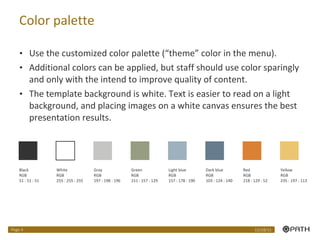
Color palette Use the customized color palette (“theme” color in the menu).  Additional colors can be applied, but staff should use color sparingly and only with the intend to improve quality of content. The template background is white. Text is easier to read on a light background, and placing images on a white canvas ensures the best presentation results. Black RGB 51 : 51 : 51 White RGB 255 : 255 : 255 Gray RGB 197 : 198 : 196 Light blue RGB 157 : 178 : 190 Dark blue RGB 103 : 124 : 140 Green RGB 151 : 157 : 129 Red RGB 218 : 129 : 52 Yellow RGB 235 : 197 : 113 12/28/11 Page
Photography Photography Photo and images should be relevant to the context of the presentation. Superfluous use of images can make a presentation feel like a  sales pitch. Images can help the presenter transition from one part of a presentation to the next, allowing the audience to take a mental breather before moving on to the next topic. 12/28/11 Page
 
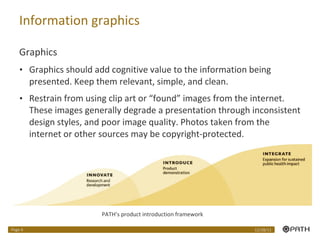
Information graphics Graphics Graphics should add cognitive value to the information being presented. Keep them relevant, simple, and clean. Restrain from using clip art or “found” images from the internet. These images generally degrade a presentation through inconsistent design styles, and poor image quality. Photos taken from the internet or other sources may be copyright-protected. PATH’s product introduction framework 12/28/11 Page
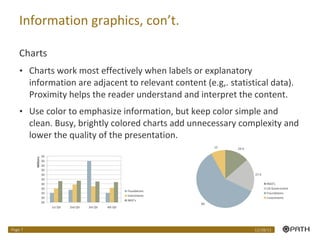
Information graphics, con’t. Charts Charts work most effectively when labels or explanatory information are adjacent to relevant content (e.g,. statistical data). Proximity helps the reader understand and interpret the content. Use color to emphasize information, but keep color simple and clean. Busy, brightly colored charts add unnecessary complexity and lower the quality of the presentation. 12/28/11 Page
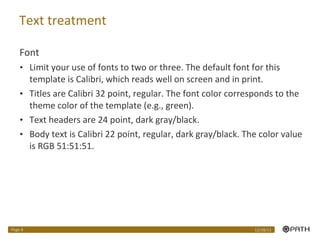
Text treatment Font Limit your use of fonts to two or three. The default font for this template is Calibri, which reads well on screen and in print. Titles are Calibri 32 point, regular. The font color corresponds to the theme color of the template (e.g., green). Text headers are 24 point, dark gray/black. Body text is Calibri 22 point, regular, dark gray/black. The color value is RGB 51:51:51.  12/28/11 Page

Master template no2 asia_12_30_10

  • 1.
    PATH PowerPoint presentation Template No.2 Subtitle here Name Title Date (optional)
  • 2.
    Design guidelines forPowerPoint presentations Keep it relevant Convey critical data as effectively and simply as possible. If you have large quantities of information, consider developing hand-outs for the audience. Try to avoid abbreviations; your audience will thank you. PowerPoint slides are intended to aid your presentation. Use photographic images, graphics, fonts, and colors to support your data. Do not make your data support your graphics. Source: Edward R. Tufte The Cognitive Style Of PowerPoint 12/28/11 Page
  • 3.
    Color palette Usethe customized color palette (“theme” color in the menu). Additional colors can be applied, but staff should use color sparingly and only with the intend to improve quality of content. The template background is white. Text is easier to read on a light background, and placing images on a white canvas ensures the best presentation results. Black RGB 51 : 51 : 51 White RGB 255 : 255 : 255 Gray RGB 197 : 198 : 196 Light blue RGB 157 : 178 : 190 Dark blue RGB 103 : 124 : 140 Green RGB 151 : 157 : 129 Red RGB 218 : 129 : 52 Yellow RGB 235 : 197 : 113 12/28/11 Page
  • 4.
    Photography Photography Photoand images should be relevant to the context of the presentation. Superfluous use of images can make a presentation feel like a sales pitch. Images can help the presenter transition from one part of a presentation to the next, allowing the audience to take a mental breather before moving on to the next topic. 12/28/11 Page
  • 5.
  • 6.
    Information graphics GraphicsGraphics should add cognitive value to the information being presented. Keep them relevant, simple, and clean. Restrain from using clip art or “found” images from the internet. These images generally degrade a presentation through inconsistent design styles, and poor image quality. Photos taken from the internet or other sources may be copyright-protected. PATH’s product introduction framework 12/28/11 Page
  • 7.
    Information graphics, con’t.Charts Charts work most effectively when labels or explanatory information are adjacent to relevant content (e.g,. statistical data). Proximity helps the reader understand and interpret the content. Use color to emphasize information, but keep color simple and clean. Busy, brightly colored charts add unnecessary complexity and lower the quality of the presentation. 12/28/11 Page
  • 8.
    Text treatment FontLimit your use of fonts to two or three. The default font for this template is Calibri, which reads well on screen and in print. Titles are Calibri 32 point, regular. The font color corresponds to the theme color of the template (e.g., green). Text headers are 24 point, dark gray/black. Body text is Calibri 22 point, regular, dark gray/black. The color value is RGB 51:51:51. 12/28/11 Page