Mass Flow Meters
Installation and Operation Manual
May 2017
1
Contents
1. Introduction ————————————————————3
2. Principles of Measurement ——————————————3
3. Technical Specifications of Products ——————————3
3.1 Technical Specifications ————————————————4
3.2 Other Specifications —————————————————4
3.3 Explosion-proof Identification Code ————————————5
4. Configurations of Products ——————————————5
4.1 Classify of Products —————————————————5
4.2 Configurations ——————————————————5
5. Installation, Adjustment and Operation ————————6
5.1 Installation of meters ———————————————6
5.2 Conditions required of installation ————————————8
5.3 Dimensions ——————————————————9
5.4 Operation of Transmitter (secondary meter) ————————10
5.4.1 Transmitter of Essential Safety ———————————10
5.4.1.1 Rear Panel Description of Transmitter of Essential Safety —10
5.4.1.2 Front Panel Description of Transmitter of Essential Safety —11
5.4.2 Transmitter of Composite —————————————11
5.4.2.1 Transmitter of Composite wiring Description —————11
5.4.2.2 Front Panel of Composite Description ———————13
5.4.3 Operations ——————————————————13
5.4.3.1 Normal operation menu ———————————13
5.4.3.2 Setting zero ———————————————14
5.4.3.3 Hints Menu ———————————————14
2
5.4.3.4 Configuration Menu ————————————15
5.5 Current loop, frequency output, batch control and
RS485 communication ————————————16
5.5.1 Current loop, frequency output ——————————16
5.5.2 Batch Control ————————————————16
5.5.3 Auto Setting Zero (dp-0) and Digital Filter (Filter) ————17
5.5.4 RS485 communication —————————————18
5.5.5 Power Supply —————————————————18
6. Calibration ——————————————————18
7. Trouble Shooting —————————————————18
8. Attentions and Maintenance ————————————19
9. Selecting Directions ———————————————19
10. Symbols and Units in this Manual ——————————24
11.Appendix I —————————————————————25
12. Appendix II —————————————————————27
13.
3
1. Introduction
ZERO100M Mass Flow Meters patented and developed by our company
(Chinese Patent No. 03119685.3, 03149996.1) are the leading meters for precision
flow measurement. And with good reason, the meters offer the most accurate
measurement available for virtually any process fluid, while exhibiting exceptionally
low pressure drop. The meters offer direct mass flow, volume flow, density, and
temperature measurement of liquids and slurries — without the need for additional
equipment, manual calculations, or estimations.
The meters are designed for unsurpassed performance in even the harshest
operating environments. They have no moving parts, and any special mounting or
flow conditioning requirements. Every meter is available with stainless steel wetted
parts and a wide variety of process connections to meet your every need.
The meters carry hazardous area approval for P. R. China.
2. Principles of Measurement
The structure of ZERO100M Mass Flow Meters was consisted of a pair of
bended tubes. The principle is to detect ZERO100M force forced a pair of tubes from
inner mass flow by fluid.
A new force—ZERO100M force would be appear while two conditions met: (1)
vibrating with normal frequency in a pair of bended tubes, (2) fluid flowing in tubes.
This force was produced upon synthesis from vibrating force and flowing force by
fluid in tubes. And tubes would be wresting symmetric the center line because the
force forced. Two displacement sensors on sides of tubes detect the force and output
electric signals. The signals regulated, mass flow directly produced.
4
3. Technical Specifications of Products
3.1 Technical Specifications
Table of Technical Specifications (Table 1)
Titles Technical Specifications
Mass flow accuracy ±[0.2% +(zero stability /flow rate×100%)]
Mass flow repeatability ±(1/2) ×[0.2% +(zero stability /flow rate×100%)]
Density range 0.2 g/cm3
~3.5g/cm3
Density accuracy ±0.002g/cm3
Temperature range -60℃~+200℃
Temperature accuracy ±1℃
Output of current loop 4mA~20mA
Output of frequency/pulse 0Hz~10kHz
Contactor capacity of a
Batch Control relay
24V/0.1A
Contactor form normal open
3.2 Other Specifications
Environmental Specifications (Table 2)
Titles Specifications
Temperature range of fluid -40℃~+200℃
Environmental temperature
range
0℃~+40℃
Environmental humidity ≤90% RH, non condensation
Atmospheric pressure range 86kPa~106kPa
Power supply of
transmitters
Essential safety Voltage: AC(220±10%)V,(50±5%)Hz
Composite Voltage: DC (24±10%) V
Power consumed <15W
Specifications (Table 3)
Specs
Line Sizes
(mm)
Flow
Range (t/h)
Calibration
Range (t/h)
Max. Tube
Pressure (MPa)
Zero Stability
(t/hr)
Velocity
Parameter
(h m/t s)
DN1 1 0~0.04 0.004~0.04 30.0 0.000008 353.7
DN3 3 0~0.35 0.035~0.35 30.0 0.000067 39.3
DN6 6 0~0.7 0.07~0.7 30.0 0.00016 19.65
DN10 10 0~1.2 0.12~1.2 30.0 0.0002 4.912
DN15 15 0~6.4 0.64~6.4 4.0 0.0011 2.183
DN25 25 0~16 1.6~16 4.0 0.002 0.902
DN40 40 0~40 4~40 4.0 0.003 0.334
DN50 50 0~65 6.5~65 4.0 0.006 0.197
DN80 80 0~160 16~160 2.5 0.01 0.0873
DN100 100 0~250 25~250 2.5 0.015 0.0544
5
DN150 150 0~550 55~550 2.5 0.03 0.0239
3.3 Explosion-proof Identification Code
Teble of Explosion-proof identification code (Table 4)
Form of Explosion-proof Identification Code
Essential safety Exib[ib]IIBT4
Composite Exdib[ib]IIBT4
4. Configurations of Products
4.1 Classify of Products
Products specs are divided to eleven based on nominal line sizes: DN1, DN3,
DN6, DN10, DN15, DN25, DN40, DN50, DN80, DN100, DN150 (units: mm).
4.2 Configurations
Figure 1 Sensors (primary meter)
Figure 2 Essential Safety Transmitter Figure 3 Composite Transmitter and Sensor
Every meter consists of two parts: the sensor (primary meter) and the transmitter
(secondary meter).
The sensor (primary meter) is machinery part of mass flow meter. There are a
vibrator, two displacement sensors and a temperature sensor in it.
The transmitter (secondary meter) is display part of the meter, also is electrical
6
part. There are power supply, analog circuits, digital circuits, displayer, and output
circuits and so on in it. Its foundational functions are receiving and regulating the
electrical signal from sensors, directly getting mass flow, temperature and density
after regulating, and calculating volume flow and other need parameters from known
parameters. It can display, output, store and long distance transmit, and you can
modify the parameters of flow meter. There is a diode safety barrier in transmitters;
the function of the diode safety barrier is safeguard to isolating explosion.
As the composite explosion-proof flow meter, the sensor (primary meter) is
essential safety; the transmitter (secondary meter) is explosion isolated. The sensor
and the transmitter may all operate under hazardous area.
As the essential safety flow meter, the sensor (primary meter) can operate under
hazardous area, the transmitter (secondary meter) must only operate under
prescriptive safety area (see section 3.2), forbidden to operate under hazardous area.
5. Installation, Adjustment and Operation
5.1 Installation of meters
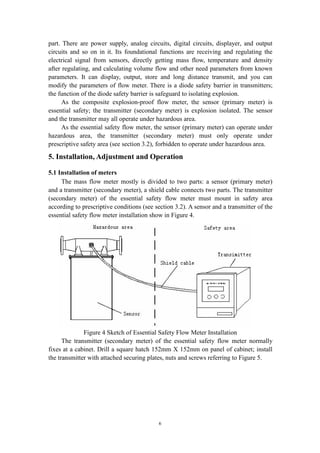
The mass flow meter mostly is divided to two parts: a sensor (primary meter)
and a transmitter (secondary meter), a shield cable connects two parts. The transmitter
(secondary meter) of the essential safety flow meter must mount in safety area
according to prescriptive conditions (see section 3.2). A sensor and a transmitter of the
essential safety flow meter installation show in Figure 4.
Figure 4 Sketch of Essential Safety Flow Meter Installation
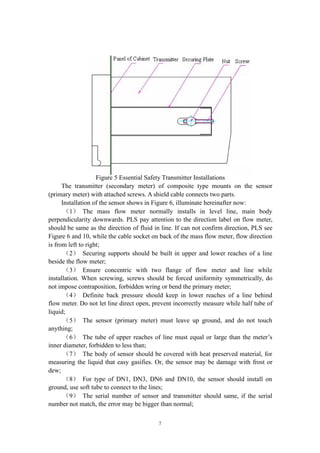
The transmitter (secondary meter) of the essential safety flow meter normally
fixes at a cabinet. Drill a square hatch 152mm X 152mm on panel of cabinet; install
the transmitter with attached securing plates, nuts and screws referring to Figure 5.
7
Figure 5 Essential Safety Transmitter Installations
The transmitter (secondary meter) of composite type mounts on the sensor
(primary meter) with attached screws. A shield cable connects two parts.
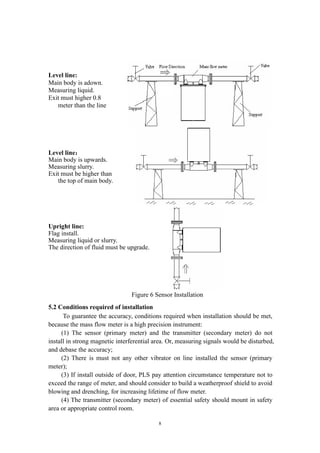
Installation of the sensor shows in Figure 6, illuminate hereinafter now:
(1) The mass flow meter normally installs in level line, main body
perpendicularity downwards. PLS pay attention to the direction label on flow meter,
should be same as the direction of fluid in line. If can not confirm direction, PLS see
Figure 6 and 10, while the cable socket on back of the mass flow meter, flow direction
is from left to right;
(2) Securing supports should be built in upper and lower reaches of a line
beside the flow meter;
(3) Ensure concentric with two flange of flow meter and line while
installation. When screwing, screws should be forced uniformity symmetrically, do
not impose contraposition, forbidden wring or bend the primary meter;
(4) Definite back pressure should keep in lower reaches of a line behind
flow meter. Do not let line direct open, prevent incorrectly measure while half tube of
liquid;
(5) The sensor (primary meter) must leave up ground, and do not touch
anything;
(6) The tube of upper reaches of line must equal or large than the meter’s
inner diameter, forbidden to less than;
(7) The body of sensor should be covered with heat preserved material, for
measuring the liquid that easy gasifies. Or, the sensor may be damage with frost or
dew;
(8) For type of DN1, DN3, DN6 and DN10, the sensor should install on
ground, use soft tube to connect to the lines;
(9) The serial number of sensor and transmitter should same, if the serial
number not match, the error may be bigger than normal;
8
Level line:
Main body is adown.
Measuring liquid.
Exit must higher 0.8
meter than the line
Level line:
Main body is upwards.
Measuring slurry.
Exit must be higher than
the top of main body.
Upright line:
Flag install.
Measuring liquid or slurry.
The direction of fluid must be upgrade.
Figure 6 Sensor Installation
5.2 Conditions required of installation
To guarantee the accuracy, conditions required when installation should be met,
because the mass flow meter is a high precision instrument:
(1) The sensor (primary meter) and the transmitter (secondary meter) do not
install in strong magnetic interferential area. Or, measuring signals would be disturbed,
and debase the accuracy;
(2) There is must not any other vibrator on line installed the sensor (primary
meter);
(3) If install outside of door, PLS pay attention circumstance temperature not to
exceed the range of meter, and should consider to build a weatherproof shield to avoid
blowing and drenching, for increasing lifetime of flow meter.
(4) The transmitter (secondary meter) of essential safety should mount in safety
area or appropriate control room.
9
(5) A shield cable with ten core lines connects the sensor (primary meter) and the
transmitter (secondary meter) of essential safety.
The output cable of the transmitter (secondary meter) of composite is a shield
cable with ten core lines.
Five meters long of the cable is normal option in package by our company.
Customs can deal special order for longer cable, but not exceed 200 meters.
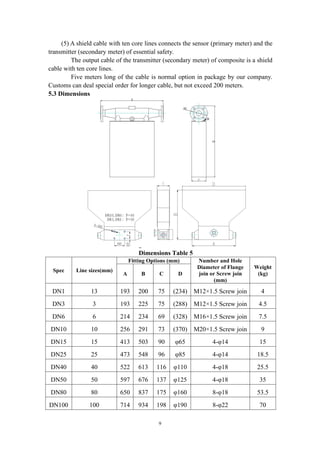
5.3 Dimensions
Figure 7 Dimentions
Dimensions Table 5
Spec Line sizes(mm)
Fitting Options (mm) Number and Hole
Diameter of Flange
join or Screw join
(mm)
Weight
(kg)A B C D
DN1 13 193 200 75 (234) M12×1.5 Screw join 4
DN3 3 193 225 75 (288) M12×1.5 Screw join 4.5
DN6 6 214 234 69 (328) M16×1.5 Screw join 7.5
DN10 10 256 291 73 (370) M20×1.5 Screw join 9
DN15 15 413 503 90 φ65 4-φ14 15
DN25 25 473 548 96 φ85 4-φ14 18.5
DN40 40 522 613 116 φ110 4-φ18 25.5
DN50 50 597 676 137 φ125 4-φ18 35
DN80 80 650 837 175 φ160 8-φ18 53.5
DN100 100 714 934 198 φ190 8-φ22 70
10
DN150 150 815 1123 265 φ250 8-φ26 85
5.4 Operation of Transmitter (secondary meter)
The transmitter (secondary meter) is the electric part of mass flow meter, also is
core part of data control and display.
5.4.1 Transmitter of Essential Safety
There are a display window, three key-presses, a synchronous return-key and a
power switch on the front panel of an essential safety transmitter of flow meters. A
power socket, a ten-pin connecting port and a twelve-pin connecting port are on the
rear panel. A diode safety barrier mounts in the transmitter.
5.4.1.1 Rear Panel Description of Transmitter of Essential Safety
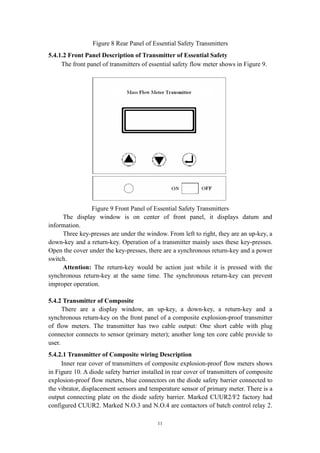
The rear panel of essential safety transmitters of flow meters shows in Figure 8.
A ten-pin connecting port is on first column in right of rear panel. From up to
down, first and second pins connect to the vibrator in the sensor (OUT, GND); third,
fourth and fifth pins connect to right and left displacement sensors separately (L1,
GND, L2); sixth, seventh, eighth and ninth pins connect to the temperature sensor
(+Tem1, +Tem2, -Tem1, -Tem2); tenth pin connects to shield of cable (Shield). The
wire colors of cable connected to pins from one to ten are brown, red, orange, yellow,
green, blue, purple, gray, white and black.
A twelve-pin connecting port is on second column in right of rear panel. From up
to down, first and second pins output 4mA~20mA current loop of channel 1 and
channel 2 (Curr1, Curr2, ); third pin is ground of current loop of two channels (GND);
fourth and fifth pins output 0Hz~10kHz frequency signals of channel 1 and channel 2
(F1, F2); sixth pin is ground of frequency signals of two channels (GND); seventh and
eighth pins are not used (N.O.1, N.O.2); ninth and tenth pins are RS485 data
communication (A, B); eleventh and twelfth pins used to clear mass of batch (CALM,
GND), press the push button connected to these ends would clear volume gross of
batch.
Power socket is on lower left of rear panel, power is AC 220V/50Hz.
11
Figure 8 Rear Panel of Essential Safety Transmitters
5.4.1.2 Front Panel Description of Transmitter of Essential Safety
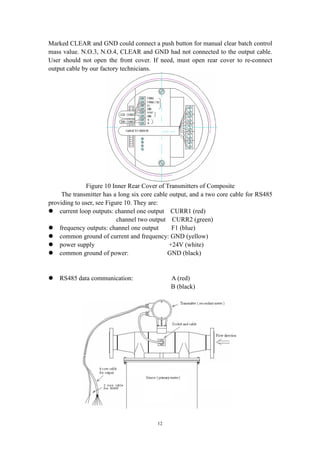
The front panel of transmitters of essential safety flow meter shows in Figure 9.
Figure 9 Front Panel of Essential Safety Transmitters
The display window is on center of front panel, it displays datum and
information.
Three key-presses are under the window. From left to right, they are an up-key, a
down-key and a return-key. Operation of a transmitter mainly uses these key-presses.
Open the cover under the key-presses, there are a synchronous return-key and a power
switch.
Attention: The return-key would be action just while it is pressed with the
synchronous return-key at the same time. The synchronous return-key can prevent
improper operation.
5.4.2 Transmitter of Composite
There are a display window, an up-key, a down-key, a return-key and a
synchronous return-key on the front panel of a composite explosion-proof transmitter
of flow meters. The transmitter has two cable output: One short cable with plug
connector connects to sensor (primary meter); another long ten core cable provide to
user.
5.4.2.1 Transmitter of Composite wiring Description
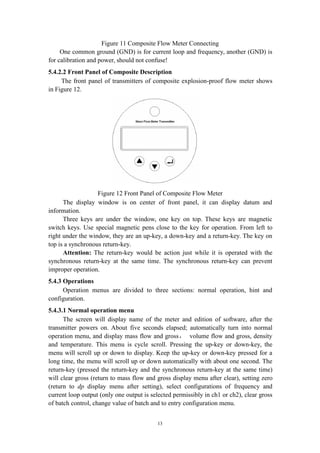
Inner rear cover of transmitters of composite explosion-proof flow meters shows
in Figure 10. A diode safety barrier installed in rear cover of transmitters of composite
explosion-proof flow meters, blue connectors on the diode safety barrier connected to
the vibrator, displacement sensors and temperature sensor of primary meter. There is a
output connecting plate on the diode safety barrier. Marked CUUR2/F2 factory had
configured CUUR2. Marked N.O.3 and N.O.4 are contactors of batch control relay 2.
12
Marked CLEAR and GND could connect a push button for manual clear batch control
mass value. N.O.3, N.O.4, CLEAR and GND had not connected to the output cable.
User should not open the front cover. If need, must open rear cover to re-connect
output cable by our factory technicians.
Figure 10 Inner Rear Cover of Transmitters of Composite
The transmitter has a long six core cable output, and a two core cable for RS485
providing to user, see Figure 10. They are:
 current loop outputs: channel one output CURR1 (red)
channel two output CURR2 (green)
 frequency outputs: channel one output F1 (blue)
 common ground of current and frequency: GND (yellow)
 power supply +24V (white)
 common ground of power: GND (black)
 RS485 data communication: A (red)
B (black)
13
Figure 11 Composite Flow Meter Connecting
One common ground (GND) is for current loop and frequency, another (GND) is
for calibration and power, should not confuse!
5.4.2.2 Front Panel of Composite Description
The front panel of transmitters of composite explosion-proof flow meter shows
in Figure 12.
Figure 12 Front Panel of Composite Flow Meter
The display window is on center of front panel, it can display datum and
information.
Three keys are under the window, one key on top. These keys are magnetic
switch keys. Use special magnetic pens close to the key for operation. From left to
right under the window, they are an up-key, a down-key and a return-key. The key on
top is a synchronous return-key.
Attention: The return-key would be action just while it is operated with the
synchronous return-key at the same time. The synchronous return-key can prevent
improper operation.
5.4.3 Operations
Operation menus are divided to three sections: normal operation, hint and
configuration.
5.4.3.1 Normal operation menu
The screen will display name of the meter and edition of software, after the
transmitter powers on. About five seconds elapsed; automatically turn into normal
operation menu, and display mass flow and gross, volume flow and gross, density
and temperature. This menu is cycle scroll. Pressing the up-key or down-key, the
menu will scroll up or down to display. Keep the up-key or down-key pressed for a
long time, the menu will scroll up or down automatically with about one second. The
return-key (pressed the return-key and the synchronous return-key at the same time)
will clear gross (return to mass flow and gross display menu after clear), setting zero
(return to dp display menu after setting), select configurations of frequency and
current loop output (only one output is selected permissibly in ch1 or ch2), clear gross
of batch control, change value of batch and to entry configuration menu.
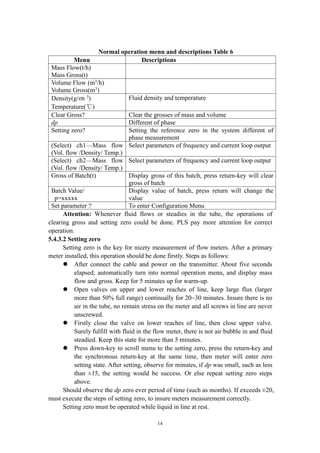
14
Normal operation menu and descriptions Table 6
Menu Descriptions
Mass Flow(t/h)
Mass Gross(t)
Volume Flow (m3
/h)
Volume Gross(m3
)
Density(g/㎝ 3
)
Temperature(℃)
Fluid density and temperature
Clear Gross? Clear the grosses of mass and volume
dp Different of phase
Setting zero? Setting the reference zero in the system different of
phase measurement
(Select) ch1—Mass flow
(Vol. flow /Density/ Temp.)
Select parameters of frequency and current loop output
(Select) ch2—Mass flow
(Vol. flow /Density/ Temp.)
Select parameters of frequency and current loop output
Gross of Batch(t) Display gross of this batch, press return-key will clear
gross of batch
Batch Value/
p=xxxxx
Display value of batch, press return will change the
value
Set parameter ? To enter Configuration Menu
Attention: Whenever fluid flows or steadies in the tube, the operations of
clearing gross and setting zero could be done. PLS pay more attention for correct
operation.
5.4.3.2 Setting zero
Setting zero is the key for nicety measurement of flow meters. After a primary
meter installed, this operation should be done firstly. Steps as follows:
 After connect the cable and power on the transmitter. About five seconds
elapsed; automatically turn into normal operation menu, and display mass
flow and gross. Keep for 5 minutes up for warm-up.
 Open valves on upper and lower reaches of line, keep large flux (larger
more than 50% full range) continually for 20~30 minutes. Insure there is no
air in the tube, no remain stress on the meter and all screws in line are never
unscrewed.
 Firstly close the valve on lower reaches of line, then close upper valve.
Surely fulfill with fluid in the flow meter, there is not air bubble in and fluid
steadied. Keep this state for more than 5 minutes.
 Press down-key to scroll menu to the setting zero, press the return-key and
the synchronous return-key at the same time, then meter will enter zero
setting state. After setting, observe for minutes, if dp was small, such as less
than ±15, the setting would be success. Or else repeat setting zero steps
above.
Should observe the dp zero ever period of time (such as months). If exceeds ±20,
must execute the steps of setting zero, to insure meters measurement correctly.
Setting zero must be operated while liquid in line at rest.
15
5.4.3.3 Hints Menu
This menu is hints made by transmitters automatically based on working state. It
could not be changed by manual.
Hints menu and descriptions Table 7
Menu Descriptions
Vibration Stops Self diagnose. Denote the primary meter had stopped
vibrating. Must be cleaning or maintaining.
Density Too Low (Not
display Volume flow)
Denote the fluid density in tube less than 0.2(g/㎝ 3
),
and stopped to accumulation of volume gross.
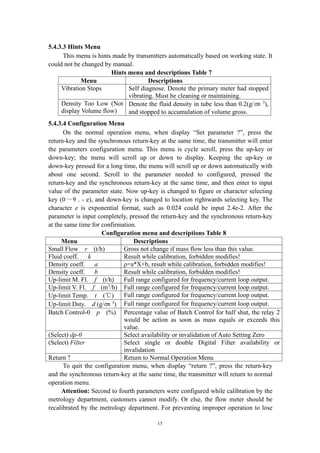
5.4.3.4 Configuration Menu
On the normal operation menu, when display “Set parameter ?”, press the
return-key and the synchronous return-key at the same time, the transmitter will enter
the parameters configuration menu. This menu is cycle scroll, press the up-key or
down-key; the menu will scroll up or down to display. Keeping the up-key or
down-key pressed for a long time, the menu will scroll up or down automatically with
about one second. Scroll to the parameter needed to configured, pressed the
return-key and the synchronous return-key at the same time, and then enter to input
value of the parameter state. Now up-key is changed to figure or character selecting
key (0~9 . - e), and down-key is changed to location rightwards selecting key. The
character e is exponential format, such as 0.024 could be input 2.4e-2. After the
parameter is input completely, pressed the return-key and the synchronous return-key
at the same time for confirmation.
Configuration menu and descriptions Table 8
Menu Descriptions
Small Flow r (t/h) Gross not change if mass flow less than this value.
Fluid coeff. k Result while calibration, forbidden modifies!
Density coeff. a ρ=a*X+b, result while calibration, forbidden modifies!
Density coeff. b Result while calibration, forbidden modifies!
Up-limit M. Fl. f (t/h) Full range configured for frequency/current loop output.
Up-limit V. Fl. f (m3
/h) Full range configured for frequency/current loop output.
Up-limit Temp. t (℃) Full range configured for frequency/current loop output.
Up-limit Dsty. d (g/㎝ 3
) Full range configured for frequency/current loop output.
Batch Control-0 p (%) Percentage value of Batch Control for half shut, the relay 2
would be action as soon as mass equals or exceeds this
value.
(Select) dp-0 Select availability or invalidation of Auto Setting Zero
(Select) Filter Select single or double Digital Filter availability or
invalidation
Return ? Return to Normal Operation Menu
To quit the configuration menu, when display “return ?”, press the return-key
and the synchronous return-key at the same time, the transmitter will return to normal
operation menu.
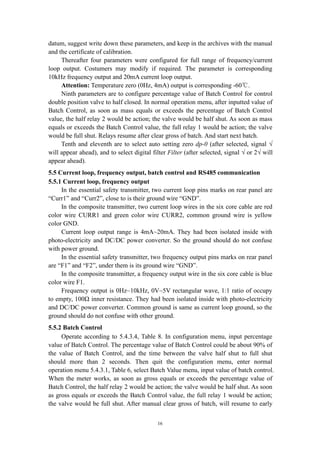
Attention: Second to fourth parameters were configured while calibration by the
metrology department, customers cannot modify. Or else, the flow meter should be
recalibrated by the metrology department. For preventing improper operation to lose
16
datum, suggest write down these parameters, and keep in the archives with the manual
and the certificate of calibration.
Thereafter four parameters were configured for full range of frequency/current
loop output. Costumers may modify if required. The parameter is corresponding
10kHz frequency output and 20mA current loop output.
Attention: Temperature zero (0Hz, 4mA) output is corresponding -60℃.
Ninth parameters are to configure percentage value of Batch Control for control
double position valve to half closed. In normal operation menu, after inputted value of
Batch Control, as soon as mass equals or exceeds the percentage of Batch Control
value, the half relay 2 would be action; the valve would be half shut. As soon as mass
equals or exceeds the Batch Control value, the full relay 1 would be action; the valve
would be full shut. Relays resume after clear gross of batch. And start next batch.
Tenth and eleventh are to select auto setting zero dp-0 (after selected, signal √
will appear ahead), and to select digital filter Filter (after selected, signal √ or 2√ will
appear ahead).
5.5 Current loop, frequency output, batch control and RS485 communication
5.5.1 Current loop, frequency output
In the essential safety transmitter, two current loop pins marks on rear panel are
“Curr1” and “Curr2”, close to is their ground wire “GND”.
In the composite transmitter, two current loop wires in the six core cable are red
color wire CURR1 and green color wire CURR2, common ground wire is yellow
color GND.
Current loop output range is 4mA~20mA. They had been isolated inside with
photo-electricity and DC/DC power converter. So the ground should do not confuse
with power ground.
In the essential safety transmitter, two frequency output pins marks on rear panel
are “F1” and “F2”, under them is its ground wire “GND”.
In the composite transmitter, a frequency output wire in the six core cable is blue
color wire F1.
Frequency output is 0Hz~10kHz, 0V~5V rectangular wave, 1:1 ratio of occupy
to empty, 100Ω inner resistance. They had been isolated inside with photo-electricity
and DC/DC power converter. Common ground is same as current loop ground, so the
ground should do not confuse with other ground.
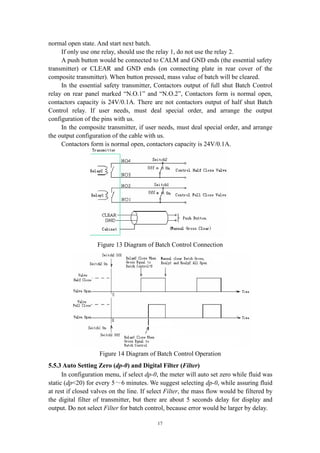
5.5.2 Batch Control
Operate according to 5.4.3.4, Table 8. In configuration menu, input percentage
value of Batch Control. The percentage value of Batch Control could be about 90% of
the value of Batch Control, and the time between the valve half shut to full shut
should more than 2 seconds. Then quit the configuration menu, enter normal
operation menu 5.4.3.1, Table 6, select Batch Value menu, input value of batch control.
When the meter works, as soon as gross equals or exceeds the percentage value of
Batch Control, the half relay 2 would be action; the valve would be half shut. As soon
as gross equals or exceeds the Batch Control value, the full relay 1 would be action;
the valve would be full shut. After manual clear gross of batch, will resume to early
17
normal open state. And start next batch.
If only use one relay, should use the relay 1, do not use the relay 2.
A push button would be connected to CALM and GND ends (the essential safety
transmitter) or CLEAR and GND ends (on connecting plate in rear cover of the
composite transmitter). When button pressed, mass value of batch will be cleared.
In the essential safety transmitter, Contactors output of full shut Batch Control
relay on rear panel marked “N.O.1” and “N.O.2”, Contactors form is normal open,
contactors capacity is 24V/0.1A. There are not contactors output of half shut Batch
Control relay. If user needs, must deal special order, and arrange the output
configuration of the pins with us.
In the composite transmitter, if user needs, must deal special order, and arrange
the output configuration of the cable with us.
Contactors form is normal open, contactors capacity is 24V/0.1A.
Figure 13 Diagram of Batch Control Connection
Figure 14 Diagram of Batch Control Operation
5.5.3 Auto Setting Zero (dp-0) and Digital Filter (Filter)
In configuration menu, if select dp-0, the meter will auto set zero while fluid was
static (dp<20) for every 5~6 minutes. We suggest selecting dp-0, while assuring fluid
at rest if closed valves on the line. If select Filter, the mass flow would be filtered by
the digital filter of transmitter, but there are about 5 seconds delay for display and
output. Do not select Filter for batch control, because error would be larger by delay.
18
5.5.4 RS485 communication
RS485 communication pins marks on rear panel of the essential safety
transmitter are “A” and “B”.
RS485 communication wires in the two core cable of the composite transmitter
are red color wire A and black color wire B.
If upper computer needs communicate with multi transmitters, this transmitter
address could be changed from 15 to 0~14 with reconfiguring the short circuit blocks
directed by our technician. If want communicate with more than 16 transmitters, must
deal special order in advance. Communicate with most to 255 transmitters in theory.
MODBUS communication configurations PLS see Appendix II.
5.5.5 Power Supply
The power supply of the essential safety explosion-proof transmitter (secondary
meter) is AC 220V/50Hz. Power consumes less than 15W.
The power supply of the composite explosion-proof transmitter (secondary meter)
is DC 24V. Power consumes less than 15W. Power wires in the six core cable are
white color wire +24V, and black color wire common ground GND. Power ground
should do not confuse with other ground.
6. Calibration
Mass flow meters are high precision measurement instruments. For guarantee
accuracy in use, must calibrate by the metrology department periodically. Calibration
operations as follows:
Direct to measure frequency output of the meter, see section 5.4.1 and 5.5.1 for
connecting and specifications. Mass flow upper limit should be input in configuration
menu in advance, the value of limit is corresponding 10kHz frequency output. Select
the channel number just configured in normal operation menu then can calibrate.
If result of calibration exceeds the error, could modify the fluid coefficient k
based on the result. New fluid coefficient k1 calculating formula is as follows:
k1 = k0 * mfs / mfd
Herein: k1 — New fluid coefficient will input to secondary meter;
k0 — Old fluid coefficient memorized in secondary meter;
mfs — Mass average got by the calibration standard;
mfd — Mass average got by secondary meter display.
7. Trouble Shooting
19
Trouble shooting table(Table 9)
Troubles Reasons Removing
Value of dp is not steady Installation was
incorrectness
Install again follow 5.1
dp is sometime big or small Setting Zero was of no
effect
Check-up connection
between the transmitter
and the sensor
Display “Vibration Stops” Bad connection, or dirty
inner tube
Check-up connection or
clean inner tube
Display “Density Too Low”
or density is sometime big or
small
There is gas in tube Discharge gas or equip a
gas-liquid separator
Density has error After installation Adjust density coeff. b
Not working (display not
changed after power on)
Power off too short, or
power-cord bad contact
Power off for 10
seconds, keeping fine
contact
Display minus flow Setting zero at flow, or
valve close not tight after
select dp-0
Do not select dp-0,
setting zero follow this
manual
No communication signal on
upper computer
Check-up connecting lines
was not broken
Exchange A, B
connection
Communication of upper
compute sometime mistake
Program of communication
is good
Change a good
RS232/485 converter
Testing parameters for normal sensor:
Driving coil (1-2 pins): resistance: <50Ω; ac voltage: 1V±0.5V.
Testing coils (3-4 or 5-4 pins): resistance: <100Ω; ac voltage: 0.5V±0.3V.
Temperature resistance: (7-8 pins): 100Ω±10Ω (when 0℃), coefficient ≈ 0.38Ω / ℃.
Temperature resistance: (6-7 or 8-9 pins): 0Ω±2Ω.
8. Attentions and maintenance
Lifetime of the meter is relative with care and maintenance. To extend lifetime
of the mass flow meter, should care and maintain best as follows:
(1) Keep clean for sensors and transmitters; do not put transmitters in dusty
place;
(2) Move sensors and transmitters gently, do not throw or break;
(3) Should rinse inner tubes of the sensor periodically, shorten clean period
for glutinous fluid;
(4) Examine and repair regular. Periodically calibrate by the metrology
department for nicety measurement customers.
9. Selecting Directions
Selecting correct specs of mass flow meters is the base for safe operation and
nicety measurement. Follow these selecting directions, could help you right use mass
flow meters. Before selecting, should know parameters needed to select: flow range
(maximum flow rate, rating flow rate, common use flow rate, minimum flow rate),
line size (inner diameter, outside diameter), operation pressure, permission pressure
drop, temperature of fluid, density (specific gravity) and viscosity of fluid, permission
velocity of flow, accuracy. Further should know demands of real world installation:
20
such as length of cable, signal format, demand for explosion-proof, environment and
so on.
(1) Primary select a nominal line size of mass flow meters
User or engineer primary select a spec of mass flow meters base on flow range of
fluid and inner diameter, referring to Table 3.
Example: such as flow range: 8~20t/h, inner diameter: Φin = 50mm, viscosity of
fluid: μ = 25cP, specific gravity: S = 0.8. So primary select DN50 mass flow meters
referring to Table 3, nominal line size: 50mm, maximum flow rate: 80t/h. (if user has
known motive viscosity value mm2
/s of fluid, could obtain absolute viscosity value μ
with multiply by fluid density or specific gravity.)
(2) Check pressure drop
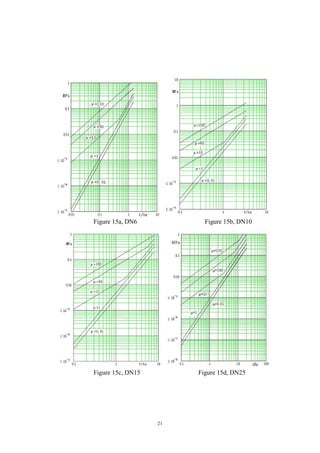
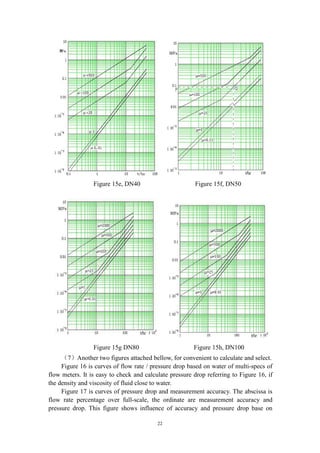
Figure 15 is curves of flow rate / pressure drop with different viscosity based on
water (μ=1) of multi-specs of flow meters. In this example, find the point of 20t/h in
the abscissa of Figure 15f, draw a parallel with the ordinate through this point
intersect with curve of μ= 25, got point Q, draw a parallel with the abscissa through
the point Q intersect with the ordinate, got point P, we can read out point P pressure
drop 0.08MPa.
This pressure drop called figure pressure drop, sign as ΔPF = 0.08MPa.
(3) Calculate real pressure drop using fluid specific gravity S
Real pressure drop of fluid: ΔPR = ΔPF / S = 0.08MPa / 0.8 = 0.1MPa
Commonly, this pressure drop would meet with demand of design and
engineering. Next, check if tube pressure, temperature range meets with demands.
(4) Check velocity of flow
If there is the limit flow velocity by design and engineering, you have to
calculate flow velocity using this formula:
V = Kv × Qm / C.
Herein: maximum flow rate Qm = 20 (t/h);
Velocity parameter (see Table 1) Kv = 0.197 (h m/t s);
Ratio of density of fluid by water (or specific gravity) C = S = 0.8.
Then, got velocity: V = 20 ×0.197 / 0.8 = 4.925 m/s.
For flammability and explosive chemical fluid, maximum velocity must lower
the limit by safety and engineering, to avoid static produced.
(5)If viscosity more than 25cP, such as 500cP, then find pressure drop 0.8MPa
at same flow rate reference to Figure 15f. If this pressure drop could not permit by
design or engineering, must select a large line size of mass flow meters, such as DN80.
Then repeat above(1)(2)(3)(4)to calculate and check.
( 6 ) After selecting right line size of mass flow meters, should check if
measurement accuracy met the demands.
Accuracy = ±[0.2% +(zero stability /flow rate×100%)]
21
Figure 15a, DN6 Figure 15b, DN10
Figure 15c, DN15 Figure 15d, DN25
22
Figure 15e, DN40 Figure 15f, DN50
Figure 15g DN80 Figure 15h, DN100
(7)Another two figures attached bellow, for convenient to calculate and select.
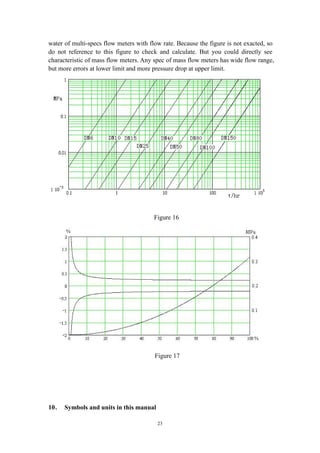
Figure 16 is curves of flow rate / pressure drop based on water of multi-specs of
flow meters. It is easy to check and calculate pressure drop referring to Figure 16, if
the density and viscosity of fluid close to water.
Figure 17 is curves of pressure drop and measurement accuracy. The abscissa is
flow rate percentage over full-scale, the ordinate are measurement accuracy and
pressure drop. This figure shows influence of accuracy and pressure drop base on
23
water of multi-specs flow meters with flow rate. Because the figure is not exacted, so
do not reference to this figure to check and calculate. But you could directly see
characteristic of mass flow meters. Any spec of mass flow meters has wide flow range,
but more errors at lower limit and more pressure drop at upper limit.
Figure 16
Figure 17
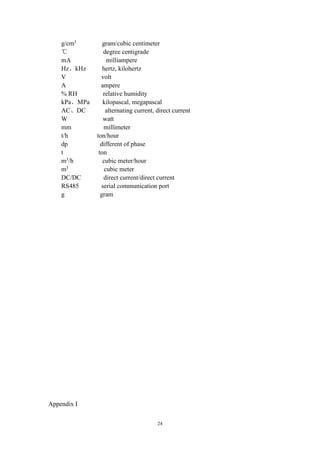
10. Symbols and units in this manual
24
g/cm3
gram/cubic centimeter
℃ degree centigrade
mA milliampere
Hz、kHz hertz, kilohertz
V volt
A ampere
% RH relative humidity
kPa、MPa kilopascal, megapascal
AC、DC alternating current, direct current
W watt
mm millimeter
t/h ton/hour
dp different of phase
t ton
m3
/h cubic meter/hour
m3
cubic meter
DC/DC direct current/direct current
RS485 serial communication port
g gram
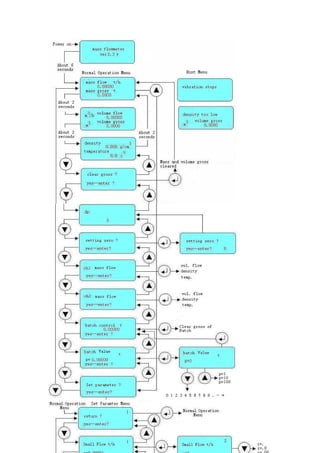
Appendix I
25
26
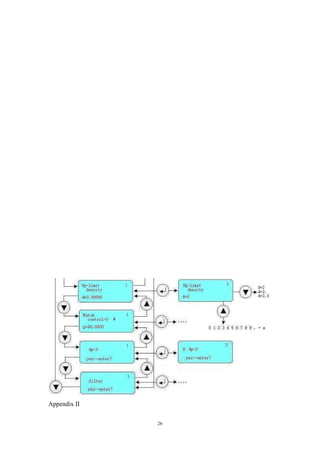
Appendix II
27
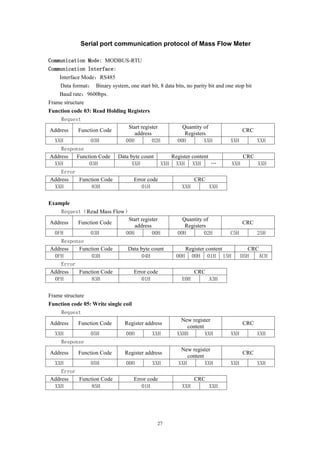
Serial port communication protocol of Mass Flow Meter
Communication Mode: MODBUS-RTU
Communication Interface:
Interface Mode:RS485
Data format: Binary system, one start bit, 8 data bits, no parity bit and one stop bit
Baud rate:9600bps.
Frame structure
Function code 03: Read Holding Registers
Request
Address Function Code
Start register
address
Quantity of
Registers
CRC
XXH 03H 00H 02H 00H XXH XXH XXH
Response
Address Function Code Data byte count Register content CRC
XXH 03H XXH XXH XXH XXH … XXH XXH
Error
Address Function Code Error code CRC
XXH 83H 01H XXH XXH
Example
Request(Read Mass Flow)
Address Function Code
Start register
address
Quantity of
Registers
CRC
0FH 03H 00H 00H 00H 02H C5H 25H
Response
Address Function Code Data byte count Register content CRC
0FH 03H 04H 00H 00H 01H 15H D5H ACH
Error
Address Function Code Error code CRC
0FH 83H 01H E0H A3H
Frame structure
Function code 05: Write single coil
Request
Address Function Code Register address
New register
content
CRC
XXH 05H 00H XXH XXHH XXH XXH XXH
Response
Address Function Code Register address
New register
content
CRC
XXH 05H 00H XXH XXH XXH XXH XXH
Error
Address Function Code Error code CRC
XXH 85H 01H XXH XXH
28
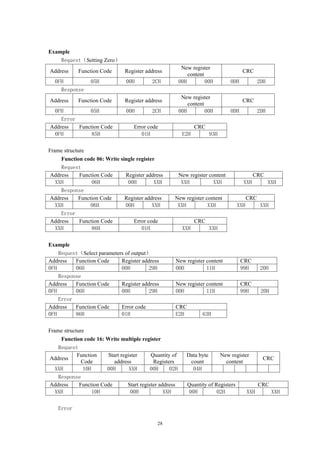
Example
Request(Setting Zero)
Address Function Code Register address
New register
content
CRC
0FH 05H 00H 2CH 00H 00H 0DH 2DH
Response
Address Function Code Register address
New register
content
CRC
0FH 05H 00H 2CH 00H 00H 0DH 2DH
Error
Address Function Code Error code CRC
0FH 85H 01H E2H 93H
Frame structure
Function code 06: Write single register
Request
Address Function Code Register address New register content CRC
XXH 06H 00H XXH XXH XXH XXH XXH
Response
Address Function Code Register address New register content CRC
XXH 06H 00H XXH XXH XXH XXH XXH
Error
Address Function Code Error code CRC
XXH 86H 01H XXH XXH
Example
Request(Select parameters of output)
Address Function Code Register address New register content CRC
0FH 06H 00H 29H 00H 11H 99H 20H
Response
Address Function Code Register address New register content CRC
0FH 06H 00H 29H 00H 11H 99H 20H
Error
Address Function Code Error code CRC
0FH 86H 01H E2H 63H
Frame structure
Function code 16: Write multiple register
Request
Address
Function
Code
Start register
address
Quantity of
Registers
Data byte
count
New register
content
CRC
XXH 10H 00H XXH 00H 02H 04H
Response
Address Function Code Start register address Quantity of Registers CRC
XXH 10H 00H XXH 00H 02H XXH XXH
Error
29
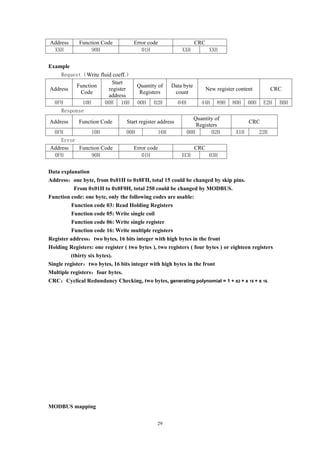
Address Function Code Error code CRC
XXH 90H 01H XXH XXH
Example
Request(Write fluid coeff.)
Address
Function
Code
Start
register
address
Quantity of
Registers
Data byte
count
New register content CRC
0FH 10H 00H 16H 00H 02H 04H 44H 89H 80H 00H E2H BBH
Response
Address Function Code Start register address
Quantity of
Registers
CRC
0FH 10H 00H 16H 00H 02H A1H 22H
Error
Address Function Code Error code CRC
0FH 90H 01H ECH 03H
Data explanation
Address:one byte, from 0x01H to 0x0FH, total 15 could be changed by skip pins.
From 0x01H to 0x0F0H, total 250 could be changed by MODBUS.
Function code: one byte, only the following codes are usable:
Function code 03: Read Holding Registers
Function code 05: Write single coil
Function code 06: Write single register
Function code 16: Write multiple registers
Register address:two bytes, 16 bits integer with high bytes in the front
Holding Registers: one register ( two bytes ), two registers ( four bytes ) or eighteen registers
(thirty six bytes).
Single register:two bytes, 16 bits integer with high bytes in the front
Multiple registers:four bytes.
CRC:Cyclical Redundancy Checking, two bytes, generating polynomial = 1 + x2 + x 15 + x 16.
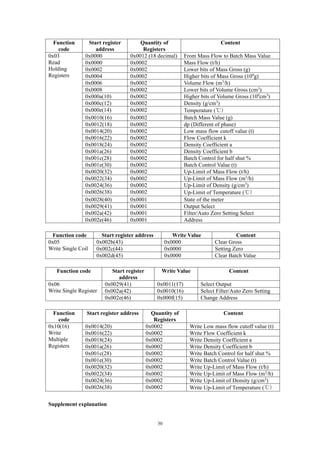
MODBUS mapping
30
Function
code
Start register
address
Quantity of
Registers
Content
0x03
Read
Holding
Registers
0x0000 0x0012 (18 decimal) From Mass Flow to Batch Mass Value
0x0000 0x0002 Mass Flow (t/h)
0x0002 0x0002 Lower bits of Mass Gross (g)
0x0004 0x0002 Higher bits of Mass Gross (109
g)
0x0006 0x0002 Volume Flow (m3
/h)
0x0008 0x0002 Lower bits of Volume Gross (cm3
)
0x000a(10) 0x0002 Higher bits of Volume Gross (109
cm3
)
0x000c(12) 0x0002 Density (g/cm3
)
0x000e(14) 0x0002 Temperature (℃)
0x0010(16) 0x0002 Batch Mass Value (g)
0x0012(18) 0x0002 dp (Different of phase)
0x0014(20) 0x0002 Low mass flow cutoff value (t)
0x0016(22) 0x0002 Flow Coefficient k
0x0018(24) 0x0002 Density Coefficient a
0x001a(26) 0x0002 Density Coefficient b
0x001c(28) 0x0002 Batch Control for half shut %
0x001e(30) 0x0002 Batch Control Value (t)
0x0020(32) 0x0002 Up-Limit of Mass Flow (t/h)
0x0022(34) 0x0002 Up-Limit of Mass Flow (m3
/h)
0x0024(36) 0x0002 Up-Limit of Density (g/cm3
)
0x0026(38) 0x0002 Up-Limit of Temperature (℃)
0x0028(40) 0x0001 State of the meter
0x0029(41) 0x0001 Output Select
0x002a(42) 0x0001 Filter/Auto Zero Setting Select
0x002e(46) 0x0001 Address
Function code Start register address Write Value Content
0x05
Write Single Coil
0x002b(43) 0x0000 Clear Gross
0x002c(44) 0x0000 Setting Zero
0x002d(45) 0x0000 Clear Batch Value
Function code Start register
address
Write Value Content
0x06
Write Single Register
0x0029(41) 0x0011(17) Select Output
0x002a(42) 0x0010(16) Select Filter/Auto Zero Setting
0x002e(46) 0x000f(15) Change Address
Function
code
Start register address Quantity of
Registers
Content
0x10(16)
Write
Multiple
Registers
0x0014(20) 0x0002 Write Low mass flow cutoff value (t)
0x0016(22) 0x0002 Write Flow Coefficient k
0x0018(24) 0x0002 Write Density Coefficient a
0x001a(26) 0x0002 Write Density Coefficient b
0x001c(28) 0x0002 Write Batch Control for half shut %
0x001e(30) 0x0002 Write Batch Control Value (t)
0x0020(32) 0x0002 Write Up-Limit of Mass Flow (t/h)
0x0022(34) 0x0002 Write Up-Limit of Mass Flow (m3
/h)
0x0024(36) 0x0002 Write Up-Limit of Density (g/cm3
)
0x0026(38) 0x0002 Write Up-Limit of Temperature (℃)
Supplement explanation
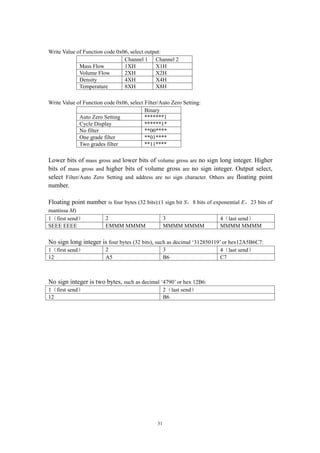
31
Write Value of Function code 0x06, select output:
Channel 1 Channel 2
Mass Flow 1XH X1H
Volume Flow 2XH X2H
Density 4XH X4H
Temperature 8XH X8H
Write Value of Function code 0x06, select Filter/Auto Zero Setting:
Binary
Auto Zero Setting *******1
Cycle Display ******1*
No filter **00****
One grade filter **01****
Two grades filter **11****
Lower bits of mass gross and lower bits of volume gross are no sign long integer. Higher
bits of mass gross and higher bits of volume gross are no sign integer. Output select,
select Filter/Auto Zero Setting and address are no sign character. Others are floating point
number.
Floating point number is four bytes (32 bits):(1 sign bit S,8 bits of exponential E,23 bits of
mantissa M)
1(first send) 2 3 4(last send)
SEEE EEEE EMMM MMMM MMMM MMMM MMMM MMMM
No sign long integer is four bytes (32 bits), such as decimal ‘312850119’ or hex12A5B6C7:
1(first send) 2 3 4(last send)
12 A5 B6 C7
No sign integer is two bytes, such as decimal ‘4790’ or hex 12B6:
1(first send) 2(last send)
12 B6

Mass flowmeter

  • 1.
    Mass Flow Meters Installationand Operation Manual May 2017
  • 2.
    1 Contents 1. Introduction ————————————————————3 2.Principles of Measurement ——————————————3 3. Technical Specifications of Products ——————————3 3.1 Technical Specifications ————————————————4 3.2 Other Specifications —————————————————4 3.3 Explosion-proof Identification Code ————————————5 4. Configurations of Products ——————————————5 4.1 Classify of Products —————————————————5 4.2 Configurations ——————————————————5 5. Installation, Adjustment and Operation ————————6 5.1 Installation of meters ———————————————6 5.2 Conditions required of installation ————————————8 5.3 Dimensions ——————————————————9 5.4 Operation of Transmitter (secondary meter) ————————10 5.4.1 Transmitter of Essential Safety ———————————10 5.4.1.1 Rear Panel Description of Transmitter of Essential Safety —10 5.4.1.2 Front Panel Description of Transmitter of Essential Safety —11 5.4.2 Transmitter of Composite —————————————11 5.4.2.1 Transmitter of Composite wiring Description —————11 5.4.2.2 Front Panel of Composite Description ———————13 5.4.3 Operations ——————————————————13 5.4.3.1 Normal operation menu ———————————13 5.4.3.2 Setting zero ———————————————14 5.4.3.3 Hints Menu ———————————————14
  • 3.
    2 5.4.3.4 Configuration Menu————————————15 5.5 Current loop, frequency output, batch control and RS485 communication ————————————16 5.5.1 Current loop, frequency output ——————————16 5.5.2 Batch Control ————————————————16 5.5.3 Auto Setting Zero (dp-0) and Digital Filter (Filter) ————17 5.5.4 RS485 communication —————————————18 5.5.5 Power Supply —————————————————18 6. Calibration ——————————————————18 7. Trouble Shooting —————————————————18 8. Attentions and Maintenance ————————————19 9. Selecting Directions ———————————————19 10. Symbols and Units in this Manual ——————————24 11.Appendix I —————————————————————25 12. Appendix II —————————————————————27 13.
  • 4.
    3 1. Introduction ZERO100M MassFlow Meters patented and developed by our company (Chinese Patent No. 03119685.3, 03149996.1) are the leading meters for precision flow measurement. And with good reason, the meters offer the most accurate measurement available for virtually any process fluid, while exhibiting exceptionally low pressure drop. The meters offer direct mass flow, volume flow, density, and temperature measurement of liquids and slurries — without the need for additional equipment, manual calculations, or estimations. The meters are designed for unsurpassed performance in even the harshest operating environments. They have no moving parts, and any special mounting or flow conditioning requirements. Every meter is available with stainless steel wetted parts and a wide variety of process connections to meet your every need. The meters carry hazardous area approval for P. R. China. 2. Principles of Measurement The structure of ZERO100M Mass Flow Meters was consisted of a pair of bended tubes. The principle is to detect ZERO100M force forced a pair of tubes from inner mass flow by fluid. A new force—ZERO100M force would be appear while two conditions met: (1) vibrating with normal frequency in a pair of bended tubes, (2) fluid flowing in tubes. This force was produced upon synthesis from vibrating force and flowing force by fluid in tubes. And tubes would be wresting symmetric the center line because the force forced. Two displacement sensors on sides of tubes detect the force and output electric signals. The signals regulated, mass flow directly produced.
  • 5.
    4 3. Technical Specificationsof Products 3.1 Technical Specifications Table of Technical Specifications (Table 1) Titles Technical Specifications Mass flow accuracy ±[0.2% +(zero stability /flow rate×100%)] Mass flow repeatability ±(1/2) ×[0.2% +(zero stability /flow rate×100%)] Density range 0.2 g/cm3 ~3.5g/cm3 Density accuracy ±0.002g/cm3 Temperature range -60℃~+200℃ Temperature accuracy ±1℃ Output of current loop 4mA~20mA Output of frequency/pulse 0Hz~10kHz Contactor capacity of a Batch Control relay 24V/0.1A Contactor form normal open 3.2 Other Specifications Environmental Specifications (Table 2) Titles Specifications Temperature range of fluid -40℃~+200℃ Environmental temperature range 0℃~+40℃ Environmental humidity ≤90% RH, non condensation Atmospheric pressure range 86kPa~106kPa Power supply of transmitters Essential safety Voltage: AC(220±10%)V,(50±5%)Hz Composite Voltage: DC (24±10%) V Power consumed <15W Specifications (Table 3) Specs Line Sizes (mm) Flow Range (t/h) Calibration Range (t/h) Max. Tube Pressure (MPa) Zero Stability (t/hr) Velocity Parameter (h m/t s) DN1 1 0~0.04 0.004~0.04 30.0 0.000008 353.7 DN3 3 0~0.35 0.035~0.35 30.0 0.000067 39.3 DN6 6 0~0.7 0.07~0.7 30.0 0.00016 19.65 DN10 10 0~1.2 0.12~1.2 30.0 0.0002 4.912 DN15 15 0~6.4 0.64~6.4 4.0 0.0011 2.183 DN25 25 0~16 1.6~16 4.0 0.002 0.902 DN40 40 0~40 4~40 4.0 0.003 0.334 DN50 50 0~65 6.5~65 4.0 0.006 0.197 DN80 80 0~160 16~160 2.5 0.01 0.0873 DN100 100 0~250 25~250 2.5 0.015 0.0544
  • 6.
    5 DN150 150 0~55055~550 2.5 0.03 0.0239 3.3 Explosion-proof Identification Code Teble of Explosion-proof identification code (Table 4) Form of Explosion-proof Identification Code Essential safety Exib[ib]IIBT4 Composite Exdib[ib]IIBT4 4. Configurations of Products 4.1 Classify of Products Products specs are divided to eleven based on nominal line sizes: DN1, DN3, DN6, DN10, DN15, DN25, DN40, DN50, DN80, DN100, DN150 (units: mm). 4.2 Configurations Figure 1 Sensors (primary meter) Figure 2 Essential Safety Transmitter Figure 3 Composite Transmitter and Sensor Every meter consists of two parts: the sensor (primary meter) and the transmitter (secondary meter). The sensor (primary meter) is machinery part of mass flow meter. There are a vibrator, two displacement sensors and a temperature sensor in it. The transmitter (secondary meter) is display part of the meter, also is electrical
  • 7.
    6 part. There arepower supply, analog circuits, digital circuits, displayer, and output circuits and so on in it. Its foundational functions are receiving and regulating the electrical signal from sensors, directly getting mass flow, temperature and density after regulating, and calculating volume flow and other need parameters from known parameters. It can display, output, store and long distance transmit, and you can modify the parameters of flow meter. There is a diode safety barrier in transmitters; the function of the diode safety barrier is safeguard to isolating explosion. As the composite explosion-proof flow meter, the sensor (primary meter) is essential safety; the transmitter (secondary meter) is explosion isolated. The sensor and the transmitter may all operate under hazardous area. As the essential safety flow meter, the sensor (primary meter) can operate under hazardous area, the transmitter (secondary meter) must only operate under prescriptive safety area (see section 3.2), forbidden to operate under hazardous area. 5. Installation, Adjustment and Operation 5.1 Installation of meters The mass flow meter mostly is divided to two parts: a sensor (primary meter) and a transmitter (secondary meter), a shield cable connects two parts. The transmitter (secondary meter) of the essential safety flow meter must mount in safety area according to prescriptive conditions (see section 3.2). A sensor and a transmitter of the essential safety flow meter installation show in Figure 4. Figure 4 Sketch of Essential Safety Flow Meter Installation The transmitter (secondary meter) of the essential safety flow meter normally fixes at a cabinet. Drill a square hatch 152mm X 152mm on panel of cabinet; install the transmitter with attached securing plates, nuts and screws referring to Figure 5.
  • 8.
    7 Figure 5 EssentialSafety Transmitter Installations The transmitter (secondary meter) of composite type mounts on the sensor (primary meter) with attached screws. A shield cable connects two parts. Installation of the sensor shows in Figure 6, illuminate hereinafter now: (1) The mass flow meter normally installs in level line, main body perpendicularity downwards. PLS pay attention to the direction label on flow meter, should be same as the direction of fluid in line. If can not confirm direction, PLS see Figure 6 and 10, while the cable socket on back of the mass flow meter, flow direction is from left to right; (2) Securing supports should be built in upper and lower reaches of a line beside the flow meter; (3) Ensure concentric with two flange of flow meter and line while installation. When screwing, screws should be forced uniformity symmetrically, do not impose contraposition, forbidden wring or bend the primary meter; (4) Definite back pressure should keep in lower reaches of a line behind flow meter. Do not let line direct open, prevent incorrectly measure while half tube of liquid; (5) The sensor (primary meter) must leave up ground, and do not touch anything; (6) The tube of upper reaches of line must equal or large than the meter’s inner diameter, forbidden to less than; (7) The body of sensor should be covered with heat preserved material, for measuring the liquid that easy gasifies. Or, the sensor may be damage with frost or dew; (8) For type of DN1, DN3, DN6 and DN10, the sensor should install on ground, use soft tube to connect to the lines; (9) The serial number of sensor and transmitter should same, if the serial number not match, the error may be bigger than normal;
  • 9.
    8 Level line: Main bodyis adown. Measuring liquid. Exit must higher 0.8 meter than the line Level line: Main body is upwards. Measuring slurry. Exit must be higher than the top of main body. Upright line: Flag install. Measuring liquid or slurry. The direction of fluid must be upgrade. Figure 6 Sensor Installation 5.2 Conditions required of installation To guarantee the accuracy, conditions required when installation should be met, because the mass flow meter is a high precision instrument: (1) The sensor (primary meter) and the transmitter (secondary meter) do not install in strong magnetic interferential area. Or, measuring signals would be disturbed, and debase the accuracy; (2) There is must not any other vibrator on line installed the sensor (primary meter); (3) If install outside of door, PLS pay attention circumstance temperature not to exceed the range of meter, and should consider to build a weatherproof shield to avoid blowing and drenching, for increasing lifetime of flow meter. (4) The transmitter (secondary meter) of essential safety should mount in safety area or appropriate control room.
  • 10.
    9 (5) A shieldcable with ten core lines connects the sensor (primary meter) and the transmitter (secondary meter) of essential safety. The output cable of the transmitter (secondary meter) of composite is a shield cable with ten core lines. Five meters long of the cable is normal option in package by our company. Customs can deal special order for longer cable, but not exceed 200 meters. 5.3 Dimensions Figure 7 Dimentions Dimensions Table 5 Spec Line sizes(mm) Fitting Options (mm) Number and Hole Diameter of Flange join or Screw join (mm) Weight (kg)A B C D DN1 13 193 200 75 (234) M12×1.5 Screw join 4 DN3 3 193 225 75 (288) M12×1.5 Screw join 4.5 DN6 6 214 234 69 (328) M16×1.5 Screw join 7.5 DN10 10 256 291 73 (370) M20×1.5 Screw join 9 DN15 15 413 503 90 φ65 4-φ14 15 DN25 25 473 548 96 φ85 4-φ14 18.5 DN40 40 522 613 116 φ110 4-φ18 25.5 DN50 50 597 676 137 φ125 4-φ18 35 DN80 80 650 837 175 φ160 8-φ18 53.5 DN100 100 714 934 198 φ190 8-φ22 70
  • 11.
    10 DN150 150 8151123 265 φ250 8-φ26 85 5.4 Operation of Transmitter (secondary meter) The transmitter (secondary meter) is the electric part of mass flow meter, also is core part of data control and display. 5.4.1 Transmitter of Essential Safety There are a display window, three key-presses, a synchronous return-key and a power switch on the front panel of an essential safety transmitter of flow meters. A power socket, a ten-pin connecting port and a twelve-pin connecting port are on the rear panel. A diode safety barrier mounts in the transmitter. 5.4.1.1 Rear Panel Description of Transmitter of Essential Safety The rear panel of essential safety transmitters of flow meters shows in Figure 8. A ten-pin connecting port is on first column in right of rear panel. From up to down, first and second pins connect to the vibrator in the sensor (OUT, GND); third, fourth and fifth pins connect to right and left displacement sensors separately (L1, GND, L2); sixth, seventh, eighth and ninth pins connect to the temperature sensor (+Tem1, +Tem2, -Tem1, -Tem2); tenth pin connects to shield of cable (Shield). The wire colors of cable connected to pins from one to ten are brown, red, orange, yellow, green, blue, purple, gray, white and black. A twelve-pin connecting port is on second column in right of rear panel. From up to down, first and second pins output 4mA~20mA current loop of channel 1 and channel 2 (Curr1, Curr2, ); third pin is ground of current loop of two channels (GND); fourth and fifth pins output 0Hz~10kHz frequency signals of channel 1 and channel 2 (F1, F2); sixth pin is ground of frequency signals of two channels (GND); seventh and eighth pins are not used (N.O.1, N.O.2); ninth and tenth pins are RS485 data communication (A, B); eleventh and twelfth pins used to clear mass of batch (CALM, GND), press the push button connected to these ends would clear volume gross of batch. Power socket is on lower left of rear panel, power is AC 220V/50Hz.
  • 12.
    11 Figure 8 RearPanel of Essential Safety Transmitters 5.4.1.2 Front Panel Description of Transmitter of Essential Safety The front panel of transmitters of essential safety flow meter shows in Figure 9. Figure 9 Front Panel of Essential Safety Transmitters The display window is on center of front panel, it displays datum and information. Three key-presses are under the window. From left to right, they are an up-key, a down-key and a return-key. Operation of a transmitter mainly uses these key-presses. Open the cover under the key-presses, there are a synchronous return-key and a power switch. Attention: The return-key would be action just while it is pressed with the synchronous return-key at the same time. The synchronous return-key can prevent improper operation. 5.4.2 Transmitter of Composite There are a display window, an up-key, a down-key, a return-key and a synchronous return-key on the front panel of a composite explosion-proof transmitter of flow meters. The transmitter has two cable output: One short cable with plug connector connects to sensor (primary meter); another long ten core cable provide to user. 5.4.2.1 Transmitter of Composite wiring Description Inner rear cover of transmitters of composite explosion-proof flow meters shows in Figure 10. A diode safety barrier installed in rear cover of transmitters of composite explosion-proof flow meters, blue connectors on the diode safety barrier connected to the vibrator, displacement sensors and temperature sensor of primary meter. There is a output connecting plate on the diode safety barrier. Marked CUUR2/F2 factory had configured CUUR2. Marked N.O.3 and N.O.4 are contactors of batch control relay 2.
  • 13.
    12 Marked CLEAR andGND could connect a push button for manual clear batch control mass value. N.O.3, N.O.4, CLEAR and GND had not connected to the output cable. User should not open the front cover. If need, must open rear cover to re-connect output cable by our factory technicians. Figure 10 Inner Rear Cover of Transmitters of Composite The transmitter has a long six core cable output, and a two core cable for RS485 providing to user, see Figure 10. They are:  current loop outputs: channel one output CURR1 (red) channel two output CURR2 (green)  frequency outputs: channel one output F1 (blue)  common ground of current and frequency: GND (yellow)  power supply +24V (white)  common ground of power: GND (black)  RS485 data communication: A (red) B (black)
  • 14.
    13 Figure 11 CompositeFlow Meter Connecting One common ground (GND) is for current loop and frequency, another (GND) is for calibration and power, should not confuse! 5.4.2.2 Front Panel of Composite Description The front panel of transmitters of composite explosion-proof flow meter shows in Figure 12. Figure 12 Front Panel of Composite Flow Meter The display window is on center of front panel, it can display datum and information. Three keys are under the window, one key on top. These keys are magnetic switch keys. Use special magnetic pens close to the key for operation. From left to right under the window, they are an up-key, a down-key and a return-key. The key on top is a synchronous return-key. Attention: The return-key would be action just while it is operated with the synchronous return-key at the same time. The synchronous return-key can prevent improper operation. 5.4.3 Operations Operation menus are divided to three sections: normal operation, hint and configuration. 5.4.3.1 Normal operation menu The screen will display name of the meter and edition of software, after the transmitter powers on. About five seconds elapsed; automatically turn into normal operation menu, and display mass flow and gross, volume flow and gross, density and temperature. This menu is cycle scroll. Pressing the up-key or down-key, the menu will scroll up or down to display. Keep the up-key or down-key pressed for a long time, the menu will scroll up or down automatically with about one second. The return-key (pressed the return-key and the synchronous return-key at the same time) will clear gross (return to mass flow and gross display menu after clear), setting zero (return to dp display menu after setting), select configurations of frequency and current loop output (only one output is selected permissibly in ch1 or ch2), clear gross of batch control, change value of batch and to entry configuration menu.
  • 15.
    14 Normal operation menuand descriptions Table 6 Menu Descriptions Mass Flow(t/h) Mass Gross(t) Volume Flow (m3 /h) Volume Gross(m3 ) Density(g/㎝ 3 ) Temperature(℃) Fluid density and temperature Clear Gross? Clear the grosses of mass and volume dp Different of phase Setting zero? Setting the reference zero in the system different of phase measurement (Select) ch1—Mass flow (Vol. flow /Density/ Temp.) Select parameters of frequency and current loop output (Select) ch2—Mass flow (Vol. flow /Density/ Temp.) Select parameters of frequency and current loop output Gross of Batch(t) Display gross of this batch, press return-key will clear gross of batch Batch Value/ p=xxxxx Display value of batch, press return will change the value Set parameter ? To enter Configuration Menu Attention: Whenever fluid flows or steadies in the tube, the operations of clearing gross and setting zero could be done. PLS pay more attention for correct operation. 5.4.3.2 Setting zero Setting zero is the key for nicety measurement of flow meters. After a primary meter installed, this operation should be done firstly. Steps as follows:  After connect the cable and power on the transmitter. About five seconds elapsed; automatically turn into normal operation menu, and display mass flow and gross. Keep for 5 minutes up for warm-up.  Open valves on upper and lower reaches of line, keep large flux (larger more than 50% full range) continually for 20~30 minutes. Insure there is no air in the tube, no remain stress on the meter and all screws in line are never unscrewed.  Firstly close the valve on lower reaches of line, then close upper valve. Surely fulfill with fluid in the flow meter, there is not air bubble in and fluid steadied. Keep this state for more than 5 minutes.  Press down-key to scroll menu to the setting zero, press the return-key and the synchronous return-key at the same time, then meter will enter zero setting state. After setting, observe for minutes, if dp was small, such as less than ±15, the setting would be success. Or else repeat setting zero steps above. Should observe the dp zero ever period of time (such as months). If exceeds ±20, must execute the steps of setting zero, to insure meters measurement correctly. Setting zero must be operated while liquid in line at rest.
  • 16.
    15 5.4.3.3 Hints Menu Thismenu is hints made by transmitters automatically based on working state. It could not be changed by manual. Hints menu and descriptions Table 7 Menu Descriptions Vibration Stops Self diagnose. Denote the primary meter had stopped vibrating. Must be cleaning or maintaining. Density Too Low (Not display Volume flow) Denote the fluid density in tube less than 0.2(g/㎝ 3 ), and stopped to accumulation of volume gross. 5.4.3.4 Configuration Menu On the normal operation menu, when display “Set parameter ?”, press the return-key and the synchronous return-key at the same time, the transmitter will enter the parameters configuration menu. This menu is cycle scroll, press the up-key or down-key; the menu will scroll up or down to display. Keeping the up-key or down-key pressed for a long time, the menu will scroll up or down automatically with about one second. Scroll to the parameter needed to configured, pressed the return-key and the synchronous return-key at the same time, and then enter to input value of the parameter state. Now up-key is changed to figure or character selecting key (0~9 . - e), and down-key is changed to location rightwards selecting key. The character e is exponential format, such as 0.024 could be input 2.4e-2. After the parameter is input completely, pressed the return-key and the synchronous return-key at the same time for confirmation. Configuration menu and descriptions Table 8 Menu Descriptions Small Flow r (t/h) Gross not change if mass flow less than this value. Fluid coeff. k Result while calibration, forbidden modifies! Density coeff. a ρ=a*X+b, result while calibration, forbidden modifies! Density coeff. b Result while calibration, forbidden modifies! Up-limit M. Fl. f (t/h) Full range configured for frequency/current loop output. Up-limit V. Fl. f (m3 /h) Full range configured for frequency/current loop output. Up-limit Temp. t (℃) Full range configured for frequency/current loop output. Up-limit Dsty. d (g/㎝ 3 ) Full range configured for frequency/current loop output. Batch Control-0 p (%) Percentage value of Batch Control for half shut, the relay 2 would be action as soon as mass equals or exceeds this value. (Select) dp-0 Select availability or invalidation of Auto Setting Zero (Select) Filter Select single or double Digital Filter availability or invalidation Return ? Return to Normal Operation Menu To quit the configuration menu, when display “return ?”, press the return-key and the synchronous return-key at the same time, the transmitter will return to normal operation menu. Attention: Second to fourth parameters were configured while calibration by the metrology department, customers cannot modify. Or else, the flow meter should be recalibrated by the metrology department. For preventing improper operation to lose
  • 17.
    16 datum, suggest writedown these parameters, and keep in the archives with the manual and the certificate of calibration. Thereafter four parameters were configured for full range of frequency/current loop output. Costumers may modify if required. The parameter is corresponding 10kHz frequency output and 20mA current loop output. Attention: Temperature zero (0Hz, 4mA) output is corresponding -60℃. Ninth parameters are to configure percentage value of Batch Control for control double position valve to half closed. In normal operation menu, after inputted value of Batch Control, as soon as mass equals or exceeds the percentage of Batch Control value, the half relay 2 would be action; the valve would be half shut. As soon as mass equals or exceeds the Batch Control value, the full relay 1 would be action; the valve would be full shut. Relays resume after clear gross of batch. And start next batch. Tenth and eleventh are to select auto setting zero dp-0 (after selected, signal √ will appear ahead), and to select digital filter Filter (after selected, signal √ or 2√ will appear ahead). 5.5 Current loop, frequency output, batch control and RS485 communication 5.5.1 Current loop, frequency output In the essential safety transmitter, two current loop pins marks on rear panel are “Curr1” and “Curr2”, close to is their ground wire “GND”. In the composite transmitter, two current loop wires in the six core cable are red color wire CURR1 and green color wire CURR2, common ground wire is yellow color GND. Current loop output range is 4mA~20mA. They had been isolated inside with photo-electricity and DC/DC power converter. So the ground should do not confuse with power ground. In the essential safety transmitter, two frequency output pins marks on rear panel are “F1” and “F2”, under them is its ground wire “GND”. In the composite transmitter, a frequency output wire in the six core cable is blue color wire F1. Frequency output is 0Hz~10kHz, 0V~5V rectangular wave, 1:1 ratio of occupy to empty, 100Ω inner resistance. They had been isolated inside with photo-electricity and DC/DC power converter. Common ground is same as current loop ground, so the ground should do not confuse with other ground. 5.5.2 Batch Control Operate according to 5.4.3.4, Table 8. In configuration menu, input percentage value of Batch Control. The percentage value of Batch Control could be about 90% of the value of Batch Control, and the time between the valve half shut to full shut should more than 2 seconds. Then quit the configuration menu, enter normal operation menu 5.4.3.1, Table 6, select Batch Value menu, input value of batch control. When the meter works, as soon as gross equals or exceeds the percentage value of Batch Control, the half relay 2 would be action; the valve would be half shut. As soon as gross equals or exceeds the Batch Control value, the full relay 1 would be action; the valve would be full shut. After manual clear gross of batch, will resume to early
  • 18.
    17 normal open state.And start next batch. If only use one relay, should use the relay 1, do not use the relay 2. A push button would be connected to CALM and GND ends (the essential safety transmitter) or CLEAR and GND ends (on connecting plate in rear cover of the composite transmitter). When button pressed, mass value of batch will be cleared. In the essential safety transmitter, Contactors output of full shut Batch Control relay on rear panel marked “N.O.1” and “N.O.2”, Contactors form is normal open, contactors capacity is 24V/0.1A. There are not contactors output of half shut Batch Control relay. If user needs, must deal special order, and arrange the output configuration of the pins with us. In the composite transmitter, if user needs, must deal special order, and arrange the output configuration of the cable with us. Contactors form is normal open, contactors capacity is 24V/0.1A. Figure 13 Diagram of Batch Control Connection Figure 14 Diagram of Batch Control Operation 5.5.3 Auto Setting Zero (dp-0) and Digital Filter (Filter) In configuration menu, if select dp-0, the meter will auto set zero while fluid was static (dp<20) for every 5~6 minutes. We suggest selecting dp-0, while assuring fluid at rest if closed valves on the line. If select Filter, the mass flow would be filtered by the digital filter of transmitter, but there are about 5 seconds delay for display and output. Do not select Filter for batch control, because error would be larger by delay.
  • 19.
    18 5.5.4 RS485 communication RS485communication pins marks on rear panel of the essential safety transmitter are “A” and “B”. RS485 communication wires in the two core cable of the composite transmitter are red color wire A and black color wire B. If upper computer needs communicate with multi transmitters, this transmitter address could be changed from 15 to 0~14 with reconfiguring the short circuit blocks directed by our technician. If want communicate with more than 16 transmitters, must deal special order in advance. Communicate with most to 255 transmitters in theory. MODBUS communication configurations PLS see Appendix II. 5.5.5 Power Supply The power supply of the essential safety explosion-proof transmitter (secondary meter) is AC 220V/50Hz. Power consumes less than 15W. The power supply of the composite explosion-proof transmitter (secondary meter) is DC 24V. Power consumes less than 15W. Power wires in the six core cable are white color wire +24V, and black color wire common ground GND. Power ground should do not confuse with other ground. 6. Calibration Mass flow meters are high precision measurement instruments. For guarantee accuracy in use, must calibrate by the metrology department periodically. Calibration operations as follows: Direct to measure frequency output of the meter, see section 5.4.1 and 5.5.1 for connecting and specifications. Mass flow upper limit should be input in configuration menu in advance, the value of limit is corresponding 10kHz frequency output. Select the channel number just configured in normal operation menu then can calibrate. If result of calibration exceeds the error, could modify the fluid coefficient k based on the result. New fluid coefficient k1 calculating formula is as follows: k1 = k0 * mfs / mfd Herein: k1 — New fluid coefficient will input to secondary meter; k0 — Old fluid coefficient memorized in secondary meter; mfs — Mass average got by the calibration standard; mfd — Mass average got by secondary meter display. 7. Trouble Shooting
  • 20.
    19 Trouble shooting table(Table9) Troubles Reasons Removing Value of dp is not steady Installation was incorrectness Install again follow 5.1 dp is sometime big or small Setting Zero was of no effect Check-up connection between the transmitter and the sensor Display “Vibration Stops” Bad connection, or dirty inner tube Check-up connection or clean inner tube Display “Density Too Low” or density is sometime big or small There is gas in tube Discharge gas or equip a gas-liquid separator Density has error After installation Adjust density coeff. b Not working (display not changed after power on) Power off too short, or power-cord bad contact Power off for 10 seconds, keeping fine contact Display minus flow Setting zero at flow, or valve close not tight after select dp-0 Do not select dp-0, setting zero follow this manual No communication signal on upper computer Check-up connecting lines was not broken Exchange A, B connection Communication of upper compute sometime mistake Program of communication is good Change a good RS232/485 converter Testing parameters for normal sensor: Driving coil (1-2 pins): resistance: <50Ω; ac voltage: 1V±0.5V. Testing coils (3-4 or 5-4 pins): resistance: <100Ω; ac voltage: 0.5V±0.3V. Temperature resistance: (7-8 pins): 100Ω±10Ω (when 0℃), coefficient ≈ 0.38Ω / ℃. Temperature resistance: (6-7 or 8-9 pins): 0Ω±2Ω. 8. Attentions and maintenance Lifetime of the meter is relative with care and maintenance. To extend lifetime of the mass flow meter, should care and maintain best as follows: (1) Keep clean for sensors and transmitters; do not put transmitters in dusty place; (2) Move sensors and transmitters gently, do not throw or break; (3) Should rinse inner tubes of the sensor periodically, shorten clean period for glutinous fluid; (4) Examine and repair regular. Periodically calibrate by the metrology department for nicety measurement customers. 9. Selecting Directions Selecting correct specs of mass flow meters is the base for safe operation and nicety measurement. Follow these selecting directions, could help you right use mass flow meters. Before selecting, should know parameters needed to select: flow range (maximum flow rate, rating flow rate, common use flow rate, minimum flow rate), line size (inner diameter, outside diameter), operation pressure, permission pressure drop, temperature of fluid, density (specific gravity) and viscosity of fluid, permission velocity of flow, accuracy. Further should know demands of real world installation:
  • 21.
    20 such as lengthof cable, signal format, demand for explosion-proof, environment and so on. (1) Primary select a nominal line size of mass flow meters User or engineer primary select a spec of mass flow meters base on flow range of fluid and inner diameter, referring to Table 3. Example: such as flow range: 8~20t/h, inner diameter: Φin = 50mm, viscosity of fluid: μ = 25cP, specific gravity: S = 0.8. So primary select DN50 mass flow meters referring to Table 3, nominal line size: 50mm, maximum flow rate: 80t/h. (if user has known motive viscosity value mm2 /s of fluid, could obtain absolute viscosity value μ with multiply by fluid density or specific gravity.) (2) Check pressure drop Figure 15 is curves of flow rate / pressure drop with different viscosity based on water (μ=1) of multi-specs of flow meters. In this example, find the point of 20t/h in the abscissa of Figure 15f, draw a parallel with the ordinate through this point intersect with curve of μ= 25, got point Q, draw a parallel with the abscissa through the point Q intersect with the ordinate, got point P, we can read out point P pressure drop 0.08MPa. This pressure drop called figure pressure drop, sign as ΔPF = 0.08MPa. (3) Calculate real pressure drop using fluid specific gravity S Real pressure drop of fluid: ΔPR = ΔPF / S = 0.08MPa / 0.8 = 0.1MPa Commonly, this pressure drop would meet with demand of design and engineering. Next, check if tube pressure, temperature range meets with demands. (4) Check velocity of flow If there is the limit flow velocity by design and engineering, you have to calculate flow velocity using this formula: V = Kv × Qm / C. Herein: maximum flow rate Qm = 20 (t/h); Velocity parameter (see Table 1) Kv = 0.197 (h m/t s); Ratio of density of fluid by water (or specific gravity) C = S = 0.8. Then, got velocity: V = 20 ×0.197 / 0.8 = 4.925 m/s. For flammability and explosive chemical fluid, maximum velocity must lower the limit by safety and engineering, to avoid static produced. (5)If viscosity more than 25cP, such as 500cP, then find pressure drop 0.8MPa at same flow rate reference to Figure 15f. If this pressure drop could not permit by design or engineering, must select a large line size of mass flow meters, such as DN80. Then repeat above(1)(2)(3)(4)to calculate and check. ( 6 ) After selecting right line size of mass flow meters, should check if measurement accuracy met the demands. Accuracy = ±[0.2% +(zero stability /flow rate×100%)]
  • 22.
    21 Figure 15a, DN6Figure 15b, DN10 Figure 15c, DN15 Figure 15d, DN25
  • 23.
    22 Figure 15e, DN40Figure 15f, DN50 Figure 15g DN80 Figure 15h, DN100 (7)Another two figures attached bellow, for convenient to calculate and select. Figure 16 is curves of flow rate / pressure drop based on water of multi-specs of flow meters. It is easy to check and calculate pressure drop referring to Figure 16, if the density and viscosity of fluid close to water. Figure 17 is curves of pressure drop and measurement accuracy. The abscissa is flow rate percentage over full-scale, the ordinate are measurement accuracy and pressure drop. This figure shows influence of accuracy and pressure drop base on
  • 24.
    23 water of multi-specsflow meters with flow rate. Because the figure is not exacted, so do not reference to this figure to check and calculate. But you could directly see characteristic of mass flow meters. Any spec of mass flow meters has wide flow range, but more errors at lower limit and more pressure drop at upper limit. Figure 16 Figure 17 10. Symbols and units in this manual
  • 25.
    24 g/cm3 gram/cubic centimeter ℃ degreecentigrade mA milliampere Hz、kHz hertz, kilohertz V volt A ampere % RH relative humidity kPa、MPa kilopascal, megapascal AC、DC alternating current, direct current W watt mm millimeter t/h ton/hour dp different of phase t ton m3 /h cubic meter/hour m3 cubic meter DC/DC direct current/direct current RS485 serial communication port g gram Appendix I
  • 26.
  • 27.
  • 28.
    27 Serial port communicationprotocol of Mass Flow Meter Communication Mode: MODBUS-RTU Communication Interface: Interface Mode:RS485 Data format: Binary system, one start bit, 8 data bits, no parity bit and one stop bit Baud rate:9600bps. Frame structure Function code 03: Read Holding Registers Request Address Function Code Start register address Quantity of Registers CRC XXH 03H 00H 02H 00H XXH XXH XXH Response Address Function Code Data byte count Register content CRC XXH 03H XXH XXH XXH XXH … XXH XXH Error Address Function Code Error code CRC XXH 83H 01H XXH XXH Example Request(Read Mass Flow) Address Function Code Start register address Quantity of Registers CRC 0FH 03H 00H 00H 00H 02H C5H 25H Response Address Function Code Data byte count Register content CRC 0FH 03H 04H 00H 00H 01H 15H D5H ACH Error Address Function Code Error code CRC 0FH 83H 01H E0H A3H Frame structure Function code 05: Write single coil Request Address Function Code Register address New register content CRC XXH 05H 00H XXH XXHH XXH XXH XXH Response Address Function Code Register address New register content CRC XXH 05H 00H XXH XXH XXH XXH XXH Error Address Function Code Error code CRC XXH 85H 01H XXH XXH
  • 29.
    28 Example Request(Setting Zero) Address FunctionCode Register address New register content CRC 0FH 05H 00H 2CH 00H 00H 0DH 2DH Response Address Function Code Register address New register content CRC 0FH 05H 00H 2CH 00H 00H 0DH 2DH Error Address Function Code Error code CRC 0FH 85H 01H E2H 93H Frame structure Function code 06: Write single register Request Address Function Code Register address New register content CRC XXH 06H 00H XXH XXH XXH XXH XXH Response Address Function Code Register address New register content CRC XXH 06H 00H XXH XXH XXH XXH XXH Error Address Function Code Error code CRC XXH 86H 01H XXH XXH Example Request(Select parameters of output) Address Function Code Register address New register content CRC 0FH 06H 00H 29H 00H 11H 99H 20H Response Address Function Code Register address New register content CRC 0FH 06H 00H 29H 00H 11H 99H 20H Error Address Function Code Error code CRC 0FH 86H 01H E2H 63H Frame structure Function code 16: Write multiple register Request Address Function Code Start register address Quantity of Registers Data byte count New register content CRC XXH 10H 00H XXH 00H 02H 04H Response Address Function Code Start register address Quantity of Registers CRC XXH 10H 00H XXH 00H 02H XXH XXH Error
  • 30.
    29 Address Function CodeError code CRC XXH 90H 01H XXH XXH Example Request(Write fluid coeff.) Address Function Code Start register address Quantity of Registers Data byte count New register content CRC 0FH 10H 00H 16H 00H 02H 04H 44H 89H 80H 00H E2H BBH Response Address Function Code Start register address Quantity of Registers CRC 0FH 10H 00H 16H 00H 02H A1H 22H Error Address Function Code Error code CRC 0FH 90H 01H ECH 03H Data explanation Address:one byte, from 0x01H to 0x0FH, total 15 could be changed by skip pins. From 0x01H to 0x0F0H, total 250 could be changed by MODBUS. Function code: one byte, only the following codes are usable: Function code 03: Read Holding Registers Function code 05: Write single coil Function code 06: Write single register Function code 16: Write multiple registers Register address:two bytes, 16 bits integer with high bytes in the front Holding Registers: one register ( two bytes ), two registers ( four bytes ) or eighteen registers (thirty six bytes). Single register:two bytes, 16 bits integer with high bytes in the front Multiple registers:four bytes. CRC:Cyclical Redundancy Checking, two bytes, generating polynomial = 1 + x2 + x 15 + x 16. MODBUS mapping
  • 31.
    30 Function code Start register address Quantity of Registers Content 0x03 Read Holding Registers 0x00000x0012 (18 decimal) From Mass Flow to Batch Mass Value 0x0000 0x0002 Mass Flow (t/h) 0x0002 0x0002 Lower bits of Mass Gross (g) 0x0004 0x0002 Higher bits of Mass Gross (109 g) 0x0006 0x0002 Volume Flow (m3 /h) 0x0008 0x0002 Lower bits of Volume Gross (cm3 ) 0x000a(10) 0x0002 Higher bits of Volume Gross (109 cm3 ) 0x000c(12) 0x0002 Density (g/cm3 ) 0x000e(14) 0x0002 Temperature (℃) 0x0010(16) 0x0002 Batch Mass Value (g) 0x0012(18) 0x0002 dp (Different of phase) 0x0014(20) 0x0002 Low mass flow cutoff value (t) 0x0016(22) 0x0002 Flow Coefficient k 0x0018(24) 0x0002 Density Coefficient a 0x001a(26) 0x0002 Density Coefficient b 0x001c(28) 0x0002 Batch Control for half shut % 0x001e(30) 0x0002 Batch Control Value (t) 0x0020(32) 0x0002 Up-Limit of Mass Flow (t/h) 0x0022(34) 0x0002 Up-Limit of Mass Flow (m3 /h) 0x0024(36) 0x0002 Up-Limit of Density (g/cm3 ) 0x0026(38) 0x0002 Up-Limit of Temperature (℃) 0x0028(40) 0x0001 State of the meter 0x0029(41) 0x0001 Output Select 0x002a(42) 0x0001 Filter/Auto Zero Setting Select 0x002e(46) 0x0001 Address Function code Start register address Write Value Content 0x05 Write Single Coil 0x002b(43) 0x0000 Clear Gross 0x002c(44) 0x0000 Setting Zero 0x002d(45) 0x0000 Clear Batch Value Function code Start register address Write Value Content 0x06 Write Single Register 0x0029(41) 0x0011(17) Select Output 0x002a(42) 0x0010(16) Select Filter/Auto Zero Setting 0x002e(46) 0x000f(15) Change Address Function code Start register address Quantity of Registers Content 0x10(16) Write Multiple Registers 0x0014(20) 0x0002 Write Low mass flow cutoff value (t) 0x0016(22) 0x0002 Write Flow Coefficient k 0x0018(24) 0x0002 Write Density Coefficient a 0x001a(26) 0x0002 Write Density Coefficient b 0x001c(28) 0x0002 Write Batch Control for half shut % 0x001e(30) 0x0002 Write Batch Control Value (t) 0x0020(32) 0x0002 Write Up-Limit of Mass Flow (t/h) 0x0022(34) 0x0002 Write Up-Limit of Mass Flow (m3 /h) 0x0024(36) 0x0002 Write Up-Limit of Density (g/cm3 ) 0x0026(38) 0x0002 Write Up-Limit of Temperature (℃) Supplement explanation
  • 32.
    31 Write Value ofFunction code 0x06, select output: Channel 1 Channel 2 Mass Flow 1XH X1H Volume Flow 2XH X2H Density 4XH X4H Temperature 8XH X8H Write Value of Function code 0x06, select Filter/Auto Zero Setting: Binary Auto Zero Setting *******1 Cycle Display ******1* No filter **00**** One grade filter **01**** Two grades filter **11**** Lower bits of mass gross and lower bits of volume gross are no sign long integer. Higher bits of mass gross and higher bits of volume gross are no sign integer. Output select, select Filter/Auto Zero Setting and address are no sign character. Others are floating point number. Floating point number is four bytes (32 bits):(1 sign bit S,8 bits of exponential E,23 bits of mantissa M) 1(first send) 2 3 4(last send) SEEE EEEE EMMM MMMM MMMM MMMM MMMM MMMM No sign long integer is four bytes (32 bits), such as decimal ‘312850119’ or hex12A5B6C7: 1(first send) 2 3 4(last send) 12 A5 B6 C7 No sign integer is two bytes, such as decimal ‘4790’ or hex 12B6: 1(first send) 2(last send) 12 B6