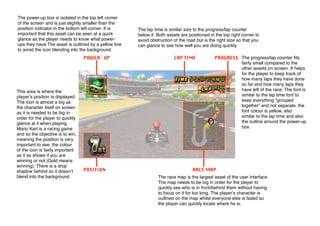
The power-up box is isolated in the top left corner
of the screen and is just slightly smaller than the
position indicator in the bottom left corner. It is
important that this asset can be seen at a quick
glance as the player needs to know what powerups they have.The asset is outlined by a yellow line
to avoid the icon blending into the background.

This area is where the
playerʼs position is displayed.
The icon is almost a big as
the character itself on screen
as it is needed to be big in
order for the player to quickly
glance at it when playing.
Mario Kart is a racing game
and so the objective is to win,
meaning the position is very
important to see. the colour
of the icon is fairly important
as it as shows if you are
winning or not (Gold means
winning). There is a drop
shadow behind so it doesnʼt
blend into the background.

The lap time is similar size to the progress/lap counter
below it. Both assets are positioned in the top right corner to
avoid obstruction of the road but is the right size so that you
can glance to see how well you are doing quickly.
The progress/lap counter fits
fairly small compared to the
other assets on screen. It helps
for the player to keep track of
how many laps they have done
so far and how many laps they
have left of the race. The font is
similar to the lap time font to
keep everything “grouped
together” and not separate. the
font colour is yellow, also
similar to the lap time and also
the outline around the power-up
box.

The race map is the largest asset of the user interface.
The map needs to be big in order for the player to
quickly see who is in front/behind them without having
to focus on it for too long. The playerʼs character is
outlined on the map whilst everyone else is faded so
the player can quickly locate where he is.

Mario UI

  • 1.
    The power-up boxis isolated in the top left corner of the screen and is just slightly smaller than the position indicator in the bottom left corner. It is important that this asset can be seen at a quick glance as the player needs to know what powerups they have.The asset is outlined by a yellow line to avoid the icon blending into the background. This area is where the playerʼs position is displayed. The icon is almost a big as the character itself on screen as it is needed to be big in order for the player to quickly glance at it when playing. Mario Kart is a racing game and so the objective is to win, meaning the position is very important to see. the colour of the icon is fairly important as it as shows if you are winning or not (Gold means winning). There is a drop shadow behind so it doesnʼt blend into the background. The lap time is similar size to the progress/lap counter below it. Both assets are positioned in the top right corner to avoid obstruction of the road but is the right size so that you can glance to see how well you are doing quickly. The progress/lap counter fits fairly small compared to the other assets on screen. It helps for the player to keep track of how many laps they have done so far and how many laps they have left of the race. The font is similar to the lap time font to keep everything “grouped together” and not separate. the font colour is yellow, also similar to the lap time and also the outline around the power-up box. The race map is the largest asset of the user interface. The map needs to be big in order for the player to quickly see who is in front/behind them without having to focus on it for too long. The playerʼs character is outlined on the map whilst everyone else is faded so the player can quickly locate where he is.