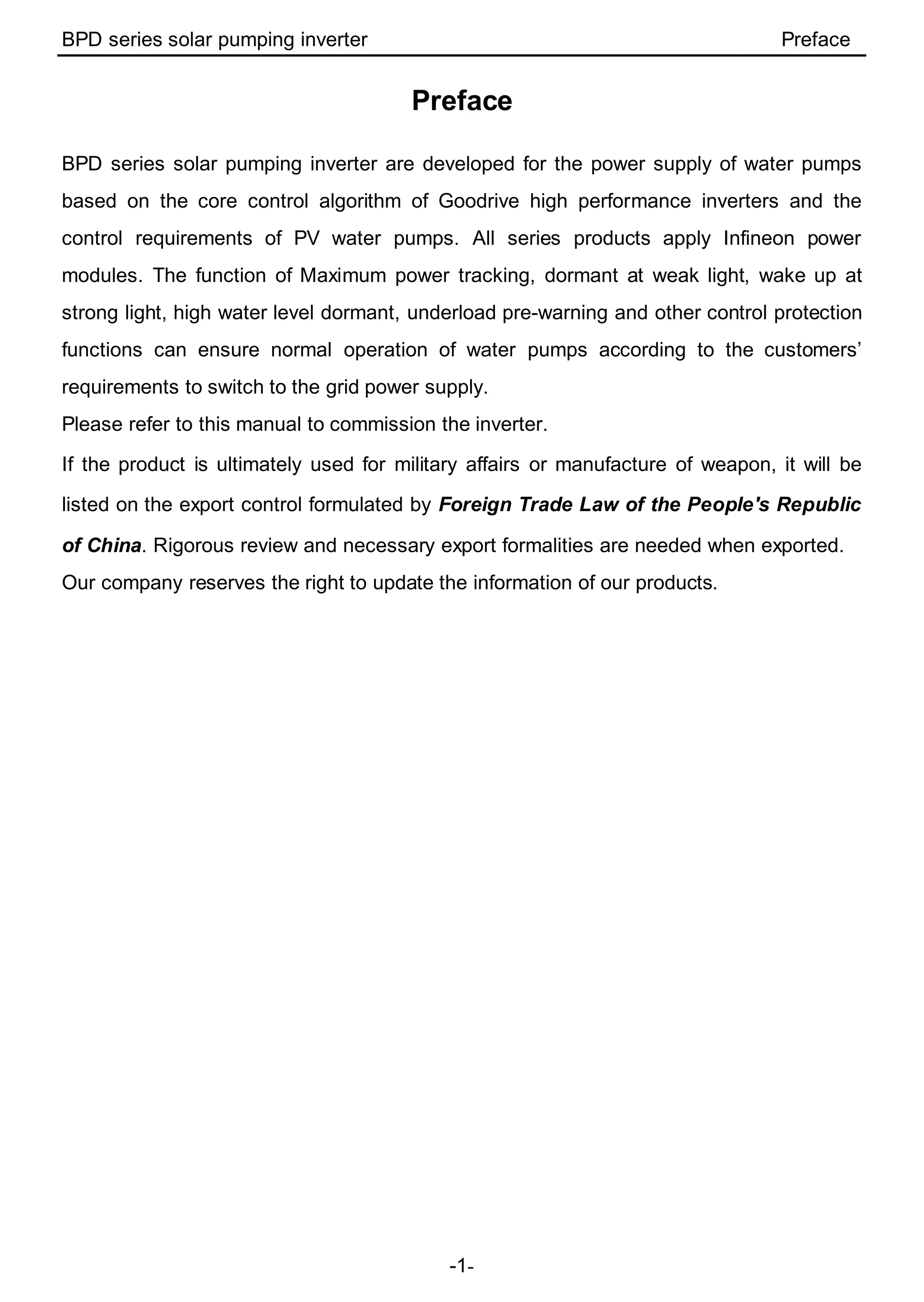
BPD Series Solar Pumping Inverter
BPD series solar pumping inverter Preface
-1-
Preface
BPD series solar pumping inverter are developed for the power supply of water pumps
based on the core control algorithm of Goodrive high performance inverters and the
control requirements of PV water pumps. All series products apply Infineon power
modules. The function of Maximum power tracking, dormant at weak light, wake up at
strong light, high water level dormant, underload pre-warning and other control protection
functions can ensure normal operation of water pumps according to the customers’
requirements to switch to the grid power supply.
Please refer to this manual to commission the inverter.
If the product is ultimately used for military affairs or manufacture of weapon, it will be
listed on the export control formulated by Foreign Trade Law of the People's Republic
of China. Rigorous review and necessary export formalities are needed when exported.
Our company reserves the right to update the information of our products.
BPD series solar pumping inverter Contents
-2-
Contents
Preface........................................................................................................................ 1
Contents...................................................................................................................... 2
1 Safety Precautions.................................................................................................... 1
1.1 Safety definition .......................................................................................... 1
1.2 Warning symbols......................................................................................... 1
1.3 Safety guidelines......................................................................................... 2
2 Product overview.................................................................................................... 4
2.1 Product specifications.................................................................................. 4
2.2 Name plate ................................................................................................. 5
2.3 Model instruction......................................................................................... 6
2.4 Rated specifications .................................................................................... 6
2.5 Terminals, wiring and dimension diagram ..................................................... 6
2.6 Keypad Operation Procedure..................................................................... 10
3 Function parameters............................................................................................. 16
3.1 Parameters of common functions............................................................... 16
3.2 Parameters of special functions ................................................................. 30
4 Installation guidelines............................................................................................ 40
4.1 Unpacking inspection ................................................................................ 40
4.2 Before installation...................................................................................... 40
4.3 Mechanical installation............................................................................... 42
4.4 Electrical installation.................................................................................. 43
4.5 Inspection before operation........................................................................ 47
4.6 Instruction of LEDs.................................................................................... 48
5 Commissioning guidelines....................................................................................... 49
5.1 Commissioning steps during power supply ................................................. 49
5.2 Commissioning steps during grid power supply........................................... 50
5.3 Commissioning steps during automatic switching between PV and grid power
supply ............................................................................................................ 51
5.4 Advanced setting....................................................................................... 53
5.5 Flow chart of the commissioning ................................................................ 55
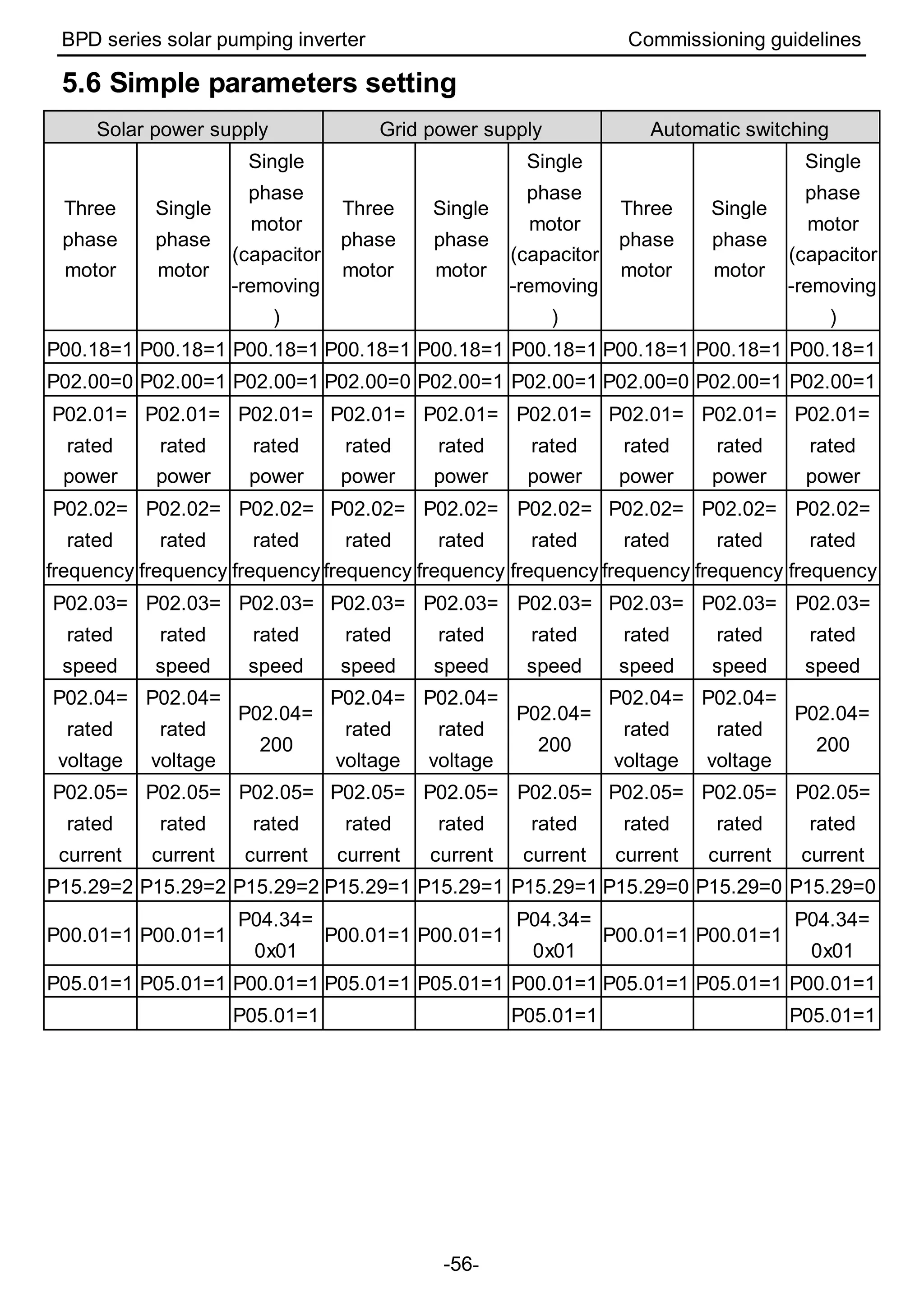
5.6 Simple parameters setting ......................................................................... 56
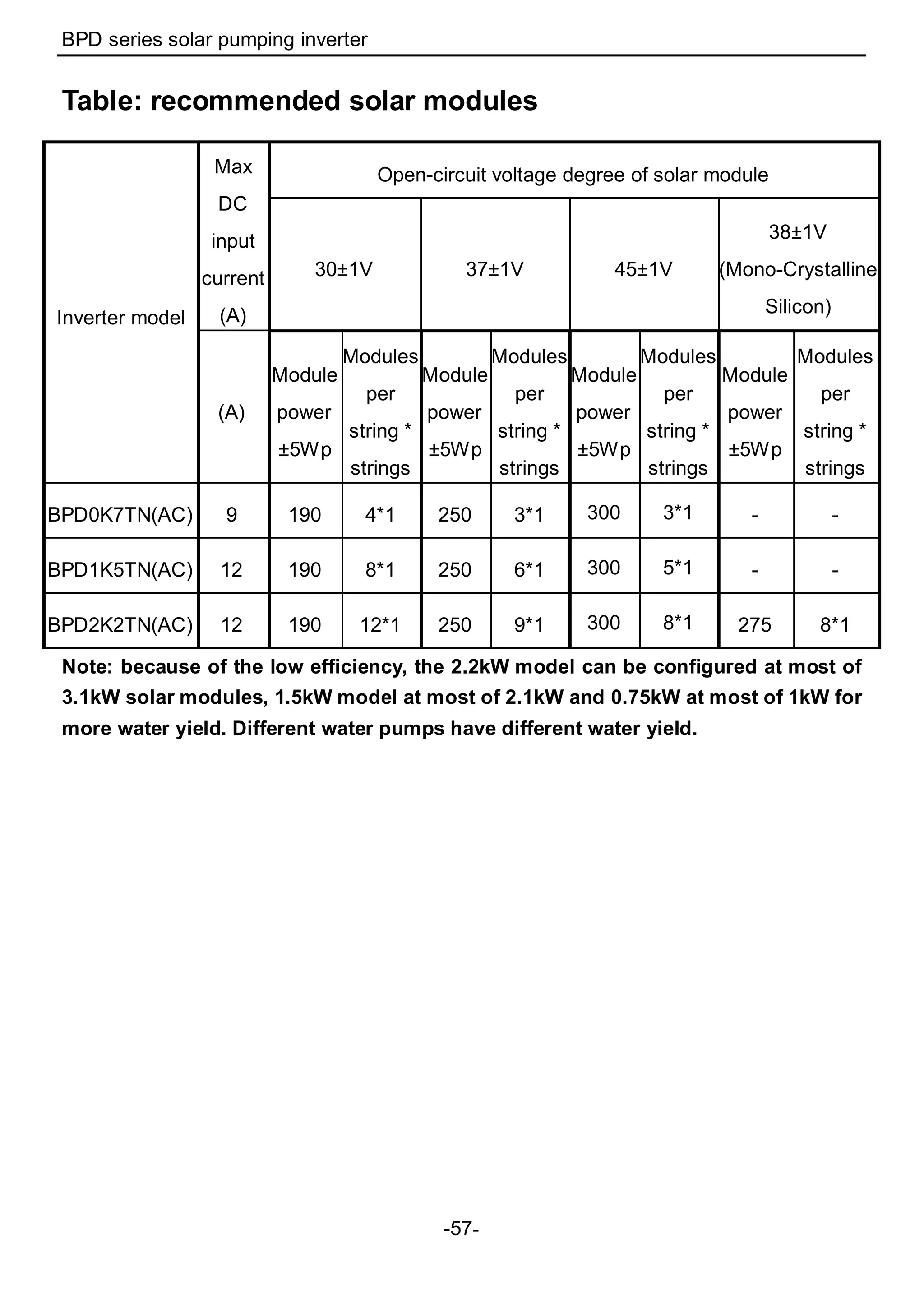
Table: recommended solar modules............................................................................ 57
BPD series solar pumping inverter Safety precautions
-1-
1 Safety Precautions
Please read this manual carefully and follow all safety precautions before moving,
installing, operating and servicing the inverter. If ignored, physical injury or death may
occur, or damage may occur to the devices.
If any physical injury or death or damage to the devices occurs for ignoring to the safety
precautions in the manual, our company will not be responsible for any damages and we
are not legally bound in any manner.
1.1 Safety definition
Danger: Serious physical injury or even death may occur if not follow
relevant requirements
Warning: Physical injury or damage to the devices may occur if not follow
relevant requirements
Note: Physical hurt may occur if not follow relevant requirements
Qualified
electricians:
People working on the device should take part in professional
electrical and safety training, receive the certification and be
familiar with all steps and requirements of installing,
commissioning, operating and maintaining the device to avoid
any emergency.
1.2 Warning symbols
Warnings caution you about conditions which can result in serious injury or death and/or
damage to the equipment, and advice on how to avoid the danger. Following warning
symbols are used in this manual:
Symbols Name Instruction Abbreviation
Danger Danger
Serious physical injury or even
death may occur if not follow the
relative requirements
Warning Warning
Physical injury or damage to the
devices may occur if not follow the
relative requirements
Do not
Electrostatic
discharge
Damage to the PCBA board may
occur if not follow the relative
requirements
Hot sides Hot sides
Sides of the device may become
hot. Do not touch.
Note Note
Physical hurt may occur if not
follow the relative requirements
Note
BPD series solar pumping inverter Safety precautions
-2-
1.3 Safety guidelines
 Only qualified electricians are allowed to operate on the inverter.
 Do not carry out any wiring and inspection or changing components when the
power supply is applied. Ensure all input power supply is disconnected before
wiring and checking and always wait for at least the time designated on the
inverter or until the DC bus voltage is less than 36V. Below is the table of the
waiting time:
Inverter module Minimum waiting time
Single-phase
220V
0.2kW-2.2kW
5 minutes
 Do not refit the inverter unauthorizedly; otherwise fire, electric shock or other
injury may occur.
 The base of the radiator may become hot during running. Do not touch to
avoid hurt.
 The electrical parts and components inside the inverter are electrostatic. Take
measurements to avoid electrostatic discharge during relevant operation.
1.3.1 Delivery and installation
 Please install the inverter on fire-retardant material and keep the inverter
away from combustible materials.
 Don’t operate on the inverter if there is any damage or components loss to
the inverter.
 Don’t touch the inverter with wet items or body, otherwise electric shock
may occur.
Note:
 Select appropriate moving and installing tools to ensure a safe and normal running
of the inverter and avoid physical injury or death. For physical safety, the erector
should take some mechanical protective measurements, such as wearing
exposure shoes and working uniforms.
 Ensure to avoid physical shock or vibration during delivery and installation.
 Do not carry the inverter by its cover. The cover may fall off.
 Install away from children and other public places.
 The pick-up current of the inverter may be above 3.5mA during operation. Ground
with proper techniques and ensure the grounding resistor is less than 10Ω. The
conductivity of PE grounding conductor is the same as that of the phase conductor
(with the same cross sectional area).
 DC INPUT is the solar input, AC INPUT is the power input and AC OUTPUT is the
motor output. Please connect the input power cable and motor cable correctly,
otherwise the damage may occur.
 Before the cable connection of sing phase AC grid, it is necessary to carry out the
BPD series solar pumping inverter Safety precautions
-3-
lightning protection, short circuit protection according to the local electrical safety
standard.
 The distance between the DC output and the DC terminals of the inverter should
be shorter than 10 meters; otherwise it is necessary to control the voltage.
1.3.2 Commissioning and running
 Disconnect all power supplies applied to the inverter before the
terminal wiring and wait for at least the designated time after
disconnecting the power supply.
 High voltage is present inside the inverter during running. Do not carry
out any operation except for the keypad setting.
 The inverter may start up by itself when P01.21=1. Do not get close to
the inverter and motor.
 The inverter can not be used as “Emergency-stop device”.
Note:
 Do not switch on/off the input power supply of the inverter frequently.
 For inverters that have been stored for a long time, check and fix the capacitance
and try to run it again before utilization.
 Cover the front board before running, otherwise electric shock may occur.
1.3.3 Maintenance and replacement of components
 Only qualified electricians are allowed to perform the maintenance,
inspection, and components replacement of the inverter.
 Disconnect all power supplies to the inverter before the terminal
wiring. Wait for at least the time designated on the inverter after
disconnection.
 Take measures to avoid screws, cables and other conductive matters
to fall into the inverter during maintenance and component
replacement.
Note:
 Please select proper torque to tighten screws.
 Keep the inverter, parts and components away from combustible materials during
maintenance and component replacement.
 Do not carry out any isolation and pressure test on the inverter and do not measure
the control circuit of the inverter by megameter.
1.3.4 What to do after scrapping
 There are heavy metals in the inverter. Deal with it as industrial
effluent.
BPD series solar pumping inverter Product overview
-4-
2 Product overview
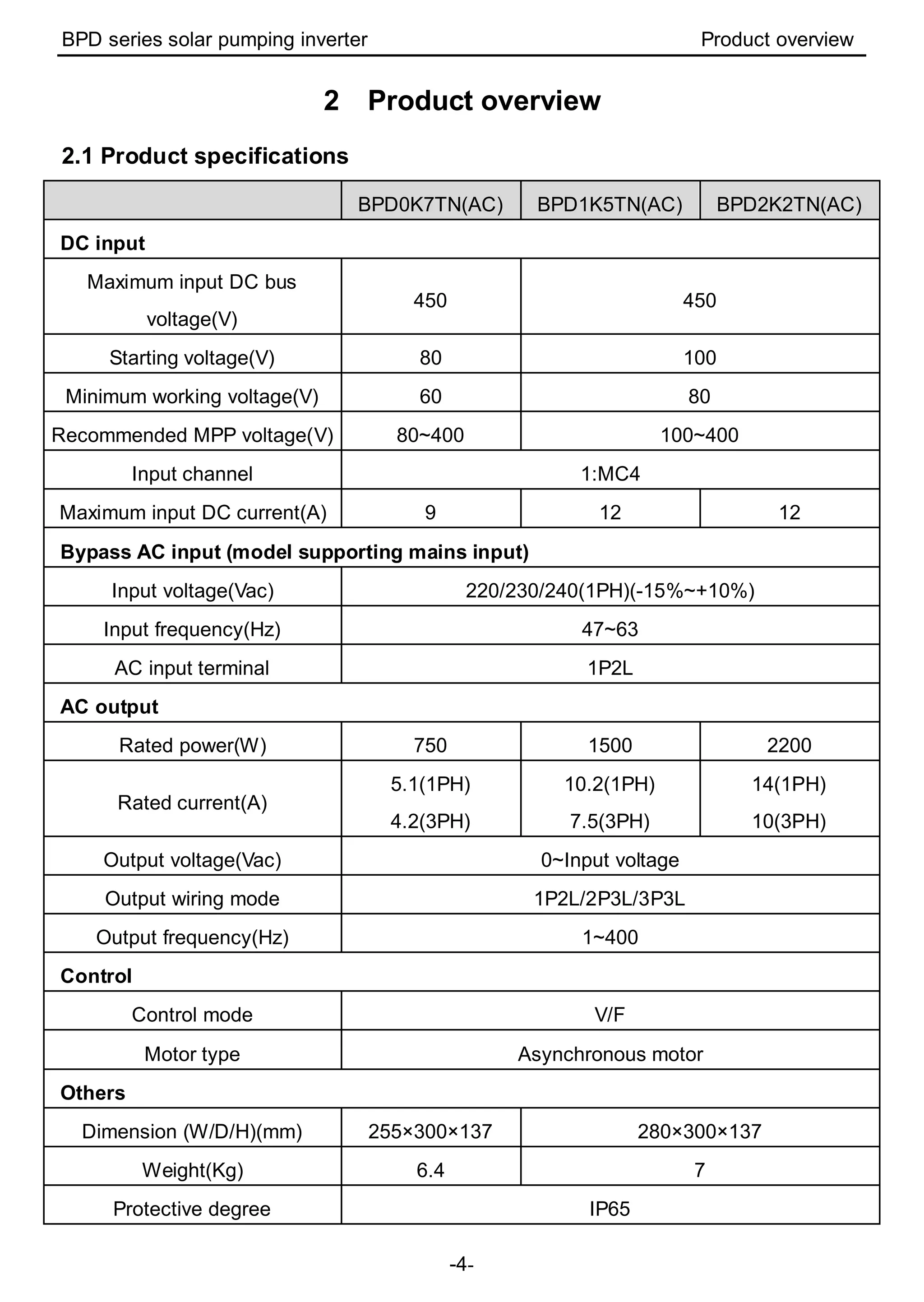
2.1 Product specifications
BPD0K7TN(AC) BPD1K5TN(AC) BPD2K2TN(AC)
DC input
Maximum input DC bus
voltage(V)
450 450
Starting voltage(V) 80 100
Minimum working voltage(V) 60 80
Recommended MPP voltage(V) 80~400 100~400
Input channel 1:MC4
Maximum input DC current(A) 9 12 12
Bypass AC input (model supporting mains input)
Input voltage(Vac) 220/230/240(1PH)(-15%~+10%)
Input frequency(Hz) 47~63
AC input terminal 1P2L
AC output
Rated power(W) 750 1500 2200
Rated current(A)
5.1(1PH)
4.2(3PH)
10.2(1PH)
7.5(3PH)
14(1PH)
10(3PH)
Output voltage(Vac) 0~Input voltage
Output wiring mode 1P2L/2P3L/3P3L
Output frequency(Hz) 1~400
Control
Control mode V/F
Motor type Asynchronous motor
Others
Dimension (W/D/H)(mm) 255×300×137 280×300×137
Weight(Kg) 6.4 7
Protective degree IP65
BPD series solar pumping inverter Product overview
-5-
BPD0K7TN(AC) BPD1K5TN(AC) BPD2K2TN(AC)
Cooling Natural cooling
HMI External LED keypad
Communication terminal
External communication RS485/3 digital input
Communication interface Multi-core waterproof connector
Certification
Standards CE; meet the requirement of IEC61800-3 C3
Operating environment
Environment temperature -25~60℃, derate above 45℃
Altitude 3000m (derate if the sea level is above 2000m)
Warranty 18 months
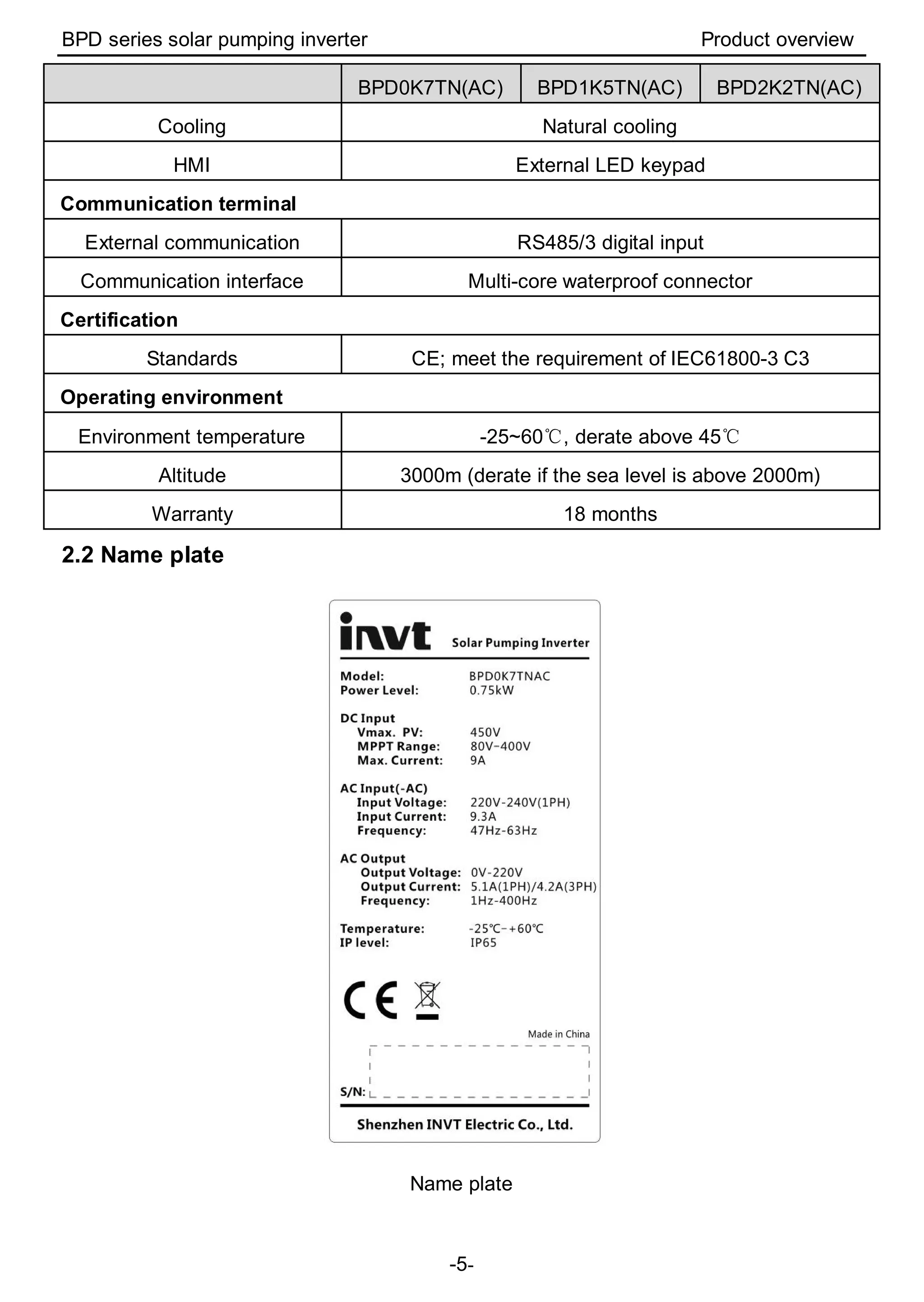
2.2 Name plate
Name plate
BPD series solar pumping inverter Product overview
-6-
2.3 Model instruction
BPD XK TN AC
① ② ③ ④
Sign
Field
identification
Detailed description
of the sign
Detailed content
① BPD Product abbreviation Series of PV water pumps
② XK ACoutput power
Max. AC output power
1500W: 1K5
5000W: 5K
150, 000W: 150K
③ TN Technical type
TL: 1PH
TR: 3PH
TN: 1PH/3PH
④ AC Extension digit
Default is standard inverter;
AC supports AC input
2.4 Rated specifications
BPDXKXTN 0K7 1K5 2K2
Rated output power(kW) 0.75 1.5 2.2
Maximum DC input current (A) 9 12 12
Rated AC input current-AC model(A) 9.3 15.7 24
Rated output current(A) 5.1 10.2 14
Note: The output current is the rated value when the output voltage is 220V(1PH). If the
output voltage is 3PH, the output current can be calculated.
2.5 Terminals, wiring and dimension diagram
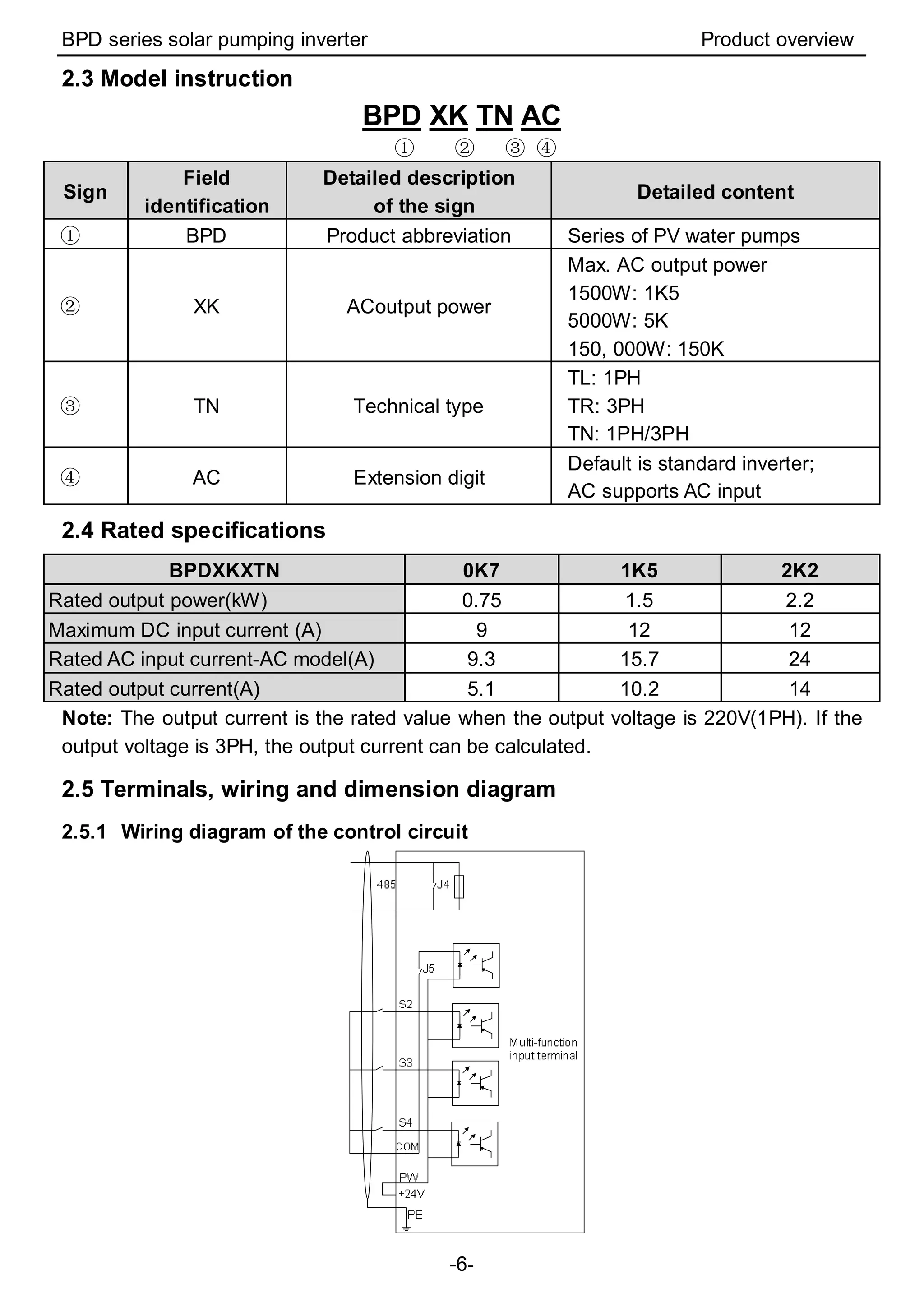
2.5.1 Wiring diagram of the control circuit
BPD series solar pumping inverter Product overview
-7-
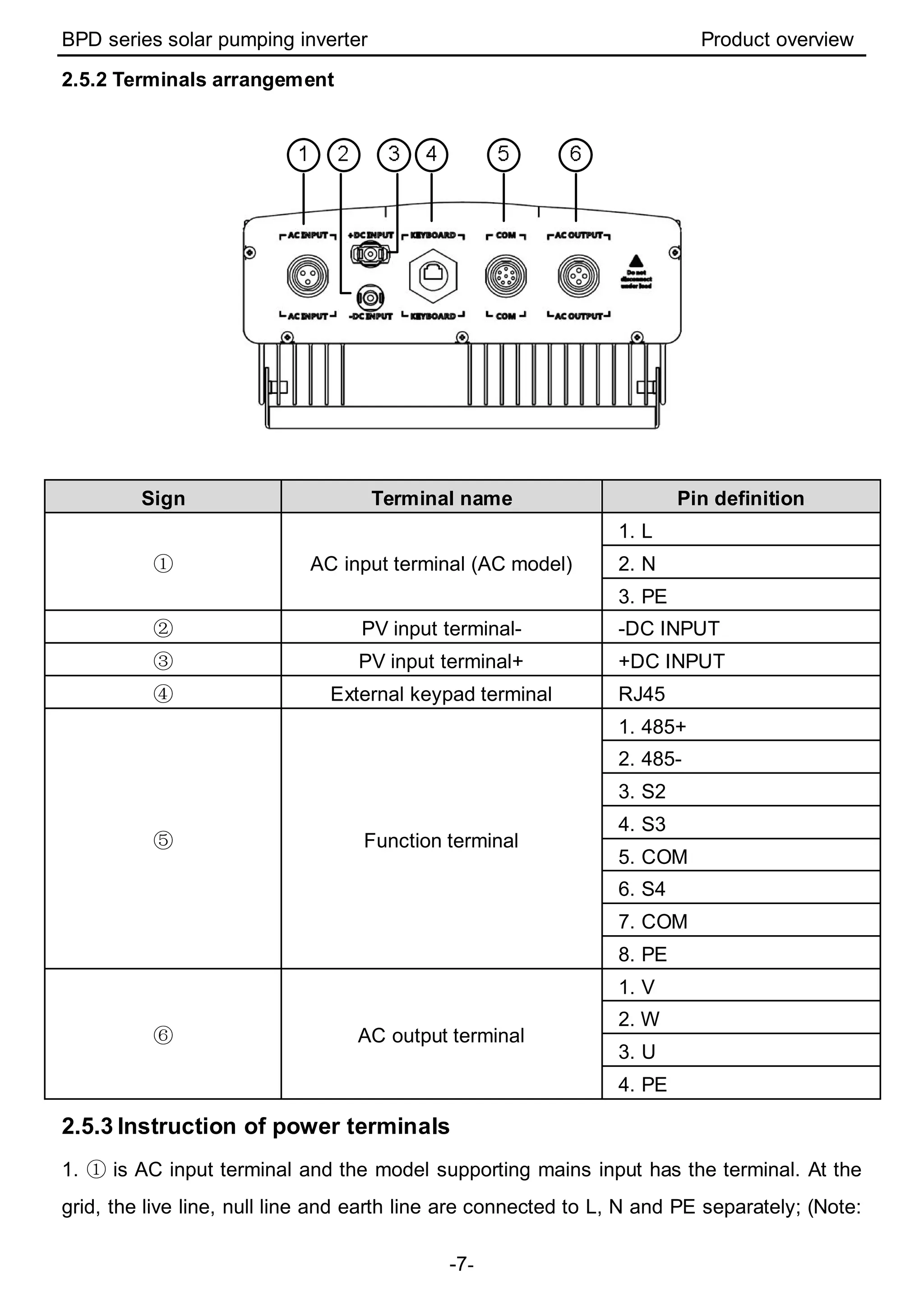
2.5.2 Terminals arrangement
Sign Terminal name Pin definition
① AC input terminal (AC model)
1. L
2. N
3. PE
② PV input terminal- -DC INPUT
③ PV input terminal+ +DC INPUT
④ External keypad terminal RJ45
⑤ Function terminal
1. 485+
2. 485-
3. S2
4. S3
5. COM
6. S4
7. COM
8. PE
⑥ AC output terminal
1. V
2. W
3. U
4. PE
2.5.3 Instruction of power terminals
1. ① is AC input terminal and the model supporting mains input has the terminal. At the
grid, the live line, null line and earth line are connected to L, N and PE separately; (Note:
BPD series solar pumping inverter Product overview
-8-
For safety, please ensure PE in reliable connection.)
2. ⑥ is AC output terminal connected to the water pump motor. When using 3PH motor,
connect U, V and W of the motor to U, V and W of the inverter. The motor enclosure is
connected to PE of ⑥.
3. The wiring is different to the different control modes if the single phase motor is used:
(1)single phase control: Please connect the motor phase to U and W of inverter terminal
⑥, connect the motor shell to PE terminal. There is no need to remove the starting
capacitor and the wiring is very easy. But the starting performance is not good and it is
only available to some motors.
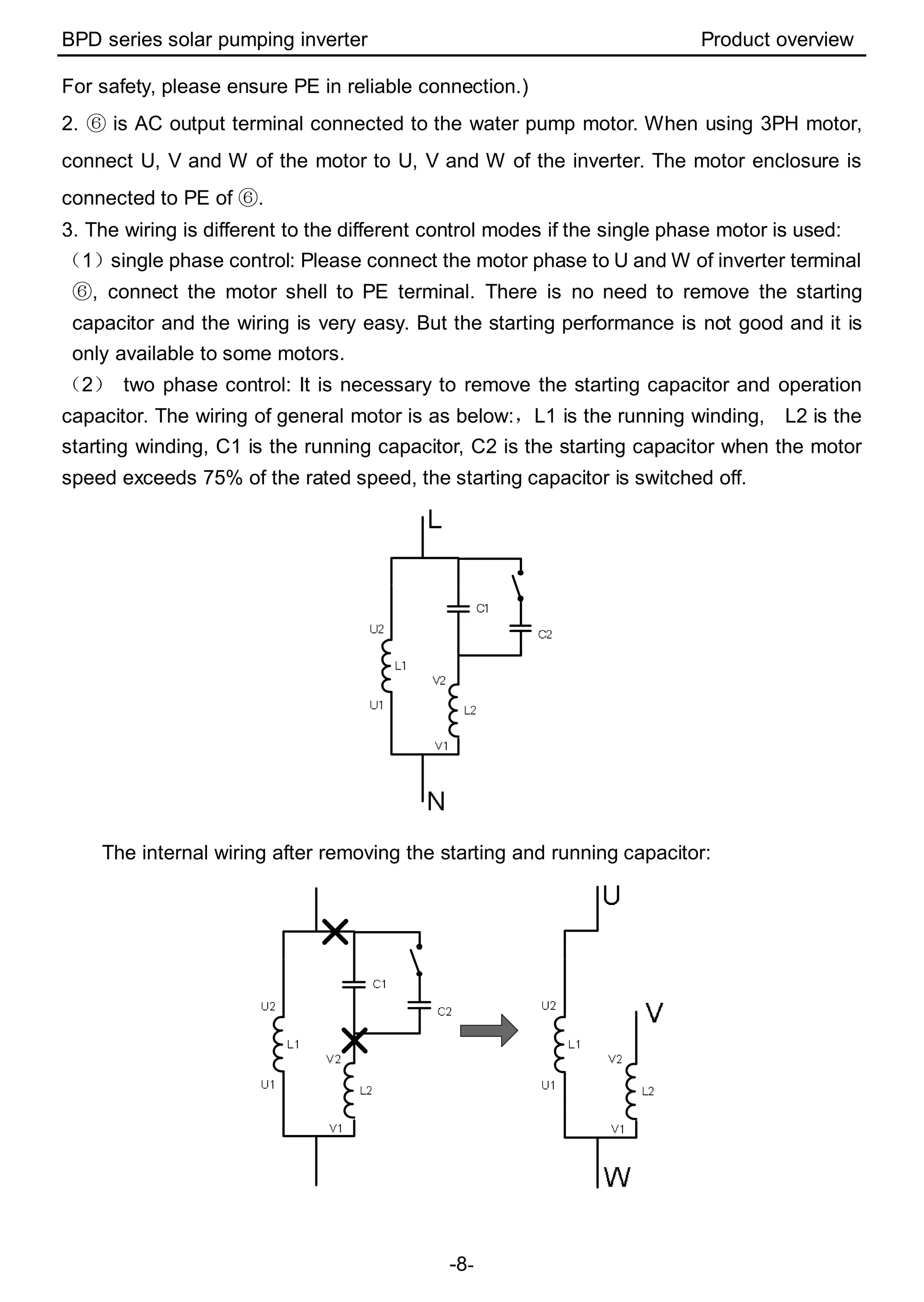
(2) two phase control: It is necessary to remove the starting capacitor and operation
capacitor. The wiring of general motor is as below:,L1 is the running winding, L2 is the
starting winding, C1 is the running capacitor, C2 is the starting capacitor when the motor
speed exceeds 75% of the rated speed, the starting capacitor is switched off.
The internal wiring after removing the starting and running capacitor:
BPD series solar pumping inverter Product overview
-9-
U1 and V1 are the common terminal of the winding, and connect with the W output of the
solar inverter, U2 to U output of the solar inverter and V2 to V output of the solar inverter.
The operation direction can be changed after voltage phase is changed by the ten bit of
P04.34. After the forward direction changing, P00.13 can be used to change the operation
direction as the forward and reverse control of three phase motor.
2.5.4 Instruction of communication terminals
Terminal
name
Description
PE Grounding terminal
COM +24V common terminal
S2 Switch input 2
1. Internal impedance:3.3kΩ
2. 12~30V voltage input is available
3. The terminal is the dual-direction input terminal
supporting both NPN and PNP
4. Max input frequency:1kHz
5. All are programmable digital input terminal. User can
set the terminal function through function codes.
6. S1 is short circuited with COM in the inverter by
default and it is not connected externally.
S3 Switch input 3
S4 Switch input 4
485+ 485 communication interface and 485 differential signal interface
If it is the standard 485 communication interface, please use twisted pairs or
shield cable.485-
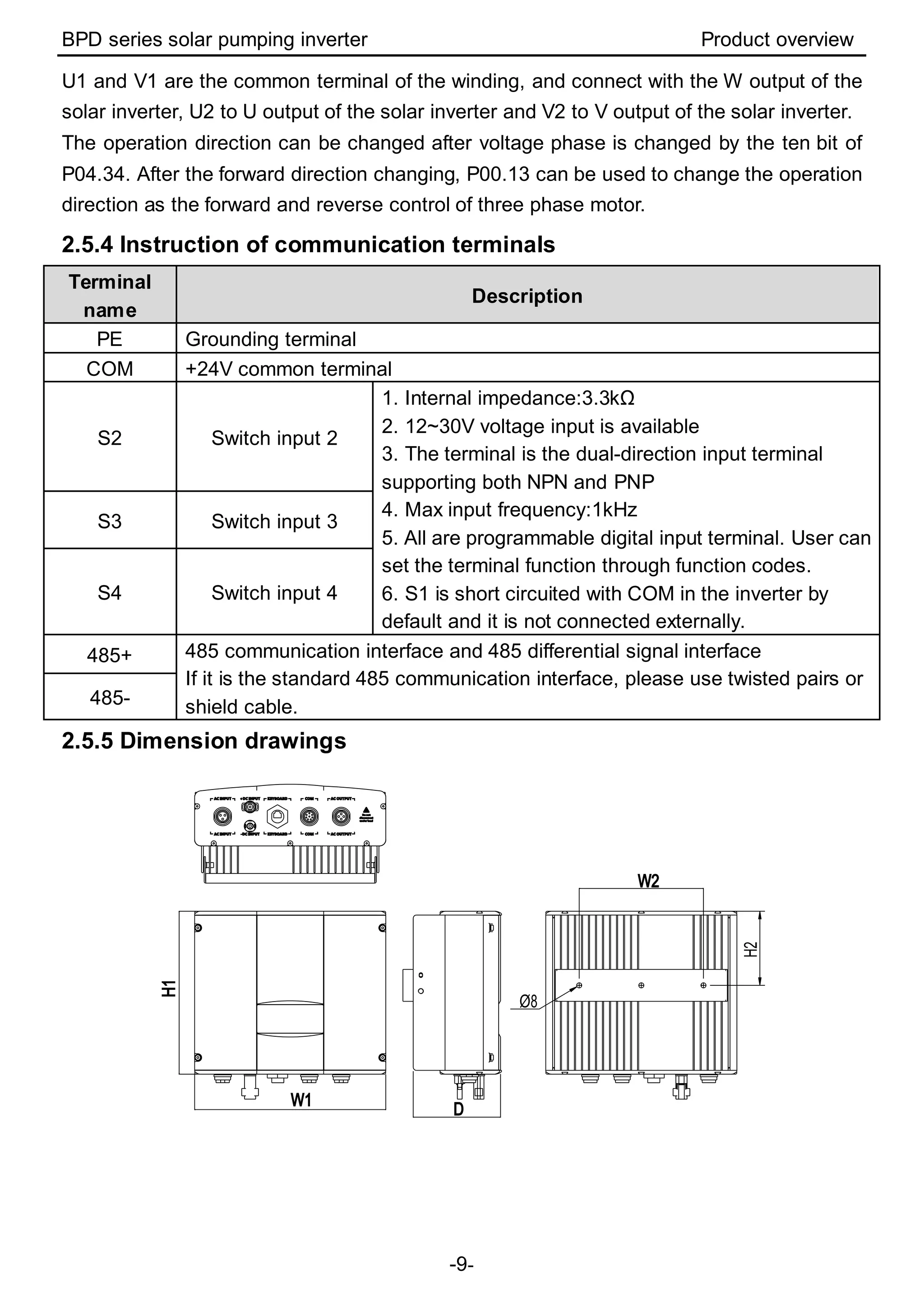
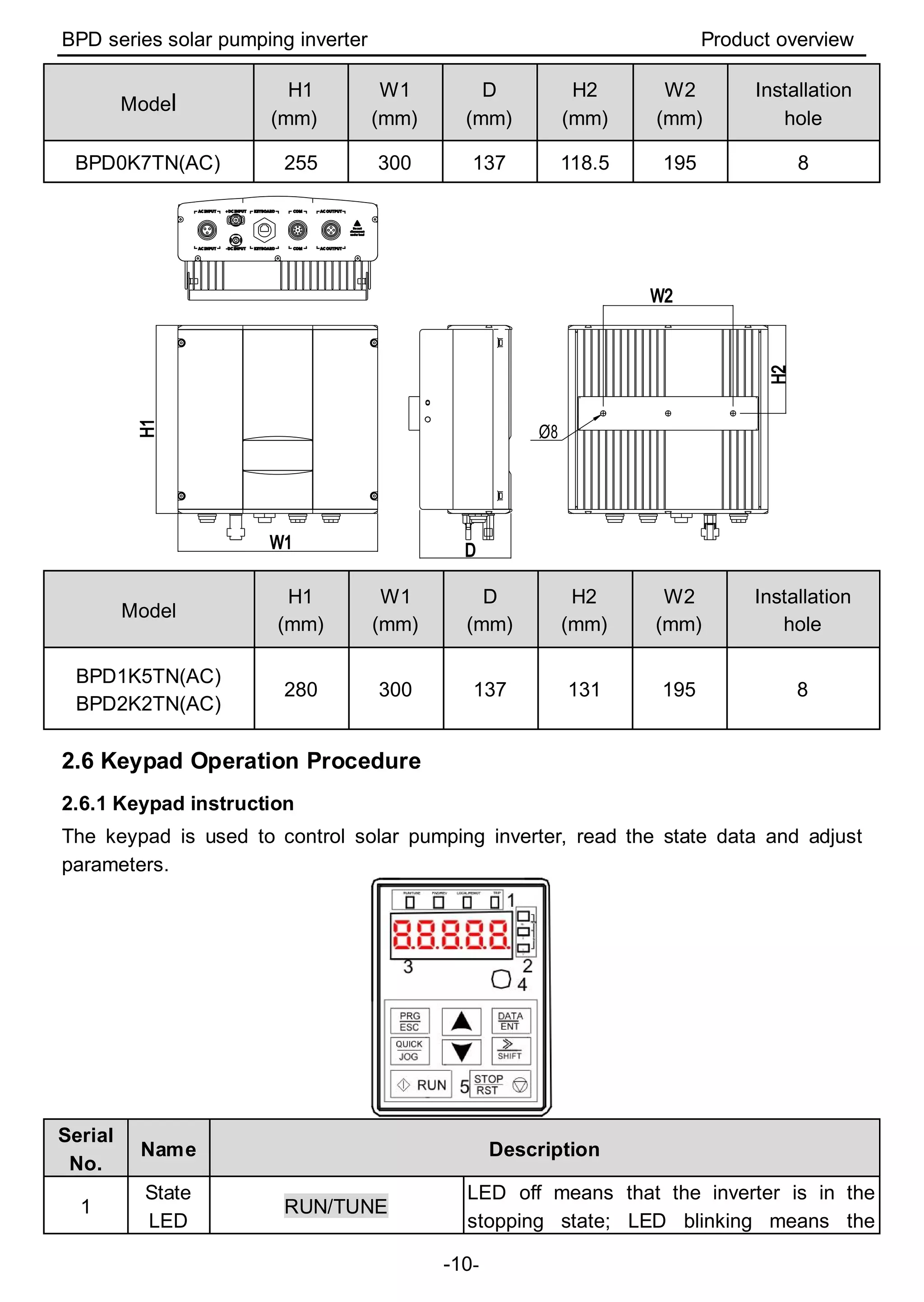
2.5.5 Dimension drawings
Ø8
H2
BPD series solar pumping inverter Product overview
-10-
Model
H1
(mm)
W1
(mm)
D
(mm)
H2
(mm)
W2
(mm)
Installation
hole
BPD0K7TN(AC) 255 300 137 118.5 195 8
Ø8
Model
H1
(mm)
W1
(mm)
D
(mm)
H2
(mm)
W2
(mm)
Installation
hole
BPD1K5TN(AC)
BPD2K2TN(AC)
280 300 137 131 195 8
2.6 Keypad Operation Procedure
2.6.1 Keypad instruction
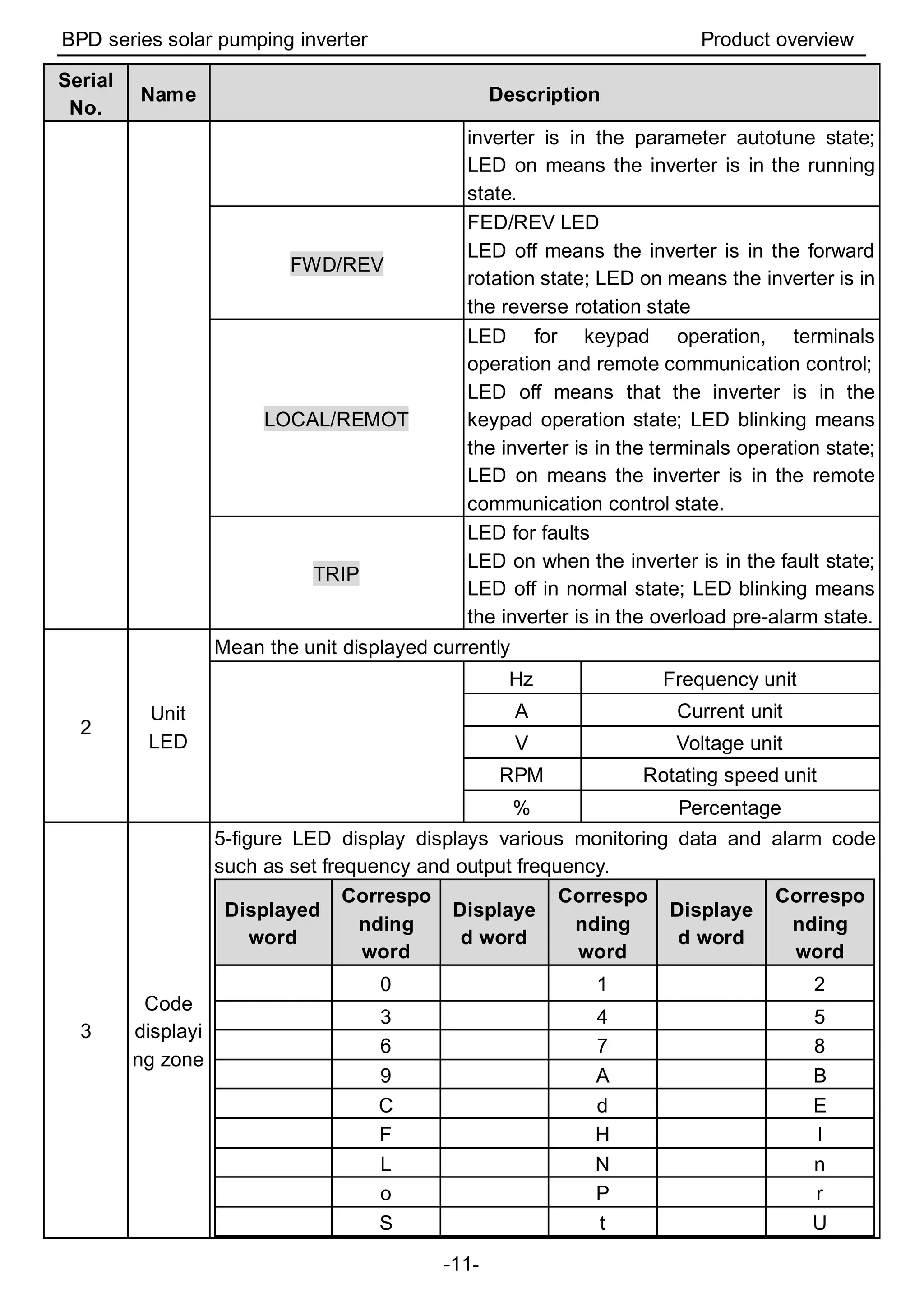
The keypad is used to control solar pumping inverter, read the state data and adjust
parameters.
Serial
No.
Name Description
1
State
LED
RUN/TUNE
LED off means that the inverter is in the
stopping state; LED blinking means the
BPD series solar pumping inverter Product overview
-11-
Serial
No.
Name Description
inverter is in the parameter autotune state;
LED on means the inverter is in the running
state.
FWD/REV
FED/REV LED
LED off means the inverter is in the forward
rotation state; LED on means the inverter is in
the reverse rotation state
LOCAL/REMOT
LED for keypad operation, terminals
operation and remote communication control;
LED off means that the inverter is in the
keypad operation state; LED blinking means
the inverter is in the terminals operation state;
LED on means the inverter is in the remote
communication control state.
TRIP
LED for faults
LED on when the inverter is in the fault state;
LED off in normal state; LED blinking means
the inverter is in the overload pre-alarm state.
2
Unit
LED
Mean the unit displayed currently
Hz Frequency unit
A Current unit
V Voltage unit
RPM Rotating speed unit
% Percentage
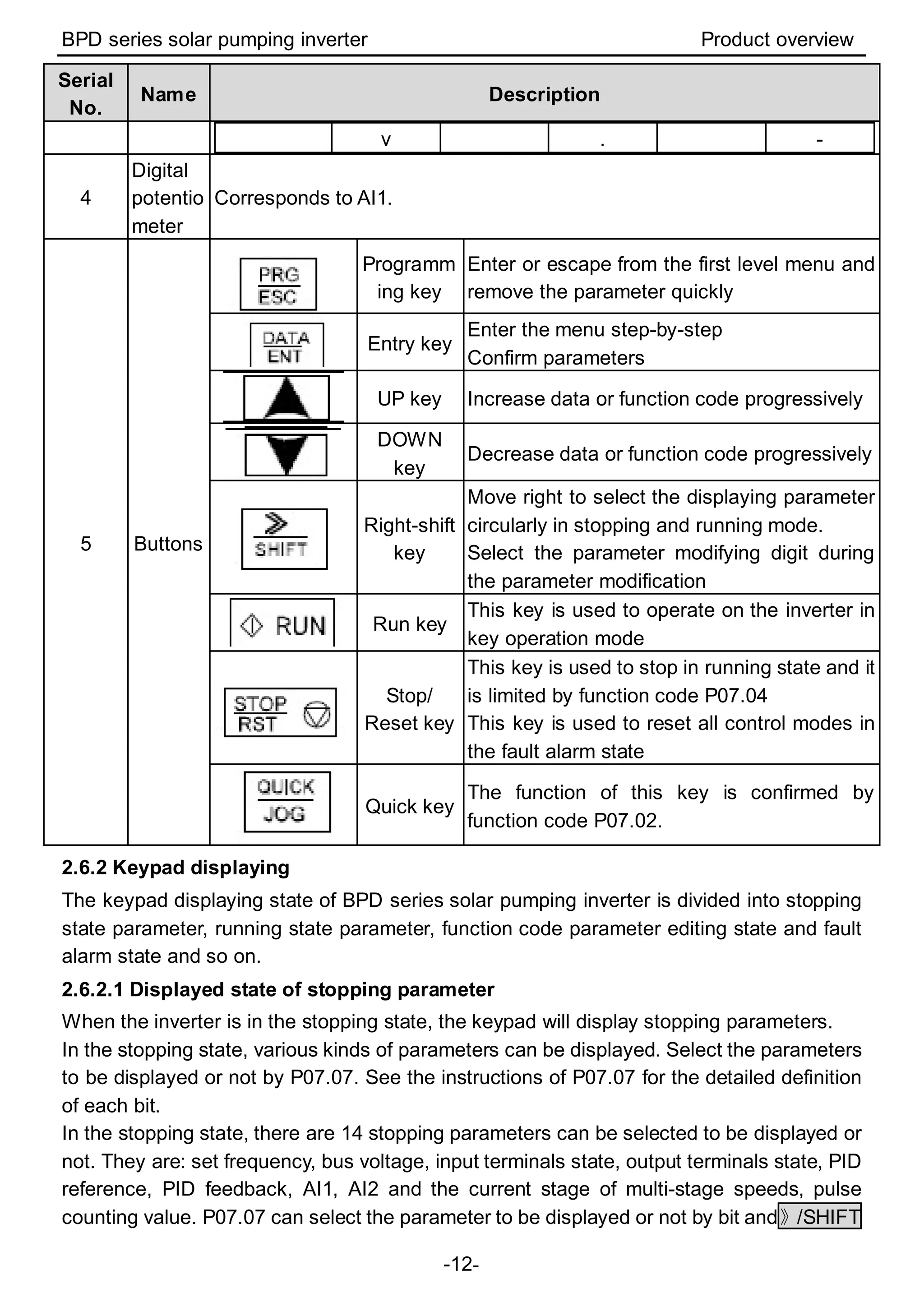
3
Code
displayi
ng zone
5-figure LED display displays various monitoring data and alarm code
such as set frequency and output frequency.
Displayed
word
Correspo
nding
word
Displaye
d word
Correspo
nding
word
Displaye
d word
Correspo
nding
word
0 1 2
3 4 5
6 7 8
9 A B
C d E
F H I
L N n
o P r
S t U
BPD series solar pumping inverter Product overview
-12-
Serial
No.
Name Description
v . -
4
Digital
potentio
meter
Corresponds to AI1.
5 Buttons
Programm
ing key
Enter or escape from the first level menu and
remove the parameter quickly
Entry key
Enter the menu step-by-step
Confirm parameters
UP key Increase data or function code progressively
DOWN
key
Decrease data or function code progressively
Right-shift
key
Move right to select the displaying parameter
circularly in stopping and running mode.
Select the parameter modifying digit during
the parameter modification
Run key
This key is used to operate on the inverter in
key operation mode
Stop/
Reset key
This key is used to stop in running state and it
is limited by function code P07.04
This key is used to reset all control modes in
the fault alarm state
Quick key
The function of this key is confirmed by
function code P07.02.
2.6.2 Keypad displaying
The keypad displaying state of BPD series solar pumping inverter is divided into stopping
state parameter, running state parameter, function code parameter editing state and fault
alarm state and so on.
2.6.2.1 Displayed state of stopping parameter
When the inverter is in the stopping state, the keypad will display stopping parameters.
In the stopping state, various kinds of parameters can be displayed. Select the parameters
to be displayed or not by P07.07. See the instructions of P07.07 for the detailed definition
of each bit.
In the stopping state, there are 14 stopping parameters can be selected to be displayed or
not. They are: set frequency, bus voltage, input terminals state, output terminals state, PID
reference, PID feedback, AI1, AI2 and the current stage of multi-stage speeds, pulse
counting value. P07.07 can select the parameter to be displayed or not by bit and》/SHIFT
BPD series solar pumping inverter Product overview
-13-
can shift the parameters form left to right, QUICK/JOG(P07.02=2) can shift the
parameters form right to left.
2.6.2.2 Displayed state of running parameters
After the inverter receives valid running commands, the inverter will enter into the running
state and the keypad will display the running parameters. RUN/TUNE LED on the keypad
is on, while the FWD/REV is determined by the current running direction.
In the running state, there are 22 parameters can be selected to be displayed or not. They
are: running frequency, set frequency, bus voltage, output voltage, output torque, PID
reference, PID feedback, input terminals state, output terminals state, and the current
stage of multi-stage speeds, pulse counting value, AI1, AI2, percentage of motor overload,
percentage of inverter overload, linear speed. P07.05 and P07.06 can select the
parameter to be displayed or not by bit and》/SHIFT can shift the parameters form left to
right, QUICK/JOG(P07.02=2) can shift the parameters from right to left.
2.6.2.3 Displayed state of fault
If the inverter detects the fault signal, it will enter into the fault pre-alarm displaying state.
The keypad will display the fault code by flicking. The TRIP LED on the keypad is on, and
the fault reset can be operated by theSTOP/RST on the keypad, control terminals or
communication commands.
2.6.2.4 Displayed state of function codes editing
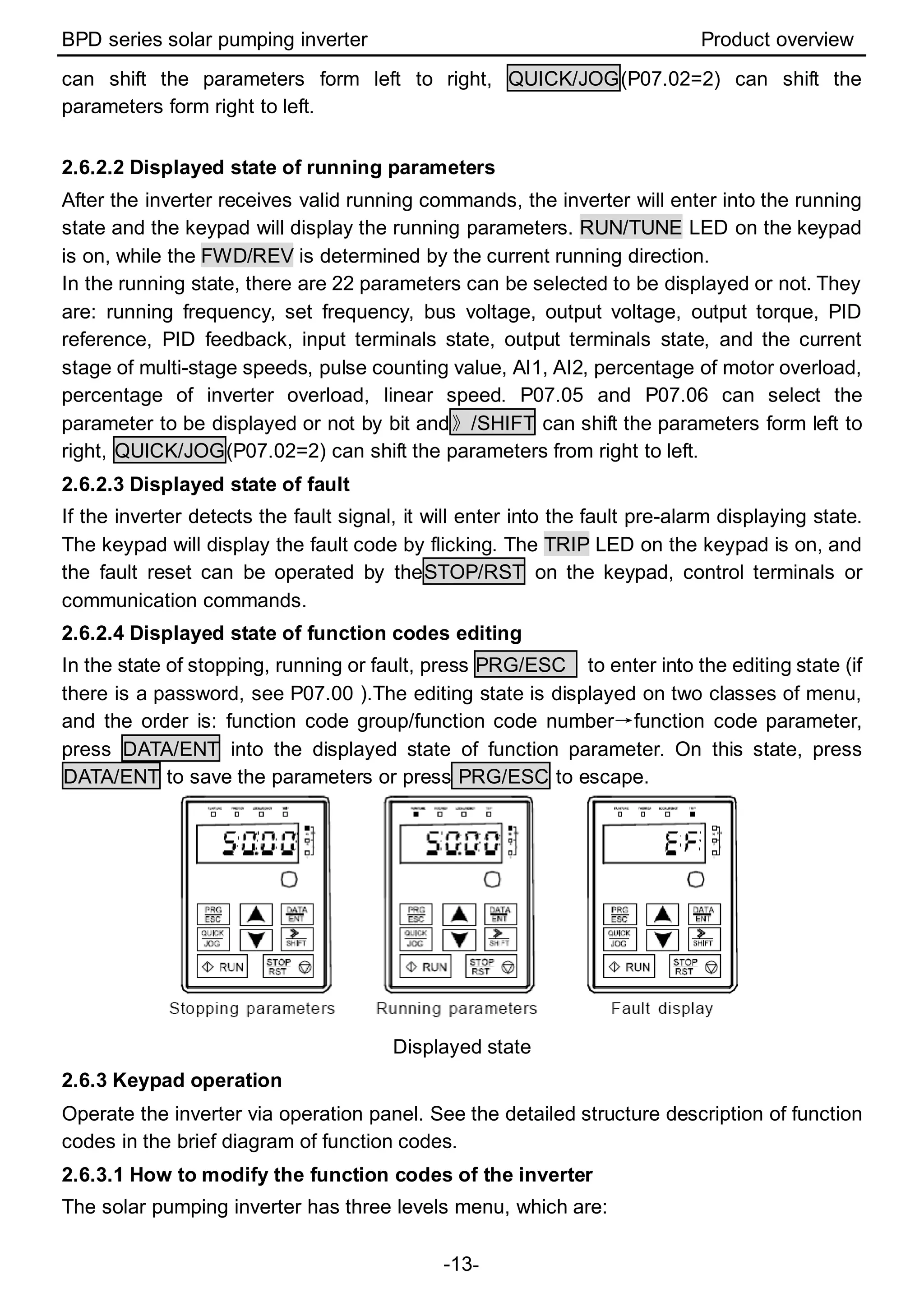
In the state of stopping, running or fault, press PRG/ESC to enter into the editing state (if
there is a password, see P07.00 ).The editing state is displayed on two classes of menu,
and the order is: function code group/function code number→function code parameter,
press DATA/ENT into the displayed state of function parameter. On this state, press
DATA/ENT to save the parameters or press PRG/ESC to escape.
Displayed state
2.6.3 Keypad operation
Operate the inverter via operation panel. See the detailed structure description of function
codes in the brief diagram of function codes.
2.6.3.1 How to modify the function codes of the inverter
The solar pumping inverter has three levels menu, which are:
BPD series solar pumping inverter Product overview
-14-
1. Group number of function code (first-level menu)
2. Tab of function code (second-level menu)
3. Set value of function code (third-level menu)
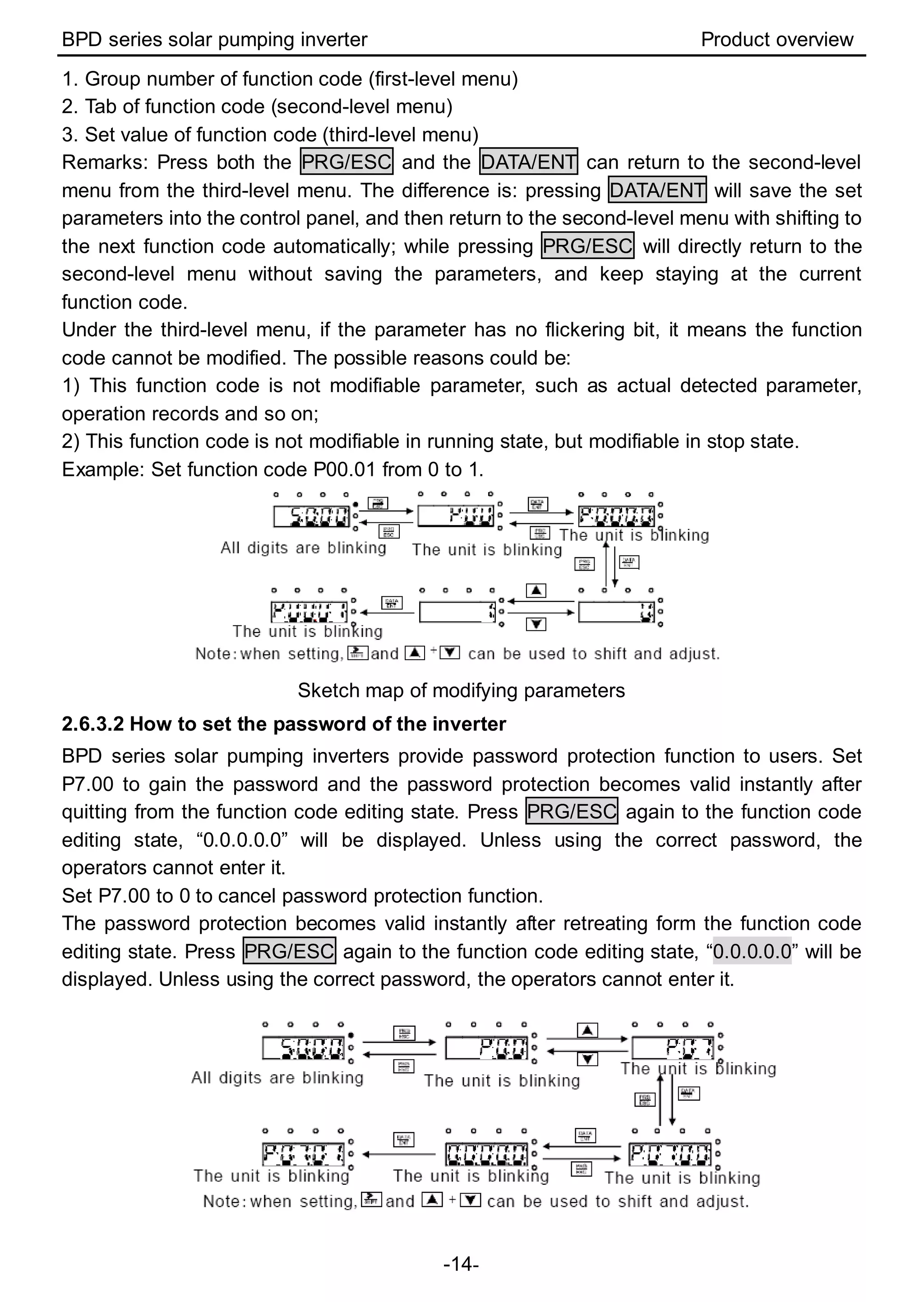
Remarks: Press both the PRG/ESC and the DATA/ENT can return to the second-level
menu from the third-level menu. The difference is: pressing DATA/ENT will save the set
parameters into the control panel, and then return to the second-level menu with shifting to
the next function code automatically; while pressing PRG/ESC will directly return to the
second-level menu without saving the parameters, and keep staying at the current
function code.
Under the third-level menu, if the parameter has no flickering bit, it means the function
code cannot be modified. The possible reasons could be:
1) This function code is not modifiable parameter, such as actual detected parameter,
operation records and so on;
2) This function code is not modifiable in running state, but modifiable in stop state.
Example: Set function code P00.01 from 0 to 1.
Sketch map of modifying parameters
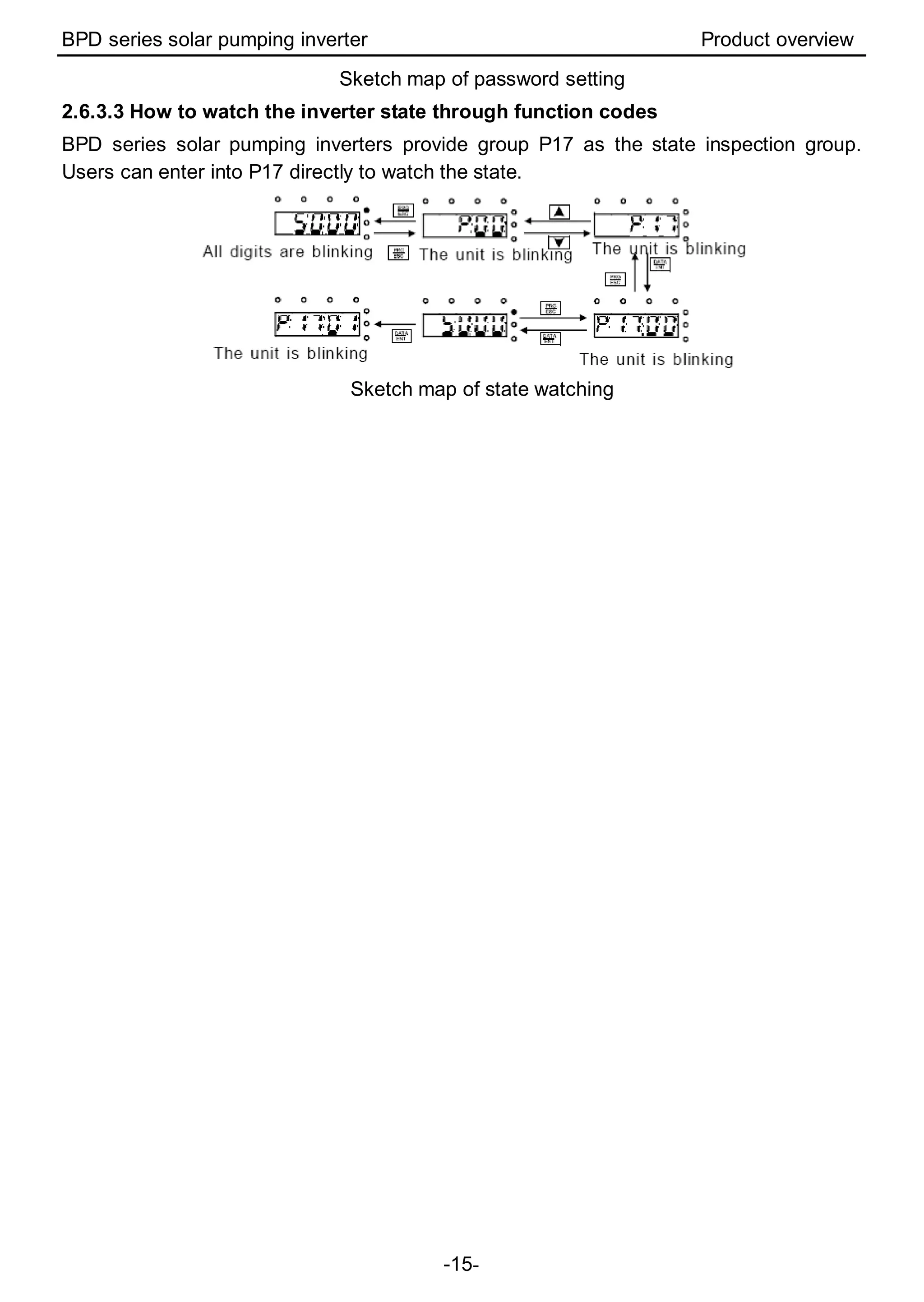
2.6.3.2 How to set the password of the inverter
BPD series solar pumping inverters provide password protection function to users. Set
P7.00 to gain the password and the password protection becomes valid instantly after
quitting from the function code editing state. Press PRG/ESC again to the function code
editing state, “0.0.0.0.0” will be displayed. Unless using the correct password, the
operators cannot enter it.
Set P7.00 to 0 to cancel password protection function.
The password protection becomes valid instantly after retreating form the function code
editing state. Press PRG/ESC again to the function code editing state, “0.0.0.0.0” will be
displayed. Unless using the correct password, the operators cannot enter it.
BPD series solar pumping inverter Product overview
-15-
Sketch map of password setting
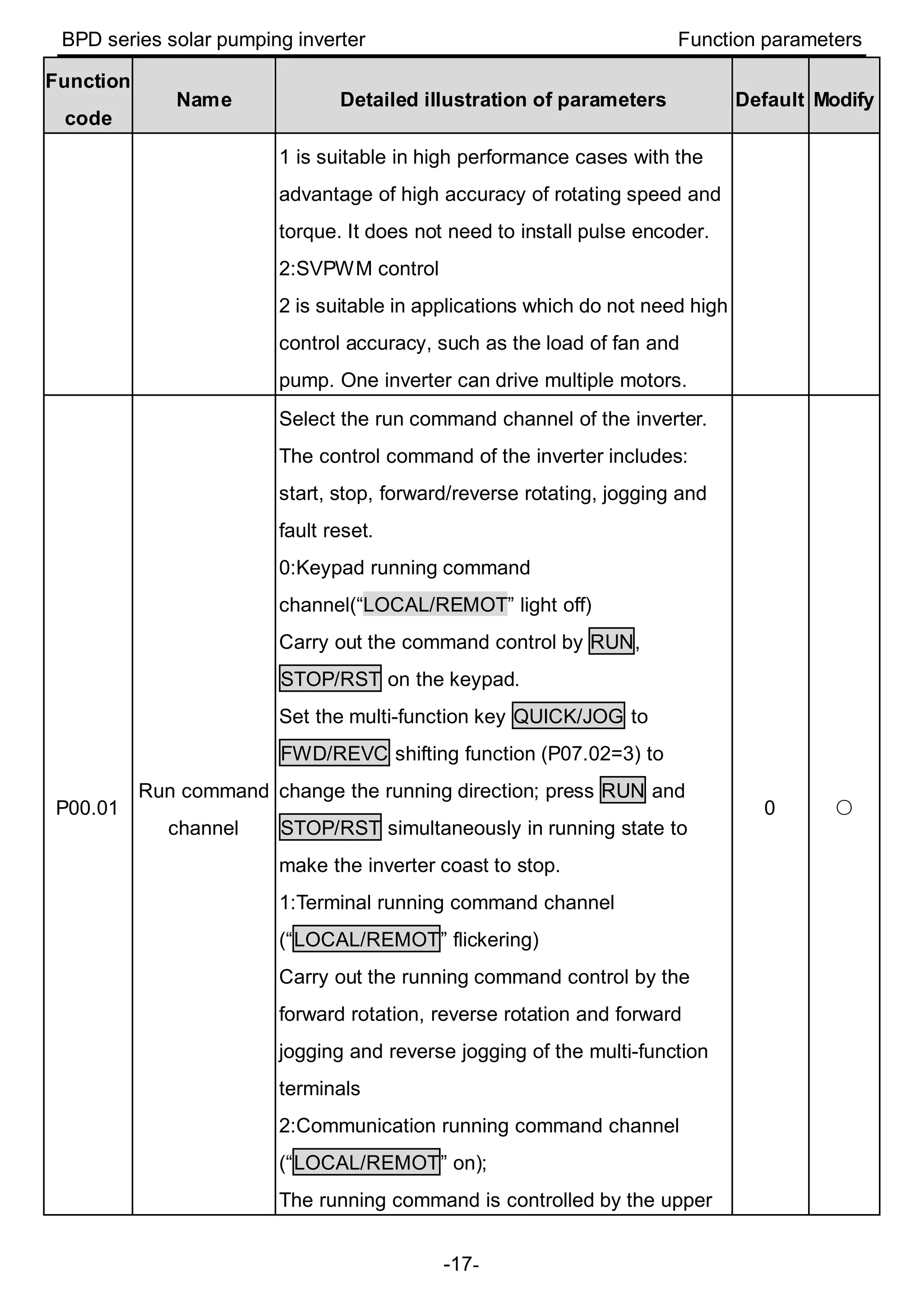
2.6.3.3 How to watch the inverter state through function codes
BPD series solar pumping inverters provide group P17 as the state inspection group.
Users can enter into P17 directly to watch the state.
Sketch map of state watching
BPD series solar pumping inverter Function parameters
-16-
3 Function parameters
For the convenience of function codes setting, the function group number corresponds to
the first level menu, the function code corresponds to the second level menu and the
function code corresponds to the third level menu.
1. Below is the instruction of the function lists:
The first column “Function code”: codes of function parameter group and parameters;
The second column “Name”: full name of function parameters;
The third column “Detailed illustration of parameters”: detailed illustration of the function
parameters;
The forth column “Default”: original factory settings of the parameters;
The fifth column “Modify”: the modifying character of function codes (the parameters can
be modified or not and the modifying conditions), below is the instruction:
“○”: means the set value of the parameter can be modified on stop and running state;
◎“ ”: means the set value of the parameter can not be modified on the running state;
“●”: means the value of the parameter is the real detection value which can not be
modified;
◆“ ”: means the function code is hidden.
(In order to avoid mistakes, the modify attribute of each parameter is limited by the
inverter)
3.1 Parameters of common functions
Function
code
Name Detailed illustration of parameters Default Modify
P00 Group Basic function group
P00.00
Speed control
mode
0: SVC 0
No need to install encoders. Suitable in
applications which need low frequency, big torque
for high accuracy of rotating speed and torque
control. Relative to mode 1, it is more suitable for
the applications which need small power.
1: SVC 1
2 ◎
BPD series solar pumping inverter Function parameters
-17-
Function
code
Name Detailed illustration of parameters Default Modify
1 is suitable in high performance cases with the
advantage of high accuracy of rotating speed and
torque. It does not need to install pulse encoder.
2:SVPWM control
2 is suitable in applications which do not need high
control accuracy, such as the load of fan and
pump. One inverter can drive multiple motors.
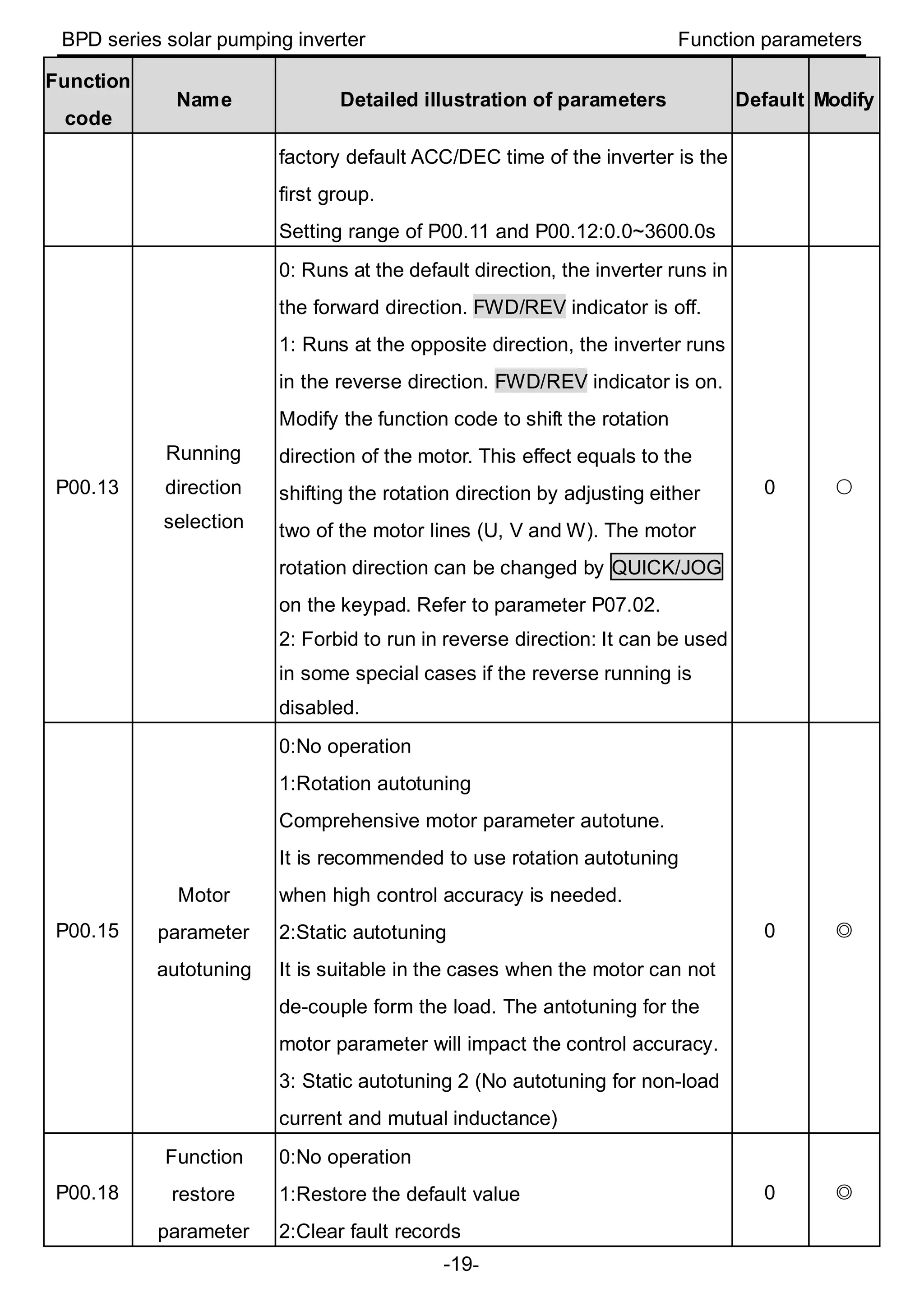
P00.01
Run command
channel
Select the run command channel of the inverter.
The control command of the inverter includes:
start, stop, forward/reverse rotating, jogging and
fault reset.
0:Keypad running command
channel(“LOCAL/REMOT” light off)
Carry out the command control by RUN,
STOP/RST on the keypad.
Set the multi-function key QUICK/JOG to
FWD/REVC shifting function (P07.02=3) to
change the running direction; press RUN and
STOP/RST simultaneously in running state to
make the inverter coast to stop.
1:Terminal running command channel
(“LOCAL/REMOT” flickering)
Carry out the running command control by the
forward rotation, reverse rotation and forward
jogging and reverse jogging of the multi-function
terminals
2:Communication running command channel
(“LOCAL/REMOT” on);
The running command is controlled by the upper
0 ○
BPD series solar pumping inverter Function parameters
-18-
Function
code
Name Detailed illustration of parameters Default Modify
monitor via communication
P00.03
Max. output
frequency
This parameter is used to set the maximum output
frequency of the inverter. Users need to pay
attention to this parameter because it is the
foundation of the frequency setting and the speed
of acceleration and deceleration.
Setting range: P00.04~400.00Hz
50.00Hz ◎
P00.04
Upper limit of
the running
frequency
The upper limit of the running frequency is the
upper limit of the output frequency of the inverter
which is lower than or equal to the maximum
frequency.
Setting range:P00.05~P00.03 (Max. output
frequency)
50.00Hz ◎
P00.05
Lower limit of
the running
frequency
The lower limit of the running frequency is that of
the output frequency of the inverter.
The inverter runs at the lower limit frequency if the
set frequency is lower than the lower limit.
Note: Max. output frequency ≥ Upper limit
frequency ≥ Lower limit frequency
Setting range:0.00Hz~P00.04 (Upper limit of the
running frequency)
0.00Hz ◎
P00.11 ACC time 1
ACC time means the time needed if the inverter
speeds up from 0Hz to the Max. output frequency
(P00.03).
DEC time means the time needed if the inverter
speeds down from the Max. Output frequency to
0Hz (P00.03).
Goodrive100 series inverters have four groups of
ACC/DEC time which can be selected by P05. The
Depend
on
model
○
P00.12 DEC time 1
Depend
on
model
○
BPD series solar pumping inverter Function parameters
-19-
Function
code
Name Detailed illustration of parameters Default Modify
factory default ACC/DEC time of the inverter is the
first group.
Setting range of P00.11 and P00.12:0.0~3600.0s
P00.13
Running
direction
selection
0: Runs at the default direction, the inverter runs in
the forward direction. FWD/REV indicator is off.
1: Runs at the opposite direction, the inverter runs
in the reverse direction. FWD/REV indicator is on.
Modify the function code to shift the rotation
direction of the motor. This effect equals to the
shifting the rotation direction by adjusting either
two of the motor lines (U, V and W). The motor
rotation direction can be changed by QUICK/JOG
on the keypad. Refer to parameter P07.02.
2: Forbid to run in reverse direction: It can be used
in some special cases if the reverse running is
disabled.
0 ○
P00.15
Motor
parameter
autotuning
0:No operation
1:Rotation autotuning
Comprehensive motor parameter autotune.
It is recommended to use rotation autotuning
when high control accuracy is needed.
2:Static autotuning
It is suitable in the cases when the motor can not
de-couple form the load. The antotuning for the
motor parameter will impact the control accuracy.
3: Static autotuning 2 (No autotuning for non-load
current and mutual inductance)
0 ◎
P00.18
Function
restore
parameter
0:No operation
1:Restore the default value
2:Clear fault records
0 ◎
BPD series solar pumping inverter Function parameters
-20-
Function
code
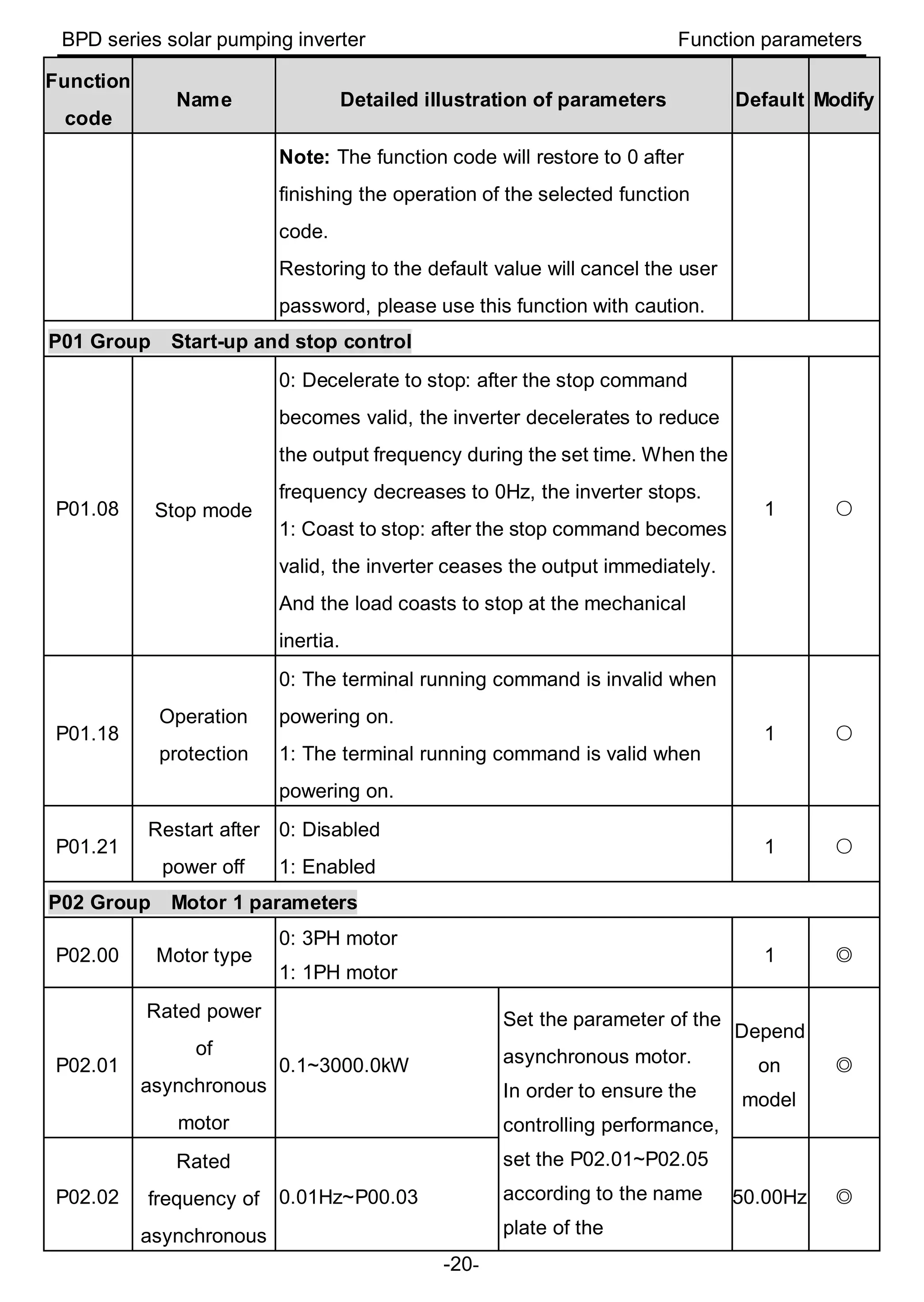
Name Detailed illustration of parameters Default Modify
Note: The function code will restore to 0 after
finishing the operation of the selected function
code.
Restoring to the default value will cancel the user
password, please use this function with caution.
P01 Group Start-up and stop control
P01.08 Stop mode
0: Decelerate to stop: after the stop command
becomes valid, the inverter decelerates to reduce
the output frequency during the set time. When the
frequency decreases to 0Hz, the inverter stops.
1: Coast to stop: after the stop command becomes
valid, the inverter ceases the output immediately.
And the load coasts to stop at the mechanical
inertia.
1 ○
P01.18
Operation
protection
0: The terminal running command is invalid when
powering on.
1: The terminal running command is valid when
powering on.
1 ○
P01.21
Restart after
power off
0: Disabled
1: Enabled
1 ○
P02 Group Motor 1 parameters
P02.00 Motor type
0: 3PH motor
1: 1PH motor
1 ◎
P02.01
Rated power
of
asynchronous
motor
0.1~3000.0kW
Set the parameter of the
asynchronous motor.
In order to ensure the
controlling performance,
set the P02.01~P02.05
according to the name
plate of the
Depend
on
model
◎
P02.02
Rated
frequency of
asynchronous
0.01Hz~P00.03 50.00Hz ◎
BPD series solar pumping inverter Function parameters
-21-
Function
code
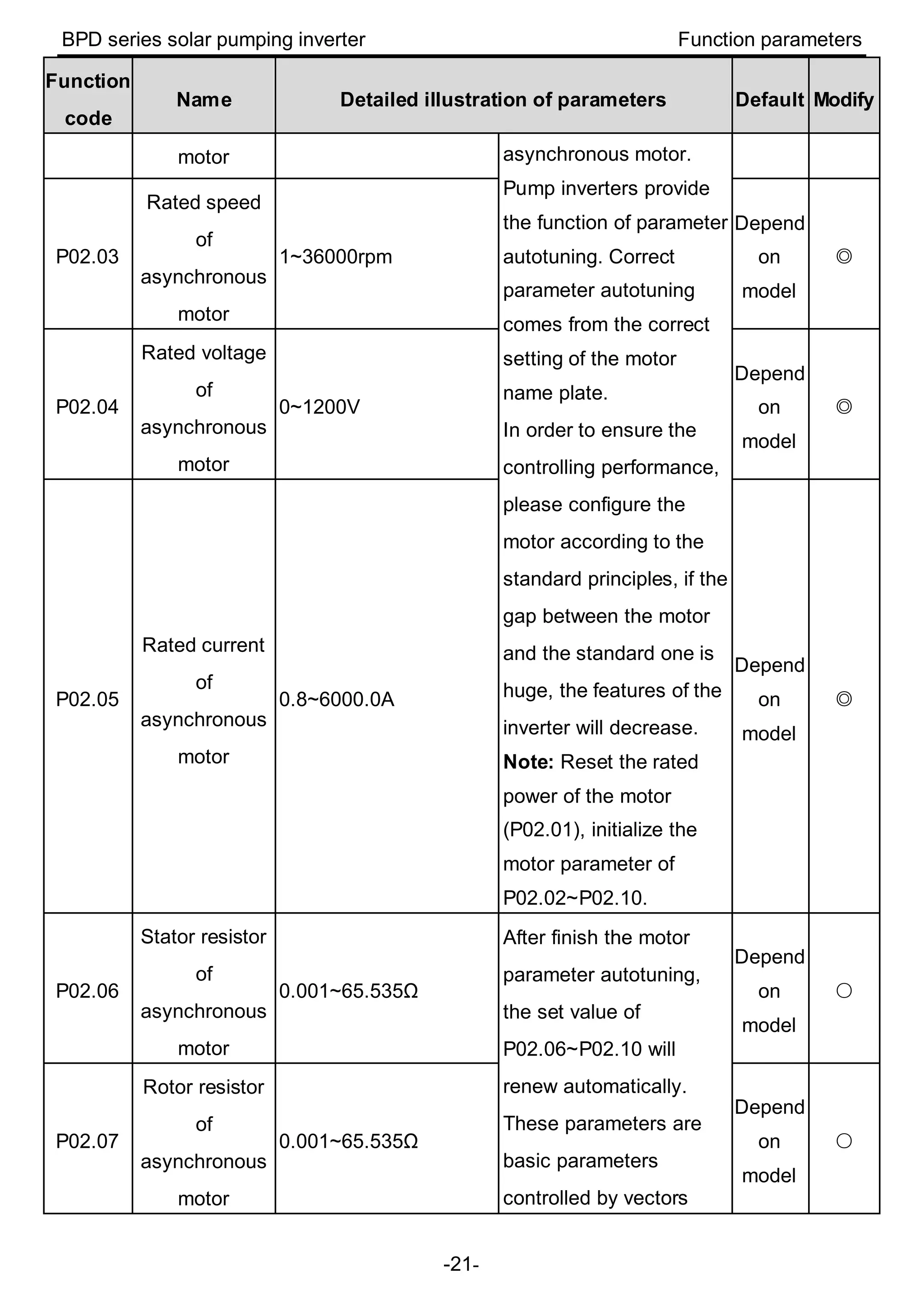
Name Detailed illustration of parameters Default Modify
motor asynchronous motor.
Pump inverters provide
the function of parameter
autotuning. Correct
parameter autotuning
comes from the correct
setting of the motor
name plate.
In order to ensure the
controlling performance,
please configure the
motor according to the
standard principles, if the
gap between the motor
and the standard one is
huge, the features of the
inverter will decrease.
Note: Reset the rated
power of the motor
(P02.01), initialize the
motor parameter of
P02.02~P02.10.
P02.03
Rated speed
of
asynchronous
motor
1~36000rpm
Depend
on
model
◎
P02.04
Rated voltage
of
asynchronous
motor
0~1200V
Depend
on
model
◎
P02.05
Rated current
of
asynchronous
motor
0.8~6000.0A
Depend
on
model
◎
P02.06
Stator resistor
of
asynchronous
motor
0.001~65.535Ω
After finish the motor
parameter autotuning,
the set value of
P02.06~P02.10 will
renew automatically.
These parameters are
basic parameters
controlled by vectors
Depend
on
model
○
P02.07
Rotor resistor
of
asynchronous
motor
0.001~65.535Ω
Depend
on
model
○
BPD series solar pumping inverter Function parameters
-22-
Function
code
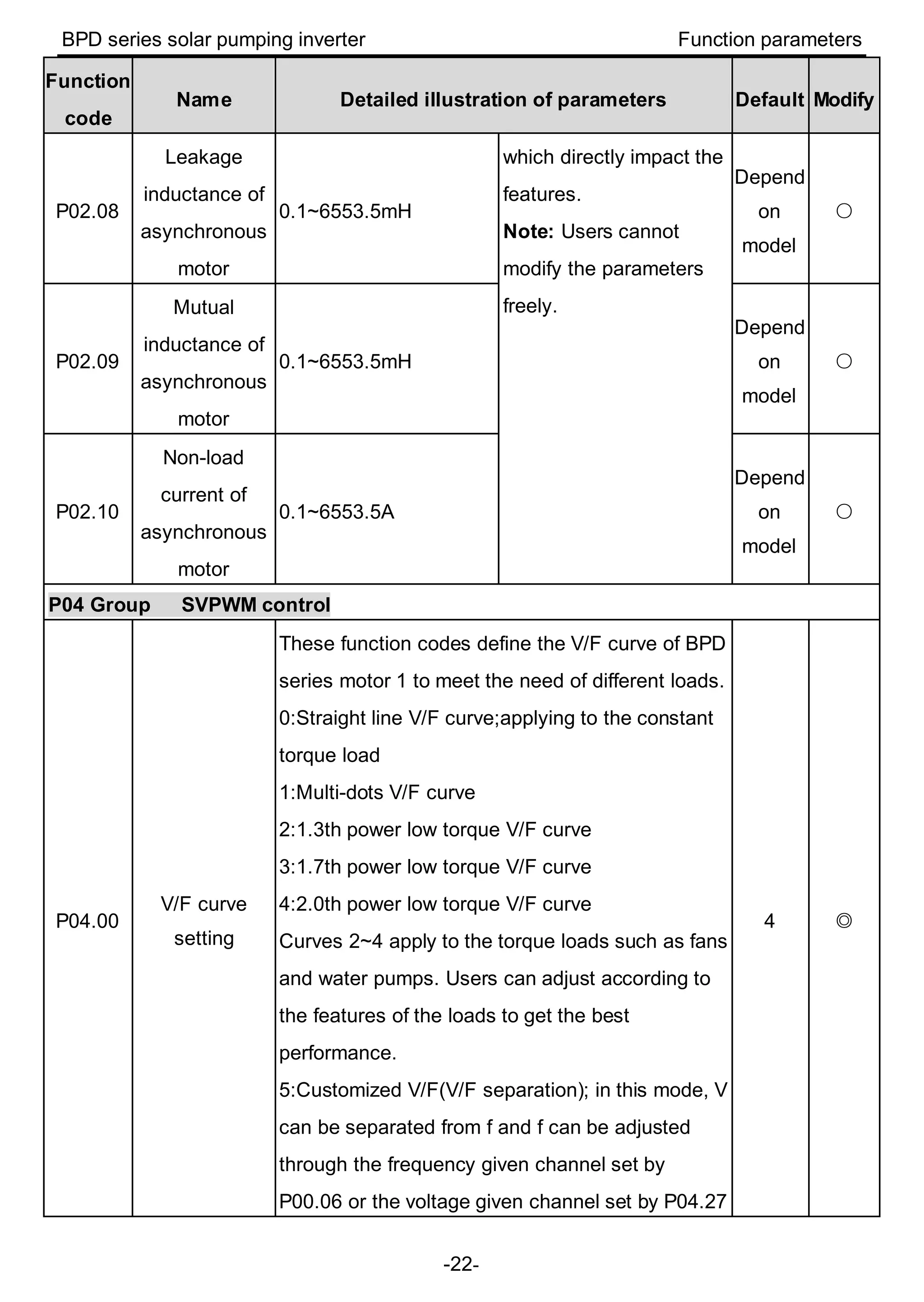
Name Detailed illustration of parameters Default Modify
P02.08
Leakage
inductance of
asynchronous
motor
0.1~6553.5mH
which directly impact the
features.
Note: Users cannot
modify the parameters
freely.
Depend
on
model
○
P02.09
Mutual
inductance of
asynchronous
motor
0.1~6553.5mH
Depend
on
model
○
P02.10
Non-load
current of
asynchronous
motor
0.1~6553.5A
Depend
on
model
○
P04 Group SVPWM control
P04.00
V/F curve
setting
These function codes define the V/F curve of BPD
series motor 1 to meet the need of different loads.
0:Straight line V/F curve;applying to the constant
torque load
1:Multi-dots V/F curve
2:1.3th power low torque V/F curve
3:1.7th power low torque V/F curve
4:2.0th power low torque V/F curve
Curves 2~4 apply to the torque loads such as fans
and water pumps. Users can adjust according to
the features of the loads to get the best
performance.
5:Customized V/F(V/F separation); in this mode, V
can be separated from f and f can be adjusted
through the frequency given channel set by
P00.06 or the voltage given channel set by P04.27
4 ◎
BPD series solar pumping inverter Function parameters
-23-
Function
code
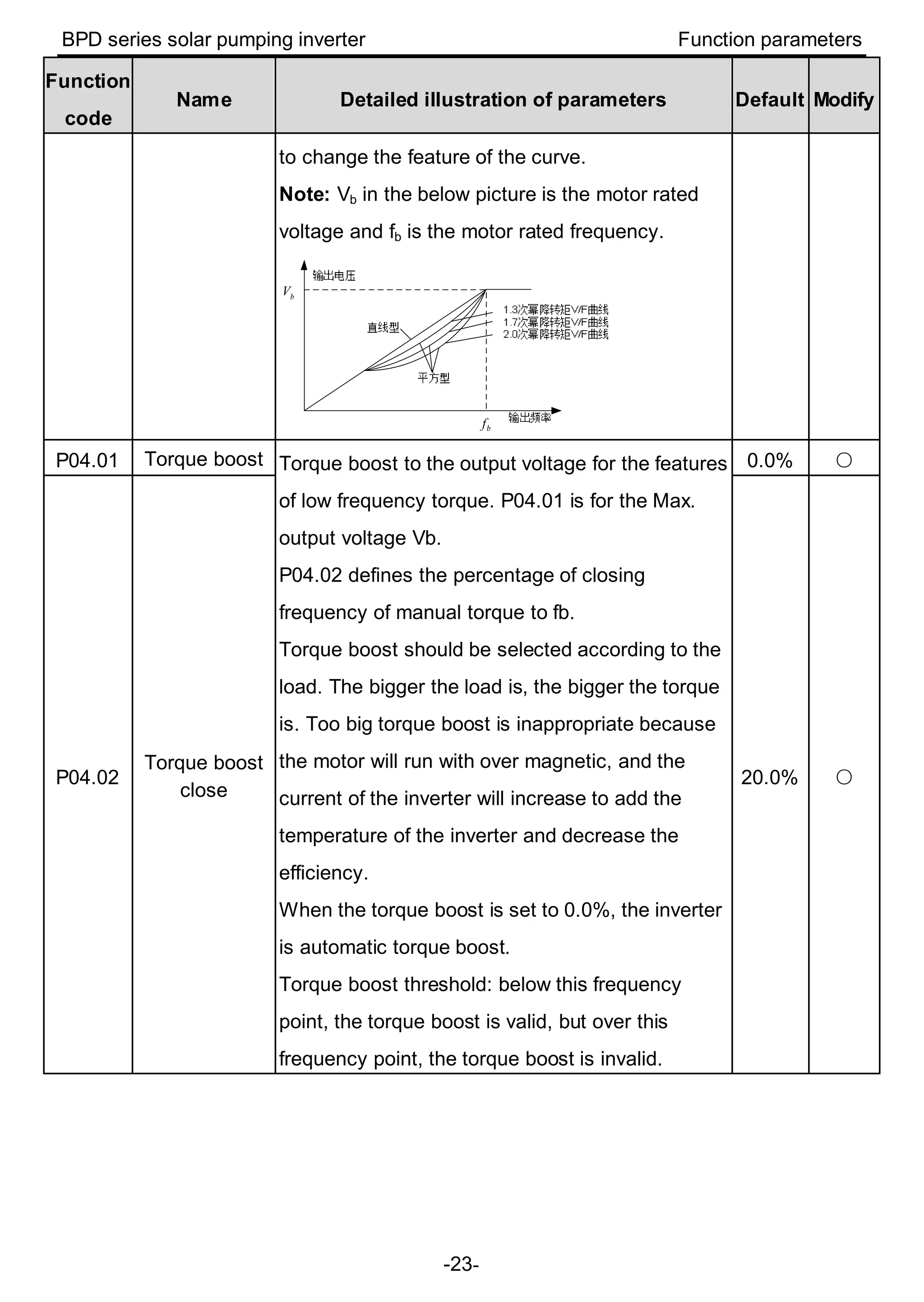
Name Detailed illustration of parameters Default Modify
to change the feature of the curve.
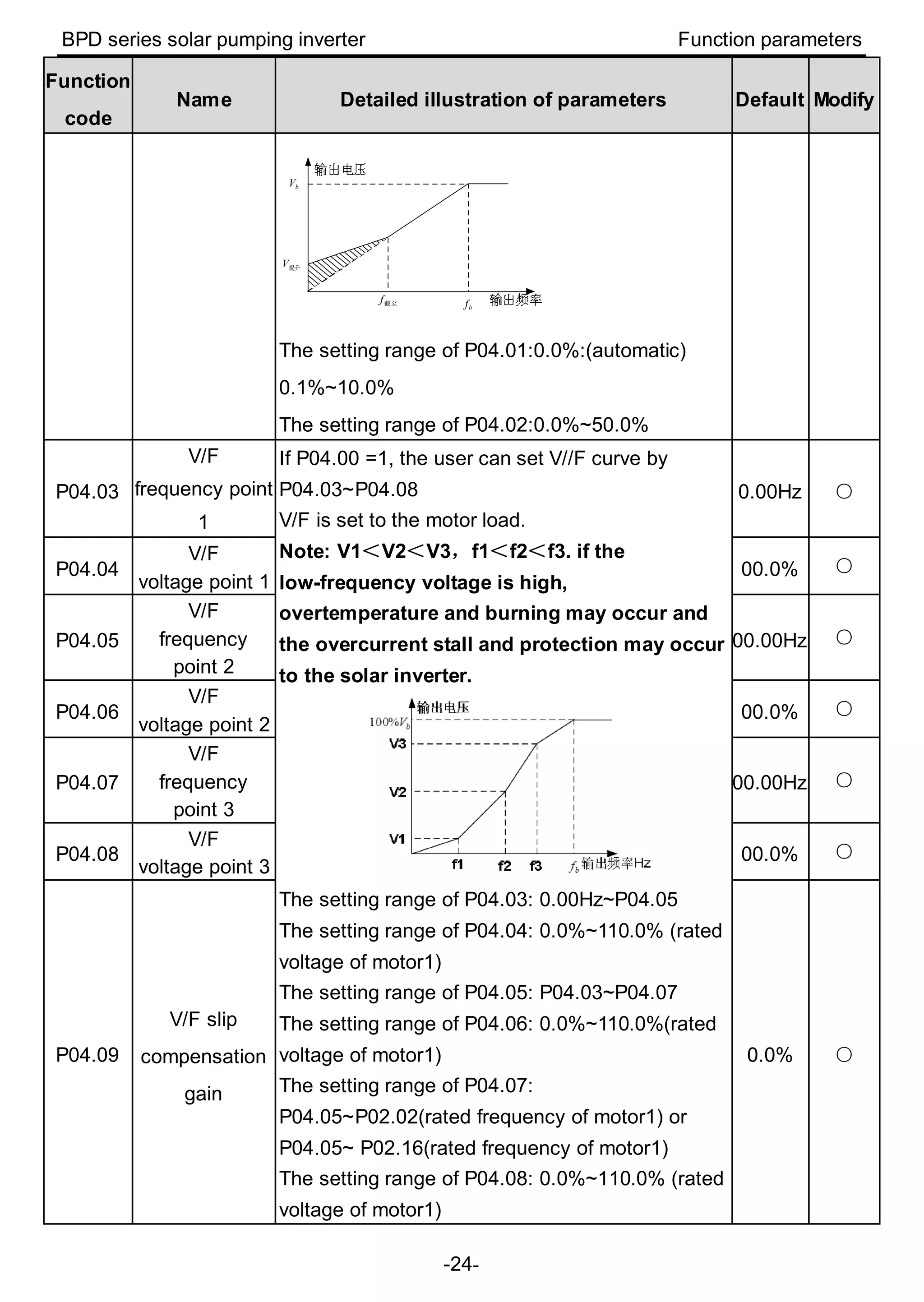
Note: Vb in the below picture is the motor rated
voltage and fb is the motor rated frequency.
bf
bV
P04.01 Torque boost Torque boost to the output voltage for the features
of low frequency torque. P04.01 is for the Max.
output voltage Vb.
P04.02 defines the percentage of closing
frequency of manual torque to fb.
Torque boost should be selected according to the
load. The bigger the load is, the bigger the torque
is. Too big torque boost is inappropriate because
the motor will run with over magnetic, and the
current of the inverter will increase to add the
temperature of the inverter and decrease the
efficiency.
When the torque boost is set to 0.0%, the inverter
is automatic torque boost.
Torque boost threshold: below this frequency
point, the torque boost is valid, but over this
frequency point, the torque boost is invalid.
0.0% ○
P04.02
Torque boost
close
20.0% ○
BPD series solar pumping inverter Function parameters
-24-
Function
code
Name Detailed illustration of parameters Default Modify
bf截至f
提升V
bV
The setting range of P04.01:0.0%:(automatic)
0.1%~10.0%
The setting range of P04.02:0.0%~50.0%
P04.03
V/F
frequency point
1
If P04.00 =1, the user can set V//F curve by
P04.03~P04.08
V/F is set to the motor load.
Note: V1<V2<V3,f1<f2<f3. if the
low-frequency voltage is high,
overtemperature and burning may occur and
the overcurrent stall and protection may occur
to the solar inverter.
The setting range of P04.03: 0.00Hz~P04.05
The setting range of P04.04: 0.0%~110.0% (rated
voltage of motor1)
The setting range of P04.05: P04.03~P04.07
The setting range of P04.06: 0.0%~110.0%(rated
voltage of motor1)
The setting range of P04.07:
P04.05~P02.02(rated frequency of motor1) or
P04.05~ P02.16(rated frequency of motor1)
The setting range of P04.08: 0.0%~110.0% (rated
voltage of motor1)
0.00Hz ○
P04.04
V/F
voltage point 1
00.0% ○
P04.05
V/F
frequency
point 2
00.00Hz ○
P04.06
V/F
voltage point 2
00.0% ○
P04.07
V/F
frequency
point 3
00.00Hz ○
P04.08
V/F
voltage point 3
00.0% ○
P04.09
V/F slip
compensation
gain
0.0% ○
BPD series solar pumping inverter Function parameters
-25-
Function
code
Name Detailed illustration of parameters Default Modify
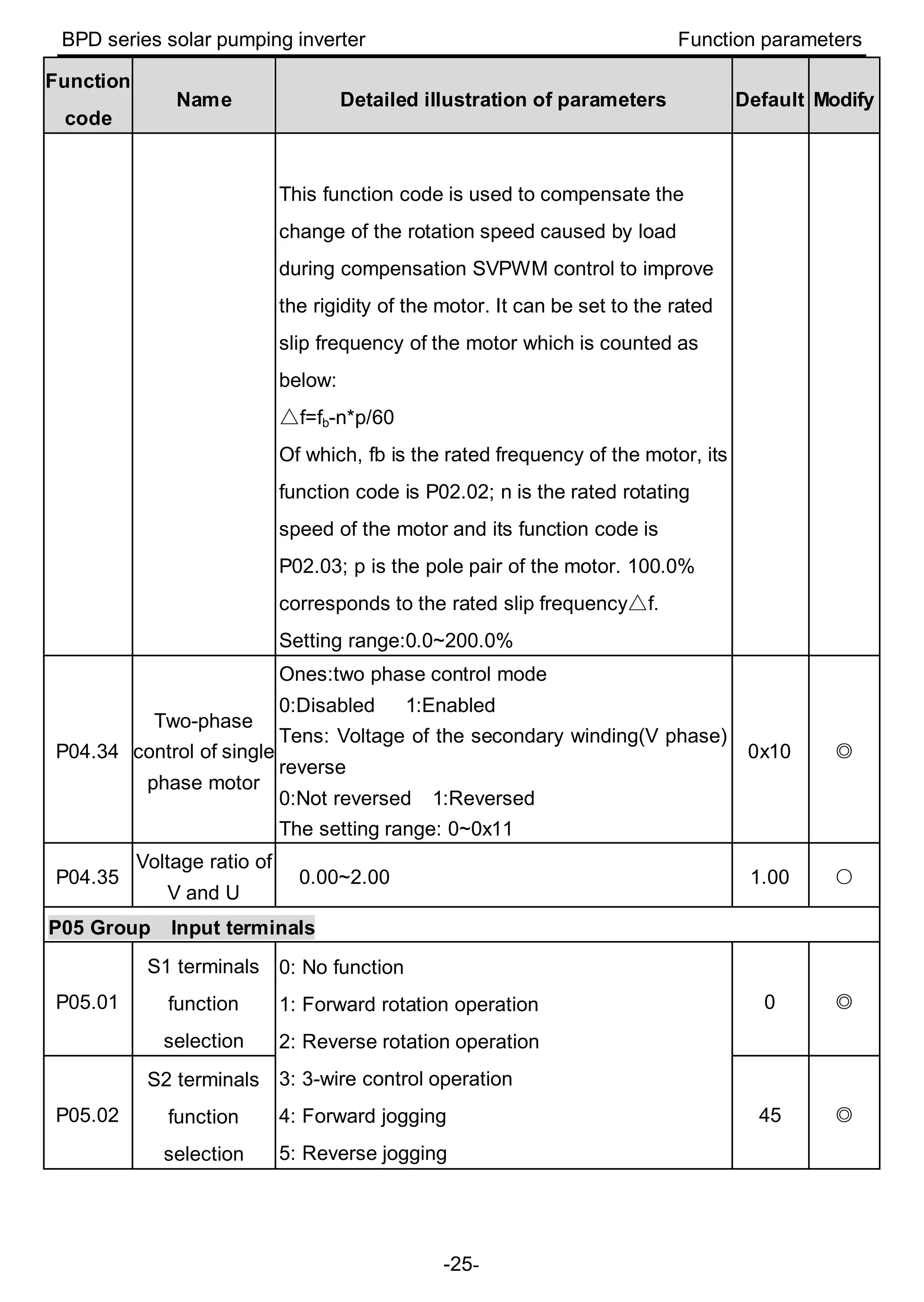
This function code is used to compensate the
change of the rotation speed caused by load
during compensation SVPWM control to improve
the rigidity of the motor. It can be set to the rated
slip frequency of the motor which is counted as
below:
△f=fb-n*p/60
Of which, fb is the rated frequency of the motor, its
function code is P02.02; n is the rated rotating
speed of the motor and its function code is
P02.03; p is the pole pair of the motor. 100.0%
△corresponds to the rated slip frequency f.
Setting range:0.0~200.0%
P04.34
Two-phase
control of single
phase motor
Ones:two phase control mode
0:Disabled 1:Enabled
Tens: Voltage of the secondary winding(V phase)
reverse
0:Not reversed 1:Reversed
The setting range: 0~0x11
0x10 ◎
P04.35
Voltage ratio of
V and U
0.00~2.00 1.00 ○
P05 Group Input terminals
P05.01
S1 terminals
function
selection
0: No function
1: Forward rotation operation
2: Reverse rotation operation
3: 3-wire control operation
4: Forward jogging
5: Reverse jogging
0 ◎
P05.02
S2 terminals
function
selection
45 ◎
BPD series solar pumping inverter Function parameters
-26-
Function
code
Name Detailed illustration of parameters Default Modify
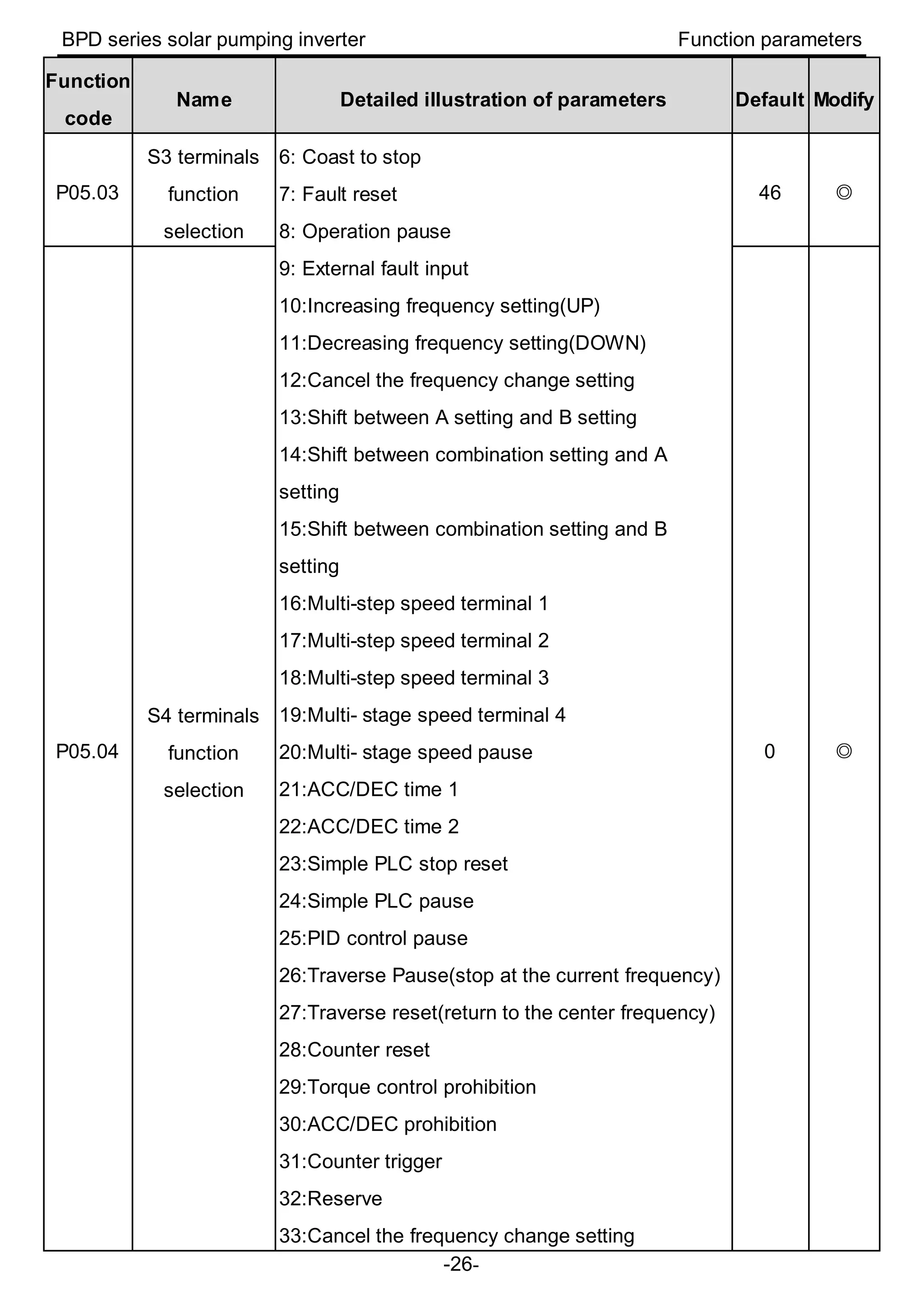
P05.03
S3 terminals
function
selection
6: Coast to stop
7: Fault reset
8: Operation pause
9: External fault input
10:Increasing frequency setting(UP)
11:Decreasing frequency setting(DOWN)
12:Cancel the frequency change setting
13:Shift between A setting and B setting
14:Shift between combination setting and A
setting
15:Shift between combination setting and B
setting
16:Multi-step speed terminal 1
17:Multi-step speed terminal 2
18:Multi-step speed terminal 3
19:Multi- stage speed terminal 4
20:Multi- stage speed pause
21:ACC/DEC time 1
22:ACC/DEC time 2
23:Simple PLC stop reset
24:Simple PLC pause
25:PID control pause
26:Traverse Pause(stop at the current frequency)
27:Traverse reset(return to the center frequency)
28:Counter reset
29:Torque control prohibition
30:ACC/DEC prohibition
31:Counter trigger
32:Reserve
33:Cancel the frequency change setting
46 ◎
P05.04
S4 terminals
function
selection
0 ◎
BPD series solar pumping inverter Function parameters
-27-
Function
code
Name Detailed illustration of parameters Default Modify
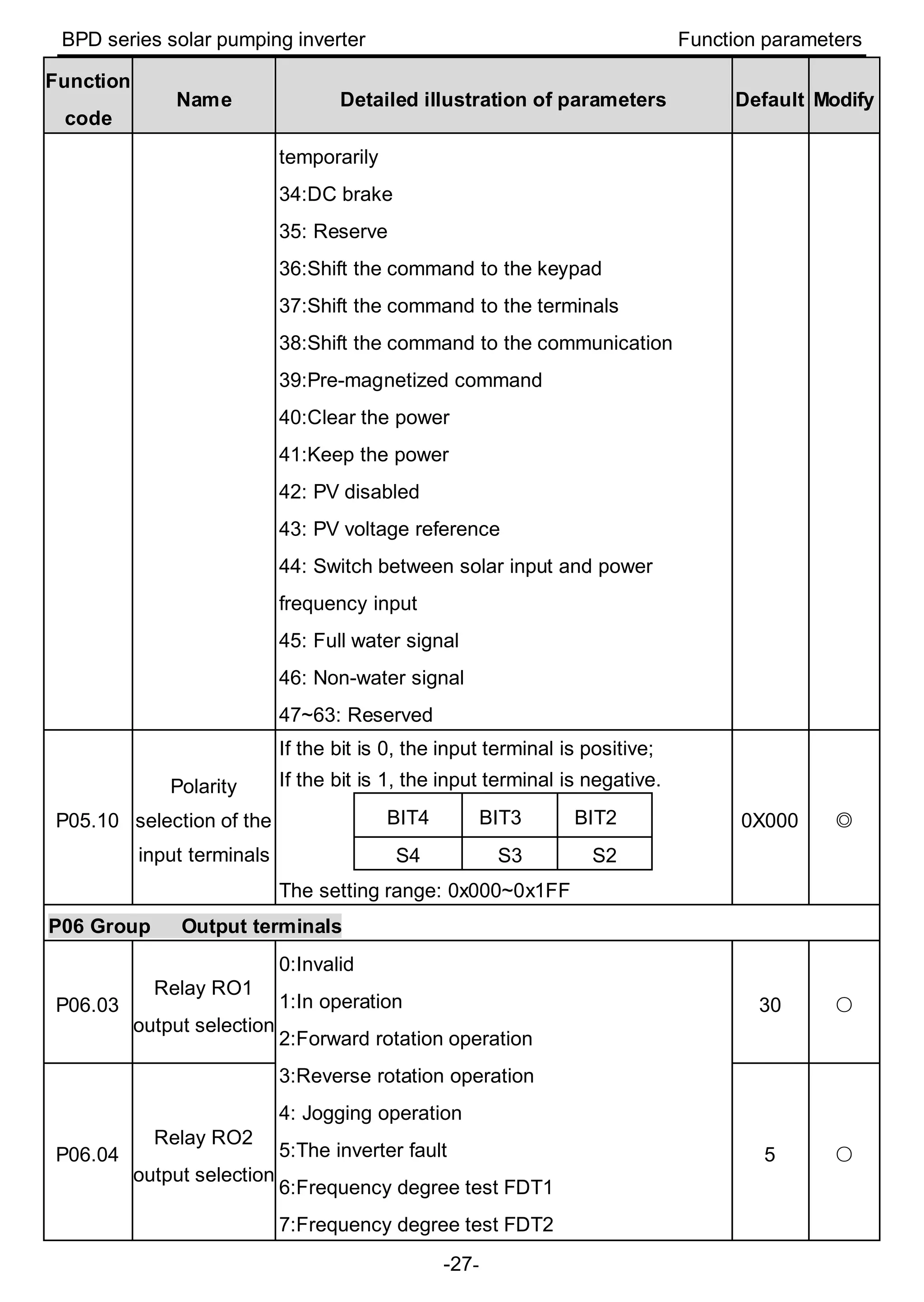
temporarily
34:DC brake
35: Reserve
36:Shift the command to the keypad
37:Shift the command to the terminals
38:Shift the command to the communication
39:Pre-magnetized command
40:Clear the power
41:Keep the power
42: PV disabled
43: PV voltage reference
44: Switch between solar input and power
frequency input
45: Full water signal
46: Non-water signal
47~63: Reserved
P05.10
Polarity
selection of the
input terminals
If the bit is 0, the input terminal is positive;
If the bit is 1, the input terminal is negative.
BIT4 BIT3 BIT2
S4 S3 S2
The setting range: 0x000~0x1FF
0X000 ◎
P06 Group Output terminals
P06.03
Relay RO1
output selection
0:Invalid
1:In operation
2:Forward rotation operation
3:Reverse rotation operation
4: Jogging operation
5:The inverter fault
6:Frequency degree test FDT1
7:Frequency degree test FDT2
30 ○
P06.04
Relay RO2
output selection
5 ○
BPD series solar pumping inverter Function parameters
-28-
Function
code
Name Detailed illustration of parameters Default Modify
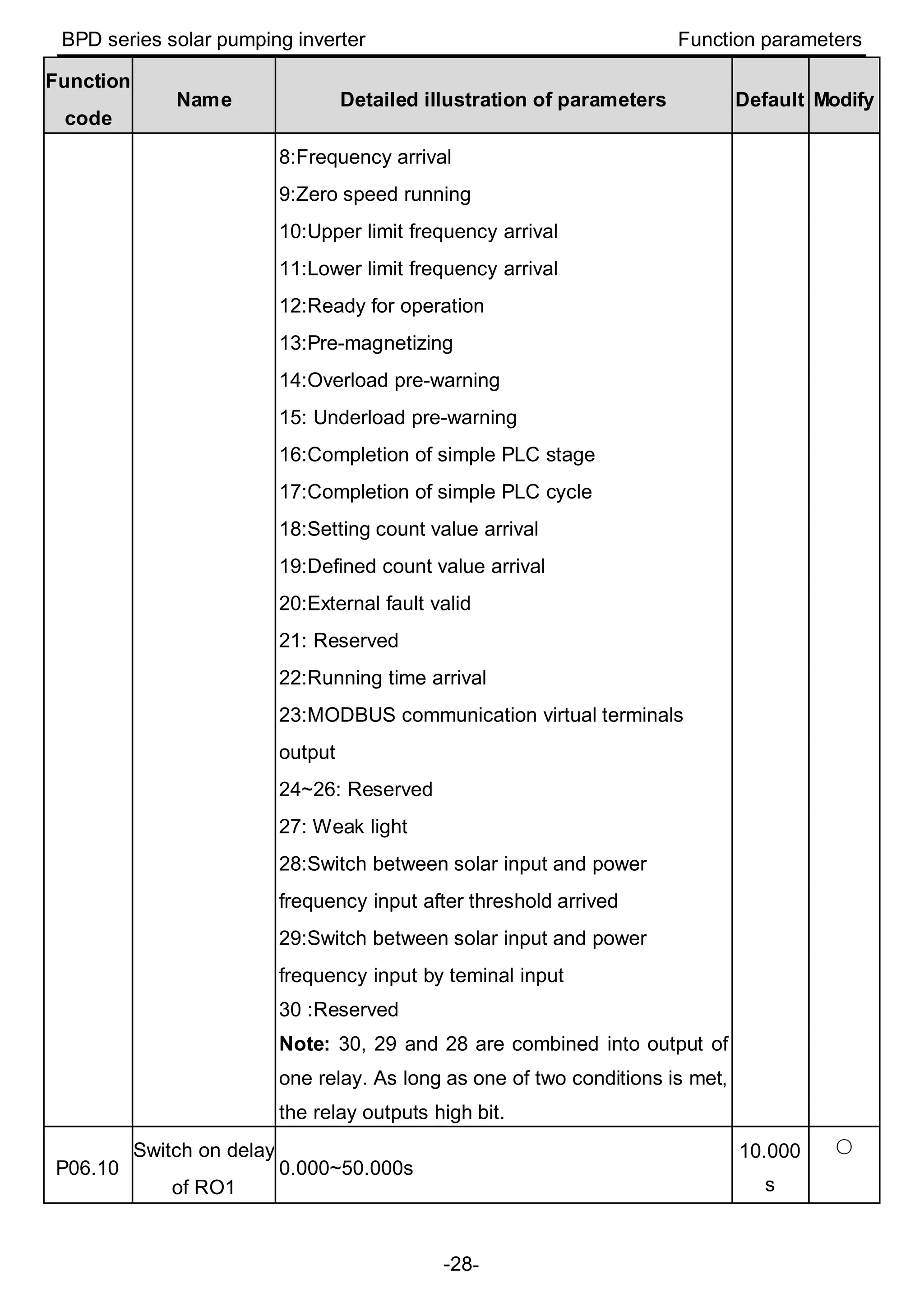
8:Frequency arrival
9:Zero speed running
10:Upper limit frequency arrival
11:Lower limit frequency arrival
12:Ready for operation
13:Pre-magnetizing
14:Overload pre-warning
15: Underload pre-warning
16:Completion of simple PLC stage
17:Completion of simple PLC cycle
18:Setting count value arrival
19:Defined count value arrival
20:External fault valid
21: Reserved
22:Running time arrival
23:MODBUS communication virtual terminals
output
24~26: Reserved
27: Weak light
28:Switch between solar input and power
frequency input after threshold arrived
29:Switch between solar input and power
frequency input by teminal input
30 :Reserved
Note: 30, 29 and 28 are combined into output of
one relay. As long as one of two conditions is met,
the relay outputs high bit.
P06.10
Switch on delay
of RO1
0.000~50.000s
10.000
s
○
BPD series solar pumping inverter Function parameters
-29-
Function
code
Name Detailed illustration of parameters Default Modify
P06.11
Switch off delay
of RO1
0.000~50.000s
10.000
s
○
P06.12
Switch on delay
of RO2
0.000~50.000s 0.000s
○
P06.13
Switch off delay
of RO2
0.000~50.000s 0.000s
○
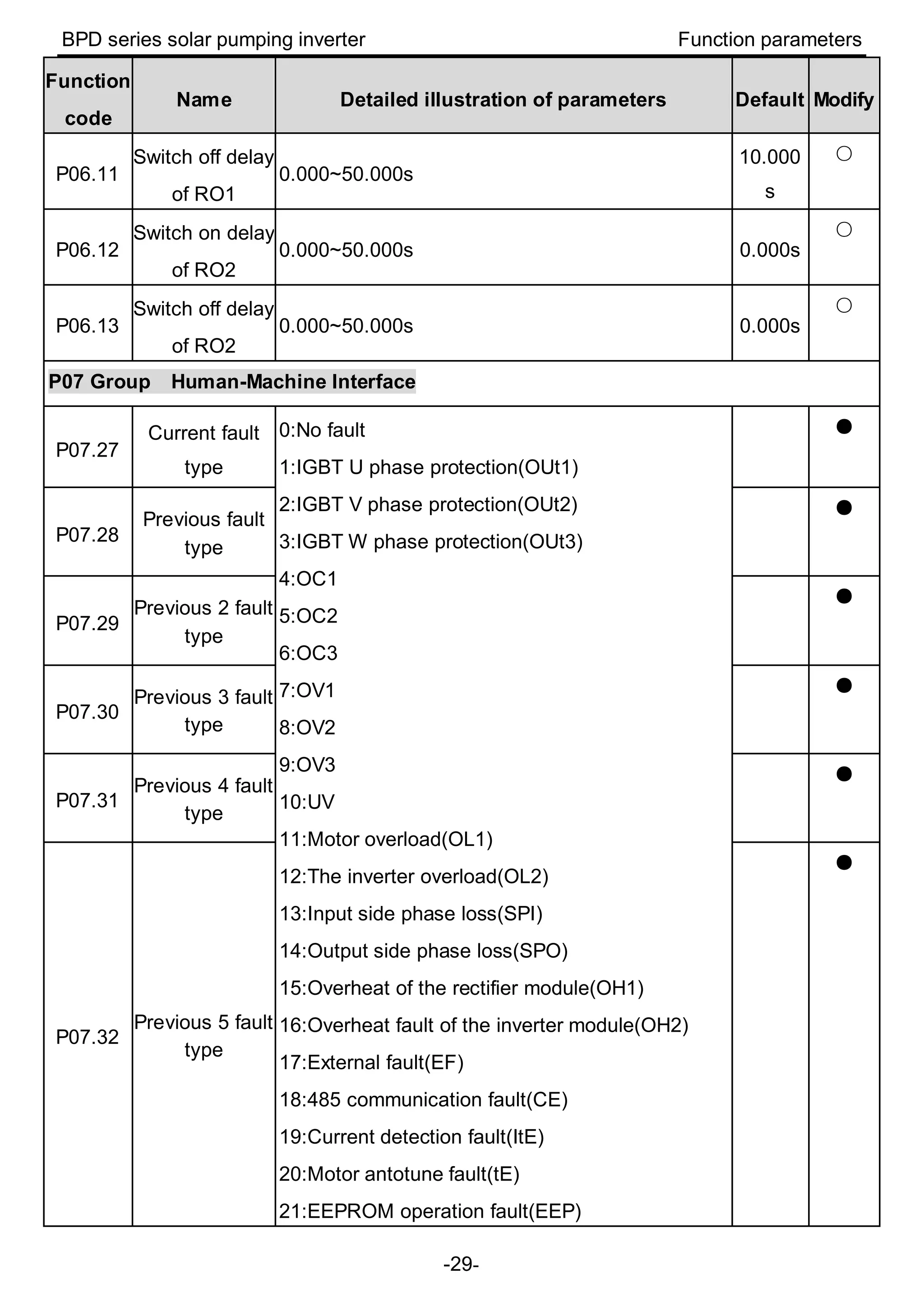
P07 Group Human-Machine Interface
P07.27
Current fault
type
0:No fault
1:IGBT U phase protection(OUt1)
2:IGBT V phase protection(OUt2)
3:IGBT W phase protection(OUt3)
4:OC1
5:OC2
6:OC3
7:OV1
8:OV2
9:OV3
10:UV
11:Motor overload(OL1)
12:The inverter overload(OL2)
13:Input side phase loss(SPI)
14:Output side phase loss(SPO)
15:Overheat of the rectifier module(OH1)
16:Overheat fault of the inverter module(OH2)
17:External fault(EF)
18:485 communication fault(CE)
19:Current detection fault(ItE)
20:Motor antotune fault(tE)
21:EEPROM operation fault(EEP)
●
P07.28
Previous fault
type
●
P07.29
Previous 2 fault
type
●
P07.30
Previous 3 fault
type
●
P07.31
Previous 4 fault
type
●
P07.32
Previous 5 fault
type
●
BPD series solar pumping inverter Function parameters
-30-
Function
code
Name Detailed illustration of parameters Default Modify
22:PID response offline fault(PIDE)
23:Braking unit fault(bCE)
24:Running time arrival(END)
25:Electrical overload(OL3)
26~31:Reserved
32:Grounding short circuit fault 1(ETH1)
33:Grounding short circuit fault 2(ETH2)
34:Speed deviation fault(dEu)
35:Maladjustment(STo)
36:Underload fault(LL)
37:Hydraulic probe damage(tSF)
38:PV reverse connection fault(PINV)
39:PV overcurrent(PVOC)
40:PV overvoltage(PVOV)
41:PV undervoltage(PVLV)
Alarm:
Weak light pre-warning(A-LS)
Underload pre-warning(A-LL)
Full water pre-warning(A-tF)
Water-empty warning(A-tL)
P08 Group Enhanced functions
P08.28
Times of fault
reset
0~10 5 ○
P08.29
Interval time of
automatic fault
reset
0.1~3600.0s 10.0s ○
3.2 Parameters of special functions
Function
code
Name Detailed illustration of parameters Default Modify
P11 Group Protective parameters
BPD series solar pumping inverter Function parameters
-31-
Function
code
Name Detailed illustration of parameters Default Modify
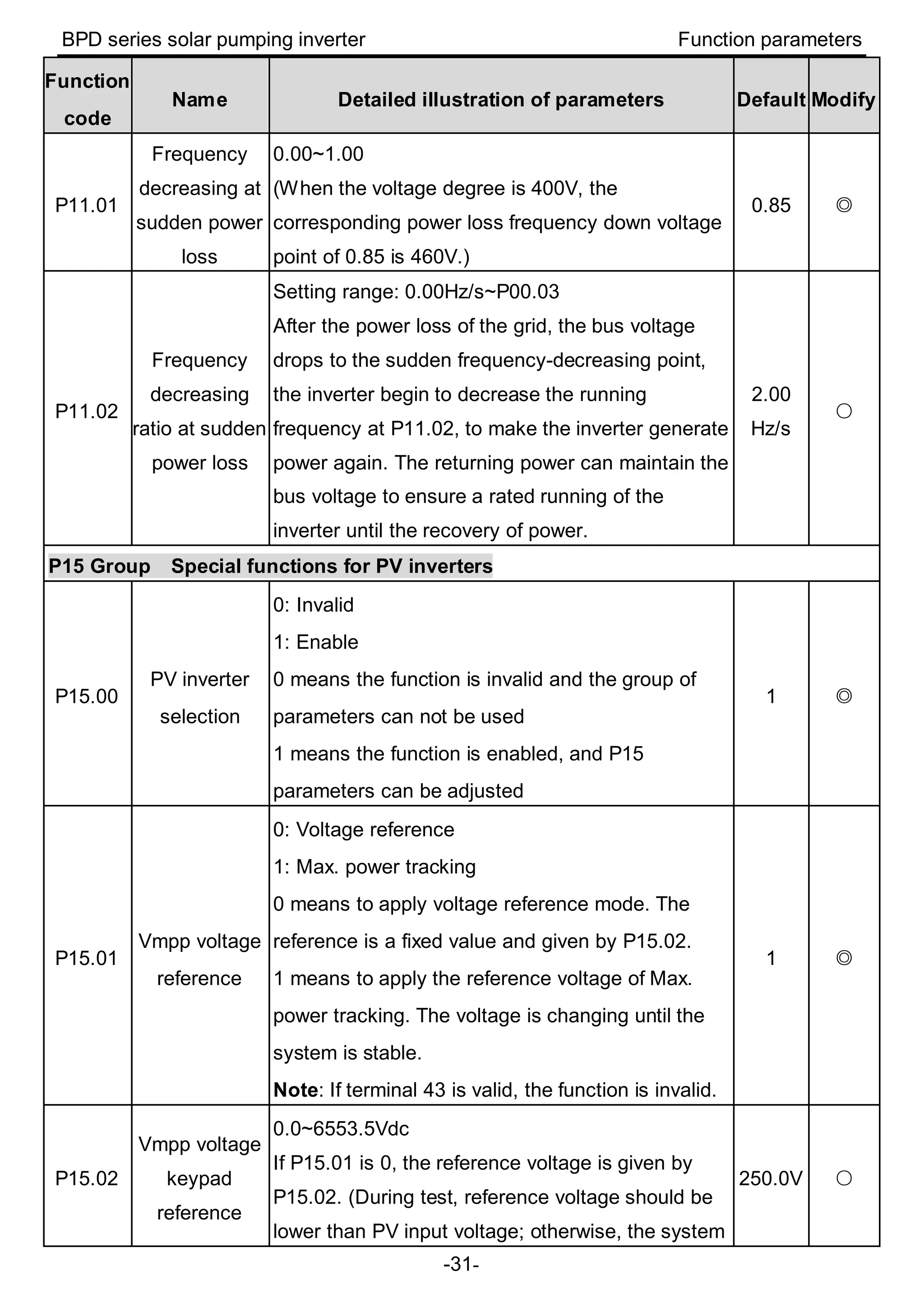
P11.01
Frequency
decreasing at
sudden power
loss
0.00~1.00
(When the voltage degree is 400V, the
corresponding power loss frequency down voltage
point of 0.85 is 460V.)
0.85 ◎
P11.02
Frequency
decreasing
ratio at sudden
power loss
Setting range: 0.00Hz/s~P00.03
After the power loss of the grid, the bus voltage
drops to the sudden frequency-decreasing point,
the inverter begin to decrease the running
frequency at P11.02, to make the inverter generate
power again. The returning power can maintain the
bus voltage to ensure a rated running of the
inverter until the recovery of power.
2.00
Hz/s
○
P15 Group Special functions for PV inverters
P15.00
PV inverter
selection
0: Invalid
1: Enable
0 means the function is invalid and the group of
parameters can not be used
1 means the function is enabled, and P15
parameters can be adjusted
1 ◎
P15.01
Vmpp voltage
reference
0: Voltage reference
1: Max. power tracking
0 means to apply voltage reference mode. The
reference is a fixed value and given by P15.02.
1 means to apply the reference voltage of Max.
power tracking. The voltage is changing until the
system is stable.
Note: If terminal 43 is valid, the function is invalid.
1 ◎
P15.02
Vmpp voltage
keypad
reference
0.0~6553.5Vdc
If P15.01 is 0, the reference voltage is given by
P15.02. (During test, reference voltage should be
lower than PV input voltage; otherwise, the system
250.0V ○
BPD series solar pumping inverter Function parameters
-32-
Function
code
Name Detailed illustration of parameters Default Modify
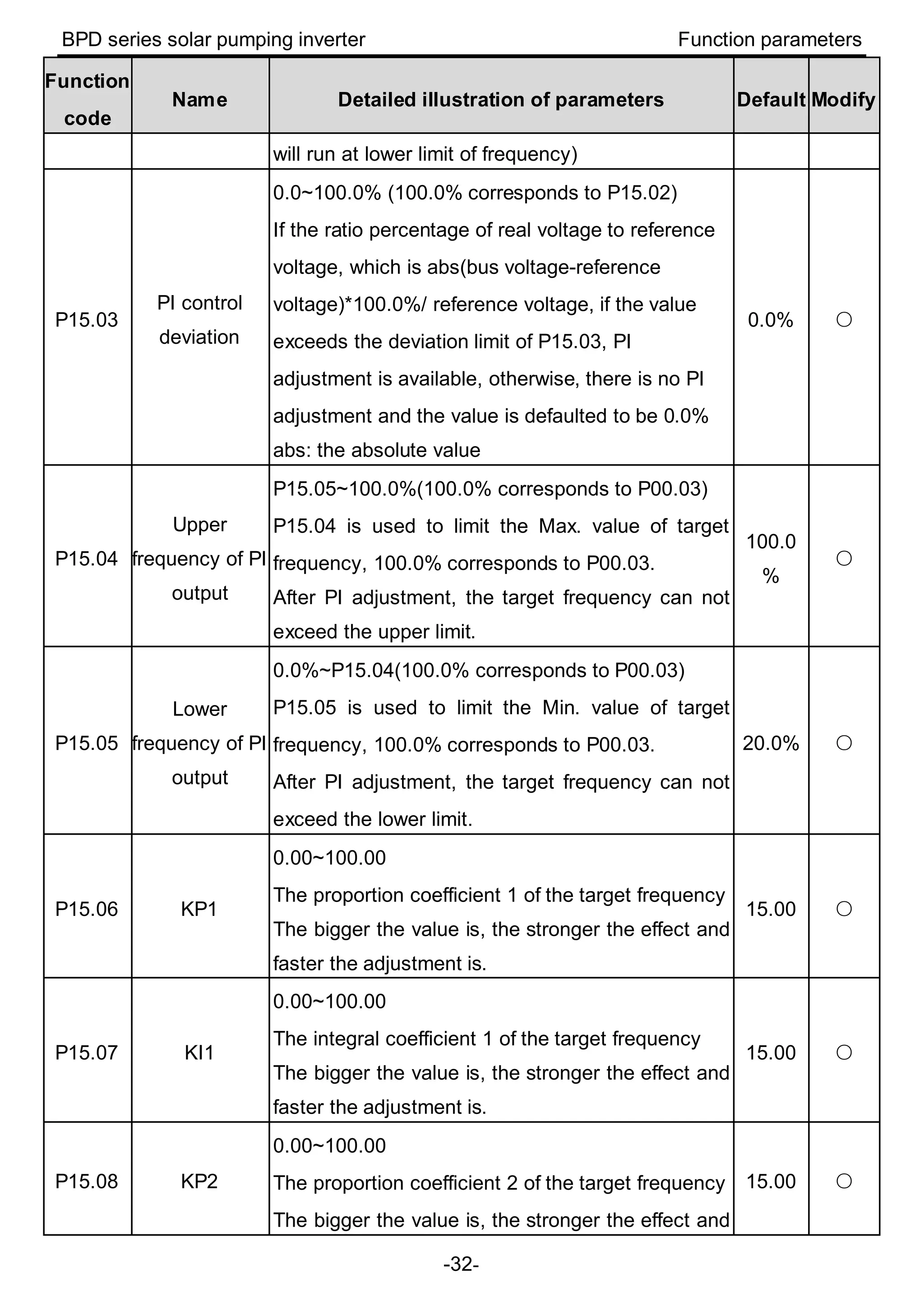
will run at lower limit of frequency)
P15.03
PI control
deviation
0.0~100.0% (100.0% corresponds to P15.02)
If the ratio percentage of real voltage to reference
voltage, which is abs(bus voltage-reference
voltage)*100.0%/ reference voltage, if the value
exceeds the deviation limit of P15.03, PI
adjustment is available, otherwise, there is no PI
adjustment and the value is defaulted to be 0.0%
abs: the absolute value
0.0% ○
P15.04
Upper
frequency of PI
output
P15.05~100.0%(100.0% corresponds to P00.03)
P15.04 is used to limit the Max. value of target
frequency, 100.0% corresponds to P00.03.
After PI adjustment, the target frequency can not
exceed the upper limit.
100.0
%
○
P15.05
Lower
frequency of PI
output
0.0%~P15.04(100.0% corresponds to P00.03)
P15.05 is used to limit the Min. value of target
frequency, 100.0% corresponds to P00.03.
After PI adjustment, the target frequency can not
exceed the lower limit.
20.0% ○
P15.06 KP1
0.00~100.00
The proportion coefficient 1 of the target frequency
The bigger the value is, the stronger the effect and
faster the adjustment is.
15.00 ○
P15.07 KI1
0.00~100.00
The integral coefficient 1 of the target frequency
The bigger the value is, the stronger the effect and
faster the adjustment is.
15.00 ○
P15.08 KP2
0.00~100.00
The proportion coefficient 2 of the target frequency
The bigger the value is, the stronger the effect and
15.00 ○
BPD series solar pumping inverter Function parameters
-33-
Function
code
Name Detailed illustration of parameters Default Modify
faster the adjustment is.
P15.09 KI2
0.00~100.00
The integral coefficient 2 of the target frequency
The bigger the value is, the stronger the effect and
faster the adjustment is.
15.00 ○
P15.10
PI switching
point
0.0~6553.5Vdc
If the absolute value of bus voltage minus the
reference value is bigger than P15.10, it will switch
to P15.08 and P15.09; otherwise it is P15.06 and
P15.07.
20.0V ◎
P15.11
Water level
control
0:Digital input of the water-level control
1:AI1(the water-level signal is input through AI1,
not supported currently)
2:AI2(the water-level signal is input through AI2)
3:AI3(the water-level signal is input through AI3)
If the function code is 0, the water-level signal is
control by the digital input. See 45 and 46 functions
of S terminal for detailed information. If the
full-water signal is valid, the system will report the
warning (A-tF) and sleep after the time of P15.13.
During the warning, the full-water signal is invalid
and the system will clear the warning after the time
of P15.14. If the empty-water signal is valid, the
system will report the warning (A-tL) and sleep after
the time of P15.32. During the warning, the empty
-water signal is invalid and the system will clear the
warning after the time of P15.33.(the function code
of P15.13, P15.14, P15.32, P15.33 is relative to the
water-level control)
If the function code is 1~3, it is the reference of
theater control analog signal. (the function code of
P15.12, P15.13, P15.14, P15.15 is relative to the
water-level control)
0 ◎
BPD series solar pumping inverter Function parameters
-34-
Function
code
Name Detailed illustration of parameters Default Modify
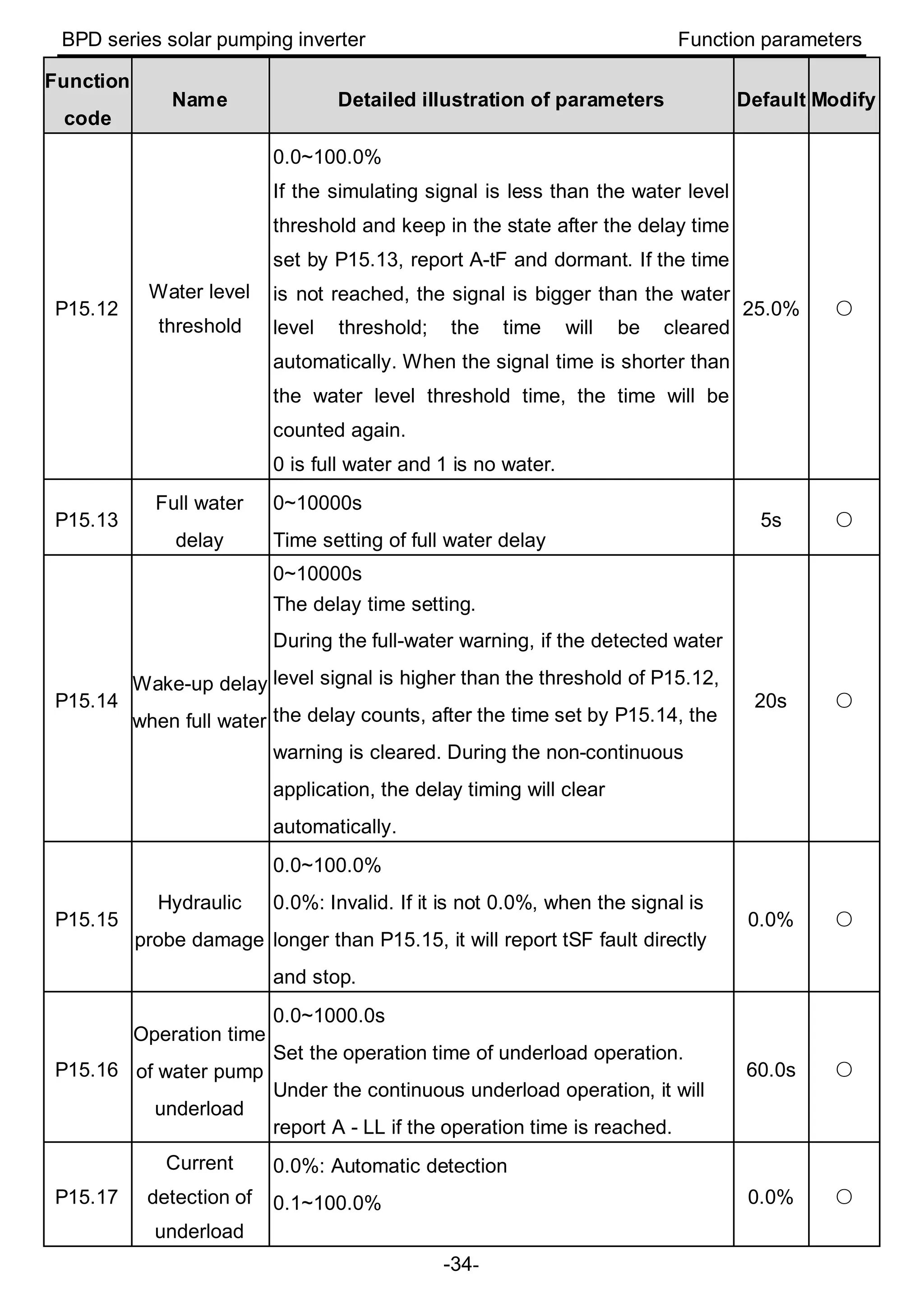
P15.12
Water level
threshold
0.0~100.0%
If the simulating signal is less than the water level
threshold and keep in the state after the delay time
set by P15.13, report A-tF and dormant. If the time
is not reached, the signal is bigger than the water
level threshold; the time will be cleared
automatically. When the signal time is shorter than
the water level threshold time, the time will be
counted again.
0 is full water and 1 is no water.
25.0% ○
P15.13
Full water
delay
0~10000s
Time setting of full water delay
5s ○
P15.14
Wake-up delay
when full water
0~10000s
The delay time setting.
During the full-water warning, if the detected water
level signal is higher than the threshold of P15.12,
the delay counts, after the time set by P15.14, the
warning is cleared. During the non-continuous
application, the delay timing will clear
automatically.
20s ○
P15.15
Hydraulic
probe damage
0.0~100.0%
0.0%: Invalid. If it is not 0.0%, when the signal is
longer than P15.15, it will report tSF fault directly
and stop.
0.0% ○
P15.16
Operation time
of water pump
underload
0.0~1000.0s
Set the operation time of underload operation.
Under the continuous underload operation, it will
report A - LL if the operation time is reached.
60.0s ○
P15.17
Current
detection of
underload
0.0%: Automatic detection
0.1~100.0% 0.0% ○
BPD series solar pumping inverter Function parameters
-35-
Function
code
Name Detailed illustration of parameters Default Modify
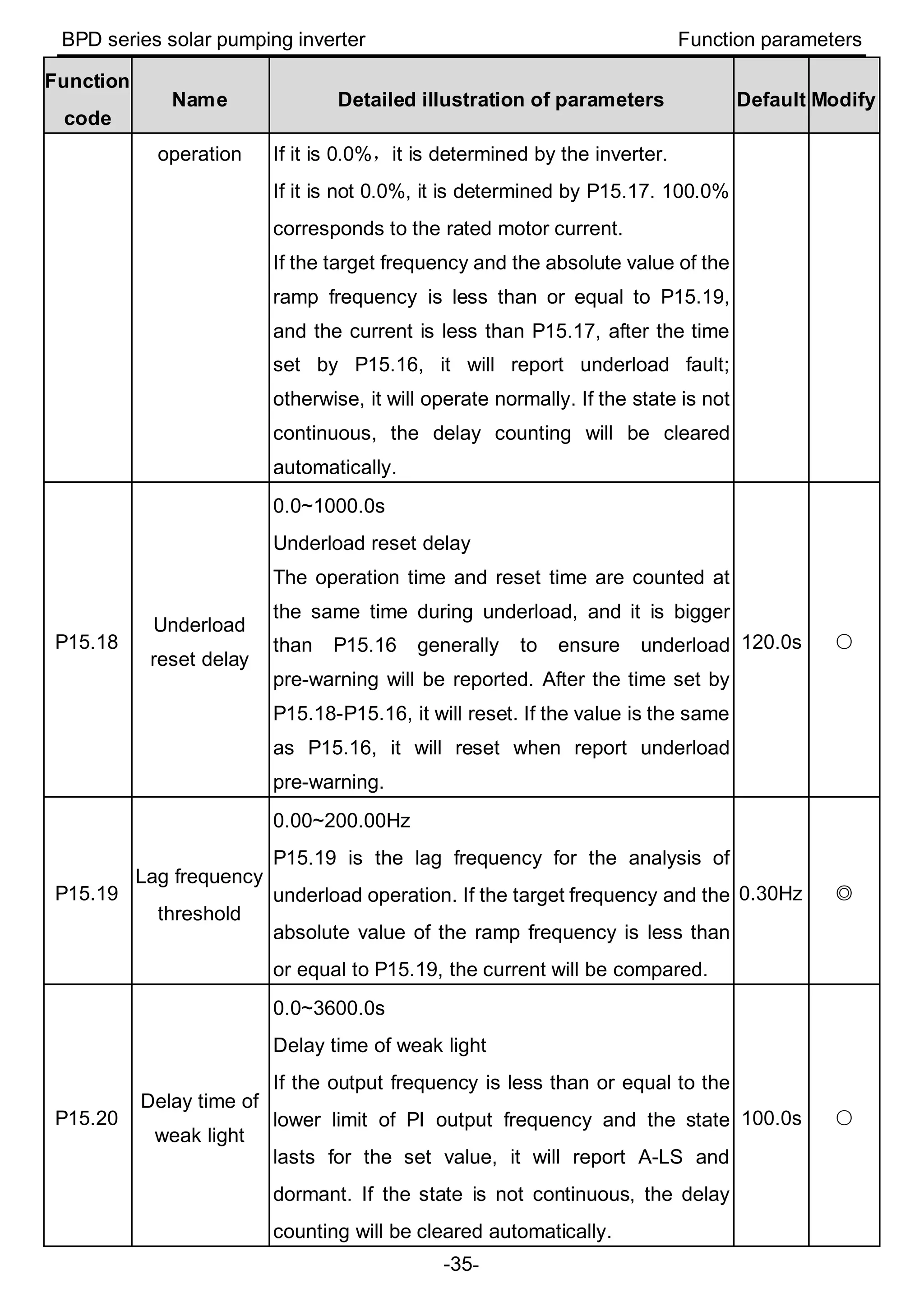
operation If it is 0.0%,it is determined by the inverter.
If it is not 0.0%, it is determined by P15.17. 100.0%
corresponds to the rated motor current.
If the target frequency and the absolute value of the
ramp frequency is less than or equal to P15.19,
and the current is less than P15.17, after the time
set by P15.16, it will report underload fault;
otherwise, it will operate normally. If the state is not
continuous, the delay counting will be cleared
automatically.
P15.18
Underload
reset delay
0.0~1000.0s
Underload reset delay
The operation time and reset time are counted at
the same time during underload, and it is bigger
than P15.16 generally to ensure underload
pre-warning will be reported. After the time set by
P15.18-P15.16, it will reset. If the value is the same
as P15.16, it will reset when report underload
pre-warning.
120.0s ○
P15.19
Lag frequency
threshold
0.00~200.00Hz
P15.19 is the lag frequency for the analysis of
underload operation. If the target frequency and the
absolute value of the ramp frequency is less than
or equal to P15.19, the current will be compared.
0.30Hz ◎
P15.20
Delay time of
weak light
0.0~3600.0s
Delay time of weak light
If the output frequency is less than or equal to the
lower limit of PI output frequency and the state
lasts for the set value, it will report A-LS and
dormant. If the state is not continuous, the delay
counting will be cleared automatically.
100.0s ○
BPD series solar pumping inverter Function parameters
-36-
Function
code
Name Detailed illustration of parameters Default Modify
Note: If the PV voltage is lower than software
undervoltage point, it will report directly and no
need to wait for the set time.
If P15.29=0, the system will switch to the power
frequency input when the light is weak.
P15.21
Delay time of
wake-up at
weak light
0.0~3600.0s
Delay time of wake-up at weak light
During the weak light warning, if the PV voltage is
higher than the starting voltage, after the delay
time, the warning will be cleared and it will run
again.
When P15.29=0, if the PV voltage is higher than
P15.31, after the delay time, it will switch to solar
input mode.
300.0s ○
P15.22
Initial
reference
voltage display
0.0~2000.0V ●
P15.23
Mini voltage
reference of
Max. power
tracking
0.0~P15.24
Valid in MPPT Max. tracking voltage, the Mini.
tracked voltage
Track in the range of P15.23~P15.24. P15.24
needs to be bigger than P15.23. The less the
difference, the faster the tracking is. But the Max.
voltage needs to be in the range. P15.23 and
P15.24 can be adjusted according to site operation.
The default value depends on model.
0.75kW:80V
1.5kW, 2.2kW:100V
80.0V ○
P15.24
Max. voltage
reference of
Max. power
tracking
P15.23~P15.28
Valid in MPPT Max. tracking voltage, the Max.
tracked voltage
The default value depends on model.
400.0V ○
BPD series solar pumping inverter Function parameters
-37-
Function
code
Name Detailed illustration of parameters Default Modify
0.75kW:400V
1.5kW, 2.2kW:400V
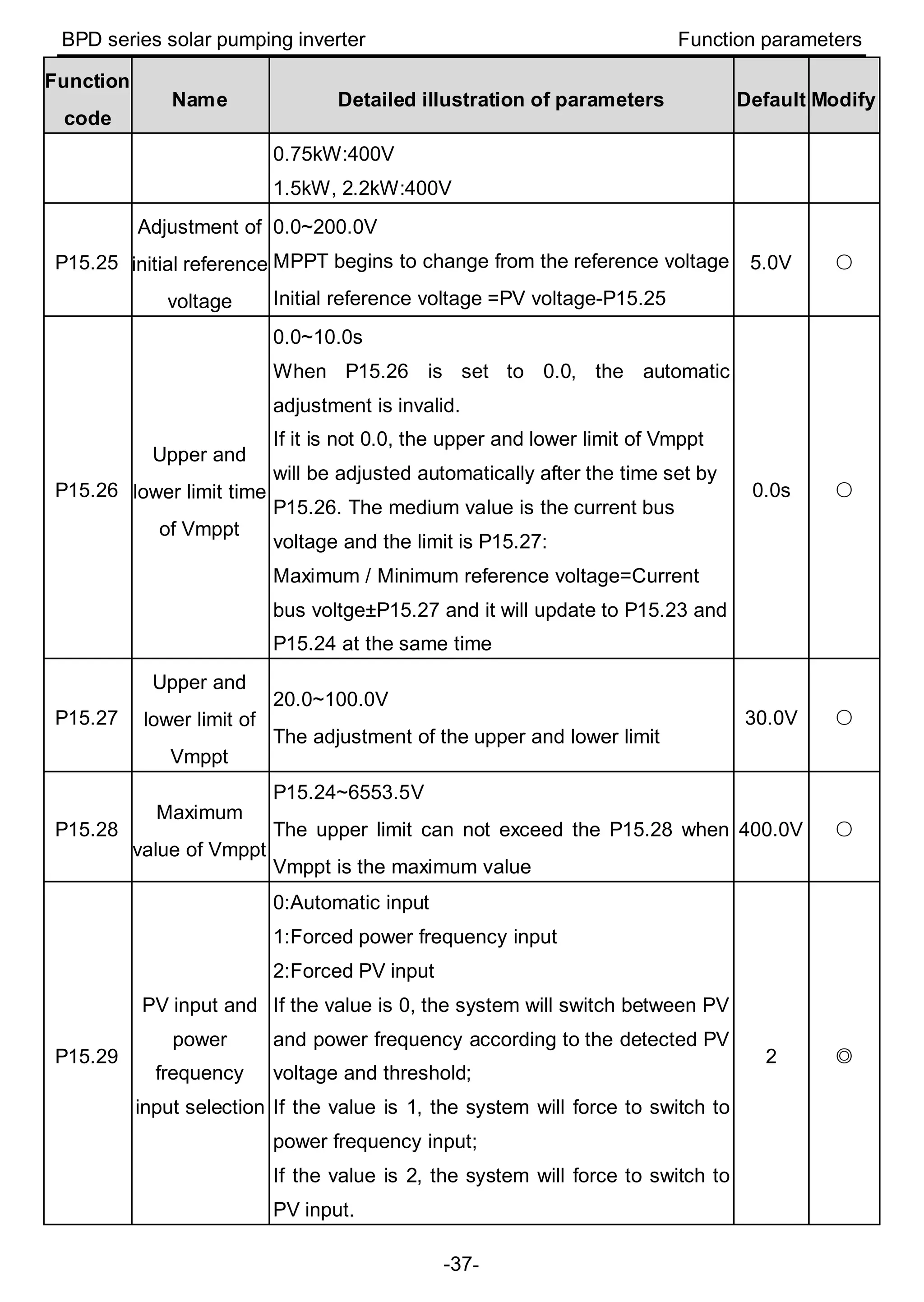
P15.25
Adjustment of
initial reference
voltage
0.0~200.0V
MPPT begins to change from the reference voltage
Initial reference voltage =PV voltage-P15.25
5.0V ○
P15.26
Upper and
lower limit time
of Vmppt
0.0~10.0s
When P15.26 is set to 0.0, the automatic
adjustment is invalid.
If it is not 0.0, the upper and lower limit of Vmppt
will be adjusted automatically after the time set by
P15.26. The medium value is the current bus
voltage and the limit is P15.27:
Maximum / Minimum reference voltage=Current
bus voltge±P15.27 and it will update to P15.23 and
P15.24 at the same time
0.0s ○
P15.27
Upper and
lower limit of
Vmppt
20.0~100.0V
The adjustment of the upper and lower limit
30.0V ○
P15.28
Maximum
value of Vmppt
P15.24~6553.5V
The upper limit can not exceed the P15.28 when
Vmppt is the maximum value
400.0V ○
P15.29
PV input and
power
frequency
input selection
0:Automatic input
1:Forced power frequency input
2:Forced PV input
If the value is 0, the system will switch between PV
and power frequency according to the detected PV
voltage and threshold;
If the value is 1, the system will force to switch to
power frequency input;
If the value is 2, the system will force to switch to
PV input.
2 ◎
BPD series solar pumping inverter Function parameters
-38-
Function
code
Name Detailed illustration of parameters Default Modify
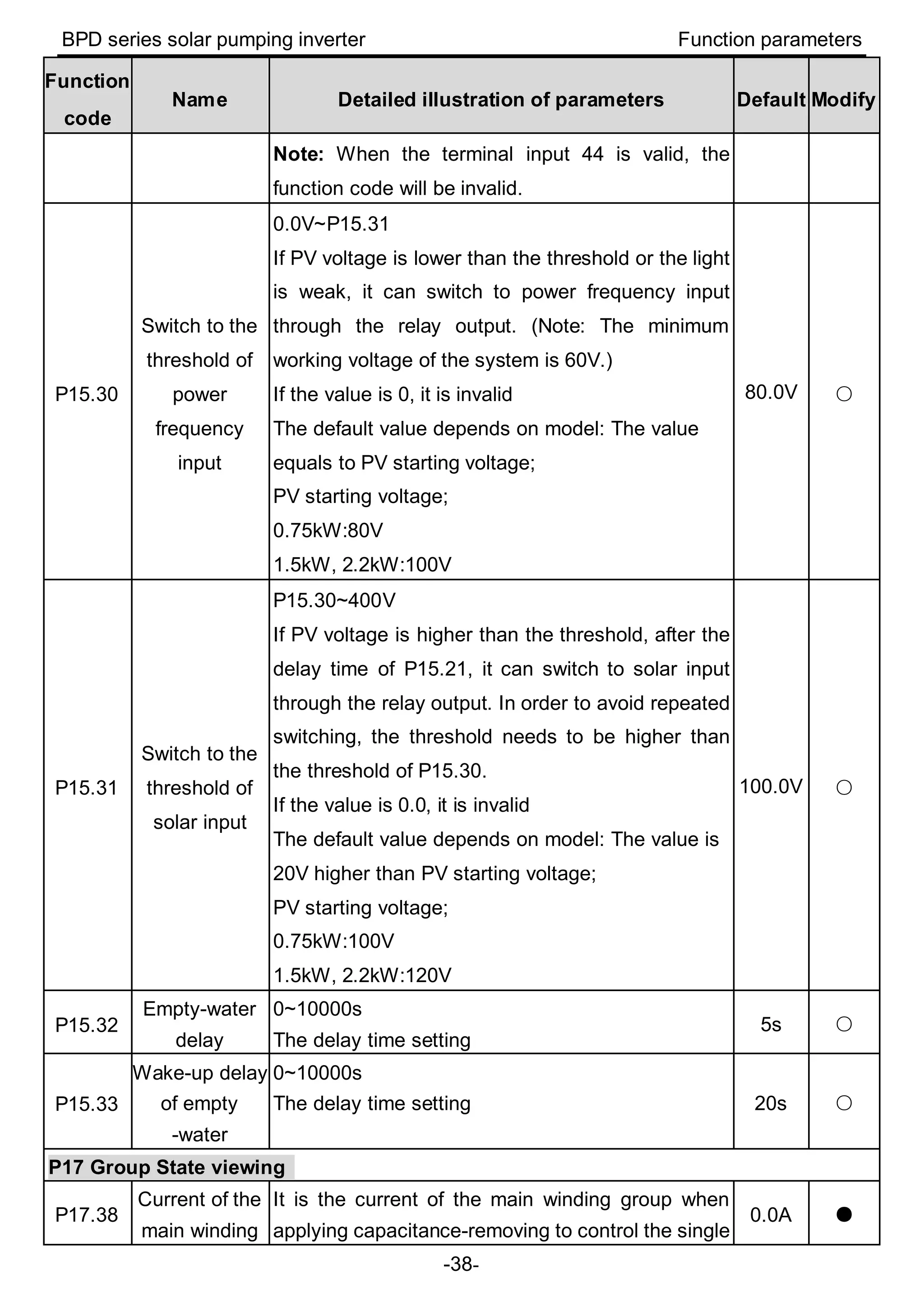
Note: When the terminal input 44 is valid, the
function code will be invalid.
P15.30
Switch to the
threshold of
power
frequency
input
0.0V~P15.31
If PV voltage is lower than the threshold or the light
is weak, it can switch to power frequency input
through the relay output. (Note: The minimum
working voltage of the system is 60V.)
If the value is 0, it is invalid
The default value depends on model: The value
equals to PV starting voltage;
PV starting voltage;
0.75kW:80V
1.5kW, 2.2kW:100V
80.0V ○
P15.31
Switch to the
threshold of
solar input
P15.30~400V
If PV voltage is higher than the threshold, after the
delay time of P15.21, it can switch to solar input
through the relay output. In order to avoid repeated
switching, the threshold needs to be higher than
the threshold of P15.30.
If the value is 0.0, it is invalid
The default value depends on model: The value is
20V higher than PV starting voltage;
PV starting voltage;
0.75kW:100V
1.5kW, 2.2kW:120V
100.0V ○
P15.32
Empty-water
delay
0~10000s
The delay time setting
5s ○
P15.33
Wake-up delay
of empty
-water
0~10000s
The delay time setting 20s ○
P17 Group State viewing
P17.38
Current of the
main winding
It is the current of the main winding group when
applying capacitance-removing to control the single
0.0A ●
BPD series solar pumping inverter Function parameters
-39-
Function
code
Name Detailed illustration of parameters Default Modify
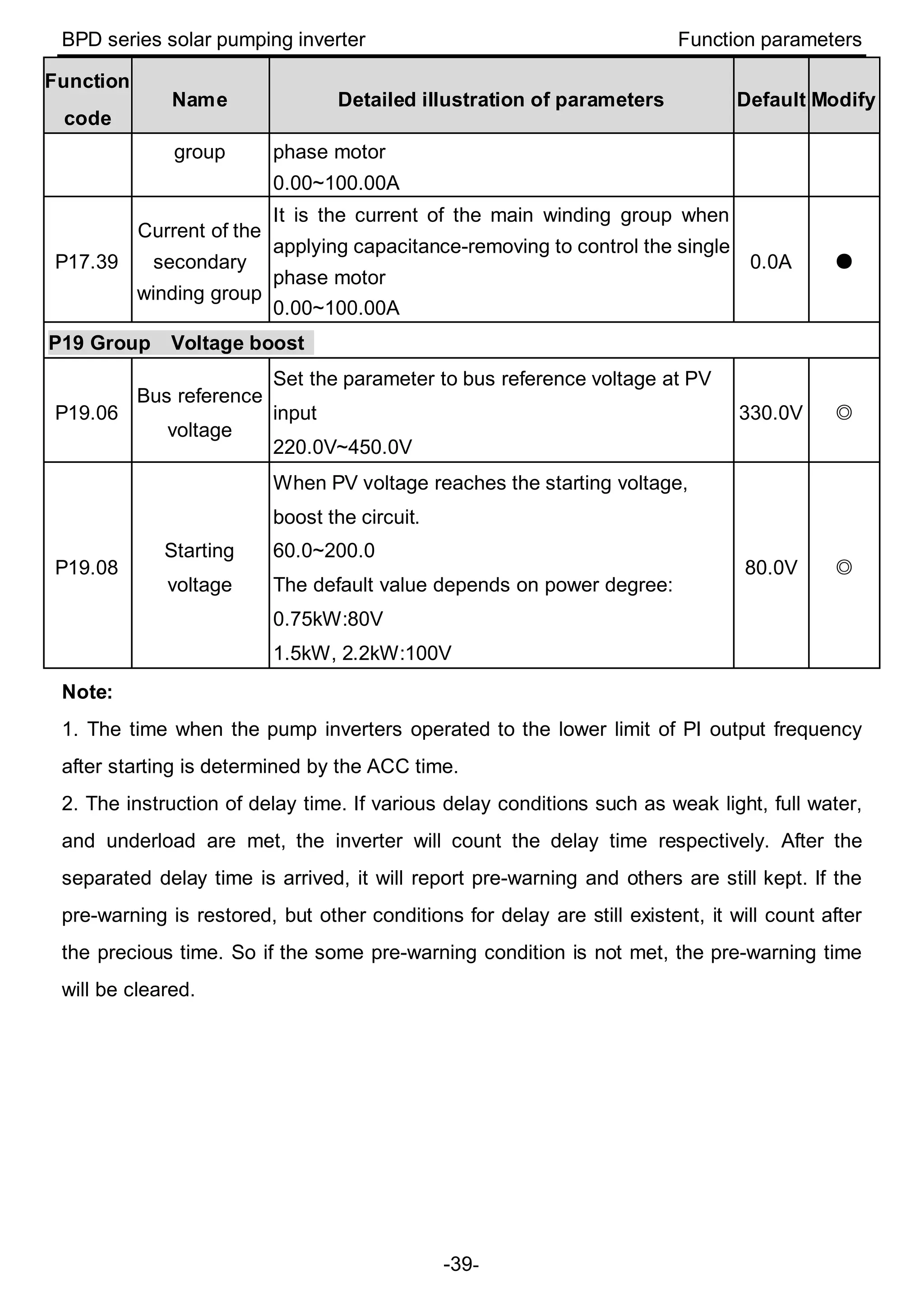
group phase motor
0.00~100.00A
P17.39
Current of the
secondary
winding group
It is the current of the main winding group when
applying capacitance-removing to control the single
phase motor
0.00~100.00A
0.0A ●
P19 Group Voltage boost
P19.06
Bus reference
voltage
Set the parameter to bus reference voltage at PV
input
220.0V~450.0V
330.0V ◎
P19.08
Starting
voltage
When PV voltage reaches the starting voltage,
boost the circuit.
60.0~200.0
The default value depends on power degree:
0.75kW:80V
1.5kW, 2.2kW:100V
80.0V ◎
Note:
1. The time when the pump inverters operated to the lower limit of PI output frequency
after starting is determined by the ACC time.
2. The instruction of delay time. If various delay conditions such as weak light, full water,
and underload are met, the inverter will count the delay time respectively. After the
separated delay time is arrived, it will report pre-warning and others are still kept. If the
pre-warning is restored, but other conditions for delay are still existent, it will count after
the precious time. So if the some pre-warning condition is not met, the pre-warning time
will be cleared.
BPD series solar pumping inverter Installation guidelines
-40-
4 Installation guidelines
4.1 Unpacking inspection
Inspect the information of the order and the name plate to ensure the product are the
ordered one and no damage to the package. If any problem, contact the supplier as soon
as possible.
Packing list of Solar pumping inverter:
BPD0K7TN(AC)/BPD1K5TN(AC)/BPD2K2TN(AC)
Inverter 1
Installation bracket 1
Operation manual 1
Expansion bolts 3 (M6*60)
DC connector 1
Communication connector 1
AC connector 1(2)
Keypad 1
Network cable 1
4.2 Before installation
4.2.1 Installation place
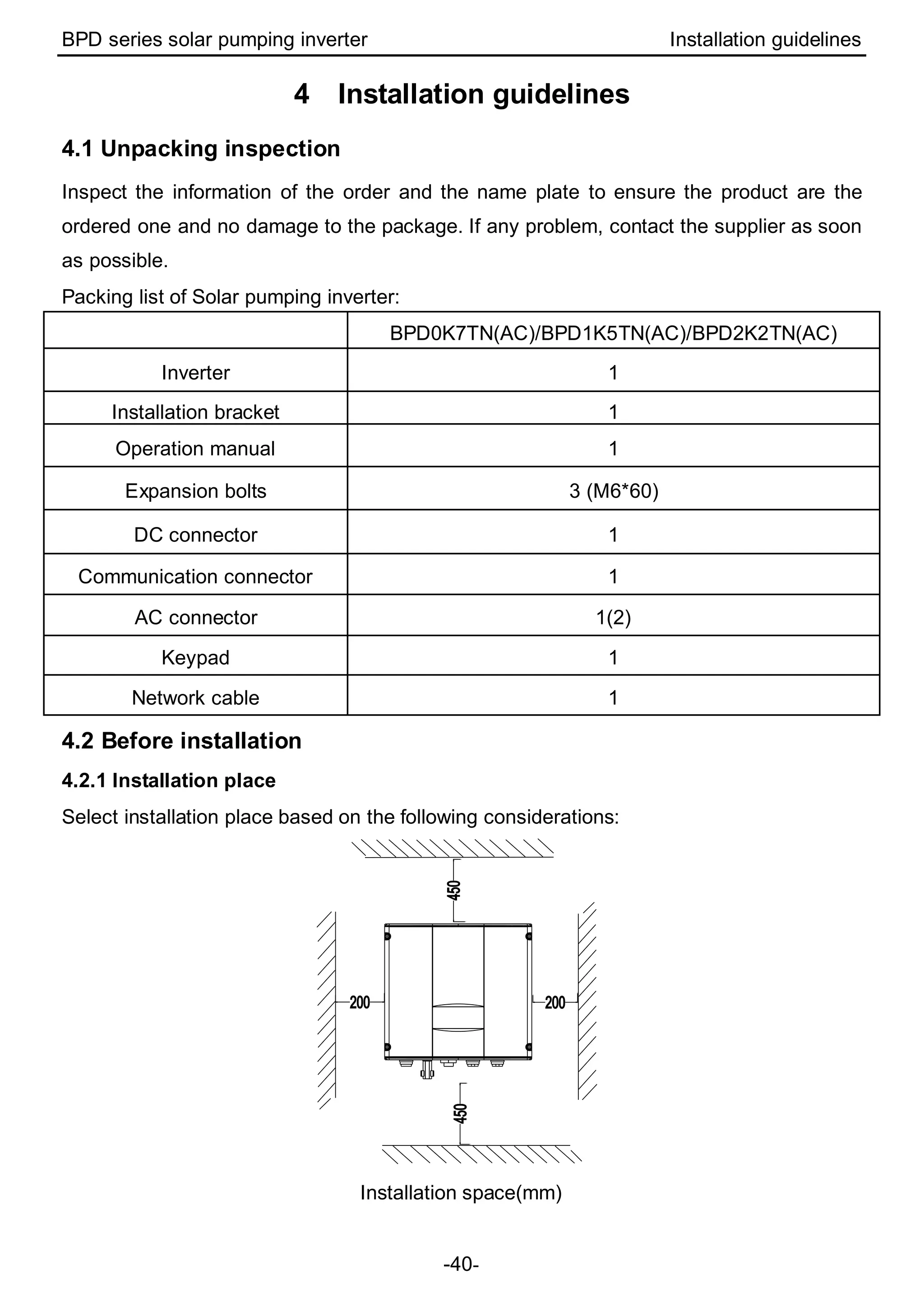
Select installation place based on the following considerations:
Installation space(mm)
BPD series solar pumping inverter Installation guidelines
-41-
(1) The environment temperature is between -25℃~60℃;
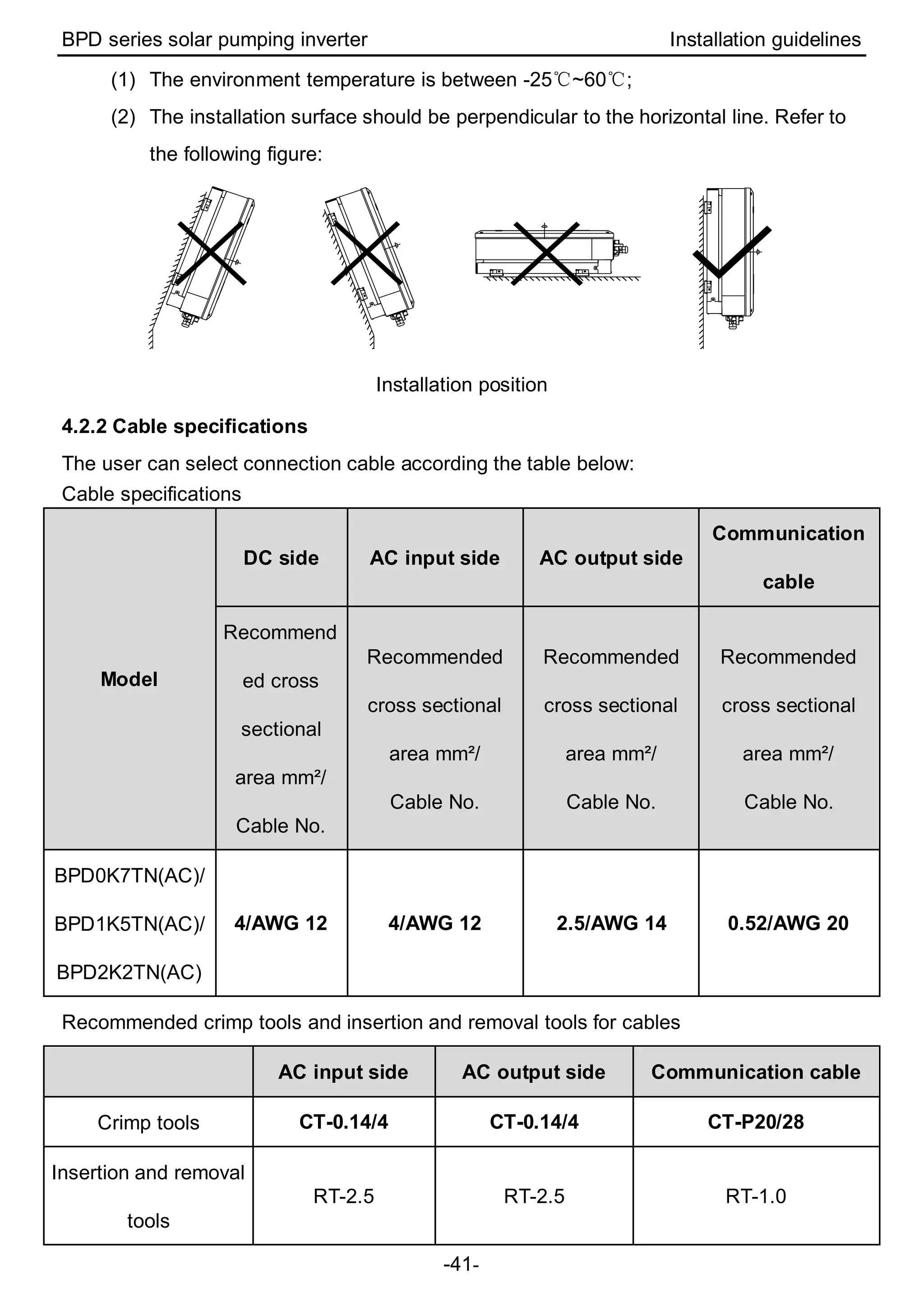
(2) The installation surface should be perpendicular to the horizontal line. Refer to
the following figure:
Installation position
4.2.2 Cable specifications
The user can select connection cable according the table below:
Cable specifications
Model
DC side AC input side AC output side
Communication
cable
Recommend
ed cross
sectional
area mm²/
Cable No.
Recommended
cross sectional
area mm²/
Cable No.
Recommended
cross sectional
area mm²/
Cable No.
Recommended
cross sectional
area mm²/
Cable No.
BPD0K7TN(AC)/
BPD1K5TN(AC)/
BPD2K2TN(AC)
4/AWG 12 4/AWG 12 2.5/AWG 14 0.52/AWG 20
Recommended crimp tools and insertion and removal tools for cables
AC input side AC output side Communication cable
Crimp tools CT-0.14/4 CT-0.14/4 CT-P20/28
Insertion and removal
tools
RT-2.5 RT-2.5 RT-1.0
BPD series solar pumping inverter Installation guidelines
-42-
4.3 Mechanical installation
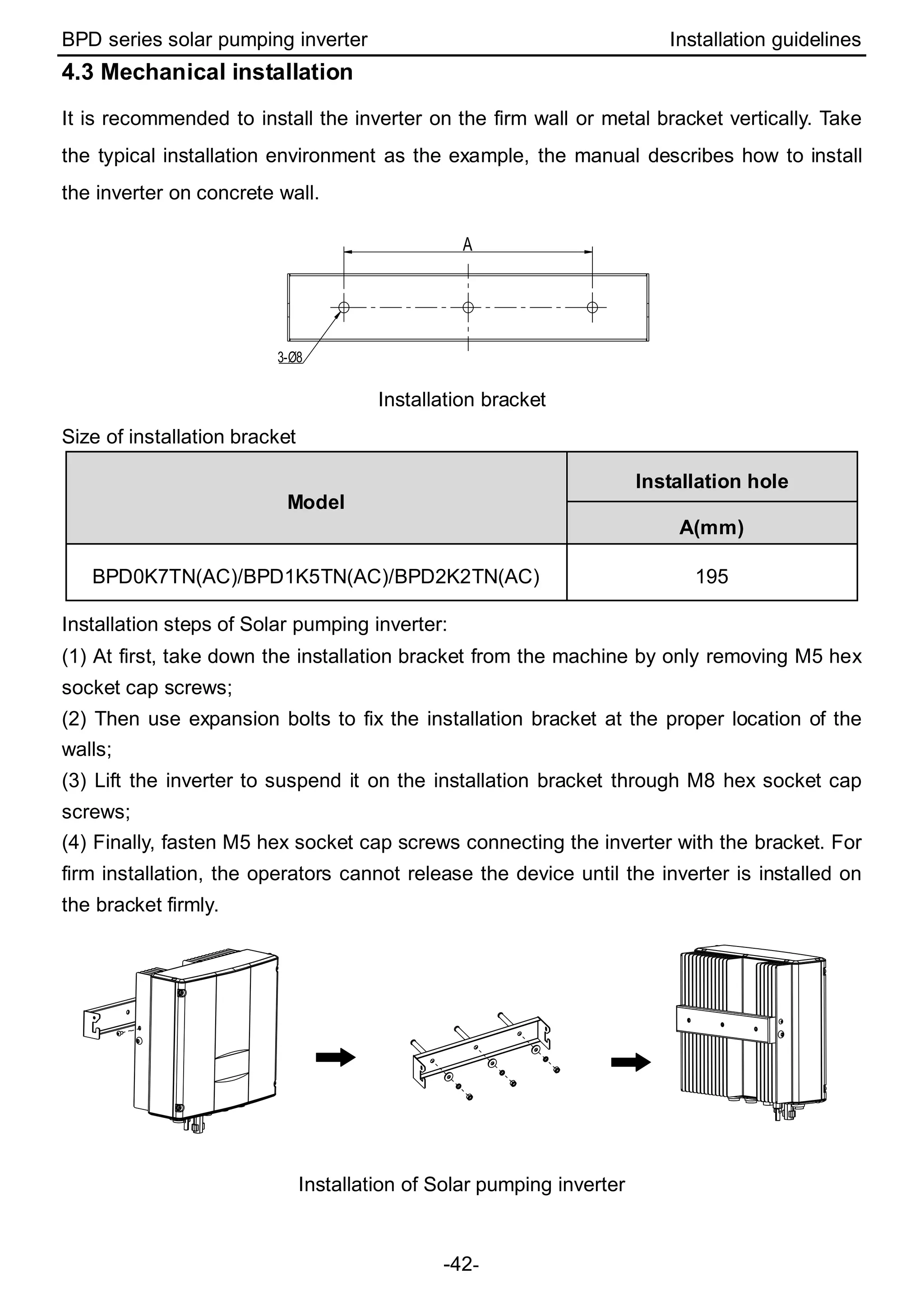
It is recommended to install the inverter on the firm wall or metal bracket vertically. Take
the typical installation environment as the example, the manual describes how to install
the inverter on concrete wall.
3-Ø8
A
Installation bracket
Size of installation bracket
Model
Installation hole
A(mm)
BPD0K7TN(AC)/BPD1K5TN(AC)/BPD2K2TN(AC) 195
Installation steps of Solar pumping inverter:
(1) At first, take down the installation bracket from the machine by only removing M5 hex
socket cap screws;
(2) Then use expansion bolts to fix the installation bracket at the proper location of the
walls;
(3) Lift the inverter to suspend it on the installation bracket through M8 hex socket cap
screws;
(4) Finally, fasten M5 hex socket cap screws connecting the inverter with the bracket. For
firm installation, the operators cannot release the device until the inverter is installed on
the bracket firmly.
Installation of Solar pumping inverter
BPD series solar pumping inverter Installation guidelines
-43-
4.4 Electrical installation
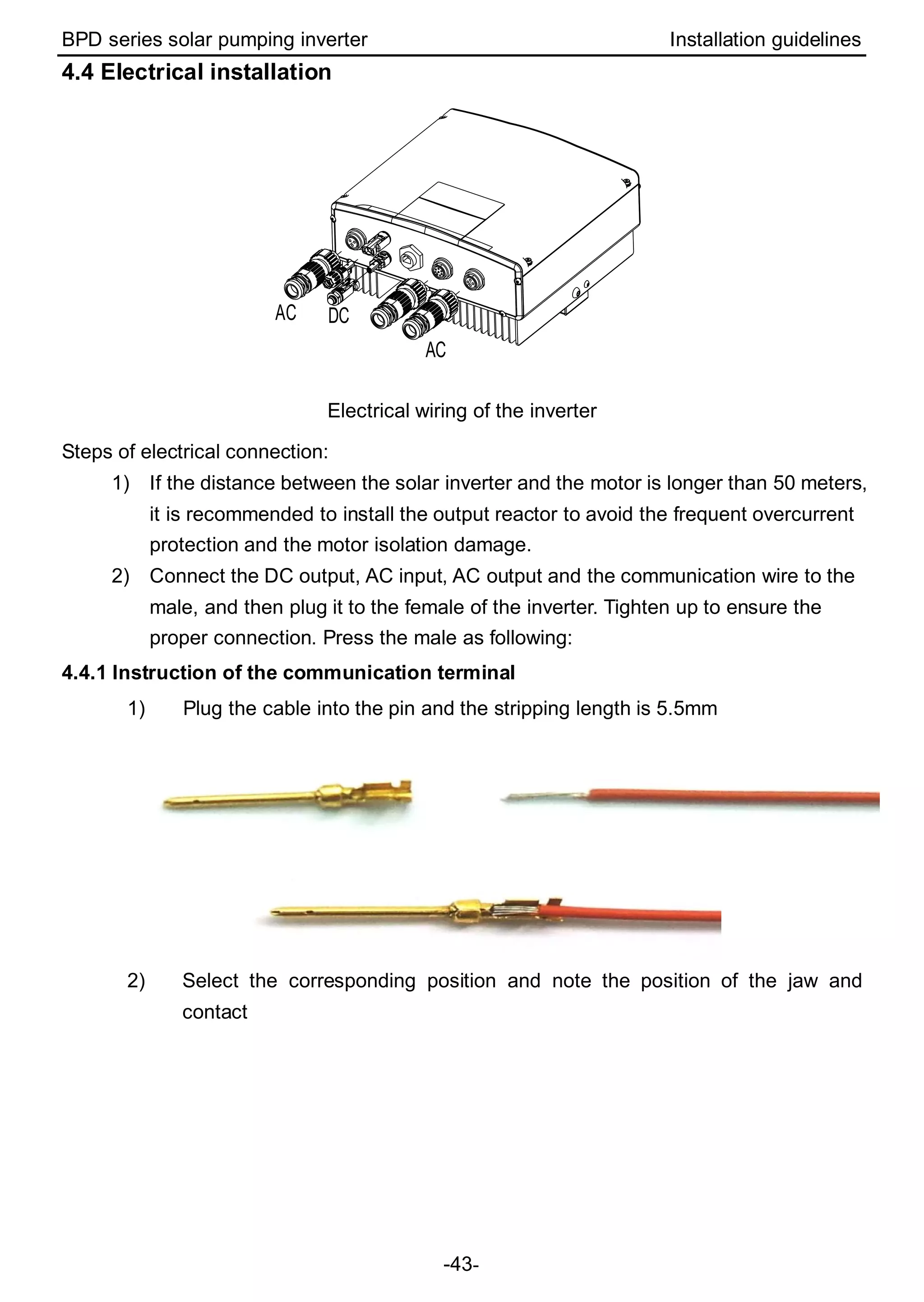
DC
AC
AC
Electrical wiring of the inverter
Steps of electrical connection:
1) If the distance between the solar inverter and the motor is longer than 50 meters,
it is recommended to install the output reactor to avoid the frequent overcurrent
protection and the motor isolation damage.
2) Connect the DC output, AC input, AC output and the communication wire to the
male, and then plug it to the female of the inverter. Tighten up to ensure the
proper connection. Press the male as following:
4.4.1 Instruction of the communication terminal
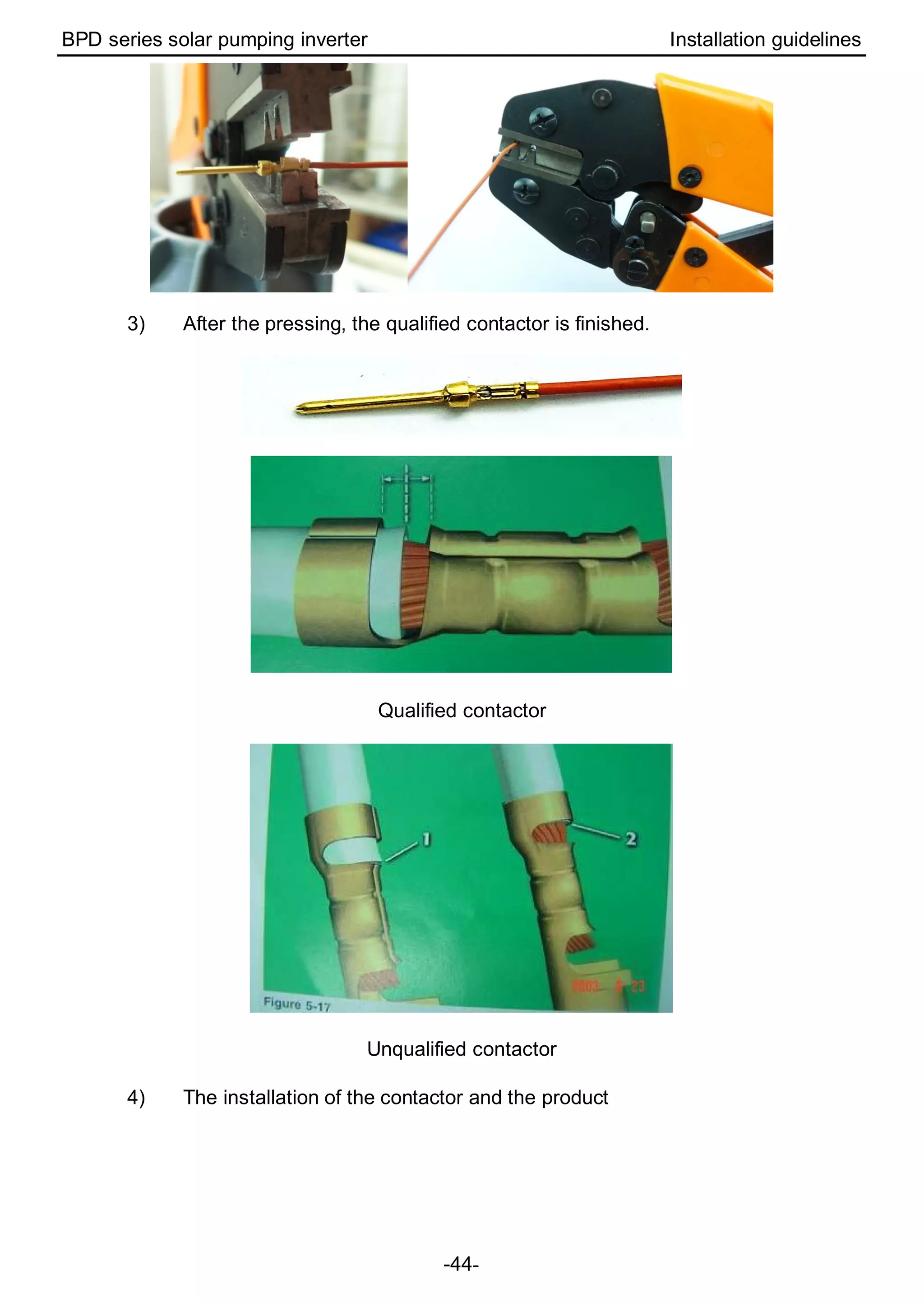
1) Plug the cable into the pin and the stripping length is 5.5mm
2) Select the corresponding position and note the position of the jaw and
contact
BPD series solar pumping inverter Installation guidelines
-44-
3) After the pressing, the qualified contactor is finished.
Qualified contactor
Unqualified contactor
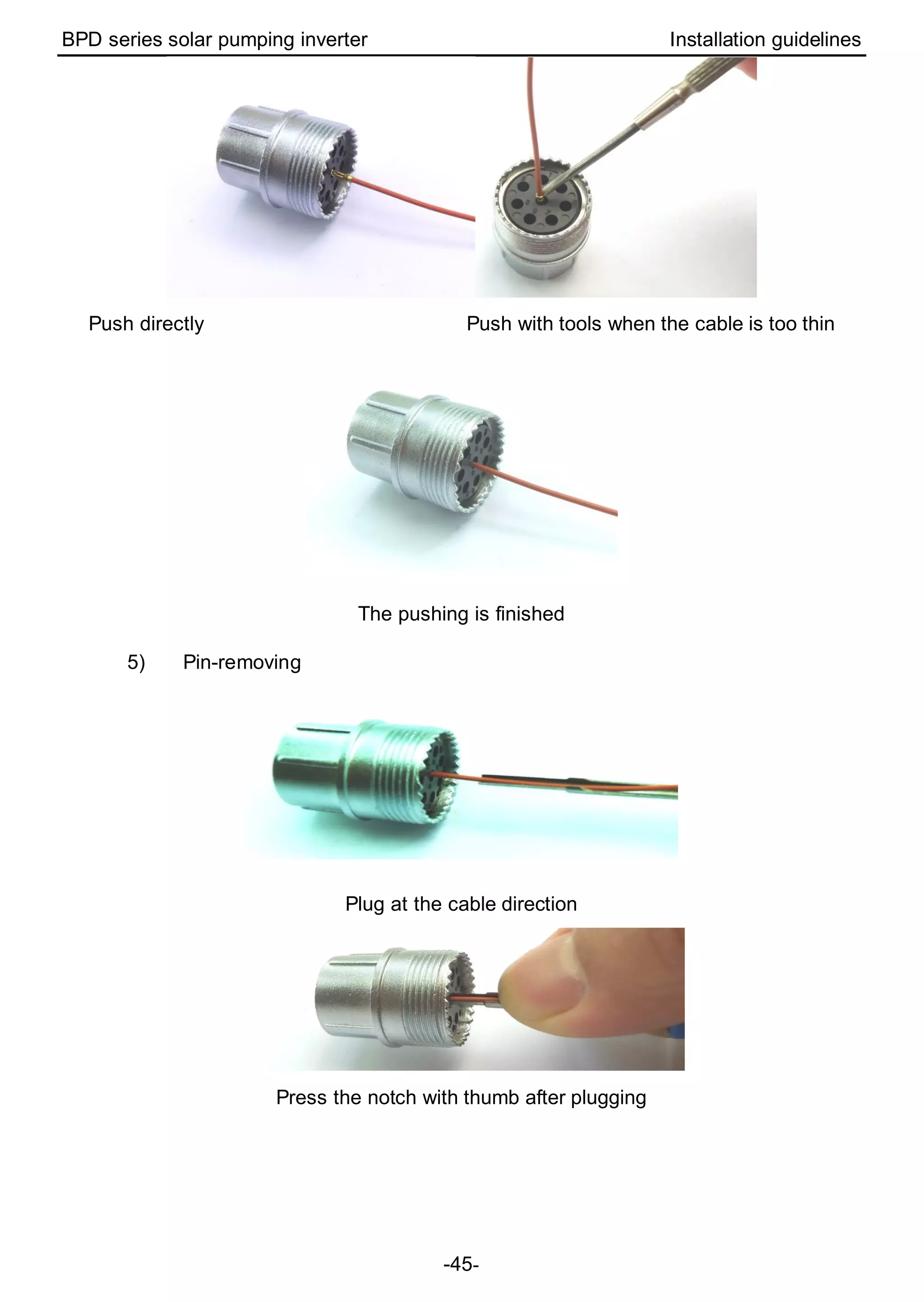
4) The installation of the contactor and the product
BPD series solar pumping inverter Installation guidelines
-45-
Push directly Push with tools when the cable is too thin
The pushing is finished
5) Pin-removing
Plug at the cable direction
Press the notch with thumb after plugging
BPD series solar pumping inverter Installation guidelines
-46-
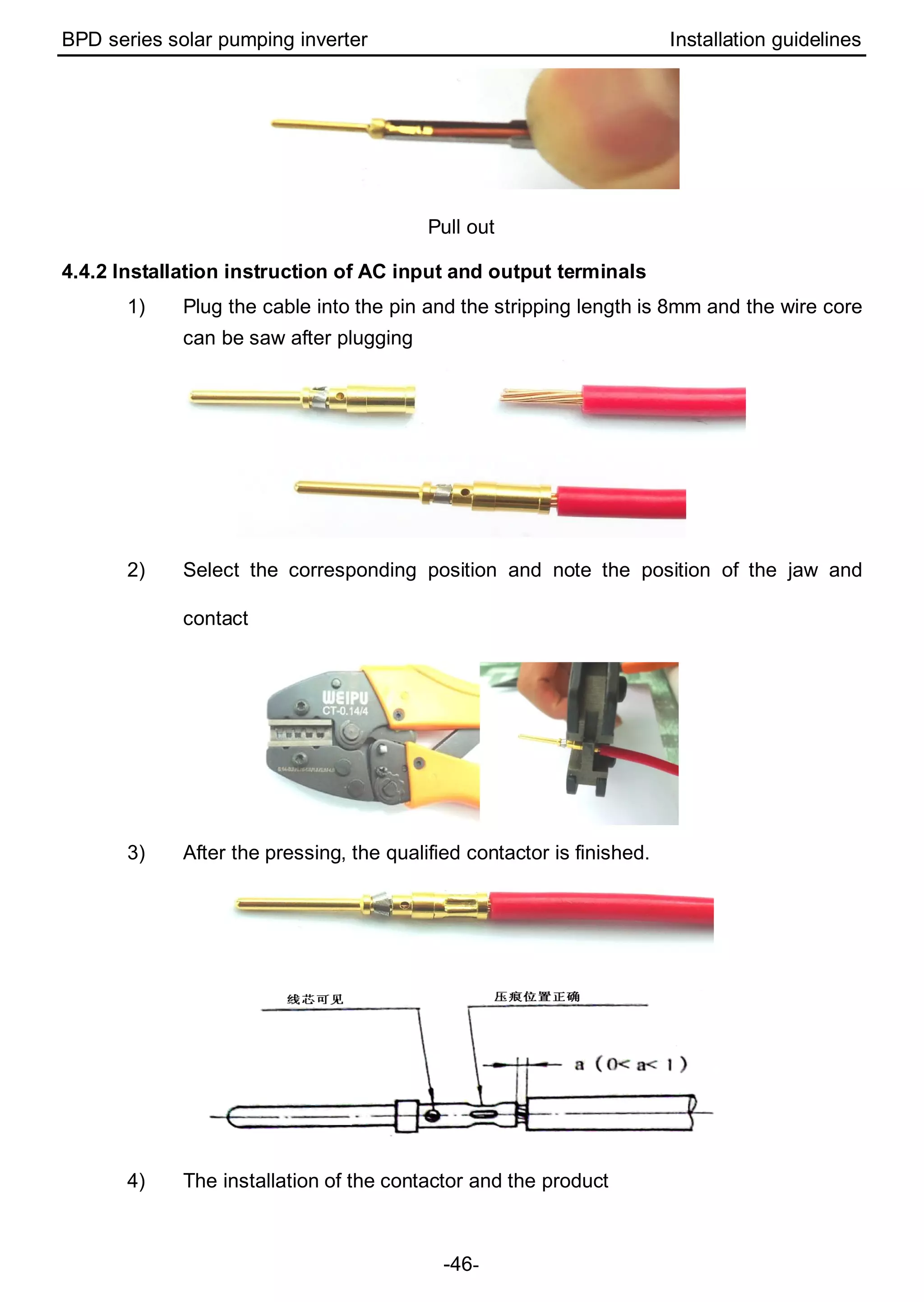
Pull out
4.4.2 Installation instruction of AC input and output terminals
1) Plug the cable into the pin and the stripping length is 8mm and the wire core
can be saw after plugging
2) Select the corresponding position and note the position of the jaw and
contact
3) After the pressing, the qualified contactor is finished.
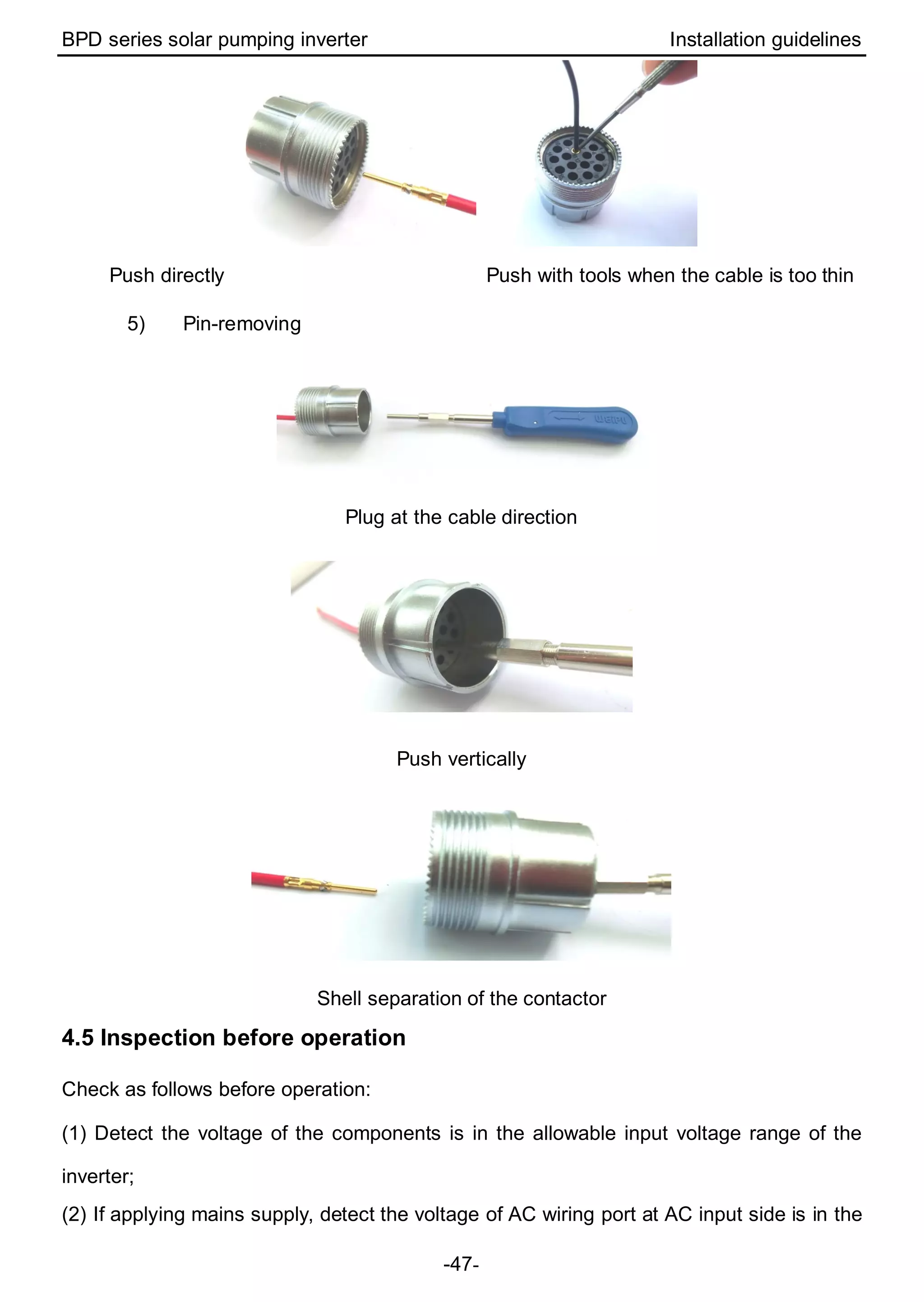
4) The installation of the contactor and the product
BPD series solar pumping inverter Installation guidelines
-47-
Push directly Push with tools when the cable is too thin
5) Pin-removing
Plug at the cable direction
Push vertically
Shell separation of the contactor
4.5 Inspection before operation
Check as follows before operation:
(1) Detect the voltage of the components is in the allowable input voltage range of the
inverter;
(2) If applying mains supply, detect the voltage of AC wiring port at AC input side is in the
BPD series solar pumping inverter Installation guidelines
-48-
allowable voltage range of the grid;
(3) Check the inverter is in good grounding;
(4) Ensure all DC inputs or AC inputs in power-off state before connecting the cables to the
inverter;
(5) Ensure all electrical safety precautions are clearly-identified on the installation site;
(6) Confirm the external keypad is in correct connection.
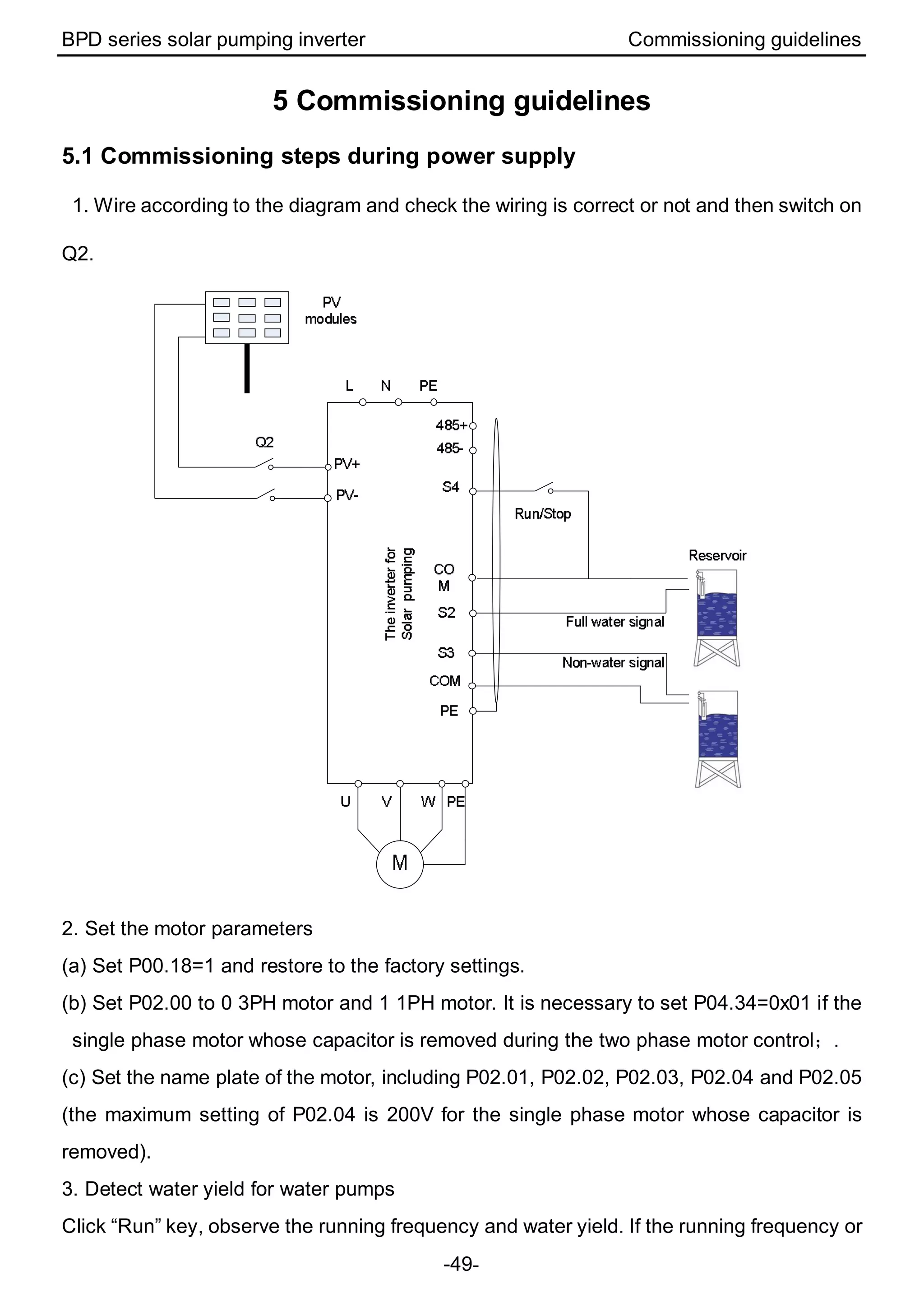
4.6 Instruction of LEDs
Displayed state Instruction
Green LED flickering The inverter has been power-on and control circuit is working.
Green LED on The inverter is running.
Yellow LED on The inverter alarms and it will restart after alarm clearing.
Red LED on The inverter has fault.
BPD series solar pumping inverter Commissioning guidelines
-49-
5 Commissioning guidelines
5.1 Commissioning steps during power supply
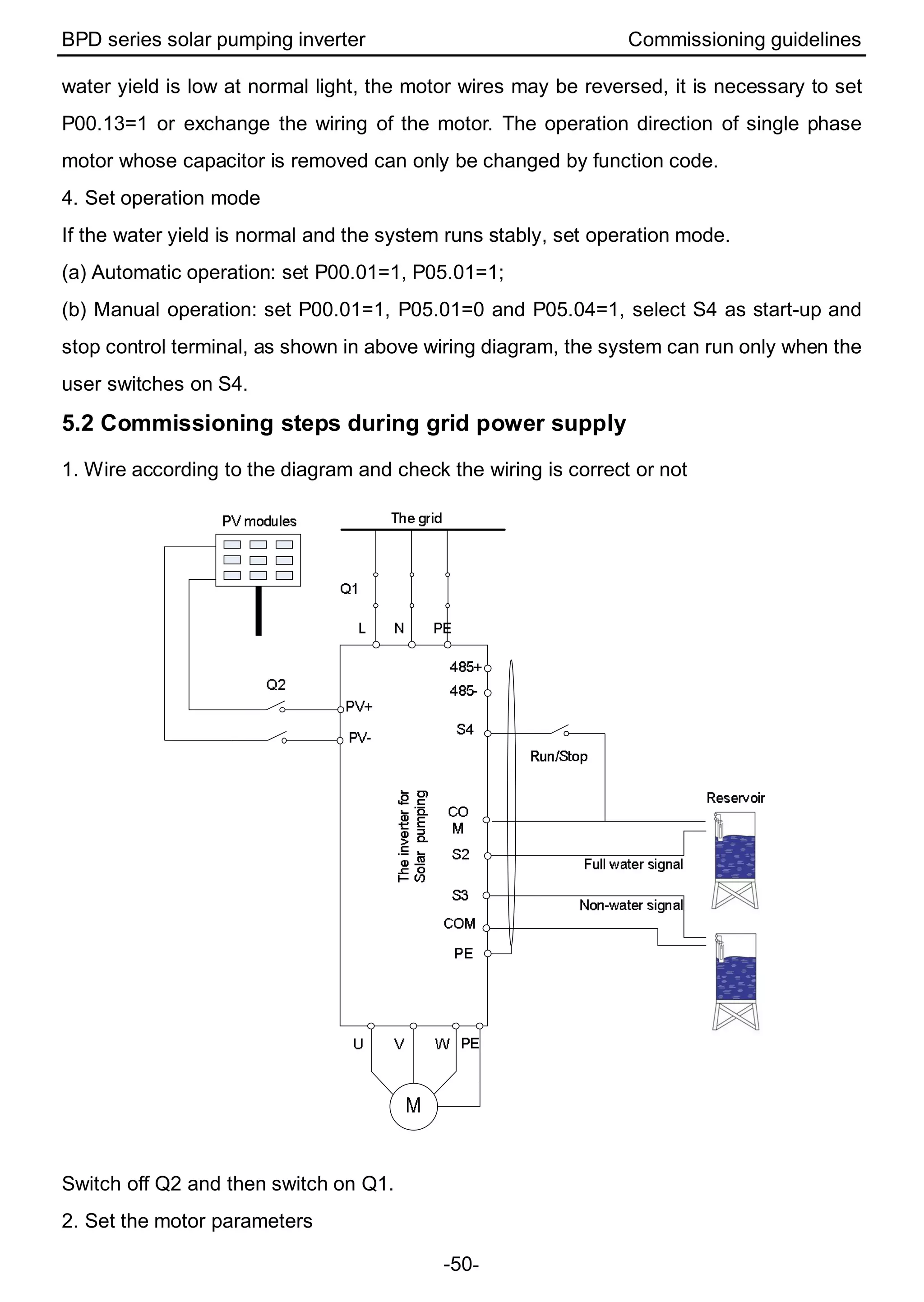
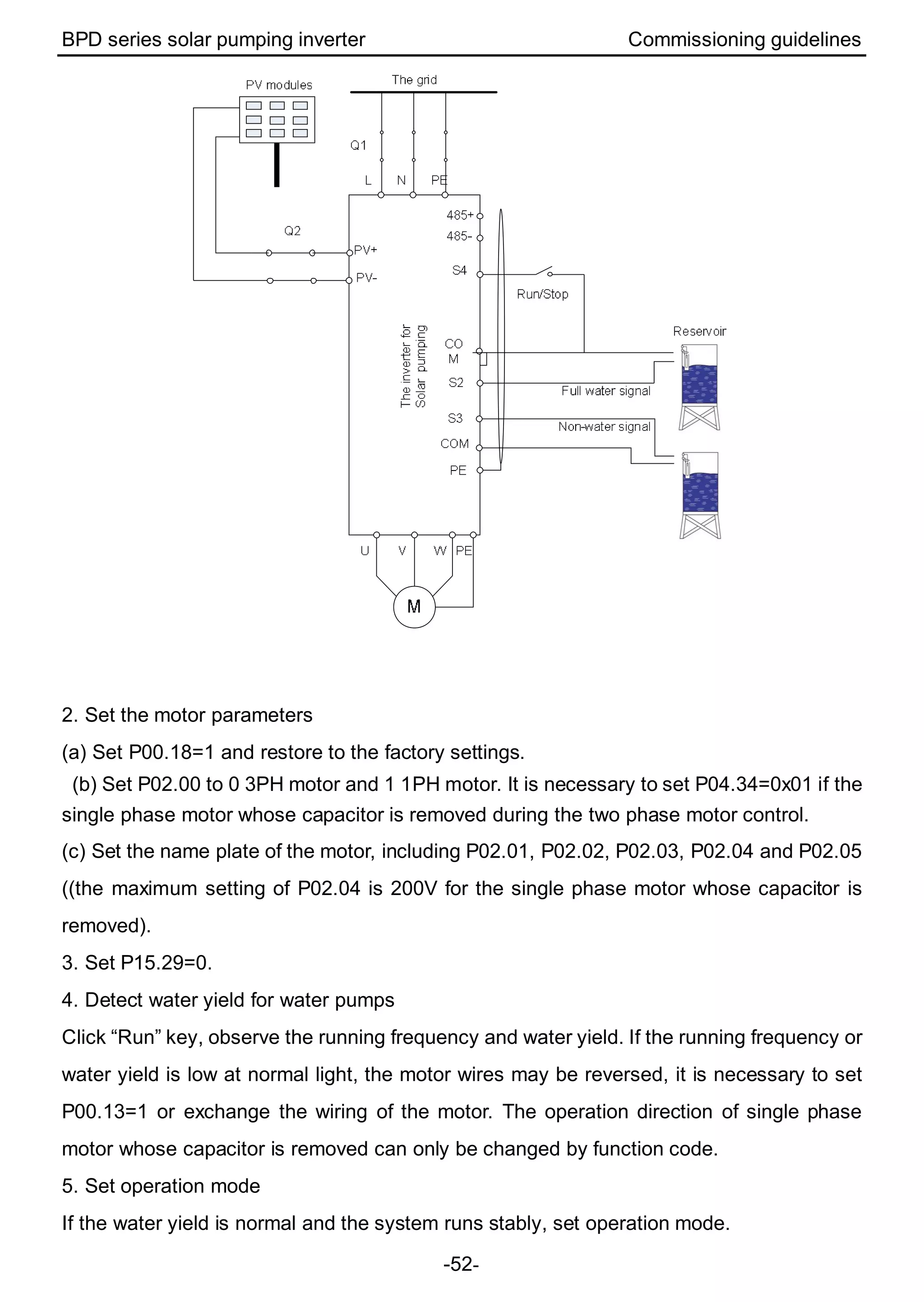
1. Wire according to the diagram and check the wiring is correct or not and then switch on
Q2.
2. Set the motor parameters
(a) Set P00.18=1 and restore to the factory settings.
(b) Set P02.00 to 0 3PH motor and 1 1PH motor. It is necessary to set P04.34=0x01 if the
single phase motor whose capacitor is removed during the two phase motor control;.
(c) Set the name plate of the motor, including P02.01, P02.02, P02.03, P02.04 and P02.05
(the maximum setting of P02.04 is 200V for the single phase motor whose capacitor is
removed).
3. Detect water yield for water pumps
Click “Run” key, observe the running frequency and water yield. If the running frequency or
BPD series solar pumping inverter Commissioning guidelines
-50-
water yield is low at normal light, the motor wires may be reversed, it is necessary to set
P00.13=1 or exchange the wiring of the motor. The operation direction of single phase
motor whose capacitor is removed can only be changed by function code.
4. Set operation mode
If the water yield is normal and the system runs stably, set operation mode.
(a) Automatic operation: set P00.01=1, P05.01=1;
(b) Manual operation: set P00.01=1, P05.01=0 and P05.04=1, select S4 as start-up and
stop control terminal, as shown in above wiring diagram, the system can run only when the
user switches on S4.
5.2 Commissioning steps during grid power supply
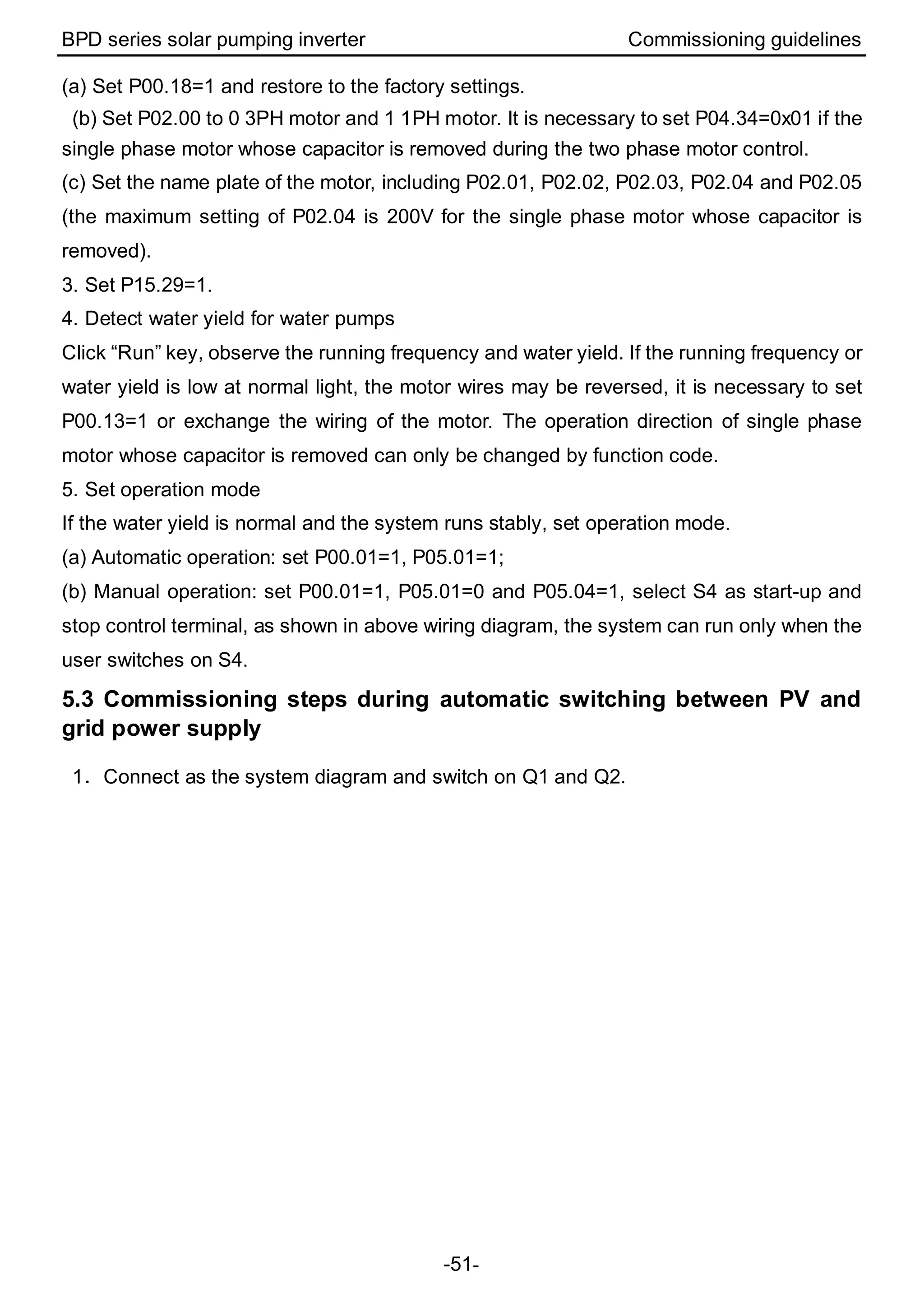
1. Wire according to the diagram and check the wiring is correct or not
Switch off Q2 and then switch on Q1.
2. Set the motor parameters
BPD series solar pumping inverter Commissioning guidelines
-51-
(a) Set P00.18=1 and restore to the factory settings.
(b) Set P02.00 to 0 3PH motor and 1 1PH motor. It is necessary to set P04.34=0x01 if the
single phase motor whose capacitor is removed during the two phase motor control.
(c) Set the name plate of the motor, including P02.01, P02.02, P02.03, P02.04 and P02.05
(the maximum setting of P02.04 is 200V for the single phase motor whose capacitor is
removed).
3. Set P15.29=1.
4. Detect water yield for water pumps
Click “Run” key, observe the running frequency and water yield. If the running frequency or
water yield is low at normal light, the motor wires may be reversed, it is necessary to set
P00.13=1 or exchange the wiring of the motor. The operation direction of single phase
motor whose capacitor is removed can only be changed by function code.
5. Set operation mode
If the water yield is normal and the system runs stably, set operation mode.
(a) Automatic operation: set P00.01=1, P05.01=1;
(b) Manual operation: set P00.01=1, P05.01=0 and P05.04=1, select S4 as start-up and
stop control terminal, as shown in above wiring diagram, the system can run only when the
user switches on S4.
5.3 Commissioning steps during automatic switching between PV and
grid power supply
1.Connect as the system diagram and switch on Q1 and Q2.
BPD series solar pumping inverter Commissioning guidelines
-52-
2. Set the motor parameters
(a) Set P00.18=1 and restore to the factory settings.
(b) Set P02.00 to 0 3PH motor and 1 1PH motor. It is necessary to set P04.34=0x01 if the
single phase motor whose capacitor is removed during the two phase motor control.
(c) Set the name plate of the motor, including P02.01, P02.02, P02.03, P02.04 and P02.05
((the maximum setting of P02.04 is 200V for the single phase motor whose capacitor is
removed).
3. Set P15.29=0.
4. Detect water yield for water pumps
Click “Run” key, observe the running frequency and water yield. If the running frequency or
water yield is low at normal light, the motor wires may be reversed, it is necessary to set
P00.13=1 or exchange the wiring of the motor. The operation direction of single phase
motor whose capacitor is removed can only be changed by function code.
5. Set operation mode
If the water yield is normal and the system runs stably, set operation mode.
BPD series solar pumping inverter Commissioning guidelines
-53-
(a) Automatic operation: set P00.01=1, P05.01=1;
(b) Manual operation: set P00.01=1, P05.01=0 and P05.04=1, select S4 as start-up and
stop control terminal, as shown in above wiring diagram, the system can run only when the
user switches on S4.
5.4 Advanced setting
Note: The default setting of the inverter for water pump can apply to most conditions and
the advanced setting is unnecessary.
1. PI adjustment to the water yield
If the user requires large or low water yield, it is necessary to adjust PI (P15.06~P15.10)
properly. The bigger PI parameters, the stronger the effect is, but the frequency fluctuation
of the motor is bigger; in reserve, the lower the water yield is, the more stable the motor
frequency is.
2. Commissioning of MPPT speed tracking
P15.23 and P15.24 is the minimum and maximum voltage of the power tracking in MPPT
mode. If the voltage range is smaller, the faster the tracking is. But the bus voltage in
normal operation needs to be in the range; otherwise the maximum power can not be
tracked. Generally:
(a) 0.75kW: P15.23=80(Min. reference voltage), P15.24=400(Max. reference voltage)
(b)1.5kW, 2.2kW: P15.23=10(Min. reference voltage), P15.24=400(Max. reference
voltage)
Above settings are only for reference and can be adjusted according to the actual
applications or by automatic adjustment.
3. Fault setting and reset time setting of fault delay
If the pre-warning of weak light, full water, empty and underload are needed, it is
necessary to set the detection point, delay time and reset time according to the actual
working. Full water/no water settings are P15.11~P15.14 , P15.32~P15.33; the function
settings of underload are P15.16~P15.19; the function settings of weak light are
P15.20~P15.21. Default settings can be used, too.
Note: P11.01 frequency decreasing at sudden power loss 0.85 corresponds to 265V. The
user is allowed to modify the coefficient (≥0.58) according to needs (the corresponding
undervoltage point of 0.58 is 180V, undervoltage fault when the actual bus voltage is lower
BPD series solar pumping inverter Commissioning guidelines
-54-
than the value).
4. Special setting for single phase motor
(a)When the single phase motor is in bad running performance, the user can adjust P04
VF curve setting, set P04.00=1 and set P04.03~P04.08 to appropriate values according to
commissioning conditions; increase the voltage if the motor can not start and decrease the
voltage if the current is high.
(b)When the light is normal and the system starts slowly, increase P15.25 initial voltage
differential value appropriately.
(c)For the single phase motors with two-phase control (capacitor-removing):
①the maximum voltage needs to be less than 1/1.6 of the bus voltage. It is
recommended to set the rated voltage less than 200V, P02.04=200V, or limit the maximum
voltage output by multi-dot V/F curve;
②observe the current of the winding group through P17.38 and P17.39, the switched
current is the combination current of the two winding groups. The impedance of the
winding group is different, so the current is different at the same voltage output.
③ P04.35 can be used to change the output current of the main and secondary
winding group. The qualified people are recommended to adjust; otherwise the motor
performance may be impacted.
BPD series solar pumping inverter Commissioning guidelines
-55-
5.5 Flow chart of the commissioning
3-phase
pump motor
Power up the BPD
inverter after the wiring
is checked to be okay
P00.18=1
Single-phase
pump whose
capacitors can
be removed?
P02.00=0
Set pump
motor
parameters
Water
pumping
status
okay?
Run
automatically
?
P00.01=1,P05.01=1
Run manually:
P00.01=1, P05.01=0,
P05.04=1, Close S4
P00.13=1
P02.00=1,
P04.34=0x0
1
Set pump
motor
parameters
P02.00=1
Set pump
motor
parameters
Y
N
Y
N
Y
N
Y
N
PV Input Only?
P15.29=2
AC Input
Only?
P15.29=1
PV/AC Auto switch:
P15.29=0
Hit "Run" on
Keypad
P02.04=200
Y
N N
Y
Start
End
BPD series solar pumping inverter Commissioning guidelines
-56-
5.6 Simple parameters setting
Solar power supply Grid power supply Automatic switching
Three
phase
motor
Single
phase
motor
Single
phase
motor
(capacitor
-removing
)
Three
phase
motor
Single
phase
motor
Single
phase
motor
(capacitor
-removing
)
Three
phase
motor
Single
phase
motor
Single
phase
motor
(capacitor
-removing
)
P00.18=1 P00.18=1 P00.18=1 P00.18=1 P00.18=1 P00.18=1 P00.18=1 P00.18=1 P00.18=1
P02.00=0 P02.00=1 P02.00=1 P02.00=0 P02.00=1 P02.00=1 P02.00=0 P02.00=1 P02.00=1
P02.01=
rated
power
P02.01=
rated
power
P02.01=
rated
power
P02.01=
rated
power
P02.01=
rated
power
P02.01=
rated
power
P02.01=
rated
power
P02.01=
rated
power
P02.01=
rated
power
P02.02=
rated
frequency
P02.02=
rated
frequency
P02.02=
rated
frequency
P02.02=
rated
frequency
P02.02=
rated
frequency
P02.02=
rated
frequency
P02.02=
rated
frequency
P02.02=
rated
frequency
P02.02=
rated
frequency
P02.03=
rated
speed
P02.03=
rated
speed
P02.03=
rated
speed
P02.03=
rated
speed
P02.03=
rated
speed
P02.03=
rated
speed
P02.03=
rated
speed
P02.03=
rated
speed
P02.03=
rated
speed
P02.04=
rated
voltage
P02.04=
rated
voltage
P02.04=
200
P02.04=
rated
voltage
P02.04=
rated
voltage
P02.04=
200
P02.04=
rated
voltage
P02.04=
rated
voltage
P02.04=
200
P02.05=
rated
current
P02.05=
rated
current
P02.05=
rated
current
P02.05=
rated
current
P02.05=
rated
current
P02.05=
rated
current
P02.05=
rated
current
P02.05=
rated
current
P02.05=
rated
current
P15.29=2 P15.29=2 P15.29=2 P15.29=1 P15.29=1 P15.29=1 P15.29=0 P15.29=0 P15.29=0
P00.01=1 P00.01=1
P04.34=
0x01
P00.01=1 P00.01=1
P04.34=
0x01
P00.01=1 P00.01=1
P04.34=
0x01
P05.01=1 P05.01=1 P00.01=1 P05.01=1 P05.01=1 P00.01=1 P05.01=1 P05.01=1 P00.01=1
P05.01=1 P05.01=1 P05.01=1
BPD series solar pumping inverter
-57-
Table: recommended solar modules
Inverter model
Max
DC
input
current
(A)
Open-circuit voltage degree of solar module
30±1V 37±1V 45±1V
38±1V
(Mono-Crystalline
Silicon)
(A)
Module
power
±5Wp
Modules
per
string *
strings
Module
power
±5Wp
Modules
per
string *
strings
Module
power
±5Wp
Modules
per
string *
strings
Module
power
±5Wp
Modules
per
string *
strings
BPD0K7TN(AC) 9 190 4*1 250 3*1 300 3*1 - -
BPD1K5TN(AC) 12 190 8*1 250 6*1 300 5*1 - -
BPD2K2TN(AC) 12 190 12*1 250 9*1 300 8*1 275 8*1
Note: because of the low efficiency, the 2.2kW model can be configured at most of
3.1kW solar modules, 1.5kW model at most of 2.1kW and 0.75kW at most of 1kW for
more water yield. Different water pumps have different water yield.
201507(V1.1)
66001- 00352

Manual BPD - Series Solar Pumping Inverter

  • 1.
    BPD Series SolarPumping Inverter
  • 2.
    BPD series solarpumping inverter Preface -1- Preface BPD series solar pumping inverter are developed for the power supply of water pumps based on the core control algorithm of Goodrive high performance inverters and the control requirements of PV water pumps. All series products apply Infineon power modules. The function of Maximum power tracking, dormant at weak light, wake up at strong light, high water level dormant, underload pre-warning and other control protection functions can ensure normal operation of water pumps according to the customers’ requirements to switch to the grid power supply. Please refer to this manual to commission the inverter. If the product is ultimately used for military affairs or manufacture of weapon, it will be listed on the export control formulated by Foreign Trade Law of the People's Republic of China. Rigorous review and necessary export formalities are needed when exported. Our company reserves the right to update the information of our products.
  • 3.
    BPD series solarpumping inverter Contents -2- Contents Preface........................................................................................................................ 1 Contents...................................................................................................................... 2 1 Safety Precautions.................................................................................................... 1 1.1 Safety definition .......................................................................................... 1 1.2 Warning symbols......................................................................................... 1 1.3 Safety guidelines......................................................................................... 2 2 Product overview.................................................................................................... 4 2.1 Product specifications.................................................................................. 4 2.2 Name plate ................................................................................................. 5 2.3 Model instruction......................................................................................... 6 2.4 Rated specifications .................................................................................... 6 2.5 Terminals, wiring and dimension diagram ..................................................... 6 2.6 Keypad Operation Procedure..................................................................... 10 3 Function parameters............................................................................................. 16 3.1 Parameters of common functions............................................................... 16 3.2 Parameters of special functions ................................................................. 30 4 Installation guidelines............................................................................................ 40 4.1 Unpacking inspection ................................................................................ 40 4.2 Before installation...................................................................................... 40 4.3 Mechanical installation............................................................................... 42 4.4 Electrical installation.................................................................................. 43 4.5 Inspection before operation........................................................................ 47 4.6 Instruction of LEDs.................................................................................... 48 5 Commissioning guidelines....................................................................................... 49 5.1 Commissioning steps during power supply ................................................. 49 5.2 Commissioning steps during grid power supply........................................... 50 5.3 Commissioning steps during automatic switching between PV and grid power supply ............................................................................................................ 51 5.4 Advanced setting....................................................................................... 53 5.5 Flow chart of the commissioning ................................................................ 55 5.6 Simple parameters setting ......................................................................... 56 Table: recommended solar modules............................................................................ 57
  • 4.
    BPD series solarpumping inverter Safety precautions -1- 1 Safety Precautions Please read this manual carefully and follow all safety precautions before moving, installing, operating and servicing the inverter. If ignored, physical injury or death may occur, or damage may occur to the devices. If any physical injury or death or damage to the devices occurs for ignoring to the safety precautions in the manual, our company will not be responsible for any damages and we are not legally bound in any manner. 1.1 Safety definition Danger: Serious physical injury or even death may occur if not follow relevant requirements Warning: Physical injury or damage to the devices may occur if not follow relevant requirements Note: Physical hurt may occur if not follow relevant requirements Qualified electricians: People working on the device should take part in professional electrical and safety training, receive the certification and be familiar with all steps and requirements of installing, commissioning, operating and maintaining the device to avoid any emergency. 1.2 Warning symbols Warnings caution you about conditions which can result in serious injury or death and/or damage to the equipment, and advice on how to avoid the danger. Following warning symbols are used in this manual: Symbols Name Instruction Abbreviation Danger Danger Serious physical injury or even death may occur if not follow the relative requirements Warning Warning Physical injury or damage to the devices may occur if not follow the relative requirements Do not Electrostatic discharge Damage to the PCBA board may occur if not follow the relative requirements Hot sides Hot sides Sides of the device may become hot. Do not touch. Note Note Physical hurt may occur if not follow the relative requirements Note
  • 5.
    BPD series solarpumping inverter Safety precautions -2- 1.3 Safety guidelines  Only qualified electricians are allowed to operate on the inverter.  Do not carry out any wiring and inspection or changing components when the power supply is applied. Ensure all input power supply is disconnected before wiring and checking and always wait for at least the time designated on the inverter or until the DC bus voltage is less than 36V. Below is the table of the waiting time: Inverter module Minimum waiting time Single-phase 220V 0.2kW-2.2kW 5 minutes  Do not refit the inverter unauthorizedly; otherwise fire, electric shock or other injury may occur.  The base of the radiator may become hot during running. Do not touch to avoid hurt.  The electrical parts and components inside the inverter are electrostatic. Take measurements to avoid electrostatic discharge during relevant operation. 1.3.1 Delivery and installation  Please install the inverter on fire-retardant material and keep the inverter away from combustible materials.  Don’t operate on the inverter if there is any damage or components loss to the inverter.  Don’t touch the inverter with wet items or body, otherwise electric shock may occur. Note:  Select appropriate moving and installing tools to ensure a safe and normal running of the inverter and avoid physical injury or death. For physical safety, the erector should take some mechanical protective measurements, such as wearing exposure shoes and working uniforms.  Ensure to avoid physical shock or vibration during delivery and installation.  Do not carry the inverter by its cover. The cover may fall off.  Install away from children and other public places.  The pick-up current of the inverter may be above 3.5mA during operation. Ground with proper techniques and ensure the grounding resistor is less than 10Ω. The conductivity of PE grounding conductor is the same as that of the phase conductor (with the same cross sectional area).  DC INPUT is the solar input, AC INPUT is the power input and AC OUTPUT is the motor output. Please connect the input power cable and motor cable correctly, otherwise the damage may occur.  Before the cable connection of sing phase AC grid, it is necessary to carry out the
  • 6.
    BPD series solarpumping inverter Safety precautions -3- lightning protection, short circuit protection according to the local electrical safety standard.  The distance between the DC output and the DC terminals of the inverter should be shorter than 10 meters; otherwise it is necessary to control the voltage. 1.3.2 Commissioning and running  Disconnect all power supplies applied to the inverter before the terminal wiring and wait for at least the designated time after disconnecting the power supply.  High voltage is present inside the inverter during running. Do not carry out any operation except for the keypad setting.  The inverter may start up by itself when P01.21=1. Do not get close to the inverter and motor.  The inverter can not be used as “Emergency-stop device”. Note:  Do not switch on/off the input power supply of the inverter frequently.  For inverters that have been stored for a long time, check and fix the capacitance and try to run it again before utilization.  Cover the front board before running, otherwise electric shock may occur. 1.3.3 Maintenance and replacement of components  Only qualified electricians are allowed to perform the maintenance, inspection, and components replacement of the inverter.  Disconnect all power supplies to the inverter before the terminal wiring. Wait for at least the time designated on the inverter after disconnection.  Take measures to avoid screws, cables and other conductive matters to fall into the inverter during maintenance and component replacement. Note:  Please select proper torque to tighten screws.  Keep the inverter, parts and components away from combustible materials during maintenance and component replacement.  Do not carry out any isolation and pressure test on the inverter and do not measure the control circuit of the inverter by megameter. 1.3.4 What to do after scrapping  There are heavy metals in the inverter. Deal with it as industrial effluent.
  • 7.
    BPD series solarpumping inverter Product overview -4- 2 Product overview 2.1 Product specifications BPD0K7TN(AC) BPD1K5TN(AC) BPD2K2TN(AC) DC input Maximum input DC bus voltage(V) 450 450 Starting voltage(V) 80 100 Minimum working voltage(V) 60 80 Recommended MPP voltage(V) 80~400 100~400 Input channel 1:MC4 Maximum input DC current(A) 9 12 12 Bypass AC input (model supporting mains input) Input voltage(Vac) 220/230/240(1PH)(-15%~+10%) Input frequency(Hz) 47~63 AC input terminal 1P2L AC output Rated power(W) 750 1500 2200 Rated current(A) 5.1(1PH) 4.2(3PH) 10.2(1PH) 7.5(3PH) 14(1PH) 10(3PH) Output voltage(Vac) 0~Input voltage Output wiring mode 1P2L/2P3L/3P3L Output frequency(Hz) 1~400 Control Control mode V/F Motor type Asynchronous motor Others Dimension (W/D/H)(mm) 255×300×137 280×300×137 Weight(Kg) 6.4 7 Protective degree IP65
  • 8.
    BPD series solarpumping inverter Product overview -5- BPD0K7TN(AC) BPD1K5TN(AC) BPD2K2TN(AC) Cooling Natural cooling HMI External LED keypad Communication terminal External communication RS485/3 digital input Communication interface Multi-core waterproof connector Certification Standards CE; meet the requirement of IEC61800-3 C3 Operating environment Environment temperature -25~60℃, derate above 45℃ Altitude 3000m (derate if the sea level is above 2000m) Warranty 18 months 2.2 Name plate Name plate
  • 9.
    BPD series solarpumping inverter Product overview -6- 2.3 Model instruction BPD XK TN AC ① ② ③ ④ Sign Field identification Detailed description of the sign Detailed content ① BPD Product abbreviation Series of PV water pumps ② XK ACoutput power Max. AC output power 1500W: 1K5 5000W: 5K 150, 000W: 150K ③ TN Technical type TL: 1PH TR: 3PH TN: 1PH/3PH ④ AC Extension digit Default is standard inverter; AC supports AC input 2.4 Rated specifications BPDXKXTN 0K7 1K5 2K2 Rated output power(kW) 0.75 1.5 2.2 Maximum DC input current (A) 9 12 12 Rated AC input current-AC model(A) 9.3 15.7 24 Rated output current(A) 5.1 10.2 14 Note: The output current is the rated value when the output voltage is 220V(1PH). If the output voltage is 3PH, the output current can be calculated. 2.5 Terminals, wiring and dimension diagram 2.5.1 Wiring diagram of the control circuit
  • 10.
    BPD series solarpumping inverter Product overview -7- 2.5.2 Terminals arrangement Sign Terminal name Pin definition ① AC input terminal (AC model) 1. L 2. N 3. PE ② PV input terminal- -DC INPUT ③ PV input terminal+ +DC INPUT ④ External keypad terminal RJ45 ⑤ Function terminal 1. 485+ 2. 485- 3. S2 4. S3 5. COM 6. S4 7. COM 8. PE ⑥ AC output terminal 1. V 2. W 3. U 4. PE 2.5.3 Instruction of power terminals 1. ① is AC input terminal and the model supporting mains input has the terminal. At the grid, the live line, null line and earth line are connected to L, N and PE separately; (Note:
  • 11.
    BPD series solarpumping inverter Product overview -8- For safety, please ensure PE in reliable connection.) 2. ⑥ is AC output terminal connected to the water pump motor. When using 3PH motor, connect U, V and W of the motor to U, V and W of the inverter. The motor enclosure is connected to PE of ⑥. 3. The wiring is different to the different control modes if the single phase motor is used: (1)single phase control: Please connect the motor phase to U and W of inverter terminal ⑥, connect the motor shell to PE terminal. There is no need to remove the starting capacitor and the wiring is very easy. But the starting performance is not good and it is only available to some motors. (2) two phase control: It is necessary to remove the starting capacitor and operation capacitor. The wiring of general motor is as below:,L1 is the running winding, L2 is the starting winding, C1 is the running capacitor, C2 is the starting capacitor when the motor speed exceeds 75% of the rated speed, the starting capacitor is switched off. The internal wiring after removing the starting and running capacitor:
  • 12.
    BPD series solarpumping inverter Product overview -9- U1 and V1 are the common terminal of the winding, and connect with the W output of the solar inverter, U2 to U output of the solar inverter and V2 to V output of the solar inverter. The operation direction can be changed after voltage phase is changed by the ten bit of P04.34. After the forward direction changing, P00.13 can be used to change the operation direction as the forward and reverse control of three phase motor. 2.5.4 Instruction of communication terminals Terminal name Description PE Grounding terminal COM +24V common terminal S2 Switch input 2 1. Internal impedance:3.3kΩ 2. 12~30V voltage input is available 3. The terminal is the dual-direction input terminal supporting both NPN and PNP 4. Max input frequency:1kHz 5. All are programmable digital input terminal. User can set the terminal function through function codes. 6. S1 is short circuited with COM in the inverter by default and it is not connected externally. S3 Switch input 3 S4 Switch input 4 485+ 485 communication interface and 485 differential signal interface If it is the standard 485 communication interface, please use twisted pairs or shield cable.485- 2.5.5 Dimension drawings Ø8 H2
  • 13.
    BPD series solarpumping inverter Product overview -10- Model H1 (mm) W1 (mm) D (mm) H2 (mm) W2 (mm) Installation hole BPD0K7TN(AC) 255 300 137 118.5 195 8 Ø8 Model H1 (mm) W1 (mm) D (mm) H2 (mm) W2 (mm) Installation hole BPD1K5TN(AC) BPD2K2TN(AC) 280 300 137 131 195 8 2.6 Keypad Operation Procedure 2.6.1 Keypad instruction The keypad is used to control solar pumping inverter, read the state data and adjust parameters. Serial No. Name Description 1 State LED RUN/TUNE LED off means that the inverter is in the stopping state; LED blinking means the
  • 14.
    BPD series solarpumping inverter Product overview -11- Serial No. Name Description inverter is in the parameter autotune state; LED on means the inverter is in the running state. FWD/REV FED/REV LED LED off means the inverter is in the forward rotation state; LED on means the inverter is in the reverse rotation state LOCAL/REMOT LED for keypad operation, terminals operation and remote communication control; LED off means that the inverter is in the keypad operation state; LED blinking means the inverter is in the terminals operation state; LED on means the inverter is in the remote communication control state. TRIP LED for faults LED on when the inverter is in the fault state; LED off in normal state; LED blinking means the inverter is in the overload pre-alarm state. 2 Unit LED Mean the unit displayed currently Hz Frequency unit A Current unit V Voltage unit RPM Rotating speed unit % Percentage 3 Code displayi ng zone 5-figure LED display displays various monitoring data and alarm code such as set frequency and output frequency. Displayed word Correspo nding word Displaye d word Correspo nding word Displaye d word Correspo nding word 0 1 2 3 4 5 6 7 8 9 A B C d E F H I L N n o P r S t U
  • 15.
    BPD series solarpumping inverter Product overview -12- Serial No. Name Description v . - 4 Digital potentio meter Corresponds to AI1. 5 Buttons Programm ing key Enter or escape from the first level menu and remove the parameter quickly Entry key Enter the menu step-by-step Confirm parameters UP key Increase data or function code progressively DOWN key Decrease data or function code progressively Right-shift key Move right to select the displaying parameter circularly in stopping and running mode. Select the parameter modifying digit during the parameter modification Run key This key is used to operate on the inverter in key operation mode Stop/ Reset key This key is used to stop in running state and it is limited by function code P07.04 This key is used to reset all control modes in the fault alarm state Quick key The function of this key is confirmed by function code P07.02. 2.6.2 Keypad displaying The keypad displaying state of BPD series solar pumping inverter is divided into stopping state parameter, running state parameter, function code parameter editing state and fault alarm state and so on. 2.6.2.1 Displayed state of stopping parameter When the inverter is in the stopping state, the keypad will display stopping parameters. In the stopping state, various kinds of parameters can be displayed. Select the parameters to be displayed or not by P07.07. See the instructions of P07.07 for the detailed definition of each bit. In the stopping state, there are 14 stopping parameters can be selected to be displayed or not. They are: set frequency, bus voltage, input terminals state, output terminals state, PID reference, PID feedback, AI1, AI2 and the current stage of multi-stage speeds, pulse counting value. P07.07 can select the parameter to be displayed or not by bit and》/SHIFT
  • 16.
    BPD series solarpumping inverter Product overview -13- can shift the parameters form left to right, QUICK/JOG(P07.02=2) can shift the parameters form right to left. 2.6.2.2 Displayed state of running parameters After the inverter receives valid running commands, the inverter will enter into the running state and the keypad will display the running parameters. RUN/TUNE LED on the keypad is on, while the FWD/REV is determined by the current running direction. In the running state, there are 22 parameters can be selected to be displayed or not. They are: running frequency, set frequency, bus voltage, output voltage, output torque, PID reference, PID feedback, input terminals state, output terminals state, and the current stage of multi-stage speeds, pulse counting value, AI1, AI2, percentage of motor overload, percentage of inverter overload, linear speed. P07.05 and P07.06 can select the parameter to be displayed or not by bit and》/SHIFT can shift the parameters form left to right, QUICK/JOG(P07.02=2) can shift the parameters from right to left. 2.6.2.3 Displayed state of fault If the inverter detects the fault signal, it will enter into the fault pre-alarm displaying state. The keypad will display the fault code by flicking. The TRIP LED on the keypad is on, and the fault reset can be operated by theSTOP/RST on the keypad, control terminals or communication commands. 2.6.2.4 Displayed state of function codes editing In the state of stopping, running or fault, press PRG/ESC to enter into the editing state (if there is a password, see P07.00 ).The editing state is displayed on two classes of menu, and the order is: function code group/function code number→function code parameter, press DATA/ENT into the displayed state of function parameter. On this state, press DATA/ENT to save the parameters or press PRG/ESC to escape. Displayed state 2.6.3 Keypad operation Operate the inverter via operation panel. See the detailed structure description of function codes in the brief diagram of function codes. 2.6.3.1 How to modify the function codes of the inverter The solar pumping inverter has three levels menu, which are:
  • 17.
    BPD series solarpumping inverter Product overview -14- 1. Group number of function code (first-level menu) 2. Tab of function code (second-level menu) 3. Set value of function code (third-level menu) Remarks: Press both the PRG/ESC and the DATA/ENT can return to the second-level menu from the third-level menu. The difference is: pressing DATA/ENT will save the set parameters into the control panel, and then return to the second-level menu with shifting to the next function code automatically; while pressing PRG/ESC will directly return to the second-level menu without saving the parameters, and keep staying at the current function code. Under the third-level menu, if the parameter has no flickering bit, it means the function code cannot be modified. The possible reasons could be: 1) This function code is not modifiable parameter, such as actual detected parameter, operation records and so on; 2) This function code is not modifiable in running state, but modifiable in stop state. Example: Set function code P00.01 from 0 to 1. Sketch map of modifying parameters 2.6.3.2 How to set the password of the inverter BPD series solar pumping inverters provide password protection function to users. Set P7.00 to gain the password and the password protection becomes valid instantly after quitting from the function code editing state. Press PRG/ESC again to the function code editing state, “0.0.0.0.0” will be displayed. Unless using the correct password, the operators cannot enter it. Set P7.00 to 0 to cancel password protection function. The password protection becomes valid instantly after retreating form the function code editing state. Press PRG/ESC again to the function code editing state, “0.0.0.0.0” will be displayed. Unless using the correct password, the operators cannot enter it.
  • 18.
    BPD series solarpumping inverter Product overview -15- Sketch map of password setting 2.6.3.3 How to watch the inverter state through function codes BPD series solar pumping inverters provide group P17 as the state inspection group. Users can enter into P17 directly to watch the state. Sketch map of state watching
  • 19.
    BPD series solarpumping inverter Function parameters -16- 3 Function parameters For the convenience of function codes setting, the function group number corresponds to the first level menu, the function code corresponds to the second level menu and the function code corresponds to the third level menu. 1. Below is the instruction of the function lists: The first column “Function code”: codes of function parameter group and parameters; The second column “Name”: full name of function parameters; The third column “Detailed illustration of parameters”: detailed illustration of the function parameters; The forth column “Default”: original factory settings of the parameters; The fifth column “Modify”: the modifying character of function codes (the parameters can be modified or not and the modifying conditions), below is the instruction: “○”: means the set value of the parameter can be modified on stop and running state; ◎“ ”: means the set value of the parameter can not be modified on the running state; “●”: means the value of the parameter is the real detection value which can not be modified; ◆“ ”: means the function code is hidden. (In order to avoid mistakes, the modify attribute of each parameter is limited by the inverter) 3.1 Parameters of common functions Function code Name Detailed illustration of parameters Default Modify P00 Group Basic function group P00.00 Speed control mode 0: SVC 0 No need to install encoders. Suitable in applications which need low frequency, big torque for high accuracy of rotating speed and torque control. Relative to mode 1, it is more suitable for the applications which need small power. 1: SVC 1 2 ◎
  • 20.
    BPD series solarpumping inverter Function parameters -17- Function code Name Detailed illustration of parameters Default Modify 1 is suitable in high performance cases with the advantage of high accuracy of rotating speed and torque. It does not need to install pulse encoder. 2:SVPWM control 2 is suitable in applications which do not need high control accuracy, such as the load of fan and pump. One inverter can drive multiple motors. P00.01 Run command channel Select the run command channel of the inverter. The control command of the inverter includes: start, stop, forward/reverse rotating, jogging and fault reset. 0:Keypad running command channel(“LOCAL/REMOT” light off) Carry out the command control by RUN, STOP/RST on the keypad. Set the multi-function key QUICK/JOG to FWD/REVC shifting function (P07.02=3) to change the running direction; press RUN and STOP/RST simultaneously in running state to make the inverter coast to stop. 1:Terminal running command channel (“LOCAL/REMOT” flickering) Carry out the running command control by the forward rotation, reverse rotation and forward jogging and reverse jogging of the multi-function terminals 2:Communication running command channel (“LOCAL/REMOT” on); The running command is controlled by the upper 0 ○
  • 21.
    BPD series solarpumping inverter Function parameters -18- Function code Name Detailed illustration of parameters Default Modify monitor via communication P00.03 Max. output frequency This parameter is used to set the maximum output frequency of the inverter. Users need to pay attention to this parameter because it is the foundation of the frequency setting and the speed of acceleration and deceleration. Setting range: P00.04~400.00Hz 50.00Hz ◎ P00.04 Upper limit of the running frequency The upper limit of the running frequency is the upper limit of the output frequency of the inverter which is lower than or equal to the maximum frequency. Setting range:P00.05~P00.03 (Max. output frequency) 50.00Hz ◎ P00.05 Lower limit of the running frequency The lower limit of the running frequency is that of the output frequency of the inverter. The inverter runs at the lower limit frequency if the set frequency is lower than the lower limit. Note: Max. output frequency ≥ Upper limit frequency ≥ Lower limit frequency Setting range:0.00Hz~P00.04 (Upper limit of the running frequency) 0.00Hz ◎ P00.11 ACC time 1 ACC time means the time needed if the inverter speeds up from 0Hz to the Max. output frequency (P00.03). DEC time means the time needed if the inverter speeds down from the Max. Output frequency to 0Hz (P00.03). Goodrive100 series inverters have four groups of ACC/DEC time which can be selected by P05. The Depend on model ○ P00.12 DEC time 1 Depend on model ○
  • 22.
    BPD series solarpumping inverter Function parameters -19- Function code Name Detailed illustration of parameters Default Modify factory default ACC/DEC time of the inverter is the first group. Setting range of P00.11 and P00.12:0.0~3600.0s P00.13 Running direction selection 0: Runs at the default direction, the inverter runs in the forward direction. FWD/REV indicator is off. 1: Runs at the opposite direction, the inverter runs in the reverse direction. FWD/REV indicator is on. Modify the function code to shift the rotation direction of the motor. This effect equals to the shifting the rotation direction by adjusting either two of the motor lines (U, V and W). The motor rotation direction can be changed by QUICK/JOG on the keypad. Refer to parameter P07.02. 2: Forbid to run in reverse direction: It can be used in some special cases if the reverse running is disabled. 0 ○ P00.15 Motor parameter autotuning 0:No operation 1:Rotation autotuning Comprehensive motor parameter autotune. It is recommended to use rotation autotuning when high control accuracy is needed. 2:Static autotuning It is suitable in the cases when the motor can not de-couple form the load. The antotuning for the motor parameter will impact the control accuracy. 3: Static autotuning 2 (No autotuning for non-load current and mutual inductance) 0 ◎ P00.18 Function restore parameter 0:No operation 1:Restore the default value 2:Clear fault records 0 ◎
  • 23.
    BPD series solarpumping inverter Function parameters -20- Function code Name Detailed illustration of parameters Default Modify Note: The function code will restore to 0 after finishing the operation of the selected function code. Restoring to the default value will cancel the user password, please use this function with caution. P01 Group Start-up and stop control P01.08 Stop mode 0: Decelerate to stop: after the stop command becomes valid, the inverter decelerates to reduce the output frequency during the set time. When the frequency decreases to 0Hz, the inverter stops. 1: Coast to stop: after the stop command becomes valid, the inverter ceases the output immediately. And the load coasts to stop at the mechanical inertia. 1 ○ P01.18 Operation protection 0: The terminal running command is invalid when powering on. 1: The terminal running command is valid when powering on. 1 ○ P01.21 Restart after power off 0: Disabled 1: Enabled 1 ○ P02 Group Motor 1 parameters P02.00 Motor type 0: 3PH motor 1: 1PH motor 1 ◎ P02.01 Rated power of asynchronous motor 0.1~3000.0kW Set the parameter of the asynchronous motor. In order to ensure the controlling performance, set the P02.01~P02.05 according to the name plate of the Depend on model ◎ P02.02 Rated frequency of asynchronous 0.01Hz~P00.03 50.00Hz ◎
  • 24.
    BPD series solarpumping inverter Function parameters -21- Function code Name Detailed illustration of parameters Default Modify motor asynchronous motor. Pump inverters provide the function of parameter autotuning. Correct parameter autotuning comes from the correct setting of the motor name plate. In order to ensure the controlling performance, please configure the motor according to the standard principles, if the gap between the motor and the standard one is huge, the features of the inverter will decrease. Note: Reset the rated power of the motor (P02.01), initialize the motor parameter of P02.02~P02.10. P02.03 Rated speed of asynchronous motor 1~36000rpm Depend on model ◎ P02.04 Rated voltage of asynchronous motor 0~1200V Depend on model ◎ P02.05 Rated current of asynchronous motor 0.8~6000.0A Depend on model ◎ P02.06 Stator resistor of asynchronous motor 0.001~65.535Ω After finish the motor parameter autotuning, the set value of P02.06~P02.10 will renew automatically. These parameters are basic parameters controlled by vectors Depend on model ○ P02.07 Rotor resistor of asynchronous motor 0.001~65.535Ω Depend on model ○
  • 25.
    BPD series solarpumping inverter Function parameters -22- Function code Name Detailed illustration of parameters Default Modify P02.08 Leakage inductance of asynchronous motor 0.1~6553.5mH which directly impact the features. Note: Users cannot modify the parameters freely. Depend on model ○ P02.09 Mutual inductance of asynchronous motor 0.1~6553.5mH Depend on model ○ P02.10 Non-load current of asynchronous motor 0.1~6553.5A Depend on model ○ P04 Group SVPWM control P04.00 V/F curve setting These function codes define the V/F curve of BPD series motor 1 to meet the need of different loads. 0:Straight line V/F curve;applying to the constant torque load 1:Multi-dots V/F curve 2:1.3th power low torque V/F curve 3:1.7th power low torque V/F curve 4:2.0th power low torque V/F curve Curves 2~4 apply to the torque loads such as fans and water pumps. Users can adjust according to the features of the loads to get the best performance. 5:Customized V/F(V/F separation); in this mode, V can be separated from f and f can be adjusted through the frequency given channel set by P00.06 or the voltage given channel set by P04.27 4 ◎
  • 26.
    BPD series solarpumping inverter Function parameters -23- Function code Name Detailed illustration of parameters Default Modify to change the feature of the curve. Note: Vb in the below picture is the motor rated voltage and fb is the motor rated frequency. bf bV P04.01 Torque boost Torque boost to the output voltage for the features of low frequency torque. P04.01 is for the Max. output voltage Vb. P04.02 defines the percentage of closing frequency of manual torque to fb. Torque boost should be selected according to the load. The bigger the load is, the bigger the torque is. Too big torque boost is inappropriate because the motor will run with over magnetic, and the current of the inverter will increase to add the temperature of the inverter and decrease the efficiency. When the torque boost is set to 0.0%, the inverter is automatic torque boost. Torque boost threshold: below this frequency point, the torque boost is valid, but over this frequency point, the torque boost is invalid. 0.0% ○ P04.02 Torque boost close 20.0% ○
  • 27.
    BPD series solarpumping inverter Function parameters -24- Function code Name Detailed illustration of parameters Default Modify bf截至f 提升V bV The setting range of P04.01:0.0%:(automatic) 0.1%~10.0% The setting range of P04.02:0.0%~50.0% P04.03 V/F frequency point 1 If P04.00 =1, the user can set V//F curve by P04.03~P04.08 V/F is set to the motor load. Note: V1<V2<V3,f1<f2<f3. if the low-frequency voltage is high, overtemperature and burning may occur and the overcurrent stall and protection may occur to the solar inverter. The setting range of P04.03: 0.00Hz~P04.05 The setting range of P04.04: 0.0%~110.0% (rated voltage of motor1) The setting range of P04.05: P04.03~P04.07 The setting range of P04.06: 0.0%~110.0%(rated voltage of motor1) The setting range of P04.07: P04.05~P02.02(rated frequency of motor1) or P04.05~ P02.16(rated frequency of motor1) The setting range of P04.08: 0.0%~110.0% (rated voltage of motor1) 0.00Hz ○ P04.04 V/F voltage point 1 00.0% ○ P04.05 V/F frequency point 2 00.00Hz ○ P04.06 V/F voltage point 2 00.0% ○ P04.07 V/F frequency point 3 00.00Hz ○ P04.08 V/F voltage point 3 00.0% ○ P04.09 V/F slip compensation gain 0.0% ○
  • 28.
    BPD series solarpumping inverter Function parameters -25- Function code Name Detailed illustration of parameters Default Modify This function code is used to compensate the change of the rotation speed caused by load during compensation SVPWM control to improve the rigidity of the motor. It can be set to the rated slip frequency of the motor which is counted as below: △f=fb-n*p/60 Of which, fb is the rated frequency of the motor, its function code is P02.02; n is the rated rotating speed of the motor and its function code is P02.03; p is the pole pair of the motor. 100.0% △corresponds to the rated slip frequency f. Setting range:0.0~200.0% P04.34 Two-phase control of single phase motor Ones:two phase control mode 0:Disabled 1:Enabled Tens: Voltage of the secondary winding(V phase) reverse 0:Not reversed 1:Reversed The setting range: 0~0x11 0x10 ◎ P04.35 Voltage ratio of V and U 0.00~2.00 1.00 ○ P05 Group Input terminals P05.01 S1 terminals function selection 0: No function 1: Forward rotation operation 2: Reverse rotation operation 3: 3-wire control operation 4: Forward jogging 5: Reverse jogging 0 ◎ P05.02 S2 terminals function selection 45 ◎
  • 29.
    BPD series solarpumping inverter Function parameters -26- Function code Name Detailed illustration of parameters Default Modify P05.03 S3 terminals function selection 6: Coast to stop 7: Fault reset 8: Operation pause 9: External fault input 10:Increasing frequency setting(UP) 11:Decreasing frequency setting(DOWN) 12:Cancel the frequency change setting 13:Shift between A setting and B setting 14:Shift between combination setting and A setting 15:Shift between combination setting and B setting 16:Multi-step speed terminal 1 17:Multi-step speed terminal 2 18:Multi-step speed terminal 3 19:Multi- stage speed terminal 4 20:Multi- stage speed pause 21:ACC/DEC time 1 22:ACC/DEC time 2 23:Simple PLC stop reset 24:Simple PLC pause 25:PID control pause 26:Traverse Pause(stop at the current frequency) 27:Traverse reset(return to the center frequency) 28:Counter reset 29:Torque control prohibition 30:ACC/DEC prohibition 31:Counter trigger 32:Reserve 33:Cancel the frequency change setting 46 ◎ P05.04 S4 terminals function selection 0 ◎
  • 30.
    BPD series solarpumping inverter Function parameters -27- Function code Name Detailed illustration of parameters Default Modify temporarily 34:DC brake 35: Reserve 36:Shift the command to the keypad 37:Shift the command to the terminals 38:Shift the command to the communication 39:Pre-magnetized command 40:Clear the power 41:Keep the power 42: PV disabled 43: PV voltage reference 44: Switch between solar input and power frequency input 45: Full water signal 46: Non-water signal 47~63: Reserved P05.10 Polarity selection of the input terminals If the bit is 0, the input terminal is positive; If the bit is 1, the input terminal is negative. BIT4 BIT3 BIT2 S4 S3 S2 The setting range: 0x000~0x1FF 0X000 ◎ P06 Group Output terminals P06.03 Relay RO1 output selection 0:Invalid 1:In operation 2:Forward rotation operation 3:Reverse rotation operation 4: Jogging operation 5:The inverter fault 6:Frequency degree test FDT1 7:Frequency degree test FDT2 30 ○ P06.04 Relay RO2 output selection 5 ○
  • 31.
    BPD series solarpumping inverter Function parameters -28- Function code Name Detailed illustration of parameters Default Modify 8:Frequency arrival 9:Zero speed running 10:Upper limit frequency arrival 11:Lower limit frequency arrival 12:Ready for operation 13:Pre-magnetizing 14:Overload pre-warning 15: Underload pre-warning 16:Completion of simple PLC stage 17:Completion of simple PLC cycle 18:Setting count value arrival 19:Defined count value arrival 20:External fault valid 21: Reserved 22:Running time arrival 23:MODBUS communication virtual terminals output 24~26: Reserved 27: Weak light 28:Switch between solar input and power frequency input after threshold arrived 29:Switch between solar input and power frequency input by teminal input 30 :Reserved Note: 30, 29 and 28 are combined into output of one relay. As long as one of two conditions is met, the relay outputs high bit. P06.10 Switch on delay of RO1 0.000~50.000s 10.000 s ○
  • 32.
    BPD series solarpumping inverter Function parameters -29- Function code Name Detailed illustration of parameters Default Modify P06.11 Switch off delay of RO1 0.000~50.000s 10.000 s ○ P06.12 Switch on delay of RO2 0.000~50.000s 0.000s ○ P06.13 Switch off delay of RO2 0.000~50.000s 0.000s ○ P07 Group Human-Machine Interface P07.27 Current fault type 0:No fault 1:IGBT U phase protection(OUt1) 2:IGBT V phase protection(OUt2) 3:IGBT W phase protection(OUt3) 4:OC1 5:OC2 6:OC3 7:OV1 8:OV2 9:OV3 10:UV 11:Motor overload(OL1) 12:The inverter overload(OL2) 13:Input side phase loss(SPI) 14:Output side phase loss(SPO) 15:Overheat of the rectifier module(OH1) 16:Overheat fault of the inverter module(OH2) 17:External fault(EF) 18:485 communication fault(CE) 19:Current detection fault(ItE) 20:Motor antotune fault(tE) 21:EEPROM operation fault(EEP) ● P07.28 Previous fault type ● P07.29 Previous 2 fault type ● P07.30 Previous 3 fault type ● P07.31 Previous 4 fault type ● P07.32 Previous 5 fault type ●
  • 33.
    BPD series solarpumping inverter Function parameters -30- Function code Name Detailed illustration of parameters Default Modify 22:PID response offline fault(PIDE) 23:Braking unit fault(bCE) 24:Running time arrival(END) 25:Electrical overload(OL3) 26~31:Reserved 32:Grounding short circuit fault 1(ETH1) 33:Grounding short circuit fault 2(ETH2) 34:Speed deviation fault(dEu) 35:Maladjustment(STo) 36:Underload fault(LL) 37:Hydraulic probe damage(tSF) 38:PV reverse connection fault(PINV) 39:PV overcurrent(PVOC) 40:PV overvoltage(PVOV) 41:PV undervoltage(PVLV) Alarm: Weak light pre-warning(A-LS) Underload pre-warning(A-LL) Full water pre-warning(A-tF) Water-empty warning(A-tL) P08 Group Enhanced functions P08.28 Times of fault reset 0~10 5 ○ P08.29 Interval time of automatic fault reset 0.1~3600.0s 10.0s ○ 3.2 Parameters of special functions Function code Name Detailed illustration of parameters Default Modify P11 Group Protective parameters
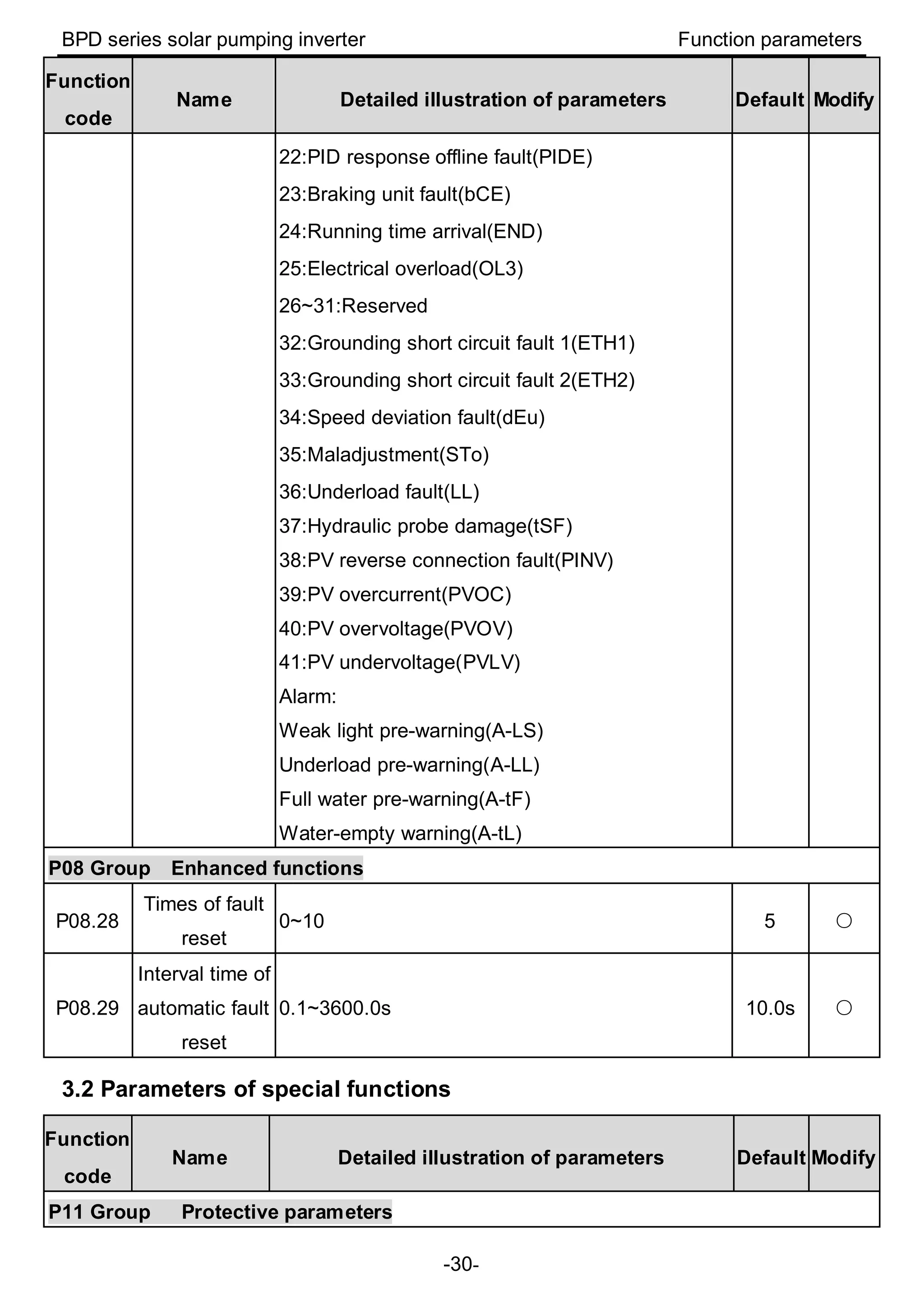
  • 34.
    BPD series solarpumping inverter Function parameters -31- Function code Name Detailed illustration of parameters Default Modify P11.01 Frequency decreasing at sudden power loss 0.00~1.00 (When the voltage degree is 400V, the corresponding power loss frequency down voltage point of 0.85 is 460V.) 0.85 ◎ P11.02 Frequency decreasing ratio at sudden power loss Setting range: 0.00Hz/s~P00.03 After the power loss of the grid, the bus voltage drops to the sudden frequency-decreasing point, the inverter begin to decrease the running frequency at P11.02, to make the inverter generate power again. The returning power can maintain the bus voltage to ensure a rated running of the inverter until the recovery of power. 2.00 Hz/s ○ P15 Group Special functions for PV inverters P15.00 PV inverter selection 0: Invalid 1: Enable 0 means the function is invalid and the group of parameters can not be used 1 means the function is enabled, and P15 parameters can be adjusted 1 ◎ P15.01 Vmpp voltage reference 0: Voltage reference 1: Max. power tracking 0 means to apply voltage reference mode. The reference is a fixed value and given by P15.02. 1 means to apply the reference voltage of Max. power tracking. The voltage is changing until the system is stable. Note: If terminal 43 is valid, the function is invalid. 1 ◎ P15.02 Vmpp voltage keypad reference 0.0~6553.5Vdc If P15.01 is 0, the reference voltage is given by P15.02. (During test, reference voltage should be lower than PV input voltage; otherwise, the system 250.0V ○
  • 35.
    BPD series solarpumping inverter Function parameters -32- Function code Name Detailed illustration of parameters Default Modify will run at lower limit of frequency) P15.03 PI control deviation 0.0~100.0% (100.0% corresponds to P15.02) If the ratio percentage of real voltage to reference voltage, which is abs(bus voltage-reference voltage)*100.0%/ reference voltage, if the value exceeds the deviation limit of P15.03, PI adjustment is available, otherwise, there is no PI adjustment and the value is defaulted to be 0.0% abs: the absolute value 0.0% ○ P15.04 Upper frequency of PI output P15.05~100.0%(100.0% corresponds to P00.03) P15.04 is used to limit the Max. value of target frequency, 100.0% corresponds to P00.03. After PI adjustment, the target frequency can not exceed the upper limit. 100.0 % ○ P15.05 Lower frequency of PI output 0.0%~P15.04(100.0% corresponds to P00.03) P15.05 is used to limit the Min. value of target frequency, 100.0% corresponds to P00.03. After PI adjustment, the target frequency can not exceed the lower limit. 20.0% ○ P15.06 KP1 0.00~100.00 The proportion coefficient 1 of the target frequency The bigger the value is, the stronger the effect and faster the adjustment is. 15.00 ○ P15.07 KI1 0.00~100.00 The integral coefficient 1 of the target frequency The bigger the value is, the stronger the effect and faster the adjustment is. 15.00 ○ P15.08 KP2 0.00~100.00 The proportion coefficient 2 of the target frequency The bigger the value is, the stronger the effect and 15.00 ○
  • 36.
    BPD series solarpumping inverter Function parameters -33- Function code Name Detailed illustration of parameters Default Modify faster the adjustment is. P15.09 KI2 0.00~100.00 The integral coefficient 2 of the target frequency The bigger the value is, the stronger the effect and faster the adjustment is. 15.00 ○ P15.10 PI switching point 0.0~6553.5Vdc If the absolute value of bus voltage minus the reference value is bigger than P15.10, it will switch to P15.08 and P15.09; otherwise it is P15.06 and P15.07. 20.0V ◎ P15.11 Water level control 0:Digital input of the water-level control 1:AI1(the water-level signal is input through AI1, not supported currently) 2:AI2(the water-level signal is input through AI2) 3:AI3(the water-level signal is input through AI3) If the function code is 0, the water-level signal is control by the digital input. See 45 and 46 functions of S terminal for detailed information. If the full-water signal is valid, the system will report the warning (A-tF) and sleep after the time of P15.13. During the warning, the full-water signal is invalid and the system will clear the warning after the time of P15.14. If the empty-water signal is valid, the system will report the warning (A-tL) and sleep after the time of P15.32. During the warning, the empty -water signal is invalid and the system will clear the warning after the time of P15.33.(the function code of P15.13, P15.14, P15.32, P15.33 is relative to the water-level control) If the function code is 1~3, it is the reference of theater control analog signal. (the function code of P15.12, P15.13, P15.14, P15.15 is relative to the water-level control) 0 ◎
  • 37.
    BPD series solarpumping inverter Function parameters -34- Function code Name Detailed illustration of parameters Default Modify P15.12 Water level threshold 0.0~100.0% If the simulating signal is less than the water level threshold and keep in the state after the delay time set by P15.13, report A-tF and dormant. If the time is not reached, the signal is bigger than the water level threshold; the time will be cleared automatically. When the signal time is shorter than the water level threshold time, the time will be counted again. 0 is full water and 1 is no water. 25.0% ○ P15.13 Full water delay 0~10000s Time setting of full water delay 5s ○ P15.14 Wake-up delay when full water 0~10000s The delay time setting. During the full-water warning, if the detected water level signal is higher than the threshold of P15.12, the delay counts, after the time set by P15.14, the warning is cleared. During the non-continuous application, the delay timing will clear automatically. 20s ○ P15.15 Hydraulic probe damage 0.0~100.0% 0.0%: Invalid. If it is not 0.0%, when the signal is longer than P15.15, it will report tSF fault directly and stop. 0.0% ○ P15.16 Operation time of water pump underload 0.0~1000.0s Set the operation time of underload operation. Under the continuous underload operation, it will report A - LL if the operation time is reached. 60.0s ○ P15.17 Current detection of underload 0.0%: Automatic detection 0.1~100.0% 0.0% ○
  • 38.
    BPD series solarpumping inverter Function parameters -35- Function code Name Detailed illustration of parameters Default Modify operation If it is 0.0%,it is determined by the inverter. If it is not 0.0%, it is determined by P15.17. 100.0% corresponds to the rated motor current. If the target frequency and the absolute value of the ramp frequency is less than or equal to P15.19, and the current is less than P15.17, after the time set by P15.16, it will report underload fault; otherwise, it will operate normally. If the state is not continuous, the delay counting will be cleared automatically. P15.18 Underload reset delay 0.0~1000.0s Underload reset delay The operation time and reset time are counted at the same time during underload, and it is bigger than P15.16 generally to ensure underload pre-warning will be reported. After the time set by P15.18-P15.16, it will reset. If the value is the same as P15.16, it will reset when report underload pre-warning. 120.0s ○ P15.19 Lag frequency threshold 0.00~200.00Hz P15.19 is the lag frequency for the analysis of underload operation. If the target frequency and the absolute value of the ramp frequency is less than or equal to P15.19, the current will be compared. 0.30Hz ◎ P15.20 Delay time of weak light 0.0~3600.0s Delay time of weak light If the output frequency is less than or equal to the lower limit of PI output frequency and the state lasts for the set value, it will report A-LS and dormant. If the state is not continuous, the delay counting will be cleared automatically. 100.0s ○
  • 39.
    BPD series solarpumping inverter Function parameters -36- Function code Name Detailed illustration of parameters Default Modify Note: If the PV voltage is lower than software undervoltage point, it will report directly and no need to wait for the set time. If P15.29=0, the system will switch to the power frequency input when the light is weak. P15.21 Delay time of wake-up at weak light 0.0~3600.0s Delay time of wake-up at weak light During the weak light warning, if the PV voltage is higher than the starting voltage, after the delay time, the warning will be cleared and it will run again. When P15.29=0, if the PV voltage is higher than P15.31, after the delay time, it will switch to solar input mode. 300.0s ○ P15.22 Initial reference voltage display 0.0~2000.0V ● P15.23 Mini voltage reference of Max. power tracking 0.0~P15.24 Valid in MPPT Max. tracking voltage, the Mini. tracked voltage Track in the range of P15.23~P15.24. P15.24 needs to be bigger than P15.23. The less the difference, the faster the tracking is. But the Max. voltage needs to be in the range. P15.23 and P15.24 can be adjusted according to site operation. The default value depends on model. 0.75kW:80V 1.5kW, 2.2kW:100V 80.0V ○ P15.24 Max. voltage reference of Max. power tracking P15.23~P15.28 Valid in MPPT Max. tracking voltage, the Max. tracked voltage The default value depends on model. 400.0V ○
  • 40.
    BPD series solarpumping inverter Function parameters -37- Function code Name Detailed illustration of parameters Default Modify 0.75kW:400V 1.5kW, 2.2kW:400V P15.25 Adjustment of initial reference voltage 0.0~200.0V MPPT begins to change from the reference voltage Initial reference voltage =PV voltage-P15.25 5.0V ○ P15.26 Upper and lower limit time of Vmppt 0.0~10.0s When P15.26 is set to 0.0, the automatic adjustment is invalid. If it is not 0.0, the upper and lower limit of Vmppt will be adjusted automatically after the time set by P15.26. The medium value is the current bus voltage and the limit is P15.27: Maximum / Minimum reference voltage=Current bus voltge±P15.27 and it will update to P15.23 and P15.24 at the same time 0.0s ○ P15.27 Upper and lower limit of Vmppt 20.0~100.0V The adjustment of the upper and lower limit 30.0V ○ P15.28 Maximum value of Vmppt P15.24~6553.5V The upper limit can not exceed the P15.28 when Vmppt is the maximum value 400.0V ○ P15.29 PV input and power frequency input selection 0:Automatic input 1:Forced power frequency input 2:Forced PV input If the value is 0, the system will switch between PV and power frequency according to the detected PV voltage and threshold; If the value is 1, the system will force to switch to power frequency input; If the value is 2, the system will force to switch to PV input. 2 ◎
  • 41.
    BPD series solarpumping inverter Function parameters -38- Function code Name Detailed illustration of parameters Default Modify Note: When the terminal input 44 is valid, the function code will be invalid. P15.30 Switch to the threshold of power frequency input 0.0V~P15.31 If PV voltage is lower than the threshold or the light is weak, it can switch to power frequency input through the relay output. (Note: The minimum working voltage of the system is 60V.) If the value is 0, it is invalid The default value depends on model: The value equals to PV starting voltage; PV starting voltage; 0.75kW:80V 1.5kW, 2.2kW:100V 80.0V ○ P15.31 Switch to the threshold of solar input P15.30~400V If PV voltage is higher than the threshold, after the delay time of P15.21, it can switch to solar input through the relay output. In order to avoid repeated switching, the threshold needs to be higher than the threshold of P15.30. If the value is 0.0, it is invalid The default value depends on model: The value is 20V higher than PV starting voltage; PV starting voltage; 0.75kW:100V 1.5kW, 2.2kW:120V 100.0V ○ P15.32 Empty-water delay 0~10000s The delay time setting 5s ○ P15.33 Wake-up delay of empty -water 0~10000s The delay time setting 20s ○ P17 Group State viewing P17.38 Current of the main winding It is the current of the main winding group when applying capacitance-removing to control the single 0.0A ●
  • 42.
    BPD series solarpumping inverter Function parameters -39- Function code Name Detailed illustration of parameters Default Modify group phase motor 0.00~100.00A P17.39 Current of the secondary winding group It is the current of the main winding group when applying capacitance-removing to control the single phase motor 0.00~100.00A 0.0A ● P19 Group Voltage boost P19.06 Bus reference voltage Set the parameter to bus reference voltage at PV input 220.0V~450.0V 330.0V ◎ P19.08 Starting voltage When PV voltage reaches the starting voltage, boost the circuit. 60.0~200.0 The default value depends on power degree: 0.75kW:80V 1.5kW, 2.2kW:100V 80.0V ◎ Note: 1. The time when the pump inverters operated to the lower limit of PI output frequency after starting is determined by the ACC time. 2. The instruction of delay time. If various delay conditions such as weak light, full water, and underload are met, the inverter will count the delay time respectively. After the separated delay time is arrived, it will report pre-warning and others are still kept. If the pre-warning is restored, but other conditions for delay are still existent, it will count after the precious time. So if the some pre-warning condition is not met, the pre-warning time will be cleared.
  • 43.
    BPD series solarpumping inverter Installation guidelines -40- 4 Installation guidelines 4.1 Unpacking inspection Inspect the information of the order and the name plate to ensure the product are the ordered one and no damage to the package. If any problem, contact the supplier as soon as possible. Packing list of Solar pumping inverter: BPD0K7TN(AC)/BPD1K5TN(AC)/BPD2K2TN(AC) Inverter 1 Installation bracket 1 Operation manual 1 Expansion bolts 3 (M6*60) DC connector 1 Communication connector 1 AC connector 1(2) Keypad 1 Network cable 1 4.2 Before installation 4.2.1 Installation place Select installation place based on the following considerations: Installation space(mm)
  • 44.
    BPD series solarpumping inverter Installation guidelines -41- (1) The environment temperature is between -25℃~60℃; (2) The installation surface should be perpendicular to the horizontal line. Refer to the following figure: Installation position 4.2.2 Cable specifications The user can select connection cable according the table below: Cable specifications Model DC side AC input side AC output side Communication cable Recommend ed cross sectional area mm²/ Cable No. Recommended cross sectional area mm²/ Cable No. Recommended cross sectional area mm²/ Cable No. Recommended cross sectional area mm²/ Cable No. BPD0K7TN(AC)/ BPD1K5TN(AC)/ BPD2K2TN(AC) 4/AWG 12 4/AWG 12 2.5/AWG 14 0.52/AWG 20 Recommended crimp tools and insertion and removal tools for cables AC input side AC output side Communication cable Crimp tools CT-0.14/4 CT-0.14/4 CT-P20/28 Insertion and removal tools RT-2.5 RT-2.5 RT-1.0
  • 45.
    BPD series solarpumping inverter Installation guidelines -42- 4.3 Mechanical installation It is recommended to install the inverter on the firm wall or metal bracket vertically. Take the typical installation environment as the example, the manual describes how to install the inverter on concrete wall. 3-Ø8 A Installation bracket Size of installation bracket Model Installation hole A(mm) BPD0K7TN(AC)/BPD1K5TN(AC)/BPD2K2TN(AC) 195 Installation steps of Solar pumping inverter: (1) At first, take down the installation bracket from the machine by only removing M5 hex socket cap screws; (2) Then use expansion bolts to fix the installation bracket at the proper location of the walls; (3) Lift the inverter to suspend it on the installation bracket through M8 hex socket cap screws; (4) Finally, fasten M5 hex socket cap screws connecting the inverter with the bracket. For firm installation, the operators cannot release the device until the inverter is installed on the bracket firmly. Installation of Solar pumping inverter
  • 46.
    BPD series solarpumping inverter Installation guidelines -43- 4.4 Electrical installation DC AC AC Electrical wiring of the inverter Steps of electrical connection: 1) If the distance between the solar inverter and the motor is longer than 50 meters, it is recommended to install the output reactor to avoid the frequent overcurrent protection and the motor isolation damage. 2) Connect the DC output, AC input, AC output and the communication wire to the male, and then plug it to the female of the inverter. Tighten up to ensure the proper connection. Press the male as following: 4.4.1 Instruction of the communication terminal 1) Plug the cable into the pin and the stripping length is 5.5mm 2) Select the corresponding position and note the position of the jaw and contact
  • 47.
    BPD series solarpumping inverter Installation guidelines -44- 3) After the pressing, the qualified contactor is finished. Qualified contactor Unqualified contactor 4) The installation of the contactor and the product
  • 48.
    BPD series solarpumping inverter Installation guidelines -45- Push directly Push with tools when the cable is too thin The pushing is finished 5) Pin-removing Plug at the cable direction Press the notch with thumb after plugging
  • 49.
    BPD series solarpumping inverter Installation guidelines -46- Pull out 4.4.2 Installation instruction of AC input and output terminals 1) Plug the cable into the pin and the stripping length is 8mm and the wire core can be saw after plugging 2) Select the corresponding position and note the position of the jaw and contact 3) After the pressing, the qualified contactor is finished. 4) The installation of the contactor and the product
  • 50.
    BPD series solarpumping inverter Installation guidelines -47- Push directly Push with tools when the cable is too thin 5) Pin-removing Plug at the cable direction Push vertically Shell separation of the contactor 4.5 Inspection before operation Check as follows before operation: (1) Detect the voltage of the components is in the allowable input voltage range of the inverter; (2) If applying mains supply, detect the voltage of AC wiring port at AC input side is in the
  • 51.
    BPD series solarpumping inverter Installation guidelines -48- allowable voltage range of the grid; (3) Check the inverter is in good grounding; (4) Ensure all DC inputs or AC inputs in power-off state before connecting the cables to the inverter; (5) Ensure all electrical safety precautions are clearly-identified on the installation site; (6) Confirm the external keypad is in correct connection. 4.6 Instruction of LEDs Displayed state Instruction Green LED flickering The inverter has been power-on and control circuit is working. Green LED on The inverter is running. Yellow LED on The inverter alarms and it will restart after alarm clearing. Red LED on The inverter has fault.
  • 52.
    BPD series solarpumping inverter Commissioning guidelines -49- 5 Commissioning guidelines 5.1 Commissioning steps during power supply 1. Wire according to the diagram and check the wiring is correct or not and then switch on Q2. 2. Set the motor parameters (a) Set P00.18=1 and restore to the factory settings. (b) Set P02.00 to 0 3PH motor and 1 1PH motor. It is necessary to set P04.34=0x01 if the single phase motor whose capacitor is removed during the two phase motor control;. (c) Set the name plate of the motor, including P02.01, P02.02, P02.03, P02.04 and P02.05 (the maximum setting of P02.04 is 200V for the single phase motor whose capacitor is removed). 3. Detect water yield for water pumps Click “Run” key, observe the running frequency and water yield. If the running frequency or
  • 53.
    BPD series solarpumping inverter Commissioning guidelines -50- water yield is low at normal light, the motor wires may be reversed, it is necessary to set P00.13=1 or exchange the wiring of the motor. The operation direction of single phase motor whose capacitor is removed can only be changed by function code. 4. Set operation mode If the water yield is normal and the system runs stably, set operation mode. (a) Automatic operation: set P00.01=1, P05.01=1; (b) Manual operation: set P00.01=1, P05.01=0 and P05.04=1, select S4 as start-up and stop control terminal, as shown in above wiring diagram, the system can run only when the user switches on S4. 5.2 Commissioning steps during grid power supply 1. Wire according to the diagram and check the wiring is correct or not Switch off Q2 and then switch on Q1. 2. Set the motor parameters
  • 54.
    BPD series solarpumping inverter Commissioning guidelines -51- (a) Set P00.18=1 and restore to the factory settings. (b) Set P02.00 to 0 3PH motor and 1 1PH motor. It is necessary to set P04.34=0x01 if the single phase motor whose capacitor is removed during the two phase motor control. (c) Set the name plate of the motor, including P02.01, P02.02, P02.03, P02.04 and P02.05 (the maximum setting of P02.04 is 200V for the single phase motor whose capacitor is removed). 3. Set P15.29=1. 4. Detect water yield for water pumps Click “Run” key, observe the running frequency and water yield. If the running frequency or water yield is low at normal light, the motor wires may be reversed, it is necessary to set P00.13=1 or exchange the wiring of the motor. The operation direction of single phase motor whose capacitor is removed can only be changed by function code. 5. Set operation mode If the water yield is normal and the system runs stably, set operation mode. (a) Automatic operation: set P00.01=1, P05.01=1; (b) Manual operation: set P00.01=1, P05.01=0 and P05.04=1, select S4 as start-up and stop control terminal, as shown in above wiring diagram, the system can run only when the user switches on S4. 5.3 Commissioning steps during automatic switching between PV and grid power supply 1.Connect as the system diagram and switch on Q1 and Q2.
  • 55.
    BPD series solarpumping inverter Commissioning guidelines -52- 2. Set the motor parameters (a) Set P00.18=1 and restore to the factory settings. (b) Set P02.00 to 0 3PH motor and 1 1PH motor. It is necessary to set P04.34=0x01 if the single phase motor whose capacitor is removed during the two phase motor control. (c) Set the name plate of the motor, including P02.01, P02.02, P02.03, P02.04 and P02.05 ((the maximum setting of P02.04 is 200V for the single phase motor whose capacitor is removed). 3. Set P15.29=0. 4. Detect water yield for water pumps Click “Run” key, observe the running frequency and water yield. If the running frequency or water yield is low at normal light, the motor wires may be reversed, it is necessary to set P00.13=1 or exchange the wiring of the motor. The operation direction of single phase motor whose capacitor is removed can only be changed by function code. 5. Set operation mode If the water yield is normal and the system runs stably, set operation mode.
  • 56.
    BPD series solarpumping inverter Commissioning guidelines -53- (a) Automatic operation: set P00.01=1, P05.01=1; (b) Manual operation: set P00.01=1, P05.01=0 and P05.04=1, select S4 as start-up and stop control terminal, as shown in above wiring diagram, the system can run only when the user switches on S4. 5.4 Advanced setting Note: The default setting of the inverter for water pump can apply to most conditions and the advanced setting is unnecessary. 1. PI adjustment to the water yield If the user requires large or low water yield, it is necessary to adjust PI (P15.06~P15.10) properly. The bigger PI parameters, the stronger the effect is, but the frequency fluctuation of the motor is bigger; in reserve, the lower the water yield is, the more stable the motor frequency is. 2. Commissioning of MPPT speed tracking P15.23 and P15.24 is the minimum and maximum voltage of the power tracking in MPPT mode. If the voltage range is smaller, the faster the tracking is. But the bus voltage in normal operation needs to be in the range; otherwise the maximum power can not be tracked. Generally: (a) 0.75kW: P15.23=80(Min. reference voltage), P15.24=400(Max. reference voltage) (b)1.5kW, 2.2kW: P15.23=10(Min. reference voltage), P15.24=400(Max. reference voltage) Above settings are only for reference and can be adjusted according to the actual applications or by automatic adjustment. 3. Fault setting and reset time setting of fault delay If the pre-warning of weak light, full water, empty and underload are needed, it is necessary to set the detection point, delay time and reset time according to the actual working. Full water/no water settings are P15.11~P15.14 , P15.32~P15.33; the function settings of underload are P15.16~P15.19; the function settings of weak light are P15.20~P15.21. Default settings can be used, too. Note: P11.01 frequency decreasing at sudden power loss 0.85 corresponds to 265V. The user is allowed to modify the coefficient (≥0.58) according to needs (the corresponding undervoltage point of 0.58 is 180V, undervoltage fault when the actual bus voltage is lower
  • 57.
    BPD series solarpumping inverter Commissioning guidelines -54- than the value). 4. Special setting for single phase motor (a)When the single phase motor is in bad running performance, the user can adjust P04 VF curve setting, set P04.00=1 and set P04.03~P04.08 to appropriate values according to commissioning conditions; increase the voltage if the motor can not start and decrease the voltage if the current is high. (b)When the light is normal and the system starts slowly, increase P15.25 initial voltage differential value appropriately. (c)For the single phase motors with two-phase control (capacitor-removing): ①the maximum voltage needs to be less than 1/1.6 of the bus voltage. It is recommended to set the rated voltage less than 200V, P02.04=200V, or limit the maximum voltage output by multi-dot V/F curve; ②observe the current of the winding group through P17.38 and P17.39, the switched current is the combination current of the two winding groups. The impedance of the winding group is different, so the current is different at the same voltage output. ③ P04.35 can be used to change the output current of the main and secondary winding group. The qualified people are recommended to adjust; otherwise the motor performance may be impacted.
  • 58.
    BPD series solarpumping inverter Commissioning guidelines -55- 5.5 Flow chart of the commissioning 3-phase pump motor Power up the BPD inverter after the wiring is checked to be okay P00.18=1 Single-phase pump whose capacitors can be removed? P02.00=0 Set pump motor parameters Water pumping status okay? Run automatically ? P00.01=1,P05.01=1 Run manually: P00.01=1, P05.01=0, P05.04=1, Close S4 P00.13=1 P02.00=1, P04.34=0x0 1 Set pump motor parameters P02.00=1 Set pump motor parameters Y N Y N Y N Y N PV Input Only? P15.29=2 AC Input Only? P15.29=1 PV/AC Auto switch: P15.29=0 Hit "Run" on Keypad P02.04=200 Y N N Y Start End
  • 59.
    BPD series solarpumping inverter Commissioning guidelines -56- 5.6 Simple parameters setting Solar power supply Grid power supply Automatic switching Three phase motor Single phase motor Single phase motor (capacitor -removing ) Three phase motor Single phase motor Single phase motor (capacitor -removing ) Three phase motor Single phase motor Single phase motor (capacitor -removing ) P00.18=1 P00.18=1 P00.18=1 P00.18=1 P00.18=1 P00.18=1 P00.18=1 P00.18=1 P00.18=1 P02.00=0 P02.00=1 P02.00=1 P02.00=0 P02.00=1 P02.00=1 P02.00=0 P02.00=1 P02.00=1 P02.01= rated power P02.01= rated power P02.01= rated power P02.01= rated power P02.01= rated power P02.01= rated power P02.01= rated power P02.01= rated power P02.01= rated power P02.02= rated frequency P02.02= rated frequency P02.02= rated frequency P02.02= rated frequency P02.02= rated frequency P02.02= rated frequency P02.02= rated frequency P02.02= rated frequency P02.02= rated frequency P02.03= rated speed P02.03= rated speed P02.03= rated speed P02.03= rated speed P02.03= rated speed P02.03= rated speed P02.03= rated speed P02.03= rated speed P02.03= rated speed P02.04= rated voltage P02.04= rated voltage P02.04= 200 P02.04= rated voltage P02.04= rated voltage P02.04= 200 P02.04= rated voltage P02.04= rated voltage P02.04= 200 P02.05= rated current P02.05= rated current P02.05= rated current P02.05= rated current P02.05= rated current P02.05= rated current P02.05= rated current P02.05= rated current P02.05= rated current P15.29=2 P15.29=2 P15.29=2 P15.29=1 P15.29=1 P15.29=1 P15.29=0 P15.29=0 P15.29=0 P00.01=1 P00.01=1 P04.34= 0x01 P00.01=1 P00.01=1 P04.34= 0x01 P00.01=1 P00.01=1 P04.34= 0x01 P05.01=1 P05.01=1 P00.01=1 P05.01=1 P05.01=1 P00.01=1 P05.01=1 P05.01=1 P00.01=1 P05.01=1 P05.01=1 P05.01=1
  • 60.
    BPD series solarpumping inverter -57- Table: recommended solar modules Inverter model Max DC input current (A) Open-circuit voltage degree of solar module 30±1V 37±1V 45±1V 38±1V (Mono-Crystalline Silicon) (A) Module power ±5Wp Modules per string * strings Module power ±5Wp Modules per string * strings Module power ±5Wp Modules per string * strings Module power ±5Wp Modules per string * strings BPD0K7TN(AC) 9 190 4*1 250 3*1 300 3*1 - - BPD1K5TN(AC) 12 190 8*1 250 6*1 300 5*1 - - BPD2K2TN(AC) 12 190 12*1 250 9*1 300 8*1 275 8*1 Note: because of the low efficiency, the 2.2kW model can be configured at most of 3.1kW solar modules, 1.5kW model at most of 2.1kW and 0.75kW at most of 1kW for more water yield. Different water pumps have different water yield.
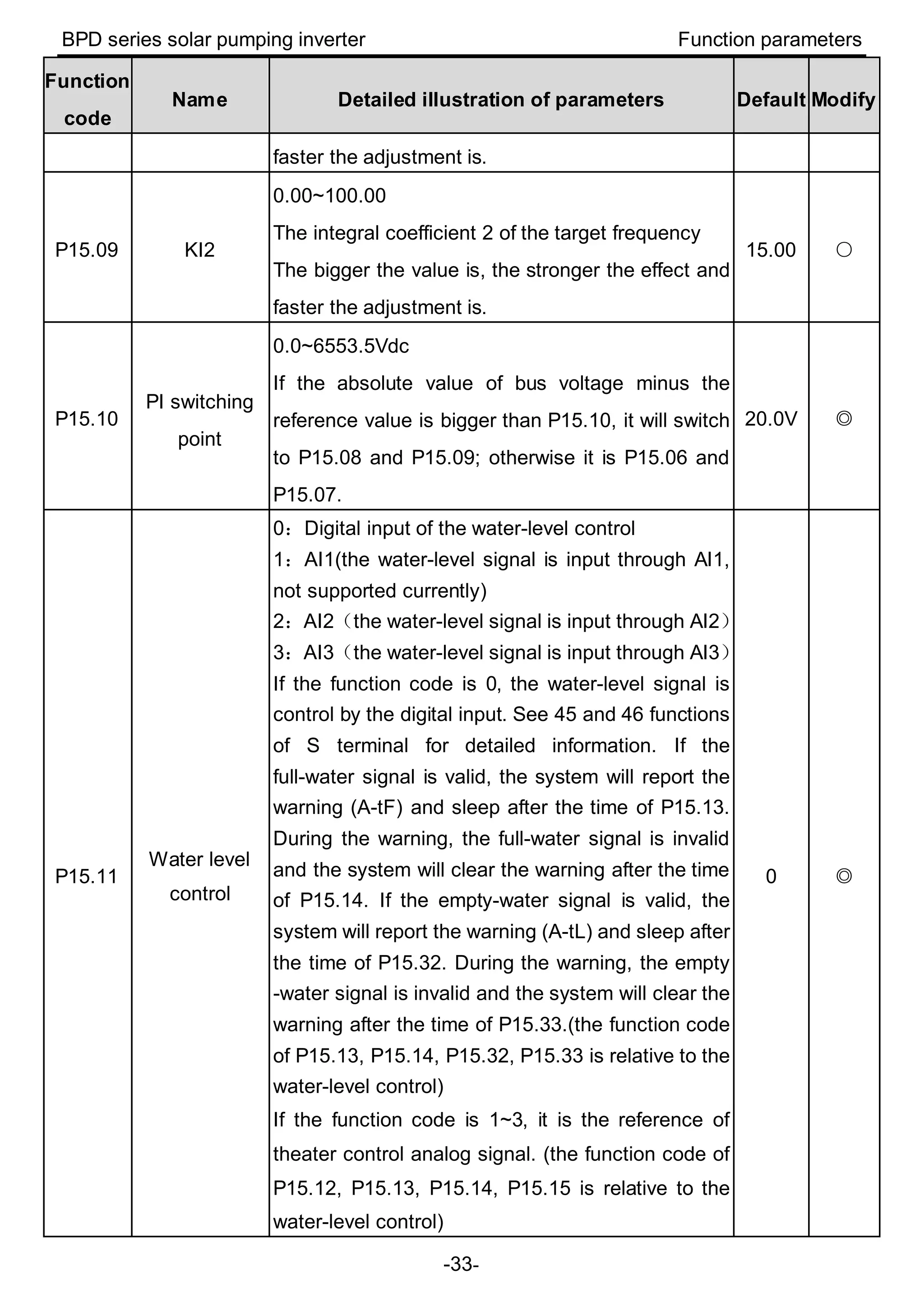
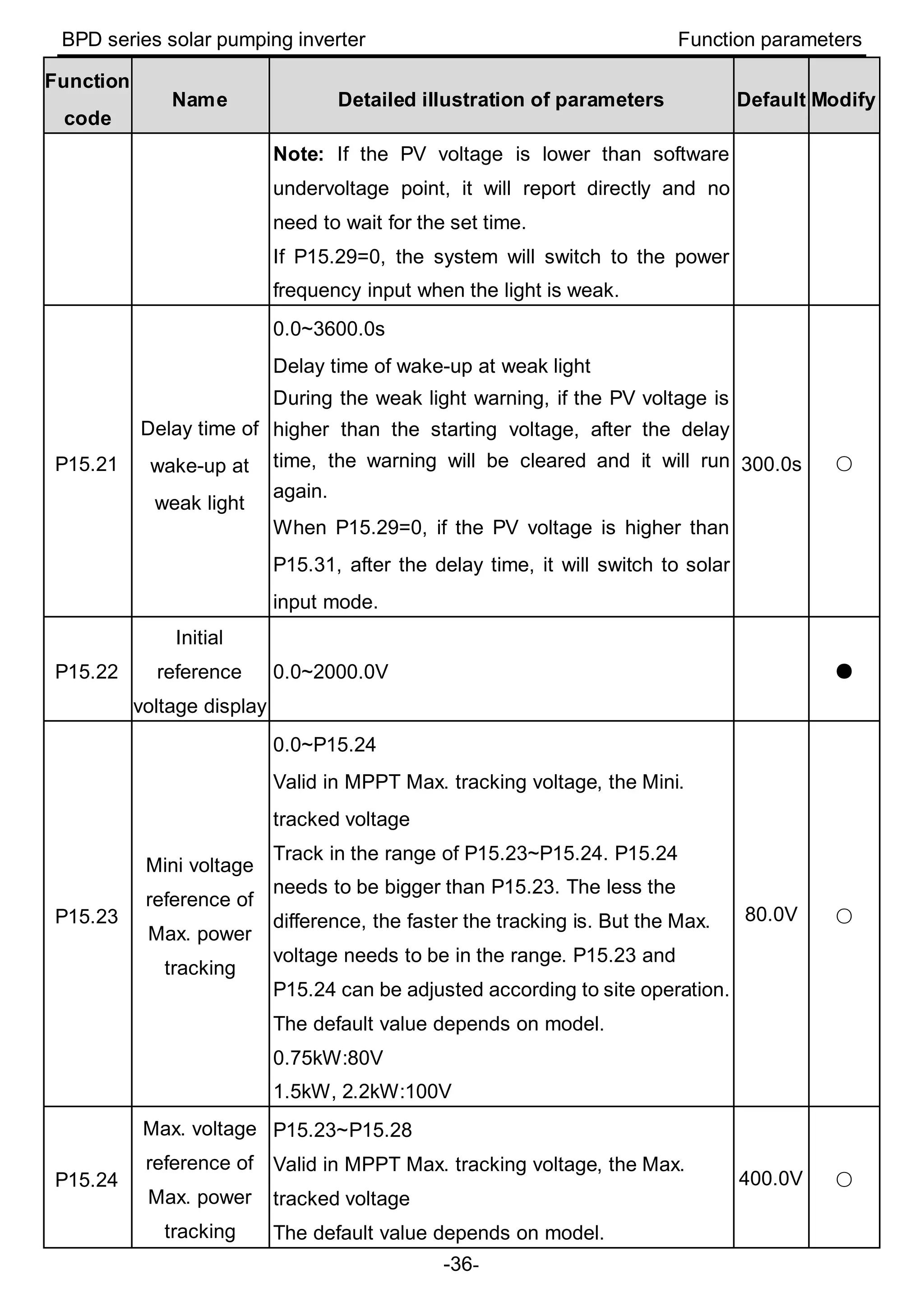
  • 61.