LeaderRegistrationsUbisoft
POBox67560
Albuquerque,NM87193
512219-MNL
Ubisoft, Inc. · 625 Third Street · Third Floor · San Francisco, CA 94107
© 2005 Ubisoft Entertainment. All Rights Reserved. Sam Fisher, Splinter Cell, Splinter Cell Chaos Theory, the
Soldier Icon, Ubisoft, Ubi.com, and the Ubisoft logo are trademarks of Ubisoft Entertainment in the U.S. and/or other
countries. Software platform logo TM and © IEMA 2003.
*Source: According to NPD Group, Inc., December 2003.
Made in the U.S.A.
FREE2-DAY SHIPPING!*
Buy online and avoid the lines with FREE 2-day shipping
from the Ubisoft Store. Enter 2DAYFREE at checkout! Spend
your time playing this game, while we deliver the next one,
shipped FREE!
*To redeem this coupon,go to http://store.ubi.com and enter Coupon Code 2DAYFREE at checkout.Offer
expires September 30, 2005.Offer applies to your next purchase at the Ubisoft Store.Products subject to
availability.May not be combined with any other promotional offers or discounts,applied to previous orders,
substituted,exchanged,sold,or redeemed for cash or other goods or services.Limit one per customer.
Offer valid on orders with U.S.shipping destinations only.Offer only available at http://store.ubi.com.
Blood
Strong Language
Violence
solo mode CO-OP MODE SPLINTERCELL.COM
available on pc-DVD and
all console platforms
File Path: Mac 13 HD:JOBS IN PROGRESS:FEAR:FEAR0365_PCS_MNL.job:FEAR0365_PCS_MnlCvr_outer.ai
User: Alex Andrist Computer: Alex Andrist’s Computer Date: 03/02/05 - 01:30 PM Print Scale: 100% Handling#: 12
GETTING STARTED . . . . . . . . . . . . . . . . . . . . . . . . . . . . . . . . . . . . . . . . . . . . . . . . .2
GAME SETUP . . . . . . . . . . . . . . . . . . . . . . . . . . . . . . . . . . . . . . . . . . . . . . . . . . . . .3
STORY . . . . . . . . . . . . . . . . . . . . . . . . . . . . . . . . . . . . . . . . . . . . . . . . . . . . . . . . . . .4
PLAYING THE GAME . . . . . . . . . . . . . . . . . . . . . . . . . . . . . . . . . . . . . . . . . . . . . . . .8
ADVANCED MOVES . . . . . . . . . . . . . . . . . . . . . . . . . . . . . . . . . . . . . . . . . . . . . . .11
MAIN OBJECTS AND ACCESSORIES . . . . . . . . . . . . . . . . . . . . . . . . . . . . . . . . . . .12
MAPS . . . . . . . . . . . . . . . . . . . . . . . . . . . . . . . . . . . . . . . . . . . . . . . . . . . . . . . . . .15
WARRANTY . . . . . . . . . . . . . . . . . . . . . . . . . . . . . . . . . . . . . . . . .inside front cover
TECHNICAL SUPPORT . . . . . . . . . . . . . . . . . . . . . . . . . . . . . . . . . .inside back cover
1
FEAR0365_PCS_MNL.qxd 3/2/05 12:08 PM Page 1
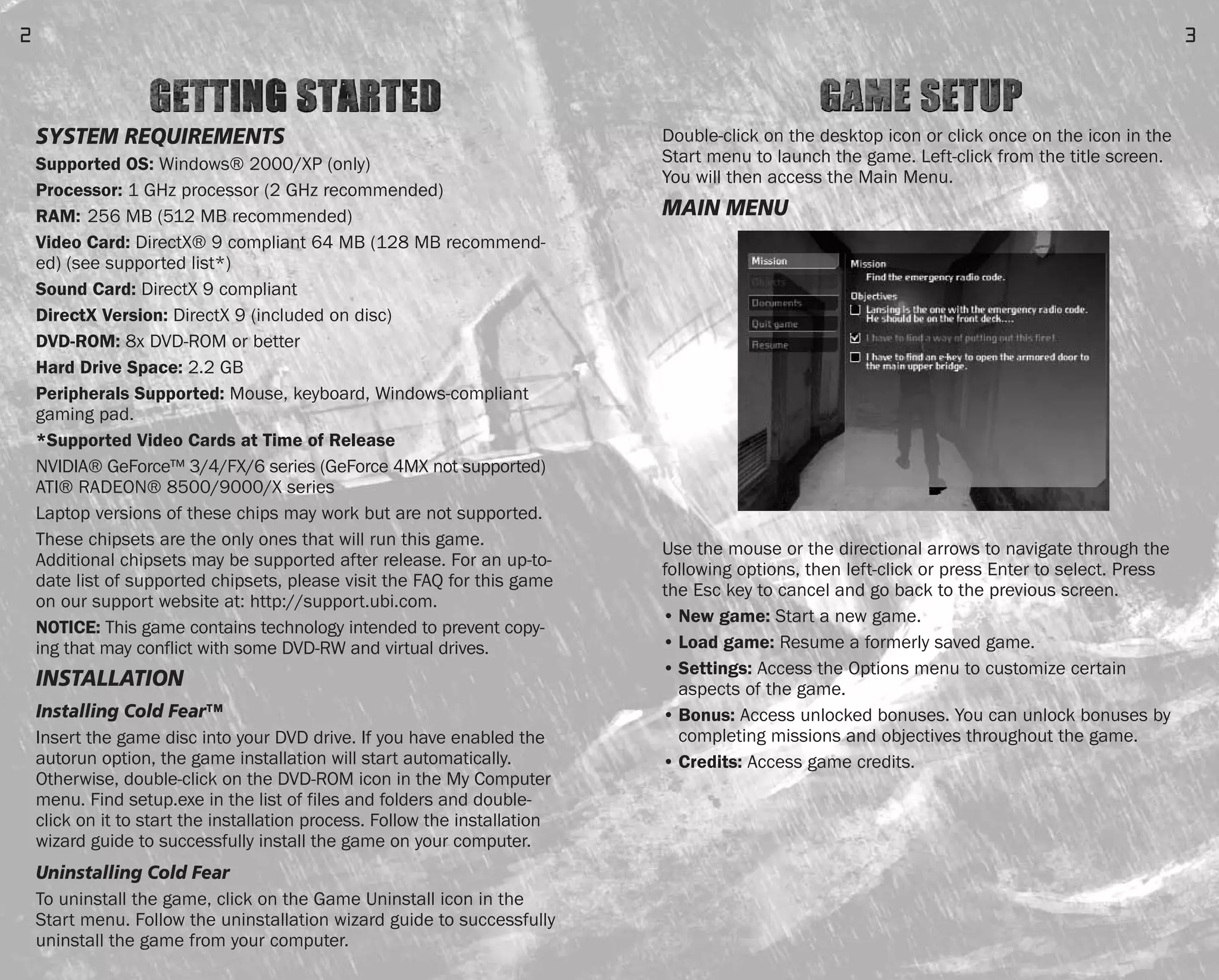
Double-click on the desktop icon or click once on the icon in the
Start menu to launch the game. Left-click from the title screen.
You will then access the Main Menu.
MAIN MENU
Use the mouse or the directional arrows to navigate through the
following options, then left-click or press Enter to select. Press
the Esc key to cancel and go back to the previous screen.
• New game: Start a new game.
• Load game: Resume a formerly saved game.
• Settings: Access the Options menu to customize certain
aspects of the game.
• Bonus: Access unlocked bonuses. You can unlock bonuses by
completing missions and objectives throughout the game.
• Credits: Access game credits.
3
SYSTEM REQUIREMENTS
Supported OS: Windows® 2000/XP (only)
Processor: 1 GHz processor (2 GHz recommended)
RAM: 256 MB (512 MB recommended)
Video Card: DirectX® 9 compliant 64 MB (128 MB recommend-
ed) (see supported list*)
Sound Card: DirectX 9 compliant
DirectX Version: DirectX 9 (included on disc)
DVD-ROM: 8x DVD-ROM or better
Hard Drive Space: 2.2 GB
Peripherals Supported: Mouse, keyboard, Windows-compliant
gaming pad.
*Supported Video Cards at Time of Release
NVIDIA® GeForce™ 3/4/FX/6 series (GeForce 4MX not supported)
ATI® RADEON® 8500/9000/X series
Laptop versions of these chips may work but are not supported.
These chipsets are the only ones that will run this game.
Additional chipsets may be supported after release. For an up-to-
date list of supported chipsets, please visit the FAQ for this game
on our support website at: http://support.ubi.com.
NOTICE: This game contains technology intended to prevent copy-
ing that may conflict with some DVD-RW and virtual drives.
INSTALLATION
Installing Cold Fear™
Insert the game disc into your DVD drive. If you have enabled the
autorun option, the game installation will start automatically.
Otherwise, double-click on the DVD-ROM icon in the My Computer
menu. Find setup.exe in the list of files and folders and double-
click on it to start the installation process. Follow the installation
wizard guide to successfully install the game on your computer.
Uninstalling Cold Fear
To uninstall the game, click on the Game Uninstall icon in the
Start menu. Follow the uninstallation wizard guide to successfully
uninstall the game from your computer.
2
FEAR0365_PCS_MNL.qxd 3/2/05 12:08 PM Page 2
CHARACTERS
Tom Hansen
Once a hero, now disgraced, Hansen is happy to fade
into the woodwork as just one more guy out there
saving lives with the Coast Guard. All that changes
when his vessel receives an order to rescue a whal-
ing ship during a raging storm. What he finds there
will reawaken the dying embers of his spirit, if it
doesn’t kill him first.
Dr. Viktor Kamsky
Brilliant scientist and devoted father, Kamsky leads
the research effort on the isolated drilling platform.
His discoveries could threaten all humanity – and
cost him his own in the bargain.
Anna Kamsky
The daughter of scientist Viktor Kamsky, she has been
kept as a hostage to ensure his cooperation. Rebellious
and strong-willed, she finds herself forced to make an
impossible decision if she wants to survive.
CIA Agent Jason Bennett
Agent Bennett has been watching the situation for a
long time. Patiently, like a spider in the center of its
web, he’s been waiting for his chance to unravel the
mystery – no matter how many lives it takes to do so.
5
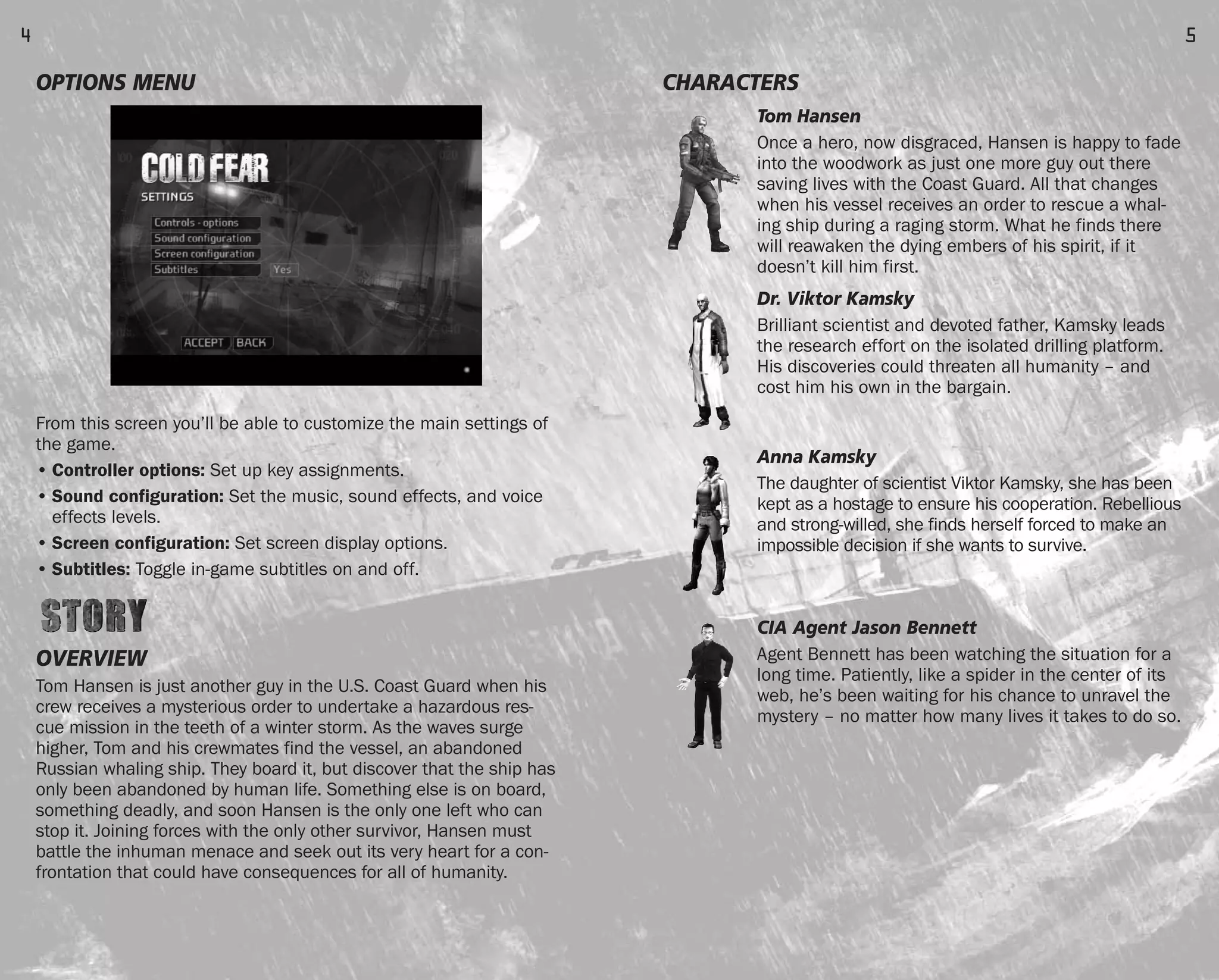
OPTIONS MENU
From this screen you’ll be able to customize the main settings of
the game.
• Controller options: Set up key assignments.
• Sound configuration: Set the music, sound effects, and voice
effects levels.
• Screen configuration: Set screen display options.
• Subtitles: Toggle in-game subtitles on and off.
OVERVIEW
Tom Hansen is just another guy in the U.S. Coast Guard when his
crew receives a mysterious order to undertake a hazardous res-
cue mission in the teeth of a winter storm. As the waves surge
higher, Tom and his crewmates find the vessel, an abandoned
Russian whaling ship. They board it, but discover that the ship has
only been abandoned by human life. Something else is on board,
something deadly, and soon Hansen is the only one left who can
stop it. Joining forces with the only other survivor, Hansen must
battle the inhuman menace and seek out its very heart for a con-
frontation that could have consequences for all of humanity.
4
FEAR0365_PCS_MNL.qxd 3/2/05 12:08 PM Page 4
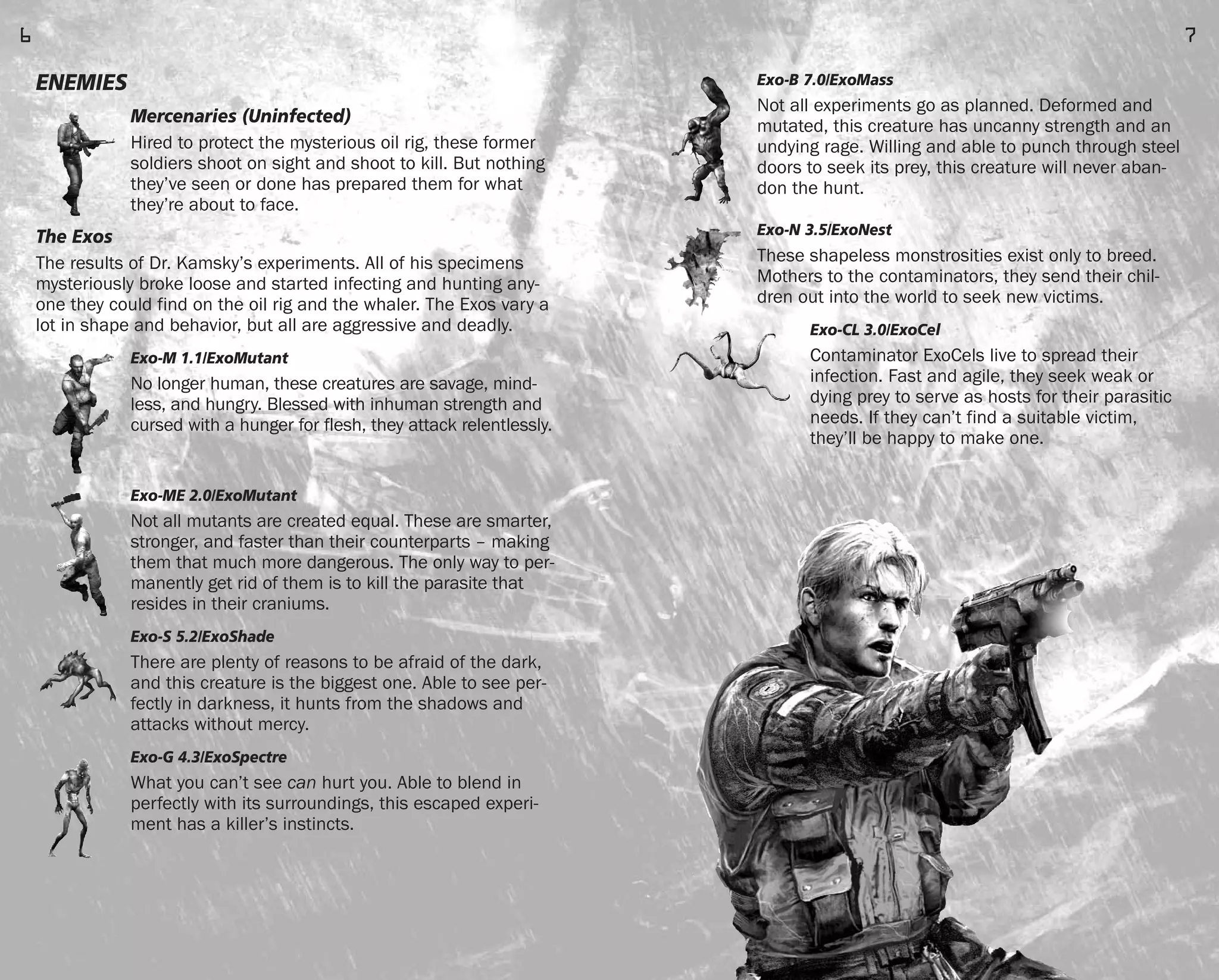
Exo-B 7.0/ExoMass
Not all experiments go as planned. Deformed and
mutated, this creature has uncanny strength and an
undying rage. Willing and able to punch through steel
doors to seek its prey, this creature will never aban-
don the hunt.
Exo-N 3.5/ExoNest
These shapeless monstrosities exist only to breed.
Mothers to the contaminators, they send their chil-
dren out into the world to seek new victims.
Exo-CL 3.0/ExoCel
Contaminator ExoCels live to spread their
infection. Fast and agile, they seek weak or
dying prey to serve as hosts for their parasitic
needs. If they can’t find a suitable victim,
they’ll be happy to make one.
7
ENEMIES
Mercenaries (Uninfected)
Hired to protect the mysterious oil rig, these former
soldiers shoot on sight and shoot to kill. But nothing
they’ve seen or done has prepared them for what
they’re about to face.
The Exos
The results of Dr. Kamsky’s experiments. All of his specimens
mysteriously broke loose and started infecting and hunting any-
one they could find on the oil rig and the whaler. The Exos vary a
lot in shape and behavior, but all are aggressive and deadly.
Exo-M 1.1/ExoMutant
No longer human, these creatures are savage, mind-
less, and hungry. Blessed with inhuman strength and
cursed with a hunger for flesh, they attack relentlessly.
Exo-ME 2.0/ExoMutant
Not all mutants are created equal. These are smarter,
stronger, and faster than their counterparts – making
them that much more dangerous. The only way to per-
manently get rid of them is to kill the parasite that
resides in their craniums.
Exo-S 5.2/ExoShade
There are plenty of reasons to be afraid of the dark,
and this creature is the biggest one. Able to see per-
fectly in darkness, it hunts from the shadows and
attacks without mercy.
Exo-G 4.3/ExoSpectre
What you can’t see can hurt you. Able to blend in
perfectly with its surroundings, this escaped experi-
ment has a killer’s instincts.
6
FEAR0365_PCS_MNL.qxd 3/2/05 12:08 PM Page 6
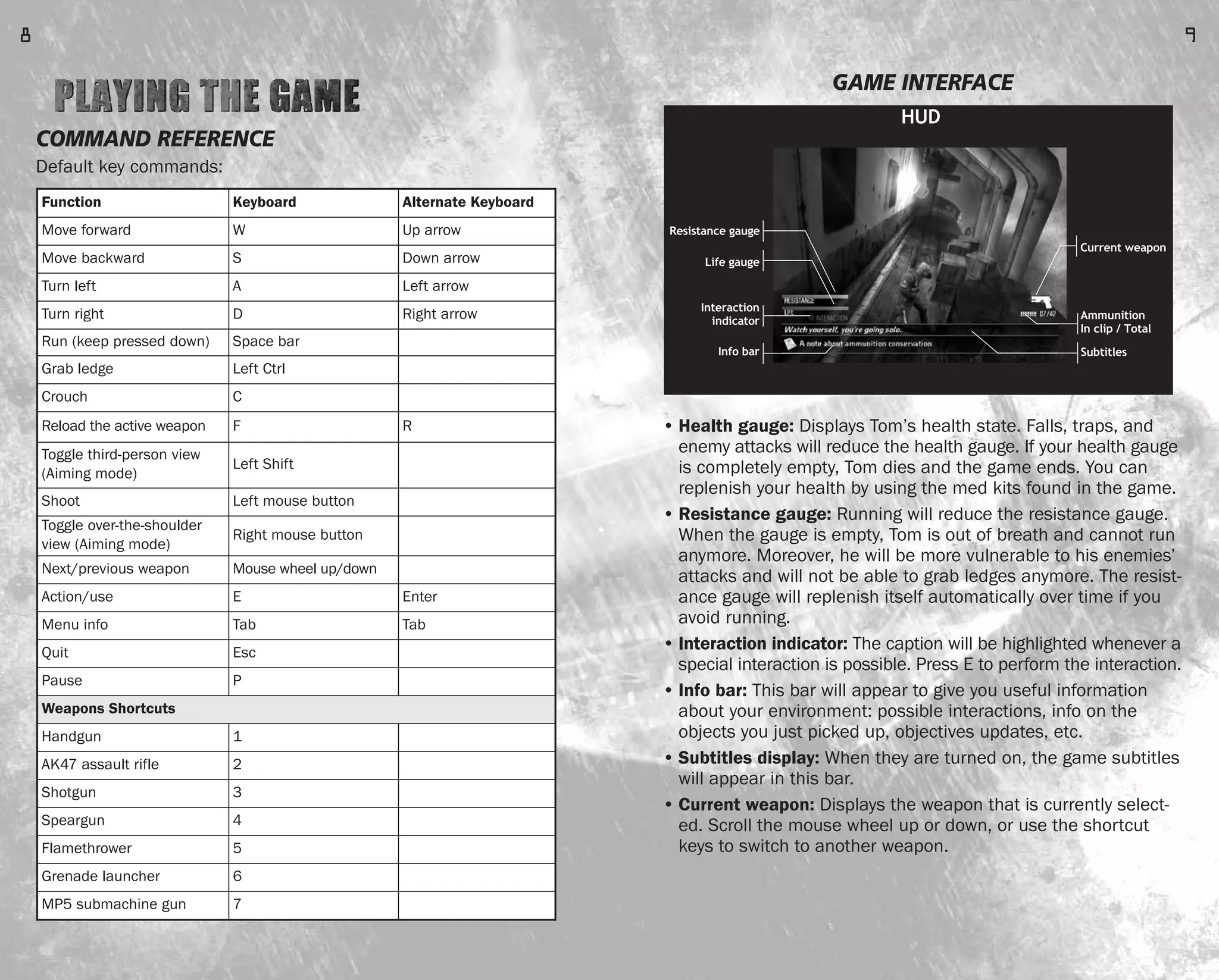
GAME INTERFACE
• Health gauge: Displays Tom’s health state. Falls, traps, and
enemy attacks will reduce the health gauge. If your health gauge
is completely empty, Tom dies and the game ends. You can
replenish your health by using the med kits found in the game.
• Resistance gauge: Running will reduce the resistance gauge.
When the gauge is empty, Tom is out of breath and cannot run
anymore. Moreover, he will be more vulnerable to his enemies’
attacks and will not be able to grab ledges anymore. The resist-
ance gauge will replenish itself automatically over time if you
avoid running.
• Interaction indicator: The caption will be highlighted whenever a
special interaction is possible. Press E to perform the interaction.
• Info bar: This bar will appear to give you useful information
about your environment: possible interactions, info on the
objects you just picked up, objectives updates, etc.
• Subtitles display: When they are turned on, the game subtitles
will appear in this bar.
• Current weapon: Displays the weapon that is currently select-
ed. Scroll the mouse wheel up or down, or use the shortcut
keys to switch to another weapon.
Resistance gauge
HUD
Current weapon
Ammunition
In clip / Total
Subtitles
Life gauge
Interaction
indicator
Info bar
9
COMMAND REFERENCE
Default key commands:
Function Keyboard Alternate Keyboard
Move forward W Up arrow
Move backward S Down arrow
Turn left A Left arrow
Turn right D Right arrow
Run (keep pressed down) Space bar
Grab ledge Left Ctrl
Crouch C
Reload the active weapon F R
Toggle third-person view
(Aiming mode)
Left Shift
Shoot Left mouse button
Toggle over-the-shoulder
view (Aiming mode)
Right mouse button
Next/previous weapon Mouse wheel up/down
Action/use E Enter
Menu info Tab Tab
Quit Esc
Pause P
Weapons Shortcuts
Handgun 1
AK47 assault rifle 2
Shotgun 3
Speargun 4
Flamethrower 5
Grenade launcher 6
MP5 submachine gun 7
8
FEAR0365_PCS_MNL.qxd 3/2/05 12:08 PM Page 8
CRITICAL HIT
During combat, some enemies may try to grab you in an attempt
to strangle or bite you. When a critical hit is possible, a status
bar will appear on the screen. Press E repeatedly to fill up the
status bar, then when it’s full, left-click to perform a special criti-
cal hit that will deal lots of damage to your opponent.
The critical hit is impossible if you do not have ammunition for
the weapon used to perform it. However, you’ll still be able to
shove an enemy that grabs you.
SHOVE MOVE
When your weapons are drawn and ready, you can use a shove
move (press F) to repel an enemy that is closing in on you. This is
especially useful when you are low on ammunition or when the
enemy is too close and threatens to grab you.
Note that the shove move can also be employed to use or break
many interactive objects in the game (crates, electric transform-
ers, etc.).
AVOIDING A FALL
At some points in the game you will be confronted with narrow
catwalks and unsecured decks. If Tom loses his balance and
begins to fall, just move in the opposite direction of the fall. Tom
will avoid the fall by grabbing on to a ledge or handrail. You can
then climb back up by moving in the direction you want to go.
GRAB LEDGE
When you shoot at long range in an unsteady environment, you
can use the left Ctrl key to grab on to nearby handrails to steady
your aim. Grabbing will also prevent you from losing your balance
on decks when the angle is too steep.
SEARCHING DEAD BODIES FOR ITEMS
Ammunition is scarce in Cold Fear, so you will often have to look
around for additional ammo clips. You can also search dead bod-
ies and pick up their loads. To do this, approach a dead body
(the Action caption will appear), and then press the E key to
search the corpse.
11
• Ammunition: Shows how much ammunition you have left for
the currently selected weapon. The first figure shows the
ammunition left in the current clip; the second indicates the
total amount of ammunition left for this weapon. Press F to
reload your weapon.
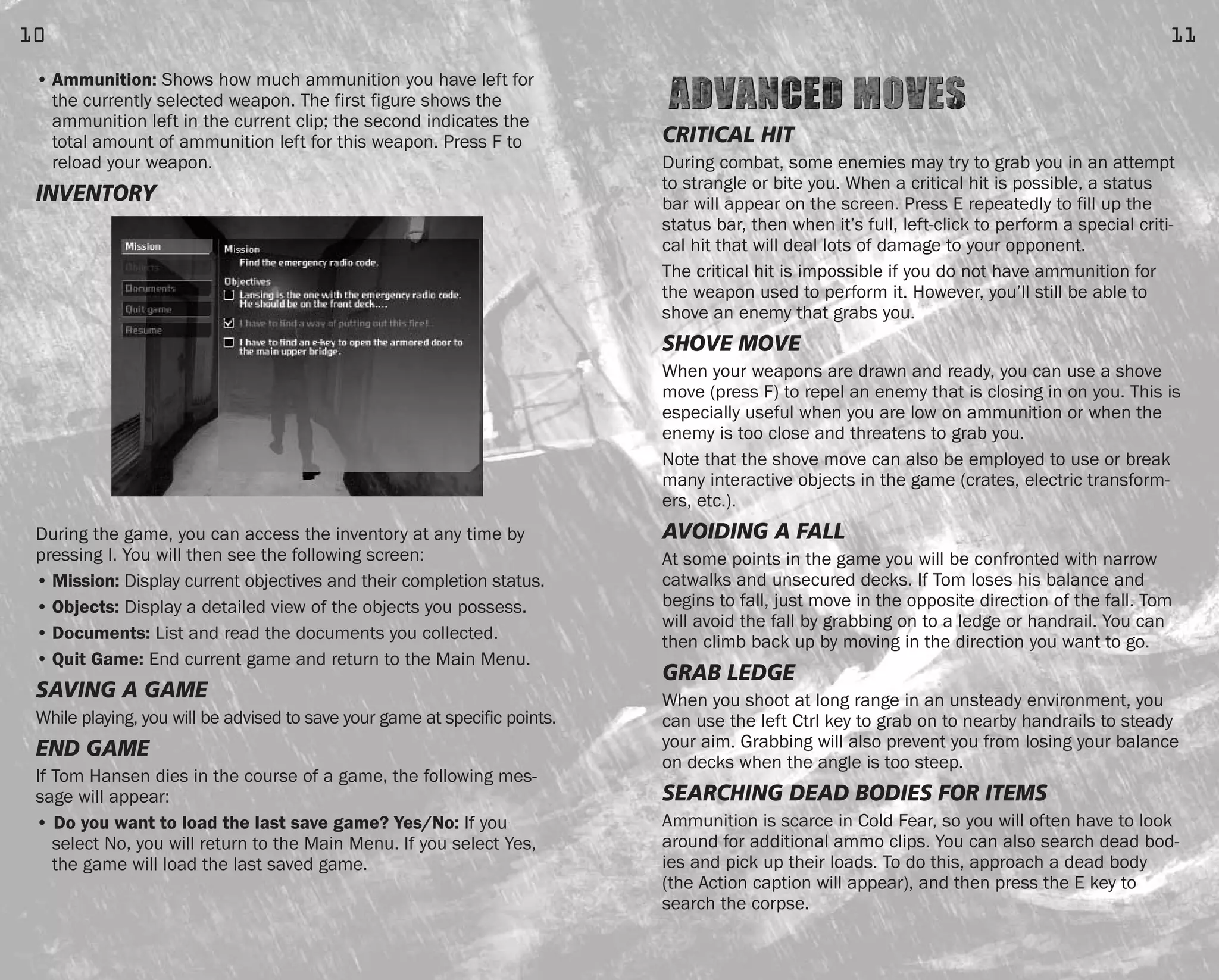
INVENTORY
During the game, you can access the inventory at any time by
pressing I. You will then see the following screen:
• Mission: Display current objectives and their completion status.
• Objects: Display a detailed view of the objects you possess.
• Documents: List and read the documents you collected.
• Quit Game: End current game and return to the Main Menu.
SAVING A GAME
While playing, you will be advised to save your game at specific points.
END GAME
If Tom Hansen dies in the course of a game, the following mes-
sage will appear:
• Do you want to load the last save game? Yes/No: If you
select No, you will return to the Main Menu. If you select Yes,
the game will load the last saved game.
10
FEAR0365_PCS_MNL.qxd 3/2/05 12:08 PM Page 10
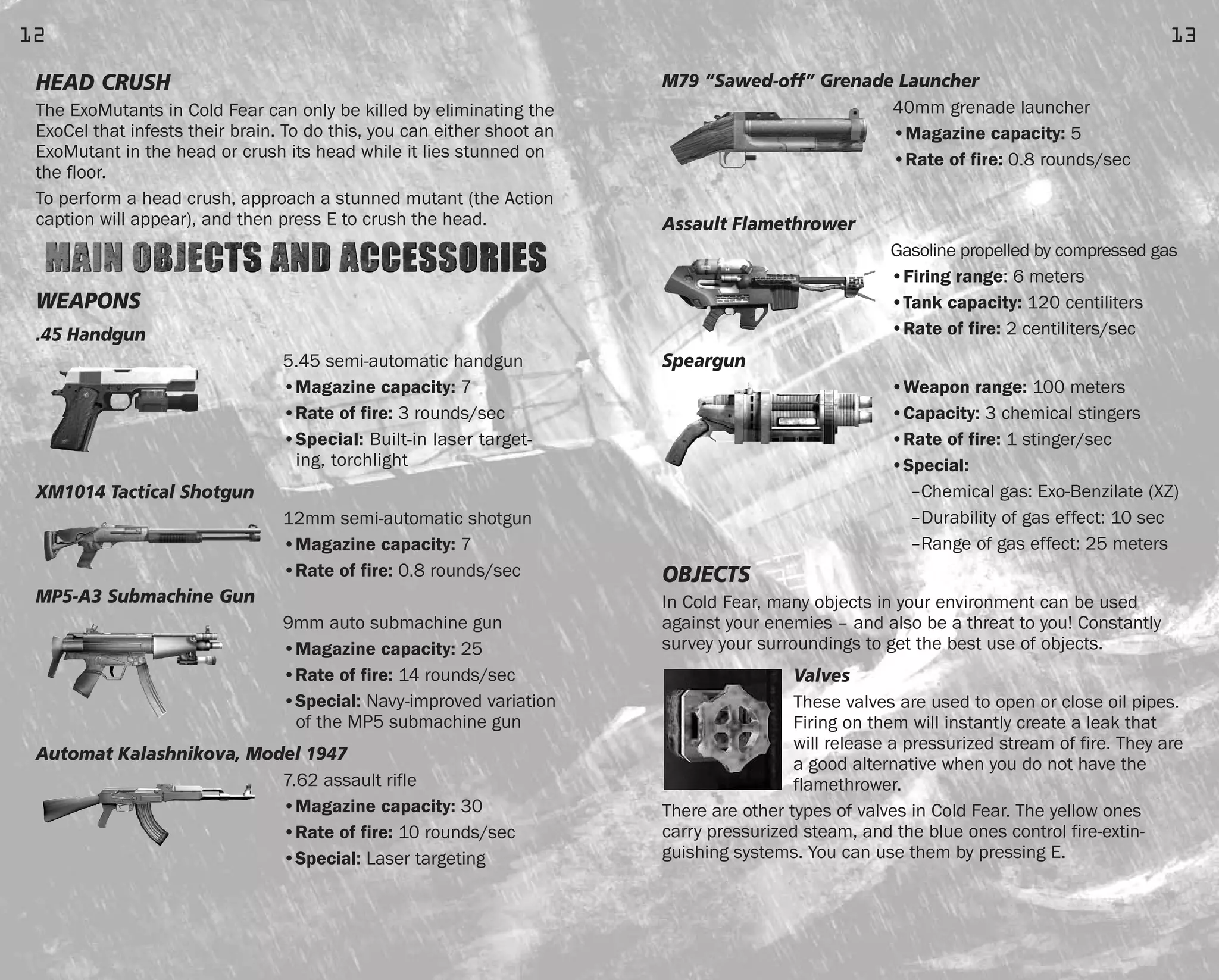
M79 “Sawed-off” Grenade Launcher
40mm grenade launcher
•Magazine capacity: 5
•Rate of fire: 0.8 rounds/sec
Assault Flamethrower
Gasoline propelled by compressed gas
•Firing range: 6 meters
•Tank capacity: 120 centiliters
•Rate of fire: 2 centiliters/sec
Speargun
•Weapon range: 100 meters
•Capacity: 3 chemical stingers
•Rate of fire: 1 stinger/sec
•Special:
–Chemical gas: Exo-Benzilate (XZ)
–Durability of gas effect: 10 sec
–Range of gas effect: 25 meters
OBJECTS
In Cold Fear, many objects in your environment can be used
against your enemies – and also be a threat to you! Constantly
survey your surroundings to get the best use of objects.
Valves
These valves are used to open or close oil pipes.
Firing on them will instantly create a leak that
will release a pressurized stream of fire. They are
a good alternative when you do not have the
flamethrower.
There are other types of valves in Cold Fear. The yellow ones
carry pressurized steam, and the blue ones control fire-extin-
guishing systems. You can use them by pressing E.
13
HEAD CRUSH
The ExoMutants in Cold Fear can only be killed by eliminating the
ExoCel that infests their brain. To do this, you can either shoot an
ExoMutant in the head or crush its head while it lies stunned on
the floor.
To perform a head crush, approach a stunned mutant (the Action
caption will appear), and then press E to crush the head.
WEAPONS
.45 Handgun
5.45 semi-automatic handgun
•Magazine capacity: 7
•Rate of fire: 3 rounds/sec
•Special: Built-in laser target-
ing, torchlight
XM1014 Tactical Shotgun
12mm semi-automatic shotgun
•Magazine capacity: 7
•Rate of fire: 0.8 rounds/sec
MP5-A3 Submachine Gun
9mm auto submachine gun
•Magazine capacity: 25
•Rate of fire: 14 rounds/sec
•Special: Navy-improved variation
of the MP5 submachine gun
Automat Kalashnikova, Model 1947
7.62 assault rifle
•Magazine capacity: 30
•Rate of fire: 10 rounds/sec
•Special: Laser targeting
12
FEAR0365_PCS_MNL.qxd 3/2/05 12:08 PM Page 12
Documents
You will find many documents scattered around that will help you
uncover the mysteries behind the Cold Fear story. Some will give
you useful information about surviving in your environment.
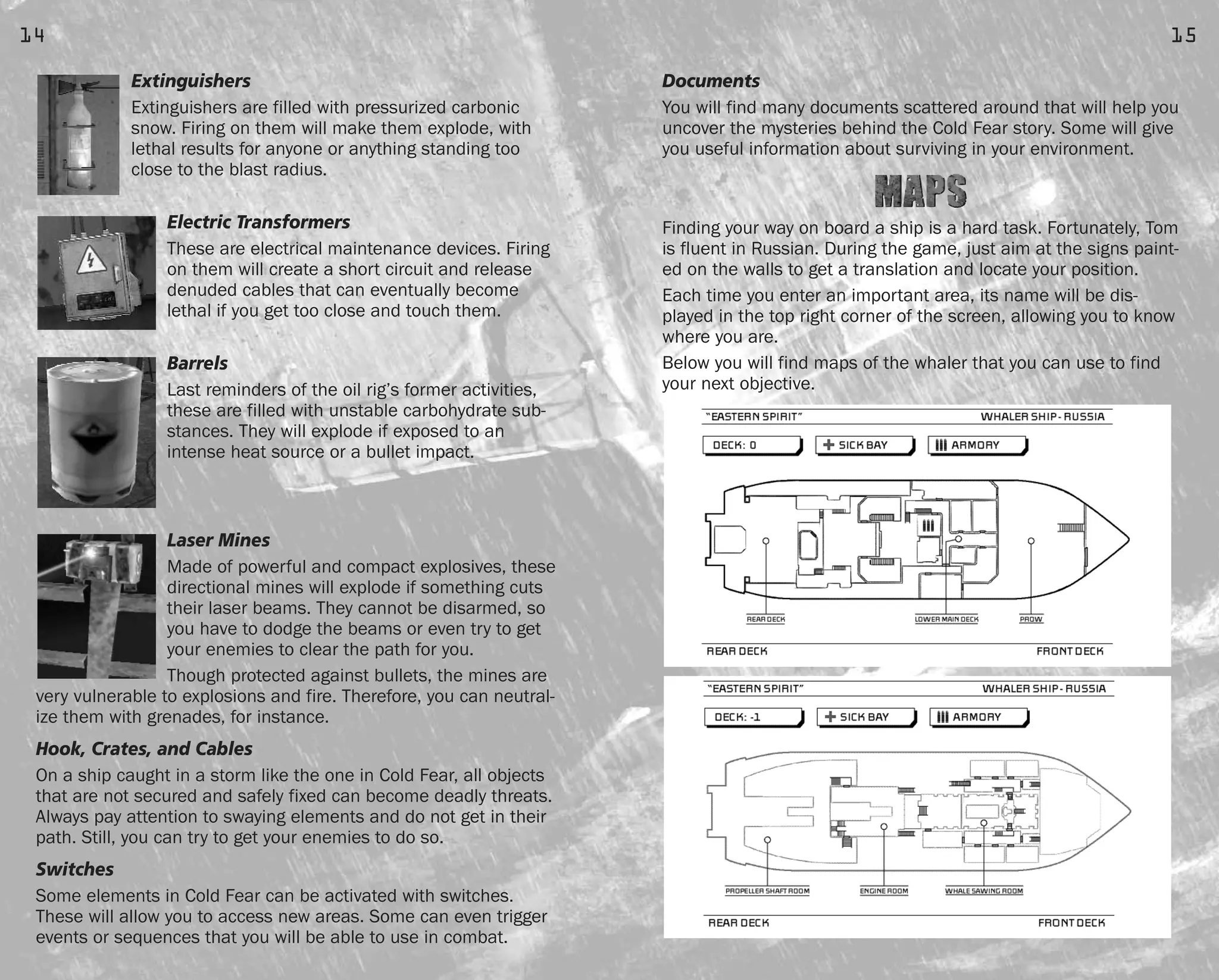
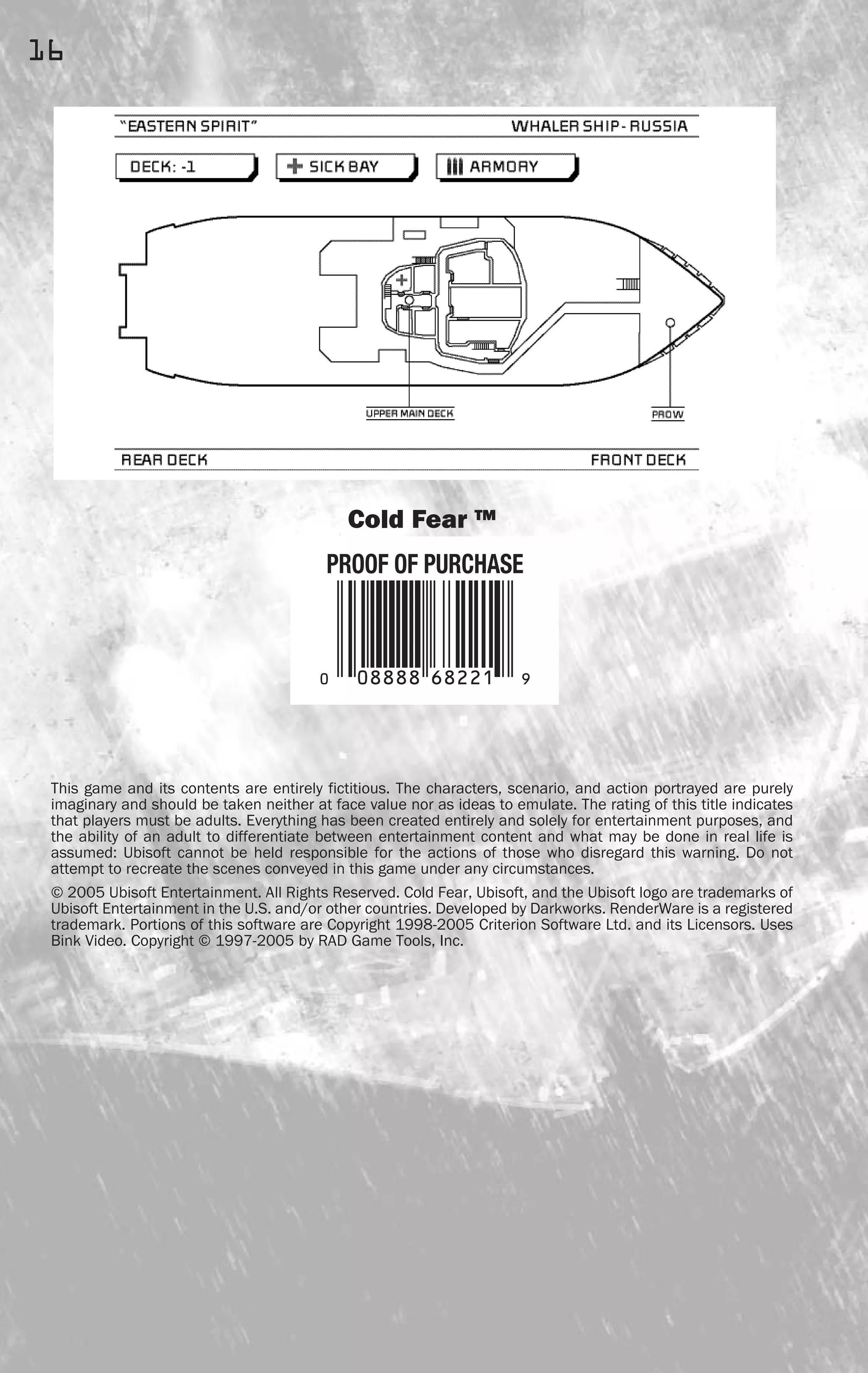
Finding your way on board a ship is a hard task. Fortunately, Tom
is fluent in Russian. During the game, just aim at the signs paint-
ed on the walls to get a translation and locate your position.
Each time you enter an important area, its name will be dis-
played in the top right corner of the screen, allowing you to know
where you are.
Below you will find maps of the whaler that you can use to find
your next objective.
15
Extinguishers
Extinguishers are filled with pressurized carbonic
snow. Firing on them will make them explode, with
lethal results for anyone or anything standing too
close to the blast radius.
Electric Transformers
These are electrical maintenance devices. Firing
on them will create a short circuit and release
denuded cables that can eventually become
lethal if you get too close and touch them.
Barrels
Last reminders of the oil rig’s former activities,
these are filled with unstable carbohydrate sub-
stances. They will explode if exposed to an
intense heat source or a bullet impact.
Laser Mines
Made of powerful and compact explosives, these
directional mines will explode if something cuts
their laser beams. They cannot be disarmed, so
you have to dodge the beams or even try to get
your enemies to clear the path for you.
Though protected against bullets, the mines are
very vulnerable to explosions and fire. Therefore, you can neutral-
ize them with grenades, for instance.
Hook, Crates, and Cables
On a ship caught in a storm like the one in Cold Fear, all objects
that are not secured and safely fixed can become deadly threats.
Always pay attention to swaying elements and do not get in their
path. Still, you can try to get your enemies to do so.
Switches
Some elements in Cold Fear can be activated with switches.
These will allow you to access new areas. Some can even trigger
events or sequences that you will be able to use in combat.
14
FEAR0365_PCS_MNL.qxd 3/2/05 12:08 PM Page 14
Cold Fear ™
This game and its contents are entirely fictitious. The characters, scenario, and action portrayed are purely
imaginary and should be taken neither at face value nor as ideas to emulate. The rating of this title indicates
that players must be adults. Everything has been created entirely and solely for entertainment purposes, and
the ability of an adult to differentiate between entertainment content and what may be done in real life is
assumed: Ubisoft cannot be held responsible for the actions of those who disregard this warning. Do not
attempt to recreate the scenes conveyed in this game under any circumstances.
© 2005 Ubisoft Entertainment. All Rights Reserved. Cold Fear, Ubisoft, and the Ubisoft logo are trademarks of
Ubisoft Entertainment in the U.S. and/or other countries. Developed by Darkworks. RenderWare is a registered
trademark. Portions of this software are Copyright 1998-2005 Criterion Software Ltd. and its Licensors. Uses
Bink Video. Copyright © 1997-2005 by RAD Game Tools, Inc.
16
FEAR0365_PCS_MNL.qxd 3/2/05 12:08 PM Page 16

Manual

  • 1.
    LeaderRegistrationsUbisoft POBox67560 Albuquerque,NM87193 512219-MNL Ubisoft, Inc. ·625 Third Street · Third Floor · San Francisco, CA 94107 © 2005 Ubisoft Entertainment. All Rights Reserved. Sam Fisher, Splinter Cell, Splinter Cell Chaos Theory, the Soldier Icon, Ubisoft, Ubi.com, and the Ubisoft logo are trademarks of Ubisoft Entertainment in the U.S. and/or other countries. Software platform logo TM and © IEMA 2003. *Source: According to NPD Group, Inc., December 2003. Made in the U.S.A. FREE2-DAY SHIPPING!* Buy online and avoid the lines with FREE 2-day shipping from the Ubisoft Store. Enter 2DAYFREE at checkout! Spend your time playing this game, while we deliver the next one, shipped FREE! *To redeem this coupon,go to http://store.ubi.com and enter Coupon Code 2DAYFREE at checkout.Offer expires September 30, 2005.Offer applies to your next purchase at the Ubisoft Store.Products subject to availability.May not be combined with any other promotional offers or discounts,applied to previous orders, substituted,exchanged,sold,or redeemed for cash or other goods or services.Limit one per customer. Offer valid on orders with U.S.shipping destinations only.Offer only available at http://store.ubi.com. Blood Strong Language Violence solo mode CO-OP MODE SPLINTERCELL.COM available on pc-DVD and all console platforms File Path: Mac 13 HD:JOBS IN PROGRESS:FEAR:FEAR0365_PCS_MNL.job:FEAR0365_PCS_MnlCvr_outer.ai User: Alex Andrist Computer: Alex Andrist’s Computer Date: 03/02/05 - 01:30 PM Print Scale: 100% Handling#: 12
  • 2.
    GETTING STARTED .. . . . . . . . . . . . . . . . . . . . . . . . . . . . . . . . . . . . . . . . . . . . . . . .2 GAME SETUP . . . . . . . . . . . . . . . . . . . . . . . . . . . . . . . . . . . . . . . . . . . . . . . . . . . . .3 STORY . . . . . . . . . . . . . . . . . . . . . . . . . . . . . . . . . . . . . . . . . . . . . . . . . . . . . . . . . . .4 PLAYING THE GAME . . . . . . . . . . . . . . . . . . . . . . . . . . . . . . . . . . . . . . . . . . . . . . . .8 ADVANCED MOVES . . . . . . . . . . . . . . . . . . . . . . . . . . . . . . . . . . . . . . . . . . . . . . .11 MAIN OBJECTS AND ACCESSORIES . . . . . . . . . . . . . . . . . . . . . . . . . . . . . . . . . . .12 MAPS . . . . . . . . . . . . . . . . . . . . . . . . . . . . . . . . . . . . . . . . . . . . . . . . . . . . . . . . . .15 WARRANTY . . . . . . . . . . . . . . . . . . . . . . . . . . . . . . . . . . . . . . . . .inside front cover TECHNICAL SUPPORT . . . . . . . . . . . . . . . . . . . . . . . . . . . . . . . . . .inside back cover 1 FEAR0365_PCS_MNL.qxd 3/2/05 12:08 PM Page 1
  • 3.
    Double-click on thedesktop icon or click once on the icon in the Start menu to launch the game. Left-click from the title screen. You will then access the Main Menu. MAIN MENU Use the mouse or the directional arrows to navigate through the following options, then left-click or press Enter to select. Press the Esc key to cancel and go back to the previous screen. • New game: Start a new game. • Load game: Resume a formerly saved game. • Settings: Access the Options menu to customize certain aspects of the game. • Bonus: Access unlocked bonuses. You can unlock bonuses by completing missions and objectives throughout the game. • Credits: Access game credits. 3 SYSTEM REQUIREMENTS Supported OS: Windows® 2000/XP (only) Processor: 1 GHz processor (2 GHz recommended) RAM: 256 MB (512 MB recommended) Video Card: DirectX® 9 compliant 64 MB (128 MB recommend- ed) (see supported list*) Sound Card: DirectX 9 compliant DirectX Version: DirectX 9 (included on disc) DVD-ROM: 8x DVD-ROM or better Hard Drive Space: 2.2 GB Peripherals Supported: Mouse, keyboard, Windows-compliant gaming pad. *Supported Video Cards at Time of Release NVIDIA® GeForce™ 3/4/FX/6 series (GeForce 4MX not supported) ATI® RADEON® 8500/9000/X series Laptop versions of these chips may work but are not supported. These chipsets are the only ones that will run this game. Additional chipsets may be supported after release. For an up-to- date list of supported chipsets, please visit the FAQ for this game on our support website at: http://support.ubi.com. NOTICE: This game contains technology intended to prevent copy- ing that may conflict with some DVD-RW and virtual drives. INSTALLATION Installing Cold Fear™ Insert the game disc into your DVD drive. If you have enabled the autorun option, the game installation will start automatically. Otherwise, double-click on the DVD-ROM icon in the My Computer menu. Find setup.exe in the list of files and folders and double- click on it to start the installation process. Follow the installation wizard guide to successfully install the game on your computer. Uninstalling Cold Fear To uninstall the game, click on the Game Uninstall icon in the Start menu. Follow the uninstallation wizard guide to successfully uninstall the game from your computer. 2 FEAR0365_PCS_MNL.qxd 3/2/05 12:08 PM Page 2
  • 4.
    CHARACTERS Tom Hansen Once ahero, now disgraced, Hansen is happy to fade into the woodwork as just one more guy out there saving lives with the Coast Guard. All that changes when his vessel receives an order to rescue a whal- ing ship during a raging storm. What he finds there will reawaken the dying embers of his spirit, if it doesn’t kill him first. Dr. Viktor Kamsky Brilliant scientist and devoted father, Kamsky leads the research effort on the isolated drilling platform. His discoveries could threaten all humanity – and cost him his own in the bargain. Anna Kamsky The daughter of scientist Viktor Kamsky, she has been kept as a hostage to ensure his cooperation. Rebellious and strong-willed, she finds herself forced to make an impossible decision if she wants to survive. CIA Agent Jason Bennett Agent Bennett has been watching the situation for a long time. Patiently, like a spider in the center of its web, he’s been waiting for his chance to unravel the mystery – no matter how many lives it takes to do so. 5 OPTIONS MENU From this screen you’ll be able to customize the main settings of the game. • Controller options: Set up key assignments. • Sound configuration: Set the music, sound effects, and voice effects levels. • Screen configuration: Set screen display options. • Subtitles: Toggle in-game subtitles on and off. OVERVIEW Tom Hansen is just another guy in the U.S. Coast Guard when his crew receives a mysterious order to undertake a hazardous res- cue mission in the teeth of a winter storm. As the waves surge higher, Tom and his crewmates find the vessel, an abandoned Russian whaling ship. They board it, but discover that the ship has only been abandoned by human life. Something else is on board, something deadly, and soon Hansen is the only one left who can stop it. Joining forces with the only other survivor, Hansen must battle the inhuman menace and seek out its very heart for a con- frontation that could have consequences for all of humanity. 4 FEAR0365_PCS_MNL.qxd 3/2/05 12:08 PM Page 4
  • 5.
    Exo-B 7.0/ExoMass Not allexperiments go as planned. Deformed and mutated, this creature has uncanny strength and an undying rage. Willing and able to punch through steel doors to seek its prey, this creature will never aban- don the hunt. Exo-N 3.5/ExoNest These shapeless monstrosities exist only to breed. Mothers to the contaminators, they send their chil- dren out into the world to seek new victims. Exo-CL 3.0/ExoCel Contaminator ExoCels live to spread their infection. Fast and agile, they seek weak or dying prey to serve as hosts for their parasitic needs. If they can’t find a suitable victim, they’ll be happy to make one. 7 ENEMIES Mercenaries (Uninfected) Hired to protect the mysterious oil rig, these former soldiers shoot on sight and shoot to kill. But nothing they’ve seen or done has prepared them for what they’re about to face. The Exos The results of Dr. Kamsky’s experiments. All of his specimens mysteriously broke loose and started infecting and hunting any- one they could find on the oil rig and the whaler. The Exos vary a lot in shape and behavior, but all are aggressive and deadly. Exo-M 1.1/ExoMutant No longer human, these creatures are savage, mind- less, and hungry. Blessed with inhuman strength and cursed with a hunger for flesh, they attack relentlessly. Exo-ME 2.0/ExoMutant Not all mutants are created equal. These are smarter, stronger, and faster than their counterparts – making them that much more dangerous. The only way to per- manently get rid of them is to kill the parasite that resides in their craniums. Exo-S 5.2/ExoShade There are plenty of reasons to be afraid of the dark, and this creature is the biggest one. Able to see per- fectly in darkness, it hunts from the shadows and attacks without mercy. Exo-G 4.3/ExoSpectre What you can’t see can hurt you. Able to blend in perfectly with its surroundings, this escaped experi- ment has a killer’s instincts. 6 FEAR0365_PCS_MNL.qxd 3/2/05 12:08 PM Page 6
  • 6.
    GAME INTERFACE • Healthgauge: Displays Tom’s health state. Falls, traps, and enemy attacks will reduce the health gauge. If your health gauge is completely empty, Tom dies and the game ends. You can replenish your health by using the med kits found in the game. • Resistance gauge: Running will reduce the resistance gauge. When the gauge is empty, Tom is out of breath and cannot run anymore. Moreover, he will be more vulnerable to his enemies’ attacks and will not be able to grab ledges anymore. The resist- ance gauge will replenish itself automatically over time if you avoid running. • Interaction indicator: The caption will be highlighted whenever a special interaction is possible. Press E to perform the interaction. • Info bar: This bar will appear to give you useful information about your environment: possible interactions, info on the objects you just picked up, objectives updates, etc. • Subtitles display: When they are turned on, the game subtitles will appear in this bar. • Current weapon: Displays the weapon that is currently select- ed. Scroll the mouse wheel up or down, or use the shortcut keys to switch to another weapon. Resistance gauge HUD Current weapon Ammunition In clip / Total Subtitles Life gauge Interaction indicator Info bar 9 COMMAND REFERENCE Default key commands: Function Keyboard Alternate Keyboard Move forward W Up arrow Move backward S Down arrow Turn left A Left arrow Turn right D Right arrow Run (keep pressed down) Space bar Grab ledge Left Ctrl Crouch C Reload the active weapon F R Toggle third-person view (Aiming mode) Left Shift Shoot Left mouse button Toggle over-the-shoulder view (Aiming mode) Right mouse button Next/previous weapon Mouse wheel up/down Action/use E Enter Menu info Tab Tab Quit Esc Pause P Weapons Shortcuts Handgun 1 AK47 assault rifle 2 Shotgun 3 Speargun 4 Flamethrower 5 Grenade launcher 6 MP5 submachine gun 7 8 FEAR0365_PCS_MNL.qxd 3/2/05 12:08 PM Page 8
  • 7.
    CRITICAL HIT During combat,some enemies may try to grab you in an attempt to strangle or bite you. When a critical hit is possible, a status bar will appear on the screen. Press E repeatedly to fill up the status bar, then when it’s full, left-click to perform a special criti- cal hit that will deal lots of damage to your opponent. The critical hit is impossible if you do not have ammunition for the weapon used to perform it. However, you’ll still be able to shove an enemy that grabs you. SHOVE MOVE When your weapons are drawn and ready, you can use a shove move (press F) to repel an enemy that is closing in on you. This is especially useful when you are low on ammunition or when the enemy is too close and threatens to grab you. Note that the shove move can also be employed to use or break many interactive objects in the game (crates, electric transform- ers, etc.). AVOIDING A FALL At some points in the game you will be confronted with narrow catwalks and unsecured decks. If Tom loses his balance and begins to fall, just move in the opposite direction of the fall. Tom will avoid the fall by grabbing on to a ledge or handrail. You can then climb back up by moving in the direction you want to go. GRAB LEDGE When you shoot at long range in an unsteady environment, you can use the left Ctrl key to grab on to nearby handrails to steady your aim. Grabbing will also prevent you from losing your balance on decks when the angle is too steep. SEARCHING DEAD BODIES FOR ITEMS Ammunition is scarce in Cold Fear, so you will often have to look around for additional ammo clips. You can also search dead bod- ies and pick up their loads. To do this, approach a dead body (the Action caption will appear), and then press the E key to search the corpse. 11 • Ammunition: Shows how much ammunition you have left for the currently selected weapon. The first figure shows the ammunition left in the current clip; the second indicates the total amount of ammunition left for this weapon. Press F to reload your weapon. INVENTORY During the game, you can access the inventory at any time by pressing I. You will then see the following screen: • Mission: Display current objectives and their completion status. • Objects: Display a detailed view of the objects you possess. • Documents: List and read the documents you collected. • Quit Game: End current game and return to the Main Menu. SAVING A GAME While playing, you will be advised to save your game at specific points. END GAME If Tom Hansen dies in the course of a game, the following mes- sage will appear: • Do you want to load the last save game? Yes/No: If you select No, you will return to the Main Menu. If you select Yes, the game will load the last saved game. 10 FEAR0365_PCS_MNL.qxd 3/2/05 12:08 PM Page 10
  • 8.
    M79 “Sawed-off” GrenadeLauncher 40mm grenade launcher •Magazine capacity: 5 •Rate of fire: 0.8 rounds/sec Assault Flamethrower Gasoline propelled by compressed gas •Firing range: 6 meters •Tank capacity: 120 centiliters •Rate of fire: 2 centiliters/sec Speargun •Weapon range: 100 meters •Capacity: 3 chemical stingers •Rate of fire: 1 stinger/sec •Special: –Chemical gas: Exo-Benzilate (XZ) –Durability of gas effect: 10 sec –Range of gas effect: 25 meters OBJECTS In Cold Fear, many objects in your environment can be used against your enemies – and also be a threat to you! Constantly survey your surroundings to get the best use of objects. Valves These valves are used to open or close oil pipes. Firing on them will instantly create a leak that will release a pressurized stream of fire. They are a good alternative when you do not have the flamethrower. There are other types of valves in Cold Fear. The yellow ones carry pressurized steam, and the blue ones control fire-extin- guishing systems. You can use them by pressing E. 13 HEAD CRUSH The ExoMutants in Cold Fear can only be killed by eliminating the ExoCel that infests their brain. To do this, you can either shoot an ExoMutant in the head or crush its head while it lies stunned on the floor. To perform a head crush, approach a stunned mutant (the Action caption will appear), and then press E to crush the head. WEAPONS .45 Handgun 5.45 semi-automatic handgun •Magazine capacity: 7 •Rate of fire: 3 rounds/sec •Special: Built-in laser target- ing, torchlight XM1014 Tactical Shotgun 12mm semi-automatic shotgun •Magazine capacity: 7 •Rate of fire: 0.8 rounds/sec MP5-A3 Submachine Gun 9mm auto submachine gun •Magazine capacity: 25 •Rate of fire: 14 rounds/sec •Special: Navy-improved variation of the MP5 submachine gun Automat Kalashnikova, Model 1947 7.62 assault rifle •Magazine capacity: 30 •Rate of fire: 10 rounds/sec •Special: Laser targeting 12 FEAR0365_PCS_MNL.qxd 3/2/05 12:08 PM Page 12
  • 9.
    Documents You will findmany documents scattered around that will help you uncover the mysteries behind the Cold Fear story. Some will give you useful information about surviving in your environment. Finding your way on board a ship is a hard task. Fortunately, Tom is fluent in Russian. During the game, just aim at the signs paint- ed on the walls to get a translation and locate your position. Each time you enter an important area, its name will be dis- played in the top right corner of the screen, allowing you to know where you are. Below you will find maps of the whaler that you can use to find your next objective. 15 Extinguishers Extinguishers are filled with pressurized carbonic snow. Firing on them will make them explode, with lethal results for anyone or anything standing too close to the blast radius. Electric Transformers These are electrical maintenance devices. Firing on them will create a short circuit and release denuded cables that can eventually become lethal if you get too close and touch them. Barrels Last reminders of the oil rig’s former activities, these are filled with unstable carbohydrate sub- stances. They will explode if exposed to an intense heat source or a bullet impact. Laser Mines Made of powerful and compact explosives, these directional mines will explode if something cuts their laser beams. They cannot be disarmed, so you have to dodge the beams or even try to get your enemies to clear the path for you. Though protected against bullets, the mines are very vulnerable to explosions and fire. Therefore, you can neutral- ize them with grenades, for instance. Hook, Crates, and Cables On a ship caught in a storm like the one in Cold Fear, all objects that are not secured and safely fixed can become deadly threats. Always pay attention to swaying elements and do not get in their path. Still, you can try to get your enemies to do so. Switches Some elements in Cold Fear can be activated with switches. These will allow you to access new areas. Some can even trigger events or sequences that you will be able to use in combat. 14 FEAR0365_PCS_MNL.qxd 3/2/05 12:08 PM Page 14
  • 10.
    Cold Fear ™ Thisgame and its contents are entirely fictitious. The characters, scenario, and action portrayed are purely imaginary and should be taken neither at face value nor as ideas to emulate. The rating of this title indicates that players must be adults. Everything has been created entirely and solely for entertainment purposes, and the ability of an adult to differentiate between entertainment content and what may be done in real life is assumed: Ubisoft cannot be held responsible for the actions of those who disregard this warning. Do not attempt to recreate the scenes conveyed in this game under any circumstances. © 2005 Ubisoft Entertainment. All Rights Reserved. Cold Fear, Ubisoft, and the Ubisoft logo are trademarks of Ubisoft Entertainment in the U.S. and/or other countries. Developed by Darkworks. RenderWare is a registered trademark. Portions of this software are Copyright 1998-2005 Criterion Software Ltd. and its Licensors. Uses Bink Video. Copyright © 1997-2005 by RAD Game Tools, Inc. 16 FEAR0365_PCS_MNL.qxd 3/2/05 12:08 PM Page 16