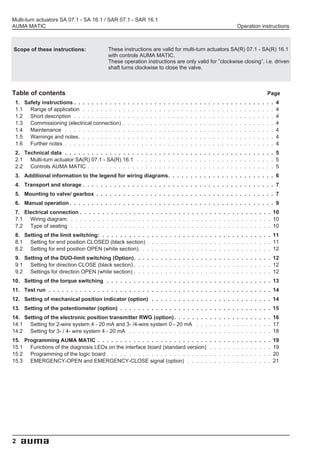
Multi-turn actuators
SA 07.1 - SA 16.1
SAR 07.1 - SAR 16.1
AUMA MATIC

Operation instructions
Multi-turn actuators SA 07.1 - SA 16.1 / SAR 07.1 - SAR 16.1
AUMA MATIC                                                                                                                                          Operation instructions


Scope of these instructions:             These instructions are valid for multi-turn actuators SA(R) 07.1 - SA(R) 16.1
                                         with controls AUMA MATIC.
                                         These operation instructions are only valid for ”clockwise closing”, i.e. driven
                                         shaft turns clockwise to close the valve.


Table of contents                                                                                                                                                               Page
 1. Safety instructions . . . . . . . . . . .   .   .   .   .   .   .   .   .   .   .   .   .   .   .   .   .   .   .   .   .   .   .   .   .   .   .   .   .   .   .   .   .   .   .   4
 1.1 Range of application . . . . . . . . .     .   .   .   .   .   .   .   .   .   .   .   .   .   .   .   .   .   .   .   .   .   .   .   .   .   .   .   .   .   .   .   .   .   .   4
 1.2 Short description . . . . . . . . . . .    .   .   .   .   .   .   .   .   .   .   .   .   .   .   .   .   .   .   .   .   .   .   .   .   .   .   .   .   .   .   .   .   .   .   4
 1.3 Commissioning (electrical connection)      .   .   .   .   .   .   .   .   .   .   .   .   .   .   .   .   .   .   .   .   .   .   .   .   .   .   .   .   .   .   .   .   .   .   4
 1.4 Maintenance . . . . . . . . . . . . .      .   .   .   .   .   .   .   .   .   .   .   .   .   .   .   .   .   .   .   .   .   .   .   .   .   .   .   .   .   .   .   .   .   .   4
 1.5 Warnings and notes. . . . . . . . . .      .   .   .   .   .   .   .   .   .   .   .   .   .   .   .   .   .   .   .   .   .   .   .   .   .   .   .   .   .   .   .   .   .   .   4
 1.6 Further notes . . . . . . . . . . . . .    .   .   .   .   .   .   .   .   .   .   .   .   .   .   .   .   .   .   .   .   .   .   .   .   .   .   .   .   .   .   .   .   .   .   4
 2. Technical data . . . . . . . . . . . . . . . . . . . . . . . . . . . . . . . . . . . . . . . . . . . . . . . 5
 2.1 Multi-turn actuator SA(R) 07.1 - SA(R) 16.1 . . . . . . . . . . . . . . . . . . . . . . . . . . . . . . . 5
 2.2 Controls AUMA MATIC . . . . . . . . . . . . . . . . . . . . . . . . . . . . . . . . . . . . . . . . . . 5
 3. Additional information to the legend for wiring diagrams. . . . . . . . . . . . . . . . . . . . . . . . 6
 4. Transport and storage . . . . . . . . . . . . . . . . . . . . . . . . . . . . . . . . . . . . . . . . . . . 7
 5. Mounting to valve/ gearbox . . . . . . . . . . . . . . . . . . . . . . . . . . . . . . . . . . . . . . . . 7
 6. Manual operation . . . . . . . . . . . . . . . . . . . . . . . . . . . . . . . . . . . . . . . . . . . . . . 9
 7. Electrical connection . . . . . . . . . . . . . . . . . . . . . . . . . . . . . . . . . . . . . . . . . . . 10
 7.1 Wiring diagram. . . . . . . . . . . . . . . . . . . . . . . . . . . . . . . . . . . . . . . . . . . . . . 10
 7.2 Type of seating . . . . . . . . . . . . . . . . . . . . . . . . . . . . . . . . . . . . . . . . . . . . . 10
 8. Setting of the limit switching: . . . . . . . . . . . . . . . . . . . . . . . . . . . . . . . . . . . . . . 11
 8.1 Setting for end position CLOSED (black section) . . . . . . . . . . . . . . . . . . . . . . . . . . . . 11
 8.2 Setting for end position OPEN (white section). . . . . . . . . . . . . . . . . . . . . . . . . . . . . . 12
 9. Setting of the DUO-limit switching (Option). . . . . . . . . . . . . . . . . . . . . . . . . . . . . . . 12
 9.1 Setting for direction CLOSE (black section) . . . . . . . . . . . . . . . . . . . . . . . . . . . . . . . 12
 9.2 Settings for direction OPEN (white section) . . . . . . . . . . . . . . . . . . . . . . . . . . . . . . . 12
10. Setting of the torque switching . . . . . . . . . . . . . . . . . . . . . . . . . . . . . . . . . . . . . 13
11. Test run . . . . . . . . . . . . . . . . . . . . . . . . . . . . . . . . . . . . . . . . . . . . . . . . . . 14
12. Setting of mechanical position indicator (option) . . . . . . . . . . . . . . . . . . . . . . . . . . . 14
13. Setting of the potentiometer (option) . . . . . . . . . . . . . . . . . . . . . . . . . . . . . . . . . . 15
14. Setting of the electronic position transmitter RWG (option) . . . . . . . . . . . . . . . . . . . . . . 16
14.1 Setting for 2-wire system 4 - 20 mA and 3- /4-wire system 0 - 20 mA . . . . . . . . . . . . . . . . . 17
14.2 Setting for 3- / 4- wire system 4 - 20 mA . . . . . . . . . . . . . . . . . . . . . . . . . . . . . . . . 18
15. Programming AUMA MATIC . . . . . . . . . . . . . . . . . . . . . . . . .                                                .   .   .   .   .   .   .   .   .   .   .   .   .   .   19
15.1 Functions of the diagnosis LEDs on the interface board (standard version)                                              .   .   .   .   .   .   .   .   .   .   .   .   .   .   19
15.2 Programming of the logic board . . . . . . . . . . . . . . . . . . . . . . .                                           .   .   .   .   .   .   .   .   .   .   .   .   .   .   20
15.3 EMERGENCY-OPEN and EMERGENCY-CLOSE signal (option) . . . . .                                                           .   .   .   .   .   .   .   .   .   .   .   .   .   .   21


2
Multi-turn actuators SA 07.1 - SA 16.1 / SAR 07.1 - SAR 16.1
Operation instructions                                                                                  AUMA MATIC


       . . . . . . . . . . . . . . . . . . . . . . . . . . . . . . . . . . . . . . . . . . . . . . . . . . . . . Page
16. Electronic positioner (option) . . . . . . . . . . . . . . . . . . .      .   .   .   .   .   .   .   .   .   .   .   .   .   .   .   .   .   .   .   21
16.1 Technical data . . . . . . . . . . . . . . . . . . . . . . . . . . .     .   .   .   .   .   .   .   .   .   .   .   .   .   .   .   .   .   .   .   21
16.2 Setting . . . . . . . . . . . . . . . . . . . . . . . . . . . . . . .    .   .   .   .   .   .   .   .   .   .   .   .   .   .   .   .   .   .   .   21
16.3 Positioner adjustment end position CLOSED (standard version) .           .   .   .   .   .   .   .   .   .   .   .   .   .   .   .   .   .   .   .   23
16.4 Positioner adjustment end position OPEN (standard version). . .          .   .   .   .   .   .   .   .   .   .   .   .   .   .   .   .   .   .   .   24
16.5 Setting of the sensitivity . . . . . . . . . . . . . . . . . . . . . .   .   .   .   .   .   .   .   .   .   .   .   .   .   .   .   .   .   .   .   25
16.6 Positioner adjustment end position OPEN (inverse operation) . .          .   .   .   .   .   .   .   .   .   .   .   .   .   .   .   .   .   .   .   25
16.7 Positioner adjustment end position CLOSED (inverse operation) .          .   .   .   .   .   .   .   .   .   .   .   .   .   .   .   .   .   .   .   26
16.8 Positioner in Split Range version (option) . . . . . . . . . . . . .     .   .   .   .   .   .   .   .   .   .   .   .   .   .   .   .   .   .   .   27
16.8.1 Split Range: description of functions . . . . . . . . . . . . . . .    .   .   .   .   .   .   .   .   .   .   .   .   .   .   .   .   .   .   .   27
16.8.2 Programming . . . . . . . . . . . . . . . . . . . . . . . . . . .      .   .   .   .   .   .   .   .   .   .   .   .   .   .   .   .   .   .   .   27
16.8.3 Positioner adjustment for Split Range . . . . . . . . . . . . . .      .   .   .   .   .   .   .   .   .   .   .   .   .   .   .   .   .   .   .   27
17. Timer (option) . . . . . . . . . . . . . . . . . . . . . . . . . . . . . . . . . . . . . . . . . . . . . . . 28
17.1 Function of the diagnosis LEDs (timer) . . . . . . . . . . . . . . . . . . . . . . . . . . . . . . . . . 28
17.2 Setting of the timer. . . . . . . . . . . . . . . . . . . . . . . . . . . . . . . . . . . . . . . . . . . . 29
18. Fuses . . . . . . . . . . . . . . . . . . . . . . . . . . . . . . . . . . . . . . . . . . . . . . . . . . . 30
19. Maintenance . . . . . . . . . . . . . . . . . . . . . . . . . . . . . . . . . . . . . . . . . . . . . . . . 30
20. Tester for AUMA MATIC . . . . . . . . . . . . . . . . . . . . . . . . . . . . . . . . . . . . . . . . . 31
21. Declaration of Conformity and Declaration of Incorporation . . . . . . . . . . . . . . . . . . . . . 33
     Index . . . . . . . . . . . . . . . . . . . . . . . . . . . . . . . . . . . . . . . . . . . . . . . . . . . . 34
     Addresses of AUMA offices and representatives. . . . . . . . . . . . . . . . . . . . . . . . . . . . 35


                                                                                                                                                               3
Multi-turn actuators SA 07.1 - SA 16.1 / SAR 07.1 - SAR 16.1
AUMA MATIC                                                                                      Operation instructions


1.   Safety instructions
1.1 Range of application               AUMA actuators are designed for the operation of industrial valves, e.g.
                                       globe valves, gate valves, butterfly valves and ball valves.
                                       For other applications, please consult us. AUMA is not liable for any possi-
                                       ble damages resulting from use in other than the designated applications.
                                       Such risk lies entirely with the user.
                                       Observance of these operation instructions is considered as part of the ac-
                                       tuator’s designated use.
1.2 Short description                  AUMA multi-turn actuators type SA(R) 07.1 - SA(R) 16 have a modular de-
                                       sign. Multi-turn actuators are driven by an electric motor and controlled with
                                       the electronic controls AUMA MATIC, which are included in the scope of
                                       supply. The limitation of travel is realised via limit switches in both end posi-
                                       tions. Torque seating is also possible in both end positions. The type of
                                       seating is stated by the valve manufacturer.
1.3 Commissioning                      During electrical operation certain parts inevitably carry lethal voltages.
    (electrical connection)            Work on the electrical system or equipment must only be carried out by a
                                       skilled electrician himself or by specially instructed personnel under the con-
                                       trol and supervision of such an electrician and in accordance with the appli-
                                       cable electrical engineering rules.
1.4 Maintenance                        The maintenance instructions (refer to page 30) must be observed, other-
                                       wise a safe operation of the actuator is no longer guaranteed.

1.5 Warnings and notes                 Non-observance of the warnings and notes may lead to serious injuries or
                                       damages. Qualified personnel must be thoroughly familiar with all warnings
                                       and notes in these operation instructions.
                                       Correct transport, proper storage, mounting and installation, as well as care-
                                       ful commissioning are essential to ensure a trouble-free and safe operation.
                                       The following references draw special attention to safety-relevant proce-
                                       dures in these operation instructions. Each is marked by the appropriate
                                       pictograph.

                                       This pictograph means: Note!
                                       ”Note” marks activities or procedures which have major influence on the
                                       correct operation. Non-observance of these notes may lead to consequen-
                                       tial damage.

                                       This pictograph means: Electrostatically endangered parts!
                                       If this pictograph is attached to a printed circuit board, it contains parts
                                       which may be damaged or destroyed by electrostatic discharges. If the
                                       boards need to be touched during setting, measurement or for exchange, it
                                       must be assured that immediately before a discharge through contact with
                                       an earthed metallic surface (e.g. the housing) has taken place.

                                       This pictograph means: Warning!
                                       ”Warning” marks activities or procedures which, if not carried out correctly,
                                       can affect the safety of persons or material.


1.6 Further notes                      This pictograph means: Procedure may have been performed by
                              MOV
                                       valve manufacturer!
                                       If actuators are delivered mounted to a valve, this step has been done in the
                              M
                                       valve manufacturer’s plant.
                                       Setting must be checked during commissioning!


4
Multi-turn actuators SA 07.1 - SA 16.1 / SAR 07.1 - SAR 16.1
Operation instructions                                                                                         AUMA MATIC


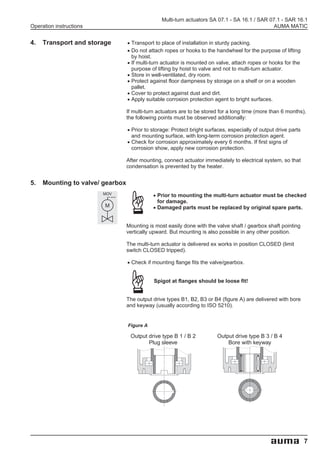
2.   Technical data
2.1 Multi-turn actuator SA(R) 07.1 - SA(R) 16.1
 Type of duty:                    SA:          Standard:     Short-time duty S2 - 15 min
 (according to IEC 34-1/ VDE 0530)             Option:       Short-time duty S2 - 30 min
                                SAR:           Standard:     Intermittent duty S4 - 25 % ED. Permissible
                                                             number of starts see Technical data sheet for SAR
 Limit switching:                              Counter gear mechanism for end positions CLOSED / OPEN
 Torque switching:                             Adjustable torque switching for closing and opening direction
 Speeds:                                       see Technical data sheets for SA and SAR
 Heater in switch compartment:                 approx. 5 W, 24 V, internally supplied
 Motors:                                       3-phase AC motor or 1-phase AC motor
 Motor protection:                             Standard:     3 Thermoswitches
                                               Option:       3 PTC thermistors + PTC tripping device
 Electrical connection:                        Standard:      AUMA plug/socket connector 100 with screw cable terminations.
 Wiring diagram:                               Refer to name plate on AUMA MATIC
 Ambient temperature:                   SA:    – 25 °C to + 70 °C
                                       SAR:    – 25 °C to + 60 °C
 Enclosure protection:                         Standard:     IP 67
 (according to EN 60 529)                      Option:       IP 68
 Finish coating:                               Standard:     two-component iron-mica combination

2.2 Controls AUMA MATIC
 Integral controls AUMA MATIC, type AM 01.1 and AM 02.1, for direct fitting to:
 Multi-turn actuators AUMA NORM SA(R) 07.1 - SA(R) 16.1
 Voltage supply                                Refer to name plate
 Motor controls Reversing contactors:          Standard:      mechanical, electrical, locked, max. 690V AC, max. 7,5 kW
                             Thyristors:       Option:        electronically locked, max. 460V AC, max. 1,5 kW
 External control voltage                      24V DC, galvanically isolated from internal voltage supply
 Binary inputs                                 Standard:      OPEN-STOP-CLOSE
 (input signals)                               Option:        Switch-over AUTOMATIC-MANUAL1) for input signals OPEN-CLOSE
                      Galvanic isolation:      Opto-isolators
                       Nominal voltage:        24 V DC, from internal power supply (max. 50 mA load) or from external source
                          Current input:       10 - 15 mA per input
 Analogue inputs (option)                      see positioner
 Relay outputs                                 – Collective fault signal:
                                                 Phase failure/ motor protection tripped/ torque fault:
                                                 Torque switch operated in mid-travel (can be separated, see table 3, page 20)
                                               – 4 output relays:
                                                 End position OPEN / End position CLOSED/ selector switch LOCAL / selector
                                                 switch REMOTE
 Monitor relay (diagnosis LEDs)                – Phase failure, motor protection tripped
                                               – Torque fault: Torque switch operated in mid-travel
 Analogue output (option)                      Position actual value (galvanically isolated) E2 = 0/4 - 20 mA
 Positioner (option)                           – Input range (position nominal value) E1 = 0/4 - 20 mA
                                                 Input resistance 250 Ohm
                                               – Feedback E2 (position actual value): 0/4 - 20 mA
 Emergency operation (EMERGENCY)               Effective in selector switch positions LOCAL, OFF and REMOTE (see page 21):
 (option)                                      – End position OPEN
                                               – End position CLOSED
 Timer (option)                Parameters:     Stepping time/ pause time independently adjustable (1-30 seconds)
 Local controls                                Standard: Selector switch LOCAL-OFF-REMOTE, lockable
                                                            Push-buttons OPEN-STOP-CLOSE
                                               Option:      Indication lights for end position OPEN, FAULT, end position CLOSED
 Enclosure protection                          Standard:      IP 67
                                               Option:        IP 68
 Temperature range                      SA:    – 25 °C to + 70 °C
                                       SAR:    – 25 °C to + 60 °C
 Electrical connection                         see clause 7, page 10
  1) Only in conjunction with the positioner


                                                                                                                                  5
Multi-turn actuators SA 07.1 - SA 16.1 / SAR 07.1 - SAR 16.1
AUMA MATIC                                                                                      Operation instructions


3.   Additional information to the legend for wiring diagrams
     Information A:                    A running indication is possible with blinker transmitter (S5) installed (open-
                                       ing and closing of contacts)
                                       Direction CLOSE:           Connections XK 6 - XK 7
                                       Direction OPEN:            Connections XK 6 - XK 8
                                       The contacts remain closed in the end positions.
                                       When connected to an external PLC the blinking signal can be switched off
                                       via the DIP-switches (table 3, page 20).

     Information B:                    The type of seating in the end positions is determined by the valve manu-
                                       facturer through setting the programming switches S1-2 and S3-2 (see sub-
                                       clause 15.2, page 20). The tripping of a torque switch in an intermediate po-
                                       sition switches off the actuator and gives a fault signal.
                                       The limit switches serve for signalisation when switching off by torque seat-
                                       ing. They need to be set so that the appropriate switch is tripped shortly be-
                                       fore reaching the end position. If the torque switch trips before the limit
                                       switch, the actuator is switched off and a fault signal is given.
                                       For further programming possibilities, e.g. self-retaining in operation mode
                                       REMOTE, see table 3, page 20.

     Information D:                    The following faults are registered and can be transmitted to the control
                                       room as a potential-free collective fault signal:
                                       - Power failure
                                       - Phase failure
                                       - Motor protection tripped
                                       - Torque switch tripped in mid-travel.
                                         This signal can be switched off in the programming, refer to
                                         table 3, page 20.

     Information E:                    Input signals according to DIN 19 240.
                                       The nominal current of the inputs XK 2; XK 3 and XK 4 is 10-15 mA. If internal
                                       voltage 24 V DC is used for remote control, it must only be connected via
                                       potential-free contacts.

     Information F:                    In case of wrong phase sequence the rotating field is automatically cor-
                                       rected. In case of a phase failure the actuator stops. This fault is indicated
                                       at LED V14 on the interface board. For collective fault signal see informa-
                                       tion D.

     Information G:                    Potential-free contacts are available for signals . The internal control voltage
                                       (XK 11 / + 24 V and XK 5 / – 24V) must not be used for external lamps, re-
                                       lays etc.


6
Multi-turn actuators SA 07.1 - SA 16.1 / SAR 07.1 - SAR 16.1
Operation instructions                                                                             AUMA MATIC


4.   Transport and storage        .
                                  .   Transport to place of installation in sturdy packing.
                                      Do not attach ropes or hooks to the handwheel for the purpose of lifting

                                  .   by hoist.
                                      If multi-turn actuator is mounted on valve, attach ropes or hooks for the

                                  .
                                  .
                                      purpose of lifting by hoist to valve and not to multi-turn actuator.
                                      Store in well-ventilated, dry room.
                                      Protect against floor dampness by storage on a shelf or on a wooden

                                  .
                                  .
                                      pallet.
                                      Cover to protect against dust and dirt.
                                      Apply suitable corrosion protection agent to bright surfaces.

                                  If multi-turn actuators are to be stored for a long time (more than 6 months),
                                  the following points must be observed additionally:

                                  .   Prior to storage: Protect bright surfaces, especially of output drive parts

                                  .   and mounting surface, with long-term corrosion protection agent.
                                      Check for corrosion approximately every 6 months. If first signs of
                                      corrosion show, apply new corrosion protection.

                                  After mounting, connect actuator immediately to electrical system, so that
                                  condensation is prevented by the heater.


5.   Mounting to valve/ gearbox
                         MOV                   .   Prior to mounting the multi-turn actuator must be checked
                         M                     .   for damage.
                                                   Damaged parts must be replaced by original spare parts.


                                  Mounting is most easily done with the valve shaft / gearbox shaft pointing
                                  vertically upward. But mounting is also possible in any other position.

                                  The multi-turn actuator is delivered ex works in position CLOSED (limit
                                  switch CLOSED tripped).

                                  .   Check if mounting flange fits the valve/gearbox.


                                               Spigot at flanges should be loose fit!


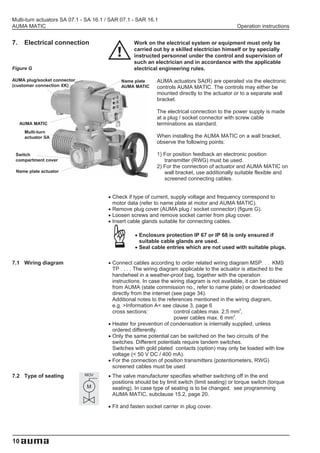
                                  The output drive types B1, B2, B3 or B4 (figure A) are delivered with bore
                                  and keyway (usually according to ISO 5210).


                                  Figure A

                                   Output drive type B 1 / B 2              Output drive type B 3 / B 4
                                          Plug sleeve                           Bore with keyway


                                                                                                                    7
Multi-turn actuators SA 07.1 - SA 16.1 / SAR 07.1 - SAR 16.1
AUMA MATIC                                                                                      Operation instructions


                                       For output drive type A (figure B), thread must match the thread of the valve
                                       stem. If not ordered explicitly with thread, the stem nut is unbored or with pi-
                                       lot bore when delivered. Finish machining of stem nut see below.

                                       .
                                       .   Check whether bore and keyway match the input shaft of valve/gearbox.
                                           Thoroughly degrease mounting faces at multi-turn actuator and valve /

                                       .
                                       .
                                           gearbox.
                                           Apply a small quantity of grease to input shaft of valve / gearbox.
                                           Place actuator on valve / gearbox and fasten. Fasten bolts (at least quality
                                           8.8, refer to table 1) evenly crosswise.

                                                           Table 1
                                                                     8.8           TA (Nm)
                                                                  M 6                 10
                                                                  M 8                 25
                                                                  M 10                50
                                                                  M 12                87
                                                                  M 16               220

                                       Finish machining of stem nut (output drive type A):

                                       Figure B
                                                                     Output drive type A
                                                                         Stem nut

                                                    80.3

                                           80.01/ 80.02

                                                    80.2


                                       The output drive flange does not have to be removed from the actuator.

                                       .   Remove spigot ring (80.2, figure B) with the help of a wrench or similar

                                       .   tool from the mounting flange.
                                           Take off stem nut (80.3) together with thrust bearing (80.01) and thrust

                                       .
                                       .
                                           bearing races (80.02).
                                           Remove thrust bearing and thrust bearing races from stem nut.
                                           Drill and bore stem nut and cut thread

                                       .
                                       .
                                           When fixing in the chuck, make sure stem nut runs true!
                                           Clean the machined stem nut.
                                           Apply ball bearing grease to thrust bearing and races, then place them on

                                       .   stem nut.
                                           Re-insert stem nut with thrust bearings into the mounting flange. Ensure

                                       .
                                       .
                                           that dogs are placed correctly in the slots of the hollow shaft.
                                           Screw in spigot ring until it is firm against the shoulder.
                                           Press a few squirts of grease into the grease nipple with a grease gun.


                                       .
                                       Protection tube for rising valve stem
                                        For protection tubes supplied separately, wire round the thread with hemp

                                       .
                                       .
                                        or teflon band.
                                        Screw protection tube into thread and tighten it firmly.

                                       .
                                       .
                                        For corrosion protection KS/ KX, push down the seal to the housing.
                                        Touch-up possible defects in painting.
                                        Check whether cap is available and not damaged.


8
Multi-turn actuators SA 07.1 - SA 16.1 / SAR 07.1 - SAR 16.1
Operation instructions                                                                  AUMA MATIC


6.   Manual operation                Manual operation should only be engaged when motor is
                                     not running. Switching over while motor is running may lead
                                     to damage at multi-turn actuator (figure C)!


                         .   Lift change-over lever in the center of the handwheel up to max. 85°,
                             while slightly turning the handwheel back and forth until manual drive
                             engages (figure D).

                         Figure C                                Figure D


                                     Manual force is sufficient for operating the change-over
                                     lever. The use of an extension is neither necessary nor
                                     permitted. Excessive force may damage the change-over
                                     mechanism.


                         .   Release change-over lever (should snap back into initial position by
                             spring action). If change-over lever does not snap back, assist with hand
                             to assure that the lever comes to the initial position
                             (figure E).

                         Figure E                                Figure F


                         .   Manual operation remains engaged until motor is started again. Then
                             motor operation is engaged automatically.

                         .   Turn handwheel into desired direction (figure F).


                                     Only operate manually when change-over lever is in its
                                     initial position!


                         .   Manual operation is automatically disengaged when motor is started


                                                                                                         9
Multi-turn actuators SA 07.1 - SA 16.1 / SAR 07.1 - SAR 16.1
AUMA MATIC                                                                                        Operation instructions


7.    Electrical connection                         Work on the electrical system or equipment must only be
                                                    carried out by a skilled electrician himself or by specially
                                                    instructed personnel under the control and supervision of
                                                    such an electrician and in accordance with the applicable
Figure G                                            electrical engineering rules.

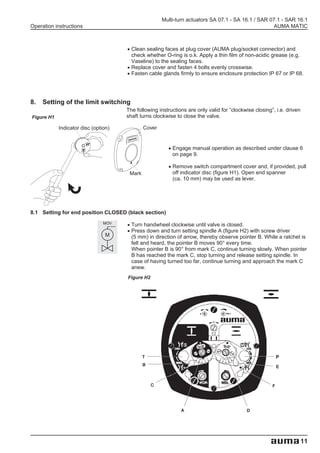
AUMA plug/socket connector                    Name plate       AUMA actuators SA(R) are operated via the electronic
(customer connection XK)                      AUMA MATIC       controls AUMA MATIC. The controls may either be
                                                               mounted directly to the actuator or to a separate wall
                                                               bracket.

                                                               The electrical connection to the power supply is made
                                                               at a plug / socket connector with screw cable
     AUMA MATIC                                                terminations as standard.
      Multi-turn
      actuator SA                                              When installing the AUMA MATIC on a wall bracket,
                                                               observe the following points:

 Switch                                                        1) For position feedback an electronic position
 compartment cover                                                transmitter (RWG) must be used.
                                                               2) For the connection of actuator and AUMA MATIC on
 Name plate actuator                                              wall bracket, use additionally suitable flexible and
                                                                  screened connecting cables.


                                       .   Check if type of current, supply voltage and frequency correspond to

                                       .
                                       .
                                           motor data (refer to name plate at motor and AUMA MATIC).
                                           Remove plug cover (AUMA plug / socket connector) (figure G).

                                       .   Loosen screws and remove socket carrier from plug cover.
                                           Insert cable glands suitable for connecting cables.

                                                    .   Enclosure protection IP 67 or IP 68 is only ensured if

                                                    .   suitable cable glands are used.
                                                        Seal cable entries which are not used with suitable plugs.

7.1 Wiring diagram                     .   Connect cables according to order related wiring diagram MSP. . . KMS
                                           TP . . . . The wiring diagram applicable to the actuator is attached to the
                                           handwheel in a weather-proof bag, together with the operation
                                           instructions. In case the wiring diagram is not available, it can be obtained
                                           from AUMA (state commission no., refer to name plate) or downloaded
                                           directly from the internet (see page 34).
                                           Additional notes to the references mentioned in the wiring diagram,
                                           e.g. >Information A< see clause 3, page 6
                                                                                                   2
                                           cross sections:             control cables max. 2,5 mm ,

                                       .                               power cables max. 6 mm .
                                                                                                2


                                           Heater for prevention of condensation is internally supplied, unless

                                       .   ordered differently.
                                           Only the same potential can be switched on the two circuits of the
                                           switches. Different potentials require tandem switches.
                                           Switches with gold plated contacts (option) may only be loaded with low

                                       .   voltage (< 50 V DC / 400 mA).
                                           For the connection of position transmitters (potentiometers, RWG)
                                           screened cables must be used
7.2 Type of seating          MOV       .   The valve manufacturer specifies whether switching off in the end
                                           positions should be by limit switch (limit seating) or torque switch (torque
                              M            seating). In case type of seating is to be changed, see programming
                                           AUMA MATIC, subclause 15.2, page 20.

                                       .   Fit and fasten socket carrier in plug cover.


10
Multi-turn actuators SA 07.1 - SA 16.1 / SAR 07.1 - SAR 16.1
Operation instructions                                                                                AUMA MATIC


                                      .   Clean sealing faces at plug cover (AUMA plug/socket connector) and
                                          check whether O-ring is o.k. Apply a thin film of non-acidic grease (e.g.

                                      .
                                      .
                                          Vaseline) to the sealing faces.
                                          Replace cover and fasten 4 bolts evenly crosswise.
                                          Fasten cable glands firmly to ensure enclosure protection IP 67 or IP 68.


8.   Setting of the limit switching
                                      The following instructions are only valid for ”clockwise closing”, i.e. driven
Figure H1                             shaft turns clockwise to close the valve.

            Indicator disc (option)            Cover


                                                         .   Engage manual operation as described under clause 6


                                                         .
                                                             on page 9.

                                                             Remove switch compartment cover and, if provided, pull
                                       Mark                  off indicator disc (figure H1). Open end spanner
                                                             (ca. 10 mm) may be used as lever.


8.1 Setting for end position CLOSED (black section)
                                MOV   .
                                      .   Turn handwheel clockwise until valve is closed.
                                          Press down and turn setting spindle A (figure H2) with screw driver
                                 M        (5 mm) in direction of arrow, thereby observe pointer B. While a ratchet is
                                          felt and heard, the pointer B moves 90° every time.
                                          When pointer B is 90° from mark C, continue turning slowly. When pointer
                                          B has reached the mark C, stop turning and release setting spindle. In
                                          case of having turned too far, continue turning and approach the mark C
                                          anew.
                                      Figure H2


                                              T                                                            P
                                              B                                                            E


                                                  C                                                    F


                                                                A                          D


                                                                                                                       11
Multi-turn actuators SA 07.1 - SA 16.1 / SAR 07.1 - SAR 16.1
AUMA MATIC                                                                                      Operation instructions

8.2 Setting for end position OPEN (white section)

                             MOV       .   Turn handwheel counter-clockwise until valve is open, then turn back

                              M        .   approximately 1/2 a turn.
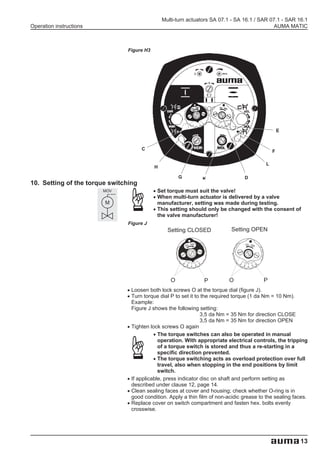
                                           Press down and turn setting spindle D (figure H3) with screw driver
                                           (5 mm) in direction of arrow, thereby observe pointer E. While a ratchet is
                                           felt and heard, the pointer E moves 90° every time.
                                           When pointer E is 90° from mark F, continue turning slowly. When pointer
                                           E has reached the mark F, stop turning and release setting spindle. In
                                           case of having turned too far, continue turning and approach the mark F
                                           anew.


                                       Red test buttons T and P (figure H2) serve for operating the microswitches
                                       of torque and limit switching.


9.   Setting of the DUO-limit switching (Option)
                             MOV                    For setting, the switching point (intermediate position) must
                                                    be approached from the same direction as afterwards in
                              M                     electrical operation.
                                                    Any application can be switched on or off via the two
                                                    intermediate position switches. The switch-on / switch-off
                                                    function is realised through the connection of the appropriate
                                                    NC and NO contacts.

                                       .   Move valve to desired intermediate position.

9.1 Setting for direction CLOSE (black section)

                                       .   Turn setting spindle G (figure H3) with screw driver (5 mm) in direction of
                                           arrow, thereby observe pointer H. While a ratchet is felt and heard, the
                                           pointer H moves 90° every time.
                                           When pointer H is 90° from mark C, continue turning slowly. When pointer
                                           H has reached the mark C, stop turning and release setting spindle. In
                                           case of having turned too far, continue turning and approach the mark C
                                           anew.

9.2 Settings for direction OPEN (white section)

                                       .   Turn setting spindle K (figure H3) with screw driver (5 mm) in direction of
                                           arrow, thereby observe pointer L. While a ratchet is felt and heard, the
                                           pointer L moves 90° every time.
                                           When pointer L is 90° from mark F, continue turning slowly. When pointer
                                           L has reached the mark F, stop turning and release setting spindle. In
                                           case of having turned too far, continue turning and approach the mark F
                                           anew.


12
Multi-turn actuators SA 07.1 - SA 16.1 / SAR 07.1 - SAR 16.1
Operation instructions                                                                          AUMA MATIC


                               Figure H3


                                                                                                     E


                                       C                                                         F

                                                                                             L
                                            H

                                                         G       K                 D
10. Setting of the torque switching
                         MOV                .
                                            .   Set torque must suit the valve!
                                                When multi-turn actuator is delivered by a valve
                         M
                                            .   manufacturer, setting was made during testing.
                                                This setting should only be changed with the consent of
                                                the valve manufacturer!
                               Figure J
                                                   Setting CLOSED             Setting OPEN


                                                     O            P          O              P
                               .
                               .   Loosen both lock screws O at the torque dial (figure J).
                                   Turn torque dial P to set it to the required torque (1 da Nm = 10 Nm).
                                   Example:
                                   Figure J shows the following setting:
                                                                  3,5 da Nm = 35 Nm for direction CLOSE

                               .            .
                                   Tighten lock screws O again
                                                                  3,5 da Nm = 35 Nm for direction OPEN

                                               The torque switches can also be operated in manual
                                               operation. With appropriate electrical controls, the tripping
                                               of a torque switch is stored and thus a re-starting in a

                                            .  specific direction prevented.
                                               The torque switching acts as overload protection over full
                                               travel, also when stopping in the end positions by limit

                               .               switch.
                                   If applicable, press indicator disc on shaft and perform setting as

                               .   described under clause 12, page 14.
                                   Clean sealing faces at cover and housing; check whether O-ring is in

                               .   good condition. Apply a thin film of non-acidic grease to the sealing faces.
                                   Replace cover on switch compartment and fasten hex. bolts evenly
                                   crosswise.


                                                                                                           13
Multi-turn actuators SA 07.1 - SA 16.1 / SAR 07.1 - SAR 16.1
AUMA MATIC                                                                                      Operation instructions


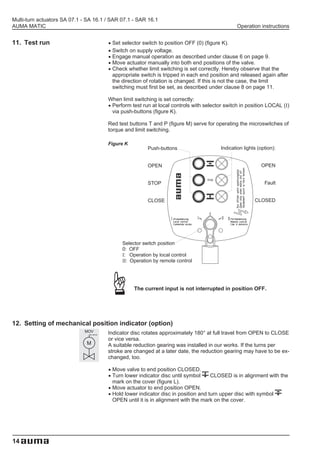
11. Test run                           .
                                       .   Set selector switch to position OFF (0) (figure K).

                                       .
                                       .
                                           Switch on supply voltage.
                                           Engage manual operation as described under clause 6 on page 9.

                                       .   Move actuator manually into both end positions of the valve.
                                           Check whether limit switching is set correctly. Hereby observe that the
                                           appropriate switch is tripped in each end position and released again after
                                           the direction of rotation is changed. If this is not the case, the limit
                                           switching must first be set, as described under clause 8 on page 11.


                                       .
                                       When limit switching is set correctly:
                                        Perform test run at local controls with selector switch in position LOCAL (I)
                                        via push-buttons (figure K).

                                       Red test buttons T and P (figure M) serve for operating the microswitches of
                                       torque and limit switching.

                                       Figure K
                                                          Push-buttons                   Indication lights (option):


                                                          OPEN                                              OPEN


                                                          STOP                                                Fault


                                                          CLOSE                                          CLOSED


                                               Selector switch position
                                               0: OFF
                                               I: Operation by local control
                                               II: Operation by remote control


                                                    The current input is not interrupted in position OFF.


12. Setting of mechanical position indicator (option)
                             MOV       Indicator disc rotates approximately 180° at full travel from OPEN to CLOSE
                                       or vice versa.
                              M        A suitable reduction gearing was installed in our works. If the turns per
                                       stroke are changed at a later date, the reduction gearing may have to be ex-
                                       changed, too.

                                       .
                                       .   Move valve to end position CLOSED.
                                           Turn lower indicator disc until symbol     CLOSED is in alignment with the

                                       .
                                       .
                                           mark on the cover (figure L).
                                           Move actuator to end position OPEN.
                                           Hold lower indicator disc in position and turn upper disc with symbol
                                           OPEN until it is in alignment with the mark on the cover.


14
Multi-turn actuators SA 07.1 - SA 16.1 / SAR 07.1 - SAR 16.1
Operation instructions                                                                           AUMA MATIC


                                Figure L
                                    Indicator disc                                   Cover


                                                                                     Mark


13. Setting of the potentiometer (option)
                               .
                               .   Move valve to end position CLOSED.
                                   Remove switch compartment cover and, if provided, pull off indicator disc

                               .   as described under clause 8, page 11.
                                   Turn potentiometer (R2) clockwise to initial position.
                                   End position CLOSED corresponds to 0 %, end position OPEN to 100 %.

                                               Due to the ratio of the reduction gearings for the position
                                               transmitter the complete resistance range is not always
                                               utilized for the whole travel. Therefore an external possibility
                                               for adjustment (setting potentiometer) must be provided.

                               .
                               .   Perform fine-tuning of the zero point at external setting potentiometer.
                                   If applicable, press indicator disc on shaft and perform setting as

                               .   described under clause 12.
                                   Clean sealing face, check O-Ring, apply a thin film of non-acidic grease to

                               .   sealing face.
                                   Fit and fasten switch compartment cover.


                                Figure M

                                                                                                 Cover
                                                                                                 plate


                                                                                                 R2


                                           T                                                     P


                                                                                                            15
Multi-turn actuators SA 07.1 - SA 16.1 / SAR 07.1 - SAR 16.1
AUMA MATIC                                                                                          Operation instructions


14. Setting of the electronic position transmitter RWG (option)

                                       – For a remote indication or external control –

                                       The electronic position transmitter is set in the factory according to the sig-
                                       nal range stated in the purchase order. Perform a subsequent adjustment
                                       according to subclauses 14.1 or 14.2.

                                       After mounting the actuator to the valve, check setting by measuring the
                                       output current at the designated measuring points (see subclause 14.1 or
                                       14.2) and re-adjust, if necessary.


                                       Table 2

                                       Technical
                                                                                       RWG 4020
                                       data
                                                                                               MSP... KMS TP . 4 . / . .
                                                                  MSP... KMS TP . . 4 / . . .
                                       Wiring                                                              .
                                       diagrams                                               MSP... KMS TP . 5 . / . .
                                                                  (requires 2 external wires)
                                                                                              (requires 2 external wires)
                                                                      3-/ 4-wire system
                                                                                                    2-wire system
                                       Output current      I        0 - 20 mA, 4 - 20 mA               4 - 20 mA
                                                                         internal supply            external supply
                                       Supply
                                                           Uv                24 V DC               14 V DC + (I x RB),
                                       voltage
                                                                                                       max. 30 V
                                       Max. input          I             24 mA at 20 mA                   20 mA
                                       current                            output current
                                       Max. load           RB                600 Ω                 (Uv - 14 V) / 20 mA

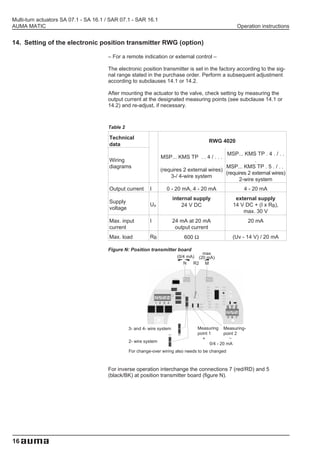
                                       Figure N: Position transmitter board
                                                                                     max
                                                                          (0/4 mA) (20 mA)
                                                                             N   R2 M


                                                 3- and 4- wire system            Measuring Measuring-
                                                                                  point 1       point 2
                                                                                    +             -
                                                 2- wire system
                                                                                        0/4 - 20 mA
                                                 For change-over wiring also needs to be changed


                                       For inverse operation interchange the connections 7 (red/RD) and 5
                                       (black/BK) at position transmitter board (figure N).


16
Multi-turn actuators SA 07.1 - SA 16.1 / SAR 07.1 - SAR 16.1
Operation instructions                                                                                   AUMA MATIC


                                                     .
14.1 Setting for 2-wire system 4 - 20 mA and 3- /4-wire system 0 - 20 mA

                                                     .
                                                   Connect voltage to AUMA MATIC.

                                                     .
                                                   Move valve to end position CLOSED.
                                                   Remove switch compartment cover and, if provided, pull off

                                                     .
                                                   indicator disc as described under clause 8, page 11.
                                                   For actuators with measuring points not accessible, remove

                                                     .
                                                   cover plate (figure O1).
                                                   Connect ammeter for 0 - 20 mA to measuring points (figure N,
                                                   page 16 or figure O1).
                                                   In end position CLOSED of 3- or 4-wire system, the value
                                                   must be 0 mA, for 2-wire system it must be 4 mA after setting.

                                                         The circuit (external load) must be connected (observe
                                                         max. ext. resistance RB), or the appropriate poles at the
                                                         AUMA plug/socket connector must be linked (refer to
                                                         wiring diagram MSP...KMS TP...), otherwise it is not
                                                         possible to measure a value.

                                       .   Turn potentiometer (R2) clockwise to initial position.

                                       .   Turn potentiometer (R2) whilst decreasing output signal until stop is felt.
                                           Turn trimmer potentiometer (N) clockwise until output current starts to

                                       .   increase.
                                           Turn back trimmer potentiometer (N) until a residual current of
                                           approx. 0,1 mA (or 4,1 mA in case of 2-wire system) is reached. This

                                       .
                                       .
                                           ensures that the signal remains above the dead and live zero point.
                                           Move valve to end position OPEN.

                                       .   Set to end value 20 mA with trimmer potentiometer (M).
                                           Approach end position CLOSED anew and check minimum value (0 mA

                                       .
                                       .
                                           or 4 mA). If necessary, correct the setting.
                                           In case cover plate (figure O1) has been removed, fit anew.
                                           If applicable, press indicator disc on shaft and perform setting as

                                       .   described under clause 12, page 14.
                                           Clean sealing face, check O-Ring, apply a thin film of non-acidic grease to

                                       .   sealing face.
                                           Fit and fasten switch compartment cover.


                                                     If the maximum value can not be reached, the selection of
                                                     the reduction gearing must be checked.


                                       Figure O1
                                                              N (0/4 mA)   M (20 mA)
                                                                      R2


                                                                                             Cover plate


                                       Measuring                                          Measuring point 2 (-)
                                       point1 (+)                                         0/4 – 20 mA
                                       0/4 – 20 mA


                                                                                                                     17
Multi-turn actuators SA 07.1 - SA 16.1 / SAR 07.1 - SAR 16.1
AUMA MATIC                                                                                        Operation instructions

14.2 Setting for 3- / 4- wire system 4 - 20 mA
                                                     .
                                                     .   Connect voltage to AUMA MATIC.

                                                     .   Move valve to end position CLOSED.
                                                         Remove switch compartment cover and, if provided, pull off

                                                     .   indicator disc as described under clause 8, page 11.
                                                         For actuators with measuring points not accessible, remove

                                                     .   cover plate (figure O2).
                                                         Connect ammeter for 0 - 20 mA to measuring points (figure N,
                                                         page 16 or figure O2).

                                                         The circuit (external load) must be connected (observe
                                                         max. ext. resistance RB), or the appropriate poles at the
                                                         AUMA plug/socket connector must be linked (refer to
                                                         wiring diagram MSP...KMS TP...), otherwise it is not
                                                         possible to measure a value.

                                       .   Turn potentiometer (R2) clockwise to initial position.

                                       .   Turn potentiometer (R2) whilst decreasing output signal until stop is felt.
                                           Turn trimmer potentiometer (N) clockwise, until output current starts to

                                       .   increase.
                                           Turn back potentiometer (N), until a rest current of approx. 0,1 mA

                                       .
                                       .
                                           is reached.
                                           Move valve to end position OPEN.

                                       .
                                       .
                                           Set to end value 16 mA with trimmer potentiometer (M).
                                           Move valve to end position CLOSED.
                                           Set potentiometer (N) from 0,1 mA to initial value 4 mA.
                                           This results in a simultaneous shift of the end value by 4 mA, so that the

                                       .   range is now 4 - 20 mA.
                                           Approach both end positions anew and check setting. If necessary,

                                       .
                                       .
                                           correct the setting.
                                           In case cover plate (figure O2) has been removed, fit anew.
                                           If applicable, press indicator disc on shaft and perform setting as

                                       .   described under clause 12, page 14.
                                           Clean sealing face, check O-Ring, apply a thin film of non-acidic grease to

                                       .   sealing face.
                                           Fit and fasten switch compartment cover.

                                                     If the maximum value can not be reached, the selection of
                                                     the reduction gearing must be checked.

                                       Figure O2
                                                              N (0/4 mA)   M (20 mA)
                                                                      R2


                                                                                             Cover plate


                                       Measuring                                          Measuring point 2 (-)
                                       point1 (+)                                         0/4 – 20 mA
                                       0/4 – 20 mA


18
Multi-turn actuators SA 07.1 - SA 16.1 / SAR 07.1 - SAR 16.1
Operation instructions                                                                                         AUMA MATIC


15. Programming AUMA MATIC
     Figure P: AUMA MATIC standard version


                                                                                    Cover plate
                                                                                      Interface board

                                                                                          Logic board
                                                                                          Name plate
                                                                                          AUMA MATIC

                                                                                                    Local controls


          Electrical connection
          with AUMA plug/socket
          connector


                      Power supply unit


                 Reversing contactors

                   Signal and control board


                         Plug/socket connector
                         to actuator


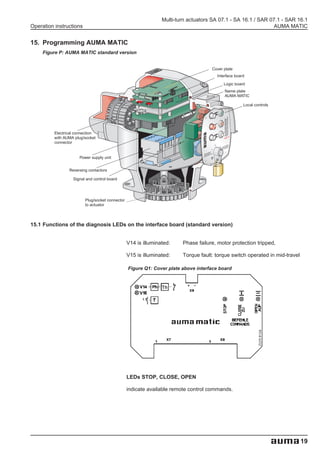
15.1 Functions of the diagnosis LEDs on the interface board (standard version)


                                                 V14 is illuminated:    Phase failure, motor protection tripped,

                                                 V15 is illuminated:    Torque fault: torque switch operated in mid-travel

                                                 Figure Q1: Cover plate above interface board


                                                 LEDs STOP, CLOSE, OPEN

                                                 indicate available remote control commands.


                                                                                                                             19
Multi-turn actuators SA 07.1 - SA 16.1 / SAR 07.1 - SAR 16.1
AUMA MATIC                                                                                       Operation instructions


15.2 Programming of the logic board


                             MOV

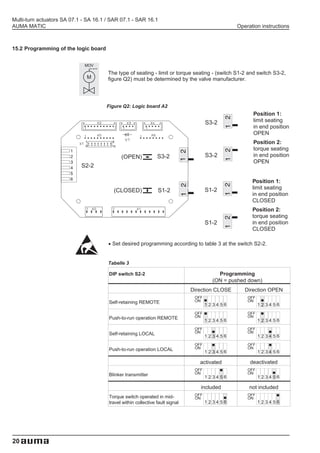
                                       The type of seating - limit or torque seating - (switch S1-2 and switch S3-2,
                              M        figure Q2) must be determined by the valve manufacturer.


                                      Figure Q2: Logic board A2
                                                                                                       Position 1:
                                                                                      S3-2             limit seating
                                                                                                       in end position
                                                                                                       OPEN
                                                                                                       Position 2:
                                                                                                       torque seating
                                              (OPEN)            S3-2                  S3-2             in end position
                                                                                                       OPEN
                            S2-2

                                                                                                       Position 1:
                                                                                      S1-2             limit seating
                                           (CLOSED)             S1-2
                                                                                                       in end position
                                                                                                       CLOSED
                                                                                                       Position 2:
                                                                                                       torque seating
                                                                                      S1-2             in end position
                                                                                                       CLOSED

                                       .   Set desired programming according to table 3 at the switch S2-2.


                                       Tabelle 3

                                       DIP switch S2-2                                    Programming
                                                                                        (ON = pushed down)
                                                                               Direction CLOSE      Direction OPEN
                                                                                OFF                  OFF
                                       Self-retaining REMOTE                    ON                   ON
                                                                                      1234 56              1234 56
                                                                                OFF                  OFF
                                       Push-to-run operation REMOTE             ON                   ON
                                                                                      1234 56              1234 56
                                                                                OFF                  OFF
                                       Self-retaining LOCAL                     ON                   ON
                                                                                      1234 56              1234 56
                                                                                OFF                  OFF
                                       Push-to-run operation LOCAL              ON                   ON
                                                                                      1234 56              1234 56

                                                                                  activated           deactivated
                                                                                OFF                  OFF
                                       Blinker transmitter                      ON                   ON
                                                                                      1234 56              1234 56

                                                                                  included            not included
                                                                                OFF                  OFF
                                       Torque switch operated in mid-           ON                   ON
                                       travel within collective fault signal          1234 56              1234 56


20
Multi-turn actuators SA 07.1 - SA 16.1 / SAR 07.1 - SAR 16.1
Operation instructions                                                                            AUMA MATIC


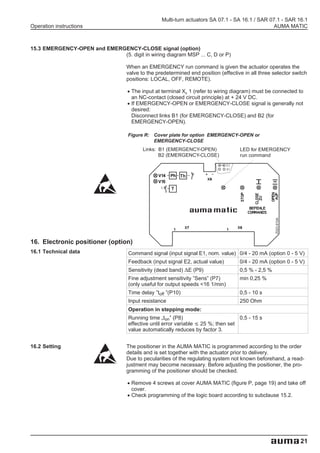
15.3 EMERGENCY-OPEN and EMERGENCY-CLOSE signal (option)
                             (5. digit in wiring diagram MSP ... C, D or P)

                                   When an EMERGENCY run command is given the actuator operates the
                                   valve to the predetermined end position (effective in all three selector switch
                                   positions: LOCAL, OFF, REMOTE).

                                   .   The input at terminal XK 1 (refer to wiring diagram) must be connected to

                                   .   an NC-contact (closed circuit principle) at + 24 V DC.
                                       If EMERGENCY-OPEN or EMERGENCY-CLOSE signal is generally not
                                       desired:
                                       Disconnect links B1 (for EMERGENCY-CLOSE) and B2 (for
                                       EMERGENCY-OPEN).

                                    Figure R: Cover plate for option EMERGENCY-OPEN or
                                              EMERGENCY-CLOSE
                                           Links: B1 (EMERGENCY-OPEN)                LED for EMERGENCY
                                                  B2 (EMERGENCY-CLOSE)               run command


                                                           Th

                                                       T


                                                                                                     Z023.910A
16. Electronic positioner (option)
16.1 Technical data                 Command signal (input signal E1, nom. value) 0/4 - 20 mA (option 0 - 5 V)
                                    Feedback (input signal E2, actual value)         0/4 - 20 mA (option 0 - 5 V)
                                    Sensitivity (dead band) ∆E (P9)                  0,5 % - 2,5 %
                                    Fine adjustment sensitivity ”Sens” (P7)          min 0,25 %
                                    (only useful for output speeds <16 1/min)
                                    Time delay ”toff ”(P10)                          0,5 - 10 s
                                    Input resistance                                 250 Ohm
                                    Operation in stepping mode:
                                    Running time „ton” (P8)                         0,5 - 15 s
                                    effective until error variable ≤ 25 %; then set
                                    value automatically reduces by factor 3.


16.2 Setting                       The positioner in the AUMA MATIC is programmed according to the order
                                   details and is set together with the actuator prior to delivery.
                                   Due to pecularities of the regulating system not known beforehand, a read-
                                   justment may become necessary. Before adjusting the positioner, the pro-
                                   gramming of the positioner should be checked.

                                   .   Remove 4 screws at cover AUMA MATIC (figure P, page 19) and take off

                                   .   cover.
                                       Check programming of the logic board according to subclause 15.2.


                                                                                                                 21
Multi-turn actuators SA 07.1 - SA 16.1 / SAR 07.1 - SAR 16.1
AUMA MATIC                                                                                               Operation instructions


                                                       Self-retaining REMOTE must be switched off with positioner.

                                         .    Take off cover plate (figure S2) and carry out required programming at
                                              positioner board (figure S1) according to table 4. For values of command
                                              signal E1 and feedback E2, see sticker on cover plate (figure S2). The
                                              behaviour of the actuator in case of loss of the command signal E1 and /
                                              or the feedback signal E2 can be set on the positioner board by
                                              DIP-switches. The complete range of choices, however, is only available
                                              with signals 4 -20 mA.

                                                       Prior setting it must be ensured that the circuit for the
                                                       position feedback E2 (see wiring diagram MSP... KMS TP...)
                                                       is closed (measuring device or link). In case of missing
                                                       signal E2 the LED V10 ”E1/E2 < 4 mA” (figure S2) is on and
                                                       the positioner does not respond.

  Figure S1: Positioner board A7                                 Figure S2: Cover plate positioner
                 P9 (DE)
               P7 (Sens)                               S2-7
                   P3 (0)                                            Sticker with signal details
                P4 (max)                                             (here example: E1 = 4-20 mA, E2 = 4-20 mA)
                                        OFF
                                        ON


                                                       V28
                                                       V27
                                                       V18
                                                                                                              t-off
                                                                                                             E1/E2
               MP4(–)                                  V10                                                  < 4 mA        V10 (red)
               MP3(+)
                                                      P10
                                                                                                              t-off
                                                                                                                          P10
               MP2(+)                                                             E1   4-20mA
               MP1(–)                                                             E2   4-20mA
                                                      P8                                                      t-on
                            ON
                            OFF


      S1-7

Table 4: Recommended settings

          Actuator behaviour on loss of signal                            Condition                         Programming
                                                                                                             (Figure S1)
                                                              Command signal       Feedback signal        S1-7            S2-7
                        E1 and/ or E2
                                                              nominal value E 1   Actual value E 21) (type of signal)   (behaviour)

                                                                                                          1 2 3 4 5       1 2 3 4 5
fail as is, i.e. actuator stops immediately and remains in
this position                                                  4 - 20 mA3) 4)     4 - 20 mA3) 4)

                                                                                                          1 2 3 4 5       1 2 3 4 5
fail close, i.e. actuator moves the valve to the end
                                                               4 - 20 mA 4)       4 - 20 mA 4)
position CLOSED
                                                                                                          1 2 3 4 5       1 2 3 4 5
fail open, i.e. actuator moves the valve to the end
                                                               4 - 20 mA 4)       4 - 20 mA 4)
position OPEN
                                                                                                          1 2 3 4 5       1 2 3 4 5
Stepping mode
                                                              other programming see above

Split Range version (option)                                                                              1 2 3 4 5       1 2 3 4 5
                                                              other programming see above

1) 3) 4) refer to table 5


22
Multi-turn actuators SA 07.1 - SA 16.1 / SAR 07.1 - SAR 16.1
Operation instructions                                                                              AUMA MATIC


Table 5: Further possible settings

              Different actuator behaviour                            Condition                        Programming
                    on loss of signal                                                                   (Figure S1)
                                                        Command signal       Feedback signal        S1-7            S2-7
             E1                           E2
                                                        nominal value E 1   Actual value E 21) (type of signal)   (behaviour)
                                                                                                    1 2 3 4 5      1 2 3 4 5
fail as is                   fail open                   4 - 20 mA4)        0 - 5 V 2) 4)
                                                                                                    1 2 3 4 5      1 2 3 4 5
                                                         0 - 20 mA          4 - 20 mA 4)
                             fail as is                                                             1 2 3 4 5      1 2 3 4 5
                                                         0 - 10 V           4 - 20 mA 4)
                                                                                                    1 2 3 4 5      1 2 3 4 5
                                                         0 - 20 mA          0 - 20 mA 2)
                                                                                                    1 2 3 4 5      1 2 3 4 5
                                                         0 - 20 mA          4 - 20 mA 4)
                                                                                                    1 2 3 4 5      1 2 3 4 5
                                                         0 - 20 mA          0 - 5 V 2)
fail close                   fail open                                                              1 2 3 4 5      1 2 3 4 5
                                                         4 - 20 mA 4)       0 - 5 V 2)
                                                                                                    1 2 3 4 5      1 2 3 4 5
                                                         0 - 5 V 2)         0 - 5 V 2)
                                                                                                    1 2 3 4 5      1 2 3 4 5
                                                         0 - 10 V           0 - 5 V 2)
                                                                                                    1 2 3 4 5      1 2 3 4 5
                                                         0 - 20 mA          4 - 20 mA 4)
                                                                                                    1 2 3 4 5      1 2 3 4 5
                                                         0 - 5 V 2)         4 - 20 mA 4)
                                                                                                    1 2 3 4 5      1 2 3 4 5
                                                         4 - 20 mA          0 - 20 mA 2)
fail open                                                                                           1 2 3 4 5      1 2 3 4 5
                                                         4 - 20 mA 4)       0 - 5 V 2)

1) Internal feedback signals: 0/4 - 20 mA from electronic position transmitter
   or 0 - 5 V from precision potentiometer 5 k Ω
2) On loss of E 1 or E 2 there may be a misinterpretation, since E 1 or E 2 can also be functional
   (without fault) with signal < 4 mA (end position CLOSED = 0 V or 0 mA).
3) For version with external change-over analogue/binary (option): additional emergency operation command for
   both directions possible (see page 21, subclause 15.3)
4) Only with Life-Zero signal (e.g. 4 - 20 mA)


16.3 Positioner adjustment end position CLOSED (standard version)
                                                Prior to the positioner setting it has to be ensured that the
                                                limit and torque switching of the actuator (clauses 8-10,
                                                pages 11-13) as well as the position feedback (clauses

                                          .
                                          .
                                                13-14, pages 15-18) have been set.
                                       Set selector switch (local controls) to position LOCAL.
                                       Run multi-turn actuator by pressing push-button         to end position

                                          .
                                       CLOSED .

                                          .
                                       Supply nominal value E1 of 0 or 4 mA (see wiring diagram).
                                       Turn potentiometer P10 (toff) counter-clockwise to the stop
                                       (figure S2).

                                                 Missing signals E1/E2 or wrong polarity are indicated by
                                                 LED V10 ”E1/E2 < 4 mA” (figure S2)


                                                                                                                               23
Multi-turn actuators SA 07.1 - SA 16.1 / SAR 07.1 - SAR 16.1
AUMA MATIC                                                                                           Operation instructions


                                         .   Connect Voltmeter to measuring points MP3 and MP4 (figure S3) for
                                             measuring the nominal value (0 - 5 V) .
                                             For a nominal value E1 of 0 mA the Voltmeter shows 0 V.
                                             For a nominal value E1 of 4 mA the Voltmeter shows 1 V.
                                             In case nominal value (0 V or 1 V) is not correct:

                                         .   Correct nominal value signal in control room.
                                             Connect Voltmeter to measuring points MP2 and MP1 for measuring the
                                             actual value signal. For an actual value E2 of 0 mA the Voltmeter shows
                                             0 V. For an actual value E2 of 4 mA the Voltmeter shows 1 V.
                                             If measured value is not correct:
                                             Adjust position feedback signal according to clauses 13 and 14.

          Possible LED indication:                   Required setting in end position CLOSED
          (refer to figures S3 and S4)               (refer to figures S3 and S4)
          LEDs are not illuminated                   Turn potentiometer ”0” (P3) slightly clockwise until
                                                     LED       (V27 yellow) lights up.
                                              Then


          LED       (V28 green) is                   Turn potentiometer ”0” (P3) slightly clockwise until LED
          illuminated                                (V28 green) goes out and LED          (V27 yellow) lights up.
     If


          LED       (V27 yellow) is                  Turn potentiometer ”0” (P3) counter-clockwise until LED       (V27
          illuminated                                yellow) goes out.
                                                     Then turn potentiometer ”0” (P3) slightly clockwise until LED
                                                     (V27 yellow) lights up again.


16.4 Positioner adjustment end position OPEN (standard version)

                                         .   Run multi-turn actuator by ressing push-button       (local controls) to

                                         .   end position OPEN.
                                             Connect Voltmeter to measuring points MP2 and MP1 for measuring of
                                             the actual value E2. When position feedback is set correctly the Voltmeter
                                             shows 5 V.
                                             If measured value is not correct:
                                             Adjust position feedback signal according to clauses 13 and 14 and

                                         .
                                         .
                                             continue with page 23, subclause 16.3.
                                             Connect max. command signal (nominal value E1) = 20 mA.
                                             Connect Voltmeter to measuring points MP3 and MP4 for measuring the
                                             nominal value E1.For a nominal value of 20 mA the Voltmeter shows 5 V.
                                             If measured value is not 5 V:
                                             Check the externally supplied command signal E1.

          LED indication:                            Required setting in end position OPEN:
          (refer to figures S3 and S4)               (refer to figures S3 and S4)
          LEDs are not illuminated                   Turn potentiometer ”max” (P4) slightly counter-clockwise until
                                                     LED       (V28 green) lights up.
                                              Then


          LED       (V28 green) is                   Turn potentiometer ”max” (P4) clockwise until LED        (V28
          illuminated                                green) goes out.
     If


                                                     Then turn potentiometer ”max” (P4) slightly counter-clockwise until
                                                     LED       (V28 green) lights up again.
          LED       (V27 yellow) is                  Turn potentiometer ”max” (P4) slightly counter-clockwise until
          illuminated                                LED      (V27 ) goes out and LED        (V28 green) lights up.


24
Multi-turn actuators SA 07.1 - SA 16.1 / SAR 07.1 - SAR 16.1
Operation instructions                                                                                 AUMA MATIC


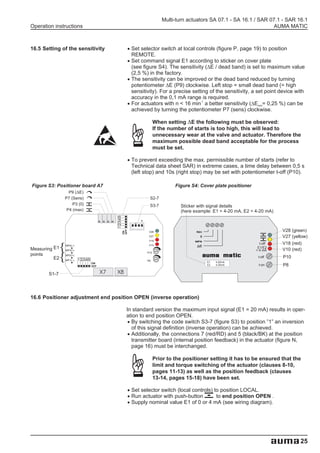
16.5 Setting of the sensitivity     .   Set selector switch at local controls (figure P, page 19) to position

                                    .   REMOTE.
                                        Set command signal E1 according to sticker on cover plate
                                        (see figure S4). The sensitivity (∆E / dead band) is set to maximum value

                                    .   (2,5 %) in the factory.
                                        The sensitivity can be improved or the dead band reduced by turning
                                        potentiometer ∆E (P9) clockwise. Left stop = small dead band (= high
                                        sensitivity). For a precise setting of the sensitivity, a set point device with

                                    .   accuracy in the 0,1 mA range is required.
                                                                        -1
                                        For actuators with n < 16 min a better sensitivity (∆Emin= 0,25 %) can be
                                        achieved by turning the potentiometer P7 (sens) clockwise.

                                                     When setting E the following must be observed:
                                                     If the number of starts is too high, this will lead to
                                                     unnecessary wear at the valve and actuator. Therefore the
                                                     maximum possible dead band acceptable for the process
                                                     must be set.

                                    .   To prevent exceeding the max. permissible number of starts (refer to
                                        Technical data sheet SAR) in extreme cases, a time delay between 0,5 s
                                        (left stop) and 10s (right stop) may be set with potentiometer t-off (P10).

Figure S3: Positioner board A7                                Figure S4: Cover plate positioner
                 P9 (DE)
               P7 (Sens)                        S2-7
                   P3 (0)                       S3-7            Sticker with signal details
                P4 (max)                                        (here example: E1 = 4-20 mA, E2 = 4-20 mA)


                                                                                                             V28 (green)
                                  OFF
                                  ON


                                                V28
                                                V27                                                          V27 (yellow)
                                                V18
               MP4(–)                           V10
                                                                                                    t-off    V18 (red)
Measuring E1   MP3(+)
                                                                                                   E1/E2
                                                                                                  < 4 mA     V10 (red)
                                               P10
points         MP2(+)
          E2                                                                                       t-off     P10
               MP1(–)                          P8
                            ON                                             E1   4-20mA
                            OFF                                            E2   4-20mA             t-on      P8
       S1-7


16.6 Positioner adjustment end position OPEN (inverse operation)

                                    In standard version the maximum input signal (E1 = 20 mA) results in oper-

                                    .
                                    ation to end position OPEN.
                                      By switching the code switch S3-7 (figure S3) to position ”1” an inversion

                                    . of this signal definition (inverse operation) can be achieved.
                                      Additionally, the connections 7 (red/RD) and 5 (black/BK) at the position
                                      transmitter board (internal position feedback) in the actuator (figure N,
                                      page 16) must be interchanged.

                                                     Prior to the positioner setting it has to be ensured that the
                                                     limit and torque switching of the actuator (clauses 8-10,
                                                     pages 11-13) as well as the position feedback (clauses
                                                     13-14, pages 15-18) have been set.

                                    .
                                    .   Set selector switch (local controls) to position LOCAL.

                                    .   Run actuator with push-button         to end position OPEN .
                                        Supply nominal value E1 of 0 or 4 mA (see wiring diagram).


                                                                                                                     25
Multi-turn actuators SA 07.1 - SA 16.1 / SAR 07.1 - SAR 16.1
AUMA MATIC                                                                                           Operation instructions


                                         .   Turn potentiometer P10 (toff) counter-clockwise up to the stop (figure S4).


                                                        Missing signals E1/ E2 or wrong polarity are indicated by
                                                        LED V10 ”E1/E2 < 4 mA” (figure S4)

                                         .   Connect Voltmeter to measuring points MP3 and MP4 (figure S3) for
                                             measuring the nominal value (0 - 5 V) .
                                             For a nominal value E1 of 0 mA the Voltmeter shows 0 V.
                                             For a nominal value E1 of 4 mA the Voltmeter shows 1 V.
                                             In case nominal value (0 V or 1 V) is not correct:

                                         .   Correct nominal value signal in control room.
                                             Connect Voltmeter to measuring points MP2 and MP1 for measuring the
                                             actual value signal.
                                             For an actual value E2 of 0 mA the Voltmeter shows 0 V.
                                             For an actual value E2 of 4 mA the Voltmeter shows 1 V.
                                             If measured value is not correct: Adjust position feedback according to
                                             clauses 13 and 14.

          Possible LED indications:                  Required setting in end position OPEN:
          (refer to figures S3 and S4)               (refer to figures S3 and S4)
          LEDs are not illuminated                   Turn potentiometer ”0” (P3) slightly clockwise until
                                                     LED       (V28 green) lights up
                                              Then


          LED       (V27 yellow) is                  Turn potentiometer ”0” (P3) slightly clockwise until LED
          illuminated                                (V27 yellow) goes out and LED         (V28 green) lights up.
     If


          LED       (V28 green) is                   Turn potentiometer ”0” (P3) counter-clockwise until LED
          illuminated                                (V28 green) goes out.
                                                     Then turn potentiometer ”0" (P3) slightly clockwise until LED
                                                     (V28 green) lights up again.


                                         .
16.7 Positioner adjustment end position CLOSED (inverse operation)
                                      Run actuator with push-button       (local controls) to end position

                                         .
                                      CLOSED.
                                      Connect Voltmeter to measuring points MP2 and MP1 for measuring of
                                      the actual value E2. When position feedback is set correctly the Voltmeter
                                      shows 5 V.
                                      If measured value is not correct:

                                         .
                                      Adjust position feedback signal according to clauses 13 and 14.

                                         .
                                      Connect max. command signal (nominal value E1) = 20 mA.
                                      Connect Voltmeter to measuring points MP3 and MP4 for measuring the
                                      nominal value E1.For a nominal value of 20 mA the Voltmeter shows 5 V.
                                      If measured value is not 5 V:
                                      Check the externally supplied command signal E1.

          LED indication:                            Required setting in end position CLOSED:
          (refer to figures S3 and S4)               (refer to figures S3 and S4)
          LEDs are not illuminated                   Turn potentiometer ”max” (P4) slightly counter-clockwise until
                                                     LED       (V27 yellow) lights up.
                                              Then


          LED       (V27 yellow) is                  Turn potentiometer ”max” (P4) clockwise until LED        (V27
          illuminated                                yellow) goes out.
     If


                                                     Then turn potentiometer ”max” (P4) slightly counter-clockwise until
                                                     LED       (V27 yellow) lights up again.
          LED       (V28 green) is                   Turn potentiometer ”max” (P4) slightly counter-clockwise until
          illuminated                                LED      (V28 green) goes out and LED        (V27 yellow) lights up.


26
Multi-turn actuators SA 07.1 - SA 16.1 / SAR 07.1 - SAR 16.1
Operation instructions                                                                                AUMA MATIC


16.8 Positioner in Split Range version (option)
                                      For Split Range a modified version of the positioner is used. The standard
                                      version is not suitable for Split Range operation.
16.8.1 Split Range: description of functions
                                      Split Range allows the adaptation of the positioner to nominal value ranges
                                      which are for example necessary to individually control several actuators
                                      (up to 4 actuators) with the same nominal value signal. Typical values for 2
                                      actuators are 0 - 10 mA and 10 - 20 mA or 4 - 12 mA and 12 - 20 mA. But
                                      all other values between 0/4 - 20 mA can also be set and adjusted.
16.8.2 Programming
                                       Programming of the positioner at the code switches S1-7, S2-7, S3-7 can,
                                       with the exception indicated below, be performed in the same manner as for
                                       normal operation.

                                                   Switch S1-7 DIP 5 at code switch S1-7 must always be in
                                                   position ON for Split Range version.


16.8.3 Positioner adjustment for Split Range

                                       .(See also example on page 28)
                                        Supply the specified minimum input signal (nominal value E1) for the
                                        positioner and check by measuring with Voltmeter at the measuring points

                                       .MP3 and MP4 (figure T).
                                        Connect voltmeter to measuring points M3 and MP1.
                                        Calculate setting value:
                                        Initial value = E 1min [in Ampere] x 250 Ohm

                                       .Set initial value with potentiometer P5.
                                        Supply specified maximum command signal (nominal value E1) and

                                       .check by measuring at the measuring points MP3 and MP4.
                                        Connect voltmeter between measuring point M9 and measuring point

                                       .MP1. Set 5 V with potentiometer P6 .
                                        Supply input signal E1 from minimum to maximum value and check the
                                        set range 0 - 5 V at measuring point M9. If necessary, readjust with P5 or

                                       .P6.
                                        Apply the same procedure to the second actuator’s positioner and set

                                       .according to the specified nominal value E1.
                                        After setting for Split Range operation, perform further readjustment as
                                        described in subclause 16.3, page 23.

                                        Figure T: Positioner board A7, Split Range version
                                                    P9 (DE)
                                                  P7 (Sens)
                                                     P3 (0)
                                                                                             S2-7
                                                   P4 (max)
                                                              P6                             S3-7
                                                              P5
                                       Measuring
                                       points
                                                                                                    V28 (green)
                                                                                OFF
                                                                                ON


                                                                                                    V27 (yellow)
                                                                                                    V18 (red)
                                                     MP4(–)                                         V10 (red)
                                       Meas. E1      MP3(+)                                         P10
                                       points        MP2(+)
                                              E2     MP1(–)                                          P8
                                                                   ON
                                                                   OFF


                                            S1-7


                                                                                                                   27
Multi-turn actuators SA 07.1 - SA 16.1 / SAR 07.1 - SAR 16.1
AUMA MATIC                                                                                     Operation instructions


                                       Example:
                                       Two actuators are to be operated in Split Range version. Actuator 1 must be
                                       in position CLOSED with a nominal value signal E1 of 0 mA, and in position
                                       OPEN with a signal of 10 mA.
                                       Actuator 2 must be in position CLOSED with a nominal value signal of
                                       10 mA, and in position OPEN with a signal of 20 mA.

                                       .   Positioner actuator 1:
                                           Supply E1 = 0 mA, set with P5 = 0 V at M3, supply E1 = 10 mA, set with

                                       .   P6 = 5V at M9.
                                           Positioner actuator 2:
                                           Supply E1 = 10 mA, set with P5 = 2,5 V at M3, supply E1 = 20 mA, set

                                       .   with P6 = 5V at M9.
                                           Perform adjustments and settings for E2, as previously described.
                                           Afterwards the nominal value E1 can be transmitted through both
                                           actuators (can be connected in series). When operating within range E1 =
                                           0 - 10 mA the actuator 1 moves, actuator 2 remains in end position
                                           CLOSED. When operating within range E1 = 10 - 20 mA the actuator 2
                                           moves, actuator 1 remains in end position OPEN.


17. Timer (option)                     With the timer board the operating time can be increased for the entire or
                                       any portion of the valve travel.

                                       Example:
                                       In order to avoid water hammer in long pipelines, stepping mode can be
                                       chosen for each part of the travel.

                                       .   The timer is installed in the AUMA MATIC instead of the interface board

                                       .   (figure P, page 19).
                                           Electronic timer is not possible in combination with positioner.


17.1 Function of the diagnosis LEDs (timer)


                                       V14 is illuminated:      Phase failure and/ or motor protection tripped,
                                       V15 is illuminated:      Torque fault: Torque switch operated in mid-travel
                                       V21 is illuminated:      Stepping mode in direction CLOSE switched on
                                       V22 is illuminated:      Stepping mode in direction OPEN switched on


28
Multi-turn actuators SA 07.1 - SA 16.1 / SAR 07.1 - SAR 16.1
Operation instructions                                                                     AUMA MATIC


                            Figure U: Cover plate timer A1.6
                                 R10                   R12
                                 R11                   R13


17.2 Setting of the timer   Start and end of stepping mode can be set via:

                            .   Intermediate position switches of the DUO limit switching,

                            .   (clause 9, page 12)
                                external switches (use potential-free contacts)

                            ON and OFF times can be set independently of each other between 1 - 30
                            seconds at the 4 potentiometers R10 to R 13.

                            Clockwise rotation:                               Time extension
                            Counter-clockwise rotation:                       Time reduction

                            R10 (t-off)            :         OFF time in direction OPEN

                            R11 (t-on)             :         Running time in direction OPEN

                            R12 (t-off)            :         OFF time in direction CLOSE

                            R13 (t-on)             :         Running time in direction CLOSE


                                                                                                     29
Multi-turn actuators SA 07.1 - SA 16.1 / SAR 07.1 - SAR 16.1
AUMA MATIC                                                                                      Operation instructions


18. Fuses
                                                   Disconnect actuator from the mains before changing the
                                                   fuses.


                                                   Fuses (figure V) are accessible after removal of the local
                                                   control cover.


                                       Figure V


                                       Fuses: (figure V)          F1/F2                 F3                 F4
                                       Size                     6,3 x 32 mm         5 x 20 mm          5 x 20 mm
                                       with reversing
                                       contactors
                                                                1 A T; 250 V        500 mA T            1,6 A T

                                       with thyristors         16 A FF; 250 V       500 mA T            1,6 A T


19. Maintenance                        After commissioning, check for damages on paint of multi-turn actuator. Do
                                       a thorough touch-up to prevent corrosion. Original paint in small quantities
                                       can be supplied by AUMA.

                                       AUMA multi-turn actuators require very little maintenance.
                                       Precondition for reliable service is correct commissioning.

                                       Seals made of elastomers are subject to aging and must therefore regularly
                                       be checked and, if necessary, exchanged.

                                       It is also very important that the O-rings at the covers are placed correctly
                                       and cable glands fastened firmly to prevent ingress of dirt or water.


30
Multi-turn actuators SA 07.1 - SA 16.1 / SAR 07.1 - SAR 16.1
Operation instructions                                                                      AUMA MATIC


                            We recommend:

                            .   If operated seldom, perform a test run about every 6 months. This

                            .   ensures that the actuator is always ready to operate.
                                Approximately six months after commissioning and then every year check
                                bolts between actuator and valve/gearbox for tightness. If required,

                            .   re-tighten applying the torques given in table 1, page 8.
                                For multi-turn actuators with output drive type A: at intervals of approx. 6
                                months press in several squirts of ball bearing grease at the lubrication
                                nipple with grease gun.

                                         We recommend to use original AUMA lubricants


                            The gear housing is filled with lubricant in the factory.
                            A grease change is recommended after the following operation time:

                            .
                            .   If operated seldom after 10 - 12 years
                                If operated frequently after 6 - 8 years


                                         Lubrication of the valve stem must be done separately.


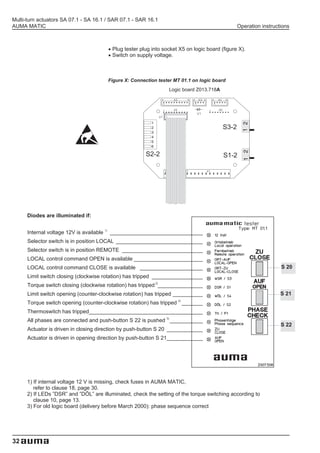
20. Tester for AUMA MATIC

                            The tester MT 01.1 (article no.: Z008.748) can be used for commissioning
                            and for trouble-shooting.

                            The tester is not included in the scope of supply of the AUMA MATIC.

                            Figure W: Tester MT 01.1


                            .
                            .   Switch off supply voltage.

                            .   Remove cover of AUMA MATIC.
                                Completely remove interface board and/or timer or positioner board with
                                cover plate (figure P, page 19).


                                                                                                         31
Multi-turn actuators SA 07.1 - SA 16.1 / SAR 07.1 - SAR 16.1
AUMA MATIC                                                                                        Operation instructions


                                       .
                                       .   Plug tester plug into socket X5 on logic board (figure X).
                                           Switch on supply voltage.


                                        Figure X: Connection tester MT 01.1 on logic board
                                                                   Logic board Z013.718A


                                                                                           S3-2


                                                         S2-2                              S1-2


      Diodes are illuminated if:


      Internal voltage 12V is available 1) _______________________________
      Selector switch is in position LOCAL _____________________________
      Selector switch is in position REMOTE ___________________________
      LOCAL control command OPEN is available _______________________
      LOCAL control command CLOSE is available _____________________                                                S 20
      Limit switch closing (clockwise rotation) has tripped _________________
      Torque switch closing (clockwise rotation) has tripped 2)_______________
      Limit switch opening (counter-clockwise rotation) has tripped __________                                      S 21
                                                                       2)
      Torque switch opening (counter-clockwise rotation) has tripped _______
      Thermoswitch has tripped______________________________________
      All phases are connected and push-button S 22 is pushed 3) ___________
                                                                                                                    S 22
      Actuator is driven in closing direction by push-button S 20 ____________
      Actuator is driven in opening direction by push-button S 21____________


      1) If internal voltage 12 V is missing, check fuses in AUMA MATIC,
         refer to clause 18, page 30.
      2) If LEDs ”DSR” and ”DÖL” are illuminated, check the setting of the torque switching according to
         clause 10, page 13.
      3) For old logic board (delivery before March 2000): phase sequence correct


32
Multi-turn actuators SA 07.1 - SA 16.1 / SAR 07.1 - SAR 16.1
Operation instructions                                                                   AUMA MATIC


21. Declaration of Conformity and Declaration of Incorporation


                                                                                                   33
Multi-turn actuators SA 07.1 - SA 16.1 / SAR 07.1 - SAR 16.1
AUMA MATIC                                                                                   Operation instructions


Index
A                                      I                                      R
Ambient temperature               5    Indicator disc                  11     Remote indication                16
                                       Interface board                 19     Running time                  21,29
B
                                       Intermittent duty                5
Blinker transmitter              20                                           S
                                       Inverse operation            16,25
                                                                              Safety instructions               4
C                                      L                                      Selector switch                  14
Collective fault signal        5,20    Limit switching            5,11,12     Self-retaining                   20
Command signal             21,22,23    Local controls                5,14     Sensitivity                      25
Corrosion                         7    Loss of signal               22,23     Short-time duty                   5
D                                                                             Signals                           6
                                       M
                                                                              Split Range Version           22,27
Declaration of Conformity        33    Maintenance                   4,30     Stepping mode
Declaration of Incorporation     33    Manual operation                 9       Operating time                 28
DUO-limit switching              12    Mechanical position indicator   14       Pause time                   5,29
E                                      Motor controls                   5     Storage                           7
                                       Motor protection              5,19
Electrical connection            10    Mounting to valve/ gearbox       7     T
Electronic position                                                           Tandem switches                  10
transmitter RWG                   16   N
                                                                              Technical data                    5
   2-wire system               16,17   Name plate                      10     Test run                         14
   3-/4-wire system            16,17                                          Tester                           31
Electronic positioner             21   O
                                                                              Thermoswitches                    5
Emergency operation                5   Output drive types               7     Thyristors                        5
EMERGENCY-Signal                  21   Output relays                    5     Torque switching                 13
External control voltage           5                                          Transport                         7
                                       P
F                                      Pause time               21,29         Type of duty                      5
Fuses                            30    Position actual value        5         Type of seating                  20
                                       Position transmitter RWG    16         W
H
                                       Potentiometer               15         Wall bracket                     10
Handwheel                         9    Power cables                10
Heater                            5                                           Wiring diagram                 6,10
                                       Programming AUMA MATIC      19
                                       Protection tube              8
                                       PTC thermistor               5
                                       Push-to-run operation       20


Information also available             Wiring diagram, inspection records and further actuator information
in the internet:                       can be downloaded directly from the internet by entering the order no. or
                                       COMM NO. (refer to name plate).
                                       Our homepage: http://www.auma.com


34
Multi-turn actuators SA 07.1 - SA 16.1 / SAR 07.1 - SAR 16.1
Operation instructions                                                                                                      AUMA MATIC
Deutschland / Germany               Europa / Europe                                   ERICHS ARMATUR AB                          Mustafa Sultan Science & Industry Co
                                                                                      Travbanegatan 8                            LLC
   WERNER RIESTER GmbH & Co. KG          AUMA Armaturenantriebe                       Box 91 44                                  P.O. Box 3340
   Industriegebiet West                  Gesellschaft m.b.H.                     SE   20039 Malmö                             QM Ruwi
   Postfach 13 62                        Betriebsgebiet Traiskirchen Süd              Tel +46 40 31 15 50                        Tel +968 602009/6067355
DE 79373 Müllheim/Baden                  Handelsstr. 14                               Fax +46 40 94 55 15                        Fax +968 6070066
   Tel +49 76 31 809-0              AT   2512 Tribuswinkel                            e-mail: info@erichsarmatur.se              e-mail: siteam@omantel.net.om
   Fax +49 76 31 13 218                  Tel +43 22 52 82 540
   e-mail: Riester@auma.com              Fax +43 22 52 82 54 050                      MEGA Endüstri Kontrol Sistemleri Tic.        Sunny Valves and Intertrade
                                         e-mail: office@auma.at                       Ltd. Sti.                                    Corp. Ltd.
   WERNER RIESTER GmbH & Co. KG                                                       Cetin Emec Bulvari 6.CAD                     232/ 13 Yen-A-Kart Soi 2
   Postfach 11 51                      AUMA (Schweiz) AG                              78.SK. 17/ 18                           TH   Yannawa, Bangkok 10120
DE 73747 Ostfildern                    Chörrenmattstr. 43                        TR   06460 Övecler - Ankara                       Tel +66 22 40 06 56
   Tel +49 71 13 48 03-0            CH 8965 Berikon                                   Tel +90 31 24 78 08 13                       Fax +66 22 40 10 95
   Fax +49 71 13 48 03 34              Tel +41 56 64 00 945                           Fax +90 31 24 78 08 31                       e-mail: swvong@mozart.inet.co.th
   e-mail: Riester@wof.auma.com        Fax +41 56 64 00 948                           e-mail: megaltd@turk.net
                                       e-mail: RettichP.ch@auma.com                                                              Top Advance Enterprises Ltd.
   WERNER RIESTER GmbH & Co. KG                                                  Afrika / Africa                                  2nd Fl., No.32, Lane 308, Section 3,
   Service-Center Köln                   AUMA Servopohony spol. s.r.o.                                                           Ho-Ping East Road
   Toyota-Allee 44                       Kazanská 121                                 AUMA South Africa (Pty) Ltd.            TW Taipei, Taiwan, R.O.C.
DE 50858 Köln                       CZ   10200 Praha 10                               P.O.Box 12 83                              Tel +886 2 2733 3530
   Tel +49 2234 20379-00                 Tel +420 2 72 70 00 56                  ZA   Springs 1560                               Fax +886 2 2736 5526
   Fax +49 2234 20379-99                 Fax +420 2 72 70 41 25                       Tel +27 11 36 32 880                       e-mail: kycl3530@ms6.hinet.net
   e-mail: Service@sck.auma.com          e-mail: auma-s@auma.cz                       Fax +27 11 81 85 248
                                                                                      e-mail: auma-sa@cis.co.za               Australien / Australia
   WERNER RIESTER GmbH & Co. KG          AUMA France
   Service-Center Magdeburg              10 - 16 Rue Constantin Pecqueur              A.T.E.C.                                   BARRON GJM Pty.Ltd.
   Am Stadtberg 1                        Z.A.C. Les Châtaigniers III                  5, Road No. 101 Maadi                      P.O.Box 792
DE 39167 Niederndodeleben           FR   95157 Taverny Cédex                     ET   Cairo - Egypt                           AU Artarmon - NSW 1570
   Tel +49 39 20 47 59-0                 Tel +33 13 93 27 272                         Tel +20 2 35 99 680                        Tel +61 29 43 61 088
   Fax +49 39 20 47 59-19                Fax +33 13 93 21 755                         Fax +20 2 35 90 681                        Fax +61 29 43 93 413
   e-mail: Service@scm.auma.com          e-mail: servocom@auma.fr                     e-mail: atec@intouch.com                   e-mail: info@barron.com.au
   WERNER RIESTER GmbH & Co. KG          OY AUMATOR AB                           Asien / Asia                                 Nord- und Südamerika / North
   Service-Center Bayern                 Pl 21 / Hyljekuja 5
   Robert-Bosch-Strasse 14          FI   02271 Espoo 27                               AUMA Middle East                        and South America
DE 85748 Garching-Hochbrück              Tel +358 95 84 022                           Representative Office
   Tel 0 89 / 32 98 85-17                Fax +358 95 84 02 300                                                                   AUMA ACTUATORS INC.
                                                                                      Sponsorship: Euro Mechanical               4 Zesta Drive
   Fax 0 89 / 32 98 85-18                e-mail: auma@aumator.fi                      P.O. Box 46153
   e-mail: Riester@scb.auma.com                                                                                               US Pittsburgh, PA 15 205
                                                                                      Tourist Club Street                        Tel +1 41 27 87 13 40
                                       AUMA ACTUATORS Ltd.                       AE   Abu Dhabi
   WERNER RIESTER GmbH & Co. KG        Britannia Way                                                                             Fax +1 41 27 87 12 23
                                                                                      Tel +971 26 44 92 43                       e-mail: mailbox@auma-usa.com
   Büro Nord                        GB Clevedon                                       Fax +971 26 44 85 61
   Krelingen 150                       North Somerset BS21 6QH                        e-mail: auma@emirates.net.ae
DE 29664 Walsrode                      Tel +44 12 75 87 11 41                                                                    Asvotec Termoindustrial Ltda.
   Tel +49 51 67 504                   Fax +44 12 75 87 54 92                                                                    Rod. Cônego Cyriaco Scaranello Pires,
                                                                                    AUMA Beijing Representative Office           Km 01
   Fax +49 51 67 565                   e-mail: auma@auma.co.uk                      Room 602, Yuanchenxin Building
   e-mail: HandwerkerE@auma.com                                                                                               BR Monte Mor-Sp, CEP 13190-000
                                                                                    12 Yumin Road, Madian                        Tel: +55 19 3879-87 35
                                         AUMA ITALIANA S.r.l.                       Chaoyang District
   WERNER RIESTER GmbH & Co. KG          Via Don Luigi Sturzo, 29                                                                Fax: +55 19 3879 87 38
                                                                                 CN 100029 Beijing                               e-mail: adm@asvotec.com.br
   Büro Nord                        IT   20020 Lainate/Milano                       Tel +86 10 62 02 24 91
   Bereich Schiffbau                     Tel +39 02 93 17 911                       Fax +86 10 62 02 24 97
   Tempowerkring 1                       Fax +39 02 93 74 387                                                                    TROY-ONTOR Inc.
                                                                                    e-mail: aumabs@ihw.com.cn                    230 Bayview Drive Unit 1A
DE 21079 Hamburg                         e-mail: info@auma.it
   Tel +49 40 79 14 02 85                                                                                                     CA Barrie, Ontario L4N 5E9
                                                                                      AUMA (INDIA) Ltd.                          Tel +1 705 721 5851
   Fax +49 40 79 14 02 86                AUMA BENELUX B.V.                            Plot No. 39-B, II Phase
   e-mail: DierksS@auma.com              Le Pooleweg 9                                                                           Fax +1 705 721 5851
                                                                                      Peenya Industrial Area                     e-mail: troy-ontor@troy-ontor.ca
                                    NL   2314 XT Leiden                          IN   Bangalore 560 058
   WERNER RIESTER GmbH & Co. KG          Tel +31 71 58 14 040                         Tel +91 80 83 94 655
   Büro West                             Fax +31 71 58 14 049                                                                    Ferrostaal de Colombia Ltd.
                                                                                      Tlx 08 45 50 63 auma in                    Avenida Eldorado No. 97-03
   Rathausplatz 7                        e-mail: office@benelux.auma.com              Fax +91 80 83 92 809
DE 45549 Sprockhövel                                                                                                             Apartado Aéreo: 7384
                                         AUMA Polska Sp. zo. o.                       e-mail: info@auma.co.in                    CO- Santafé de Bogotá, D.C.
   Tel +49 23 39 92 12-0
   Fax +49 23 39 92 12 15                Ul. Pukowca 15                                                                       CO Tel +57 1 4 011 300
                                                                                      AUMA JAPAN Co., Ltd.                       Fax +57 1 4 131 806
   e-mail: KettnerM@auma.com        PL   40-816 Katowice                              596-4 Futago-Cho
           SuchhardtP@auma.com           Tel +48 32 25 05 412                                                                    e-mail:
                                                                                      273-0034 Funabashi-Shi                     dorian_hernandez@ferrostaal.com
                                         Fax +48 32 25 05 412                    JP   Chiba
   WERNER RIESTER GmbH & Co. KG          e-mail: R.Ludzien@auma.com.pll               Tel +81 47 30 29 551
   Büro Süd-West                                                                                                                 IESS de Mexico S.A.
                                       AUMA Moscow                                    Fax +81 47 30 29 555                       AV. Cuitlahuac 1422, Col. Aguilera,
   Mozartstr. 4                                                                       e-mail: auma.jp@oregano.ocn.ne.jp
DE 69488 Birkenau                      Representative Office                                                                     Delegacion Atzco.
   Tel +49 62 01 37 31 49              8/9, 1-y Tverskoy-Yamskoy pereulok,                                                       MX-02900 Mexico D.F.
                                                                                    AUMA ACTUATORS                            MX Tel +52 55 561701
   Fax +49 62 01 37 31 50           RU Moscow, 125047, Post Box 220                 (Singapore) Pte Ltd.
   e-mail: WagnerD@auma.com            Tel: +7 095 973 29 43                                                                     Fax +51 53 563337
                                                                                    32, Ang Mo Kio Industrial Park 2             e-mail: informes@iess.com.mx
                                       Fax: +7 095 973 35 28                        #01 - 02, Sing Industrial Complex
   WERNER RIESTER GmbH & Co. KG        e-mail: georgeip@aha.ru                   SG Singapore 569510
   Büro Baden                                                                                                                      Multi-Valve Latin America S.A.
                                       GROENBECH & SOENNER A/S                      Tel +65 48 18 750                              Amàdor Merino Reyna 496, Of. 301
   Postfach 13 62                                                                   Fax +65 48 18 269
DE 79373 Müllheim/Baden                Scandiagade 25                                                                              PE- San Isidro, Lima 27
                                    DK 2450 Copenhagen SV                           e-mail:                                   PE   Tel +51 12 22 13 13
   Tel +49 76 31 809 193                                                            aumasing@mbox5singnet.com.sg
   Fax +49 76 31 809 294               Tel +45 33 26 63 00                                                                         Fax +51 12 22 18 80
   e-mail: HenselR@auma.com            Fax +45 33 26 63 01                                                                         e-mail: multivalve@tsi.com.pe
                                                                                    PERFECT CONTROLS Ltd.
                                       e-mail: GS@groenbech-sons.dk                 Suite 202, Block 1,
    WERNER RIESTER GmbH & Co. KG                                                                                                 PASSCO Inc.
                                         IBEROPLAN S.A.                             Hofai Commercial Centre                      36 41 53
    Büro Württemberg                                                                218 Sai Lau Kok Road
    Postfach 11 51                       Marques de Hoyos, 10                                                                    PR-00936-4153 San Juan
                                    ES   28027 Madrid                            HK Tsuen Wan, Kowloon, Hongkong              PR Tel +18 09 78 77 20 87 85
D   73747 Ostfildern                                                                Tel +852 24 93 77 26
    Tel +49 71 13 48 03 80               Tel +34 91 37 17 130                                                                    Fax +18 09 78 77 31 72 77
                                         Fax +34 91 74 27 126                       Fax +852 24 16 37 63                         e-mail: passco@prtc.net
    Fax +49 71 13 48 03 81                                                          e-mail: pcltd@netvigator.com
    e-mail: KoeglerS@wof.auma.com        e-mail: iberoplan@iberoplan.com
                                                                                                                                 LOOP S.A.
                                       D.G. Bellos & Co O.E.                        Dong Woo Valve Control Co., Ltd.             Chacabuco 580
   WERNER RIESTER GmbH & Co. KG                                                     24-2, Youi Do-Dong, Yeong Deung
   Büro Bayern                         86, Konstantinoupoleos St.                                                                AR-1069 Buenos Aires
                                    GR 136 71 Acharnai, Athens                      Po-Ku                                     AR Tel +54 11 43 31 32 06
   Kagerberg 12                                                                  KR P.O.Box 293 Seoul, 150-010
DE 93356 Teugn/Niederbayern            Tel +30 124 094 86                                                                        Fax +54 11 43 31 32 06
                                       Fax +30 124 094 86                           Tel +82 2761 6233                            e-mail: loop@datamar.com.ar
   Tel +49 94 05 94 10 24                                                           Fax +82 2761 1278
   Fax +49 94 05 94 10 25              e-mail: info@dgbellos.gr
                                                                                    e-mail: dw7994@users.unitel.co.kr              AUMA Representative Office Chile
   e-mail: JochumM@auma.com
                                       SIGURD SOERUM A.S.                                                                          Avenida Larrain 6642 Of. 304
                                       Jongsasveien 3                               AL-ARFAJ Eng. Company W.L.L.                   La Reina,
   WERNER RIESTER GmbH & Co. KG                                                     P.O. Box 391
   Büro Ost                            Postboks 85                                                                                 CL- Santiago de Chile
                                    NO 1301 Sandvika                             KW Salmiyah 22004                            CL   Tel +56 22 77 71 51
   Am Stadtberg 1                                                                   Tel +965 48 17 448
DE 39167 Niederndodeleben              Tel +47 67 57 26 00                                                                         Fax +56 22 77 84 78
                                       Fax +47 67 57 26 10                          Fax +965 48 17 442                             Mobil + 56 95 99 85 47
   Tel +49 39 20 47 59 80                                                           e-mail: arfaj@qualitynet.net
   Fax +49 39 20 47 59 89              e-mail: post@sigurd-sorum.no                                                                e-mail: aumachile@usa.net
   e-mail: ZanderC@scm.auma.com                                                     BEHZAD Trading
                                         INDUSTRA Comércio de                                                                      Sublibarca
                                         Equipamentos Industrias, Lda.              P.O. Box 11 23                                 Centro Comercial Carmen, Avenia La
                                         Estrada de Albarraque 5°                   Rayyan Road                                    Limpia Local 1-2 # 85-39
                                    PT   Centro Empresarial Sintra-Estoril       QA Doha, Qatar                                    VE- Maracaibo, Edo, Zulia
                                         Bloco A3-Linh 2710-297 Sintra              Tel +974 43 32 36                         VE   Tel +58 261 7 555 667
                                         Tel +351 2 19 10 95 00                     Fax +974 43 32 37                              Fax +58 261 7 532 259
                                         Fax +351 2 19 10 95 99                     e-mail: behzad@qatar.net.qa                    e-mail: suplibarca@tamnet.com
                                         e-mail: jpalhares@tyco-valves.com


                                                                                                                                                                       35
Multi-turn actuators
                                                                                SA 07.1 - SA 16.1 / SA 25.1 - SA 48.1
                                                                                Torques from 10 to 32 000 Nm
                                                                                Output speeds from 4 to 180 min-1


                                       Controls AUMA MATIC
                                       with multi-turn actuators SA/ SAR
                                       Torques from 10 to 1 000 Nm
                                       Speeds from 4 to 180 min-1


                                                                                Part-turn actuators
                                                                                SG 05.1 – SG 12.1
                                                                                Torques from 100 to 1 200 Nm
                                                                                Operating times for 90° from 4 to 180 s
Linear thrust units LE
with multi-turn actuators SA           Part-turn actuators
Thrusts from 4 kN to 217 kN            AS 6 – AS 50
Strokes up to 500 mm                   Torques from 25 to 500 Nm
Linear speeds                          Operating times for 90° from 4 to 90 s
from 20 to 360 mm/min


                                                                                Bevel gearboxes
                                                                                GK 10.2 – GK 40.2
                                       Worm gearboxes                           Torques up to 16 000 Nm
                                       GS 40.3 – GS 125.3
                                       GS 160 – GS 500
                                       Torques up to 360 000 Nm


Worm gearboxes with base and lever
GF 50.3 – GF 125.3                                                              Spur gearboxes
GF 160 – GF 250                                                                 GST 10.1 - GST 40.1
Torques up to 32 000 Nm                                                         Torques up to 16 000 Nm


WERNER RIESTER GmbH & Co. KG          WERNER RIESTER GmbH & Co. KG
Armaturen- und Maschinenantriebe      Armaturen- und Maschinenantriebe
P.O.Box 1362     D - 79373 Müllheim   P.O. Box 1151    D - 73747 Ostfildern
Tel 07631/809-0 Fax 07631/13218       Tel 0711/34803-0 Fax 0711/34803-34
e-mail riester@auma.com               e-mail riester@wof.auma.com
http://www.auma.com                                                                                    Y000.176/003/en/2.01

Auma

  • 1.
    Multi-turn actuators SA 07.1- SA 16.1 SAR 07.1 - SAR 16.1 AUMA MATIC Operation instructions
  • 2.
    Multi-turn actuators SA07.1 - SA 16.1 / SAR 07.1 - SAR 16.1 AUMA MATIC Operation instructions Scope of these instructions: These instructions are valid for multi-turn actuators SA(R) 07.1 - SA(R) 16.1 with controls AUMA MATIC. These operation instructions are only valid for ”clockwise closing”, i.e. driven shaft turns clockwise to close the valve. Table of contents Page 1. Safety instructions . . . . . . . . . . . . . . . . . . . . . . . . . . . . . . . . . . . . . . . . . . . . . 4 1.1 Range of application . . . . . . . . . . . . . . . . . . . . . . . . . . . . . . . . . . . . . . . . . . . 4 1.2 Short description . . . . . . . . . . . . . . . . . . . . . . . . . . . . . . . . . . . . . . . . . . . . . 4 1.3 Commissioning (electrical connection) . . . . . . . . . . . . . . . . . . . . . . . . . . . . . . . . . . 4 1.4 Maintenance . . . . . . . . . . . . . . . . . . . . . . . . . . . . . . . . . . . . . . . . . . . . . . . 4 1.5 Warnings and notes. . . . . . . . . . . . . . . . . . . . . . . . . . . . . . . . . . . . . . . . . . . . 4 1.6 Further notes . . . . . . . . . . . . . . . . . . . . . . . . . . . . . . . . . . . . . . . . . . . . . . . 4 2. Technical data . . . . . . . . . . . . . . . . . . . . . . . . . . . . . . . . . . . . . . . . . . . . . . . 5 2.1 Multi-turn actuator SA(R) 07.1 - SA(R) 16.1 . . . . . . . . . . . . . . . . . . . . . . . . . . . . . . . 5 2.2 Controls AUMA MATIC . . . . . . . . . . . . . . . . . . . . . . . . . . . . . . . . . . . . . . . . . . 5 3. Additional information to the legend for wiring diagrams. . . . . . . . . . . . . . . . . . . . . . . . 6 4. Transport and storage . . . . . . . . . . . . . . . . . . . . . . . . . . . . . . . . . . . . . . . . . . . 7 5. Mounting to valve/ gearbox . . . . . . . . . . . . . . . . . . . . . . . . . . . . . . . . . . . . . . . . 7 6. Manual operation . . . . . . . . . . . . . . . . . . . . . . . . . . . . . . . . . . . . . . . . . . . . . . 9 7. Electrical connection . . . . . . . . . . . . . . . . . . . . . . . . . . . . . . . . . . . . . . . . . . . 10 7.1 Wiring diagram. . . . . . . . . . . . . . . . . . . . . . . . . . . . . . . . . . . . . . . . . . . . . . 10 7.2 Type of seating . . . . . . . . . . . . . . . . . . . . . . . . . . . . . . . . . . . . . . . . . . . . . 10 8. Setting of the limit switching: . . . . . . . . . . . . . . . . . . . . . . . . . . . . . . . . . . . . . . 11 8.1 Setting for end position CLOSED (black section) . . . . . . . . . . . . . . . . . . . . . . . . . . . . 11 8.2 Setting for end position OPEN (white section). . . . . . . . . . . . . . . . . . . . . . . . . . . . . . 12 9. Setting of the DUO-limit switching (Option). . . . . . . . . . . . . . . . . . . . . . . . . . . . . . . 12 9.1 Setting for direction CLOSE (black section) . . . . . . . . . . . . . . . . . . . . . . . . . . . . . . . 12 9.2 Settings for direction OPEN (white section) . . . . . . . . . . . . . . . . . . . . . . . . . . . . . . . 12 10. Setting of the torque switching . . . . . . . . . . . . . . . . . . . . . . . . . . . . . . . . . . . . . 13 11. Test run . . . . . . . . . . . . . . . . . . . . . . . . . . . . . . . . . . . . . . . . . . . . . . . . . . 14 12. Setting of mechanical position indicator (option) . . . . . . . . . . . . . . . . . . . . . . . . . . . 14 13. Setting of the potentiometer (option) . . . . . . . . . . . . . . . . . . . . . . . . . . . . . . . . . . 15 14. Setting of the electronic position transmitter RWG (option) . . . . . . . . . . . . . . . . . . . . . . 16 14.1 Setting for 2-wire system 4 - 20 mA and 3- /4-wire system 0 - 20 mA . . . . . . . . . . . . . . . . . 17 14.2 Setting for 3- / 4- wire system 4 - 20 mA . . . . . . . . . . . . . . . . . . . . . . . . . . . . . . . . 18 15. Programming AUMA MATIC . . . . . . . . . . . . . . . . . . . . . . . . . . . . . . . . . . . . . . . 19 15.1 Functions of the diagnosis LEDs on the interface board (standard version) . . . . . . . . . . . . . . 19 15.2 Programming of the logic board . . . . . . . . . . . . . . . . . . . . . . . . . . . . . . . . . . . . . 20 15.3 EMERGENCY-OPEN and EMERGENCY-CLOSE signal (option) . . . . . . . . . . . . . . . . . . . 21 2
  • 3.
    Multi-turn actuators SA07.1 - SA 16.1 / SAR 07.1 - SAR 16.1 Operation instructions AUMA MATIC . . . . . . . . . . . . . . . . . . . . . . . . . . . . . . . . . . . . . . . . . . . . . . . . . . . . . Page 16. Electronic positioner (option) . . . . . . . . . . . . . . . . . . . . . . . . . . . . . . . . . . . . . . 21 16.1 Technical data . . . . . . . . . . . . . . . . . . . . . . . . . . . . . . . . . . . . . . . . . . . . . . 21 16.2 Setting . . . . . . . . . . . . . . . . . . . . . . . . . . . . . . . . . . . . . . . . . . . . . . . . . . 21 16.3 Positioner adjustment end position CLOSED (standard version) . . . . . . . . . . . . . . . . . . . . 23 16.4 Positioner adjustment end position OPEN (standard version). . . . . . . . . . . . . . . . . . . . . . 24 16.5 Setting of the sensitivity . . . . . . . . . . . . . . . . . . . . . . . . . . . . . . . . . . . . . . . . . 25 16.6 Positioner adjustment end position OPEN (inverse operation) . . . . . . . . . . . . . . . . . . . . . 25 16.7 Positioner adjustment end position CLOSED (inverse operation) . . . . . . . . . . . . . . . . . . . . 26 16.8 Positioner in Split Range version (option) . . . . . . . . . . . . . . . . . . . . . . . . . . . . . . . . 27 16.8.1 Split Range: description of functions . . . . . . . . . . . . . . . . . . . . . . . . . . . . . . . . . . 27 16.8.2 Programming . . . . . . . . . . . . . . . . . . . . . . . . . . . . . . . . . . . . . . . . . . . . . . 27 16.8.3 Positioner adjustment for Split Range . . . . . . . . . . . . . . . . . . . . . . . . . . . . . . . . . 27 17. Timer (option) . . . . . . . . . . . . . . . . . . . . . . . . . . . . . . . . . . . . . . . . . . . . . . . 28 17.1 Function of the diagnosis LEDs (timer) . . . . . . . . . . . . . . . . . . . . . . . . . . . . . . . . . 28 17.2 Setting of the timer. . . . . . . . . . . . . . . . . . . . . . . . . . . . . . . . . . . . . . . . . . . . 29 18. Fuses . . . . . . . . . . . . . . . . . . . . . . . . . . . . . . . . . . . . . . . . . . . . . . . . . . . 30 19. Maintenance . . . . . . . . . . . . . . . . . . . . . . . . . . . . . . . . . . . . . . . . . . . . . . . . 30 20. Tester for AUMA MATIC . . . . . . . . . . . . . . . . . . . . . . . . . . . . . . . . . . . . . . . . . 31 21. Declaration of Conformity and Declaration of Incorporation . . . . . . . . . . . . . . . . . . . . . 33 Index . . . . . . . . . . . . . . . . . . . . . . . . . . . . . . . . . . . . . . . . . . . . . . . . . . . . 34 Addresses of AUMA offices and representatives. . . . . . . . . . . . . . . . . . . . . . . . . . . . 35 3
  • 4.
    Multi-turn actuators SA07.1 - SA 16.1 / SAR 07.1 - SAR 16.1 AUMA MATIC Operation instructions 1. Safety instructions 1.1 Range of application AUMA actuators are designed for the operation of industrial valves, e.g. globe valves, gate valves, butterfly valves and ball valves. For other applications, please consult us. AUMA is not liable for any possi- ble damages resulting from use in other than the designated applications. Such risk lies entirely with the user. Observance of these operation instructions is considered as part of the ac- tuator’s designated use. 1.2 Short description AUMA multi-turn actuators type SA(R) 07.1 - SA(R) 16 have a modular de- sign. Multi-turn actuators are driven by an electric motor and controlled with the electronic controls AUMA MATIC, which are included in the scope of supply. The limitation of travel is realised via limit switches in both end posi- tions. Torque seating is also possible in both end positions. The type of seating is stated by the valve manufacturer. 1.3 Commissioning During electrical operation certain parts inevitably carry lethal voltages. (electrical connection) Work on the electrical system or equipment must only be carried out by a skilled electrician himself or by specially instructed personnel under the con- trol and supervision of such an electrician and in accordance with the appli- cable electrical engineering rules. 1.4 Maintenance The maintenance instructions (refer to page 30) must be observed, other- wise a safe operation of the actuator is no longer guaranteed. 1.5 Warnings and notes Non-observance of the warnings and notes may lead to serious injuries or damages. Qualified personnel must be thoroughly familiar with all warnings and notes in these operation instructions. Correct transport, proper storage, mounting and installation, as well as care- ful commissioning are essential to ensure a trouble-free and safe operation. The following references draw special attention to safety-relevant proce- dures in these operation instructions. Each is marked by the appropriate pictograph. This pictograph means: Note! ”Note” marks activities or procedures which have major influence on the correct operation. Non-observance of these notes may lead to consequen- tial damage. This pictograph means: Electrostatically endangered parts! If this pictograph is attached to a printed circuit board, it contains parts which may be damaged or destroyed by electrostatic discharges. If the boards need to be touched during setting, measurement or for exchange, it must be assured that immediately before a discharge through contact with an earthed metallic surface (e.g. the housing) has taken place. This pictograph means: Warning! ”Warning” marks activities or procedures which, if not carried out correctly, can affect the safety of persons or material. 1.6 Further notes This pictograph means: Procedure may have been performed by MOV valve manufacturer! If actuators are delivered mounted to a valve, this step has been done in the M valve manufacturer’s plant. Setting must be checked during commissioning! 4
  • 5.
    Multi-turn actuators SA07.1 - SA 16.1 / SAR 07.1 - SAR 16.1 Operation instructions AUMA MATIC 2. Technical data 2.1 Multi-turn actuator SA(R) 07.1 - SA(R) 16.1 Type of duty: SA: Standard: Short-time duty S2 - 15 min (according to IEC 34-1/ VDE 0530) Option: Short-time duty S2 - 30 min SAR: Standard: Intermittent duty S4 - 25 % ED. Permissible number of starts see Technical data sheet for SAR Limit switching: Counter gear mechanism for end positions CLOSED / OPEN Torque switching: Adjustable torque switching for closing and opening direction Speeds: see Technical data sheets for SA and SAR Heater in switch compartment: approx. 5 W, 24 V, internally supplied Motors: 3-phase AC motor or 1-phase AC motor Motor protection: Standard: 3 Thermoswitches Option: 3 PTC thermistors + PTC tripping device Electrical connection: Standard: AUMA plug/socket connector 100 with screw cable terminations. Wiring diagram: Refer to name plate on AUMA MATIC Ambient temperature: SA: – 25 °C to + 70 °C SAR: – 25 °C to + 60 °C Enclosure protection: Standard: IP 67 (according to EN 60 529) Option: IP 68 Finish coating: Standard: two-component iron-mica combination 2.2 Controls AUMA MATIC Integral controls AUMA MATIC, type AM 01.1 and AM 02.1, for direct fitting to: Multi-turn actuators AUMA NORM SA(R) 07.1 - SA(R) 16.1 Voltage supply Refer to name plate Motor controls Reversing contactors: Standard: mechanical, electrical, locked, max. 690V AC, max. 7,5 kW Thyristors: Option: electronically locked, max. 460V AC, max. 1,5 kW External control voltage 24V DC, galvanically isolated from internal voltage supply Binary inputs Standard: OPEN-STOP-CLOSE (input signals) Option: Switch-over AUTOMATIC-MANUAL1) for input signals OPEN-CLOSE Galvanic isolation: Opto-isolators Nominal voltage: 24 V DC, from internal power supply (max. 50 mA load) or from external source Current input: 10 - 15 mA per input Analogue inputs (option) see positioner Relay outputs – Collective fault signal: Phase failure/ motor protection tripped/ torque fault: Torque switch operated in mid-travel (can be separated, see table 3, page 20) – 4 output relays: End position OPEN / End position CLOSED/ selector switch LOCAL / selector switch REMOTE Monitor relay (diagnosis LEDs) – Phase failure, motor protection tripped – Torque fault: Torque switch operated in mid-travel Analogue output (option) Position actual value (galvanically isolated) E2 = 0/4 - 20 mA Positioner (option) – Input range (position nominal value) E1 = 0/4 - 20 mA Input resistance 250 Ohm – Feedback E2 (position actual value): 0/4 - 20 mA Emergency operation (EMERGENCY) Effective in selector switch positions LOCAL, OFF and REMOTE (see page 21): (option) – End position OPEN – End position CLOSED Timer (option) Parameters: Stepping time/ pause time independently adjustable (1-30 seconds) Local controls Standard: Selector switch LOCAL-OFF-REMOTE, lockable Push-buttons OPEN-STOP-CLOSE Option: Indication lights for end position OPEN, FAULT, end position CLOSED Enclosure protection Standard: IP 67 Option: IP 68 Temperature range SA: – 25 °C to + 70 °C SAR: – 25 °C to + 60 °C Electrical connection see clause 7, page 10 1) Only in conjunction with the positioner 5
  • 6.
    Multi-turn actuators SA07.1 - SA 16.1 / SAR 07.1 - SAR 16.1 AUMA MATIC Operation instructions 3. Additional information to the legend for wiring diagrams Information A: A running indication is possible with blinker transmitter (S5) installed (open- ing and closing of contacts) Direction CLOSE: Connections XK 6 - XK 7 Direction OPEN: Connections XK 6 - XK 8 The contacts remain closed in the end positions. When connected to an external PLC the blinking signal can be switched off via the DIP-switches (table 3, page 20). Information B: The type of seating in the end positions is determined by the valve manu- facturer through setting the programming switches S1-2 and S3-2 (see sub- clause 15.2, page 20). The tripping of a torque switch in an intermediate po- sition switches off the actuator and gives a fault signal. The limit switches serve for signalisation when switching off by torque seat- ing. They need to be set so that the appropriate switch is tripped shortly be- fore reaching the end position. If the torque switch trips before the limit switch, the actuator is switched off and a fault signal is given. For further programming possibilities, e.g. self-retaining in operation mode REMOTE, see table 3, page 20. Information D: The following faults are registered and can be transmitted to the control room as a potential-free collective fault signal: - Power failure - Phase failure - Motor protection tripped - Torque switch tripped in mid-travel. This signal can be switched off in the programming, refer to table 3, page 20. Information E: Input signals according to DIN 19 240. The nominal current of the inputs XK 2; XK 3 and XK 4 is 10-15 mA. If internal voltage 24 V DC is used for remote control, it must only be connected via potential-free contacts. Information F: In case of wrong phase sequence the rotating field is automatically cor- rected. In case of a phase failure the actuator stops. This fault is indicated at LED V14 on the interface board. For collective fault signal see informa- tion D. Information G: Potential-free contacts are available for signals . The internal control voltage (XK 11 / + 24 V and XK 5 / – 24V) must not be used for external lamps, re- lays etc. 6
  • 7.
    Multi-turn actuators SA07.1 - SA 16.1 / SAR 07.1 - SAR 16.1 Operation instructions AUMA MATIC 4. Transport and storage . . Transport to place of installation in sturdy packing. Do not attach ropes or hooks to the handwheel for the purpose of lifting . by hoist. If multi-turn actuator is mounted on valve, attach ropes or hooks for the . . purpose of lifting by hoist to valve and not to multi-turn actuator. Store in well-ventilated, dry room. Protect against floor dampness by storage on a shelf or on a wooden . . pallet. Cover to protect against dust and dirt. Apply suitable corrosion protection agent to bright surfaces. If multi-turn actuators are to be stored for a long time (more than 6 months), the following points must be observed additionally: . Prior to storage: Protect bright surfaces, especially of output drive parts . and mounting surface, with long-term corrosion protection agent. Check for corrosion approximately every 6 months. If first signs of corrosion show, apply new corrosion protection. After mounting, connect actuator immediately to electrical system, so that condensation is prevented by the heater. 5. Mounting to valve/ gearbox MOV . Prior to mounting the multi-turn actuator must be checked M . for damage. Damaged parts must be replaced by original spare parts. Mounting is most easily done with the valve shaft / gearbox shaft pointing vertically upward. But mounting is also possible in any other position. The multi-turn actuator is delivered ex works in position CLOSED (limit switch CLOSED tripped). . Check if mounting flange fits the valve/gearbox. Spigot at flanges should be loose fit! The output drive types B1, B2, B3 or B4 (figure A) are delivered with bore and keyway (usually according to ISO 5210). Figure A Output drive type B 1 / B 2 Output drive type B 3 / B 4 Plug sleeve Bore with keyway 7
  • 8.
    Multi-turn actuators SA07.1 - SA 16.1 / SAR 07.1 - SAR 16.1 AUMA MATIC Operation instructions For output drive type A (figure B), thread must match the thread of the valve stem. If not ordered explicitly with thread, the stem nut is unbored or with pi- lot bore when delivered. Finish machining of stem nut see below. . . Check whether bore and keyway match the input shaft of valve/gearbox. Thoroughly degrease mounting faces at multi-turn actuator and valve / . . gearbox. Apply a small quantity of grease to input shaft of valve / gearbox. Place actuator on valve / gearbox and fasten. Fasten bolts (at least quality 8.8, refer to table 1) evenly crosswise. Table 1 8.8 TA (Nm) M 6 10 M 8 25 M 10 50 M 12 87 M 16 220 Finish machining of stem nut (output drive type A): Figure B Output drive type A Stem nut 80.3 80.01/ 80.02 80.2 The output drive flange does not have to be removed from the actuator. . Remove spigot ring (80.2, figure B) with the help of a wrench or similar . tool from the mounting flange. Take off stem nut (80.3) together with thrust bearing (80.01) and thrust . . bearing races (80.02). Remove thrust bearing and thrust bearing races from stem nut. Drill and bore stem nut and cut thread . . When fixing in the chuck, make sure stem nut runs true! Clean the machined stem nut. Apply ball bearing grease to thrust bearing and races, then place them on . stem nut. Re-insert stem nut with thrust bearings into the mounting flange. Ensure . . that dogs are placed correctly in the slots of the hollow shaft. Screw in spigot ring until it is firm against the shoulder. Press a few squirts of grease into the grease nipple with a grease gun. . Protection tube for rising valve stem For protection tubes supplied separately, wire round the thread with hemp . . or teflon band. Screw protection tube into thread and tighten it firmly. . . For corrosion protection KS/ KX, push down the seal to the housing. Touch-up possible defects in painting. Check whether cap is available and not damaged. 8
  • 9.
    Multi-turn actuators SA07.1 - SA 16.1 / SAR 07.1 - SAR 16.1 Operation instructions AUMA MATIC 6. Manual operation Manual operation should only be engaged when motor is not running. Switching over while motor is running may lead to damage at multi-turn actuator (figure C)! . Lift change-over lever in the center of the handwheel up to max. 85°, while slightly turning the handwheel back and forth until manual drive engages (figure D). Figure C Figure D Manual force is sufficient for operating the change-over lever. The use of an extension is neither necessary nor permitted. Excessive force may damage the change-over mechanism. . Release change-over lever (should snap back into initial position by spring action). If change-over lever does not snap back, assist with hand to assure that the lever comes to the initial position (figure E). Figure E Figure F . Manual operation remains engaged until motor is started again. Then motor operation is engaged automatically. . Turn handwheel into desired direction (figure F). Only operate manually when change-over lever is in its initial position! . Manual operation is automatically disengaged when motor is started 9
  • 10.
    Multi-turn actuators SA07.1 - SA 16.1 / SAR 07.1 - SAR 16.1 AUMA MATIC Operation instructions 7. Electrical connection Work on the electrical system or equipment must only be carried out by a skilled electrician himself or by specially instructed personnel under the control and supervision of such an electrician and in accordance with the applicable Figure G electrical engineering rules. AUMA plug/socket connector Name plate AUMA actuators SA(R) are operated via the electronic (customer connection XK) AUMA MATIC controls AUMA MATIC. The controls may either be mounted directly to the actuator or to a separate wall bracket. The electrical connection to the power supply is made at a plug / socket connector with screw cable AUMA MATIC terminations as standard. Multi-turn actuator SA When installing the AUMA MATIC on a wall bracket, observe the following points: Switch 1) For position feedback an electronic position compartment cover transmitter (RWG) must be used. 2) For the connection of actuator and AUMA MATIC on Name plate actuator wall bracket, use additionally suitable flexible and screened connecting cables. . Check if type of current, supply voltage and frequency correspond to . . motor data (refer to name plate at motor and AUMA MATIC). Remove plug cover (AUMA plug / socket connector) (figure G). . Loosen screws and remove socket carrier from plug cover. Insert cable glands suitable for connecting cables. . Enclosure protection IP 67 or IP 68 is only ensured if . suitable cable glands are used. Seal cable entries which are not used with suitable plugs. 7.1 Wiring diagram . Connect cables according to order related wiring diagram MSP. . . KMS TP . . . . The wiring diagram applicable to the actuator is attached to the handwheel in a weather-proof bag, together with the operation instructions. In case the wiring diagram is not available, it can be obtained from AUMA (state commission no., refer to name plate) or downloaded directly from the internet (see page 34). Additional notes to the references mentioned in the wiring diagram, e.g. >Information A< see clause 3, page 6 2 cross sections: control cables max. 2,5 mm , . power cables max. 6 mm . 2 Heater for prevention of condensation is internally supplied, unless . ordered differently. Only the same potential can be switched on the two circuits of the switches. Different potentials require tandem switches. Switches with gold plated contacts (option) may only be loaded with low . voltage (< 50 V DC / 400 mA). For the connection of position transmitters (potentiometers, RWG) screened cables must be used 7.2 Type of seating MOV . The valve manufacturer specifies whether switching off in the end positions should be by limit switch (limit seating) or torque switch (torque M seating). In case type of seating is to be changed, see programming AUMA MATIC, subclause 15.2, page 20. . Fit and fasten socket carrier in plug cover. 10
  • 11.
    Multi-turn actuators SA07.1 - SA 16.1 / SAR 07.1 - SAR 16.1 Operation instructions AUMA MATIC . Clean sealing faces at plug cover (AUMA plug/socket connector) and check whether O-ring is o.k. Apply a thin film of non-acidic grease (e.g. . . Vaseline) to the sealing faces. Replace cover and fasten 4 bolts evenly crosswise. Fasten cable glands firmly to ensure enclosure protection IP 67 or IP 68. 8. Setting of the limit switching The following instructions are only valid for ”clockwise closing”, i.e. driven Figure H1 shaft turns clockwise to close the valve. Indicator disc (option) Cover . Engage manual operation as described under clause 6 . on page 9. Remove switch compartment cover and, if provided, pull Mark off indicator disc (figure H1). Open end spanner (ca. 10 mm) may be used as lever. 8.1 Setting for end position CLOSED (black section) MOV . . Turn handwheel clockwise until valve is closed. Press down and turn setting spindle A (figure H2) with screw driver M (5 mm) in direction of arrow, thereby observe pointer B. While a ratchet is felt and heard, the pointer B moves 90° every time. When pointer B is 90° from mark C, continue turning slowly. When pointer B has reached the mark C, stop turning and release setting spindle. In case of having turned too far, continue turning and approach the mark C anew. Figure H2 T P B E C F A D 11
  • 12.
    Multi-turn actuators SA07.1 - SA 16.1 / SAR 07.1 - SAR 16.1 AUMA MATIC Operation instructions 8.2 Setting for end position OPEN (white section) MOV . Turn handwheel counter-clockwise until valve is open, then turn back M . approximately 1/2 a turn. Press down and turn setting spindle D (figure H3) with screw driver (5 mm) in direction of arrow, thereby observe pointer E. While a ratchet is felt and heard, the pointer E moves 90° every time. When pointer E is 90° from mark F, continue turning slowly. When pointer E has reached the mark F, stop turning and release setting spindle. In case of having turned too far, continue turning and approach the mark F anew. Red test buttons T and P (figure H2) serve for operating the microswitches of torque and limit switching. 9. Setting of the DUO-limit switching (Option) MOV For setting, the switching point (intermediate position) must be approached from the same direction as afterwards in M electrical operation. Any application can be switched on or off via the two intermediate position switches. The switch-on / switch-off function is realised through the connection of the appropriate NC and NO contacts. . Move valve to desired intermediate position. 9.1 Setting for direction CLOSE (black section) . Turn setting spindle G (figure H3) with screw driver (5 mm) in direction of arrow, thereby observe pointer H. While a ratchet is felt and heard, the pointer H moves 90° every time. When pointer H is 90° from mark C, continue turning slowly. When pointer H has reached the mark C, stop turning and release setting spindle. In case of having turned too far, continue turning and approach the mark C anew. 9.2 Settings for direction OPEN (white section) . Turn setting spindle K (figure H3) with screw driver (5 mm) in direction of arrow, thereby observe pointer L. While a ratchet is felt and heard, the pointer L moves 90° every time. When pointer L is 90° from mark F, continue turning slowly. When pointer L has reached the mark F, stop turning and release setting spindle. In case of having turned too far, continue turning and approach the mark F anew. 12
  • 13.
    Multi-turn actuators SA07.1 - SA 16.1 / SAR 07.1 - SAR 16.1 Operation instructions AUMA MATIC Figure H3 E C F L H G K D 10. Setting of the torque switching MOV . . Set torque must suit the valve! When multi-turn actuator is delivered by a valve M . manufacturer, setting was made during testing. This setting should only be changed with the consent of the valve manufacturer! Figure J Setting CLOSED Setting OPEN O P O P . . Loosen both lock screws O at the torque dial (figure J). Turn torque dial P to set it to the required torque (1 da Nm = 10 Nm). Example: Figure J shows the following setting: 3,5 da Nm = 35 Nm for direction CLOSE . . Tighten lock screws O again 3,5 da Nm = 35 Nm for direction OPEN The torque switches can also be operated in manual operation. With appropriate electrical controls, the tripping of a torque switch is stored and thus a re-starting in a . specific direction prevented. The torque switching acts as overload protection over full travel, also when stopping in the end positions by limit . switch. If applicable, press indicator disc on shaft and perform setting as . described under clause 12, page 14. Clean sealing faces at cover and housing; check whether O-ring is in . good condition. Apply a thin film of non-acidic grease to the sealing faces. Replace cover on switch compartment and fasten hex. bolts evenly crosswise. 13
  • 14.
    Multi-turn actuators SA07.1 - SA 16.1 / SAR 07.1 - SAR 16.1 AUMA MATIC Operation instructions 11. Test run . . Set selector switch to position OFF (0) (figure K). . . Switch on supply voltage. Engage manual operation as described under clause 6 on page 9. . Move actuator manually into both end positions of the valve. Check whether limit switching is set correctly. Hereby observe that the appropriate switch is tripped in each end position and released again after the direction of rotation is changed. If this is not the case, the limit switching must first be set, as described under clause 8 on page 11. . When limit switching is set correctly: Perform test run at local controls with selector switch in position LOCAL (I) via push-buttons (figure K). Red test buttons T and P (figure M) serve for operating the microswitches of torque and limit switching. Figure K Push-buttons Indication lights (option): OPEN OPEN STOP Fault CLOSE CLOSED Selector switch position 0: OFF I: Operation by local control II: Operation by remote control The current input is not interrupted in position OFF. 12. Setting of mechanical position indicator (option) MOV Indicator disc rotates approximately 180° at full travel from OPEN to CLOSE or vice versa. M A suitable reduction gearing was installed in our works. If the turns per stroke are changed at a later date, the reduction gearing may have to be ex- changed, too. . . Move valve to end position CLOSED. Turn lower indicator disc until symbol CLOSED is in alignment with the . . mark on the cover (figure L). Move actuator to end position OPEN. Hold lower indicator disc in position and turn upper disc with symbol OPEN until it is in alignment with the mark on the cover. 14
  • 15.
    Multi-turn actuators SA07.1 - SA 16.1 / SAR 07.1 - SAR 16.1 Operation instructions AUMA MATIC Figure L Indicator disc Cover Mark 13. Setting of the potentiometer (option) . . Move valve to end position CLOSED. Remove switch compartment cover and, if provided, pull off indicator disc . as described under clause 8, page 11. Turn potentiometer (R2) clockwise to initial position. End position CLOSED corresponds to 0 %, end position OPEN to 100 %. Due to the ratio of the reduction gearings for the position transmitter the complete resistance range is not always utilized for the whole travel. Therefore an external possibility for adjustment (setting potentiometer) must be provided. . . Perform fine-tuning of the zero point at external setting potentiometer. If applicable, press indicator disc on shaft and perform setting as . described under clause 12. Clean sealing face, check O-Ring, apply a thin film of non-acidic grease to . sealing face. Fit and fasten switch compartment cover. Figure M Cover plate R2 T P 15
  • 16.
    Multi-turn actuators SA07.1 - SA 16.1 / SAR 07.1 - SAR 16.1 AUMA MATIC Operation instructions 14. Setting of the electronic position transmitter RWG (option) – For a remote indication or external control – The electronic position transmitter is set in the factory according to the sig- nal range stated in the purchase order. Perform a subsequent adjustment according to subclauses 14.1 or 14.2. After mounting the actuator to the valve, check setting by measuring the output current at the designated measuring points (see subclause 14.1 or 14.2) and re-adjust, if necessary. Table 2 Technical RWG 4020 data MSP... KMS TP . 4 . / . . MSP... KMS TP . . 4 / . . . Wiring . diagrams MSP... KMS TP . 5 . / . . (requires 2 external wires) (requires 2 external wires) 3-/ 4-wire system 2-wire system Output current I 0 - 20 mA, 4 - 20 mA 4 - 20 mA internal supply external supply Supply Uv 24 V DC 14 V DC + (I x RB), voltage max. 30 V Max. input I 24 mA at 20 mA 20 mA current output current Max. load RB 600 Ω (Uv - 14 V) / 20 mA Figure N: Position transmitter board max (0/4 mA) (20 mA) N R2 M 3- and 4- wire system Measuring Measuring- point 1 point 2 + - 2- wire system 0/4 - 20 mA For change-over wiring also needs to be changed For inverse operation interchange the connections 7 (red/RD) and 5 (black/BK) at position transmitter board (figure N). 16
  • 17.
    Multi-turn actuators SA07.1 - SA 16.1 / SAR 07.1 - SAR 16.1 Operation instructions AUMA MATIC . 14.1 Setting for 2-wire system 4 - 20 mA and 3- /4-wire system 0 - 20 mA . Connect voltage to AUMA MATIC. . Move valve to end position CLOSED. Remove switch compartment cover and, if provided, pull off . indicator disc as described under clause 8, page 11. For actuators with measuring points not accessible, remove . cover plate (figure O1). Connect ammeter for 0 - 20 mA to measuring points (figure N, page 16 or figure O1). In end position CLOSED of 3- or 4-wire system, the value must be 0 mA, for 2-wire system it must be 4 mA after setting. The circuit (external load) must be connected (observe max. ext. resistance RB), or the appropriate poles at the AUMA plug/socket connector must be linked (refer to wiring diagram MSP...KMS TP...), otherwise it is not possible to measure a value. . Turn potentiometer (R2) clockwise to initial position. . Turn potentiometer (R2) whilst decreasing output signal until stop is felt. Turn trimmer potentiometer (N) clockwise until output current starts to . increase. Turn back trimmer potentiometer (N) until a residual current of approx. 0,1 mA (or 4,1 mA in case of 2-wire system) is reached. This . . ensures that the signal remains above the dead and live zero point. Move valve to end position OPEN. . Set to end value 20 mA with trimmer potentiometer (M). Approach end position CLOSED anew and check minimum value (0 mA . . or 4 mA). If necessary, correct the setting. In case cover plate (figure O1) has been removed, fit anew. If applicable, press indicator disc on shaft and perform setting as . described under clause 12, page 14. Clean sealing face, check O-Ring, apply a thin film of non-acidic grease to . sealing face. Fit and fasten switch compartment cover. If the maximum value can not be reached, the selection of the reduction gearing must be checked. Figure O1 N (0/4 mA) M (20 mA) R2 Cover plate Measuring Measuring point 2 (-) point1 (+) 0/4 – 20 mA 0/4 – 20 mA 17
  • 18.
    Multi-turn actuators SA07.1 - SA 16.1 / SAR 07.1 - SAR 16.1 AUMA MATIC Operation instructions 14.2 Setting for 3- / 4- wire system 4 - 20 mA . . Connect voltage to AUMA MATIC. . Move valve to end position CLOSED. Remove switch compartment cover and, if provided, pull off . indicator disc as described under clause 8, page 11. For actuators with measuring points not accessible, remove . cover plate (figure O2). Connect ammeter for 0 - 20 mA to measuring points (figure N, page 16 or figure O2). The circuit (external load) must be connected (observe max. ext. resistance RB), or the appropriate poles at the AUMA plug/socket connector must be linked (refer to wiring diagram MSP...KMS TP...), otherwise it is not possible to measure a value. . Turn potentiometer (R2) clockwise to initial position. . Turn potentiometer (R2) whilst decreasing output signal until stop is felt. Turn trimmer potentiometer (N) clockwise, until output current starts to . increase. Turn back potentiometer (N), until a rest current of approx. 0,1 mA . . is reached. Move valve to end position OPEN. . . Set to end value 16 mA with trimmer potentiometer (M). Move valve to end position CLOSED. Set potentiometer (N) from 0,1 mA to initial value 4 mA. This results in a simultaneous shift of the end value by 4 mA, so that the . range is now 4 - 20 mA. Approach both end positions anew and check setting. If necessary, . . correct the setting. In case cover plate (figure O2) has been removed, fit anew. If applicable, press indicator disc on shaft and perform setting as . described under clause 12, page 14. Clean sealing face, check O-Ring, apply a thin film of non-acidic grease to . sealing face. Fit and fasten switch compartment cover. If the maximum value can not be reached, the selection of the reduction gearing must be checked. Figure O2 N (0/4 mA) M (20 mA) R2 Cover plate Measuring Measuring point 2 (-) point1 (+) 0/4 – 20 mA 0/4 – 20 mA 18
  • 19.
    Multi-turn actuators SA07.1 - SA 16.1 / SAR 07.1 - SAR 16.1 Operation instructions AUMA MATIC 15. Programming AUMA MATIC Figure P: AUMA MATIC standard version Cover plate Interface board Logic board Name plate AUMA MATIC Local controls Electrical connection with AUMA plug/socket connector Power supply unit Reversing contactors Signal and control board Plug/socket connector to actuator 15.1 Functions of the diagnosis LEDs on the interface board (standard version) V14 is illuminated: Phase failure, motor protection tripped, V15 is illuminated: Torque fault: torque switch operated in mid-travel Figure Q1: Cover plate above interface board LEDs STOP, CLOSE, OPEN indicate available remote control commands. 19
  • 20.
    Multi-turn actuators SA07.1 - SA 16.1 / SAR 07.1 - SAR 16.1 AUMA MATIC Operation instructions 15.2 Programming of the logic board MOV The type of seating - limit or torque seating - (switch S1-2 and switch S3-2, M figure Q2) must be determined by the valve manufacturer. Figure Q2: Logic board A2 Position 1: S3-2 limit seating in end position OPEN Position 2: torque seating (OPEN) S3-2 S3-2 in end position OPEN S2-2 Position 1: S1-2 limit seating (CLOSED) S1-2 in end position CLOSED Position 2: torque seating S1-2 in end position CLOSED . Set desired programming according to table 3 at the switch S2-2. Tabelle 3 DIP switch S2-2 Programming (ON = pushed down) Direction CLOSE Direction OPEN OFF OFF Self-retaining REMOTE ON ON 1234 56 1234 56 OFF OFF Push-to-run operation REMOTE ON ON 1234 56 1234 56 OFF OFF Self-retaining LOCAL ON ON 1234 56 1234 56 OFF OFF Push-to-run operation LOCAL ON ON 1234 56 1234 56 activated deactivated OFF OFF Blinker transmitter ON ON 1234 56 1234 56 included not included OFF OFF Torque switch operated in mid- ON ON travel within collective fault signal 1234 56 1234 56 20
  • 21.
    Multi-turn actuators SA07.1 - SA 16.1 / SAR 07.1 - SAR 16.1 Operation instructions AUMA MATIC 15.3 EMERGENCY-OPEN and EMERGENCY-CLOSE signal (option) (5. digit in wiring diagram MSP ... C, D or P) When an EMERGENCY run command is given the actuator operates the valve to the predetermined end position (effective in all three selector switch positions: LOCAL, OFF, REMOTE). . The input at terminal XK 1 (refer to wiring diagram) must be connected to . an NC-contact (closed circuit principle) at + 24 V DC. If EMERGENCY-OPEN or EMERGENCY-CLOSE signal is generally not desired: Disconnect links B1 (for EMERGENCY-CLOSE) and B2 (for EMERGENCY-OPEN). Figure R: Cover plate for option EMERGENCY-OPEN or EMERGENCY-CLOSE Links: B1 (EMERGENCY-OPEN) LED for EMERGENCY B2 (EMERGENCY-CLOSE) run command Th T Z023.910A 16. Electronic positioner (option) 16.1 Technical data Command signal (input signal E1, nom. value) 0/4 - 20 mA (option 0 - 5 V) Feedback (input signal E2, actual value) 0/4 - 20 mA (option 0 - 5 V) Sensitivity (dead band) ∆E (P9) 0,5 % - 2,5 % Fine adjustment sensitivity ”Sens” (P7) min 0,25 % (only useful for output speeds <16 1/min) Time delay ”toff ”(P10) 0,5 - 10 s Input resistance 250 Ohm Operation in stepping mode: Running time „ton” (P8) 0,5 - 15 s effective until error variable ≤ 25 %; then set value automatically reduces by factor 3. 16.2 Setting The positioner in the AUMA MATIC is programmed according to the order details and is set together with the actuator prior to delivery. Due to pecularities of the regulating system not known beforehand, a read- justment may become necessary. Before adjusting the positioner, the pro- gramming of the positioner should be checked. . Remove 4 screws at cover AUMA MATIC (figure P, page 19) and take off . cover. Check programming of the logic board according to subclause 15.2. 21
  • 22.
    Multi-turn actuators SA07.1 - SA 16.1 / SAR 07.1 - SAR 16.1 AUMA MATIC Operation instructions Self-retaining REMOTE must be switched off with positioner. . Take off cover plate (figure S2) and carry out required programming at positioner board (figure S1) according to table 4. For values of command signal E1 and feedback E2, see sticker on cover plate (figure S2). The behaviour of the actuator in case of loss of the command signal E1 and / or the feedback signal E2 can be set on the positioner board by DIP-switches. The complete range of choices, however, is only available with signals 4 -20 mA. Prior setting it must be ensured that the circuit for the position feedback E2 (see wiring diagram MSP... KMS TP...) is closed (measuring device or link). In case of missing signal E2 the LED V10 ”E1/E2 < 4 mA” (figure S2) is on and the positioner does not respond. Figure S1: Positioner board A7 Figure S2: Cover plate positioner P9 (DE) P7 (Sens) S2-7 P3 (0) Sticker with signal details P4 (max) (here example: E1 = 4-20 mA, E2 = 4-20 mA) OFF ON V28 V27 V18 t-off E1/E2 MP4(–) V10 < 4 mA V10 (red) MP3(+) P10 t-off P10 MP2(+) E1 4-20mA MP1(–) E2 4-20mA P8 t-on ON OFF S1-7 Table 4: Recommended settings Actuator behaviour on loss of signal Condition Programming (Figure S1) Command signal Feedback signal S1-7 S2-7 E1 and/ or E2 nominal value E 1 Actual value E 21) (type of signal) (behaviour) 1 2 3 4 5 1 2 3 4 5 fail as is, i.e. actuator stops immediately and remains in this position 4 - 20 mA3) 4) 4 - 20 mA3) 4) 1 2 3 4 5 1 2 3 4 5 fail close, i.e. actuator moves the valve to the end 4 - 20 mA 4) 4 - 20 mA 4) position CLOSED 1 2 3 4 5 1 2 3 4 5 fail open, i.e. actuator moves the valve to the end 4 - 20 mA 4) 4 - 20 mA 4) position OPEN 1 2 3 4 5 1 2 3 4 5 Stepping mode other programming see above Split Range version (option) 1 2 3 4 5 1 2 3 4 5 other programming see above 1) 3) 4) refer to table 5 22
  • 23.
    Multi-turn actuators SA07.1 - SA 16.1 / SAR 07.1 - SAR 16.1 Operation instructions AUMA MATIC Table 5: Further possible settings Different actuator behaviour Condition Programming on loss of signal (Figure S1) Command signal Feedback signal S1-7 S2-7 E1 E2 nominal value E 1 Actual value E 21) (type of signal) (behaviour) 1 2 3 4 5 1 2 3 4 5 fail as is fail open 4 - 20 mA4) 0 - 5 V 2) 4) 1 2 3 4 5 1 2 3 4 5 0 - 20 mA 4 - 20 mA 4) fail as is 1 2 3 4 5 1 2 3 4 5 0 - 10 V 4 - 20 mA 4) 1 2 3 4 5 1 2 3 4 5 0 - 20 mA 0 - 20 mA 2) 1 2 3 4 5 1 2 3 4 5 0 - 20 mA 4 - 20 mA 4) 1 2 3 4 5 1 2 3 4 5 0 - 20 mA 0 - 5 V 2) fail close fail open 1 2 3 4 5 1 2 3 4 5 4 - 20 mA 4) 0 - 5 V 2) 1 2 3 4 5 1 2 3 4 5 0 - 5 V 2) 0 - 5 V 2) 1 2 3 4 5 1 2 3 4 5 0 - 10 V 0 - 5 V 2) 1 2 3 4 5 1 2 3 4 5 0 - 20 mA 4 - 20 mA 4) 1 2 3 4 5 1 2 3 4 5 0 - 5 V 2) 4 - 20 mA 4) 1 2 3 4 5 1 2 3 4 5 4 - 20 mA 0 - 20 mA 2) fail open 1 2 3 4 5 1 2 3 4 5 4 - 20 mA 4) 0 - 5 V 2) 1) Internal feedback signals: 0/4 - 20 mA from electronic position transmitter or 0 - 5 V from precision potentiometer 5 k Ω 2) On loss of E 1 or E 2 there may be a misinterpretation, since E 1 or E 2 can also be functional (without fault) with signal < 4 mA (end position CLOSED = 0 V or 0 mA). 3) For version with external change-over analogue/binary (option): additional emergency operation command for both directions possible (see page 21, subclause 15.3) 4) Only with Life-Zero signal (e.g. 4 - 20 mA) 16.3 Positioner adjustment end position CLOSED (standard version) Prior to the positioner setting it has to be ensured that the limit and torque switching of the actuator (clauses 8-10, pages 11-13) as well as the position feedback (clauses . . 13-14, pages 15-18) have been set. Set selector switch (local controls) to position LOCAL. Run multi-turn actuator by pressing push-button to end position . CLOSED . . Supply nominal value E1 of 0 or 4 mA (see wiring diagram). Turn potentiometer P10 (toff) counter-clockwise to the stop (figure S2). Missing signals E1/E2 or wrong polarity are indicated by LED V10 ”E1/E2 < 4 mA” (figure S2) 23
  • 24.
    Multi-turn actuators SA07.1 - SA 16.1 / SAR 07.1 - SAR 16.1 AUMA MATIC Operation instructions . Connect Voltmeter to measuring points MP3 and MP4 (figure S3) for measuring the nominal value (0 - 5 V) . For a nominal value E1 of 0 mA the Voltmeter shows 0 V. For a nominal value E1 of 4 mA the Voltmeter shows 1 V. In case nominal value (0 V or 1 V) is not correct: . Correct nominal value signal in control room. Connect Voltmeter to measuring points MP2 and MP1 for measuring the actual value signal. For an actual value E2 of 0 mA the Voltmeter shows 0 V. For an actual value E2 of 4 mA the Voltmeter shows 1 V. If measured value is not correct: Adjust position feedback signal according to clauses 13 and 14. Possible LED indication: Required setting in end position CLOSED (refer to figures S3 and S4) (refer to figures S3 and S4) LEDs are not illuminated Turn potentiometer ”0” (P3) slightly clockwise until LED (V27 yellow) lights up. Then LED (V28 green) is Turn potentiometer ”0” (P3) slightly clockwise until LED illuminated (V28 green) goes out and LED (V27 yellow) lights up. If LED (V27 yellow) is Turn potentiometer ”0” (P3) counter-clockwise until LED (V27 illuminated yellow) goes out. Then turn potentiometer ”0” (P3) slightly clockwise until LED (V27 yellow) lights up again. 16.4 Positioner adjustment end position OPEN (standard version) . Run multi-turn actuator by ressing push-button (local controls) to . end position OPEN. Connect Voltmeter to measuring points MP2 and MP1 for measuring of the actual value E2. When position feedback is set correctly the Voltmeter shows 5 V. If measured value is not correct: Adjust position feedback signal according to clauses 13 and 14 and . . continue with page 23, subclause 16.3. Connect max. command signal (nominal value E1) = 20 mA. Connect Voltmeter to measuring points MP3 and MP4 for measuring the nominal value E1.For a nominal value of 20 mA the Voltmeter shows 5 V. If measured value is not 5 V: Check the externally supplied command signal E1. LED indication: Required setting in end position OPEN: (refer to figures S3 and S4) (refer to figures S3 and S4) LEDs are not illuminated Turn potentiometer ”max” (P4) slightly counter-clockwise until LED (V28 green) lights up. Then LED (V28 green) is Turn potentiometer ”max” (P4) clockwise until LED (V28 illuminated green) goes out. If Then turn potentiometer ”max” (P4) slightly counter-clockwise until LED (V28 green) lights up again. LED (V27 yellow) is Turn potentiometer ”max” (P4) slightly counter-clockwise until illuminated LED (V27 ) goes out and LED (V28 green) lights up. 24
  • 25.
    Multi-turn actuators SA07.1 - SA 16.1 / SAR 07.1 - SAR 16.1 Operation instructions AUMA MATIC 16.5 Setting of the sensitivity . Set selector switch at local controls (figure P, page 19) to position . REMOTE. Set command signal E1 according to sticker on cover plate (see figure S4). The sensitivity (∆E / dead band) is set to maximum value . (2,5 %) in the factory. The sensitivity can be improved or the dead band reduced by turning potentiometer ∆E (P9) clockwise. Left stop = small dead band (= high sensitivity). For a precise setting of the sensitivity, a set point device with . accuracy in the 0,1 mA range is required. -1 For actuators with n < 16 min a better sensitivity (∆Emin= 0,25 %) can be achieved by turning the potentiometer P7 (sens) clockwise. When setting E the following must be observed: If the number of starts is too high, this will lead to unnecessary wear at the valve and actuator. Therefore the maximum possible dead band acceptable for the process must be set. . To prevent exceeding the max. permissible number of starts (refer to Technical data sheet SAR) in extreme cases, a time delay between 0,5 s (left stop) and 10s (right stop) may be set with potentiometer t-off (P10). Figure S3: Positioner board A7 Figure S4: Cover plate positioner P9 (DE) P7 (Sens) S2-7 P3 (0) S3-7 Sticker with signal details P4 (max) (here example: E1 = 4-20 mA, E2 = 4-20 mA) V28 (green) OFF ON V28 V27 V27 (yellow) V18 MP4(–) V10 t-off V18 (red) Measuring E1 MP3(+) E1/E2 < 4 mA V10 (red) P10 points MP2(+) E2 t-off P10 MP1(–) P8 ON E1 4-20mA OFF E2 4-20mA t-on P8 S1-7 16.6 Positioner adjustment end position OPEN (inverse operation) In standard version the maximum input signal (E1 = 20 mA) results in oper- . ation to end position OPEN. By switching the code switch S3-7 (figure S3) to position ”1” an inversion . of this signal definition (inverse operation) can be achieved. Additionally, the connections 7 (red/RD) and 5 (black/BK) at the position transmitter board (internal position feedback) in the actuator (figure N, page 16) must be interchanged. Prior to the positioner setting it has to be ensured that the limit and torque switching of the actuator (clauses 8-10, pages 11-13) as well as the position feedback (clauses 13-14, pages 15-18) have been set. . . Set selector switch (local controls) to position LOCAL. . Run actuator with push-button to end position OPEN . Supply nominal value E1 of 0 or 4 mA (see wiring diagram). 25
  • 26.
    Multi-turn actuators SA07.1 - SA 16.1 / SAR 07.1 - SAR 16.1 AUMA MATIC Operation instructions . Turn potentiometer P10 (toff) counter-clockwise up to the stop (figure S4). Missing signals E1/ E2 or wrong polarity are indicated by LED V10 ”E1/E2 < 4 mA” (figure S4) . Connect Voltmeter to measuring points MP3 and MP4 (figure S3) for measuring the nominal value (0 - 5 V) . For a nominal value E1 of 0 mA the Voltmeter shows 0 V. For a nominal value E1 of 4 mA the Voltmeter shows 1 V. In case nominal value (0 V or 1 V) is not correct: . Correct nominal value signal in control room. Connect Voltmeter to measuring points MP2 and MP1 for measuring the actual value signal. For an actual value E2 of 0 mA the Voltmeter shows 0 V. For an actual value E2 of 4 mA the Voltmeter shows 1 V. If measured value is not correct: Adjust position feedback according to clauses 13 and 14. Possible LED indications: Required setting in end position OPEN: (refer to figures S3 and S4) (refer to figures S3 and S4) LEDs are not illuminated Turn potentiometer ”0” (P3) slightly clockwise until LED (V28 green) lights up Then LED (V27 yellow) is Turn potentiometer ”0” (P3) slightly clockwise until LED illuminated (V27 yellow) goes out and LED (V28 green) lights up. If LED (V28 green) is Turn potentiometer ”0” (P3) counter-clockwise until LED illuminated (V28 green) goes out. Then turn potentiometer ”0" (P3) slightly clockwise until LED (V28 green) lights up again. . 16.7 Positioner adjustment end position CLOSED (inverse operation) Run actuator with push-button (local controls) to end position . CLOSED. Connect Voltmeter to measuring points MP2 and MP1 for measuring of the actual value E2. When position feedback is set correctly the Voltmeter shows 5 V. If measured value is not correct: . Adjust position feedback signal according to clauses 13 and 14. . Connect max. command signal (nominal value E1) = 20 mA. Connect Voltmeter to measuring points MP3 and MP4 for measuring the nominal value E1.For a nominal value of 20 mA the Voltmeter shows 5 V. If measured value is not 5 V: Check the externally supplied command signal E1. LED indication: Required setting in end position CLOSED: (refer to figures S3 and S4) (refer to figures S3 and S4) LEDs are not illuminated Turn potentiometer ”max” (P4) slightly counter-clockwise until LED (V27 yellow) lights up. Then LED (V27 yellow) is Turn potentiometer ”max” (P4) clockwise until LED (V27 illuminated yellow) goes out. If Then turn potentiometer ”max” (P4) slightly counter-clockwise until LED (V27 yellow) lights up again. LED (V28 green) is Turn potentiometer ”max” (P4) slightly counter-clockwise until illuminated LED (V28 green) goes out and LED (V27 yellow) lights up. 26
  • 27.
    Multi-turn actuators SA07.1 - SA 16.1 / SAR 07.1 - SAR 16.1 Operation instructions AUMA MATIC 16.8 Positioner in Split Range version (option) For Split Range a modified version of the positioner is used. The standard version is not suitable for Split Range operation. 16.8.1 Split Range: description of functions Split Range allows the adaptation of the positioner to nominal value ranges which are for example necessary to individually control several actuators (up to 4 actuators) with the same nominal value signal. Typical values for 2 actuators are 0 - 10 mA and 10 - 20 mA or 4 - 12 mA and 12 - 20 mA. But all other values between 0/4 - 20 mA can also be set and adjusted. 16.8.2 Programming Programming of the positioner at the code switches S1-7, S2-7, S3-7 can, with the exception indicated below, be performed in the same manner as for normal operation. Switch S1-7 DIP 5 at code switch S1-7 must always be in position ON for Split Range version. 16.8.3 Positioner adjustment for Split Range .(See also example on page 28) Supply the specified minimum input signal (nominal value E1) for the positioner and check by measuring with Voltmeter at the measuring points .MP3 and MP4 (figure T). Connect voltmeter to measuring points M3 and MP1. Calculate setting value: Initial value = E 1min [in Ampere] x 250 Ohm .Set initial value with potentiometer P5. Supply specified maximum command signal (nominal value E1) and .check by measuring at the measuring points MP3 and MP4. Connect voltmeter between measuring point M9 and measuring point .MP1. Set 5 V with potentiometer P6 . Supply input signal E1 from minimum to maximum value and check the set range 0 - 5 V at measuring point M9. If necessary, readjust with P5 or .P6. Apply the same procedure to the second actuator’s positioner and set .according to the specified nominal value E1. After setting for Split Range operation, perform further readjustment as described in subclause 16.3, page 23. Figure T: Positioner board A7, Split Range version P9 (DE) P7 (Sens) P3 (0) S2-7 P4 (max) P6 S3-7 P5 Measuring points V28 (green) OFF ON V27 (yellow) V18 (red) MP4(–) V10 (red) Meas. E1 MP3(+) P10 points MP2(+) E2 MP1(–) P8 ON OFF S1-7 27
  • 28.
    Multi-turn actuators SA07.1 - SA 16.1 / SAR 07.1 - SAR 16.1 AUMA MATIC Operation instructions Example: Two actuators are to be operated in Split Range version. Actuator 1 must be in position CLOSED with a nominal value signal E1 of 0 mA, and in position OPEN with a signal of 10 mA. Actuator 2 must be in position CLOSED with a nominal value signal of 10 mA, and in position OPEN with a signal of 20 mA. . Positioner actuator 1: Supply E1 = 0 mA, set with P5 = 0 V at M3, supply E1 = 10 mA, set with . P6 = 5V at M9. Positioner actuator 2: Supply E1 = 10 mA, set with P5 = 2,5 V at M3, supply E1 = 20 mA, set . with P6 = 5V at M9. Perform adjustments and settings for E2, as previously described. Afterwards the nominal value E1 can be transmitted through both actuators (can be connected in series). When operating within range E1 = 0 - 10 mA the actuator 1 moves, actuator 2 remains in end position CLOSED. When operating within range E1 = 10 - 20 mA the actuator 2 moves, actuator 1 remains in end position OPEN. 17. Timer (option) With the timer board the operating time can be increased for the entire or any portion of the valve travel. Example: In order to avoid water hammer in long pipelines, stepping mode can be chosen for each part of the travel. . The timer is installed in the AUMA MATIC instead of the interface board . (figure P, page 19). Electronic timer is not possible in combination with positioner. 17.1 Function of the diagnosis LEDs (timer) V14 is illuminated: Phase failure and/ or motor protection tripped, V15 is illuminated: Torque fault: Torque switch operated in mid-travel V21 is illuminated: Stepping mode in direction CLOSE switched on V22 is illuminated: Stepping mode in direction OPEN switched on 28
  • 29.
    Multi-turn actuators SA07.1 - SA 16.1 / SAR 07.1 - SAR 16.1 Operation instructions AUMA MATIC Figure U: Cover plate timer A1.6 R10 R12 R11 R13 17.2 Setting of the timer Start and end of stepping mode can be set via: . Intermediate position switches of the DUO limit switching, . (clause 9, page 12) external switches (use potential-free contacts) ON and OFF times can be set independently of each other between 1 - 30 seconds at the 4 potentiometers R10 to R 13. Clockwise rotation: Time extension Counter-clockwise rotation: Time reduction R10 (t-off) : OFF time in direction OPEN R11 (t-on) : Running time in direction OPEN R12 (t-off) : OFF time in direction CLOSE R13 (t-on) : Running time in direction CLOSE 29
  • 30.
    Multi-turn actuators SA07.1 - SA 16.1 / SAR 07.1 - SAR 16.1 AUMA MATIC Operation instructions 18. Fuses Disconnect actuator from the mains before changing the fuses. Fuses (figure V) are accessible after removal of the local control cover. Figure V Fuses: (figure V) F1/F2 F3 F4 Size 6,3 x 32 mm 5 x 20 mm 5 x 20 mm with reversing contactors 1 A T; 250 V 500 mA T 1,6 A T with thyristors 16 A FF; 250 V 500 mA T 1,6 A T 19. Maintenance After commissioning, check for damages on paint of multi-turn actuator. Do a thorough touch-up to prevent corrosion. Original paint in small quantities can be supplied by AUMA. AUMA multi-turn actuators require very little maintenance. Precondition for reliable service is correct commissioning. Seals made of elastomers are subject to aging and must therefore regularly be checked and, if necessary, exchanged. It is also very important that the O-rings at the covers are placed correctly and cable glands fastened firmly to prevent ingress of dirt or water. 30
  • 31.
    Multi-turn actuators SA07.1 - SA 16.1 / SAR 07.1 - SAR 16.1 Operation instructions AUMA MATIC We recommend: . If operated seldom, perform a test run about every 6 months. This . ensures that the actuator is always ready to operate. Approximately six months after commissioning and then every year check bolts between actuator and valve/gearbox for tightness. If required, . re-tighten applying the torques given in table 1, page 8. For multi-turn actuators with output drive type A: at intervals of approx. 6 months press in several squirts of ball bearing grease at the lubrication nipple with grease gun. We recommend to use original AUMA lubricants The gear housing is filled with lubricant in the factory. A grease change is recommended after the following operation time: . . If operated seldom after 10 - 12 years If operated frequently after 6 - 8 years Lubrication of the valve stem must be done separately. 20. Tester for AUMA MATIC The tester MT 01.1 (article no.: Z008.748) can be used for commissioning and for trouble-shooting. The tester is not included in the scope of supply of the AUMA MATIC. Figure W: Tester MT 01.1 . . Switch off supply voltage. . Remove cover of AUMA MATIC. Completely remove interface board and/or timer or positioner board with cover plate (figure P, page 19). 31
  • 32.
    Multi-turn actuators SA07.1 - SA 16.1 / SAR 07.1 - SAR 16.1 AUMA MATIC Operation instructions . . Plug tester plug into socket X5 on logic board (figure X). Switch on supply voltage. Figure X: Connection tester MT 01.1 on logic board Logic board Z013.718A S3-2 S2-2 S1-2 Diodes are illuminated if: Internal voltage 12V is available 1) _______________________________ Selector switch is in position LOCAL _____________________________ Selector switch is in position REMOTE ___________________________ LOCAL control command OPEN is available _______________________ LOCAL control command CLOSE is available _____________________ S 20 Limit switch closing (clockwise rotation) has tripped _________________ Torque switch closing (clockwise rotation) has tripped 2)_______________ Limit switch opening (counter-clockwise rotation) has tripped __________ S 21 2) Torque switch opening (counter-clockwise rotation) has tripped _______ Thermoswitch has tripped______________________________________ All phases are connected and push-button S 22 is pushed 3) ___________ S 22 Actuator is driven in closing direction by push-button S 20 ____________ Actuator is driven in opening direction by push-button S 21____________ 1) If internal voltage 12 V is missing, check fuses in AUMA MATIC, refer to clause 18, page 30. 2) If LEDs ”DSR” and ”DÖL” are illuminated, check the setting of the torque switching according to clause 10, page 13. 3) For old logic board (delivery before March 2000): phase sequence correct 32
  • 33.
    Multi-turn actuators SA07.1 - SA 16.1 / SAR 07.1 - SAR 16.1 Operation instructions AUMA MATIC 21. Declaration of Conformity and Declaration of Incorporation 33
  • 34.
    Multi-turn actuators SA07.1 - SA 16.1 / SAR 07.1 - SAR 16.1 AUMA MATIC Operation instructions Index A I R Ambient temperature 5 Indicator disc 11 Remote indication 16 Interface board 19 Running time 21,29 B Intermittent duty 5 Blinker transmitter 20 S Inverse operation 16,25 Safety instructions 4 C L Selector switch 14 Collective fault signal 5,20 Limit switching 5,11,12 Self-retaining 20 Command signal 21,22,23 Local controls 5,14 Sensitivity 25 Corrosion 7 Loss of signal 22,23 Short-time duty 5 D Signals 6 M Split Range Version 22,27 Declaration of Conformity 33 Maintenance 4,30 Stepping mode Declaration of Incorporation 33 Manual operation 9 Operating time 28 DUO-limit switching 12 Mechanical position indicator 14 Pause time 5,29 E Motor controls 5 Storage 7 Motor protection 5,19 Electrical connection 10 Mounting to valve/ gearbox 7 T Electronic position Tandem switches 10 transmitter RWG 16 N Technical data 5 2-wire system 16,17 Name plate 10 Test run 14 3-/4-wire system 16,17 Tester 31 Electronic positioner 21 O Thermoswitches 5 Emergency operation 5 Output drive types 7 Thyristors 5 EMERGENCY-Signal 21 Output relays 5 Torque switching 13 External control voltage 5 Transport 7 P F Pause time 21,29 Type of duty 5 Fuses 30 Position actual value 5 Type of seating 20 Position transmitter RWG 16 W H Potentiometer 15 Wall bracket 10 Handwheel 9 Power cables 10 Heater 5 Wiring diagram 6,10 Programming AUMA MATIC 19 Protection tube 8 PTC thermistor 5 Push-to-run operation 20 Information also available Wiring diagram, inspection records and further actuator information in the internet: can be downloaded directly from the internet by entering the order no. or COMM NO. (refer to name plate). Our homepage: http://www.auma.com 34
  • 35.
    Multi-turn actuators SA07.1 - SA 16.1 / SAR 07.1 - SAR 16.1 Operation instructions AUMA MATIC Deutschland / Germany Europa / Europe ERICHS ARMATUR AB Mustafa Sultan Science & Industry Co Travbanegatan 8 LLC WERNER RIESTER GmbH & Co. KG AUMA Armaturenantriebe Box 91 44 P.O. Box 3340 Industriegebiet West Gesellschaft m.b.H. SE 20039 Malmö QM Ruwi Postfach 13 62 Betriebsgebiet Traiskirchen Süd Tel +46 40 31 15 50 Tel +968 602009/6067355 DE 79373 Müllheim/Baden Handelsstr. 14 Fax +46 40 94 55 15 Fax +968 6070066 Tel +49 76 31 809-0 AT 2512 Tribuswinkel e-mail: info@erichsarmatur.se e-mail: siteam@omantel.net.om Fax +49 76 31 13 218 Tel +43 22 52 82 540 e-mail: Riester@auma.com Fax +43 22 52 82 54 050 MEGA Endüstri Kontrol Sistemleri Tic. Sunny Valves and Intertrade e-mail: office@auma.at Ltd. Sti. Corp. Ltd. WERNER RIESTER GmbH & Co. KG Cetin Emec Bulvari 6.CAD 232/ 13 Yen-A-Kart Soi 2 Postfach 11 51 AUMA (Schweiz) AG 78.SK. 17/ 18 TH Yannawa, Bangkok 10120 DE 73747 Ostfildern Chörrenmattstr. 43 TR 06460 Övecler - Ankara Tel +66 22 40 06 56 Tel +49 71 13 48 03-0 CH 8965 Berikon Tel +90 31 24 78 08 13 Fax +66 22 40 10 95 Fax +49 71 13 48 03 34 Tel +41 56 64 00 945 Fax +90 31 24 78 08 31 e-mail: swvong@mozart.inet.co.th e-mail: Riester@wof.auma.com Fax +41 56 64 00 948 e-mail: megaltd@turk.net e-mail: RettichP.ch@auma.com Top Advance Enterprises Ltd. WERNER RIESTER GmbH & Co. KG Afrika / Africa 2nd Fl., No.32, Lane 308, Section 3, Service-Center Köln AUMA Servopohony spol. s.r.o. Ho-Ping East Road Toyota-Allee 44 Kazanská 121 AUMA South Africa (Pty) Ltd. TW Taipei, Taiwan, R.O.C. DE 50858 Köln CZ 10200 Praha 10 P.O.Box 12 83 Tel +886 2 2733 3530 Tel +49 2234 20379-00 Tel +420 2 72 70 00 56 ZA Springs 1560 Fax +886 2 2736 5526 Fax +49 2234 20379-99 Fax +420 2 72 70 41 25 Tel +27 11 36 32 880 e-mail: kycl3530@ms6.hinet.net e-mail: Service@sck.auma.com e-mail: auma-s@auma.cz Fax +27 11 81 85 248 e-mail: auma-sa@cis.co.za Australien / Australia WERNER RIESTER GmbH & Co. KG AUMA France Service-Center Magdeburg 10 - 16 Rue Constantin Pecqueur A.T.E.C. BARRON GJM Pty.Ltd. Am Stadtberg 1 Z.A.C. Les Châtaigniers III 5, Road No. 101 Maadi P.O.Box 792 DE 39167 Niederndodeleben FR 95157 Taverny Cédex ET Cairo - Egypt AU Artarmon - NSW 1570 Tel +49 39 20 47 59-0 Tel +33 13 93 27 272 Tel +20 2 35 99 680 Tel +61 29 43 61 088 Fax +49 39 20 47 59-19 Fax +33 13 93 21 755 Fax +20 2 35 90 681 Fax +61 29 43 93 413 e-mail: Service@scm.auma.com e-mail: servocom@auma.fr e-mail: atec@intouch.com e-mail: info@barron.com.au WERNER RIESTER GmbH & Co. KG OY AUMATOR AB Asien / Asia Nord- und Südamerika / North Service-Center Bayern Pl 21 / Hyljekuja 5 Robert-Bosch-Strasse 14 FI 02271 Espoo 27 AUMA Middle East and South America DE 85748 Garching-Hochbrück Tel +358 95 84 022 Representative Office Tel 0 89 / 32 98 85-17 Fax +358 95 84 02 300 AUMA ACTUATORS INC. Sponsorship: Euro Mechanical 4 Zesta Drive Fax 0 89 / 32 98 85-18 e-mail: auma@aumator.fi P.O. Box 46153 e-mail: Riester@scb.auma.com US Pittsburgh, PA 15 205 Tourist Club Street Tel +1 41 27 87 13 40 AUMA ACTUATORS Ltd. AE Abu Dhabi WERNER RIESTER GmbH & Co. KG Britannia Way Fax +1 41 27 87 12 23 Tel +971 26 44 92 43 e-mail: mailbox@auma-usa.com Büro Nord GB Clevedon Fax +971 26 44 85 61 Krelingen 150 North Somerset BS21 6QH e-mail: auma@emirates.net.ae DE 29664 Walsrode Tel +44 12 75 87 11 41 Asvotec Termoindustrial Ltda. Tel +49 51 67 504 Fax +44 12 75 87 54 92 Rod. Cônego Cyriaco Scaranello Pires, AUMA Beijing Representative Office Km 01 Fax +49 51 67 565 e-mail: auma@auma.co.uk Room 602, Yuanchenxin Building e-mail: HandwerkerE@auma.com BR Monte Mor-Sp, CEP 13190-000 12 Yumin Road, Madian Tel: +55 19 3879-87 35 AUMA ITALIANA S.r.l. Chaoyang District WERNER RIESTER GmbH & Co. KG Via Don Luigi Sturzo, 29 Fax: +55 19 3879 87 38 CN 100029 Beijing e-mail: adm@asvotec.com.br Büro Nord IT 20020 Lainate/Milano Tel +86 10 62 02 24 91 Bereich Schiffbau Tel +39 02 93 17 911 Fax +86 10 62 02 24 97 Tempowerkring 1 Fax +39 02 93 74 387 TROY-ONTOR Inc. e-mail: aumabs@ihw.com.cn 230 Bayview Drive Unit 1A DE 21079 Hamburg e-mail: info@auma.it Tel +49 40 79 14 02 85 CA Barrie, Ontario L4N 5E9 AUMA (INDIA) Ltd. Tel +1 705 721 5851 Fax +49 40 79 14 02 86 AUMA BENELUX B.V. Plot No. 39-B, II Phase e-mail: DierksS@auma.com Le Pooleweg 9 Fax +1 705 721 5851 Peenya Industrial Area e-mail: troy-ontor@troy-ontor.ca NL 2314 XT Leiden IN Bangalore 560 058 WERNER RIESTER GmbH & Co. KG Tel +31 71 58 14 040 Tel +91 80 83 94 655 Büro West Fax +31 71 58 14 049 Ferrostaal de Colombia Ltd. Tlx 08 45 50 63 auma in Avenida Eldorado No. 97-03 Rathausplatz 7 e-mail: office@benelux.auma.com Fax +91 80 83 92 809 DE 45549 Sprockhövel Apartado Aéreo: 7384 AUMA Polska Sp. zo. o. e-mail: info@auma.co.in CO- Santafé de Bogotá, D.C. Tel +49 23 39 92 12-0 Fax +49 23 39 92 12 15 Ul. Pukowca 15 CO Tel +57 1 4 011 300 AUMA JAPAN Co., Ltd. Fax +57 1 4 131 806 e-mail: KettnerM@auma.com PL 40-816 Katowice 596-4 Futago-Cho SuchhardtP@auma.com Tel +48 32 25 05 412 e-mail: 273-0034 Funabashi-Shi dorian_hernandez@ferrostaal.com Fax +48 32 25 05 412 JP Chiba WERNER RIESTER GmbH & Co. KG e-mail: R.Ludzien@auma.com.pll Tel +81 47 30 29 551 Büro Süd-West IESS de Mexico S.A. AUMA Moscow Fax +81 47 30 29 555 AV. Cuitlahuac 1422, Col. Aguilera, Mozartstr. 4 e-mail: auma.jp@oregano.ocn.ne.jp DE 69488 Birkenau Representative Office Delegacion Atzco. Tel +49 62 01 37 31 49 8/9, 1-y Tverskoy-Yamskoy pereulok, MX-02900 Mexico D.F. AUMA ACTUATORS MX Tel +52 55 561701 Fax +49 62 01 37 31 50 RU Moscow, 125047, Post Box 220 (Singapore) Pte Ltd. e-mail: WagnerD@auma.com Tel: +7 095 973 29 43 Fax +51 53 563337 32, Ang Mo Kio Industrial Park 2 e-mail: informes@iess.com.mx Fax: +7 095 973 35 28 #01 - 02, Sing Industrial Complex WERNER RIESTER GmbH & Co. KG e-mail: georgeip@aha.ru SG Singapore 569510 Büro Baden Multi-Valve Latin America S.A. GROENBECH & SOENNER A/S Tel +65 48 18 750 Amàdor Merino Reyna 496, Of. 301 Postfach 13 62 Fax +65 48 18 269 DE 79373 Müllheim/Baden Scandiagade 25 PE- San Isidro, Lima 27 DK 2450 Copenhagen SV e-mail: PE Tel +51 12 22 13 13 Tel +49 76 31 809 193 aumasing@mbox5singnet.com.sg Fax +49 76 31 809 294 Tel +45 33 26 63 00 Fax +51 12 22 18 80 e-mail: HenselR@auma.com Fax +45 33 26 63 01 e-mail: multivalve@tsi.com.pe PERFECT CONTROLS Ltd. e-mail: GS@groenbech-sons.dk Suite 202, Block 1, WERNER RIESTER GmbH & Co. KG PASSCO Inc. IBEROPLAN S.A. Hofai Commercial Centre 36 41 53 Büro Württemberg 218 Sai Lau Kok Road Postfach 11 51 Marques de Hoyos, 10 PR-00936-4153 San Juan ES 28027 Madrid HK Tsuen Wan, Kowloon, Hongkong PR Tel +18 09 78 77 20 87 85 D 73747 Ostfildern Tel +852 24 93 77 26 Tel +49 71 13 48 03 80 Tel +34 91 37 17 130 Fax +18 09 78 77 31 72 77 Fax +34 91 74 27 126 Fax +852 24 16 37 63 e-mail: passco@prtc.net Fax +49 71 13 48 03 81 e-mail: pcltd@netvigator.com e-mail: KoeglerS@wof.auma.com e-mail: iberoplan@iberoplan.com LOOP S.A. D.G. Bellos & Co O.E. Dong Woo Valve Control Co., Ltd. Chacabuco 580 WERNER RIESTER GmbH & Co. KG 24-2, Youi Do-Dong, Yeong Deung Büro Bayern 86, Konstantinoupoleos St. AR-1069 Buenos Aires GR 136 71 Acharnai, Athens Po-Ku AR Tel +54 11 43 31 32 06 Kagerberg 12 KR P.O.Box 293 Seoul, 150-010 DE 93356 Teugn/Niederbayern Tel +30 124 094 86 Fax +54 11 43 31 32 06 Fax +30 124 094 86 Tel +82 2761 6233 e-mail: loop@datamar.com.ar Tel +49 94 05 94 10 24 Fax +82 2761 1278 Fax +49 94 05 94 10 25 e-mail: info@dgbellos.gr e-mail: dw7994@users.unitel.co.kr AUMA Representative Office Chile e-mail: JochumM@auma.com SIGURD SOERUM A.S. Avenida Larrain 6642 Of. 304 Jongsasveien 3 AL-ARFAJ Eng. Company W.L.L. La Reina, WERNER RIESTER GmbH & Co. KG P.O. Box 391 Büro Ost Postboks 85 CL- Santiago de Chile NO 1301 Sandvika KW Salmiyah 22004 CL Tel +56 22 77 71 51 Am Stadtberg 1 Tel +965 48 17 448 DE 39167 Niederndodeleben Tel +47 67 57 26 00 Fax +56 22 77 84 78 Fax +47 67 57 26 10 Fax +965 48 17 442 Mobil + 56 95 99 85 47 Tel +49 39 20 47 59 80 e-mail: arfaj@qualitynet.net Fax +49 39 20 47 59 89 e-mail: post@sigurd-sorum.no e-mail: aumachile@usa.net e-mail: ZanderC@scm.auma.com BEHZAD Trading INDUSTRA Comércio de Sublibarca Equipamentos Industrias, Lda. P.O. Box 11 23 Centro Comercial Carmen, Avenia La Estrada de Albarraque 5° Rayyan Road Limpia Local 1-2 # 85-39 PT Centro Empresarial Sintra-Estoril QA Doha, Qatar VE- Maracaibo, Edo, Zulia Bloco A3-Linh 2710-297 Sintra Tel +974 43 32 36 VE Tel +58 261 7 555 667 Tel +351 2 19 10 95 00 Fax +974 43 32 37 Fax +58 261 7 532 259 Fax +351 2 19 10 95 99 e-mail: behzad@qatar.net.qa e-mail: suplibarca@tamnet.com e-mail: jpalhares@tyco-valves.com 35
  • 36.
    Multi-turn actuators SA 07.1 - SA 16.1 / SA 25.1 - SA 48.1 Torques from 10 to 32 000 Nm Output speeds from 4 to 180 min-1 Controls AUMA MATIC with multi-turn actuators SA/ SAR Torques from 10 to 1 000 Nm Speeds from 4 to 180 min-1 Part-turn actuators SG 05.1 – SG 12.1 Torques from 100 to 1 200 Nm Operating times for 90° from 4 to 180 s Linear thrust units LE with multi-turn actuators SA Part-turn actuators Thrusts from 4 kN to 217 kN AS 6 – AS 50 Strokes up to 500 mm Torques from 25 to 500 Nm Linear speeds Operating times for 90° from 4 to 90 s from 20 to 360 mm/min Bevel gearboxes GK 10.2 – GK 40.2 Worm gearboxes Torques up to 16 000 Nm GS 40.3 – GS 125.3 GS 160 – GS 500 Torques up to 360 000 Nm Worm gearboxes with base and lever GF 50.3 – GF 125.3 Spur gearboxes GF 160 – GF 250 GST 10.1 - GST 40.1 Torques up to 32 000 Nm Torques up to 16 000 Nm WERNER RIESTER GmbH & Co. KG WERNER RIESTER GmbH & Co. KG Armaturen- und Maschinenantriebe Armaturen- und Maschinenantriebe P.O.Box 1362 D - 79373 Müllheim P.O. Box 1151 D - 73747 Ostfildern Tel 07631/809-0 Fax 07631/13218 Tel 0711/34803-0 Fax 0711/34803-34 e-mail riester@auma.com e-mail riester@wof.auma.com http://www.auma.com Y000.176/003/en/2.01