



Managing the Revenue Cycle
Tips & Tools
Rozmin Bapat, CCS-P, CPC, CPMA
Revenue Cycle Management (RCM)
• Revenue cycle management (RCM) is the process of managing claims,
payment and revenue generation. RCM encompasses everything from
determining patient insurance eligibility and collecting co-pays to
properly coding claims. A well-designed RCM system is able to
communicate with the EHR and accounting systems to streamline the
billing and collection cycles.
Managing the Revenue Cycle
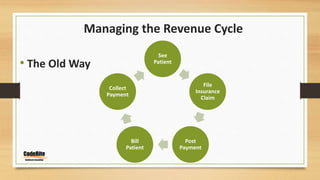
• The Old Way
See
Patient
File
Insurance
Claim
Post
Payment
Bill
Patient
Collect
Payment
Managing the Revenue Cycle
• What’s wrong with the old way?
• No Insurance verification
• Nothing collected upfront
• Depending on insurance to cover the payment
• Hassle of billing and making collection efforts from patients
BOTTOM LINE
TIME AND MONEY LOST FOR THE PRACTICE!!!
Managing the Revenue Cycle
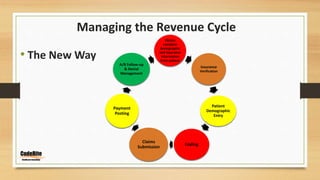
• The New Way
Obtain
complete
demographic
and insurance
information
from patient
Insurance
Verification
Patient
Demographic
Entry
Coding
Claims
Submission
Payment
Posting
A/R Follow-up
& Denial
Management
1 of 7
Obtain
complete
demographic
and insurance
information
from patient
• Who is responsible?
• Front Desk
• Information must be collected
at the time of making the
appointment
• Before the patient arrives in
the office
2 of 7
Insurance
Verification
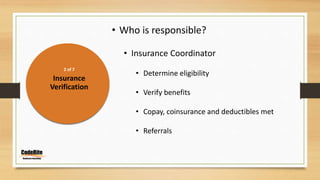
• Who is responsible?
• Insurance Coordinator
• Determine eligibility
• Verify benefits
• Copay, coinsurance and deductibles met
• Referrals
2 of 7
Insurance
Verification
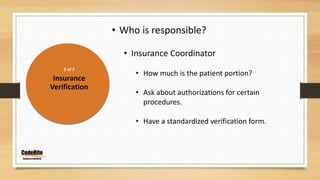
• Who is responsible?
• Insurance Coordinator
• How much is the patient portion?
• Ask about authorizations for certain
procedures.
• Have a standardized verification form.
3 of 7
Patient
Demographic
Entry
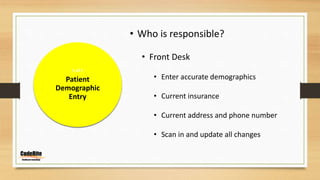
• Who is responsible?
• Front Desk
• Enter accurate demographics
• Current insurance
• Current address and phone number
• Scan in and update all changes
3 of 7
Patient
Communication
• Who is responsible?
• Insurance Coordinator
• Communicate to the patient what they
owe upfront
• Have the allowables from patient’s
insurance available
• Collect, Collect, Collect
• Patient is the second largest payer in most offices
• 20% – 35% of revenue is patient’s responsibility
• Huge deal for practice’s bottom line
• Difference between a thriving and a sinking practice
4 of 7
Coding
• Who is responsible?
• Coding Staff
• Know coding guidelines
• Know payer guidelines
• Accurate coding
• Sending clean claims
4 of 7
ICD-10
Coding
• Who is responsible?
• Coding Staff
• Dual coding before implementation date
• Learn on the job
• Measure productivity
• Always train and educate staff
5 of 7
Claims
Submission
• Who is responsible?
• Billing Staff
• Visual scanning
• Scrubbing
• Setting up system to prompt incorrect entries
• Explosion codes
• Modifiers
6 of 7
Payment
Posting
• Who is responsible?
• Coding and/or billing staff
• Electronic Remittance (ERAs)
• Electronic Funds Transfer (EFT)
• Post from paper EOBs
• Send secondary & tertiary claims
• Automate
7 of 7
A/R Follow-up &
Denial
Management
• Who is responsible?
• Billing Staff
• Working Denials
• Clearinghouse
• Catch errors before payer denials
• EOB denials
• Fix easy errors right away
7 of 7
A/R Follow-up &
Denial
Management
• Choose one day a week to work denials
• Register on insurance websites for faster claim
status updates.
• Use your clearinghouse, Availity, Navinet for
multiple insurances
• Call insurance companies and document all
conversations in the claim window
7 of 7
A/R Follow-up &
Denial
Management
• Look at unpaid claims every two weeks
• File appeal if needed
• Know Medicare and payer guidelines for
filing appeals
7 of 7
A/R Follow-up &
Denial
Management
Patient Collections: Do’s and Don'ts
*** Collect Upfront***
• Payment Plan (Do’s)
• Down payment
• Schedule of payments
• Definitive end date
• Payment Plan (DON’Ts)
• Don’t offer unlimited time
• Don’t take just any amount
• Don’t let patients talk to physician about payment
7 of 7
A/R Follow-up &
Denial
Management
Patient Collections
• Collect balance when making appointment
• Collect when patient comes in
• Online payment options
• Send statement
• Limit the amount of statements sent
• Have a plan for patients who cannot pay
• Send to collections
• Bad debt write-off
• Dismissal from practice (review the consequences)
Managing the Revenue Cycle
It takes a village!!
• Office policies and procedures manual
• Standardized forms and scripts
• Everyone needs to be on the same page!
• Cross Training
• Divides the burden
• Cost-effective
• Everyone in the office should have the same philosophy
• Empowers the employees
Thank you!

Managing the Revenue Cycle Tips & Tools

  • 1.
    Managing the RevenueCycle Tips & Tools Rozmin Bapat, CCS-P, CPC, CPMA
  • 2.
    Revenue Cycle Management(RCM) • Revenue cycle management (RCM) is the process of managing claims, payment and revenue generation. RCM encompasses everything from determining patient insurance eligibility and collecting co-pays to properly coding claims. A well-designed RCM system is able to communicate with the EHR and accounting systems to streamline the billing and collection cycles.
  • 3.
    Managing the RevenueCycle • The Old Way See Patient File Insurance Claim Post Payment Bill Patient Collect Payment
  • 4.
    Managing the RevenueCycle • What’s wrong with the old way? • No Insurance verification • Nothing collected upfront • Depending on insurance to cover the payment • Hassle of billing and making collection efforts from patients BOTTOM LINE TIME AND MONEY LOST FOR THE PRACTICE!!!
  • 5.
    Managing the RevenueCycle • The New Way Obtain complete demographic and insurance information from patient Insurance Verification Patient Demographic Entry Coding Claims Submission Payment Posting A/R Follow-up & Denial Management
  • 6.
    1 of 7 Obtain complete demographic andinsurance information from patient • Who is responsible? • Front Desk • Information must be collected at the time of making the appointment • Before the patient arrives in the office
  • 7.
    2 of 7 Insurance Verification •Who is responsible? • Insurance Coordinator • Determine eligibility • Verify benefits • Copay, coinsurance and deductibles met • Referrals
  • 8.
    2 of 7 Insurance Verification •Who is responsible? • Insurance Coordinator • How much is the patient portion? • Ask about authorizations for certain procedures. • Have a standardized verification form.
  • 9.
    3 of 7 Patient Demographic Entry •Who is responsible? • Front Desk • Enter accurate demographics • Current insurance • Current address and phone number • Scan in and update all changes
  • 10.
    3 of 7 Patient Communication •Who is responsible? • Insurance Coordinator • Communicate to the patient what they owe upfront • Have the allowables from patient’s insurance available • Collect, Collect, Collect
  • 11.
    • Patient isthe second largest payer in most offices • 20% – 35% of revenue is patient’s responsibility • Huge deal for practice’s bottom line • Difference between a thriving and a sinking practice
  • 12.
    4 of 7 Coding •Who is responsible? • Coding Staff • Know coding guidelines • Know payer guidelines • Accurate coding • Sending clean claims
  • 13.
    4 of 7 ICD-10 Coding •Who is responsible? • Coding Staff • Dual coding before implementation date • Learn on the job • Measure productivity • Always train and educate staff
  • 14.
    5 of 7 Claims Submission •Who is responsible? • Billing Staff • Visual scanning • Scrubbing • Setting up system to prompt incorrect entries • Explosion codes • Modifiers
  • 15.
    6 of 7 Payment Posting •Who is responsible? • Coding and/or billing staff • Electronic Remittance (ERAs) • Electronic Funds Transfer (EFT) • Post from paper EOBs • Send secondary & tertiary claims • Automate
  • 16.
    7 of 7 A/RFollow-up & Denial Management • Who is responsible? • Billing Staff • Working Denials • Clearinghouse • Catch errors before payer denials • EOB denials • Fix easy errors right away
  • 17.
    7 of 7 A/RFollow-up & Denial Management • Choose one day a week to work denials • Register on insurance websites for faster claim status updates. • Use your clearinghouse, Availity, Navinet for multiple insurances • Call insurance companies and document all conversations in the claim window
  • 18.
    7 of 7 A/RFollow-up & Denial Management • Look at unpaid claims every two weeks • File appeal if needed • Know Medicare and payer guidelines for filing appeals
  • 19.
    7 of 7 A/RFollow-up & Denial Management Patient Collections: Do’s and Don'ts *** Collect Upfront*** • Payment Plan (Do’s) • Down payment • Schedule of payments • Definitive end date • Payment Plan (DON’Ts) • Don’t offer unlimited time • Don’t take just any amount • Don’t let patients talk to physician about payment
  • 20.
    7 of 7 A/RFollow-up & Denial Management Patient Collections • Collect balance when making appointment • Collect when patient comes in • Online payment options • Send statement • Limit the amount of statements sent • Have a plan for patients who cannot pay • Send to collections • Bad debt write-off • Dismissal from practice (review the consequences)
  • 21.
    Managing the RevenueCycle It takes a village!! • Office policies and procedures manual • Standardized forms and scripts • Everyone needs to be on the same page! • Cross Training • Divides the burden • Cost-effective • Everyone in the office should have the same philosophy • Empowers the employees
  • 22.

Editor's Notes

  • #8 You should have a list of allowable from at least top 5 payers and have the exact amount ready for the patient.
  • #9 If your practice routinely does certain procedures, it is a good idea to get preauths for those services.
  • #10 Accuracy is more important than speed. Many offices make mistakes entering the information which can lead in claim denials and loss of revenue. Share the nickname scenario.
  • #13 Download CCI edit file (keep current). Beware of modifier use.
  • #14 ICD-10 is 10 days away and most practices should be ready to go on October 1st. If not, there is still time to come up with a crosswalk and train staff on free and low cost webinars offered by clearinghouses and AAPC and AHIMA.
  • #16 The system was not setup to send secondary claims. These are the things you need to look for.
  • #18 Some insurance companies do not send paper EOBs, instead just send a check. Make sure you register on the website so you can match the check number and amount to proper claims and post.
  • #19 Do not be afraid to file appeals. If your claim is correct and you should be paid for the service, you must fight to get paid. Write-off should be the last resort after exhausting the appeals process.
  • #20 It is not a payment plan without money down, When you finance a car, you have to put a deposit and the balance is distributed into a set amount of time. A medical practice’s payment plan should work exactly the same way.
  • #21 Check with your PM system about online payment options. IF you have a website, setup PayPal so patients can pay securely online so you are not responsible to keep credit cards on file. Setup patient on a recurring basis. Paientpay.net – integrates with your PM system as a financial institution and automatic statement emails are generated instead of printing and mailing statements. We generally recommend that practices check with their malpractice carrier regarding their recommended language and process.  We also generally recommend the following:  You will need a formal policy regarding patient dismissal, the patient needs to be informed in writing, the letter should clearly state the patient is dismissed from the practice as of a specific date, the letter should be sent via regular mail and certified mail with return receipt.  A common practice is to allow the patient 30 days to find alternative care, while in the meantime providing acute care services only with full payment required at the time of service.  To facilitate transfer of care to another physician the letter should include contact information for a physician referral service or local hospital and include a medical records release form.  Again, however, it is important to check with your malpractice carrier as they may have some specific process to recommend.