Managing gRPC Services
with an API Gateway
By João Esperancinha
(2024/05/13)
Summary
- gRPC theory
- What is it?
- What are the benefits?
- What are the drawbacks?
- Making a gRPC service in the backend in Kotlin
- Making a gRPC client to communicate with the backend in Kotlin
- Creating a gRPC-web client for the front end in Javascript
- Using the gRPC gateway plugin
- Using the gRPC web plugin
- Conclusion
About me
João Esperancinha
● Java
● Kotlin
● Groovy
● Scala
● Software Engineer 10+ years
● JESPROTECH owner for 1 year Kong Champion/Java Professional/Spring Professional
Part - I - gRPC Introduction
gRPC
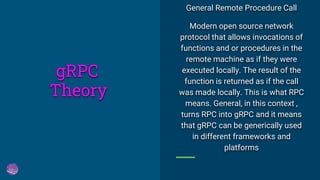
General Remote Procedure Call
Modern open source network
protocol that allows invocations of
functions and or procedures in the
remote machine as if they were
executed locally. The result of the
function is returned as if the call
was made locally. This is what RPC
means. General, in this context ,
turns RPC into gRPC and it means
that gRPC can be generically used
in different frameworks and
platforms
Theory
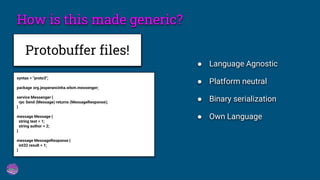
How is this made generic?
Protobuffer files!
syntax = "proto3";
package org.jesperancinha.wlsm.messenger;
service Messenger {
rpc Send (Message) returns (MessageResponse);
}
message Message {
string text = 1;
string author = 2;
}
message MessageResponse {
int32 result = 1;
}
● Language Agnostic
● Platform neutral
● Binary serialization
● Own Language
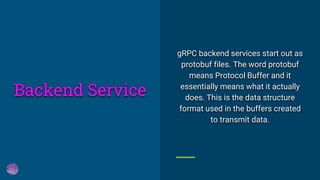
gRPC backend services start out as
protobuf files. The word protobuf
means Protocol Buffer and it
essentially means what it actually
does. This is the data structure
format used in the buffers created
to transmit data.
Backend Service
How to generate
protobuf {
protoc {
artifact =
libs.protoc.asProvider().get().toString()
}
plugins {
create("grpc") {
artifact =
libs.protoc.gen.grpc.java.get().toString()
}
create("grpckt") {
artifact =
libs.protoc.gen.grpc.kotlin.get().toString() +
":jdk8@jar"
}
}
generateProtoTasks {
all().forEach {
it.plugins {
create("grpc")
create("grpckt")
}
it.builtins {
create("kotlin")
}
}
}
}
gradle.kts
MessengerService
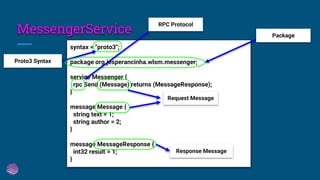
syntax = "proto3";
package org.jesperancinha.wlsm.messenger;
service Messenger {
rpc Send (Message) returns (MessageResponse);
}
message Message {
string text = 1;
string author = 2;
}
message MessageResponse {
int32 result = 1;
}
Proto3 Syntax
Request Message
Response Message
Package
RPC Protocol
MessengerService
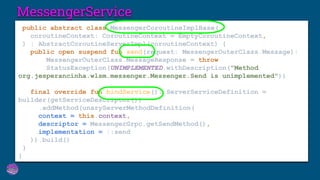
public abstract class MessengerCoroutineImplBase(
coroutineContext: CoroutineContext = EmptyCoroutineContext,
) : AbstractCoroutineServerImpl(coroutineContext) {
public open suspend fun send(request: MessengerOuterClass.Message):
MessengerOuterClass.MessageResponse = throw
StatusException(UNIMPLEMENTED.withDescription("Method
org.jesperancinha.wlsm.messenger.Messenger.Send is unimplemented"))
final override fun bindService(): ServerServiceDefinition =
builder(getServiceDescriptor())
.addMethod(unaryServerMethodDefinition(
context = this.context,
descriptor = MessengerGrpc.getSendMethod(),
implementation = ::send
)).build()
}
}
MessengerService
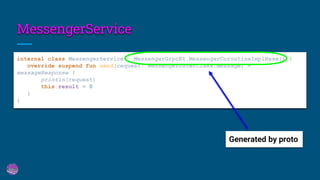
internal class MessengerService : MessengerGrpcKt.MessengerCoroutineImplBase() {
override suspend fun send(request: MessengerOuterClass.Message) =
messageResponse {
println(request)
this.result = 0
}
}
Generated by proto
MessengerService
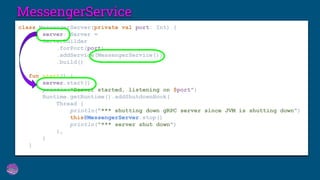
class MessengerServer(private val port: Int) {
val server: Server =
ServerBuilder
.forPort(port)
.addService(MessengerService())
.build()
fun start() {
server.start()
println("Server started, listening on $port")
Runtime.getRuntime().addShutdownHook(
Thread {
println("*** shutting down gRPC server since JVM is shutting down")
this@MessengerServer.stop()
println("*** server shut down")
},
)
}
Just as the gRPC services, the
client files get also generated with
the protobuf plugin. Once that is
created, we can easily use the client
to access the service.
Client
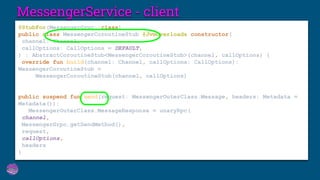
MessengerService - client
@StubFor(MessengerGrpc::class)
public class MessengerCoroutineStub @JvmOverloads constructor(
channel: Channel,
callOptions: CallOptions = DEFAULT,
) : AbstractCoroutineStub<MessengerCoroutineStub>(channel, callOptions) {
override fun build(channel: Channel, callOptions: CallOptions):
MessengerCoroutineStub =
MessengerCoroutineStub(channel, callOptions)
public suspend fun send(request: MessengerOuterClass.Message, headers: Metadata =
Metadata()):
MessengerOuterClass.MessageResponse = unaryRpc(
channel,
MessengerGrpc.getSendMethod(),
request,
callOptions,
headers
)
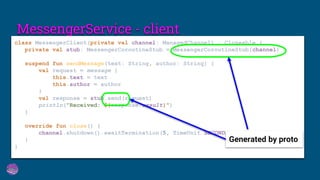
MessengerService - client
class MessengerClient(private val channel: ManagedChannel) : Closeable {
private val stub: MessengerCoroutineStub = MessengerCoroutineStub(channel)
suspend fun sendMessage(text: String, author: String) {
val request = message {
this.text = text
this.author = author
}
val response = stub.send(request)
println("Received: ${response.result}")
}
override fun close() {
channel.shutdown().awaitTermination(5, TimeUnit.SECONDS)
}
}
Generated by proto
gRPC without gradle
gRPC with gradle
Creating gRPC
DEMO
Part - II - gRPC in Kong Konnect
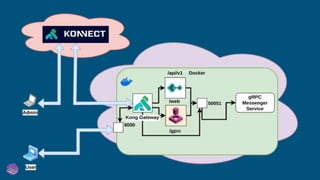
Where and how do we make the
tests?
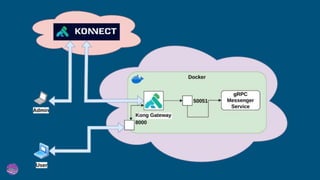
How do we connect Kong
KONNECT to our containerized
environment?
How do we see gRPC in action?
How to use
docker-compose
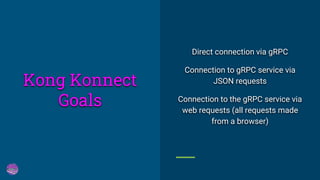
Direct connection via gRPC
Connection to gRPC service via
JSON requests
Connection to the gRPC service via
web requests (all requests made
from a browser)
Kong Konnect
Goals
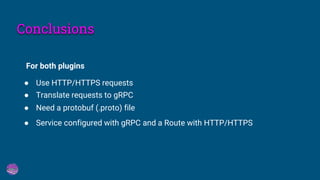
Conclusions
● Use HTTP/HTTPS requests
For both plugins
● Translate requests to gRPC
● Need a protobuf (.proto) file
● Service configured with gRPC and a Route with HTTP/HTTPS
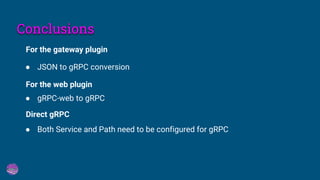
Conclusions
● JSON to gRPC conversion
For the gateway plugin
For the web plugin
● gRPC-web to gRPC
Direct gRPC
● Both Service and Path need to be configured for gRPC
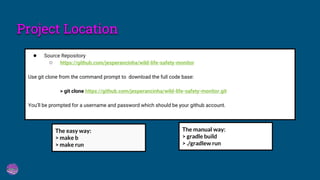
● Source Repository
○ https://github.com/jesperancinha/wild-life-safety-monitor
Use git clone from the command prompt to download the full code base:
> git clone https://github.com/jesperancinha/wild-life-safety-monitor.git
You’ll be prompted for a username and password which should be your github account.
The easy way:
> make b
> make run
The manual way:
> gradle build
> ./gradlew run
Project Location
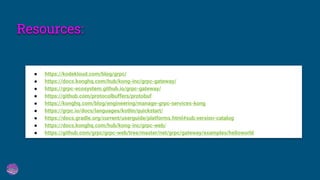
Resources:
● https://kodekloud.com/blog/grpc/
● https://docs.konghq.com/hub/kong-inc/grpc-gateway/
● https://grpc-ecosystem.github.io/grpc-gateway/
● https://github.com/protocolbuffers/protobuf
● https://konghq.com/blog/engineering/manage-grpc-services-kong
● https://grpc.io/docs/languages/kotlin/quickstart/
● https://docs.gradle.org/current/userguide/platforms.html#sub:version-catalog
● https://docs.konghq.com/hub/kong-inc/grpc-web/
● https://github.com/grpc/grpc-web/tree/master/net/grpc/gateway/examples/helloworld
Questions?
Thank you!

Managing gRPC Services using Kong KONNECT and the KONG API Gateway

  • 1.
    Managing gRPC Services withan API Gateway By João Esperancinha (2024/05/13)
  • 2.
    Summary - gRPC theory -What is it? - What are the benefits? - What are the drawbacks? - Making a gRPC service in the backend in Kotlin - Making a gRPC client to communicate with the backend in Kotlin - Creating a gRPC-web client for the front end in Javascript - Using the gRPC gateway plugin - Using the gRPC web plugin - Conclusion
  • 3.
    About me João Esperancinha ●Java ● Kotlin ● Groovy ● Scala ● Software Engineer 10+ years ● JESPROTECH owner for 1 year Kong Champion/Java Professional/Spring Professional
  • 4.
    Part - I- gRPC Introduction
  • 5.
    gRPC General Remote ProcedureCall Modern open source network protocol that allows invocations of functions and or procedures in the remote machine as if they were executed locally. The result of the function is returned as if the call was made locally. This is what RPC means. General, in this context , turns RPC into gRPC and it means that gRPC can be generically used in different frameworks and platforms Theory
  • 6.
    How is thismade generic? Protobuffer files! syntax = "proto3"; package org.jesperancinha.wlsm.messenger; service Messenger { rpc Send (Message) returns (MessageResponse); } message Message { string text = 1; string author = 2; } message MessageResponse { int32 result = 1; } ● Language Agnostic ● Platform neutral ● Binary serialization ● Own Language
  • 7.
    gRPC backend servicesstart out as protobuf files. The word protobuf means Protocol Buffer and it essentially means what it actually does. This is the data structure format used in the buffers created to transmit data. Backend Service
  • 8.
    How to generate protobuf{ protoc { artifact = libs.protoc.asProvider().get().toString() } plugins { create("grpc") { artifact = libs.protoc.gen.grpc.java.get().toString() } create("grpckt") { artifact = libs.protoc.gen.grpc.kotlin.get().toString() + ":jdk8@jar" } } generateProtoTasks { all().forEach { it.plugins { create("grpc") create("grpckt") } it.builtins { create("kotlin") } } } } gradle.kts
  • 9.
    MessengerService syntax = "proto3"; packageorg.jesperancinha.wlsm.messenger; service Messenger { rpc Send (Message) returns (MessageResponse); } message Message { string text = 1; string author = 2; } message MessageResponse { int32 result = 1; } Proto3 Syntax Request Message Response Message Package RPC Protocol
  • 10.
    MessengerService public abstract classMessengerCoroutineImplBase( coroutineContext: CoroutineContext = EmptyCoroutineContext, ) : AbstractCoroutineServerImpl(coroutineContext) { public open suspend fun send(request: MessengerOuterClass.Message): MessengerOuterClass.MessageResponse = throw StatusException(UNIMPLEMENTED.withDescription("Method org.jesperancinha.wlsm.messenger.Messenger.Send is unimplemented")) final override fun bindService(): ServerServiceDefinition = builder(getServiceDescriptor()) .addMethod(unaryServerMethodDefinition( context = this.context, descriptor = MessengerGrpc.getSendMethod(), implementation = ::send )).build() } }
  • 11.
    MessengerService internal class MessengerService: MessengerGrpcKt.MessengerCoroutineImplBase() { override suspend fun send(request: MessengerOuterClass.Message) = messageResponse { println(request) this.result = 0 } } Generated by proto
  • 12.
    MessengerService class MessengerServer(private valport: Int) { val server: Server = ServerBuilder .forPort(port) .addService(MessengerService()) .build() fun start() { server.start() println("Server started, listening on $port") Runtime.getRuntime().addShutdownHook( Thread { println("*** shutting down gRPC server since JVM is shutting down") this@MessengerServer.stop() println("*** server shut down") }, ) }
  • 13.
    Just as thegRPC services, the client files get also generated with the protobuf plugin. Once that is created, we can easily use the client to access the service. Client
  • 14.
    MessengerService - client @StubFor(MessengerGrpc::class) publicclass MessengerCoroutineStub @JvmOverloads constructor( channel: Channel, callOptions: CallOptions = DEFAULT, ) : AbstractCoroutineStub<MessengerCoroutineStub>(channel, callOptions) { override fun build(channel: Channel, callOptions: CallOptions): MessengerCoroutineStub = MessengerCoroutineStub(channel, callOptions) public suspend fun send(request: MessengerOuterClass.Message, headers: Metadata = Metadata()): MessengerOuterClass.MessageResponse = unaryRpc( channel, MessengerGrpc.getSendMethod(), request, callOptions, headers )
  • 15.
    MessengerService - client classMessengerClient(private val channel: ManagedChannel) : Closeable { private val stub: MessengerCoroutineStub = MessengerCoroutineStub(channel) suspend fun sendMessage(text: String, author: String) { val request = message { this.text = text this.author = author } val response = stub.send(request) println("Received: ${response.result}") } override fun close() { channel.shutdown().awaitTermination(5, TimeUnit.SECONDS) } } Generated by proto
  • 16.
    gRPC without gradle gRPCwith gradle Creating gRPC DEMO
  • 17.
    Part - II- gRPC in Kong Konnect
  • 18.
    Where and howdo we make the tests? How do we connect Kong KONNECT to our containerized environment? How do we see gRPC in action? How to use docker-compose
  • 19.
    Direct connection viagRPC Connection to gRPC service via JSON requests Connection to the gRPC service via web requests (all requests made from a browser) Kong Konnect Goals
  • 23.
    Conclusions ● Use HTTP/HTTPSrequests For both plugins ● Translate requests to gRPC ● Need a protobuf (.proto) file ● Service configured with gRPC and a Route with HTTP/HTTPS
  • 24.
    Conclusions ● JSON togRPC conversion For the gateway plugin For the web plugin ● gRPC-web to gRPC Direct gRPC ● Both Service and Path need to be configured for gRPC
  • 25.
    ● Source Repository ○https://github.com/jesperancinha/wild-life-safety-monitor Use git clone from the command prompt to download the full code base: > git clone https://github.com/jesperancinha/wild-life-safety-monitor.git You’ll be prompted for a username and password which should be your github account. The easy way: > make b > make run The manual way: > gradle build > ./gradlew run Project Location
  • 26.
    Resources: ● https://kodekloud.com/blog/grpc/ ● https://docs.konghq.com/hub/kong-inc/grpc-gateway/ ●https://grpc-ecosystem.github.io/grpc-gateway/ ● https://github.com/protocolbuffers/protobuf ● https://konghq.com/blog/engineering/manage-grpc-services-kong ● https://grpc.io/docs/languages/kotlin/quickstart/ ● https://docs.gradle.org/current/userguide/platforms.html#sub:version-catalog ● https://docs.konghq.com/hub/kong-inc/grpc-web/ ● https://github.com/grpc/grpc-web/tree/master/net/grpc/gateway/examples/helloworld
  • 27.
  • 28.