Managing Deliverable-Specific Link Anchors:
New Suggested Best Practice for Keys
How to define and maintain publicly-
linkable anchors in deliverables
produced from DITA source
4/29/2015 Contrext, LLC 1
Eliot Kimber
Contrext, LLC
DITA North America 2015
About the Author
• Independent consultant focusing on DITA analysis,
design, and implementation
• Doing SGML and XML for cough 30 years cough
• Founding member of the DITA Technical Committee
• Founding member of the XML Working Group
• Co-editor of HyTime standard (ISO/IEC 10744)
• Primary developer and founder of the DITA for
Publishers project
• Author of DITA for Practitioners, Vol 1 (XML Press)
4/29/2015 Contrext, LLC 2
Agenda
• What are "public anchors"?
• Navigation vs resource keys
• Key definition and usage best practice
• Generating public deliverable anchors
4/29/2015 Contrext, LLC 3
Executive Summary
• Use keys for everything
• Principle: Exactly one URI reference to each
resource across all maps
• Put unique keys on each navigation topicref
you want to be publicly linkable or xref to
• Use navigation keys to determine deliverable
anchors
• Don’t change navigation keys unnecessarily
4/29/2015 Contrext, LLC 4
What are Public Anchors?
• Anything that can be linked to from outside the
deliverable:
– HTML files
– HTML @id values
– PDF named destinations
– Help topic IDs
• Need to be reliably persistent
• Should not change from release to release for the
same logical component (topic or element)
4/29/2015 Contrext, LLC 5
Navigation vs Resource keys
• Two types of topicrefs:
– "normal": contribute to the navigation tree or to
reltables
– "resource-only": Establish a dependency on a
resource but don’t put it in the navigation tree
• @processing-role on topicref:
– processing-role="normal"
– processing-role="resource-only"
• <keydef> is resource-only by default
4/29/2015 Contrext, LLC 6
Resource-Only Keys
• Establish context-independent keys for topics
• Can be unique across all maps if required or
map- or scope-specific
• Key-defining maps serve as catalogs of topics
or other resources (images, etc.)
• Should be used for conrefs
• Not useful for cross reference targets: no
navigation use context
4/29/2015 Contrext, LLC 7
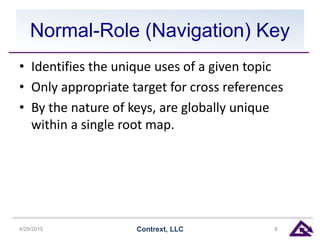
Normal-Role (Navigation) Key
• Identifies the unique uses of a given topic
• Only appropriate target for cross references
• By the nature of keys, are globally unique
within a single root map.
4/29/2015 Contrext, LLC 8
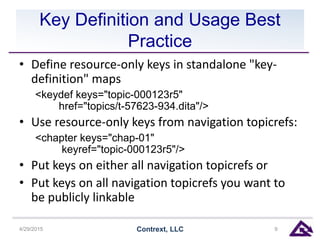
Key Definition and Usage Best
Practice
• Define resource-only keys in standalone "key-
definition" maps
<keydef keys="topic-000123r5"
href="topics/t-57623-934.dita"/>
• Use resource-only keys from navigation topicrefs:
<chapter keys="chap-01"
keyref="topic-000123r5"/>
• Put keys on either all navigation topicrefs or
• Put keys on all navigation topicrefs you want to
be publicly linkable
4/29/2015 Contrext, LLC 9
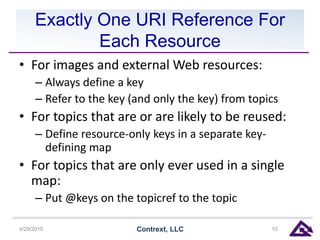
Exactly One URI Reference For
Each Resource
• For images and external Web resources:
– Always define a key
– Refer to the key (and only the key) from topics
• For topics that are or are likely to be reused:
– Define resource-only keys in a separate key-
defining map
• For topics that are only ever used in a single
map:
– Put @keys on the topicref to the topic
4/29/2015 Contrext, LLC 10
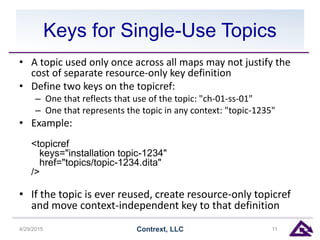
Keys for Single-Use Topics
• A topic used only once across all maps may not justify the
cost of separate resource-only key definition
• Define two keys on the topicref:
– One that reflects that use of the topic: "ch-01-ss-01"
– One that represents the topic in any context: "topic-1235"
• Example:
<topicref
keys="installation topic-1234"
href="topics/topic-1234.dita"
/>
• If the topic is ever reused, create resource-only topicref
and move context-independent key to that definition
4/29/2015 Contrext, LLC 11
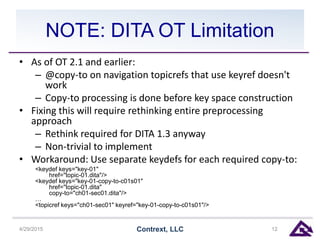
NOTE: DITA OT Limitation
• As of OT 2.1 and earlier:
– @copy-to on navigation topicrefs that use keyref doesn't
work
– Copy-to processing is done before key space construction
• Fixing this will require rethinking entire preprocessing
approach
– Rethink required for DITA 1.3 anyway
– Non-trivial to implement
• Workaround: Use separate keydefs for each required copy-to:
<keydef keys="key-01"
href="topic-01.dita"/>
<keydef keys="key-01-copy-to-c01s01"
href="topic-01.dita"
copy-to="ch01-sec01.dita"/>
…
<topicref keys="ch01-sec01" keyref="key-01-copy-to-c01s01"/>
4/29/2015 Contrext, LLC 12
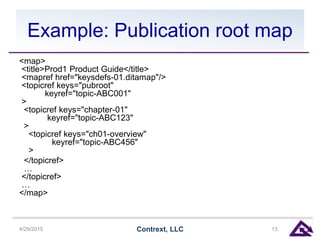
Example: Publication root map
<map>
<title>Prod1 Product Guide</title>
<mapref href="keysdefs-01.ditamap"/>
<topicref keys="pubroot"
keyref="topic-ABC001"
>
<topicref keys="chapter-01"
keyref="topic-ABC123"
>
<topicref keys="ch01-overview"
keyref="topic-ABC456"
>
</topicref>
…
</topicref>
…
</map>
4/29/2015 Contrext, LLC 13
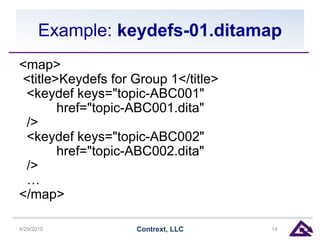
Example: keydefs-01.ditamap
<map>
<title>Keydefs for Group 1</title>
<keydef keys="topic-ABC001"
href="topic-ABC001.dita"
/>
<keydef keys="topic-ABC002"
href="topic-ABC002.dita"
/>
…
</map>
4/29/2015 Contrext, LLC 14
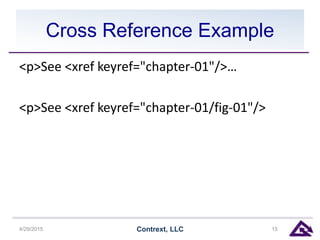
Cross Reference Example
<p>See <xref keyref="chapter-01"/>…
<p>See <xref keyref="chapter-01/fig-01"/>
4/29/2015 Contrext, LLC 15
Generating Public Deliverable
Anchors
• Two basic use cases:
– Multi-file outputs (HTML, online help)
– Monolithic outputs (PDF, EPUB, etc.)
• General problem: anchors for non-topic
elements
– Only unique within a single topic
– Not necessarily unique within result documents
• Must combine keys with element IDs in some
cases
4/29/2015 Contrext, LLC 16
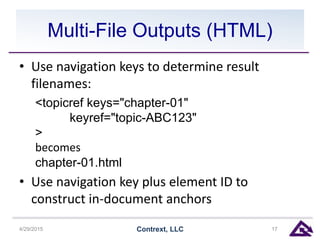
Multi-File Outputs (HTML)
• Use navigation keys to determine result
filenames:
<topicref keys="chapter-01"
keyref="topic-ABC123"
>
becomes
chapter-01.html
• Use navigation key plus element ID to
construct in-document anchors
4/29/2015 Contrext, LLC 17
Monolithic Outputs (PDF)
• Use navigation key for topic anchors
• Use navigation key+element ID for non-topic
anchors
• For PDF, need to use a separator that uses
legal URL characters, e.g. "_._", "-.-"
– Needs to be more than "-" or "_" to avoid
accidental collisions
4/29/2015 Contrext, LLC 18
Preprocessing Extensions
• DITA Community project
• Extends base preprocessing to add @copy-to
to topicrefs as required
– Second and subsequent reference to a given topic
– Will eventually use keys for the filename value
• Some subtle complexities
• Haven't had time to implement yet
4/29/2015 Contrext, LLC 19
Summary
• Always use keys for all references
– To topics
– To images
– To peer maps (DITA 1.3)
• Put keys on navigation topicrefs
• Crossrefs should point to navigation keys
• Use navigation keys to generate anchors in
deliverables
4/29/2015 Contrext, LLC 20
Resources
• Paper: http://github.io/dita-
community/paper-dita-keys-as-public-anchor-
ids
• Preprocessing extensions:
https://github.com/dita-community/org.dita-
community.preprocess-extensions
• Me: ekimber@contrext.com,
http://contrext.com
4/29/2015 Contrext, LLC 21

Managing Deliverable-Specific Link Anchors: New Suggested Best Practice for Keys

  • 1.
    Managing Deliverable-Specific LinkAnchors: New Suggested Best Practice for Keys How to define and maintain publicly- linkable anchors in deliverables produced from DITA source 4/29/2015 Contrext, LLC 1 Eliot Kimber Contrext, LLC DITA North America 2015
  • 2.
    About the Author •Independent consultant focusing on DITA analysis, design, and implementation • Doing SGML and XML for cough 30 years cough • Founding member of the DITA Technical Committee • Founding member of the XML Working Group • Co-editor of HyTime standard (ISO/IEC 10744) • Primary developer and founder of the DITA for Publishers project • Author of DITA for Practitioners, Vol 1 (XML Press) 4/29/2015 Contrext, LLC 2
  • 3.
    Agenda • What are"public anchors"? • Navigation vs resource keys • Key definition and usage best practice • Generating public deliverable anchors 4/29/2015 Contrext, LLC 3
  • 4.
    Executive Summary • Usekeys for everything • Principle: Exactly one URI reference to each resource across all maps • Put unique keys on each navigation topicref you want to be publicly linkable or xref to • Use navigation keys to determine deliverable anchors • Don’t change navigation keys unnecessarily 4/29/2015 Contrext, LLC 4
  • 5.
    What are PublicAnchors? • Anything that can be linked to from outside the deliverable: – HTML files – HTML @id values – PDF named destinations – Help topic IDs • Need to be reliably persistent • Should not change from release to release for the same logical component (topic or element) 4/29/2015 Contrext, LLC 5
  • 6.
    Navigation vs Resourcekeys • Two types of topicrefs: – "normal": contribute to the navigation tree or to reltables – "resource-only": Establish a dependency on a resource but don’t put it in the navigation tree • @processing-role on topicref: – processing-role="normal" – processing-role="resource-only" • <keydef> is resource-only by default 4/29/2015 Contrext, LLC 6
  • 7.
    Resource-Only Keys • Establishcontext-independent keys for topics • Can be unique across all maps if required or map- or scope-specific • Key-defining maps serve as catalogs of topics or other resources (images, etc.) • Should be used for conrefs • Not useful for cross reference targets: no navigation use context 4/29/2015 Contrext, LLC 7
  • 8.
    Normal-Role (Navigation) Key •Identifies the unique uses of a given topic • Only appropriate target for cross references • By the nature of keys, are globally unique within a single root map. 4/29/2015 Contrext, LLC 8
  • 9.
    Key Definition andUsage Best Practice • Define resource-only keys in standalone "key- definition" maps <keydef keys="topic-000123r5" href="topics/t-57623-934.dita"/> • Use resource-only keys from navigation topicrefs: <chapter keys="chap-01" keyref="topic-000123r5"/> • Put keys on either all navigation topicrefs or • Put keys on all navigation topicrefs you want to be publicly linkable 4/29/2015 Contrext, LLC 9
  • 10.
    Exactly One URIReference For Each Resource • For images and external Web resources: – Always define a key – Refer to the key (and only the key) from topics • For topics that are or are likely to be reused: – Define resource-only keys in a separate key- defining map • For topics that are only ever used in a single map: – Put @keys on the topicref to the topic 4/29/2015 Contrext, LLC 10
  • 11.
    Keys for Single-UseTopics • A topic used only once across all maps may not justify the cost of separate resource-only key definition • Define two keys on the topicref: – One that reflects that use of the topic: "ch-01-ss-01" – One that represents the topic in any context: "topic-1235" • Example: <topicref keys="installation topic-1234" href="topics/topic-1234.dita" /> • If the topic is ever reused, create resource-only topicref and move context-independent key to that definition 4/29/2015 Contrext, LLC 11
  • 12.
    NOTE: DITA OTLimitation • As of OT 2.1 and earlier: – @copy-to on navigation topicrefs that use keyref doesn't work – Copy-to processing is done before key space construction • Fixing this will require rethinking entire preprocessing approach – Rethink required for DITA 1.3 anyway – Non-trivial to implement • Workaround: Use separate keydefs for each required copy-to: <keydef keys="key-01" href="topic-01.dita"/> <keydef keys="key-01-copy-to-c01s01" href="topic-01.dita" copy-to="ch01-sec01.dita"/> … <topicref keys="ch01-sec01" keyref="key-01-copy-to-c01s01"/> 4/29/2015 Contrext, LLC 12
  • 13.
    Example: Publication rootmap <map> <title>Prod1 Product Guide</title> <mapref href="keysdefs-01.ditamap"/> <topicref keys="pubroot" keyref="topic-ABC001" > <topicref keys="chapter-01" keyref="topic-ABC123" > <topicref keys="ch01-overview" keyref="topic-ABC456" > </topicref> … </topicref> … </map> 4/29/2015 Contrext, LLC 13
  • 14.
    Example: keydefs-01.ditamap <map> <title>Keydefs forGroup 1</title> <keydef keys="topic-ABC001" href="topic-ABC001.dita" /> <keydef keys="topic-ABC002" href="topic-ABC002.dita" /> … </map> 4/29/2015 Contrext, LLC 14
  • 15.
    Cross Reference Example <p>See<xref keyref="chapter-01"/>… <p>See <xref keyref="chapter-01/fig-01"/> 4/29/2015 Contrext, LLC 15
  • 16.
    Generating Public Deliverable Anchors •Two basic use cases: – Multi-file outputs (HTML, online help) – Monolithic outputs (PDF, EPUB, etc.) • General problem: anchors for non-topic elements – Only unique within a single topic – Not necessarily unique within result documents • Must combine keys with element IDs in some cases 4/29/2015 Contrext, LLC 16
  • 17.
    Multi-File Outputs (HTML) •Use navigation keys to determine result filenames: <topicref keys="chapter-01" keyref="topic-ABC123" > becomes chapter-01.html • Use navigation key plus element ID to construct in-document anchors 4/29/2015 Contrext, LLC 17
  • 18.
    Monolithic Outputs (PDF) •Use navigation key for topic anchors • Use navigation key+element ID for non-topic anchors • For PDF, need to use a separator that uses legal URL characters, e.g. "_._", "-.-" – Needs to be more than "-" or "_" to avoid accidental collisions 4/29/2015 Contrext, LLC 18
  • 19.
    Preprocessing Extensions • DITACommunity project • Extends base preprocessing to add @copy-to to topicrefs as required – Second and subsequent reference to a given topic – Will eventually use keys for the filename value • Some subtle complexities • Haven't had time to implement yet 4/29/2015 Contrext, LLC 19
  • 20.
    Summary • Always usekeys for all references – To topics – To images – To peer maps (DITA 1.3) • Put keys on navigation topicrefs • Crossrefs should point to navigation keys • Use navigation keys to generate anchors in deliverables 4/29/2015 Contrext, LLC 20
  • 21.
    Resources • Paper: http://github.io/dita- community/paper-dita-keys-as-public-anchor- ids •Preprocessing extensions: https://github.com/dita-community/org.dita- community.preprocess-extensions • Me: ekimber@contrext.com, http://contrext.com 4/29/2015 Contrext, LLC 21