Twisted XSLT Tricks:
Making Column Switching Work for
FOP
Eliot Kimber
Contrext
DITA OT Day 2018
About the Author
• Independent consultant focusing on DITA
analysis, design, and implementation
• Doing SGML and XML for cough 30 years cough
• Founding member of the DITA Technical
Committee
• Founding member of the XML Working Group
• Co-editor of HyTime standard (ISO/IEC 10744)
• Primary developer and founder of the DITA for
Publishers project (dita4publishers.org)
• Author of DITA for Practitioners, Vol 1 (XML Press)
DITA OT Day 2018
Agenda
• The trouble with columns in FO
• And also page sequences
• Solution: Split the trees
• Demonstration
DITA OT Day 2018
THE TROUBLE WITH
COLUMNS (AND PAGE
SEQUENCES)
DITA OT Day 2018
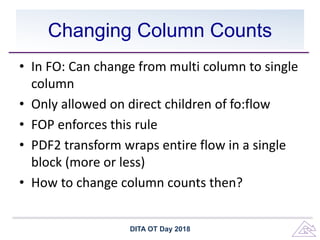
Changing Column Counts
• In FO: Can change from multi column to single
column
• Only allowed on direct children of fo:flow
• FOP enforces this rule
• PDF2 transform wraps entire flow in a single
block (more or less)
• How to change column counts then?
DITA OT Day 2018
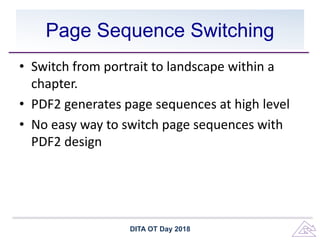
Page Sequence Switching
• Switch from portrait to landscape within a
chapter.
• PDF2 generates page sequences at high level
• No easy way to switch page sequences with
PDF2 design
DITA OT Day 2018
SOLUTION: SPLIT THE TREES
DITA OT Day 2018
Column Splitting
• Set base column count to 2 then set top-level
fo:block to span="all"
• Put out marker elements to signal start and
end of a column change
• Post-process generated FO to split top-level
blocks at span change boundaries
DITA OT Day 2018
Page Sequence Splitting
• Same approach as for columns
• Put out start/end markers for page sequences
• Post-process FO to split page sequences at
marker boundaries.
DITA OT Day 2018
HOW TO DO THE SPLITTING
DITA OT Day 2018
General Tree-Splitting Algorithm
• Provided by Gerrit Imsieke on the XSL mailing
list
• Uses for-each-group to split original tree on
marker elements:
– Get the nodes before the start marker
– Get the nodes after the start marker
– Nodes not in either group must be between the
markers
– Construct new trees, one for each set of nodes
DITA OT Day 2018
Confession
DITA OT Day 2018
I don’t know how it works
https://getyarn.io/yarn-clip/9c369b08-76b9-4eb8-b00e-432aa1a36977#BJ_HVBSn2Q.copy
Gerrit’s Original Code
<xsl:template match="node() | @*" mode="#default split">
<xsl:copy>
<xsl:apply-templates select="@* | node()”
mode="#current"/>
</xsl:copy>
</xsl:template>
<xsl:template match="fo:block[empty(ancestor::fo:block)]"
mode="#default">
<xsl:variable name="block-root" as="element(fo:block)”
select="."/>
<xsl:for-each-group
select="descendant::node()[empty(node())]"
group-starting-with="two-column-start">
<xsl:for-each-group select="current-group()"
group-ending-with="two-column-end">
<xsl:apply-templates select="$block-root" mode="split">
<xsl:with-param name="restricted-to" as="node()*"
select="current-group()/ancestor-or-self::node()"
tunnel="yes"/>
<xsl:with-param name="two-col-start" as="xs:boolean"
tunnel="yes"
select="exists(self::two-column-start)"/>
</xsl:apply-templates>
</xsl:for-each-group>
</xsl:template>
<xsl:template match="node()" mode="split" priority="1">
<xsl:param name="restricted-to" tunnel="yes" as="node()+"/>
<xsl:if test="exists(. intersect $restricted-to)">
<xsl:next-match/>
</xsl:if>
</xsl:template>
<xsl:template match="fo:block[empty(ancestor::fo:block)]”
mode="split">
<xsl:param name="restricted-to" tunnel="yes" as="node()*"/>
<xsl:param name="two-col-start" tunnel="yes”
as="xs:boolean"/>
<xsl:copy>
<xsl:apply-templates select="@*" mode="#current"/>
<xsl:if test="$two-col-start">
<xsl:attribute name="span" select="'none'"/>
</xsl:if>
<xsl:apply-templates mode="#current"/>
</xsl:copy>
</xsl:template>
<xsl:template match="two-column-start | two-column-end”
mode="split"/>
DITA OT Day 2018
The Key Bit of the Code
<xsl:template match="fo:block[empty(ancestor::fo:block)]"
mode="#default">
<xsl:variable name="block-root" as="element(fo:block)”
select="."/>
<xsl:for-each-group select="descendant::node()[empty(node())]"
group-starting-with="two-column-start">
<xsl:for-each-group select="current-group()"
group-ending-with="two-column-end">
<xsl:apply-templates
select="$block-root" mode="split">
<xsl:with-param name="restricted-to" as="node()*"
select="current-group()/ancestor-or-self::node()"
tunnel="yes"/>
<xsl:with-param name="two-col-start" as="xs:boolean"
tunnel="yes"
select="exists(self::two-column-start)"/>
</xsl:apply-templates>
</xsl:for-each-group>
</xsl:template>
DITA OT Day 2018
Gotchas
• Had to ensure IDs were not duplicated
• Selecting all leaf elements
– No need to look inside blocks or tables, for
instance
– More than just fo:block
DITA OT Day 2018
Demo: Federal Acquisition
Regulations
• Use of FOP is customer requirement
• Mostly one-column but some two-column
tables
• Mostly portrait but some rotated (landscape)
tables
DITA OT Day 2018
Questions?
DITA OT Day 2018

Twisted XSL Tricks: Column Switching for FOP

  • 1.
    Twisted XSLT Tricks: MakingColumn Switching Work for FOP Eliot Kimber Contrext DITA OT Day 2018
  • 2.
    About the Author •Independent consultant focusing on DITA analysis, design, and implementation • Doing SGML and XML for cough 30 years cough • Founding member of the DITA Technical Committee • Founding member of the XML Working Group • Co-editor of HyTime standard (ISO/IEC 10744) • Primary developer and founder of the DITA for Publishers project (dita4publishers.org) • Author of DITA for Practitioners, Vol 1 (XML Press) DITA OT Day 2018
  • 3.
    Agenda • The troublewith columns in FO • And also page sequences • Solution: Split the trees • Demonstration DITA OT Day 2018
  • 4.
    THE TROUBLE WITH COLUMNS(AND PAGE SEQUENCES) DITA OT Day 2018
  • 5.
    Changing Column Counts •In FO: Can change from multi column to single column • Only allowed on direct children of fo:flow • FOP enforces this rule • PDF2 transform wraps entire flow in a single block (more or less) • How to change column counts then? DITA OT Day 2018
  • 6.
    Page Sequence Switching •Switch from portrait to landscape within a chapter. • PDF2 generates page sequences at high level • No easy way to switch page sequences with PDF2 design DITA OT Day 2018
  • 7.
    SOLUTION: SPLIT THETREES DITA OT Day 2018
  • 8.
    Column Splitting • Setbase column count to 2 then set top-level fo:block to span="all" • Put out marker elements to signal start and end of a column change • Post-process generated FO to split top-level blocks at span change boundaries DITA OT Day 2018
  • 9.
    Page Sequence Splitting •Same approach as for columns • Put out start/end markers for page sequences • Post-process FO to split page sequences at marker boundaries. DITA OT Day 2018
  • 10.
    HOW TO DOTHE SPLITTING DITA OT Day 2018
  • 11.
    General Tree-Splitting Algorithm •Provided by Gerrit Imsieke on the XSL mailing list • Uses for-each-group to split original tree on marker elements: – Get the nodes before the start marker – Get the nodes after the start marker – Nodes not in either group must be between the markers – Construct new trees, one for each set of nodes DITA OT Day 2018
  • 12.
    Confession DITA OT Day2018 I don’t know how it works https://getyarn.io/yarn-clip/9c369b08-76b9-4eb8-b00e-432aa1a36977#BJ_HVBSn2Q.copy
  • 13.
    Gerrit’s Original Code <xsl:templatematch="node() | @*" mode="#default split"> <xsl:copy> <xsl:apply-templates select="@* | node()” mode="#current"/> </xsl:copy> </xsl:template> <xsl:template match="fo:block[empty(ancestor::fo:block)]" mode="#default"> <xsl:variable name="block-root" as="element(fo:block)” select="."/> <xsl:for-each-group select="descendant::node()[empty(node())]" group-starting-with="two-column-start"> <xsl:for-each-group select="current-group()" group-ending-with="two-column-end"> <xsl:apply-templates select="$block-root" mode="split"> <xsl:with-param name="restricted-to" as="node()*" select="current-group()/ancestor-or-self::node()" tunnel="yes"/> <xsl:with-param name="two-col-start" as="xs:boolean" tunnel="yes" select="exists(self::two-column-start)"/> </xsl:apply-templates> </xsl:for-each-group> </xsl:for-each-group> </xsl:template> <xsl:template match="node()" mode="split" priority="1"> <xsl:param name="restricted-to" tunnel="yes" as="node()+"/> <xsl:if test="exists(. intersect $restricted-to)"> <xsl:next-match/> </xsl:if> </xsl:template> <xsl:template match="fo:block[empty(ancestor::fo:block)]” mode="split"> <xsl:param name="restricted-to" tunnel="yes" as="node()*"/> <xsl:param name="two-col-start" tunnel="yes” as="xs:boolean"/> <xsl:copy> <xsl:apply-templates select="@*" mode="#current"/> <xsl:if test="$two-col-start"> <xsl:attribute name="span" select="'none'"/> </xsl:if> <xsl:apply-templates mode="#current"/> </xsl:copy> </xsl:template> <xsl:template match="two-column-start | two-column-end” mode="split"/> DITA OT Day 2018
  • 14.
    The Key Bitof the Code <xsl:template match="fo:block[empty(ancestor::fo:block)]" mode="#default"> <xsl:variable name="block-root" as="element(fo:block)” select="."/> <xsl:for-each-group select="descendant::node()[empty(node())]" group-starting-with="two-column-start"> <xsl:for-each-group select="current-group()" group-ending-with="two-column-end"> <xsl:apply-templates select="$block-root" mode="split"> <xsl:with-param name="restricted-to" as="node()*" select="current-group()/ancestor-or-self::node()" tunnel="yes"/> <xsl:with-param name="two-col-start" as="xs:boolean" tunnel="yes" select="exists(self::two-column-start)"/> </xsl:apply-templates> </xsl:for-each-group> </xsl:for-each-group> </xsl:template> DITA OT Day 2018
  • 15.
    Gotchas • Had toensure IDs were not duplicated • Selecting all leaf elements – No need to look inside blocks or tables, for instance – More than just fo:block DITA OT Day 2018
  • 16.
    Demo: Federal Acquisition Regulations •Use of FOP is customer requirement • Mostly one-column but some two-column tables • Mostly portrait but some rotated (landscape) tables DITA OT Day 2018
  • 17.