IMPLEMENTATION OF COVERT CHANNEL
UNIT II
Non self-reproducing Malware
• “simple infections means that , viruses install themselves
into the users’ operating system. The installation must be
performed according to the following steps:
• In a resident mode: the program goes resident (is an
active process permanently in memory) and may activate
and operate as long as the computer is on;
• In stealth mode: the user must be kept unaware of the
presence of such a resident program on his operating
system. For instance, the attached process must not be
displayed on the screen unlike the other processes. .
• In a persistent mode: when erased or uninstalled, the
infecting program manages to reinstall on the computer
(as a general rule, under Windows, several copies of this
program are hidden in the system directories).
• At boot time, this mode also allows a malicious program to
run in resident mode. For the sake of argument, the Back
Orifice 2000 Trojan horse program adds the following key to
the system registry .
• BackOrifice2000HKLMSoftwareMicrosoftWindows
CurrentVersionRunServices.
• Whenever the host boots, the Trojan horse’s server part is
thus automatically executed.
• It is essential to bear in mind that a single mistake from the
user is enough to allow the infecting program to install
itself.
• As long as the program is not completely eradicated, the
operating system will remain corrupted.
• Simple computer infection programs may be divided into
two different classes: logic bombs and Trojan horse
programs.
What is a Trojan Horse? (Trojan Malware)
• A Trojan Horse (Trojan) is a type of malware that disguises itself as legitimate
code or software.
• Once inside the network, attackers are able to carry out any action that a
legitimate user could perform, such as exporting files, modifying data,
deleting files or otherwise altering the contents of the device.
• Trojans may be packaged in downloads for games, tools, apps or even
software patches.
• Many Trojan attacks also leverage social engineering tactics, as well as
spoofing and phishing, to prompt the desired action in the user.
Trojan: Virus or Malware?
• A Trojan is sometimes called a Trojan virus or Trojan horse virus, but those
terms are technically incorrect.
• Unlike a virus or worm, Trojan malware cannot replicate itself or self-execute.
• It requires specific and deliberate action from the user.
• Trojans are malware, and like most forms of malware, Trojans are designed to
damage files, redirect internet traffic, monitor the user’s activity, steal
sensitive data or set up backdoor access points to the system.
• Trojans may delete, block, modify, leak or copy data, which can then be sold
back to the user for ransom or on the dark web.
How Trojans Work?
• A Trojan horse cannot manifest by itself, so it needs a user to
download the server side of the application for it to work.
• This means the executable (.exe) file should be implemented and the
program installed for the Trojan to attack a device’s system.
• A Trojan virus spreads through legitimate-looking emails and files
attached to emails, which are spammed to reach the inboxes of as
many people as possible.
• When the email is opened and the malicious attachment is
downloaded, the Trojan server will install and automatically run
every time the infected device is turned on.
• Devices can also be infected by a Trojan through social engineering
tactics, which cyber criminals use to force users into downloading a
malicious application.
• The malicious file could be hidden in banner advertisements, pop-up
advertisements, or links on websites.
• A computer infected by Trojan malware can also spread it to
other computers.
• A cyber criminal turns the device into a zombie computer,
which means they have remote control of it without the
user knowing.
• Hackers can then use the zombie computer to continue
sharing malware across a network of devices, known as a
botnet.
• For example, a user might receive an email from someone
they know, which includes an attachment that also looks
rightful.
• However, the attachment contains malicious code that
executes and installs the Trojan on their device.
• The user often will not know anything untoward has
occurred, as their computer may continue to work normally
with no signs of it having been infected.
• The malware will reside undetected until the user
takes a certain action, such as visiting a certain
website or banking app.
• This will activate the malicious code, and the
Trojan will carry out the hacker’s desired action.
• Depending on the type of Trojan and how it was
created, the malware may delete itself, return to
being hidden, or remain active on the device.
• Trojans can also attack and infect smartphones and
tablets using a thread of mobile malware.
• This could occur through the attacker redirecting
traffic to a device connected to a Wi-Fi network
and then using it to launch cyber attacks.
Types of Trojan Malware
• Backdoor Trojan: A backdoor Trojan enables an attacker to gain remote access to a
computer and take control of it using a backdoor.
• This enables the malicious actor to do whatever they want on the device, such as
deleting files, rebooting the computer, stealing data, or uploading malware.
• A backdoor Trojan is frequently used to create a botnet through a network of
zombie computers.
• Banker Trojan: A banker Trojan is designed to target users’ banking accounts and
financial information.
• It attempts to steal account data for credit and debit cards, e-payment systems, and
online banking systems.
• Distributed denial-of-service (DDoS) Trojan: These Trojan programs carry out
attacks that overload a network with traffic.
• It will send multiple requests from a computer or a group of computers to
overwhelm a target web address and cause a denial of service.
• Downloader Trojan: A downloader Trojan targets a computer that has already been
infected by malware, then downloads and installs more malicious programs to it.
• This could be additional Trojans or other types of malware like adware.
• Exploit Trojan: An exploit malware program contains code or
data that takes advantage of specific vulnerabilities within an
application or computer system.
• The cyber criminal will target users through a method like a
phishing attack, then use the code in the program to exploit a
known vulnerability.
• Fake antivirus Trojan: A fake antivirus Trojan simulates the
actions of legitimate antivirus software.
• The Trojan is designed to detect and remove threats like a
regular antivirus program, then extort money from users for
removing threats that may be nonexistent.
• Game-thief Trojan: A game-thief Trojan is specifically designed
to steal user account information from people playing online
games.
• Instant messaging (IM) Trojan: This type of Trojan targets IM
services to steal users’ logins and passwords.
• It targets popular messaging platforms such as AOL Instant
Messenger, ICQ, MSN Messenger, Skype, and Yahoo Pager.
• Infostealer Trojan: This malware can either be used to install Trojans
or prevent the user from detecting the existence of a malicious
program.
• The components of infostealer Trojans can make it difficult for
antivirus systems to discover them in scans.
• Mailfinder Trojan: A mailfinder Trojan aims to harvest and steal email
addresses that have been stored on a computer.
• Ransom Trojan: Ransom Trojans seek to damage a computer’s
performance or block data on the device so that the user can no
longer access or use it.
• The attacker will then hold the user or organization ransom until they
pay a ransom fee to undo the device damage or unlock the affected
data.
• Remote access Trojan: Similar to a backdoor Trojan, this strand of
malware gives the attacker full control of a user’s computer.
• The cyber criminal maintains access to the device through a remote
network connection, which they use to steal information or spy on a
user.
• Rootkit Trojan: A rootkit is a type of malware that conceals itself on a user’s
computer.
• Its purpose is to stop malicious programs from being detected, which enables
malware to remain active on an infected computer for a longer period.
• Short message service (SMS) Trojan: An SMS Trojan infects mobile devices and
is capable of sending and intercepting text messages.
• This includes sending messages to premium-rate phone numbers, which
increases the costs on a user’s phone bill.
• Spy Trojan: Spy Trojans are designed to sit on a user’s computer and spy on their
activity.
• This includes logging their keyboard actions, taking screenshots, accessing the
applications they use, and tracking login data.
• SUNBURST: The SUNBURST trojan virus was released on numerous SolarWinds
Orion Platform.
• Victims were compromised by trojanized versions of a legitimate SolarWinds
digitally signed file named: SolarWinds.Orion.Core.BusinessLayer.dll.
• The trojanized file is a backdoor.
• Once on a target machine, it remains dormant for a two-week period and will
then retrieve commands that allow it to transfer, execute, perform
reconnaissance, reboot and halt system services.
• Communication occurs over http to predetermined URI's.
How To Recognize a Trojan Virus
• A Trojan horse virus can often remain on a device for months
without the user knowing their computer has been infected.
• However, revealing signs of the presence of a Trojan include
computer settings suddenly changing, a loss in computer
performance, or unusual activity taking place.
• The best way to recognize a Trojan is to search a device using a
Trojan scanner or malware-removal software.
• Malware programs like Trojans are always evolving, and one
way to prevent breaches or minimize damage is to take a
comprehensive look at past Trojan Attacks. Here are a few
example
• NIGHT SPIDER’s Zloader: Zloader was hidden as legitimate
programs such as Zoom, Atera, NetSupport, Brave Browser,
JavaPlugin and TeamViewer installers, but the programs were
also packaged with malicious scripts and payloads to perform
automated reconnaissance and download the trojan.
QakBot
• QakBot is an eCrime banking trojan that can spread
laterally throughout a network utilizing a worm-like functionality
through brute-forcing network shares and Active Directory user group
accounts, or via server message block (SMB) exploitation.
• Despite QakBot’s anti-analysis and evasive capabilities, the
CrowdStrike Falcon® platform prevents this malware from completing
its execution chain when it detects the VBScript execution.
• Andromeda: Andromeda is a modular trojan that was used primarily
as a downloader to deliver additional malware payloads including
banking Trojans.
• It is often bundled and sold with plugins that extend its functionality,
including a rootkit, HTML formgrabber, keylogger and a SOCKS proxy.
• CrowdStrike used PowerShell via the Real Time Response platform to
remove the malware without having to escalate and have the drive
formatted — all while not impacting the user’s operations at any point.
Examples of Trojan Horse Virus Attacks
• Trojan attacks have been responsible for causing major
damage by infecting computers and stealing user data.
Well-known examples of Trojans include:
• Rakhni Trojan: The Rakhni Trojan delivers ransomware or a
cryptojacker tool—which enables an attacker to use a
device to mine cryptocurrency—to infect devices.
• Tiny Banker: Tiny Banker enables hackers to steal users’
financial details. It was discovered when it infected at least
20 U.S. banks.
• Zeus or Zbot: Zeus is a toolkit that targets financial services
and enables hackers to build their own Trojan malware.
• The source code uses techniques like form grabbing and
keystroke logging to steal user credentials and financial
details.
Implementation of Remote access and file transfer
• Remote access is the ability to connect to a computer or network in one location
from another place.
• This can be done in several ways, including via
• The internet,
• Virtual private network (VPN)
• By using specialized software, such as a remote monitoring and management
(RMM) tool that allows one computer to control another.
• IT technicians or employees no longer need to be present on-site to provide or
receive IT support.
• A technician can remotely connect and support a device using remote access tools
and technologies.
• In our post-pandemic world, where hybrid work is taking center stage, remote
access makes it easy for employees to work from home or anywhere in the world.
• You can be out of town and still be able to manage your business without a
drawback.
• Remote access eliminates the need for users to be present in the office to access a
network or file or for IT technicians to add new systems to the company network.
• It allows employees to work from anywhere and enables IT staff to monitor and
manage endpoints remotely.
Example of remote access
• An example of remote access is when you use a computer,
smart phone or tablet to connect to another computer or
network from a different location.
• There are several everyday scenarios in which remote
access comes into play.
• For example, if you need to access files on your work
computer from home, you will use remote access to do so.
• Similarly, if technicians need to troubleshoot an issue on
an employee’s computer, who is working remotely, they
would also use remote access.
• In both these cases and many others, remote access
provides a convenient way to get the information, software
or help to do your job without being physically present in
the office.
Difference between remote access and remote control
• Remote access allows you to access files and
applications on another person’s computer without
taking control of it.
• This is useful for people who need to work remotely,
such as remote workers or people who travel
frequently.
• Remote control, on the other hand, allows you to
take control of another person’s computer from your
own computer.
• This is often used by IT support professionals to
troubleshoot problems on someone else’s computer.
How does remote access work?
• Remote access is the ability to access a computer or network remotely.
• There are many different ways to do this, but they all involve using some kind of
protocols, tools, software and connections.
• The most common way to get remote access is by using a virtual private network
(VPN).
• VPNs are commonly used in businesses so that employees can access company
resources from their homes or while on the road.
• Another common way to provide remote access is via remote desktop protocol
(RDP), a proprietary protocol developed by Microsoft that works with Mac
operating systems as well.
• IT professionals use RDP to share data between connected computers or
troubleshoot problems on other computers.
• RDP encrypts the data before transmitting it, making it a secure way to share
information over public networks.
• You can also use SSH (Secure Shell) to securely connect to another computer and
transfer files back and forth.
• Many tools and services also enable users to access files remotely on other
computers.
• These include solutions like Dropbox, Google Drive and Microsoft OneDrive.
•
Different types of remote access methods
• There are broadly three types of remote access
methods: direct, indirect and VPN.
• Direct remote access is the most common and simplest
type of remote access.
• It involves using a computer or other device to connect
directly to another computer or device over the
internet.
• Indirect remote access usually requires some
intermediary server, such as a web-based email service,
to relay messages between two computers or devices.
• VPNs create a secure, private connection between two
computers or devices over the internet.
Common methods of remote access
• Point-to-Point Protocol (PPP): PPP is a TCP/IP protocol used to
connect two computer systems over a telephone network or the
internet.
• It is a data link layer communication protocol that connects two
routers directly without using a host or any other networking
protocol.
• It can authenticate loop connections, encrypt transmissions and
compress data.
• Point-to-Point Protocol over Ethernet (PPPoE): PPPoE is a
combination of PPP and the Ethernet link-layer protocol that connects
users to a network of hosts via a bridge or access concentrator.
• It encapsulates and transports IP packets over an Ethernet link using
PPP.
• Serial Line Internet Protocol (SLIP): SLIP is a simple protocol that
communicates over serial ports and routers using TCP/IP,
• It enabling communication between machines that were previously
configured to communicate directly with one another.
• Point-to-Point Tunneling Protocol (PPTP): PPTP is a networking
protocol used to connect to VPNs.
• People who want to connect to a network in a different location
than they are in use this protocol.
• Layer Two Tunneling Protocol (L2TP): Also known as virtual lines,
L2TP connections enable corporate networks to manage IP
addresses assigned to remote users.
• As a result, remote users can access corporate networks at a low
cost.
• L2TP has two tunnel modes. The voluntary tunnel terminates at
the remote client, whereas the mandatory tunnel terminates at
the internet service provider (ISP).
• Remote Desktop Protocol (RDP): RDP is used to access a desktop
computer remotely.
• Remote desktop users can operate their work system remotely
(e.g., to edit or create files) and run applications just like they
would if they were in front of their computer.
• Remote Access Services (RAS): RAS acts as a gateway or a
server to let users connect to a company’s internal local
area network (LAN) remotely.
• Remote Authentication Dial-In User Service
(RADIUS): RADIUS provides centralized authentication,
authorization and accounting AAA management services
for remote access users in a distributed dial-up network.
• Terminal Access Controller Access Control System
(TACACS): TACACS is an authentication protocol that
allows remote communication with UNIX server.
• Internet Protocol Security (IPsec): IPsec creates
encrypted connections between devices and ensures the
security of data transmitted over public networks.
Most common form of remote access
• A VPN is the most common way to securely connect to a private network
over the internet.
• VPN allows you to access resources on the private network as if you were
physically connected to it.
• Businesses commonly use VPNs to allow employees to access corporate
resources remotely.
• Individuals also use them to securely connect to public Wi-Fi networks
and protect their privacy while online.
• Using an endpoint management tool, you can create scripts to set up
VPNs that provide secure access to your office environment for remote
workers.
• Not only that, but it also makes VPN access easy for end users.
• Once VPN clients are installed on all of your remote endpoints, you can
monitor those clients in your endpoint management tool to ensure they
are up and running.
• If the client goes down, you can also auto-remediate the issue by
restarting the VPN client via policy-guided scripts.
Why is remote access important?
• In an increasingly mobile and connected world, remote access
is more important than ever.
• It allows employees to work from anywhere, at any time,
using any device.
• It also provides a way for businesses to connect with
customers and partners in real time, regardless of location.
• There are many benefits of remote access, but the following
are the most noteworthy:
• Increased productivity: Employees can work from anywhere,
anytime, using any device.
• This flexibility can lead to higher productivity since employees
can better manage their time and work around personal
commitments.
• Improved collaboration: Remote access allows team
members to collaborate in real time, regardless of location.
• It helps enhance communication and teamwork.
• Lower costs: Businesses can reduce office space and
equipment costs when employees can work remotely.
• Additionally, businesses can reduce travel costs by
conducting meetings and conferences online.
• In addition, remote access supports bring your own
device (BYOD) practice, so employers don’t need to invest
heavily in buying computers for new employees.
• Enhanced security: When properly implemented, remote
access improves security since it allows for better early
detection and remediation of potential cybersecurity
breaches.
• Additionally, data can be stored remotely off-site, reducing
disaster-related data loss risks.
Benefits of remote access
• With remote access, you can keep your business running
smoothly no matter the economic environment.
• It also keeps you up and running when a natural disaster like
a hurricane or a pandemic strikes and threatens business
continuity.
• Most MSPs(Managed Service Provider) understand how
hard it is to keep up with their clients’ ever-changing
requirements. With seamless remote access, MSPs can check
in on their clients’ endpoints from anywhere at any time.
• Additionally, remotely providing services to clients reduces
costs and ensures continuity of service, improving client
satisfaction.
• Clients are more likely to recommend MSPs with a faster
response time than their peers.
• For internal IT teams, uninterrupted IT service enhances
employee satisfaction, contributing to higher productivity
and lower employee turnover.
• Additionally, remote access helps companies reduce
operational costs associated with the on-site management
of employees and helps IT teams decrease ticket response
times, thus minimizing downtime.
• Employees can easily share knowledge to complete
projects and access cutting-edge technologies for improved
productivity.
• A common concern among MSPs and internal IT teams is
ensuring security when employees and clients work
remotely.
• The ability to monitor and patch vulnerabilities remotely
allows technicians to ensure the security of networks and
devices, basically the IT infrastructure in general.
Remote access software
• Remote access software lets you access your device remotely
without physically being able to see it.
• When you remote into a device, you can see the screen, access
the files and use the software on the machine just like you would
if you were there in person.
• Remote monitoring and management (RMM) software is a must-
have tool for any enterprise with a fleet of managed devices.
• An RMM tool is helpful for managing remote access to your
network from the outside through an extended VPN or Remote
Access Management system.
• These tools can help you filter which users have remote access
privileges and track device usage so that you know who has
access to which data and when.
Users can gain remote access to your company’s network through several different
channels —
an on-premises VPN,
an internet-based VPN (also called a cloud VPN),
a SaaS app, etc.
Whatever kind of external remote access you set up requires management and
tracking to ensure optimal security and performance levels.
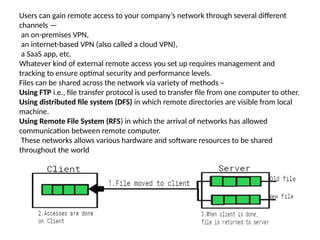
Files can be shared across the network via variety of methods –
Using FTP i.e., file transfer protocol is used to transfer file from one computer to other.
Using distributed file system (DFS) in which remote directories are visible from local
machine.
Using Remote File System (RFS) in which the arrival of networks has allowed
communication between remote computer.
These networks allows various hardware and software resources to be shared
throughout the world
• Remote file sharing (RFS) is a type of distributed file system
technology.
• It was developed in 1980 by AT&T.
• Later, it was delivered with UNIX System version V (five) release 3
(SVR3). It enables file and/or data access to multiple remote users
over the Internet or a network connection.
• It is also known as a general process of providing remote user
access to locally stored files and/or data.
• It was relied on the STREAMS Transport Provider Interface feature
of the operating system.
• To implement remote file system we use client-server model. It
was one of the basic application of Remote File System.
Client-Server Model in RFS
•
RFS allows a computer to support one or more file systems from one or
more remote machines.
• In this case, the machine containing the files is server and the machine
wanting access to the files is the client.
• The server specifies which file can be accessed by a particular client(s).
• Files are usually specified on a partition level.
• A server can serve multiple clients, and a client can access multiple servers,
depending on the implementation details of a given client-server facility.
• Once it is mounted, file operation requests are sent on the behalf of the
user to the server, via network.
• For example, a user sends a file open request to the server along with its ID.
• The server then check file access to determine if the user has rights to
access the file requested mode.
• This request is either allowed or denied.
• If it is allowed, a file is returned to the client application, and the
application then may perform read, write and other operations on file.
• After the required operation is performed, the client closes the files.
Logic bomb
• A logic bomb is a set of instructions in a program carrying a
malicious payload that can attack an operating system, program, or
network.
• It only goes off after certain conditions are met.
• A simple example of these conditions is a specific date or time.
• A more complex example is when an organization fires an employee and
logs their dismissal in their system.
• A logic bomb usually carries a computer virus or a computer worm.
• A computer virus is a malicious program that spreads by infecting files and
corrupting or deleting data.
• Computer viruses are handy components of logic bombs that can be
designed by dissatisfied employees looking for revenge.
• A computer worm is similar to a computer virus but can be more
sophisticated.
• Unlike a virus, a worm doesn’t need human action to propagate once
inside a network.
• Additionally, a worm can drop more threatening malware like
ransomware, rootkits, and spyware.
Examples of logic bombs
• One of the most frequently told examples of a logic
bomb incident occurred in 1982 and was known as
the Trans-Siberian Pipeline incident.
• The story of this incident had the makings of a spy
movie, from the KGB and the CIA to secret
documents and international scheme.
• Interestingly, it may have sounded like a spy novel
because some of the story could have been a
hoax(a trick to make people believe something
that is not true).
• If you search the web for information on this
incident, you’ll find various versions of the story.
• 2000: A securities trader and programmer at Deutsche Morgan Grenfell
was indicted before a grand jury. Thankfully, his logic bomb from 1996 was
discovered before it was set to go off in 2000.
• 2003: A logic bomb from a Unix administrator at Medco Health Solutions
didn’t go off because of a programming error. It was discovered and
disabled by another administrator when he tried again. The culprit was
sentenced to prison and fined $81,200.
• 2006: A system administrator for Swiss multinational investment bank UBS
Group AG executed a logic bomb to damage its network and depreciate its
stock. He was sentenced to over eight years in prison and fined over $3
million.
• 2008: An IT contractor’s logic bomb was set to wipe off all of the mortgage
giant Fannie Mae’s 4000 servers but was stopped in time. The contractor
was sentenced to 41 months in prison.
• 2013: A logic bomb against South Korea wiped data at multiple banks and
media companies.
• 2019: A Siemens Corporation contract employee was caught after planting
logic bombs in the programs he designed. His goal was to get more work
from the company to repair the damage.
How to stop logic bomb virus and malware attacks
• To protect your devices and data from logic bomb attacks, you need to
follow some cyber security basics.
• Start by downloading intelligent antivirus and anti-malware software
that uses artificial intelligence (AI) to stop a malicious payload with
unknown signatures.
• Update your software regularly to close vulnerabilities and shield your
network.
• And invest in regular backups to recover from disaster.
• But stopping logic bombs can be more complex if the danger is
internal.
• To stop such threats, you may need to harden your hiring practices,
enhance your security checks, and use legal means to monitor staff
and contractors.
• A good Endpoint Detection and Response tool can also block attack
vectors, prevent malicious downloads, and offer malware remediation
driven from the cloud.
• A logic bomb is a non self-reproducing malware, which installs itself into the
system and waits for some trigger incident or before performing a
damaging or an offensive function.
• Mostly, these programs simply constitute final payloads of viruses (as an
example, the cih virus activates every year on April 26th, for the 1.2
variant .That is the reason why logic bombs are often confused with viruses
and worms.
• A very famous real logic bomb was designed and installed in a company’s
network by the network administrator.
• Every morning this logic bomb verified that the name of the administrator
was still present in the accounts department’s computer.
• As soon as his name was absent from the accounts register (the
administrator had been fired by the company), the logic encrypted all
company’s hard disks (including the backup data) by means of a random
secret key.
• Since the company did not know this encryption key (nor did the fired
administrator), all the company’s data were definitively lost.
• Moreover, the encryption security level of the encryption algorithm was so
high that no efficient cryptanalysis was possible.
• The way logic bombs operate easily explains why
antivirus programs find it hard to fight against logic
bombs
• Although they look like simple programs, unknown logic
bombs are bound to defeat sophisticated techniques of
antiviral protection .
• As an illustrative and powerful example, let us consider
the case of Unix which makes extensive use of
commands postponing execution (queuing jobs for a
later execution), like at and batch in administration
scripts.
• This kind of problem may arise regardless of the used
operating system.
Case Study- Co flicker C worm
• Conficker is a computer worm that erupted on the
Internet in 2008.
• It is unique in combining three different spreading
strategies: local probing, neighbourhood probing, and
global probing.
• We propose a mathematical model that combines three
modes of spreading: local, neighbourhood, and global, to
capture the worm’s spreading behaviour.
• The parameters of the model are inferred directly from
network data obtained during the first day of the
Conficker epidemic.
• The model is then used to explore the tradeoff between
spreading modes in determining the worm’s
effectiveness.
Epidemic spreading mechanisms
• A number of epidemic spreading mechanisms have
been extensively studied .
• For example, in the fully-mixed spreading models , a
node is connected to all other nodes in a population,
thus an epidemic can potentially spread between any
two nodes according to a probability.
• Whereas in the network spreading models , nodes are
connected to their neighbors via a network structure,
therefore an epidemic can only spread along the
connections among nodes.
• Recent network-based models considered additional
physical properties such as location-specific contact
patterns , human mobility patterns and spatial effects .
Hybrid epidemics
• Many epidemics (DISEASE)are hybrid in the sense that they
spread via two or more spreading mechanisms simultaneously.
A hybrid epidemic can use fully-mixed spreading and network
spreading, or use fully-mixed spreading but at two or more
different levels, e.g. at the global level covering the whole
population or at the local level consisting of only a part of the
population.
There are many real examples.
Mobile phone viruses can spread via Bluetooth communication
with any nearby devises (local, fully-mixed spreading) and
Multimedia Messaging Service with remote contacts (global,
network spreading) .
A computer that is infected by the worm Red Code II spends 1/8 of
its time probing any computers on the Internet at random
(global, fully-mixed spreading) and the rest of the time probing
computers located in local area networks (local, fully-mixed
spreading) .
• Today information is propagated in society via mass
media (TV, newspaper, posters) as well as online
social media (Facebook, Twitter and emails).
• Mass media (global, fully-mixed spreading) can
potentially deliver the information to a big
audience, but the effectiveness of information
transmission at an individual level may be small (for
example, its ability to alter the target individual’s
behaviour).
• In contrast, social media (local, network spreading)
may have little or no access to the majority of
people who are not connected to the local group,
but they provide rapid penetration of a selected
target group with higher effectiveness.
MALWARE / VIRUS AND WORMS CHARACTERISTICS

MALWARE / VIRUS AND WORMS CHARACTERISTICS

  • 1.
    IMPLEMENTATION OF COVERTCHANNEL UNIT II
  • 2.
    Non self-reproducing Malware •“simple infections means that , viruses install themselves into the users’ operating system. The installation must be performed according to the following steps: • In a resident mode: the program goes resident (is an active process permanently in memory) and may activate and operate as long as the computer is on; • In stealth mode: the user must be kept unaware of the presence of such a resident program on his operating system. For instance, the attached process must not be displayed on the screen unlike the other processes. . • In a persistent mode: when erased or uninstalled, the infecting program manages to reinstall on the computer (as a general rule, under Windows, several copies of this program are hidden in the system directories).
  • 3.
    • At boottime, this mode also allows a malicious program to run in resident mode. For the sake of argument, the Back Orifice 2000 Trojan horse program adds the following key to the system registry . • BackOrifice2000HKLMSoftwareMicrosoftWindows CurrentVersionRunServices. • Whenever the host boots, the Trojan horse’s server part is thus automatically executed. • It is essential to bear in mind that a single mistake from the user is enough to allow the infecting program to install itself. • As long as the program is not completely eradicated, the operating system will remain corrupted. • Simple computer infection programs may be divided into two different classes: logic bombs and Trojan horse programs.
  • 4.
    What is aTrojan Horse? (Trojan Malware) • A Trojan Horse (Trojan) is a type of malware that disguises itself as legitimate code or software. • Once inside the network, attackers are able to carry out any action that a legitimate user could perform, such as exporting files, modifying data, deleting files or otherwise altering the contents of the device. • Trojans may be packaged in downloads for games, tools, apps or even software patches. • Many Trojan attacks also leverage social engineering tactics, as well as spoofing and phishing, to prompt the desired action in the user. Trojan: Virus or Malware? • A Trojan is sometimes called a Trojan virus or Trojan horse virus, but those terms are technically incorrect. • Unlike a virus or worm, Trojan malware cannot replicate itself or self-execute. • It requires specific and deliberate action from the user. • Trojans are malware, and like most forms of malware, Trojans are designed to damage files, redirect internet traffic, monitor the user’s activity, steal sensitive data or set up backdoor access points to the system. • Trojans may delete, block, modify, leak or copy data, which can then be sold back to the user for ransom or on the dark web.
  • 5.
    How Trojans Work? •A Trojan horse cannot manifest by itself, so it needs a user to download the server side of the application for it to work. • This means the executable (.exe) file should be implemented and the program installed for the Trojan to attack a device’s system. • A Trojan virus spreads through legitimate-looking emails and files attached to emails, which are spammed to reach the inboxes of as many people as possible. • When the email is opened and the malicious attachment is downloaded, the Trojan server will install and automatically run every time the infected device is turned on. • Devices can also be infected by a Trojan through social engineering tactics, which cyber criminals use to force users into downloading a malicious application. • The malicious file could be hidden in banner advertisements, pop-up advertisements, or links on websites.
  • 6.
    • A computerinfected by Trojan malware can also spread it to other computers. • A cyber criminal turns the device into a zombie computer, which means they have remote control of it without the user knowing. • Hackers can then use the zombie computer to continue sharing malware across a network of devices, known as a botnet. • For example, a user might receive an email from someone they know, which includes an attachment that also looks rightful. • However, the attachment contains malicious code that executes and installs the Trojan on their device. • The user often will not know anything untoward has occurred, as their computer may continue to work normally with no signs of it having been infected.
  • 7.
    • The malwarewill reside undetected until the user takes a certain action, such as visiting a certain website or banking app. • This will activate the malicious code, and the Trojan will carry out the hacker’s desired action. • Depending on the type of Trojan and how it was created, the malware may delete itself, return to being hidden, or remain active on the device. • Trojans can also attack and infect smartphones and tablets using a thread of mobile malware. • This could occur through the attacker redirecting traffic to a device connected to a Wi-Fi network and then using it to launch cyber attacks.
  • 8.
    Types of TrojanMalware • Backdoor Trojan: A backdoor Trojan enables an attacker to gain remote access to a computer and take control of it using a backdoor. • This enables the malicious actor to do whatever they want on the device, such as deleting files, rebooting the computer, stealing data, or uploading malware. • A backdoor Trojan is frequently used to create a botnet through a network of zombie computers. • Banker Trojan: A banker Trojan is designed to target users’ banking accounts and financial information. • It attempts to steal account data for credit and debit cards, e-payment systems, and online banking systems. • Distributed denial-of-service (DDoS) Trojan: These Trojan programs carry out attacks that overload a network with traffic. • It will send multiple requests from a computer or a group of computers to overwhelm a target web address and cause a denial of service. • Downloader Trojan: A downloader Trojan targets a computer that has already been infected by malware, then downloads and installs more malicious programs to it. • This could be additional Trojans or other types of malware like adware.
  • 9.
    • Exploit Trojan:An exploit malware program contains code or data that takes advantage of specific vulnerabilities within an application or computer system. • The cyber criminal will target users through a method like a phishing attack, then use the code in the program to exploit a known vulnerability. • Fake antivirus Trojan: A fake antivirus Trojan simulates the actions of legitimate antivirus software. • The Trojan is designed to detect and remove threats like a regular antivirus program, then extort money from users for removing threats that may be nonexistent. • Game-thief Trojan: A game-thief Trojan is specifically designed to steal user account information from people playing online games. • Instant messaging (IM) Trojan: This type of Trojan targets IM services to steal users’ logins and passwords. • It targets popular messaging platforms such as AOL Instant Messenger, ICQ, MSN Messenger, Skype, and Yahoo Pager.
  • 10.
    • Infostealer Trojan:This malware can either be used to install Trojans or prevent the user from detecting the existence of a malicious program. • The components of infostealer Trojans can make it difficult for antivirus systems to discover them in scans. • Mailfinder Trojan: A mailfinder Trojan aims to harvest and steal email addresses that have been stored on a computer. • Ransom Trojan: Ransom Trojans seek to damage a computer’s performance or block data on the device so that the user can no longer access or use it. • The attacker will then hold the user or organization ransom until they pay a ransom fee to undo the device damage or unlock the affected data. • Remote access Trojan: Similar to a backdoor Trojan, this strand of malware gives the attacker full control of a user’s computer. • The cyber criminal maintains access to the device through a remote network connection, which they use to steal information or spy on a user.
  • 11.
    • Rootkit Trojan:A rootkit is a type of malware that conceals itself on a user’s computer. • Its purpose is to stop malicious programs from being detected, which enables malware to remain active on an infected computer for a longer period. • Short message service (SMS) Trojan: An SMS Trojan infects mobile devices and is capable of sending and intercepting text messages. • This includes sending messages to premium-rate phone numbers, which increases the costs on a user’s phone bill. • Spy Trojan: Spy Trojans are designed to sit on a user’s computer and spy on their activity. • This includes logging their keyboard actions, taking screenshots, accessing the applications they use, and tracking login data. • SUNBURST: The SUNBURST trojan virus was released on numerous SolarWinds Orion Platform. • Victims were compromised by trojanized versions of a legitimate SolarWinds digitally signed file named: SolarWinds.Orion.Core.BusinessLayer.dll. • The trojanized file is a backdoor. • Once on a target machine, it remains dormant for a two-week period and will then retrieve commands that allow it to transfer, execute, perform reconnaissance, reboot and halt system services. • Communication occurs over http to predetermined URI's.
  • 12.
    How To Recognizea Trojan Virus • A Trojan horse virus can often remain on a device for months without the user knowing their computer has been infected. • However, revealing signs of the presence of a Trojan include computer settings suddenly changing, a loss in computer performance, or unusual activity taking place. • The best way to recognize a Trojan is to search a device using a Trojan scanner or malware-removal software. • Malware programs like Trojans are always evolving, and one way to prevent breaches or minimize damage is to take a comprehensive look at past Trojan Attacks. Here are a few example • NIGHT SPIDER’s Zloader: Zloader was hidden as legitimate programs such as Zoom, Atera, NetSupport, Brave Browser, JavaPlugin and TeamViewer installers, but the programs were also packaged with malicious scripts and payloads to perform automated reconnaissance and download the trojan.
  • 13.
    QakBot • QakBot isan eCrime banking trojan that can spread laterally throughout a network utilizing a worm-like functionality through brute-forcing network shares and Active Directory user group accounts, or via server message block (SMB) exploitation. • Despite QakBot’s anti-analysis and evasive capabilities, the CrowdStrike Falcon® platform prevents this malware from completing its execution chain when it detects the VBScript execution. • Andromeda: Andromeda is a modular trojan that was used primarily as a downloader to deliver additional malware payloads including banking Trojans. • It is often bundled and sold with plugins that extend its functionality, including a rootkit, HTML formgrabber, keylogger and a SOCKS proxy. • CrowdStrike used PowerShell via the Real Time Response platform to remove the malware without having to escalate and have the drive formatted — all while not impacting the user’s operations at any point.
  • 14.
    Examples of TrojanHorse Virus Attacks • Trojan attacks have been responsible for causing major damage by infecting computers and stealing user data. Well-known examples of Trojans include: • Rakhni Trojan: The Rakhni Trojan delivers ransomware or a cryptojacker tool—which enables an attacker to use a device to mine cryptocurrency—to infect devices. • Tiny Banker: Tiny Banker enables hackers to steal users’ financial details. It was discovered when it infected at least 20 U.S. banks. • Zeus or Zbot: Zeus is a toolkit that targets financial services and enables hackers to build their own Trojan malware. • The source code uses techniques like form grabbing and keystroke logging to steal user credentials and financial details.
  • 15.
    Implementation of Remoteaccess and file transfer • Remote access is the ability to connect to a computer or network in one location from another place. • This can be done in several ways, including via • The internet, • Virtual private network (VPN) • By using specialized software, such as a remote monitoring and management (RMM) tool that allows one computer to control another. • IT technicians or employees no longer need to be present on-site to provide or receive IT support. • A technician can remotely connect and support a device using remote access tools and technologies. • In our post-pandemic world, where hybrid work is taking center stage, remote access makes it easy for employees to work from home or anywhere in the world. • You can be out of town and still be able to manage your business without a drawback. • Remote access eliminates the need for users to be present in the office to access a network or file or for IT technicians to add new systems to the company network. • It allows employees to work from anywhere and enables IT staff to monitor and manage endpoints remotely.
  • 16.
    Example of remoteaccess • An example of remote access is when you use a computer, smart phone or tablet to connect to another computer or network from a different location. • There are several everyday scenarios in which remote access comes into play. • For example, if you need to access files on your work computer from home, you will use remote access to do so. • Similarly, if technicians need to troubleshoot an issue on an employee’s computer, who is working remotely, they would also use remote access. • In both these cases and many others, remote access provides a convenient way to get the information, software or help to do your job without being physically present in the office.
  • 17.
    Difference between remoteaccess and remote control • Remote access allows you to access files and applications on another person’s computer without taking control of it. • This is useful for people who need to work remotely, such as remote workers or people who travel frequently. • Remote control, on the other hand, allows you to take control of another person’s computer from your own computer. • This is often used by IT support professionals to troubleshoot problems on someone else’s computer.
  • 18.
    How does remoteaccess work? • Remote access is the ability to access a computer or network remotely. • There are many different ways to do this, but they all involve using some kind of protocols, tools, software and connections. • The most common way to get remote access is by using a virtual private network (VPN). • VPNs are commonly used in businesses so that employees can access company resources from their homes or while on the road. • Another common way to provide remote access is via remote desktop protocol (RDP), a proprietary protocol developed by Microsoft that works with Mac operating systems as well. • IT professionals use RDP to share data between connected computers or troubleshoot problems on other computers. • RDP encrypts the data before transmitting it, making it a secure way to share information over public networks. • You can also use SSH (Secure Shell) to securely connect to another computer and transfer files back and forth. • Many tools and services also enable users to access files remotely on other computers. • These include solutions like Dropbox, Google Drive and Microsoft OneDrive. •
  • 19.
    Different types ofremote access methods • There are broadly three types of remote access methods: direct, indirect and VPN. • Direct remote access is the most common and simplest type of remote access. • It involves using a computer or other device to connect directly to another computer or device over the internet. • Indirect remote access usually requires some intermediary server, such as a web-based email service, to relay messages between two computers or devices. • VPNs create a secure, private connection between two computers or devices over the internet.
  • 20.
    Common methods ofremote access • Point-to-Point Protocol (PPP): PPP is a TCP/IP protocol used to connect two computer systems over a telephone network or the internet. • It is a data link layer communication protocol that connects two routers directly without using a host or any other networking protocol. • It can authenticate loop connections, encrypt transmissions and compress data. • Point-to-Point Protocol over Ethernet (PPPoE): PPPoE is a combination of PPP and the Ethernet link-layer protocol that connects users to a network of hosts via a bridge or access concentrator. • It encapsulates and transports IP packets over an Ethernet link using PPP. • Serial Line Internet Protocol (SLIP): SLIP is a simple protocol that communicates over serial ports and routers using TCP/IP, • It enabling communication between machines that were previously configured to communicate directly with one another.
  • 21.
    • Point-to-Point TunnelingProtocol (PPTP): PPTP is a networking protocol used to connect to VPNs. • People who want to connect to a network in a different location than they are in use this protocol. • Layer Two Tunneling Protocol (L2TP): Also known as virtual lines, L2TP connections enable corporate networks to manage IP addresses assigned to remote users. • As a result, remote users can access corporate networks at a low cost. • L2TP has two tunnel modes. The voluntary tunnel terminates at the remote client, whereas the mandatory tunnel terminates at the internet service provider (ISP). • Remote Desktop Protocol (RDP): RDP is used to access a desktop computer remotely. • Remote desktop users can operate their work system remotely (e.g., to edit or create files) and run applications just like they would if they were in front of their computer.
  • 22.
    • Remote AccessServices (RAS): RAS acts as a gateway or a server to let users connect to a company’s internal local area network (LAN) remotely. • Remote Authentication Dial-In User Service (RADIUS): RADIUS provides centralized authentication, authorization and accounting AAA management services for remote access users in a distributed dial-up network. • Terminal Access Controller Access Control System (TACACS): TACACS is an authentication protocol that allows remote communication with UNIX server. • Internet Protocol Security (IPsec): IPsec creates encrypted connections between devices and ensures the security of data transmitted over public networks.
  • 23.
    Most common formof remote access • A VPN is the most common way to securely connect to a private network over the internet. • VPN allows you to access resources on the private network as if you were physically connected to it. • Businesses commonly use VPNs to allow employees to access corporate resources remotely. • Individuals also use them to securely connect to public Wi-Fi networks and protect their privacy while online. • Using an endpoint management tool, you can create scripts to set up VPNs that provide secure access to your office environment for remote workers. • Not only that, but it also makes VPN access easy for end users. • Once VPN clients are installed on all of your remote endpoints, you can monitor those clients in your endpoint management tool to ensure they are up and running. • If the client goes down, you can also auto-remediate the issue by restarting the VPN client via policy-guided scripts.
  • 24.
    Why is remoteaccess important? • In an increasingly mobile and connected world, remote access is more important than ever. • It allows employees to work from anywhere, at any time, using any device. • It also provides a way for businesses to connect with customers and partners in real time, regardless of location. • There are many benefits of remote access, but the following are the most noteworthy: • Increased productivity: Employees can work from anywhere, anytime, using any device. • This flexibility can lead to higher productivity since employees can better manage their time and work around personal commitments. • Improved collaboration: Remote access allows team members to collaborate in real time, regardless of location. • It helps enhance communication and teamwork.
  • 25.
    • Lower costs:Businesses can reduce office space and equipment costs when employees can work remotely. • Additionally, businesses can reduce travel costs by conducting meetings and conferences online. • In addition, remote access supports bring your own device (BYOD) practice, so employers don’t need to invest heavily in buying computers for new employees. • Enhanced security: When properly implemented, remote access improves security since it allows for better early detection and remediation of potential cybersecurity breaches. • Additionally, data can be stored remotely off-site, reducing disaster-related data loss risks.
  • 26.
    Benefits of remoteaccess • With remote access, you can keep your business running smoothly no matter the economic environment. • It also keeps you up and running when a natural disaster like a hurricane or a pandemic strikes and threatens business continuity. • Most MSPs(Managed Service Provider) understand how hard it is to keep up with their clients’ ever-changing requirements. With seamless remote access, MSPs can check in on their clients’ endpoints from anywhere at any time. • Additionally, remotely providing services to clients reduces costs and ensures continuity of service, improving client satisfaction. • Clients are more likely to recommend MSPs with a faster response time than their peers.
  • 27.
    • For internalIT teams, uninterrupted IT service enhances employee satisfaction, contributing to higher productivity and lower employee turnover. • Additionally, remote access helps companies reduce operational costs associated with the on-site management of employees and helps IT teams decrease ticket response times, thus minimizing downtime. • Employees can easily share knowledge to complete projects and access cutting-edge technologies for improved productivity. • A common concern among MSPs and internal IT teams is ensuring security when employees and clients work remotely. • The ability to monitor and patch vulnerabilities remotely allows technicians to ensure the security of networks and devices, basically the IT infrastructure in general.
  • 28.
    Remote access software •Remote access software lets you access your device remotely without physically being able to see it. • When you remote into a device, you can see the screen, access the files and use the software on the machine just like you would if you were there in person. • Remote monitoring and management (RMM) software is a must- have tool for any enterprise with a fleet of managed devices. • An RMM tool is helpful for managing remote access to your network from the outside through an extended VPN or Remote Access Management system. • These tools can help you filter which users have remote access privileges and track device usage so that you know who has access to which data and when.
  • 29.
    Users can gainremote access to your company’s network through several different channels — an on-premises VPN, an internet-based VPN (also called a cloud VPN), a SaaS app, etc. Whatever kind of external remote access you set up requires management and tracking to ensure optimal security and performance levels. Files can be shared across the network via variety of methods – Using FTP i.e., file transfer protocol is used to transfer file from one computer to other. Using distributed file system (DFS) in which remote directories are visible from local machine. Using Remote File System (RFS) in which the arrival of networks has allowed communication between remote computer. These networks allows various hardware and software resources to be shared throughout the world
  • 30.
    • Remote filesharing (RFS) is a type of distributed file system technology. • It was developed in 1980 by AT&T. • Later, it was delivered with UNIX System version V (five) release 3 (SVR3). It enables file and/or data access to multiple remote users over the Internet or a network connection. • It is also known as a general process of providing remote user access to locally stored files and/or data. • It was relied on the STREAMS Transport Provider Interface feature of the operating system. • To implement remote file system we use client-server model. It was one of the basic application of Remote File System.
  • 31.
    Client-Server Model inRFS • RFS allows a computer to support one or more file systems from one or more remote machines. • In this case, the machine containing the files is server and the machine wanting access to the files is the client. • The server specifies which file can be accessed by a particular client(s). • Files are usually specified on a partition level. • A server can serve multiple clients, and a client can access multiple servers, depending on the implementation details of a given client-server facility. • Once it is mounted, file operation requests are sent on the behalf of the user to the server, via network. • For example, a user sends a file open request to the server along with its ID. • The server then check file access to determine if the user has rights to access the file requested mode. • This request is either allowed or denied. • If it is allowed, a file is returned to the client application, and the application then may perform read, write and other operations on file. • After the required operation is performed, the client closes the files.
  • 32.
    Logic bomb • Alogic bomb is a set of instructions in a program carrying a malicious payload that can attack an operating system, program, or network. • It only goes off after certain conditions are met. • A simple example of these conditions is a specific date or time. • A more complex example is when an organization fires an employee and logs their dismissal in their system. • A logic bomb usually carries a computer virus or a computer worm. • A computer virus is a malicious program that spreads by infecting files and corrupting or deleting data. • Computer viruses are handy components of logic bombs that can be designed by dissatisfied employees looking for revenge. • A computer worm is similar to a computer virus but can be more sophisticated. • Unlike a virus, a worm doesn’t need human action to propagate once inside a network. • Additionally, a worm can drop more threatening malware like ransomware, rootkits, and spyware.
  • 33.
    Examples of logicbombs • One of the most frequently told examples of a logic bomb incident occurred in 1982 and was known as the Trans-Siberian Pipeline incident. • The story of this incident had the makings of a spy movie, from the KGB and the CIA to secret documents and international scheme. • Interestingly, it may have sounded like a spy novel because some of the story could have been a hoax(a trick to make people believe something that is not true). • If you search the web for information on this incident, you’ll find various versions of the story.
  • 34.
    • 2000: Asecurities trader and programmer at Deutsche Morgan Grenfell was indicted before a grand jury. Thankfully, his logic bomb from 1996 was discovered before it was set to go off in 2000. • 2003: A logic bomb from a Unix administrator at Medco Health Solutions didn’t go off because of a programming error. It was discovered and disabled by another administrator when he tried again. The culprit was sentenced to prison and fined $81,200. • 2006: A system administrator for Swiss multinational investment bank UBS Group AG executed a logic bomb to damage its network and depreciate its stock. He was sentenced to over eight years in prison and fined over $3 million. • 2008: An IT contractor’s logic bomb was set to wipe off all of the mortgage giant Fannie Mae’s 4000 servers but was stopped in time. The contractor was sentenced to 41 months in prison. • 2013: A logic bomb against South Korea wiped data at multiple banks and media companies. • 2019: A Siemens Corporation contract employee was caught after planting logic bombs in the programs he designed. His goal was to get more work from the company to repair the damage.
  • 35.
    How to stoplogic bomb virus and malware attacks • To protect your devices and data from logic bomb attacks, you need to follow some cyber security basics. • Start by downloading intelligent antivirus and anti-malware software that uses artificial intelligence (AI) to stop a malicious payload with unknown signatures. • Update your software regularly to close vulnerabilities and shield your network. • And invest in regular backups to recover from disaster. • But stopping logic bombs can be more complex if the danger is internal. • To stop such threats, you may need to harden your hiring practices, enhance your security checks, and use legal means to monitor staff and contractors. • A good Endpoint Detection and Response tool can also block attack vectors, prevent malicious downloads, and offer malware remediation driven from the cloud.
  • 36.
    • A logicbomb is a non self-reproducing malware, which installs itself into the system and waits for some trigger incident or before performing a damaging or an offensive function. • Mostly, these programs simply constitute final payloads of viruses (as an example, the cih virus activates every year on April 26th, for the 1.2 variant .That is the reason why logic bombs are often confused with viruses and worms. • A very famous real logic bomb was designed and installed in a company’s network by the network administrator. • Every morning this logic bomb verified that the name of the administrator was still present in the accounts department’s computer. • As soon as his name was absent from the accounts register (the administrator had been fired by the company), the logic encrypted all company’s hard disks (including the backup data) by means of a random secret key. • Since the company did not know this encryption key (nor did the fired administrator), all the company’s data were definitively lost. • Moreover, the encryption security level of the encryption algorithm was so high that no efficient cryptanalysis was possible.
  • 37.
    • The waylogic bombs operate easily explains why antivirus programs find it hard to fight against logic bombs • Although they look like simple programs, unknown logic bombs are bound to defeat sophisticated techniques of antiviral protection . • As an illustrative and powerful example, let us consider the case of Unix which makes extensive use of commands postponing execution (queuing jobs for a later execution), like at and batch in administration scripts. • This kind of problem may arise regardless of the used operating system.
  • 38.
    Case Study- Coflicker C worm • Conficker is a computer worm that erupted on the Internet in 2008. • It is unique in combining three different spreading strategies: local probing, neighbourhood probing, and global probing. • We propose a mathematical model that combines three modes of spreading: local, neighbourhood, and global, to capture the worm’s spreading behaviour. • The parameters of the model are inferred directly from network data obtained during the first day of the Conficker epidemic. • The model is then used to explore the tradeoff between spreading modes in determining the worm’s effectiveness.
  • 39.
    Epidemic spreading mechanisms •A number of epidemic spreading mechanisms have been extensively studied . • For example, in the fully-mixed spreading models , a node is connected to all other nodes in a population, thus an epidemic can potentially spread between any two nodes according to a probability. • Whereas in the network spreading models , nodes are connected to their neighbors via a network structure, therefore an epidemic can only spread along the connections among nodes. • Recent network-based models considered additional physical properties such as location-specific contact patterns , human mobility patterns and spatial effects .
  • 40.
    Hybrid epidemics • Manyepidemics (DISEASE)are hybrid in the sense that they spread via two or more spreading mechanisms simultaneously. A hybrid epidemic can use fully-mixed spreading and network spreading, or use fully-mixed spreading but at two or more different levels, e.g. at the global level covering the whole population or at the local level consisting of only a part of the population. There are many real examples. Mobile phone viruses can spread via Bluetooth communication with any nearby devises (local, fully-mixed spreading) and Multimedia Messaging Service with remote contacts (global, network spreading) . A computer that is infected by the worm Red Code II spends 1/8 of its time probing any computers on the Internet at random (global, fully-mixed spreading) and the rest of the time probing computers located in local area networks (local, fully-mixed spreading) .
  • 41.
    • Today informationis propagated in society via mass media (TV, newspaper, posters) as well as online social media (Facebook, Twitter and emails). • Mass media (global, fully-mixed spreading) can potentially deliver the information to a big audience, but the effectiveness of information transmission at an individual level may be small (for example, its ability to alter the target individual’s behaviour). • In contrast, social media (local, network spreading) may have little or no access to the majority of people who are not connected to the local group, but they provide rapid penetration of a selected target group with higher effectiveness.