Making Mighty
     Multi-Modals


     iangray9@gmail.com
FB/Twitter – search for iangray9
What are YOU
    doing now?
        5 min sharing
Feel free to tweet at any time
   Search for iangray9 or
     #mightymultimodals
What we’re doing now…
But not pptlessness
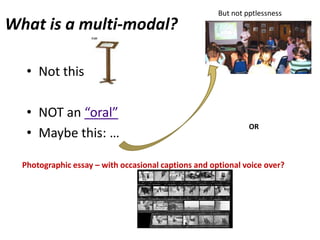
What is a multi-modal?

   • Not this:

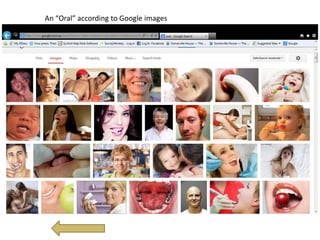
   • NOT an “oral”
                                                               OR
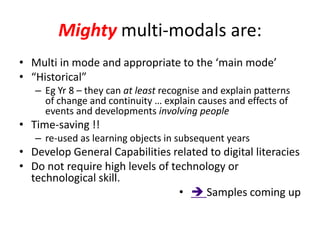
   • Maybe this: …

  Photographic essay – with occasional captions and optional voice over?
Multi-modal =
• Invisible theatre incorporating artefacts
• An interactive learning device - sequence of
  guided activities beginning with a 3 min movie
  then an option of sources to investigate and
  feedback to the user
• A combination of objects from a Learning Fed
  learning pathway
• A series of flipped charts from ActiveInspire for
  the IWB
• Etc where the characteristics of the mode are
  utilised
Mighty multi-modals are:
• Multi in mode and appropriate to the ‘main mode’
• “Historical”
   – Eg Yr 8 – they can at least recognise and explain patterns
     of change and continuity … explain causes and effects of
     events and developments involving people
• Time-saving !!
   – re-used as learning objects in subsequent years
• Develop General Capabilities related to digital literacies
• Do not require high levels of technology or
  technological skill.
                                  •  Samples coming up
Aust Curric: Year 8 standards in summary
• …students recognise and explain patterns of change and continuity
  … explain the causes and effects of events and developments.
• identify motives and actions
• explain the significance of individuals and groups and how they
  were influenced by the beliefs and values of their society.
• describe different interpretations of the past.
• sequence events and developments within a chronological
  framework with reference to periods of time.
• When researching, develop questions to frame an historical inquiry.
  = analyse, select and organise information from primary and
  secondary sources and use it as evidence to answer inquiry
  questions.
• Students identify and explain different points of view in sources...
An “Oral” according to Google images
Syllabus says:
•   Sample portfolio:
•   Sample 1 Descriptive report – Viking dragon ships
•   Sample 2 Source analysis – Medieval period
•   Sample 3 Descriptive report – The arrival of the Conquistadors
•   Sample 4 Explanation – The Polynesian expansion

                          Zzzzzzzzzzzzzzzzzzzzzz !
                          BUT…all of these could
                          become part of a mighty
                          multi-modal
                          And generate more
                          engagement
Syllabus (well v3.0) also says:
• General ICT Capability History =
• …use ICT effectively and appropriately when
  investigating, creating and communicating
  ideas and information…
• Competence in ICT is most evident in
  historical skills associated with locating,
  processing and communicating historical
  information. (what else is there?)
Syllabus says:
• …students use range of digitised online materials;
  …technologies such as word processing,
  publishing and presentation software …
• Communication technologies, such as wikis and
  blogs, to enhance students’ analytical thinking
  capabilities in their study of history; and online
  forums and videoconferencing to discuss and
  debate ideas.
•  there’s more!
Many options but we want:
• Mighty modals that save time:
•  An interactive learning device
  - A Basic communication technology
• = ppt with hyperlinks
• Create your own adventure genre
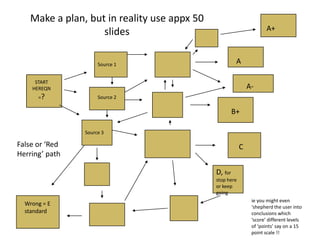
Make a plan, but in reality use appx 50
                                                                     A+
                   slides

                     Source 1                          A

     START
    HEREQN                                                   A-
      =?             Source 2

                                                      B+

                Source 3

False or ‘Red                                            C
Herring’ path

                                             D, for
                                             stop here
                                             or keep
                                             going
                                                              ie you might even
  Wrong = E                                                   ‘shepherd the user into
  standard                                                    conclusions which
                                                              ‘score’ different levels
                                                              of ‘points’ say on a 15
                                                              point scale !!
In reality m.m. often become descriptive
       and rather single mode b/c:
• The struggle to think constructivist
  amidst yard duties and discipline issues
• One way information flows – the lecture-
  the “oral” are easier
• Positioning of pedagogy in Aust
  Curriculum
• E-Learning literacy takes time and PD
Samples from the real world
• A.C. context:
• Depth Study = Medieval Europe (c.590 – c.1500)
    – Continuity and change in society in ONE of the
      following areas: crime and punishment; military and
      defence systems; towns, cities and commerce
•   Link to disease
•   Link to transport
•   Link to Warfare (military and defence systems)
•    judgements according to m.m. criteria =?
Comments?
• ??
• ??
• ??
• Warfare one had more analysis; some
  appreciation of how artefacts are used by
  historians and more “multi” …. Ppt with
  embedded movie
• But not interactive
Syllabus Skills offer hope … egFrame questions
                                   Yr 8
• Sequence events, developments and periods           rather than
                                                      identify would
• Critical and creative thinking
• “Identify” a range of questions about the past      have been better
                                                      but we can work
                                                      around it
• Draw conclusions about the usefulness of sources
• Identify and describe points of view, attitudes and values
  in primary and secondary sources
• Develop texts, particularly descriptions and explanations
  that use evidence from a range of sources
• Use a range of communication forms
  (oral, graphic, written) and digital technologies
  (ACHHS157)
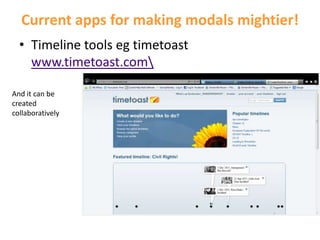
Current apps for making modals mightier!
  • Timeline tools eg timetoast
    www.timetoast.com

And it can be
created
collaboratively
Capzules
•  www.capzles.com/
• helps anyone create beautiful, interactive,
  tagged, collaborative, rich-media timelines
  online using videos, photos, text, music, audio
  and most documents
• For How To see YourTube:
  www.youtube.com/watch?v=hR_21MeVeqQ
Dipity
•  www.dipity.com/
• Create an interactive, visually engaging
  timeline in minutes. Use dynamic visualization
  tools to display photos, videos, news and
  blogs in chronological order
• If you like the timeline being created you can
  “follow” the creator as you do with twitter
• Plenty of P-10 timelines
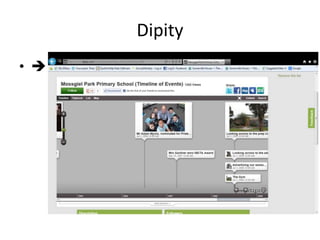
Dipity
•  www.dipity.com/
Voicethread
• http://voicethread.com/
• safe , collaborative, recordable conversations
  in the cloud - with video, voice, and text
  commenting.

• For 350 users about $450
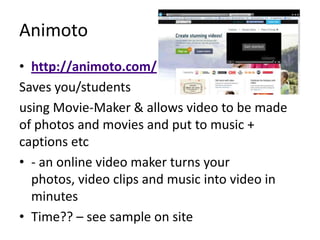
Animoto
• http://animoto.com/
Saves you/students
using Movie-Maker & allows video to be made
of photos and movies and put to music +
captions etc
• - an online video maker turns your
  photos, video clips and music into video in
  minutes
• Time?? – see sample on site
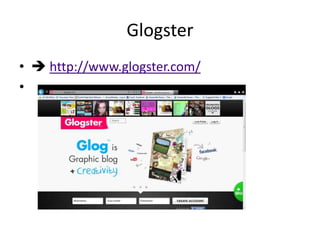
Glogster
•  http://www.glogster.com/
•
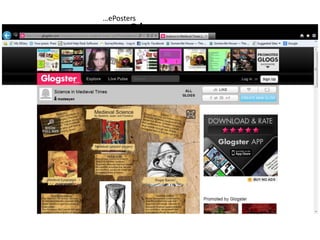
…ePosters
          Glogster

•
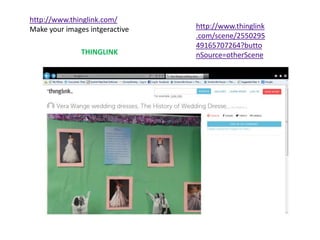
http://www.thinglink.com/
Make your images intgeractive   http://www.thinglink
                                .com/scene/2550295
                                49165707264?butto
               THINGLINK        nSource=otherScene
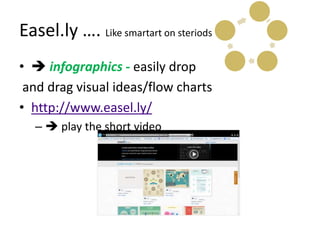
Easel.ly …. Like smartart on steriods
•  infographics - easily drop
 and drag visual ideas/flow charts
• http://www.easel.ly/
   –  play the short video
Moviemaker of course
•  but also
• Prezi
• Screencasting software like
  screencaster, community clips, jing,
diigo – web search tool assistant that aids note
taking and collaboration
• http://www.diigo.com/
• Collaborative annotation tool
   – Annotate websites then share in apps for Android and
     Apple
   – Time? Play sample?
   Webnotes allows you to highlight and add notes to both
   web pages and PDFs. You can also use it to organize your
   bookmarks and share them with others
   Bounce - lets you take a snapshot of any webpage and
   add note to it before sharing it with others.
Others??
•  suggestions
•  Need PD help? … Note footnote
  of paper handout …cpd4teachers
•  Discussions/Questions
• Tweets …??

Making mighty multi modals

  • 1.
    Making Mighty Multi-Modals iangray9@gmail.com FB/Twitter – search for iangray9
  • 2.
    What are YOU doing now? 5 min sharing Feel free to tweet at any time Search for iangray9 or #mightymultimodals
  • 3.
  • 4.
    But not pptlessness Whatis a multi-modal? • Not this: • NOT an “oral” OR • Maybe this: … Photographic essay – with occasional captions and optional voice over?
  • 5.
    Multi-modal = • Invisibletheatre incorporating artefacts • An interactive learning device - sequence of guided activities beginning with a 3 min movie then an option of sources to investigate and feedback to the user • A combination of objects from a Learning Fed learning pathway • A series of flipped charts from ActiveInspire for the IWB • Etc where the characteristics of the mode are utilised
  • 6.
    Mighty multi-modals are: •Multi in mode and appropriate to the ‘main mode’ • “Historical” – Eg Yr 8 – they can at least recognise and explain patterns of change and continuity … explain causes and effects of events and developments involving people • Time-saving !! – re-used as learning objects in subsequent years • Develop General Capabilities related to digital literacies • Do not require high levels of technology or technological skill. •  Samples coming up
  • 7.
    Aust Curric: Year8 standards in summary • …students recognise and explain patterns of change and continuity … explain the causes and effects of events and developments. • identify motives and actions • explain the significance of individuals and groups and how they were influenced by the beliefs and values of their society. • describe different interpretations of the past. • sequence events and developments within a chronological framework with reference to periods of time. • When researching, develop questions to frame an historical inquiry. = analyse, select and organise information from primary and secondary sources and use it as evidence to answer inquiry questions. • Students identify and explain different points of view in sources...
  • 8.
    An “Oral” accordingto Google images
  • 9.
    Syllabus says: • Sample portfolio: • Sample 1 Descriptive report – Viking dragon ships • Sample 2 Source analysis – Medieval period • Sample 3 Descriptive report – The arrival of the Conquistadors • Sample 4 Explanation – The Polynesian expansion Zzzzzzzzzzzzzzzzzzzzzz ! BUT…all of these could become part of a mighty multi-modal And generate more engagement
  • 10.
    Syllabus (well v3.0)also says: • General ICT Capability History = • …use ICT effectively and appropriately when investigating, creating and communicating ideas and information… • Competence in ICT is most evident in historical skills associated with locating, processing and communicating historical information. (what else is there?)
  • 11.
    Syllabus says: • …studentsuse range of digitised online materials; …technologies such as word processing, publishing and presentation software … • Communication technologies, such as wikis and blogs, to enhance students’ analytical thinking capabilities in their study of history; and online forums and videoconferencing to discuss and debate ideas. •  there’s more!
  • 12.
    Many options butwe want: • Mighty modals that save time: •  An interactive learning device - A Basic communication technology • = ppt with hyperlinks • Create your own adventure genre
  • 13.
    Make a plan,but in reality use appx 50 A+ slides Source 1 A START HEREQN A- =? Source 2 B+ Source 3 False or ‘Red C Herring’ path D, for stop here or keep going ie you might even Wrong = E ‘shepherd the user into standard conclusions which ‘score’ different levels of ‘points’ say on a 15 point scale !!
  • 14.
    In reality m.m.often become descriptive and rather single mode b/c: • The struggle to think constructivist amidst yard duties and discipline issues • One way information flows – the lecture- the “oral” are easier • Positioning of pedagogy in Aust Curriculum • E-Learning literacy takes time and PD
  • 15.
    Samples from thereal world • A.C. context: • Depth Study = Medieval Europe (c.590 – c.1500) – Continuity and change in society in ONE of the following areas: crime and punishment; military and defence systems; towns, cities and commerce • Link to disease • Link to transport • Link to Warfare (military and defence systems) •  judgements according to m.m. criteria =?
  • 16.
    Comments? • ?? • ?? •?? • Warfare one had more analysis; some appreciation of how artefacts are used by historians and more “multi” …. Ppt with embedded movie • But not interactive
  • 17.
    Syllabus Skills offerhope … egFrame questions Yr 8 • Sequence events, developments and periods rather than identify would • Critical and creative thinking • “Identify” a range of questions about the past have been better but we can work around it • Draw conclusions about the usefulness of sources • Identify and describe points of view, attitudes and values in primary and secondary sources • Develop texts, particularly descriptions and explanations that use evidence from a range of sources • Use a range of communication forms (oral, graphic, written) and digital technologies (ACHHS157)
  • 18.
    Current apps formaking modals mightier! • Timeline tools eg timetoast www.timetoast.com And it can be created collaboratively
  • 19.
    Capzules •  www.capzles.com/ •helps anyone create beautiful, interactive, tagged, collaborative, rich-media timelines online using videos, photos, text, music, audio and most documents • For How To see YourTube: www.youtube.com/watch?v=hR_21MeVeqQ
  • 20.
    Dipity •  www.dipity.com/ •Create an interactive, visually engaging timeline in minutes. Use dynamic visualization tools to display photos, videos, news and blogs in chronological order • If you like the timeline being created you can “follow” the creator as you do with twitter • Plenty of P-10 timelines
  • 21.
  • 22.
    Voicethread • http://voicethread.com/ • safe, collaborative, recordable conversations in the cloud - with video, voice, and text commenting. • For 350 users about $450
  • 23.
    Animoto • http://animoto.com/ Saves you/students usingMovie-Maker & allows video to be made of photos and movies and put to music + captions etc • - an online video maker turns your photos, video clips and music into video in minutes • Time?? – see sample on site
  • 24.
  • 25.
    …ePosters Glogster •
  • 26.
    http://www.thinglink.com/ Make your imagesintgeractive http://www.thinglink .com/scene/2550295 49165707264?butto THINGLINK nSource=otherScene
  • 27.
    Easel.ly …. Likesmartart on steriods •  infographics - easily drop and drag visual ideas/flow charts • http://www.easel.ly/ –  play the short video
  • 28.
    Moviemaker of course • but also • Prezi • Screencasting software like screencaster, community clips, jing,
  • 29.
    diigo – websearch tool assistant that aids note taking and collaboration • http://www.diigo.com/ • Collaborative annotation tool – Annotate websites then share in apps for Android and Apple – Time? Play sample? Webnotes allows you to highlight and add notes to both web pages and PDFs. You can also use it to organize your bookmarks and share them with others Bounce - lets you take a snapshot of any webpage and add note to it before sharing it with others.
  • 30.
    Others?? •  suggestions • Need PD help? … Note footnote of paper handout …cpd4teachers •  Discussions/Questions • Tweets …??