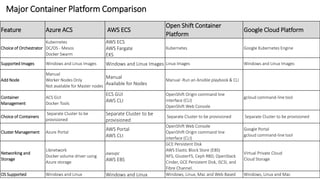
Major Container Platform Comparison
Feature Azure ACS AWS ECS
Open Shift Container
Platform
Google Cloud Platform
Choice of Orchestrator
Kubernetes
DC/OS - Mesos
Docker Swarm
AWS ECS
AWS Fargate
EKS
Kubernetes Google Kubernetes Engine
Supported Images Windows and Linux Images Windows and Linux Images Linux Images Windows and Linux Images
Add Node
Manual
Worker Nodes Only
Not available for Master nodes
Manual
Available for Nodes
Manual -Run an Ansible playbook & CLI
Container
Management
ACS GUI
Docker Tools
ECS GUI
AWS CLI
OpenShift Origin command line
interface (CLI)
OpenShift Web Console
gcloud command-line tool
Choice of Containers
Separate Cluster to be
provisioned
Separate Cluster to be
provisioned
Separate Cluster to be provisioned Separate Cluster to be provisioned
Cluster Management Azure Portal
AWS Portal
AWS CLI
OpenShift Web Console
OpenShift Origin command line
interface (CLI)
Google Portal
gcloud command-line tool
Networking and
Storage
Libnetwork
Docker volume driver using
Azure storage
awsvpc
AWS EBS
GCE Persistent Disk
AWS Elastic Block Store (EBS)
NFS, GlusterFS, Ceph RBD, OpenStack
Cinder, GCE Persistent Disk, iSCSI, and
Fibre Channel.
Virtual Private Cloud
Cloud Storage
OS Supported Windows and Linux Windows and Linux Windows, Linux, Mac and Web Based Windows, Linux and Mac
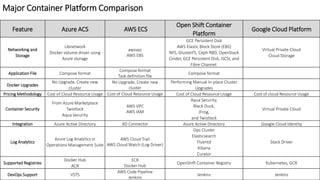
Major Container Platform Comparison
Feature Azure ACS AWS ECS
Open Shift Container
Platform
Google Cloud Platform
Networking and
Storage
Libnetwork
Docker volume driver using
Azure storage
awsvpc
AWS EBS
GCE Persistent Disk
AWS Elastic Block Store (EBS)
NFS, GlusterFS, Ceph RBD, OpenStack
Cinder, GCE Persistent Disk, iSCSI, and
Fibre Channel.
Virtual Private Cloud
Cloud Storage
Application File Compose format
Compose format
Task definition file
Compose format
Docker Upgrades
No Upgrade, Create new
cluster
No Upgrade, Create new
cluster
Performing Manual In-place Cluster
Upgrades
Pricing Methodology Cost of Cloud Resource Usage Cost of Cloud Resource Usage Cost of Cloud Resource Usage Cost of cloud Resource Usage
Container Security
From Azure Marketplace
Twistlock
Aqua Security
AWS VPC
AWS IAM
Aqua Security,
Black Duck,
JFrog,
and Twistlock
Virtual Private Cloud
Integration Azure Active Directory AD Connector Azure Active Directory Google Cloud Identity
Log Analytics
Azure Log Analytics in
Operations Management Suite
AWS Cloud Trail
AWS Cloud Watch (Log Driver)
Ops Cluster
Elasticsearch
Fluentd
Kibana
Curator
Stack Driver
Supported Registries
Docker Hub
ACR
ECR
Docker Hub
OpenShift Container Registry Kubernetes, GCR
DevOps Support VSTS
AWS Code Pipeline
Jenkins
Jenkins Jenkins
Parameter Docker Swarm Kubernetes Mesos
Cluster Installation
Very easy to install and setup. All
components are mostly docker-
based, and can be integrated inside
“systemd”.
Slightly complex to setup. Extensive use
of YAML files to define all services in the
cluster. The YAML configuration is unique
to Kubernetes
Generally easy to install and setup with small
clusters, but considerably more complex with
larger setups. Repositories available for some
Linux distributions.
Container
Deployment
Completely Docker based and very
easy to setup. Completely native to
Docker.
YAML based for all components in a
deployed application (pods, services, and
replication controllers).
JSON based. All application definitions go
inside a JSON file which is passed to the
Mesos/Marathon REST API.
Minimum Size
(Cluster)
2 3 3
Scalability Small to medium
Medium to large clusters. Very well
suited for complex applications with
many containers inside pods.
Large to very large scale clusters.
Maturity Mature, but still evolving
Very mature.Direct descendant of Google
internal BORG Platform.
Very mature, especially for very big clusters
counting in the thousands of servers.
Best Features
Easy to use, and more native to
Docker.
est PODS scheduling features when
complex applications are required to be
deployed
Scale in the thousands, and rack/host based
constraints features available in order to fine-
tune where to deploy applications.
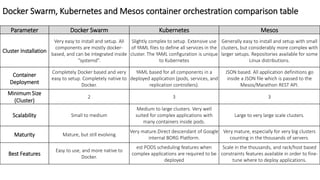
Docker Swarm, Kubernetes and Mesos container orchestration comparison table
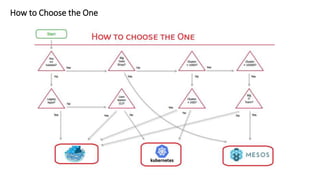
How to Choose the One

Major Container Platform Comparison

  • 1.
    Major Container PlatformComparison Feature Azure ACS AWS ECS Open Shift Container Platform Google Cloud Platform Choice of Orchestrator Kubernetes DC/OS - Mesos Docker Swarm AWS ECS AWS Fargate EKS Kubernetes Google Kubernetes Engine Supported Images Windows and Linux Images Windows and Linux Images Linux Images Windows and Linux Images Add Node Manual Worker Nodes Only Not available for Master nodes Manual Available for Nodes Manual -Run an Ansible playbook & CLI Container Management ACS GUI Docker Tools ECS GUI AWS CLI OpenShift Origin command line interface (CLI) OpenShift Web Console gcloud command-line tool Choice of Containers Separate Cluster to be provisioned Separate Cluster to be provisioned Separate Cluster to be provisioned Separate Cluster to be provisioned Cluster Management Azure Portal AWS Portal AWS CLI OpenShift Web Console OpenShift Origin command line interface (CLI) Google Portal gcloud command-line tool Networking and Storage Libnetwork Docker volume driver using Azure storage awsvpc AWS EBS GCE Persistent Disk AWS Elastic Block Store (EBS) NFS, GlusterFS, Ceph RBD, OpenStack Cinder, GCE Persistent Disk, iSCSI, and Fibre Channel. Virtual Private Cloud Cloud Storage OS Supported Windows and Linux Windows and Linux Windows, Linux, Mac and Web Based Windows, Linux and Mac
  • 2.
    Major Container PlatformComparison Feature Azure ACS AWS ECS Open Shift Container Platform Google Cloud Platform Networking and Storage Libnetwork Docker volume driver using Azure storage awsvpc AWS EBS GCE Persistent Disk AWS Elastic Block Store (EBS) NFS, GlusterFS, Ceph RBD, OpenStack Cinder, GCE Persistent Disk, iSCSI, and Fibre Channel. Virtual Private Cloud Cloud Storage Application File Compose format Compose format Task definition file Compose format Docker Upgrades No Upgrade, Create new cluster No Upgrade, Create new cluster Performing Manual In-place Cluster Upgrades Pricing Methodology Cost of Cloud Resource Usage Cost of Cloud Resource Usage Cost of Cloud Resource Usage Cost of cloud Resource Usage Container Security From Azure Marketplace Twistlock Aqua Security AWS VPC AWS IAM Aqua Security, Black Duck, JFrog, and Twistlock Virtual Private Cloud Integration Azure Active Directory AD Connector Azure Active Directory Google Cloud Identity Log Analytics Azure Log Analytics in Operations Management Suite AWS Cloud Trail AWS Cloud Watch (Log Driver) Ops Cluster Elasticsearch Fluentd Kibana Curator Stack Driver Supported Registries Docker Hub ACR ECR Docker Hub OpenShift Container Registry Kubernetes, GCR DevOps Support VSTS AWS Code Pipeline Jenkins Jenkins Jenkins
  • 3.
    Parameter Docker SwarmKubernetes Mesos Cluster Installation Very easy to install and setup. All components are mostly docker- based, and can be integrated inside “systemd”. Slightly complex to setup. Extensive use of YAML files to define all services in the cluster. The YAML configuration is unique to Kubernetes Generally easy to install and setup with small clusters, but considerably more complex with larger setups. Repositories available for some Linux distributions. Container Deployment Completely Docker based and very easy to setup. Completely native to Docker. YAML based for all components in a deployed application (pods, services, and replication controllers). JSON based. All application definitions go inside a JSON file which is passed to the Mesos/Marathon REST API. Minimum Size (Cluster) 2 3 3 Scalability Small to medium Medium to large clusters. Very well suited for complex applications with many containers inside pods. Large to very large scale clusters. Maturity Mature, but still evolving Very mature.Direct descendant of Google internal BORG Platform. Very mature, especially for very big clusters counting in the thousands of servers. Best Features Easy to use, and more native to Docker. est PODS scheduling features when complex applications are required to be deployed Scale in the thousands, and rack/host based constraints features available in order to fine- tune where to deploy applications. Docker Swarm, Kubernetes and Mesos container orchestration comparison table
  • 4.