
© 2017 Cisco and/or its affiliates. All rights reserved. 1
Cisco
Connect
Le
moment
est venu
Magical Meeting
Experiences
#ConnectCA
Robert Bouchard, Sr. Collaboration Technical Solutions Architect
Michelle Williams, Systems Engineer
November 2017
© 2017 Cisco and/or its affiliates. All rights reserved. Cisco Public
Scheduling and Joining a
Meeting should not be the
hardest part of your day
© 2017 Cisco and/or its affiliates. All rights reserved. Cisco Public
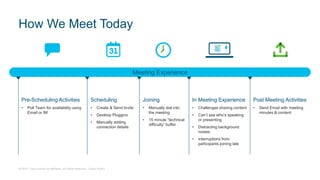
Meeting Experience
Pre-Scheduling Activities
• Poll Team for availability using
Email or IM
Scheduling
• Create & Send Invite
• Desktop Pluggins
• Manually adding
connection details
Joining
• Manually dial into
the meeting
• 15 minute “technical
difficulty” buffer
In Meeting Experience
• Challenges sharing content
• Can’t see who’s speaking
or presenting
• Distracting background
noises
• Interruptions from
participants joining late
Post Meeting Activities
• Send Email with meeting
minutes & content
How We Meet Today
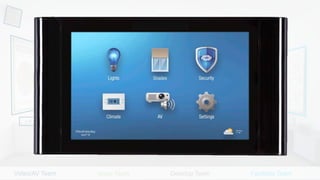
Video/AV Team Voice Team Desktop Team Facilities Team
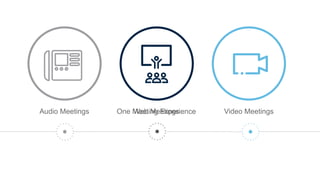
Audio Meetings Video MeetingsWeb MeetingsOne Meeting Experience
© 2017 Cisco and/or its affiliates. All rights reserved. Cisco Public
Cisco Single Meeting Engine Innovations
ONE
Meeting Engine
Powered by
WebEx
WebEx Client
Jabber
On Premise
Registered
Devices
Spark Registered
Endpoints
Spark Client
Skype for Business
Simplified Schedule & Join
Video / Mobile First Experience
Efficient Management
Innovations for Engagement
© 2017 Cisco and/or its affiliates. All rights reserved. Cisco Public Spark Desktop
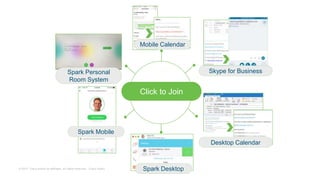
Spark Personal
Room System
Desktop Calendar
Mobile Calendar
Click to Join
Skype for Business
Spark Mobile
© 2017 Cisco and/or its affiliates. All rights reserved. Cisco Public
Spark Desktop
Meetings Powered by WebEx
Consistent Experience
Spark Personal
Room System Skype for Business
Spark Mobile
WebEx Mobile
WebEx Meeting Center
© 2017 Cisco and/or its affiliates. All rights reserved. Cisco Public
Cisco SX80
Cisco DX70
NEW
Cisco Room Kit
Plus
NEW
Cisco Room Kit
Cisco SX10
Cisco Spark Board 55
NEW
Cisco Spark Board 70
Cloud
Cisco IX5000
On-PremisesOptimized for Both
Cloud and On-Premises
An Amazing Experience in Every Space
Cisco DX80
Cisco Room 70DCisco Room 70S
Cisco MX700
Cisco Room 55
NEW NEW NEW
© 2017 Cisco and/or its affiliates. All rights reserved. Cisco Public
Enablement for Everyone
“Ingredients” for a Magical Meeting Experience
Easy to Schedule
Easy to Start/Join
Impactful in-Meeting Experience
Ability to easily follow up with the Team/Attendees
AdoptionMethodology
© 2017 Cisco and/or its affiliates. All rights reserved. Cisco Public
Scheduling
• Schedule from Any
Device
• Schedule from a
Spark Space
• Meeting connection
details are
automatically
populated into the
invite
Joining
• “Big Green Buttons”
across all devices
and Apps
• Endpoint Control for
seemless join
• Simplified Activity
based UI for Rooms
In Meeting Experience
• Always see who’s
talking/presenting
• Leverage your full display
real-estate
• Always see who’s in the
meeting and mute/eject if
necessary
• Share Wirelessly
Post-Meeting Activities
• Post Meeting Minutes,
Presentation, and Recording
in the Meeting’s Spark
Space
Next Generation Meeting Experience
Pre-Scheduling Activities
• Communicate with
individuals/Team in existing
Spaces
• Create a new Space for an
upcoming meeting/project
Traditional Meeting Tools Next Gen Meeting Tools
© 2017 Cisco and/or its affiliates. All rights reserved. Cisco Public
Evolving the Meeting App Experience
Chat not persistent
outside of Meeting
Video not prominent
when content is not
being displayed
Roster of all
participants only
available in Client
“Content is King”,
even when not being
displayed
Dial in options can be
“challenging” to use,
depending on Audio
Plans
© 2017 Cisco and/or its affiliates. All rights reserved. Cisco Public
Cisco Spark: Next Gen Meeting App Experience
People-Centric Meetings Unified Roster for
All Participants
Persistent chat within
Meeting Space
See what’s happening
in other Spaces
Active Meeting Space
always on Top
Flexible Video viewing
options
© 2017 Cisco and/or its affiliates. All rights reserved. Cisco Public
In-Meeting Experiences
In Room Controls Meeting Roster
Automatic Wake Up
People Count
One Button to Push HD Audio
Wireless ContentSpeakerTrack
Room Pairing Multistream
© 2017 Cisco and/or its affiliates. All rights reserved. Cisco Public
Meeting Experiences of Tomorrow
In-Meeting Tools Collaboration in VR
Check out Cisco Spark in VR @ https://www.ciscospark.com/VR/index.html
Meeting AssistantFacial Recognition
© 2017 Cisco and/or its affiliates. All rights reserved. Cisco Public© 2017 Cisco and/or its affiliates. All rights reserved. Cisco Confidential
Key Takeaways
• Scheduling and Joining a Meeting
should not be the hardest part of
your day
• Talk to your Cisco Partner & Account
Team about:
 Getting Video setup for your
WebEx Site (it’s included!)
 How to Simplify and Enhance
your Boardroom Experience
 Collaboration Adoption Services
 Spark Integrations
• Try using Spark to Join your next
WebEx Video Meeting
© 2017 Cisco and/or its affiliates. All rights reserved. Cisco Public
Questions?
Magical meeting experiences

Magical meeting experiences

  • 1.
    © 2017 Ciscoand/or its affiliates. All rights reserved. 1 Cisco Connect Le moment est venu Magical Meeting Experiences #ConnectCA Robert Bouchard, Sr. Collaboration Technical Solutions Architect Michelle Williams, Systems Engineer November 2017
  • 2.
    © 2017 Ciscoand/or its affiliates. All rights reserved. Cisco Public Scheduling and Joining a Meeting should not be the hardest part of your day
  • 3.
    © 2017 Ciscoand/or its affiliates. All rights reserved. Cisco Public Meeting Experience Pre-Scheduling Activities • Poll Team for availability using Email or IM Scheduling • Create & Send Invite • Desktop Pluggins • Manually adding connection details Joining • Manually dial into the meeting • 15 minute “technical difficulty” buffer In Meeting Experience • Challenges sharing content • Can’t see who’s speaking or presenting • Distracting background noises • Interruptions from participants joining late Post Meeting Activities • Send Email with meeting minutes & content How We Meet Today
  • 4.
    Video/AV Team VoiceTeam Desktop Team Facilities Team
  • 5.
    Audio Meetings VideoMeetingsWeb MeetingsOne Meeting Experience
  • 6.
    © 2017 Ciscoand/or its affiliates. All rights reserved. Cisco Public Cisco Single Meeting Engine Innovations ONE Meeting Engine Powered by WebEx WebEx Client Jabber On Premise Registered Devices Spark Registered Endpoints Spark Client Skype for Business Simplified Schedule & Join Video / Mobile First Experience Efficient Management Innovations for Engagement
  • 7.
    © 2017 Ciscoand/or its affiliates. All rights reserved. Cisco Public Spark Desktop Spark Personal Room System Desktop Calendar Mobile Calendar Click to Join Skype for Business Spark Mobile
  • 8.
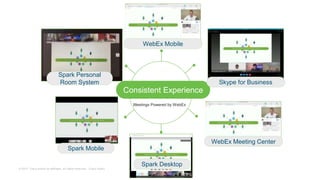
    © 2017 Ciscoand/or its affiliates. All rights reserved. Cisco Public Spark Desktop Meetings Powered by WebEx Consistent Experience Spark Personal Room System Skype for Business Spark Mobile WebEx Mobile WebEx Meeting Center
  • 9.
    © 2017 Ciscoand/or its affiliates. All rights reserved. Cisco Public Cisco SX80 Cisco DX70 NEW Cisco Room Kit Plus NEW Cisco Room Kit Cisco SX10 Cisco Spark Board 55 NEW Cisco Spark Board 70 Cloud Cisco IX5000 On-PremisesOptimized for Both Cloud and On-Premises An Amazing Experience in Every Space Cisco DX80 Cisco Room 70DCisco Room 70S Cisco MX700 Cisco Room 55 NEW NEW NEW
  • 10.
    © 2017 Ciscoand/or its affiliates. All rights reserved. Cisco Public Enablement for Everyone “Ingredients” for a Magical Meeting Experience Easy to Schedule Easy to Start/Join Impactful in-Meeting Experience Ability to easily follow up with the Team/Attendees AdoptionMethodology
  • 11.
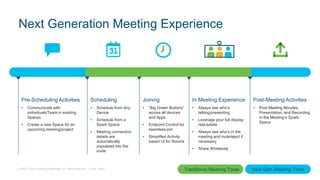
    © 2017 Ciscoand/or its affiliates. All rights reserved. Cisco Public Scheduling • Schedule from Any Device • Schedule from a Spark Space • Meeting connection details are automatically populated into the invite Joining • “Big Green Buttons” across all devices and Apps • Endpoint Control for seemless join • Simplified Activity based UI for Rooms In Meeting Experience • Always see who’s talking/presenting • Leverage your full display real-estate • Always see who’s in the meeting and mute/eject if necessary • Share Wirelessly Post-Meeting Activities • Post Meeting Minutes, Presentation, and Recording in the Meeting’s Spark Space Next Generation Meeting Experience Pre-Scheduling Activities • Communicate with individuals/Team in existing Spaces • Create a new Space for an upcoming meeting/project Traditional Meeting Tools Next Gen Meeting Tools
  • 12.
    © 2017 Ciscoand/or its affiliates. All rights reserved. Cisco Public Evolving the Meeting App Experience Chat not persistent outside of Meeting Video not prominent when content is not being displayed Roster of all participants only available in Client “Content is King”, even when not being displayed Dial in options can be “challenging” to use, depending on Audio Plans
  • 13.
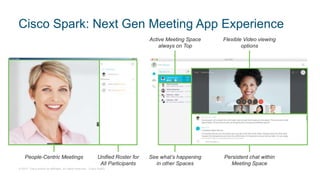
    © 2017 Ciscoand/or its affiliates. All rights reserved. Cisco Public Cisco Spark: Next Gen Meeting App Experience People-Centric Meetings Unified Roster for All Participants Persistent chat within Meeting Space See what’s happening in other Spaces Active Meeting Space always on Top Flexible Video viewing options
  • 15.
    © 2017 Ciscoand/or its affiliates. All rights reserved. Cisco Public
  • 16.
    © 2017 Ciscoand/or its affiliates. All rights reserved. Cisco Public In-Meeting Experiences In Room Controls Meeting Roster Automatic Wake Up People Count One Button to Push HD Audio Wireless ContentSpeakerTrack Room Pairing Multistream
  • 17.
    © 2017 Ciscoand/or its affiliates. All rights reserved. Cisco Public Meeting Experiences of Tomorrow In-Meeting Tools Collaboration in VR Check out Cisco Spark in VR @ https://www.ciscospark.com/VR/index.html Meeting AssistantFacial Recognition
  • 18.
    © 2017 Ciscoand/or its affiliates. All rights reserved. Cisco Public© 2017 Cisco and/or its affiliates. All rights reserved. Cisco Confidential Key Takeaways • Scheduling and Joining a Meeting should not be the hardest part of your day • Talk to your Cisco Partner & Account Team about:  Getting Video setup for your WebEx Site (it’s included!)  How to Simplify and Enhance your Boardroom Experience  Collaboration Adoption Services  Spark Integrations • Try using Spark to Join your next WebEx Video Meeting
  • 19.
    © 2017 Ciscoand/or its affiliates. All rights reserved. Cisco Public Questions?

Editor's Notes

  • #6 Two (2) years ago we made a commitment to you to make meetings easier to use. And we delivered on this with WebEx, TelePresence, and Collaboration Meeting Rooms. We reinvented conferencing.
  • #10 Many of you probably know this portfolio well. 4 new devices in 2017, New dimension – what can be registered to cloud and what can be registered to on-premise. Clarify the confusion – our new Cisco Spark Room Kit Series can register to both on-premise and to cloud, and the run the same CE / Room OS SW builds as the rest of our SX, MX and now also DX Series. Our IX5000 Series will not support Cloud registration as it solves a use case which we see better supported being registered on-premises for management and monitoring.
  • #11 Page 10
  • #15 Room Requirements: Share Content Audio Conference Video Conference “Collaborate”