© 2016 Magento, Inc. Page | 1
Magento
Presentation Layer
© 2016 Magento, Inc. Page | 2
PHP Architect, Magento Inc.
Volodymyr Kublytskyi
© 2016 Magento, Inc. Page | 3
Agenda
• Magento Layered Architecture
• Content rendering and blocks
• Custom block class implementation recommendation
• Block and Full Pages Caches
• Public and Private Content
© 2016 Magento, Inc. Page | 4
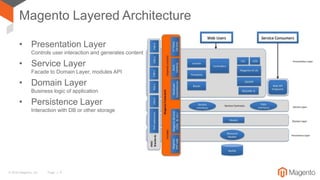
Magento Layered Architecture
• Presentation Layer
Controls user interaction and generates content
• Service Layer
Facade to Domain Layer, modules API
• Domain Layer
Business logic of application
• Persistence Layer
Interaction with DB or other storage
© 2016 Magento, Inc. Page | 5
Presentation Layer and Block Concept
• Presentation Layer understands what content is requested by a user
and generates it
• Block is a unit of content and represents logically grouped piece of
data
• Blocks are composite (block may contain other blocks)
© 2016 Magento, Inc. Page | 6
Block Anatomy
• Template provides markup snippet
• Block Class is a data provider for template. It encapsulates fetching
data logic
• <block/> and <referenceBlock/> layout declaration elements
define where block should be inserted on page and how it should
be rendered
© 2016 Magento, Inc. Page | 7
Block Class: New Class Implementation
• Must be child of
MagentoFrameworkViewElementAbstractBlock
• Do NOT use setter methods
• Use as less properties and methods from AbstractBlock as
possible
• AbstractBlock will be eliminated in future
© 2016 Magento, Inc. Page | 8
Block Class: Fetching Data
• Use Service and Domain Layer objects
• Inject all objects used by Block Class in constructor
(prefer Service Layer interfaces)
public function __construct(
CustomerRepositoryInterface $customerRepository
) {
$this->customerRepository = $customerRepository;
}
public function getCustomer() {
$customerId = $this->getCustomerIdFromRequest();
return $this->customerRepository->getById($customerId);
}
© 2016 Magento, Inc. Page | 9
Block Class: Variations
• Implement reusable block classes
• Use $data array passed in constructor as Block Class configuration
• Use layout XML configuration to set $data array value
<block>
<arguments>
<argument name="include_hidden">true</argument>
</arguments>
</block>
if ($this->getData('include_hidden')) {
// modify search criteria
}
© 2016 Magento, Inc. Page | 10
Block Class: Page Content Modification
Use declarative approach (configure block in layout XML files):
• Do NOT manipulate with layout object
• Do NOT generate HTML
© 2016 Magento, Inc. Page | 11
Block Class: Additional Responsibilities
• Additional responsibilities are legacy code and the reason of
requirement to extend from AbstractBlock
• Provides methods for returned data formatting and encoding
• Triggers rendering of nested blocks
• Configure rendered content cache
© 2016 Magento, Inc. Page | 12
Magento Cache
• Page rendering is an expensive operation
• Magento caches:
– layout configurations (layout cache type)
– block content (block_html cache type)
– full page (full_page cache type)
• internal (requires application bootstrap)
• external (Varnish, preferable for production, ESI support)
• Magento uses Cache-Contol HTTP header
• Block Classes are used for block_html and full_page cache
configuration
© 2016 Magento, Inc. Page | 13
Block Class: Cache Configuration
• Defines is block content cacheable or not
• Provides:
– block cache key — a unique cache identifier (used to load and save
cache)
– cache tags — a list of strings that are used to group caches (used for
batch cache removal)
– cache life time
• Set correct cache type block_html
(do NOT override AbstractBlock::CACHE_GROUP)
© 2016 Magento, Inc. Page | 14
Edge Side Includes
• Magento supports ESI
• To convert block content into ESI tag just specify ttl attribute in
the layout configuration
• Use ESI for frequently updated blocks available on many pages
• Warning: ESI usage creates additional load on server
(performance degradation)
<block ttl="86400" />
© 2016 Magento, Inc. Page | 15
Full Page Cache Issues
• Pages cached with Full Page Cached are displayed to all users
– Different users (e.g. guests and authorized customers) should see
different content available by same URL
– Some pages contain sensitive customer data
• Magento allows to disable caching per block:
– Use cacheable boolean attribute of block in page configuration file
– Page which contains at least one not cacheable block is not cacheable
either
– Issue: not cacheable pages lead to performance degradation
© 2016 Magento, Inc. Page | 16
Public Content Variations
• Inject MagentoFrameworkAppHttpContext to your class
from Presentation Layer and use setValue and unsValue
methods to add or remove public content dimension
• Result of Context::getVaryString is sent in X-Magento-Vary
cookie and is used as cache identifier in pair with requested URL
• Do not overuse: increasing of public content dimensions leads to
increasing of cache misses (performance degradation)
$this->context->setValue('loyalty', $loyaltyLevel);
© 2016 Magento, Inc. Page | 17
Public and Private Content Segregation
• Replace private customer data with placeholders during page
generation
• Cache page with placeholder
• Load private data with not cacheable AJAX request
• Replace placeholders with actual data on client side
• Two strategies:
– Depersonalization
– Customer Data Segments
© 2016 Magento, Inc. Page | 18
Private Content Delay
© 2016 Magento, Inc. Page | 19
Depersonalization
• Custom markup is used
• JavaScript parses HTML and load blocks content
• Content updated on each POST/PUT/DELETE request
• Supported but not recommended
• Do not require custom JavaScript code for implementation
• Will be deprecated in scope of MAGETWO-56701
<!-- BLOCK block_name --><!-- /BLOCK block_name -->
© 2016 Magento, Inc. Page | 20
Customer Data: Overview
• Magento provides unified API to fetch private content
(customer/section/load)
• Magento splits private content into sections
• Magento automatically tracks change of private content and loads
updated sections
• Magento provides framework to bind private content data
(JavaScript variables) to HTML
© 2016 Magento, Inc. Page | 21
Customer Data: Implement Own Section
• Create new class in <Vendor><Module>CustomerData namespace
• Implement
MagentoCustomerCustomerDataSectionSourceInterface (do not
forget declare dependency on Magento_Customer module)
• Your getSectionData method should return array which will be JSON
decoded (use simple types)
• Register your class in pool in di.xml
<type name="MagentoCustomerCustomerDataSectionPoolInterface">
<arguments>
<argument name="sectionSourceMap" xsi:type="array">
<item name="your-section-name"
xsi:type="string"
>VendorModuleCustomerDataYourSource</item>
</argument>
</arguments>
</type>
© 2016 Magento, Inc. Page | 22
Customer Data: Trigger Update
• To trigger customer data section update on some action create
etc/sections.xml
• Trigger section updates only on POST/PUT/DELETE actions
• Magento uses section_data_ids cookie to track expired
customer data sections
<config>
<action name="*">
<section name="your-section-name" />
</action>
<action name="/some/*/action/pattern" />
</config>
© 2016 Magento, Inc. Page | 23
Customer Data: Use On Client Side
• As simple as import in your AMD
• Or (useful for JavaScript console)
Important: yourSectionData is Knockout.js observable
define([
'Magento_Customer/js/customer-data'
], function (customerData) {
var yourSectionData = customerData.get(
'your-section-name'
);
}
var yourSectionData = require(
'Magento_Customer/js/customer-data'
).get('your-section-name');
© 2016 Magento, Inc. Page | 24
Customer Data: Use On Page
Create JavaScript View Model AMD component that reads data from
Magento_Customer/js/customer-data
© 2016 Magento, Inc. Page | 25
Customer Data: Use On Page
Add cacheable block in layout configuration with jsLayout argument
Do not be confused:
– <uiComponent /> — inserts UI Component in the page
– <item name="component">uiComponent</item> — registers new
JavaScript View Model as instance of
Magento_Ui/js/lib/core/collection
<block>
<arguments>
<argument name="jsLayout" xsi:type="array">
<item name="components" xsi:type="array">
<item name="viewModelName" xsi:type="array">
<item name="component" xsi:type="string">
Vendor_Module/js/view-model
© 2016 Magento, Inc. Page | 26
Customer Data: Use On Page
Use Knockout.js binding in phtml template
<div data-bind="scope: 'viewModelName'” data-role="placeholder">
<span data-bind="text: viewModelName().foo"></span>
<!-- ko template: getTemplate() --><!-- /ko -->
</div>
© 2016 Magento, Inc. Page | 27
Customer Data: Use On Page
Add x-magento-init script in phtml template
<script type="text/x-magento-init">
{
"[data-role=placeholder]": {
"Magento_Ui/js/core/app": <?php
/*@noEscape*/ echo $block->getJsLayout();
?>
}
}
</script>
© 2016 Magento, Inc. Page | 28
Summary
• Keep code related to content rendering in Presentation Layer
• Split content into reusable blocks
• Use Block Classes to fetch data from Service Layer
• Do NOT create not cacheable pages
• Use Customer Section Data for private data cache
© 2016 Magento, Inc. Page | 29
Thank You!
Q&A

Magento Presentation Layer

  • 1.
    © 2016 Magento,Inc. Page | 1 Magento Presentation Layer
  • 2.
    © 2016 Magento,Inc. Page | 2 PHP Architect, Magento Inc. Volodymyr Kublytskyi
  • 3.
    © 2016 Magento,Inc. Page | 3 Agenda • Magento Layered Architecture • Content rendering and blocks • Custom block class implementation recommendation • Block and Full Pages Caches • Public and Private Content
  • 4.
    © 2016 Magento,Inc. Page | 4 Magento Layered Architecture • Presentation Layer Controls user interaction and generates content • Service Layer Facade to Domain Layer, modules API • Domain Layer Business logic of application • Persistence Layer Interaction with DB or other storage
  • 5.
    © 2016 Magento,Inc. Page | 5 Presentation Layer and Block Concept • Presentation Layer understands what content is requested by a user and generates it • Block is a unit of content and represents logically grouped piece of data • Blocks are composite (block may contain other blocks)
  • 6.
    © 2016 Magento,Inc. Page | 6 Block Anatomy • Template provides markup snippet • Block Class is a data provider for template. It encapsulates fetching data logic • <block/> and <referenceBlock/> layout declaration elements define where block should be inserted on page and how it should be rendered
  • 7.
    © 2016 Magento,Inc. Page | 7 Block Class: New Class Implementation • Must be child of MagentoFrameworkViewElementAbstractBlock • Do NOT use setter methods • Use as less properties and methods from AbstractBlock as possible • AbstractBlock will be eliminated in future
  • 8.
    © 2016 Magento,Inc. Page | 8 Block Class: Fetching Data • Use Service and Domain Layer objects • Inject all objects used by Block Class in constructor (prefer Service Layer interfaces) public function __construct( CustomerRepositoryInterface $customerRepository ) { $this->customerRepository = $customerRepository; } public function getCustomer() { $customerId = $this->getCustomerIdFromRequest(); return $this->customerRepository->getById($customerId); }
  • 9.
    © 2016 Magento,Inc. Page | 9 Block Class: Variations • Implement reusable block classes • Use $data array passed in constructor as Block Class configuration • Use layout XML configuration to set $data array value <block> <arguments> <argument name="include_hidden">true</argument> </arguments> </block> if ($this->getData('include_hidden')) { // modify search criteria }
  • 10.
    © 2016 Magento,Inc. Page | 10 Block Class: Page Content Modification Use declarative approach (configure block in layout XML files): • Do NOT manipulate with layout object • Do NOT generate HTML
  • 11.
    © 2016 Magento,Inc. Page | 11 Block Class: Additional Responsibilities • Additional responsibilities are legacy code and the reason of requirement to extend from AbstractBlock • Provides methods for returned data formatting and encoding • Triggers rendering of nested blocks • Configure rendered content cache
  • 12.
    © 2016 Magento,Inc. Page | 12 Magento Cache • Page rendering is an expensive operation • Magento caches: – layout configurations (layout cache type) – block content (block_html cache type) – full page (full_page cache type) • internal (requires application bootstrap) • external (Varnish, preferable for production, ESI support) • Magento uses Cache-Contol HTTP header • Block Classes are used for block_html and full_page cache configuration
  • 13.
    © 2016 Magento,Inc. Page | 13 Block Class: Cache Configuration • Defines is block content cacheable or not • Provides: – block cache key — a unique cache identifier (used to load and save cache) – cache tags — a list of strings that are used to group caches (used for batch cache removal) – cache life time • Set correct cache type block_html (do NOT override AbstractBlock::CACHE_GROUP)
  • 14.
    © 2016 Magento,Inc. Page | 14 Edge Side Includes • Magento supports ESI • To convert block content into ESI tag just specify ttl attribute in the layout configuration • Use ESI for frequently updated blocks available on many pages • Warning: ESI usage creates additional load on server (performance degradation) <block ttl="86400" />
  • 15.
    © 2016 Magento,Inc. Page | 15 Full Page Cache Issues • Pages cached with Full Page Cached are displayed to all users – Different users (e.g. guests and authorized customers) should see different content available by same URL – Some pages contain sensitive customer data • Magento allows to disable caching per block: – Use cacheable boolean attribute of block in page configuration file – Page which contains at least one not cacheable block is not cacheable either – Issue: not cacheable pages lead to performance degradation
  • 16.
    © 2016 Magento,Inc. Page | 16 Public Content Variations • Inject MagentoFrameworkAppHttpContext to your class from Presentation Layer and use setValue and unsValue methods to add or remove public content dimension • Result of Context::getVaryString is sent in X-Magento-Vary cookie and is used as cache identifier in pair with requested URL • Do not overuse: increasing of public content dimensions leads to increasing of cache misses (performance degradation) $this->context->setValue('loyalty', $loyaltyLevel);
  • 17.
    © 2016 Magento,Inc. Page | 17 Public and Private Content Segregation • Replace private customer data with placeholders during page generation • Cache page with placeholder • Load private data with not cacheable AJAX request • Replace placeholders with actual data on client side • Two strategies: – Depersonalization – Customer Data Segments
  • 18.
    © 2016 Magento,Inc. Page | 18 Private Content Delay
  • 19.
    © 2016 Magento,Inc. Page | 19 Depersonalization • Custom markup is used • JavaScript parses HTML and load blocks content • Content updated on each POST/PUT/DELETE request • Supported but not recommended • Do not require custom JavaScript code for implementation • Will be deprecated in scope of MAGETWO-56701 <!-- BLOCK block_name --><!-- /BLOCK block_name -->
  • 20.
    © 2016 Magento,Inc. Page | 20 Customer Data: Overview • Magento provides unified API to fetch private content (customer/section/load) • Magento splits private content into sections • Magento automatically tracks change of private content and loads updated sections • Magento provides framework to bind private content data (JavaScript variables) to HTML
  • 21.
    © 2016 Magento,Inc. Page | 21 Customer Data: Implement Own Section • Create new class in <Vendor><Module>CustomerData namespace • Implement MagentoCustomerCustomerDataSectionSourceInterface (do not forget declare dependency on Magento_Customer module) • Your getSectionData method should return array which will be JSON decoded (use simple types) • Register your class in pool in di.xml <type name="MagentoCustomerCustomerDataSectionPoolInterface"> <arguments> <argument name="sectionSourceMap" xsi:type="array"> <item name="your-section-name" xsi:type="string" >VendorModuleCustomerDataYourSource</item> </argument> </arguments> </type>
  • 22.
    © 2016 Magento,Inc. Page | 22 Customer Data: Trigger Update • To trigger customer data section update on some action create etc/sections.xml • Trigger section updates only on POST/PUT/DELETE actions • Magento uses section_data_ids cookie to track expired customer data sections <config> <action name="*"> <section name="your-section-name" /> </action> <action name="/some/*/action/pattern" /> </config>
  • 23.
    © 2016 Magento,Inc. Page | 23 Customer Data: Use On Client Side • As simple as import in your AMD • Or (useful for JavaScript console) Important: yourSectionData is Knockout.js observable define([ 'Magento_Customer/js/customer-data' ], function (customerData) { var yourSectionData = customerData.get( 'your-section-name' ); } var yourSectionData = require( 'Magento_Customer/js/customer-data' ).get('your-section-name');
  • 24.
    © 2016 Magento,Inc. Page | 24 Customer Data: Use On Page Create JavaScript View Model AMD component that reads data from Magento_Customer/js/customer-data
  • 25.
    © 2016 Magento,Inc. Page | 25 Customer Data: Use On Page Add cacheable block in layout configuration with jsLayout argument Do not be confused: – <uiComponent /> — inserts UI Component in the page – <item name="component">uiComponent</item> — registers new JavaScript View Model as instance of Magento_Ui/js/lib/core/collection <block> <arguments> <argument name="jsLayout" xsi:type="array"> <item name="components" xsi:type="array"> <item name="viewModelName" xsi:type="array"> <item name="component" xsi:type="string"> Vendor_Module/js/view-model
  • 26.
    © 2016 Magento,Inc. Page | 26 Customer Data: Use On Page Use Knockout.js binding in phtml template <div data-bind="scope: 'viewModelName'” data-role="placeholder"> <span data-bind="text: viewModelName().foo"></span> <!-- ko template: getTemplate() --><!-- /ko --> </div>
  • 27.
    © 2016 Magento,Inc. Page | 27 Customer Data: Use On Page Add x-magento-init script in phtml template <script type="text/x-magento-init"> { "[data-role=placeholder]": { "Magento_Ui/js/core/app": <?php /*@noEscape*/ echo $block->getJsLayout(); ?> } } </script>
  • 28.
    © 2016 Magento,Inc. Page | 28 Summary • Keep code related to content rendering in Presentation Layer • Split content into reusable blocks • Use Block Classes to fetch data from Service Layer • Do NOT create not cacheable pages • Use Customer Section Data for private data cache
  • 29.
    © 2016 Magento,Inc. Page | 29 Thank You! Q&A