nomadmage.com
Magento 2 Front-end
performance tips & tricks
Definitely not a talk about replacing front-end stack
Bartek Igielski
Lead Front-end Developer at Snowdog
@igloczek
nomadmage.com
Performance
=
Happiness
=
Conversion
=
Money
nomadmage.com
How to measure performance?
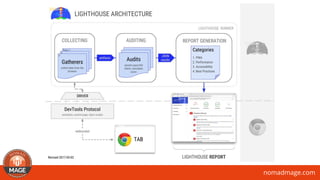
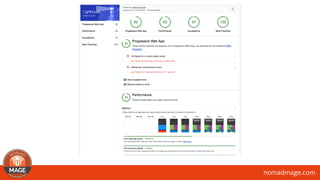
Lighthouse
A tower or other structure tool containing a beacon
light to warn or guide ships at sea developers.
https://github.com/GoogleChrome/lighthouse
nomadmage.com
nomadmage.com
How it works?
• Run on clean Chrome instance
• Emulate Nexus 5X size
• CPU throttling is enabled to emulate smartphone performance
• Network is throttled to slow 3G
nomadmage.com
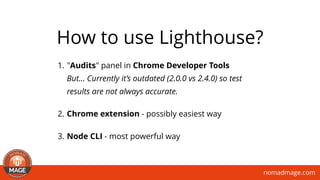
1. "Audits" panel in Chrome Developer Tools

But… Currently it’s outdated (2.0.0 vs 2.4.0) so test
results are not always accurate.
2. Chrome extension - possibly easiest way
3. Node CLI - most powerful way
How to use Lighthouse?
nomadmage.com
nomadmage.com
Which config perform best?
Minification?
Merging?
Bundling?
nomadmage.com
Always enable

minification and merging
It saves data (better compression) 

and reduce number of requests
nomadmage.com
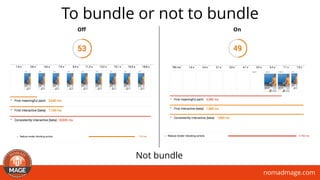
To bundle or not to bundle
Not bundle
OnOff
nomadmage.com
What’s the starting point?
Magento 2.1.8 + Sample data + Luma theme
Minification and merging enabled, bundling off
HTTPS + HTTP/2 + GZIP
nomadmage.com
nomadmage.com
nomadmage.com
First step - create theme
{
"name": „snowdog/theme-frontend-performance",
"require": {
"snowdog/frontools": "*",
"snowdog/theme-blank-sass": "*"
},
"type": "magento2-theme",
"autoload": {
"files": [
"registration.php"
]
}
}
https://github.com/SnowdogApps/magento2-theme-performance
nomadmage.com
Annihilate render
blocking resources
Let’s make everything asynchronous!
nomadmage.com
Asynchronous
stylesheets
Because asynchronous JS isn’t enough
You can save here 800-1000 ms
nomadmage.com
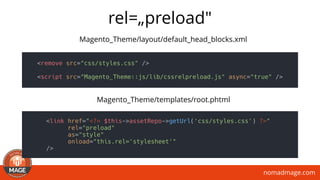
rel=„preload"
<link href="<?= $this->assetRepo->getUrl('css/styles.css') ?>"
rel="preload"
as="style"
onload="this.rel='stylesheet'"
/>
Magento_Theme/templates/root.phtml
Magento_Theme/layout/default_head_blocks.xml
<remove src="css/styles.css" />
<script src="Magento_Theme::js/lib/cssrelpreload.js" async="true" />
nomadmage.com
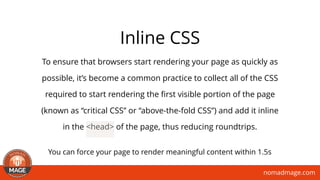
Inline CSS
To ensure that browsers start rendering your page as quickly as
possible, it’s become a common practice to collect all of the CSS
required to start rendering the first visible portion of the page
(known as “critical CSS” or “above-the-fold CSS”) and add it inline
in the <head> of the page, thus reducing roundtrips. 
You can force your page to render meaningful content within 1.5s
nomadmage.com
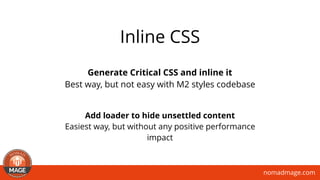
Generate Critical CSS and inline it
Best way, but not easy with M2 styles codebase
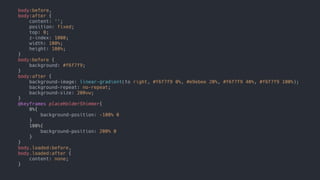
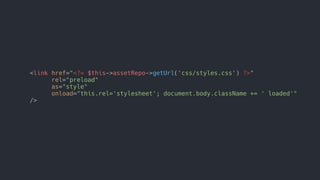
Add loader to hide unsettled content
Easiest way, but without any positive performance
impact
Inline CSS
nomadmage.com
body:before,
body:after {
content: '';
position: fixed;
top: 0;
z-index: 1000;
width: 100%;
height: 100%;
}
body:before {
background: #f6f7f9;
}
body:after {
background-image: linear-gradient(to right, #f6f7f9 0%, #e9ebee 20%, #f6f7f9 40%, #f6f7f9 100%);
background-repeat: no-repeat;
background-size: 200vw;
}
@keyframes placeHolderShimmer{
0%{
background-position: -100% 0
}
100%{
background-position: 200% 0
}
}
body.loaded:before,
body.loaded:after {
content: none;
}
nomadmage.com
<link href="<?= $this->assetRepo->getUrl('css/styles.css') ?>"
rel="preload"
as="style"
onload="this.rel='stylesheet'; document.body.className += ' loaded'"
/>
nomadmage.com
Images lazy-loading
To load images when they are really necessary
You can save here 500-1500+ ms - depends on images overall weight
nomadmage.com
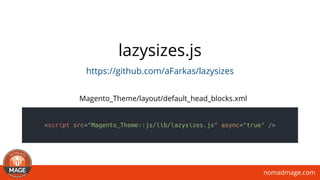
lazysizes.js
https://github.com/aFarkas/lazysizes
<script src="Magento_Theme::js/lib/lazysizes.js" async="true" />
Magento_Theme/layout/default_head_blocks.xml
nomadmage.com
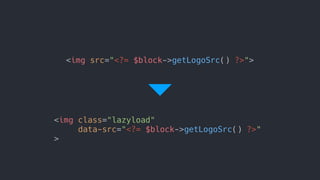
<img class="lazyload"
data-src="<?= $block->getLogoSrc() ?>"
>
<img src="<?= $block->getLogoSrc() ?>">
nomadmage.com
Low Quality Image
Placeholders
1. Initially load the page with low quality images
2. Once the page loaded (e.g. in the onload event),
replace them with the full quality images
Possible improvements to lazy-loading model
https://www.guypo.com/introducing-lqip-low-quality-image-placeholders/
nomadmage.com
Avoid synchronous JS
Check 3rd party extensions, many of them ignore
existence of Require JS
nomadmage.com
Prefetch
<link href="<?= $this->assetRepo->getUrl('jquery.js') ?>”
as=„script"
rel=„prefetch"
/>
<link href="<?= $this->assetRepo->getUrl('jquery/jquery-ui.js') ?>”
as=„script"
rel=„prefetch”
/>
<link href="<?= $this->assetRepo->getUrl('knockoutjs/knockout.js') ?>”
as=„script"
rel=„prefetch"
/>
<link href="<?= $this->assetRepo->getUrl('underscore.js') ?>”
as=„script"
rel=„prefetch"
/>
You can save here 50-300 ms
nomadmage.com
Reduce payload
nomadmage.com
Merge stylesheets
Since asynchronous approach is not supported
by the core, so we have to care about merging
on our end
You can save here 50-300 ms
nomadmage.com
Optimize images
Compression, downsize, lower quality, WebP
You can save here… a lot! Store maintainers tends to load heavy images.
nomadmage.com
Use responsive
images
Load images conditionally depends on user device screen size
You can save here a lot - up to 50-70% reduce
nomadmage.com
Reduce number of fonts
Font is just an enchantment, not a content.
You can use system fonts instead.
nomadmage.com
Load web fonts in
WOFF2 format
But if really have to load fonts…
nomadmage.com
Optimize fonts
loading
https://www.zachleat.com/web/comprehensive-webfonts/
nomadmage.com
Do not duplicate JS
libraries
Check 3rd party extensions, they like to load lots of stuff,
just to be sure that it will work.
nomadmage.com
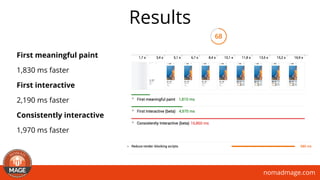
Results
First meaningful paint
1,830 ms faster
First interactive
2,190 ms faster
Consistently interactive
1,970 ms faster
nomadmage.com
nomadmage.com
https://github.com/antonkril/magento-rjs-config
Make JS bundling great again!
nomadmage.com
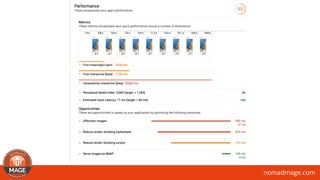
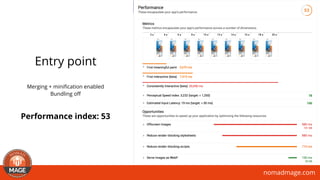
Entry point
Merging + minification enabled

Bundling off
Performance index: 53
nomadmage.com
Anton’s idea
1. Manually create a config file for R.js
2.Create a bundle
3.Load bundle using layout instructions
nomadmage.com
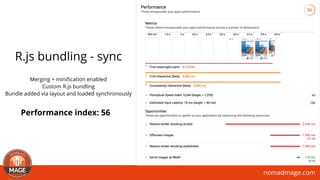
R.js bundling - sync
Merging + minification enabled

Custom R.js bundling
Bundle added via layout and loaded synchronously
Performance index: 56
nomadmage.com
Improved Anton’s idea
1. Manually create a config file for R.js
2.Create a bundle
3.Extend Require.js config to define a
bundle and it’s content
4.Bundle will be loaded
asynchronously, automatically via
Require.js
nomadmage.com
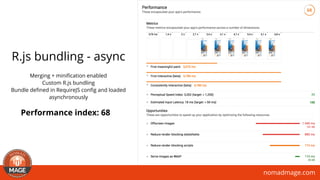
R.js bundling - async
Merging + minification enabled

Custom R.js bundling
Bundle defined in RequireJS config and loaded
asynchronously
Performance index: 68
nomadmage.com
nomadmage.com
More possibilities…
1. Parse rendered page, take all script tags and move to
the end of the body. This will let us to remove blocking
JS from the head and make page to render way faster
than now.
2. Use HTTP/2 Push to load heavies files like: jQuery UI lib,
jQuery lib, stylesheets etc. (for now Apache only)
3. Use Brotli or Zopfli compression format (lossless
compression algorithms like a Gzip)
4. Service workers
nomadmage.com
Further reading
Front End Performance Checklist 2017
https://www.smashingmagazine.com/2016/12/front-end-performance-
checklist-2017-pdf-pages/
nomadmage.com
Follow and contribute
https://github.com/antonkril/magento-rjs-config
https://github.com/SnowdogApps/magento2-theme-performance
nomadmage.com
Q & A Time!
Let’s stay in touch
Twitter: @igloczek
Blog: iglo.tech
bartek.igielski@snow.dog
nomadmage.com
https://hacktoberfest.digitalocean.com/
nomadmage.com
Thank you!

Magento 2 Front-end performance tips & tricks - Nomadmage September 2017