Industrial
C amerasP arth De s ai : Author
What is an Industrial C amera?
[1 ]
◎ Imaging sensor packaged for industrial usage
◎ Improved performance, stability & reliability
◎ Easy installation & compact structure
◎ Long operational time
◎ High speed shutter time (order of micro-seconds)
◎ Higher frame rates (up to thousands of fps)
◎ Output raw data (uncompressed)
◎ Supports wide spectral range
2
http://pomeas.com/mobile/newsview/396.html [1 ]
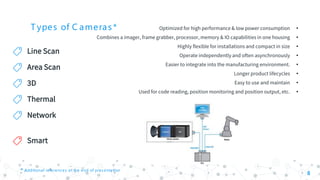
T ypes of C ameras*
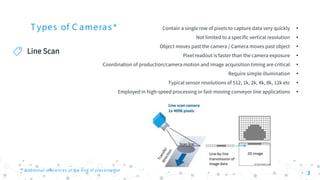
Line Scan
3
•Contain a single row of pixels to capture data very quickly
•Not limited to a specific vertical resolution
•Object moves past the camera / Camera moves past object
•Pixel readout is faster than the camera exposure
•Coordination of production/camera motion and image acquisition timing are critical
•Require simple illumination
•Typical sensor resolutions of 512, 1k, 2k, 4k, 8k, 12k etc
•Employed in high-speed processing or fast-moving conveyor line applications
* Additional references at the end of presentation
T ypes of C ameras*
Line Scan
4
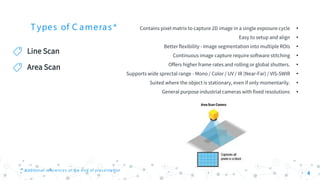
Area Scan
* Additional references at the end of presentation
•Contains pixel matrix to capture 2D image in a single exposure cycle
•Easy to setup and align
•Better flexibility - Image segmentation into multiple ROIs
•Continuous image capture require software stitching
•Offers higher frame rates and rolling or global shutters.
•Supports wide sprectal range - Mono / Color / UV / IR (Near-Far) / VIS-SWIR
•Suited where the object is stationary, even if only momentarily.
•General purpose industrial cameras with fixed resolutions
T ypes of C ameras*
Line Scan
5
Area Scan
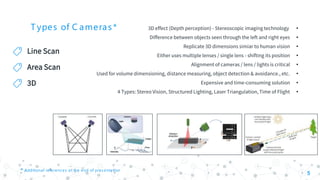
3D
* Additional references at the end of presentation
•3D effect (Depth perception) - Stereoscopic imaging technology
•Difference between objects seen through the left and right eyes
•Replicate 3D dimensions simiar to human vision
•Either uses multiple lenses / single lens - shifting its position
•Alignment of cameras / lens / lights is critical
•Used for volume dimensioning, distance measuring, object detection & avoidance., etc.
•Expensive and time-consuming solution
•4 Types: Stereo Vision, Structured Lighting, Laser Triangulation, Time of Flight
T ypes of C ameras*
Line Scan
6
Area Scan
3D
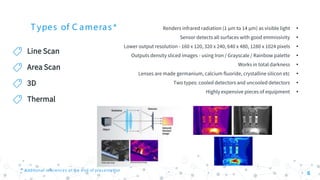
Thermal
* Additional references at the end of presentation
•Renders infrared radiation (1 μm to 14 μm) as visible light
•Sensor detects all surfaces with good emmissivity
•Lower output resolution - 160 x 120, 320 x 240, 640 x 480, 1280 x 1024 pixels
•Outputs density sliced images - using Iron / Grayscale / Rainbow palette
•Works in total darkness
•Lenses are made germanium, calcium fluoride, crystalline silicon etc
•Two types: cooled detectors and uncooled detectors
•Highly expensive pieces of equipment
T ypes of C ameras*
Line Scan
7
Area Scan
3D
Thermal
Network
* Additional references at the end of presentation
•A digital video camera - connected & directly accessed via the Internet.
•May / may not require support of a centrallized network video recorder to operate.
•Types: Fixed Camera, PTZ Camera, AC Powered Camera, Wired Free Camera
•Can be connected through wired / wireless network
•Supports high quality image compression and encrypted data transmission
•Can be powered separately or using PoE
•Better image Resolution compared to analog camera
•Primary disadvantage is Privacy / Security concerns
T ypes of C ameras*
Line Scan
8
Area Scan
3D
Thermal
Network
* Additional references at the end of presentation
Smart
•Optimized for high performance & low power consumption
•Combines a imager, frame grabber, processor, memory & IO capabilities in one housing
•Highly flexible for installations and compact in size
•Operate independently and often asynchronously
•Easier to integrate into the manufacturing environment.
•Longer product lifecycles
•Easy to use and maintain
•Used for code reading, position monitoring and position output, etc.
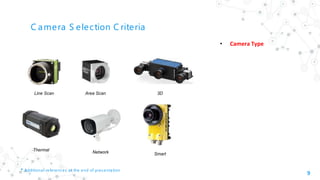
C amera S election C riteria
9
• Camera Type
* Additional references at the end of presentation
Line Scan Area Scan 3D
SmartNetworkThermal
C amera S election C riteria
10
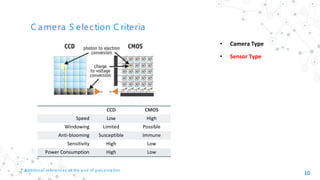
• Sensor Type
• Camera Type
CCD CMOS
Speed Low High
Windowing Limited Possible
Anti-blooming Susceptible Immune
Sensitivity High Low
Power Consumption High Low
* Additional references at the end of presentation
C amera S election C riteria
11
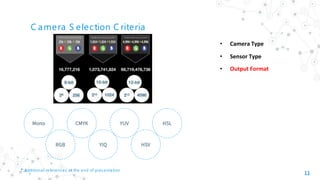
• Sensor Type
• Output Format
• Camera Type
RGB
Mono CMYK YUV
YIQ HSV
HSL
* Additional references at the end of presentation
C amera S election C riteria
12
• Sensor Type
• Output Format
• Shutter Type
• Camera Type
* Additional references at the end of presentation
Animation
C amera S election C riteria
13
• Sensor Type
• Output Format
• Shutter Type
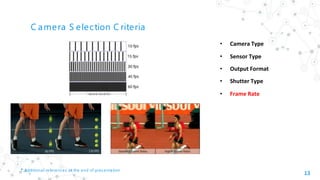
• Frame Rate
• Camera Type
* Additional references at the end of presentation
C amera S election C riteria
14
• Sensor Type
• Output Format
• Shutter Type
• Frame Rate
• Image Resolution
• Camera Type
* Additional references at the end of presentation
C amera S election C riteria
15
• Sensor Type
• Output Format
• Shutter Type
• Frame Rate
• Image Resolution
• Sensor & Pixel Size
• Camera Type
* Additional references at the end of presentation
C amera S election C riteria
16
• Sensor Type
• Output Format
• Shutter Type
• Frame Rate
• Image Resolution
• Sensor & Pixel Size
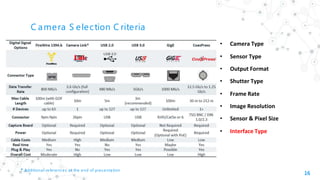
• Interface Type
• Camera Type
* Additional references at the end of presentation
C amera S election C riteria
17
• Sensor Type
• Output Format
• Shutter Type
• Frame Rate
• Image Resolution
• Sensor & Pixel Size
• Interface Type
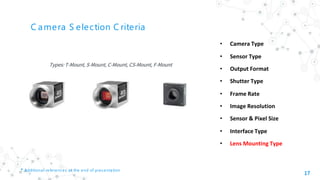
• Lens Mounting Type
• Camera Type
* Additional references at the end of presentation
Types: T-Mount, S-Mount, C-Mount, CS-Mount, F-Mount
C amera S election C riteria
18
• Sensor Type
• Output Format
• Shutter Type
• Frame Rate
• Image Resolution
• Sensor & Pixel Size
• Interface Type
• Lens Mounting Type
• Camera Type
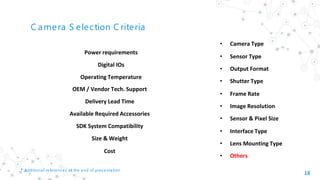
Power requirements
Digital IOs
Operating Temperature
OEM / Vendor Tech. Support
Delivery Lead Time
Available Required Accessories
SDK System Compatibility
Size & Weight
Cost
* Additional references at the end of presentation
• Others
Important C amera P arameters - Area S can Applications
Gain Gamma Pixel Format
Trigger Mode Trigger Activation
19
Trigger Selector
Trigger Delay Trigger Source Exposure
Digital IO Control Packet Size Interpacket Delay
Timeout Acquistion Mode
“
20
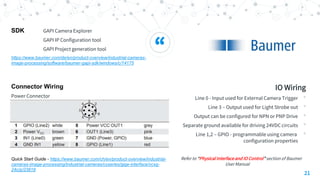
IO Wiring
•Line 1 - Input used for External Camera Trigger
•Line 2 – Output used for Light Strobe out
•Output can be configured for NPN or PNP Drive
•Separate ground available for driving 24VDC circuits
•Line 3 – GPIO - programmable using camera
configuration properties
Refer to “Physical Interface and IO Control” section of Basler GigE
Manual
SDK Pylon IP Configurator
Pylon Viewer
https://www.baslerweb.com/en/products/software/basler-pylon-
camera-software-suite/
Connector Wiring
Power Connector
https://www.baslerweb.com/en/sales-support/downloads/document-
downloads/basler-ace-gige-users-manual/
“
21
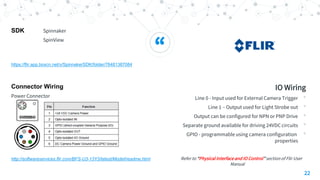
IO Wiring
•Line 0 - Input used for External Camera Trigger
•Line 3 – Output used for Light Strobe out
•Output can be configured for NPN or PNP Drive
•Separate ground available for driving 24VDC circuits
•Line 1,2 – GPIO - programmable using camera
configuration properties
Refer to “Physical Interface and IO Control” section of Baumer
User Manual
SDK GAPI Camera Explorer
GAPI IP Configuration tool
GAPI Project generation tool
https://www.baumer.com/de/en/product-overview/industrial-cameras-
image-processing/software/baumer-gapi-sdk/windows/c/14175
Connector Wiring
Power Connector
Quick Start Guide - https://www.baumer.com/ch/en/product-overview/industrial-
cameras-image-processing/industrial-cameras/cxseries/gige-interface/vcxg-
24c/p/23818
“
22
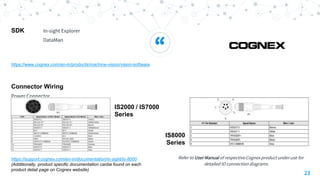
IO Wiring
•Line 0 - Input used for External Camera Trigger
•Line 1 – Output used for Light Strobe out
•Output can be configured for NPN or PNP Drive
•Separate ground available for driving 24VDC circuits
•GPIO - programmable using camera configuration
properties
Refer to “Physical Interface and IO Control” section of Flir User
Manual
Connector Wiring
Power Connector
http://softwareservices.flir.com/BFS-U3-13Y3/latest/Model/readme.html
SDK Spinnaker
SpinView
https://flir.app.boxcn.net/v/SpinnakerSDK/folder/76481387084
“
23
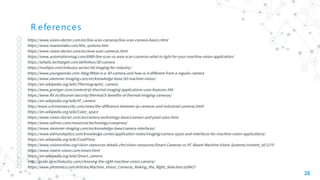
Refer to User Manual of respective Cognex product under use for
detailed IO connection diagrams.
Connector Wiring
Power Connector
https://support.cognex.com/en-in/documentation/in-sight/is-8000
(Additionally, product specific documentation canbe found on each
product detail page on Cognex website)
SDK In-sight Explorer
DataMan
https://www.cognex.com/en-in/products/machine-vision/vision-software
IS2000 / IS7000
Series
IS8000
Series
Other Information
Windows Network Properties
When using GigE cameras for inspection applications,
following network properties needs to be configured
for better image capturing
•Link Speed & Duplex
•Jumbo Frames
•Receive Descriptors
•Interrupt Moderation Rate
24
Baumer
Cognex
Dalsa
Basler
mvC amera Vendors
Flir
XiMEA
iDS
NI
R eferences
◎ https://www.vision-doctor.com/en/line-scan-cameras/line-scan-camera-basics.html
◎ https://www.newtonlabs.com/line_systems.htm
◎ https://www.vision-doctor.com/en/area-scan-cameras.html
◎ https://www.automationmag.com/6989-line-scan-vs-area-scan-cameras-what-is-right-for-your-machine-vision-application/
◎ https://whatis.techtarget.com/definition/3D-camera
◎ https://multipix.com/industry-sector/3d-imaging-for-industry/
◎ https://www.youngwonks.com /blog/What-is-a-3D-camera-and-how-is-it-different-from-a-regular-camera
◎ https://www.stemmer-imaging.com/en/knowledge-base/3d-machine-vision/
◎ https://en.wikipedia.org/wiki/Thermographic_camera
◎ https://www.grainger.com/content/qt-thermal-imaging-applications-uses-features-345
◎ https://www.flir.in/discover/security/thermal/5-benefits-of-thermal-imaging-cameras/
◎ https://en.wikipedia.org/wiki/IP_camera
◎ http://www.cctvmansecurity.com/news/the-difference-between-ip-cameras-and-industrial-cameras.html
◎ https://en.wikipedia.org/wiki/Color_space
◎ https://www.vision-doctor.com/en/camera-technology-basics/sensor-and-pixel-sizes.html
◎ https://www.adimec.com/resources/technology/coaxpress/
◎ https://www.stemmer-imaging.com/en/knowledge-base/camera-interfaces/
◎ https://www.edmundoptics.com/knowledge-center/application-notes/imaging/camera-types-and-interfaces-for-machine-vision-applications/
◎ https://en.wikipedia.org/wiki/CoaXPress
◎ https://www.visiononline.org/vision-resources-details.cfm/vision-resources/Smart-Cameras-vs-PC-Based-Machine-Vision-Systems/content_id/1275
◎ https://www.matrix-vision.com/smart.html
◎ https://en.wikipedia.org/wiki/Smart_camera
◎ http://guide.directindustry.com/choosing-the-right-machine-vision-camera/
◎ https://www.photonics.com/Articles/Machine_Vision_Cameras_Making_the_Right_Selection/a58427
26
Thanks!
Any questions?
27

Machine Vision Cameras

  • 1.
    Industrial C amerasP arthDe s ai : Author
  • 2.
    What is anIndustrial C amera? [1 ] ◎ Imaging sensor packaged for industrial usage ◎ Improved performance, stability & reliability ◎ Easy installation & compact structure ◎ Long operational time ◎ High speed shutter time (order of micro-seconds) ◎ Higher frame rates (up to thousands of fps) ◎ Output raw data (uncompressed) ◎ Supports wide spectral range 2 http://pomeas.com/mobile/newsview/396.html [1 ]
  • 3.
    T ypes ofC ameras* Line Scan 3 •Contain a single row of pixels to capture data very quickly •Not limited to a specific vertical resolution •Object moves past the camera / Camera moves past object •Pixel readout is faster than the camera exposure •Coordination of production/camera motion and image acquisition timing are critical •Require simple illumination •Typical sensor resolutions of 512, 1k, 2k, 4k, 8k, 12k etc •Employed in high-speed processing or fast-moving conveyor line applications * Additional references at the end of presentation
  • 4.
    T ypes ofC ameras* Line Scan 4 Area Scan * Additional references at the end of presentation •Contains pixel matrix to capture 2D image in a single exposure cycle •Easy to setup and align •Better flexibility - Image segmentation into multiple ROIs •Continuous image capture require software stitching •Offers higher frame rates and rolling or global shutters. •Supports wide sprectal range - Mono / Color / UV / IR (Near-Far) / VIS-SWIR •Suited where the object is stationary, even if only momentarily. •General purpose industrial cameras with fixed resolutions
  • 5.
    T ypes ofC ameras* Line Scan 5 Area Scan 3D * Additional references at the end of presentation •3D effect (Depth perception) - Stereoscopic imaging technology •Difference between objects seen through the left and right eyes •Replicate 3D dimensions simiar to human vision •Either uses multiple lenses / single lens - shifting its position •Alignment of cameras / lens / lights is critical •Used for volume dimensioning, distance measuring, object detection & avoidance., etc. •Expensive and time-consuming solution •4 Types: Stereo Vision, Structured Lighting, Laser Triangulation, Time of Flight
  • 6.
    T ypes ofC ameras* Line Scan 6 Area Scan 3D Thermal * Additional references at the end of presentation •Renders infrared radiation (1 μm to 14 μm) as visible light •Sensor detects all surfaces with good emmissivity •Lower output resolution - 160 x 120, 320 x 240, 640 x 480, 1280 x 1024 pixels •Outputs density sliced images - using Iron / Grayscale / Rainbow palette •Works in total darkness •Lenses are made germanium, calcium fluoride, crystalline silicon etc •Two types: cooled detectors and uncooled detectors •Highly expensive pieces of equipment
  • 7.
    T ypes ofC ameras* Line Scan 7 Area Scan 3D Thermal Network * Additional references at the end of presentation •A digital video camera - connected & directly accessed via the Internet. •May / may not require support of a centrallized network video recorder to operate. •Types: Fixed Camera, PTZ Camera, AC Powered Camera, Wired Free Camera •Can be connected through wired / wireless network •Supports high quality image compression and encrypted data transmission •Can be powered separately or using PoE •Better image Resolution compared to analog camera •Primary disadvantage is Privacy / Security concerns
  • 8.
    T ypes ofC ameras* Line Scan 8 Area Scan 3D Thermal Network * Additional references at the end of presentation Smart •Optimized for high performance & low power consumption •Combines a imager, frame grabber, processor, memory & IO capabilities in one housing •Highly flexible for installations and compact in size •Operate independently and often asynchronously •Easier to integrate into the manufacturing environment. •Longer product lifecycles •Easy to use and maintain •Used for code reading, position monitoring and position output, etc.
  • 9.
    C amera Selection C riteria 9 • Camera Type * Additional references at the end of presentation Line Scan Area Scan 3D SmartNetworkThermal
  • 10.
    C amera Selection C riteria 10 • Sensor Type • Camera Type CCD CMOS Speed Low High Windowing Limited Possible Anti-blooming Susceptible Immune Sensitivity High Low Power Consumption High Low * Additional references at the end of presentation
  • 11.
    C amera Selection C riteria 11 • Sensor Type • Output Format • Camera Type RGB Mono CMYK YUV YIQ HSV HSL * Additional references at the end of presentation
  • 12.
    C amera Selection C riteria 12 • Sensor Type • Output Format • Shutter Type • Camera Type * Additional references at the end of presentation Animation
  • 13.
    C amera Selection C riteria 13 • Sensor Type • Output Format • Shutter Type • Frame Rate • Camera Type * Additional references at the end of presentation
  • 14.
    C amera Selection C riteria 14 • Sensor Type • Output Format • Shutter Type • Frame Rate • Image Resolution • Camera Type * Additional references at the end of presentation
  • 15.
    C amera Selection C riteria 15 • Sensor Type • Output Format • Shutter Type • Frame Rate • Image Resolution • Sensor & Pixel Size • Camera Type * Additional references at the end of presentation
  • 16.
    C amera Selection C riteria 16 • Sensor Type • Output Format • Shutter Type • Frame Rate • Image Resolution • Sensor & Pixel Size • Interface Type • Camera Type * Additional references at the end of presentation
  • 17.
    C amera Selection C riteria 17 • Sensor Type • Output Format • Shutter Type • Frame Rate • Image Resolution • Sensor & Pixel Size • Interface Type • Lens Mounting Type • Camera Type * Additional references at the end of presentation Types: T-Mount, S-Mount, C-Mount, CS-Mount, F-Mount
  • 18.
    C amera Selection C riteria 18 • Sensor Type • Output Format • Shutter Type • Frame Rate • Image Resolution • Sensor & Pixel Size • Interface Type • Lens Mounting Type • Camera Type Power requirements Digital IOs Operating Temperature OEM / Vendor Tech. Support Delivery Lead Time Available Required Accessories SDK System Compatibility Size & Weight Cost * Additional references at the end of presentation • Others
  • 19.
    Important C ameraP arameters - Area S can Applications Gain Gamma Pixel Format Trigger Mode Trigger Activation 19 Trigger Selector Trigger Delay Trigger Source Exposure Digital IO Control Packet Size Interpacket Delay Timeout Acquistion Mode
  • 20.
    “ 20 IO Wiring •Line 1- Input used for External Camera Trigger •Line 2 – Output used for Light Strobe out •Output can be configured for NPN or PNP Drive •Separate ground available for driving 24VDC circuits •Line 3 – GPIO - programmable using camera configuration properties Refer to “Physical Interface and IO Control” section of Basler GigE Manual SDK Pylon IP Configurator Pylon Viewer https://www.baslerweb.com/en/products/software/basler-pylon- camera-software-suite/ Connector Wiring Power Connector https://www.baslerweb.com/en/sales-support/downloads/document- downloads/basler-ace-gige-users-manual/
  • 21.
    “ 21 IO Wiring •Line 0- Input used for External Camera Trigger •Line 3 – Output used for Light Strobe out •Output can be configured for NPN or PNP Drive •Separate ground available for driving 24VDC circuits •Line 1,2 – GPIO - programmable using camera configuration properties Refer to “Physical Interface and IO Control” section of Baumer User Manual SDK GAPI Camera Explorer GAPI IP Configuration tool GAPI Project generation tool https://www.baumer.com/de/en/product-overview/industrial-cameras- image-processing/software/baumer-gapi-sdk/windows/c/14175 Connector Wiring Power Connector Quick Start Guide - https://www.baumer.com/ch/en/product-overview/industrial- cameras-image-processing/industrial-cameras/cxseries/gige-interface/vcxg- 24c/p/23818
  • 22.
    “ 22 IO Wiring •Line 0- Input used for External Camera Trigger •Line 1 – Output used for Light Strobe out •Output can be configured for NPN or PNP Drive •Separate ground available for driving 24VDC circuits •GPIO - programmable using camera configuration properties Refer to “Physical Interface and IO Control” section of Flir User Manual Connector Wiring Power Connector http://softwareservices.flir.com/BFS-U3-13Y3/latest/Model/readme.html SDK Spinnaker SpinView https://flir.app.boxcn.net/v/SpinnakerSDK/folder/76481387084
  • 23.
    “ 23 Refer to UserManual of respective Cognex product under use for detailed IO connection diagrams. Connector Wiring Power Connector https://support.cognex.com/en-in/documentation/in-sight/is-8000 (Additionally, product specific documentation canbe found on each product detail page on Cognex website) SDK In-sight Explorer DataMan https://www.cognex.com/en-in/products/machine-vision/vision-software IS2000 / IS7000 Series IS8000 Series
  • 24.
    Other Information Windows NetworkProperties When using GigE cameras for inspection applications, following network properties needs to be configured for better image capturing •Link Speed & Duplex •Jumbo Frames •Receive Descriptors •Interrupt Moderation Rate 24
  • 25.
  • 26.
    R eferences ◎ https://www.vision-doctor.com/en/line-scan-cameras/line-scan-camera-basics.html ◎https://www.newtonlabs.com/line_systems.htm ◎ https://www.vision-doctor.com/en/area-scan-cameras.html ◎ https://www.automationmag.com/6989-line-scan-vs-area-scan-cameras-what-is-right-for-your-machine-vision-application/ ◎ https://whatis.techtarget.com/definition/3D-camera ◎ https://multipix.com/industry-sector/3d-imaging-for-industry/ ◎ https://www.youngwonks.com /blog/What-is-a-3D-camera-and-how-is-it-different-from-a-regular-camera ◎ https://www.stemmer-imaging.com/en/knowledge-base/3d-machine-vision/ ◎ https://en.wikipedia.org/wiki/Thermographic_camera ◎ https://www.grainger.com/content/qt-thermal-imaging-applications-uses-features-345 ◎ https://www.flir.in/discover/security/thermal/5-benefits-of-thermal-imaging-cameras/ ◎ https://en.wikipedia.org/wiki/IP_camera ◎ http://www.cctvmansecurity.com/news/the-difference-between-ip-cameras-and-industrial-cameras.html ◎ https://en.wikipedia.org/wiki/Color_space ◎ https://www.vision-doctor.com/en/camera-technology-basics/sensor-and-pixel-sizes.html ◎ https://www.adimec.com/resources/technology/coaxpress/ ◎ https://www.stemmer-imaging.com/en/knowledge-base/camera-interfaces/ ◎ https://www.edmundoptics.com/knowledge-center/application-notes/imaging/camera-types-and-interfaces-for-machine-vision-applications/ ◎ https://en.wikipedia.org/wiki/CoaXPress ◎ https://www.visiononline.org/vision-resources-details.cfm/vision-resources/Smart-Cameras-vs-PC-Based-Machine-Vision-Systems/content_id/1275 ◎ https://www.matrix-vision.com/smart.html ◎ https://en.wikipedia.org/wiki/Smart_camera ◎ http://guide.directindustry.com/choosing-the-right-machine-vision-camera/ ◎ https://www.photonics.com/Articles/Machine_Vision_Cameras_Making_the_Right_Selection/a58427 26
  • 27.

Editor's Notes

  • #10 Newer Shutter type technology – coded rolling shutter and flutter shutter
  • #11 Newer Shutter type technology – coded rolling shutter and flutter shutter
  • #12 Newer Shutter type technology – coded rolling shutter and flutter shutter
  • #13 Newer Shutter type technology – coded rolling shutter and flutter shutter
  • #14 Newer Shutter type technology – coded rolling shutter and flutter shutter
  • #15 Newer Shutter type technology – coded rolling shutter and flutter shutter
  • #16 Newer Shutter type technology – coded rolling shutter and flutter shutter
  • #17 Newer Shutter type technology – coded rolling shutter and flutter shutter
  • #18 Newer Shutter type technology – coded rolling shutter and flutter shutter
  • #19 Newer Shutter type technology – coded rolling shutter and flutter shutter