Liferay Digital Experience (DXP)
7.1
Training
Presented by : Elyes Makhlouf
o Elyes Makhlouf
o Liferay & AWS Expert
o Liferay trainer on Liferay version
since version 5
OVERVIEW
o Portal : Think website on steroids. A Liferay portal includes user management,
collaboration, document management, community management, organization
management and more.
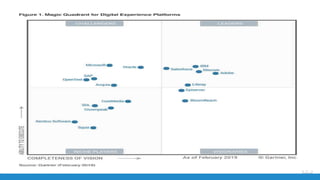
o Liferay Digital Experience Platform (DXP) 7.1 incorporates a plethora of new
features and improvements in the areas of:
• Web Experience Management,
• Document Management and Collaboration
• Business Productivity.
OVERVIEW
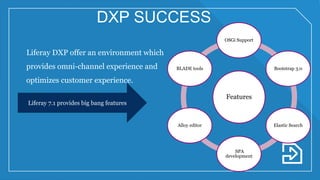
Features
OSGi Support
Bootstrap 3.0
Elastic Search
SPA
development
Alloy editor
BLADE tools
Liferay DXP offer an environment which
provides omni-channel experience and
optimizes customer experience.
Liferay 7.1 provides big bang features
DXP SUCCESS
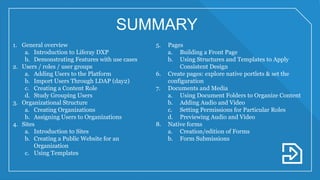
SUMMARY
1. General overview
a. Introduction to Liferay DXP
b. Demonstrating Features with use cases
2. Users / roles / user groups
a. Adding Users to the Platform
b. Import Users Through LDAP (day2)
c. Creating a Content Role
d. Study Grouping Users
3. Organizational Structure
a. Creating Organizations
b. Assigning Users to Organizations
4. Sites
a. Introduction to Sites
b. Creating a Public Website for an
Organization
c. Using Templates
5. Pages
a. Building a Front Page
b. Using Structures and Templates to Apply
Consistent Design
6. Create pages: explore native portlets & set the
configuration
7. Documents and Media
a. Using Document Folders to Organize Content
b. Adding Audio and Video
c. Setting Permissions for Particular Roles
d. Previewing Audio and Video
8. Native forms
a. Creation/edition of Forms
b. Form Submissions
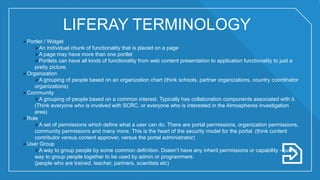
Portlet / Widget
An individual chunk of functionality that is placed on a page
A page may have more than one portlet
Portlets can have all kinds of functionality from web content presentation to application functionality to just a
pretty picture.
Organization
A grouping of people based on an organization chart (think schools, partner organizations, country coordinator
organizations)
Community
A grouping of people based on a common interest. Typically has collaboration components associated with it.
(Think everyone who is involved with SCRC, or everyone who is interested in the Atmospheres investigation
area)
Role
A set of permissions which define what a user can do. There are portal permissions, organization permissions,
community permissions and many more. This is the heart of the security model for the portal. (think content
contributor versus content approver, versus the portal administrator)
User Group
A way to group people by some common definition. Doesn’t have any inherit permissions or capability – just a
way to group people together to be used by admin or programmers.
(people who are trained, teacher, partners, scientists etc)
LIFERAY TERMINOLOGY
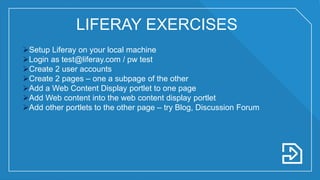
Setup Liferay on your local machine
Login as test@liferay.com / pw test
Create 2 user accounts
Create 2 pages – one a subpage of the other
Add a Web Content Display portlet to one page
Add Web content into the web content display portlet
Add other portlets to the other page – try Blog, Discussion Forum
LIFERAY EXERCISES
Questions
THANK YOU.
Elyes Makhlouf
+33 7 52 75 78 34
makhloufelyes@gmail.com
Elyesmakhlouf.blogspot.com
?

Liferay DXP Training

  • 1.
    Liferay Digital Experience(DXP) 7.1 Training Presented by : Elyes Makhlouf
  • 2.
    o Elyes Makhlouf oLiferay & AWS Expert o Liferay trainer on Liferay version since version 5
  • 3.
    OVERVIEW o Portal :Think website on steroids. A Liferay portal includes user management, collaboration, document management, community management, organization management and more. o Liferay Digital Experience Platform (DXP) 7.1 incorporates a plethora of new features and improvements in the areas of: • Web Experience Management, • Document Management and Collaboration • Business Productivity.
  • 5.
    OVERVIEW Features OSGi Support Bootstrap 3.0 ElasticSearch SPA development Alloy editor BLADE tools Liferay DXP offer an environment which provides omni-channel experience and optimizes customer experience. Liferay 7.1 provides big bang features DXP SUCCESS
  • 6.
    SUMMARY 1. General overview a.Introduction to Liferay DXP b. Demonstrating Features with use cases 2. Users / roles / user groups a. Adding Users to the Platform b. Import Users Through LDAP (day2) c. Creating a Content Role d. Study Grouping Users 3. Organizational Structure a. Creating Organizations b. Assigning Users to Organizations 4. Sites a. Introduction to Sites b. Creating a Public Website for an Organization c. Using Templates 5. Pages a. Building a Front Page b. Using Structures and Templates to Apply Consistent Design 6. Create pages: explore native portlets & set the configuration 7. Documents and Media a. Using Document Folders to Organize Content b. Adding Audio and Video c. Setting Permissions for Particular Roles d. Previewing Audio and Video 8. Native forms a. Creation/edition of Forms b. Form Submissions
  • 7.
    Portlet / Widget Anindividual chunk of functionality that is placed on a page A page may have more than one portlet Portlets can have all kinds of functionality from web content presentation to application functionality to just a pretty picture. Organization A grouping of people based on an organization chart (think schools, partner organizations, country coordinator organizations) Community A grouping of people based on a common interest. Typically has collaboration components associated with it. (Think everyone who is involved with SCRC, or everyone who is interested in the Atmospheres investigation area) Role A set of permissions which define what a user can do. There are portal permissions, organization permissions, community permissions and many more. This is the heart of the security model for the portal. (think content contributor versus content approver, versus the portal administrator) User Group A way to group people by some common definition. Doesn’t have any inherit permissions or capability – just a way to group people together to be used by admin or programmers. (people who are trained, teacher, partners, scientists etc) LIFERAY TERMINOLOGY
  • 8.
    Setup Liferay onyour local machine Login as test@liferay.com / pw test Create 2 user accounts Create 2 pages – one a subpage of the other Add a Web Content Display portlet to one page Add Web content into the web content display portlet Add other portlets to the other page – try Blog, Discussion Forum LIFERAY EXERCISES
  • 9.
    Questions THANK YOU. Elyes Makhlouf +337 52 75 78 34 makhloufelyes@gmail.com Elyesmakhlouf.blogspot.com ?