Tutorial
Debugging Selenium Scripts with Logs
• Here, we have included advanced ideas that would
benefit from optimizing the Testing Automation
framework and produces more clarity to the users.
• We would consider the logging feature and it's possible,
debugging capabilities etc.
• Benefits of Logging in Selenium Scripts:
Introduction
Offers an
understanding of
test suites
execution
Log messages can
be saved in
external files for
post-execution
scrutiny
Logs are an
outstanding assistant
in debugging the
software execution
problems and
breakdowns
Logs can also be
examined to
determine the
application's position
Log4j
Log4j – A Java-based Logging Utility
• Let's Discuss the technical aspects of logging.
• Log4j was a decision of collaborative endeavors of
people at Secure Electronic Marketplace for Europe to
produce a utility.
• Log4j is an open source tool and licensed under IBM
Public License.
• It would support us generating logs and hence the log4j
came into consideration in the year 1996.
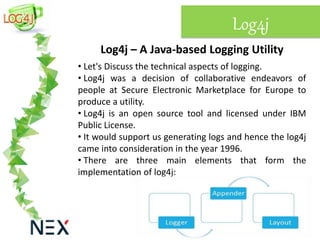
• There are three main elements that form the
implementation of log4j:
1. Loggers
Logger Class: It is a java based utility/API that has grown
all the generic methods already done so that users can
enable to use Log4j.
Log Levels: Log levels are commonly identified as to
printing methods. These are utilized for printing log
messages.
5 Types of Log Levels:
1. error()
2. warn()
3. info()
4. debug()
5. log()
We have to only call any of the above printing methods
over the logger instance.
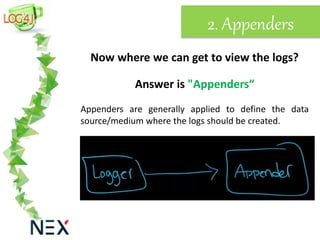
2. Appenders
Now where we can get to view the logs?
Answer is "Appenders“
Appenders are generally applied to define the data
source/medium where the logs should be created.
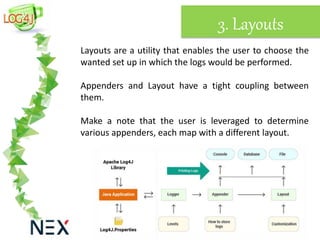
3. Layouts
Layouts are a utility that enables the user to choose the
wanted set up in which the logs would be performed.
Appenders and Layout have a tight coupling between
them.
Make a note that the user is leveraged to determine
various appenders, each map with a different layout.
Installation
Here we learnt about the basics of log4j and its parts,
now let's implement these phenomena for Debugging
Selenium Scripts with Logs
Logging using log4j can be performed and configured in
particularly two ways:
• Using Script via Programmatically
• Configuration files via Manually
Above both suggested configuration ways have merit as
well as demerits.
Here we will configure log4j manually using Configuration
files as its comfort and simplicity.
Continue
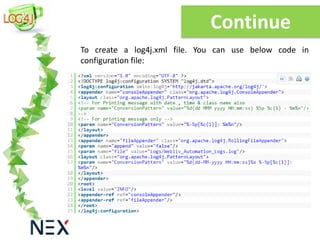
To create a log4j.xml file. You can use below code in
configuration file:
The output of the above code is:
01-07-2014 12:56:32 INFO [GmailLogin]: Sample log message
Here,
• First is Execution Date
• Second is Time in which the test step was
performed
• Third is one of the log level
• Fourth is name of the test class
• Fifth is Log message
Put the log4j.XML file into the project’s root folder/base
directory now.
Continue
Continue
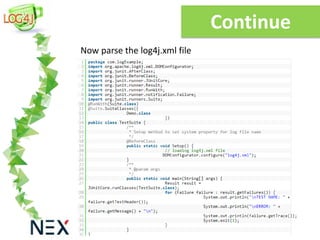
Now parse the log4j.xml file
Continue
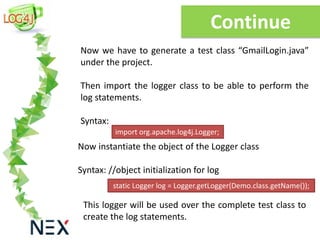
Now we have to generate a test class “GmailLogin.java”
under the project.
Then import the logger class to be able to perform the
log statements.
Syntax:
import org.apache.log4j.Logger;
Now instantiate the object of the Logger class
Syntax: //object initialization for log
static Logger log = Logger.getLogger(Demo.class.getName());
This logger will be used over the complete test class to
create the log statements.
Conclusion
Here we used log4j use to perform logging.
We explained the essential parts that form log4j from a
usability view.
With the Appenders and layouts, you can leverage to
determine the wanted logging form/model and the data
reference/position.
References:
Debugging Selenium Scripts with Logs (Log4j Tutorial)
Debugging Selenium Scripts with Logs
Contact Us
Web: www.nexsoftsys.com
Email: info@nexsoftsys.com
Call: +1-646-971-0799

Log4j with selenium tutorial: How to Setup log4j logging in selenium automation framework

  • 1.
  • 2.
    • Here, wehave included advanced ideas that would benefit from optimizing the Testing Automation framework and produces more clarity to the users. • We would consider the logging feature and it's possible, debugging capabilities etc. • Benefits of Logging in Selenium Scripts: Introduction Offers an understanding of test suites execution Log messages can be saved in external files for post-execution scrutiny Logs are an outstanding assistant in debugging the software execution problems and breakdowns Logs can also be examined to determine the application's position
  • 3.
    Log4j Log4j – AJava-based Logging Utility • Let's Discuss the technical aspects of logging. • Log4j was a decision of collaborative endeavors of people at Secure Electronic Marketplace for Europe to produce a utility. • Log4j is an open source tool and licensed under IBM Public License. • It would support us generating logs and hence the log4j came into consideration in the year 1996. • There are three main elements that form the implementation of log4j:
  • 4.
    1. Loggers Logger Class:It is a java based utility/API that has grown all the generic methods already done so that users can enable to use Log4j. Log Levels: Log levels are commonly identified as to printing methods. These are utilized for printing log messages. 5 Types of Log Levels: 1. error() 2. warn() 3. info() 4. debug() 5. log() We have to only call any of the above printing methods over the logger instance.
  • 5.
    2. Appenders Now wherewe can get to view the logs? Answer is "Appenders“ Appenders are generally applied to define the data source/medium where the logs should be created.
  • 6.
    3. Layouts Layouts area utility that enables the user to choose the wanted set up in which the logs would be performed. Appenders and Layout have a tight coupling between them. Make a note that the user is leveraged to determine various appenders, each map with a different layout.
  • 7.
    Installation Here we learntabout the basics of log4j and its parts, now let's implement these phenomena for Debugging Selenium Scripts with Logs Logging using log4j can be performed and configured in particularly two ways: • Using Script via Programmatically • Configuration files via Manually Above both suggested configuration ways have merit as well as demerits. Here we will configure log4j manually using Configuration files as its comfort and simplicity.
  • 8.
    Continue To create alog4j.xml file. You can use below code in configuration file:
  • 9.
    The output ofthe above code is: 01-07-2014 12:56:32 INFO [GmailLogin]: Sample log message Here, • First is Execution Date • Second is Time in which the test step was performed • Third is one of the log level • Fourth is name of the test class • Fifth is Log message Put the log4j.XML file into the project’s root folder/base directory now. Continue
  • 10.
    Continue Now parse thelog4j.xml file
  • 11.
    Continue Now we haveto generate a test class “GmailLogin.java” under the project. Then import the logger class to be able to perform the log statements. Syntax: import org.apache.log4j.Logger; Now instantiate the object of the Logger class Syntax: //object initialization for log static Logger log = Logger.getLogger(Demo.class.getName()); This logger will be used over the complete test class to create the log statements.
  • 12.
    Conclusion Here we usedlog4j use to perform logging. We explained the essential parts that form log4j from a usability view. With the Appenders and layouts, you can leverage to determine the wanted logging form/model and the data reference/position. References: Debugging Selenium Scripts with Logs (Log4j Tutorial) Debugging Selenium Scripts with Logs
  • 13.
    Contact Us Web: www.nexsoftsys.com Email:info@nexsoftsys.com Call: +1-646-971-0799