Contents
 Operating System & Features
 Definition & Naming of Linux
 History of Linux
 Components of Linux
 Basic Features of Linux
 Architecture of Linux
 About Kernel
 User-Interface View of Linux
 CLI/GUI View of Linux
 Distribution of Linux
 Hardware Requirement of Linux
 Software Application of Linux
 Different Editors of Linux
 Comparison between Linux with other Operating System
 Important Commands of Linux
 Merits/Demerits of Linux
 Use of Linux in the various fields
 Commercial use of Linux
 Conclusion
Operating System
An operating system is a software that communicates with the
hardware and allows other programs to be run.
Features of Operating System:
o Task Scheduling
o Memory Management
o Network Communication Handling
o Data and User Security
Definition & Naming of Linux
Operating System
 The Linux open source operating system, or Linux
OS, is a freely distributable, cross-platform operating
system based on Unix that can be installed on PCs,
laptops, notebooks, mobile and tablet devices, video
game consoles, servers, supercomputers and more.
 It was developed by Linus Torvalds.
 Linus Torvalds had wanted to call his invention
"Freax” i.e., Free, Freak + x as an allusion to Unix. In
this project his partner Mr. A.L.Torvalds did not think
it’s a good name, So they finally decided named their
project name as “Linux”.
system and do not requires kernel module's code access
Components of Linux System
a) Kernel Kernel is the core part of Linux. It is responsible for
−
all major activities of this operating system.
b) System Library System libraries are special functions or
−
programs using which application programs or system
utilities accesses Kernel's features
c) System Utility System Utility programs are responsible to
−
do specialized, individual level tasks.
Basic Features of Linux
a) Portable Portability means software can works on
−
different types of hardware in same way.
b) Open Source Linux source code is freely available and it is
−
community based development project.
c) Multiprogramming Linux is a multiprogramming system
−
means multiple applications can run at same time.
d) Security Linux provides user security using authentication
−
features like password protection/ controlled access to
specific files/ encryption of data.
Architecture of Linux Operating System
The architecture of Linux contains some layers :
a) Hardware layer Hardware consists of all
−
peripheral devices (RAM/ HDD/ CPU etc).
b) Kernel It is the core component of Operating
−
System, interacts directly with hardware, provides
low level services to upper layer components.
c) Shell It takes commands from the user and
−
executes kernel's functions.
d) Utilities Utility programs that provide the user
−
most of the functionalities of an operating
systems.
About Kernel
 It interacts with the actual hardware in machine
language.
 It is the monarch who has overall control of
everything.
 It has various functions such as file management ,
data transfer between file system and hardware,
memory management, scheduling of various
programs in the memory, interrupts issues.
User-Interface of Linux
 The user interface is either a command line interface
(CLI), a graphical user interface (GUI), or through
controls are associated with hardware.
 CLI shells are text based user interfaces, which use
text for both input and output.
 On desktop systems, the most popular user interfaces
are the GUI shells.
 Most popular user interfaces are based on the X
Window System, often simply called "X".
CLI view of Linux
Desktop View of KALI Linux
Inside view of Linux
Distribution of Linux
 Corel Linux
 Debian GNU/Linux
 OpenLinux (Caldera)
 Red Hat
 Ubuntu
 TurboLinux
Hardware requirements to installing Linux
 CPU
 Main memory
 Optical Drive
 Graphic card
 Hard Drive
 Sound Card
Software application for Linux
 Audacity : Audacity is an open-source digital
audio editor and recording application that
supports Windows, macOS, and Linux.
 Mozilla Firefox : Web Browser
 ThunderBird: Thunderbird is a free and
powerful yet easy-to-use email client which helps
to manage your emails with ease.
 VLC : VLC is the most famous media player
which supports any kind of audio or video files
without the need to download additional codecs.
Editors of Linux
 There are some editors in Linux
a) Vi/Vm editor
b) Gedit editor
c) Nano editor
d) GNU Emacs editor
e) Kate/Kwrite editor
f) Lime Text editor
and many more.
Now
Comparison of Linux with Other
Operating System
Linux v/s Windows
 Linux is freely available or online downloads, for
windows companies have pay for their license.
 Windows need up to date time to time, its
updating process is slower than Linux.
 Linux supports backward compatibility unlike to
the windows.
 Most of the software made on the windows are
need to be licensed but in Linux all of them are
freely available.
Linux v/s IOS
 Hardware Requirement:
IOS has restrictive hardware requirement, while
Linux does not.
 Customizability:
IOS keep restrictions in the arrangement of your data
or display whereas Linux can make it simpler as you
want.
 Security:
In the terms of security both of them are highly
secured, they did not give direct permission to their
system administrator.
Commands of Linux
 There are some commands in Linux which give direct
accessories to the files by using terminal.
Some of them are:
ls- (List Command)
mv- (Move Command)
mkdir- (Make Directories)
rmdir- (Remove Directory)
locate- (Locate Directory) etc..,
Why we use Linux?
 Costless
 Stable
 Reliable
 Extremely powerful
 Highly Secure
Merits and Demerits of Linux
 It can be easily accessible to the old computers .
 It cannot be made for gaming purpose.
 It is not easy to understand for those who are new
to Linux.
 It is mostly used by the programmers.
 It is used for both commercial and personal but for
home purpose, for this Windows is mostly
preferred.
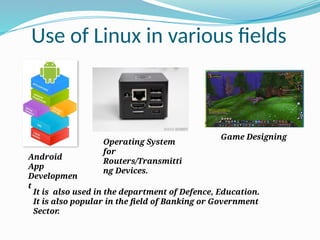
Use of Linux in various fields
It is also used in the department of Defence, Education.
It is also popular in the field of Banking or Government
Sector
.
Android
App
Developmen
t
Operating System
for
Routers/Transmitti
ng Devices.
Game Designing
Commercial use of Linux Operating
System
 Adoption of Linux in production environments, rather
than being used only by hobbyists, its widely started
in the mid-off 1990s for supercomputing purpose.
 Today, Linux systems are used throughout computing,
from embedded systems to supercomputers and
provide a secured place in server installations such as
the popular LAMP application stack.
 Linux also achieve a greatest success in the field of
mobile development with the Android by providing
ease-access and high security feature.
Conclusion
“When is it best to use Linux and when should
some other operating system be preferred?”
It all depends on the user.
Linux is only for the programmer-based
environment not for the non-programmer
because it is difficult to understand.
Thank You
Submitted by:
Yogesh P. Budhalkar
ECE 3rdYear

Linux_ operating_ System (Linux os ).pptx

  • 2.
    Contents  Operating System& Features  Definition & Naming of Linux  History of Linux  Components of Linux  Basic Features of Linux  Architecture of Linux  About Kernel  User-Interface View of Linux  CLI/GUI View of Linux  Distribution of Linux  Hardware Requirement of Linux  Software Application of Linux  Different Editors of Linux  Comparison between Linux with other Operating System  Important Commands of Linux  Merits/Demerits of Linux  Use of Linux in the various fields  Commercial use of Linux  Conclusion
  • 3.
    Operating System An operatingsystem is a software that communicates with the hardware and allows other programs to be run. Features of Operating System: o Task Scheduling o Memory Management o Network Communication Handling o Data and User Security
  • 4.
    Definition & Namingof Linux Operating System  The Linux open source operating system, or Linux OS, is a freely distributable, cross-platform operating system based on Unix that can be installed on PCs, laptops, notebooks, mobile and tablet devices, video game consoles, servers, supercomputers and more.  It was developed by Linus Torvalds.  Linus Torvalds had wanted to call his invention "Freax” i.e., Free, Freak + x as an allusion to Unix. In this project his partner Mr. A.L.Torvalds did not think it’s a good name, So they finally decided named their project name as “Linux”.
  • 5.
    system and donot requires kernel module's code access Components of Linux System a) Kernel Kernel is the core part of Linux. It is responsible for − all major activities of this operating system. b) System Library System libraries are special functions or − programs using which application programs or system utilities accesses Kernel's features c) System Utility System Utility programs are responsible to − do specialized, individual level tasks.
  • 6.
    Basic Features ofLinux a) Portable Portability means software can works on − different types of hardware in same way. b) Open Source Linux source code is freely available and it is − community based development project. c) Multiprogramming Linux is a multiprogramming system − means multiple applications can run at same time. d) Security Linux provides user security using authentication − features like password protection/ controlled access to specific files/ encryption of data.
  • 7.
    Architecture of LinuxOperating System
  • 8.
    The architecture ofLinux contains some layers : a) Hardware layer Hardware consists of all − peripheral devices (RAM/ HDD/ CPU etc). b) Kernel It is the core component of Operating − System, interacts directly with hardware, provides low level services to upper layer components. c) Shell It takes commands from the user and − executes kernel's functions. d) Utilities Utility programs that provide the user − most of the functionalities of an operating systems.
  • 9.
    About Kernel  Itinteracts with the actual hardware in machine language.  It is the monarch who has overall control of everything.  It has various functions such as file management , data transfer between file system and hardware, memory management, scheduling of various programs in the memory, interrupts issues.
  • 10.
    User-Interface of Linux The user interface is either a command line interface (CLI), a graphical user interface (GUI), or through controls are associated with hardware.  CLI shells are text based user interfaces, which use text for both input and output.  On desktop systems, the most popular user interfaces are the GUI shells.  Most popular user interfaces are based on the X Window System, often simply called "X".
  • 11.
  • 12.
    Desktop View ofKALI Linux
  • 13.
  • 14.
    Distribution of Linux Corel Linux  Debian GNU/Linux  OpenLinux (Caldera)  Red Hat  Ubuntu  TurboLinux
  • 15.
    Hardware requirements toinstalling Linux  CPU  Main memory  Optical Drive  Graphic card  Hard Drive  Sound Card
  • 16.
    Software application forLinux  Audacity : Audacity is an open-source digital audio editor and recording application that supports Windows, macOS, and Linux.  Mozilla Firefox : Web Browser  ThunderBird: Thunderbird is a free and powerful yet easy-to-use email client which helps to manage your emails with ease.  VLC : VLC is the most famous media player which supports any kind of audio or video files without the need to download additional codecs.
  • 17.
    Editors of Linux There are some editors in Linux a) Vi/Vm editor b) Gedit editor c) Nano editor d) GNU Emacs editor e) Kate/Kwrite editor f) Lime Text editor and many more.
  • 18.
    Now Comparison of Linuxwith Other Operating System
  • 19.
    Linux v/s Windows Linux is freely available or online downloads, for windows companies have pay for their license.  Windows need up to date time to time, its updating process is slower than Linux.  Linux supports backward compatibility unlike to the windows.  Most of the software made on the windows are need to be licensed but in Linux all of them are freely available.
  • 20.
    Linux v/s IOS Hardware Requirement: IOS has restrictive hardware requirement, while Linux does not.  Customizability: IOS keep restrictions in the arrangement of your data or display whereas Linux can make it simpler as you want.  Security: In the terms of security both of them are highly secured, they did not give direct permission to their system administrator.
  • 21.
    Commands of Linux There are some commands in Linux which give direct accessories to the files by using terminal. Some of them are: ls- (List Command) mv- (Move Command) mkdir- (Make Directories) rmdir- (Remove Directory) locate- (Locate Directory) etc..,
  • 22.
    Why we useLinux?  Costless  Stable  Reliable  Extremely powerful  Highly Secure
  • 23.
    Merits and Demeritsof Linux  It can be easily accessible to the old computers .  It cannot be made for gaming purpose.  It is not easy to understand for those who are new to Linux.  It is mostly used by the programmers.  It is used for both commercial and personal but for home purpose, for this Windows is mostly preferred.
  • 24.
    Use of Linuxin various fields It is also used in the department of Defence, Education. It is also popular in the field of Banking or Government Sector . Android App Developmen t Operating System for Routers/Transmitti ng Devices. Game Designing
  • 25.
    Commercial use ofLinux Operating System  Adoption of Linux in production environments, rather than being used only by hobbyists, its widely started in the mid-off 1990s for supercomputing purpose.  Today, Linux systems are used throughout computing, from embedded systems to supercomputers and provide a secured place in server installations such as the popular LAMP application stack.  Linux also achieve a greatest success in the field of mobile development with the Android by providing ease-access and high security feature.
  • 26.
    Conclusion “When is itbest to use Linux and when should some other operating system be preferred?” It all depends on the user. Linux is only for the programmer-based environment not for the non-programmer because it is difficult to understand.
  • 27.
    Thank You Submitted by: YogeshP. Budhalkar ECE 3rdYear