Name :: Hassan Habib
Roll no :: (016)
Section :: SP15-BSE-2A
Presentation :: LINUX
Subject :: PP IT
TO :: Mam. Anam Zafar.
Outline
• O/S
• linux
• History of Linux
• Kernel
• Types of kernel
• Feature of linux
• Linux system architecture
• Linux Distribution
• How to install
Operating System ??
• It is medium which provide interface between
user and hardware
• It provide user an environment in which user can
execute program conveniently and efficiently.
• o/s controls allocation of resources and services
such as memory, processor , device and
information
• You can say that it is a program which start from
initial stage to ending stage
Operating System
Operating System
Functions of Operating System
LINUX
History
• Before taking about linux history .
We should about unix history
because linux is free unix type
o/s.
• Unix o/s system was conceived
and implemented by Thompson
and Dennis Ritchie at AT&T
laboratories in 1969 and released
in 1970 (utix).
• 1973 Rewrite UNIX.
• They want to create multi user
o/s but fails to achieved.
• In 1983 Richard stullman want to
made unix free o/s .
• In 1991 linus Torvalds ; student of
University of Helsinki Finland.
Developed linux
• He released it for free on the
internet. Also free source code
available on. internet
What is Linux??
• Linux is an o/s.
• A free unix type o/s.
• Made by Linus Torvalds.
• An open o/s.
• Open source code.
Kernel
• The kernel is a central core of a o/s.
• It has complete control over everything occurs in the system.
• First part to load into memory.
• Operates from beginning to sessional logout.
• Kernel code is usually loaded into a protected area of
memory, which prevents it from being over written by other
or local programming.
• Kernel perform its task such as executing processes and
handling interrupts in kernel space.
• User task is done in user space. (e.g writing a text in text
editor or running programs in GUI)
Process Scheduler
(Program is an active form of different task)
• Memory Managing
• File system management
• Network interface
• Inter process communication
Types of Kernel
• Micro kernel
• Monolithic kernel
• Hybrid kernel
Micro Kernel
Pros:
 Small installation requirements
 Small memory
 Security
Cons:
 Hardware may react slower because driver
are in user mode.
 Process have to wait to get information.
CPU, memory and
IPC(Inter Process
communication)
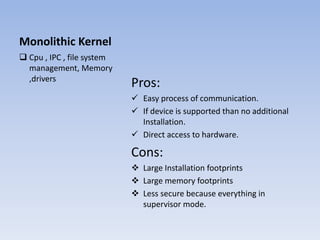
Monolithic Kernel
Pros:
 Easy process of communication.
 If device is supported than no additional
Installation.
 Direct access to hardware.
Cons:
 Large Installation footprints
 Large memory footprints
 Less secure because everything in
supervisor mode.
 Cpu , IPC , file system
management, Memory
,drivers
Hybrid Kernel
Pros:
 Developer can choose what should be in
user or supervisor mode.
 Small installation footprints than
monolethic kernel.
Cons:
 Can suffer same process lag as microkernel.
 Combination of last two
kernel.
 Hybrid kernel have the
ability to pick what
should be run in user
mode or what should be
in supervisor mode.
 File system and I/O
devices be in user
mode, while IPC and
server call be kept in
supervisor mode.
What sort of kernel Linux has??
Features of Linux
Portable
• Portability means software
can work on different types
of hardware in same way.
• Linux kernel and application
and application programs
supports their installation
on any kind of hardware
platform.
Open Source
• Linux source code is freely
available and it is
community based project.
• Multiple team works
together to enhance linux
o/s.
Features of Linux
Multi User
• Multi user o/s.
• Multi user can access and
share memory ,ram and
storage devices etc.
Multi Programming
• Linux is multiprogramming
system means different
programs run at a time
Features of Linux
Hierarchical File System
• Linux provide hierarchical
file in which system file are
arrange.
Shell
• Linux provides special
interpreter programs which
be executed commands of
the operating system. It can
be use to do various types
of operation, application
call application programs
etc.
Features of Linux
Security
• Linux provides user security , using authentication
features like password and encryption.
Linux System Architecture
• User Application
• O/s service
• Linux Kernel
• Hardware
controller
User Application:
• Application use on a particular linux system
Example:
Word Processing
Web Browsing
o/s Service
• These are the service that are considered as typical of the
operating system (windowing system , command shell etc.)
also the programming interface to kernel (compiling tool) os
included in this subsystem.
Linux Kernel
• Kernel is the abstract and mediates access to
the hardware resources, including the cpu.
Hardware Controller
• This subsystem consist of all physical device in a linux
installations
For Example
CPU, Network Hardware, Memory Hardware
Linux System Architecture
Linux Distribution
• Ubantu
• Red hat
• Debian
• Fedora
• Suse from Novell
ubantu
• Ubantu is a community based o/s best for laptops
and desktops etc. LOGO:
Application :
• Web browsing
• Documents
• Spreadsheet software
• Much more
Red Hat
• For business , government or other users looking for stable,
supported and certified linux.
LOGO:
Red Hat Desktop
Debian
• Debian produced by almost thousand of active
developer spread around the world who
volunteer in their spare time.
LOGO:
Debian
Fedora
• Fedora sponsored by Red hat
• Consists of latest updates and open source software
• There is a new release every six month , that drive
incremental improvement to user at rapid pace.
LOGO:
Fedora
Fedora
Suse From Novell
• Enterprise level version of the linux o/s.
• This mainstream distribution is popular with
business who want alternative to other o/s’s.
LOGO:
Suse From Novell
Suse From Novell
Ubantu
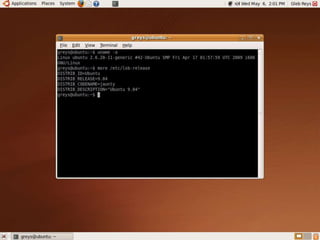
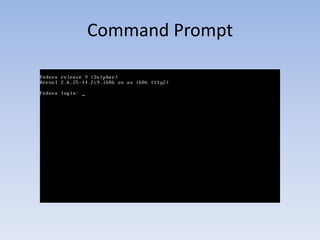
Command prompt
Command Prompt
Command Prompt
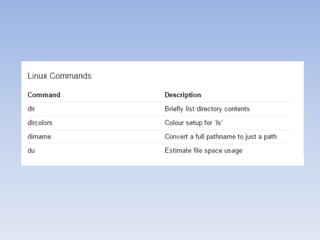
Command for Linux
How to install Linux
• Booting to a USB Stick
• Burning a Live CD
Installation Process
• The installation process will be slightly different for every
distro, but in general setup should guide you through the
necessary steps pretty easily. Assuming you're installing Linux
alongside another OS like Windows, though, there are a few
things you'll want to pay attention to.
Linux

Linux

  • 1.
    Name :: HassanHabib Roll no :: (016) Section :: SP15-BSE-2A Presentation :: LINUX Subject :: PP IT TO :: Mam. Anam Zafar.
  • 3.
    Outline • O/S • linux •History of Linux • Kernel • Types of kernel • Feature of linux • Linux system architecture • Linux Distribution • How to install
  • 4.
    Operating System ?? •It is medium which provide interface between user and hardware • It provide user an environment in which user can execute program conveniently and efficiently. • o/s controls allocation of resources and services such as memory, processor , device and information • You can say that it is a program which start from initial stage to ending stage
  • 5.
  • 6.
  • 7.
  • 8.
  • 9.
    History • Before takingabout linux history . We should about unix history because linux is free unix type o/s. • Unix o/s system was conceived and implemented by Thompson and Dennis Ritchie at AT&T laboratories in 1969 and released in 1970 (utix). • 1973 Rewrite UNIX. • They want to create multi user o/s but fails to achieved. • In 1983 Richard stullman want to made unix free o/s . • In 1991 linus Torvalds ; student of University of Helsinki Finland. Developed linux • He released it for free on the internet. Also free source code available on. internet
  • 10.
    What is Linux?? •Linux is an o/s. • A free unix type o/s. • Made by Linus Torvalds. • An open o/s. • Open source code.
  • 11.
    Kernel • The kernelis a central core of a o/s. • It has complete control over everything occurs in the system. • First part to load into memory. • Operates from beginning to sessional logout. • Kernel code is usually loaded into a protected area of memory, which prevents it from being over written by other or local programming. • Kernel perform its task such as executing processes and handling interrupts in kernel space. • User task is done in user space. (e.g writing a text in text editor or running programs in GUI)
  • 12.
    Process Scheduler (Program isan active form of different task) • Memory Managing • File system management • Network interface • Inter process communication
  • 13.
    Types of Kernel •Micro kernel • Monolithic kernel • Hybrid kernel
  • 14.
    Micro Kernel Pros:  Smallinstallation requirements  Small memory  Security Cons:  Hardware may react slower because driver are in user mode.  Process have to wait to get information. CPU, memory and IPC(Inter Process communication)
  • 15.
    Monolithic Kernel Pros:  Easyprocess of communication.  If device is supported than no additional Installation.  Direct access to hardware. Cons:  Large Installation footprints  Large memory footprints  Less secure because everything in supervisor mode.  Cpu , IPC , file system management, Memory ,drivers
  • 16.
    Hybrid Kernel Pros:  Developercan choose what should be in user or supervisor mode.  Small installation footprints than monolethic kernel. Cons:  Can suffer same process lag as microkernel.  Combination of last two kernel.  Hybrid kernel have the ability to pick what should be run in user mode or what should be in supervisor mode.  File system and I/O devices be in user mode, while IPC and server call be kept in supervisor mode.
  • 17.
    What sort ofkernel Linux has??
  • 18.
    Features of Linux Portable •Portability means software can work on different types of hardware in same way. • Linux kernel and application and application programs supports their installation on any kind of hardware platform. Open Source • Linux source code is freely available and it is community based project. • Multiple team works together to enhance linux o/s.
  • 19.
    Features of Linux MultiUser • Multi user o/s. • Multi user can access and share memory ,ram and storage devices etc. Multi Programming • Linux is multiprogramming system means different programs run at a time
  • 20.
    Features of Linux HierarchicalFile System • Linux provide hierarchical file in which system file are arrange. Shell • Linux provides special interpreter programs which be executed commands of the operating system. It can be use to do various types of operation, application call application programs etc.
  • 21.
    Features of Linux Security •Linux provides user security , using authentication features like password and encryption.
  • 22.
    Linux System Architecture •User Application • O/s service • Linux Kernel • Hardware controller
  • 24.
    User Application: • Applicationuse on a particular linux system Example: Word Processing Web Browsing
  • 26.
    o/s Service • Theseare the service that are considered as typical of the operating system (windowing system , command shell etc.) also the programming interface to kernel (compiling tool) os included in this subsystem.
  • 28.
    Linux Kernel • Kernelis the abstract and mediates access to the hardware resources, including the cpu.
  • 30.
    Hardware Controller • Thissubsystem consist of all physical device in a linux installations For Example CPU, Network Hardware, Memory Hardware
  • 31.
  • 33.
    Linux Distribution • Ubantu •Red hat • Debian • Fedora • Suse from Novell
  • 34.
    ubantu • Ubantu isa community based o/s best for laptops and desktops etc. LOGO: Application : • Web browsing • Documents • Spreadsheet software • Much more
  • 35.
    Red Hat • Forbusiness , government or other users looking for stable, supported and certified linux. LOGO:
  • 36.
  • 37.
    Debian • Debian producedby almost thousand of active developer spread around the world who volunteer in their spare time. LOGO:
  • 38.
  • 39.
    Fedora • Fedora sponsoredby Red hat • Consists of latest updates and open source software • There is a new release every six month , that drive incremental improvement to user at rapid pace. LOGO:
  • 40.
  • 41.
  • 42.
    Suse From Novell •Enterprise level version of the linux o/s. • This mainstream distribution is popular with business who want alternative to other o/s’s. LOGO:
  • 43.
  • 44.
  • 45.
  • 46.
  • 47.
  • 49.
  • 50.
  • 54.
    How to installLinux • Booting to a USB Stick • Burning a Live CD
  • 55.
    Installation Process • Theinstallation process will be slightly different for every distro, but in general setup should guide you through the necessary steps pretty easily. Assuming you're installing Linux alongside another OS like Windows, though, there are a few things you'll want to pay attention to.