Library Catalog and Checkout System
MIT Art Design and Technology University
MIT School of Computing, Pune
AY 2024-2025 SEM-I
GROUP MEMBER NAMES
1. Vedant Ghule
2. Nishita Yadav
3. Aditya Gholap
4. Himank Maheshwari
5. Arya Dhumal
6. Ashwin Gudur
 Develop a system to manage library resources, including books, patrons,
and checkouts. The system should streamline the cataloging process,
optimize book checkouts, and manage inventory effectively.
Problem Statement
Problem Description
The Library Catalog and Checkout System addresses the inefficiencies of traditional
library management methods, such as manual record-keeping, static data storage, and
scalability challenges. These systems are time-consuming, error-prone, and struggle to
manage growing libraries effectively. This project aims to design a dynamic and efficient
solution using linked lists to store and manage books and library members. The system
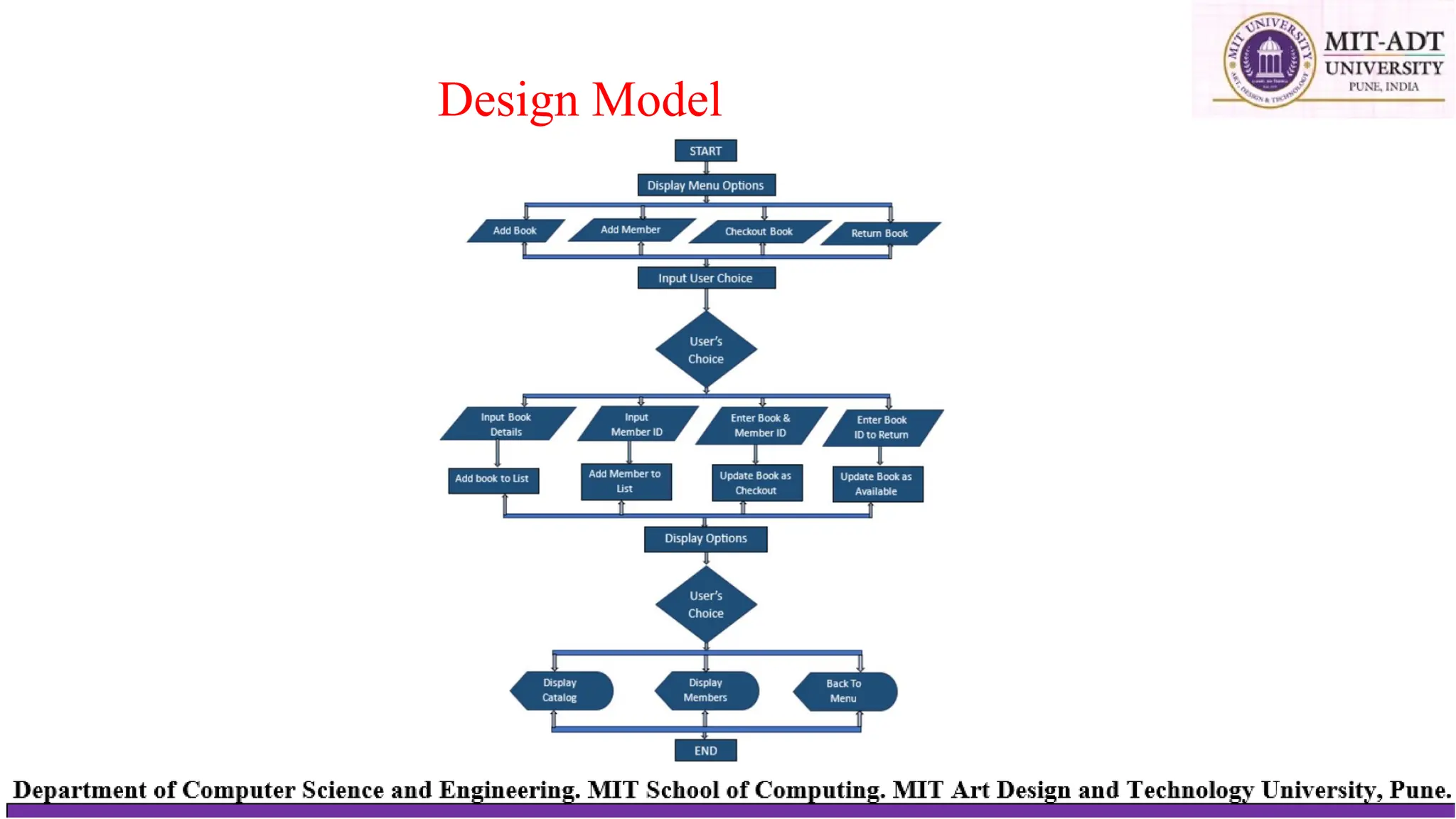
supports operations like adding books and members, checking out and returning books,
and displaying records, all through a simple command-line interface. By utilizing the
flexibility of linked lists, it ensures efficient memory usage and seamless handling of
library operations, overcoming the limitations of static storage and traditional systems.
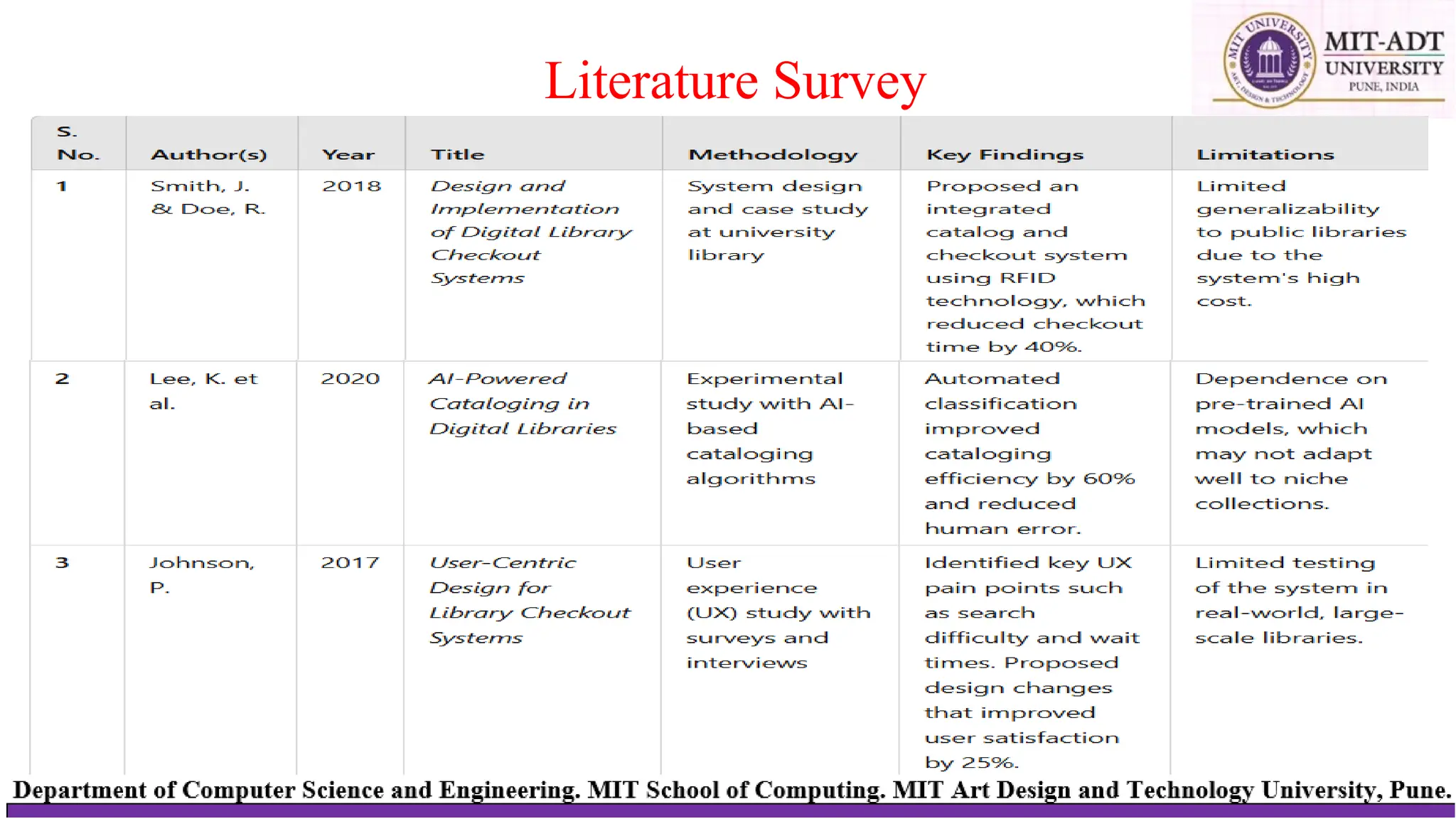
Literature Survey
Design Model
•Client-Server Architecture
Client: A web-based interface where users can interact with the library system (e.g., add books, check out books, view
catalogs).
Server: Backend service that processes requests, performs operations, and manages data storage.
Book Operations:
•/add_book (POST): Add new books.
•/update_book (POST): Update book details.
Member Operations:
•/add_member (POST): Add new members.
•/delete_member (POST): Remove a member.
•/update_member (POST): Update member information.
Checkout and Return Operations:
•/checkout_book (POST): Mark a book as checked out by a member.
•/return_book (POST): Mark a book as returned.
Reports:
•/get_catalog (GET): Retrieve the book catalog.
•/get_members (GET): Retrieve the member list.
Design Model
•Client Requests
-Input: Send data for operations such as adding books or members, checking out books, and updating records.
-Output: Fetch data such as catalog information, borrowing reports, and member details.
•Core Functionalities
-Dynamic addition and deletion of books and members.
-Real-time updates for book checkout and return operations.
-Simplified data retrieval for client-side display.
Design Model
Data Structure: Singly Linked List
A linked list is a dynamic data structure where each node points tothenext
node. It allows efficient memory utilization as data grows. 5.2 Linked List Implementation
Book List:
1. Each node stores book details: ID, title, author, andcheckoutstatus.
2. Linked list enables dynamic addition, deletion, and traversal.
Member List:
3. Each node stores member details: ID and name.
4. Linked list dynamically grows as members are added.
Data Structures Used
Algorithm
1. Initialize System
1. Start
2. Create two empty lists:
1. Book Catalog (to store all book records)
2. Member List (to store all member records)
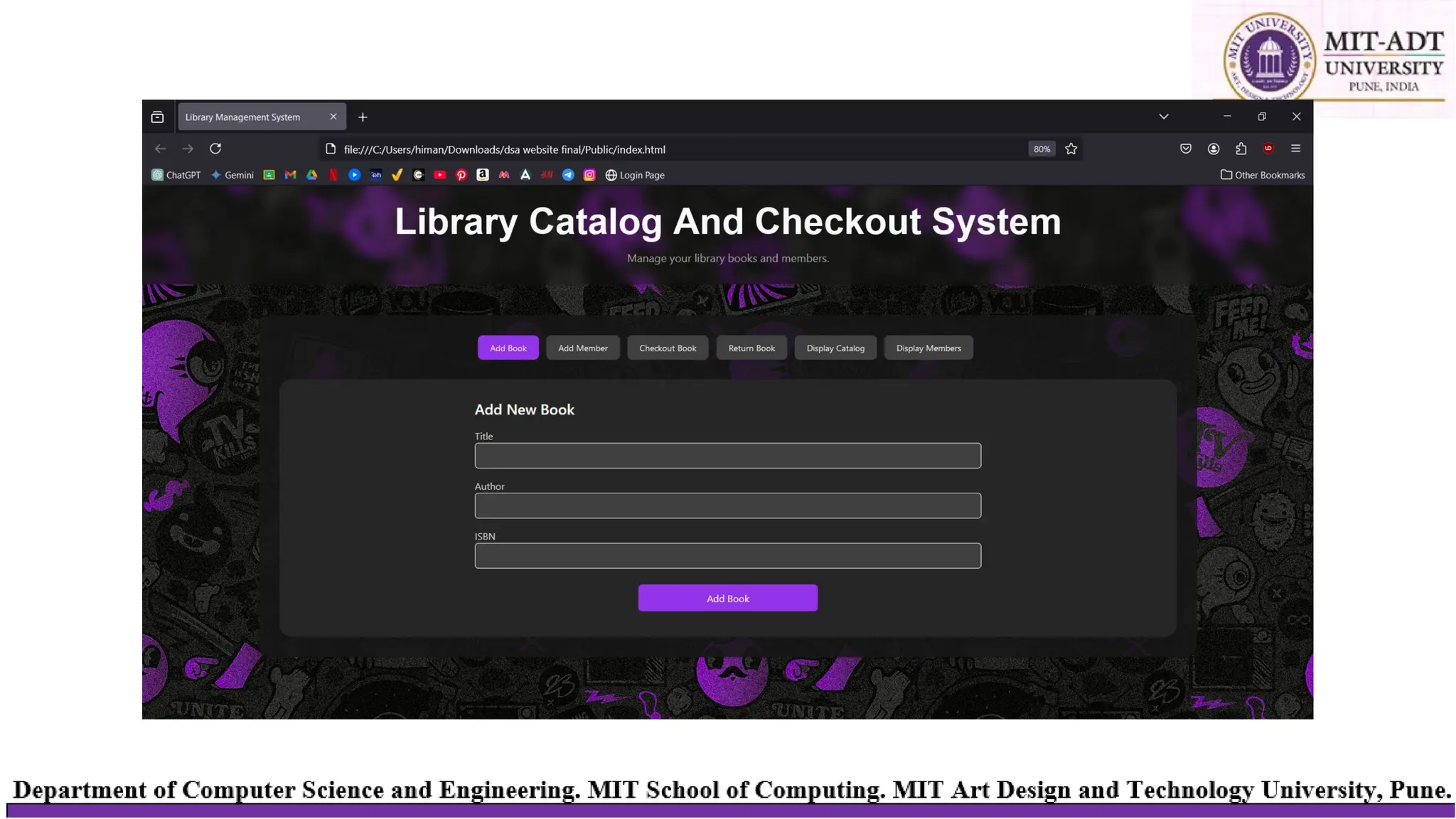
2. Add Book Button
3. On Add Book Button Click
4. Input:
1. Book ID (unique identifier for the book)
2. Title (title of the book)
3. Author (author of the book)
4. ISBN (unique ISBN for the book)
5. Status (initially set as Available)
6. Assign To (set as None since the book is not checked out)
5. Create a New Book Record using the input details.
6. Check for Duplicate:
1. If a book with the same Book ID or ISBN exists in Book Catalog, alert the user and stop.
2. Else, add the New Book Record to Book Catalog.
7. Display message: "Book added successfully."
Algorithm
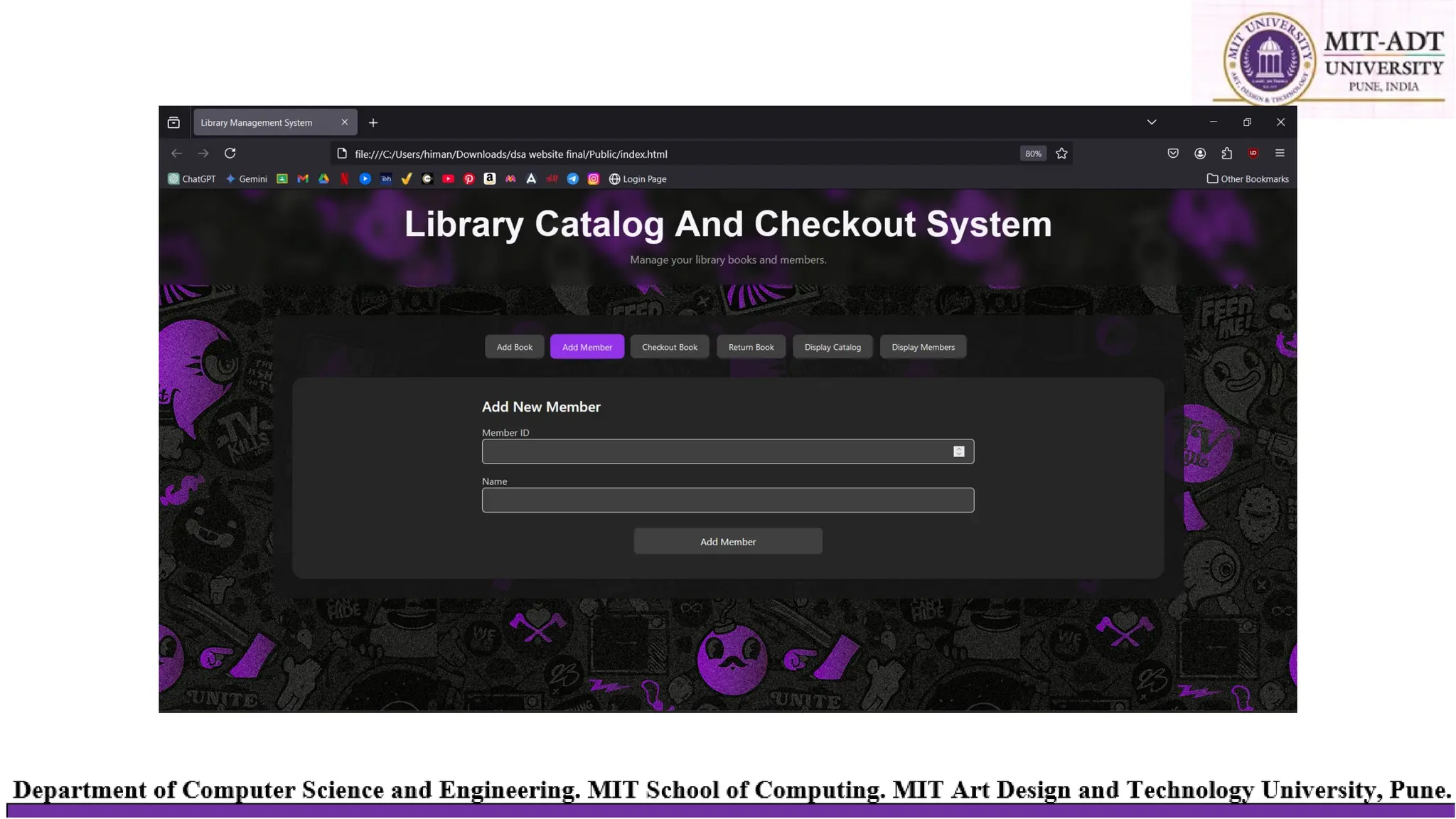
3. Add Member Button
1. On Add Member Button Click
2. Input:
1. Member ID (unique identifier for the member)
2. Name (name of the member)
3. Create a New Member Record using the input details.
4. Check for Duplicate:
1. If a member with the same Member ID exists in Member List, alert the user and stop.
2. Else, add the New Member Record to Member List.
5. Display message: "Member added successfully."
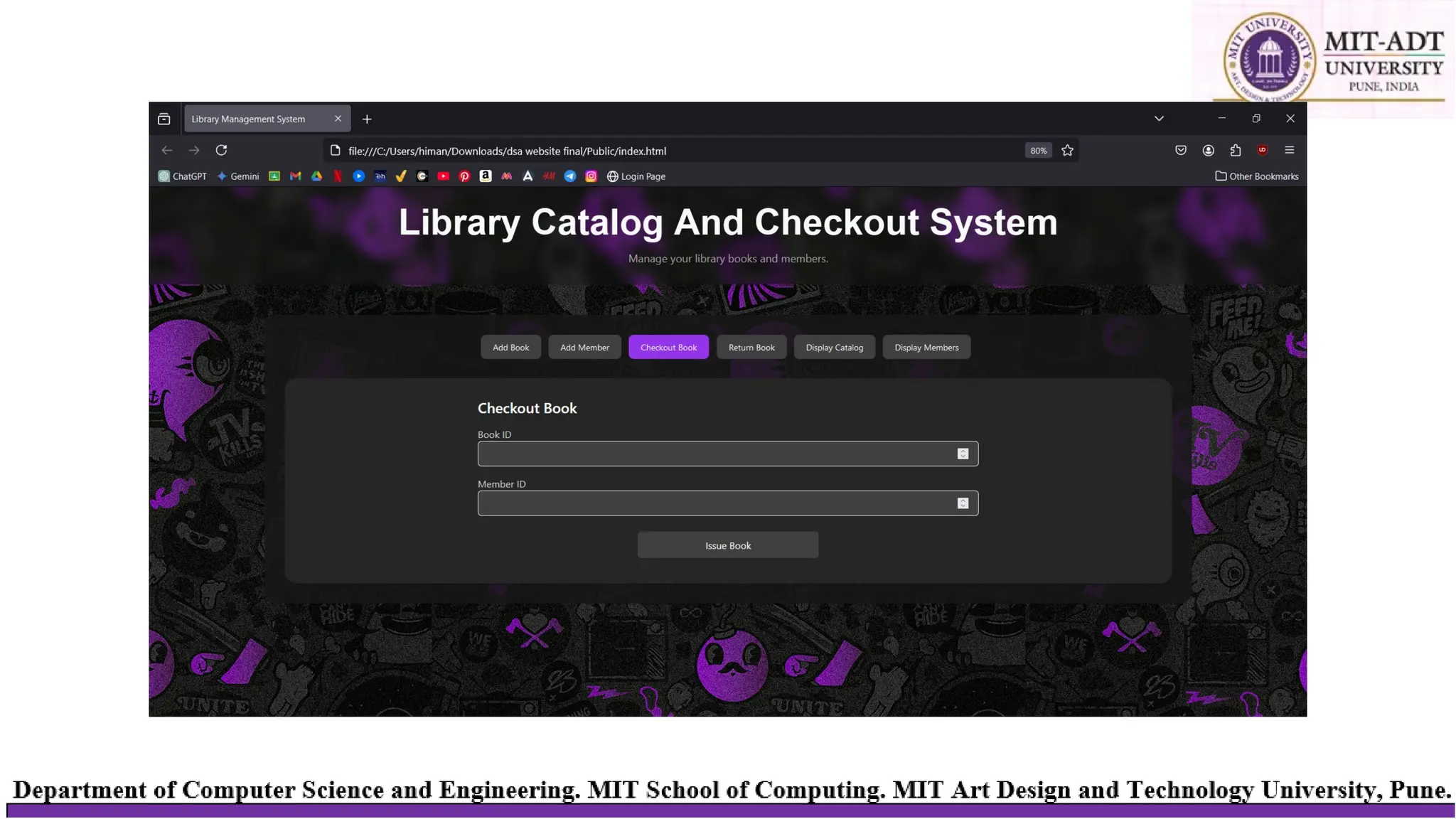
4. Checkout Book Button
6. On Checkout Book Button Click
7. Input:
1. Book ID (ID of the book to be checked out)
2. Member ID (ID of the member checking out the book)
8. Check Book Availability:
1. If the book with Book ID is not found in Book Catalog, alert "Book not found." and stop.
2. If the Status of the book is not Available, alert "Book is already checked out." and stop.
9. Check Member Validity:
1. If the member with Member ID is not found in Member List, alert "Member not found." and stop.
10.Update Book Status:
1. Set Status = Checked Out.
2. Set Assign To = Member ID.
11.Display message: "Book successfully checked out."
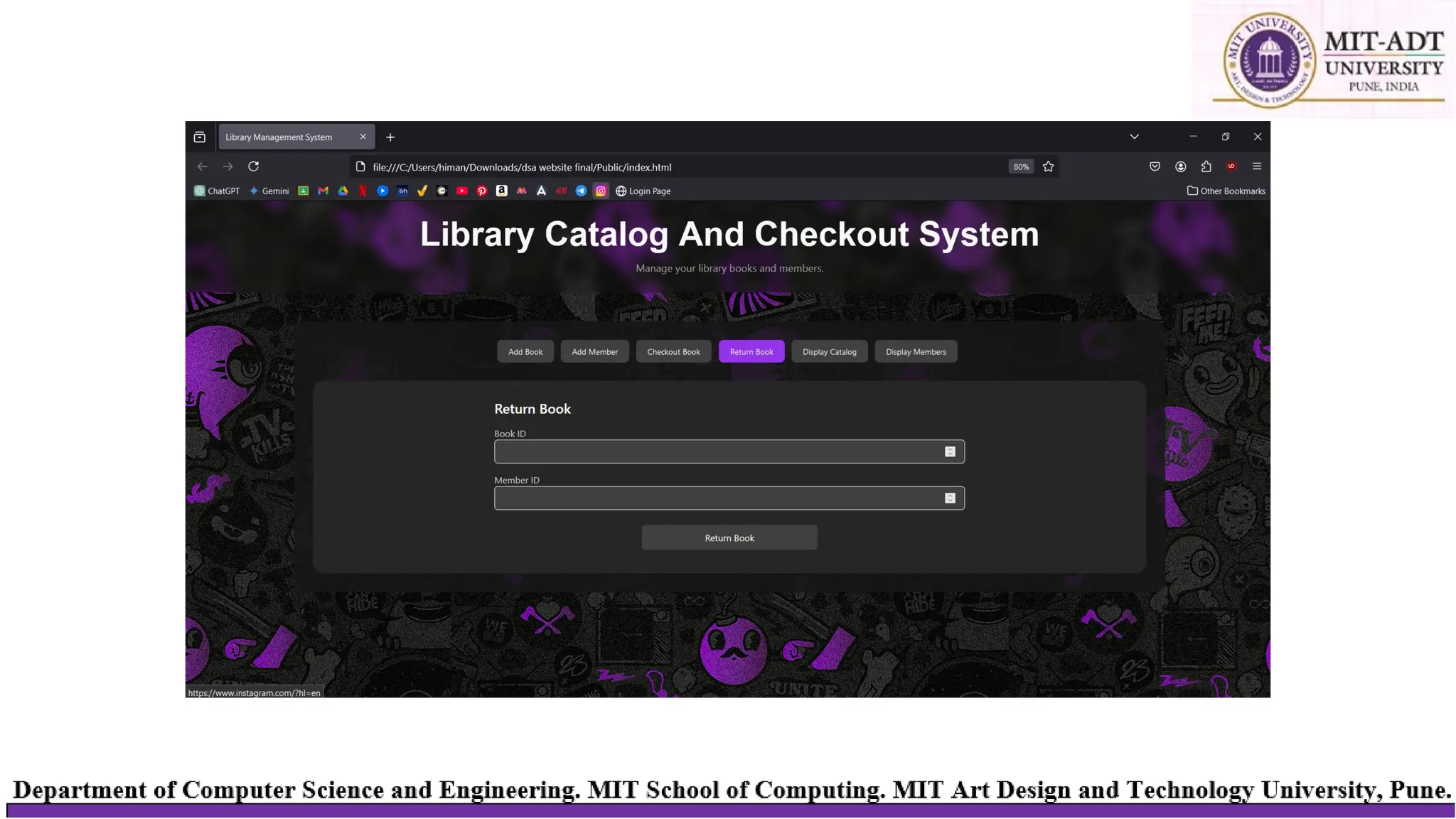
5. Return Book Button
1. On Return Book Button Click
2. Input:
1. Book ID (ID of the book to be returned)
3. Check Book Existence:
1. If the book with Book ID is not found in Book Catalog, alert "Book not found." and stop.
2. If the Status of the book is Available, alert "This book is not checked out." and stop.
4. Update Book Status:
1. Set Status = Available.
2. Set Assign To = None.
5. Display message: "Book successfully returned.“
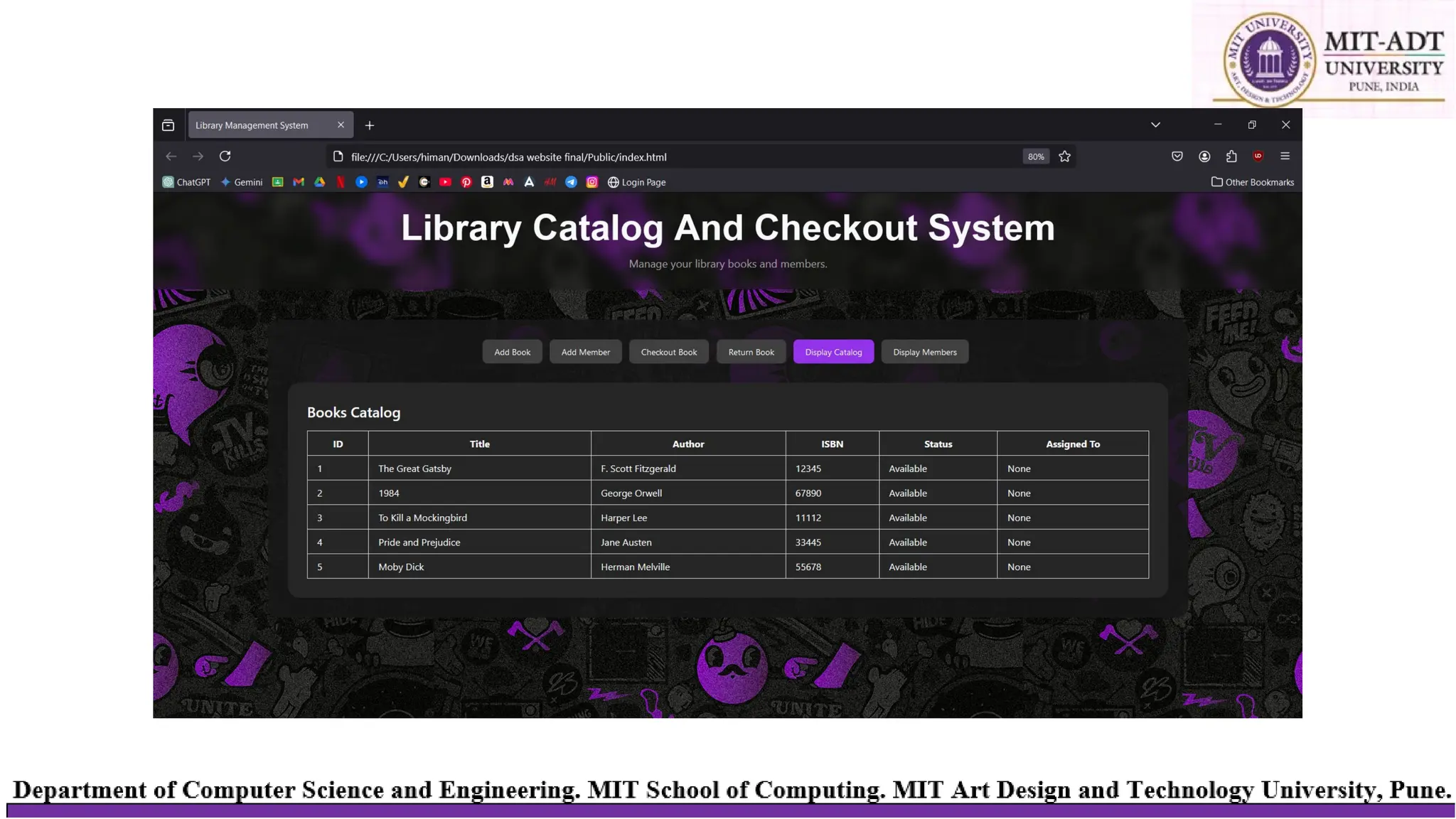
6. Display Catalog Button
6. On Display Catalog Button Click
7. Show all books from Book Catalog.
8. Display the following columns for each book:
1. Book ID
2. Title
3. Author
4. ISBN
5. Status (Available or Checked Out)
6. Assign To (if checked out, it shows the Member ID who checked it out)
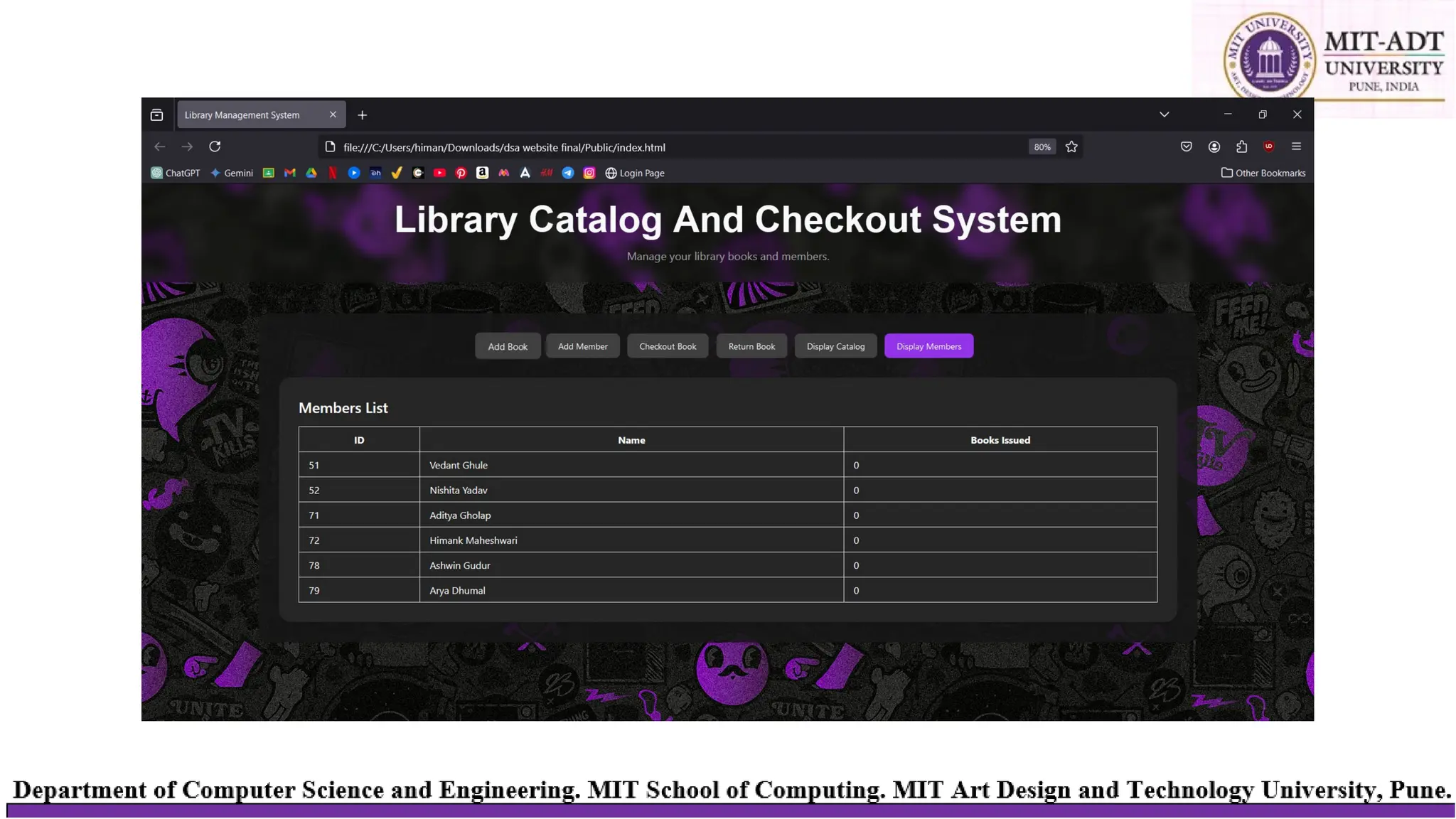
7. Display Members Button
1. On Display Members Button Click
2. Show all members from Member List.
3. Display the following columns for each member:
1. Member ID
2. Name
3. No. of books issued
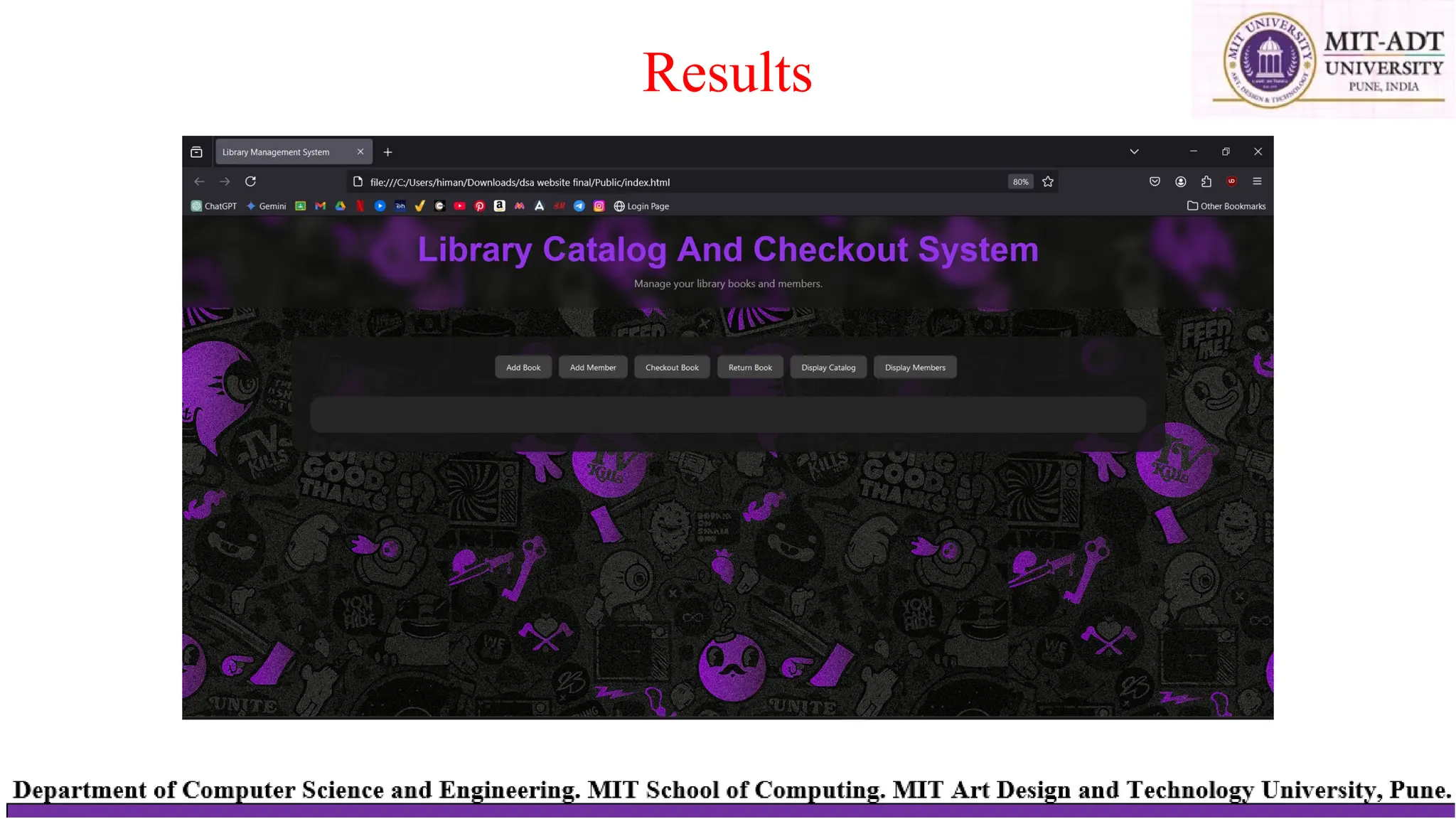
Results
THANK YOU

Library Management System Data Structure.pptx

  • 1.
    Library Catalog andCheckout System MIT Art Design and Technology University MIT School of Computing, Pune AY 2024-2025 SEM-I GROUP MEMBER NAMES 1. Vedant Ghule 2. Nishita Yadav 3. Aditya Gholap 4. Himank Maheshwari 5. Arya Dhumal 6. Ashwin Gudur
  • 2.
     Develop asystem to manage library resources, including books, patrons, and checkouts. The system should streamline the cataloging process, optimize book checkouts, and manage inventory effectively. Problem Statement
  • 3.
    Problem Description The LibraryCatalog and Checkout System addresses the inefficiencies of traditional library management methods, such as manual record-keeping, static data storage, and scalability challenges. These systems are time-consuming, error-prone, and struggle to manage growing libraries effectively. This project aims to design a dynamic and efficient solution using linked lists to store and manage books and library members. The system supports operations like adding books and members, checking out and returning books, and displaying records, all through a simple command-line interface. By utilizing the flexibility of linked lists, it ensures efficient memory usage and seamless handling of library operations, overcoming the limitations of static storage and traditional systems.
  • 4.
  • 5.
    Design Model •Client-Server Architecture Client:A web-based interface where users can interact with the library system (e.g., add books, check out books, view catalogs). Server: Backend service that processes requests, performs operations, and manages data storage. Book Operations: •/add_book (POST): Add new books. •/update_book (POST): Update book details. Member Operations: •/add_member (POST): Add new members. •/delete_member (POST): Remove a member. •/update_member (POST): Update member information. Checkout and Return Operations: •/checkout_book (POST): Mark a book as checked out by a member. •/return_book (POST): Mark a book as returned. Reports: •/get_catalog (GET): Retrieve the book catalog. •/get_members (GET): Retrieve the member list.
  • 6.
    Design Model •Client Requests -Input:Send data for operations such as adding books or members, checking out books, and updating records. -Output: Fetch data such as catalog information, borrowing reports, and member details. •Core Functionalities -Dynamic addition and deletion of books and members. -Real-time updates for book checkout and return operations. -Simplified data retrieval for client-side display.
  • 7.
  • 8.
    Data Structure: SinglyLinked List A linked list is a dynamic data structure where each node points tothenext node. It allows efficient memory utilization as data grows. 5.2 Linked List Implementation Book List: 1. Each node stores book details: ID, title, author, andcheckoutstatus. 2. Linked list enables dynamic addition, deletion, and traversal. Member List: 3. Each node stores member details: ID and name. 4. Linked list dynamically grows as members are added. Data Structures Used
  • 9.
    Algorithm 1. Initialize System 1.Start 2. Create two empty lists: 1. Book Catalog (to store all book records) 2. Member List (to store all member records) 2. Add Book Button 3. On Add Book Button Click 4. Input: 1. Book ID (unique identifier for the book) 2. Title (title of the book) 3. Author (author of the book) 4. ISBN (unique ISBN for the book) 5. Status (initially set as Available) 6. Assign To (set as None since the book is not checked out) 5. Create a New Book Record using the input details. 6. Check for Duplicate: 1. If a book with the same Book ID or ISBN exists in Book Catalog, alert the user and stop. 2. Else, add the New Book Record to Book Catalog. 7. Display message: "Book added successfully."
  • 10.
    Algorithm 3. Add MemberButton 1. On Add Member Button Click 2. Input: 1. Member ID (unique identifier for the member) 2. Name (name of the member) 3. Create a New Member Record using the input details. 4. Check for Duplicate: 1. If a member with the same Member ID exists in Member List, alert the user and stop. 2. Else, add the New Member Record to Member List. 5. Display message: "Member added successfully." 4. Checkout Book Button 6. On Checkout Book Button Click 7. Input: 1. Book ID (ID of the book to be checked out) 2. Member ID (ID of the member checking out the book) 8. Check Book Availability: 1. If the book with Book ID is not found in Book Catalog, alert "Book not found." and stop. 2. If the Status of the book is not Available, alert "Book is already checked out." and stop. 9. Check Member Validity: 1. If the member with Member ID is not found in Member List, alert "Member not found." and stop. 10.Update Book Status: 1. Set Status = Checked Out. 2. Set Assign To = Member ID. 11.Display message: "Book successfully checked out."
  • 11.
    5. Return BookButton 1. On Return Book Button Click 2. Input: 1. Book ID (ID of the book to be returned) 3. Check Book Existence: 1. If the book with Book ID is not found in Book Catalog, alert "Book not found." and stop. 2. If the Status of the book is Available, alert "This book is not checked out." and stop. 4. Update Book Status: 1. Set Status = Available. 2. Set Assign To = None. 5. Display message: "Book successfully returned.“ 6. Display Catalog Button 6. On Display Catalog Button Click 7. Show all books from Book Catalog. 8. Display the following columns for each book: 1. Book ID 2. Title 3. Author 4. ISBN 5. Status (Available or Checked Out) 6. Assign To (if checked out, it shows the Member ID who checked it out)
  • 12.
    7. Display MembersButton 1. On Display Members Button Click 2. Show all members from Member List. 3. Display the following columns for each member: 1. Member ID 2. Name 3. No. of books issued
  • 13.
  • 20.