PLM 7.0 Webinar Eric Stajda April 2009
PLM 7.0 Top Five Improvements   Before going into the demos, a short discussion about five improvements with PLM 7.0 Improvements are numerous, this is an initial list based on key questions or problems that I have faced when working with customers during implementations and are now elegantly covered with PLM 7.0
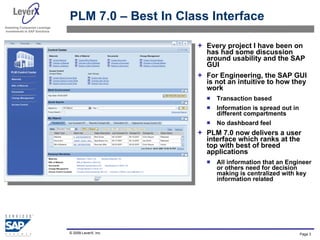
PLM 7.0 – Best In Class Interface Every project I have been on has had some discussion around usability and the SAP GUI For Engineering, the SAP GUI is not an intuitive to how they work Transaction based Information is spread out in different compartments No dashboard feel PLM 7.0 now delivers a user interface which ranks at the top with best of breed applications All information that an Engineer or others need for decision making is centralized with key information related
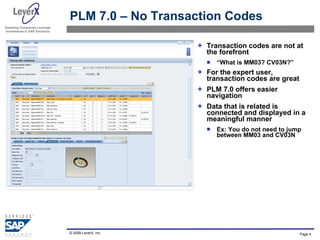
PLM 7.0 – No Transaction Codes Transaction codes are not at the forefront “ What is MM03? CV03N?” For the expert user, transaction codes are great PLM 7.0 offers easier navigation Data that is related is connected and displayed in a meaningful manner Ex: You do not need to jump between MM03 and CV03N
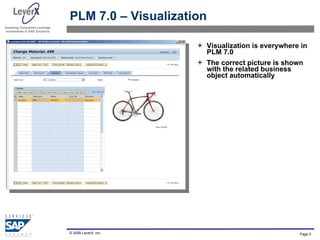
PLM 7.0 – Visualization Visualization is everywhere in PLM 7.0 The correct picture is shown with the related business object automatically
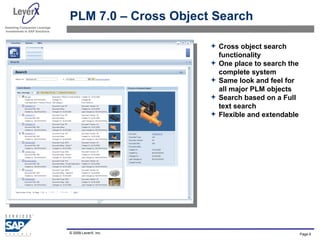
PLM 7.0 – Cross Object Search  Cross object search functionality One place to search the complete system Same look and feel for all major PLM objects Search based on a Full text search  Flexible and extendable
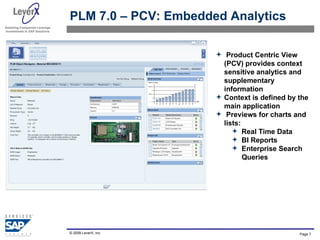
PLM 7.0 – PCV: Embedded Analytics  Product Centric View (PCV) provides context sensitive analytics and supplementary information Context is defined by the main application Previews for charts and lists:  Real Time Data BI Reports Enterprise Search Queries
Demo: PLM 7.0

LeverX SAP PLM 7.0 Webinar

  • 1.
    PLM 7.0 WebinarEric Stajda April 2009
  • 2.
    PLM 7.0 TopFive Improvements Before going into the demos, a short discussion about five improvements with PLM 7.0 Improvements are numerous, this is an initial list based on key questions or problems that I have faced when working with customers during implementations and are now elegantly covered with PLM 7.0
  • 3.
    PLM 7.0 –Best In Class Interface Every project I have been on has had some discussion around usability and the SAP GUI For Engineering, the SAP GUI is not an intuitive to how they work Transaction based Information is spread out in different compartments No dashboard feel PLM 7.0 now delivers a user interface which ranks at the top with best of breed applications All information that an Engineer or others need for decision making is centralized with key information related
  • 4.
    PLM 7.0 –No Transaction Codes Transaction codes are not at the forefront “ What is MM03? CV03N?” For the expert user, transaction codes are great PLM 7.0 offers easier navigation Data that is related is connected and displayed in a meaningful manner Ex: You do not need to jump between MM03 and CV03N
  • 5.
    PLM 7.0 –Visualization Visualization is everywhere in PLM 7.0 The correct picture is shown with the related business object automatically
  • 6.
    PLM 7.0 –Cross Object Search Cross object search functionality One place to search the complete system Same look and feel for all major PLM objects Search based on a Full text search Flexible and extendable
  • 7.
    PLM 7.0 –PCV: Embedded Analytics Product Centric View (PCV) provides context sensitive analytics and supplementary information Context is defined by the main application Previews for charts and lists: Real Time Data BI Reports Enterprise Search Queries
  • 8.