The Flappy Bird Game
Lesson 7
In this course, we will study, learn, and/or creating games in Scratch that makes it interactive so that you will appreciate how
logic and critical thinking works. This is our Scratch Programming Playground.
In today’s lesson, we’ll learn platform games and velocities while also creating the Flappy Bird Game that we will continuously
work on.
The Flappy Bird Game
Flappy Bird was a popular mobile game released in 2013. In
the game, you will control the bird that must fly through
pipes. The main objective is to get as many points as you
can without touching the pipes or the edge of the screen.
Game Mechanics
To prepare, you must know how the game looks like before
we get the blocks. You will know the sprites and a backdrop
needed for the game.
Game Layout
You’ll be making blocks on how to make the animations for
the parrot when space key is pressed.
Parrot Blocks
The Pipes are your obstacles. You learn cloning and how
move the clones from right to left.
Pipe Blocks
You’ll be making blocks on how to display the you win
message when the score is 5 points.
You Win Blocks
You’ll make blocks here that when the game ends, there will
be a game over message.
Game Over Blocks
Flappy Bird was a popular mobile game released in 2013. In the game, you will
control the bird that must fly through pipes. The main objective is to get as many
points as you can without touching the pipes or the edge of the screen.
Game
Mechanics
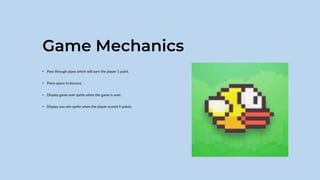
Game Mechanics
• Pass through pipes which will earn the player 1 point.
• Press space to bounce.
• Display game over sprite when the game is over.
• Display you win sprite when the player scored 5 points.
To prepare, you must know how the game looks like before we get the blocks.
You will know the sprites and a backdrop needed for the game.
Game
Layout
Game Layout
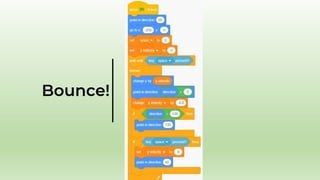
You’ll be making blocks on how to make the animations for the parrot when
space key is pressed.
Parrot
Blocks
The Flying
Animation
Bounce!
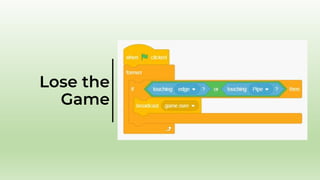
Lose the
Game
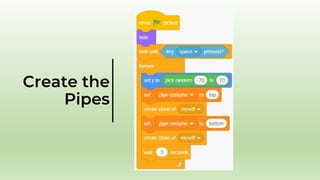
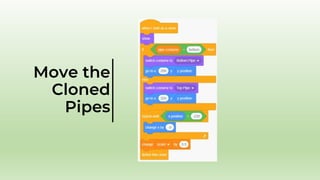
The Pipes are your obstacles. You learn cloning and how move the clones from
right to left.
Pipe Blocks
Create the
Pipes
Move the
Cloned
Pipes
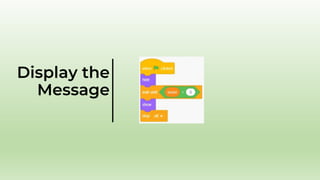
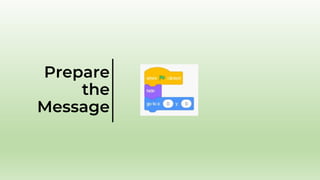
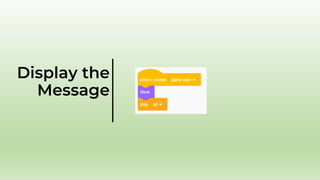
You’ll be making blocks on how to display the you win message when the score is
5 points.
You Win
Blocks
Prepare
the
Message
Display the
Message
You’ll make blocks here that when the game ends, there will be a game over
message.
Game Over
Blocks
Prepare
the
Message
Display the
Message
End of Lesson
You just created the Flappy Bird game that uses cloning and clone movements to generate moving pipes Keep up the good work! You’ll
create more games in our course.
This is all for now in our Scratch Programming Playground. See you in our next meeting!

Lesson-7-Flappy-Bird.pptx

  • 1.
    The Flappy BirdGame Lesson 7
  • 2.
    In this course,we will study, learn, and/or creating games in Scratch that makes it interactive so that you will appreciate how logic and critical thinking works. This is our Scratch Programming Playground. In today’s lesson, we’ll learn platform games and velocities while also creating the Flappy Bird Game that we will continuously work on. The Flappy Bird Game
  • 3.
    Flappy Bird wasa popular mobile game released in 2013. In the game, you will control the bird that must fly through pipes. The main objective is to get as many points as you can without touching the pipes or the edge of the screen. Game Mechanics To prepare, you must know how the game looks like before we get the blocks. You will know the sprites and a backdrop needed for the game. Game Layout
  • 4.
    You’ll be makingblocks on how to make the animations for the parrot when space key is pressed. Parrot Blocks The Pipes are your obstacles. You learn cloning and how move the clones from right to left. Pipe Blocks
  • 5.
    You’ll be makingblocks on how to display the you win message when the score is 5 points. You Win Blocks You’ll make blocks here that when the game ends, there will be a game over message. Game Over Blocks
  • 6.
    Flappy Bird wasa popular mobile game released in 2013. In the game, you will control the bird that must fly through pipes. The main objective is to get as many points as you can without touching the pipes or the edge of the screen. Game Mechanics
  • 7.
    Game Mechanics • Passthrough pipes which will earn the player 1 point. • Press space to bounce. • Display game over sprite when the game is over. • Display you win sprite when the player scored 5 points.
  • 8.
    To prepare, youmust know how the game looks like before we get the blocks. You will know the sprites and a backdrop needed for the game. Game Layout
  • 9.
  • 10.
    You’ll be makingblocks on how to make the animations for the parrot when space key is pressed. Parrot Blocks
  • 11.
  • 12.
  • 13.
  • 14.
    The Pipes areyour obstacles. You learn cloning and how move the clones from right to left. Pipe Blocks
  • 15.
  • 16.
  • 17.
    You’ll be makingblocks on how to display the you win message when the score is 5 points. You Win Blocks
  • 18.
  • 19.
  • 20.
    You’ll make blockshere that when the game ends, there will be a game over message. Game Over Blocks
  • 21.
  • 22.
  • 23.
    End of Lesson Youjust created the Flappy Bird game that uses cloning and clone movements to generate moving pipes Keep up the good work! You’ll create more games in our course. This is all for now in our Scratch Programming Playground. See you in our next meeting!