Flappy bird
Review 2
Diagrams
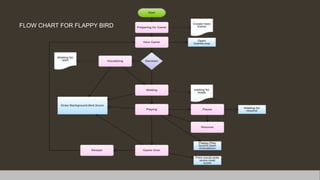
FLOW CHART FOR FLAPPY BIRD
MODULES USED IN FLAPPY BIRD
pygame.event
Pygame.image
pysound
Pygame.surface
MODULES DESCRIPTION
FLAPPY BIRD: A GUI PROJECT
Creating a Flappy Bird game using Pygame in Python typically involves
breaking down the game into various modules and components. Here are
some key modules and components you might use:
Pygame Initialization:
• Import the Pygame library.
• Initialize Pygame.
• Create the game window (screen).
Game Loop:
• Implement the main game loop to manage game updates and rendering.
Bird:
• Create a bird character.
• Implement bird animation for flying and falling.
• Manage bird's position, velocity, and gravity.
Pipes:
• Design and create pipe obstacles.
• Randomly generate pipe positions and gaps.
• Scroll pipes to simulate movement.
Collision Detection:
• Detect collisions between the bird and pipes.
• Handle game over conditions when a collision occurs.
Scoring:
• Keep track of the player's score.
• Award points for passing through gaps between pipes.
Background:
• Display a scrolling background to create the illusion of movement.
Sounds:
• Add sound effects for events like jumping, collision, and scoring.
Game Over Screen:
• Create a game over screen that displays the final score.
• Allow players to restart the game.
User Input:
• Handle user input to control the bird's actions (e.g., jumping).
Game State Management:
• Implement game states (e.g., menu, gameplay, game over) and transitions.
Game Physics:
• Implement gravity and physics for the bird's movement.
Score Display:
• Display the player's current score on the screen.
Timer:
• Manage timing and delays for various game events.
High Score:
• Track and display the highest score achieved by the player.
Font and Text:
• Choose and render fonts for displaying text on the screen.
Event Handling:
• Handle various events, such as window close, key presses, and mouse clicks.
Assets (Images and Sounds):
• Load and manage game assets, including images, sounds, and fonts.
Game Over Animation:
• Add animation or effects for the game over screen.
Optimization:
• Optimize the game for performance and resource usage.
These modules and components form the building blocks for creating a basic
Flappy Bird game using Pygame. Depending on your design and features, you
may expand or modify these modules to create a more complex and polished
game.
THANK YOU

Presentation 8.pptx

  • 1.
  • 2.
  • 3.
    FLOW CHART FORFLAPPY BIRD
  • 5.
    MODULES USED INFLAPPY BIRD pygame.event Pygame.image pysound Pygame.surface
  • 6.
  • 7.
    Creating a FlappyBird game using Pygame in Python typically involves breaking down the game into various modules and components. Here are some key modules and components you might use: Pygame Initialization: • Import the Pygame library. • Initialize Pygame. • Create the game window (screen). Game Loop: • Implement the main game loop to manage game updates and rendering. Bird: • Create a bird character. • Implement bird animation for flying and falling. • Manage bird's position, velocity, and gravity. Pipes: • Design and create pipe obstacles. • Randomly generate pipe positions and gaps. • Scroll pipes to simulate movement.
  • 8.
    Collision Detection: • Detectcollisions between the bird and pipes. • Handle game over conditions when a collision occurs. Scoring: • Keep track of the player's score. • Award points for passing through gaps between pipes. Background: • Display a scrolling background to create the illusion of movement. Sounds: • Add sound effects for events like jumping, collision, and scoring. Game Over Screen: • Create a game over screen that displays the final score. • Allow players to restart the game. User Input: • Handle user input to control the bird's actions (e.g., jumping).
  • 9.
    Game State Management: •Implement game states (e.g., menu, gameplay, game over) and transitions. Game Physics: • Implement gravity and physics for the bird's movement. Score Display: • Display the player's current score on the screen. Timer: • Manage timing and delays for various game events. High Score: • Track and display the highest score achieved by the player. Font and Text: • Choose and render fonts for displaying text on the screen. Event Handling: • Handle various events, such as window close, key presses, and mouse clicks. Assets (Images and Sounds): • Load and manage game assets, including images, sounds, and fonts.
  • 10.
    Game Over Animation: •Add animation or effects for the game over screen. Optimization: • Optimize the game for performance and resource usage. These modules and components form the building blocks for creating a basic Flappy Bird game using Pygame. Depending on your design and features, you may expand or modify these modules to create a more complex and polished game.
  • 11.