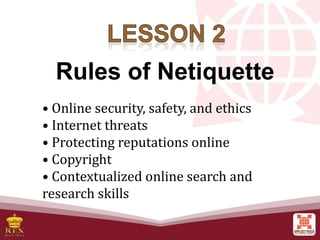
• Online security, safety, and ethics
• Internet threats
• Protecting reputations online
• Copyright
• Contextualized online search and
research skills
Rules of Netiquette
Rules of Netiquette
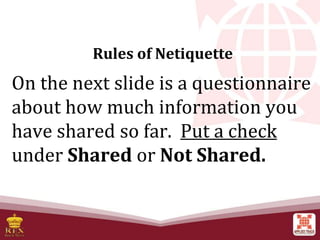
On the next slide is a questionnaire
about how much information you
have shared so far. Put a check
under Shared or Not Shared.
Rules of Netiquette
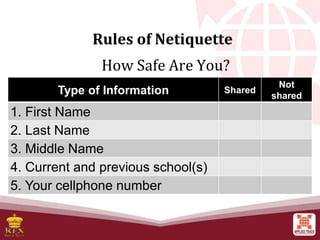
How Safe Are You?
Type of Information Shared
Not
shared
1. First Name
2. Last Name
3. Middle Name
4. Current and previous school(s)
5. Your cellphone number
Rules of Netiquette
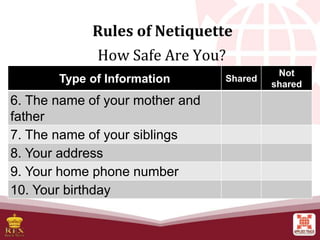
How Safe Are You?
Type of Information Shared
Not
shared
6. The name of your mother and
father
7. The name of your siblings
8. Your address
9. Your home phone number
10. Your birthday
Rules of Netiquette
How many checks did you have for shared?
Rules of Netiquette
Rules of Netiquette
1. How many hours do you spend on the
Internet per day?
2. Can you leave without Internet for a week?
3. How many aspects of your life depend on
the Internet?
4. How many times have you complained
about your Internet connection speed?
Netiquette
Netiquette or network etiquette is a
set of rules for behaving properly online.
(Shea, 1997) Rules that may not be
strictly enforced or even regularly
followed is important to keep everyone
online in check.
Rules of Netiquette
Online Safety and Security
The Internet, truly is a powerful tool. It can be
used to promote business, gain new friends, and
stay in touch with the old ones.
Rules of Netiquette
Online Safety and Security
Let us go back to the
“How Safe Are You?”
Rules of Netiquette
Online Safety and Security
Type of Information:
1. First Name
2. Last Name
3. Middle Name
4. Current and previous
schools
5. Cellphone number
6. Name of your mother and
father
7. The name of your siblings
8. Your address
9. Your home phone number
10. Your birthday
Rules of Netiquette
Online Safety and Security
The Internet is defined as the information
superhighway.
Rules of Netiquette
Tips to Stay Safe Online
Here are some tips to help you stay safe when
using the Internet.
1. Be mindful of what you share and what site you
share it to.
2. Do not just accept terms and conditions; read it.
3. Check out the privacy policy page of a website.
Tips to Stay Safe Online
4. Know the security features of the social
networking site you use.
5. Do not share password with anyone.
6. Avoid logging in to public networks/Wi-Fi.
7. Do not talk to strangers whether online or face-
to-face.
Rules of Netiquette
Tips to Stay Safe Online
8. Never post anything about future vacation.
9. Add friends you know in real life.
10. Avoid visiting untrusted websites.
11. Install and update an antivirus software on your
computer.
12. If you have a Wi-Fi at home, make it a private
network by adding password.
Rules of Netiquette
Tips to Stay Safe Online
13. Avoid downloading anything from untrusted
websites.
14. Buy the software; do not use pirated ones.
15. Do not reply or click links from suspicious emails.
Rules of Netiquette
Internet Threats
1. Malware – stands for Malicious Software.
2. Spam – unwanted email mostly from bots or
advertisers.
3. Phishing – its goal is to acquire sensitive personal
information like passwords and credit card
details.
Rules of Netiquette
Internet Threats
Malware
a. Virus – a malicious program designed to replicate
itself and transfer from one computer to another.
b. Worm – a malicious program that transfers from
one computer to another by any type of means.
Rules of Netiquette
Internet Threats
Malware
c. Trojan - a malicious program that is disguised as
a useful program but once downloaded or
installed, leaves your PC unprotected and allows
hacker to get you information
* Rouge security software
Rules of Netiquette
Internet Threats
Malware
d. Spyware - a program that runs in the
background without you knowing it.
* Keyloggers – used to record the keystroke done by
the user.
Rules of Netiquette
Internet Threats
Malware
e. Adware - a program designed to send you
advertisements, mostly as pop-ups.
Rules of Netiquette
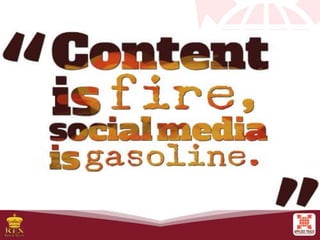
Protecting Reputations Online
In the past, doing something embarrassing was not
much a big deal.
Nowadays, embarrassing moments are captured
using any device you could imagine
This could impact not only your reputation but also
the people around you.
Rules of Netiquette
Think Before You Click
1. Before you post something on the web, ask these
questions to yourself:
• Would you want your parents or grandparents to
see it?
• Would you want your future boss to see it?
Rules of Netiquette
Think Before You Click
2. Your friends depend on you to protect their
reputation online.
3. Set your post to “private”.
4. Avoid using names.
5. If you feel that a post can affect you or other’s
reputation, ask the one who posted it to pull it
down or report it as inappropriate.
Rules of Netiquette
Copyright Infringement
Intellectual Property
Copyright Law
Copyright Page “No part of this book may be copied,
reproduced……”
Rules of Netiquette
Copyright Infringement
1. Understand. Copyright protect literary works,
photographs paintings, drawings, films, music
(and lyrics), choreography, and sculptures.
2. Be responsible. Even if a material does not say
that it is copyrighted, it is not a valid defence
against copyright.
Rules of Netiquette
Rules of Netiquette
Copyright Infringement
3. Be creative. Ask yourself whether what you are
making is something that came from you or
something made from somebody else’s creativity.
4. Know the law. There are some limitations to
copyright laws.
Online Research
1. Have a question in mind. Focus on a question
you want answered.
2. Narrow it down. Search engines like Google,
Bing, or Yahoo use several filters to determine the
most appropriate result for you.
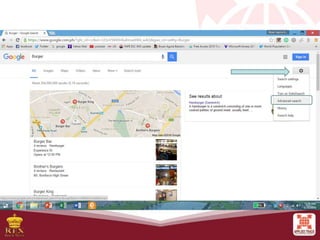
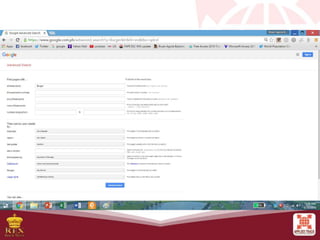
3. Advanced Search.
Rules of Netiquette
Online Research
3. Advanced Search. The best way to filter
information you get from search engines is by
using the advanced search.
Rules of Netiquette
Online Research
4. Look for a credible sources. Some wikis, filled
with updated information, are not a credible
source. When using wikis, check out the link of
the cited text.
Rules of Netiquette
Online Research
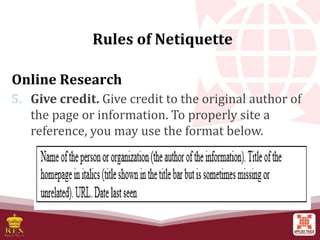
5. Give credit. Give credit to the original author of
the page or information. To properly site a
reference, you may use the format below.
Rules of Netiquette
Exploration 2.2 Cyber News Report
Form groups with three members each. Search for
several news and events related to cybercrime.
Together with your group, create a campaign
materials promoting “Think before you click.”
It could be in a form of small posters posted along the
hallway or bulletin boards as approved by the school.
Rules of Netiquette

Lesson-2-Rules-of-Netiquette safety Online

  • 1.
    • Online security,safety, and ethics • Internet threats • Protecting reputations online • Copyright • Contextualized online search and research skills Rules of Netiquette
  • 2.
    Rules of Netiquette Onthe next slide is a questionnaire about how much information you have shared so far. Put a check under Shared or Not Shared.
  • 3.
    Rules of Netiquette HowSafe Are You? Type of Information Shared Not shared 1. First Name 2. Last Name 3. Middle Name 4. Current and previous school(s) 5. Your cellphone number
  • 4.
    Rules of Netiquette HowSafe Are You? Type of Information Shared Not shared 6. The name of your mother and father 7. The name of your siblings 8. Your address 9. Your home phone number 10. Your birthday
  • 5.
    Rules of Netiquette Howmany checks did you have for shared?
  • 6.
  • 8.
    Rules of Netiquette 1.How many hours do you spend on the Internet per day? 2. Can you leave without Internet for a week? 3. How many aspects of your life depend on the Internet? 4. How many times have you complained about your Internet connection speed?
  • 9.
    Netiquette Netiquette or networketiquette is a set of rules for behaving properly online. (Shea, 1997) Rules that may not be strictly enforced or even regularly followed is important to keep everyone online in check.
  • 10.
    Rules of Netiquette OnlineSafety and Security The Internet, truly is a powerful tool. It can be used to promote business, gain new friends, and stay in touch with the old ones.
  • 11.
    Rules of Netiquette OnlineSafety and Security Let us go back to the “How Safe Are You?”
  • 12.
    Rules of Netiquette OnlineSafety and Security Type of Information: 1. First Name 2. Last Name 3. Middle Name 4. Current and previous schools 5. Cellphone number 6. Name of your mother and father 7. The name of your siblings 8. Your address 9. Your home phone number 10. Your birthday
  • 13.
    Rules of Netiquette OnlineSafety and Security The Internet is defined as the information superhighway.
  • 14.
    Rules of Netiquette Tipsto Stay Safe Online Here are some tips to help you stay safe when using the Internet. 1. Be mindful of what you share and what site you share it to. 2. Do not just accept terms and conditions; read it. 3. Check out the privacy policy page of a website.
  • 15.
    Tips to StaySafe Online 4. Know the security features of the social networking site you use. 5. Do not share password with anyone. 6. Avoid logging in to public networks/Wi-Fi. 7. Do not talk to strangers whether online or face- to-face. Rules of Netiquette
  • 16.
    Tips to StaySafe Online 8. Never post anything about future vacation. 9. Add friends you know in real life. 10. Avoid visiting untrusted websites. 11. Install and update an antivirus software on your computer. 12. If you have a Wi-Fi at home, make it a private network by adding password. Rules of Netiquette
  • 17.
    Tips to StaySafe Online 13. Avoid downloading anything from untrusted websites. 14. Buy the software; do not use pirated ones. 15. Do not reply or click links from suspicious emails. Rules of Netiquette
  • 18.
    Internet Threats 1. Malware– stands for Malicious Software. 2. Spam – unwanted email mostly from bots or advertisers. 3. Phishing – its goal is to acquire sensitive personal information like passwords and credit card details. Rules of Netiquette
  • 19.
    Internet Threats Malware a. Virus– a malicious program designed to replicate itself and transfer from one computer to another. b. Worm – a malicious program that transfers from one computer to another by any type of means. Rules of Netiquette
  • 20.
    Internet Threats Malware c. Trojan- a malicious program that is disguised as a useful program but once downloaded or installed, leaves your PC unprotected and allows hacker to get you information * Rouge security software Rules of Netiquette
  • 21.
    Internet Threats Malware d. Spyware- a program that runs in the background without you knowing it. * Keyloggers – used to record the keystroke done by the user. Rules of Netiquette
  • 22.
    Internet Threats Malware e. Adware- a program designed to send you advertisements, mostly as pop-ups. Rules of Netiquette
  • 23.
    Protecting Reputations Online Inthe past, doing something embarrassing was not much a big deal. Nowadays, embarrassing moments are captured using any device you could imagine This could impact not only your reputation but also the people around you. Rules of Netiquette
  • 26.
    Think Before YouClick 1. Before you post something on the web, ask these questions to yourself: • Would you want your parents or grandparents to see it? • Would you want your future boss to see it? Rules of Netiquette
  • 27.
    Think Before YouClick 2. Your friends depend on you to protect their reputation online. 3. Set your post to “private”. 4. Avoid using names. 5. If you feel that a post can affect you or other’s reputation, ask the one who posted it to pull it down or report it as inappropriate. Rules of Netiquette
  • 28.
    Copyright Infringement Intellectual Property CopyrightLaw Copyright Page “No part of this book may be copied, reproduced……” Rules of Netiquette
  • 29.
    Copyright Infringement 1. Understand.Copyright protect literary works, photographs paintings, drawings, films, music (and lyrics), choreography, and sculptures. 2. Be responsible. Even if a material does not say that it is copyrighted, it is not a valid defence against copyright. Rules of Netiquette
  • 30.
    Rules of Netiquette CopyrightInfringement 3. Be creative. Ask yourself whether what you are making is something that came from you or something made from somebody else’s creativity. 4. Know the law. There are some limitations to copyright laws.
  • 31.
    Online Research 1. Havea question in mind. Focus on a question you want answered. 2. Narrow it down. Search engines like Google, Bing, or Yahoo use several filters to determine the most appropriate result for you. 3. Advanced Search. Rules of Netiquette
  • 32.
    Online Research 3. AdvancedSearch. The best way to filter information you get from search engines is by using the advanced search. Rules of Netiquette
  • 35.
    Online Research 4. Lookfor a credible sources. Some wikis, filled with updated information, are not a credible source. When using wikis, check out the link of the cited text. Rules of Netiquette
  • 36.
    Online Research 5. Givecredit. Give credit to the original author of the page or information. To properly site a reference, you may use the format below. Rules of Netiquette
  • 37.
    Exploration 2.2 CyberNews Report Form groups with three members each. Search for several news and events related to cybercrime. Together with your group, create a campaign materials promoting “Think before you click.” It could be in a form of small posters posted along the hallway or bulletin boards as approved by the school. Rules of Netiquette

Editor's Notes

  • #2 “Break the Barrier” before starting the lesson. Give the etymological meaning of Netiquette and define what the term means.
  • #3 Most of us use the Internet everyday. Sometimes we do not pay attention on how much information we share online.
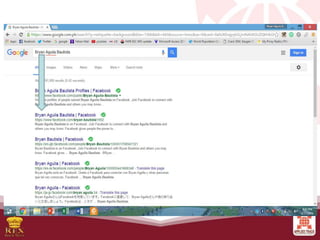
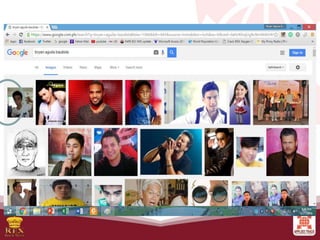
  • #6 You probably answered shared in the first two items. If that is the case. Try using a search engine like google then type your first and last name.
  • #9 Most of us use the Internet everyday. Sometimes we do not pay attention on how much information we share online.
  • #11 It is also a source of entertainment through games and online communities.
  • #13 It is also a source of entertainment through games and online communities.
  • #14 This means that anyone has access to this highway, can place information, and can grad that information.
  • #15 The internet is a public place and it is up to you to protect yourself.
  • #16 The internet is a public place and it is up to you to protect yourself.
  • #17 The internet is a public place and it is up to you to protect yourself.
  • #18 The internet is a public place and it is up to you to protect yourself.
  • #19 Here are some of the threats you should be aware of when using the Internet. 2. It can be used to send malware. 3. Email that will direct the user to the website and be asked to update username, password, credit card, or personal info.
  • #24 It happened, people would laugh at it, and they would move on. What is worse is that people can easily upload it to the Internet, where it can be stored forever.
  • #27 Here are things you might want to consider before posting something over the Internet. Once you post something on the web, you have no control of who sees your post.
  • #28 2. talk to your friends about this serious responsibility. 3. in this way, search engines will not be able to scan that post. 4. names are easy for search engines to scan.
  • #32 Tips in conducting online research If it is a series of questions, tart with one, never search anything on the go.
  • #33 Tips in conducting online research If it is a series of questions, tart with one, never search anything on the go. 3. this will allow you to filter out information you do not need.
  • #36 This is due to the fact that anyone can edit its content
  • #37 This is due to the fact that anyone can edit its content
  • #38 Tips in conducting online research If it is a series of questions, tart with one, never search anything on the go. 3. this will allow you to filter out information you do not need.