Writing Basic  SQL Statements
Objectives After completing this lesson, you should be able to do the following: List the capabilities of SQL SELECT statements Execute a basic SELECT statement Differentiate between SQL statements and SQL*Plus commands
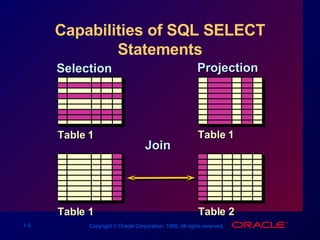
Capabilities of SQL SELECT Statements Selection Projection Table 1 Table 2 Table 1 Table 1 Join
Basic SELECT Statement SELECT identifies  what  columns. FROM identifies  which  table. SELECT [DISTINCT] {*,  column  [ alias ],...} FROM table;
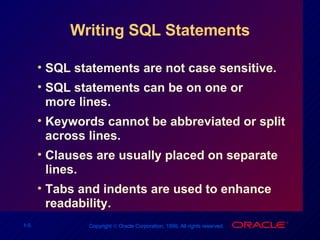
Writing SQL Statements SQL statements are not case sensitive.  SQL statements can be on one or more lines. Keywords cannot be abbreviated or split across lines. Clauses are usually placed on separate lines. Tabs and indents are used to enhance readability.
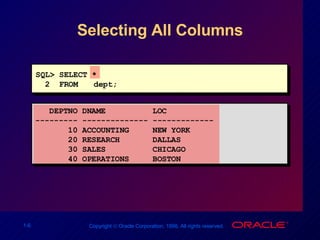
Selecting All Columns DEPTNO DNAME  LOC --------- -------------- ------------- 10 ACCOUNTING  NEW YORK 20 RESEARCH  DALLAS 30 SALES  CHICAGO 40 OPERATIONS  BOSTON SQL> SELECT * 2  FROM  dept;
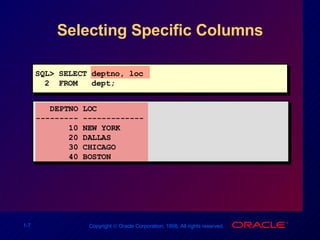
Selecting Specific Columns DEPTNO LOC --------- ------------- 10 NEW YORK 20 DALLAS 30 CHICAGO 40 BOSTON SQL> SELECT deptno, loc 2  FROM  dept;
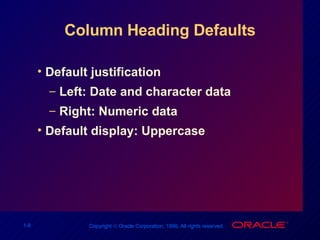
Column Heading Defaults Default justification Left: Date and character data Right: Numeric data Default display: Uppercase
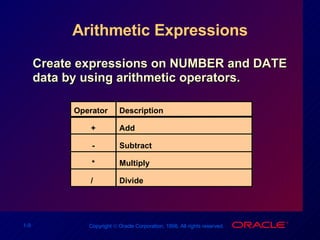
Arithmetic Expressions Create expressions on NUMBER and DATE data by using arithmetic operators. Operator + - * /  Description Add Subtract  Multiply  Divide
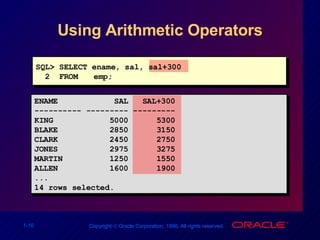
Using Arithmetic Operators SQL> SELECT ename, sal, sal+300 2  FROM emp; ENAME  SAL  SAL+300 ---------- --------- --------- KING  5000  5300 BLAKE  2850  3150 CLARK  2450  2750 JONES  2975  3275 MARTIN  1250  1550 ALLEN  1600  1900 ... 14 rows selected.
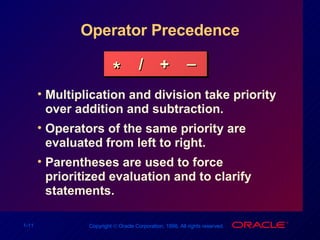
Operator Precedence Multiplication and division take priority over addition and subtraction. Operators of the same priority are evaluated from left to right. Parentheses are used to force prioritized evaluation and to clarify statements. * / + _
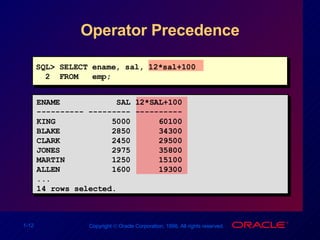
Operator Precedence SQL> SELECT ename, sal, 12*sal+100 2  FROM  emp; ENAME  SAL 12*SAL+100 ---------- --------- ---------- KING  5000  60100 BLAKE  2850  34300 CLARK  2450  29500 JONES  2975  35800 MARTIN  1250  15100 ALLEN  1600  19300 ... 14 rows selected.
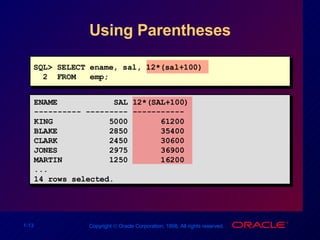
Using Parentheses SQL> SELECT ename, sal, 12*(sal+100) 2  FROM  emp; ENAME  SAL 12*(SAL+100) ---------- --------- ----------- KING  5000  61200 BLAKE  2850  35400 CLARK  2450  30600 JONES  2975  36900 MARTIN  1250  16200 ... 14 rows selected.
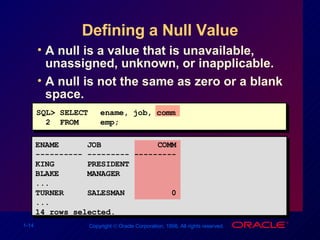
Defining a Null Value A null is a value that is unavailable, unassigned, unknown, or inapplicable. A null is not the same as zero or a blank space. SQL> SELECT  ename, job, comm 2  FROM emp; ENAME  JOB  COMM ---------- --------- --------- KING  PRESIDENT BLAKE  MANAGER ... TURNER  SALESMAN  0 ... 14 rows selected.
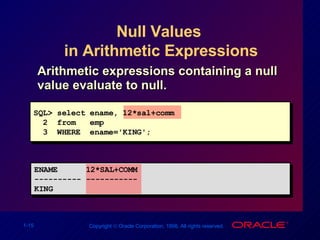
Null Values  in Arithmetic Expressions Arithmetic expressions containing a null value evaluate to null. SQL> select ename, 12*sal+comm  2  from  emp 3  WHERE  ename='KING'; ENAME  12*SAL+COMM  ---------- ----------- KING
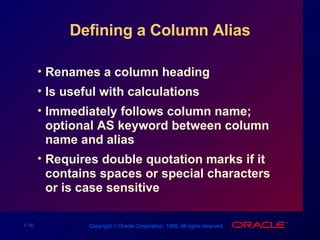
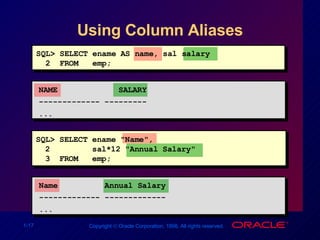
Defining a Column Alias Renames a column heading Is useful with calculations Immediately follows column name; optional AS keyword between column name and alias Requires double quotation marks if it contains spaces or special characters or is case sensitive
Using Column Aliases SQL> SELECT ename AS name, sal salary 2  FROM  emp; NAME  SALARY ------------- --------- ... SQL> SELECT ename "Name", 2  sal*12 "Annual Salary" 3  FROM  emp; Name  Annual Salary ------------- ------------- ...
Concatenation Operator Concatenates columns or character strings to other columns  Is represented by two vertical bars (||) Creates a resultant column that is a character expression
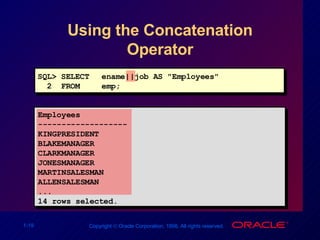
Using the Concatenation Operator SQL> SELECT ename||job AS "Employees" 2  FROM  emp; Employees ------------------- KINGPRESIDENT BLAKEMANAGER CLARKMANAGER JONESMANAGER MARTINSALESMAN ALLENSALESMAN ... 14 rows selected.
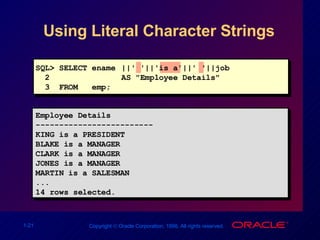
Literal Character Strings A literal is a character, expression, or number included in the SELECT list. Date and character literal values must be enclosed within single quotation marks. Each character string is output once for each row returned.
Using Literal Character Strings Employee Details ------------------------- KING is a PRESIDENT BLAKE is a MANAGER CLARK is a MANAGER JONES is a MANAGER MARTIN is a SALESMAN ... 14 rows selected. SQL> SELECT ename ||' '||'is a'||' '||job  2   AS "Employee Details" 3  FROM  emp;
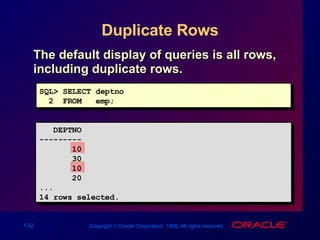
Duplicate Rows The default display of queries is all rows, including duplicate rows. SQL> SELECT deptno 2  FROM  emp; DEPTNO --------- 10 30 10 20 ... 14 rows selected.
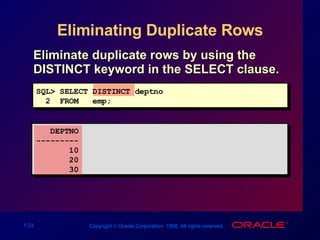
Eliminating Duplicate Rows Eliminate duplicate rows by using the DISTINCT keyword in the SELECT clause. SQL> SELECT DISTINCT deptno 2  FROM  emp; DEPTNO --------- 10 20 30
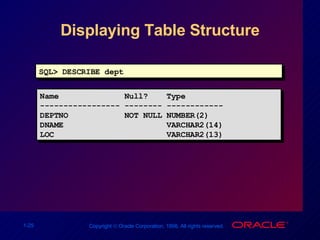
Displaying Table Structure Use the SQL*Plus DESCRIBE command to display the structure of a table. DESC[RIBE]  tablename
Displaying Table Structure SQL> DESCRIBE dept Name  Null?  Type ----------------- -------- ------------ DEPTNO  NOT NULL NUMBER(2) DNAME  VARCHAR2(14) LOC  VARCHAR2(13)
Summary Use SQL*Plus as an environment to: Execute SQL statements Edit SQL statements SELECT [DISTINCT] {*, column  [ alias ],...} FROM table;
Practice Overview Selecting all data from different tables Describing the structure of tables Performing arithmetic calculations and specifying column names Using SQL*Plus editor

Les01-Oracle

  • 1.
    Writing Basic SQL Statements
  • 2.
    Objectives After completingthis lesson, you should be able to do the following: List the capabilities of SQL SELECT statements Execute a basic SELECT statement Differentiate between SQL statements and SQL*Plus commands
  • 3.
    Capabilities of SQLSELECT Statements Selection Projection Table 1 Table 2 Table 1 Table 1 Join
  • 4.
    Basic SELECT StatementSELECT identifies what columns. FROM identifies which table. SELECT [DISTINCT] {*, column [ alias ],...} FROM table;
  • 5.
    Writing SQL StatementsSQL statements are not case sensitive. SQL statements can be on one or more lines. Keywords cannot be abbreviated or split across lines. Clauses are usually placed on separate lines. Tabs and indents are used to enhance readability.
  • 6.
    Selecting All ColumnsDEPTNO DNAME LOC --------- -------------- ------------- 10 ACCOUNTING NEW YORK 20 RESEARCH DALLAS 30 SALES CHICAGO 40 OPERATIONS BOSTON SQL> SELECT * 2 FROM dept;
  • 7.
    Selecting Specific ColumnsDEPTNO LOC --------- ------------- 10 NEW YORK 20 DALLAS 30 CHICAGO 40 BOSTON SQL> SELECT deptno, loc 2 FROM dept;
  • 8.
    Column Heading DefaultsDefault justification Left: Date and character data Right: Numeric data Default display: Uppercase
  • 9.
    Arithmetic Expressions Createexpressions on NUMBER and DATE data by using arithmetic operators. Operator + - * / Description Add Subtract Multiply Divide
  • 10.
    Using Arithmetic OperatorsSQL> SELECT ename, sal, sal+300 2 FROM emp; ENAME SAL SAL+300 ---------- --------- --------- KING 5000 5300 BLAKE 2850 3150 CLARK 2450 2750 JONES 2975 3275 MARTIN 1250 1550 ALLEN 1600 1900 ... 14 rows selected.
  • 11.
    Operator Precedence Multiplicationand division take priority over addition and subtraction. Operators of the same priority are evaluated from left to right. Parentheses are used to force prioritized evaluation and to clarify statements. * / + _
  • 12.
    Operator Precedence SQL>SELECT ename, sal, 12*sal+100 2 FROM emp; ENAME SAL 12*SAL+100 ---------- --------- ---------- KING 5000 60100 BLAKE 2850 34300 CLARK 2450 29500 JONES 2975 35800 MARTIN 1250 15100 ALLEN 1600 19300 ... 14 rows selected.
  • 13.
    Using Parentheses SQL>SELECT ename, sal, 12*(sal+100) 2 FROM emp; ENAME SAL 12*(SAL+100) ---------- --------- ----------- KING 5000 61200 BLAKE 2850 35400 CLARK 2450 30600 JONES 2975 36900 MARTIN 1250 16200 ... 14 rows selected.
  • 14.
    Defining a NullValue A null is a value that is unavailable, unassigned, unknown, or inapplicable. A null is not the same as zero or a blank space. SQL> SELECT ename, job, comm 2 FROM emp; ENAME JOB COMM ---------- --------- --------- KING PRESIDENT BLAKE MANAGER ... TURNER SALESMAN 0 ... 14 rows selected.
  • 15.
    Null Values in Arithmetic Expressions Arithmetic expressions containing a null value evaluate to null. SQL> select ename, 12*sal+comm 2 from emp 3 WHERE ename='KING'; ENAME 12*SAL+COMM ---------- ----------- KING
  • 16.
    Defining a ColumnAlias Renames a column heading Is useful with calculations Immediately follows column name; optional AS keyword between column name and alias Requires double quotation marks if it contains spaces or special characters or is case sensitive
  • 17.
    Using Column AliasesSQL> SELECT ename AS name, sal salary 2 FROM emp; NAME SALARY ------------- --------- ... SQL> SELECT ename "Name", 2 sal*12 "Annual Salary" 3 FROM emp; Name Annual Salary ------------- ------------- ...
  • 18.
    Concatenation Operator Concatenatescolumns or character strings to other columns Is represented by two vertical bars (||) Creates a resultant column that is a character expression
  • 19.
    Using the ConcatenationOperator SQL> SELECT ename||job AS "Employees" 2 FROM emp; Employees ------------------- KINGPRESIDENT BLAKEMANAGER CLARKMANAGER JONESMANAGER MARTINSALESMAN ALLENSALESMAN ... 14 rows selected.
  • 20.
    Literal Character StringsA literal is a character, expression, or number included in the SELECT list. Date and character literal values must be enclosed within single quotation marks. Each character string is output once for each row returned.
  • 21.
    Using Literal CharacterStrings Employee Details ------------------------- KING is a PRESIDENT BLAKE is a MANAGER CLARK is a MANAGER JONES is a MANAGER MARTIN is a SALESMAN ... 14 rows selected. SQL> SELECT ename ||' '||'is a'||' '||job 2 AS "Employee Details" 3 FROM emp;
  • 22.
    Duplicate Rows Thedefault display of queries is all rows, including duplicate rows. SQL> SELECT deptno 2 FROM emp; DEPTNO --------- 10 30 10 20 ... 14 rows selected.
  • 23.
    Eliminating Duplicate RowsEliminate duplicate rows by using the DISTINCT keyword in the SELECT clause. SQL> SELECT DISTINCT deptno 2 FROM emp; DEPTNO --------- 10 20 30
  • 24.
    Displaying Table StructureUse the SQL*Plus DESCRIBE command to display the structure of a table. DESC[RIBE] tablename
  • 25.
    Displaying Table StructureSQL> DESCRIBE dept Name Null? Type ----------------- -------- ------------ DEPTNO NOT NULL NUMBER(2) DNAME VARCHAR2(14) LOC VARCHAR2(13)
  • 26.
    Summary Use SQL*Plusas an environment to: Execute SQL statements Edit SQL statements SELECT [DISTINCT] {*, column [ alias ],...} FROM table;
  • 27.
    Practice Overview Selectingall data from different tables Describing the structure of tables Performing arithmetic calculations and specifying column names Using SQL*Plus editor

Editor's Notes

  • #2 Schedule: Timing Topic 40 minutes Lecture 25 minutes Practice 65 minutes Total