Objectives
• After completingthis lesson, you
should be able to do the following:
– List the capabilities of SQL SELECT
statements
– Execute a basic SELECT statement
Basic SELECT Statement
SELECT[DISTINCT] {*, column [alias],...}
FROM table;
– SELECT identifies what columns.
– FROM identifies which table.
5.
Writing SQL Statements
–SQL statements are not case sensitive.
– SQL statements can be on one or
more lines.
– Keywords cannot be abbreviated or split
across lines.
– Clauses are usually placed on separate
lines.
– Tabs and indents are used to enhance
readability.
6.
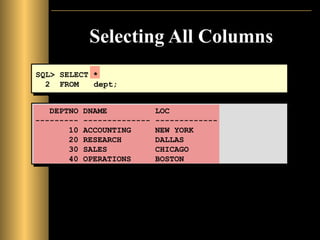
Selecting All Columns
DEPTNODNAME LOC
--------- -------------- -------------
10 ACCOUNTING NEW YORK
20 RESEARCH DALLAS
30 SALES CHICAGO
40 OPERATIONS BOSTON
SQL> SELECT *
2 FROM dept;
7.
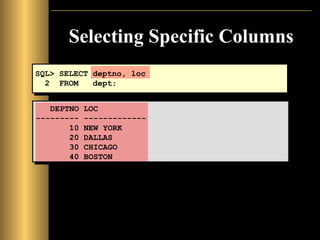
Selecting Specific Columns
DEPTNOLOC
--------- -------------
10 NEW YORK
20 DALLAS
30 CHICAGO
40 BOSTON
SQL> SELECT deptno, loc
2 FROM dept;
8.
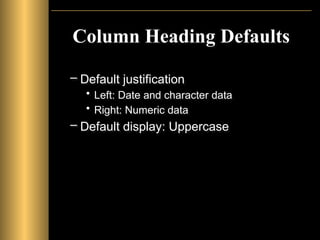
Column Heading Defaults
–Default justification
• Left: Date and character data
• Right: Numeric data
– Default display: Uppercase
9.
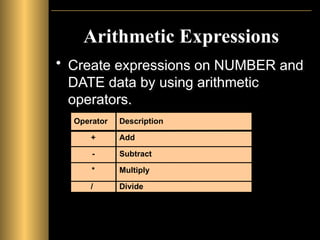
Arithmetic Expressions
• Createexpressions on NUMBER and
DATE data by using arithmetic
operators.
Operator
+
-
*
/
Description
Add
Subtract
Multiply
Divide
10.
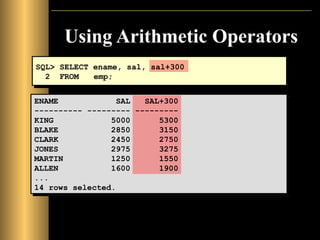
Using Arithmetic Operators
SQL>SELECT ename, sal, sal+300
2 FROM emp;
ENAME SAL SAL+300
---------- --------- ---------
KING 5000 5300
BLAKE 2850 3150
CLARK 2450 2750
JONES 2975 3275
MARTIN 1250 1550
ALLEN 1600 1900
...
14 rows selected.
11.
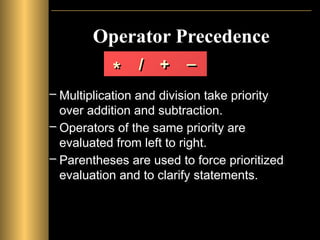
Operator Precedence
– Multiplicationand division take priority
over addition and subtraction.
– Operators of the same priority are
evaluated from left to right.
– Parentheses are used to force prioritized
evaluation and to clarify statements.
* / + _
12.
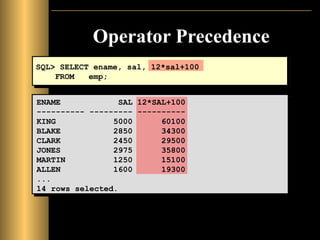
Operator Precedence
SQL> SELECTename, sal, 12*sal+100
FROM emp;
ENAME SAL 12*SAL+100
---------- --------- ----------
KING 5000 60100
BLAKE 2850 34300
CLARK 2450 29500
JONES 2975 35800
MARTIN 1250 15100
ALLEN 1600 19300
...
14 rows selected.
13.
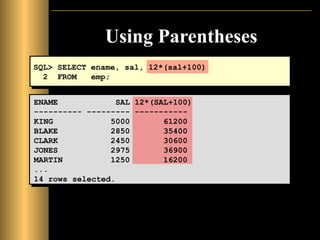
Using Parentheses
SQL> SELECTename, sal, 12*(sal+100)
2 FROM emp;
ENAME SAL 12*(SAL+100)
---------- --------- -----------
KING 5000 61200
BLAKE 2850 35400
CLARK 2450 30600
JONES 2975 36900
MARTIN 1250 16200
...
14 rows selected.
14.
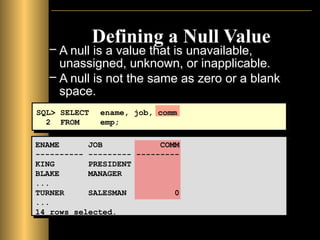
Defining a NullValue
– A null is a value that is unavailable,
unassigned, unknown, or inapplicable.
– A null is not the same as zero or a blank
space.
SQL> SELECT ename, job, comm
2 FROM emp;
ENAME JOB COMM
---------- --------- ---------
KING PRESIDENT
BLAKE MANAGER
...
TURNER SALESMAN 0
...
14 rows selected.
15.
Null Values
in ArithmeticExpressions
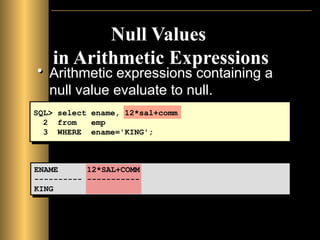
• Arithmetic expressions containing a
null value evaluate to null.
SQL> select ename, 12*sal+comm
2 from emp
3 WHERE ename='KING';
ENAME 12*SAL+COMM
---------- -----------
KING
16.
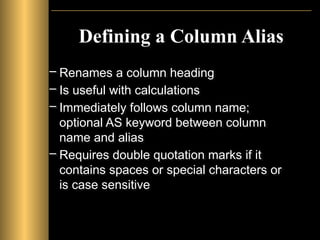
Defining a ColumnAlias
– Renames a column heading
– Is useful with calculations
– Immediately follows column name;
optional AS keyword between column
name and alias
– Requires double quotation marks if it
contains spaces or special characters or
is case sensitive
17.
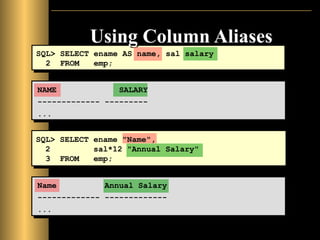
Using Column Aliases
SQL>SELECT ename AS name, sal salary
2 FROM emp;
NAME SALARY
------------- ---------
...
SQL> SELECT ename "Name",
2 sal*12 "Annual Salary"
3 FROM emp;
Name Annual Salary
------------- -------------
...
18.
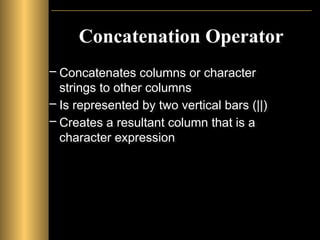
Concatenation Operator
– Concatenatescolumns or character
strings to other columns
– Is represented by two vertical bars (||)
– Creates a resultant column that is a
character expression
19.
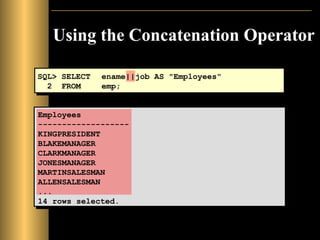
Using the ConcatenationOperator
SQL> SELECT ename||job AS "Employees"
2 FROM emp;
Employees
-------------------
KINGPRESIDENT
BLAKEMANAGER
CLARKMANAGER
JONESMANAGER
MARTINSALESMAN
ALLENSALESMAN
...
14 rows selected.
20.
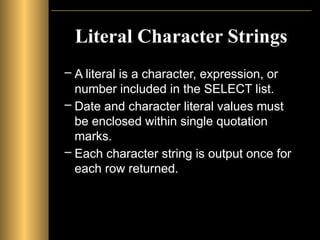
Literal Character Strings
–A literal is a character, expression, or
number included in the SELECT list.
– Date and character literal values must
be enclosed within single quotation
marks.
– Each character string is output once for
each row returned.
21.
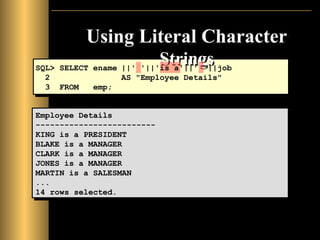
Using Literal Character
Strings
EmployeeDetails
-------------------------
KING is a PRESIDENT
BLAKE is a MANAGER
CLARK is a MANAGER
JONES is a MANAGER
MARTIN is a SALESMAN
...
14 rows selected.
SQL> SELECT ename ||' '||'is a'||' '||job
2 AS "Employee Details"
3 FROM emp;
22.
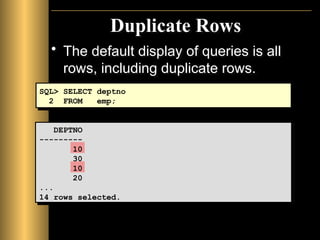
Duplicate Rows
• Thedefault display of queries is all
rows, including duplicate rows.
SQL> SELECT deptno
2 FROM emp;
DEPTNO
---------
10
30
10
20
...
14 rows selected.
23.
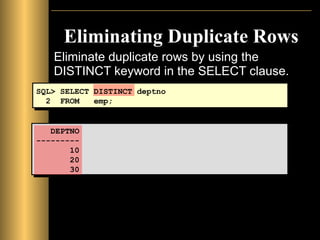
Eliminating Duplicate Rows
Eliminateduplicate rows by using the
DISTINCT keyword in the SELECT clause.
SQL> SELECT DISTINCT deptno
2 FROM emp;
DEPTNO
---------
10
20
30
24.
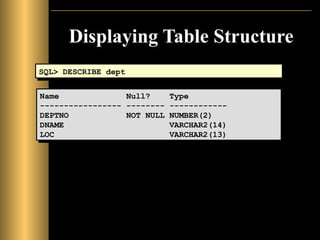
Displaying Table Structure
•Use the SQL*Plus DESCRIBE
command to display the structure of a
table.
DESC[RIBE] tablename
25.
Displaying Table Structure
SQL>DESCRIBE dept
Name Null? Type
----------------- -------- ------------
DEPTNO NOT NULL NUMBER(2)
DNAME VARCHAR2(14)
LOC VARCHAR2(13)
26.
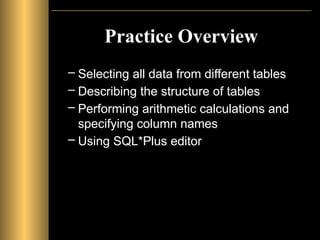
Practice Overview
– Selectingall data from different tables
– Describing the structure of tables
– Performing arithmetic calculations and
specifying column names
– Using SQL*Plus editor
Editor's Notes
#1
Schedule: Timing Topic
40 minutes Lecture
25 minutes Practice
65 minutes Total
#2 Lesson Aim
To extract data from the database, you need to use the structured query language (SQL) SELECT statement. You may need to restrict the columns that are displayed. This lesson describes all the SQL statements that you need to perform these actions.
You may want to create SELECT statements that can be used time and time again. This lesson also covers the use of SQL*Plus commands to execute SQL statements.
#3 Capabilities of SQL SELECT Statements
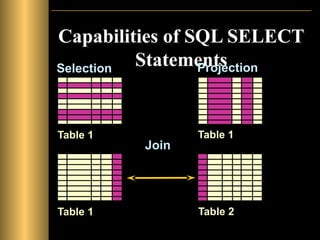
A SELECT statement retrieves information from the database. Using a SELECT statement, you can do the following:
Selection: You can use the selection capability in SQL to choose the rows in a table that you want returned by a query. You can use various criteria to selectively restrict the rows that you see.
Projection: You can use the projection capability in SQL to choose the columns in a table that you want returned by your query. You can choose as few or as many columns of the table as you require.
Join: You can use the join capability in SQL to bring together data that is stored in different tables by creating a link through a column that both the tables share. You will learn more about joins in a later lesson.
#4 Basic SELECT Statement
In its simplest form, a SELECT statement must include the following:
A SELECT clause, which specifies the columns to be displayed
A FROM clause, which specifies the table containing the columns listed in the SELECT clause
In the syntax:
SELECT is a list of one or more columns.
DISTINCT suppresses duplicates.
* selects all columns.
column selects the named column.
alias gives selected columns different headings.
FROM table specifies the table containing the columns.
Note: Throughout this course, the words keyword, clause, and statement are used.
A keyword refers to an individual SQL element.
For example, SELECT and FROM are keywords.
A clause is a part of an SQL statement.
For example, SELECT empno, ename, ... is a clause.
A statement is a combination of two or more clauses.
For example, SELECT * FROM emp is a SQL statement.
#5 Writing SQL Statements
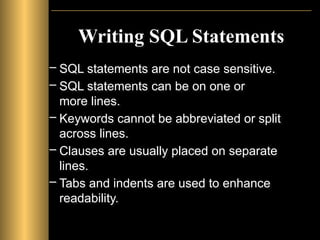
Using the following simple rules and guidelines, you can construct valid statements that are both easy to read and easy to edit:
• SQL statements are not case sensitive, unless indicated.
SQL statements can be entered on one or many lines.
• Keywords cannot be split across lines or abbreviated.
Clauses are usually placed on separate lines for readability and ease of editing.
• Tabs and indents can be used to make code more readable.
Keywords typically are entered in uppercase; all other words, such as table names and columns, are entered in lowercase.
• Within SQL*Plus, a SQL statement is entered at the SQL prompt, and the subsequent lines are numbered. This is called the SQL buffer. Only one statement can be current at any time within the buffer.
Executing SQL Statements
Place a semicolon (;) at the end of the last clause.
Place a slash on the last line in the buffer.
Place a slash at the SQL prompt.
Issue a SQL*Plus RUN command at the SQL prompt.
#6 Selecting All Columns, All Rows
You can display all columns of data in a table by following the SELECT keyword with an asterisk (*). In the example on the slide, the department table contains three columns: DEPTNO, DNAME, and LOC. The table contains four rows, one for each department.
You can also display all columns in the table by listing all the columns after the SELECT keyword. For example, the following SQL statement, like the example on the slide, displays all columns and all rows of the DEPT table:
Class Management Note
Let the students know that details of all the tables are given in Appendix B.
#7 Selecting Specific Columns, All Rows
You can use the SELECT statement to display specific columns of the table by specifying the column names, separated by commas. The example on the slide displays all the department numbers and locations from the DEPT table.
In the SELECT clause, specify the columns that you want to see, in the order in which you want them to appear in the output. For example, to display location before department number, you use the following statement:
Class Management Note
You can also select from pseudocolumns. A pseudocolumn behaves like a table column but is not actually stored in the table. You cannot insert or delete values of the pseudocolumns. The available pseudocolumns are CURRVAL, NEXTVAL, LEVEL, ROWID, and ROWNUM.
#8 Column Heading Defaults
Character column heading and data as well as date column heading and data are left-justified within a column width. Number headings and data are right-justified.
Character and date column headings can be truncated, but number headings cannot be truncated. The column headings appear in uppercase by default. You can override the column heading display with an alias. Column aliases are covered later in this lesson.
#9 Arithmetic Expressions
You may need to modify the way in which data is displayed, perform calculations, or look at what-if scenarios. This is possible using arithmetic expressions. An arithmetic expression may contain column names, constant numeric values, and the arithmetic operators.
Arithmetic Operators
The slide lists the arithmetic operators available in SQL. You can use arithmetic operators in any clause of a SQL statement except the FROM clause.
#10 Using Arithmetic Operators
The example in the slide uses the addition operator to calculate a salary increase of $300 for all employees and displays a new SAL+300 column in the output.
Note that the resultant calculated column SAL+300 is not a new column in the EMP table; it is for display only. By default, the name of a new column comes from the calculation that generated it—in this case, sal+300.
Note: SQL*Plus ignores blank spaces before and after the arithmetic operator.
#11 Operator Precedence
If an arithmetic expression contains more than one operator, multiplication and division are evaluated first. If operators within an expression are of same priority, then evaluation is done from left to right.
You can use parentheses to force the expression within parentheses to be evaluated first.
#12 Operator Precedence (continued)
The example on the slide displays the name, salary, and annual compensation of employees. It calculates the annual compensation as 12 multiplied by the monthly salary, plus a one-time bonus of $100. Notice that multiplication is performed before addition.
Note: Use parentheses to reinforce the standard order of precedence and to improve clarity. For example, the expression above can be written as (12*sal)+100 with no change in the result.
Class Management Note
Demo: l1prec1.sql, l1prec2.sql
Purpose: To illustrate viewing a query containing no parentheses and executing a query with parentheses to override rules of precedence.
#13 Using Parentheses
You can override the rules of precedence by using parentheses to specify the order in which operators are executed.
The example on the slide displays the name, salary, and annual compensation of employees. It calculates the annual compensation as monthly salary plus a monthly bonus of $100, multiplied by 12. Because of the parentheses, addition takes priority over multiplication.
#14 Null Values
If a row lacks the data value for a particular column, that value is said to be null, or to contain null.
A null value is a value that is unavailable, unassigned, unknown, or inapplicable. A null value is not the same as zero or a space. Zero is a number, and a space is a character.
Columns of any datatype can contain null values, unless the column was defined as NOT NULL or as PRIMARY KEY when the column was created.
In the COMM column in the EMP table, you notice that only a SALESMAN can earn commission. Other employees are not entitled to earn commission. A null value represents that fact. Turner, who is a salesman, does not earn any commission. Notice that his commission is zero and not null.
Class Management Note
Demo: l1null.sql
Purpose: To illustrate calculating with null values.
#15 Null Values (continued)
If any column value in an arithmetic expression is null, the result is null. For example, if you attempt to perform division with zero, you get an error. However, if you divide a number by null, the result is a null or unknown.
In the example on the slide, employee KING is not in SALESMAN and does not get any commission. Because the COMM column in the arithmetic expression is null, the result is null.
For more information, see
Oracle Server SQL Reference, Release 8, “Elements of SQL.”
#16 Column Aliases
When displaying the result of a query, SQL*Plus normally uses the name of the selected column as the column heading. In many cases, this heading may not be descriptive and hence is difficult to understand. You can change a column heading by using a column alias.
Specify the alias after the column in the SELECT list using a space as a separator. By default, alias headings appear in uppercase. If the alias contains spaces, special characters (such as # or $), or is case sensitive, enclose the alias in double quotation marks (" ").
Class Management Note
Within a SQL statement, a column alias can be used in both the SELECT clause and the ORDER BY clause. You cannot use column aliases in the WHERE clause. Both alias features comply with the ANSI SQL 92 standard.
Demo: l1alias.sql
Purpose: To illustrate the use of aliases in expressions.
#17 Column Aliases (continued)
The first example displays the name and the monthly salary of all the employees. Notice that the optional AS keyword has been used before the column alias name. The result of the query would be the same whether the AS keyword is used or not. Also notice that the SQL statement has the column aliases, name and salary, in lowercase, whereas the result of the query displays the column headings in uppercase. As mentioned in the last slide, column headings appear in uppercase by default.
The second example displays the name and annual salary of all the employees. Because Annual Salary contains spaces, it has been enclosed in double quotation marks. Notice that the column heading in the output is exactly the same as the column alias.
Class Management Note
Point out the optional AS keyword in the first example and the double quotation marks in the second example. Also show that the aliases always appear in uppercase, unless enclosed within double quotation marks.
#18 Concatenation Operator
You can link columns to other columns, arithmetic expressions, or constant values to create a character expression by using the concatenation operator (||). Columns on either side of the operator are combined to make a single output column.
#19 Concatenation Operator (continued)
In the example, ENAME and JOB are concatenated, and they are given the alias Employees. Notice that the employee number and job are combined to make a single output column.
The AS keyword before the alias name makes the SELECT clause easier to read.
#20 Literal Character Strings
A literal is any character, expression, or number included in the SELECT list that is not a column name or a column alias. It is printed for each row returned. Literal strings of free-format text can be included in the query result and are treated the same as a column in the SELECT list.
Date and character literals must be enclosed within single quotation marks (' '); number literals must not.
#21 Literal Character Strings (continued)
The example on the slide displays names and jobs of all employees. The column has the heading Employee Details. Notice the spaces between the single quotation marks in the SELECT statement. The spaces improve the readability of the output.
In the following example, the name and salary for each employee is concatenated with a literal to give the returned rows more meaning.
#22 Duplicate Rows
Unless you indicate otherwise, SQL*Plus displays the results of a query without eliminating duplicate rows. The example on the slide displays all the department numbers from the EMP table. Notice that the department numbers are repeated.
#23 Duplicate Rows (continued)
To eliminate duplicate rows in the result, include the DISTINCT keyword in the SELECT clause immediately after the SELECT keyword. In the example on the slide, the EMP table actually contains fourteen rows but there are only three unique department numbers in the table.
You can specify multiple columns after the DISTINCT qualifier. The DISTINCT qualifier affects all the selected columns, and the result represents a distinct combination of the columns.
DEPTNO JOB
------ ---------
10 CLERK
10 MANAGER
10 PRESIDENT
20 ANALYST
...
9 rows selected.
#24 Displaying Table Structure
In SQL*Plus, you can display the structure of a table using the DESCRIBE command. The result of the command is to see the column names and datatypes as well as whether a column must contain data.
In the syntax:
tablename is the name of any existing table, view, or synonym accessible to the user
#25 Displaying Table Structure (continued)
The example on the slide displays the information about the structure of the DEPT table.
In the result:
Null? indicates whether a column must contain data; NOT NULL indicates that a column must contain data
Type displays the datatype for a column
The datatypes are described in the following table:
#26 Practice Overview
This is the first of many practices. The solutions (if you require them) can be found in Appendix A. Practices are intended to introduce all topics covered in the lesson. Questions 2–4 are paper-based.
In any practice, there may be “if you have time” or “if you want extra challenge” questions. Do these only if you have completed all other questions within the allocated time and would like a further challenge to your skills.
Take the practice slowly and precisely. You can experiment with saving and running command files. If you have any questions at any time, attract the instructor’s attention.
Paper-Based Questions
For questions 2–4 circle either True or False.
![Basic SELECT Statement
SELECT [DISTINCT] {*, column [alias],...}
FROM table;
– SELECT identifies what columns.
– FROM identifies which table.](https://image.slidesharecdn.com/ch1basicsqlstatement-250412112526-49b245fd/85/Ch-1-Basic-SQL-Statement-for-the-data-pptx-4-320.jpg)
![Displaying Table Structure
• Use the SQL*Plus DESCRIBE
command to display the structure of a
table.
DESC[RIBE] tablename](https://image.slidesharecdn.com/ch1basicsqlstatement-250412112526-49b245fd/85/Ch-1-Basic-SQL-Statement-for-the-data-pptx-24-320.jpg)