BASIC PROGRAMMING
BLOCKS
NXT-G
THE NXT CONTROLLER
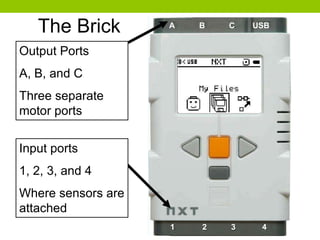
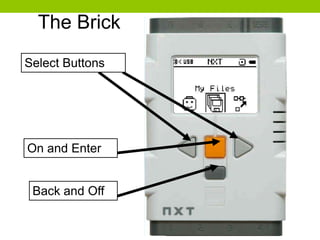
The Brick
Output Ports
A, B, and C
Three separate
motor ports
A B C USB
1 2 3 4
Input ports
1, 2, 3, and 4
Where sensors are
attached
Select Buttons
On and Enter
Back and Off
The Brick
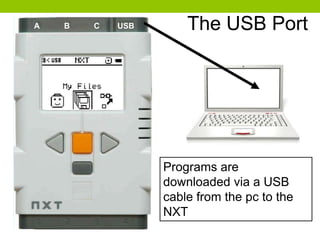
Programs are
downloaded via a USB
cable from the pc to the
NXT
The USB PortA B C USB
THE NXT-G INTERFACE
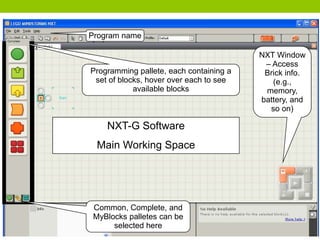
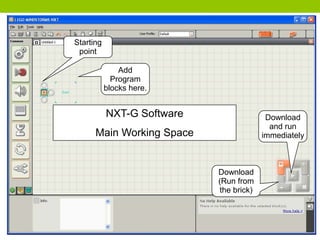
NXT-G Software
Main Working Space
Programming pallete, each containing a
set of blocks, hover over each to see
available blocks
NXT Window
– Access
Brick info.
(e.g.,
memory,
battery, and
so on)
Program name
Common, Complete, and
MyBlocks palletes can be
selected here
Add
Program
blocks here.
Download
and run
immediately
NXT-G Software
Main Working Space
Download
(Run from
the brick)
Starting
point
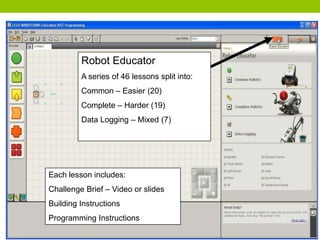
Robot Educator
A series of 46 lessons split into:
Common – Easier (20)
Complete – Harder (19)
Data Logging – Mixed (7)
Each lesson includes:
Challenge Brief – Video or slides
Building Instructions
Programming Instructions
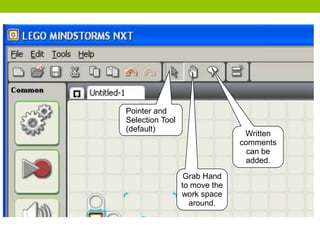
Written
comments
can be
added.
Pointer and
Selection Tool
(default)
Grab Hand
to move the
work space
around.
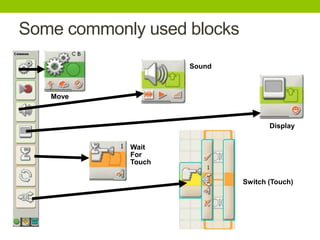
Move
Wait
For
Touch
Display
Sound
Switch (Touch)
Some commonly used blocks
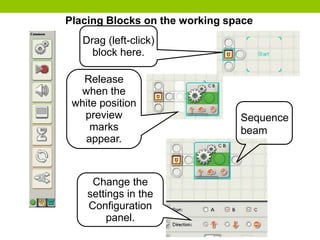
Drag (left-click)
block here.
Change the
settings in the
Configuration
panel.
Release
when the
white position
preview
marks
appear.
Placing Blocks on the working space
Sequence
beam
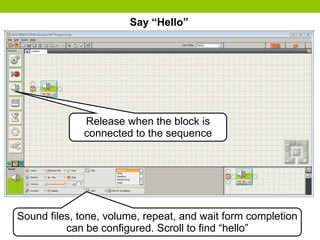
Say “Hello”
Release when the block is
connected to the sequence
Sound files, tone, volume, repeat, and wait form completion
can be configured. Scroll to find “hello”
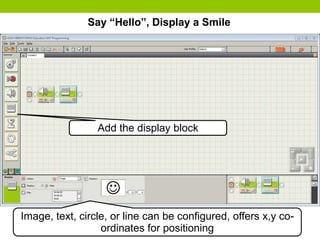
Say “Hello”, Display a Smile
Add the display block
Image, text, circle, or line can be configured, offers x,y co-
ordinates for positioning
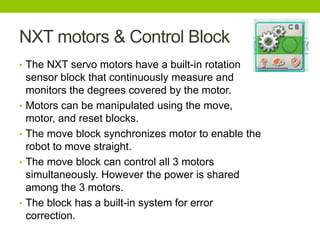
NXT motors & Control Block
• The NXT servo motors have a built-in rotation
sensor block that continuously measure and
monitors the degrees covered by the motor.
• Motors can be manipulated using the move,
motor, and reset blocks.
• The move block synchronizes motor to enable the
robot to move straight.
• The move block can control all 3 motors
simultaneously. However the power is shared
among the 3 motors.
• The block has a built-in system for error
correction.
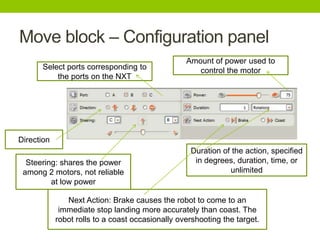
Move block – Configuration panel
Select ports corresponding to
the ports on the NXT
Amount of power used to
control the motor
Duration of the action, specified
in degrees, duration, time, or
unlimited
Direction
Steering: shares the power
among 2 motors, not reliable
at low power
Next Action: Brake causes the robot to come to an
immediate stop landing more accurately than coast. The
robot rolls to a coast occasionally overshooting the target.
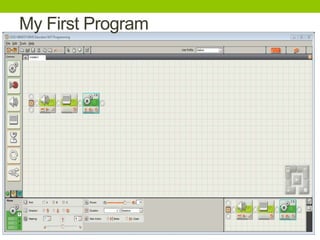
My First Program

Basic Programming Blocks

  • 1.
  • 2.
  • 3.
    The Brick Output Ports A,B, and C Three separate motor ports A B C USB 1 2 3 4 Input ports 1, 2, 3, and 4 Where sensors are attached
  • 4.
    Select Buttons On andEnter Back and Off The Brick
  • 5.
    Programs are downloaded viaa USB cable from the pc to the NXT The USB PortA B C USB
  • 6.
  • 7.
    NXT-G Software Main WorkingSpace Programming pallete, each containing a set of blocks, hover over each to see available blocks NXT Window – Access Brick info. (e.g., memory, battery, and so on) Program name Common, Complete, and MyBlocks palletes can be selected here
  • 8.
    Add Program blocks here. Download and run immediately NXT-GSoftware Main Working Space Download (Run from the brick) Starting point
  • 9.
    Robot Educator A seriesof 46 lessons split into: Common – Easier (20) Complete – Harder (19) Data Logging – Mixed (7) Each lesson includes: Challenge Brief – Video or slides Building Instructions Programming Instructions
  • 10.
    Written comments can be added. Pointer and SelectionTool (default) Grab Hand to move the work space around.
  • 11.
  • 12.
    Drag (left-click) block here. Changethe settings in the Configuration panel. Release when the white position preview marks appear. Placing Blocks on the working space Sequence beam
  • 13.
    Say “Hello” Release whenthe block is connected to the sequence Sound files, tone, volume, repeat, and wait form completion can be configured. Scroll to find “hello”
  • 14.
    Say “Hello”, Displaya Smile Add the display block Image, text, circle, or line can be configured, offers x,y co- ordinates for positioning
  • 15.
    NXT motors &Control Block • The NXT servo motors have a built-in rotation sensor block that continuously measure and monitors the degrees covered by the motor. • Motors can be manipulated using the move, motor, and reset blocks. • The move block synchronizes motor to enable the robot to move straight. • The move block can control all 3 motors simultaneously. However the power is shared among the 3 motors. • The block has a built-in system for error correction.
  • 16.
    Move block –Configuration panel Select ports corresponding to the ports on the NXT Amount of power used to control the motor Duration of the action, specified in degrees, duration, time, or unlimited Direction Steering: shares the power among 2 motors, not reliable at low power Next Action: Brake causes the robot to come to an immediate stop landing more accurately than coast. The robot rolls to a coast occasionally overshooting the target.
  • 17.