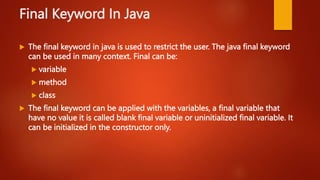
The document discusses method overloading and the final keyword in Java. It provides examples of overloading methods by changing the number and type of parameters. Method overloading allows writing methods with the same name but different signatures. The final keyword can be applied to variables, methods, and classes. It prevents modification of final variables, overriding of final methods, and extending of final classes. Blank final variables must be initialized in the constructor.

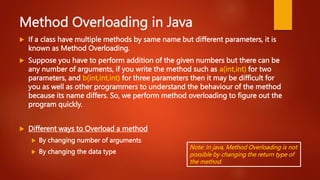
![1.Method Overloading by changing the no.
of arguments
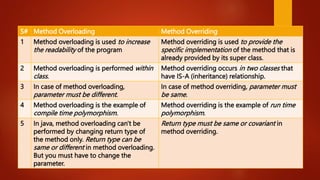
1. class Calculation{
2. void sum(int a,int b)
3. { System.out.println(a+b); }
4. void sum(int a,int b,int c)
5. { System.out.println(a+b+c); }
6.
7. public static void main(String args[ ]){
8. Calculation obj=new Calculation();
9. obj.sum(10,10,10);
10. obj.sum(20,20);
11. }
12. }](https://image.slidesharecdn.com/lecture5methodoverloadingfinal-240313113041-0c562e27/85/Lecture5_Method_overloading_Final-power-point-presentation-3-320.jpg)
![2. Method Overloading by changing data
type of argument
1. class Calculation2{
2. void sum(int a,int b)
3. { System.out.println(a+b); }
4. void sum(double a,double b)
5. { System.out.println(a+b); }
6.
7. public static void main(String args[]){
8. Calculation2 obj=new Calculation2();
9. obj.sum(10.5,10.5);
10. obj.sum(20,20);
11. }
12. }](https://image.slidesharecdn.com/lecture5methodoverloadingfinal-240313113041-0c562e27/85/Lecture5_Method_overloading_Final-power-point-presentation-4-320.jpg)
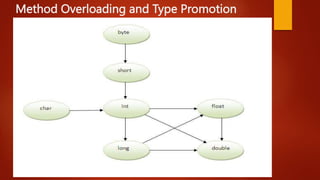
![Method Overloading and Type Promotion
1. class OverloadingCalculation1{
2. void sum(int a,long b)
3. { System.out.println(a+b); }
4. void sum(int a,int b,int c)
5. { System.out.println(a+b+c); }
6.
7. public static void main(String args[]){
8. OverloadingCalculation1 obj=new OverloadingCalculation1();
9. obj.sum(20,20); //now second int literal will be promoted to long
10. obj.sum(20,20,20);
11.
12. }
13. }
Note: One type is not de-promoted
implicitly for example double cannot be
de-promoted to any type implicitly.](https://image.slidesharecdn.com/lecture5methodoverloadingfinal-240313113041-0c562e27/85/Lecture5_Method_overloading_Final-power-point-presentation-6-320.jpg)


![Final Variable
If you make any variable as final, you cannot change the value of final
variable(It will be constant).
Example
1. class Bike9{
2. final int speedlimit=90; //final variable
3. void run( ){
4. speedlimit=400; //Error. Cannot change final Variable
5. }
6. public static void main(String args[]){
7. Bike9 obj=new Bike9( );
8. obj.run( );
9. }
10. }](https://image.slidesharecdn.com/lecture5methodoverloadingfinal-240313113041-0c562e27/85/Lecture5_Method_overloading_Final-power-point-presentation-11-320.jpg)
![Final Method
If you make any method as final, you cannot override it.
Example
1. class Bike{
2. final void run( ){ System.out.println("running"); }
3. }
4. class Honda extends Bike{
5. void run( ) //ERROR: Final method cannot be overridden
6. { System.out.println("running safely with 100kmph"); }
7.
8. public static void main(String args[ ]){
9. Honda honda= new Honda();
10. honda.run( );
11. }
12. }](https://image.slidesharecdn.com/lecture5methodoverloadingfinal-240313113041-0c562e27/85/Lecture5_Method_overloading_Final-power-point-presentation-12-320.jpg)
![Final Class
If you make any class as final, you cannot extend it.
Example
1. final class Bike{
2. Bike( ) { System.out.println(“Bike Class”); }
3. }
4. class Honda1 extends Bike{ //ERROR: Cannot extend final Class
5. void run( ){ System.out.println("running safely with 100kmph"); }
6. public static void main(String args[ ]){
7. Honda1 honda= new Honda( );
8. honda.run();
9. }
10. }](https://image.slidesharecdn.com/lecture5methodoverloadingfinal-240313113041-0c562e27/85/Lecture5_Method_overloading_Final-power-point-presentation-13-320.jpg)
![Inheritance of Final Methods
Final Method is inherited but final method cannot be overridden.
Example
1. class Bike{
2. final void run( ){ System.out.println("running..."); }
3. }
4. class Honda2 extends Bike{
5. public static void main(String args[ ]){
6. new Honda2().run();
7. }
8. }](https://image.slidesharecdn.com/lecture5methodoverloadingfinal-240313113041-0c562e27/85/Lecture5_Method_overloading_Final-power-point-presentation-14-320.jpg)
![Blank or uninitialized final variables
A final variable that is not initialized at
the time of declaration is known as
blank final variable.
If you want to create a variable that is
initialized at the time of creating
object and once initialized may not be
changed, it is useful. For example
Reg# in Student Class.
It can be initialized only in constructor
1. public class Student {
2. private final int reg_no;
3. private String name;
4. private String address;
5. public Student(int r, String n, String a){
6. reg_no = r;
7. name = n;
8. address = a; }
9. public static void main(String[ ] args) {
10. new Student(111, "Omer", "Rwp");
11. new Student(222, "Hamza", "Rwp");
12. }
13. }](https://image.slidesharecdn.com/lecture5methodoverloadingfinal-240313113041-0c562e27/85/Lecture5_Method_overloading_Final-power-point-presentation-15-320.jpg)
![Final parameter
If you declare any parameter as final, you cannot change the value of it.
Example
1. class Bike{
2. int cube(final int n){
3. n=n+2; //can't be changed as n is final
4. n*n*n;
5. }
6. public static void main(String args[]){
7. Bike b=new Bike();
8. b.cube(5);
9. }
10. }](https://image.slidesharecdn.com/lecture5methodoverloadingfinal-240313113041-0c562e27/85/Lecture5_Method_overloading_Final-power-point-presentation-16-320.jpg)


![[Deck] What's New in Spark-Iceberg Integration via DSV2.pptx](https://cdn.slidesharecdn.com/ss_thumbnails/deckwhatsnewinspark-icebergintegrationviadsv2-260210005337-25955b12-thumbnail.jpg?width=640&height=640&fit=bounds)


