INFORMATION
MANAGEMENT
LECTURE 1
TOPICS
Introduction to the course
Data vs. Information
File Systems
Database
Database Management System
Database Design
TOPICS
Introduction to the course
Data vs. Information
File Systems
Database
Database Management System
Database Design
Data vs. Information
• Data:
• Unprocessed information
• i.e. customer, course, employee
• Building blocks of information
• Information:
• Produced by processing data which is related
• i.e. credit card statement, phone bill, video rental
• Accurate and timely information is needed for decision making
• Good decision making is key to an organization’s survival
Transforming data into
information
topics
Introduction to the course
Data vs. Information
File Systems
Database
Database Management System
Database Design
File Systems
• Using a simple business example:
• A customer orders product from a Retailer
• Sales Department would take the order information from the
customer and not what products they want to order
• Sales Department would send a request to the Shipping
Department to deliver a product to a customer
File Systems
• Using a simple business example:
• The Shipping Department would enter in the information about
the customer who ordered and create a shipping document
• The Shipping Department would print the shipping document and
send the products to the Customer
File Systems
• Possible files:
• Sales Department:
• Customer, Product, Sale
• Shipping Department:
• Customer, Shipping Document
• Can anybody see a problem with this?
• Where would you go to look up the phone number for
a customer?
Data Redundancy
• Same data appears in more than one location
• Results in data inconsistency
• Data anomalies result when changes to redundant data are
not made successfully
Data Anomalies
• Modification anomalies
• Insertion anomalies
• Deletion anomalies
File Systems
• Programs were written to access data.
• i.e. to get information about a customer, a program would be
written to do just that (and nothing else).
• Program would go against a specific file (or files, depending on it’s
purpose)
• If other information was needed, another program was
written
• Programmer had to specify exactly how the processing of
the data needed to be done
File Systems
• What if you wanted some information from a file quickly?
• Could not be done using a traditional file system.
• Why? Programs specified exact structure of a file. Think of
the complexity if information was required from multiple
files
File Systems
• What if you wanted to change the structure of a file?
• All the programs that used that file would have to be
changed
topics
Introduction to the course
Data vs. Information
File Systems
Database
Database Management System
Database Design
Database
• Database
• A structure that contains logically related data in a single repository
• A Database contains:
• End user component – data
• Metadata – data about data
Database
• Types of Databases
• According to Location
• Centralized
• Supports one or more users at a time
• Database is in one physical location
• Database could be on a pc, a mid-range, or a main-frame
• Distributed:
• Data is distributed at several physical locations
• Database at each physical locations can vary (i.e. one location might have the
database on a mid-range, one might have it on a pc)
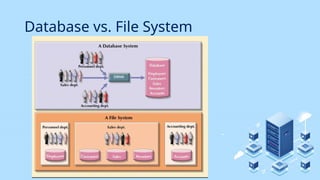
Database vs. File System
Database Uses
• Production or Transaction
• Supports day-to-day operations
• Decision Support
• Information for tactical or strategic decision making
• Data Warehouse
• Historical data
Advantages of Database Processing
• Ability to get more information from the same amount of
data
• i.e. all customer related data is in one customer place
• Sharing data
• Data is available to be use by authorized users
• Controlling Redundancy
• Only a single copy of the data exists
Advantages of Database Processing
• Balancing
• Databases are structured to benefit all users in the organization,
not just a single group
• Expanding security
• Access to data can be password protected or can restrict access to
data – read only, update
Advantages of Database Processing
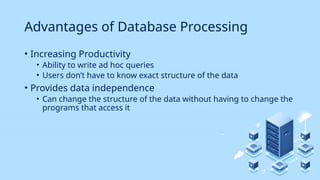
• Increasing Productivity
• Ability to write ad hoc queries
• Users don’t have to know exact structure of the data
• Provides data independence
• Can change the structure of the data without having to change the
programs that access it
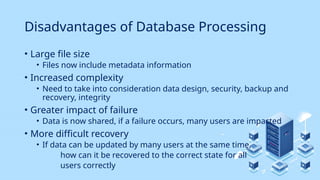
Disadvantages of Database Processing
• Large file size
• Files now include metadata information
• Increased complexity
• Need to take into consideration data design, security, backup and
recovery, integrity
• Greater impact of failure
• Data is now shared, if a failure occurs, many users are impacted
• More difficult recovery
• If data can be updated by many users at the same time,
how can it be recovered to the correct state for all
users correctly
topics
Introduction to the course
Data vs. Information
File Systems
Database
Database Management System
Database Design
Database Management System (DBMS)
• Collection of programs that manages database structure
and controls access to the database (and ultimately the
data)
• Manages sharing of data among multiple applications and
users
• Data is more consistent
• Ability to do ad hoc querying
Database Management System (DBMS)
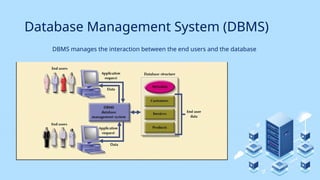
DBMS manages the interaction between the end users and the database
Importance of a DBMS
• For Top Management
• Provides information necessary for strategic decision making and
planning
• Provides access to external and internal data
• Provides information on company performance and whether the
company is achieving their goals (targets) or not
• For Middle Management
• Provides information necessary for tactical decision
making planning
Importance of a DBMS
• For Operational Management
• Provides timely information
• Represents and supports the company operations as closely as
possible (operational data)
• For Other Users
• Provides timely information
• Produces results within specified performance levels
topics
Introduction to the course
Data vs. Information
File Systems
Database
Database Management System
Database Design
Database Design
• Defines the database’s expected use
• Avoids redundant data (unnecessarily duplicated)
• Eliminates poorly designed databases
• Done within a systems development life cycle (SDLC)
framework
• Database Design has it’s own framework, within the SDLC
called the Database Life Cycle (DBLC)

Lecture1 Information Management Introduction

  • 1.
  • 2.
    TOPICS Introduction to thecourse Data vs. Information File Systems Database Database Management System Database Design
  • 3.
    TOPICS Introduction to thecourse Data vs. Information File Systems Database Database Management System Database Design
  • 4.
    Data vs. Information •Data: • Unprocessed information • i.e. customer, course, employee • Building blocks of information • Information: • Produced by processing data which is related • i.e. credit card statement, phone bill, video rental • Accurate and timely information is needed for decision making • Good decision making is key to an organization’s survival
  • 5.
  • 6.
    topics Introduction to thecourse Data vs. Information File Systems Database Database Management System Database Design
  • 7.
    File Systems • Usinga simple business example: • A customer orders product from a Retailer • Sales Department would take the order information from the customer and not what products they want to order • Sales Department would send a request to the Shipping Department to deliver a product to a customer
  • 8.
    File Systems • Usinga simple business example: • The Shipping Department would enter in the information about the customer who ordered and create a shipping document • The Shipping Department would print the shipping document and send the products to the Customer
  • 9.
    File Systems • Possiblefiles: • Sales Department: • Customer, Product, Sale • Shipping Department: • Customer, Shipping Document • Can anybody see a problem with this? • Where would you go to look up the phone number for a customer?
  • 10.
    Data Redundancy • Samedata appears in more than one location • Results in data inconsistency • Data anomalies result when changes to redundant data are not made successfully
  • 11.
    Data Anomalies • Modificationanomalies • Insertion anomalies • Deletion anomalies
  • 12.
    File Systems • Programswere written to access data. • i.e. to get information about a customer, a program would be written to do just that (and nothing else). • Program would go against a specific file (or files, depending on it’s purpose) • If other information was needed, another program was written • Programmer had to specify exactly how the processing of the data needed to be done
  • 13.
    File Systems • Whatif you wanted some information from a file quickly? • Could not be done using a traditional file system. • Why? Programs specified exact structure of a file. Think of the complexity if information was required from multiple files
  • 14.
    File Systems • Whatif you wanted to change the structure of a file? • All the programs that used that file would have to be changed
  • 15.
    topics Introduction to thecourse Data vs. Information File Systems Database Database Management System Database Design
  • 16.
    Database • Database • Astructure that contains logically related data in a single repository • A Database contains: • End user component – data • Metadata – data about data
  • 17.
    Database • Types ofDatabases • According to Location • Centralized • Supports one or more users at a time • Database is in one physical location • Database could be on a pc, a mid-range, or a main-frame • Distributed: • Data is distributed at several physical locations • Database at each physical locations can vary (i.e. one location might have the database on a mid-range, one might have it on a pc)
  • 18.
  • 19.
    Database Uses • Productionor Transaction • Supports day-to-day operations • Decision Support • Information for tactical or strategic decision making • Data Warehouse • Historical data
  • 20.
    Advantages of DatabaseProcessing • Ability to get more information from the same amount of data • i.e. all customer related data is in one customer place • Sharing data • Data is available to be use by authorized users • Controlling Redundancy • Only a single copy of the data exists
  • 21.
    Advantages of DatabaseProcessing • Balancing • Databases are structured to benefit all users in the organization, not just a single group • Expanding security • Access to data can be password protected or can restrict access to data – read only, update
  • 22.
    Advantages of DatabaseProcessing • Increasing Productivity • Ability to write ad hoc queries • Users don’t have to know exact structure of the data • Provides data independence • Can change the structure of the data without having to change the programs that access it
  • 23.
    Disadvantages of DatabaseProcessing • Large file size • Files now include metadata information • Increased complexity • Need to take into consideration data design, security, backup and recovery, integrity • Greater impact of failure • Data is now shared, if a failure occurs, many users are impacted • More difficult recovery • If data can be updated by many users at the same time, how can it be recovered to the correct state for all users correctly
  • 24.
    topics Introduction to thecourse Data vs. Information File Systems Database Database Management System Database Design
  • 25.
    Database Management System(DBMS) • Collection of programs that manages database structure and controls access to the database (and ultimately the data) • Manages sharing of data among multiple applications and users • Data is more consistent • Ability to do ad hoc querying
  • 26.
    Database Management System(DBMS) DBMS manages the interaction between the end users and the database
  • 27.
    Importance of aDBMS • For Top Management • Provides information necessary for strategic decision making and planning • Provides access to external and internal data • Provides information on company performance and whether the company is achieving their goals (targets) or not • For Middle Management • Provides information necessary for tactical decision making planning
  • 28.
    Importance of aDBMS • For Operational Management • Provides timely information • Represents and supports the company operations as closely as possible (operational data) • For Other Users • Provides timely information • Produces results within specified performance levels
  • 29.
    topics Introduction to thecourse Data vs. Information File Systems Database Database Management System Database Design
  • 30.
    Database Design • Definesthe database’s expected use • Avoids redundant data (unnecessarily duplicated) • Eliminates poorly designed databases • Done within a systems development life cycle (SDLC) framework • Database Design has it’s own framework, within the SDLC called the Database Life Cycle (DBLC)