Database Development in SQL Server
Lecture 4
Triggers
Triggers
An SQL Server trigger is a T/SQL procedure that
is automatically invoked when a specified
database activity occurs. Usually when a data
manipulation language (DML) event takes
place that affects the table or view defined in
the trigger.
DML events include INSERT, UPDATE, or
DELETE statements.
Using of Triggers: 1
Triggers can be used to:
- Enforce business rules
- Implement referential integrity actions
- Query other tables
- Audit changes
- Replicate data
- Include complex Transact-SQL statements
Using of Triggers: 2
SQL Server supports INSTEAD OF and AFTER triggers:
- A table may have one or more AFTER triggers
- AFTER triggers may not be assigned to views
- A view or table may have only one INSTEAD OF trigger for
each triggering action
The trigger and the statement that fires it are treated as a single
transaction, which can be rolled back from within the trigger.
If a severe error is detected (for example, insufficient disk
space), the entire transaction automatically rolls back.
Creating DML Triggers
CREATE TRIGGER [ schema_name . ]trigger_name
ON { table | view }
[ WITH [ ENCRYPTION ]|
[ EXECUTE AS Clause ] [ ,...n ] ]
{ FOR | AFTER | INSTEAD OF }
{ [ INSERT ] [ , ] [ UPDATE ] [ , ] [ DELETE ] }
[ NOT FOR REPLICATION ]
AS { sql_statement [ ; ] [ ,...n ] | EXTERNAL NAME
<method specifier [ ; ] > }
<dml_trigger_option> ::=
[ ENCRYPTION ]
[ EXECUTE AS Clause ]
<method_specifier> ::=
assembly_name.class_name.method_name
AFTER trigger
AFTER triggers are executed after the action of the
INSERT, UPDATE, MERGE, or DELETE statement is
performed.
AFTER triggers are never executed if a constraint
violation occurs; therefore, these triggers cannot be
used for any processing that might prevent constraint
violations.
For every INSERT, UPDATE, or DELETE action
specified in a MERGE statement, the corresponding
trigger is fired for each DML operation.
FOR is synonym AFTER.
INSTEAD OF trigger
INSTEAD OF triggers override the standard actions of
the triggering statement. Therefore, they can be
used to perform error or value checking on one or
more columns and the perform additional actions
before insert, updating or deleting the row or rows.
The primary advantage of INSTEAD OF triggers is that
they enable views that would not be updatable to
support updates. For example, a view based on
multiple base tables must use an INSTEAD OF
trigger to support inserts, updates, and deletes that
reference data in more than one table.
Another advantage of INSTEAD OF triggers is that they
enable you to code logic that can reject parts of a
batch while letting other parts of a batch to succeed.
Retrieving data inside triggers
DML triggers use the deleted and inserted logical
(conceptual) tables. They are structurally similar to the table
on which the trigger is defined, that is, the table on which
the user action is tried. The deleted and inserted tables
hold the old values or new values of the rows that may be
changed by the user action.
For example, to retrieve all values in the deleted table, use:
SELECT * FROM deleted
Tables inserted and deleted cannot be modified.
Additional trigger options
WITH ENCRYPTION
Obfuscates the text of the CREATE TRIGGER statement. Using
WITH ENCRYPTION prevents the trigger from being published as
part of SQL Server replication. WITH ENCRYPTION cannot be
specified for CLR triggers.
EXECUTE AS
Specifies the security context under which the trigger is executed.
Enables you to control which user account the instance of SQL
Server uses to validate permissions on any database objects that
are referenced by the trigger.
NOT FOR REPLICATION
Indicates that the trigger should not be executed when a replication
agent modifies the table that is involved in the trigger.
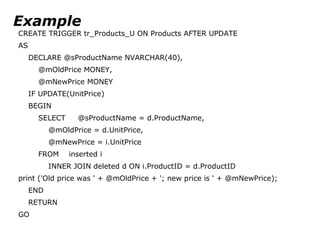
Example
CREATE TRIGGER tr_Products_U ON Products AFTER UPDATE
AS
DECLARE @sProductName NVARCHAR(40),
@mOldPrice MONEY,
@mNewPrice MONEY
IF UPDATE(UnitPrice)
BEGIN
SELECT @sProductName = d.ProductName,
@mOldPrice = d.UnitPrice,
@mNewPrice = i.UnitPrice
FROM inserted i
INNER JOIN deleted d ON i.ProductID = d.ProductID
print ('Old price was ' + @mOldPrice + '; new price is ' + @mNewPrice);
END
RETURN
GO
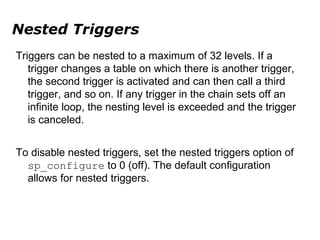
Nested Triggers
Triggers can be nested to a maximum of 32 levels. If a
trigger changes a table on which there is another trigger,
the second trigger is activated and can then call a third
trigger, and so on. If any trigger in the chain sets off an
infinite loop, the nesting level is exceeded and the trigger
is canceled.
To disable nested triggers, set the nested triggers option of
sp_configure to 0 (off). The default configuration
allows for nested triggers.

Lecture 4. MS SQL. DML Triggers

  • 1.
    Database Development inSQL Server Lecture 4 Triggers
  • 2.
    Triggers An SQL Servertrigger is a T/SQL procedure that is automatically invoked when a specified database activity occurs. Usually when a data manipulation language (DML) event takes place that affects the table or view defined in the trigger. DML events include INSERT, UPDATE, or DELETE statements.
  • 3.
    Using of Triggers:1 Triggers can be used to: - Enforce business rules - Implement referential integrity actions - Query other tables - Audit changes - Replicate data - Include complex Transact-SQL statements
  • 4.
    Using of Triggers:2 SQL Server supports INSTEAD OF and AFTER triggers: - A table may have one or more AFTER triggers - AFTER triggers may not be assigned to views - A view or table may have only one INSTEAD OF trigger for each triggering action The trigger and the statement that fires it are treated as a single transaction, which can be rolled back from within the trigger. If a severe error is detected (for example, insufficient disk space), the entire transaction automatically rolls back.
  • 5.
    Creating DML Triggers CREATETRIGGER [ schema_name . ]trigger_name ON { table | view } [ WITH [ ENCRYPTION ]| [ EXECUTE AS Clause ] [ ,...n ] ] { FOR | AFTER | INSTEAD OF } { [ INSERT ] [ , ] [ UPDATE ] [ , ] [ DELETE ] } [ NOT FOR REPLICATION ] AS { sql_statement [ ; ] [ ,...n ] | EXTERNAL NAME <method specifier [ ; ] > } <dml_trigger_option> ::= [ ENCRYPTION ] [ EXECUTE AS Clause ] <method_specifier> ::= assembly_name.class_name.method_name
  • 6.
    AFTER trigger AFTER triggersare executed after the action of the INSERT, UPDATE, MERGE, or DELETE statement is performed. AFTER triggers are never executed if a constraint violation occurs; therefore, these triggers cannot be used for any processing that might prevent constraint violations. For every INSERT, UPDATE, or DELETE action specified in a MERGE statement, the corresponding trigger is fired for each DML operation. FOR is synonym AFTER.
  • 7.
    INSTEAD OF trigger INSTEADOF triggers override the standard actions of the triggering statement. Therefore, they can be used to perform error or value checking on one or more columns and the perform additional actions before insert, updating or deleting the row or rows. The primary advantage of INSTEAD OF triggers is that they enable views that would not be updatable to support updates. For example, a view based on multiple base tables must use an INSTEAD OF trigger to support inserts, updates, and deletes that reference data in more than one table. Another advantage of INSTEAD OF triggers is that they enable you to code logic that can reject parts of a batch while letting other parts of a batch to succeed.
  • 8.
    Retrieving data insidetriggers DML triggers use the deleted and inserted logical (conceptual) tables. They are structurally similar to the table on which the trigger is defined, that is, the table on which the user action is tried. The deleted and inserted tables hold the old values or new values of the rows that may be changed by the user action. For example, to retrieve all values in the deleted table, use: SELECT * FROM deleted Tables inserted and deleted cannot be modified.
  • 9.
    Additional trigger options WITHENCRYPTION Obfuscates the text of the CREATE TRIGGER statement. Using WITH ENCRYPTION prevents the trigger from being published as part of SQL Server replication. WITH ENCRYPTION cannot be specified for CLR triggers. EXECUTE AS Specifies the security context under which the trigger is executed. Enables you to control which user account the instance of SQL Server uses to validate permissions on any database objects that are referenced by the trigger. NOT FOR REPLICATION Indicates that the trigger should not be executed when a replication agent modifies the table that is involved in the trigger.
  • 10.
    Example CREATE TRIGGER tr_Products_UON Products AFTER UPDATE AS DECLARE @sProductName NVARCHAR(40), @mOldPrice MONEY, @mNewPrice MONEY IF UPDATE(UnitPrice) BEGIN SELECT @sProductName = d.ProductName, @mOldPrice = d.UnitPrice, @mNewPrice = i.UnitPrice FROM inserted i INNER JOIN deleted d ON i.ProductID = d.ProductID print ('Old price was ' + @mOldPrice + '; new price is ' + @mNewPrice); END RETURN GO
  • 11.
    Nested Triggers Triggers canbe nested to a maximum of 32 levels. If a trigger changes a table on which there is another trigger, the second trigger is activated and can then call a third trigger, and so on. If any trigger in the chain sets off an infinite loop, the nesting level is exceeded and the trigger is canceled. To disable nested triggers, set the nested triggers option of sp_configure to 0 (off). The default configuration allows for nested triggers.