Introduction
Evolution of Telecommunications
Dr. Rajashree Narendra
Professor-ECE
SOE, DSU
The Electromagnetic Spectrum
Shortest wavelengths
(Most energetic photons)
Longest wavelengths
(Least energetic photons)
E = hn = hc/l
h = 6.6x10⁻³⁴ [J*sec]
(Planck’s constant)
8/25/2022
■ Telecommunications
Communication over a distance
■ The exchange of information in any form (voice, data,
text, images, audio, video) over networks
The electronic transmission of signals for
communications, include means such as:
■ Telephone
■ Radio
■ Television
■ Fascimile
Telecommunications
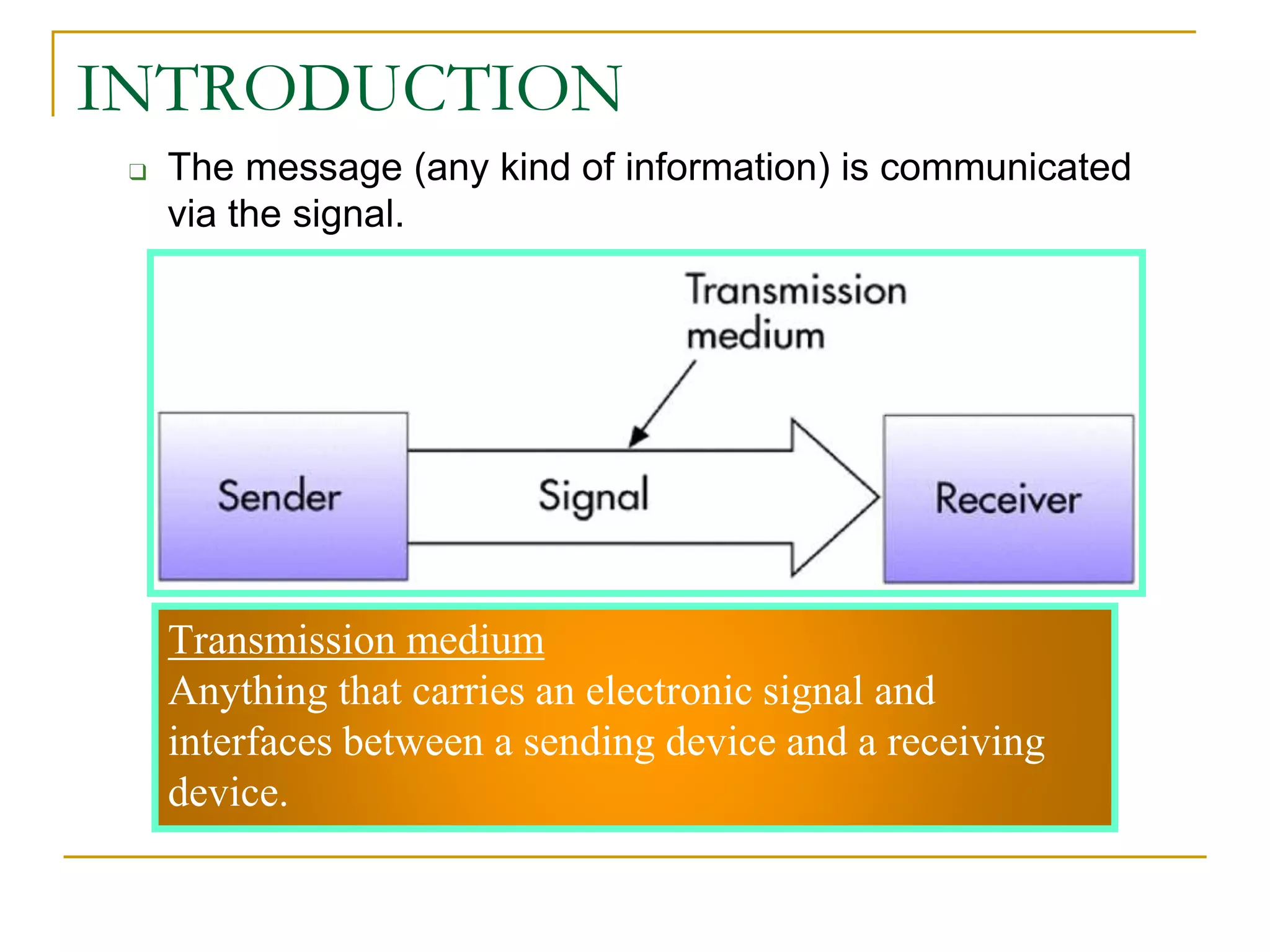
❑ The message (any kind of information) is communicated
via the signal.
INTRODUCTION
Transmission medium
Anything that carries an electronic signal and
interfaces between a sending device and a receiving
device.
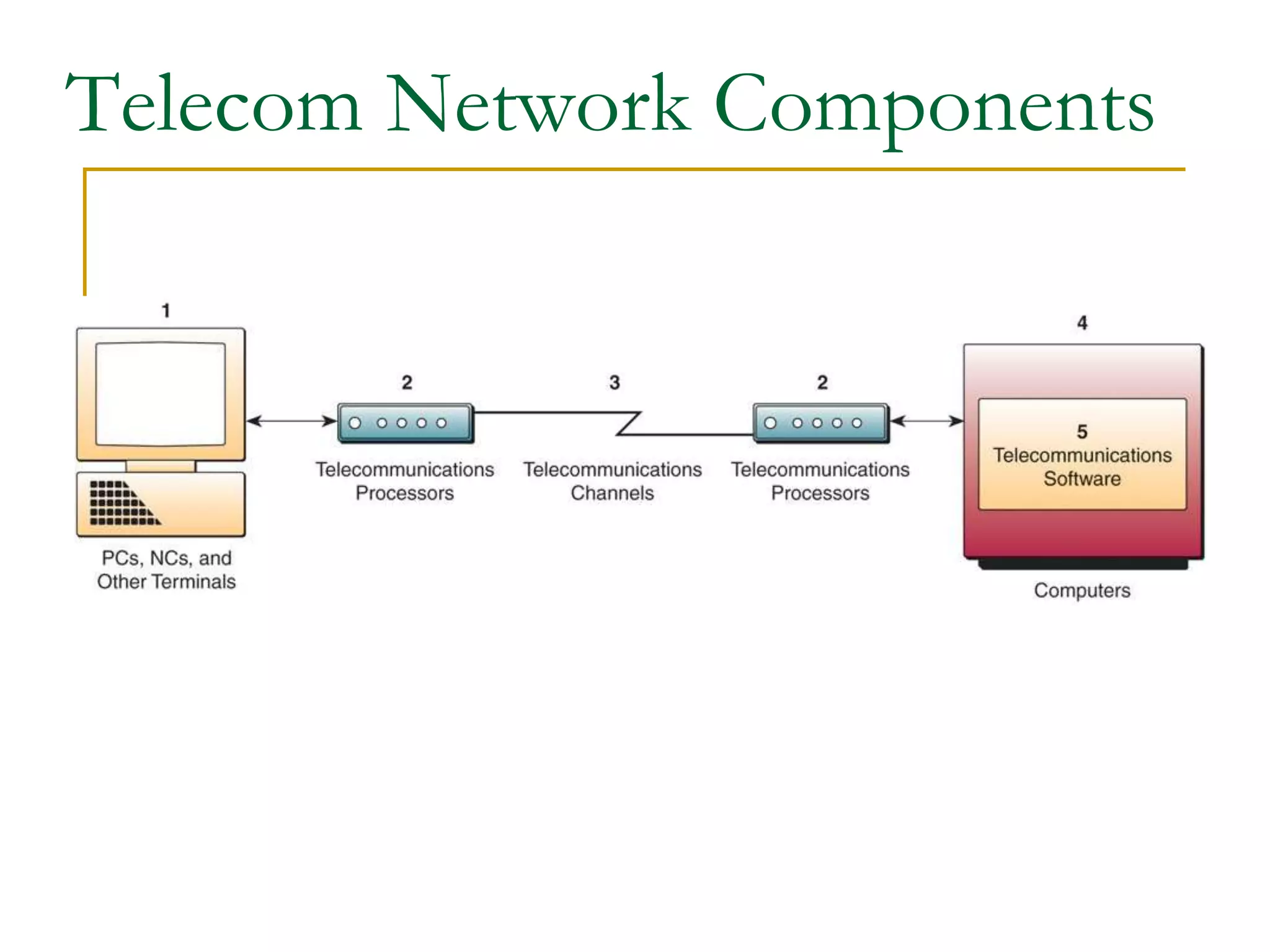
Telecom Network Components
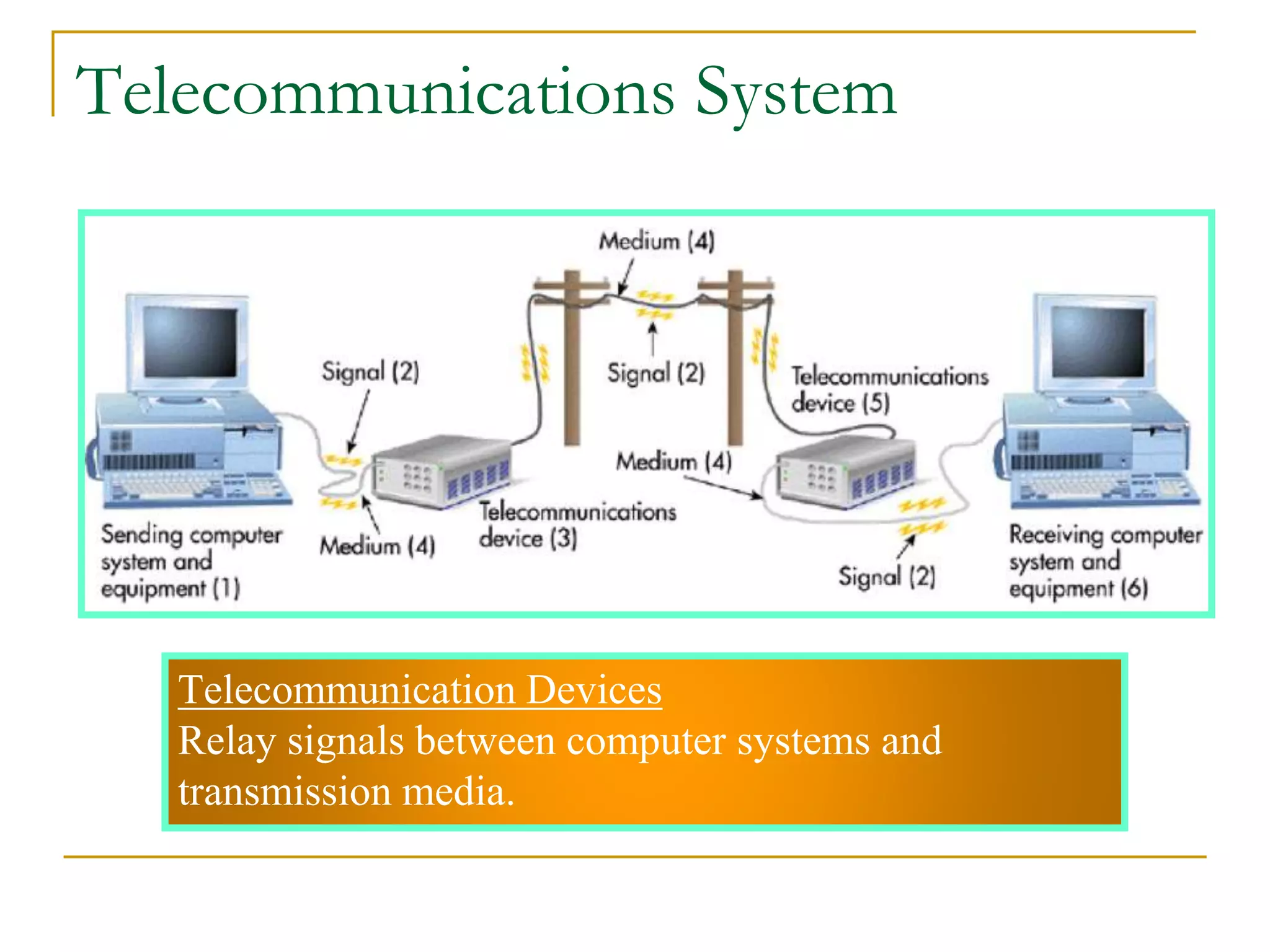
Telecommunication Devices
Relay signals between computer systems and
transmission media.
Telecommunications System
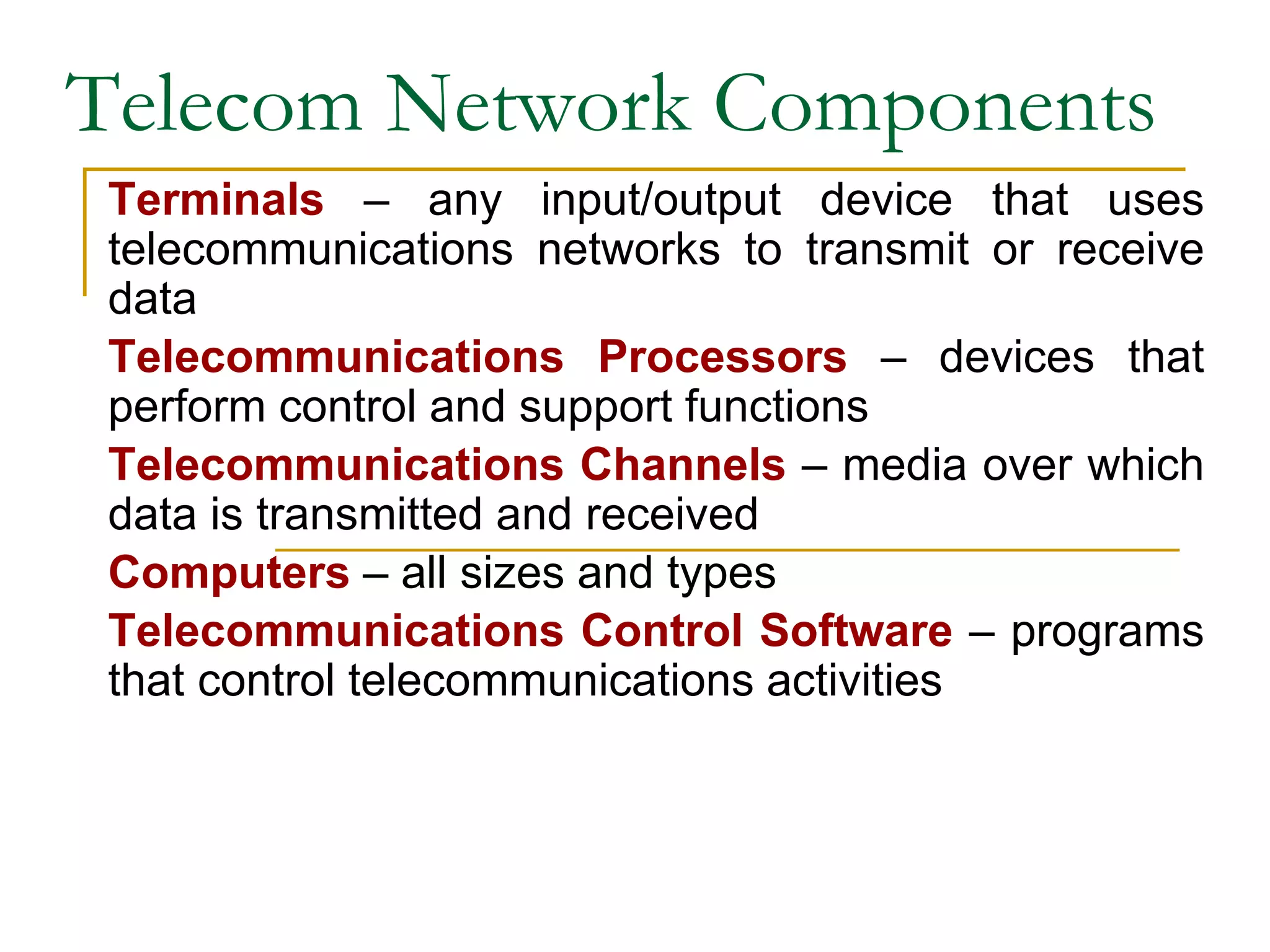
Telecom Network Components
Terminals – any input/output device that uses
telecommunications networks to transmit or receive
data
Telecommunications Processors – devices that
perform control and support functions
Telecommunications Channels – media over which
data is transmitted and received
Computers – all sizes and types
Telecommunications Control Software – programs
that control telecommunications activities
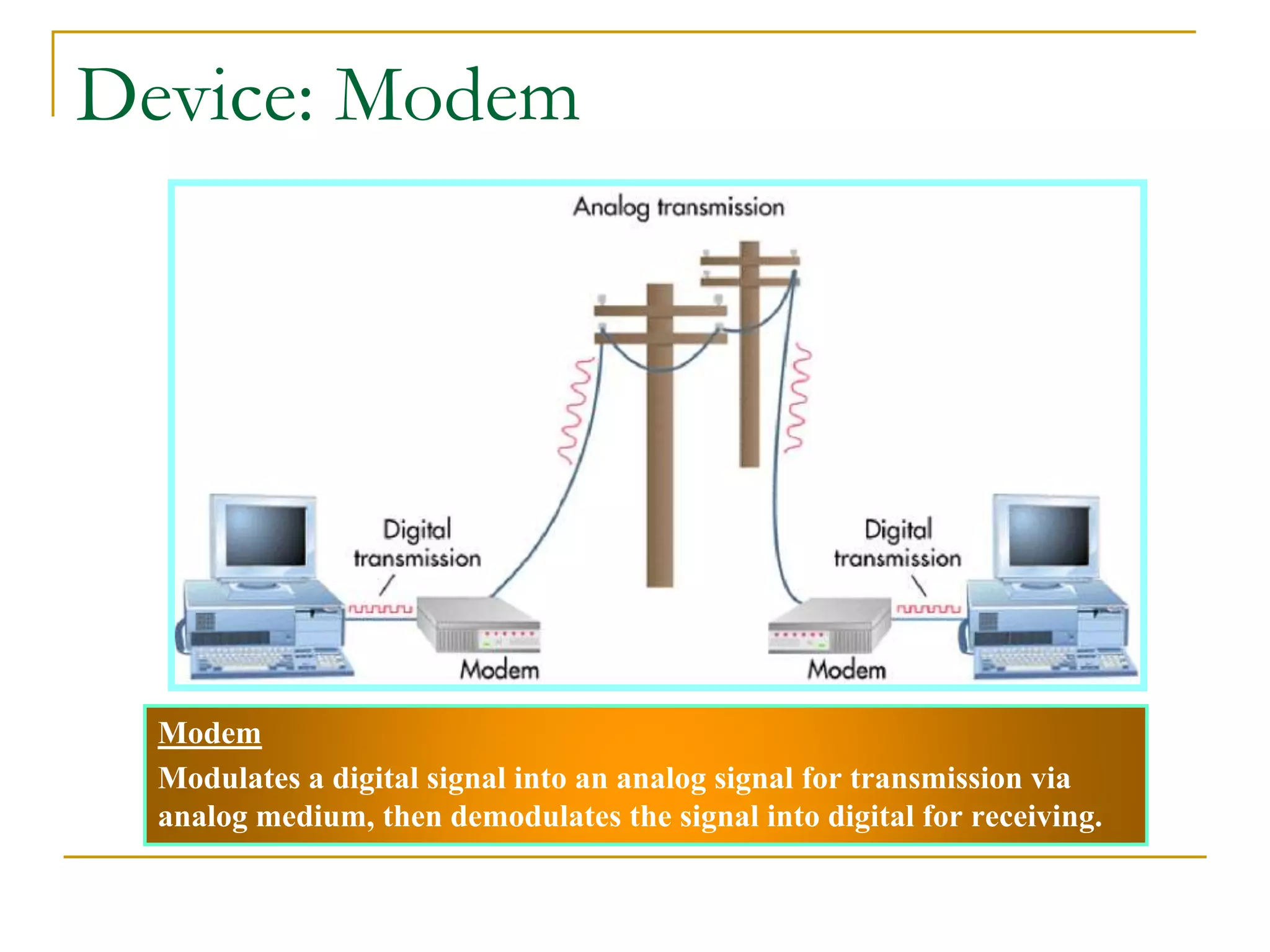
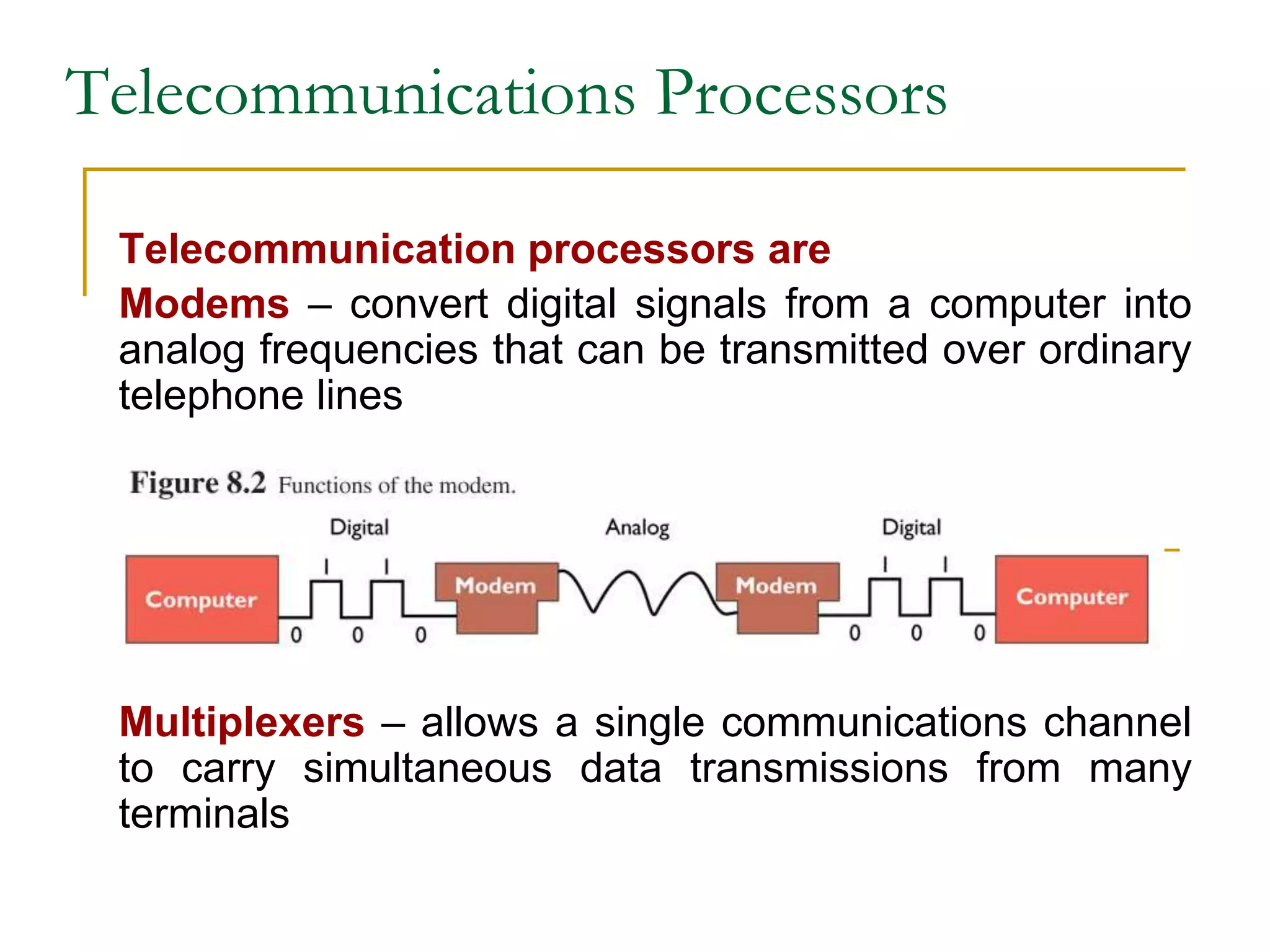
Modem
Modulates a digital signal into an analog signal for transmission via
analog medium, then demodulates the signal into digital for receiving.
Device: Modem
Figure
6.11
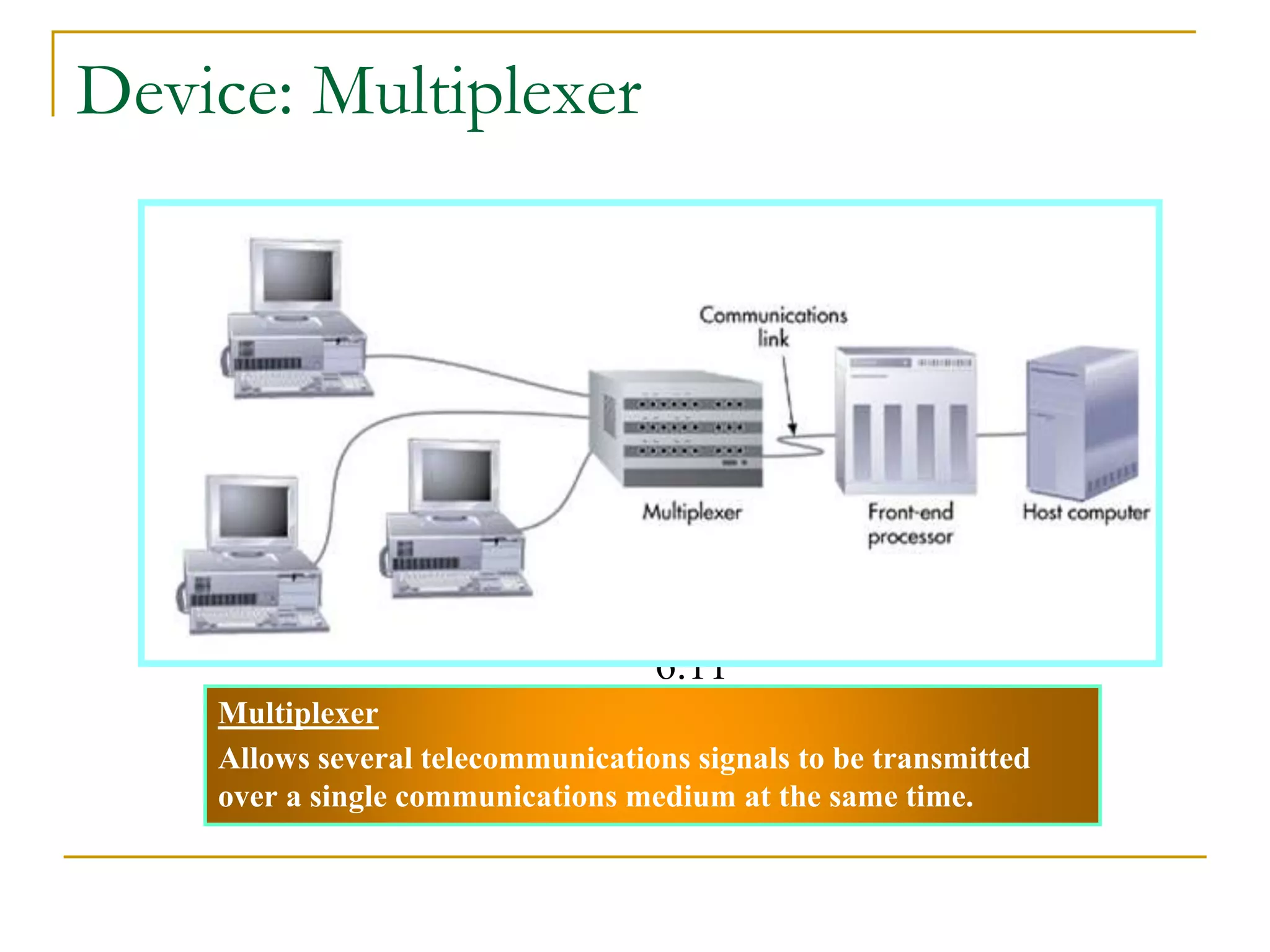
Multiplexer
Allows several telecommunications signals to be transmitted
over a single communications medium at the same time.
Device: Multiplexer
Telecommunications Processors
Telecommunication processors are
Modems – convert digital signals from a computer into
analog frequencies that can be transmitted over ordinary
telephone lines
Multiplexers – allows a single communications channel
to carry simultaneous data transmissions from many
terminals
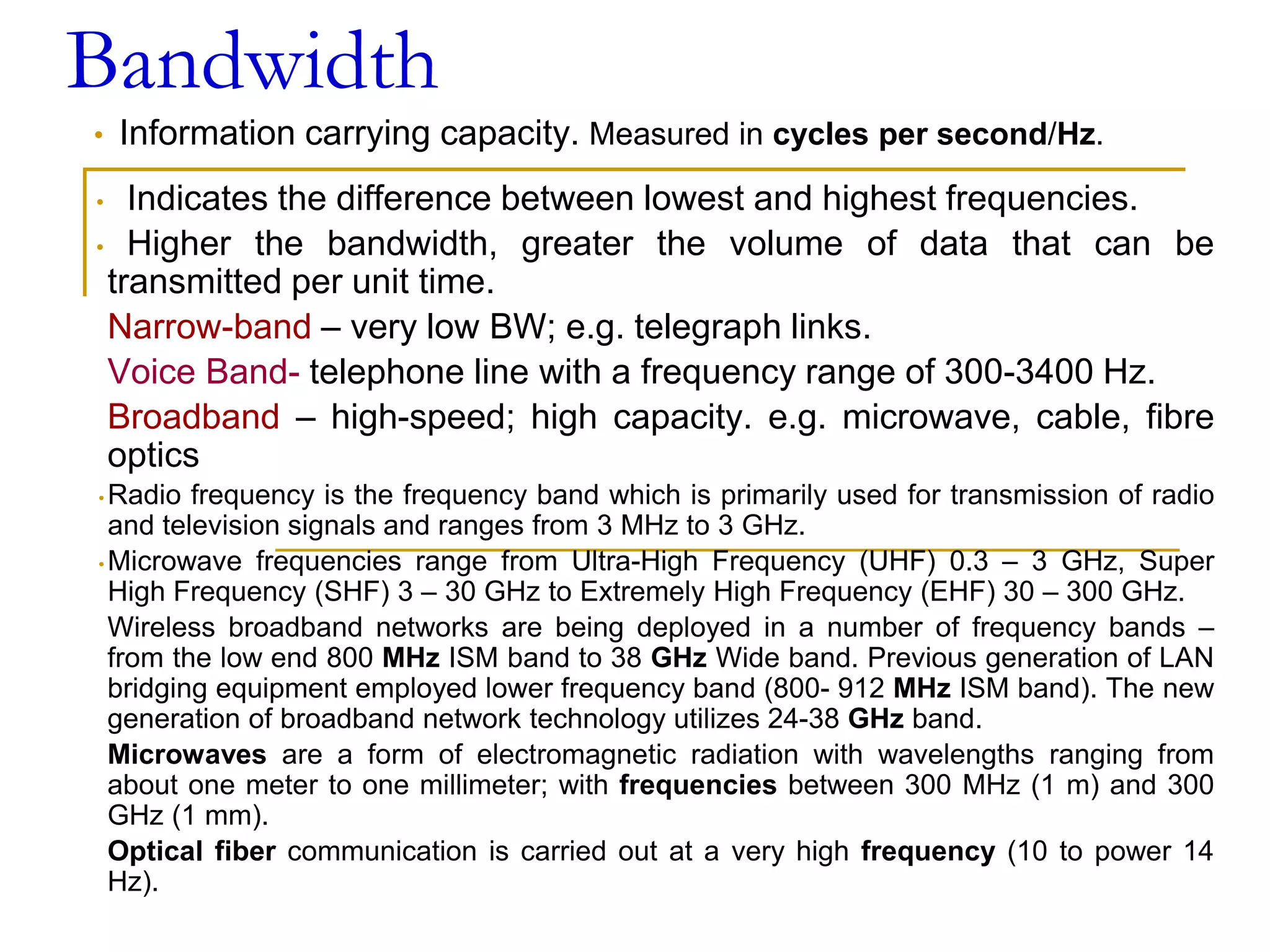
Bandwidth
• Information carrying capacity. Measured in cycles per second/Hz.
• Indicates the difference between lowest and highest frequencies.
• Higher the bandwidth, greater the volume of data that can be
transmitted per unit time.
Narrow-band – very low BW; e.g. telegraph links.
Voice Band- telephone line with a frequency range of 300-3400 Hz.
Broadband – high-speed; high capacity. e.g. microwave, cable, fibre
optics
• Radio frequency is the frequency band which is primarily used for transmission of radio
and television signals and ranges from 3 MHz to 3 GHz.
• Microwave frequencies range from Ultra-High Frequency (UHF) 0.3 – 3 GHz, Super
High Frequency (SHF) 3 – 30 GHz to Extremely High Frequency (EHF) 30 – 300 GHz.
Wireless broadband networks are being deployed in a number of frequency bands –
from the low end 800 MHz ISM band to 38 GHz Wide band. Previous generation of LAN
bridging equipment employed lower frequency band (800- 912 MHz ISM band). The new
generation of broadband network technology utilizes 24-38 GHz band.
Microwaves are a form of electromagnetic radiation with wavelengths ranging from
about one meter to one millimeter; with frequencies between 300 MHz (1 m) and 300
GHz (1 mm).
Optical fiber communication is carried out at a very high frequency (10 to power 14
Hz).
Data Transfer Rate
• Amount of data that can be transmitted
through the channel.
• Expressed in number of bits per second or bit
rate (bps).
• Baud rate - signal change from positive to
negative or vice versa.
❑ - may not be always same as bit rate.
Types of Signals: Analog and Digital
Analog signal
• Continuous waveform
• Passes through communications medium
• Used for voice communications
Digital signal
• Discrete waveform
• Transmits data coded into two discrete states as
1-bits and 0-bits
• Used for data communications
Communication Subnet
Switching devices- used for switching data
signals from source to destination point.
Telephone exchange- signals on incoming lines
are transmitted to appropriate outgoing lines.
Transmission lines- that carry data signals from
one host to another .
- also known as circuits or trunks.
- speed as well as efficiency depend on the
speed at which the transmission lines can
transmit the data.
- e.g. optical fibres, twisted pair, coaxial cable
etc.
Switching Alternatives
Circuit Switching – a switch opens a circuit to
establish a link between a sender and receiver; it
remains open until the communication session is
completed.
Packet Switching – messages are divided into
fixed or variable length packets, and packets are
sent across networks.
■ Twisted Pair Wire Cable
❑ Insulated pairs of wires historically used in
telephone service and to connect computer
devices.
■ Coaxial Cable
❑ Consists of an inner conductor wire surrounded by
insulation, called the dielectric. The dielectric is
surrounded by a conductive shield, which is
surrounded by a non-conductive jacket. Coaxial
cable has better data transmission rate than
twisted pair.
❑ Optical Fiber
Consists of higher index glass core and lower index
cladding. This is covered with Plastic coating and
is available in cables
Types of Telecommunication Media
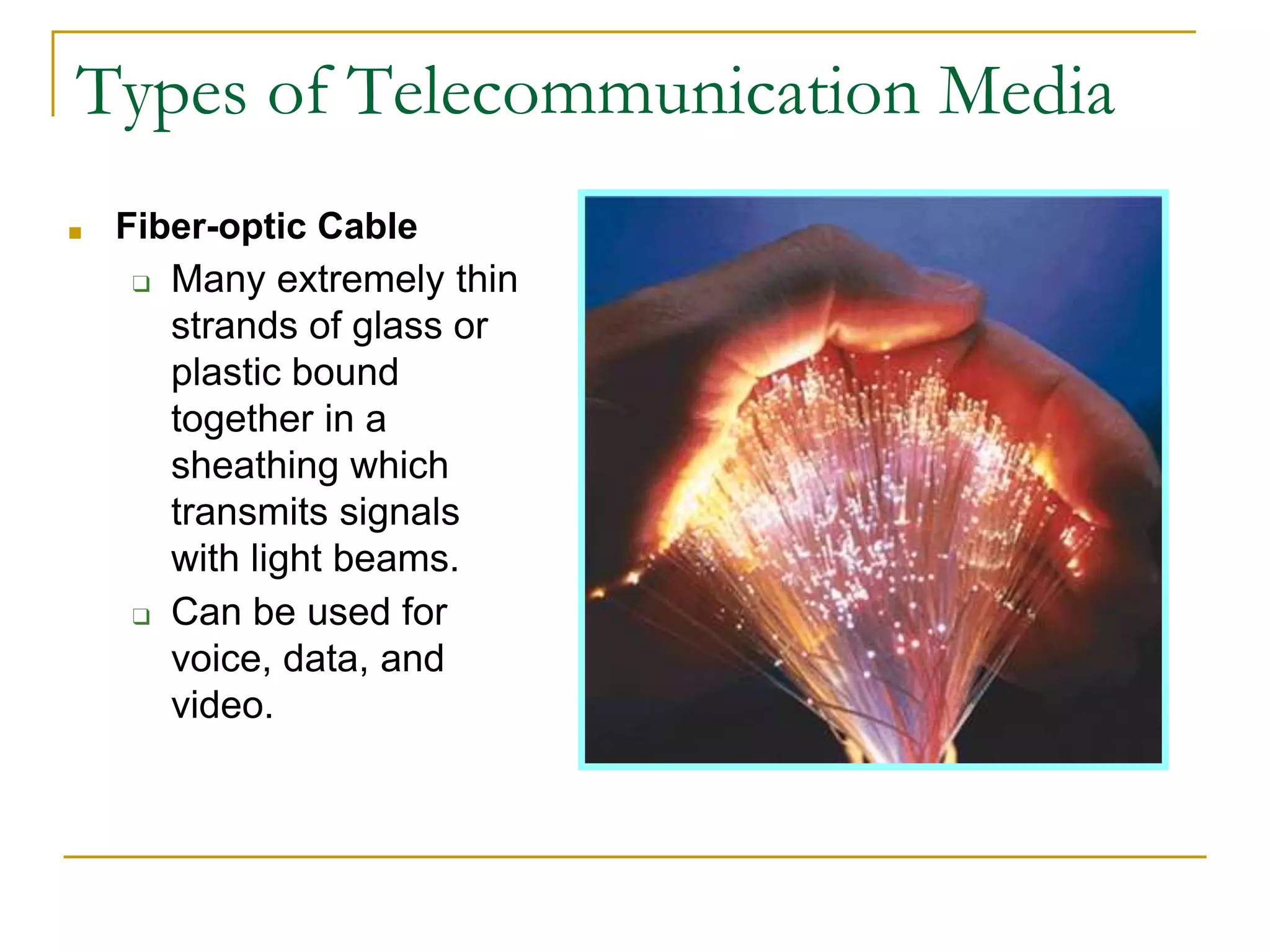
■ Fiber-optic Cable
❑ Many extremely thin
strands of glass or
plastic bound
together in a
sheathing which
transmits signals
with light beams.
❑ Can be used for
voice, data, and
video.
Types of Telecommunication Media
Telecommunications Media
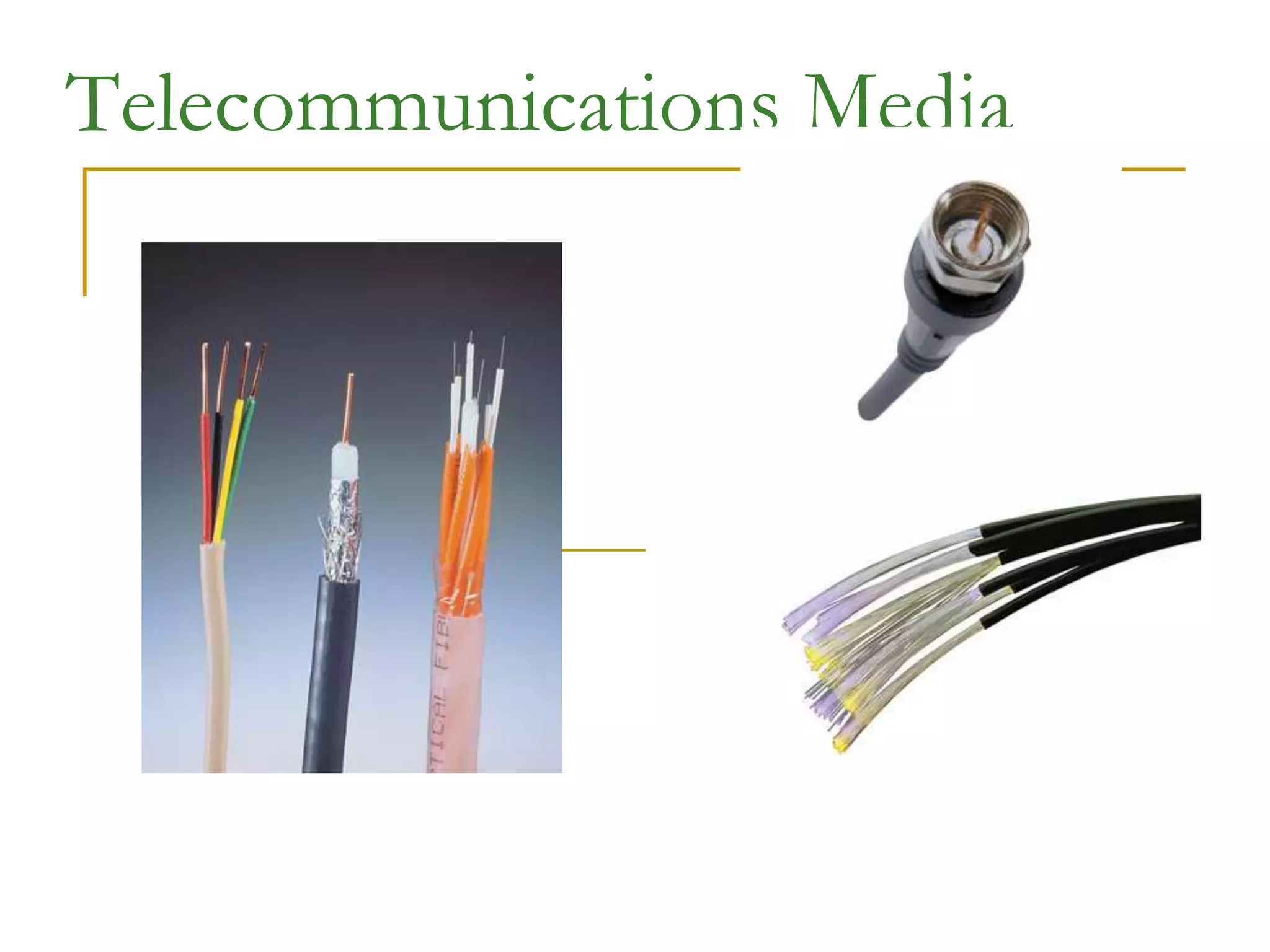
Twisted-Pair Wire – copper wire twisted into pairs. e.g.
telephone system (300bps-10Mbps)
Coaxial Cable – sturdy copper or aluminum wire wrapped
with spacers to insulate and protect it. e.g. Cable TV.
- faster data rate (56 Kbps-200 Mbps), larger BW.
Fiber Optics – one or more hair-thin filaments of glass
fiber wrapped in a protective jacket
- Data transmitted using light beams.
- Very high BW; high data transmission rate (500
Kbps- 25Tbps)
Telecommunications Media
Wireless Technologies
Terrestrial Microwave – data transmitted with the
help of microwaves. Microwaves are
electromagnetic waves with frequency in the
range of 300 MHz to 300 GHz.
Radio Waves – also electromagnetic waves with
low frequency range of 3KHz to 30MHz.
Communications Satellites - high-earth orbit
communications satellites placed in stationary
geosynchronous orbits
For satellite communication, the frequencies are
in the range 7.25 GHz to 7.75 GHz (Space to
Earth) and 7.9 GHz to 8.4 GHz (Earth to Space)
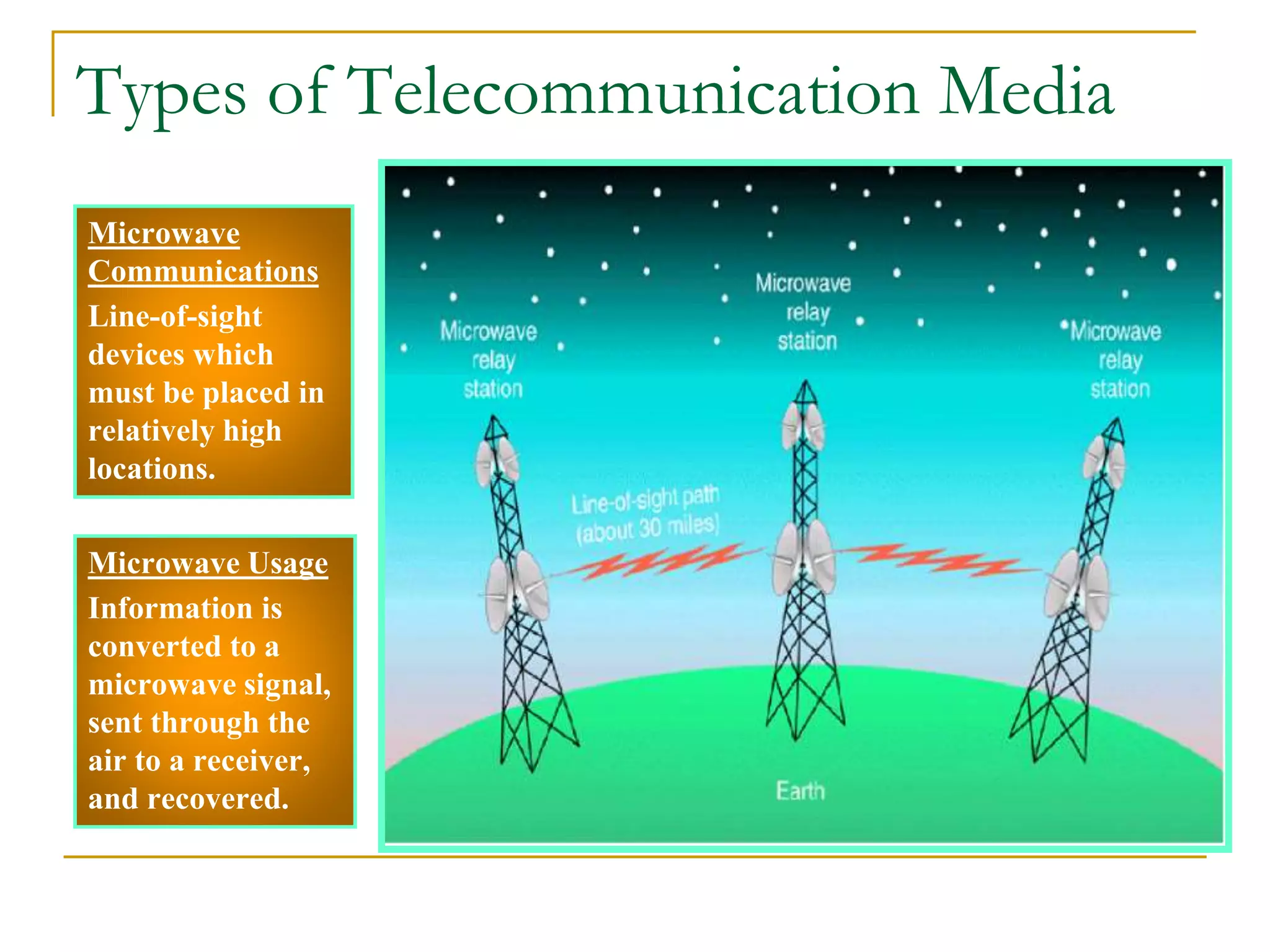
Microwave
Communications
Line-of-sight
devices which
must be placed in
relatively high
locations.
Microwave Usage
Information is
converted to a
microwave signal,
sent through the
air to a receiver,
and recovered.
Types of Telecommunication Media
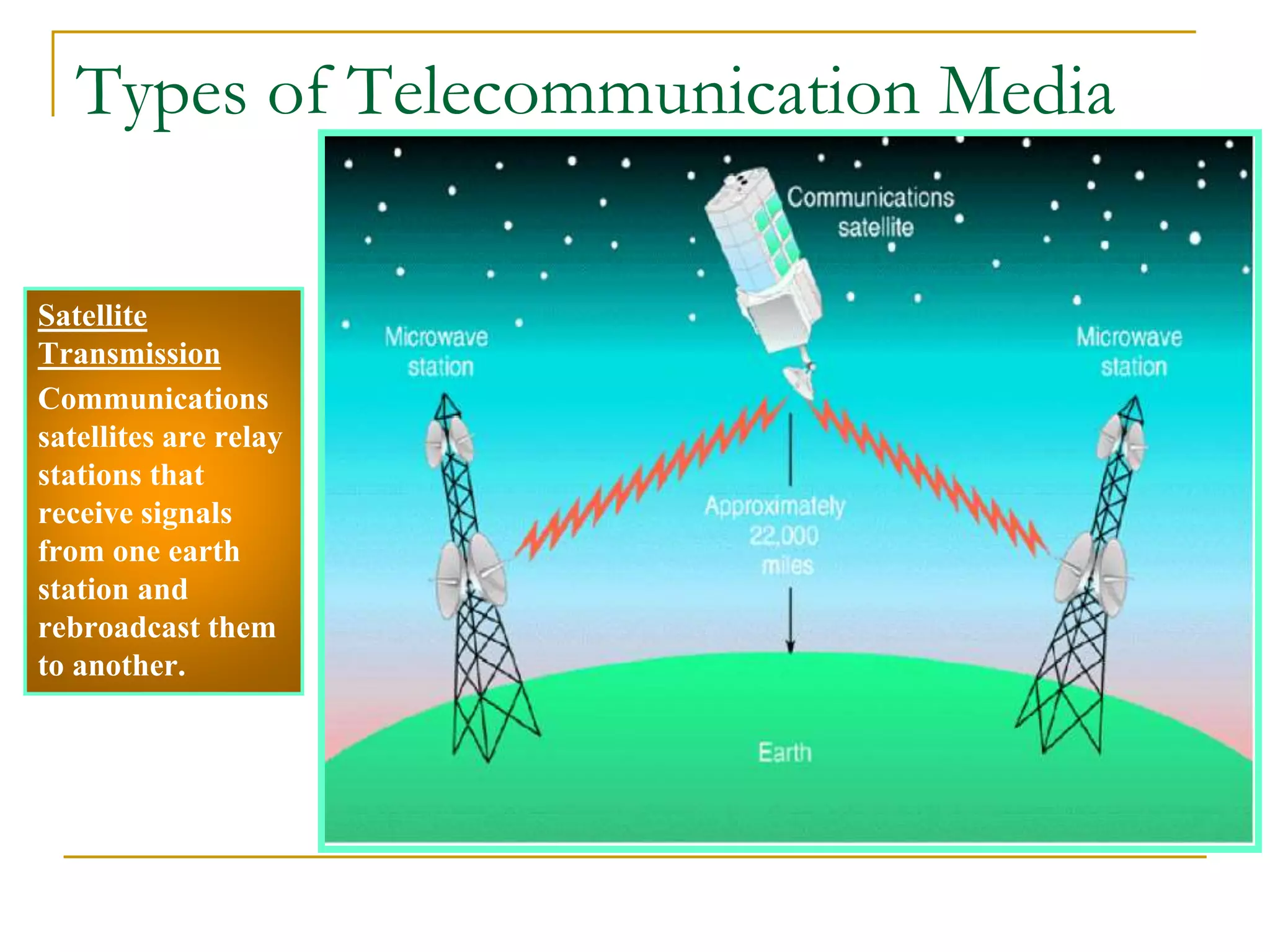
Satellite
Transmission
Communications
satellites are relay
stations that
receive signals
from one earth
station and
rebroadcast them
to another.
Types of Telecommunication Media
Wireless Technologies
Cellular and PCS Systems – a geographic
area divided into cells with one low-power
transmitter device per cell used to relay calls
from one cell to another
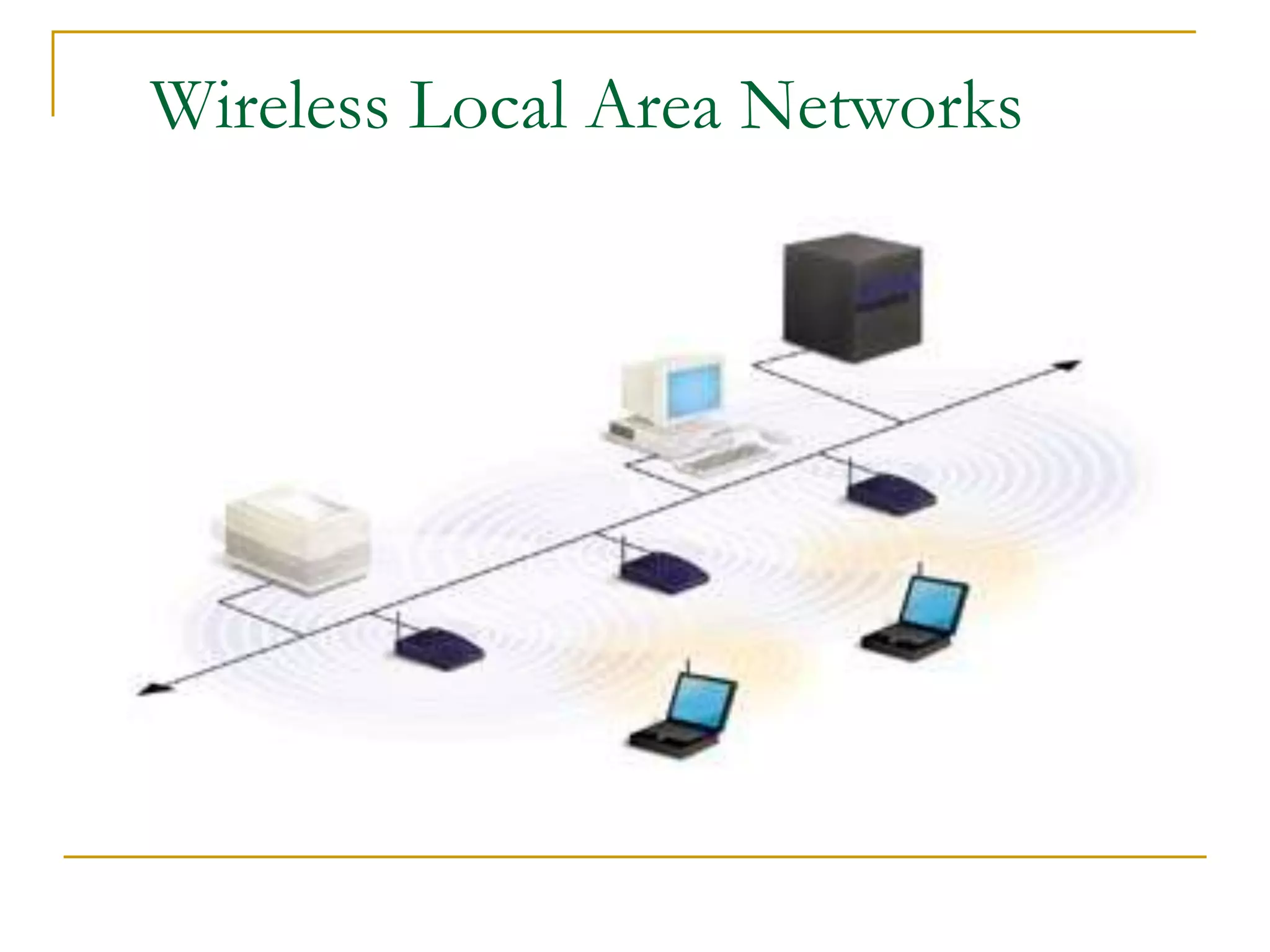
Wireless LANs – high- or low-frequency radio
technology installed in an office or building
Wireless Web – wireless, Web-enabled
information appliances accessing the Internet,
intranets and extranets
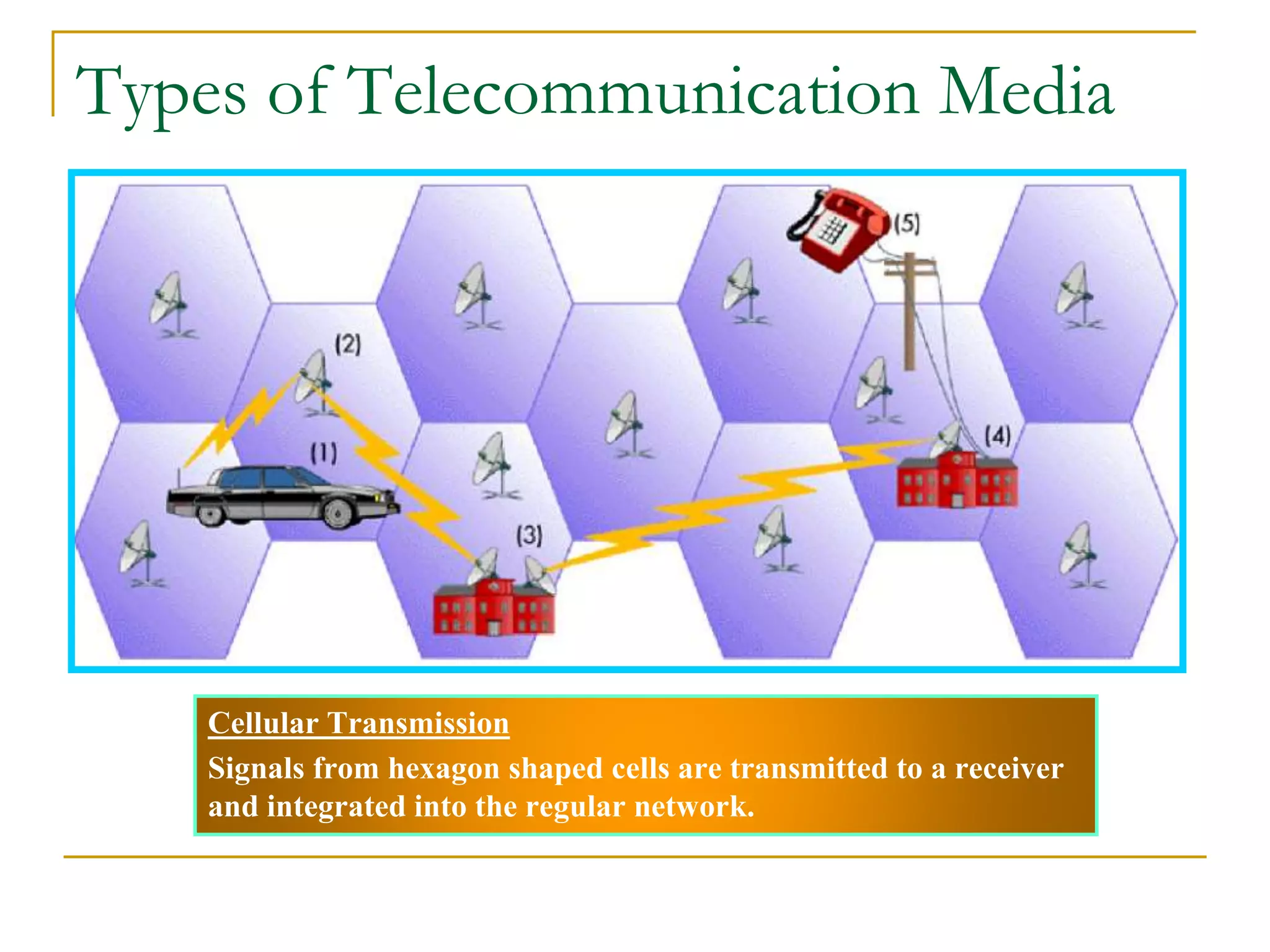
Cellular Transmission
Signals from hexagon shaped cells are transmitted to a receiver
and integrated into the regular network.
Types of Telecommunication Media
Satellite
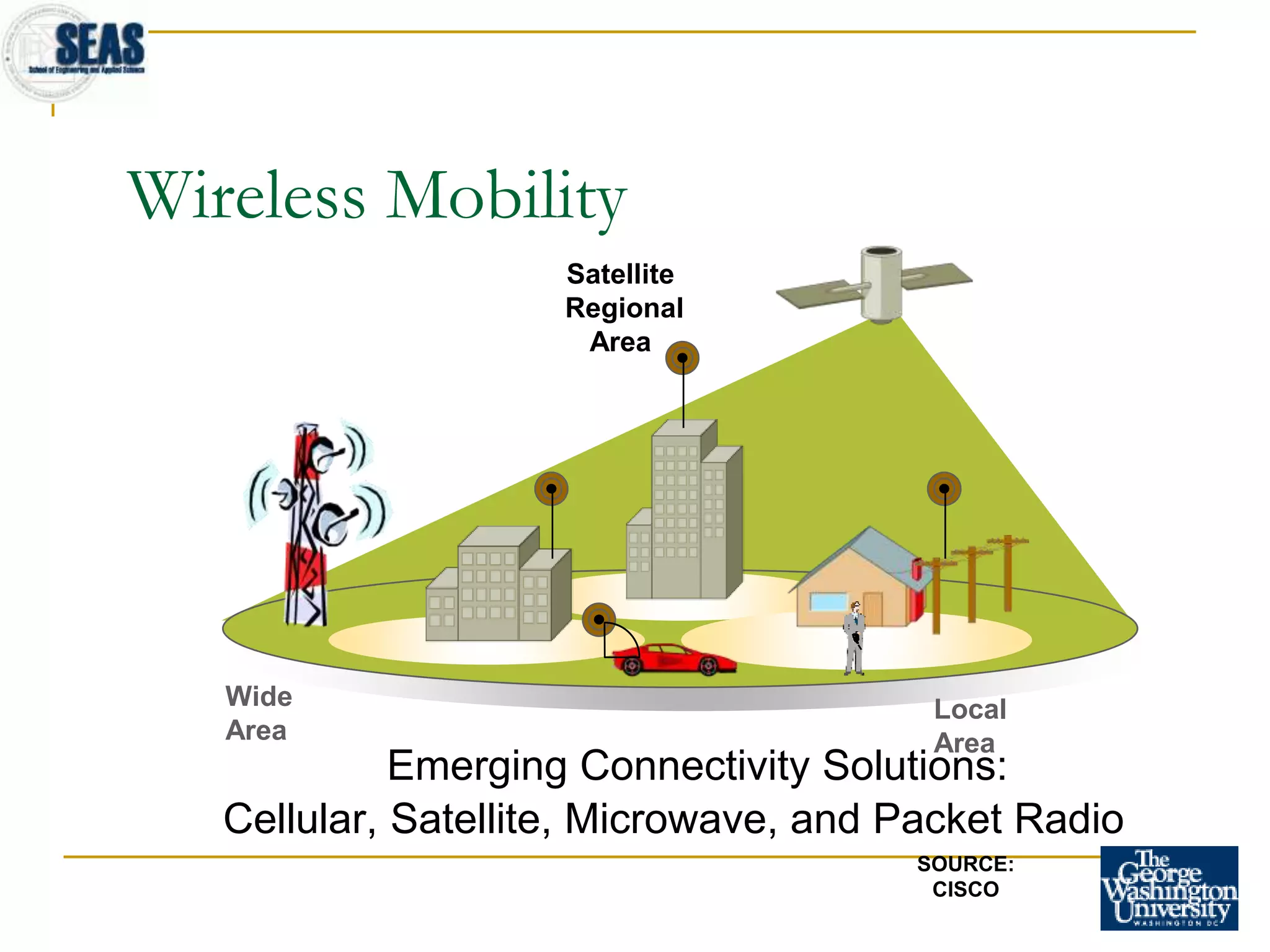
Regional
Area
Wide
Area
Local
Area
Wireless Mobility
Emerging Connectivity Solutions:
Cellular, Satellite, Microwave, and Packet Radio
SOURCE:
CISCO
■ Infrared Transmission
❑ Involves sending signals through the air via light
waves.
■ Requires line-of-sight and short distances (a few
hundred yards)
■ Used to connect various computing devices such as
handheld computers, keyboards and mouse.
Types of Telecommunication Media
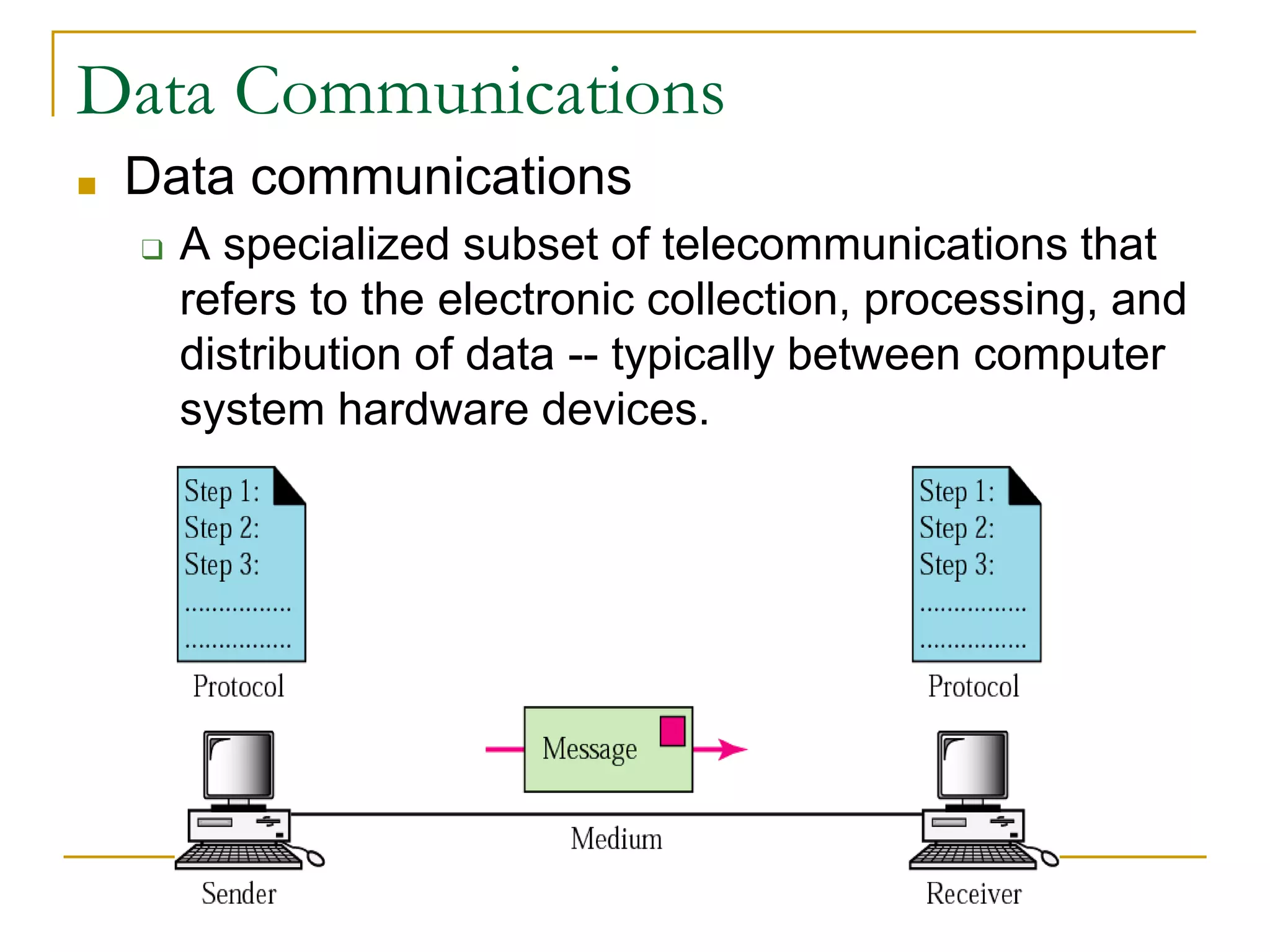
■ Data communications
❑ A specialized subset of telecommunications that
refers to the electronic collection, processing, and
distribution of data -- typically between computer
system hardware devices.
Data Communications
Effectiveness of data communication
systems
■ Performance
❑ if the systems can deliver data in a timely manner based on
the types of data
■ Reliability
❑ if the systems can provide non-stop services, measured by
the frequency of failure or recovery time of a network after
failure
■ Security
❑ if the systems can protect the transmitted data from illegal
access and/or modification
Distributed Processing
■ Centralized Processing
❑ Data processing that occurs in a single location or
facility.
■ Distributed Processing
❑ Data processing that occurs when computers are
placed at remote locations but are connected to
each other via telecommunications devices.
❑ The computers are connected as a computer
network.
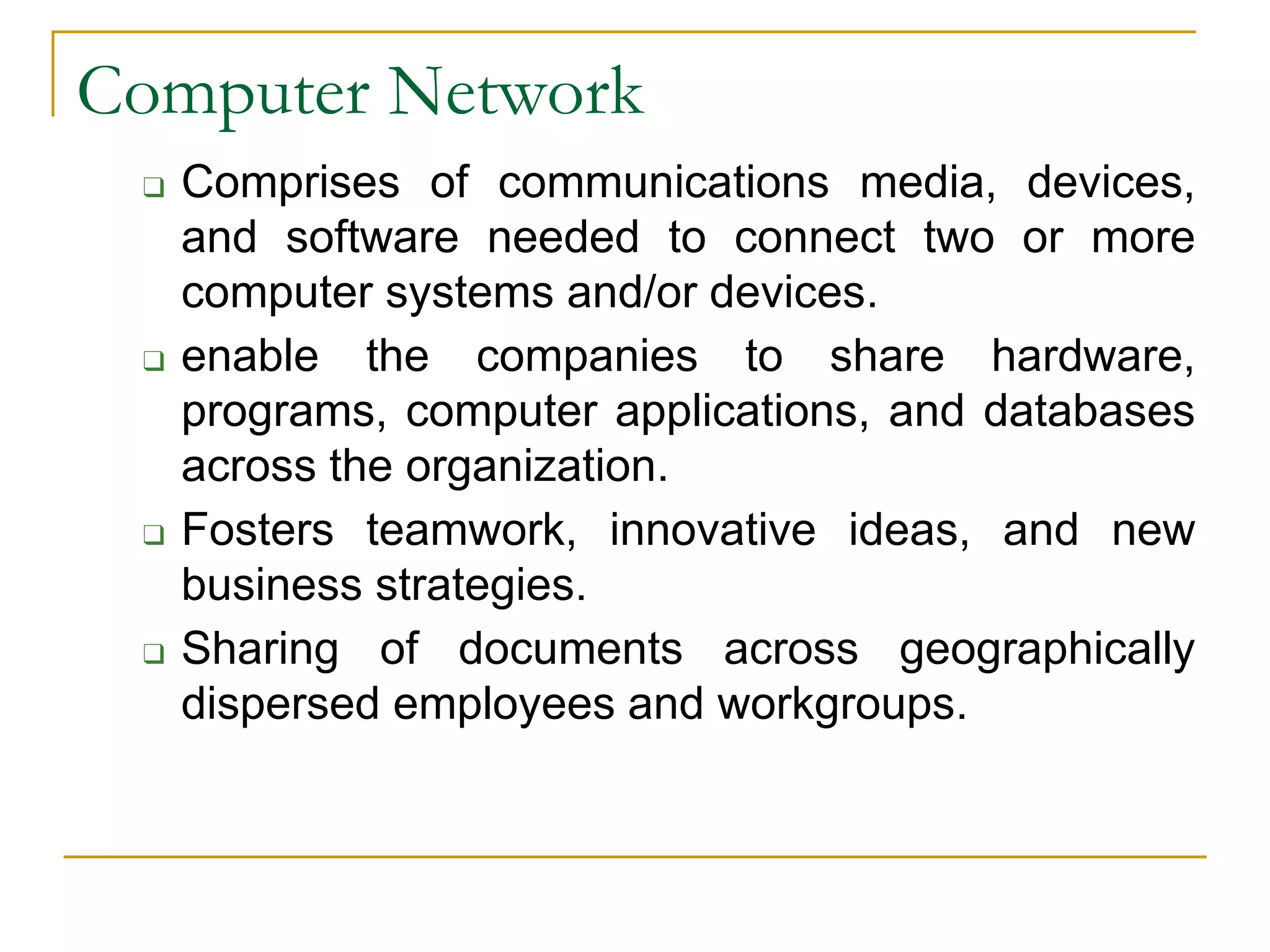
❑ Comprises of communications media, devices,
and software needed to connect two or more
computer systems and/or devices.
❑ enable the companies to share hardware,
programs, computer applications, and databases
across the organization.
❑ Fosters teamwork, innovative ideas, and new
business strategies.
❑ Sharing of documents across geographically
dispersed employees and workgroups.
Computer Network
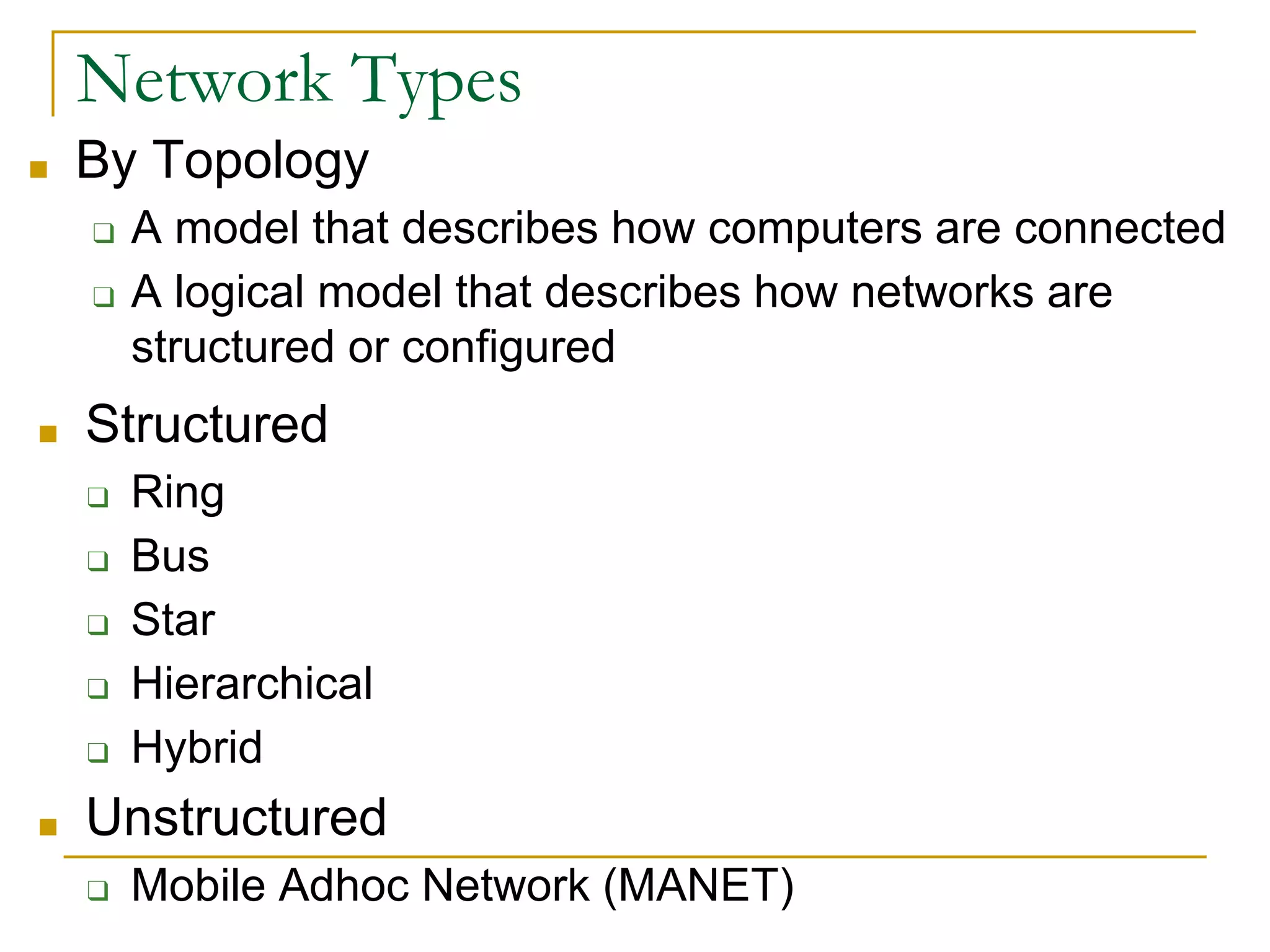
■ By Topology
❑ A model that describes how computers are connected
❑ A logical model that describes how networks are
structured or configured
24
Network Types
■ Structured
❑ Ring
❑ Bus
❑ Star
❑ Hierarchical
❑ Hybrid
■ Unstructured
❑ Mobile Adhoc Network (MANET)
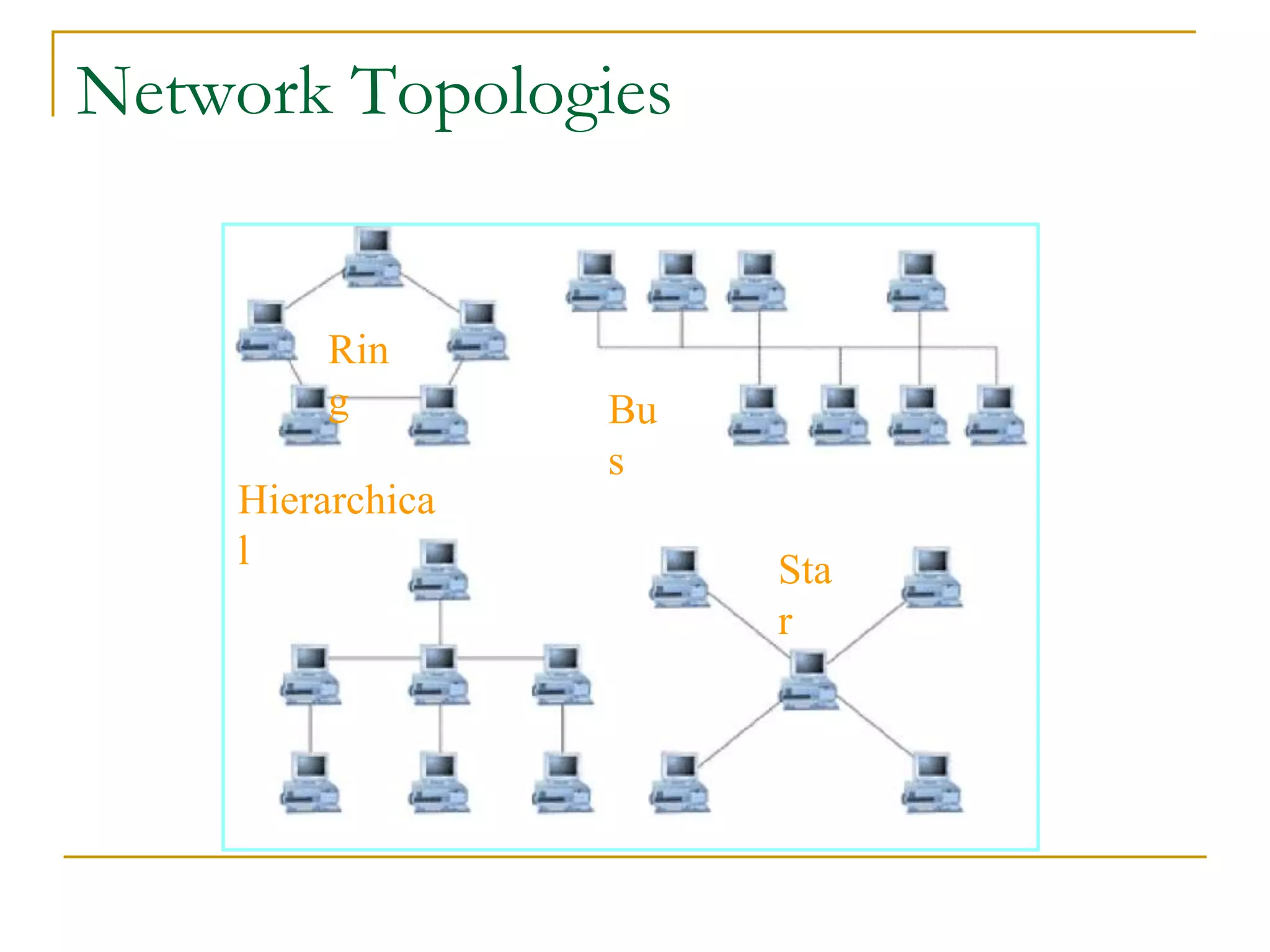
Rin
g
Hierarchica
l Sta
r
Bu
s
25
Network Topologies
Network Topologies
■ For local area networks, not for the Internet
■ Ring
❑ A topology that contains computers and computer
devices placed in a ring.
■ Bus
❑ Computers and computer devices are on a single
line. Each device can communicate directly to all
devices on the bus.
■ Star
❑ All computers are connected via a central hub.
Network Topologies
■ Hierarchical
❑ Uses treelike structures with messages passed
along the branches of the hierarchy
■ Hybrid
❑ A mix of different kinds of structured topologies. It
is what exactly the Internet looks like.
■ Mobile Adhoc Network
❑ It is unstructured network topology
❑ Structure is changing dynamically.
EG. Network of mobile phone.
Network Topologies
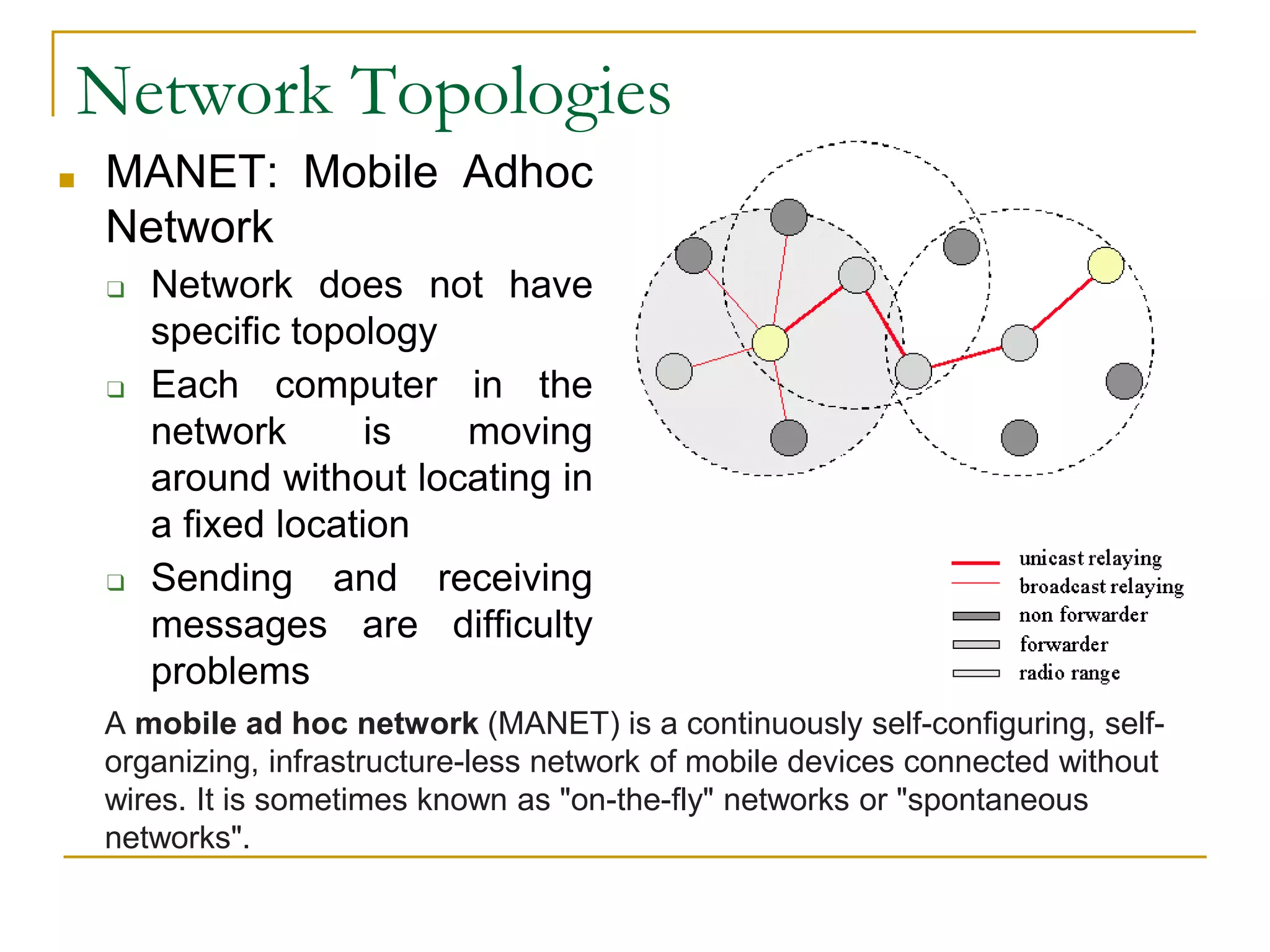
■ MANET: Mobile Adhoc
Network
❑ Network does not have
specific topology
❑ Each computer in the
network is moving
around without locating in
a fixed location
❑ Sending and receiving
messages are difficulty
problems
A mobile ad hoc network (MANET) is a continuously self-configuring, self-
organizing, infrastructure-less network of mobile devices connected without
wires. It is sometimes known as "on-the-fly" networks or "spontaneous
networks".
Types of Telecom Networks
Point-to-point Communication
- point to point communication between two computers
for data transmission.
- e.g. computer networks in banks
Broadcast Communication
- All the machines on the network share a single
communication channel.
- message broadcasted for all receivers.
Peer-to-Peer – file-sharing software connects each
PC to a central server or to another online user’s PC
Types of Telecom Networks
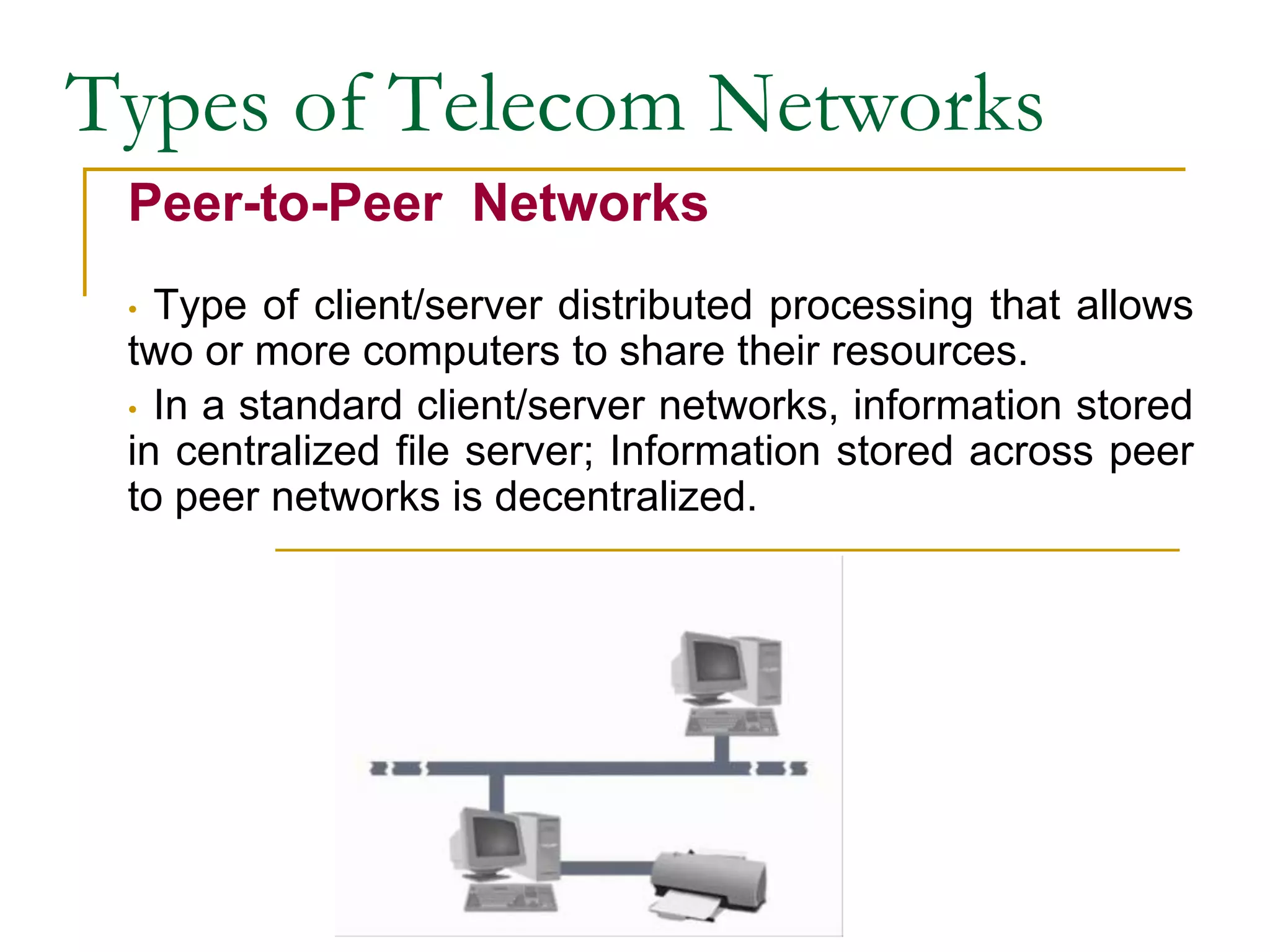
Peer-to-Peer Networks
• Type of client/server distributed processing that allows
two or more computers to share their resources.
• In a standard client/server networks, information stored
in centralized file server; Information stored across peer
to peer networks is decentralized.
27
Network Types by Size
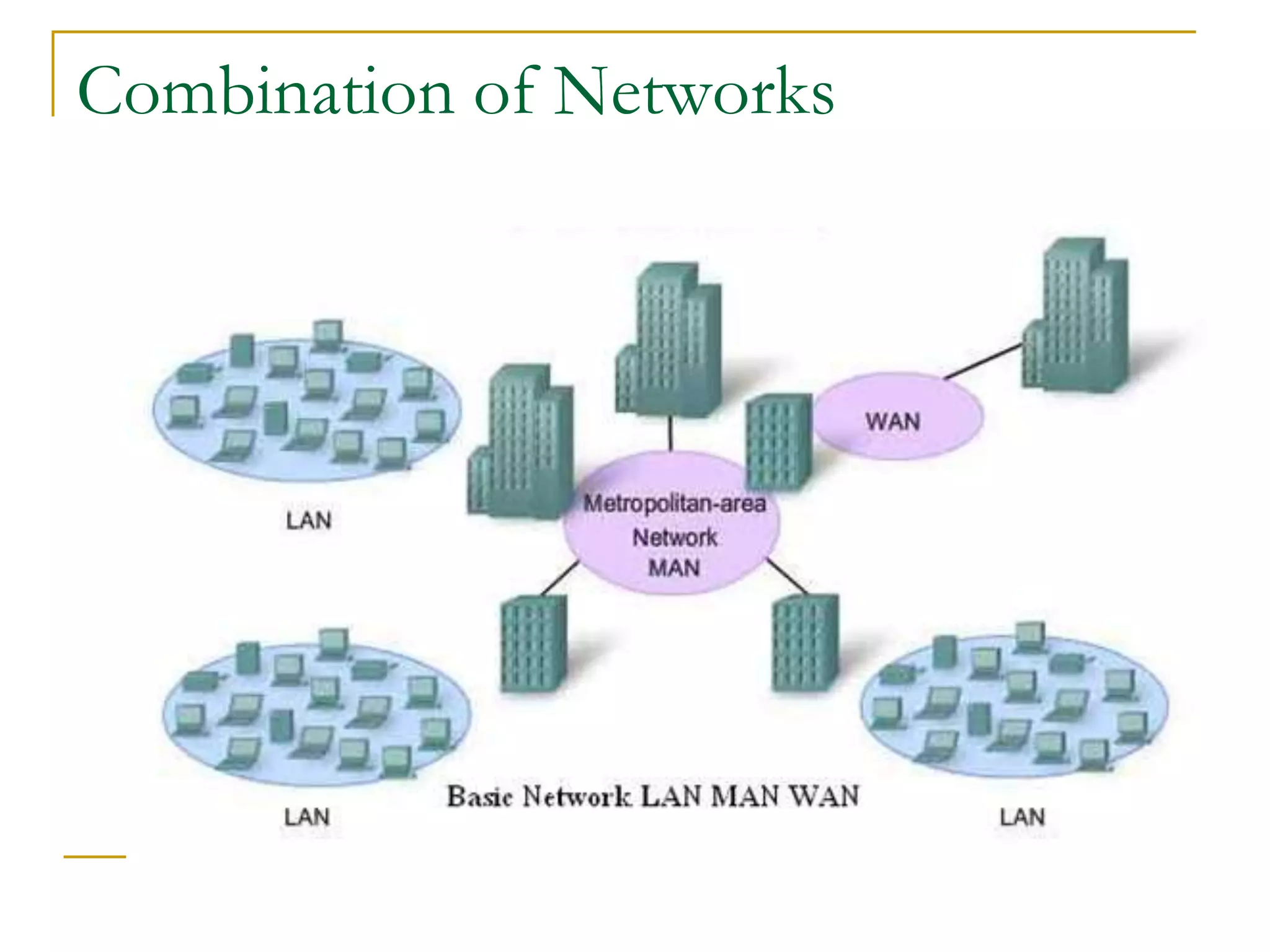
■ Local Area Network (LAN)
❑ Connects computer systems and devices in the
same geographic area (can be Ring, Bus,
Hierarchical, Star, Hybrid)
■ Wide Area Network (WAN)
❑ Ties together large geographic regions using
microwave and satellite transmission or
telephone lines.
■ International Network
❑ Links systems between countries.
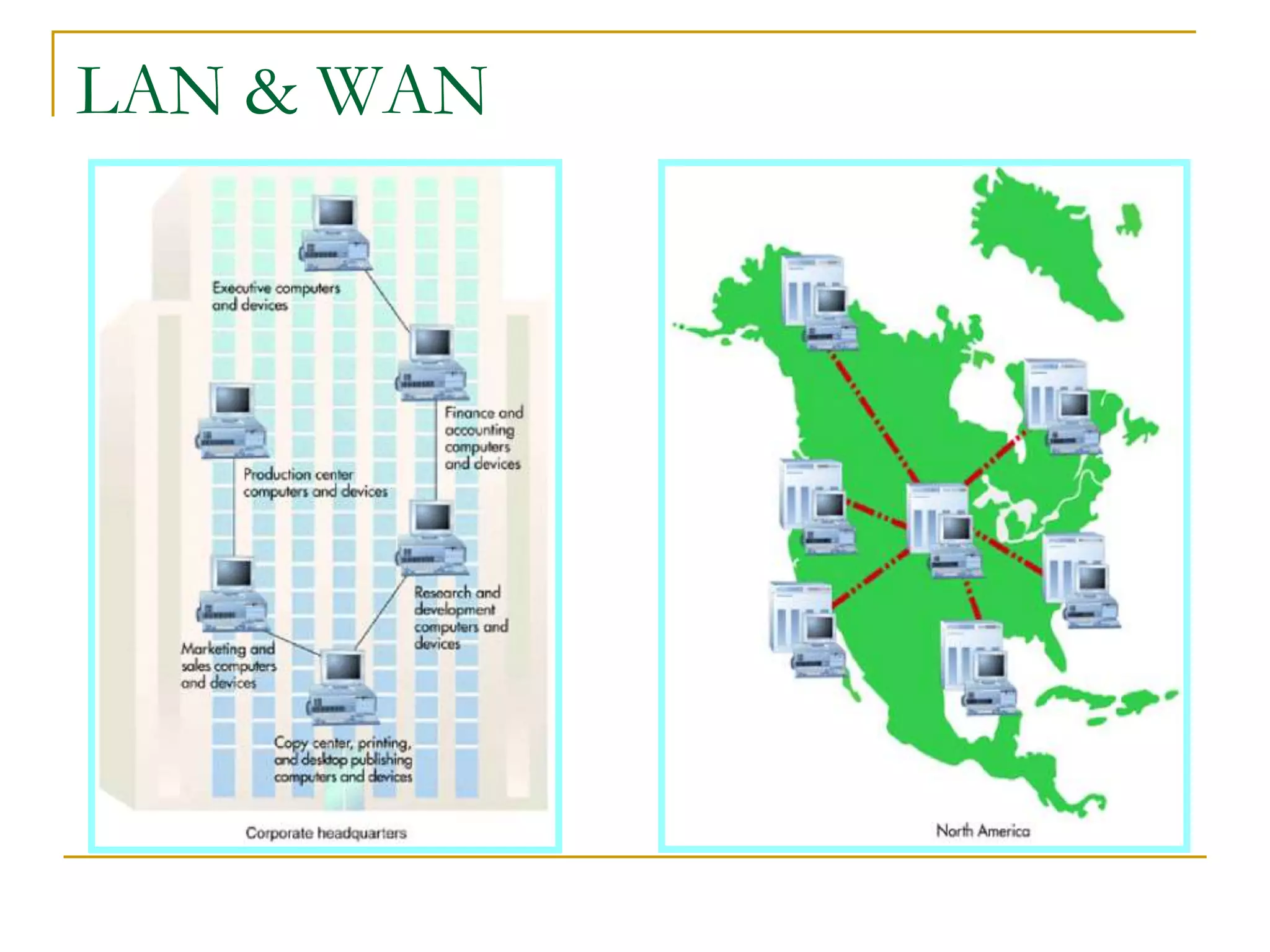
A Typical
LAN in a
BUS
Topology
A Wide Area
LAN & WAN
Types of Telecom Networks
Local Area Network (LAN)
• Network that connect devices sharing a common
communication link and sharing resources within a limited
geographical area.
• Serves a local area like floor of a building, college or
university campus.
• Typical transmission speed is 100Mbps.
• Within the organization, provides fast and efficient
access to common bank of information.
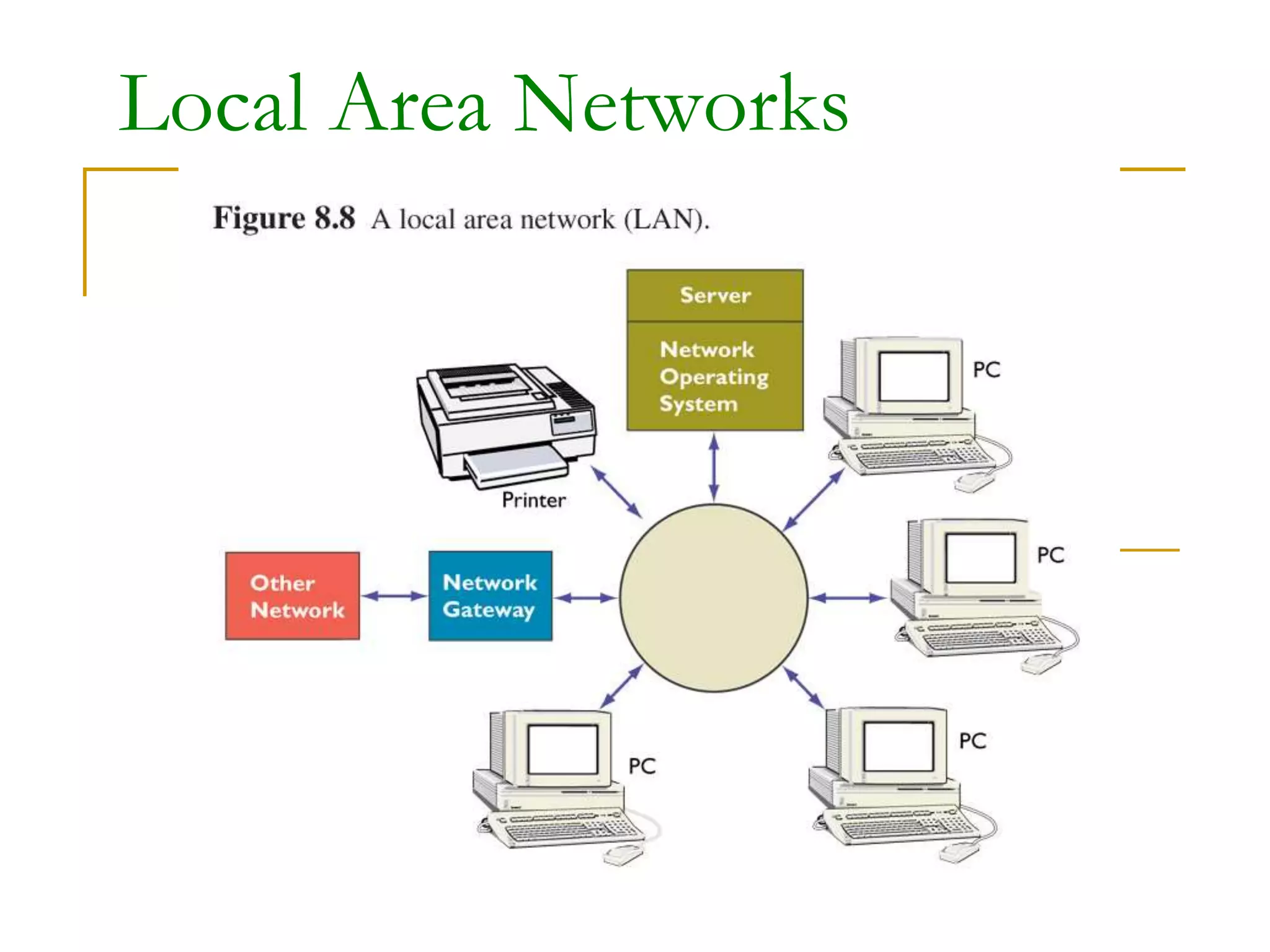
Local Area Networks
Wireless Local Area Networks
Local Area Networks
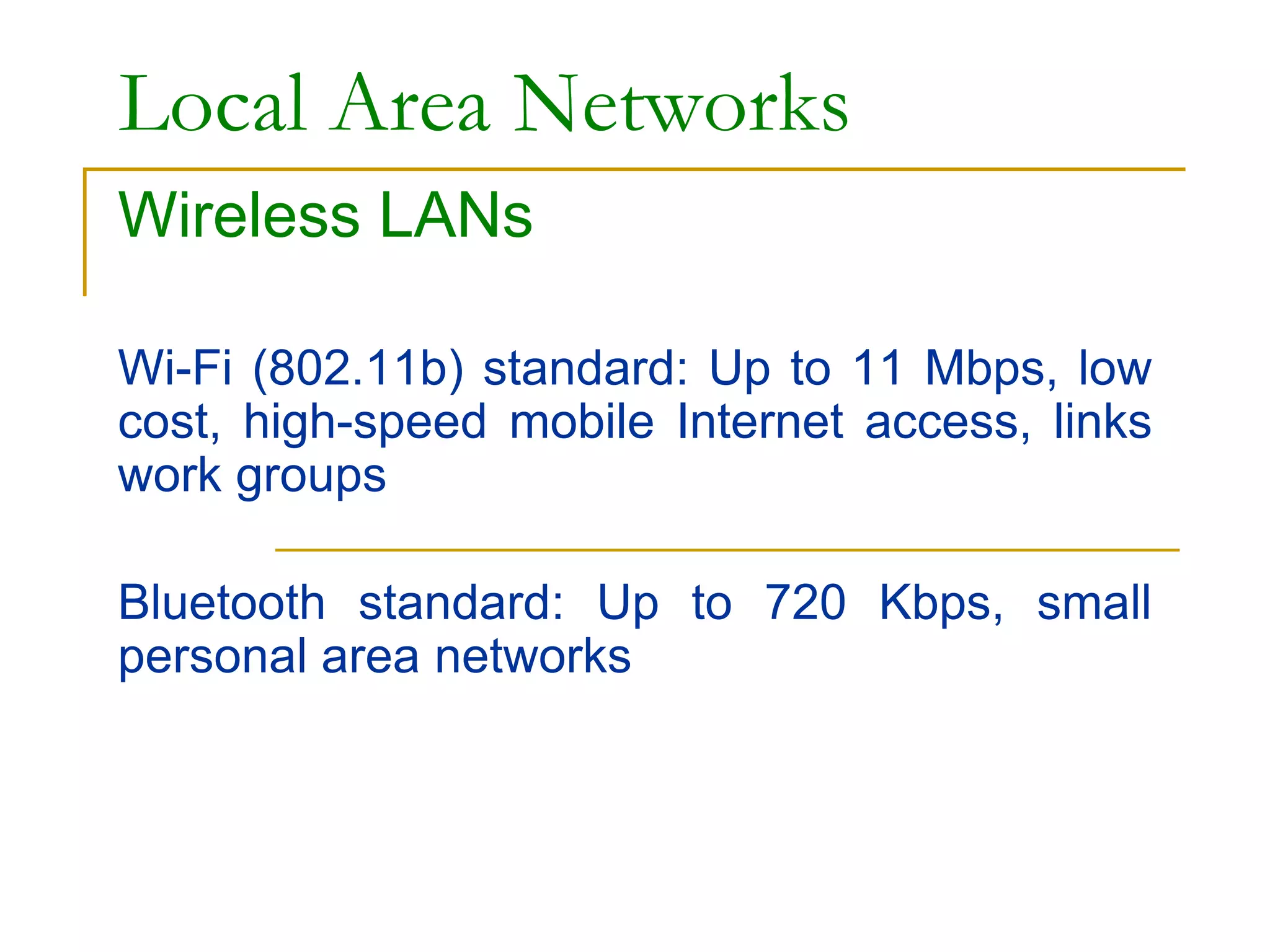
Wireless LANs
Wi-Fi (802.11b) standard: Up to 11 Mbps, low
cost, high-speed mobile Internet access, links
work groups
Bluetooth standard: Up to 720 Kbps, small
personal area networks
Bluetooth
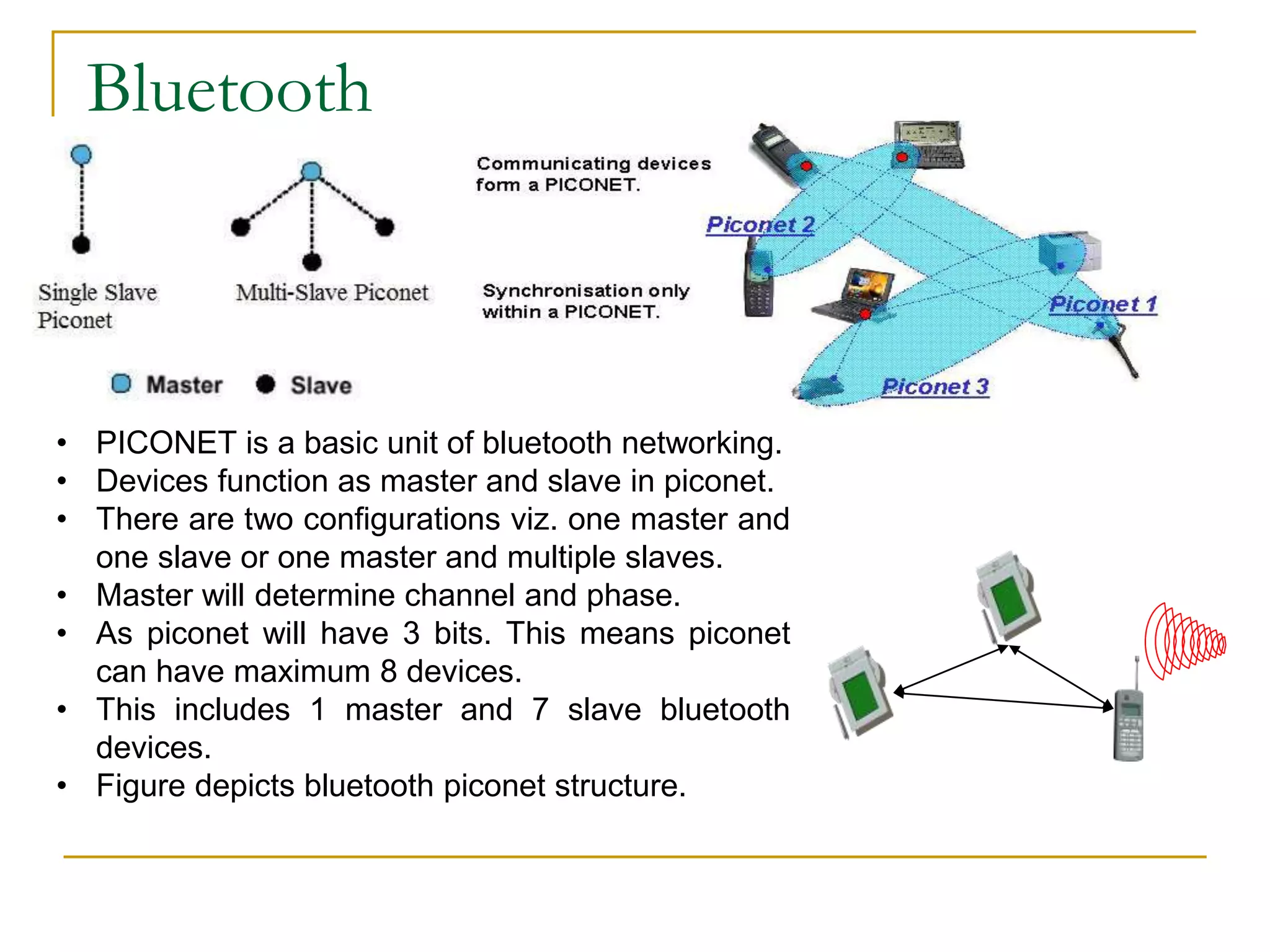
• PICONET is a basic unit of bluetooth networking.
• Devices function as master and slave in piconet.
• There are two configurations viz. one master and
one slave or one master and multiple slaves.
• Master will determine channel and phase.
• As piconet will have 3 bits. This means piconet
can have maximum 8 devices.
• This includes 1 master and 7 slave bluetooth
devices.
• Figure depicts bluetooth piconet structure.
Scatternet
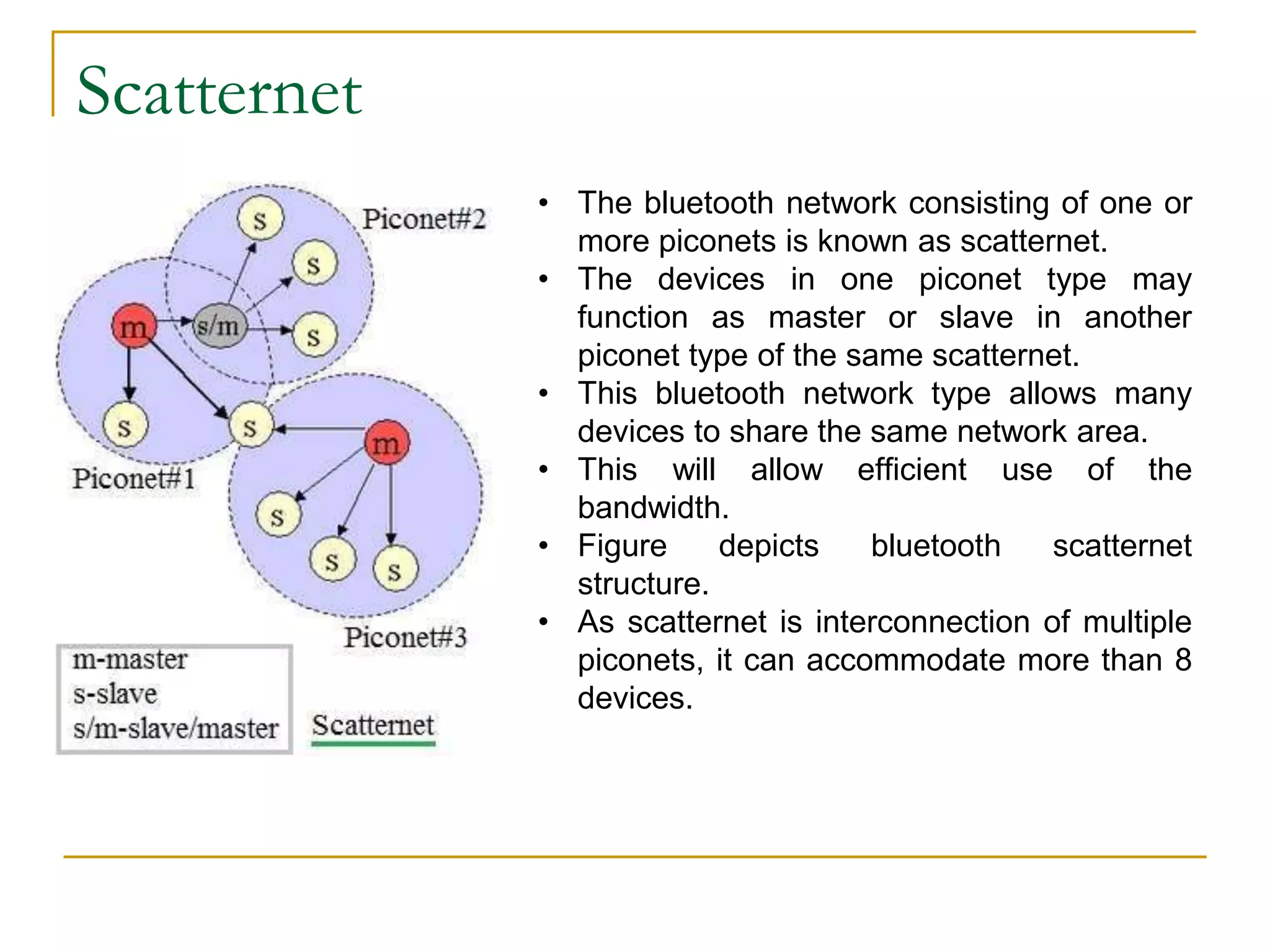
• The bluetooth network consisting of one or
more piconets is known as scatternet.
• The devices in one piconet type may
function as master or slave in another
piconet type of the same scatternet.
• This bluetooth network type allows many
devices to share the same network area.
• This will allow efficient use of the
bandwidth.
• Figure depicts bluetooth scatternet
structure.
• As scatternet is interconnection of multiple
piconets, it can accommodate more than 8
devices.
Types of Telecom Networks
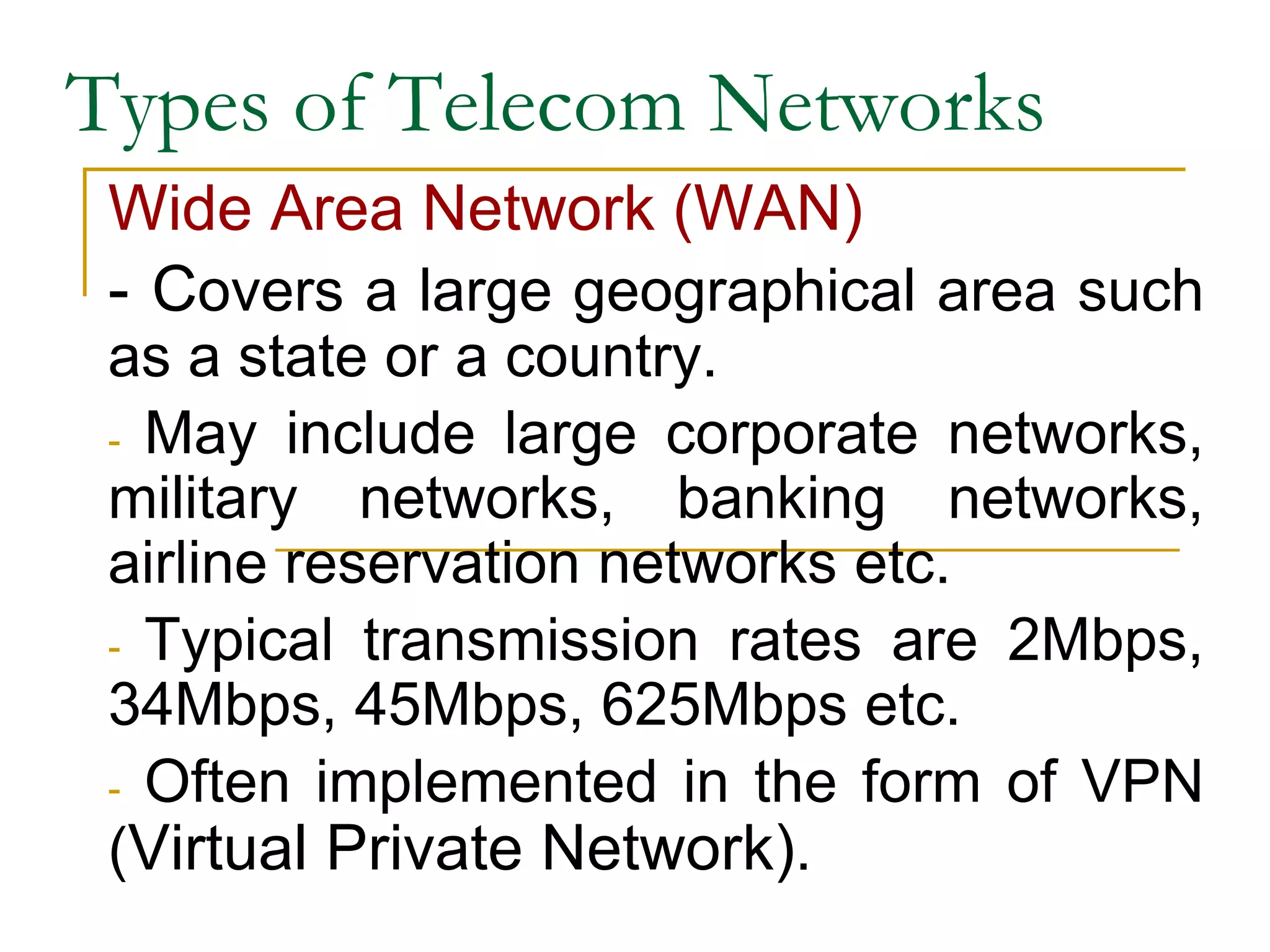
Wide Area Network (WAN)
- Covers a large geographical area such
as a state or a country.
- May include large corporate networks,
military networks, banking networks,
airline reservation networks etc.
- Typical transmission rates are 2Mbps,
34Mbps, 45Mbps, 625Mbps etc.
- Often implemented in the form of VPN
(Virtual Private Network).
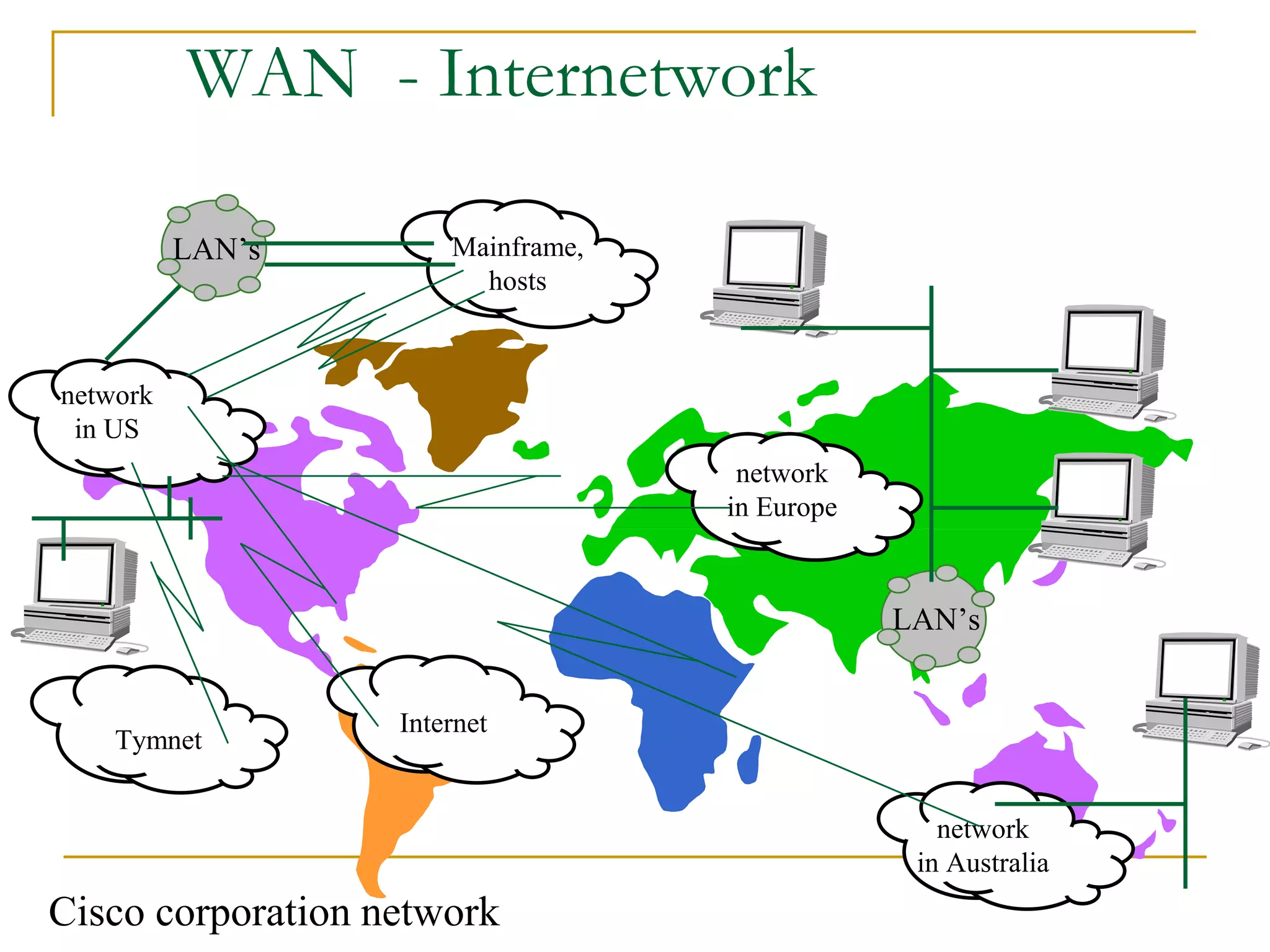
WAN - Internetwork
network
in US
network
in Europe
Mainframe,
hosts
Internet
network
in Australia
LAN’s
LAN’s
Tymnet
Cisco corporation network
Types of Telecom Networks
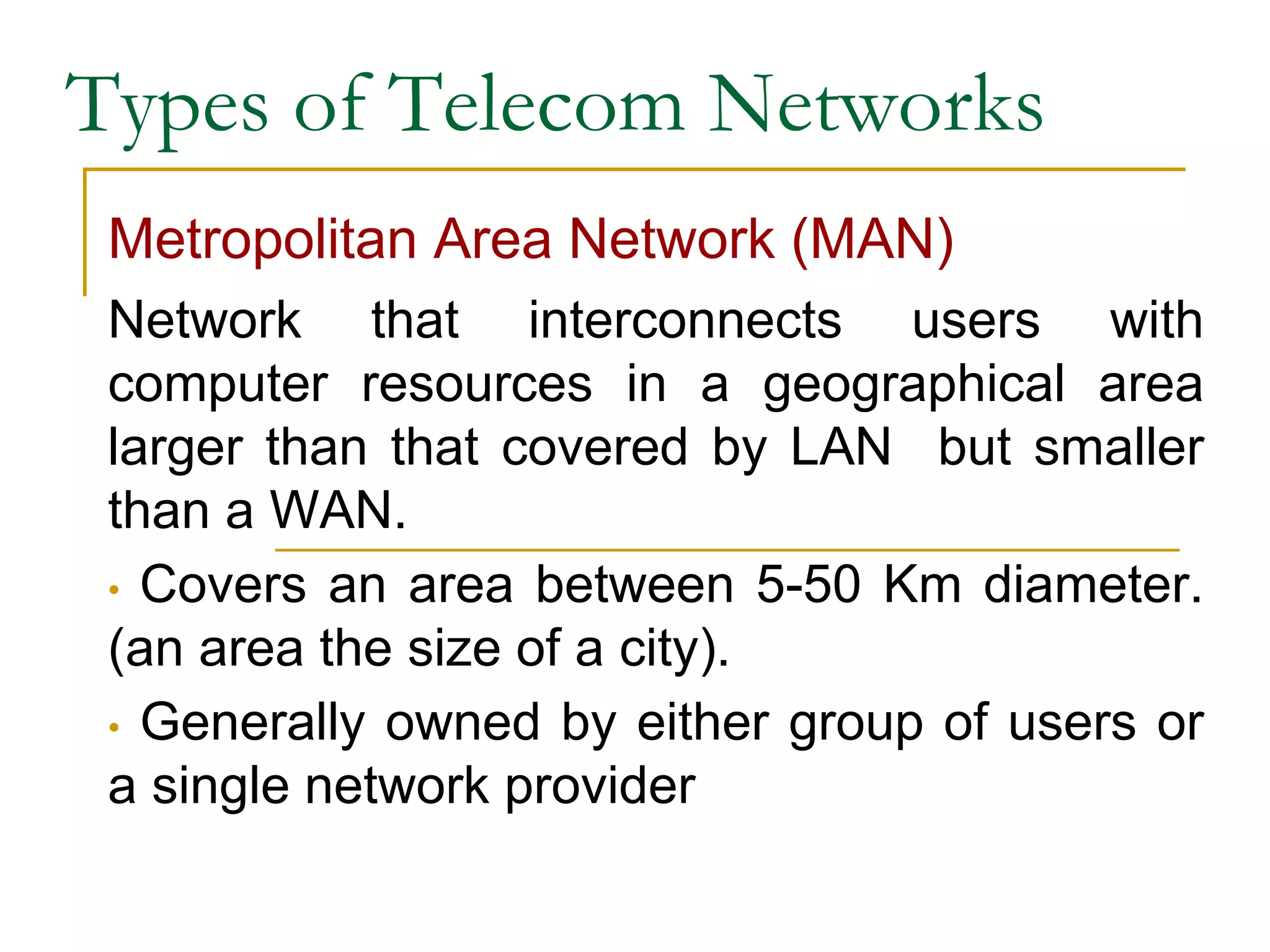
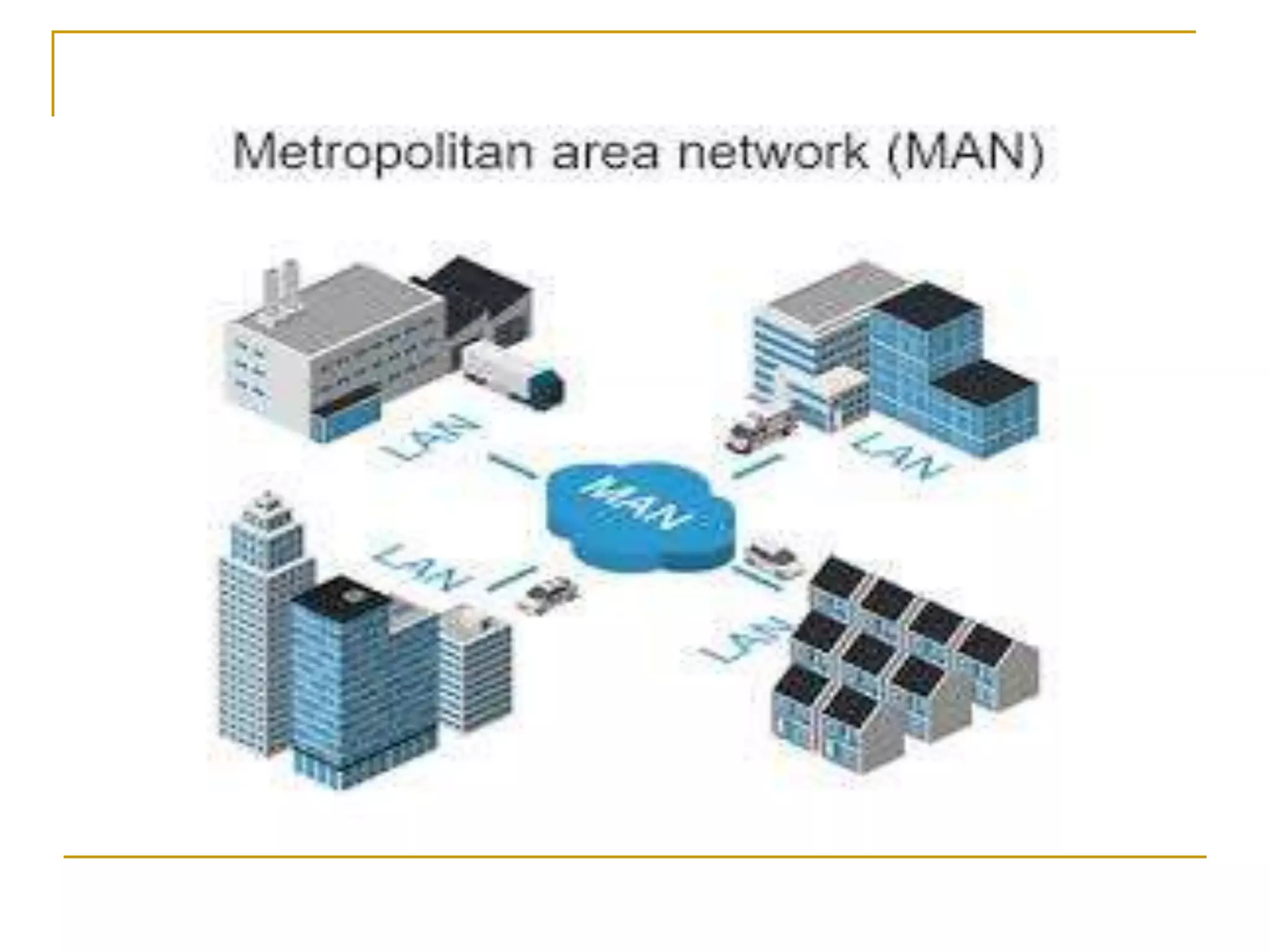
Metropolitan Area Network (MAN)
Network that interconnects users with
computer resources in a geographical area
larger than that covered by LAN but smaller
than a WAN.
• Covers an area between 5-50 Km diameter.
(an area the size of a city).
• Generally owned by either group of users or
a single network provider
Combination of Networks
Types of Telecom Networks
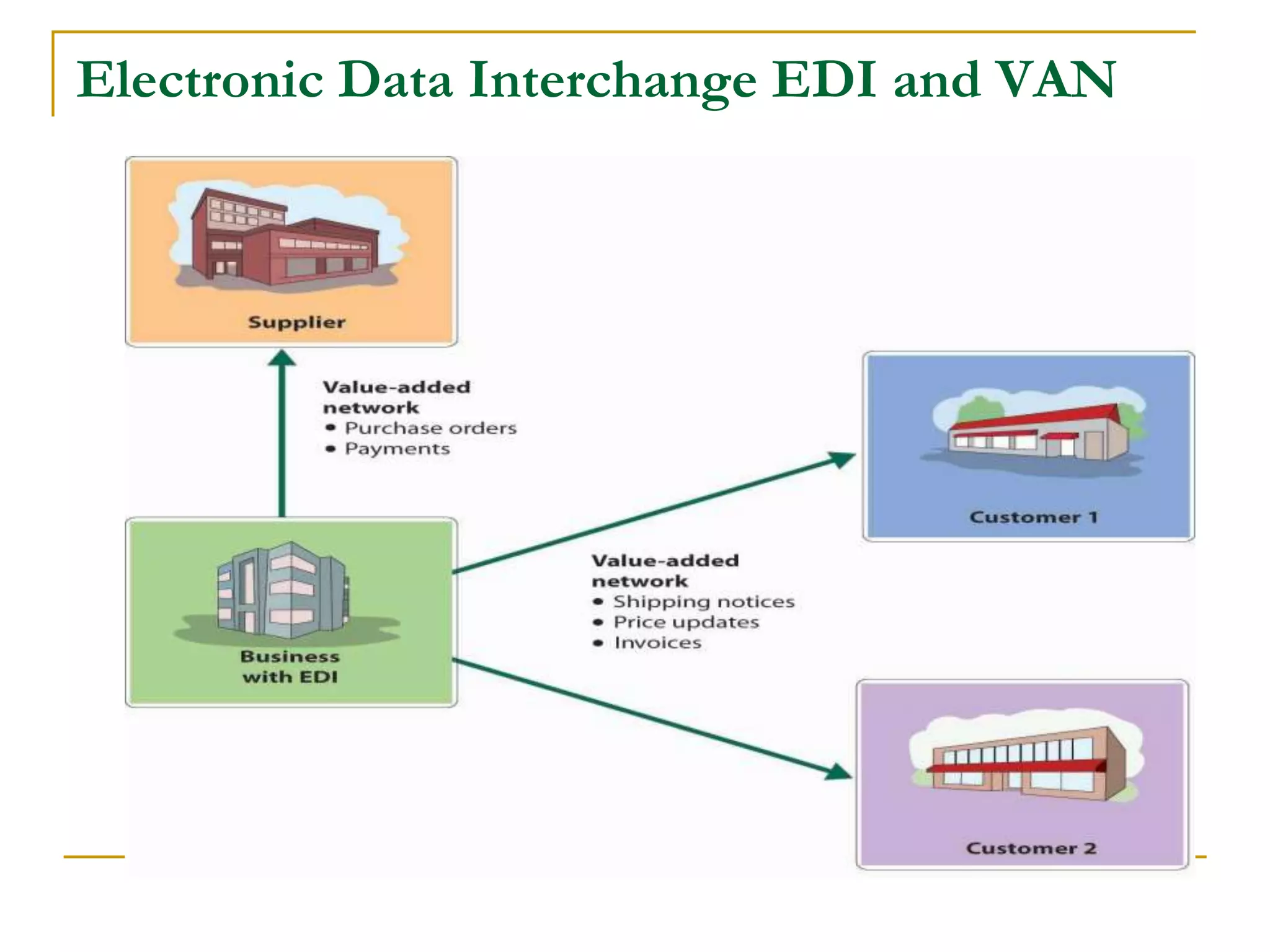
Value Added Network (VAN)
• A private network that can be hired by
organization.
• Enable the users to more closely tailor
communication capabilities to their specific
business needs.
Electronic Data Interchange EDI and VAN
Types of Telecom Networks
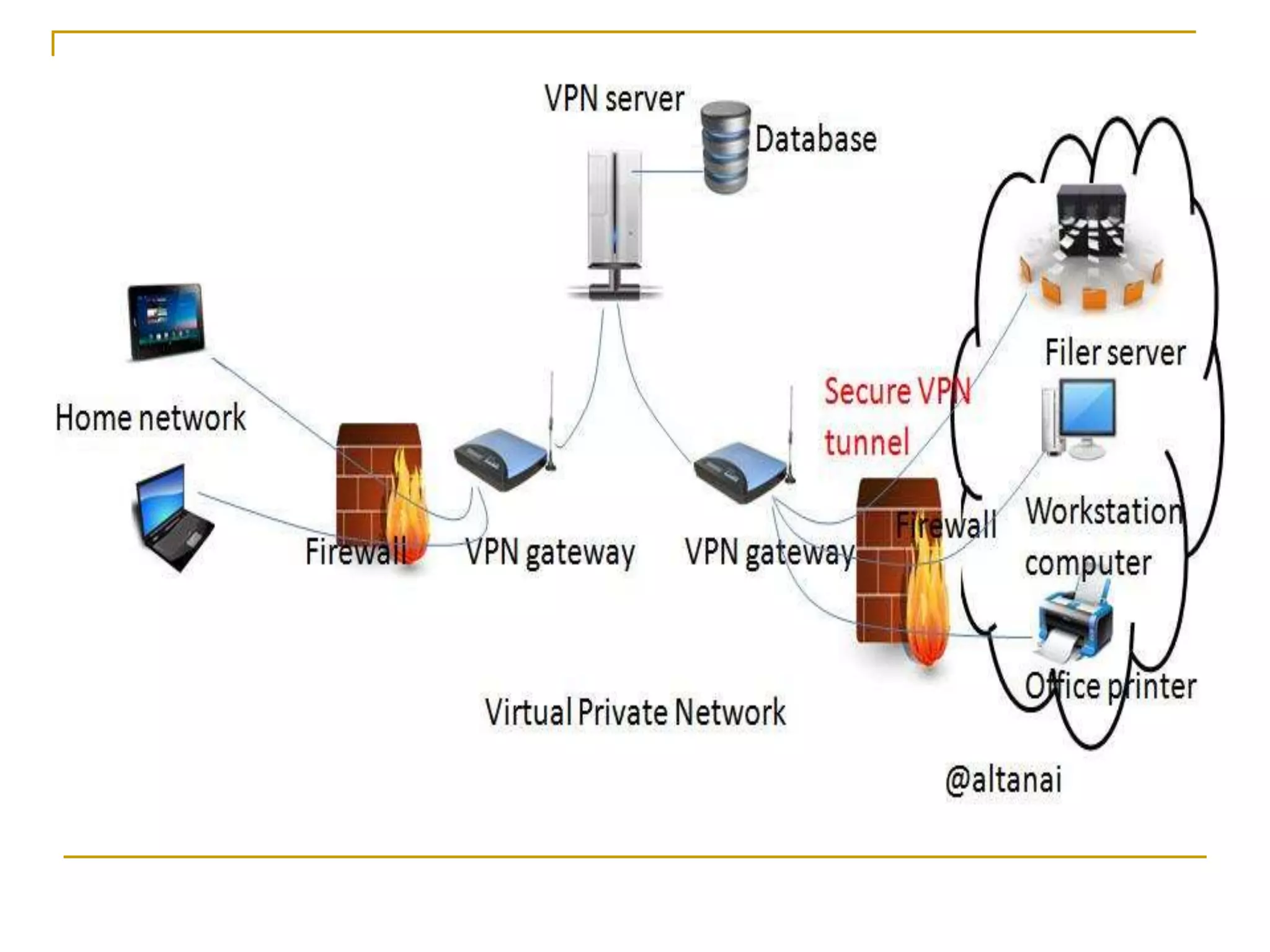
Virtual Private Network (VPN)
• Secure network that uses the Internet as its
main backbone network
• Relies on network firewalls, encryption, and
other security features.
• Effective for extranets and important for
international businesses.
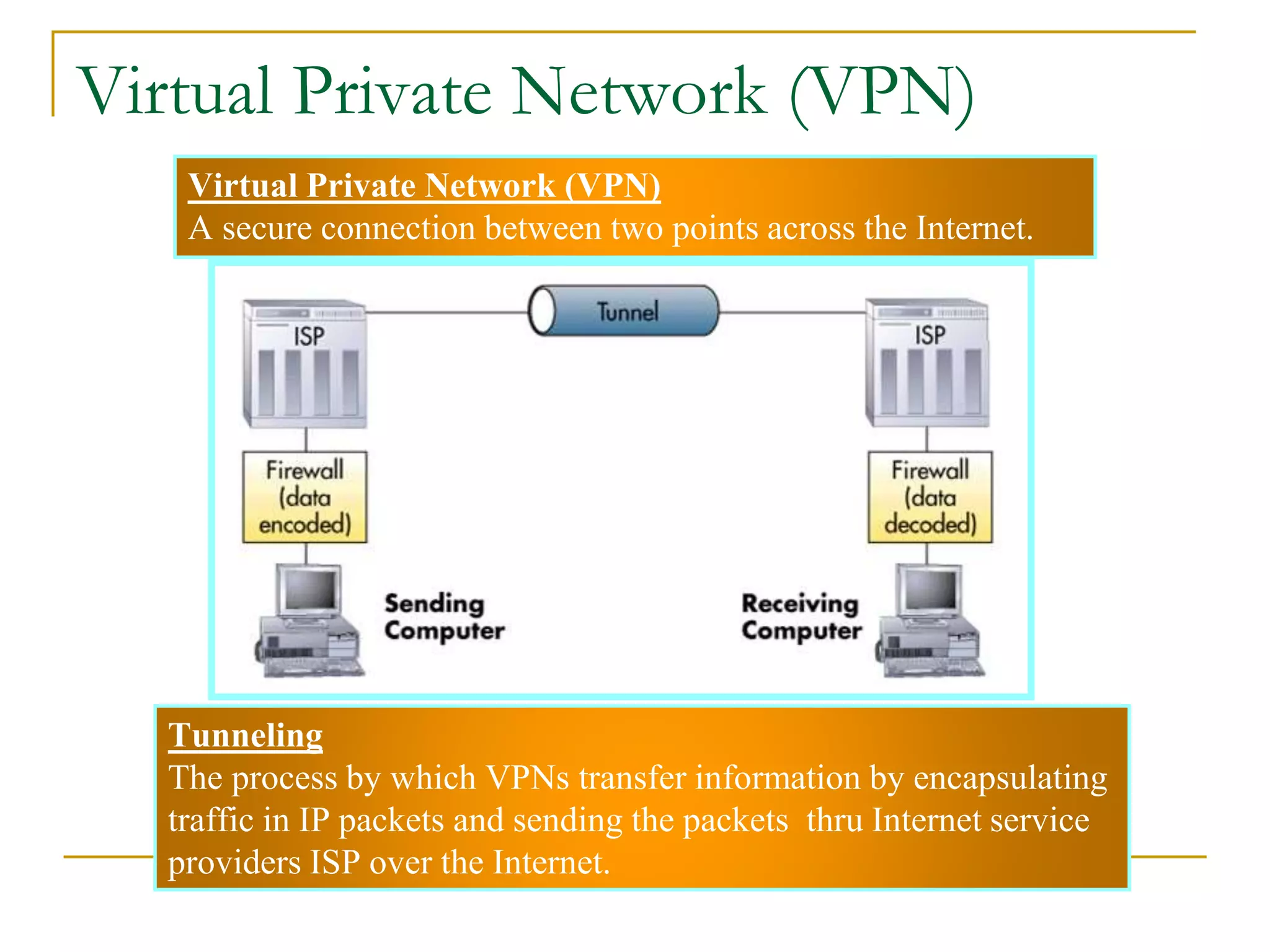
Virtual Private Network (VPN)
A secure connection between two points across the Internet.
Tunneling
The process by which VPNs transfer information by encapsulating
traffic in IP packets and sending the packets thru Internet service
providers ISP over the Internet.
24
Virtual Private Network (VPN)
15/12/2012 Bahman R. Alyaei 57
Telecommunication Networks
Two major types of TelecomNetworks:
■ Public Switched Telephone Network
(PSTN).
■ Enterprise Networks
15/12/2012 Bahman R. Alyaei 58
Continue…
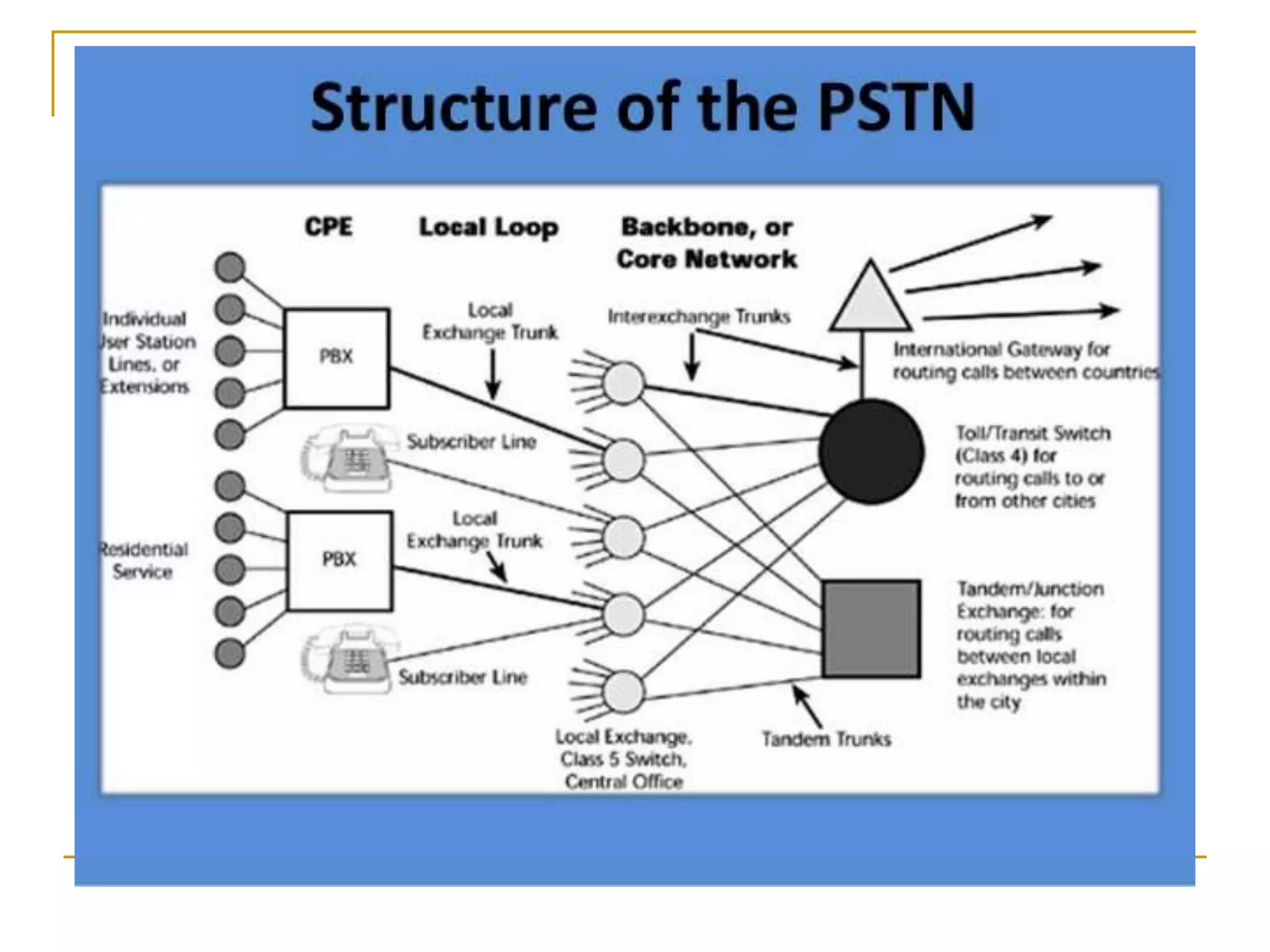
1) PSTN
■ It consists of hundreds of smaller networks
interconnected.
■ There are “fixed” and “mobile” counterparts.
■ They may or may not have common
ownership.
■ Traditionally been based on speech
operations.
■ Hierarchical structure
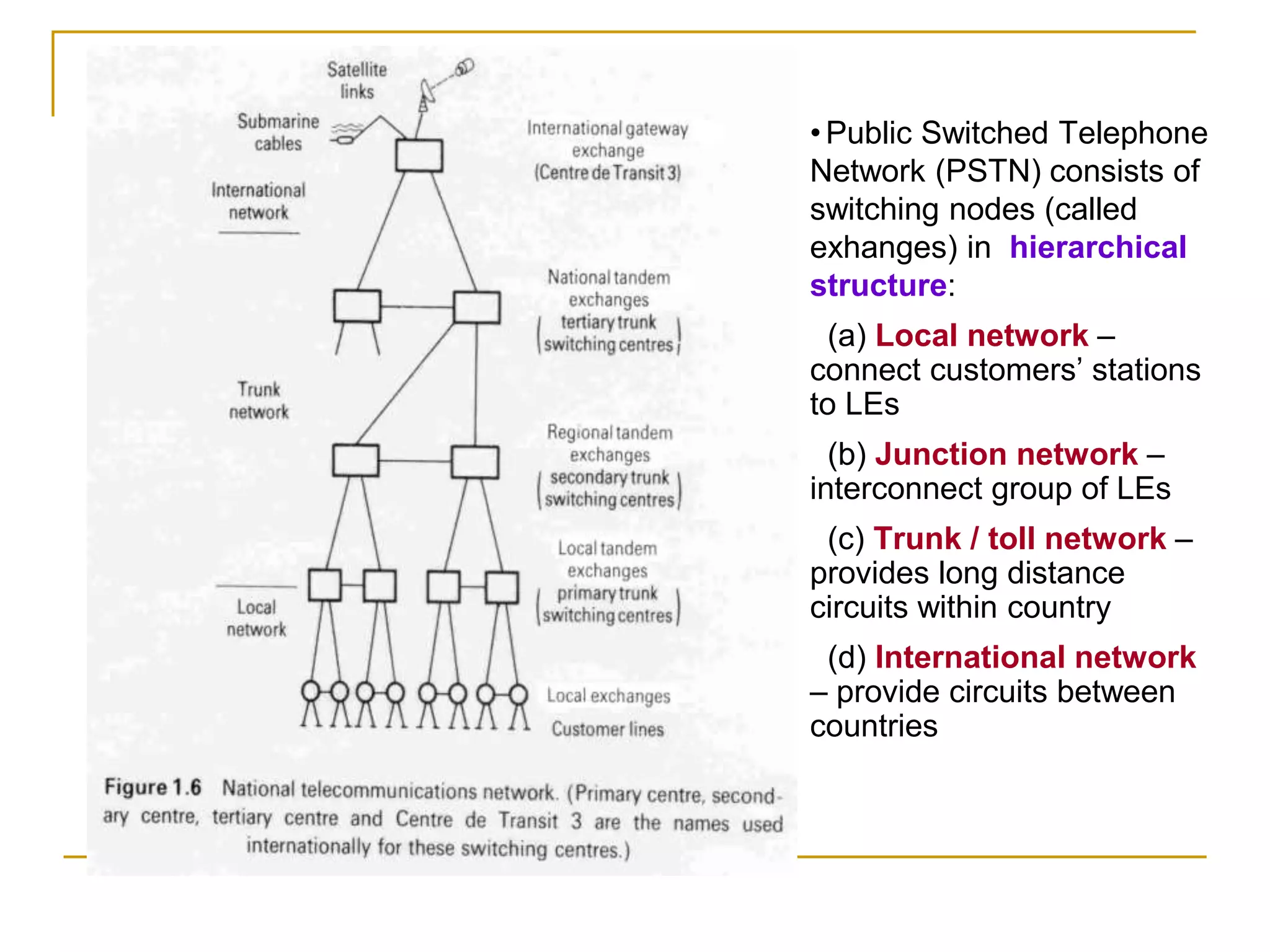
•Public Switched Telephone
Network (PSTN) consists of
switching nodes (called
exhanges) in hierarchical
structure:
(a) Local network –
connect customers’ stations
to LEs
(b) Junction network –
interconnect group of LEs
(c) Trunk / toll network –
provides long distance
circuits within country
(d) International network
– provide circuits between
countries
15/12/2012 Bahman R. Alyaei 61
Continue…
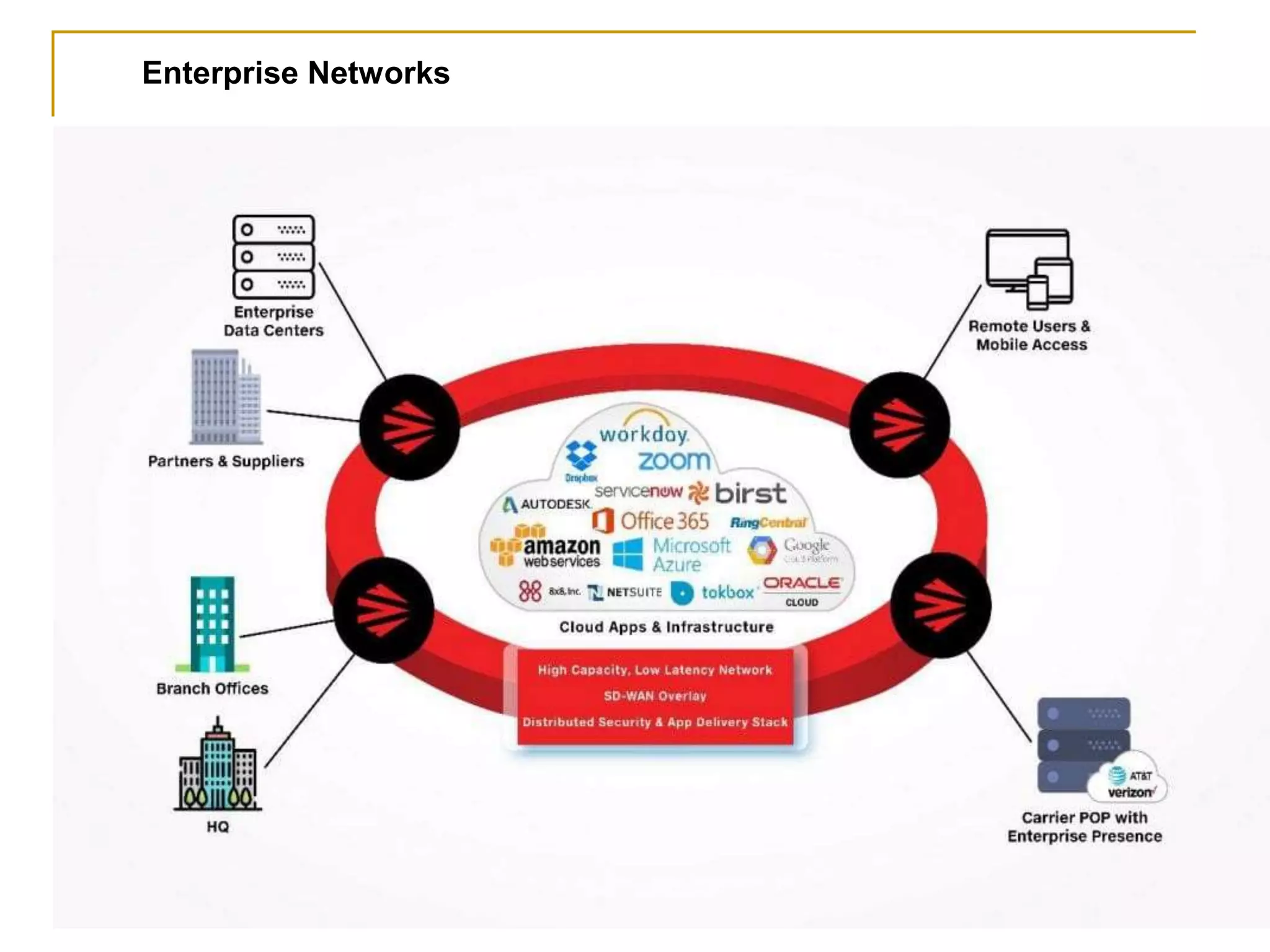
2) Enterprise Networks
■ supports the business and government
enterprise as a private business.
■ Its most common configuration is the Local
Area Network (LAN) and is optimized for data
communications.
■ Wide Area Network (WAN) is its long
distance example developed by the US
Department of Defense having been opened
to the public worldwide. It is the internet.
Enterprise Networks
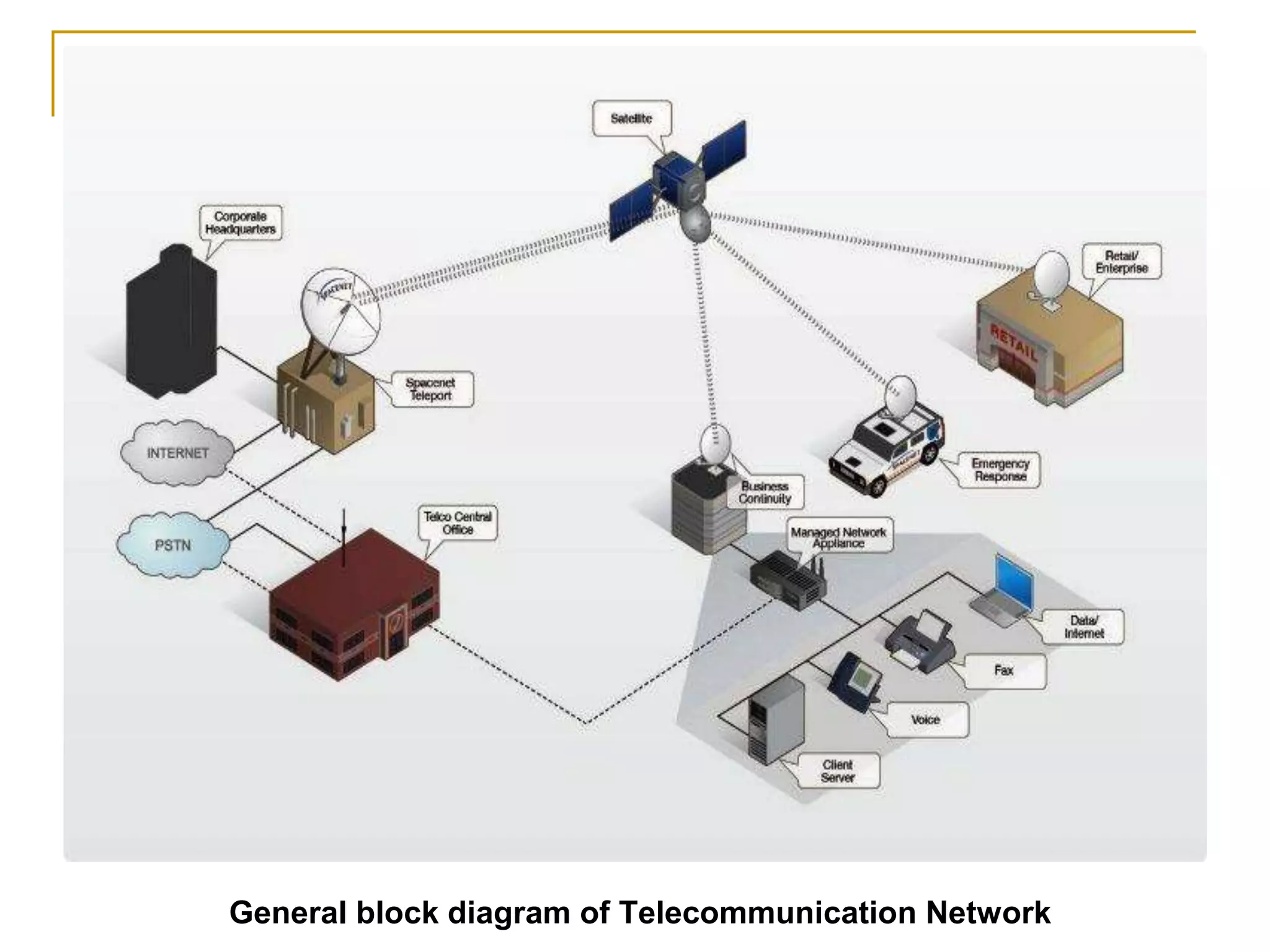
General block diagram of Telecommunication Network
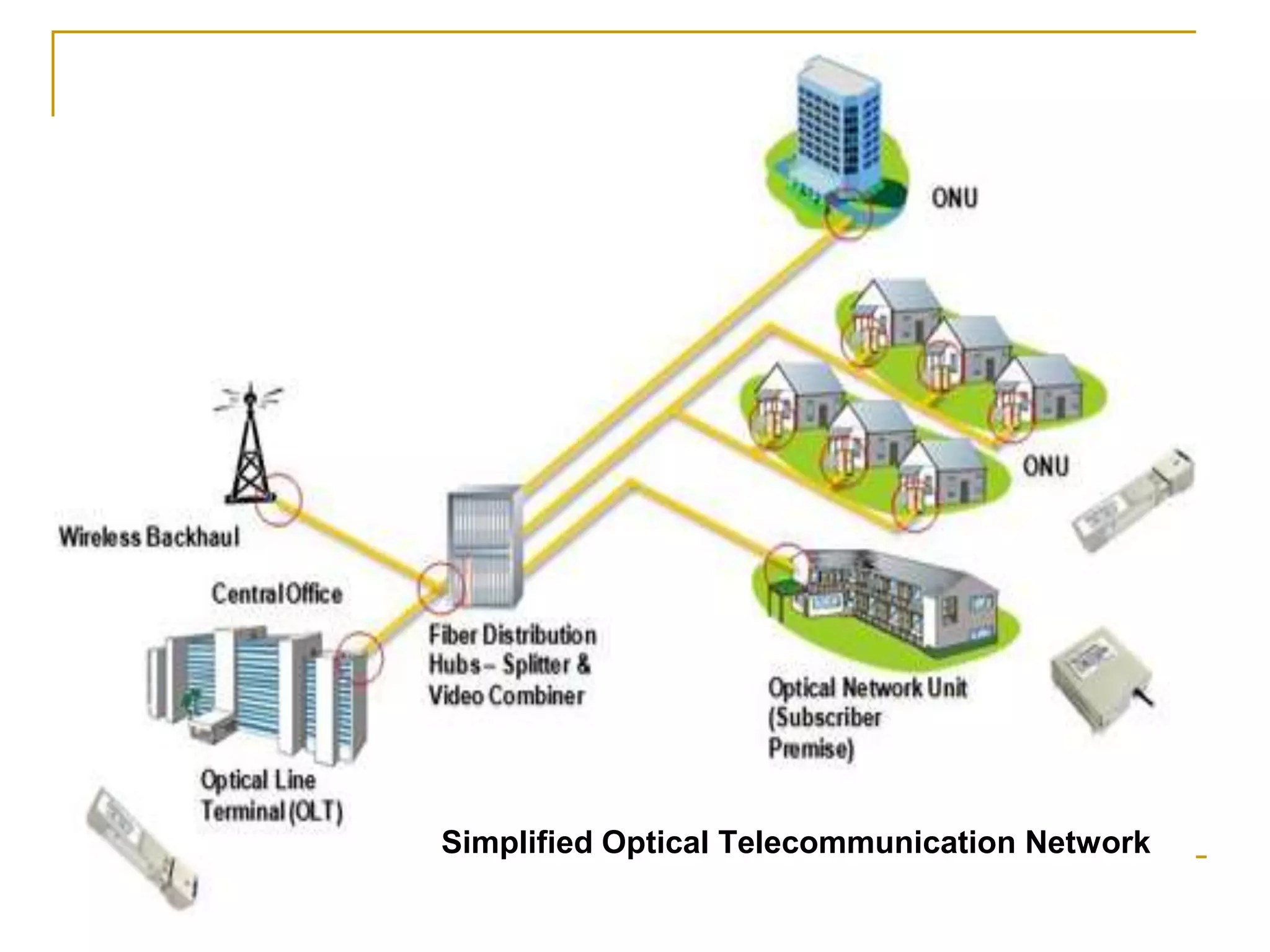
Simplified Optical Telecommunication Network
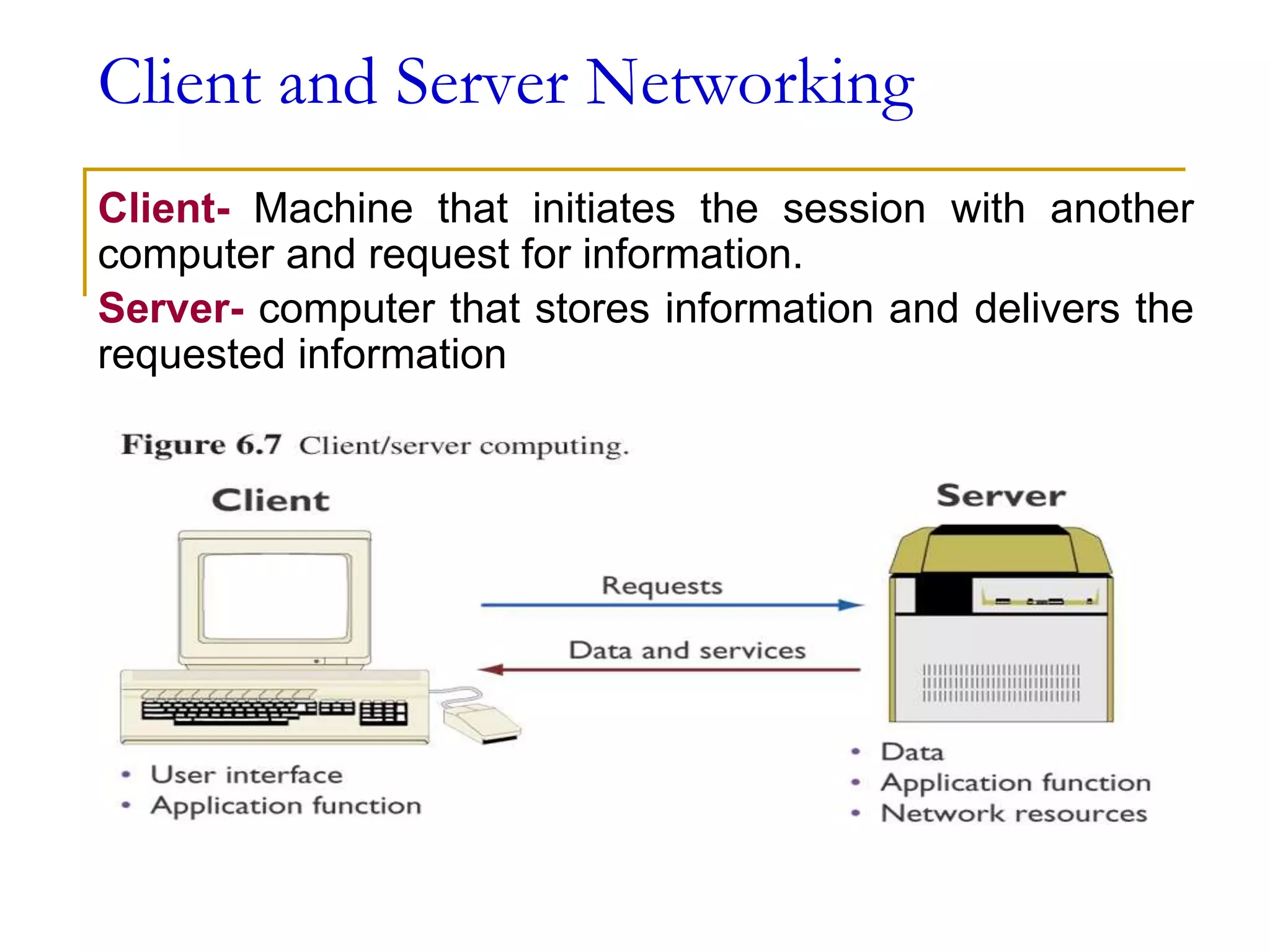
Client and Server Networking
Client- Machine that initiates the session with another
computer and request for information.
Server- computer that stores information and delivers the
requested information
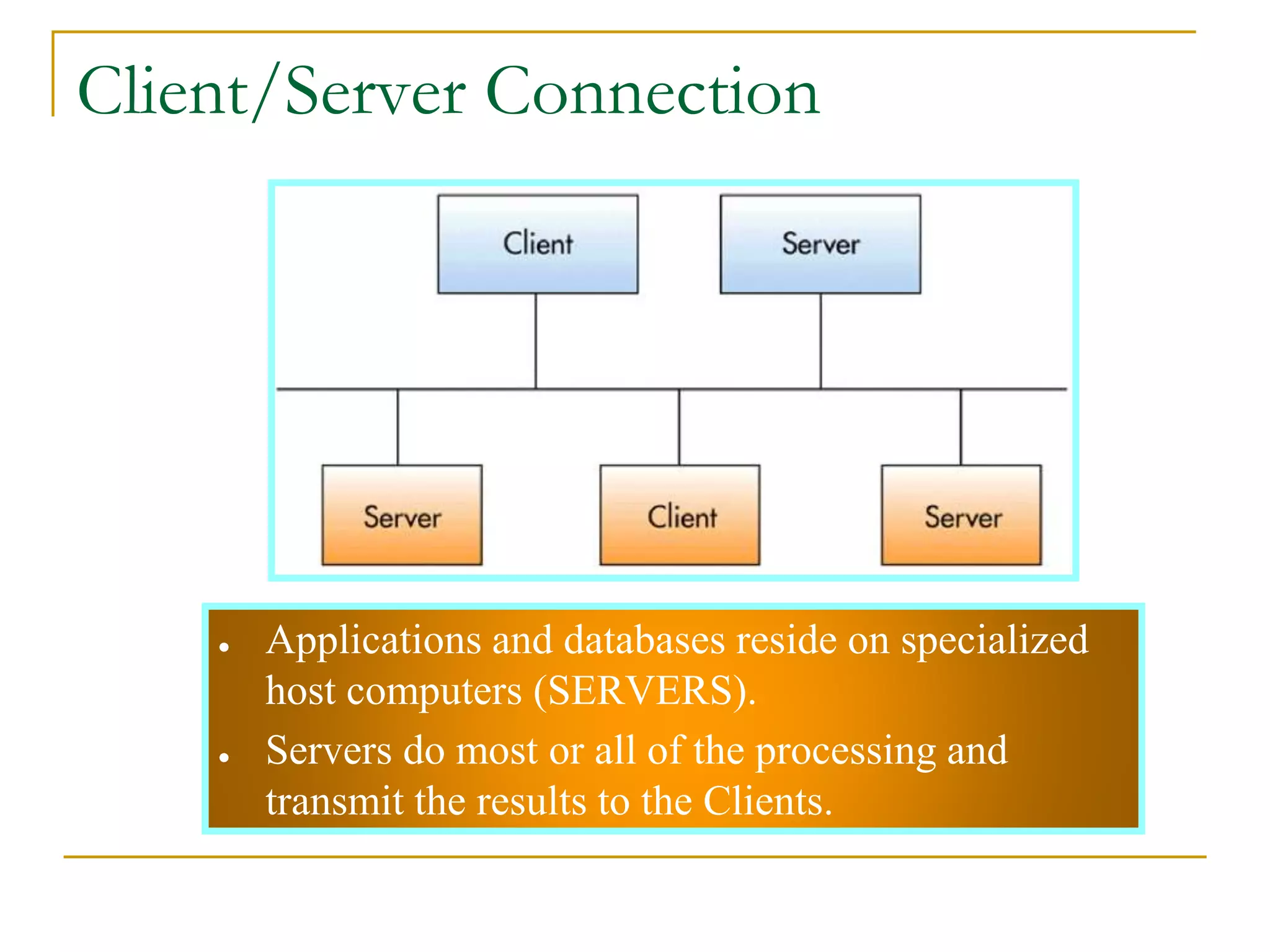
● Applications and databases reside on specialized
host computers (SERVERS).
● Servers do most or all of the processing and
transmit the results to the Clients.
31
Client/Server Connection
■ Advantages
❑ Reduced cost potential
❑ Improved Performance
❑ Increased Security
■ Disadvantages
❑ Loss of control
❑ Complex multi-vendor
environment
32
Advantages & Disadvantages of
Client/Server
33
Communications Software
■ Communications Software
❑ Provides error checking, message formatting,
communications logs, data security and privacy, and
translation capabilities for networks.
■ Network Operating System (NOS)
❑ Systems software that controls the computer systems and
devices on a network and allows them to communicate with
each other.
■ Network Management Software
❑ Enables a manager on a networked desktop to monitor the
use of individual computers and shared hardware, scan for
viruses, and ensure compliance with software licenses.
Network Architectures & Protocols
Protocol – standard set of rules and procedures for the
control of communications in a network
❑ Rules that ensure communications among computers of
different types and from different manufacturers.
❑ Rules that determine the form of signal being
transmitted, encoded, error detection and correction,
etc.
Network Architecture – standard interface between end
users and computer systems. Supports the use of
standard protocols and standard communications
hardware and software interfaces; - the goal of promoting
an open, simple, flexible, and efficient telecommunications
environment
35
Protocols
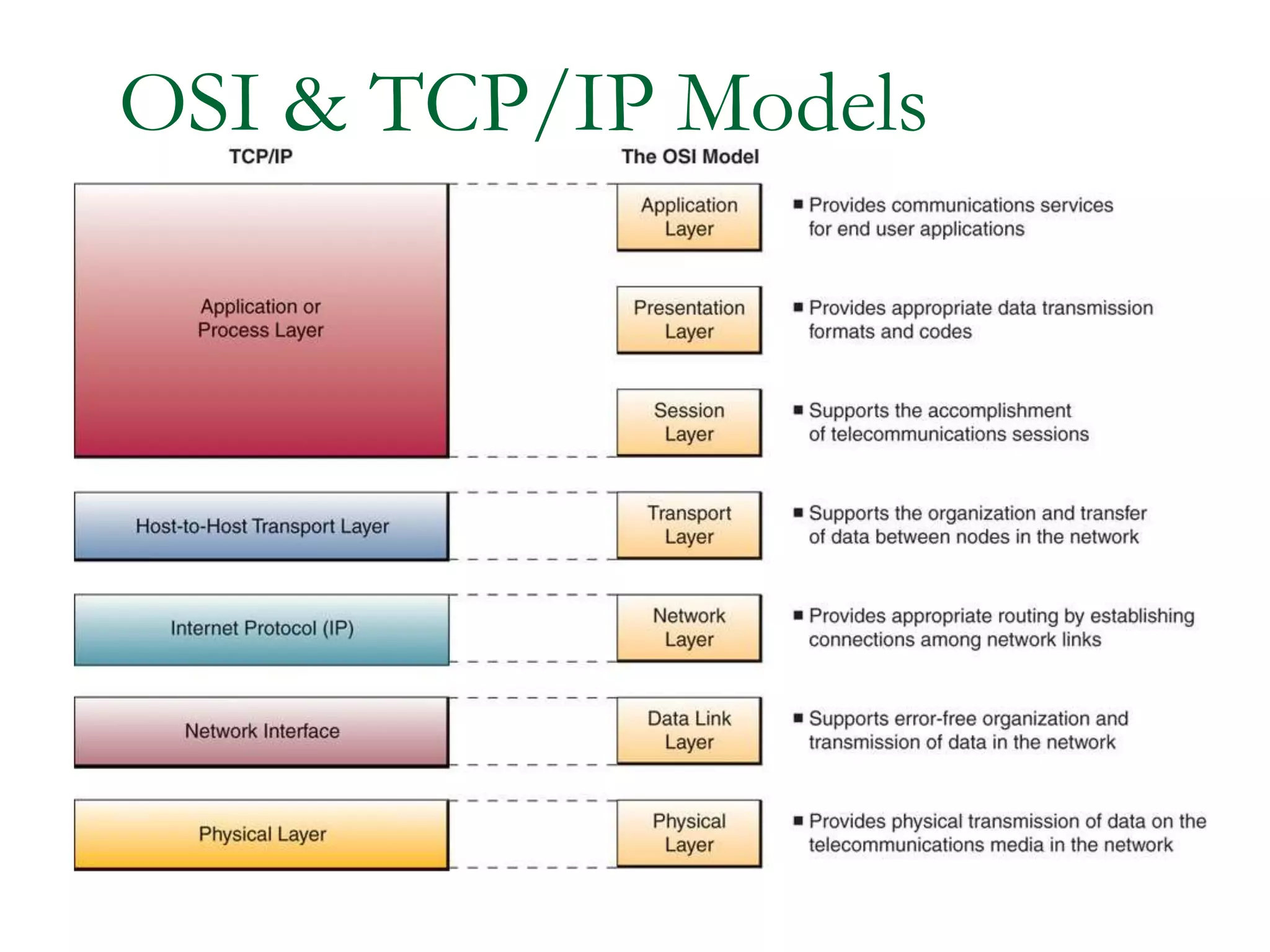
■ OSI 7-Layers Model
❑ Serves as a standard model for network architectures and is
endorsed by the International Standards Committee.
❑ Communication functions are represented in seven layers to
promote the development of modular networks.
❑ Designed to permit communication among different computers
from different operating systems.
❑ Open Systems Interconnection model (OSI model) is a
conceptual model that characterizes and standardizes the
communication functions of a telecommunication or computing
system without regard to its underlying internal structure and
technology.
❑ In the OSI reference model, the communications between a
computing system are split into seven different abstraction layers:
Physical,DataLink,Network,Transport, Session, Presentation
and Application.
TCP/IP Protocol
■ Transmission Control Protocol/Internet Protocol
(TCP/IP)
❑ Standard originally developed by the U.S. government
to link defense research agencies; it is the primary
communication protocol of the Internet.
❑ The TCP/IP model is based on a five-layer model for
networking.
❑ TCP maintains the connection between the sender
and receiver.
❑ The Internet Protocol (IP) is the address system of the
Internet and has the core function of delivering
packets of information from a source device to a target
device.
❑ From bottom (the link) to top (the user application),
these are the physical, data link,
network, transport, and application layers.
36
■ Systems Network Architecture (SNA)
❑ IBM communication protocol for LAN.
❑ Systems Network Architecture is IBM's
proprietary networking architecture, created in
1974.
❑ It is a complete protocol stack for interconnecting
computers and their resources.
❑ The 5-level design has evolved into a 7-level
model closely corresponding to the
internationally recognized Open Systems
Interconnection (OSI) model, and now supports
peer-to-peer networks of workstations.
❑ SNA describes formats and protocols and is, in
itself, not a piece of software.
Protocols
Ethernet
❑ Protocol standard developed for LANs using a
bus topology.
❑ An international standard for message
handling and network directories.
❑ Ethernet protocol is a typical LAN
technology.
❑ Standard Ethernet-based local area networks
transmit data at speed up to 10 Mbps.
❑ Two new Ethernet standards that are
currently being developed are
Gigabit Ethernet (up to 1000 Mbps) and 10
Gigabit Ethernet (with data transfer rate of
10,000 Mbps).
OSI & TCP/IP Models
Open Systems Interconnection (OSI) -
model is a seven-layer model that serves as
a standard model for network architectures
Transmission Control Protocol / Internet
Protocol (TCP/IP) – is a five layer
telecommunications protocol used by the
Internet
OSI & TCP/IP Models
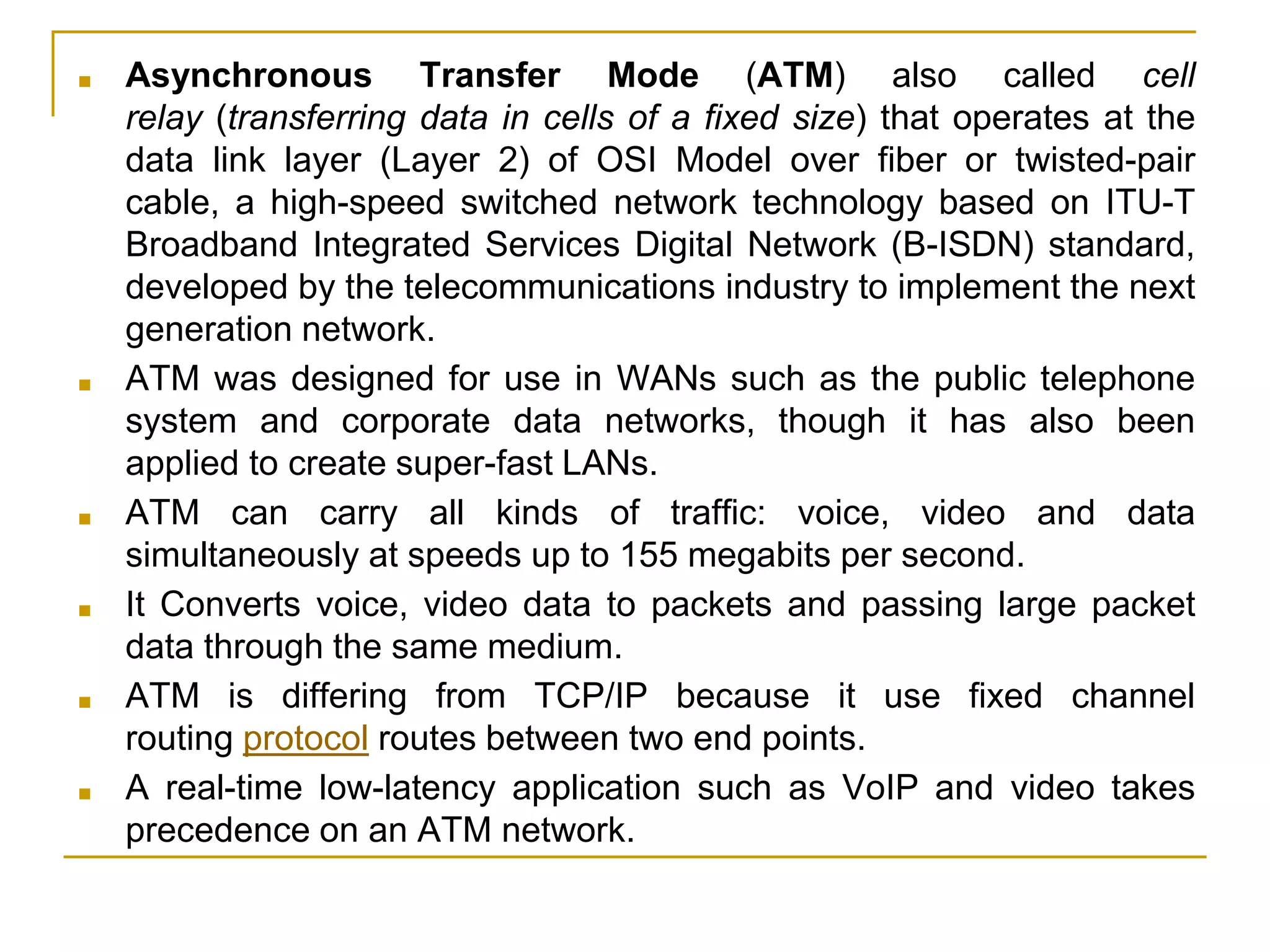
■ Asynchronous Transfer Mode (ATM) also called cell
relay (transferring data in cells of a fixed size) that operates at the
data link layer (Layer 2) of OSI Model over fiber or twisted-pair
cable, a high-speed switched network technology based on ITU-T
Broadband Integrated Services Digital Network (B-ISDN) standard,
developed by the telecommunications industry to implement the next
generation network.
■ ATM was designed for use in WANs such as the public telephone
system and corporate data networks, though it has also been
applied to create super-fast LANs.
■ ATM can carry all kinds of traffic: voice, video and data
simultaneously at speeds up to 155 megabits per second.
■ It Converts voice, video data to packets and passing large packet
data through the same medium.
■ ATM is differing from TCP/IP because it use fixed channel
routing protocol routes between two end points.
■ A real-time low-latency application such as VoIP and video takes
precedence on an ATM network.
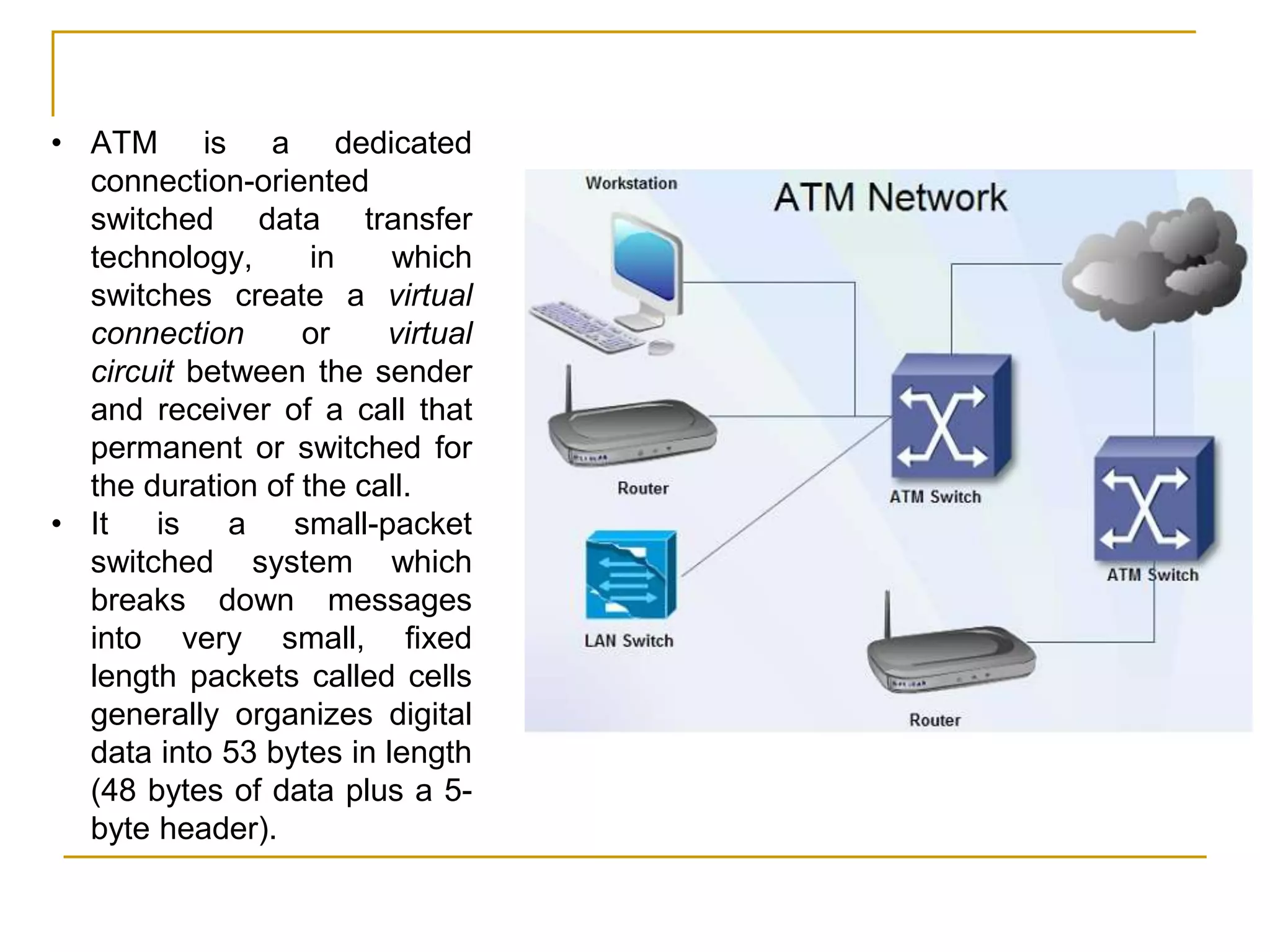
• ATM is a dedicated
connection-oriented
switched data transfer
technology, in which
switches create a virtual
connection or virtual
circuit between the sender
and receiver of a call that
permanent or switched for
the duration of the call.
• It is a small-packet
switched system which
breaks down messages
into very small, fixed
length packets called cells
generally organizes digital
data into 53 bytes in length
(48 bytes of data plus a 5-
byte header).
■ Linking Personal Computers to Mainframe
Computers
❑ Download and upload information.
■ Voice Mail
❑ Enables users to leave, receive, and store
verbal messages for and from other users.
■ Electronic Mail (e-mail)
❑ Enables a sender to connect a computer to
a network, type messages, and send it to
another person on the network.
39
Applications
40
Applications
■ Electronic Software Distribution
❑ Involves installing software on a file server for
users to share by signing onto the network and
requesting that the software be downloaded onto
their computers over a network.
■ Electronic Document Distribution
❑ Transporting documents -- such as sales reports,
policy manuals, and advertising brochures -- over
communications lines and networks.
42
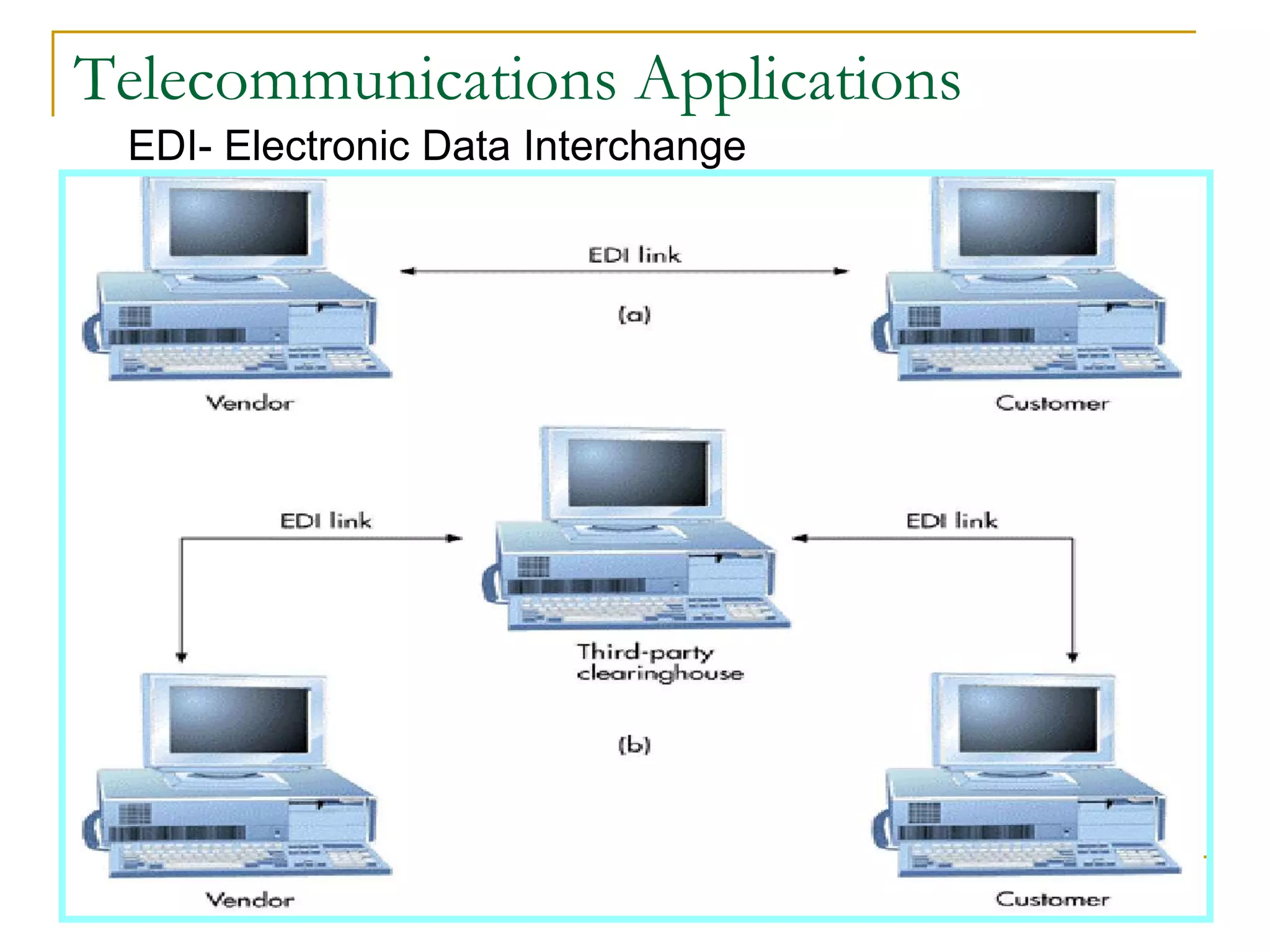
Telecommunications Applications
EDI- Electronic Data Interchange
■ Public Network Services
❑ Services that give personal computer users
access to vast databases and other services,
usually for an initial fee plus usage fees.
■ Specialized and Regional Information
Services
❑ Specialized electronic bulletin boards and e-
mail services targeting particular interests.
■ Distance Education
❑ Use of telecommunications to extend the
classroom.
43
Telecommunications Applications
E- Commerce and E-Business Technologies
Teleconferencing: Ability to confer with a group
of people simultaneously
Data conferencing: Two or more users can edit
and modify data files simultaneously
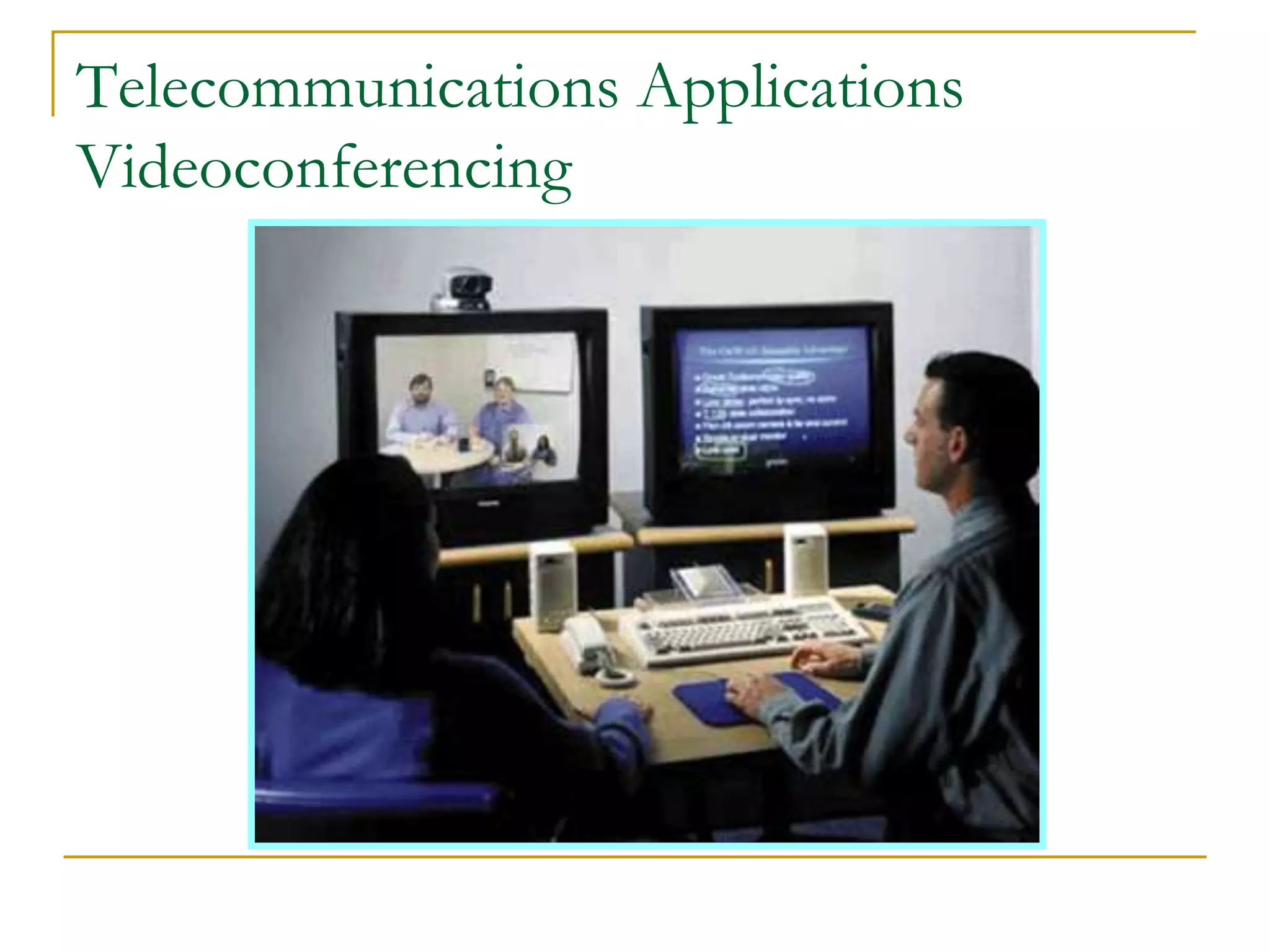
Videoconferencing: Participants are able to see
each other over video screens
Distance learning: Education or training
delivered over a distance to individuals in one or
more locations
E-learning: Instruction delivered online using the
Internet or private networks
41
Telecommunications Applications
Videoconferencing
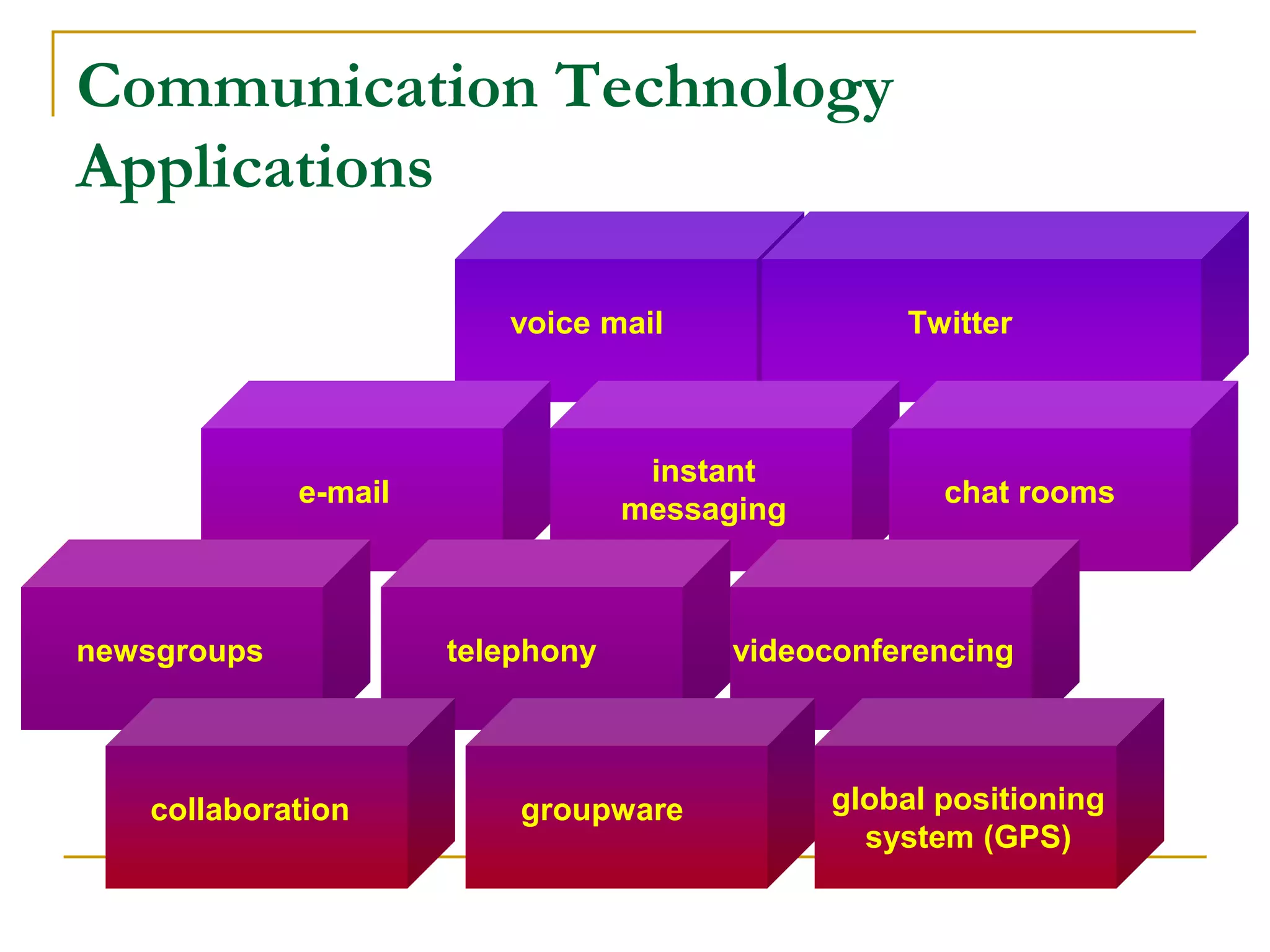
Communication Technology
Applications
voice mail Twitter
e-mail
instant
messaging
chat rooms
newsgroups telephony videoconferencing
collaboration groupware global positioning
system (GPS)
Communication Technologies -
Applications
■ Different technologies allowing us to communicate
❑ Examples: Voice mail, fax, email, instant message, chat rooms, news groups,
telephony, GPS, and more
■ Voice mail: Similar to answering machine but digitized
■ Fax: Sending hardcopy of text or photographs between computers using fax
modem
■ Email: electronic mail – sending text, files, images between different computer
networks - must have email software
❑ More than 1.3 billion people send 244 billion messages monthly!
■ Chat rooms: Allows communications in real time when connected to the Internet
■ Telephony: Talking to other people over the Internet (also called VoIP)
❑ Sends digitized audio signals over the Internet
❑ Requires Internet telephone software
■ Groupware: Software application allowing a group of people to communicate
with each other (exchange data)
❑ Address book, appointment book, schedules, etc.
■ GPS: consists of receivers connected to satellite systems
❑ Determining the geographical location of the receiver
❑ Used for cars, advertising, hiking, tracking, etc.
Internet
A network made up of millions of smaller private
networks, each operate independent of, or in
harmony with, all the other millions of networks
• Surf
• E-mail
• Buy and sell
• Download
• Publish
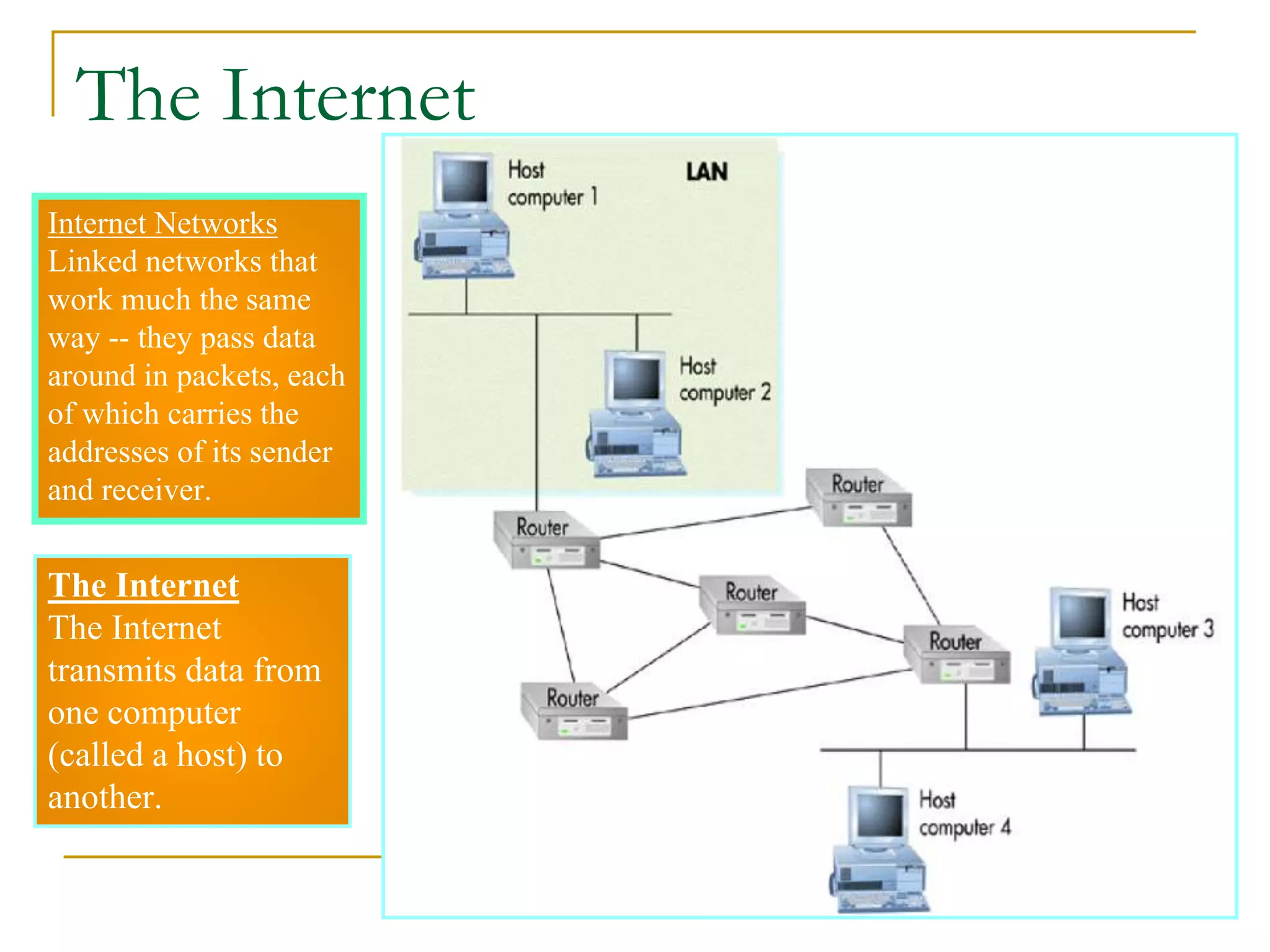
The Internet
The Internet
transmits data from
one computer
(called a host) to
another.
Internet Networks
Linked networks that
work much the same
way -- they pass data
around in packets, each
of which carries the
addresses of its sender
and receiver.
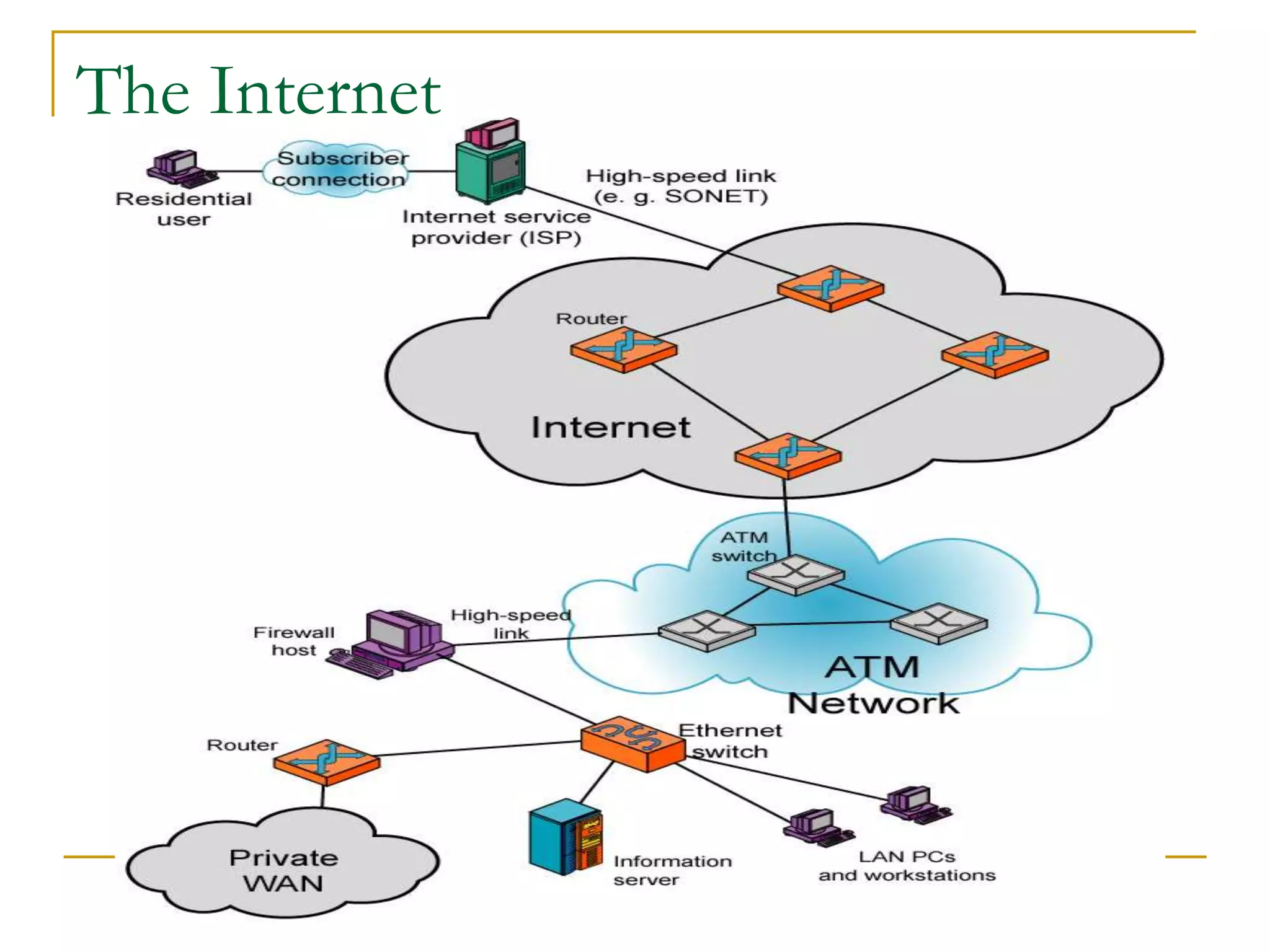
The Internet
The Internet
How the Internet Works
■ Protocol
❑ A protocol that operates at the transport layer and is
used in combination with IP by most Internet
applications
❑ It ensures that computers in Internet can understand
the message sending amongst each other.
■ Backbone
❑ One of the Internet’s high-speed, long distance
communications links.
■ IP Address/Port
❑ IP address is the unique identification on a computer
that is connecting to the Internet.
❑ Ports are the input/output locations of a computer
where messages should send in or out.
❑ If an IP address is analogy to a country, then the Port
addresses will be analogy to the ports of that country.
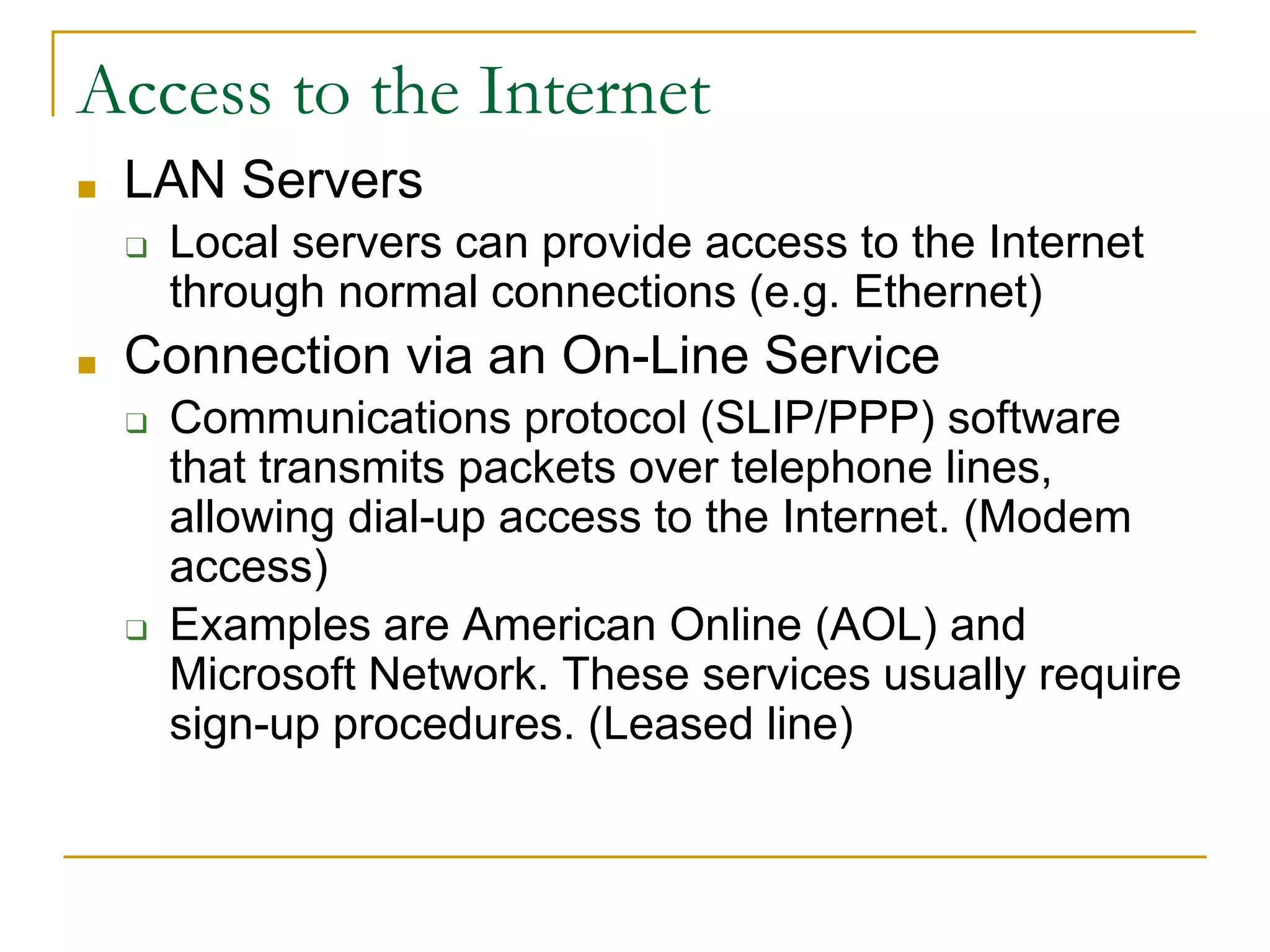
Access to the Internet
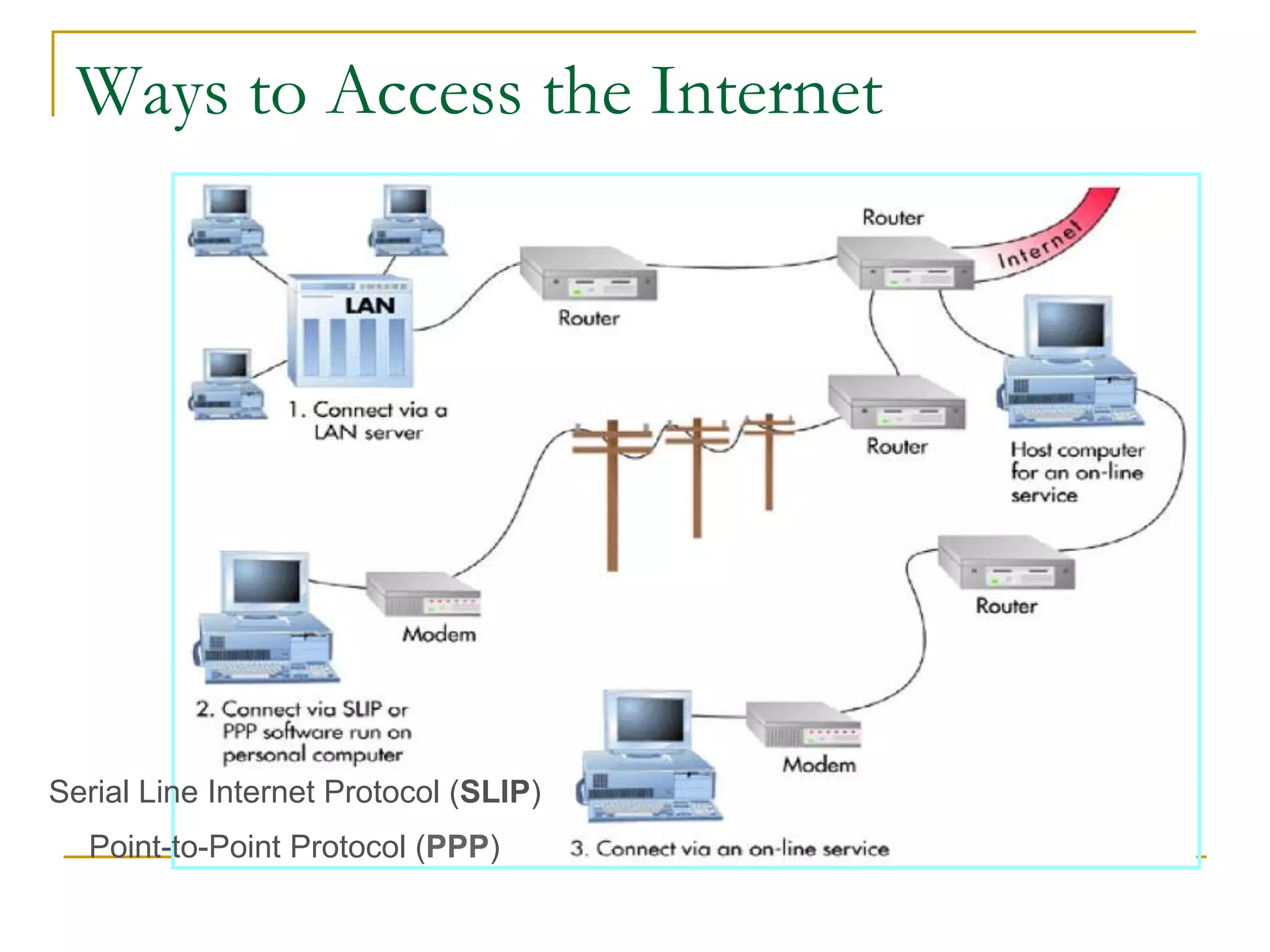
■ LAN Servers
❑ Local servers can provide access to the Internet
through normal connections (e.g. Ethernet)
■ Connection via an On-Line Service
❑ Communications protocol (SLIP/PPP) software
that transmits packets over telephone lines,
allowing dial-up access to the Internet. (Modem
access)
❑ Examples are American Online (AOL) and
Microsoft Network. These services usually require
sign-up procedures. (Leased line)
Ways to Access the Internet
Serial Line Internet Protocol (SLIP)
Point-to-Point Protocol (PPP)
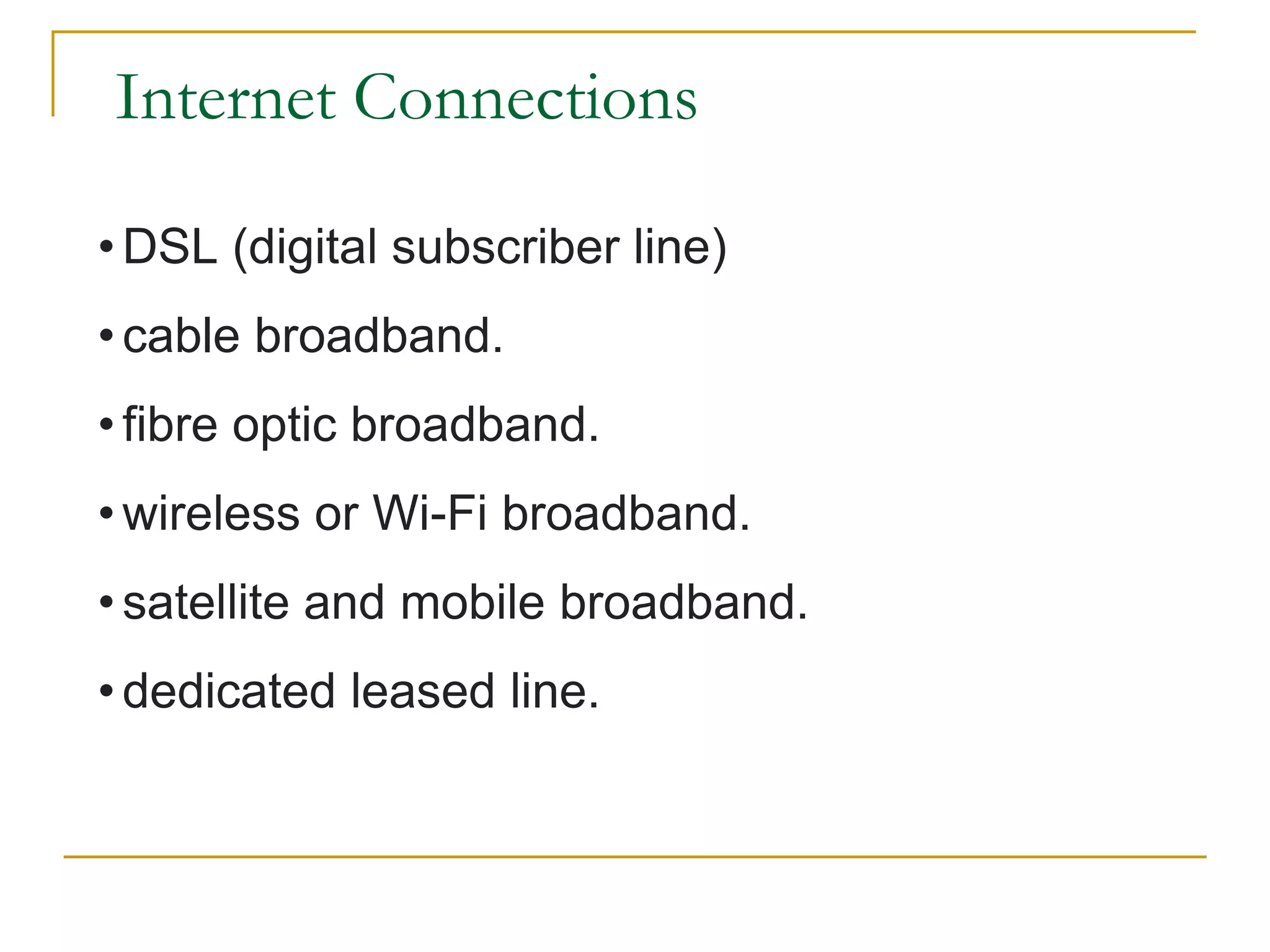
Internet Connections
• DSL (digital subscriber line)
• cable broadband.
• fibre optic broadband.
• wireless or Wi-Fi broadband.
• satellite and mobile broadband.
• dedicated leased line.
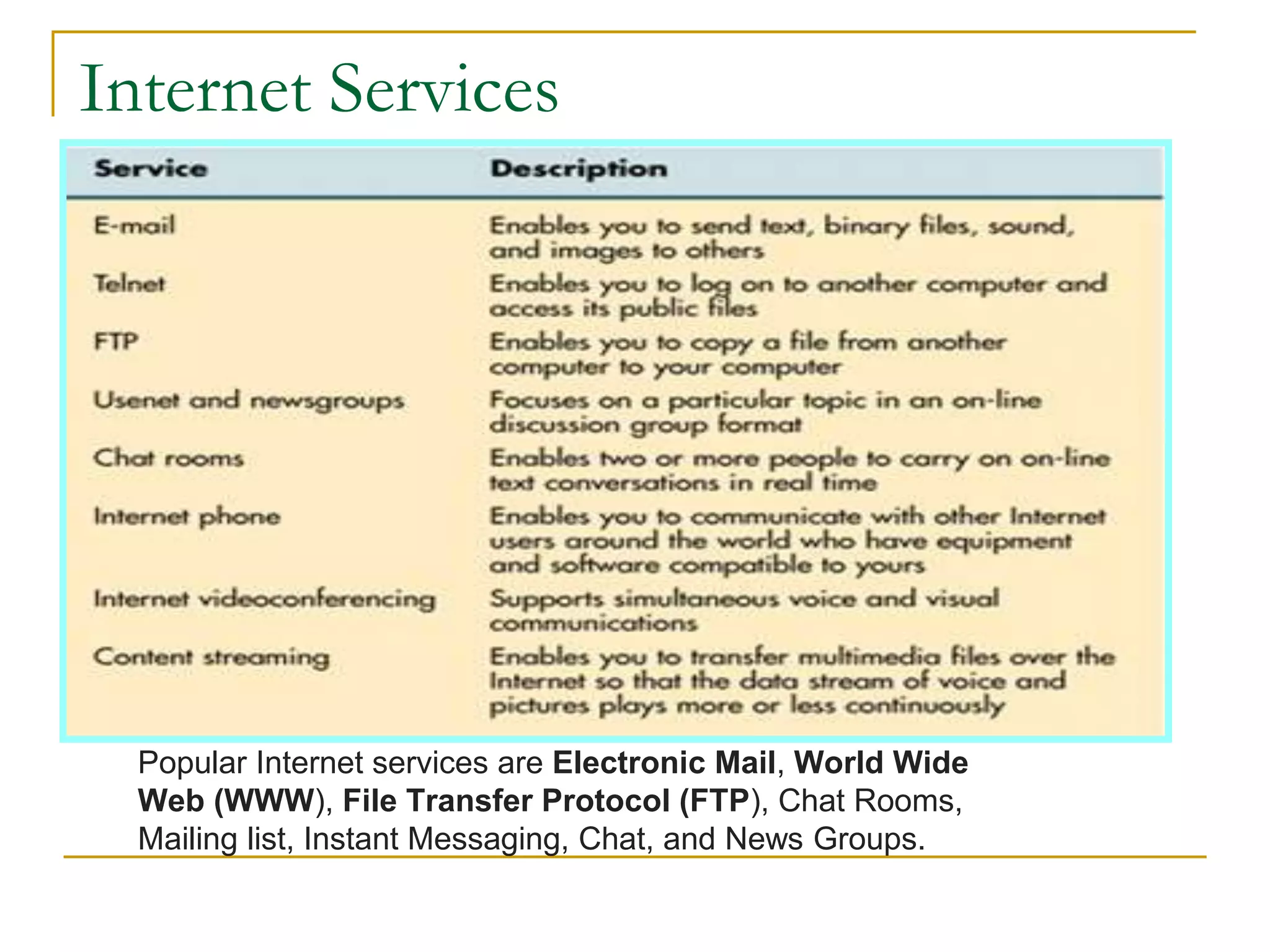
Internet Services
Popular Internet services are Electronic Mail, World Wide
Web (WWW), File Transfer Protocol (FTP), Chat Rooms,
Mailing list, Instant Messaging, Chat, and News Groups.
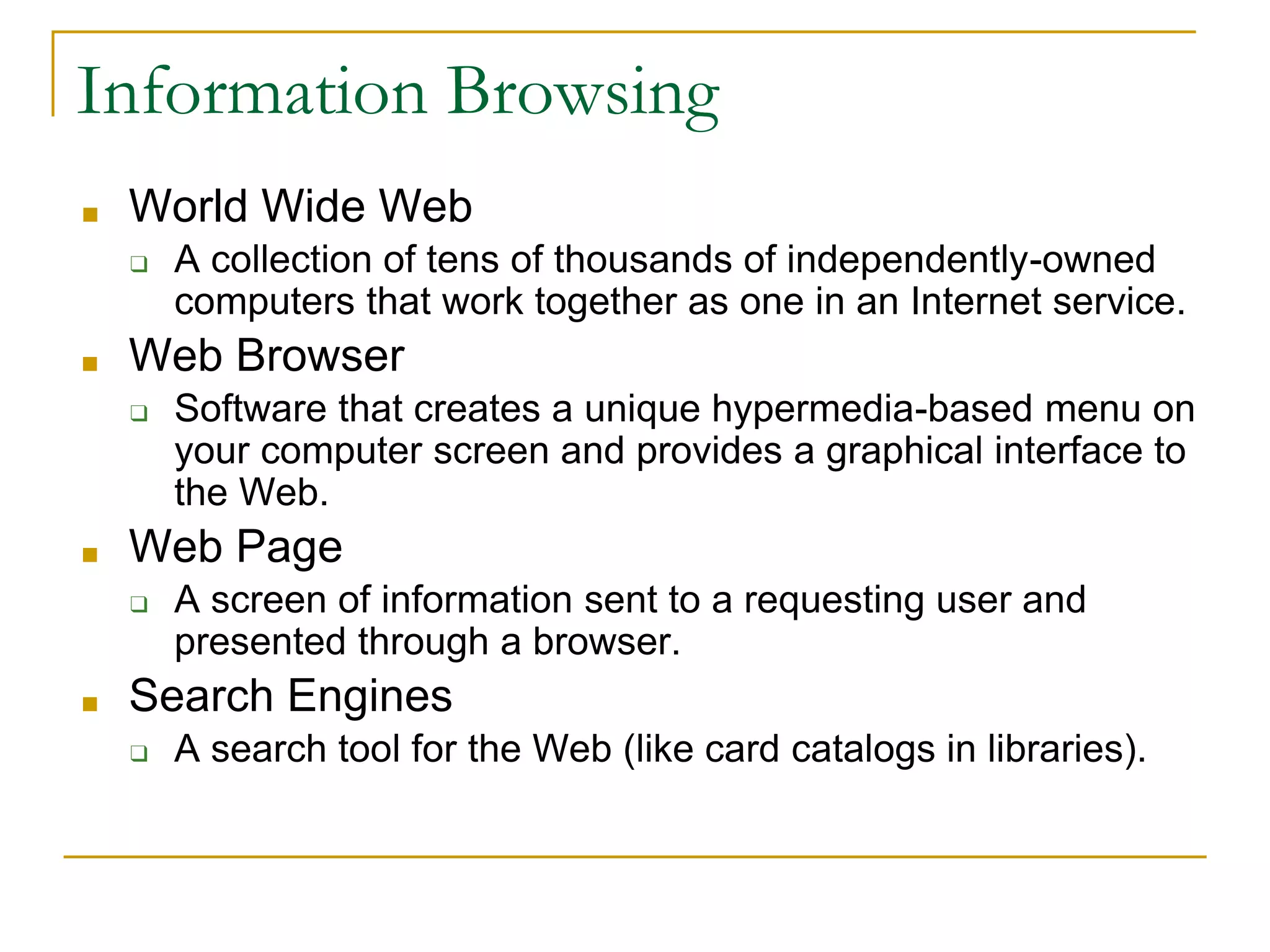
■ World Wide Web
❑ A collection of tens of thousands of independently-owned
computers that work together as one in an Internet service.
■ Web Browser
❑ Software that creates a unique hypermedia-based menu on
your computer screen and provides a graphical interface to
the Web.
■ Web Page
❑ A screen of information sent to a requesting user and
presented through a browser.
■ Search Engines
❑ A search tool for the Web (like card catalogs in libraries).
Information Browsing
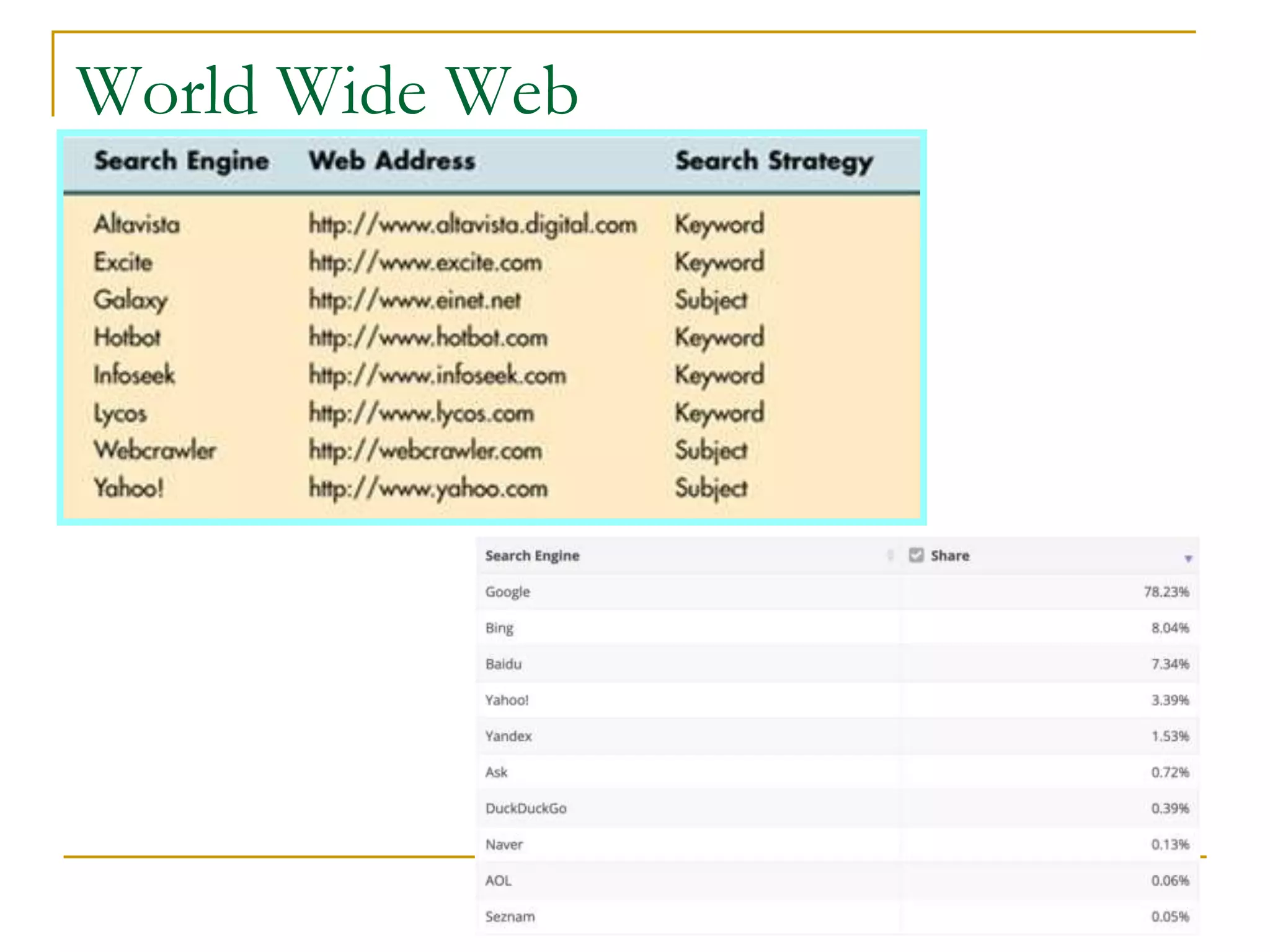
World Wide Web
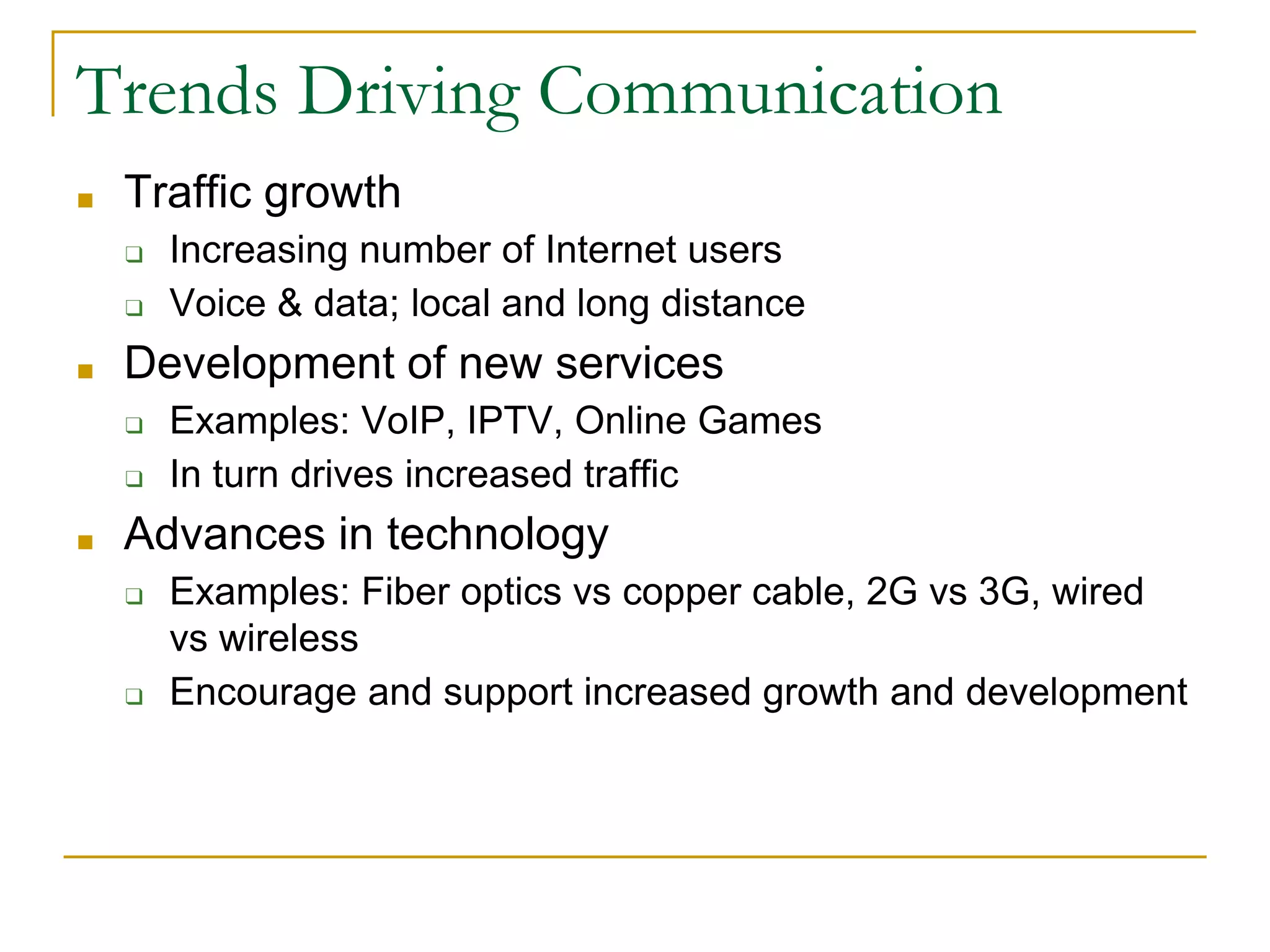
Trends Driving Communication
■ Traffic growth
❑ Increasing number of Internet users
❑ Voice & data; local and long distance
■ Development of new services
❑ Examples: VoIP, IPTV, Online Games
❑ In turn drives increased traffic
■ Advances in technology
❑ Examples: Fiber optics vs copper cable, 2G vs 3G, wired
vs wireless
❑ Encourage and support increased growth and development
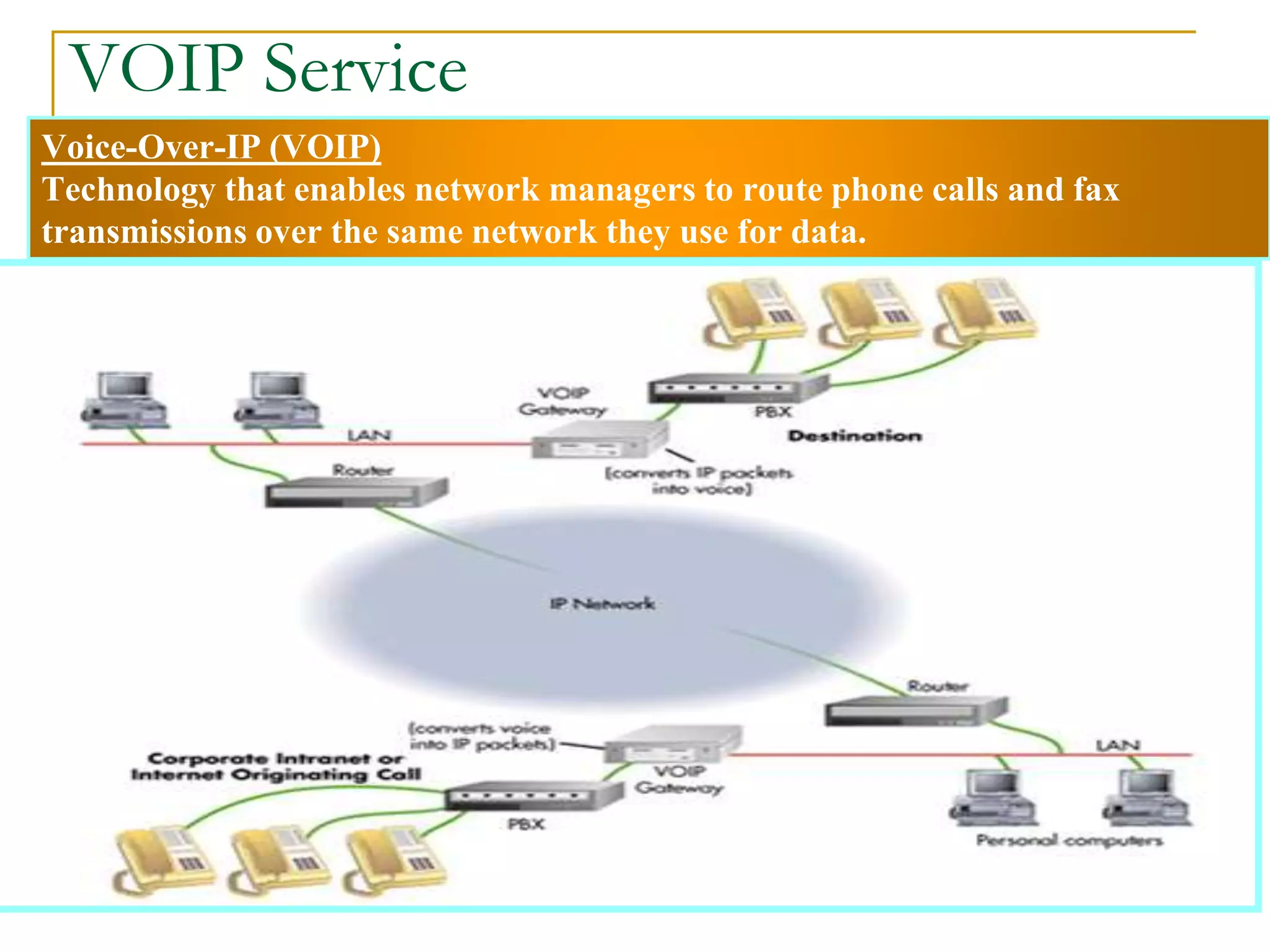
Voice-Over-IP (VOIP)
Technology that enables network managers to route phone calls and fax
transmissions over the same network they use for data.
VOIP Service
Internet Entertainment
■ Internet Protocol television (IPTV)
■ IPTV is the delivery of televisionIPTV is the delivery
of television content over Internet Protocol (IP) networks.
■ Unlike downloaded media, IPTV offers the ability to
stream the source media continuously.
■ As a result, a client media player can begin playing the
content (such as a TV channel) almost immediately. This
is known as streaming media.
■ Content Streaming
❑ A method for transferring multimedia files over the
Internet so that the data stream of voice and pictures
plays continuously, without a break, or very few of
them.
❑ It also enables users to browse large files in real time.
Key Technology Trends
■ Faster and cheaper computing and
communications
■ Increasingly “intelligent” networks
■ Growing importance of Internet, intranet and
extranet applications
■ Increasing use of and dependence on mobile
technologies, e.g. personal networks
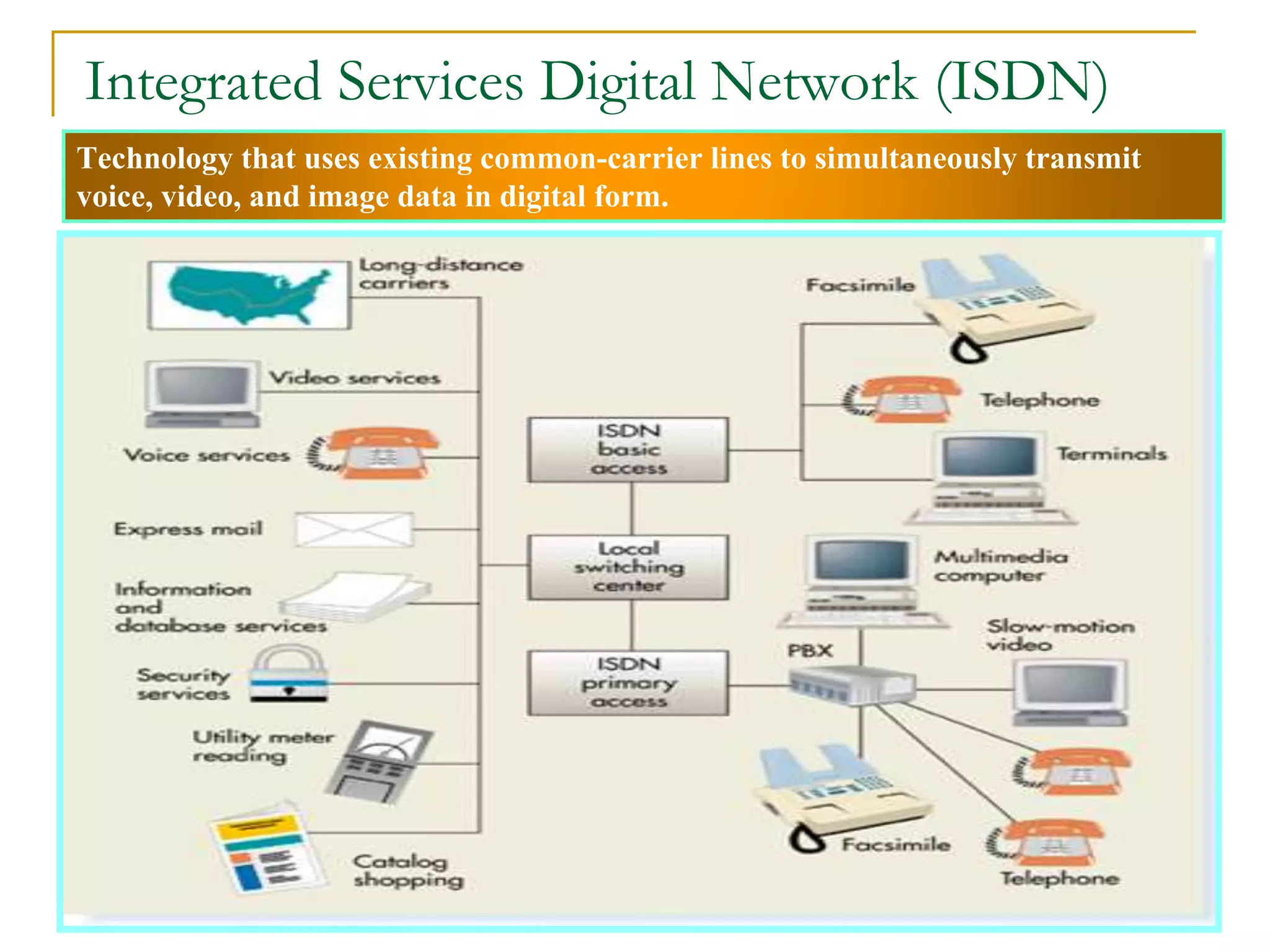
Technology that uses existing common-carrier lines to simultaneously transmit
voice, video, and image data in digital form.
Integrated Services Digital Network (ISDN)
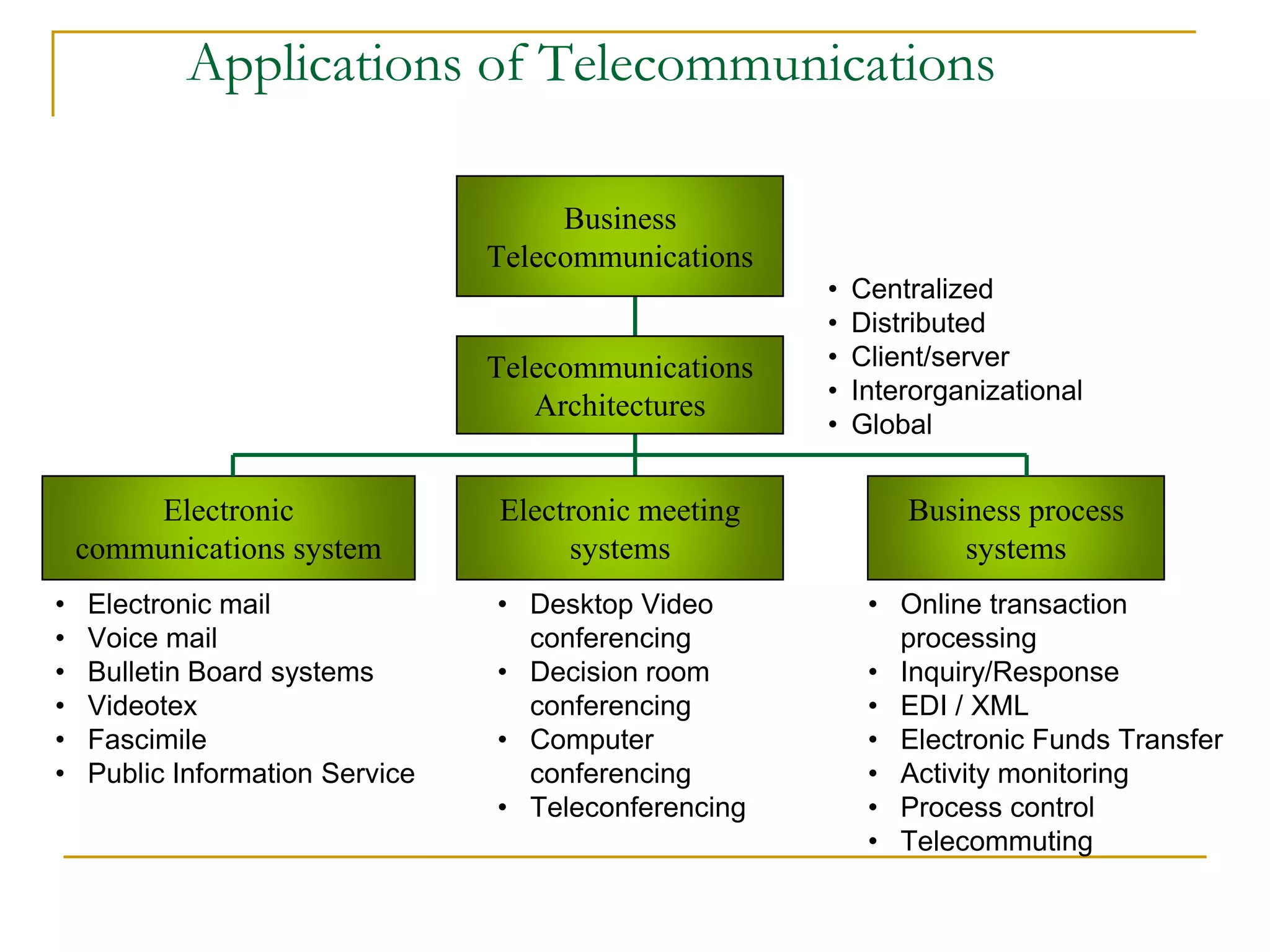
Applications of Telecommunications
Business
Telecommunications
Telecommunications
Architectures
Electronic
communications system
Electronic meeting
systems
Business process
systems
• Centralized
• Distributed
• Client/server
• Interorganizational
• Global
• Electronic mail
• Voice mail
• Bulletin Board systems
• Videotex
• Fascimile
• Public Information Service
• Desktop Video
conferencing
• Decision room
conferencing
• Computer
conferencing
• Teleconferencing
• Online transaction
processing
• Inquiry/Response
• EDI / XML
• Electronic Funds Transfer
• Activity monitoring
• Process control
• Telecommuting
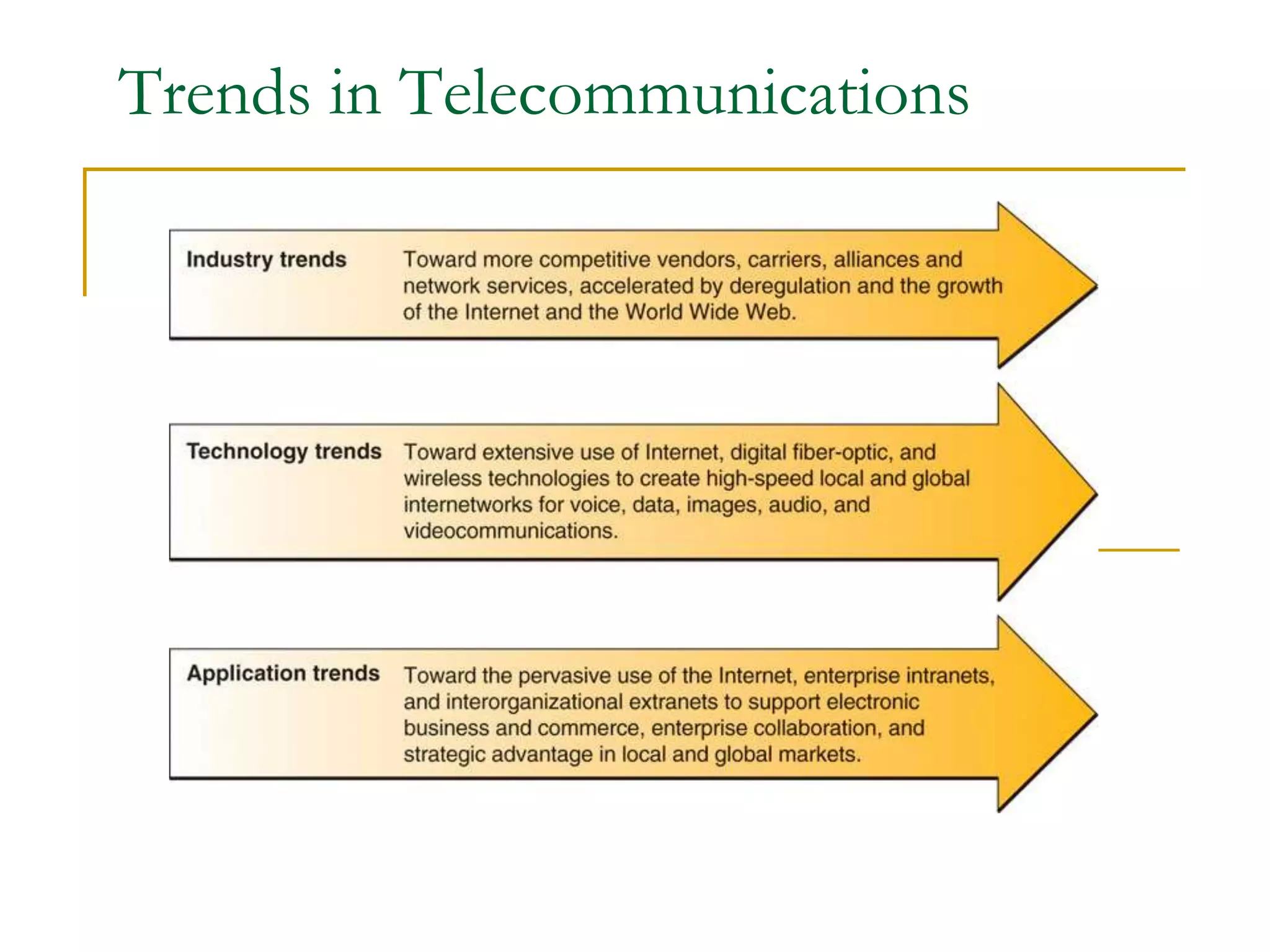
Trends in Telecommunications
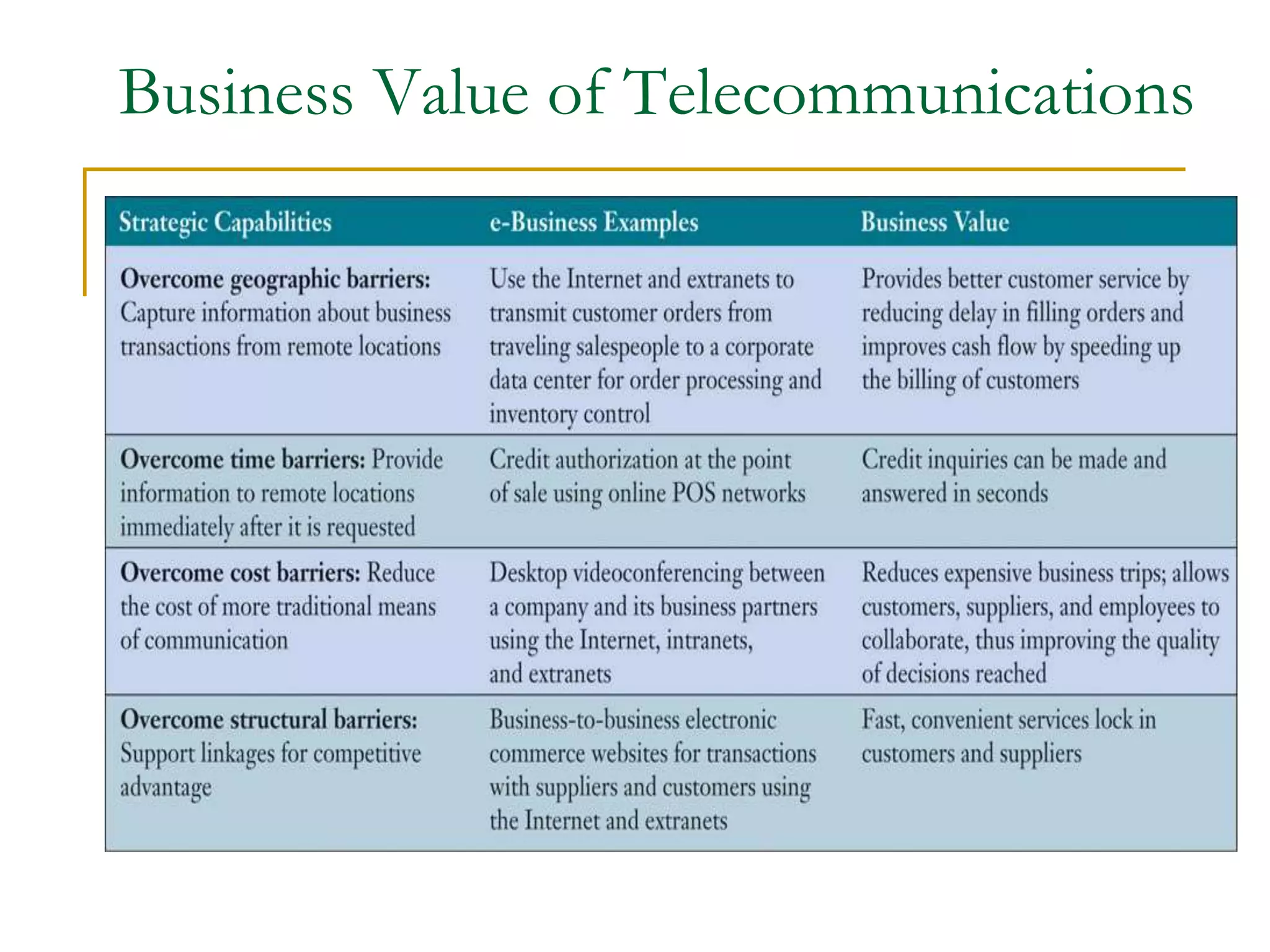
Business Value of Telecommunications
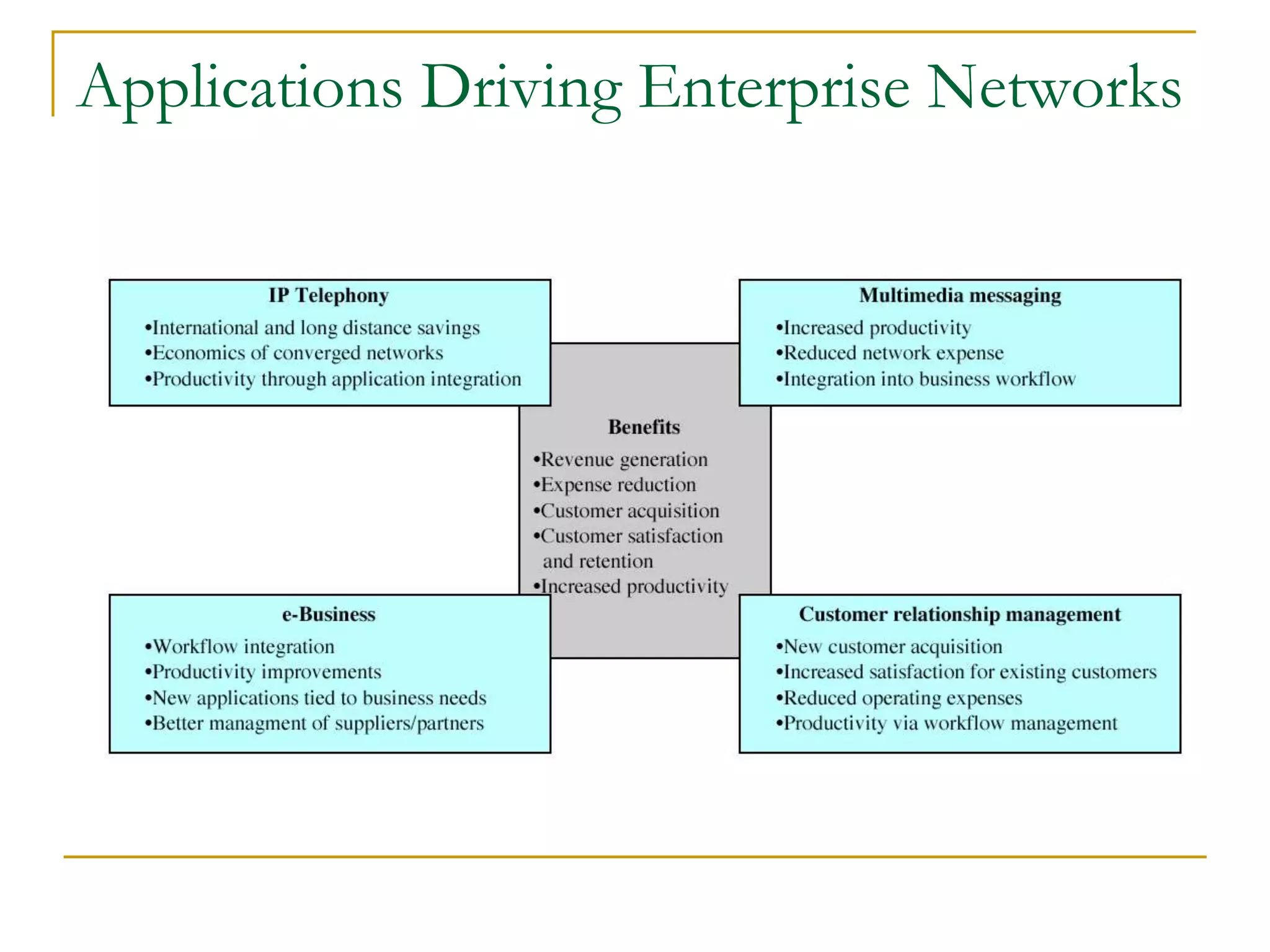
Applications Driving Enterprise Networks
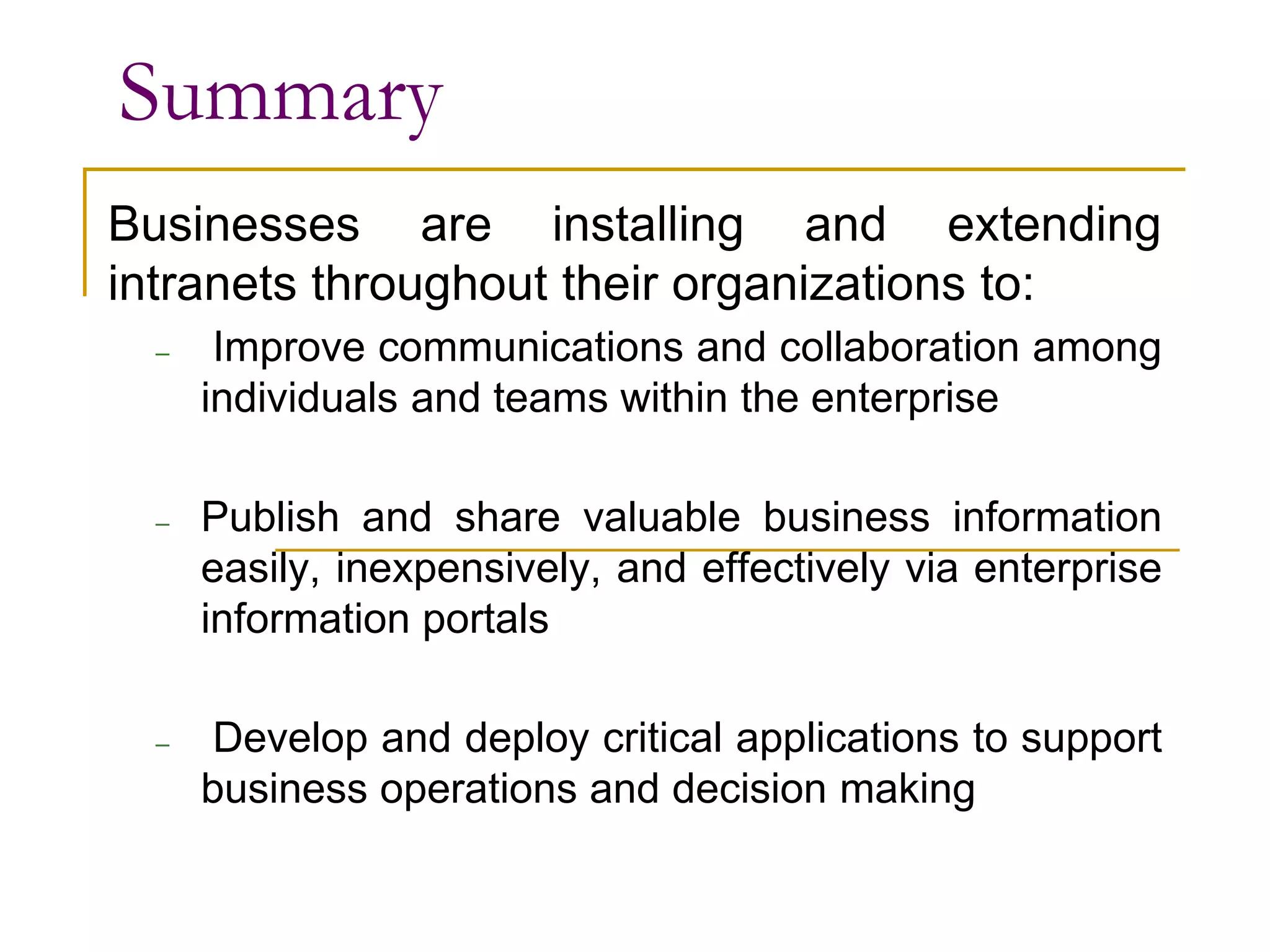
Summary
Businesses are installing and extending
intranets throughout their organizations to:
– Improve communications and collaboration among
individuals and teams within the enterprise
– Publish and share valuable business information
easily, inexpensively, and effectively via enterprise
information portals
– Develop and deploy critical applications to support
business operations and decision making
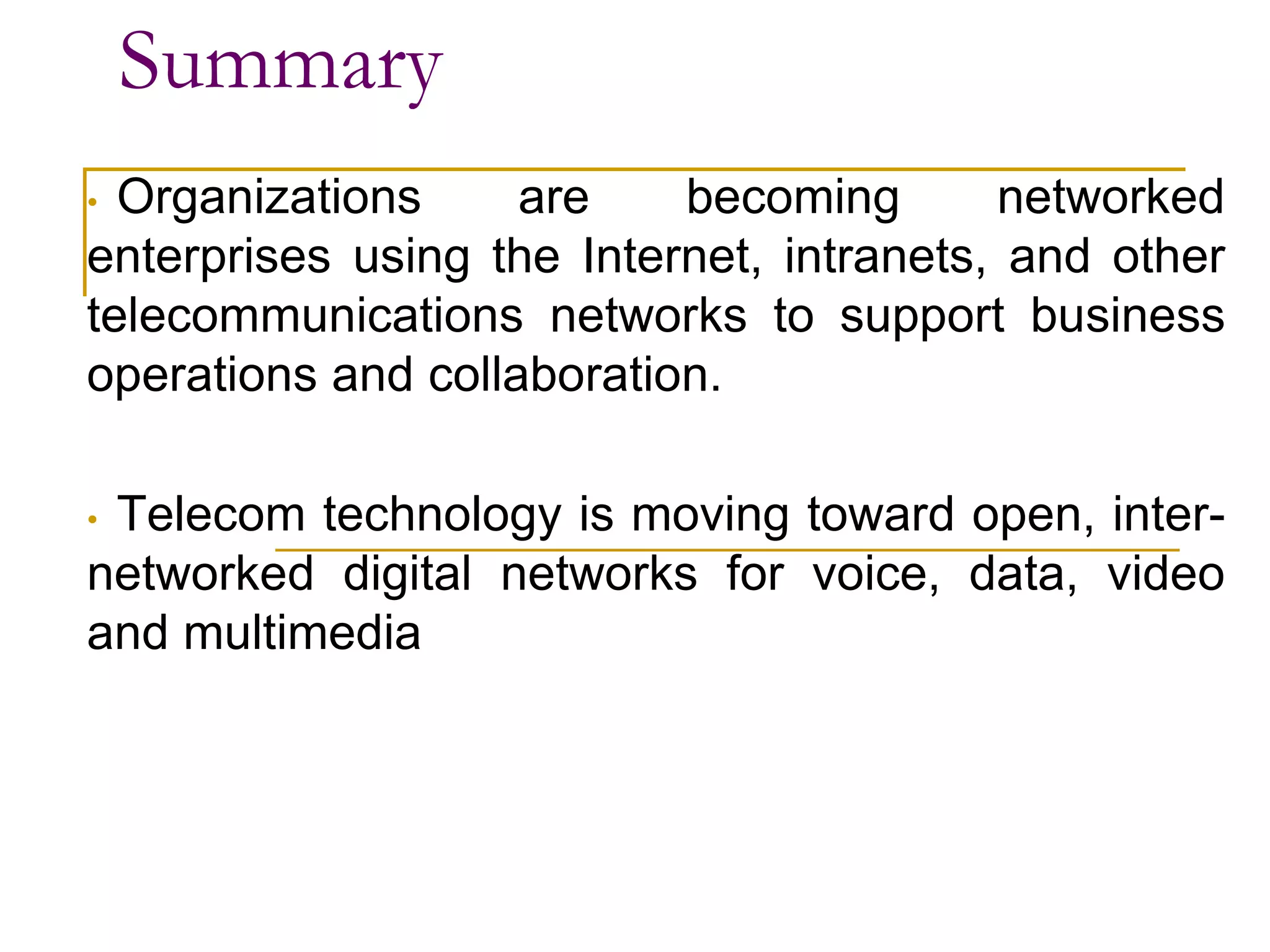
Summary
• Organizations are becoming networked
enterprises using the Internet, intranets, and other
telecommunications networks to support business
operations and collaboration.
• Telecom technology is moving toward open, inter-
networked digital networks for voice, data, video
and multimedia
Summary
• Open systems with unrestricted connectivity
using Internet technologies are the primary
telecommunications technology drivers in e-
business systems.
• Companies are deriving strategic business value
from the Internet, intranets etc. which enables
them to disseminate information globally

lecture -2 Communication_introduction.pptx

  • 1.
    Introduction Evolution of Telecommunications Dr.Rajashree Narendra Professor-ECE SOE, DSU
  • 3.
    The Electromagnetic Spectrum Shortestwavelengths (Most energetic photons) Longest wavelengths (Least energetic photons) E = hn = hc/l h = 6.6x10⁻³⁴ [J*sec] (Planck’s constant) 8/25/2022
  • 4.
    ■ Telecommunications Communication overa distance ■ The exchange of information in any form (voice, data, text, images, audio, video) over networks The electronic transmission of signals for communications, include means such as: ■ Telephone ■ Radio ■ Television ■ Fascimile Telecommunications
  • 5.
    ❑ The message(any kind of information) is communicated via the signal. INTRODUCTION Transmission medium Anything that carries an electronic signal and interfaces between a sending device and a receiving device.
  • 6.
  • 7.
    Telecommunication Devices Relay signalsbetween computer systems and transmission media. Telecommunications System
  • 8.
    Telecom Network Components Terminals– any input/output device that uses telecommunications networks to transmit or receive data Telecommunications Processors – devices that perform control and support functions Telecommunications Channels – media over which data is transmitted and received Computers – all sizes and types Telecommunications Control Software – programs that control telecommunications activities
  • 9.
    Modem Modulates a digitalsignal into an analog signal for transmission via analog medium, then demodulates the signal into digital for receiving. Device: Modem
  • 10.
    Figure 6.11 Multiplexer Allows several telecommunicationssignals to be transmitted over a single communications medium at the same time. Device: Multiplexer
  • 11.
    Telecommunications Processors Telecommunication processorsare Modems – convert digital signals from a computer into analog frequencies that can be transmitted over ordinary telephone lines Multiplexers – allows a single communications channel to carry simultaneous data transmissions from many terminals
  • 12.
    Bandwidth • Information carryingcapacity. Measured in cycles per second/Hz. • Indicates the difference between lowest and highest frequencies. • Higher the bandwidth, greater the volume of data that can be transmitted per unit time. Narrow-band – very low BW; e.g. telegraph links. Voice Band- telephone line with a frequency range of 300-3400 Hz. Broadband – high-speed; high capacity. e.g. microwave, cable, fibre optics • Radio frequency is the frequency band which is primarily used for transmission of radio and television signals and ranges from 3 MHz to 3 GHz. • Microwave frequencies range from Ultra-High Frequency (UHF) 0.3 – 3 GHz, Super High Frequency (SHF) 3 – 30 GHz to Extremely High Frequency (EHF) 30 – 300 GHz. Wireless broadband networks are being deployed in a number of frequency bands – from the low end 800 MHz ISM band to 38 GHz Wide band. Previous generation of LAN bridging equipment employed lower frequency band (800- 912 MHz ISM band). The new generation of broadband network technology utilizes 24-38 GHz band. Microwaves are a form of electromagnetic radiation with wavelengths ranging from about one meter to one millimeter; with frequencies between 300 MHz (1 m) and 300 GHz (1 mm). Optical fiber communication is carried out at a very high frequency (10 to power 14 Hz).
  • 13.
    Data Transfer Rate •Amount of data that can be transmitted through the channel. • Expressed in number of bits per second or bit rate (bps). • Baud rate - signal change from positive to negative or vice versa. ❑ - may not be always same as bit rate.
  • 14.
    Types of Signals:Analog and Digital Analog signal • Continuous waveform • Passes through communications medium • Used for voice communications Digital signal • Discrete waveform • Transmits data coded into two discrete states as 1-bits and 0-bits • Used for data communications
  • 15.
    Communication Subnet Switching devices-used for switching data signals from source to destination point. Telephone exchange- signals on incoming lines are transmitted to appropriate outgoing lines. Transmission lines- that carry data signals from one host to another . - also known as circuits or trunks. - speed as well as efficiency depend on the speed at which the transmission lines can transmit the data. - e.g. optical fibres, twisted pair, coaxial cable etc.
  • 16.
    Switching Alternatives Circuit Switching– a switch opens a circuit to establish a link between a sender and receiver; it remains open until the communication session is completed. Packet Switching – messages are divided into fixed or variable length packets, and packets are sent across networks.
  • 17.
    ■ Twisted PairWire Cable ❑ Insulated pairs of wires historically used in telephone service and to connect computer devices. ■ Coaxial Cable ❑ Consists of an inner conductor wire surrounded by insulation, called the dielectric. The dielectric is surrounded by a conductive shield, which is surrounded by a non-conductive jacket. Coaxial cable has better data transmission rate than twisted pair. ❑ Optical Fiber Consists of higher index glass core and lower index cladding. This is covered with Plastic coating and is available in cables Types of Telecommunication Media
  • 18.
    ■ Fiber-optic Cable ❑Many extremely thin strands of glass or plastic bound together in a sheathing which transmits signals with light beams. ❑ Can be used for voice, data, and video. Types of Telecommunication Media
  • 19.
    Telecommunications Media Twisted-Pair Wire– copper wire twisted into pairs. e.g. telephone system (300bps-10Mbps) Coaxial Cable – sturdy copper or aluminum wire wrapped with spacers to insulate and protect it. e.g. Cable TV. - faster data rate (56 Kbps-200 Mbps), larger BW. Fiber Optics – one or more hair-thin filaments of glass fiber wrapped in a protective jacket - Data transmitted using light beams. - Very high BW; high data transmission rate (500 Kbps- 25Tbps)
  • 20.
  • 21.
    Wireless Technologies Terrestrial Microwave– data transmitted with the help of microwaves. Microwaves are electromagnetic waves with frequency in the range of 300 MHz to 300 GHz. Radio Waves – also electromagnetic waves with low frequency range of 3KHz to 30MHz. Communications Satellites - high-earth orbit communications satellites placed in stationary geosynchronous orbits For satellite communication, the frequencies are in the range 7.25 GHz to 7.75 GHz (Space to Earth) and 7.9 GHz to 8.4 GHz (Earth to Space)
  • 22.
    Microwave Communications Line-of-sight devices which must beplaced in relatively high locations. Microwave Usage Information is converted to a microwave signal, sent through the air to a receiver, and recovered. Types of Telecommunication Media
  • 23.
    Satellite Transmission Communications satellites are relay stationsthat receive signals from one earth station and rebroadcast them to another. Types of Telecommunication Media
  • 24.
    Wireless Technologies Cellular andPCS Systems – a geographic area divided into cells with one low-power transmitter device per cell used to relay calls from one cell to another Wireless LANs – high- or low-frequency radio technology installed in an office or building Wireless Web – wireless, Web-enabled information appliances accessing the Internet, intranets and extranets
  • 25.
    Cellular Transmission Signals fromhexagon shaped cells are transmitted to a receiver and integrated into the regular network. Types of Telecommunication Media
  • 26.
    Satellite Regional Area Wide Area Local Area Wireless Mobility Emerging ConnectivitySolutions: Cellular, Satellite, Microwave, and Packet Radio SOURCE: CISCO
  • 27.
    ■ Infrared Transmission ❑Involves sending signals through the air via light waves. ■ Requires line-of-sight and short distances (a few hundred yards) ■ Used to connect various computing devices such as handheld computers, keyboards and mouse. Types of Telecommunication Media
  • 28.
    ■ Data communications ❑A specialized subset of telecommunications that refers to the electronic collection, processing, and distribution of data -- typically between computer system hardware devices. Data Communications
  • 29.
    Effectiveness of datacommunication systems ■ Performance ❑ if the systems can deliver data in a timely manner based on the types of data ■ Reliability ❑ if the systems can provide non-stop services, measured by the frequency of failure or recovery time of a network after failure ■ Security ❑ if the systems can protect the transmitted data from illegal access and/or modification
  • 30.
    Distributed Processing ■ CentralizedProcessing ❑ Data processing that occurs in a single location or facility. ■ Distributed Processing ❑ Data processing that occurs when computers are placed at remote locations but are connected to each other via telecommunications devices. ❑ The computers are connected as a computer network.
  • 31.
    ❑ Comprises ofcommunications media, devices, and software needed to connect two or more computer systems and/or devices. ❑ enable the companies to share hardware, programs, computer applications, and databases across the organization. ❑ Fosters teamwork, innovative ideas, and new business strategies. ❑ Sharing of documents across geographically dispersed employees and workgroups. Computer Network
  • 32.
    ■ By Topology ❑A model that describes how computers are connected ❑ A logical model that describes how networks are structured or configured 24 Network Types ■ Structured ❑ Ring ❑ Bus ❑ Star ❑ Hierarchical ❑ Hybrid ■ Unstructured ❑ Mobile Adhoc Network (MANET)
  • 33.
  • 34.
    Network Topologies ■ Forlocal area networks, not for the Internet ■ Ring ❑ A topology that contains computers and computer devices placed in a ring. ■ Bus ❑ Computers and computer devices are on a single line. Each device can communicate directly to all devices on the bus. ■ Star ❑ All computers are connected via a central hub.
  • 35.
    Network Topologies ■ Hierarchical ❑Uses treelike structures with messages passed along the branches of the hierarchy ■ Hybrid ❑ A mix of different kinds of structured topologies. It is what exactly the Internet looks like. ■ Mobile Adhoc Network ❑ It is unstructured network topology ❑ Structure is changing dynamically. EG. Network of mobile phone.
  • 36.
    Network Topologies ■ MANET:Mobile Adhoc Network ❑ Network does not have specific topology ❑ Each computer in the network is moving around without locating in a fixed location ❑ Sending and receiving messages are difficulty problems A mobile ad hoc network (MANET) is a continuously self-configuring, self- organizing, infrastructure-less network of mobile devices connected without wires. It is sometimes known as "on-the-fly" networks or "spontaneous networks".
  • 37.
    Types of TelecomNetworks Point-to-point Communication - point to point communication between two computers for data transmission. - e.g. computer networks in banks Broadcast Communication - All the machines on the network share a single communication channel. - message broadcasted for all receivers. Peer-to-Peer – file-sharing software connects each PC to a central server or to another online user’s PC
  • 38.
    Types of TelecomNetworks Peer-to-Peer Networks • Type of client/server distributed processing that allows two or more computers to share their resources. • In a standard client/server networks, information stored in centralized file server; Information stored across peer to peer networks is decentralized.
  • 39.
    27 Network Types bySize ■ Local Area Network (LAN) ❑ Connects computer systems and devices in the same geographic area (can be Ring, Bus, Hierarchical, Star, Hybrid) ■ Wide Area Network (WAN) ❑ Ties together large geographic regions using microwave and satellite transmission or telephone lines. ■ International Network ❑ Links systems between countries.
  • 40.
    A Typical LAN ina BUS Topology A Wide Area LAN & WAN
  • 41.
    Types of TelecomNetworks Local Area Network (LAN) • Network that connect devices sharing a common communication link and sharing resources within a limited geographical area. • Serves a local area like floor of a building, college or university campus. • Typical transmission speed is 100Mbps. • Within the organization, provides fast and efficient access to common bank of information.
  • 42.
  • 43.
  • 44.
    Local Area Networks WirelessLANs Wi-Fi (802.11b) standard: Up to 11 Mbps, low cost, high-speed mobile Internet access, links work groups Bluetooth standard: Up to 720 Kbps, small personal area networks
  • 45.
    Bluetooth • PICONET isa basic unit of bluetooth networking. • Devices function as master and slave in piconet. • There are two configurations viz. one master and one slave or one master and multiple slaves. • Master will determine channel and phase. • As piconet will have 3 bits. This means piconet can have maximum 8 devices. • This includes 1 master and 7 slave bluetooth devices. • Figure depicts bluetooth piconet structure.
  • 46.
    Scatternet • The bluetoothnetwork consisting of one or more piconets is known as scatternet. • The devices in one piconet type may function as master or slave in another piconet type of the same scatternet. • This bluetooth network type allows many devices to share the same network area. • This will allow efficient use of the bandwidth. • Figure depicts bluetooth scatternet structure. • As scatternet is interconnection of multiple piconets, it can accommodate more than 8 devices.
  • 47.
    Types of TelecomNetworks Wide Area Network (WAN) - Covers a large geographical area such as a state or a country. - May include large corporate networks, military networks, banking networks, airline reservation networks etc. - Typical transmission rates are 2Mbps, 34Mbps, 45Mbps, 625Mbps etc. - Often implemented in the form of VPN (Virtual Private Network).
  • 48.
    WAN - Internetwork network inUS network in Europe Mainframe, hosts Internet network in Australia LAN’s LAN’s Tymnet Cisco corporation network
  • 49.
    Types of TelecomNetworks Metropolitan Area Network (MAN) Network that interconnects users with computer resources in a geographical area larger than that covered by LAN but smaller than a WAN. • Covers an area between 5-50 Km diameter. (an area the size of a city). • Generally owned by either group of users or a single network provider
  • 51.
  • 52.
    Types of TelecomNetworks Value Added Network (VAN) • A private network that can be hired by organization. • Enable the users to more closely tailor communication capabilities to their specific business needs.
  • 53.
  • 54.
    Types of TelecomNetworks Virtual Private Network (VPN) • Secure network that uses the Internet as its main backbone network • Relies on network firewalls, encryption, and other security features. • Effective for extranets and important for international businesses.
  • 55.
    Virtual Private Network(VPN) A secure connection between two points across the Internet. Tunneling The process by which VPNs transfer information by encapsulating traffic in IP packets and sending the packets thru Internet service providers ISP over the Internet. 24 Virtual Private Network (VPN)
  • 57.
    15/12/2012 Bahman R.Alyaei 57 Telecommunication Networks Two major types of TelecomNetworks: ■ Public Switched Telephone Network (PSTN). ■ Enterprise Networks
  • 58.
    15/12/2012 Bahman R.Alyaei 58 Continue… 1) PSTN ■ It consists of hundreds of smaller networks interconnected. ■ There are “fixed” and “mobile” counterparts. ■ They may or may not have common ownership. ■ Traditionally been based on speech operations. ■ Hierarchical structure
  • 60.
    •Public Switched Telephone Network(PSTN) consists of switching nodes (called exhanges) in hierarchical structure: (a) Local network – connect customers’ stations to LEs (b) Junction network – interconnect group of LEs (c) Trunk / toll network – provides long distance circuits within country (d) International network – provide circuits between countries
  • 61.
    15/12/2012 Bahman R.Alyaei 61 Continue… 2) Enterprise Networks ■ supports the business and government enterprise as a private business. ■ Its most common configuration is the Local Area Network (LAN) and is optimized for data communications. ■ Wide Area Network (WAN) is its long distance example developed by the US Department of Defense having been opened to the public worldwide. It is the internet.
  • 62.
  • 63.
    General block diagramof Telecommunication Network
  • 64.
  • 65.
    Client and ServerNetworking Client- Machine that initiates the session with another computer and request for information. Server- computer that stores information and delivers the requested information
  • 66.
    ● Applications anddatabases reside on specialized host computers (SERVERS). ● Servers do most or all of the processing and transmit the results to the Clients. 31 Client/Server Connection
  • 67.
    ■ Advantages ❑ Reducedcost potential ❑ Improved Performance ❑ Increased Security ■ Disadvantages ❑ Loss of control ❑ Complex multi-vendor environment 32 Advantages & Disadvantages of Client/Server
  • 68.
    33 Communications Software ■ CommunicationsSoftware ❑ Provides error checking, message formatting, communications logs, data security and privacy, and translation capabilities for networks. ■ Network Operating System (NOS) ❑ Systems software that controls the computer systems and devices on a network and allows them to communicate with each other. ■ Network Management Software ❑ Enables a manager on a networked desktop to monitor the use of individual computers and shared hardware, scan for viruses, and ensure compliance with software licenses.
  • 69.
    Network Architectures &Protocols Protocol – standard set of rules and procedures for the control of communications in a network ❑ Rules that ensure communications among computers of different types and from different manufacturers. ❑ Rules that determine the form of signal being transmitted, encoded, error detection and correction, etc. Network Architecture – standard interface between end users and computer systems. Supports the use of standard protocols and standard communications hardware and software interfaces; - the goal of promoting an open, simple, flexible, and efficient telecommunications environment
  • 70.
    35 Protocols ■ OSI 7-LayersModel ❑ Serves as a standard model for network architectures and is endorsed by the International Standards Committee. ❑ Communication functions are represented in seven layers to promote the development of modular networks. ❑ Designed to permit communication among different computers from different operating systems. ❑ Open Systems Interconnection model (OSI model) is a conceptual model that characterizes and standardizes the communication functions of a telecommunication or computing system without regard to its underlying internal structure and technology. ❑ In the OSI reference model, the communications between a computing system are split into seven different abstraction layers: Physical,DataLink,Network,Transport, Session, Presentation and Application.
  • 71.
    TCP/IP Protocol ■ TransmissionControl Protocol/Internet Protocol (TCP/IP) ❑ Standard originally developed by the U.S. government to link defense research agencies; it is the primary communication protocol of the Internet. ❑ The TCP/IP model is based on a five-layer model for networking. ❑ TCP maintains the connection between the sender and receiver. ❑ The Internet Protocol (IP) is the address system of the Internet and has the core function of delivering packets of information from a source device to a target device. ❑ From bottom (the link) to top (the user application), these are the physical, data link, network, transport, and application layers.
  • 72.
    36 ■ Systems NetworkArchitecture (SNA) ❑ IBM communication protocol for LAN. ❑ Systems Network Architecture is IBM's proprietary networking architecture, created in 1974. ❑ It is a complete protocol stack for interconnecting computers and their resources. ❑ The 5-level design has evolved into a 7-level model closely corresponding to the internationally recognized Open Systems Interconnection (OSI) model, and now supports peer-to-peer networks of workstations. ❑ SNA describes formats and protocols and is, in itself, not a piece of software. Protocols
  • 73.
    Ethernet ❑ Protocol standarddeveloped for LANs using a bus topology. ❑ An international standard for message handling and network directories. ❑ Ethernet protocol is a typical LAN technology. ❑ Standard Ethernet-based local area networks transmit data at speed up to 10 Mbps. ❑ Two new Ethernet standards that are currently being developed are Gigabit Ethernet (up to 1000 Mbps) and 10 Gigabit Ethernet (with data transfer rate of 10,000 Mbps).
  • 74.
    OSI & TCP/IPModels Open Systems Interconnection (OSI) - model is a seven-layer model that serves as a standard model for network architectures Transmission Control Protocol / Internet Protocol (TCP/IP) – is a five layer telecommunications protocol used by the Internet
  • 75.
  • 76.
    ■ Asynchronous TransferMode (ATM) also called cell relay (transferring data in cells of a fixed size) that operates at the data link layer (Layer 2) of OSI Model over fiber or twisted-pair cable, a high-speed switched network technology based on ITU-T Broadband Integrated Services Digital Network (B-ISDN) standard, developed by the telecommunications industry to implement the next generation network. ■ ATM was designed for use in WANs such as the public telephone system and corporate data networks, though it has also been applied to create super-fast LANs. ■ ATM can carry all kinds of traffic: voice, video and data simultaneously at speeds up to 155 megabits per second. ■ It Converts voice, video data to packets and passing large packet data through the same medium. ■ ATM is differing from TCP/IP because it use fixed channel routing protocol routes between two end points. ■ A real-time low-latency application such as VoIP and video takes precedence on an ATM network.
  • 77.
    • ATM isa dedicated connection-oriented switched data transfer technology, in which switches create a virtual connection or virtual circuit between the sender and receiver of a call that permanent or switched for the duration of the call. • It is a small-packet switched system which breaks down messages into very small, fixed length packets called cells generally organizes digital data into 53 bytes in length (48 bytes of data plus a 5- byte header).
  • 79.
    ■ Linking PersonalComputers to Mainframe Computers ❑ Download and upload information. ■ Voice Mail ❑ Enables users to leave, receive, and store verbal messages for and from other users. ■ Electronic Mail (e-mail) ❑ Enables a sender to connect a computer to a network, type messages, and send it to another person on the network. 39 Applications
  • 80.
    40 Applications ■ Electronic SoftwareDistribution ❑ Involves installing software on a file server for users to share by signing onto the network and requesting that the software be downloaded onto their computers over a network. ■ Electronic Document Distribution ❑ Transporting documents -- such as sales reports, policy manuals, and advertising brochures -- over communications lines and networks.
  • 81.
  • 82.
    ■ Public NetworkServices ❑ Services that give personal computer users access to vast databases and other services, usually for an initial fee plus usage fees. ■ Specialized and Regional Information Services ❑ Specialized electronic bulletin boards and e- mail services targeting particular interests. ■ Distance Education ❑ Use of telecommunications to extend the classroom. 43 Telecommunications Applications
  • 83.
    E- Commerce andE-Business Technologies Teleconferencing: Ability to confer with a group of people simultaneously Data conferencing: Two or more users can edit and modify data files simultaneously Videoconferencing: Participants are able to see each other over video screens Distance learning: Education or training delivered over a distance to individuals in one or more locations E-learning: Instruction delivered online using the Internet or private networks
  • 84.
  • 85.
    Communication Technology Applications voice mailTwitter e-mail instant messaging chat rooms newsgroups telephony videoconferencing collaboration groupware global positioning system (GPS)
  • 86.
    Communication Technologies - Applications ■Different technologies allowing us to communicate ❑ Examples: Voice mail, fax, email, instant message, chat rooms, news groups, telephony, GPS, and more ■ Voice mail: Similar to answering machine but digitized ■ Fax: Sending hardcopy of text or photographs between computers using fax modem ■ Email: electronic mail – sending text, files, images between different computer networks - must have email software ❑ More than 1.3 billion people send 244 billion messages monthly! ■ Chat rooms: Allows communications in real time when connected to the Internet ■ Telephony: Talking to other people over the Internet (also called VoIP) ❑ Sends digitized audio signals over the Internet ❑ Requires Internet telephone software ■ Groupware: Software application allowing a group of people to communicate with each other (exchange data) ❑ Address book, appointment book, schedules, etc. ■ GPS: consists of receivers connected to satellite systems ❑ Determining the geographical location of the receiver ❑ Used for cars, advertising, hiking, tracking, etc.
  • 87.
    Internet A network madeup of millions of smaller private networks, each operate independent of, or in harmony with, all the other millions of networks • Surf • E-mail • Buy and sell • Download • Publish
  • 88.
    The Internet The Internet transmitsdata from one computer (called a host) to another. Internet Networks Linked networks that work much the same way -- they pass data around in packets, each of which carries the addresses of its sender and receiver. The Internet
  • 89.
  • 90.
    How the InternetWorks ■ Protocol ❑ A protocol that operates at the transport layer and is used in combination with IP by most Internet applications ❑ It ensures that computers in Internet can understand the message sending amongst each other. ■ Backbone ❑ One of the Internet’s high-speed, long distance communications links. ■ IP Address/Port ❑ IP address is the unique identification on a computer that is connecting to the Internet. ❑ Ports are the input/output locations of a computer where messages should send in or out. ❑ If an IP address is analogy to a country, then the Port addresses will be analogy to the ports of that country.
  • 91.
    Access to theInternet ■ LAN Servers ❑ Local servers can provide access to the Internet through normal connections (e.g. Ethernet) ■ Connection via an On-Line Service ❑ Communications protocol (SLIP/PPP) software that transmits packets over telephone lines, allowing dial-up access to the Internet. (Modem access) ❑ Examples are American Online (AOL) and Microsoft Network. These services usually require sign-up procedures. (Leased line)
  • 92.
    Ways to Accessthe Internet Serial Line Internet Protocol (SLIP) Point-to-Point Protocol (PPP)
  • 93.
    Internet Connections • DSL(digital subscriber line) • cable broadband. • fibre optic broadband. • wireless or Wi-Fi broadband. • satellite and mobile broadband. • dedicated leased line.
  • 94.
    Internet Services Popular Internetservices are Electronic Mail, World Wide Web (WWW), File Transfer Protocol (FTP), Chat Rooms, Mailing list, Instant Messaging, Chat, and News Groups.
  • 95.
    ■ World WideWeb ❑ A collection of tens of thousands of independently-owned computers that work together as one in an Internet service. ■ Web Browser ❑ Software that creates a unique hypermedia-based menu on your computer screen and provides a graphical interface to the Web. ■ Web Page ❑ A screen of information sent to a requesting user and presented through a browser. ■ Search Engines ❑ A search tool for the Web (like card catalogs in libraries). Information Browsing
  • 96.
  • 97.
    Trends Driving Communication ■Traffic growth ❑ Increasing number of Internet users ❑ Voice & data; local and long distance ■ Development of new services ❑ Examples: VoIP, IPTV, Online Games ❑ In turn drives increased traffic ■ Advances in technology ❑ Examples: Fiber optics vs copper cable, 2G vs 3G, wired vs wireless ❑ Encourage and support increased growth and development
  • 98.
    Voice-Over-IP (VOIP) Technology thatenables network managers to route phone calls and fax transmissions over the same network they use for data. VOIP Service
  • 99.
    Internet Entertainment ■ InternetProtocol television (IPTV) ■ IPTV is the delivery of televisionIPTV is the delivery of television content over Internet Protocol (IP) networks. ■ Unlike downloaded media, IPTV offers the ability to stream the source media continuously. ■ As a result, a client media player can begin playing the content (such as a TV channel) almost immediately. This is known as streaming media. ■ Content Streaming ❑ A method for transferring multimedia files over the Internet so that the data stream of voice and pictures plays continuously, without a break, or very few of them. ❑ It also enables users to browse large files in real time.
  • 100.
    Key Technology Trends ■Faster and cheaper computing and communications ■ Increasingly “intelligent” networks ■ Growing importance of Internet, intranet and extranet applications ■ Increasing use of and dependence on mobile technologies, e.g. personal networks
  • 101.
    Technology that usesexisting common-carrier lines to simultaneously transmit voice, video, and image data in digital form. Integrated Services Digital Network (ISDN)
  • 102.
    Applications of Telecommunications Business Telecommunications Telecommunications Architectures Electronic communicationssystem Electronic meeting systems Business process systems • Centralized • Distributed • Client/server • Interorganizational • Global • Electronic mail • Voice mail • Bulletin Board systems • Videotex • Fascimile • Public Information Service • Desktop Video conferencing • Decision room conferencing • Computer conferencing • Teleconferencing • Online transaction processing • Inquiry/Response • EDI / XML • Electronic Funds Transfer • Activity monitoring • Process control • Telecommuting
  • 103.
  • 104.
    Business Value ofTelecommunications
  • 105.
  • 106.
    Summary Businesses are installingand extending intranets throughout their organizations to: – Improve communications and collaboration among individuals and teams within the enterprise – Publish and share valuable business information easily, inexpensively, and effectively via enterprise information portals – Develop and deploy critical applications to support business operations and decision making
  • 107.
    Summary • Organizations arebecoming networked enterprises using the Internet, intranets, and other telecommunications networks to support business operations and collaboration. • Telecom technology is moving toward open, inter- networked digital networks for voice, data, video and multimedia
  • 108.
    Summary • Open systemswith unrestricted connectivity using Internet technologies are the primary telecommunications technology drivers in e- business systems. • Companies are deriving strategic business value from the Internet, intranets etc. which enables them to disseminate information globally