M. Raihan
Email: rianku11@gmail.com
Working with
ApplicatioN Software
Part-1
Productivity Software
08-Oct-17 3
Productivity software is a category of application programs that help
users produce things such as documents, databases, graphs,
worksheets and presentations.
Many productivity applications are intended for business use.
Examples of office productivity software include word processors,
database management systems (DBMS), graphics software and
spreadsheet applications.
The definition of productivity software is sometimes broadened to
include any type of application that is used to help people do their
jobs, including collaboration and communication programs.
Word Processing
08-Oct-17 4
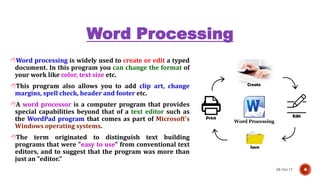
Word processing is widely used to create or edit a typed
document. In this program you can change the format of
your work like color, text size etc.
This program also allows you to add clip art, change
margins, spell check, header and footer etc.
A word processor is a computer program that provides
special capabilities beyond that of a text editor such as
the WordPad program that comes as part of Microsoft's
Windows operating systems.
The term originated to distinguish text building
programs that were "easy to use" from conventional text
editors, and to suggest that the program was more than
just an "editor."
Database Management
System (DBMS)
08-Oct-17 5
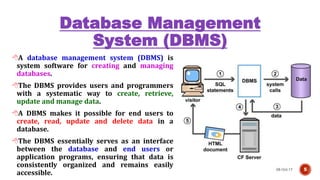
A database management system (DBMS) is
system software for creating and managing
databases.
The DBMS provides users and programmers
with a systematic way to create, retrieve,
update and manage data.
A DBMS makes it possible for end users to
create, read, update and delete data in a
database.
The DBMS essentially serves as an interface
between the database and end users or
application programs, ensuring that data is
consistently organized and remains easily
accessible.
Spreadsheet
08-Oct-17 6
A spreadsheet is a sheet of paper
that shows accounting or other data
in rows and columns.
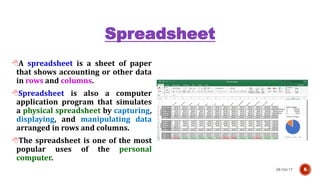
Spreadsheet is also a computer
application program that simulates
a physical spreadsheet by capturing,
displaying, and manipulating data
arranged in rows and columns.
The spreadsheet is one of the most
popular uses of the personal
computer.
Continue
08-Oct-17 7
Spreadsheets make it easy to display information
and make it easy to work with data.
For example: There is particular icon that has a
formula to sum up numbers that are given. This icon
is called ‘AUTO SUM.’
ROBERT FRANKSTON, co-inventor of the first
electronic spreadsheet
Usage of Spreadsheet
08-Oct-17 8
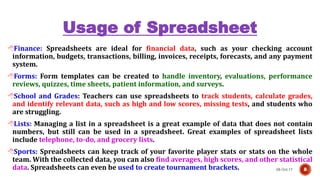
Finance: Spreadsheets are ideal for financial data, such as your checking account
information, budgets, transactions, billing, invoices, receipts, forecasts, and any payment
system.
Forms: Form templates can be created to handle inventory, evaluations, performance
reviews, quizzes, time sheets, patient information, and surveys.
School and Grades: Teachers can use spreadsheets to track students, calculate grades,
and identify relevant data, such as high and low scores, missing tests, and students who
are struggling.
Lists: Managing a list in a spreadsheet is a great example of data that does not contain
numbers, but still can be used in a spreadsheet. Great examples of spreadsheet lists
include telephone, to-do, and grocery lists.
Sports: Spreadsheets can keep track of your favorite player stats or stats on the whole
team. With the collected data, you can also find averages, high scores, and other statistical
data. Spreadsheets can even be used to create tournament brackets.
Examples of Spreadsheet
Programs
08-Oct-17 9
Microsoft Excel: The most popular and widely used Spreadsheet
program.
Google Sheets: Google Docs, Google Sheets, and Google Slides are
a word processor, a spreadsheet and a presentation program
respectively, all part of a free, web-based software office
suite offered by Google within its Google Drive service
LibreOffice is a free and open source office suite, a project of The
Document Foundation. It was forked from OpenOffice.org in 2010,
which was an open-sourced version of the earlier StarOffice.
Examples of Spreadsheet
Programs
08-Oct-17 10
Lotus 1-2-3 is a discontinued spreadsheet program from Lotus
Software (later part of IBM). It was the IBM PC's first killer application,
was hugely popular in the 1980s and contributed significantly to the
success of the IBM PC.
VisiCalc (for "visible calculator") was the first spreadsheet computer
program for personal computers, originally released for the Apple
II by VisiCorp.
SuperCalc is a CP/M-80 spreadsheet application published
by Sorcim in 1980. Visicalc was the first spreadsheet program but was
not available for the popular CP/M operating system. SuperCalc was
created to fill that void and market opportunity.
Continue
08-Oct-17 11
Example of Productivity
Software
08-Oct-17 12
Google Apps for Business
Google’s office suite includes a selection of office productivity tools including
enhanced-for-business versions of Gmail, Google Talk, Google Calendar, Google
Docs, Google Sites, and Google Video.
Microsoft Office
Acquiring Software
08-Oct-17 13
Commercial software
Software that must be purchased
Stand alone products:
Solve one type of task (ex: word processing, graphics)
Software suites:
Integrated tools that work together
Solve many problems
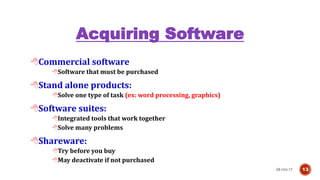
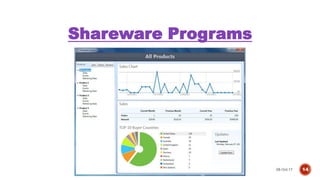
Shareware:
Try before you buy
May deactivate if not purchased
Shareware Programs
08-Oct-17 14
Freeware Software
08-Oct-17 15
No obligation to
purchase
Donations often
accepted
Software may be
distributed
freely
Public domain
software
Open Source
08-Oct-17 16
Programs distributed with
source code
Allows users to modify the
software
Modifications and comments
are welcome
Linux and Open Office
Thank You
08-Oct-17 17

Lecture 15

  • 1.
  • 2.
  • 3.
    Productivity Software 08-Oct-17 3 Productivitysoftware is a category of application programs that help users produce things such as documents, databases, graphs, worksheets and presentations. Many productivity applications are intended for business use. Examples of office productivity software include word processors, database management systems (DBMS), graphics software and spreadsheet applications. The definition of productivity software is sometimes broadened to include any type of application that is used to help people do their jobs, including collaboration and communication programs.
  • 4.
    Word Processing 08-Oct-17 4 Wordprocessing is widely used to create or edit a typed document. In this program you can change the format of your work like color, text size etc. This program also allows you to add clip art, change margins, spell check, header and footer etc. A word processor is a computer program that provides special capabilities beyond that of a text editor such as the WordPad program that comes as part of Microsoft's Windows operating systems. The term originated to distinguish text building programs that were "easy to use" from conventional text editors, and to suggest that the program was more than just an "editor."
  • 5.
    Database Management System (DBMS) 08-Oct-175 A database management system (DBMS) is system software for creating and managing databases. The DBMS provides users and programmers with a systematic way to create, retrieve, update and manage data. A DBMS makes it possible for end users to create, read, update and delete data in a database. The DBMS essentially serves as an interface between the database and end users or application programs, ensuring that data is consistently organized and remains easily accessible.
  • 6.
    Spreadsheet 08-Oct-17 6 A spreadsheetis a sheet of paper that shows accounting or other data in rows and columns. Spreadsheet is also a computer application program that simulates a physical spreadsheet by capturing, displaying, and manipulating data arranged in rows and columns. The spreadsheet is one of the most popular uses of the personal computer.
  • 7.
    Continue 08-Oct-17 7 Spreadsheets makeit easy to display information and make it easy to work with data. For example: There is particular icon that has a formula to sum up numbers that are given. This icon is called ‘AUTO SUM.’ ROBERT FRANKSTON, co-inventor of the first electronic spreadsheet
  • 8.
    Usage of Spreadsheet 08-Oct-178 Finance: Spreadsheets are ideal for financial data, such as your checking account information, budgets, transactions, billing, invoices, receipts, forecasts, and any payment system. Forms: Form templates can be created to handle inventory, evaluations, performance reviews, quizzes, time sheets, patient information, and surveys. School and Grades: Teachers can use spreadsheets to track students, calculate grades, and identify relevant data, such as high and low scores, missing tests, and students who are struggling. Lists: Managing a list in a spreadsheet is a great example of data that does not contain numbers, but still can be used in a spreadsheet. Great examples of spreadsheet lists include telephone, to-do, and grocery lists. Sports: Spreadsheets can keep track of your favorite player stats or stats on the whole team. With the collected data, you can also find averages, high scores, and other statistical data. Spreadsheets can even be used to create tournament brackets.
  • 9.
    Examples of Spreadsheet Programs 08-Oct-179 Microsoft Excel: The most popular and widely used Spreadsheet program. Google Sheets: Google Docs, Google Sheets, and Google Slides are a word processor, a spreadsheet and a presentation program respectively, all part of a free, web-based software office suite offered by Google within its Google Drive service LibreOffice is a free and open source office suite, a project of The Document Foundation. It was forked from OpenOffice.org in 2010, which was an open-sourced version of the earlier StarOffice.
  • 10.
    Examples of Spreadsheet Programs 08-Oct-1710 Lotus 1-2-3 is a discontinued spreadsheet program from Lotus Software (later part of IBM). It was the IBM PC's first killer application, was hugely popular in the 1980s and contributed significantly to the success of the IBM PC. VisiCalc (for "visible calculator") was the first spreadsheet computer program for personal computers, originally released for the Apple II by VisiCorp. SuperCalc is a CP/M-80 spreadsheet application published by Sorcim in 1980. Visicalc was the first spreadsheet program but was not available for the popular CP/M operating system. SuperCalc was created to fill that void and market opportunity.
  • 11.
  • 12.
    Example of Productivity Software 08-Oct-1712 Google Apps for Business Google’s office suite includes a selection of office productivity tools including enhanced-for-business versions of Gmail, Google Talk, Google Calendar, Google Docs, Google Sites, and Google Video. Microsoft Office
  • 13.
    Acquiring Software 08-Oct-17 13 Commercialsoftware Software that must be purchased Stand alone products: Solve one type of task (ex: word processing, graphics) Software suites: Integrated tools that work together Solve many problems Shareware: Try before you buy May deactivate if not purchased
  • 14.
  • 15.
    Freeware Software 08-Oct-17 15 Noobligation to purchase Donations often accepted Software may be distributed freely Public domain software
  • 16.
    Open Source 08-Oct-17 16 Programsdistributed with source code Allows users to modify the software Modifications and comments are welcome Linux and Open Office
  • 17.