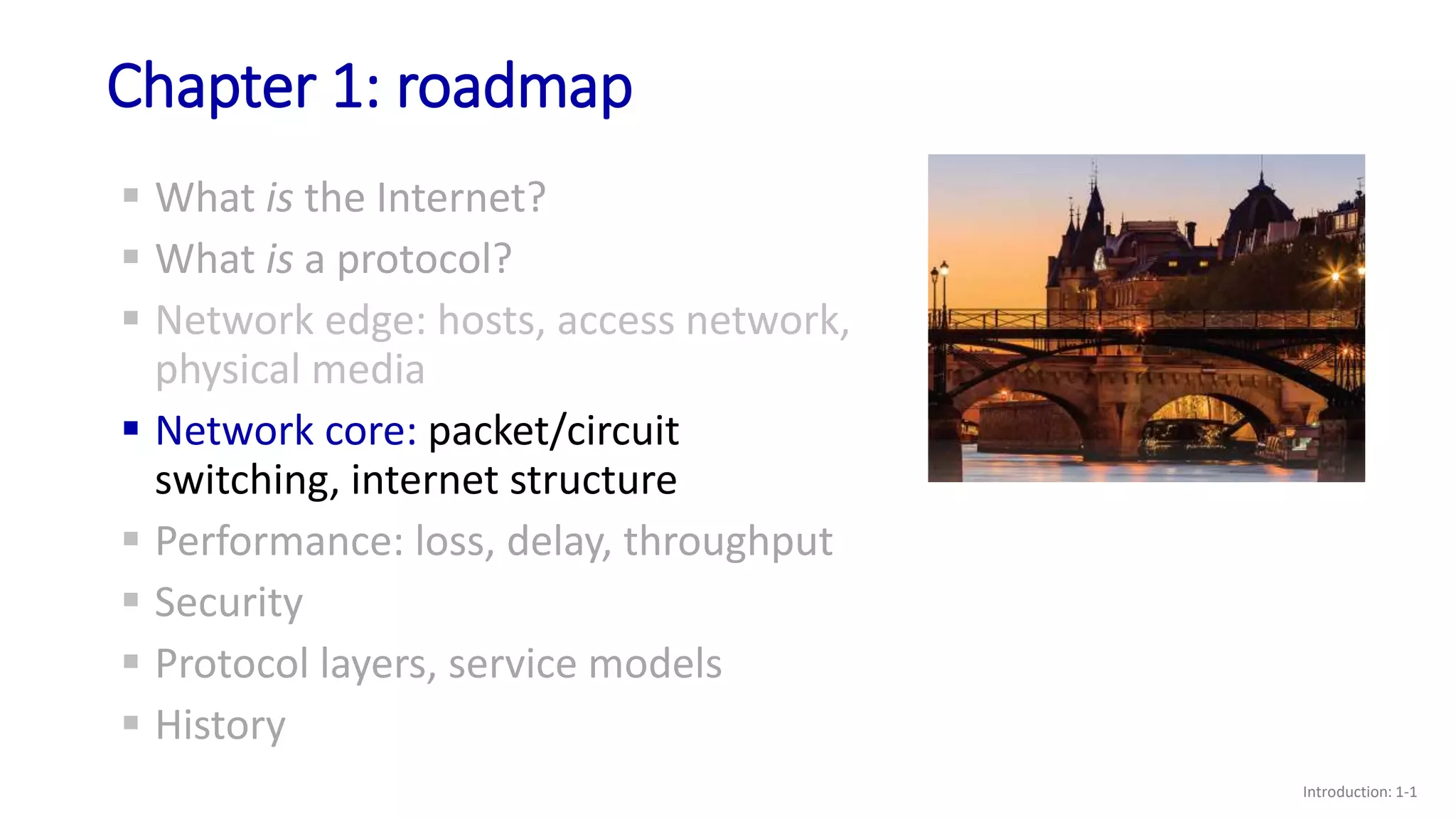
Chapter 1: roadmap
Introduction: 1-1
 What is the Internet?
 What is a protocol?
 Network edge: hosts, access network,
physical media
 Network core: packet/circuit
switching, internet structure
 Performance: loss, delay, throughput
 Security
 Protocol layers, service models
 History
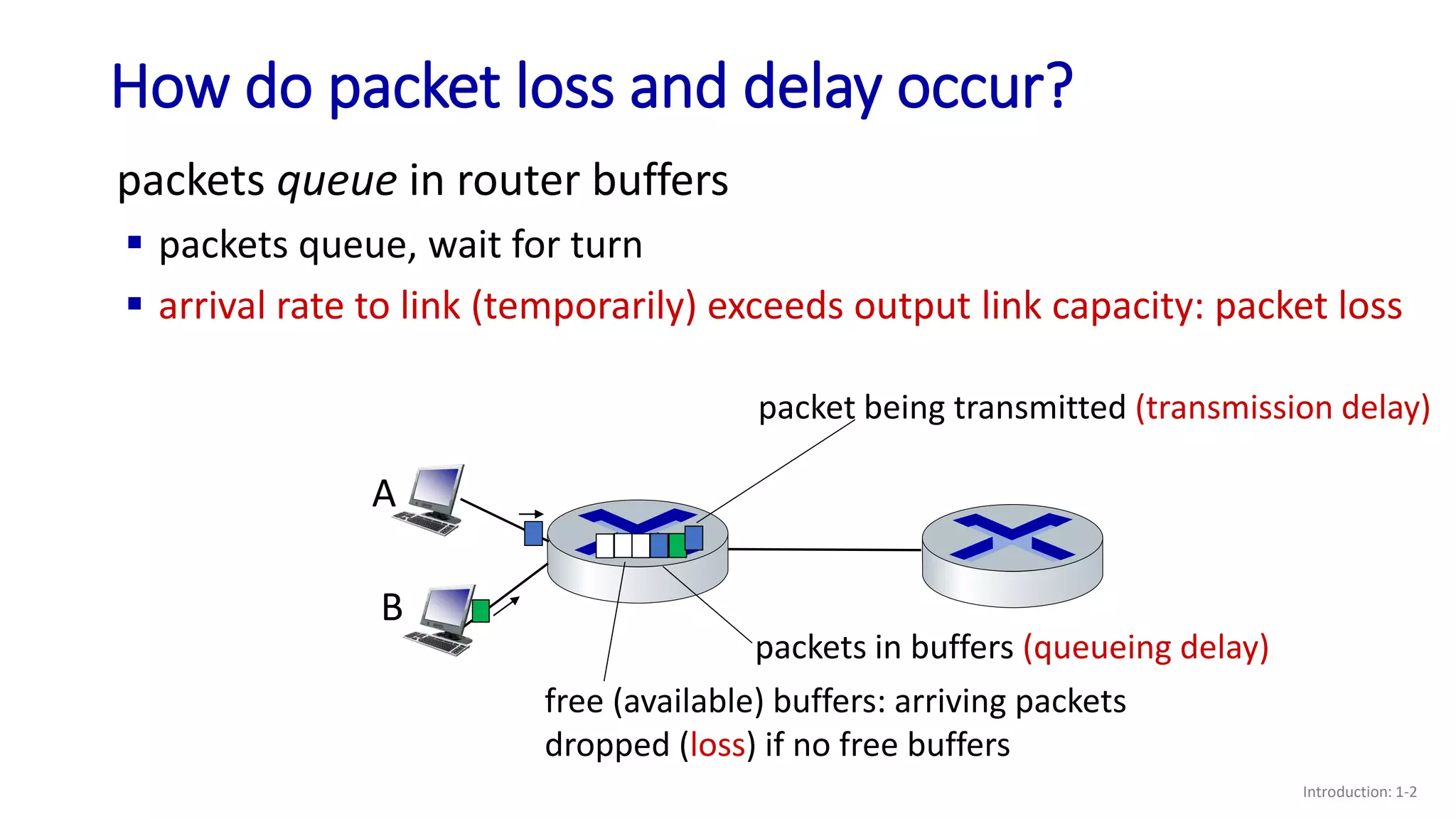
How do packet loss and delay occur?
Introduction: 1-2
packets queue in router buffers
 packets queue, wait for turn
 arrival rate to link (temporarily) exceeds output link capacity: packet loss
A
B
packet being transmitted (transmission delay)
packets in buffers (queueing delay)
free (available) buffers: arriving packets
dropped (loss) if no free buffers
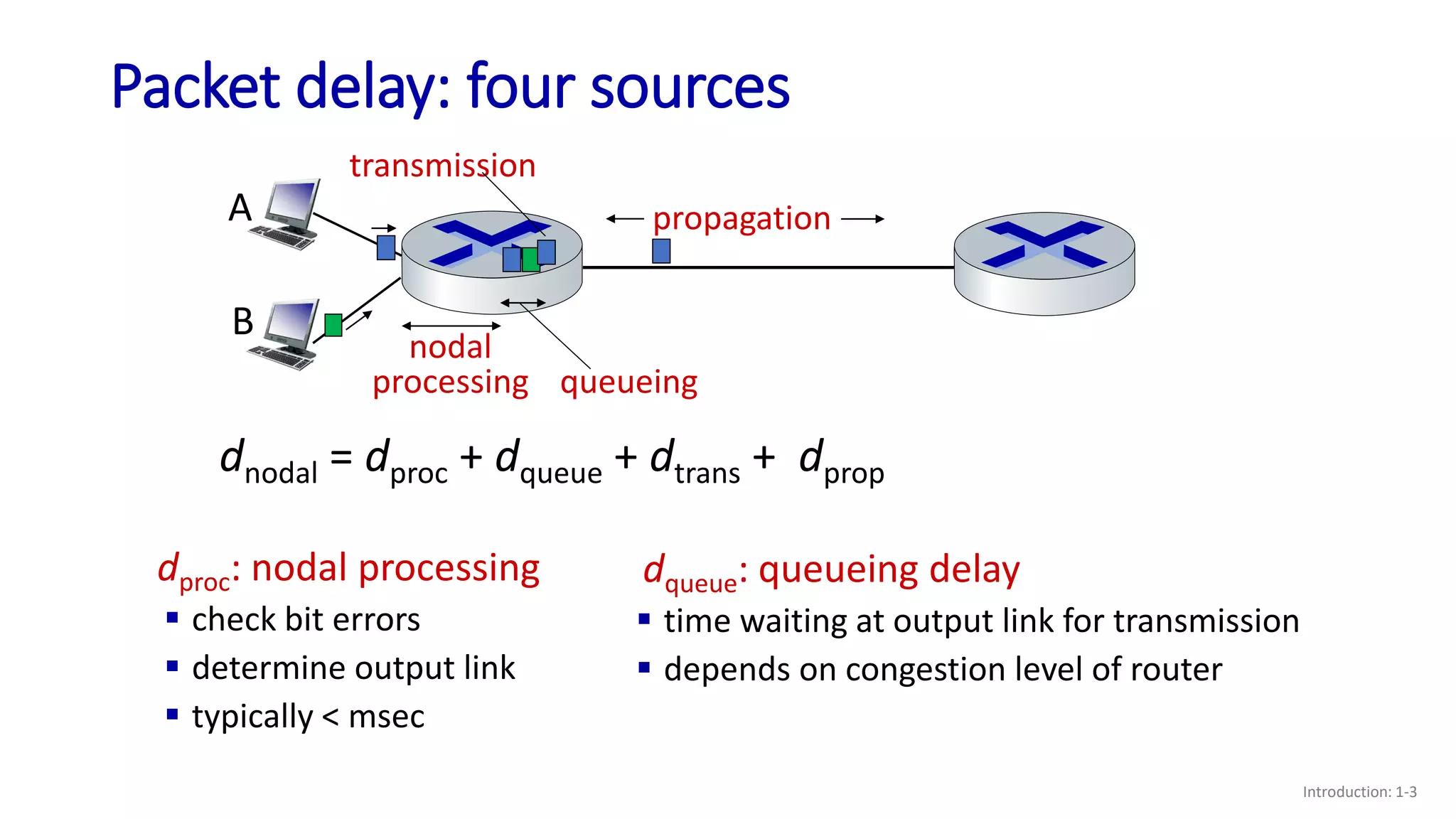
Packet delay: four sources
Introduction: 1-3
dproc: nodal processing
 check bit errors
 determine output link
 typically < msec
dqueue: queueing delay
 time waiting at output link for transmission
 depends on congestion level of router
propagation
nodal
processing queueing
dnodal = dproc + dqueue + dtrans + dprop
A
B
transmission
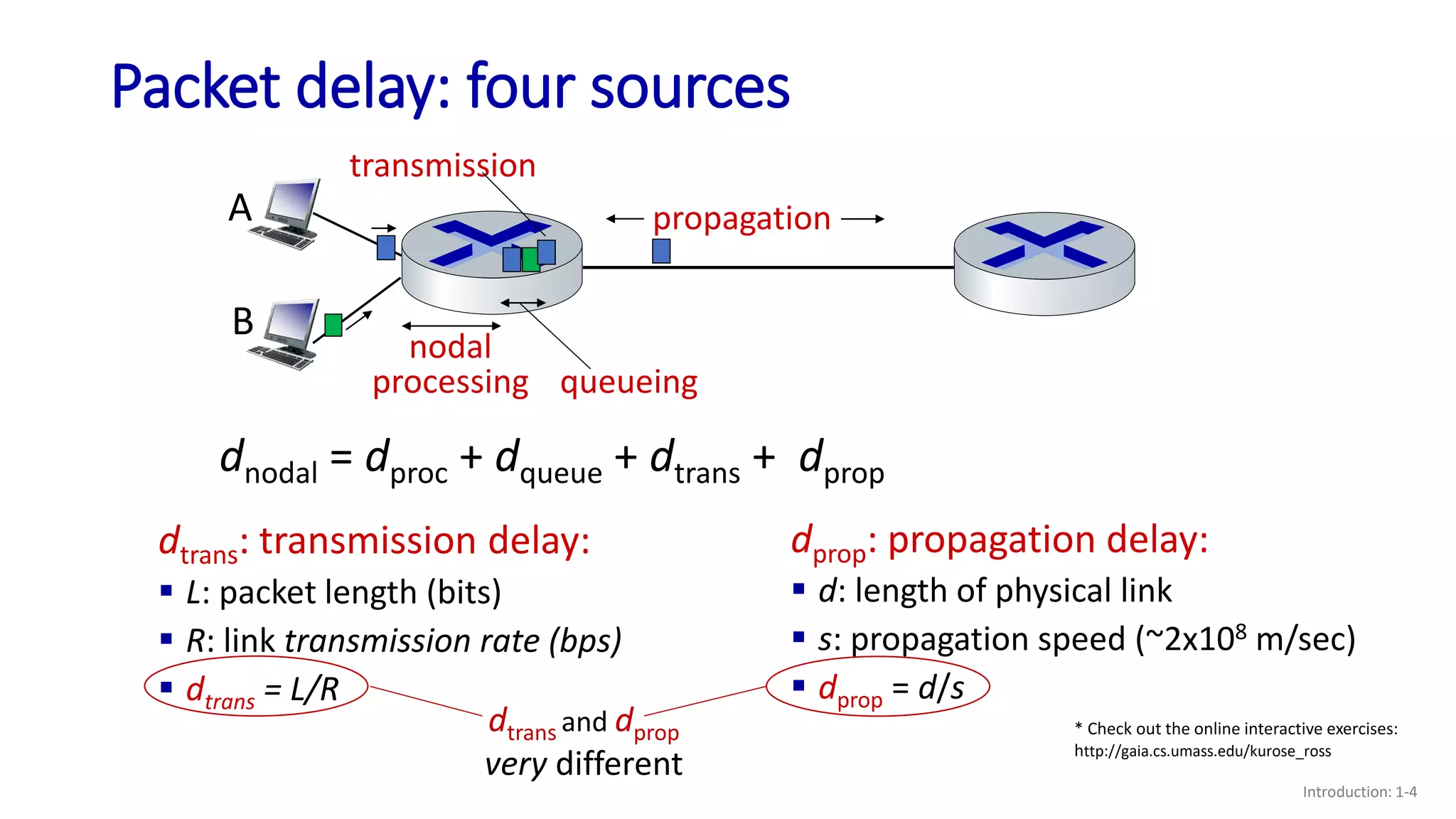
Packet delay: four sources
Introduction: 1-4
propagation
nodal
processing queueing
dnodal = dproc + dqueue + dtrans + dprop
A
B
transmission
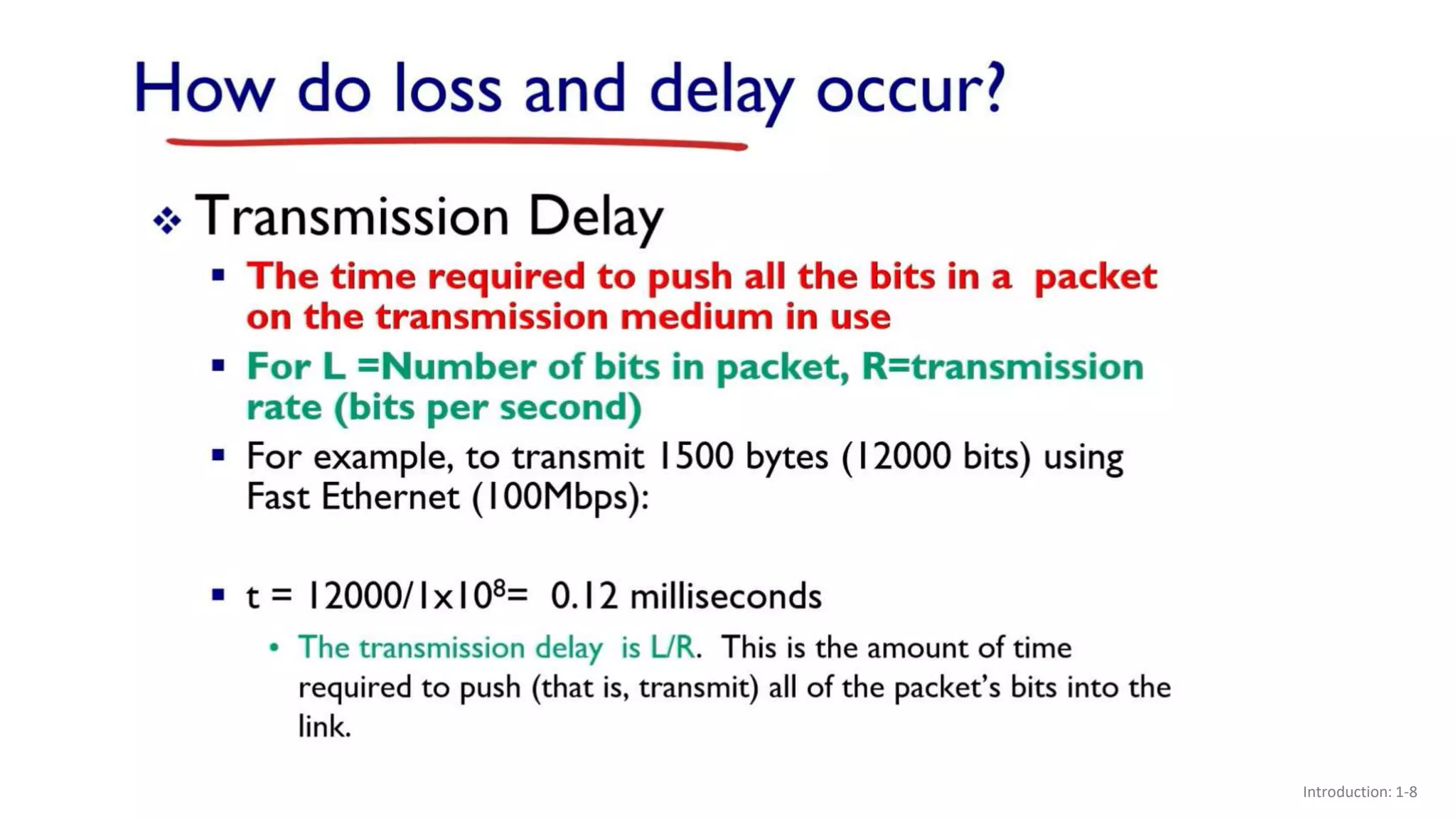
dtrans: transmission delay:
 L: packet length (bits)
 R: link transmission rate (bps)
 dtrans = L/R
dprop: propagation delay:
 d: length of physical link
 s: propagation speed (~2x10⁸ m/sec)
 dprop = d/s
dtrans and dprop
very different
* Check out the online interactive exercises:
http://gaia.cs.umass.edu/kurose_ross
Caravan analogy
Introduction: 1-5
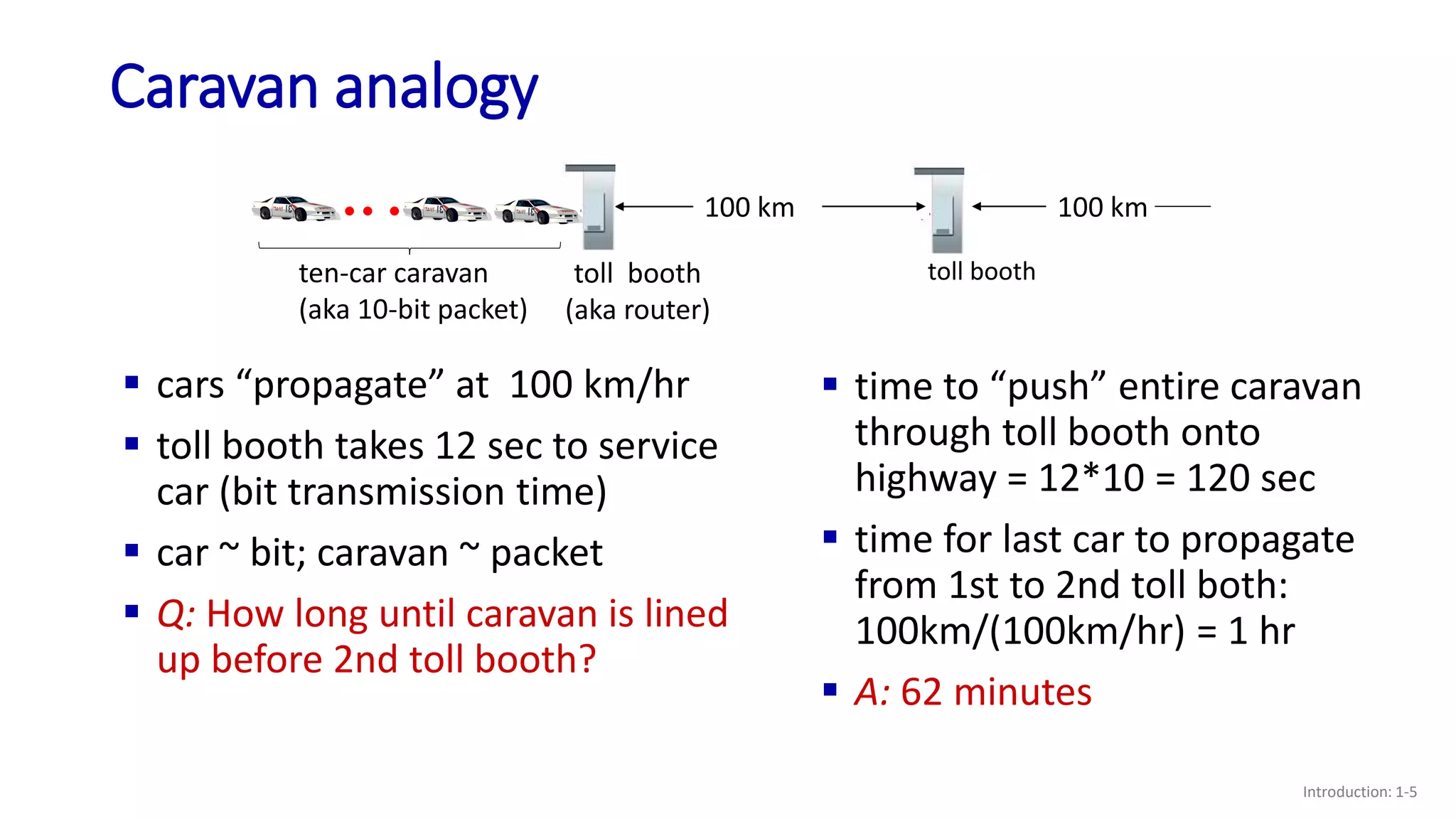
 cars “propagate” at 100 km/hr
 toll booth takes 12 sec to service
car (bit transmission time)
 car ~ bit; caravan ~ packet
 Q: How long until caravan is lined
up before 2nd toll booth?
 time to “push” entire caravan
through toll booth onto
highway = 12*10 = 120 sec
 time for last car to propagate
from 1st to 2nd toll both:
100km/(100km/hr) = 1 hr
 A: 62 minutes
toll booth
toll booth
(aka router)
ten-car caravan
(aka 10-bit packet)
100 km 100 km
Caravan analogy
Introduction: 1-6
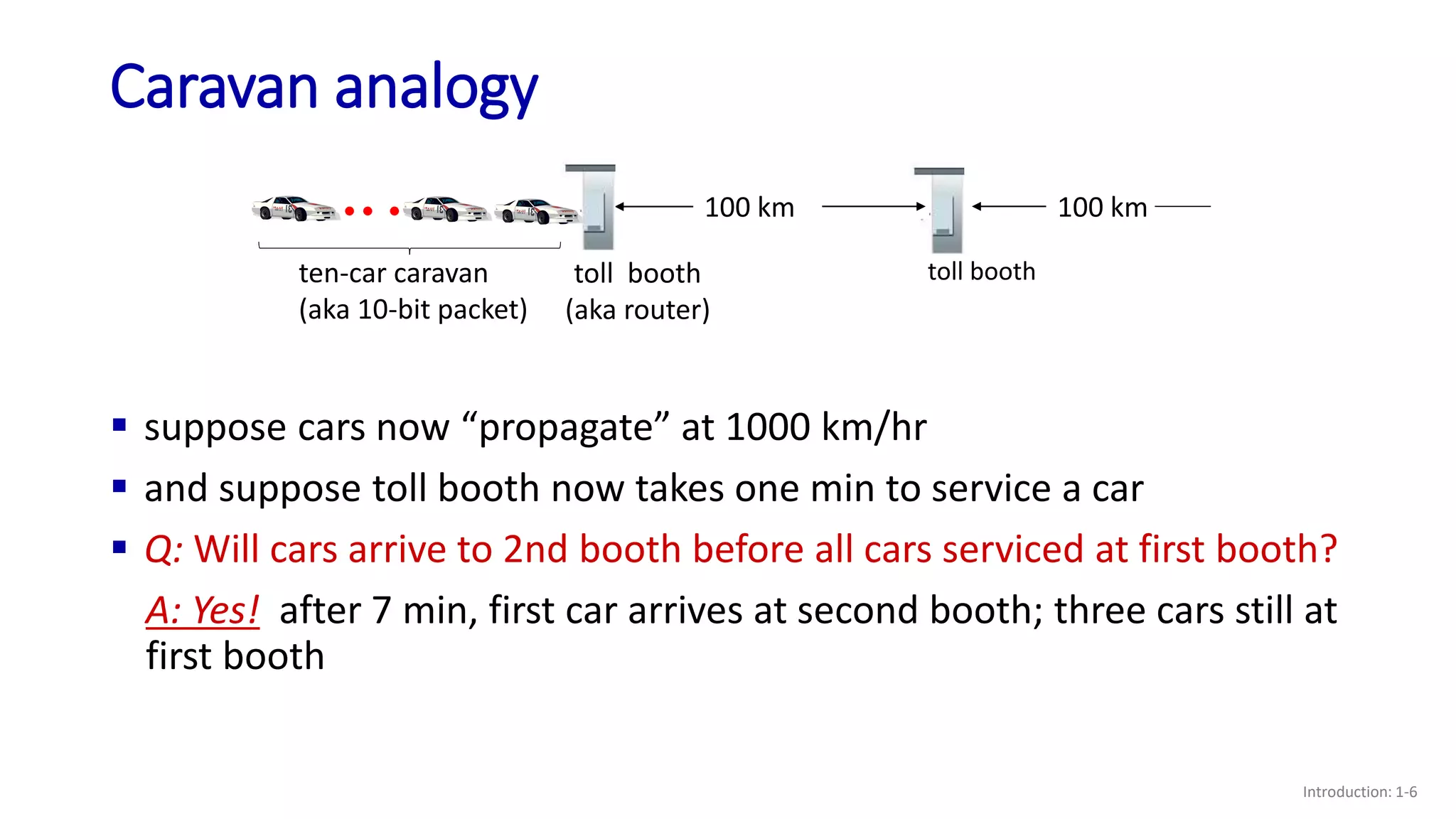
toll booth
toll booth
(aka router)
ten-car caravan
(aka 10-bit packet)
100 km 100 km
 suppose cars now “propagate” at 1000 km/hr
 and suppose toll booth now takes one min to service a car
 Q: Will cars arrive to 2nd booth before all cars serviced at first booth?
A: Yes! after 7 min, first car arrives at second booth; three cars still at
first booth
Packet queueing delay (revisited)
Introduction: 1-7
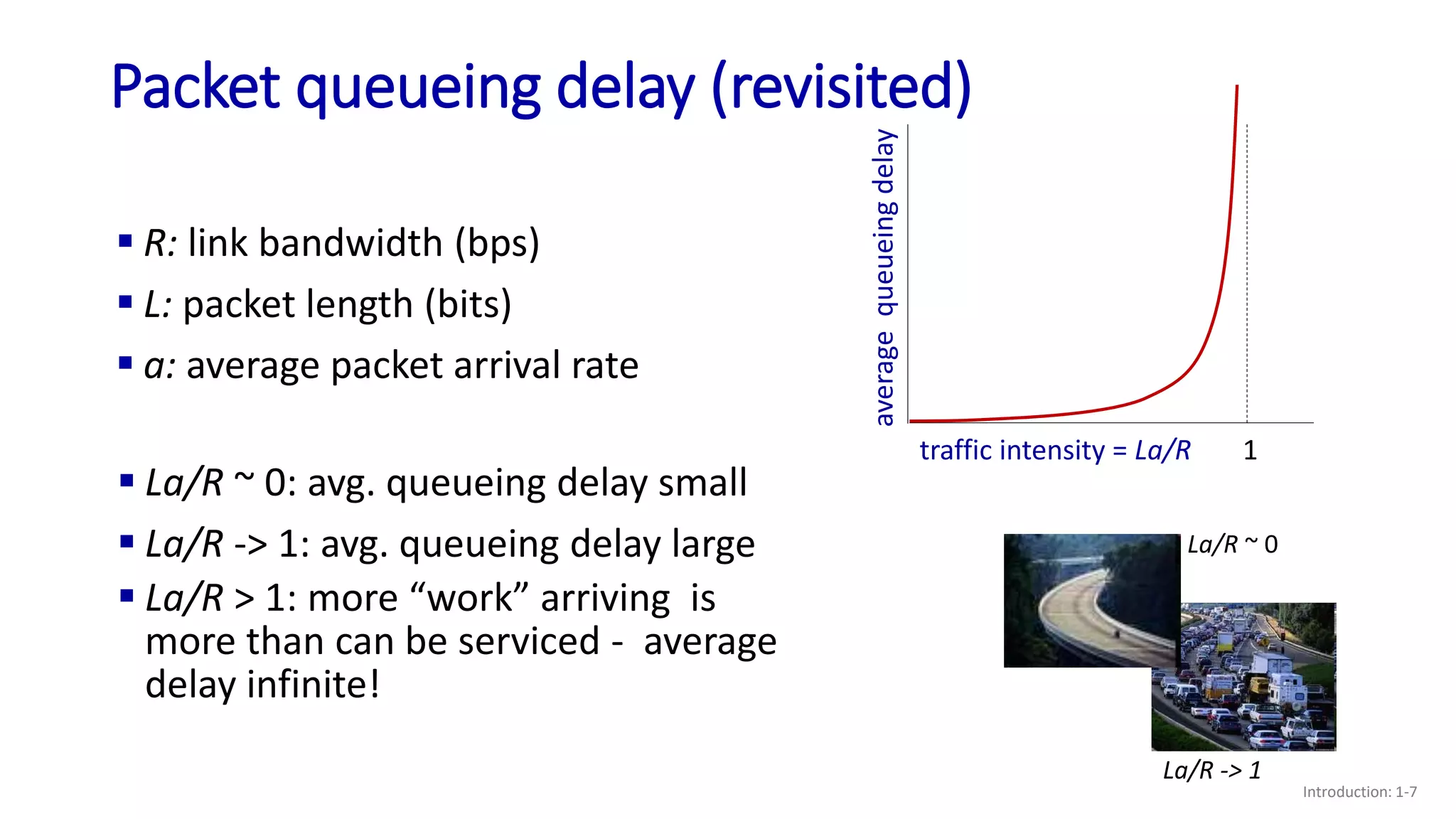
 R: link bandwidth (bps)
 L: packet length (bits)
 a: average packet arrival rate
 La/R ~ 0: avg. queueing delay small
 La/R -> 1: avg. queueing delay large
 La/R > 1: more “work” arriving is
more than can be serviced - average
delay infinite!
La/R ~ 0
La/R -> 1
traffic intensity = La/R
average
queueing
delay
1
Introduction: 1-8
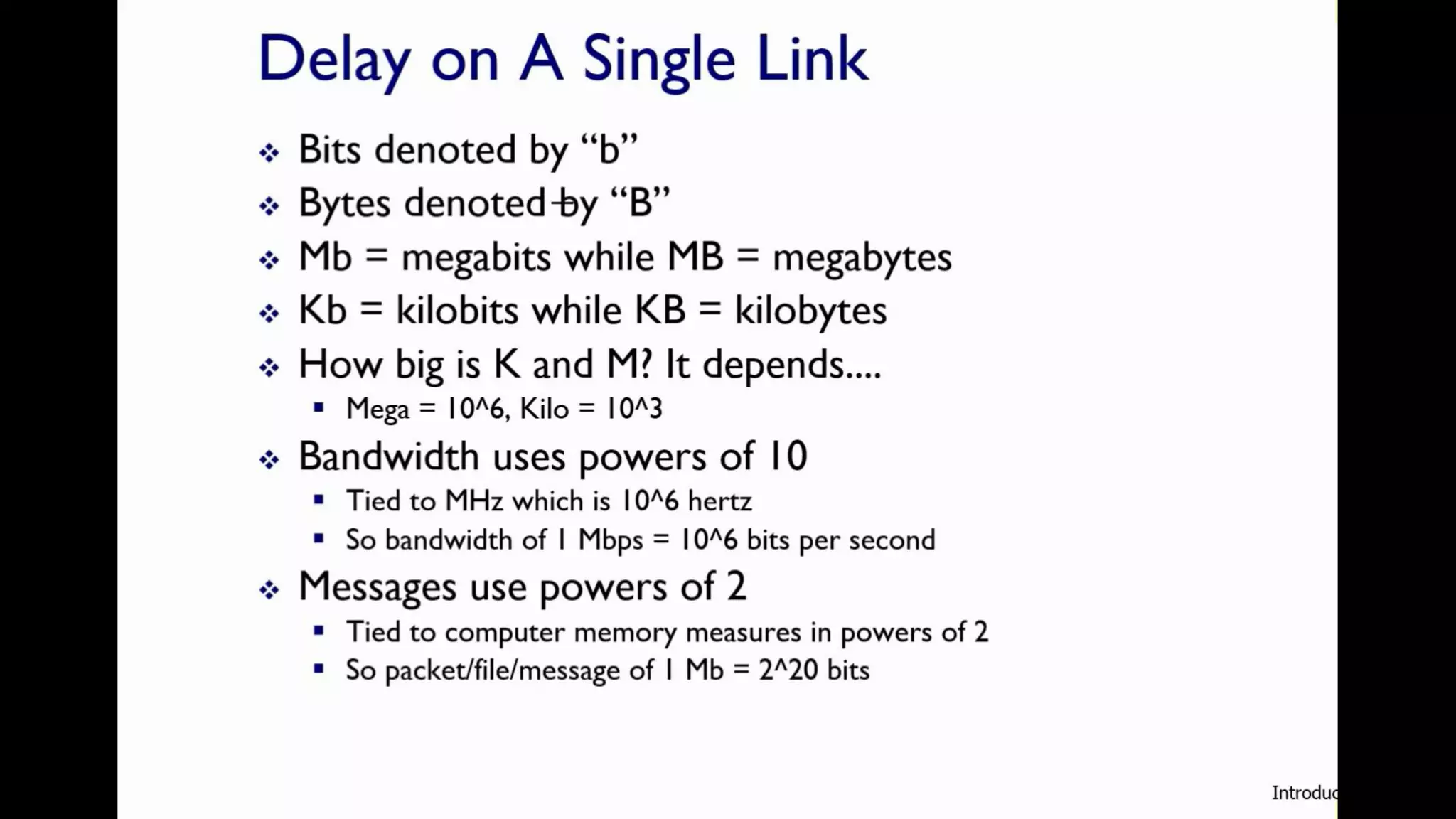
Introduction: 1-9
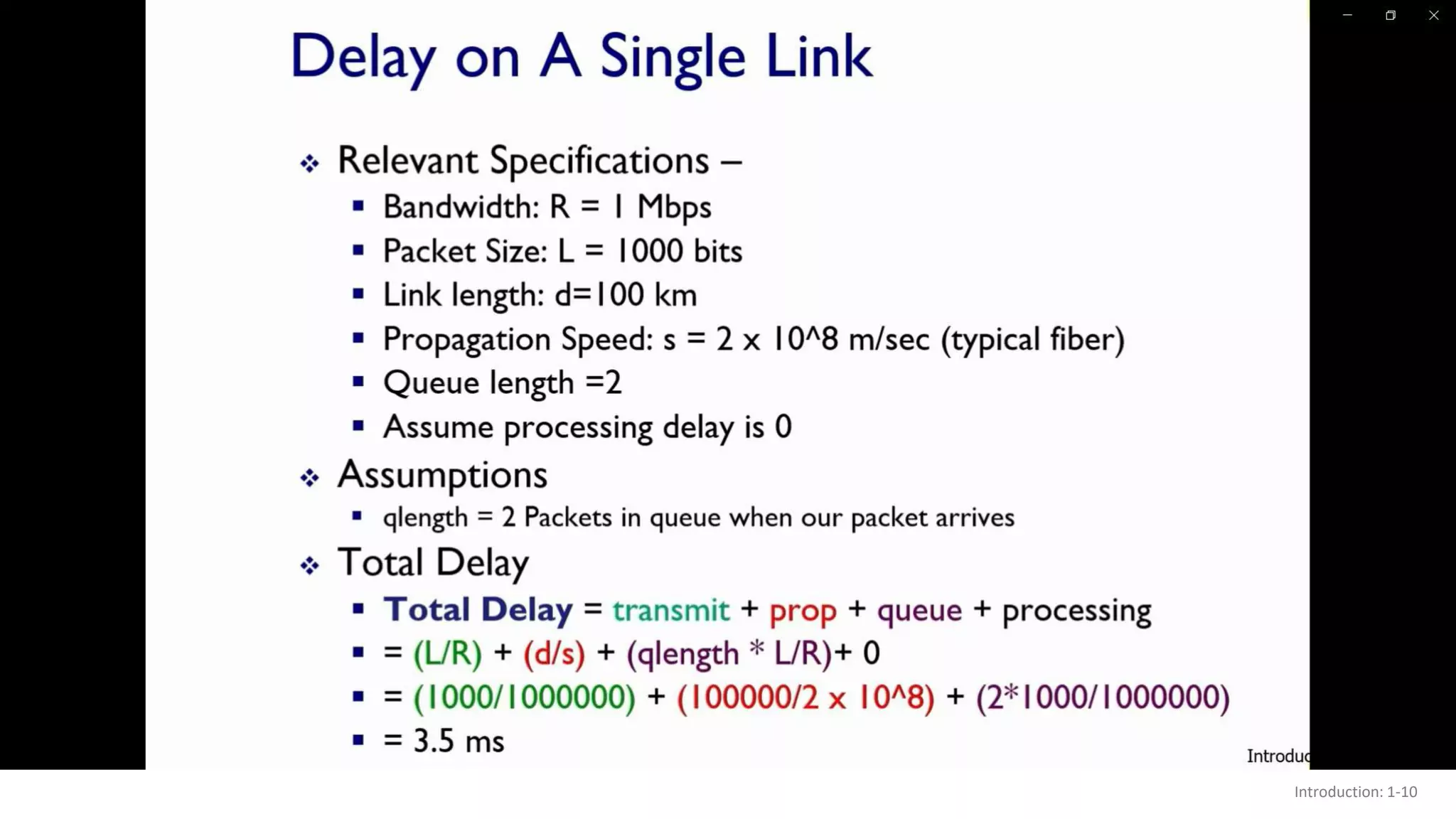
Introduction: 1-10
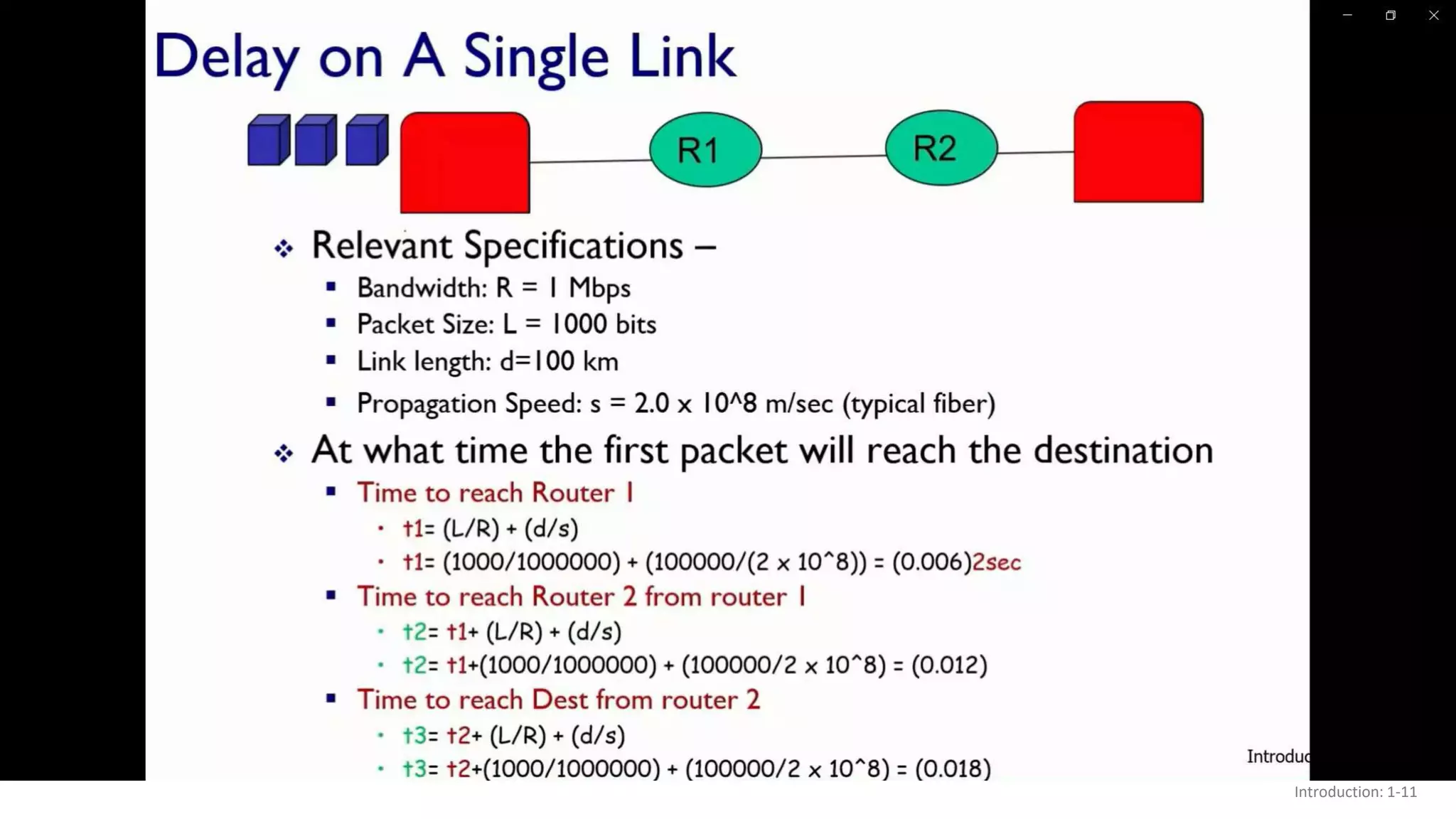
Introduction: 1-11
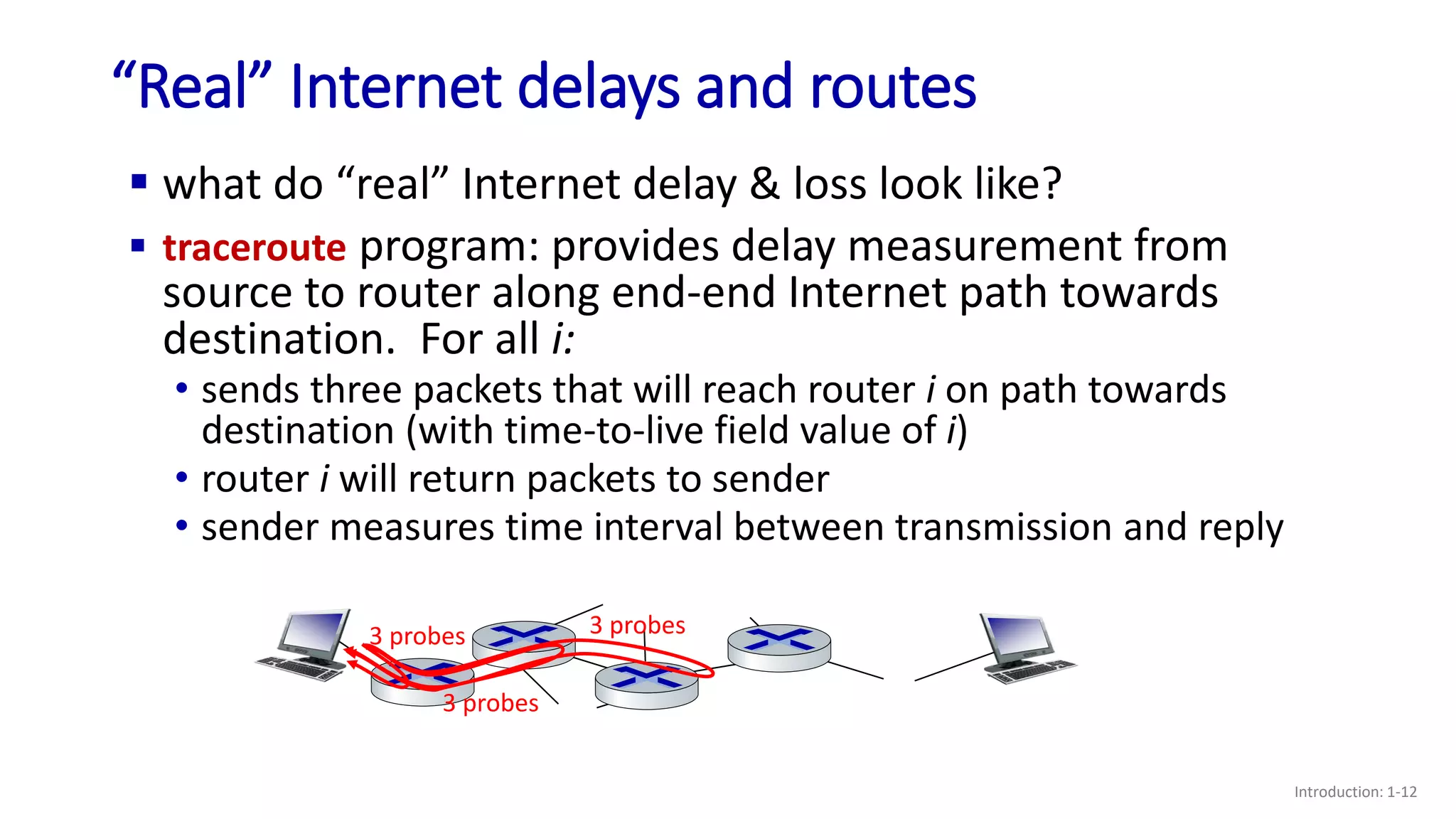
“Real” Internet delays and routes
Introduction: 1-12
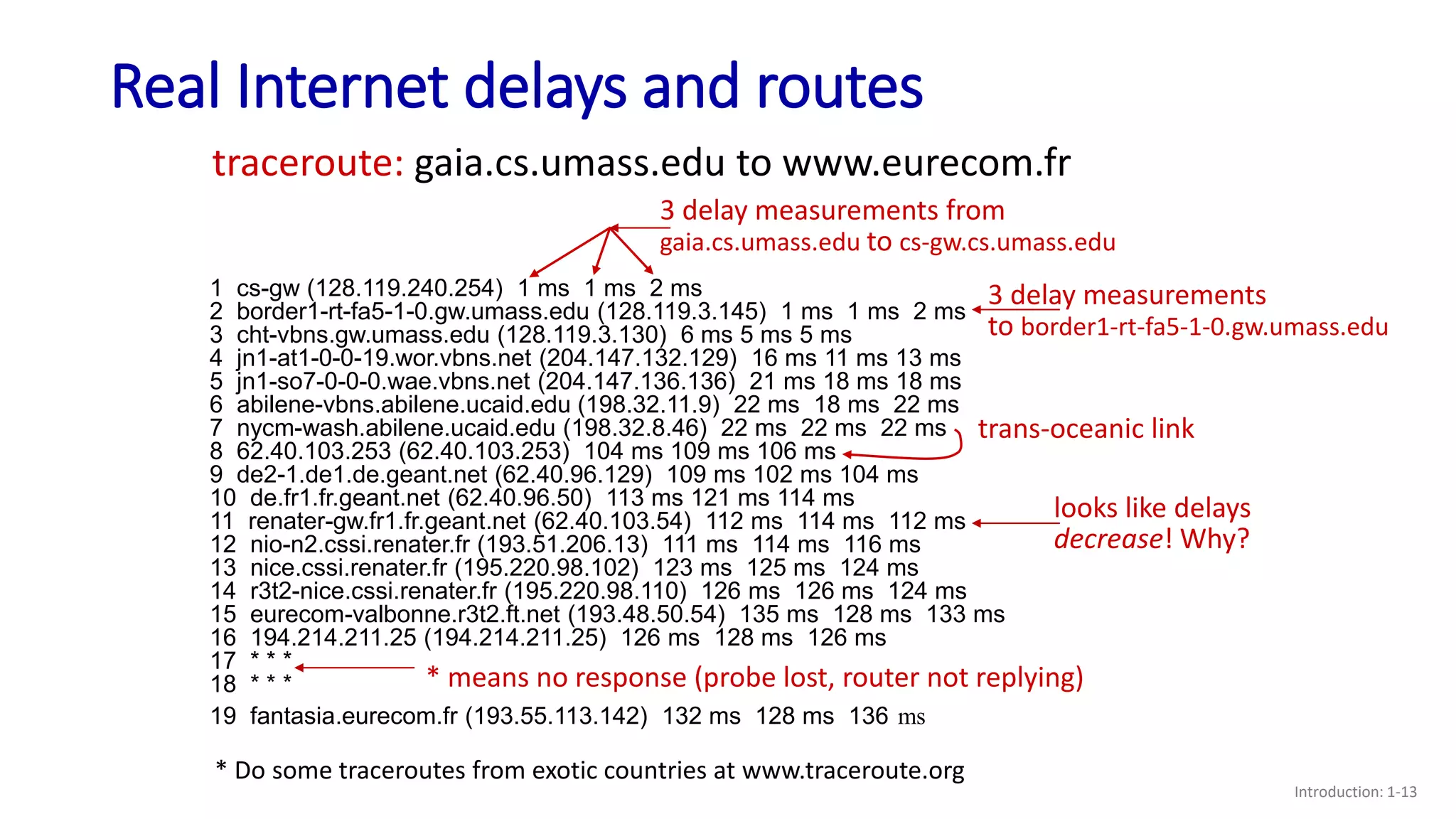
 what do “real” Internet delay & loss look like?
 traceroute program: provides delay measurement from
source to router along end-end Internet path towards
destination. For all i:
3 probes
3 probes
3 probes
• sends three packets that will reach router i on path towards
destination (with time-to-live field value of i)
• router i will return packets to sender
• sender measures time interval between transmission and reply
Real Internet delays and routes
Introduction: 1-13
1 cs-gw (128.119.240.254) 1 ms 1 ms 2 ms
2 border1-rt-fa5-1-0.gw.umass.edu (128.119.3.145) 1 ms 1 ms 2 ms
3 cht-vbns.gw.umass.edu (128.119.3.130) 6 ms 5 ms 5 ms
4 jn1-at1-0-0-19.wor.vbns.net (204.147.132.129) 16 ms 11 ms 13 ms
5 jn1-so7-0-0-0.wae.vbns.net (204.147.136.136) 21 ms 18 ms 18 ms
6 abilene-vbns.abilene.ucaid.edu (198.32.11.9) 22 ms 18 ms 22 ms
7 nycm-wash.abilene.ucaid.edu (198.32.8.46) 22 ms 22 ms 22 ms
8 62.40.103.253 (62.40.103.253) 104 ms 109 ms 106 ms
9 de2-1.de1.de.geant.net (62.40.96.129) 109 ms 102 ms 104 ms
10 de.fr1.fr.geant.net (62.40.96.50) 113 ms 121 ms 114 ms
11 renater-gw.fr1.fr.geant.net (62.40.103.54) 112 ms 114 ms 112 ms
12 nio-n2.cssi.renater.fr (193.51.206.13) 111 ms 114 ms 116 ms
13 nice.cssi.renater.fr (195.220.98.102) 123 ms 125 ms 124 ms
14 r3t2-nice.cssi.renater.fr (195.220.98.110) 126 ms 126 ms 124 ms
15 eurecom-valbonne.r3t2.ft.net (193.48.50.54) 135 ms 128 ms 133 ms
16 194.214.211.25 (194.214.211.25) 126 ms 128 ms 126 ms
17 * * *
18 * * *
19 fantasia.eurecom.fr (193.55.113.142) 132 ms 128 ms 136 ms
traceroute: gaia.cs.umass.edu to www.eurecom.fr
3 delay measurements from
gaia.cs.umass.edu to cs-gw.cs.umass.edu
* means no response (probe lost, router not replying)
trans-oceanic link
* Do some traceroutes from exotic countries at www.traceroute.org
looks like delays
decrease! Why?
3 delay measurements
to border1-rt-fa5-1-0.gw.umass.edu
Packet loss
Introduction: 1-14
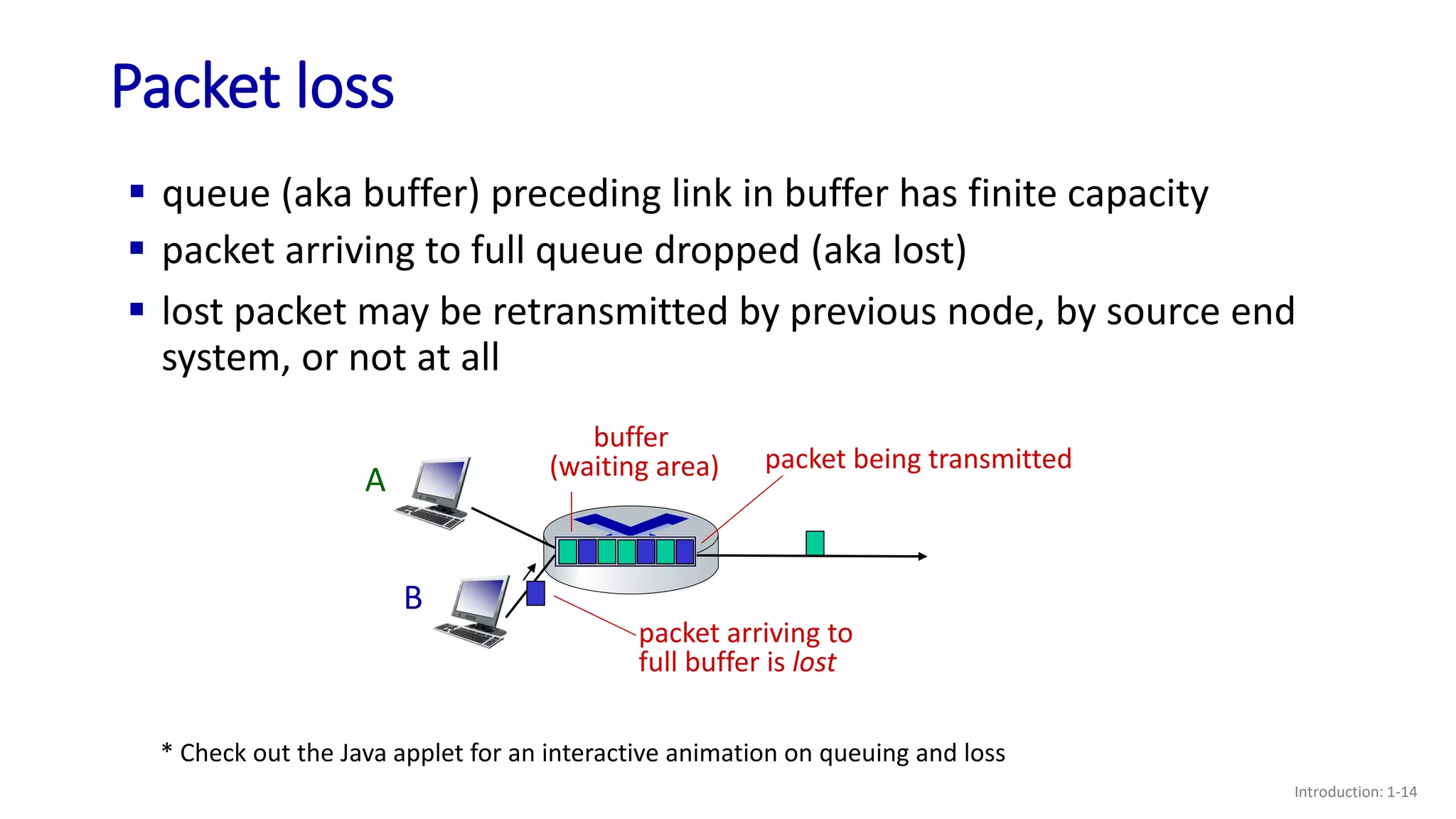
 queue (aka buffer) preceding link in buffer has finite capacity
A
B
packet being transmitted
buffer
(waiting area)
* Check out the Java applet for an interactive animation on queuing and loss
packet arriving to
full buffer is lost
 packet arriving to full queue dropped (aka lost)
 lost packet may be retransmitted by previous node, by source end
system, or not at all
Throughput
Introduction: 1-15
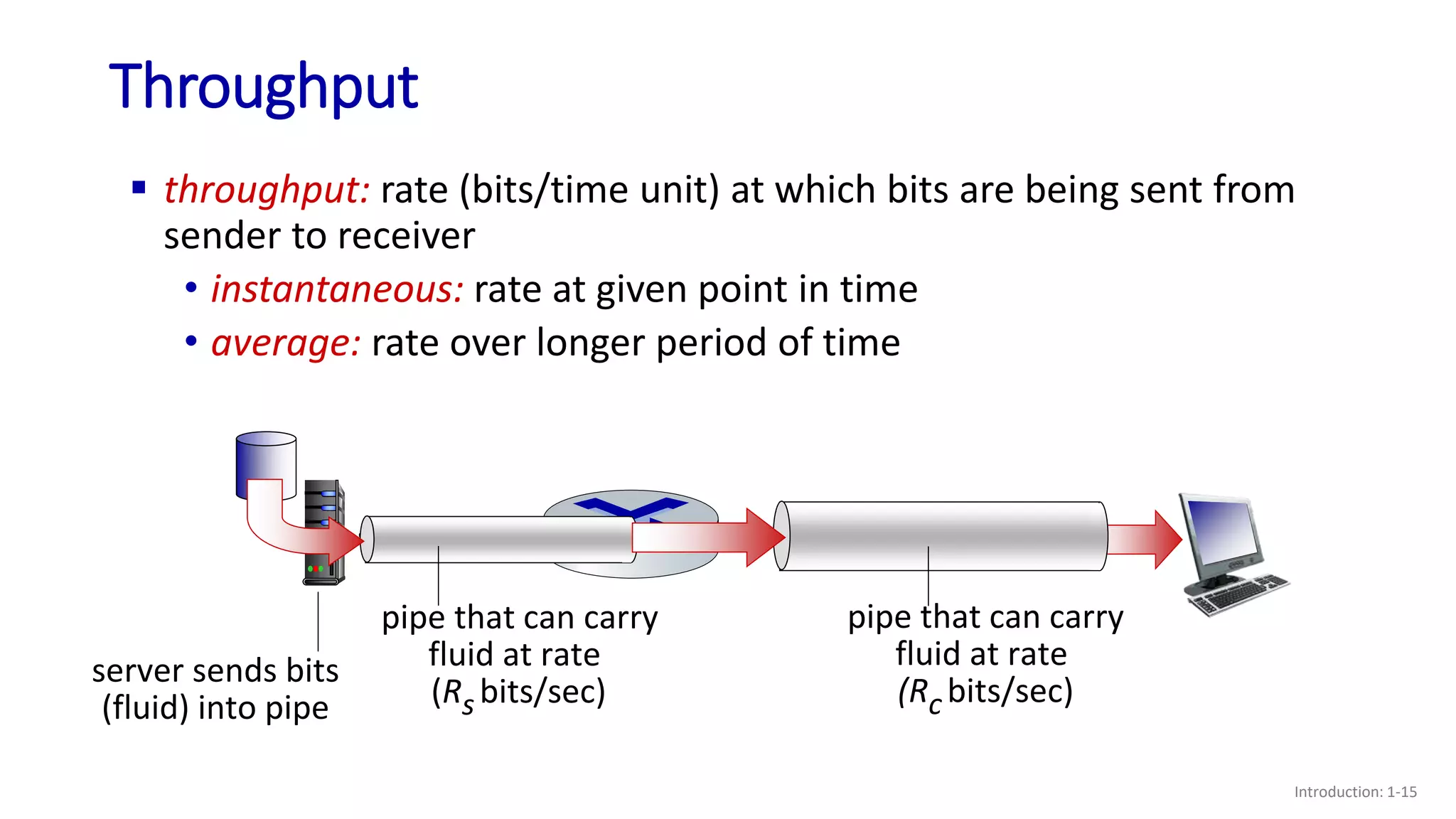
 throughput: rate (bits/time unit) at which bits are being sent from
sender to receiver
• instantaneous: rate at given point in time
• average: rate over longer period of time
server, with
file of F bits
to send to client
link capacity
Rs bits/sec
link capacity
Rc bits/sec
server sends bits
(fluid) into pipe
pipe that can carry
fluid at rate
(Rs bits/sec)
pipe that can carry
fluid at rate
(Rc bits/sec)
Throughput
Introduction: 1-16
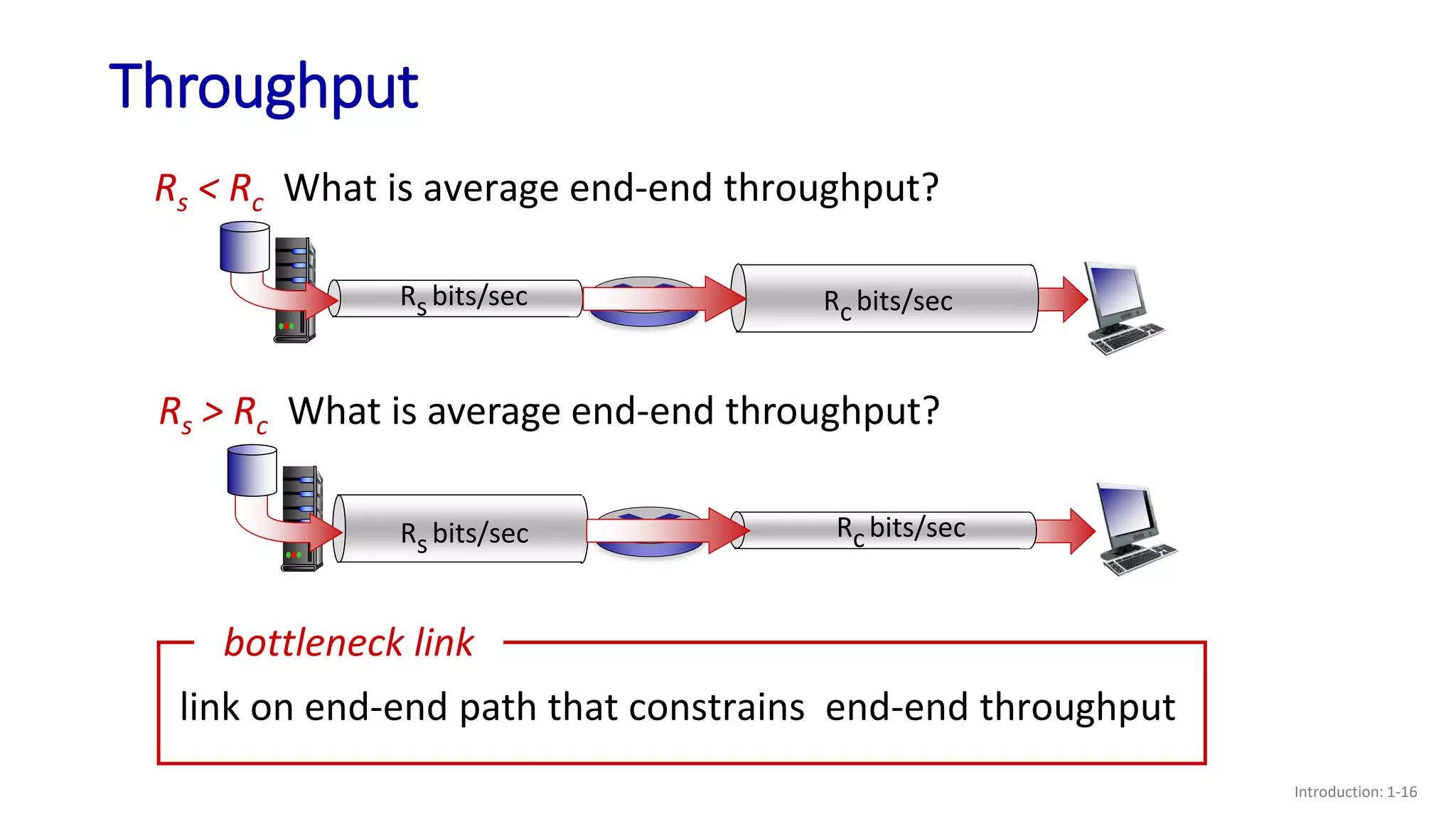
Rs < Rc What is average end-end throughput?
Rs bits/sec Rc bits/sec
Rs > Rc What is average end-end throughput?
link on end-end path that constrains end-end throughput
bottleneck link
Rs bits/sec Rc bits/sec
Throughput: network scenario
Introduction: 1-17
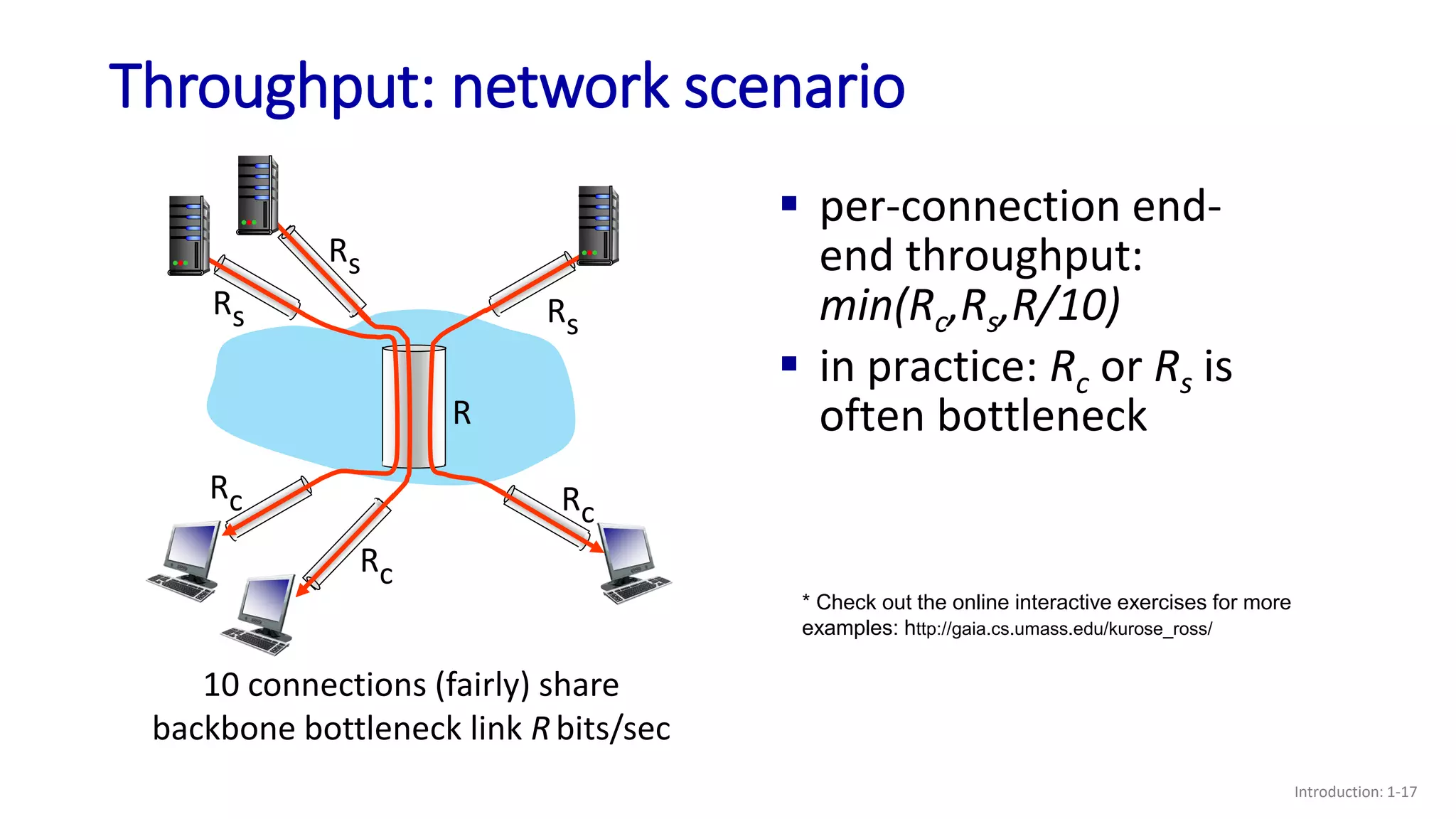
10 connections (fairly) share
backbone bottleneck link Rbits/sec
Rs
Rs
Rs
Rc
Rc
Rc
R
 per-connection end-
end throughput:
min(Rc,Rs,R/10)
 in practice: Rc or Rs is
often bottleneck
* Check out the online interactive exercises for more
examples: http://gaia.cs.umass.edu/kurose_ross/
Chapter 1: roadmap
Introduction: 1-18
 What is the Internet?
 What is a protocol?
 Network edge: hosts, access network,
physical media
 Network core: packet/circuit
switching, internet structure
 Performance: loss, delay, throughput
 Security
 Protocol layers, service models
 History
Network security
Introduction: 1-19
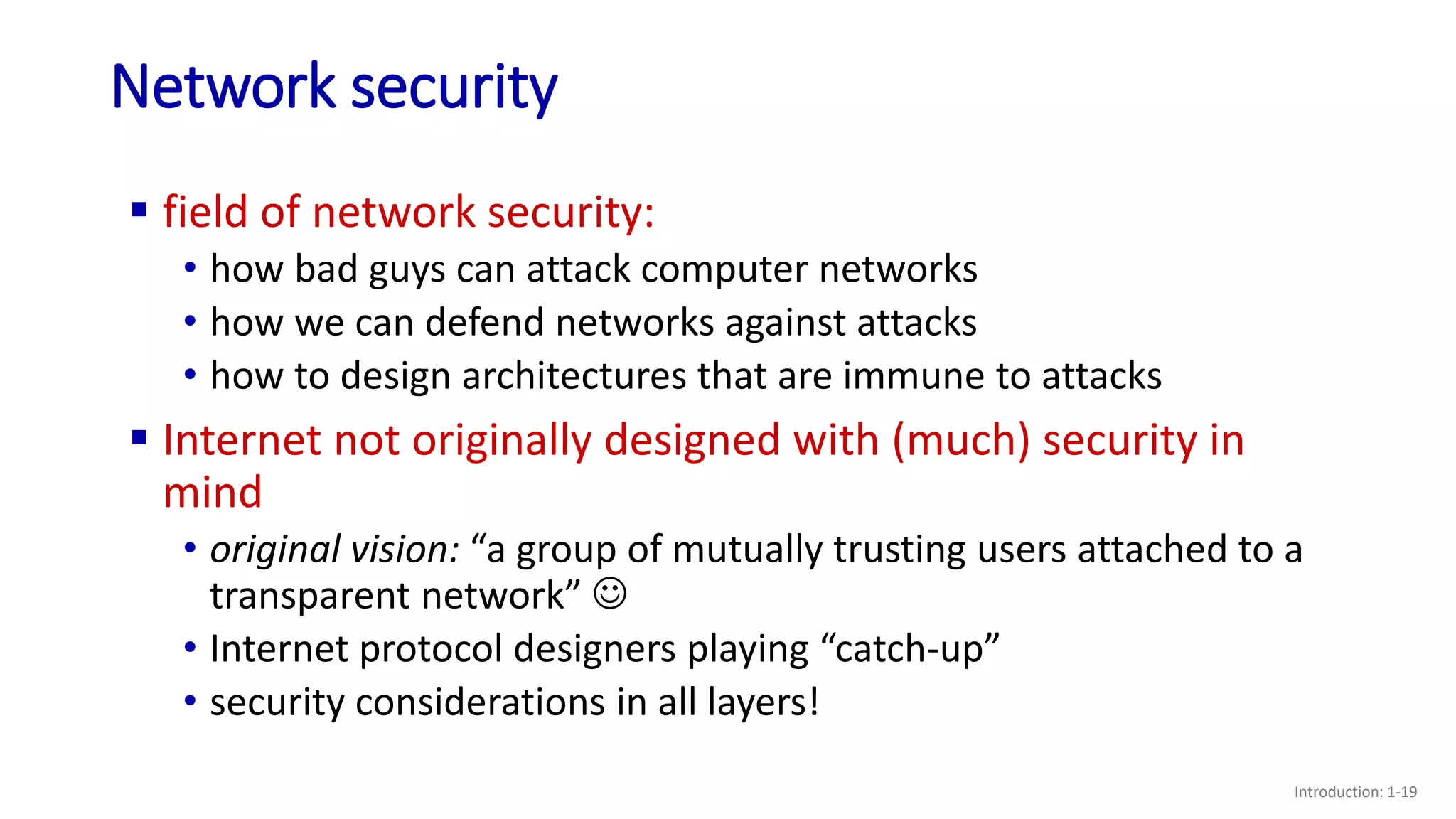
 field of network security:
• how bad guys can attack computer networks
• how we can defend networks against attacks
• how to design architectures that are immune to attacks
 Internet not originally designed with (much) security in
mind
• original vision: “a group of mutually trusting users attached to a
transparent network” 
• Internet protocol designers playing “catch-up”
• security considerations in all layers!
Bad guys: malware
Introduction: 1-20
 malware can get in host from:
• virus: self-replicating infection by receiving/executing object
(e.g., e-mail attachment)
• worm: self-replicating infection by passively receiving object that
gets itself executed
 spyware malware can record keystrokes, web sites visited, upload
info to collection site
 infected host can be enrolled in botnet, used for spam or
distributed denial of service (DDoS) attacks
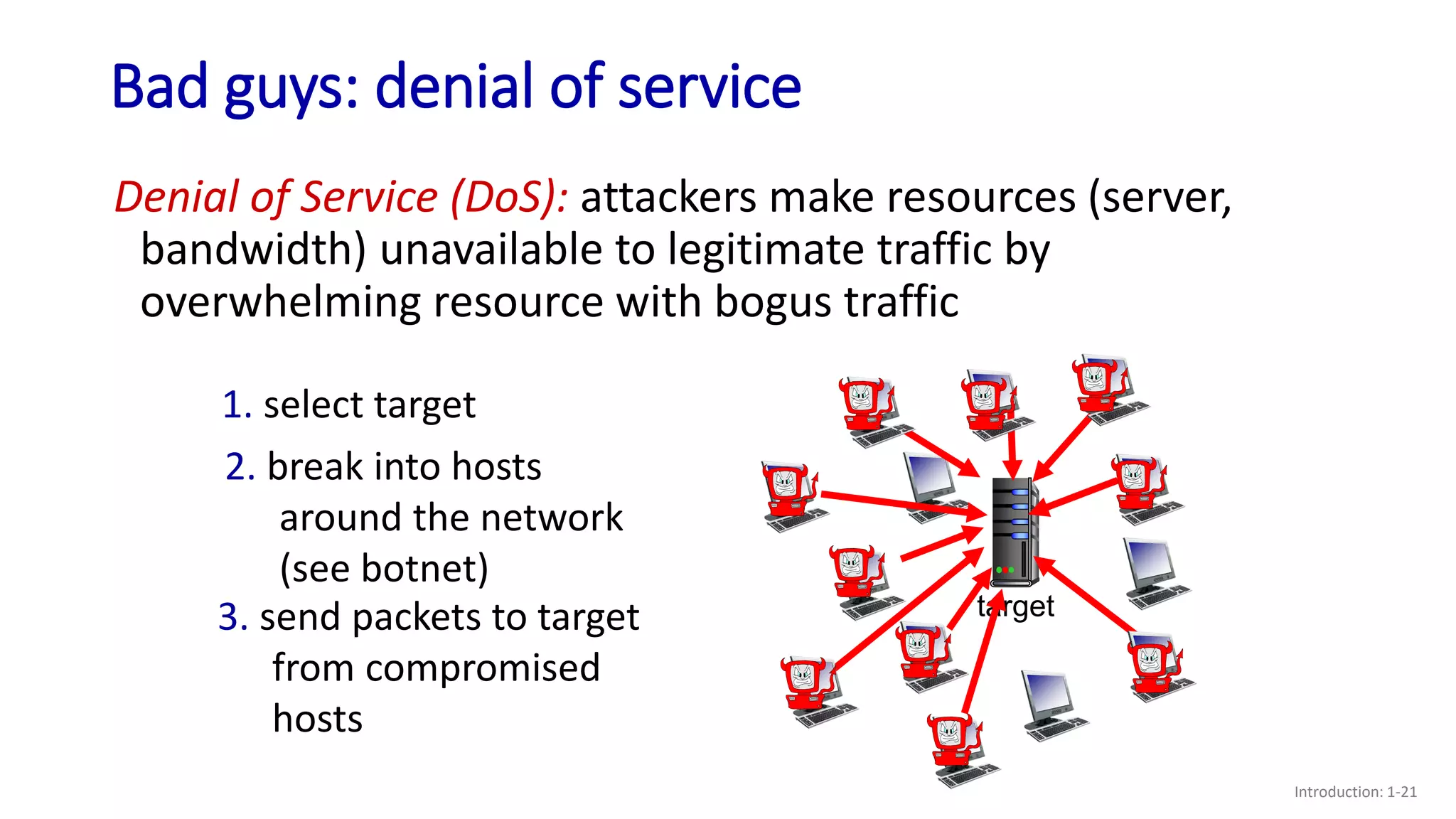
Bad guys: denial of service
Introduction: 1-21
target
Denial of Service (DoS): attackers make resources (server,
bandwidth) unavailable to legitimate traffic by
overwhelming resource with bogus traffic
1. select target
2. break into hosts
around the network
(see botnet)
3. send packets to target
from compromised
hosts
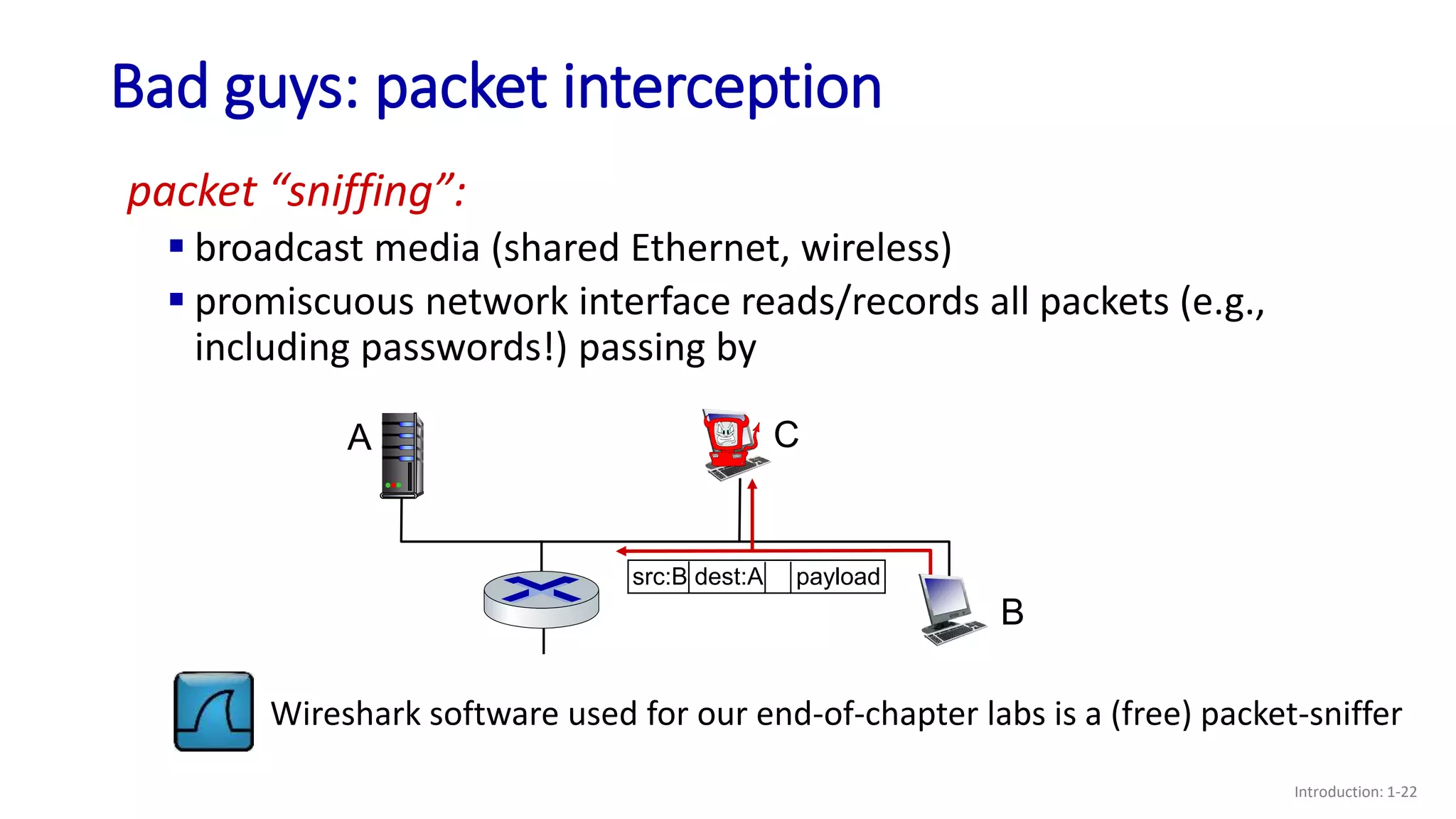
Bad guys: packet interception
Introduction: 1-22
packet “sniffing”:
 broadcast media (shared Ethernet, wireless)
 promiscuous network interface reads/records all packets (e.g.,
including passwords!) passing by
A
B
C
src:B dest:A payload
Wireshark software used for our end-of-chapter labs is a (free) packet-sniffer
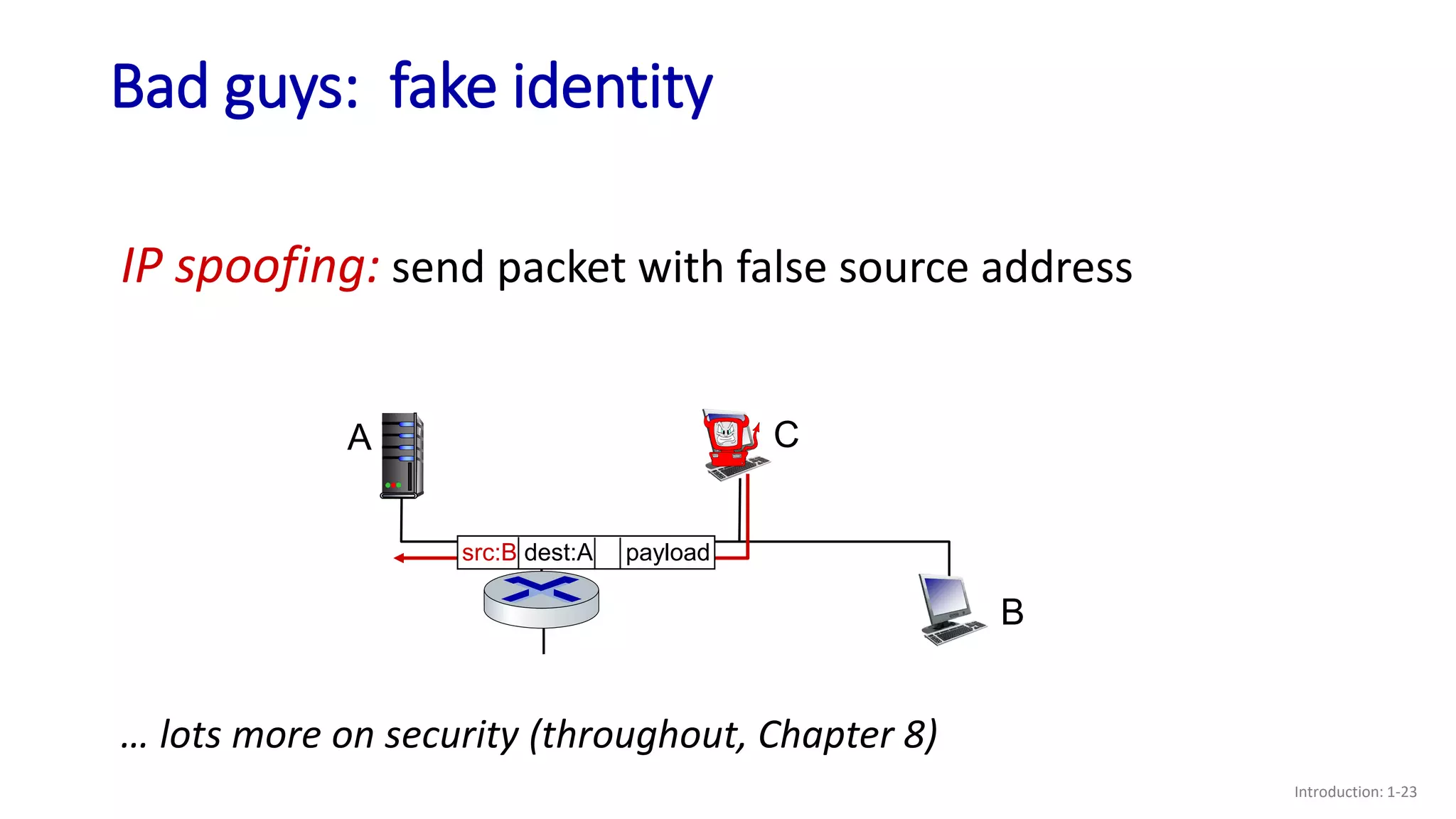
Bad guys: fake identity
Introduction: 1-23
IP spoofing: send packet with false source address
A
B
C
… lots more on security (throughout, Chapter 8)
src:B dest:A payload
Chapter 1: roadmap
Introduction: 1-24
 What is the Internet?
 What is a protocol?
 Network edge: hosts, access network,
physical media
 Network core: packet/circuit
switching, internet structure
 Performance: loss, delay, throughput
 Security
 Protocol layers, service models
 History
Internet history
Introduction: 1-25
 1961: Kleinrock - queueing
theory shows effectiveness of
packet-switching
 1964: Baran - packet-switching
in military nets
 1967: ARPAnet conceived by
Advanced Research Projects
Agency
 1969: first ARPAnet node
operational
 1972:
• ARPAnet public demo
• NCP (Network Control Protocol)
first host-host protocol
• first e-mail program
• ARPAnet has 15 nodes
1961-1972: Early packet-switching principles
Internet history
Introduction: 1-26
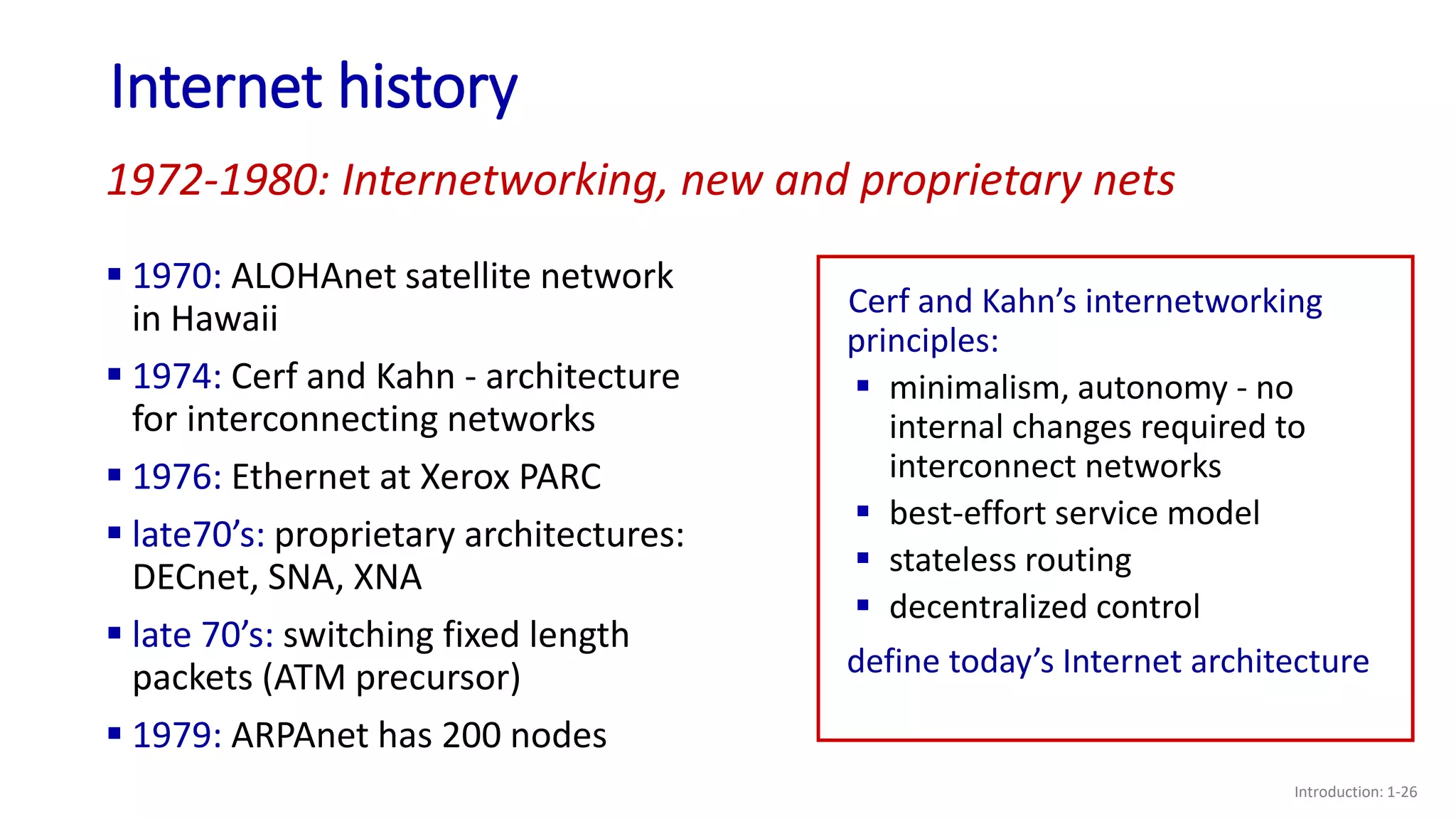
 1970: ALOHAnet satellite network
in Hawaii
 1974: Cerf and Kahn - architecture
for interconnecting networks
 1976: Ethernet at Xerox PARC
 late70’s: proprietary architectures:
DECnet, SNA, XNA
 late 70’s: switching fixed length
packets (ATM precursor)
 1979: ARPAnet has 200 nodes
1972-1980: Internetworking, new and proprietary nets
Cerf and Kahn’s internetworking
principles:
 minimalism, autonomy - no
internal changes required to
interconnect networks
 best-effort service model
 stateless routing
 decentralized control
define today’s Internet architecture
Internet history
Introduction: 1-27
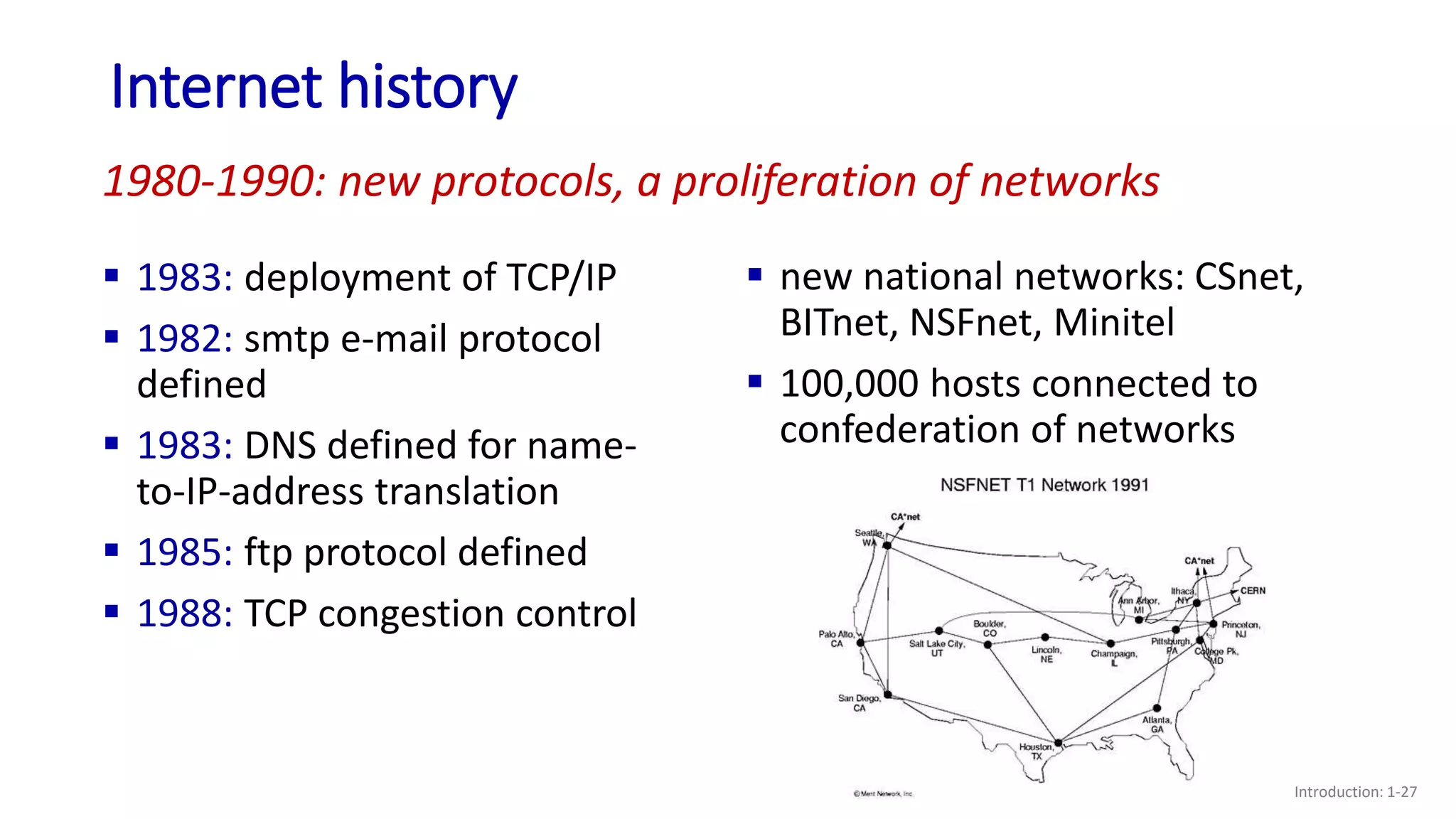
 1983: deployment of TCP/IP
 1982: smtp e-mail protocol
defined
 1983: DNS defined for name-
to-IP-address translation
 1985: ftp protocol defined
 1988: TCP congestion control
 new national networks: CSnet,
BITnet, NSFnet, Minitel
 100,000 hosts connected to
confederation of networks
1980-1990: new protocols, a proliferation of networks
Internet history
Introduction: 1-28
 early 1990s: ARPAnet
decommissioned
 1991: NSF lifts restrictions on
commercial use of NSFnet
(decommissioned, 1995)
 early 1990s: Web
• hypertext [Bush 1945, Nelson 1960’s]
• HTML, HTTP: Berners-Lee
• 1994: Mosaic, later Netscape
• late 1990s: commercialization of the
Web
late 1990s – 2000s:
 more killer apps: instant
messaging, P2P file sharing
 network security to forefront
 est. 50 million host, 100 million+
users
 backbone links running at Gbps
1990, 2000s: commercialization, the Web, new applications
Internet history
Introduction: 1-29
 ~18B devices attached to Internet (2017)
• rise of smartphones (iPhone: 2007)
 aggressive deployment of broadband access
 increasing ubiquity of high-speed wireless access: 4G/5G, WiFi
 emergence of online social networks:
• Facebook: ~ 2.5 billion users
 service providers (Google, FB, Microsoft) create their own networks
• bypass commercial Internet to connect “close” to end user, providing
“instantaneous” access to search, video content, …
 enterprises run their services in “cloud” (e.g., Amazon Web Services,
Microsoft Azure)
2005-present: more new applications, Internet is “everywhere”
Chapter 1: summary
Introduction: 1-30
We’ve covered a “ton” of material!
 Internet overview
 what’s a protocol?
 network edge, access network, core
• packet-switching versus circuit-
switching
• Internet structure
 performance: loss, delay, throughput
 layering, service models
 security
 history
You now have:
 context, overview,
vocabulary, “feel”
of networking
 more depth,
detail, and fun to
follow!
Additional Chapter 1 slides
Introduction: 1-31
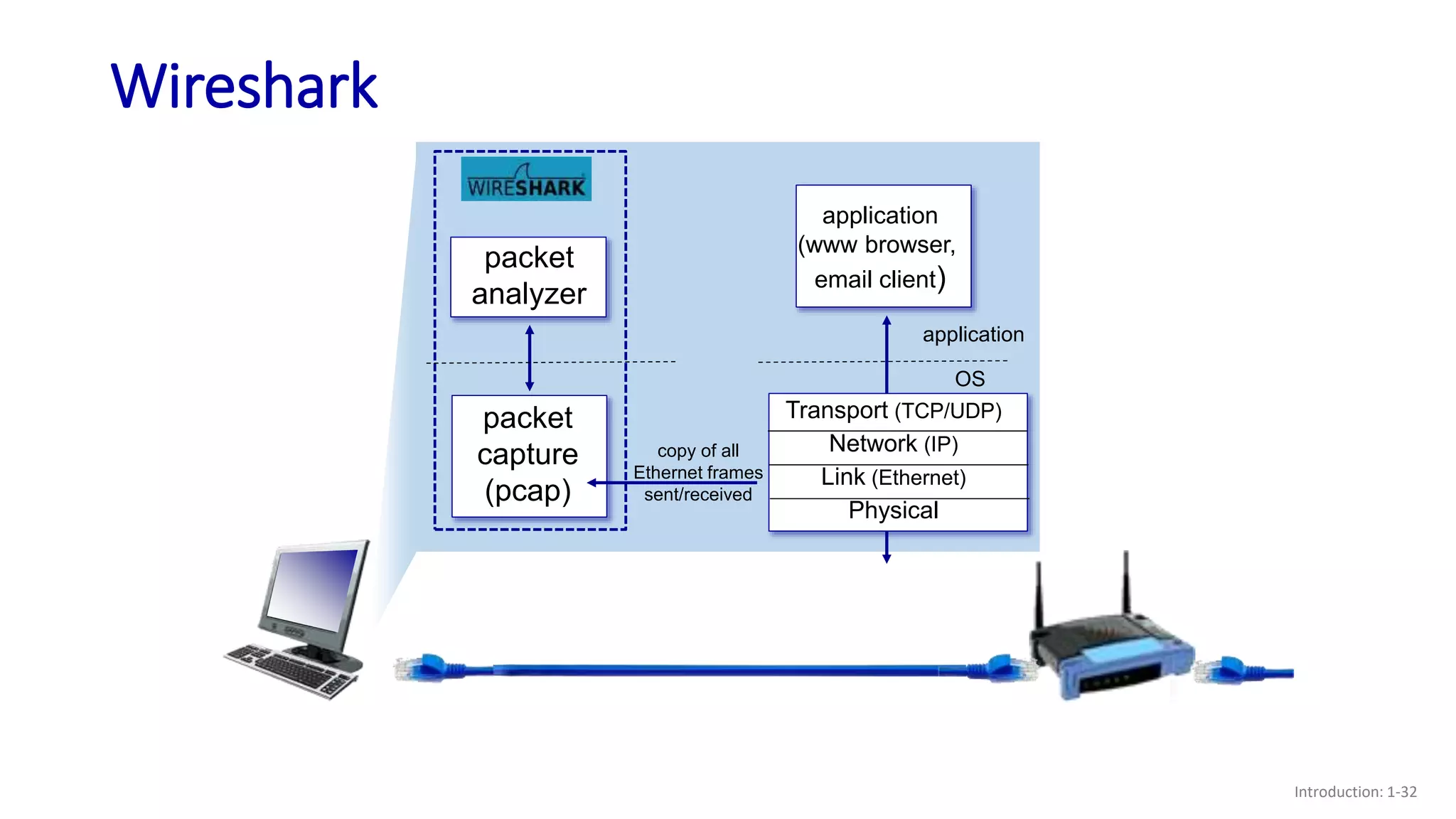
Wireshark
Introduction: 1-32
Transport (TCP/UDP)
Network (IP)
Link (Ethernet)
Physical
application
(www browser,
email client)
application
OS
packet
capture
(pcap)
packet
analyzer
copy of all
Ethernet frames
sent/received

Lecture 06 and 07.pptx

  • 1.
    Chapter 1: roadmap Introduction:1-1  What is the Internet?  What is a protocol?  Network edge: hosts, access network, physical media  Network core: packet/circuit switching, internet structure  Performance: loss, delay, throughput  Security  Protocol layers, service models  History
  • 2.
    How do packetloss and delay occur? Introduction: 1-2 packets queue in router buffers  packets queue, wait for turn  arrival rate to link (temporarily) exceeds output link capacity: packet loss A B packet being transmitted (transmission delay) packets in buffers (queueing delay) free (available) buffers: arriving packets dropped (loss) if no free buffers
  • 3.
    Packet delay: foursources Introduction: 1-3 dproc: nodal processing  check bit errors  determine output link  typically < msec dqueue: queueing delay  time waiting at output link for transmission  depends on congestion level of router propagation nodal processing queueing dnodal = dproc + dqueue + dtrans + dprop A B transmission
  • 4.
    Packet delay: foursources Introduction: 1-4 propagation nodal processing queueing dnodal = dproc + dqueue + dtrans + dprop A B transmission dtrans: transmission delay:  L: packet length (bits)  R: link transmission rate (bps)  dtrans = L/R dprop: propagation delay:  d: length of physical link  s: propagation speed (~2x10⁸ m/sec)  dprop = d/s dtrans and dprop very different * Check out the online interactive exercises: http://gaia.cs.umass.edu/kurose_ross
  • 5.
    Caravan analogy Introduction: 1-5 cars “propagate” at 100 km/hr  toll booth takes 12 sec to service car (bit transmission time)  car ~ bit; caravan ~ packet  Q: How long until caravan is lined up before 2nd toll booth?  time to “push” entire caravan through toll booth onto highway = 12*10 = 120 sec  time for last car to propagate from 1st to 2nd toll both: 100km/(100km/hr) = 1 hr  A: 62 minutes toll booth toll booth (aka router) ten-car caravan (aka 10-bit packet) 100 km 100 km
  • 6.
    Caravan analogy Introduction: 1-6 tollbooth toll booth (aka router) ten-car caravan (aka 10-bit packet) 100 km 100 km  suppose cars now “propagate” at 1000 km/hr  and suppose toll booth now takes one min to service a car  Q: Will cars arrive to 2nd booth before all cars serviced at first booth? A: Yes! after 7 min, first car arrives at second booth; three cars still at first booth
  • 7.
    Packet queueing delay(revisited) Introduction: 1-7  R: link bandwidth (bps)  L: packet length (bits)  a: average packet arrival rate  La/R ~ 0: avg. queueing delay small  La/R -> 1: avg. queueing delay large  La/R > 1: more “work” arriving is more than can be serviced - average delay infinite! La/R ~ 0 La/R -> 1 traffic intensity = La/R average queueing delay 1
  • 8.
  • 9.
  • 10.
  • 11.
  • 12.
    “Real” Internet delaysand routes Introduction: 1-12  what do “real” Internet delay & loss look like?  traceroute program: provides delay measurement from source to router along end-end Internet path towards destination. For all i: 3 probes 3 probes 3 probes • sends three packets that will reach router i on path towards destination (with time-to-live field value of i) • router i will return packets to sender • sender measures time interval between transmission and reply
  • 13.
    Real Internet delaysand routes Introduction: 1-13 1 cs-gw (128.119.240.254) 1 ms 1 ms 2 ms 2 border1-rt-fa5-1-0.gw.umass.edu (128.119.3.145) 1 ms 1 ms 2 ms 3 cht-vbns.gw.umass.edu (128.119.3.130) 6 ms 5 ms 5 ms 4 jn1-at1-0-0-19.wor.vbns.net (204.147.132.129) 16 ms 11 ms 13 ms 5 jn1-so7-0-0-0.wae.vbns.net (204.147.136.136) 21 ms 18 ms 18 ms 6 abilene-vbns.abilene.ucaid.edu (198.32.11.9) 22 ms 18 ms 22 ms 7 nycm-wash.abilene.ucaid.edu (198.32.8.46) 22 ms 22 ms 22 ms 8 62.40.103.253 (62.40.103.253) 104 ms 109 ms 106 ms 9 de2-1.de1.de.geant.net (62.40.96.129) 109 ms 102 ms 104 ms 10 de.fr1.fr.geant.net (62.40.96.50) 113 ms 121 ms 114 ms 11 renater-gw.fr1.fr.geant.net (62.40.103.54) 112 ms 114 ms 112 ms 12 nio-n2.cssi.renater.fr (193.51.206.13) 111 ms 114 ms 116 ms 13 nice.cssi.renater.fr (195.220.98.102) 123 ms 125 ms 124 ms 14 r3t2-nice.cssi.renater.fr (195.220.98.110) 126 ms 126 ms 124 ms 15 eurecom-valbonne.r3t2.ft.net (193.48.50.54) 135 ms 128 ms 133 ms 16 194.214.211.25 (194.214.211.25) 126 ms 128 ms 126 ms 17 * * * 18 * * * 19 fantasia.eurecom.fr (193.55.113.142) 132 ms 128 ms 136 ms traceroute: gaia.cs.umass.edu to www.eurecom.fr 3 delay measurements from gaia.cs.umass.edu to cs-gw.cs.umass.edu * means no response (probe lost, router not replying) trans-oceanic link * Do some traceroutes from exotic countries at www.traceroute.org looks like delays decrease! Why? 3 delay measurements to border1-rt-fa5-1-0.gw.umass.edu
  • 14.
    Packet loss Introduction: 1-14 queue (aka buffer) preceding link in buffer has finite capacity A B packet being transmitted buffer (waiting area) * Check out the Java applet for an interactive animation on queuing and loss packet arriving to full buffer is lost  packet arriving to full queue dropped (aka lost)  lost packet may be retransmitted by previous node, by source end system, or not at all
  • 15.
    Throughput Introduction: 1-15  throughput:rate (bits/time unit) at which bits are being sent from sender to receiver • instantaneous: rate at given point in time • average: rate over longer period of time server, with file of F bits to send to client link capacity Rs bits/sec link capacity Rc bits/sec server sends bits (fluid) into pipe pipe that can carry fluid at rate (Rs bits/sec) pipe that can carry fluid at rate (Rc bits/sec)
  • 16.
    Throughput Introduction: 1-16 Rs <Rc What is average end-end throughput? Rs bits/sec Rc bits/sec Rs > Rc What is average end-end throughput? link on end-end path that constrains end-end throughput bottleneck link Rs bits/sec Rc bits/sec
  • 17.
    Throughput: network scenario Introduction:1-17 10 connections (fairly) share backbone bottleneck link Rbits/sec Rs Rs Rs Rc Rc Rc R  per-connection end- end throughput: min(Rc,Rs,R/10)  in practice: Rc or Rs is often bottleneck * Check out the online interactive exercises for more examples: http://gaia.cs.umass.edu/kurose_ross/
  • 18.
    Chapter 1: roadmap Introduction:1-18  What is the Internet?  What is a protocol?  Network edge: hosts, access network, physical media  Network core: packet/circuit switching, internet structure  Performance: loss, delay, throughput  Security  Protocol layers, service models  History
  • 19.
    Network security Introduction: 1-19 field of network security: • how bad guys can attack computer networks • how we can defend networks against attacks • how to design architectures that are immune to attacks  Internet not originally designed with (much) security in mind • original vision: “a group of mutually trusting users attached to a transparent network”  • Internet protocol designers playing “catch-up” • security considerations in all layers!
  • 20.
    Bad guys: malware Introduction:1-20  malware can get in host from: • virus: self-replicating infection by receiving/executing object (e.g., e-mail attachment) • worm: self-replicating infection by passively receiving object that gets itself executed  spyware malware can record keystrokes, web sites visited, upload info to collection site  infected host can be enrolled in botnet, used for spam or distributed denial of service (DDoS) attacks
  • 21.
    Bad guys: denialof service Introduction: 1-21 target Denial of Service (DoS): attackers make resources (server, bandwidth) unavailable to legitimate traffic by overwhelming resource with bogus traffic 1. select target 2. break into hosts around the network (see botnet) 3. send packets to target from compromised hosts
  • 22.
    Bad guys: packetinterception Introduction: 1-22 packet “sniffing”:  broadcast media (shared Ethernet, wireless)  promiscuous network interface reads/records all packets (e.g., including passwords!) passing by A B C src:B dest:A payload Wireshark software used for our end-of-chapter labs is a (free) packet-sniffer
  • 23.
    Bad guys: fakeidentity Introduction: 1-23 IP spoofing: send packet with false source address A B C … lots more on security (throughout, Chapter 8) src:B dest:A payload
  • 24.
    Chapter 1: roadmap Introduction:1-24  What is the Internet?  What is a protocol?  Network edge: hosts, access network, physical media  Network core: packet/circuit switching, internet structure  Performance: loss, delay, throughput  Security  Protocol layers, service models  History
  • 25.
    Internet history Introduction: 1-25 1961: Kleinrock - queueing theory shows effectiveness of packet-switching  1964: Baran - packet-switching in military nets  1967: ARPAnet conceived by Advanced Research Projects Agency  1969: first ARPAnet node operational  1972: • ARPAnet public demo • NCP (Network Control Protocol) first host-host protocol • first e-mail program • ARPAnet has 15 nodes 1961-1972: Early packet-switching principles
  • 26.
    Internet history Introduction: 1-26 1970: ALOHAnet satellite network in Hawaii  1974: Cerf and Kahn - architecture for interconnecting networks  1976: Ethernet at Xerox PARC  late70’s: proprietary architectures: DECnet, SNA, XNA  late 70’s: switching fixed length packets (ATM precursor)  1979: ARPAnet has 200 nodes 1972-1980: Internetworking, new and proprietary nets Cerf and Kahn’s internetworking principles:  minimalism, autonomy - no internal changes required to interconnect networks  best-effort service model  stateless routing  decentralized control define today’s Internet architecture
  • 27.
    Internet history Introduction: 1-27 1983: deployment of TCP/IP  1982: smtp e-mail protocol defined  1983: DNS defined for name- to-IP-address translation  1985: ftp protocol defined  1988: TCP congestion control  new national networks: CSnet, BITnet, NSFnet, Minitel  100,000 hosts connected to confederation of networks 1980-1990: new protocols, a proliferation of networks
  • 28.
    Internet history Introduction: 1-28 early 1990s: ARPAnet decommissioned  1991: NSF lifts restrictions on commercial use of NSFnet (decommissioned, 1995)  early 1990s: Web • hypertext [Bush 1945, Nelson 1960’s] • HTML, HTTP: Berners-Lee • 1994: Mosaic, later Netscape • late 1990s: commercialization of the Web late 1990s – 2000s:  more killer apps: instant messaging, P2P file sharing  network security to forefront  est. 50 million host, 100 million+ users  backbone links running at Gbps 1990, 2000s: commercialization, the Web, new applications
  • 29.
    Internet history Introduction: 1-29 ~18B devices attached to Internet (2017) • rise of smartphones (iPhone: 2007)  aggressive deployment of broadband access  increasing ubiquity of high-speed wireless access: 4G/5G, WiFi  emergence of online social networks: • Facebook: ~ 2.5 billion users  service providers (Google, FB, Microsoft) create their own networks • bypass commercial Internet to connect “close” to end user, providing “instantaneous” access to search, video content, …  enterprises run their services in “cloud” (e.g., Amazon Web Services, Microsoft Azure) 2005-present: more new applications, Internet is “everywhere”
  • 30.
    Chapter 1: summary Introduction:1-30 We’ve covered a “ton” of material!  Internet overview  what’s a protocol?  network edge, access network, core • packet-switching versus circuit- switching • Internet structure  performance: loss, delay, throughput  layering, service models  security  history You now have:  context, overview, vocabulary, “feel” of networking  more depth, detail, and fun to follow!
  • 31.
    Additional Chapter 1slides Introduction: 1-31
  • 32.
    Wireshark Introduction: 1-32 Transport (TCP/UDP) Network(IP) Link (Ethernet) Physical application (www browser, email client) application OS packet capture (pcap) packet analyzer copy of all Ethernet frames sent/received

Editor's Notes

  • #7 In this case cars reach the 2nd booth even before the First booth finish all the cars. (as we have 1000 km/hr).
  • #19 Segue: from performanceto security