Layered Approach IN OS
BY FAHAD RAFI
BSCS -5B
2671
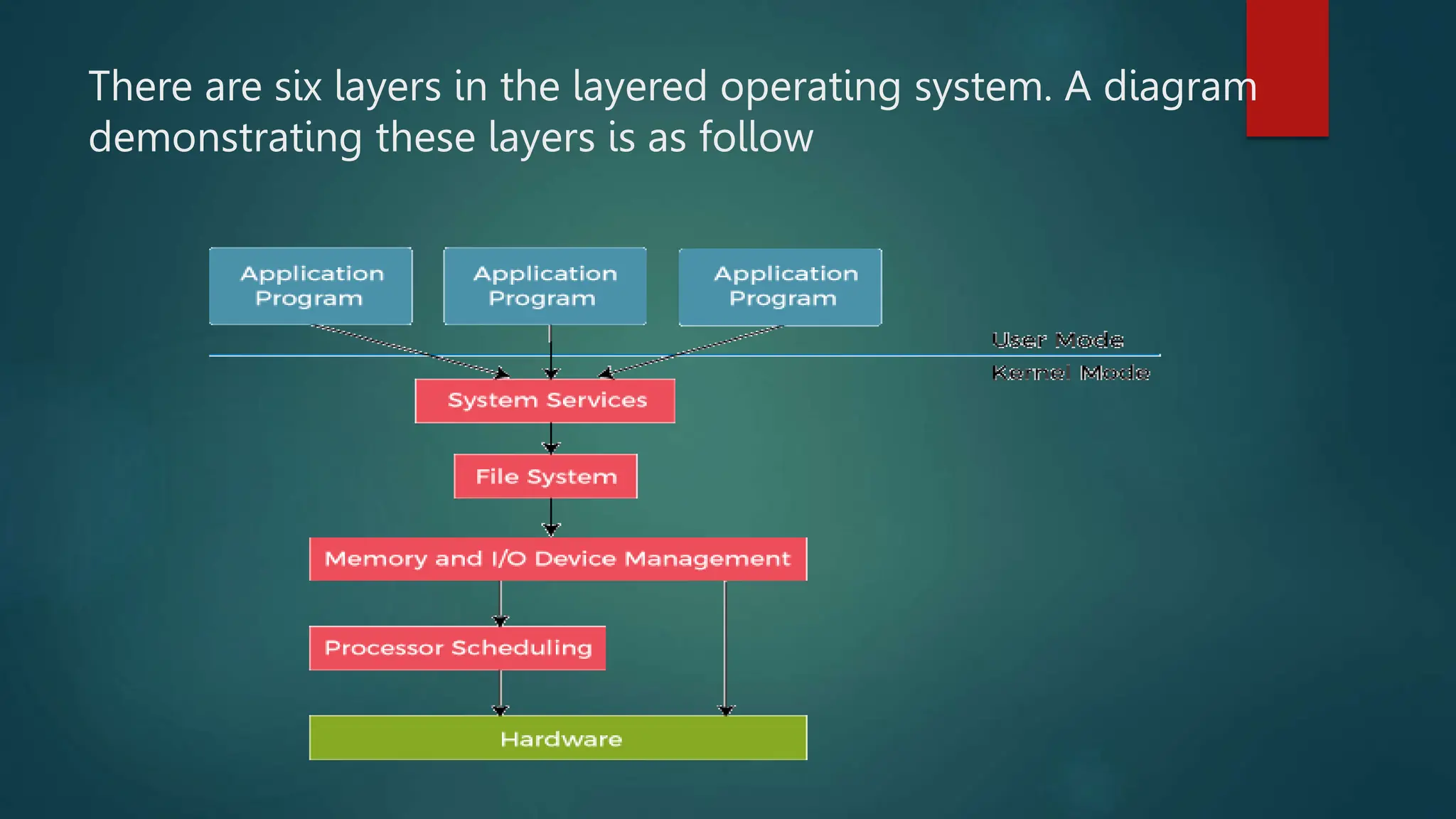
There are six layers in the layered operating system. A diagram
demonstrating these layers is as follow
1) Hardware:
This layer interacts with the system hardware and coordinates
with all the peripheral devices used, such as a printer, mouse,
keyboard, scanner, etc. These types of hardware devices are
managed in the hardware layer.
The hardware layer is the lowest and most authoritative layer in
the layered operating system architecture. It is attached directly
to the core of the system.
2) CPU Scheduling:
This layer deals with scheduling the processes for the CPU. Many
scheduling queues are used to handle processes. When the
processes enter the system, they are put into the job queue.
The processes that are ready to execute in the main memory are
kept in the ready queue. This layer is responsible for managing how
many processes will be allocated to the CPU and how many will stay
out of the CPU.
3) Memory Management:
Memory management deals with memory and moving processes
from disk to primary memory for execution and back again. This is
handled by the third layer of the operating system. All memory
management is associated with this layer. There are various types of
memories in the computer like RAM, ROM.
If you consider RAM, then it is concerned with swapping in and
swapping out of memory. When our computer runs, some processes
move to the main memory (RAM) for execution, and when
programs, such as calculator, exit, it is removed from the main
memory.
4) Process Management:
This layer is responsible for managing the processes, i.e.,
assigning the processor to a process and deciding how many
processes will stay in the waiting schedule. The priority of the
processes is also managed in this layer. The different algorithms
used for process scheduling are FCFS (first come, first served),
SJF (shortest job first), priority scheduling, round-robin
scheduling, etc.
5) Input/Output Buffer:
I/O devices are very important in computer systems. They provide
users with the means of interacting with the system. This layer
handles the buffers for the I/O devices and makes sure that they
work correctly.
Suppose you are typing from the keyboard. There is a keyboard
buffer attached with the keyboard, which stores data for a
temporary time. Similarly, all input/output devices have some buffer
attached to them. This is because the input/output devices have
slow processing or storing speed. The computer uses buffers to
maintain the good timing speed of the processor and input/output
devices.
6) User Programs:
This is the highest layer in the layered operating system. This layer
deals with the many user programs and applications that run in an
operating system, such as word processors, games, browsers, etc.
You can also call this an application layer because it is concerned
with application programs.
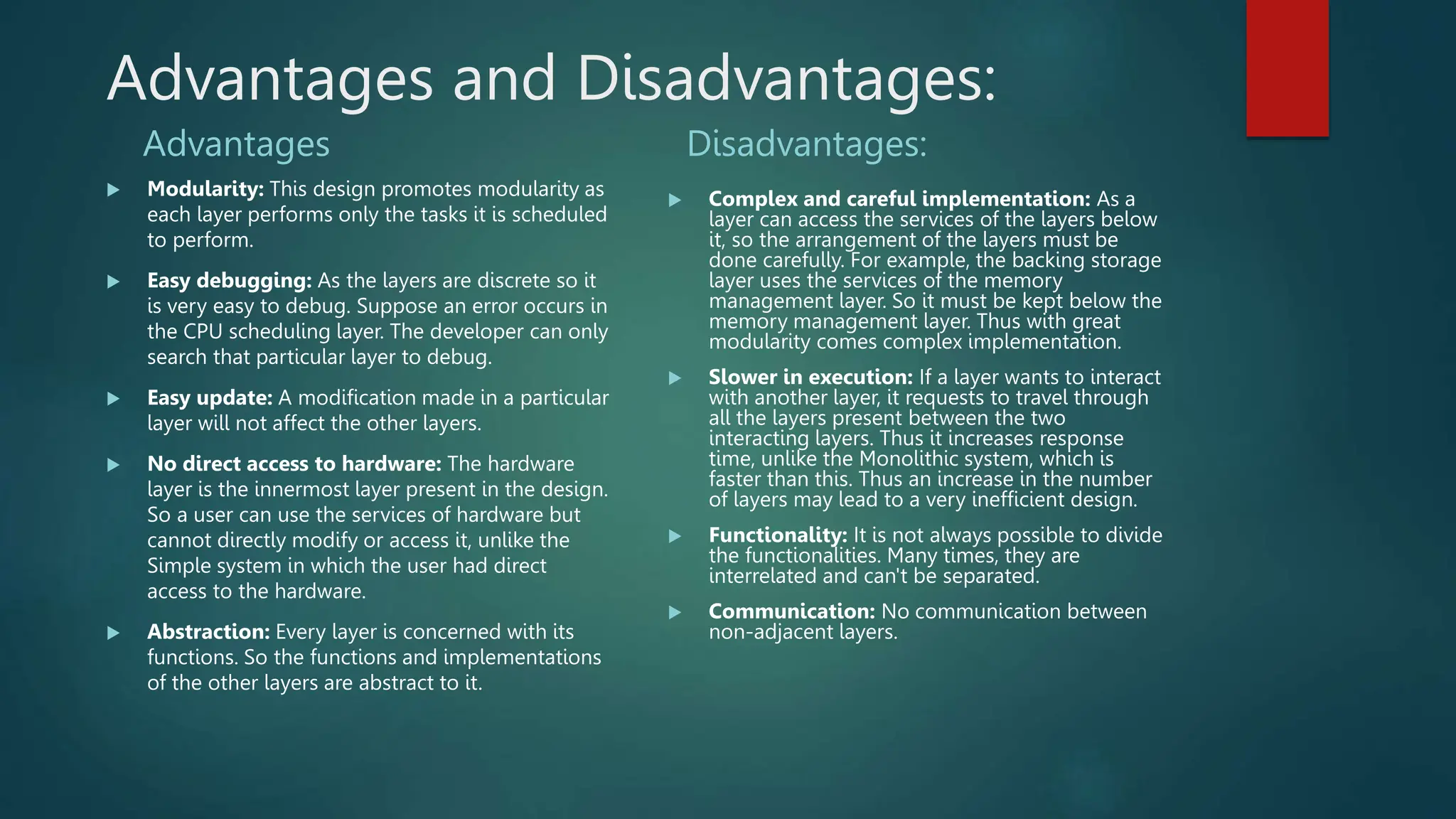
Advantages and Disadvantages:
Advantages
 Modularity: This design promotes modularity as
each layer performs only the tasks it is scheduled
to perform.
 Easy debugging: As the layers are discrete so it
is very easy to debug. Suppose an error occurs in
the CPU scheduling layer. The developer can only
search that particular layer to debug.
 Easy update: A modification made in a particular
layer will not affect the other layers.
 No direct access to hardware: The hardware
layer is the innermost layer present in the design.
So a user can use the services of hardware but
cannot directly modify or access it, unlike the
Simple system in which the user had direct
access to the hardware.
 Abstraction: Every layer is concerned with its
functions. So the functions and implementations
of the other layers are abstract to it.
Disadvantages:
 Complex and careful implementation: As a
layer can access the services of the layers below
it, so the arrangement of the layers must be
done carefully. For example, the backing storage
layer uses the services of the memory
management layer. So it must be kept below the
memory management layer. Thus with great
modularity comes complex implementation.
 Slower in execution: If a layer wants to interact
with another layer, it requests to travel through
all the layers present between the two
interacting layers. Thus it increases response
time, unlike the Monolithic system, which is
faster than this. Thus an increase in the number
of layers may lead to a very inefficient design.
 Functionality: It is not always possible to divide
the functionalities. Many times, they are
interrelated and can't be separated.
 Communication: No communication between
non-adjacent layers.
Thank you for your time 

Layered approach in OS by Fahad Rafi.pptx

  • 1.
    Layered Approach INOS BY FAHAD RAFI BSCS -5B 2671
  • 2.
    There are sixlayers in the layered operating system. A diagram demonstrating these layers is as follow
  • 3.
    1) Hardware: This layerinteracts with the system hardware and coordinates with all the peripheral devices used, such as a printer, mouse, keyboard, scanner, etc. These types of hardware devices are managed in the hardware layer. The hardware layer is the lowest and most authoritative layer in the layered operating system architecture. It is attached directly to the core of the system.
  • 4.
    2) CPU Scheduling: Thislayer deals with scheduling the processes for the CPU. Many scheduling queues are used to handle processes. When the processes enter the system, they are put into the job queue. The processes that are ready to execute in the main memory are kept in the ready queue. This layer is responsible for managing how many processes will be allocated to the CPU and how many will stay out of the CPU.
  • 5.
    3) Memory Management: Memorymanagement deals with memory and moving processes from disk to primary memory for execution and back again. This is handled by the third layer of the operating system. All memory management is associated with this layer. There are various types of memories in the computer like RAM, ROM. If you consider RAM, then it is concerned with swapping in and swapping out of memory. When our computer runs, some processes move to the main memory (RAM) for execution, and when programs, such as calculator, exit, it is removed from the main memory.
  • 6.
    4) Process Management: Thislayer is responsible for managing the processes, i.e., assigning the processor to a process and deciding how many processes will stay in the waiting schedule. The priority of the processes is also managed in this layer. The different algorithms used for process scheduling are FCFS (first come, first served), SJF (shortest job first), priority scheduling, round-robin scheduling, etc.
  • 7.
    5) Input/Output Buffer: I/Odevices are very important in computer systems. They provide users with the means of interacting with the system. This layer handles the buffers for the I/O devices and makes sure that they work correctly. Suppose you are typing from the keyboard. There is a keyboard buffer attached with the keyboard, which stores data for a temporary time. Similarly, all input/output devices have some buffer attached to them. This is because the input/output devices have slow processing or storing speed. The computer uses buffers to maintain the good timing speed of the processor and input/output devices.
  • 8.
    6) User Programs: Thisis the highest layer in the layered operating system. This layer deals with the many user programs and applications that run in an operating system, such as word processors, games, browsers, etc. You can also call this an application layer because it is concerned with application programs.
  • 9.
    Advantages and Disadvantages: Advantages Modularity: This design promotes modularity as each layer performs only the tasks it is scheduled to perform.  Easy debugging: As the layers are discrete so it is very easy to debug. Suppose an error occurs in the CPU scheduling layer. The developer can only search that particular layer to debug.  Easy update: A modification made in a particular layer will not affect the other layers.  No direct access to hardware: The hardware layer is the innermost layer present in the design. So a user can use the services of hardware but cannot directly modify or access it, unlike the Simple system in which the user had direct access to the hardware.  Abstraction: Every layer is concerned with its functions. So the functions and implementations of the other layers are abstract to it. Disadvantages:  Complex and careful implementation: As a layer can access the services of the layers below it, so the arrangement of the layers must be done carefully. For example, the backing storage layer uses the services of the memory management layer. So it must be kept below the memory management layer. Thus with great modularity comes complex implementation.  Slower in execution: If a layer wants to interact with another layer, it requests to travel through all the layers present between the two interacting layers. Thus it increases response time, unlike the Monolithic system, which is faster than this. Thus an increase in the number of layers may lead to a very inefficient design.  Functionality: It is not always possible to divide the functionalities. Many times, they are interrelated and can't be separated.  Communication: No communication between non-adjacent layers.
  • 10.
    Thank you foryour time 