







Launchplan: Getting Everyone
Mobilized

Mike Gerholdt, ACT, Inc, Manager of Social Enterprise
@MikeGerholdt
Safe harbor
 Safe harbor statement under the Private Securities Litigation Reform Act of 1995:

 This presentation may contain forward-looking statements that involve risks, uncertainties, and assumptions. If any such uncertainties
 materialize or if any of the assumptions proves incorrect, the results of salesforce.com, inc. could differ materially from the results expressed or
 implied by the forward-looking statements we make. All statements other than statements of historical fact could be deemed forward-looking,
 including any projections of product or service availability, subscriber growth, earnings, revenues, or other financial items and any statements
 regarding strategies or plans of management for future operations, statements of belief, any statements concerning new, planned, or upgraded
 services or technology developments and customer contracts or use of our services.

 The risks and uncertainties referred to above include – but are not limited to – risks associated with developing and delivering new functionality
 for our service, new products and services, our new business model, our past operating losses, possible fluctuations in our operating results
 and rate of growth, interruptions or delays in our Web hosting, breach of our security measures, the outcome of intellectual property and other
 litigation, risks associated with possible mergers and acquisitions, the immature market in which we operate, our relatively limited operating
 history, our ability to expand, retain, and motivate our employees and manage our growth, new releases of our service and successful
 customer deployment, our limited history reselling non-salesforce.com products, and utilization and selling to larger enterprise customers.
 Further information on potential factors that could affect the financial results of salesforce.com, inc. is included in our annual report on Form 10-
 Q for the most recent fiscal quarter ended July 31, 2012. This documents and others containing important disclosures are available on the SEC
 Filings section of the Investor Information section of our Web site.

 Any unreleased services or features referenced in this or other presentations, press releases or public statements are not currently available
 and may not be delivered on time or at all. Customers who purchase our services should make the purchase decisions based upon features
 that are currently available. Salesforce.com, inc. assumes no obligation and does not intend to update these forward-looking statements.
Matt Jadhav
Success Accounts Manager
@twittername
Linked-in
Mike Gerholdt
Manager of Social Enterprise
@Mike Gerholdt
All about ACT,Inc.

               ACT is an independent, not-for-profit organization that
               provides a broad array of assessment, research,
               information, and program management solutions in the
               areas of education and workforce development
               §  Enterprise Edition.
               §  Used Salesforce for over 7 years

               §  Over 500 users
Agenda
Spend 30 minutes understanding how to identify the
characteristics of your company’s culture and get Action steps to
drive Chatter adoption.
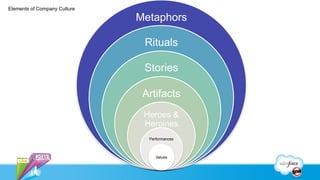
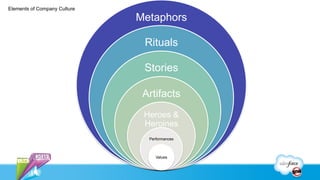
Elements of Company Culture

                              Metaphors

                               Rituals

                               Stories

                               Artifacts
                               Heroes &
                               Heroines
                                Performances


                                   Values
Metaphors
Action Step!

 Chatter it to me!
 “Instead of meeting on this, can we just create a Chatter group?”
 “Be sure to post that to the Account record in Salesforce and at
 (@) mention the NW Sales Executive.”
Rituals
Action Step!

 Propose a new ritual!
   §  No meetings
      •  Everyone is responsible for 1 status update and 1 question to a group.
      •  Answers and statuses need to be checked at least 1 a week
      •  Meetings are bi-weekly and collaborative to address anything NOT posted to the
         group.
Stories
Action Step!

 Create a plan to gather stories about collaboration
   §  Work with your internal communication team to get the stories told.
   §  Post the stories to an internal blog
   §  Post the stories to chatter
 Create a video of co-workers talking about why the like Chatter
Artifacts
Action Step!

 Grab SWAG!
   §  Give it away as prizes
 Encourage people to display it prominently
 Create a “Chatter Super User Award” that can be displayed a
 person’s desk to create conversations.
Heroes & Heroines
Action Step!

 Work to get time with key Heroes & Heroines to talk about
 Chatter.
   §  Find their pain points and work with them to address them
   §  Try to solve problems with Chatter first
   §  Encourage them to tell their story
 Important note- Heroes & Heroines don’t have to be high-level
 people, but influential people who have had real-world problems
 solved for them making their job easier.
Performances
Action Step!

 Create a customer group to share your stories
 As an Admin you should be the MOST active on chatter
 Be the example you want to set
Values
Action Step!

 Align your Chatter goals to that of the mission statement or goal
 of the company
 Create a “Chatter Charter”
   §  Incorporate words found in your mission statement to the charter
   §  It should not be “We should use Chatter because it’s cool.”
Elements of Company Culture

                              Metaphors

                               Rituals

                               Stories

                               Artifacts
                               Heroes &
                               Heroines
                                Performances


                                   Values
Speaker Name      Mike Gerholdt       Speaker Name      Speaker Name
 Speaker Title,   Manager of Social    Speaker Title,    Speaker Title,
 @twittername        Enterprise,       @twittername      @twittername
                   @MikeGerholdt
CONTENT GUIDELINES
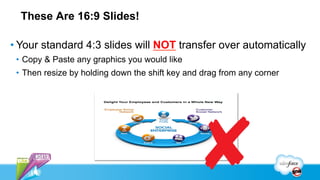
These Are 16:9 Slides!

• Your standard 4:3 slides will NOT transfer over automatically
 •  Copy & Paste any graphics you would like
 •  Then resize by holding down the shift key and drag from any corner
Sample Bullet Slide

• Primary bullets are 65-point
 •  Secondary bullets (press return & tab key) are 55-point
• All bulleted text is sentence case
 •  Second level bullet goes here
  •  Tertiary bullets (press return & tab) are 45-point and use blue for highlight text
  •  To go back to large bullets from small press return, hold down shift key & press tab

• Keep points clear and simple and use blue for highlight text
• Try to not exceed six bullets
Animation Guidelines                 .


Use animation to time and illustrate your points without distracting the reader.
With animation you can more carefully pace your presentation and remain in
control of what you say when.

FOR GRAPHICS     Use Fade In , Fade Out , set to Very Fast
FOR BULLETS      Use Appear
FOR ARROWS       Use Wipe to show movement. Set direction for wipe.

• Use other custom animation types at your discretion to illustrate important points.
• Be conservative: Avoid animations that fly objects all around the screen.
Click to add title - use initial cap, other words are
lowercase
This is Lorem ipsum dolor sit amet, consectetur adipiscing elit.
Lorem ipsum dolor sit amet, consectetur adipiscing elit.
   §  And this is a bullet
       •  Lorem ipsum
       •  Lorem ipsum

   §  And this is a bullet
       •  Lorem ipsum
            –  Lorem ipsum
                »  Lorem ipsum
GRAPHICS LIBRARY
iPad Template


Content Introduction
                                   YOUR
                                  CONTEN
•  Bullet Point 1
•  Bullet Point 2
                                  T HERE
•  Bullet Point 3                  Just change the
                        YOUR      background layer
                       CONTENT (right-click > arrange)
                        HERE
Additional Graphics                                               Salesforce Graphics Library:
                                                                      http://bit.ly/lopDD9


                                  Divider Line


                                                      Ma
                                                      yI
                                                      su
                                                      gg
                                                      est
                                                      …


                                                            I
                                                            wa
                                                            s
                                                            ho
                                                            pin
                                                            g
                                                            to
                                                            fin
                                     Ma                     d
                                     yI
                                                            …
                                     sug
                                     ges         M
                                     t…          ay
                                                 I
                                                 su
                                                 gg
                                                 es
                                                 t
                                                 …


        Touch Icon   HTML5 Icon     Connected People                    Content Wrapper
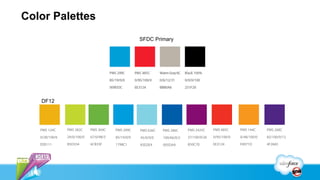
Color Palettes
                                                                                             SFDC Primary


                                                                                                                                                                  service & engage (Service)
                                                                                              connect & sell (Sales)
                         collaborate (Chatter)


                                                                                                                          automate & extend


                                                                                                                                                                                                  product & partners
                                                    site.com category


                                                                          social marketing
      social profile


                                                                                                                                                 social apps


                                                                                                                                                                                                                        Rypple
   DF12


   PMS 124C            PMS 382C                  PMS 369C               PMS 299C             PMS 636C                  PMS 286C               PMS 2425C        PMS 485C                        PMS 144C                PMS 268C

   0/28/100/6          29/0/100/0                67/0/98/5              85/19/0/0            45/0/9/0                  100/66/0/2             37/100/0/26      0/95/100/0                      0/48/100/0              82/100/0/12

   EEB111              B5D334                    6CB33F                 1798C1               83D2E4                    005DAA                 850C70           EE3124                          F8971D                  4F2683
Salesforce Logo Library
Slide parts
Official Social Icons
Slide parts

   Use certification logos as appropriate; copy and paste next to speaker name
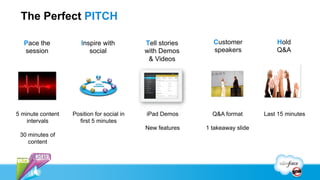
The Perfect PITCH

  Pace the            Inspire with          Tell stories     Customer             Hold
  session                social             with Demos       speakers             Q&A
                                             & Videos


5 minute content   Position for social in   iPad Demos       Q&A format       Last 15 minutes
    intervals        first 5 minutes
                                            New features   1 takeaway slide
 30 minutes of
    content
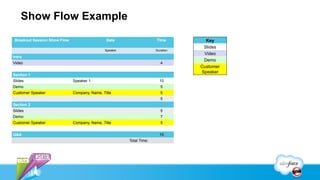
Show Flow Example
Breakout Session Show Flow                    Date                   TIme         Key
                                                                                 Slides
                                             Speaker                 Duration
                                                                                 Video
Intro
                                                                                 Demo
Video                                                                   4
                                                                                Customer
                                                                                Speaker
Section 1
Slides                       Speaker 1                                 10
Demo                                                                    5
Customer Speaker             Company, Name, Title                       5
                                                                        5
Section 2
Slides                                                                  5
Demo                                                                    7
Customer Speaker             Company, Name, Title                       5


Q&A                                                                    15
                                                       Total Time:
CONTENT TEMPLATES
Speaker Name      Speaker Name      Speaker Name      Speaker Name
 Speaker Title,    Speaker Title,    Speaker Title,    Speaker Title,
 @twittername      @twittername      @twittername      @twittername
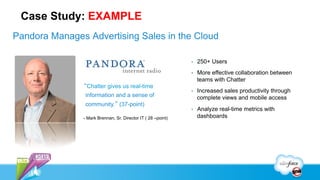
Case Study: EXAMPLE
Pandora Manages Advertising Sales in the Cloud

                                                              •    250+ Users
                                                              •    More effective collaboration between
                                                                   teams with Chatter
               “Chatter gives us real-time
                                                              •    Increased sales productivity through
                information and a sense of                         complete views and mobile access
                community.” (37-point)
                                                              •    Analyze real-time metrics with
               - Mark Brennan, Sr. Director IT ( 28 –point)        dashboards

Launchplan: Getting Everyone Mobilized

  • 1.
    Launchplan: Getting Everyone Mobilized MikeGerholdt, ACT, Inc, Manager of Social Enterprise @MikeGerholdt
  • 2.
    Safe harbor Safeharbor statement under the Private Securities Litigation Reform Act of 1995: This presentation may contain forward-looking statements that involve risks, uncertainties, and assumptions. If any such uncertainties materialize or if any of the assumptions proves incorrect, the results of salesforce.com, inc. could differ materially from the results expressed or implied by the forward-looking statements we make. All statements other than statements of historical fact could be deemed forward-looking, including any projections of product or service availability, subscriber growth, earnings, revenues, or other financial items and any statements regarding strategies or plans of management for future operations, statements of belief, any statements concerning new, planned, or upgraded services or technology developments and customer contracts or use of our services. The risks and uncertainties referred to above include – but are not limited to – risks associated with developing and delivering new functionality for our service, new products and services, our new business model, our past operating losses, possible fluctuations in our operating results and rate of growth, interruptions or delays in our Web hosting, breach of our security measures, the outcome of intellectual property and other litigation, risks associated with possible mergers and acquisitions, the immature market in which we operate, our relatively limited operating history, our ability to expand, retain, and motivate our employees and manage our growth, new releases of our service and successful customer deployment, our limited history reselling non-salesforce.com products, and utilization and selling to larger enterprise customers. Further information on potential factors that could affect the financial results of salesforce.com, inc. is included in our annual report on Form 10- Q for the most recent fiscal quarter ended July 31, 2012. This documents and others containing important disclosures are available on the SEC Filings section of the Investor Information section of our Web site. Any unreleased services or features referenced in this or other presentations, press releases or public statements are not currently available and may not be delivered on time or at all. Customers who purchase our services should make the purchase decisions based upon features that are currently available. Salesforce.com, inc. assumes no obligation and does not intend to update these forward-looking statements.
  • 3.
    Matt Jadhav Success AccountsManager @twittername Linked-in
  • 4.
    Mike Gerholdt Manager ofSocial Enterprise @Mike Gerholdt
  • 5.
    All about ACT,Inc. ACT is an independent, not-for-profit organization that provides a broad array of assessment, research, information, and program management solutions in the areas of education and workforce development §  Enterprise Edition. §  Used Salesforce for over 7 years §  Over 500 users
  • 6.
    Agenda Spend 30 minutesunderstanding how to identify the characteristics of your company’s culture and get Action steps to drive Chatter adoption.
  • 7.
    Elements of CompanyCulture Metaphors Rituals Stories Artifacts Heroes & Heroines Performances Values
  • 8.
  • 9.
    Action Step! Chatterit to me! “Instead of meeting on this, can we just create a Chatter group?” “Be sure to post that to the Account record in Salesforce and at (@) mention the NW Sales Executive.”
  • 10.
  • 11.
    Action Step! Proposea new ritual! §  No meetings •  Everyone is responsible for 1 status update and 1 question to a group. •  Answers and statuses need to be checked at least 1 a week •  Meetings are bi-weekly and collaborative to address anything NOT posted to the group.
  • 12.
  • 13.
    Action Step! Createa plan to gather stories about collaboration §  Work with your internal communication team to get the stories told. §  Post the stories to an internal blog §  Post the stories to chatter Create a video of co-workers talking about why the like Chatter
  • 14.
  • 15.
    Action Step! GrabSWAG! §  Give it away as prizes Encourage people to display it prominently Create a “Chatter Super User Award” that can be displayed a person’s desk to create conversations.
  • 16.
  • 17.
    Action Step! Workto get time with key Heroes & Heroines to talk about Chatter. §  Find their pain points and work with them to address them §  Try to solve problems with Chatter first §  Encourage them to tell their story Important note- Heroes & Heroines don’t have to be high-level people, but influential people who have had real-world problems solved for them making their job easier.
  • 18.
  • 19.
    Action Step! Createa customer group to share your stories As an Admin you should be the MOST active on chatter Be the example you want to set
  • 20.
  • 21.
    Action Step! Alignyour Chatter goals to that of the mission statement or goal of the company Create a “Chatter Charter” §  Incorporate words found in your mission statement to the charter §  It should not be “We should use Chatter because it’s cool.”
  • 22.
    Elements of CompanyCulture Metaphors Rituals Stories Artifacts Heroes & Heroines Performances Values
  • 23.
    Speaker Name Mike Gerholdt Speaker Name Speaker Name Speaker Title, Manager of Social Speaker Title, Speaker Title, @twittername Enterprise, @twittername @twittername @MikeGerholdt
  • 25.
  • 26.
    These Are 16:9Slides! • Your standard 4:3 slides will NOT transfer over automatically •  Copy & Paste any graphics you would like •  Then resize by holding down the shift key and drag from any corner
  • 27.
    Sample Bullet Slide • Primarybullets are 65-point •  Secondary bullets (press return & tab key) are 55-point • All bulleted text is sentence case •  Second level bullet goes here •  Tertiary bullets (press return & tab) are 45-point and use blue for highlight text •  To go back to large bullets from small press return, hold down shift key & press tab • Keep points clear and simple and use blue for highlight text • Try to not exceed six bullets
  • 28.
    Animation Guidelines . Use animation to time and illustrate your points without distracting the reader. With animation you can more carefully pace your presentation and remain in control of what you say when. FOR GRAPHICS Use Fade In , Fade Out , set to Very Fast FOR BULLETS Use Appear FOR ARROWS Use Wipe to show movement. Set direction for wipe. • Use other custom animation types at your discretion to illustrate important points. • Be conservative: Avoid animations that fly objects all around the screen.
  • 29.
    Click to addtitle - use initial cap, other words are lowercase This is Lorem ipsum dolor sit amet, consectetur adipiscing elit. Lorem ipsum dolor sit amet, consectetur adipiscing elit. §  And this is a bullet •  Lorem ipsum •  Lorem ipsum §  And this is a bullet •  Lorem ipsum –  Lorem ipsum »  Lorem ipsum
  • 31.
  • 32.
    iPad Template Content Introduction YOUR CONTEN •  Bullet Point 1 •  Bullet Point 2 T HERE •  Bullet Point 3 Just change the YOUR background layer CONTENT (right-click > arrange) HERE
  • 33.
    Additional Graphics Salesforce Graphics Library: http://bit.ly/lopDD9 Divider Line Ma yI su gg est … I wa s ho pin g to fin Ma d yI … sug ges M t… ay I su gg es t … Touch Icon HTML5 Icon Connected People Content Wrapper
  • 34.
    Color Palettes SFDC Primary service & engage (Service) connect & sell (Sales) collaborate (Chatter) automate & extend product & partners site.com category social marketing social profile social apps Rypple DF12 PMS 124C PMS 382C PMS 369C PMS 299C PMS 636C PMS 286C PMS 2425C PMS 485C PMS 144C PMS 268C 0/28/100/6 29/0/100/0 67/0/98/5 85/19/0/0 45/0/9/0 100/66/0/2 37/100/0/26 0/95/100/0 0/48/100/0 82/100/0/12 EEB111 B5D334 6CB33F 1798C1 83D2E4 005DAA 850C70 EE3124 F8971D 4F2683
  • 35.
  • 37.
  • 38.
  • 39.
    Slide parts Use certification logos as appropriate; copy and paste next to speaker name
  • 40.
    The Perfect PITCH Pace the Inspire with Tell stories Customer Hold session social with Demos speakers Q&A & Videos 5 minute content Position for social in iPad Demos Q&A format Last 15 minutes intervals first 5 minutes New features 1 takeaway slide 30 minutes of content
  • 41.
    Show Flow Example BreakoutSession Show Flow Date TIme Key Slides Speaker Duration Video Intro Demo Video 4 Customer Speaker Section 1 Slides Speaker 1 10 Demo 5 Customer Speaker Company, Name, Title 5 5 Section 2 Slides 5 Demo 7 Customer Speaker Company, Name, Title 5 Q&A 15 Total Time:
  • 42.
  • 43.
    Speaker Name Speaker Name Speaker Name Speaker Name Speaker Title, Speaker Title, Speaker Title, Speaker Title, @twittername @twittername @twittername @twittername
  • 44.
    Case Study: EXAMPLE PandoraManages Advertising Sales in the Cloud •  250+ Users •  More effective collaboration between teams with Chatter “Chatter gives us real-time •  Increased sales productivity through information and a sense of complete views and mobile access community.” (37-point) •  Analyze real-time metrics with - Mark Brennan, Sr. Director IT ( 28 –point) dashboards