IT3401
WEB ESSENTIALS
Lab Exercise No 1:
Creation of interactive web sites - Design using HTML
and authoring tools
Outcomes of today's Lab
HTML
CSS
OUTPUT
WHAT is HTML?
• HTML stands for Hyper Text Markup Language
• HTML is the standard markup language for creating Web
pages
• HTML describes the structure of a Web page
• HTML consists of a series of elements
• HTML elements tell the browser how to display the content
Simple HTML Program
<!DOCTYPE html>
<html> - root element of an HTML page
<head> - contains meta information about the HTML
<title>Page Title</title> - title for the HTML page
</head>
<body>
<h1>My First Heading</h1> - defines a large heading
<p>My first paragraph.</p> - defines a paragraph
</body>
</html>
HTML ELEMENTS
• An HTML element is defined by a start tag, some content,
and an end tag
• <tagname> Content goes here... </tagname>
• The <img> tag is used to embed an image in an HTML
page.
• The <img> tag has two required attributes:
• src - Specifies the path to the image
• alt - Specifies an alternate text for the image, if the image
for some reason cannot be displayed
• <img src="img_girl.jpg" alt="Girl in a jacket" width="500"
height="600">
What is CSS?
• Cascading Style Sheets (CSS) is used to format the layout
of a webpage.
• With CSS, you can control the color, font, the size of text,
the spacing between elements,
• how elements are positioned and laid out, what
background images or background colors are to be used,
• different displays for different devices and screen sizes.
Using CSS
• CSS can be added to HTML documents in 3 ways:
• Inline - by using the style attribute inside HTML elements
• Internal - by using a <style> element in the <head>
section
• External - by using a <link> element to link to an
external CSS file
Inline CSS
• An inline CSS is used to apply a unique style to a single
HTML element.
• <h1 style="color:blue;">A Blue Heading</h1>
• <p style="color:red;">A red paragraph.</p>
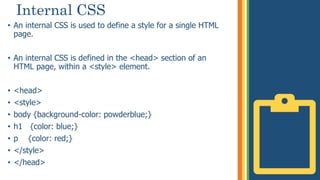
Internal CSS
• An internal CSS is used to define a style for a single HTML
page.
• An internal CSS is defined in the <head> section of an
HTML page, within a <style> element.
• <head>
• <style>
• body {background-color: powderblue;}
• h1 {color: blue;}
• p {color: red;}
• </style>
• </head>
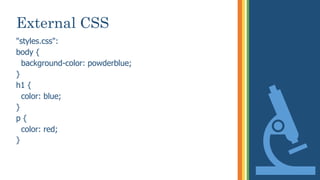
External CSS
• An external style sheet is used to define the style for many
HTML pages.
• To use an external style sheet, add a link to it in the
<head> section of each HTML page.
• <head>
• <link rel="stylesheet" href="styles.css">
• </head>
External CSS
"styles.css":
body {
background-color: powderblue;
}
h1 {
color: blue;
}
p {
color: red;
}
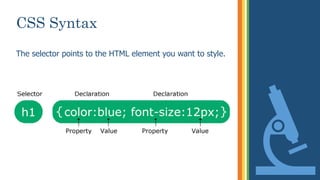
CSS Syntax
The selector points to the HTML element you want to style.
THANK YOU!

Lab_Ex1.pptx

  • 1.
    IT3401 WEB ESSENTIALS Lab ExerciseNo 1: Creation of interactive web sites - Design using HTML and authoring tools
  • 2.
    Outcomes of today'sLab HTML CSS OUTPUT
  • 3.
    WHAT is HTML? •HTML stands for Hyper Text Markup Language • HTML is the standard markup language for creating Web pages • HTML describes the structure of a Web page • HTML consists of a series of elements • HTML elements tell the browser how to display the content
  • 4.
    Simple HTML Program <!DOCTYPEhtml> <html> - root element of an HTML page <head> - contains meta information about the HTML <title>Page Title</title> - title for the HTML page </head> <body> <h1>My First Heading</h1> - defines a large heading <p>My first paragraph.</p> - defines a paragraph </body> </html>
  • 5.
    HTML ELEMENTS • AnHTML element is defined by a start tag, some content, and an end tag • <tagname> Content goes here... </tagname> • The <img> tag is used to embed an image in an HTML page. • The <img> tag has two required attributes: • src - Specifies the path to the image • alt - Specifies an alternate text for the image, if the image for some reason cannot be displayed • <img src="img_girl.jpg" alt="Girl in a jacket" width="500" height="600">
  • 6.
    What is CSS? •Cascading Style Sheets (CSS) is used to format the layout of a webpage. • With CSS, you can control the color, font, the size of text, the spacing between elements, • how elements are positioned and laid out, what background images or background colors are to be used, • different displays for different devices and screen sizes.
  • 7.
    Using CSS • CSScan be added to HTML documents in 3 ways: • Inline - by using the style attribute inside HTML elements • Internal - by using a <style> element in the <head> section • External - by using a <link> element to link to an external CSS file
  • 8.
    Inline CSS • Aninline CSS is used to apply a unique style to a single HTML element. • <h1 style="color:blue;">A Blue Heading</h1> • <p style="color:red;">A red paragraph.</p>
  • 9.
    Internal CSS • Aninternal CSS is used to define a style for a single HTML page. • An internal CSS is defined in the <head> section of an HTML page, within a <style> element. • <head> • <style> • body {background-color: powderblue;} • h1 {color: blue;} • p {color: red;} • </style> • </head>
  • 10.
    External CSS • Anexternal style sheet is used to define the style for many HTML pages. • To use an external style sheet, add a link to it in the <head> section of each HTML page. • <head> • <link rel="stylesheet" href="styles.css"> • </head>
  • 11.
    External CSS "styles.css": body { background-color:powderblue; } h1 { color: blue; } p { color: red; }
  • 12.
    CSS Syntax The selectorpoints to the HTML element you want to style.
  • 13.