Proof Copies of Photos
Objectives 
• Know what a ‘proof copy’ of a 
photograph is 
• Describe a range of methods of giving 
proof copies to customers 
• Explain benefits & drawbacks of methods 
of sharing proof photographs
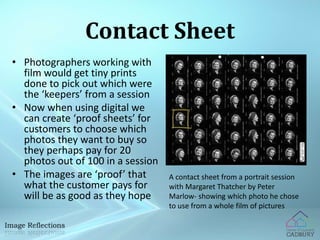
Contact Sheet 
• Photographers working with 
film would get tiny prints 
done to pick out which were 
the ‘keepers’ from a session 
• Now when using digital we 
can create ‘proof sheets’ for 
customers to choose which 
photos they want to buy so 
they perhaps pay for 20 
photos out of 100 in a session 
• The images are ‘proof’ that 
what the customer pays for 
will be as good as they hope 
A contact sheet from a portrait session 
with Margaret Thatcher by Peter 
Marlow- showing which photo he chose 
to use from a whole film of pictures
Paper Proof Photos 
• Proofs can be posted to the customer on 
paper to choose from small ‘thumbnails’ 
• This is also called a ‘hard copy’ – the proofs 
would be output with a high-quality photo 
printer 
• E.g. the school photographer does it this way 
– proofs are given out by your form tutor so 
your family can order copies if they want
Digital Proof Photos 
• Proof photos could be emailed to customers 
• However, most photographers now have 
websites to show customers digital proofs 
• Often each session has its own password to 
keep proof copies private 
• These are often small versions of the full-size 
image – also called thumbnails, but may 
have a larger version if you click
Protecting Digital Proofs 
• Some customers might not want to pay 
for full copies of photos if all they want 
to do is post on Facebook 
• So how could a photographer stop them 
from doing that?
Protecting Digital Proofs 
• Disable right-click & copy 
• Watermarks 
• Legal text 
• Password so others can’t see the photo 
All of these can be ignored or got around if 
people want to!
Choosing Paper or Digital 
Paper 
• Small/medium cost each 
time – postage, paper & 
printing 
• Seems more ‘old fashioned’ 
• Customers can view any 
time with no computer 
• Photos are ‘smaller’ 
• Slightly lower chance of 
copying photos 
Digital 
• Website costs quite a lot to 
set up but no extra cost per 
customer 
• Seems more ‘up to date’ 
• Customers can view on any 
computer, any time 
• Photos can be zoomed 
• Slightly easier for customer 
to copy photos without 
paying
Task 
• Download the ‘student task’ from the 
VLE 
• You’ll need to answer the questions & 
put some example images in to show
Exam Question – Read Carefully 
1. Proof copies of photographs are sent to customers 
a few days after the photographic session. 
a) Proof copies of photographs need to be manipulated 
before being sent to customers. One of these 
techniques is called a “Watermark”. 
Explain why a watermark may be used. [2] 
b) Proof copies may be sent electronically or as a hard 
copy. 
Identify one hardware device that could be used to 
create a hard copy of the photographs. [1] 
c) Describe how proof copies of photographs may be 
sent electronically to the customers. [2]
Example Answer 
• Look at the answers and decide (in pairs) 
how many marks they should get 
a) To stop people from copying the photo 
b) A printer 
c) On a website 
a) A watermark shows that the photo has not been paid 
for, so customers can’t use it without looking cheap 
b) A laser printer 
c) A website could be set up where customers log in 
with a session password and then can choose the 
photos they want to buy
Exam Question – Your Go! 
1. Proof copies of photographs are sent to customers 
a few days after the photographic session. 
a) Proof copies of photographs need to be manipulated 
before being sent to customers. One of these 
techniques is called a “Watermark”. 
Explain why a watermark may be used. [2] 
b) Proof copies may be sent electronically or as a hard 
copy. 
Identify one hardware device that could be used to 
create a hard copy of the photographs. [1] 
c) Describe how proof copies of photographs may be 
sent electronically to the customers. [2]

L4 proofs

  • 1.
  • 2.
    Objectives • Knowwhat a ‘proof copy’ of a photograph is • Describe a range of methods of giving proof copies to customers • Explain benefits & drawbacks of methods of sharing proof photographs
  • 3.
    Contact Sheet •Photographers working with film would get tiny prints done to pick out which were the ‘keepers’ from a session • Now when using digital we can create ‘proof sheets’ for customers to choose which photos they want to buy so they perhaps pay for 20 photos out of 100 in a session • The images are ‘proof’ that what the customer pays for will be as good as they hope A contact sheet from a portrait session with Margaret Thatcher by Peter Marlow- showing which photo he chose to use from a whole film of pictures
  • 4.
    Paper Proof Photos • Proofs can be posted to the customer on paper to choose from small ‘thumbnails’ • This is also called a ‘hard copy’ – the proofs would be output with a high-quality photo printer • E.g. the school photographer does it this way – proofs are given out by your form tutor so your family can order copies if they want
  • 5.
    Digital Proof Photos • Proof photos could be emailed to customers • However, most photographers now have websites to show customers digital proofs • Often each session has its own password to keep proof copies private • These are often small versions of the full-size image – also called thumbnails, but may have a larger version if you click
  • 6.
    Protecting Digital Proofs • Some customers might not want to pay for full copies of photos if all they want to do is post on Facebook • So how could a photographer stop them from doing that?
  • 7.
    Protecting Digital Proofs • Disable right-click & copy • Watermarks • Legal text • Password so others can’t see the photo All of these can be ignored or got around if people want to!
  • 8.
    Choosing Paper orDigital Paper • Small/medium cost each time – postage, paper & printing • Seems more ‘old fashioned’ • Customers can view any time with no computer • Photos are ‘smaller’ • Slightly lower chance of copying photos Digital • Website costs quite a lot to set up but no extra cost per customer • Seems more ‘up to date’ • Customers can view on any computer, any time • Photos can be zoomed • Slightly easier for customer to copy photos without paying
  • 9.
    Task • Downloadthe ‘student task’ from the VLE • You’ll need to answer the questions & put some example images in to show
  • 10.
    Exam Question –Read Carefully 1. Proof copies of photographs are sent to customers a few days after the photographic session. a) Proof copies of photographs need to be manipulated before being sent to customers. One of these techniques is called a “Watermark”. Explain why a watermark may be used. [2] b) Proof copies may be sent electronically or as a hard copy. Identify one hardware device that could be used to create a hard copy of the photographs. [1] c) Describe how proof copies of photographs may be sent electronically to the customers. [2]
  • 11.
    Example Answer •Look at the answers and decide (in pairs) how many marks they should get a) To stop people from copying the photo b) A printer c) On a website a) A watermark shows that the photo has not been paid for, so customers can’t use it without looking cheap b) A laser printer c) A website could be set up where customers log in with a session password and then can choose the photos they want to buy
  • 12.
    Exam Question –Your Go! 1. Proof copies of photographs are sent to customers a few days after the photographic session. a) Proof copies of photographs need to be manipulated before being sent to customers. One of these techniques is called a “Watermark”. Explain why a watermark may be used. [2] b) Proof copies may be sent electronically or as a hard copy. Identify one hardware device that could be used to create a hard copy of the photographs. [1] c) Describe how proof copies of photographs may be sent electronically to the customers. [2]