The Terminology of the Eclipse Platform


This is a basic walk-through of all the central concepts of the Eclipse
platform and how these fit together. The primary goal of this module is
to establish a common terminology.


Redistribution and other use of this material requires written permission from The RCP Company.

L0001 - 2010-11-27
Eclipse Architecture


Goals for the Eclipse architecture
     Be able to host any number of 3rd party applications
     Scalability in terms of size and complexity of hosted applications
     Alignment with native UI look-n-feel

Flexible architecture, structured around
     Plug-ins – the basic unit of functionality
     Extension points – the defined interfaces between plug-ins

This architecture allows for
     Implementation of 3rd party applications on top of the basic platform
      (Eclipse RCP)
     Additional tools to be integrated in the platform
     Integrated tools to be further extended


2
                                                                              L0001 - 2010-11-27
3
                                                                                                                      JDT
                                                                                     Team
                                                                                                                      PDE
                                                                                   Resources


                                                                     Eclipse RCP
                                                                                                                      CVS
                                                                                   Workspace
                                                                                                 Eclipse Platform


                                                                                                                       Git
                                                                                      Help

                                                                                     Update
                                                                                                                      CDT
                                                                                    Apache


                                         SWT
                                                                                                                      WTP


                                                 JFace
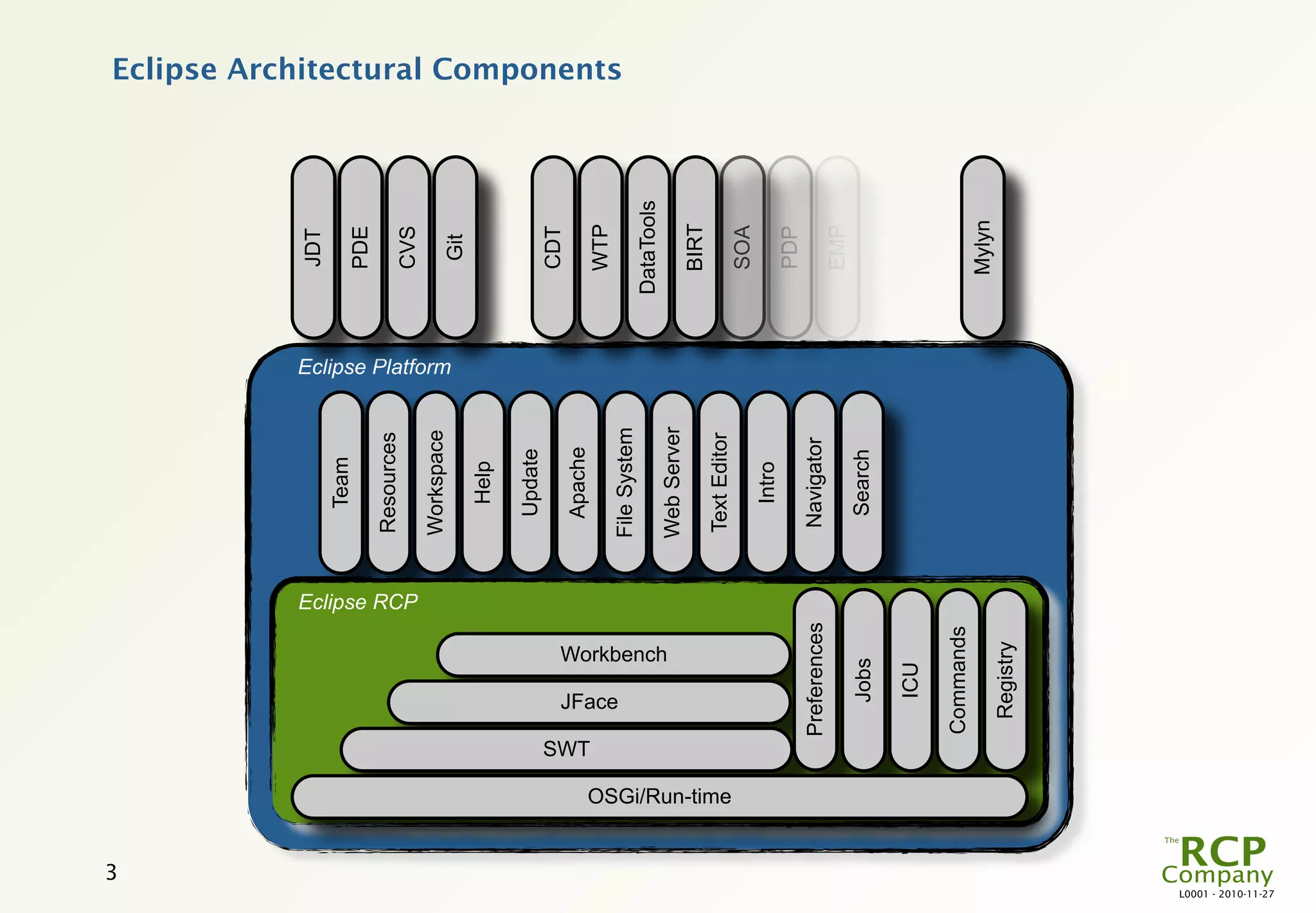
                                                                                                                                Eclipse Architectural Components


                                                                                   File System
                                                         Workbench                                                  DataTools
                                                                                   Web Server
                                                                                                                      BIRT
                                                                                   Text Editor


                         OSGi/Run-time
                                                                                                                      SOA
                                                                                      Intro
                                                                                                                      PDP
                                               Preferences                         Navigator
                                                                                                                      EMP
                                                   Jobs                              Search

                                                    ICU

                                               Commands
                                                                                                                     Mylyn
                                                Registry
L0001 - 2010-11-27
The Basic RCP Components


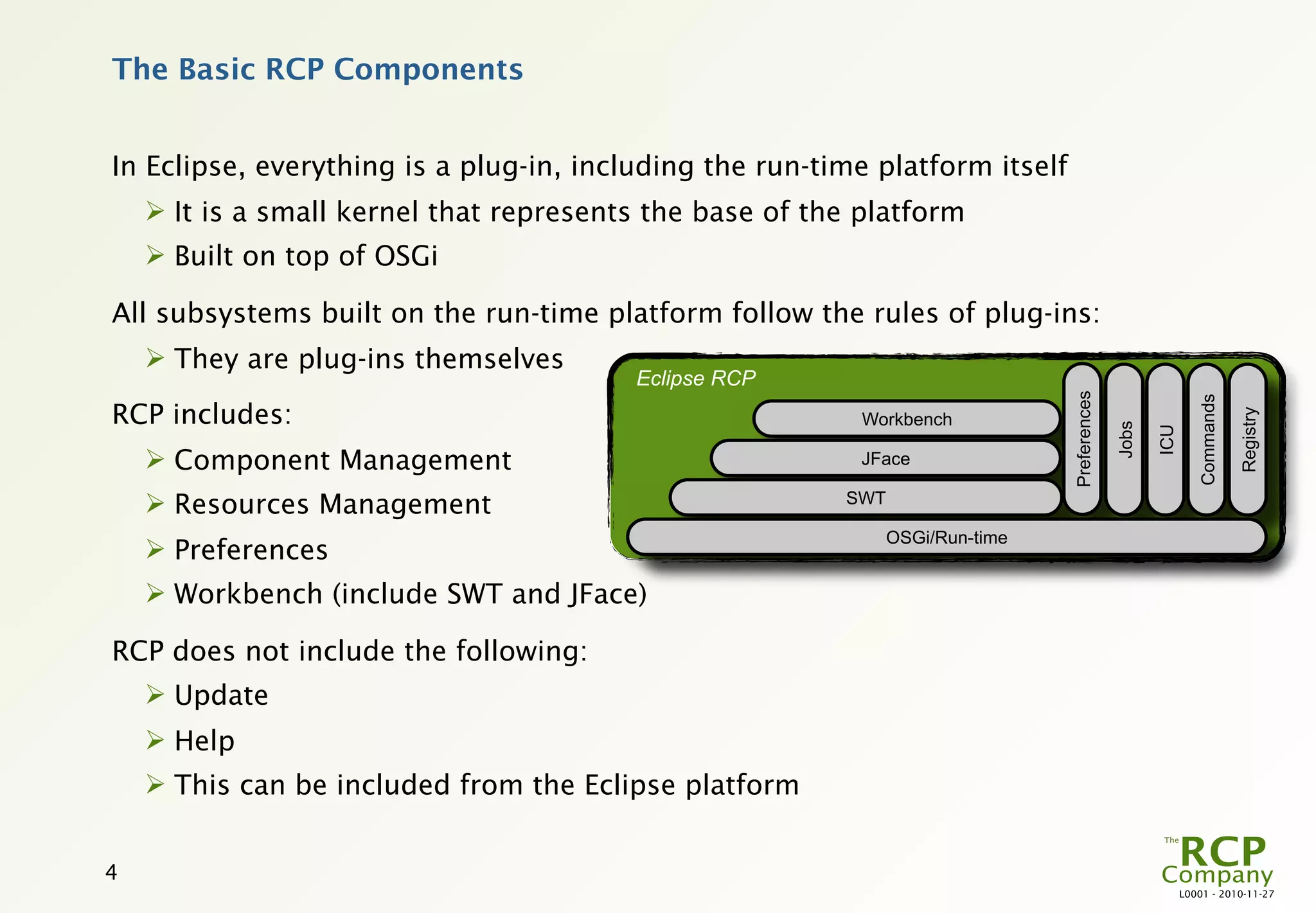
In Eclipse, everything is a plug-in, including the run-time platform itself
     It is a small kernel that represents the base of the platform
     Built on top of OSGi

All subsystems built on the run-time platform follow the rules of plug-ins:
     They are plug-ins themselves
                                         Eclipse RCP


                                                                               Preferences


                                                                                                             Commands
RCP includes:


                                                                                                                        Registry
                                                           Workbench


                                                                                             Jobs

                                                                                                    ICU
     Component Management                                 JFace

     Resources Management                               SWT

                                                               OSGi/Run-time
     Preferences
     Workbench (include SWT and JFace)

RCP does not include the following:
     Update
     Help
     This can be included from the Eclipse platform


4
                                                                                                          L0001 - 2010-11-27
Base
                                                                                             Authentication
                                                                                                              Data Model
                                                                                             Communication
                                                                                                              Data Model
                                                                                                Logging
                                                                                                              Base Logic
                                                                                                 Audit
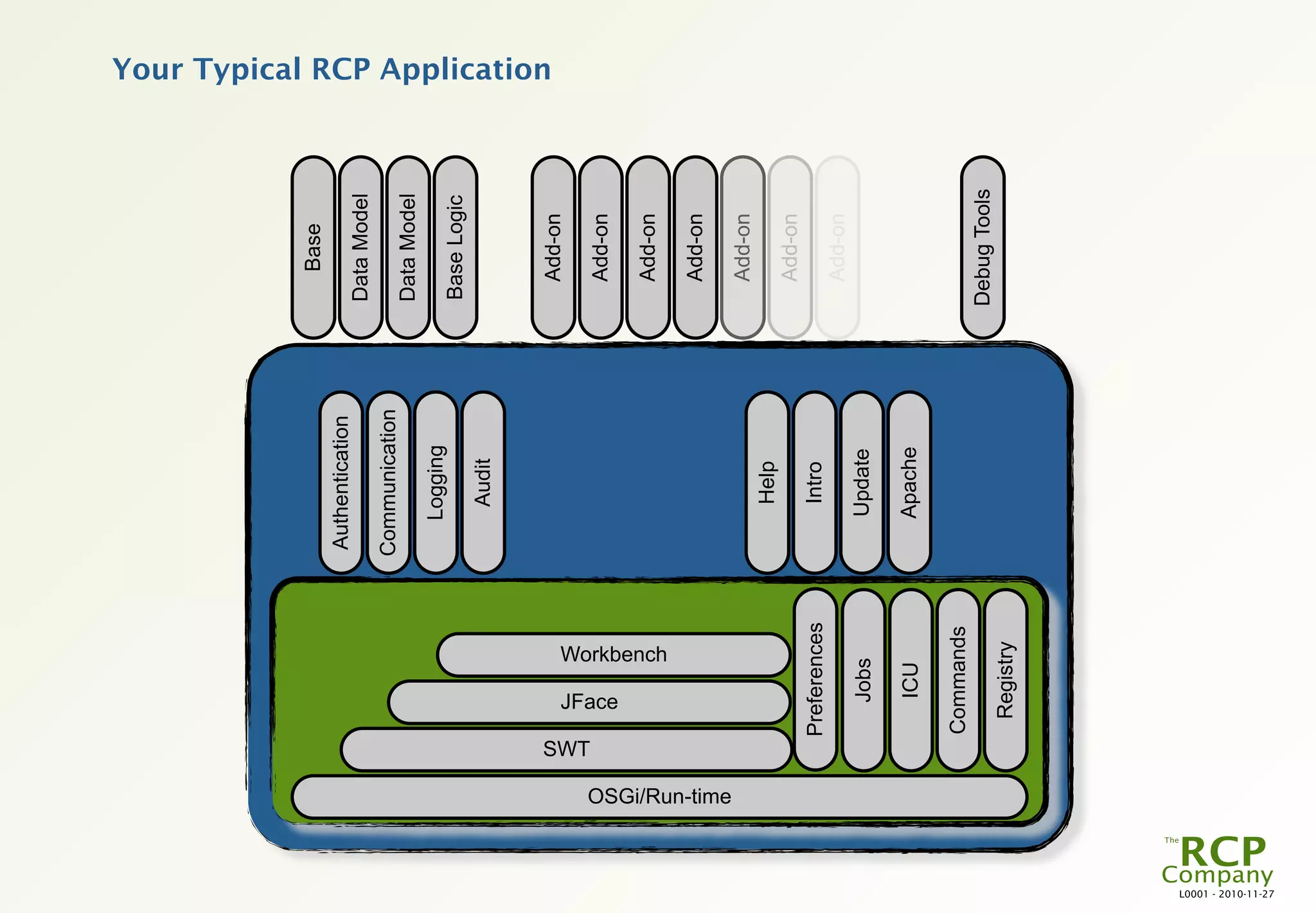
                                                                                                                            Your Typical RCP Application


                                                                                                                Add-on


                                     SWT
                                                                                                                Add-on


                                             JFace
                                                              Workbench                                         Add-on

                                                Eclipse RCP                                                     Add-on


                     OSGi/Run-time
                                                                          Eclipse Platform


                                                                                                                Add-on
                                                                                                 Help
                                                                                                                Add-on
                                           Preferences                                           Intro
                                                                                                                Add-on
                                                   Jobs                                         Update

                                                     ICU                                        Apache

                                           Commands
                                                                                                              Debug Tools
                                            Registry
L0001 - 2010-11-27
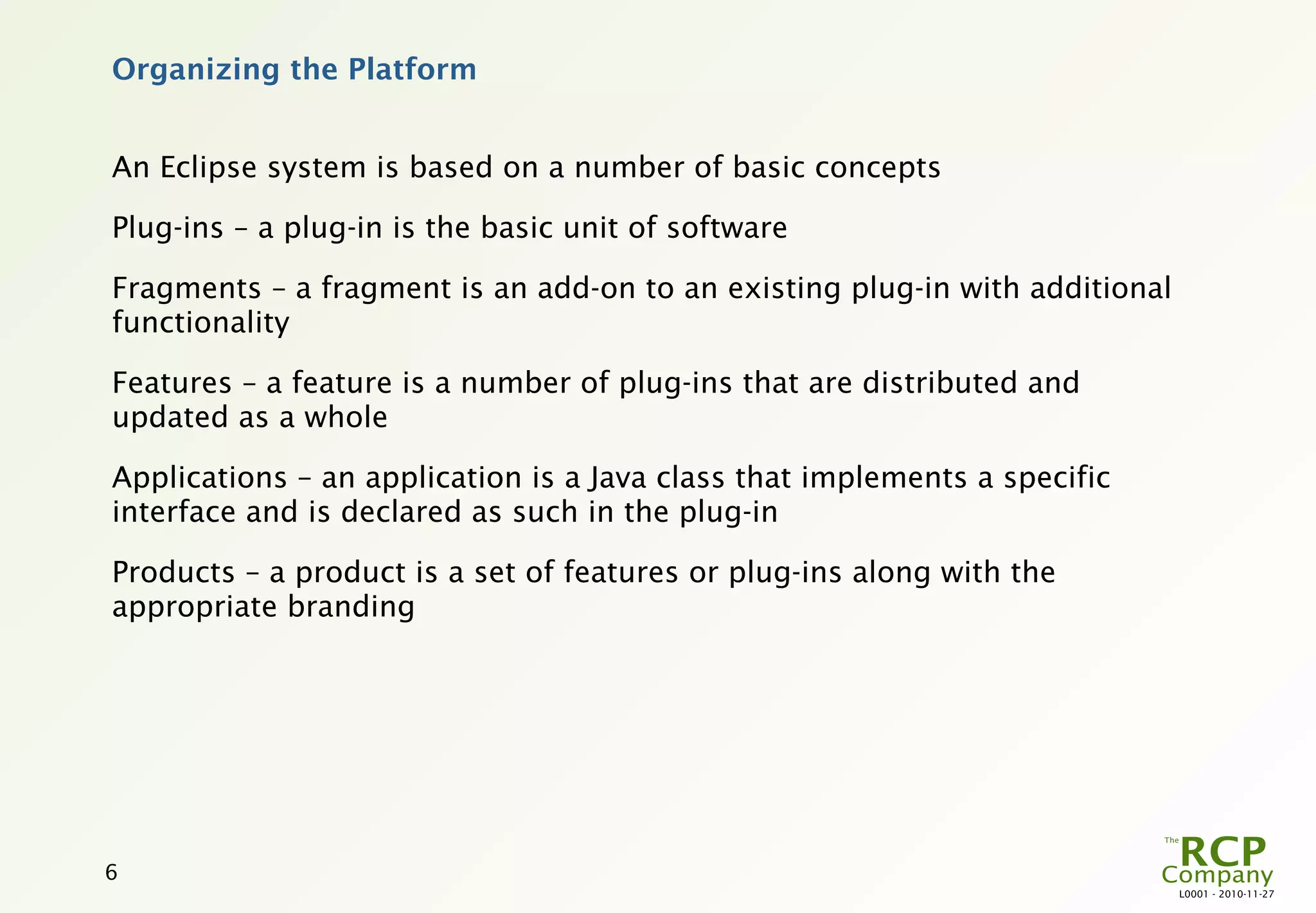
Organizing the Platform


An Eclipse system is based on a number of basic concepts

Plug-ins – a plug-in is the basic unit of software

Fragments – a fragment is an add-on to an existing plug-in with additional
functionality

Features – a feature is a number of plug-ins that are distributed and
updated as a whole

Applications – an application is a Java class that implements a specific
interface and is declared as such in the plug-in

Products – a product is a set of features or plug-ins along with the
appropriate branding


6
                                                                             L0001 - 2010-11-27
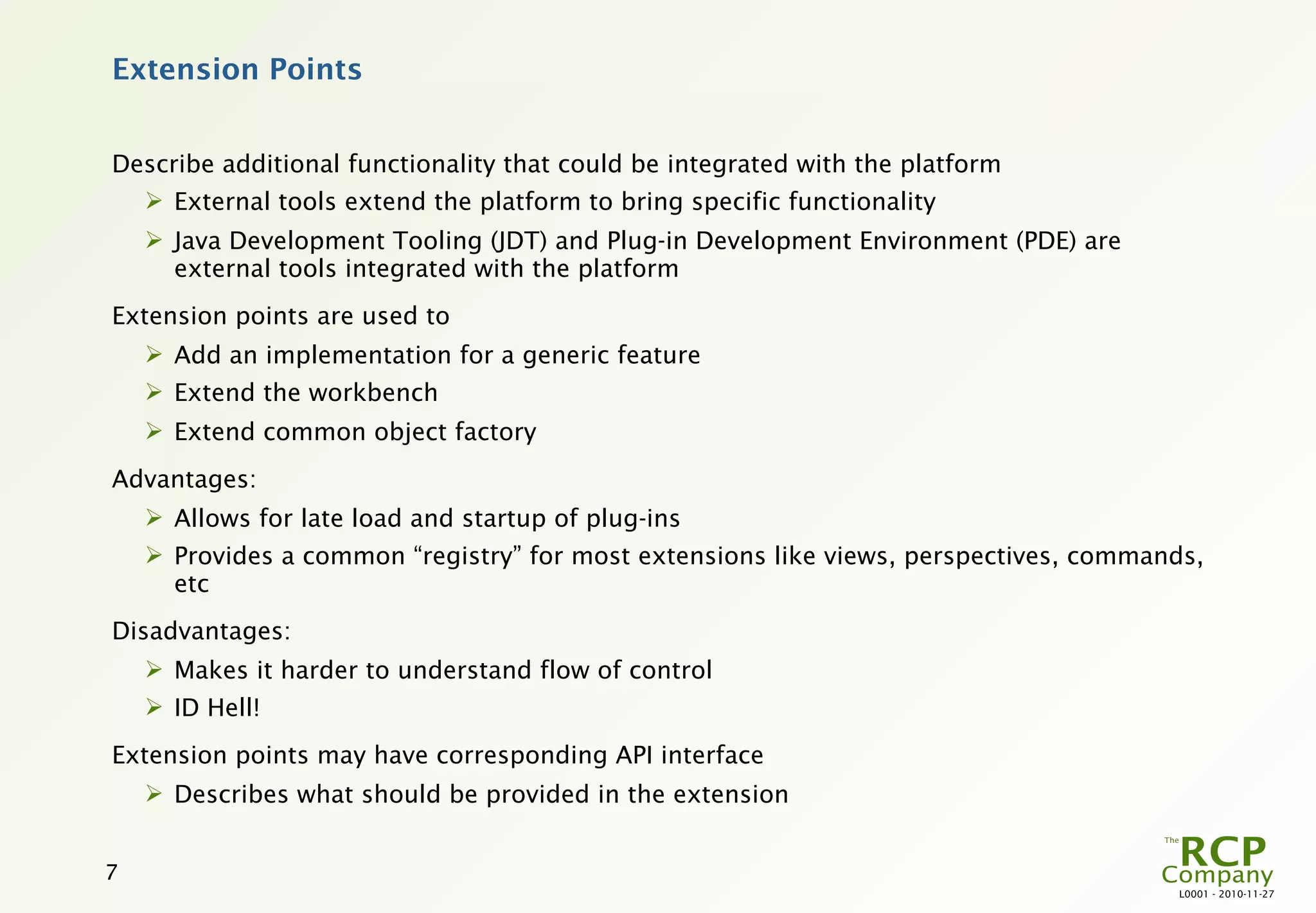
Extension Points


Describe additional functionality that could be integrated with the platform
     External tools extend the platform to bring specific functionality
     Java Development Tooling (JDT) and Plug-in Development Environment (PDE) are
      external tools integrated with the platform
Extension points are used to
     Add an implementation for a generic feature
     Extend the workbench
     Extend common object factory
Advantages:
     Allows for late load and startup of plug-ins
     Provides a common “registry” for most extensions like views, perspectives, commands,
      etc
Disadvantages:
     Makes it harder to understand flow of control
     ID Hell!
Extension points may have corresponding API interface
     Describes what should be provided in the extension


7
                                                                                       L0001 - 2010-11-27
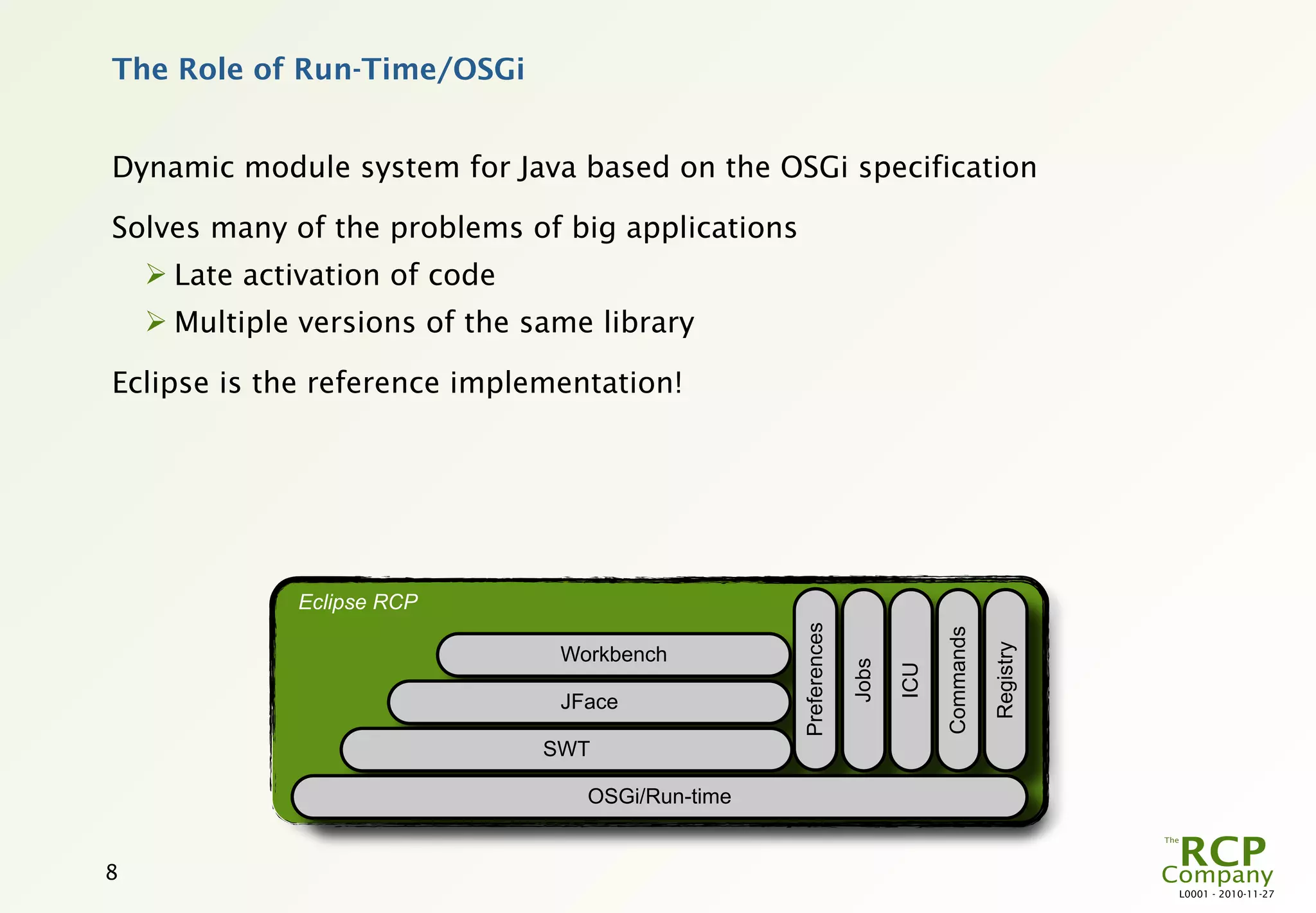
The Role of Run-Time/OSGi


Dynamic module system for Java based on the OSGi specification

Solves many of the problems of big applications
     Late activation of code
     Multiple versions of the same library

Eclipse is the reference implementation!


              Eclipse RCP


                                                   Preferences


                                                                              Commands

                                                                                         Registry
                                 Workbench


                                                                 Jobs

                                                                        ICU
                                 JFace

                                SWT

                                   OSGi/Run-time


8
                                                                                                    L0001 - 2010-11-27
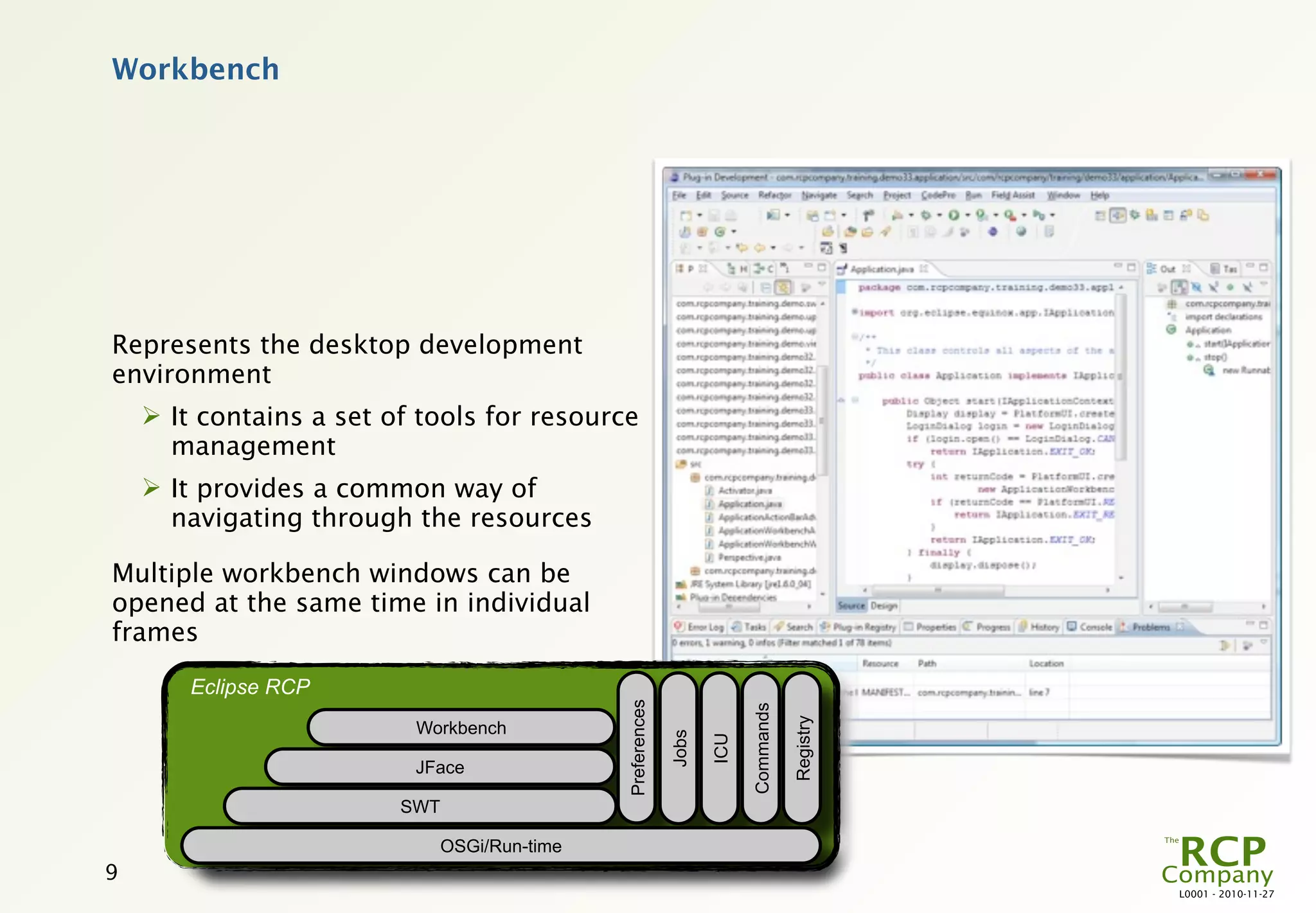
Workbench


Represents the desktop development
environment
     It contains a set of tools for resource
      management
     It provides a common way of
      navigating through the resources

Multiple workbench windows can be
opened at the same time in individual
frames

        Eclipse RCP
                                               Preferences


                                                                          Commands

                                                                                     Registry
                          Workbench
                                                             Jobs

                                                                    ICU

                          JFace

                         SWT

                               OSGi/Run-time
9
                                                                                                L0001 - 2010-11-27
More Information


 “Eclipse Roadmap”
      http://www.eclipse.org/org/councils/roadmap_v2_0/index.php

 “Will It Go Round in Circles?” by Rick DeNatale
      http://talklikeaduck.denhaven2.com/2008/10/15/will-it-go-round-in-
       circles
      
          The basic Eclipse History from an insider

 “Eclipse: Behind the Name”
      http://www.eweek.com/c/a/Application-Development/Eclipse-Behind-
       the-Name/
      
          Who “eclipse” who…

 “Swing/SWT Integration”
      http://www.eclipse.org/resources/resource.php?id=381


10
                                                                            L0001 - 2010-11-27

L0001 - The Terminology of the Eclipse Platform

  • 1.
    The Terminology ofthe Eclipse Platform This is a basic walk-through of all the central concepts of the Eclipse platform and how these fit together. The primary goal of this module is to establish a common terminology. Redistribution and other use of this material requires written permission from The RCP Company. L0001 - 2010-11-27
  • 2.
    Eclipse Architecture Goals forthe Eclipse architecture  Be able to host any number of 3rd party applications  Scalability in terms of size and complexity of hosted applications  Alignment with native UI look-n-feel Flexible architecture, structured around  Plug-ins – the basic unit of functionality  Extension points – the defined interfaces between plug-ins This architecture allows for  Implementation of 3rd party applications on top of the basic platform (Eclipse RCP)  Additional tools to be integrated in the platform  Integrated tools to be further extended 2 L0001 - 2010-11-27
  • 3.
    3 JDT Team PDE Resources Eclipse RCP CVS Workspace Eclipse Platform Git Help Update CDT Apache SWT WTP JFace Eclipse Architectural Components File System Workbench DataTools Web Server BIRT Text Editor OSGi/Run-time SOA Intro PDP Preferences Navigator EMP Jobs Search ICU Commands Mylyn Registry L0001 - 2010-11-27
  • 4.
    The Basic RCPComponents In Eclipse, everything is a plug-in, including the run-time platform itself  It is a small kernel that represents the base of the platform  Built on top of OSGi All subsystems built on the run-time platform follow the rules of plug-ins:  They are plug-ins themselves Eclipse RCP Preferences Commands RCP includes: Registry Workbench Jobs ICU  Component Management JFace  Resources Management SWT OSGi/Run-time  Preferences  Workbench (include SWT and JFace) RCP does not include the following:  Update  Help  This can be included from the Eclipse platform 4 L0001 - 2010-11-27
  • 5.
    Base Authentication Data Model Communication Data Model Logging Base Logic Audit Your Typical RCP Application Add-on SWT Add-on JFace Workbench Add-on Eclipse RCP Add-on OSGi/Run-time Eclipse Platform Add-on Help Add-on Preferences Intro Add-on Jobs Update ICU Apache Commands Debug Tools Registry L0001 - 2010-11-27
  • 6.
    Organizing the Platform AnEclipse system is based on a number of basic concepts Plug-ins – a plug-in is the basic unit of software Fragments – a fragment is an add-on to an existing plug-in with additional functionality Features – a feature is a number of plug-ins that are distributed and updated as a whole Applications – an application is a Java class that implements a specific interface and is declared as such in the plug-in Products – a product is a set of features or plug-ins along with the appropriate branding 6 L0001 - 2010-11-27
  • 7.
    Extension Points Describe additionalfunctionality that could be integrated with the platform  External tools extend the platform to bring specific functionality  Java Development Tooling (JDT) and Plug-in Development Environment (PDE) are external tools integrated with the platform Extension points are used to  Add an implementation for a generic feature  Extend the workbench  Extend common object factory Advantages:  Allows for late load and startup of plug-ins  Provides a common “registry” for most extensions like views, perspectives, commands, etc Disadvantages:  Makes it harder to understand flow of control  ID Hell! Extension points may have corresponding API interface  Describes what should be provided in the extension 7 L0001 - 2010-11-27
  • 8.
    The Role ofRun-Time/OSGi Dynamic module system for Java based on the OSGi specification Solves many of the problems of big applications  Late activation of code  Multiple versions of the same library Eclipse is the reference implementation! Eclipse RCP Preferences Commands Registry Workbench Jobs ICU JFace SWT OSGi/Run-time 8 L0001 - 2010-11-27
  • 9.
    Workbench Represents the desktopdevelopment environment  It contains a set of tools for resource management  It provides a common way of navigating through the resources Multiple workbench windows can be opened at the same time in individual frames Eclipse RCP Preferences Commands Registry Workbench Jobs ICU JFace SWT OSGi/Run-time 9 L0001 - 2010-11-27
  • 10.
    More Information “EclipseRoadmap”  http://www.eclipse.org/org/councils/roadmap_v2_0/index.php “Will It Go Round in Circles?” by Rick DeNatale  http://talklikeaduck.denhaven2.com/2008/10/15/will-it-go-round-in- circles  The basic Eclipse History from an insider “Eclipse: Behind the Name”  http://www.eweek.com/c/a/Application-Development/Eclipse-Behind- the-Name/  Who “eclipse” who… “Swing/SWT Integration”  http://www.eclipse.org/resources/resource.php?id=381 10 L0001 - 2010-11-27

Editor's Notes

  • #2 \n
  • #3 The basic goals for the Eclipse architecture mean – among other things – that the complete platform must be equally accessible for all parties. So all parts of the basic platform must be\n Free of charge\n Fully documented\n No licensing attached to any of the software apart from the basic EPL – Eclipse Public License\nThe basic unit of functionality in Eclipse is the plug-in. A single plug-in can encompass a complete application, but it can also be a functional independent part of an application.\nThe interfaces between plug-ins is defined via extension points  Extension points are well-defined places in the system where other plug-ins can contribute functionality.\nEach major subsystem in Eclipse IDE and Eclipse RCP is itself structured as a set of plug-ins that implement some key function and define extension points.  The Eclipse system itself is built by contributing to the same extension points that third party plug-in providers can use.  Plug-ins can define their own extension points or simply add extensions to the extension points of other plug-ins.\nNote that the concepts of plug-ins and extension points run very deep in the Eclipse platform; even the very basic parts of the platform are organized as plug-ins with extension points. The only Eclipse RCP plug-in that does not provide or use extensions is SWT.\n
  • #4 Eclipse products are built in layers.\n At the bottom there are Eclipse RCP with the bare necessities. The RCP subsystems typically add visible features to the platform and provide APIs for extending their functionality. Some of these components supply additional class libraries that do not directly relate to an extension point, but can be used to implement extensions. For example, the workbench UI supplies the JFace UI framework and the SWT widget toolkit. \n The platform layer adds the generic features needed for an Integrated Development Environment (IDE).\n The different language support sits on top of the platform. The basic IDE features (known under the misleading name Eclipse SDK) includes two major tools that are useful for plug-in development. The Java development tooling (JDT) implements a full-featured Java development environment. The Plug-in Developer Environment (PDE) adds specialized tools that streamline the development of plug-ins and extensions.\nLikewise for the many features of Calisto, Europa and now Ganymede. They are also layered to provide a set of basic features that are used by other features to provide better and more specialized tools.\nThe Resources, Workspace and Update components shown above are not really part of the very basic RCP component set. They are used very often in RCP applications.\n
  • #5 The platform run-time core implements the run-time engine that starts the platform base and dynamically discovers plug-ins. A plug-in is a structured component that describes itself to the system using a manifest (plugin.xml) file. The platform maintains a registry of installed plug-ins and the functions they provide.\nFunctionality is added to the system using a common extension model. Extension points are well-defined function points in the system that can be extended by plug-ins. When a plug-in contributes an implementation for an extension point, we say that it adds an extension to the platform. Plug-ins can define their own extension points, so that other plug-ins can integrate tightly with them.\nThe extension mechanisms are the only means of adding function to the platform and other plug-ins. All plug-ins use the same mechanisms.  Plug-ins provided with the Eclipse SDK do not use any private mechanisms in their implementation.\nExtensions are typically written in Java using the platform APIs. However, some extension points accommodate extensions provided as platform executables, ActiveX components, or developed in scripting languages. In general, only a subset of the full platform function is available to non-Java extensions. \nA general goal of the run-time is that the end user should not pay a memory or performance penalty for plug-ins that are installed, but not used. A plug-in can be installed and added to the registry, but the plug-in will not be activated unless a function provided by the plug-in has been requested according to the user's activity.\n
  • #6 Using Eclipse RCP in an application is typically done the very same way as when used in Eclipse IDE.\n At the bottom there are Eclipse RCP with the bare necessities.\n The platform layer adds the generic features needed for any application in the specific environment.\n The application itself is then placed at the top.\n
  • #7 The terms listed above are central to an Eclipse system and it is rather important to understand them in order to implement a big Eclipse application.\n
  • #8 \n
  • #9 There are two parallel JSR projects which both look at OSGi, but with totally different results!\n JSR 291, “Dynamic Component Support for Java SE”, aims to use OSGi directly in standard Java SE\n JSR 277, “Java Module System”, aims to implement a completely new module system. In this case “OSGi is not good enough”.\n OSGi: The OSGi Alliance used to be known as the Open Services Gateway Initiative. Go to: http://www.osgi.org\n
  • #10 The term Workbench refers to the desktop development environment. The Workbench aims to achieve seamless tool integration and controlled openness by providing a common paradigm for the creation, management, and navigation of Workbench resources.\nEach Workbench window contains one or more perspectives.  Perspectives contain views and editors and control what appears in certain menus and tool bars.  More than one Workbench window can exist on the desktop at any given time.\n
  • #11 \n