Speak more with less effort
KType
●
    KType Overview:
    ●
        What is KType?
    ●
        Who is it for?
    ●
        How can you help?
    ●
        How does KType work?
    ●
        “KType for iPad” Features


                            2 / 23
What is KType?
●
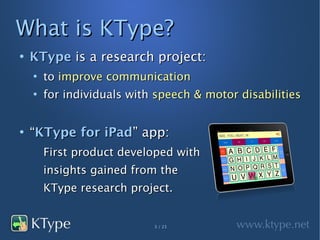
    KType is a research project:
    ●
        to improve communication
    ●
        for individuals with speech & motor disabilities


●
    “KType for iPad” app:
        First product developed with
        insights gained from the
        KType research project.


                            3 / 23
Who is KType for?
●
    KType is for individuals who cannot
    verbally communicate with ease or speed.
●
    KType is built to assist users who:
    ●
        cannot control or see keyboard/mouse/LCD
    ●
        may have muscle spasms, motor tics, paralysis
    ●
        have trouble reading, writing, spelling


                            4 / 23
Who is KType for?
●
    KType can assist individuals with:
    ●
        Motor Neuron Diseases such as ALS
    ●
        Cerebral Palsy
    ●
        Stroke
    ●
        Autism
    ●
        Neurological Trauma
    ●
        Speech Disorders: Apraxia with Aphasia, Dysarthria


                             5 / 23
How can you help?
●
    Recommend users for case-studies
●
    Connect me with care organizations
    ●
        Medical Centers (Trauma Units)
    ●
        Nursing Home (Senior-Care facilities)
    ●
        Special Education Schools
    ●
        Associations (ALS Assoc., ASHA etc.)


                            6 / 23
How does KType work?
●
    “KType for iPad” app:
    ●
        Accepts user input via touchscreen and
        physical buttons / switches
    ●
        Speaks in realistic male and female voices
    ●
        Guesses what the user is trying to type,
        minimizing the need to spell out each word


                            7 / 23
KType: Features
●
    Going beyond accessibility:

    ●
        Built for unsteady hands

    ●
        Speak more with less effort

    ●
        Make your own keyboard

    ●
        Customizable features


                            8 / 23
KType: Unsteady hands
●
    PROBLEM: Individuals with unsteady hands

    find it difficult to:

    ●
        Navigate touch-screen interfaces

    ●
        Touch precise locations on the screen

    ●
        Operate keyboard and mouse on a regular PC


                            9 / 23
KType: Unsteady hands
●
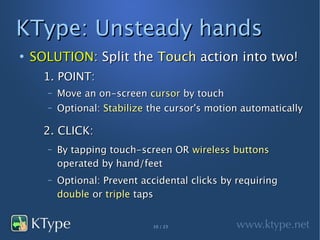
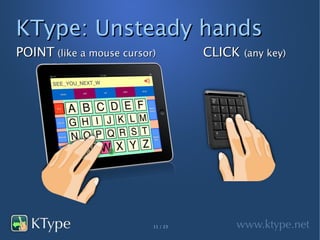
    SOLUTION: Split the Touch action into two!
      1. POINT:
      –   Move an on-screen cursor by touch
      –   Optional: Stabilize the cursor's motion automatically

      2. CLICK:
      –   By tapping touch-screen OR wireless buttons
          operated by hand/feet
      –   Optional: Prevent accidental clicks by requiring
          double or triple taps


                              10 / 23
KType: Unsteady hands
POINT (like a mouse cursor)         CLICK (any key)


                          11 / 23
KType: Speak more
●
    PROBLEM:


    Typing takes more effort than speaking.


    How do we make typing easier?


                       12 / 23
KType: Speak more
●
    SOLUTION: Make typing easier by
    ●
        Reducing movement of hands:
        –   Rearrange keys so common sequences are closer
        –   Enlarge commonly used keys / buttons

    ●
        Anticipating the user's next action:
        –   Type a few letters and KType suggests 3-7 words
        –   Make suggestions based on the context


                               13 / 23
KType: Speak more
●
    FUN FACT #1:

    ●
        Over 100,000 Twitter users indirectly helped

        create a keyboard layout that is better than

        QWERTY for users who press keys with one

        finger instead of typing with 10 fingers.


                            14 / 23
KType: Speak more
●
    FUN FACT #2:
    ●
        Analysis of 10 Million Tweets from Twitter
        helped create technology that can provide
        intelligent suggestions, not just spellcheck.
    ●
        KType can instantly suggest:
        –   “SOMEWHERE” when user types “SMW”
        –   “HUNGRY” and “HOPING” after user types “I AM HN”
        –   “POTTER” and “MET” after user types “HARRY”


                               15 / 23
KType: Your own keyboard
●
    Why rearrange the keyboard layout that has
    been in use for over a hundred years?
    ●
        Because it is not optimal for use with 1 finger
    ●
        QWERTY layout was designed in 1870s
        –   It was optimized for typing with 10 fingers
        –   Commonly used letter sequences were purposely
            put in different rows to minimize typewrite jams


                                16 / 23
KType: Your own keyboard
●
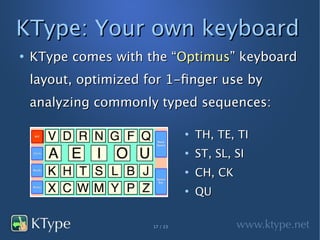
    KType comes with the “Optimus” keyboard
    layout, optimized for 1-finger use by
    analyzing commonly typed sequences:

                                 ●
                                     TH, TE, TI
                                 ●
                                     ST, SL, SI
                                 ●
                                     CH, CK
                                 ●
                                     QU

                       17 / 23
KType: Your own keyboard
●
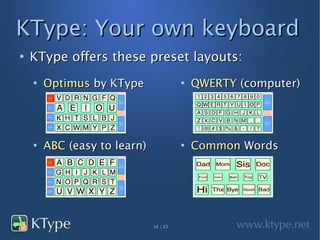
    KType offers these preset layouts:
    ●
        Optimus by KType                ●
                                            QWERTY (computer)


    ●
        ABC (easy to learn)             ●
                                            Common Words


                              18 / 23
KType: Your own keyboard
●
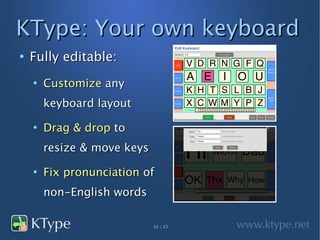
    Fully editable:
    ●
        Customize any
        keyboard layout
    ●
        Drag & drop to
        resize & move keys
    ●
        Fix pronunciation of
        non-English words

                             19 / 23
KType: Customizations
●
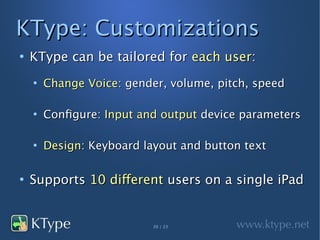
    KType can be tailored for each user:
    ●
        Change Voice: gender, volume, pitch, speed

    ●
        Configure: Input and output device parameters

    ●
        Design: Keyboard layout and button text

●
    Supports 10 different users on a single iPad


                           20 / 23
KType: On the Roadmap
●
    Send Email, Text/SMS, Tweets

●
    Add pictures & sound to keyboard buttons

●
    Automatically learn users' typing patterns

●
    Listen to Facebook updates, news & web
    articles, and incoming emails

                       21 / 23
KType: On the Roadmap
●
    POINT using:                   ●
                                       CLICK using:

    ●
        Joystick                       ●
                                           Sip/Puff Switch

    ●
        WiiMote / Kinect3D             ●
                                           WiiFit Pad

    ●
        Eye / Gaze Tracking            ●
                                           iPod Touch

    ●
        Head Tracking                  ●
                                           Ribbon Switch


                             22 / 23
Thank You


Contact:   Chirag Mehta

           chirag@ktype.net

           727-386-9382

           @chime1998

KType by Chirag Mehta

  • 1.
    Speak more withless effort
  • 2.
    KType ● KType Overview: ● What is KType? ● Who is it for? ● How can you help? ● How does KType work? ● “KType for iPad” Features 2 / 23
  • 3.
    What is KType? ● KType is a research project: ● to improve communication ● for individuals with speech & motor disabilities ● “KType for iPad” app: First product developed with insights gained from the KType research project. 3 / 23
  • 4.
    Who is KTypefor? ● KType is for individuals who cannot verbally communicate with ease or speed. ● KType is built to assist users who: ● cannot control or see keyboard/mouse/LCD ● may have muscle spasms, motor tics, paralysis ● have trouble reading, writing, spelling 4 / 23
  • 5.
    Who is KTypefor? ● KType can assist individuals with: ● Motor Neuron Diseases such as ALS ● Cerebral Palsy ● Stroke ● Autism ● Neurological Trauma ● Speech Disorders: Apraxia with Aphasia, Dysarthria 5 / 23
  • 6.
    How can youhelp? ● Recommend users for case-studies ● Connect me with care organizations ● Medical Centers (Trauma Units) ● Nursing Home (Senior-Care facilities) ● Special Education Schools ● Associations (ALS Assoc., ASHA etc.) 6 / 23
  • 7.
    How does KTypework? ● “KType for iPad” app: ● Accepts user input via touchscreen and physical buttons / switches ● Speaks in realistic male and female voices ● Guesses what the user is trying to type, minimizing the need to spell out each word 7 / 23
  • 8.
    KType: Features ● Going beyond accessibility: ● Built for unsteady hands ● Speak more with less effort ● Make your own keyboard ● Customizable features 8 / 23
  • 9.
    KType: Unsteady hands ● PROBLEM: Individuals with unsteady hands find it difficult to: ● Navigate touch-screen interfaces ● Touch precise locations on the screen ● Operate keyboard and mouse on a regular PC 9 / 23
  • 10.
    KType: Unsteady hands ● SOLUTION: Split the Touch action into two! 1. POINT: – Move an on-screen cursor by touch – Optional: Stabilize the cursor's motion automatically 2. CLICK: – By tapping touch-screen OR wireless buttons operated by hand/feet – Optional: Prevent accidental clicks by requiring double or triple taps 10 / 23
  • 11.
    KType: Unsteady hands POINT(like a mouse cursor) CLICK (any key) 11 / 23
  • 12.
    KType: Speak more ● PROBLEM: Typing takes more effort than speaking. How do we make typing easier? 12 / 23
  • 13.
    KType: Speak more ● SOLUTION: Make typing easier by ● Reducing movement of hands: – Rearrange keys so common sequences are closer – Enlarge commonly used keys / buttons ● Anticipating the user's next action: – Type a few letters and KType suggests 3-7 words – Make suggestions based on the context 13 / 23
  • 14.
    KType: Speak more ● FUN FACT #1: ● Over 100,000 Twitter users indirectly helped create a keyboard layout that is better than QWERTY for users who press keys with one finger instead of typing with 10 fingers. 14 / 23
  • 15.
    KType: Speak more ● FUN FACT #2: ● Analysis of 10 Million Tweets from Twitter helped create technology that can provide intelligent suggestions, not just spellcheck. ● KType can instantly suggest: – “SOMEWHERE” when user types “SMW” – “HUNGRY” and “HOPING” after user types “I AM HN” – “POTTER” and “MET” after user types “HARRY” 15 / 23
  • 16.
    KType: Your ownkeyboard ● Why rearrange the keyboard layout that has been in use for over a hundred years? ● Because it is not optimal for use with 1 finger ● QWERTY layout was designed in 1870s – It was optimized for typing with 10 fingers – Commonly used letter sequences were purposely put in different rows to minimize typewrite jams 16 / 23
  • 17.
    KType: Your ownkeyboard ● KType comes with the “Optimus” keyboard layout, optimized for 1-finger use by analyzing commonly typed sequences: ● TH, TE, TI ● ST, SL, SI ● CH, CK ● QU 17 / 23
  • 18.
    KType: Your ownkeyboard ● KType offers these preset layouts: ● Optimus by KType ● QWERTY (computer) ● ABC (easy to learn) ● Common Words 18 / 23
  • 19.
    KType: Your ownkeyboard ● Fully editable: ● Customize any keyboard layout ● Drag & drop to resize & move keys ● Fix pronunciation of non-English words 19 / 23
  • 20.
    KType: Customizations ● KType can be tailored for each user: ● Change Voice: gender, volume, pitch, speed ● Configure: Input and output device parameters ● Design: Keyboard layout and button text ● Supports 10 different users on a single iPad 20 / 23
  • 21.
    KType: On theRoadmap ● Send Email, Text/SMS, Tweets ● Add pictures & sound to keyboard buttons ● Automatically learn users' typing patterns ● Listen to Facebook updates, news & web articles, and incoming emails 21 / 23
  • 22.
    KType: On theRoadmap ● POINT using: ● CLICK using: ● Joystick ● Sip/Puff Switch ● WiiMote / Kinect3D ● WiiFit Pad ● Eye / Gaze Tracking ● iPod Touch ● Head Tracking ● Ribbon Switch 22 / 23
  • 23.
    Thank You Contact: Chirag Mehta chirag@ktype.net 727-386-9382 @chime1998