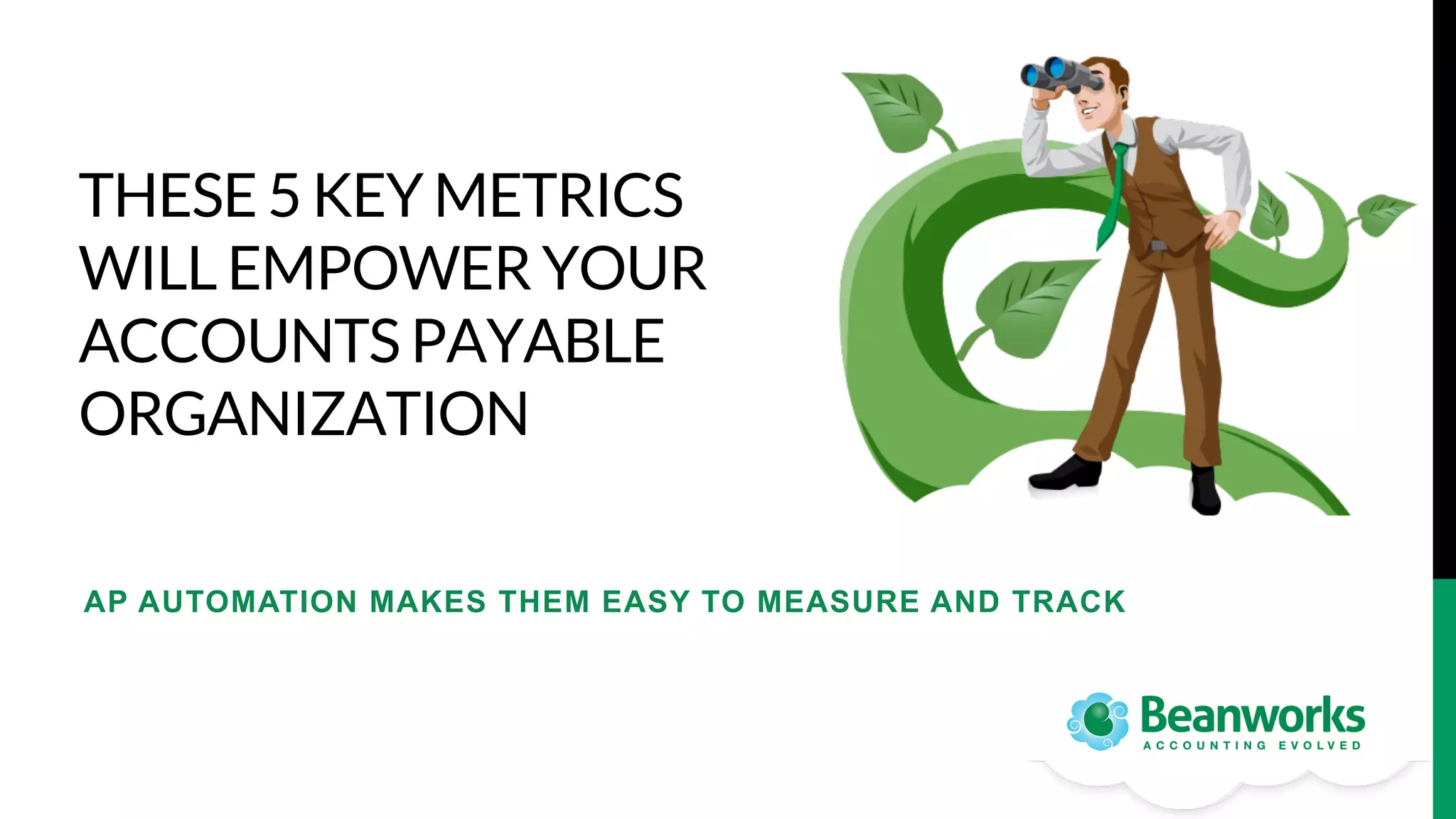
THESE 5 KEY METRICS
WILL EMPOWER YOUR
ACCOUNTS PAYABLE
ORGANIZATION

AP AUTOMATION MAKES THEM EASY TO MEASURE AND TRACK
THE STRATEGIC IMPORTANCE OF
ACCOUNTS PAYABLE
The most vulnerable area of
accounting in any company
is the outflow of cash
resources – the accounts
payable function. 

How is this empowerment
possible?

As companies realize this, they are finding that
empowering the accounts payable function
enables it to leave behind its costly manual, taskdriven, accounting-centric image and take on
strategic importance – even as a source of
additional revenue – and that this empowerment
transforms the way people work within the
organization.
EMPOWERMENT STARTS WITH
MEASUREMENT
You cannot change what you
cannot see.

Accounting departments
that improve efficiencies
do so by embracing
technology. 

Accounting departments are always busy
measuring external business activity but they
rarely stop to measure their own, or to think
about empowering the spenders outside of
accounting to leverage efficiencies.
AP SOLUTIONS HAVE BEEN DEVELOPED
TO MAXIMIZE EFFICIENCY
AP Automation empowers you with tools for:
•  defining KPIs (key performance indicators), 
•  measuring and
•  reporting on those KPIs for your Accounts Payable process.

What are the key metrics you should be measuring?
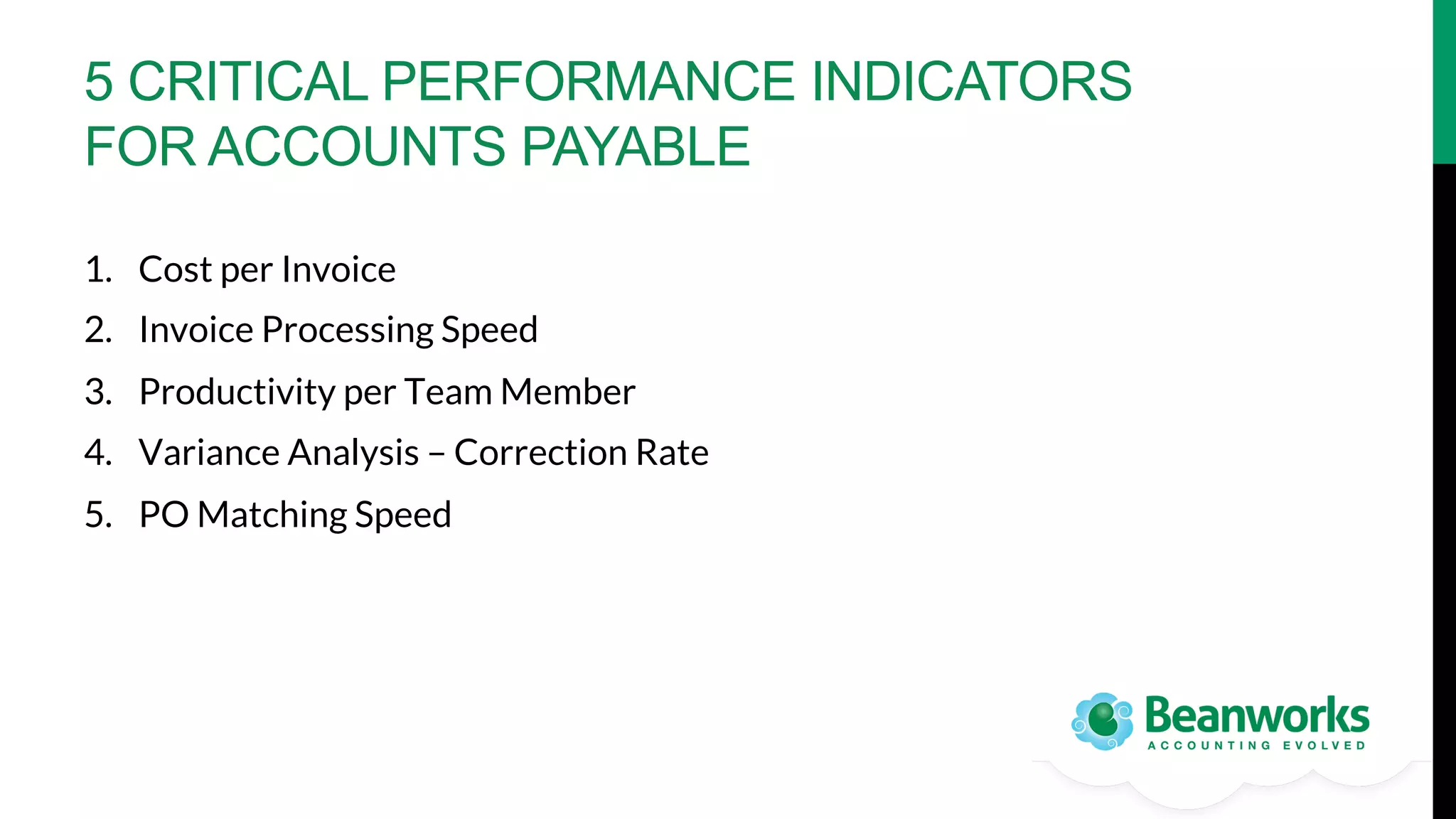
5 CRITICAL PERFORMANCE INDICATORS
FOR ACCOUNTS PAYABLE
1.  Cost per Invoice
2.  Invoice Processing Speed
3.  Productivity per Team Member
4.  Variance Analysis – Correction Rate
5.  PO Matching Speed
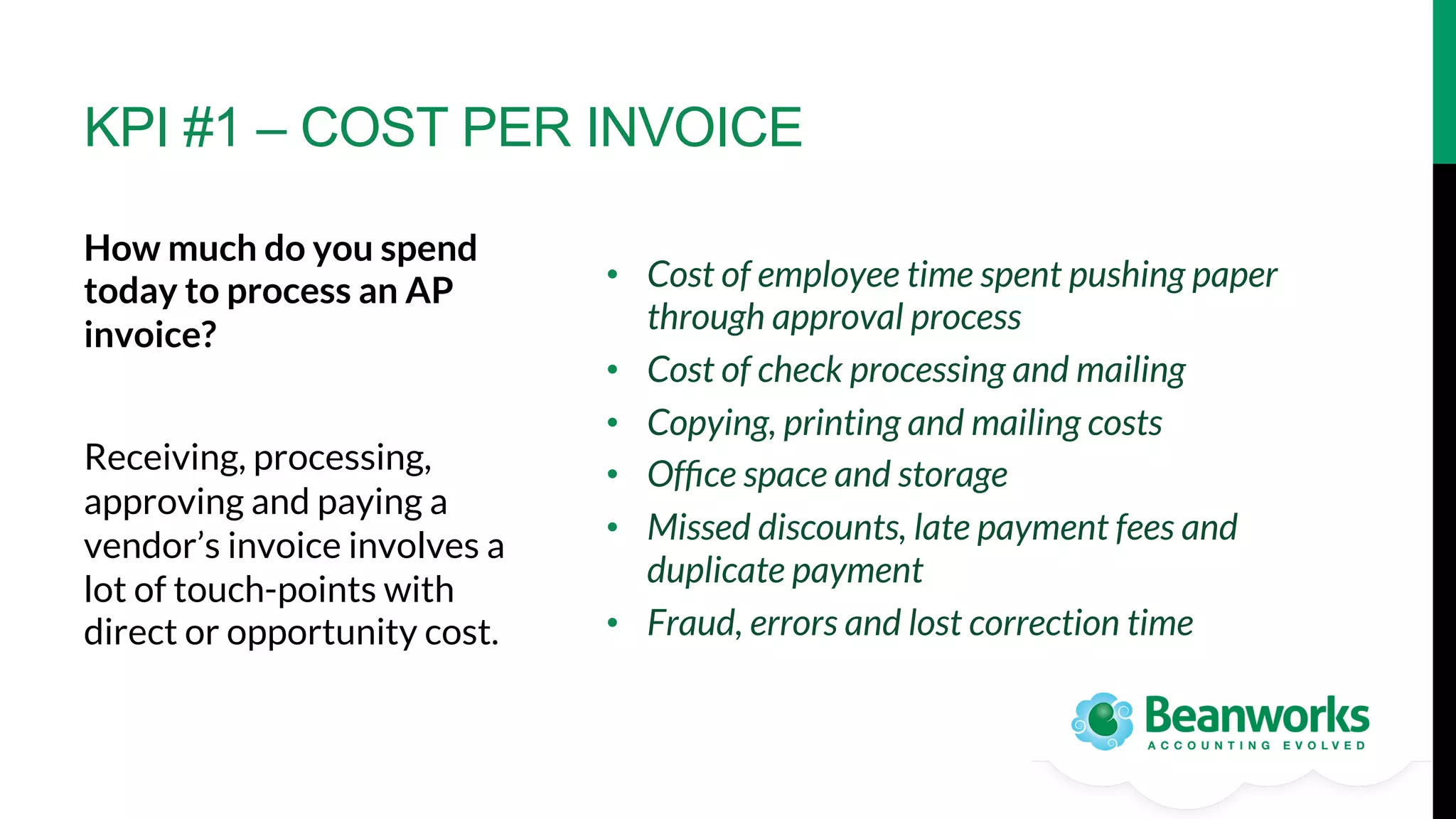
KPI #1 – COST PER INVOICE
How much do you spend
today to process an AP
invoice? 

Receiving, processing,
approving and paying a
vendor’s invoice involves a
lot of touch-points with
direct or opportunity cost.

•  Cost of employee time spent pushing paper
through approval process
•  Cost of check processing and mailing
•  Copying, printing and mailing costs
•  Office space and storage
•  Missed discounts, late payment fees and
duplicate payment
•  Fraud, errors and lost correction time
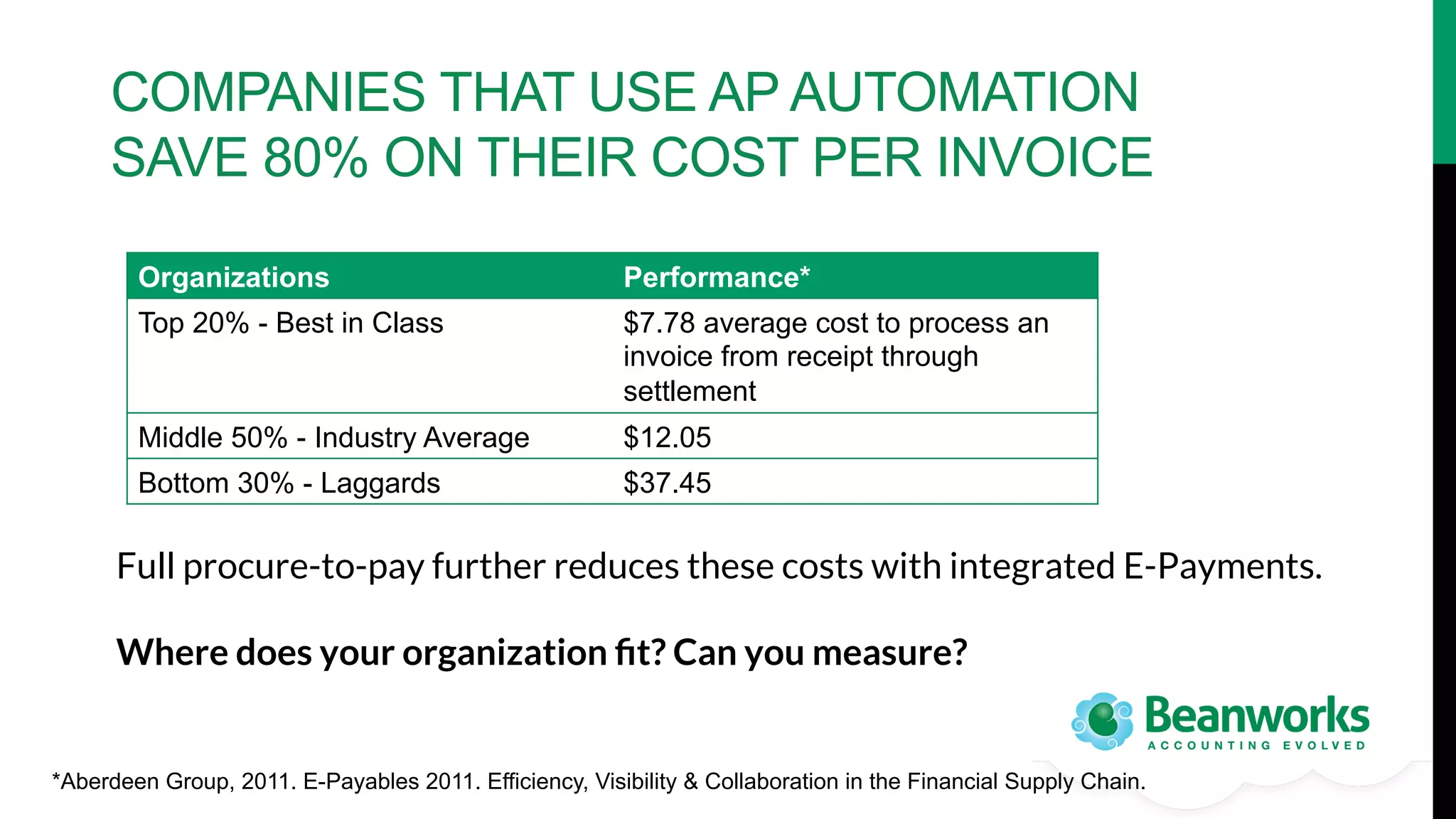
COMPANIES THAT USE AP AUTOMATION
SAVE 80% ON THEIR COST PER INVOICE
Organizations

Performance*

Top 20% - Best in Class

$7.78 average cost to process an
invoice from receipt through
settlement

Middle 50% - Industry Average

$12.05

Bottom 30% - Laggards

$37.45

Full procure-to-pay further reduces these costs with integrated E-Payments.

Where does your organization fit? Can you measure? 

*Aberdeen Group, 2011. E-Payables 2011. Efficiency, Visibility & Collaboration in the Financial Supply Chain.
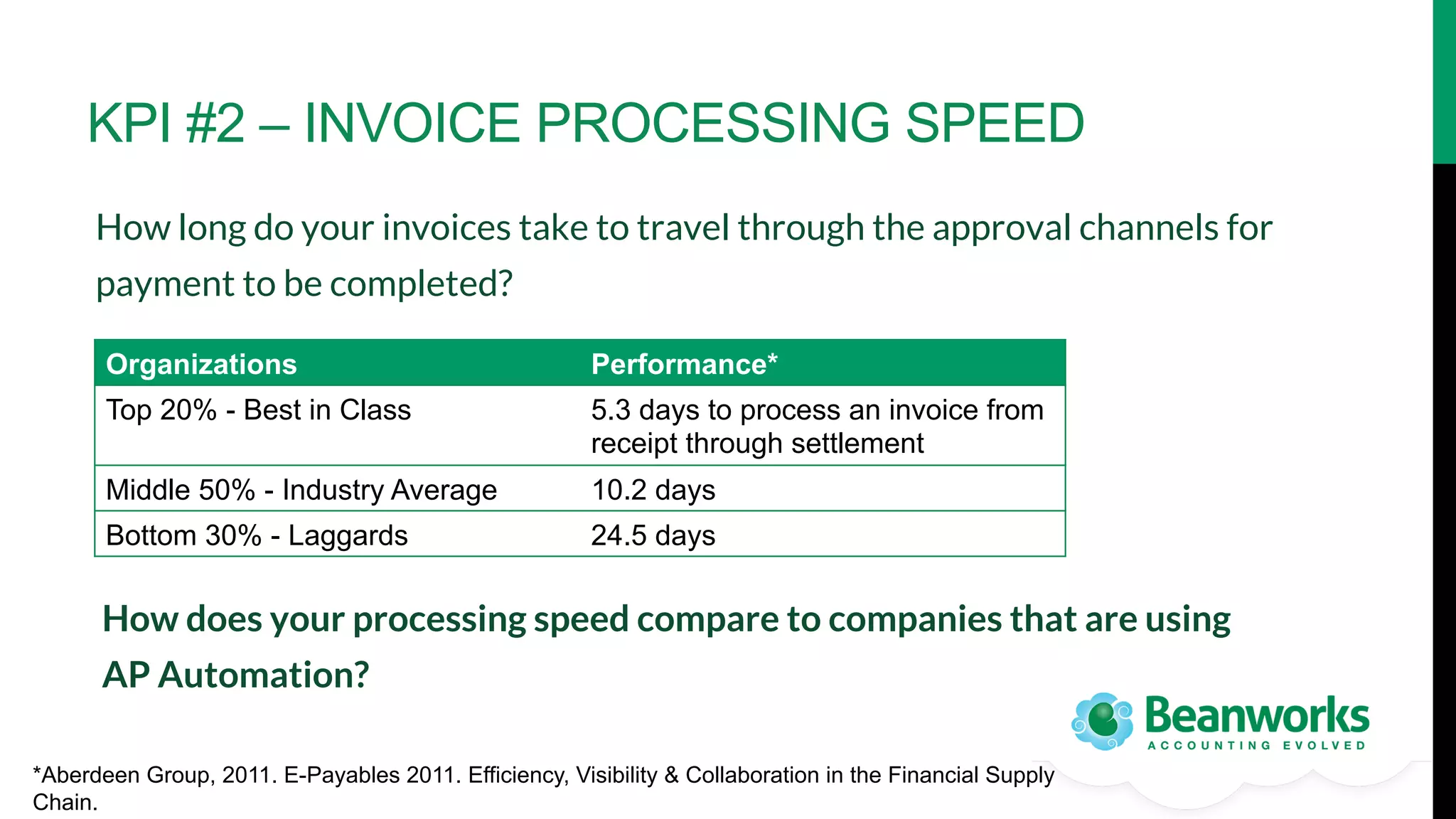
KPI #2 – INVOICE PROCESSING SPEED
How long do your invoices take to travel through the approval channels for
payment to be completed? 
Organizations

Performance*

Top 20% - Best in Class

5.3 days to process an invoice from
receipt through settlement

Middle 50% - Industry Average

10.2 days

Bottom 30% - Laggards

24.5 days

How does your processing speed compare to companies that are using
AP Automation?
*Aberdeen Group, 2011. E-Payables 2011. Efficiency, Visibility & Collaboration in the Financial Supply
Chain.
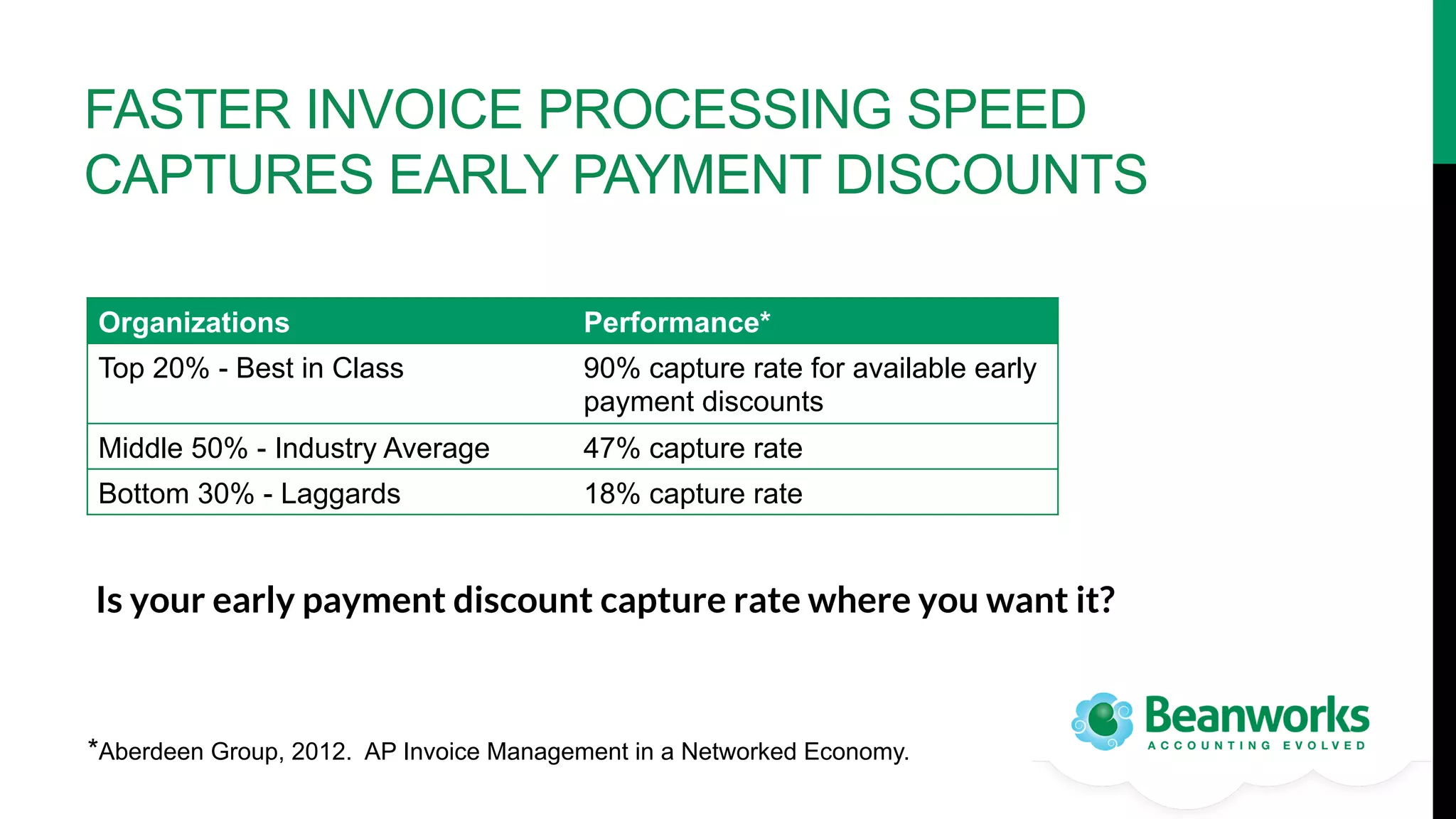
FASTER INVOICE PROCESSING SPEED
CAPTURES EARLY PAYMENT DISCOUNTS
Organizations

Performance*

Top 20% - Best in Class

90% capture rate for available early
payment discounts

Middle 50% - Industry Average

47% capture rate

Bottom 30% - Laggards

18% capture rate

Is your early payment discount capture rate where you want it? 

*Aberdeen Group, 2012. AP Invoice Management in a Networked Economy.
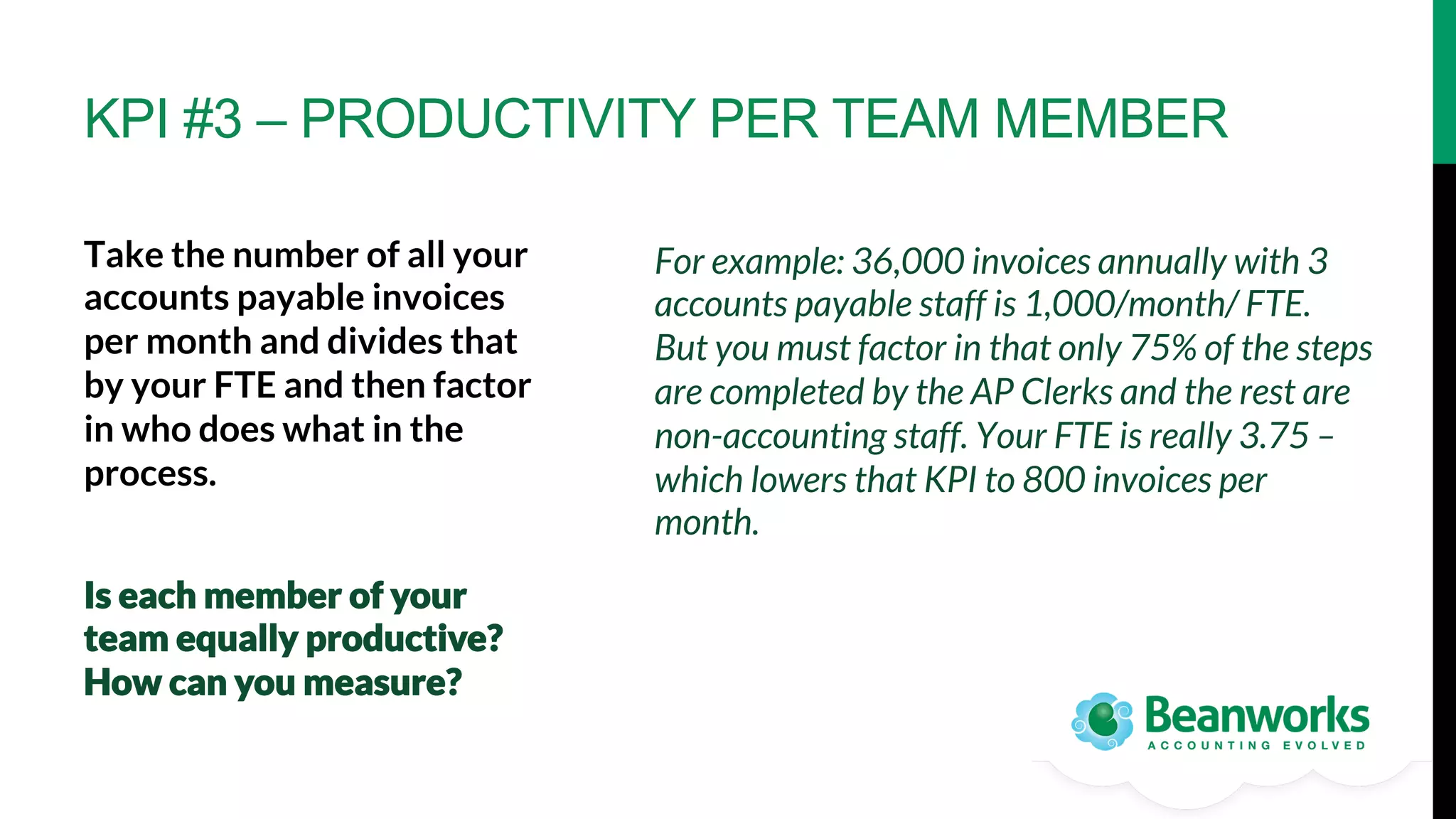
KPI #3 – PRODUCTIVITY PER TEAM MEMBER
Take the number of all your
accounts payable invoices
per month and divides that
by your FTE and then factor
in who does what in the
process. 


Is each member of your
team equally productive?
How can you measure? 

For example: 36,000 invoices annually with 3
accounts payable staff is 1,000/month/ FTE.
But you must factor in that only 75% of the steps
are completed by the AP Clerks and the rest are
non-accounting staff. Your FTE is really 3.75 –
which lowers that KPI to 800 invoices per
month.
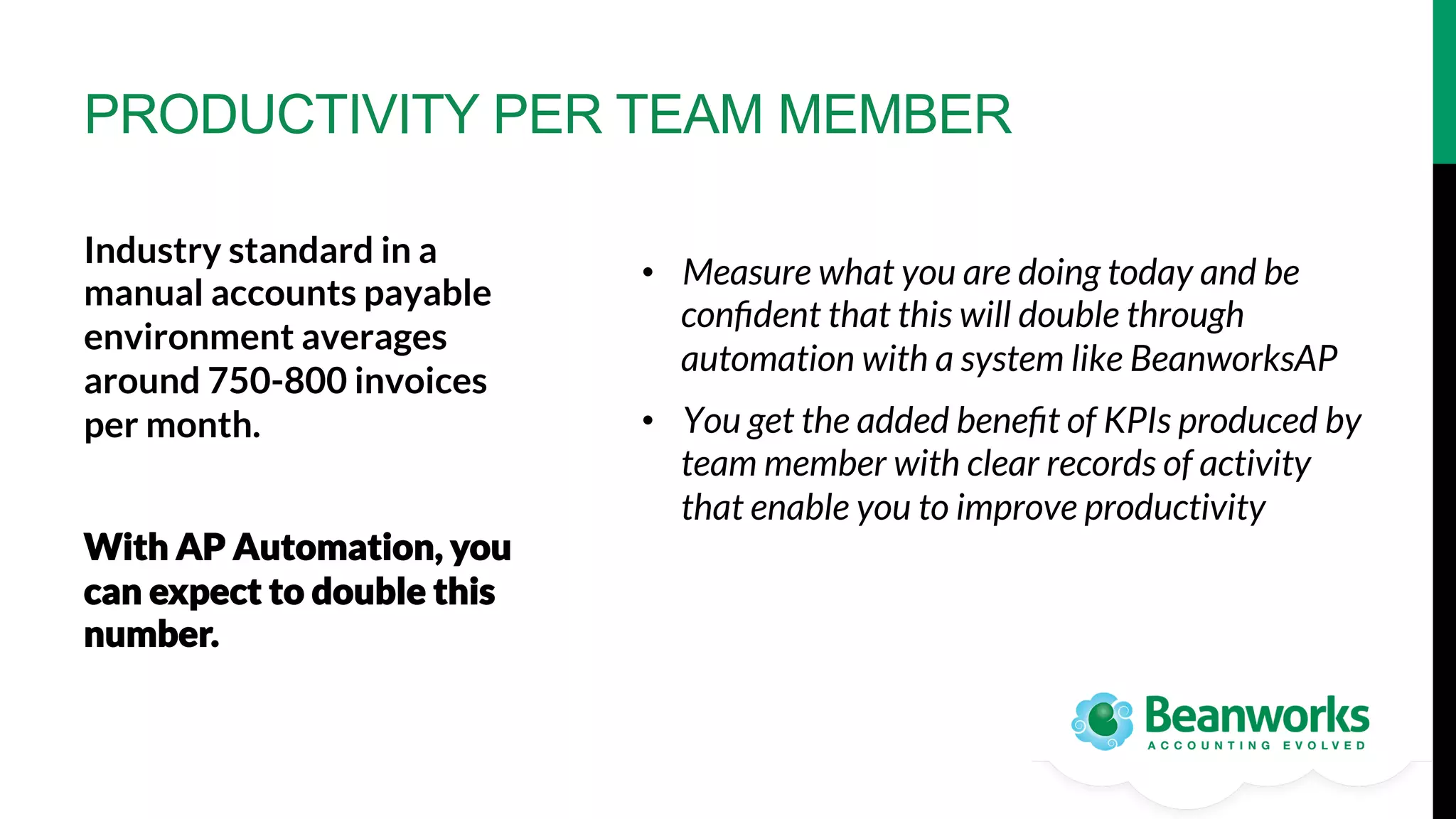
PRODUCTIVITY PER TEAM MEMBER
Industry standard in a
manual accounts payable
environment averages
around 750-800 invoices
per month.


With AP Automation, you
can expect to double this
number.

•  Measure what you are doing today and be
confident that this will double through
automation with a system like BeanworksAP
•  You get the added benefit of KPIs produced by
team member with clear records of activity
that enable you to improve productivity
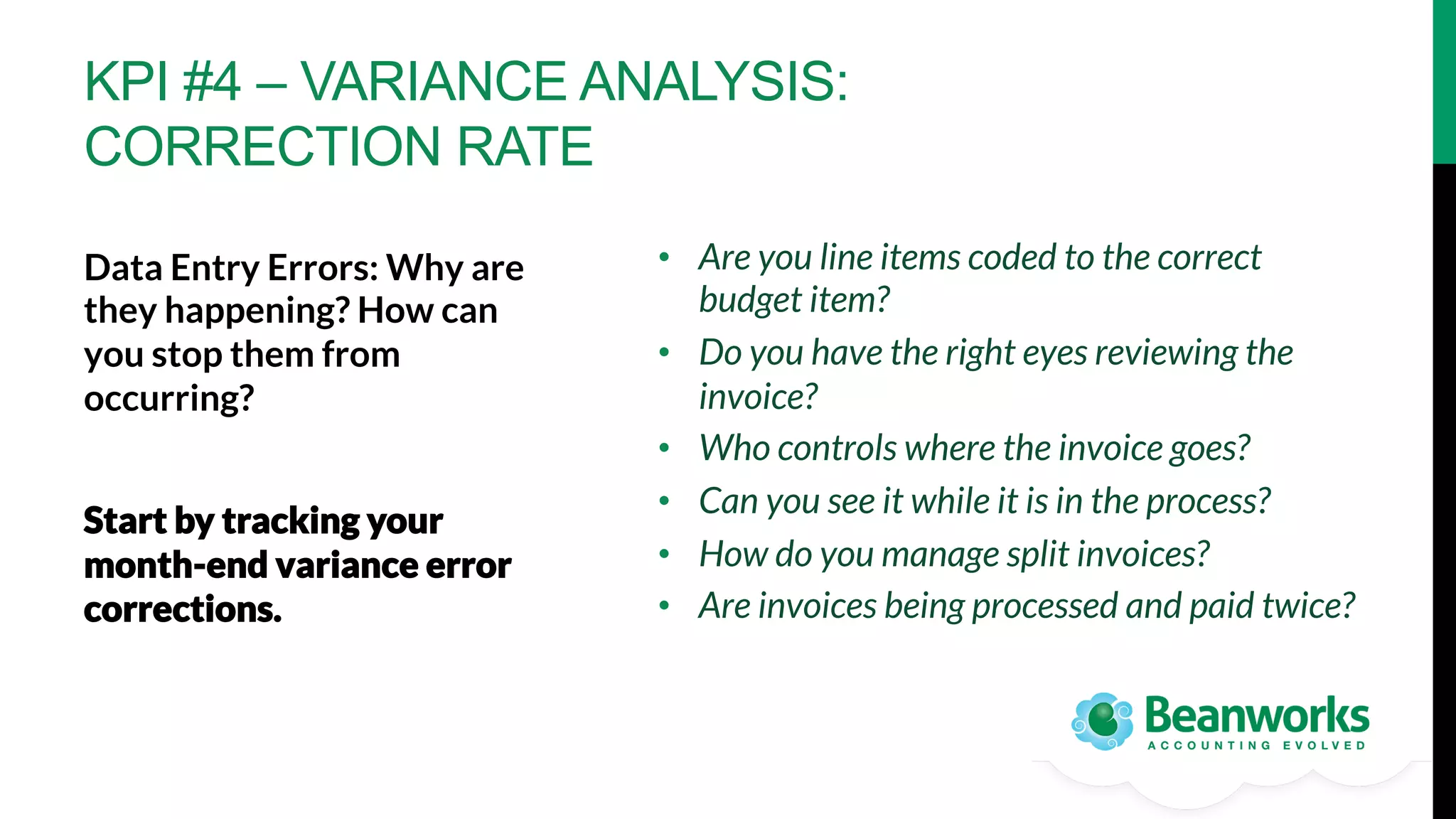
KPI #4 – VARIANCE ANALYSIS:
CORRECTION RATE
•  Are you line items coded to the correct
budget item?
•  Do you have the right eyes reviewing the
invoice?
•  Who controls where the invoice goes?
•  Can you see it while it is in the process?
•  How do you manage split invoices?
•  Are invoices being processed and paid twice?

Data Entry Errors: Why are
they happening? How can
you stop them from
occurring? 

Start by tracking your
month-end variance error
corrections.
VARIANCE ANALYSIS
With AP Automation, your
variance report is in place
and reflects the real-time
situation.

An automated process
automatically flags
duplicate invoices for you.

•  Workflow automation allows you to preprogram where invoices go and to instantly
see who has them
•  Automation ensures the right set of eyes
have approved your AP before anything is
transferred into your account system
KPI #5 – PO MATCHING SPEED
Invoices are typically grouped into
two types:
•  Purchase order-based invoices 
•  Invoices with no purchase order


How long does it take to
accurately match your POs to
invoices today? What is your
exception rate?

When an invoice arrives, if a fully-coded
purchase order is associated with that invoice,
the process should be simple and easy. In
paper-based systems however, POs are often
added as an afterthought to make accounting
happy. This manual process provides little
control and no visibility for a company’s
committed spend.
PO MATCHING SPEED
With an automated procure-topay process POs are matched
automatically to invoices.

Exceptions rates will decline dramatically


re-route for correction.
Auto-matching enables better
control of your cash flow and
allows you to take advantage of
early payment discounts.

and in parallel with the ability to quickly
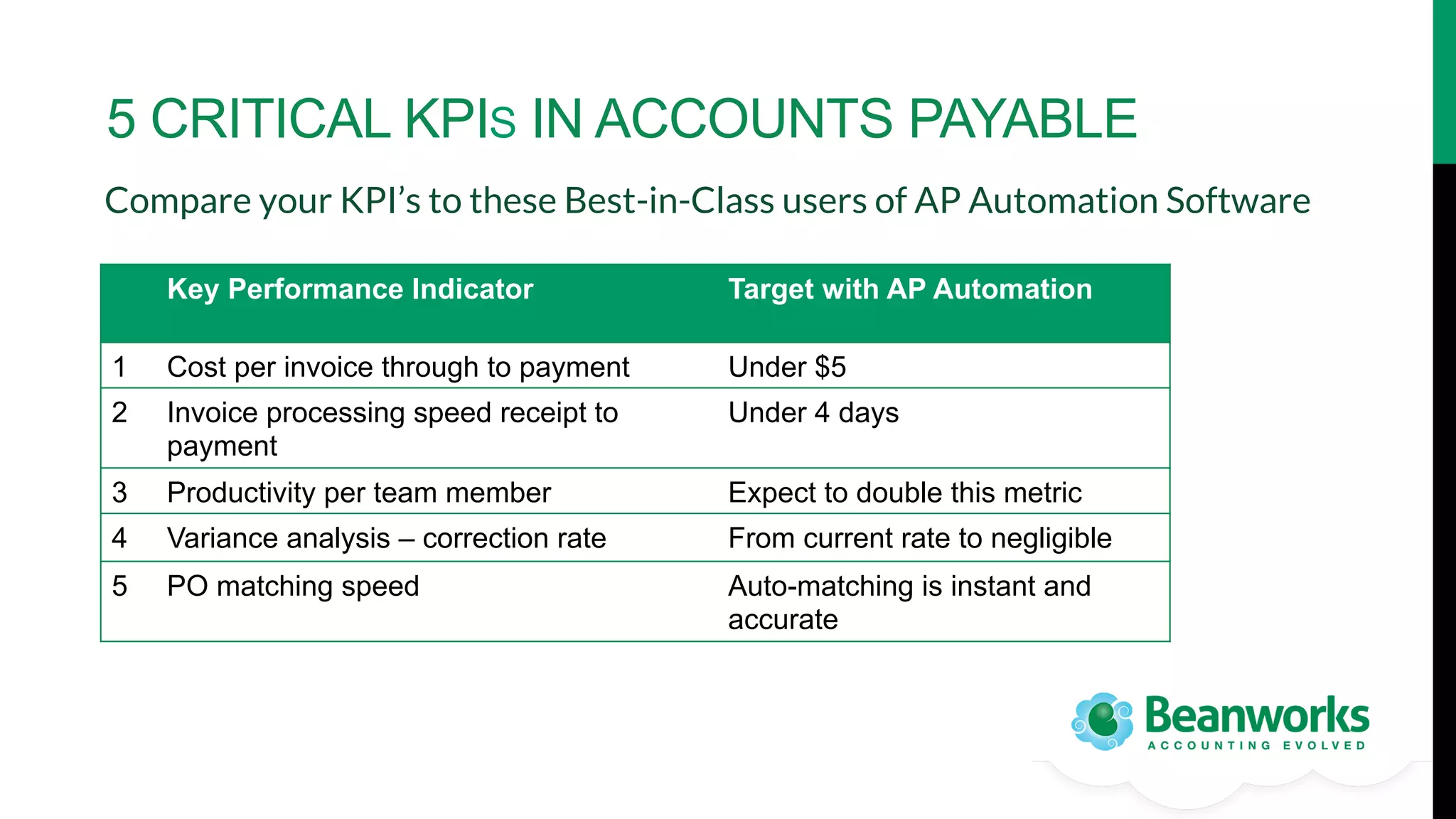
5 CRITICAL KPIS IN ACCOUNTS PAYABLE
Compare your KPI’s to these Best-in-Class users of AP Automation Software
Key Performance Indicator

Target with AP Automation

1

Cost per invoice through to payment

Under $5

2

Invoice processing speed receipt to
payment

Under 4 days

3

Productivity per team member

Expect to double this metric

4

Variance analysis – correction rate

From current rate to negligible

5

PO matching speed

Auto-matching is instant and
accurate
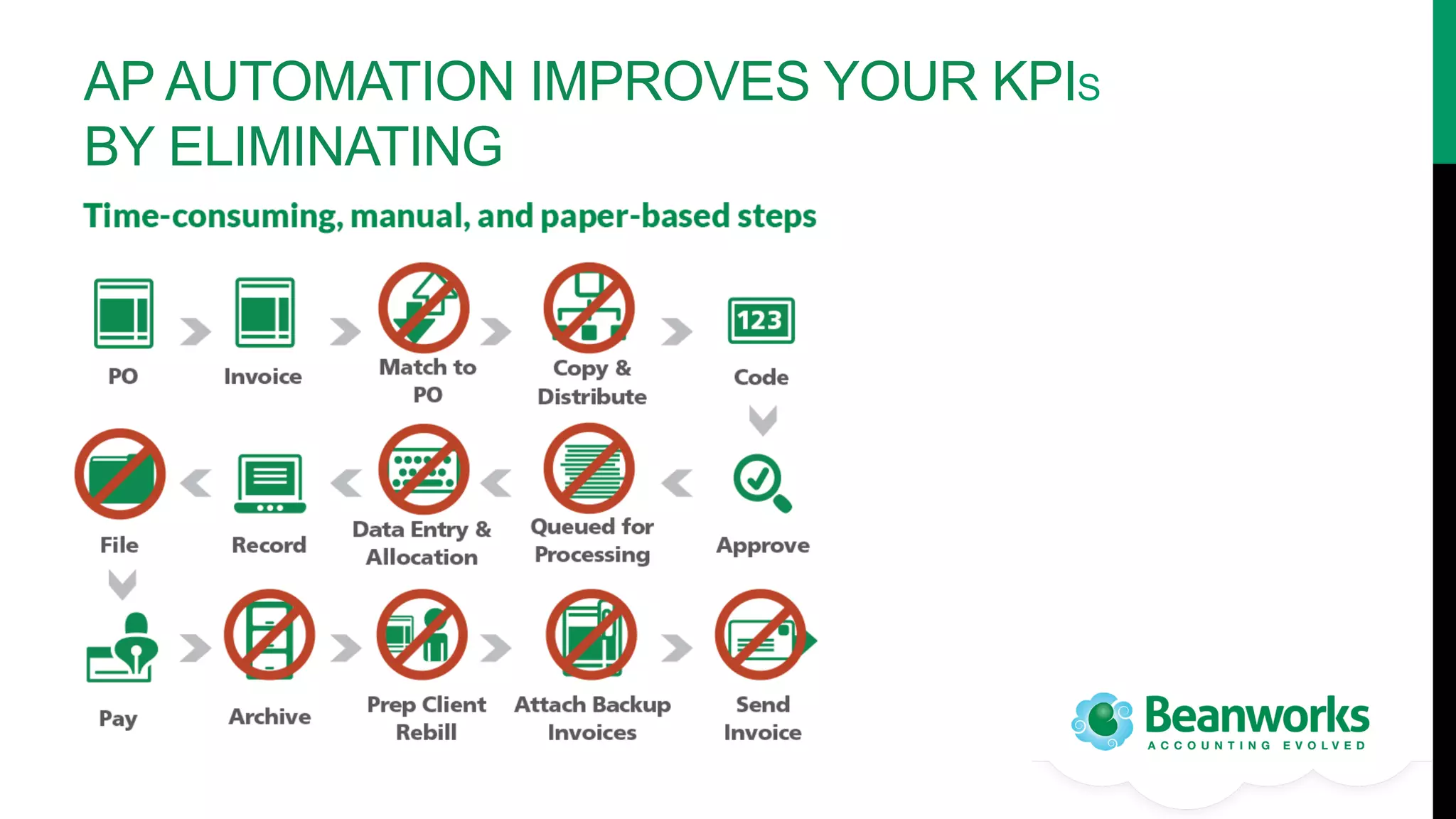
AP AUTOMATION IMPROVES YOUR KPIS
BY ELIMINATING
SUMMARY
•  AP Automation solutions enable your accounts payable
department to get Best-In-Class results 
•  Solutions such as cloud-based AP automation BeanworksAP track
and measure these KPIs on a daily basis
•  With this information, comes the empowerment to manage and
modify processes to reach optimal efficiency
A “TOUCHLESS” AP AUTOMATION
SOLUTION BENEFITS MANY AREAS
•  Maximize supplier discounts – 2% per month adds up
•  Integration with E-Payments reduces time and costs further
•  Import data versus manually keying it into your accounting system
•  Give your approvers and spenders mobile access to help make faster and
more informed decisions
•  Get it right BEFORE it gets recorded as a liability
•  STOP FRAUD and make your auditors happy!
KEY POINTS TO CONSIDER WHEN
ASSESSING AP AUTOMATION SOLUTIONS
1.  How configurable is it? Will it work
with your workflow? Or will you have
to change your processes? 
2.  Does it handle multiple companies? Do
you have manage more than one legal
entity? Can you see all that spend in
one easy place or will you have to
manage multiple logins?
3.  Does it have an intuitive customer
interface? Will non-accountants find it
easy-to-use?
4.  Is the solution cloud-based? Can you
access it anywhere, anytime?

5.  Is there a mobile application for your
travelling invoice approvers? 
6.  Is there a simple dashboard for
reporting on your team metrics at your
fingertips?
7.  Can you access critical accounting
information quickly when you need it?
8.  Does the solution provide the
capability to manage full Procure-toPayment?
FIND OUT MORE ABOUT
HOW AUTOMATION CAN
EMPOWER YOUR AP
DEPARTMENT
Contact:
Beanworks Solutions Inc. 
www.beanworks.com 
info@beanworks.com
Toll-free: 877-959-2326 x150

5 Key Metrics to Empower Your Accounts Payable Organization

  • 1.
    THESE 5 KEYMETRICS WILL EMPOWER YOUR ACCOUNTS PAYABLE ORGANIZATION AP AUTOMATION MAKES THEM EASY TO MEASURE AND TRACK
  • 2.
    THE STRATEGIC IMPORTANCEOF ACCOUNTS PAYABLE The most vulnerable area of accounting in any company is the outflow of cash resources – the accounts payable function. How is this empowerment possible? As companies realize this, they are finding that empowering the accounts payable function enables it to leave behind its costly manual, taskdriven, accounting-centric image and take on strategic importance – even as a source of additional revenue – and that this empowerment transforms the way people work within the organization.
  • 3.
    EMPOWERMENT STARTS WITH MEASUREMENT Youcannot change what you cannot see. Accounting departments that improve efficiencies do so by embracing technology. Accounting departments are always busy measuring external business activity but they rarely stop to measure their own, or to think about empowering the spenders outside of accounting to leverage efficiencies.
  • 4.
    AP SOLUTIONS HAVEBEEN DEVELOPED TO MAXIMIZE EFFICIENCY AP Automation empowers you with tools for: •  defining KPIs (key performance indicators), •  measuring and •  reporting on those KPIs for your Accounts Payable process. What are the key metrics you should be measuring?
  • 5.
    5 CRITICAL PERFORMANCEINDICATORS FOR ACCOUNTS PAYABLE 1.  Cost per Invoice 2.  Invoice Processing Speed 3.  Productivity per Team Member 4.  Variance Analysis – Correction Rate 5.  PO Matching Speed
  • 6.
    KPI #1 –COST PER INVOICE How much do you spend today to process an AP invoice? Receiving, processing, approving and paying a vendor’s invoice involves a lot of touch-points with direct or opportunity cost. •  Cost of employee time spent pushing paper through approval process •  Cost of check processing and mailing •  Copying, printing and mailing costs •  Office space and storage •  Missed discounts, late payment fees and duplicate payment •  Fraud, errors and lost correction time
  • 7.
    COMPANIES THAT USEAP AUTOMATION SAVE 80% ON THEIR COST PER INVOICE Organizations Performance* Top 20% - Best in Class $7.78 average cost to process an invoice from receipt through settlement Middle 50% - Industry Average $12.05 Bottom 30% - Laggards $37.45 Full procure-to-pay further reduces these costs with integrated E-Payments. Where does your organization fit? Can you measure? *Aberdeen Group, 2011. E-Payables 2011. Efficiency, Visibility & Collaboration in the Financial Supply Chain.
  • 8.
    KPI #2 –INVOICE PROCESSING SPEED How long do your invoices take to travel through the approval channels for payment to be completed? Organizations Performance* Top 20% - Best in Class 5.3 days to process an invoice from receipt through settlement Middle 50% - Industry Average 10.2 days Bottom 30% - Laggards 24.5 days How does your processing speed compare to companies that are using AP Automation? *Aberdeen Group, 2011. E-Payables 2011. Efficiency, Visibility & Collaboration in the Financial Supply Chain.
  • 9.
    FASTER INVOICE PROCESSINGSPEED CAPTURES EARLY PAYMENT DISCOUNTS Organizations Performance* Top 20% - Best in Class 90% capture rate for available early payment discounts Middle 50% - Industry Average 47% capture rate Bottom 30% - Laggards 18% capture rate Is your early payment discount capture rate where you want it? *Aberdeen Group, 2012. AP Invoice Management in a Networked Economy.
  • 10.
    KPI #3 –PRODUCTIVITY PER TEAM MEMBER Take the number of all your accounts payable invoices per month and divides that by your FTE and then factor in who does what in the process. Is each member of your team equally productive? How can you measure? For example: 36,000 invoices annually with 3 accounts payable staff is 1,000/month/ FTE. But you must factor in that only 75% of the steps are completed by the AP Clerks and the rest are non-accounting staff. Your FTE is really 3.75 – which lowers that KPI to 800 invoices per month.
  • 11.
    PRODUCTIVITY PER TEAMMEMBER Industry standard in a manual accounts payable environment averages around 750-800 invoices per month. With AP Automation, you can expect to double this number. •  Measure what you are doing today and be confident that this will double through automation with a system like BeanworksAP •  You get the added benefit of KPIs produced by team member with clear records of activity that enable you to improve productivity
  • 12.
    KPI #4 –VARIANCE ANALYSIS: CORRECTION RATE •  Are you line items coded to the correct budget item? •  Do you have the right eyes reviewing the invoice? •  Who controls where the invoice goes? •  Can you see it while it is in the process? •  How do you manage split invoices? •  Are invoices being processed and paid twice? Data Entry Errors: Why are they happening? How can you stop them from occurring? Start by tracking your month-end variance error corrections.
  • 13.
    VARIANCE ANALYSIS With APAutomation, your variance report is in place and reflects the real-time situation. An automated process automatically flags duplicate invoices for you. •  Workflow automation allows you to preprogram where invoices go and to instantly see who has them •  Automation ensures the right set of eyes have approved your AP before anything is transferred into your account system
  • 14.
    KPI #5 –PO MATCHING SPEED Invoices are typically grouped into two types: •  Purchase order-based invoices •  Invoices with no purchase order How long does it take to accurately match your POs to invoices today? What is your exception rate? When an invoice arrives, if a fully-coded purchase order is associated with that invoice, the process should be simple and easy. In paper-based systems however, POs are often added as an afterthought to make accounting happy. This manual process provides little control and no visibility for a company’s committed spend.
  • 15.
    PO MATCHING SPEED Withan automated procure-topay process POs are matched automatically to invoices. Exceptions rates will decline dramatically re-route for correction. Auto-matching enables better control of your cash flow and allows you to take advantage of early payment discounts. and in parallel with the ability to quickly
  • 16.
    5 CRITICAL KPISIN ACCOUNTS PAYABLE Compare your KPI’s to these Best-in-Class users of AP Automation Software Key Performance Indicator Target with AP Automation 1 Cost per invoice through to payment Under $5 2 Invoice processing speed receipt to payment Under 4 days 3 Productivity per team member Expect to double this metric 4 Variance analysis – correction rate From current rate to negligible 5 PO matching speed Auto-matching is instant and accurate
  • 17.
    AP AUTOMATION IMPROVESYOUR KPIS BY ELIMINATING
  • 18.
    SUMMARY •  AP Automationsolutions enable your accounts payable department to get Best-In-Class results •  Solutions such as cloud-based AP automation BeanworksAP track and measure these KPIs on a daily basis •  With this information, comes the empowerment to manage and modify processes to reach optimal efficiency
  • 19.
    A “TOUCHLESS” APAUTOMATION SOLUTION BENEFITS MANY AREAS •  Maximize supplier discounts – 2% per month adds up •  Integration with E-Payments reduces time and costs further •  Import data versus manually keying it into your accounting system •  Give your approvers and spenders mobile access to help make faster and more informed decisions •  Get it right BEFORE it gets recorded as a liability •  STOP FRAUD and make your auditors happy!
  • 20.
    KEY POINTS TOCONSIDER WHEN ASSESSING AP AUTOMATION SOLUTIONS 1.  How configurable is it? Will it work with your workflow? Or will you have to change your processes? 2.  Does it handle multiple companies? Do you have manage more than one legal entity? Can you see all that spend in one easy place or will you have to manage multiple logins? 3.  Does it have an intuitive customer interface? Will non-accountants find it easy-to-use? 4.  Is the solution cloud-based? Can you access it anywhere, anytime? 5.  Is there a mobile application for your travelling invoice approvers? 6.  Is there a simple dashboard for reporting on your team metrics at your fingertips? 7.  Can you access critical accounting information quickly when you need it? 8.  Does the solution provide the capability to manage full Procure-toPayment?
  • 21.
    FIND OUT MOREABOUT HOW AUTOMATION CAN EMPOWER YOUR AP DEPARTMENT Contact: Beanworks Solutions Inc. www.beanworks.com info@beanworks.com Toll-free: 877-959-2326 x150