
What’s in it for you ?
Introduction to Kotlin
Variables in Kotlin
String templates
Array
Loops in Kotlin
Null safety
Ranges
Kotlin functions
If-else and when
Introduction to Kotlin
1
2
3
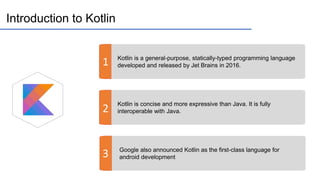
Kotlin is a general-purpose, statically-typed programming language
developed and released by Jet Brains in 2016.
Kotlin is concise and more expressive than Java. It is fully
interoperable with Java.
Google also announced Kotlin as the first-class language for
android development
Variables in Kotlin
var
val
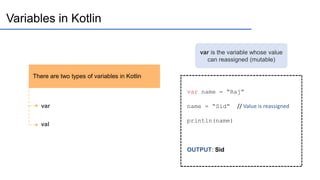
There are two types of variables in Kotlin
var is the variable whose value
can reassigned (mutable)
var name = “Raj”
name = “Sid“ // Value is reassigned
println(name)
OUTPUT: Sid
Variables in Kotlin
var
val
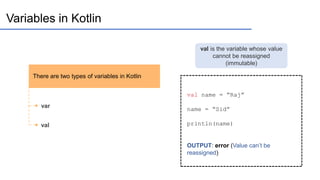
There are two types of variables in Kotlin
val is the variable whose value
cannot be reassigned
(immutable)
val name = “Raj”
name = “Sid”
println(name)
OUTPUT: error (Value can’t be
reassigned)
Variables in Kotlin
var
val
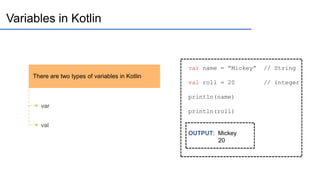
There are two types of variables in Kotlin
var name = ”Mickey” // String
val roll = 20 // integer
println(name)
println(roll)
OUTPUT: Mickey
20
String templates
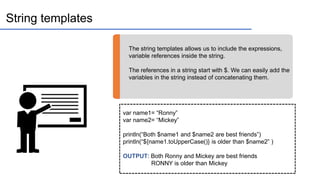
The string templates allows us to include the expressions,
variable references inside the string.
The references in a string start with $. We can easily add the
variables in the string instead of concatenating them.
var name1= “Ronny”
var name2= “Mickey”
println(“Both $name1 and $name2 are best friends”)
println(“${name1.toUpperCase()} is older than $name2” )
OUTPUT: Both Ronny and Mickey are best friends
RONNY is older than Mickey
If else and when statements
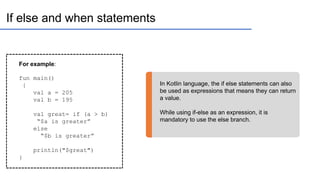
In Kotlin language, the if else statements can also
be used as expressions that means they can return
a value.
While using if-else as an expression, it is
mandatory to use the else branch.
For example:
fun main()
{
val a = 205
val b = 195
val great= if (a > b)
“$a is greater”
else
“$b is greater”
println("$great")
}
If else and when statements
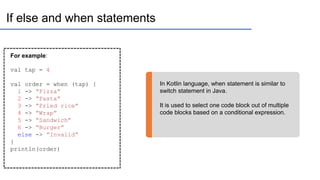
In Kotlin language, when statement is similar to
switch statement in Java.
It is used to select one code block out of multiple
code blocks based on a conditional expression.
For example:
val tap = 4
val order = when (tap) {
1 -> “Pizza”
2 -> “Pasta”
3 -> “Fried rice”
4 -> “Wrap”
5 -> “Sandwich”
6 -> “Burger”
else -> ”Invalid”
}
println(order)
Array
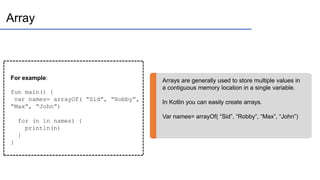
Arrays are generally used to store multiple values in
a contiguous memory location in a single variable.
In Kotlin you can easily create arrays.
Var names= arrayOf( “Sid”, “Robby”, “Max”, “John”)
For example:
fun main() {
var names= arrayOf( “Sid”, “Robby”,
“Max”, “John”)
for (n in names) {
println(n)
}
}
Loops in Kotlin
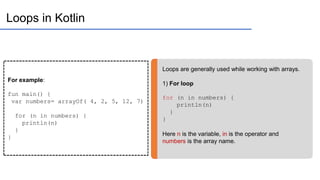
Loops are generally used while working with arrays.
1) For loop
for (n in numbers) {
println(n)
}
}
Here n is the variable, in is the operator and
numbers is the array name.
For example:
fun main() {
var numbers= arrayOf( 4, 2, 5, 12, 7)
for (n in numbers) {
println(n)
}
}
Loops in Kotlin
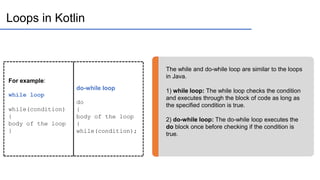
The while and do-while loop are similar to the loops
in Java.
1) while loop: The while loop checks the condition
and executes through the block of code as long as
the specified condition is true.
2) do-while loop: The do-while loop executes the
do block once before checking if the condition is
true.
For example:
while loop
while(condition)
{
body of the loop
}
do-while loop
do
{
body of the loop
}
while(condition);
Null Safety
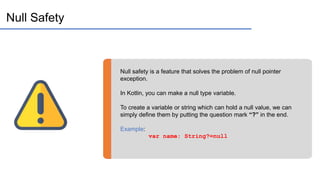
Null safety is a feature that solves the problem of null pointer
exception.
In Kotlin, you can make a null type variable.
To create a variable or string which can hold a null value, we can
simply define them by putting the question mark “?” in the end.
Example:
var name: String?=null
Ranges
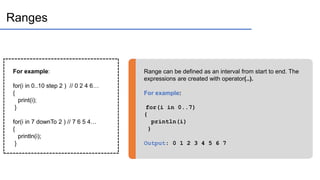
Range can be defined as an interval from start to end. The
expressions are created with operator(..).
For example:
for(i in 0..7)
{
println(i)
}
Output: 0 1 2 3 4 5 6 7
For example:
for(i in 0..10 step 2 ) // 0 2 4 6…
{
print(i);
}
for(i in 7 downTo 2 ) // 7 6 5 4…
{
println(i);
}
Kotlin Functions
Functions which are also known as methods are the block of
code which runs whenever it is invoked.
It is defined with the keyword fun
Example: fun box()
Function parameters are specified inside the parentheses.
The type of parameter is specified after the name of the
parameter.
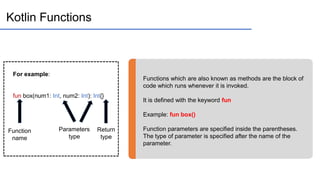
For example:
fun box(num1: Int, num2: Int): Int{}
Function
name
Parameters
type
Return
type

Kotlin InDepth Tutorial for beginners 2022

  • 2.
    What’s in itfor you ? Introduction to Kotlin Variables in Kotlin String templates Array Loops in Kotlin Null safety Ranges Kotlin functions If-else and when
  • 3.
    Introduction to Kotlin 1 2 3 Kotlinis a general-purpose, statically-typed programming language developed and released by Jet Brains in 2016. Kotlin is concise and more expressive than Java. It is fully interoperable with Java. Google also announced Kotlin as the first-class language for android development
  • 4.
    Variables in Kotlin var val Thereare two types of variables in Kotlin var is the variable whose value can reassigned (mutable) var name = “Raj” name = “Sid“ // Value is reassigned println(name) OUTPUT: Sid
  • 5.
    Variables in Kotlin var val Thereare two types of variables in Kotlin val is the variable whose value cannot be reassigned (immutable) val name = “Raj” name = “Sid” println(name) OUTPUT: error (Value can’t be reassigned)
  • 6.
    Variables in Kotlin var val Thereare two types of variables in Kotlin var name = ”Mickey” // String val roll = 20 // integer println(name) println(roll) OUTPUT: Mickey 20
  • 7.
    String templates The stringtemplates allows us to include the expressions, variable references inside the string. The references in a string start with $. We can easily add the variables in the string instead of concatenating them. var name1= “Ronny” var name2= “Mickey” println(“Both $name1 and $name2 are best friends”) println(“${name1.toUpperCase()} is older than $name2” ) OUTPUT: Both Ronny and Mickey are best friends RONNY is older than Mickey
  • 8.
    If else andwhen statements In Kotlin language, the if else statements can also be used as expressions that means they can return a value. While using if-else as an expression, it is mandatory to use the else branch. For example: fun main() { val a = 205 val b = 195 val great= if (a > b) “$a is greater” else “$b is greater” println("$great") }
  • 9.
    If else andwhen statements In Kotlin language, when statement is similar to switch statement in Java. It is used to select one code block out of multiple code blocks based on a conditional expression. For example: val tap = 4 val order = when (tap) { 1 -> “Pizza” 2 -> “Pasta” 3 -> “Fried rice” 4 -> “Wrap” 5 -> “Sandwich” 6 -> “Burger” else -> ”Invalid” } println(order)
  • 10.
    Array Arrays are generallyused to store multiple values in a contiguous memory location in a single variable. In Kotlin you can easily create arrays. Var names= arrayOf( “Sid”, “Robby”, “Max”, “John”) For example: fun main() { var names= arrayOf( “Sid”, “Robby”, “Max”, “John”) for (n in names) { println(n) } }
  • 11.
    Loops in Kotlin Loopsare generally used while working with arrays. 1) For loop for (n in numbers) { println(n) } } Here n is the variable, in is the operator and numbers is the array name. For example: fun main() { var numbers= arrayOf( 4, 2, 5, 12, 7) for (n in numbers) { println(n) } }
  • 12.
    Loops in Kotlin Thewhile and do-while loop are similar to the loops in Java. 1) while loop: The while loop checks the condition and executes through the block of code as long as the specified condition is true. 2) do-while loop: The do-while loop executes the do block once before checking if the condition is true. For example: while loop while(condition) { body of the loop } do-while loop do { body of the loop } while(condition);
  • 13.
    Null Safety Null safetyis a feature that solves the problem of null pointer exception. In Kotlin, you can make a null type variable. To create a variable or string which can hold a null value, we can simply define them by putting the question mark “?” in the end. Example: var name: String?=null
  • 14.
    Ranges Range can bedefined as an interval from start to end. The expressions are created with operator(..). For example: for(i in 0..7) { println(i) } Output: 0 1 2 3 4 5 6 7 For example: for(i in 0..10 step 2 ) // 0 2 4 6… { print(i); } for(i in 7 downTo 2 ) // 7 6 5 4… { println(i); }
  • 15.
    Kotlin Functions Functions whichare also known as methods are the block of code which runs whenever it is invoked. It is defined with the keyword fun Example: fun box() Function parameters are specified inside the parentheses. The type of parameter is specified after the name of the parameter. For example: fun box(num1: Int, num2: Int): Int{} Function name Parameters type Return type