


















Kick-Ass
Tips
to improve SAP performance
Go CSI on
your code
2 3 4 5 61
So you’re an ABAP developer
and you want to step up your
performance…
The first step is ensuring that you have
high performance code.
The SAP code inspector rapidly
finds issues within your ABAP
code that might not be obvious
to the naked eye…
Things like
selects not using
indexes, and
nested select
statements.
You might know that
you can get it from
SE80/SE37/SE20
via
Menu>Check>Code
Inspector
But have you tried
transaction SCI?
Take a look, it provides
some very powerful extra
features.
Check out this SCN blog for a
really great feature overview
This might seem obvious stuff,
but it’s much faster and more
comprehensive than manually
slogging through code.
It also reduces the risk that you
miss something important.
Especially when you’re dealing with
thousands of lines of unfamiliar
code that you didn’t even write.
You should be using Code
Inspector as part of your Change
Control and QA processes to
shift quality left and prevent
issues that might affect
performance from getting into
your Production systems in the
first place.
21st Century
Data Mining
2 3 4 5 61
Big Data has
exploded
Meaning that your
reports, extracts and
interfaces get slower and
slower as the data they
crunch gets
and
bigger
BIGGER
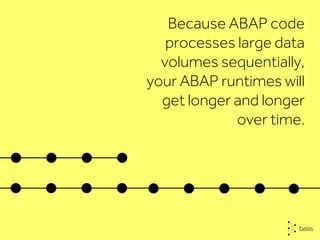
Because ABAP code
processes large data
volumes sequentially,
your ABAP runtimes will
get longer and longer
over time.
This means that
your business users
will have to wait longer
for their precious information.
Which means
EVEN MORE WAITING.
and, if multiple users are
running the same report,
they’re placing extra load
on your hardware to
run the same reports
multiple times.
You don’t need a BIG hammer
to fix this BIG Data problem
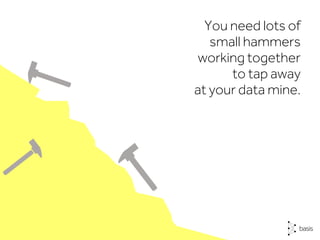
You need lots of
small hammers
working together
to tap away
at your data mine.
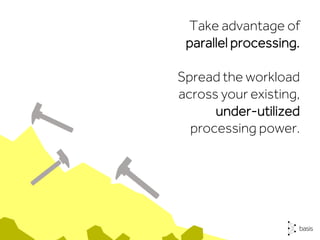
Take advantage of
parallel processing.
Spread the workload
across your existing,
under-utilized
processing power.
But parallel processing is
complex to develop, control
and manage…
and predefining multiple
background jobs with
variants isn’t really
a scalable solution.
and even allow reports
to be run once for
multiple users without
any performance
overhead.
Z Accelerators
simplify parallel
processing
Talk.
Don’t code.
2 3 4 5 61
Sometimes, the
fastest way to
make your code
run faster is not
to code…
Log out of SAP.
Take a walk to sit
with your business
users or set up a
regular call with your
user community.
Your business
users know
exactly what
they want.
Sometimes this can be
lost in translation between
&
Business
Analysts
Functional
Consultants
It’s only when you spend time
really understanding
business requirements that
you can write code that
elegantly delivers them.
Many performance issues
can be resolved simply by
restricting default values on
selections screens, or
breaking processing down
into discrete steps.
Frequent user
conversations will improve
your understanding of
requirements and open up
new ways of working that
save days of unnecessary
coding.
Use your
Index finger
2 3 4 5 61
like making
incorrect tables
selections by
declaring
selections without
full indexes or
incorrect indexes.
When coding, there are
some important points
that are easily overlooked
but have a huge
impact on performance…
indexes are
your friend
Take general ledger table BSEG,
it contains most of the
information required.
But unless it’s read using the full
key, it’s very inefficient as a
cluster table, leading to slow
data retrieval.
Click on the Indexes button in
SE11 to compare the indexes
against your WHERE clause and
adjust to fit.
Get the exact index for BSEG,
AUFM, VBFA, EDIDC or any of
the massive cluster tables.
And, you’re well on the way to
writing high performance code.
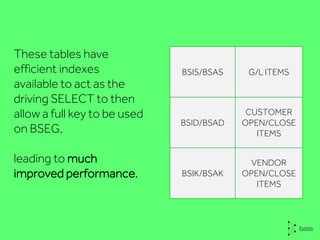
These tables have
efficient indexes
available to act as the
driving SELECT to then
allow a full key to be used
on BSEG,
leading to much
improved performance.
BSIS/BSAS G/L ITEMS
BSID/BSAD
CUSTOMER
OPEN/CLOSE
ITEMS
BSIK/BSAK
VENDOR
OPEN/CLOSE
ITEMS
Go back
to school
2 3 4 5 61
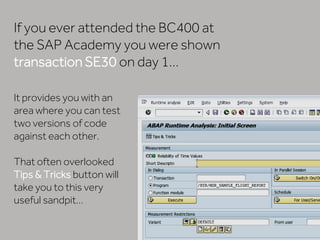
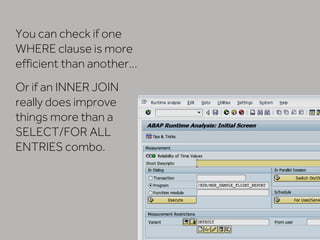
It provides you with an
area where you can test
two versions of code
against each other.
That often overlooked
Tips & Tricks button will
take you to this very
useful sandpit…
If you ever attended the BC400 at
the SAP Academy you were shown
transaction SE30 on day 1…
You can check if one
WHERE clause is more
efficient than another…
Or if an INNER JOIN
really does improve
things more than a
SELECT/FOR ALL
ENTRIES combo.
A few minutes trying out different
data input and SELECT statements
will reap rewards later in
final processing times.
And a little online research will reveal
plenty of blogs full of performance
tips and SCN forums crammed with
topics that will help you work out
whether method A is faster than
method B.
You might be surprised…
Share what
you know
2 3 4 5 61
Shared experiences make us all
better programmers
so make sure you pass on your
learning for the benefit of your
fellow developers.
If you solve an SAP
performance problem,
post the solution
to the SCN forum.
Become a performance
informer and put 10
minutes in your diary each
week to share what you’ve
learned.
If we all help one fellow
ABAP developer to
improve their SAP
system performance, the
world will be a better
place.
60%
of the world’s
economic
transactions touch
an SAP system in
some way
basistechnologies.com
A faster, better way

6 Kick-Ass Tips to Improve SAP Performance

  • 1.
  • 2.
    Go CSI on yourcode 2 3 4 5 61
  • 3.
    So you’re anABAP developer and you want to step up your performance… The first step is ensuring that you have high performance code.
  • 4.
    The SAP codeinspector rapidly finds issues within your ABAP code that might not be obvious to the naked eye… Things like selects not using indexes, and nested select statements.
  • 5.
    You might knowthat you can get it from SE80/SE37/SE20 via Menu>Check>Code Inspector But have you tried transaction SCI? Take a look, it provides some very powerful extra features. Check out this SCN blog for a really great feature overview
  • 6.
    This might seemobvious stuff, but it’s much faster and more comprehensive than manually slogging through code.
  • 7.
    It also reducesthe risk that you miss something important. Especially when you’re dealing with thousands of lines of unfamiliar code that you didn’t even write.
  • 8.
    You should beusing Code Inspector as part of your Change Control and QA processes to shift quality left and prevent issues that might affect performance from getting into your Production systems in the first place.
  • 9.
  • 10.
  • 11.
    Meaning that your reports,extracts and interfaces get slower and slower as the data they crunch gets and bigger BIGGER
  • 12.
    Because ABAP code processeslarge data volumes sequentially, your ABAP runtimes will get longer and longer over time.
  • 13.
    This means that yourbusiness users will have to wait longer for their precious information.
  • 14.
    Which means EVEN MOREWAITING. and, if multiple users are running the same report, they’re placing extra load on your hardware to run the same reports multiple times.
  • 15.
    You don’t needa BIG hammer to fix this BIG Data problem
  • 16.
    You need lotsof small hammers working together to tap away at your data mine.
  • 17.
    Take advantage of parallelprocessing. Spread the workload across your existing, under-utilized processing power.
  • 18.
    But parallel processingis complex to develop, control and manage… and predefining multiple background jobs with variants isn’t really a scalable solution.
  • 19.
    and even allowreports to be run once for multiple users without any performance overhead. Z Accelerators simplify parallel processing
  • 20.
  • 21.
    Sometimes, the fastest wayto make your code run faster is not to code…
  • 22.
    Log out ofSAP. Take a walk to sit with your business users or set up a regular call with your user community.
  • 23.
  • 24.
    Sometimes this canbe lost in translation between & Business Analysts Functional Consultants
  • 25.
    It’s only whenyou spend time really understanding business requirements that you can write code that elegantly delivers them. Many performance issues can be resolved simply by restricting default values on selections screens, or breaking processing down into discrete steps.
  • 26.
    Frequent user conversations willimprove your understanding of requirements and open up new ways of working that save days of unnecessary coding.
  • 27.
  • 28.
    like making incorrect tables selectionsby declaring selections without full indexes or incorrect indexes. When coding, there are some important points that are easily overlooked but have a huge impact on performance…
  • 29.
  • 30.
    Take general ledgertable BSEG, it contains most of the information required. But unless it’s read using the full key, it’s very inefficient as a cluster table, leading to slow data retrieval.
  • 31.
    Click on theIndexes button in SE11 to compare the indexes against your WHERE clause and adjust to fit. Get the exact index for BSEG, AUFM, VBFA, EDIDC or any of the massive cluster tables. And, you’re well on the way to writing high performance code.
  • 32.
    These tables have efficientindexes available to act as the driving SELECT to then allow a full key to be used on BSEG, leading to much improved performance. BSIS/BSAS G/L ITEMS BSID/BSAD CUSTOMER OPEN/CLOSE ITEMS BSIK/BSAK VENDOR OPEN/CLOSE ITEMS
  • 33.
  • 34.
    It provides youwith an area where you can test two versions of code against each other. That often overlooked Tips & Tricks button will take you to this very useful sandpit… If you ever attended the BC400 at the SAP Academy you were shown transaction SE30 on day 1…
  • 35.
    You can checkif one WHERE clause is more efficient than another… Or if an INNER JOIN really does improve things more than a SELECT/FOR ALL ENTRIES combo.
  • 36.
    A few minutestrying out different data input and SELECT statements will reap rewards later in final processing times. And a little online research will reveal plenty of blogs full of performance tips and SCN forums crammed with topics that will help you work out whether method A is faster than method B. You might be surprised…
  • 37.
  • 38.
    Shared experiences makeus all better programmers so make sure you pass on your learning for the benefit of your fellow developers. If you solve an SAP performance problem, post the solution to the SCN forum.
  • 39.
    Become a performance informerand put 10 minutes in your diary each week to share what you’ve learned. If we all help one fellow ABAP developer to improve their SAP system performance, the world will be a better place. 60% of the world’s economic transactions touch an SAP system in some way
  • 40.
  • 41.