KFSENSOR
HONEYPOT AND INTRUSION DETECTION
SYSTEM
S. Janani, Assistant Professor
Kamaraj College of Engineering and Technology
Agenda
 Introduction
 Honeypot Technology
 KFSensor
 Components of KFSensor
 Features
 Tests
 Conclusion
 Increasing security threats with proliferation of
internet
 Network security – Firewall, IDS, antivirus.
 Traditional approach – defensive
 Today – offensive approach
 Honeypot
Introduction
Honeypot Technology
 Attract and detect hackers and worms by
simulating vulnerable system services and
trojans.
 By acting as a decoy server it can divert attacks
from critical systems and provide a higher level
of information that can be achieved by using
firewalls and NIDS alone.
 A honeypot is security resource whose value -
probed, attacked, or compromised
 We want attackers to probe and exploit the
virtual system running emulated services
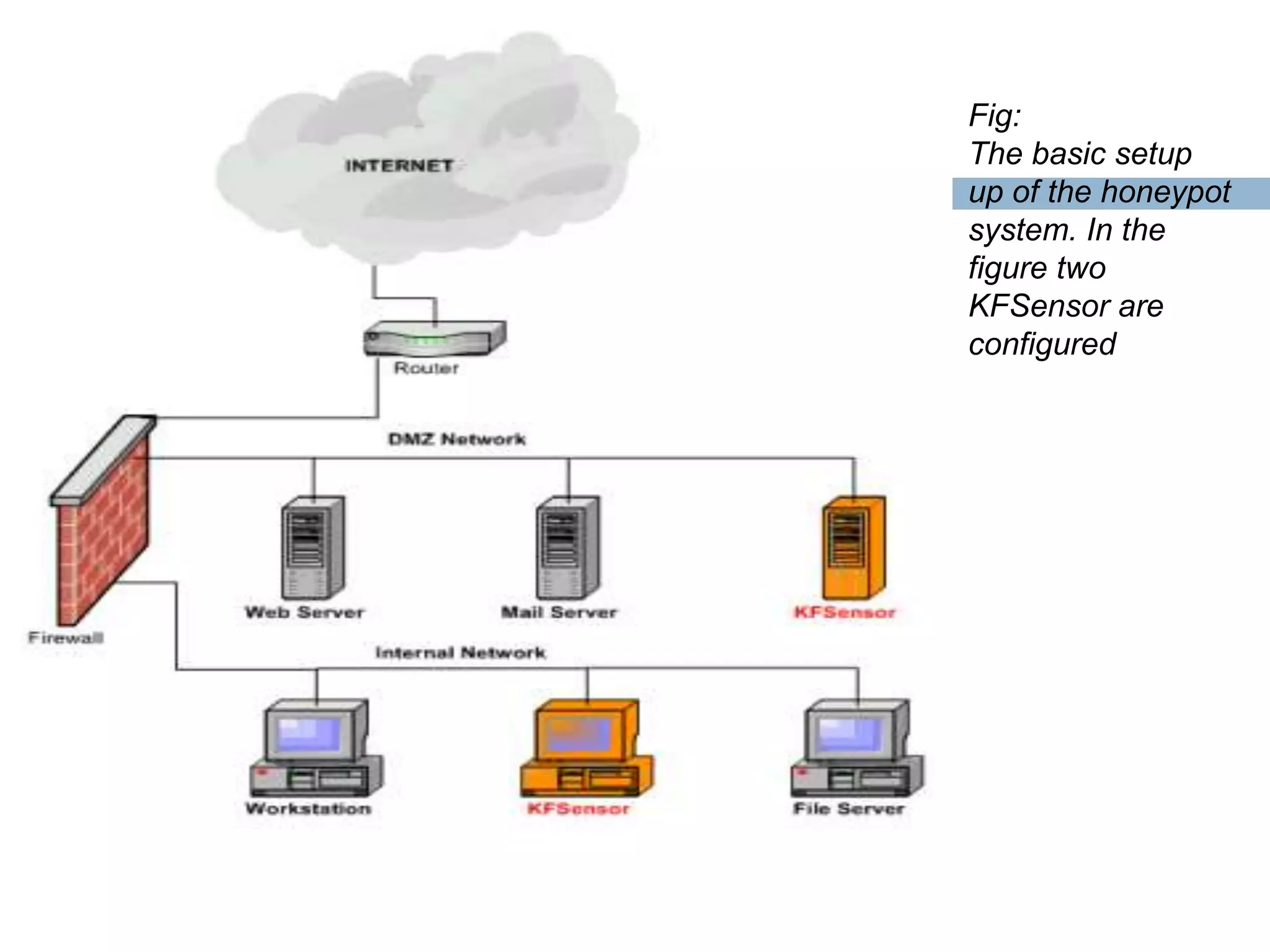
Fig:
The basic setup
up of the honeypot
system. In the
figure two
KFSensor are
configured
Advantage
 Minimal resources required
 GUI based management console - extensive
documentation and low maintenance
Disadvantage
 Limited View: Can’t capture attacks against
other system
Types of Honeypot
Interaction: level of activity Honeypot allows with attacker
 Low Interaction
Emulated services, easy to deploy and maintain, less risk
Designed to capture only known attack
 High Interaction
Setup real services and provides interaction with OS
More information, no assumption made give full open environments.
Can use the real honeypot to attack others.
KFSensor
 Commercial low interaction honeypot solution
 Windows OS
 Easy configuration and flexible
Product detail:
Software: KFSensor
Version: 2.2.1
License: Evaluation (14 days trial)
Vendor: Key Focus
Downloaded Site: http://www.keyfocus.net/kfsensor/
Installations
 Download the application from the website
 To install login as ADMINISTRATOR
 C:kfsensorlogs – XML files
 Running the KFSensor server – as daemon –
windows service. [kfsnserve.exe]
 Open up the KFSensor monitor - GUI
Components of KFSensor
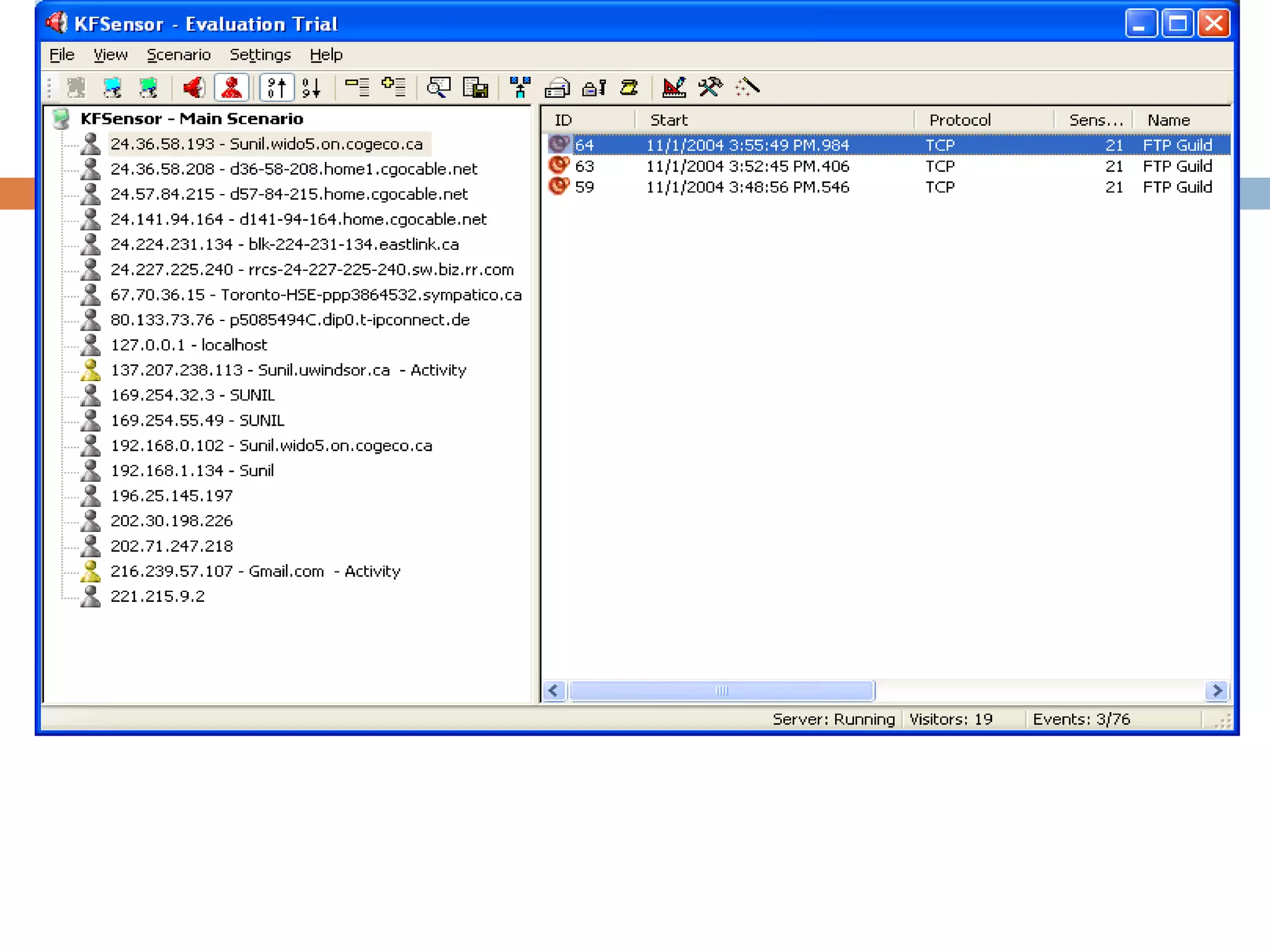
KFSensor Server
Performs core functionality, outsider
interacts with the server, doesn’t have the GUI.
KFSensor Monitor
Interprets all the data and alerts captured by
server in graphical form.
Features
 File Menu
Export [HTML, XML, TSV or CSV ], Service
 View Menu
Ports View, Visitors View
 Editing Scenarios
Editing Listens, Edit Rules, Sim Server
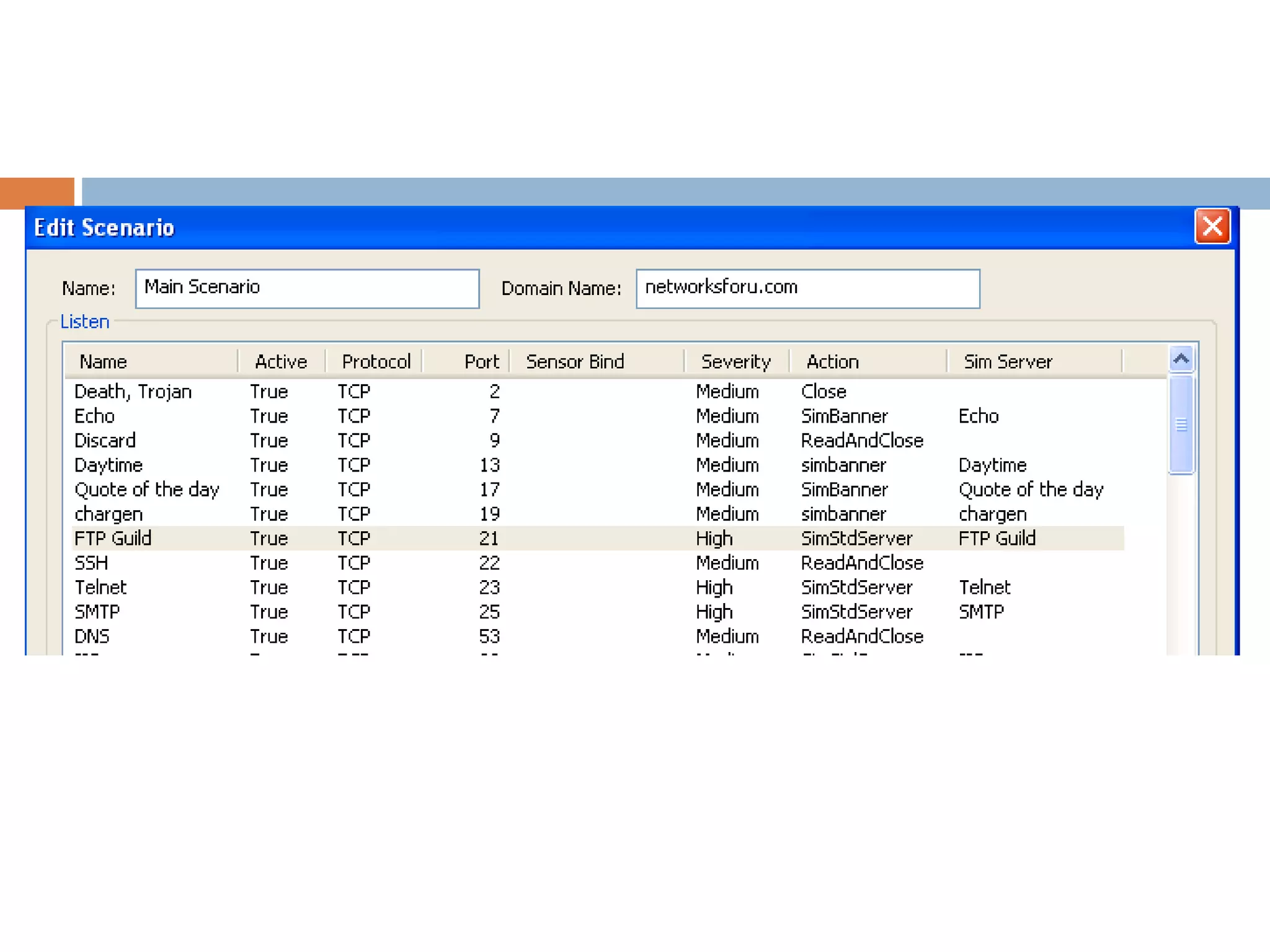
Editing Scenario
Listen On:
Name : Identifies the listen when connection is made to the
particular specification
Protocol: Choice between UDP or TCP
Port
Bind Address: Should specify the IP address it binds too
Action:
Action Type: The action to performed once the connection is made
by the outsider
Severity: define the level of severity generated by the event to alert
the admin
Time out : value in second for server to wait until it closes the
connection
Editing Listens
Edit Rule
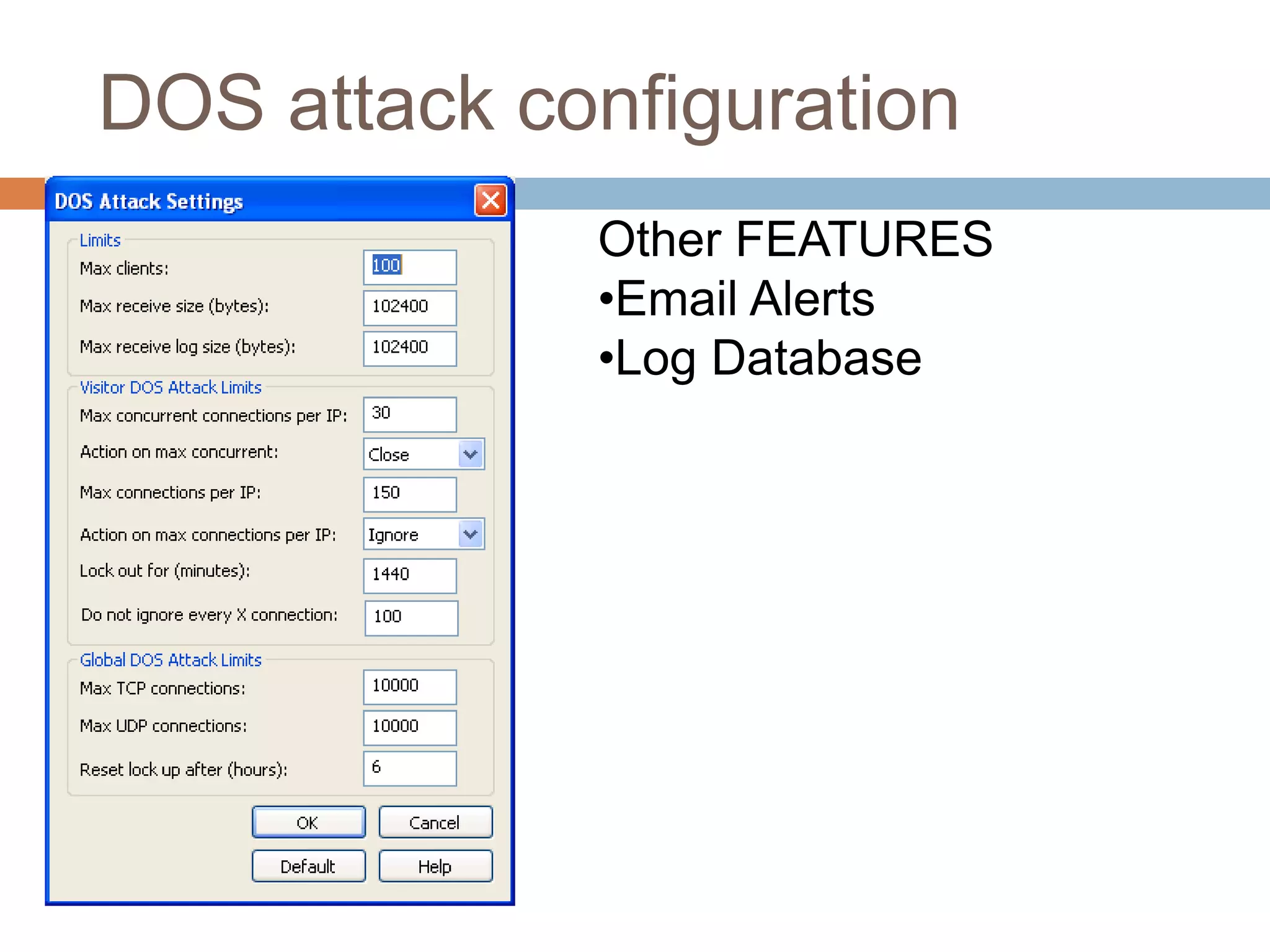
DOS attack configuration
Other FEATURES
•Email Alerts
•Log Database
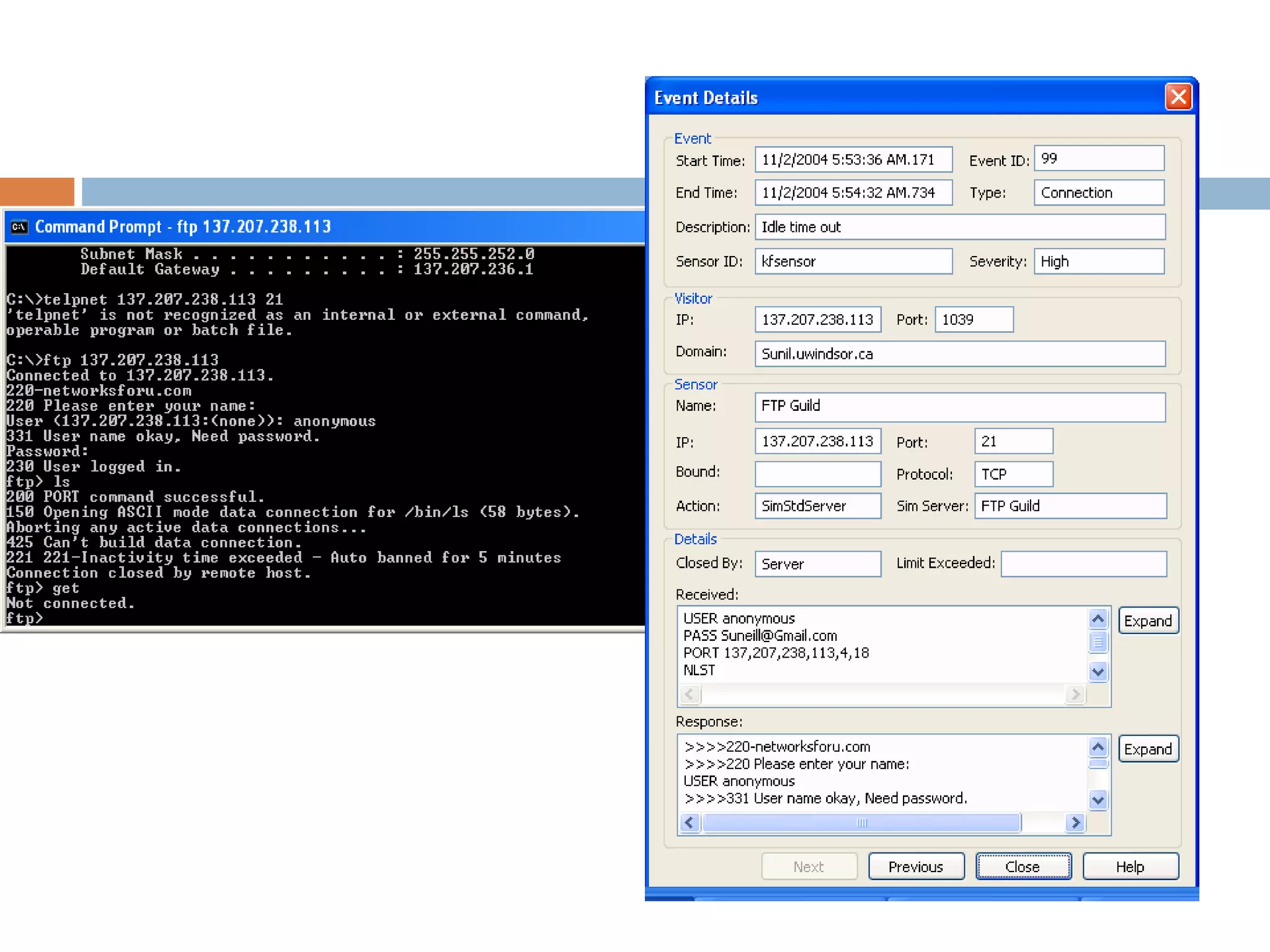
Test 1: FTP emulation
Conclusion
 Good user interface
 Easy to configure emulation services
 Flexible
 Minimal risk
 Limited to only minimal transactions
Honeypot
Can not replace the existing system. Work better
along with it.

Kf sensor1

  • 1.
    KFSENSOR HONEYPOT AND INTRUSIONDETECTION SYSTEM S. Janani, Assistant Professor Kamaraj College of Engineering and Technology
  • 2.
    Agenda  Introduction  HoneypotTechnology  KFSensor  Components of KFSensor  Features  Tests  Conclusion
  • 3.
     Increasing securitythreats with proliferation of internet  Network security – Firewall, IDS, antivirus.  Traditional approach – defensive  Today – offensive approach  Honeypot Introduction
  • 4.
    Honeypot Technology  Attractand detect hackers and worms by simulating vulnerable system services and trojans.  By acting as a decoy server it can divert attacks from critical systems and provide a higher level of information that can be achieved by using firewalls and NIDS alone.  A honeypot is security resource whose value - probed, attacked, or compromised  We want attackers to probe and exploit the virtual system running emulated services
  • 5.
    Fig: The basic setup upof the honeypot system. In the figure two KFSensor are configured
  • 6.
    Advantage  Minimal resourcesrequired  GUI based management console - extensive documentation and low maintenance Disadvantage  Limited View: Can’t capture attacks against other system
  • 7.
    Types of Honeypot Interaction:level of activity Honeypot allows with attacker  Low Interaction Emulated services, easy to deploy and maintain, less risk Designed to capture only known attack  High Interaction Setup real services and provides interaction with OS More information, no assumption made give full open environments. Can use the real honeypot to attack others.
  • 8.
    KFSensor  Commercial lowinteraction honeypot solution  Windows OS  Easy configuration and flexible Product detail: Software: KFSensor Version: 2.2.1 License: Evaluation (14 days trial) Vendor: Key Focus Downloaded Site: http://www.keyfocus.net/kfsensor/
  • 9.
    Installations  Download theapplication from the website  To install login as ADMINISTRATOR  C:kfsensorlogs – XML files  Running the KFSensor server – as daemon – windows service. [kfsnserve.exe]  Open up the KFSensor monitor - GUI
  • 10.
    Components of KFSensor KFSensorServer Performs core functionality, outsider interacts with the server, doesn’t have the GUI. KFSensor Monitor Interprets all the data and alerts captured by server in graphical form.
  • 12.
    Features  File Menu Export[HTML, XML, TSV or CSV ], Service  View Menu Ports View, Visitors View  Editing Scenarios Editing Listens, Edit Rules, Sim Server
  • 13.
  • 14.
    Listen On: Name :Identifies the listen when connection is made to the particular specification Protocol: Choice between UDP or TCP Port Bind Address: Should specify the IP address it binds too Action: Action Type: The action to performed once the connection is made by the outsider Severity: define the level of severity generated by the event to alert the admin Time out : value in second for server to wait until it closes the connection Editing Listens
  • 15.
  • 16.
    DOS attack configuration OtherFEATURES •Email Alerts •Log Database
  • 17.
    Test 1: FTPemulation
  • 18.
    Conclusion  Good userinterface  Easy to configure emulation services  Flexible  Minimal risk  Limited to only minimal transactions Honeypot Can not replace the existing system. Work better along with it.